UnRESTful APIs
with Django
Ari Lacenski
@tensory
June 25, 2013
Tuesday, June 25, 13
Why create an API?
API stands for Application Programming Interface.
An API to your project lets people write applications
that use your technology.
Web APIs are collections of URLs pointing to services.
Tuesday, June 25, 13
Remote Procedure Call
Uses URL patterns to suggest what you get back
like: yoursite.com/show/articles?article_id=42
Used to be super common, until REST pattern emerged
good luck with that
Often inconsistent &
needs a lot of docs
Response data isn’t
linked to DB records
Tuesday, June 25, 13
REST
(REpresentational State Transfer)
Uses HTTP concepts: GET, POST, DELETE & PUT
Super useful, super popular!
Lets you build an API that directly represents the data
that you want developers to work with
Tuesday, June 25, 13
REST
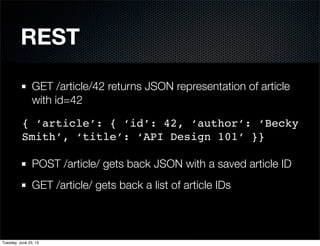
GET /article/42 returns JSON representation of article
with id=42
POST /article/ gets back JSON with a saved article ID
GET /article/ gets back a list of article IDs
{ ‘article’: { ‘id’: 42, ‘author’: ‘Becky
Smith’, ‘title’: ‘API Design 101’ }}
Tuesday, June 25, 13
REST works great.
“RESTful API” designs try to follow the REST pattern.
There are free API libraries for Python web frameworks.
This all works well for creating APIs to relational data.
BUT WAIT
What if your data is too complex to store in a DB table?
Tuesday, June 25, 13
Extend your pattern.
Consider a photo service with some color search tools.
Upload a photo? POST to /upload/ with file + metadata
Get photo details? GET /photo/
Want to let your API users calculate the average color in
some random images? ... Hmm.
Tuesday, June 25, 13
Let’s make it happen.
Tuesday, June 25, 13
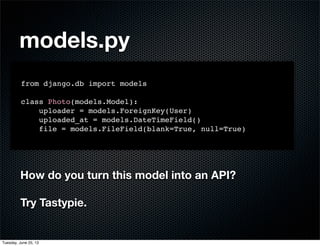
models.py
from django.db import models
class Photo(models.Model):
uploader = models.ForeignKey(User)
uploaded_at = models.DateTimeField()
file = models.FileField(blank=True, null=True)
How do you turn this model into an API?
Try Tastypie.
Tuesday, June 25, 13
from tastypie.resources import Resource
from models import Photo
class PhotoResource(Resource):
class Meta(object):
queryset = Photo.objects.all()
resource_name = ‘photo’
allowed_methods = [‘get’, ‘post’, ‘put’]
api.py
Tuesday, June 25, 13
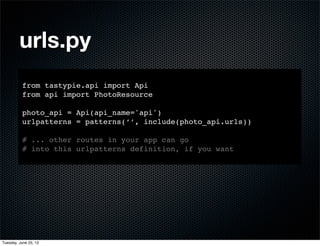
urls.py
from tastypie.api import Api
from api import PhotoResource
photo_api = Api(api_name='api')
urlpatterns = patterns(‘’, include(photo_api.urls))
# ... other routes in your app can go
# into this urlpatterns definition, if you want
Tuesday, June 25, 13
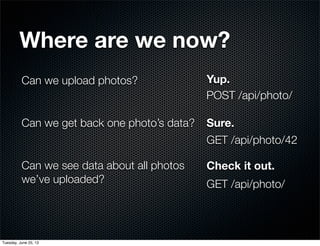
Can we upload photos?
Can we get back one photo’s data?
Can we see data about all photos
we’ve uploaded?
Yup.
Sure.
Check it out.
GET /api/photo/42
GET /api/photo/
POST /api/photo/
Where are we now?
Tuesday, June 25, 13
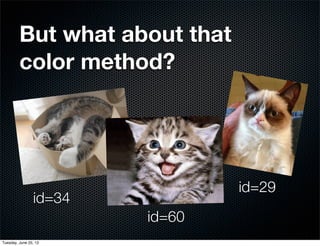
But what about that
color method?
id=34
id=60
id=29
Tuesday, June 25, 13
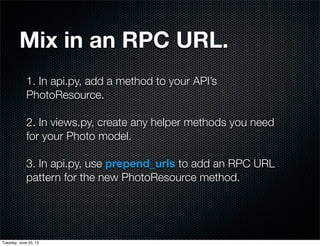
1. In api.py, add a method to your API’s
PhotoResource.
2. In views.py, create any helper methods you need
for your Photo model.
3. In api.py, use prepend_urls to add an RPC URL
pattern for the new PhotoResource method.
Mix in an RPC URL.
Tuesday, June 25, 13
import views
from tastypie.resources import Resource
from models import Photo
class PhotoResource(Resource):
class Meta(object):
queryset = Photo.objects.all()
resource_name = ‘photo’
allowed_methods = [‘get’, ‘post’, ‘put’]
def prepend_urls(self):
return [
url(r”^(?P<resource_name>)/average/” %
self._meta.resource_name, self.wrap_view('get_average_color'))
]
def get_average_color(self, request):
photo_ids = request.getlist(‘ids’)
# Add a get_average_color method to your app views.
result = views.get_average_color(photo_ids)
return { ‘color’: result.color_code }
api.py
Tuesday, June 25, 13
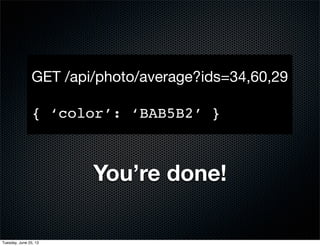
You’re done!
GET /api/photo/average?ids=34,60,29
{ ‘color’: ‘BAB5B2’ }
Tuesday, June 25, 13
Find out more
Comparison of REST vs XML RPC
http://bit.ly/8lkoPK
Django API packages comparison
https://www.djangopackages.com/grids/g/api/
Tastypie
http://django-tastypie.readthedocs.org/
https://github.com/toastdriven/django-tastypie
Tuesday, June 25, 13
Thanks for listening!
Ari Lacenski @tensory
Tuesday, June 25, 13

UnRESTful APIs with Django

  • 1.
    UnRESTful APIs with Django AriLacenski @tensory June 25, 2013 Tuesday, June 25, 13
  • 2.
    Why create anAPI? API stands for Application Programming Interface. An API to your project lets people write applications that use your technology. Web APIs are collections of URLs pointing to services. Tuesday, June 25, 13
  • 3.
    Remote Procedure Call UsesURL patterns to suggest what you get back like: yoursite.com/show/articles?article_id=42 Used to be super common, until REST pattern emerged good luck with that Often inconsistent & needs a lot of docs Response data isn’t linked to DB records Tuesday, June 25, 13
  • 4.
    REST (REpresentational State Transfer) UsesHTTP concepts: GET, POST, DELETE & PUT Super useful, super popular! Lets you build an API that directly represents the data that you want developers to work with Tuesday, June 25, 13
  • 5.
    REST GET /article/42 returnsJSON representation of article with id=42 POST /article/ gets back JSON with a saved article ID GET /article/ gets back a list of article IDs { ‘article’: { ‘id’: 42, ‘author’: ‘Becky Smith’, ‘title’: ‘API Design 101’ }} Tuesday, June 25, 13
  • 6.
    REST works great. “RESTfulAPI” designs try to follow the REST pattern. There are free API libraries for Python web frameworks. This all works well for creating APIs to relational data. BUT WAIT What if your data is too complex to store in a DB table? Tuesday, June 25, 13
  • 7.
    Extend your pattern. Considera photo service with some color search tools. Upload a photo? POST to /upload/ with file + metadata Get photo details? GET /photo/ Want to let your API users calculate the average color in some random images? ... Hmm. Tuesday, June 25, 13
  • 8.
    Let’s make ithappen. Tuesday, June 25, 13
  • 9.
    models.py from django.db importmodels class Photo(models.Model): uploader = models.ForeignKey(User) uploaded_at = models.DateTimeField() file = models.FileField(blank=True, null=True) How do you turn this model into an API? Try Tastypie. Tuesday, June 25, 13
  • 10.
    from tastypie.resources importResource from models import Photo class PhotoResource(Resource): class Meta(object): queryset = Photo.objects.all() resource_name = ‘photo’ allowed_methods = [‘get’, ‘post’, ‘put’] api.py Tuesday, June 25, 13
  • 11.
    urls.py from tastypie.api importApi from api import PhotoResource photo_api = Api(api_name='api') urlpatterns = patterns(‘’, include(photo_api.urls)) # ... other routes in your app can go # into this urlpatterns definition, if you want Tuesday, June 25, 13
  • 12.
    Can we uploadphotos? Can we get back one photo’s data? Can we see data about all photos we’ve uploaded? Yup. Sure. Check it out. GET /api/photo/42 GET /api/photo/ POST /api/photo/ Where are we now? Tuesday, June 25, 13
  • 13.
    But what aboutthat color method? id=34 id=60 id=29 Tuesday, June 25, 13
  • 14.
    1. In api.py,add a method to your API’s PhotoResource. 2. In views.py, create any helper methods you need for your Photo model. 3. In api.py, use prepend_urls to add an RPC URL pattern for the new PhotoResource method. Mix in an RPC URL. Tuesday, June 25, 13
  • 15.
    import views from tastypie.resourcesimport Resource from models import Photo class PhotoResource(Resource): class Meta(object): queryset = Photo.objects.all() resource_name = ‘photo’ allowed_methods = [‘get’, ‘post’, ‘put’] def prepend_urls(self): return [ url(r”^(?P<resource_name>)/average/” % self._meta.resource_name, self.wrap_view('get_average_color')) ] def get_average_color(self, request): photo_ids = request.getlist(‘ids’) # Add a get_average_color method to your app views. result = views.get_average_color(photo_ids) return { ‘color’: result.color_code } api.py Tuesday, June 25, 13
  • 16.
    You’re done! GET /api/photo/average?ids=34,60,29 {‘color’: ‘BAB5B2’ } Tuesday, June 25, 13
  • 17.
    Find out more Comparisonof REST vs XML RPC http://bit.ly/8lkoPK Django API packages comparison https://www.djangopackages.com/grids/g/api/ Tastypie http://django-tastypie.readthedocs.org/ https://github.com/toastdriven/django-tastypie Tuesday, June 25, 13
  • 18.
    Thanks for listening! AriLacenski @tensory Tuesday, June 25, 13