Angular JS –
Built-in Directives
Dr.M.Akila Rani,
ASSISTANT PROFESSOR,
DEPARTMENT OF IT, TCE.
Session Outcomes
At the end of this session, students will be able to,
1. Apply built-in directives for the given problem
Directives in Angular JS
 AngularJS directives are used to extend HTML. They
are special attributes starting with ng-prefix.
 ng-app − This directive starts an AngularJS Application.
 ng-init − This directive initializes application data.
 ng-model − This directive defines the model that is
variable to be used in AngularJS.
 ng-repeat − This directive repeats HTML elements for
each item in a collection.
DEMO – Built-in Directives
Built-in Directives
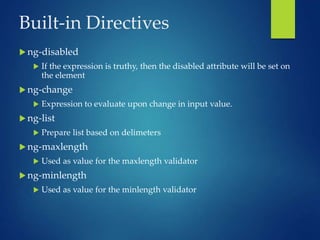
 ng-disabled
 If the expression is truthy, then the disabled attribute will be set on
the element
 ng-change
 Expression to evaluate upon change in input value.
 ng-list
 Prepare list based on delimeters
 ng-maxlength
 Used as value for the maxlength validator
 ng-minlength
 Used as value for the minlength validator
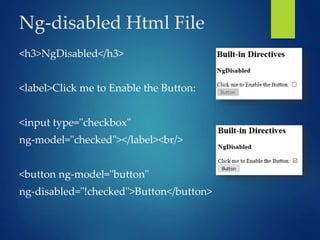
Ng-disabled Html File
<h3>NgDisabled</h3>
<label>Click me to Enable the Button:
<input type="checkbox"
ng-model="checked"></label><br/>
<button ng-model="button"
ng-disabled="!checked">Button</button>
Ng-change
<!DOCTYPE html>
<html>
<script
src="https://ajax.googleapis.com/ajax/libs/angularjs/1.6.9/angular.mi
n.js"></script>
<body ng-app="myApp">
<div ng-controller="myCtrl">
<p>Write something in the input field:</p>
<input type="text" ng-change="myFunc()" ng-model="myValue" />
<p>The input field has changed {{count}} times.</p>
</div>
<script>
angular.module('myApp', [])
.controller('myCtrl', ['$scope', function($scope) {
$scope.count = 0;
$scope.myFunc = function() {
$scope.count++;
};
}]);
</script>
</body>
</html>
Output
Ng-list
<body ng-app="app">
<h2>ng-list Directive</h2>
<div ng-controller="ctrl">
<p>Enter Input: <input type="text" ng-model="list" ng-list="-"> </p>
{{list}} </div>
<script>
var app = angular.module("app", []);
app.controller('ctrl', ['$scope', function ($scope) {
$scope.list = [];
}]);
</script>
</body>
Ng-maxlength & minlength
<head>
<script src="//ajax.googleapis.com/ajax/libs/angularjs/1.3.2/angular.min.js"><
/script>
<script>
var app = angular.module("myApp", []);
app.controller('myCtrl', function($scope) {
$scope.user = {
name: {
required: true,
minlength: 5,
maxlength: 25
}
}
}); </script></head>
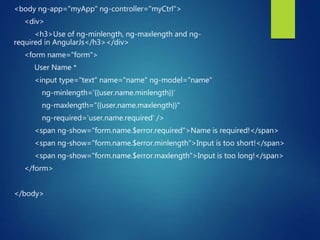
<body ng-app="myApp" ng-controller="myCtrl">
<div>
<h3>Use of ng-minlength, ng-maxlength and ng-
required in AngularJs</h3></div>
<form name="form">
User Name *
<input type="text" name="name" ng-model="name"
ng-minlength='{{user.name.minlength}}‘
ng-maxlength="{{user.name.maxlength}}"
ng-required='user.name.required' />
<span ng-show="form.name.$error.required">Name is required!</span>
<span ng-show="form.name.$error.minlength">Input is too short!</span>
<span ng-show="form.name.$error.maxlength">Input is too long!</span>
</form>
</body>
Output
Quiz & Demo

Angular JS - Directives.pptx

  • 1.
    Angular JS – Built-inDirectives Dr.M.Akila Rani, ASSISTANT PROFESSOR, DEPARTMENT OF IT, TCE.
  • 2.
    Session Outcomes At theend of this session, students will be able to, 1. Apply built-in directives for the given problem
  • 3.
    Directives in AngularJS  AngularJS directives are used to extend HTML. They are special attributes starting with ng-prefix.  ng-app − This directive starts an AngularJS Application.  ng-init − This directive initializes application data.  ng-model − This directive defines the model that is variable to be used in AngularJS.  ng-repeat − This directive repeats HTML elements for each item in a collection.
  • 4.
  • 5.
    Built-in Directives  ng-disabled If the expression is truthy, then the disabled attribute will be set on the element  ng-change  Expression to evaluate upon change in input value.  ng-list  Prepare list based on delimeters  ng-maxlength  Used as value for the maxlength validator  ng-minlength  Used as value for the minlength validator
  • 6.
    Ng-disabled Html File <h3>NgDisabled</h3> <label>Clickme to Enable the Button: <input type="checkbox" ng-model="checked"></label><br/> <button ng-model="button" ng-disabled="!checked">Button</button>
  • 7.
    Ng-change <!DOCTYPE html> <html> <script src="https://ajax.googleapis.com/ajax/libs/angularjs/1.6.9/angular.mi n.js"></script> <body ng-app="myApp"> <divng-controller="myCtrl"> <p>Write something in the input field:</p> <input type="text" ng-change="myFunc()" ng-model="myValue" /> <p>The input field has changed {{count}} times.</p> </div>
  • 8.
    <script> angular.module('myApp', []) .controller('myCtrl', ['$scope',function($scope) { $scope.count = 0; $scope.myFunc = function() { $scope.count++; }; }]); </script> </body> </html>
  • 9.
  • 10.
    Ng-list <body ng-app="app"> <h2>ng-list Directive</h2> <divng-controller="ctrl"> <p>Enter Input: <input type="text" ng-model="list" ng-list="-"> </p> {{list}} </div> <script> var app = angular.module("app", []); app.controller('ctrl', ['$scope', function ($scope) { $scope.list = []; }]); </script> </body>
  • 11.
    Ng-maxlength & minlength <head> <scriptsrc="//ajax.googleapis.com/ajax/libs/angularjs/1.3.2/angular.min.js">< /script> <script> var app = angular.module("myApp", []); app.controller('myCtrl', function($scope) { $scope.user = { name: { required: true, minlength: 5, maxlength: 25 } } }); </script></head>
  • 12.
    <body ng-app="myApp" ng-controller="myCtrl"> <div> <h3>Useof ng-minlength, ng-maxlength and ng- required in AngularJs</h3></div> <form name="form"> User Name * <input type="text" name="name" ng-model="name" ng-minlength='{{user.name.minlength}}‘ ng-maxlength="{{user.name.maxlength}}" ng-required='user.name.required' /> <span ng-show="form.name.$error.required">Name is required!</span> <span ng-show="form.name.$error.minlength">Input is too short!</span> <span ng-show="form.name.$error.maxlength">Input is too long!</span> </form> </body>
  • 13.
  • 14.