Submitted By:
Lhona Padmayuky S
20234012404123
Android Sqlite (Handling Tables )
SQLite in Android
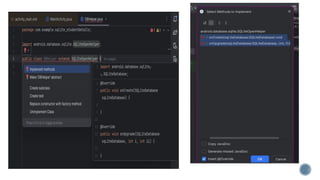
• Class – SQLiteOpenHelper
 abstract class (methods with only declaration)
• Contains Contructor , onCreate() , onUpgrade()
 DataBase , Create table , upgrade table
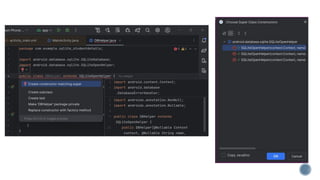
• Derived class (DBHelper) extends SQLiteOpenHelper
 Access definition by means of derived class
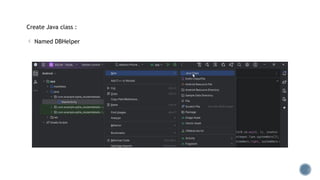
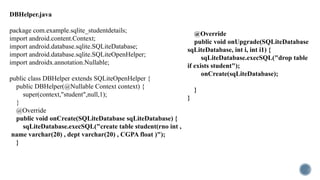
Create Java class :
 Named DBHelper
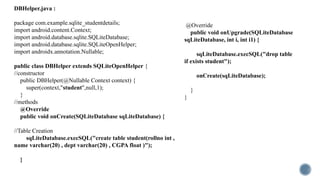
package com.example.sqlite_studentdetails;
import android.content.Context;
import android.database.sqlite.SQLiteDatabase;
import android.database.sqlite.SQLiteOpenHelper;
import androidx.annotation.Nullable;
public class DBHelper extends SQLiteOpenHelper {
//constructor
public DBHelper(@Nullable Context context) {
super(context,"student",null,1);
}
//methods
@Override
public void onCreate(SQLiteDatabase sqLiteDatabase) {
//Table Creation
sqLiteDatabase.execSQL("create table student(rollno int ,
name varchar(20) , dept varchar(20) , CGPA float )");
}
@Override
public void onUpgrade(SQLiteDatabase
sqLiteDatabase, int i, int i1) {
sqLiteDatabase.execSQL("drop table
if exists student");
onCreate(sqLiteDatabase);
}
}
DBHelper.java :
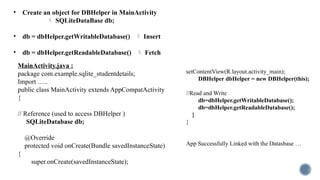
• Create an object for DBHelper in MainActivity
 SQLiteDataBase db;
• db = dbHelper.getWritableDatabase()  Insert
• db = dbHelper.getReadableDatabase()  Fetch
MainActivity.java :
package com.example.sqlite_studentdetails;
Import …..
public class MainActivity extends AppCompatActivity
{
// Reference (used to access DBHelper )
SQLiteDatabase db;
@Override
protected void onCreate(Bundle savedInstanceState)
{
super.onCreate(savedInstanceState);
setContentView(R.layout.activity_main);
DBHelper dbHelper = new DBHelper(this);
//Read and Write
db=dbHelper.getWritableDatabase();
db=dbHelper.getReadableDatabase();
}
}
App Successfully Linked with the Datasbase …
Question :
Design a app using android studio to perform CRUD
operation using SQLite that allows to Insert , Update,
Delete and Read Student Details .
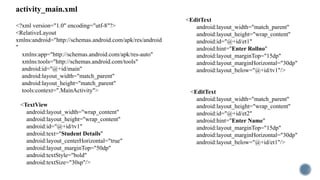
activity_main.xml
<?xml version="1.0" encoding="utf-8"?>
<RelativeLayout
xmlns:android="http://schemas.android.com/apk/res/android
"
xmlns:app="http://schemas.android.com/apk/res-auto"
xmlns:tools="http://schemas.android.com/tools"
android:id="@+id/main"
android:layout_width="match_parent"
android:layout_height="match_parent"
tools:context=".MainActivity">
<TextView
android:layout_width="wrap_content"
android:layout_height="wrap_content"
android:id="@+id/tv1"
android:text="Student Details"
android:layout_centerHorizontal="true"
android:layout_marginTop="50dp"
android:textStyle="bold"
android:textSize="30sp"/>
<EditText
android:layout_width="match_parent"
android:layout_height="wrap_content"
android:id="@+id/et1"
android:hint="Enter Rollno"
android:layout_marginTop="15dp"
android:layout_marginHorizontal="30dp"
android:layout_below="@+id/tv1"/>
<EditText
android:layout_width="match_parent"
android:layout_height="wrap_content"
android:id="@+id/et2"
android:hint="Enter Name"
android:layout_marginTop="15dp"
android:layout_marginHorizontal="30dp"
android:layout_below="@+id/et1"/>
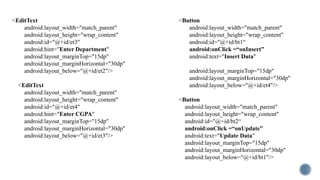
<EditText
android:layout_width="match_parent"
android:layout_height="wrap_content"
android:id="@+id/et3"
android:hint="Enter Department"
android:layout_marginTop="15dp"
android:layout_marginHorizontal="30dp"
android:layout_below="@+id/et2"/>
<EditText
android:layout_width="match_parent"
android:layout_height="wrap_content"
android:id="@+id/et4"
android:hint="Enter CGPA"
android:layout_marginTop="15dp"
android:layout_marginHorizontal="30dp"
android:layout_below="@+id/et3"/>
<Button
android:layout_width="match_parent"
android:layout_height="wrap_content"
android:id="@+id/bt1“
android:onClick =“onInsert”
android:text="Insert Data"
android:layout_marginTop="15dp"
android:layout_marginHorizontal="30dp"
android:layout_below="@+id/et4"/>
<Button
android:layout_width="match_parent"
android:layout_height="wrap_content"
android:id="@+id/bt2“
android:onClick =“onUpdate”
android:text="Update Data"
android:layout_marginTop="15dp"
android:layout_marginHorizontal="30dp"
android:layout_below="@+id/bt1"/>
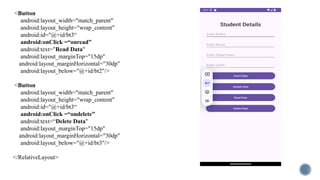
<Button
android:layout_width="match_parent"
android:layout_height="wrap_content"
android:id="@+id/bt3“
android:onClick =“onread”
android:text="Read Data"
android:layout_marginTop="15dp"
android:layout_marginHorizontal="30dp"
android:layout_below="@+id/bt2"/>
<Button
android:layout_width="match_parent"
android:layout_height="wrap_content"
android:id="@+id/bt3“
android:onClick =“ondelete”
android:text=“Delete Data"
android:layout_marginTop="15dp"
android:layout_marginHorizontal="30dp"
android:layout_below="@+id/bt3"/>
</RelativeLayout>
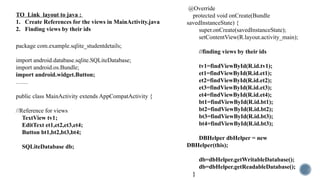
TO Link layout to java :
1. Create References for the views in MainActivity.java
2. Finding views by their ids
package com.example.sqlite_studentdetails;
import android.database.sqlite.SQLiteDatabase;
import android.os.Bundle;
import android.widget.Button;
……
public class MainActivity extends AppCompatActivity {
//Reference for views
TextView tv1;
EditText et1,et2,et3,et4;
Button bt1,bt2,bt3,bt4;
SQLiteDatabase db;
@Override
protected void onCreate(Bundle
savedInstanceState) {
super.onCreate(savedInstanceState);
setContentView(R.layout.activity_main);
//finding views by their ids
tv1=findViewById(R.id.tv1);
et1=findViewById(R.id.et1);
et2=findViewById(R.id.et2);
et3=findViewById(R.id.et3);
et4=findViewById(R.id.et4);
bt1=findViewById(R.id.bt1);
bt2=findViewById(R.id.bt2);
bt3=findViewById(R.id.bt3);
bt4=findViewById(R.id.bt3);
DBHelper dbHelper = new
DBHelper(this);
db=dbHelper.getWritableDatabase();
db=dbHelper.getReadableDatabase();
}
Implement all views to method :
i. Insert  Content Values[class] (uses
Hashmap {Key:value pair }
values.put(“rollno”,101)
values.put(“name”,”Lhona”)
……(uses put method)
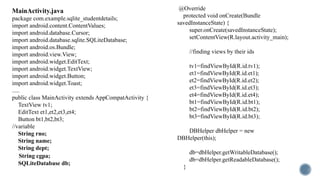
MainActivity.java
CRUD OPERATION :
Button onclick
DBHelper.java
package com.example.sqlite_studentdetails;
import android.content.Context;
import android.database.sqlite.SQLiteDatabase;
import android.database.sqlite.SQLiteOpenHelper;
import androidx.annotation.Nullable;
public class DBHelper extends SQLiteOpenHelper {
public DBHelper(@Nullable Context context) {
super(context,"student",null,1);
}
@Override
public void onCreate(SQLiteDatabase sqLiteDatabase) {
sqLiteDatabase.execSQL("create table student(rno int ,
name varchar(20) , dept varchar(20) , CGPA float )");
}
@Override
public void onUpgrade(SQLiteDatabase
sqLiteDatabase, int i, int i1) {
sqLiteDatabase.execSQL("drop table
if exists student");
onCreate(sqLiteDatabase);
}
}
MainActivity.java
package com.example.sqlite_studentdetails;
import android.content.ContentValues;
import android.database.Cursor;
import android.database.sqlite.SQLiteDatabase;
import android.os.Bundle;
import android.view.View;
import android.widget.EditText;
import android.widget.TextView;
import android.widget.Button;
import android.widget.Toast;
.....
public class MainActivity extends AppCompatActivity {
TextView tv1;
EditText et1,et2,et3,et4;
Button bt1,bt2,bt3;
//variable
String rno;
String name;
String dept;
String cgpa;
SQLiteDatabase db;
@Override
protected void onCreate(Bundle
savedInstanceState) {
super.onCreate(savedInstanceState);
setContentView(R.layout.activity_main);
//finding views by their ids
tv1=findViewById(R.id.tv1);
et1=findViewById(R.id.et1);
et2=findViewById(R.id.et2);
et3=findViewById(R.id.et3);
et4=findViewById(R.id.et4);
bt1=findViewById(R.id.bt1);
bt2=findViewById(R.id.bt2);
bt3=findViewById(R.id.bt3);
DBHelper dbHelper = new
DBHelper(this);
db=dbHelper.getWritableDatabase();
db=dbHelper.getReadableDatabase();
}
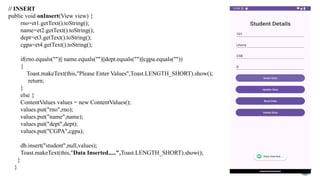
// INSERT
public void onInsert(View view) {
rno=et1.getText().toString();
name=et2.getText().toString();
dept=et3.getText().toString();
cgpa=et4.getText().toString();
if(rno.equals("")|| name.equals("")||dept.equals("")||cgpa.equals(""))
{
Toast.makeText(this,"Please Enter Values",Toast.LENGTH_SHORT).show();
return;
}
else {
ContentValues values = new ContentValues();
values.put("rno",rno);
values.put("name",name);
values.put("dept",dept);
values.put("CGPA",cgpa);
db.insert("student",null,values);
Toast.makeText(this,"Data Inserted.....",Toast.LENGTH_SHORT).show();
}
}
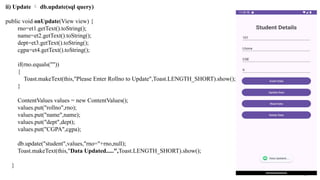
ii) Update  db.update(sql query)
public void onUpdate(View view) {
rno=et1.getText().toString();
name=et2.getText().toString();
dept=et3.getText().toString();
cgpa=et4.getText().toString();
if(rno.equals(""))
{
Toast.makeText(this,"Please Enter Rollno to Update",Toast.LENGTH_SHORT).show();
}
ContentValues values = new ContentValues();
values.put("rollno",rno);
values.put("name",name);
values.put("dept",dept);
values.put("CGPA",cgpa);
db.update("student",values,"rno="+rno,null);
Toast.makeText(this,"Data Updated.....",Toast.LENGTH_SHORT).show();
}
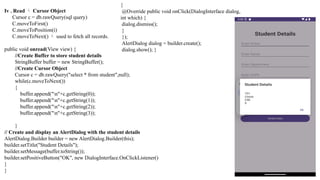
Iv . Read  Cursor Object
Cursor c = db.rawQuery(sql query)
C.moveToFirst()
C.moveToPosition(i)
C.moveToNext()  used to fetch all records.
public void onread(View view) {
//Create Buffer to store student details
StringBuffer buffer = new StringBuffer();
//Create Cursor Object
Cursor c = db.rawQuery("select * from student",null);
while(c.moveToNext())
{
buffer.append("n"+c.getString(0));
buffer.append("n"+c.getString(1));
buffer.append("n"+c.getString(2));
buffer.append("n"+c.getString(3));
}
// Create and display an AlertDialog with the student details
AlertDialog.Builder builder = new AlertDialog.Builder(this);
builder.setTitle("Student Details");
builder.setMessage(buffer.toString());
builder.setPositiveButton("OK", new DialogInterface.OnClickListener()
}
}
{
@Override public void onClick(DialogInterface dialog,
int which) {
dialog.dismiss();
}
});
AlertDialog dialog = builder.create();
dialog.show(); }
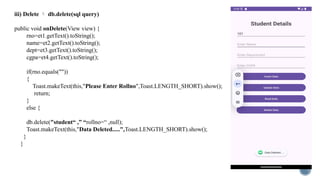
iii) Delete  db.delete(sql query)
public void onDelete(View view) {
rno=et1.getText().toString();
name=et2.getText().toString();
dept=et3.getText().toString();
cgpa=et4.getText().toString();
if(rno.equals(""))
{
Toast.makeText(this,"Please Enter Rollno",Toast.LENGTH_SHORT).show();
return;
}
else {
db.delete("student“ ,” “rollno=“ ,null);
Toast.makeText(this,"Data Deleted.....",Toast.LENGTH_SHORT).show();
}
}
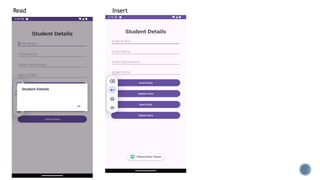
Read Insert

android_databaseConnectivity_SQLite.pptx

  • 1.
    Submitted By: Lhona PadmayukyS 20234012404123 Android Sqlite (Handling Tables )
  • 2.
    SQLite in Android •Class – SQLiteOpenHelper  abstract class (methods with only declaration) • Contains Contructor , onCreate() , onUpgrade()  DataBase , Create table , upgrade table • Derived class (DBHelper) extends SQLiteOpenHelper  Access definition by means of derived class
  • 3.
    Create Java class:  Named DBHelper
  • 6.
    package com.example.sqlite_studentdetails; import android.content.Context; importandroid.database.sqlite.SQLiteDatabase; import android.database.sqlite.SQLiteOpenHelper; import androidx.annotation.Nullable; public class DBHelper extends SQLiteOpenHelper { //constructor public DBHelper(@Nullable Context context) { super(context,"student",null,1); } //methods @Override public void onCreate(SQLiteDatabase sqLiteDatabase) { //Table Creation sqLiteDatabase.execSQL("create table student(rollno int , name varchar(20) , dept varchar(20) , CGPA float )"); } @Override public void onUpgrade(SQLiteDatabase sqLiteDatabase, int i, int i1) { sqLiteDatabase.execSQL("drop table if exists student"); onCreate(sqLiteDatabase); } } DBHelper.java :
  • 7.
    • Create anobject for DBHelper in MainActivity  SQLiteDataBase db; • db = dbHelper.getWritableDatabase()  Insert • db = dbHelper.getReadableDatabase()  Fetch MainActivity.java : package com.example.sqlite_studentdetails; Import ….. public class MainActivity extends AppCompatActivity { // Reference (used to access DBHelper ) SQLiteDatabase db; @Override protected void onCreate(Bundle savedInstanceState) { super.onCreate(savedInstanceState); setContentView(R.layout.activity_main); DBHelper dbHelper = new DBHelper(this); //Read and Write db=dbHelper.getWritableDatabase(); db=dbHelper.getReadableDatabase(); } } App Successfully Linked with the Datasbase …
  • 8.
    Question : Design aapp using android studio to perform CRUD operation using SQLite that allows to Insert , Update, Delete and Read Student Details .
  • 9.
    activity_main.xml <?xml version="1.0" encoding="utf-8"?> <RelativeLayout xmlns:android="http://schemas.android.com/apk/res/android " xmlns:app="http://schemas.android.com/apk/res-auto" xmlns:tools="http://schemas.android.com/tools" android:id="@+id/main" android:layout_width="match_parent" android:layout_height="match_parent" tools:context=".MainActivity"> <TextView android:layout_width="wrap_content" android:layout_height="wrap_content" android:id="@+id/tv1" android:text="StudentDetails" android:layout_centerHorizontal="true" android:layout_marginTop="50dp" android:textStyle="bold" android:textSize="30sp"/> <EditText android:layout_width="match_parent" android:layout_height="wrap_content" android:id="@+id/et1" android:hint="Enter Rollno" android:layout_marginTop="15dp" android:layout_marginHorizontal="30dp" android:layout_below="@+id/tv1"/> <EditText android:layout_width="match_parent" android:layout_height="wrap_content" android:id="@+id/et2" android:hint="Enter Name" android:layout_marginTop="15dp" android:layout_marginHorizontal="30dp" android:layout_below="@+id/et1"/>
  • 10.
    <EditText android:layout_width="match_parent" android:layout_height="wrap_content" android:id="@+id/et3" android:hint="Enter Department" android:layout_marginTop="15dp" android:layout_marginHorizontal="30dp" android:layout_below="@+id/et2"/> <EditText android:layout_width="match_parent" android:layout_height="wrap_content" android:id="@+id/et4" android:hint="Enter CGPA" android:layout_marginTop="15dp" android:layout_marginHorizontal="30dp" android:layout_below="@+id/et3"/> <Button android:layout_width="match_parent" android:layout_height="wrap_content" android:id="@+id/bt1“ android:onClick=“onInsert” android:text="Insert Data" android:layout_marginTop="15dp" android:layout_marginHorizontal="30dp" android:layout_below="@+id/et4"/> <Button android:layout_width="match_parent" android:layout_height="wrap_content" android:id="@+id/bt2“ android:onClick =“onUpdate” android:text="Update Data" android:layout_marginTop="15dp" android:layout_marginHorizontal="30dp" android:layout_below="@+id/bt1"/>
  • 11.
  • 12.
    TO Link layoutto java : 1. Create References for the views in MainActivity.java 2. Finding views by their ids package com.example.sqlite_studentdetails; import android.database.sqlite.SQLiteDatabase; import android.os.Bundle; import android.widget.Button; …… public class MainActivity extends AppCompatActivity { //Reference for views TextView tv1; EditText et1,et2,et3,et4; Button bt1,bt2,bt3,bt4; SQLiteDatabase db; @Override protected void onCreate(Bundle savedInstanceState) { super.onCreate(savedInstanceState); setContentView(R.layout.activity_main); //finding views by their ids tv1=findViewById(R.id.tv1); et1=findViewById(R.id.et1); et2=findViewById(R.id.et2); et3=findViewById(R.id.et3); et4=findViewById(R.id.et4); bt1=findViewById(R.id.bt1); bt2=findViewById(R.id.bt2); bt3=findViewById(R.id.bt3); bt4=findViewById(R.id.bt3); DBHelper dbHelper = new DBHelper(this); db=dbHelper.getWritableDatabase(); db=dbHelper.getReadableDatabase(); }
  • 13.
    Implement all viewsto method : i. Insert  Content Values[class] (uses Hashmap {Key:value pair } values.put(“rollno”,101) values.put(“name”,”Lhona”) ……(uses put method) MainActivity.java CRUD OPERATION : Button onclick
  • 14.
    DBHelper.java package com.example.sqlite_studentdetails; import android.content.Context; importandroid.database.sqlite.SQLiteDatabase; import android.database.sqlite.SQLiteOpenHelper; import androidx.annotation.Nullable; public class DBHelper extends SQLiteOpenHelper { public DBHelper(@Nullable Context context) { super(context,"student",null,1); } @Override public void onCreate(SQLiteDatabase sqLiteDatabase) { sqLiteDatabase.execSQL("create table student(rno int , name varchar(20) , dept varchar(20) , CGPA float )"); } @Override public void onUpgrade(SQLiteDatabase sqLiteDatabase, int i, int i1) { sqLiteDatabase.execSQL("drop table if exists student"); onCreate(sqLiteDatabase); } }
  • 15.
    MainActivity.java package com.example.sqlite_studentdetails; import android.content.ContentValues; importandroid.database.Cursor; import android.database.sqlite.SQLiteDatabase; import android.os.Bundle; import android.view.View; import android.widget.EditText; import android.widget.TextView; import android.widget.Button; import android.widget.Toast; ..... public class MainActivity extends AppCompatActivity { TextView tv1; EditText et1,et2,et3,et4; Button bt1,bt2,bt3; //variable String rno; String name; String dept; String cgpa; SQLiteDatabase db; @Override protected void onCreate(Bundle savedInstanceState) { super.onCreate(savedInstanceState); setContentView(R.layout.activity_main); //finding views by their ids tv1=findViewById(R.id.tv1); et1=findViewById(R.id.et1); et2=findViewById(R.id.et2); et3=findViewById(R.id.et3); et4=findViewById(R.id.et4); bt1=findViewById(R.id.bt1); bt2=findViewById(R.id.bt2); bt3=findViewById(R.id.bt3); DBHelper dbHelper = new DBHelper(this); db=dbHelper.getWritableDatabase(); db=dbHelper.getReadableDatabase(); }
  • 16.
    // INSERT public voidonInsert(View view) { rno=et1.getText().toString(); name=et2.getText().toString(); dept=et3.getText().toString(); cgpa=et4.getText().toString(); if(rno.equals("")|| name.equals("")||dept.equals("")||cgpa.equals("")) { Toast.makeText(this,"Please Enter Values",Toast.LENGTH_SHORT).show(); return; } else { ContentValues values = new ContentValues(); values.put("rno",rno); values.put("name",name); values.put("dept",dept); values.put("CGPA",cgpa); db.insert("student",null,values); Toast.makeText(this,"Data Inserted.....",Toast.LENGTH_SHORT).show(); } }
  • 17.
    ii) Update db.update(sql query) public void onUpdate(View view) { rno=et1.getText().toString(); name=et2.getText().toString(); dept=et3.getText().toString(); cgpa=et4.getText().toString(); if(rno.equals("")) { Toast.makeText(this,"Please Enter Rollno to Update",Toast.LENGTH_SHORT).show(); } ContentValues values = new ContentValues(); values.put("rollno",rno); values.put("name",name); values.put("dept",dept); values.put("CGPA",cgpa); db.update("student",values,"rno="+rno,null); Toast.makeText(this,"Data Updated.....",Toast.LENGTH_SHORT).show(); }
  • 18.
    Iv . Read Cursor Object Cursor c = db.rawQuery(sql query) C.moveToFirst() C.moveToPosition(i) C.moveToNext()  used to fetch all records. public void onread(View view) { //Create Buffer to store student details StringBuffer buffer = new StringBuffer(); //Create Cursor Object Cursor c = db.rawQuery("select * from student",null); while(c.moveToNext()) { buffer.append("n"+c.getString(0)); buffer.append("n"+c.getString(1)); buffer.append("n"+c.getString(2)); buffer.append("n"+c.getString(3)); } // Create and display an AlertDialog with the student details AlertDialog.Builder builder = new AlertDialog.Builder(this); builder.setTitle("Student Details"); builder.setMessage(buffer.toString()); builder.setPositiveButton("OK", new DialogInterface.OnClickListener() } } { @Override public void onClick(DialogInterface dialog, int which) { dialog.dismiss(); } }); AlertDialog dialog = builder.create(); dialog.show(); }
  • 19.
    iii) Delete db.delete(sql query) public void onDelete(View view) { rno=et1.getText().toString(); name=et2.getText().toString(); dept=et3.getText().toString(); cgpa=et4.getText().toString(); if(rno.equals("")) { Toast.makeText(this,"Please Enter Rollno",Toast.LENGTH_SHORT).show(); return; } else { db.delete("student“ ,” “rollno=“ ,null); Toast.makeText(this,"Data Deleted.....",Toast.LENGTH_SHORT).show(); } }
  • 20.