LAYOUT
ANDROID-KOTLIN
PERFECTION OF PLANNED
LAYOUT IS ARCHIVED
ONLY BY INSTITUTIONS ON
THE POINT OF COLLAPSE
C.Northcote Parkinson
ANDROID KOTLIN FUNDAMENTAL – ROOM DATABASE
ANDROID KOTLIN FUNDAMENTAL – LAYOUT
LAYOUT
Layout is a view that has been conceptualized neatly like using View and
ViewGroup. View is object that illustrate display component to screen then user
can see and do interaction like TextView, Button, ImageView, etc. View Group is
object which accommodates View and ViewGroup it’s self to form a unified whole
application display.
On this material we will disscuss about 2 ViewGroup:
- Constraint Layout
- Linear Layout
ANDROID KOTLIN FUNDAMENTAL – LAYOUT
Constraint Layout
Constraint layout is one of ViewGroup component that can be used for set the
flexible application screen where the place of the view depends on other view in
one layout or with the parent layout. For the constraint layout, every view have
rope (constraint) that pull in every side an a elastic way
How constraint work?
1. Choose the component that want be add from palette panel
to the editor
2. The component that have been add will have anchor point
in every side that will we use for new constraint
3. To add constraint, click anchor point on the component then
navigate to the parent or end of the layout
4. After add constraint to a component, in a default it will be
found margin that separates every component and parent
and other component that related with the component.
ANDROID KOTLIN FUNDAMENTAL – LAYOUT
Constraint Layout
Constraint work conditions:
- Every view must have minimum one vertical and horizontal constraint
- We can associate between component with the same orientation, the top
anchor point just can be associate with the top anchor point, we can’t
associate with the right or left anchor
- One anchor point just associate for one anchor point
Here is how you can delete the constraint
ANDROID KOTLIN FUNDAMENTAL – LAYOUT
Bias constraint
When we add 2 constraint for horizontal constraint with the constant component
size or by the content inside, the component position will be in the corner.
We can use the value of bias to change the view position using bias slider in the
panel attribute and immediately move it
If we can adjust the size with the parent or bound component we can change
width layout configuration to match constraint
ANDROID KOTLIN FUNDAMENTAL – LAYOUT
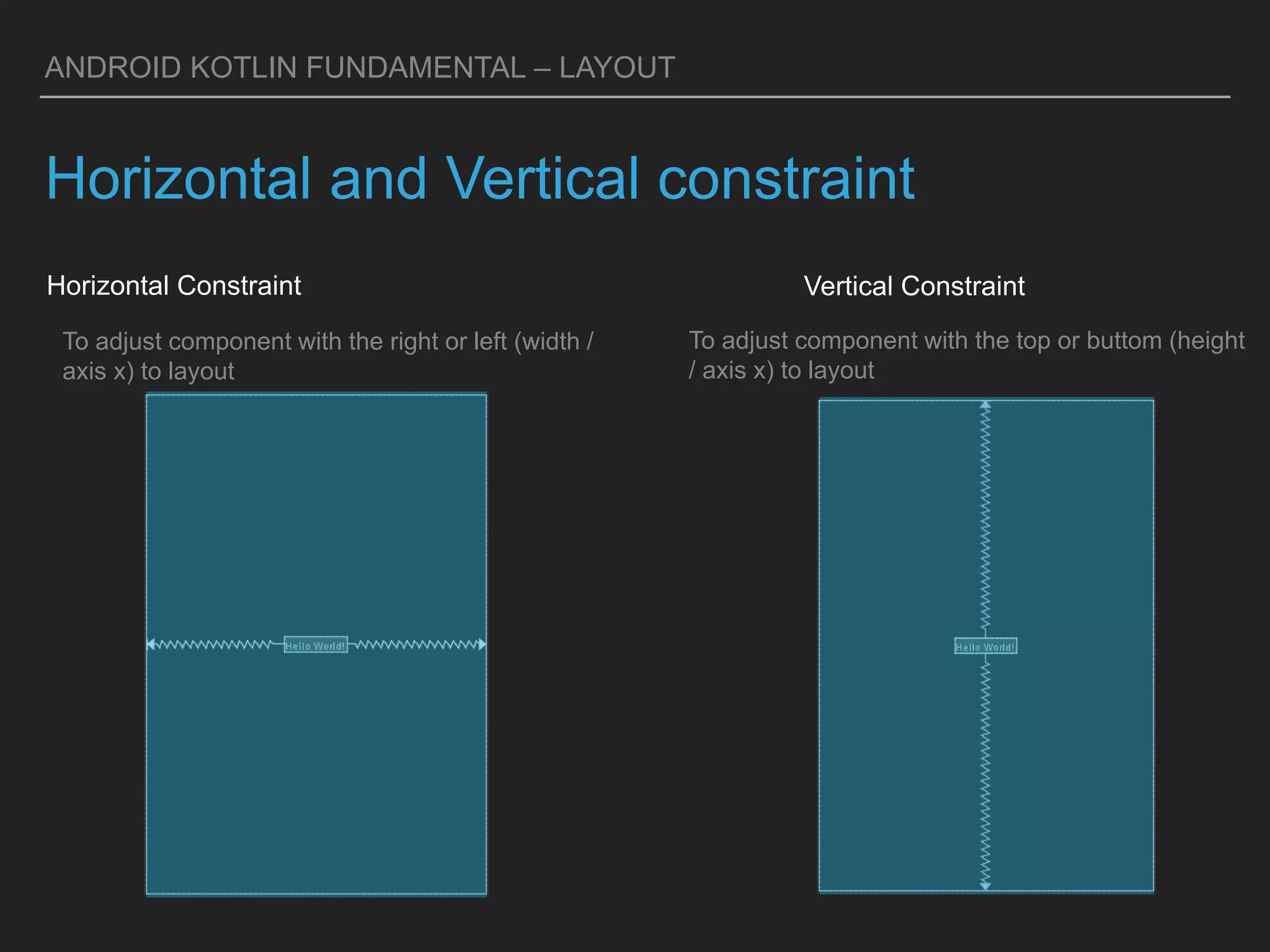
Horizontal and Vertical constraint
Horizontal Constraint
To adjust component with the top or buttom (height
/ axis x) to layout
Vertical Constraint
To adjust component with the right or left (width /
axis x) to layout
ANDROID KOTLIN FUNDAMENTAL – LAYOUT
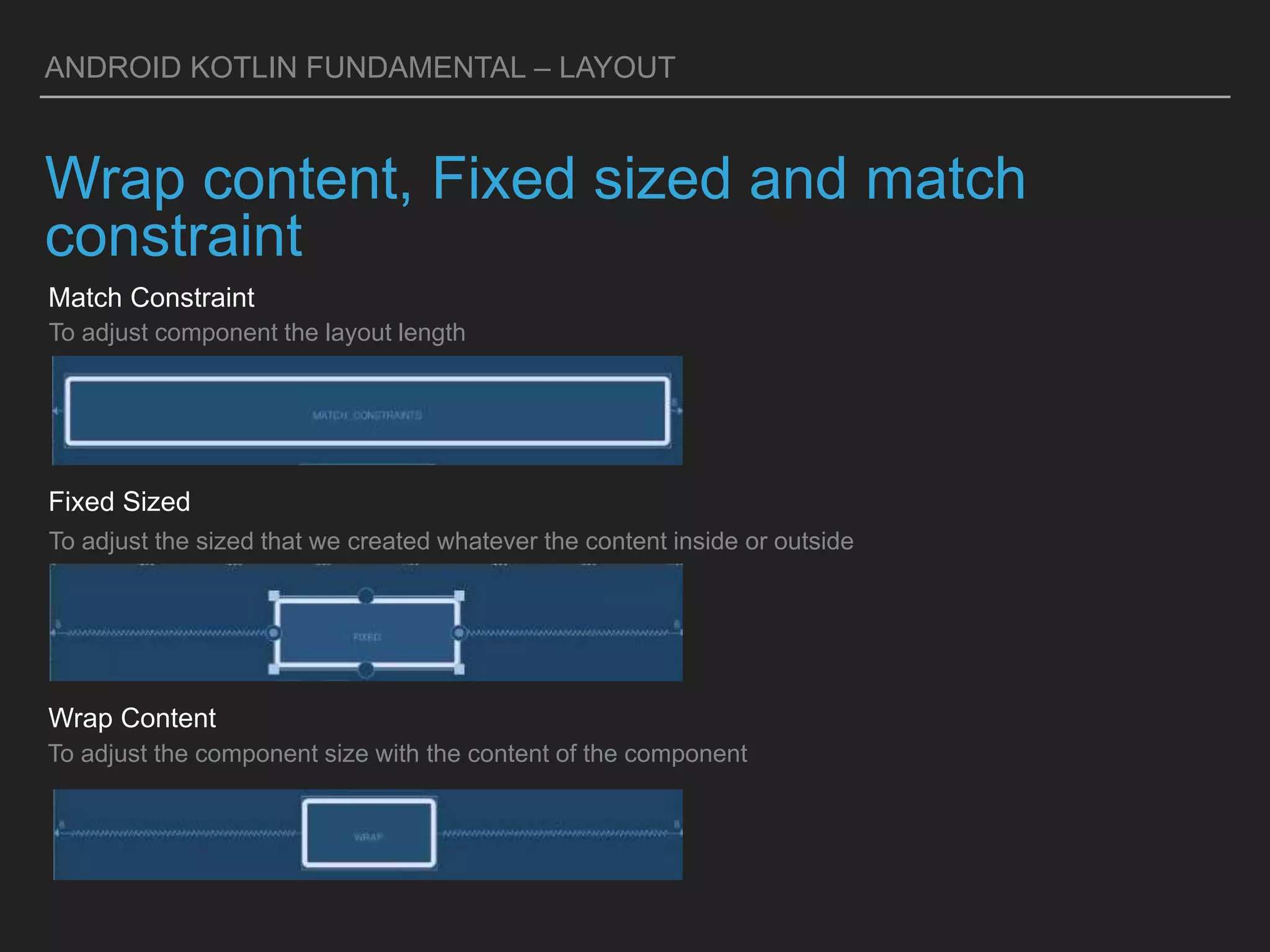
Wrap content, Fixed sized and match
constraint
Match Constraint
To adjust the component size with the content of the component
Wrap Content
To adjust component the layout length
Fixed Sized
To adjust the sized that we created whatever the content inside or outside
ANDROID KOTLIN FUNDAMENTAL – LAYOUT
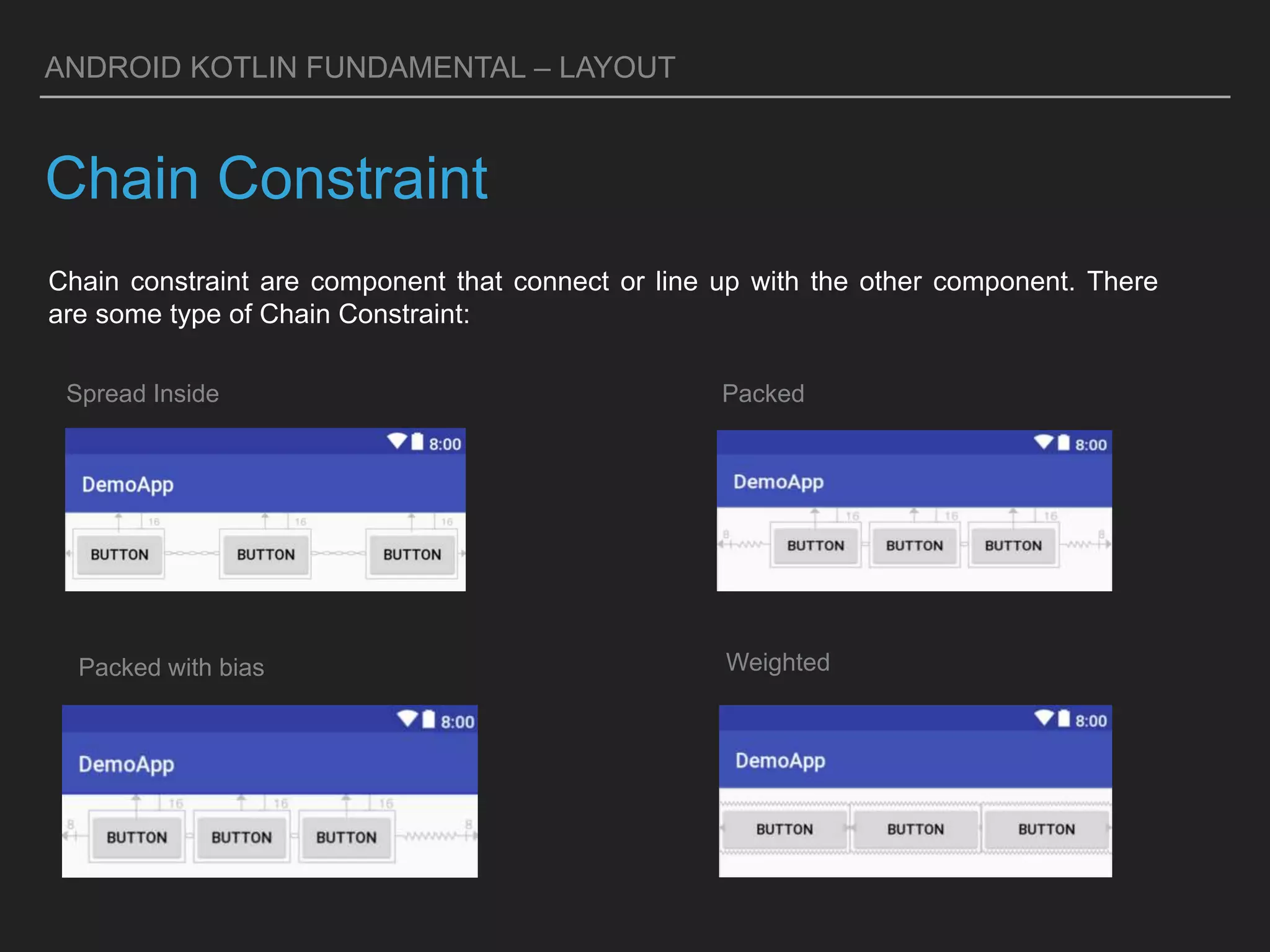
Chain Constraint
Chain constraint are component that connect or line up with the other component. There
are some type of Chain Constraint:
Spread Inside Packed
Packed with bias Weighted
ANDROID KOTLIN FUNDAMENTAL – LAYOUT
Linear Layout
Linear Layout is ViewGroup where user put 1 component every line or column. In every
line/column there are only put for 1 component. We can set the direction of linear layout in
atributte android:orientation. There are 2 type of linear layout:
Vertical Linear Layout
When user put 1 component in every line
Horizontal Linear Layout
When user put 1 component in every column
ANDROID KOTLIN FUNDAMENTAL – LAYOUT
Linear Weight
Set every component with attribute android:layout_weight, attribute set the value on a
screen as much the total wide of screen. The linear will fill the other space room.
ANDROID KOTLIN FUNDAMENTAL – LAYOUT
Equal Distribution
The component used the same space on the screen. Set the component by
android:layout_height for vertical layout or android:layout_width for horizontal layout.
ANDROID KOTLIN FUNDAMENTAL – LAYOUT
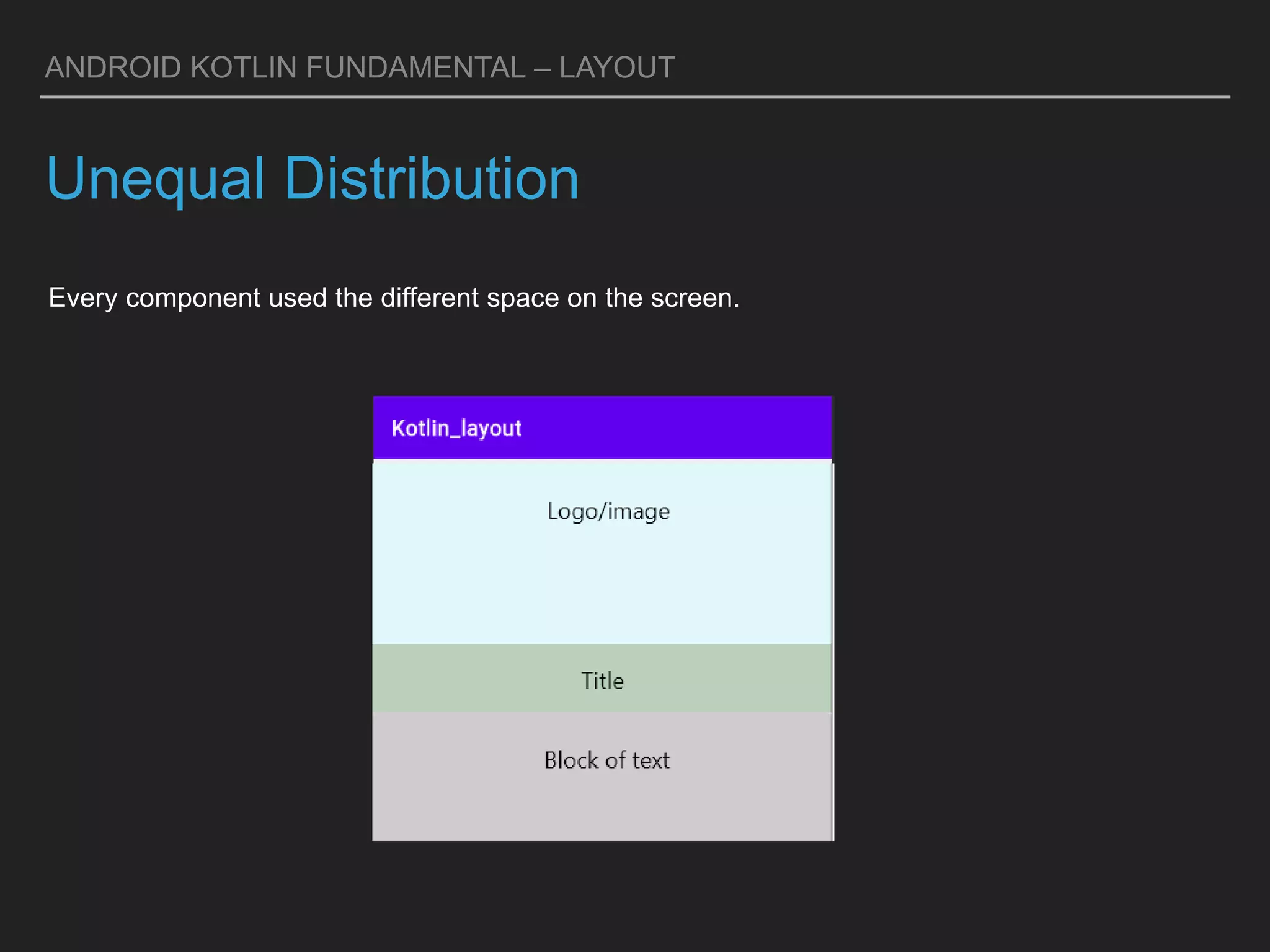
Unequal Distribution
Every component used the different space on the screen.
ANDROID KOTLIN FUNDAMENTAL – LAYOUT
Challenge
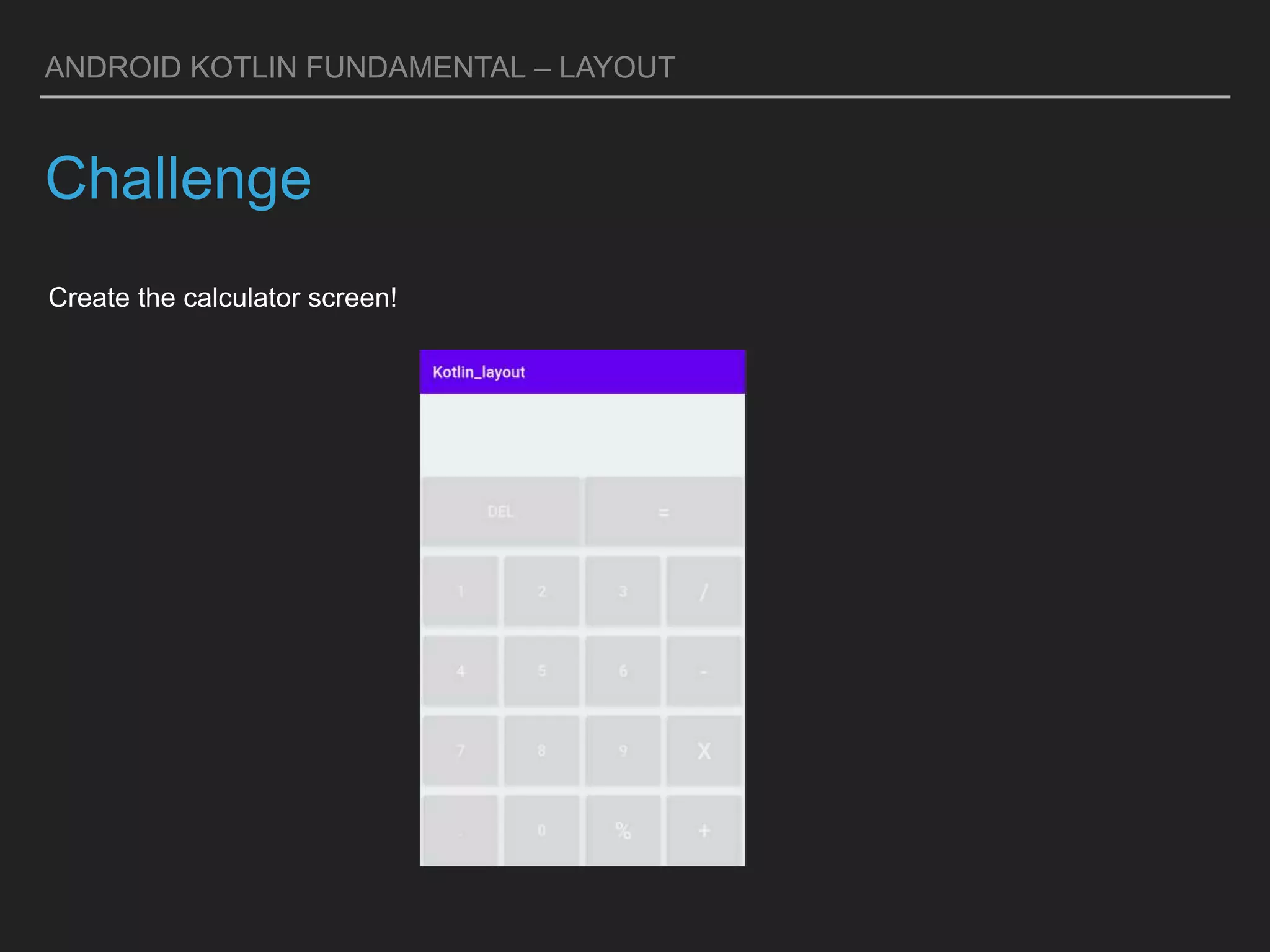
Create the calculator screen!

Android Kotlin-Layout.pptx

  • 1.
  • 2.
    PERFECTION OF PLANNED LAYOUTIS ARCHIVED ONLY BY INSTITUTIONS ON THE POINT OF COLLAPSE C.Northcote Parkinson ANDROID KOTLIN FUNDAMENTAL – ROOM DATABASE
  • 3.
    ANDROID KOTLIN FUNDAMENTAL– LAYOUT LAYOUT Layout is a view that has been conceptualized neatly like using View and ViewGroup. View is object that illustrate display component to screen then user can see and do interaction like TextView, Button, ImageView, etc. View Group is object which accommodates View and ViewGroup it’s self to form a unified whole application display. On this material we will disscuss about 2 ViewGroup: - Constraint Layout - Linear Layout
  • 4.
    ANDROID KOTLIN FUNDAMENTAL– LAYOUT Constraint Layout Constraint layout is one of ViewGroup component that can be used for set the flexible application screen where the place of the view depends on other view in one layout or with the parent layout. For the constraint layout, every view have rope (constraint) that pull in every side an a elastic way How constraint work? 1. Choose the component that want be add from palette panel to the editor 2. The component that have been add will have anchor point in every side that will we use for new constraint 3. To add constraint, click anchor point on the component then navigate to the parent or end of the layout 4. After add constraint to a component, in a default it will be found margin that separates every component and parent and other component that related with the component.
  • 5.
    ANDROID KOTLIN FUNDAMENTAL– LAYOUT Constraint Layout Constraint work conditions: - Every view must have minimum one vertical and horizontal constraint - We can associate between component with the same orientation, the top anchor point just can be associate with the top anchor point, we can’t associate with the right or left anchor - One anchor point just associate for one anchor point Here is how you can delete the constraint
  • 6.
    ANDROID KOTLIN FUNDAMENTAL– LAYOUT Bias constraint When we add 2 constraint for horizontal constraint with the constant component size or by the content inside, the component position will be in the corner. We can use the value of bias to change the view position using bias slider in the panel attribute and immediately move it If we can adjust the size with the parent or bound component we can change width layout configuration to match constraint
  • 7.
    ANDROID KOTLIN FUNDAMENTAL– LAYOUT Horizontal and Vertical constraint Horizontal Constraint To adjust component with the top or buttom (height / axis x) to layout Vertical Constraint To adjust component with the right or left (width / axis x) to layout
  • 8.
    ANDROID KOTLIN FUNDAMENTAL– LAYOUT Wrap content, Fixed sized and match constraint Match Constraint To adjust the component size with the content of the component Wrap Content To adjust component the layout length Fixed Sized To adjust the sized that we created whatever the content inside or outside
  • 9.
    ANDROID KOTLIN FUNDAMENTAL– LAYOUT Chain Constraint Chain constraint are component that connect or line up with the other component. There are some type of Chain Constraint: Spread Inside Packed Packed with bias Weighted
  • 10.
    ANDROID KOTLIN FUNDAMENTAL– LAYOUT Linear Layout Linear Layout is ViewGroup where user put 1 component every line or column. In every line/column there are only put for 1 component. We can set the direction of linear layout in atributte android:orientation. There are 2 type of linear layout: Vertical Linear Layout When user put 1 component in every line Horizontal Linear Layout When user put 1 component in every column
  • 11.
    ANDROID KOTLIN FUNDAMENTAL– LAYOUT Linear Weight Set every component with attribute android:layout_weight, attribute set the value on a screen as much the total wide of screen. The linear will fill the other space room.
  • 12.
    ANDROID KOTLIN FUNDAMENTAL– LAYOUT Equal Distribution The component used the same space on the screen. Set the component by android:layout_height for vertical layout or android:layout_width for horizontal layout.
  • 13.
    ANDROID KOTLIN FUNDAMENTAL– LAYOUT Unequal Distribution Every component used the different space on the screen.
  • 14.
    ANDROID KOTLIN FUNDAMENTAL– LAYOUT Challenge Create the calculator screen!