Download free for 30 days
Sign in
Upload
Language (EN)
Support
Business
Mobile
Social Media
Marketing
Technology
Art & Photos
Career
Design
Education
Presentations & Public Speaking
Government & Nonprofit
Healthcare
Internet
Law
Leadership & Management
Automotive
Engineering
Software
Recruiting & HR
Retail
Sales
Services
Science
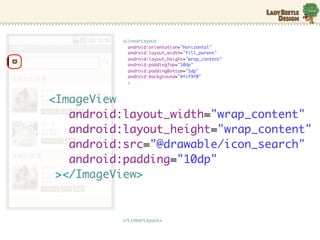
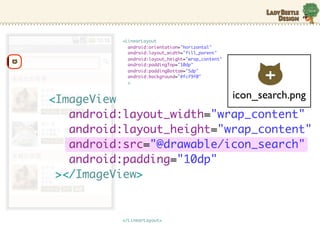
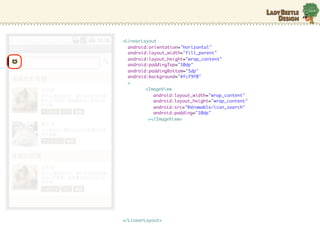
Small Business & Entrepreneurship
Food
Environment
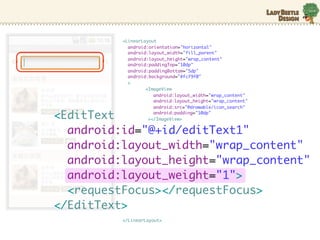
Economy & Finance
Data & Analytics
Investor Relations
Sports
Spiritual
News & Politics
Travel
Self Improvement
Real Estate
Entertainment & Humor
Health & Medicine
Devices & Hardware
Lifestyle
Change Language
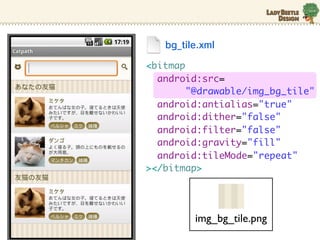
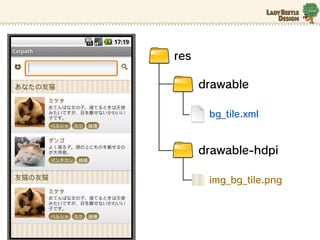
Language
English
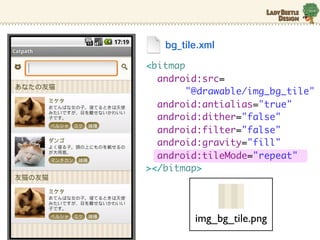
Español
Português
Français
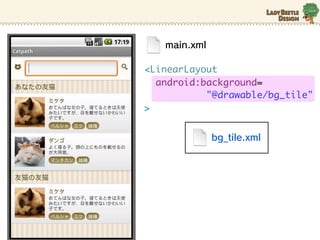
Deutsche
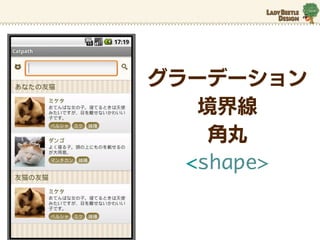
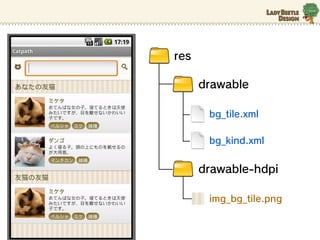
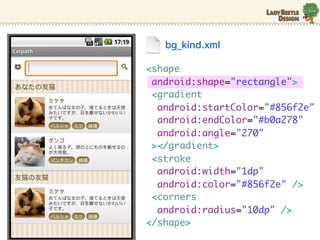
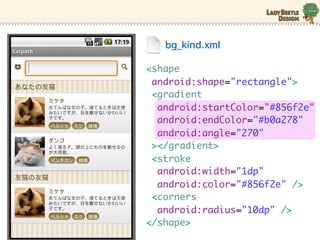
Cancel
Save
EN
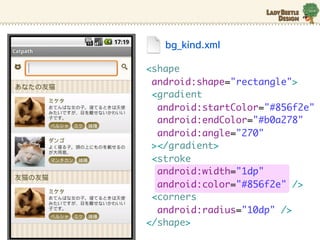
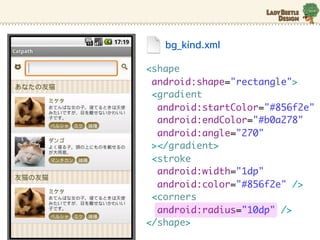
Uploaded by
Chihiro Tomita
3,063 views
デザイナーが実際にAndroidアプリのレイアウトを 組んでみた(秋葉ちひろ)
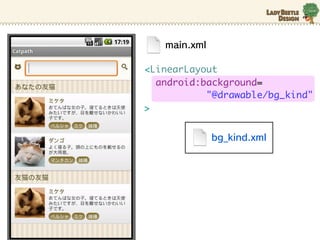
Technology
◦
Business
◦
Read more
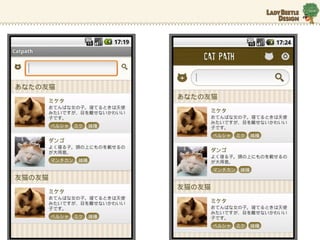
8
Save
Share
Embed
Embed presentation
Download
Downloaded 41 times
1
/ 65
2
/ 65
3
/ 65
4
/ 65
5
/ 65
6
/ 65
7
/ 65
8
/ 65
9
/ 65
10
/ 65
11
/ 65
12
/ 65
13
/ 65
14
/ 65
15
/ 65
16
/ 65
17
/ 65
18
/ 65
19
/ 65
20
/ 65
21
/ 65
22
/ 65
23
/ 65
24
/ 65
25
/ 65
26
/ 65
27
/ 65
28
/ 65
29
/ 65
30
/ 65
31
/ 65
32
/ 65
33
/ 65
34
/ 65
35
/ 65
36
/ 65
37
/ 65
38
/ 65
39
/ 65
40
/ 65
41
/ 65
42
/ 65
43
/ 65
44
/ 65
45
/ 65
46
/ 65
47
/ 65
48
/ 65
49
/ 65
50
/ 65
51
/ 65
52
/ 65
53
/ 65
54
/ 65
55
/ 65
56
/ 65
57
/ 65
58
/ 65
59
/ 65
60
/ 65
61
/ 65
62
/ 65
63
/ 65
64
/ 65
65
/ 65
More Related Content
PDF
Head First XML Layout on Android
by
Yuki Anzai
PDF
jQuery Mobile 概要
by
トモロヲ いちがみ
PDF
No border, スマホ UI! 〜これからのモバイルアプリデザイン〜
by
Chihiro Tomita
PDF
【オープンセミナー岡山2014】 明日からできるデザイン脳
by
Chihiro Tomita
PDF
細かすぎて伝わらない「気配りデザイン」の極意 先生:秋葉 ちひろ
by
schoowebcampus
PDF
【DevLOVE甲子園2013】UIと画面遷移を設計するときに 破綻しないようにするための、 ひと手間
by
Chihiro Tomita
PDF
ガイドラインからみたアプリUI〜iPhone用とAndroid用〜
by
Chihiro Tomita
PDF
Developers Summit 2013【14-E-4】デザインをするときにデザイナーが考えること〜デザイナーの頭の中〜
by
Chihiro Tomita
Head First XML Layout on Android
by
Yuki Anzai
jQuery Mobile 概要
by
トモロヲ いちがみ
No border, スマホ UI! 〜これからのモバイルアプリデザイン〜
by
Chihiro Tomita
【オープンセミナー岡山2014】 明日からできるデザイン脳
by
Chihiro Tomita
細かすぎて伝わらない「気配りデザイン」の極意 先生:秋葉 ちひろ
by
schoowebcampus
【DevLOVE甲子園2013】UIと画面遷移を設計するときに 破綻しないようにするための、 ひと手間
by
Chihiro Tomita
ガイドラインからみたアプリUI〜iPhone用とAndroid用〜
by
Chihiro Tomita
Developers Summit 2013【14-E-4】デザインをするときにデザイナーが考えること〜デザイナーの頭の中〜
by
Chihiro Tomita
Similar to デザイナーが実際にAndroidアプリのレイアウトを 組んでみた(秋葉ちひろ)
PDF
日本Androidの会 中国支部資料
by
Masafumi Terazono
PDF
Android Lecture #04 @PRO&BSC Inc.
by
Yuki Higuchi
PDF
Androidレイアウトのスタンダードアプローチ
by
Takao Sumitomo
PDF
夜子まま塾講義10(画面の呼び出し)
by
Masafumi Terazono
PDF
【第4回】デザイナーがコードから読み解く、Androidアプリのデザインの幅を広げるコツとTips
by
Chihiro Tomita
PDF
夜子まま塾講義9(androidの画面デザイン)
by
Masafumi Terazono
PDF
【第2回】デザイナーがコードから読み解く、Androidアプリのデザインの幅を広げるコツとTips
by
Chihiro Tomita
PPT
アプリ開発・端末毎の解像度の違いを吸収する方法 Android Bazaar and Conference 2011 Summer
by
Kunimasa Noda
PDF
主婦でもできる Android Layout
by
Hiromi Tsuzuki
PDF
Action Bar and Menu
by
Katsumi Onishi
PPTX
Action Bar Compat読んでみた
by
Yukiya Nakagawa
KEY
[ABC2012S]Android2x/3x/4x対応アプリ開発Tips
by
Kenichi Kambara
PDF
初心者〜中級者 Android StudioによるAndroid勉強会資料(スライド)
by
Masafumi Terazono
PDF
Fragment の利用パターン
by
Android UI勉強会
PDF
プログラマとデザイナが共有すべきUIに関するAndroidの10の機能
by
youten (ようてん)
PPTX
Using the Fragments(Android)
by
Teruaki Kinoshita
PDF
マルチスクリーン対応と最近のアプリの傾向
by
Yuki Anzai
日本Androidの会 中国支部資料
by
Masafumi Terazono
Android Lecture #04 @PRO&BSC Inc.
by
Yuki Higuchi
Androidレイアウトのスタンダードアプローチ
by
Takao Sumitomo
夜子まま塾講義10(画面の呼び出し)
by
Masafumi Terazono
【第4回】デザイナーがコードから読み解く、Androidアプリのデザインの幅を広げるコツとTips
by
Chihiro Tomita
夜子まま塾講義9(androidの画面デザイン)
by
Masafumi Terazono
【第2回】デザイナーがコードから読み解く、Androidアプリのデザインの幅を広げるコツとTips
by
Chihiro Tomita
アプリ開発・端末毎の解像度の違いを吸収する方法 Android Bazaar and Conference 2011 Summer
by
Kunimasa Noda
主婦でもできる Android Layout
by
Hiromi Tsuzuki
Action Bar and Menu
by
Katsumi Onishi
Action Bar Compat読んでみた
by
Yukiya Nakagawa
[ABC2012S]Android2x/3x/4x対応アプリ開発Tips
by
Kenichi Kambara
初心者〜中級者 Android StudioによるAndroid勉強会資料(スライド)
by
Masafumi Terazono
Fragment の利用パターン
by
Android UI勉強会
プログラマとデザイナが共有すべきUIに関するAndroidの10の機能
by
youten (ようてん)
Using the Fragments(Android)
by
Teruaki Kinoshita
マルチスクリーン対応と最近のアプリの傾向
by
Yuki Anzai
デザイナーが実際にAndroidアプリのレイアウトを 組んでみた(秋葉ちひろ)
1.
デザイナーが実際に Androidアプリのレイアウトを
組んでみた 秋葉ちひろ
2.
楽しかった!
3.
そも そも デザイナーが なんでXMLを?
4.
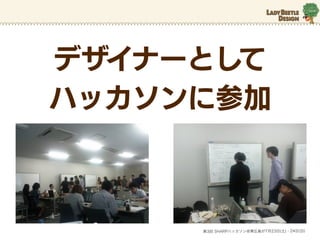
デザイナーとして ハッカソンに参加
第3回 SHARPハッカソン@東広島が7月23日(土)・24日(日)
6.
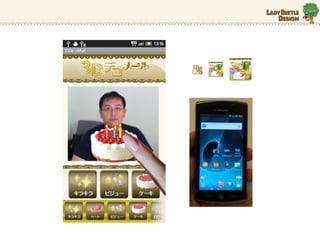
動かなかった…
7.
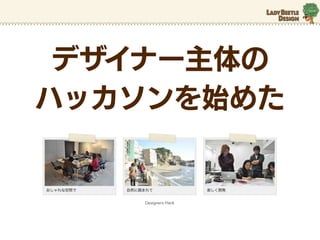
デザイナー主体の ハッカソンを始めた
Designers Hack
8.
もう一歩 踏み出したい!
9.
10月17日
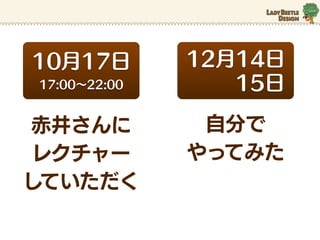
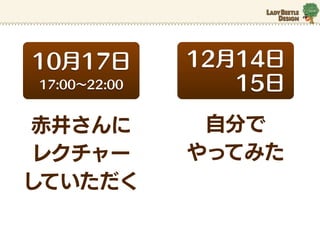
12月14日 17:00∼22:00 15日 赤井さんに 自分で レクチャー やってみた していただく
10.
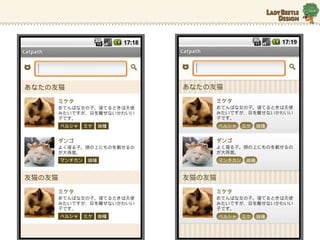
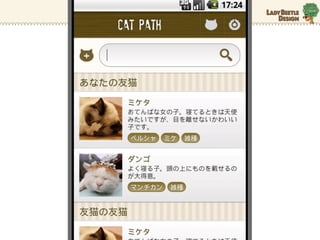
今回コーディングしたアプリ
11.
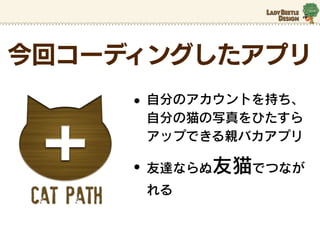
今回コーディングしたアプリ
• 自分のアカウントを持ち、 自分の猫の写真をひたすら アップできる親バカアプリ • 友達ならぬ友猫でつなが れる
12.
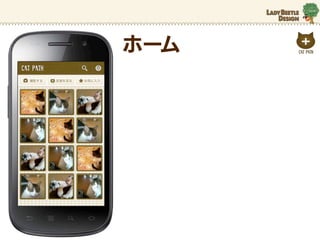
ホーム
13.
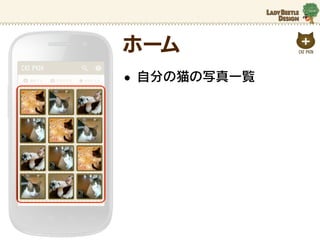
ホーム • 自分の猫の写真一覧
14.
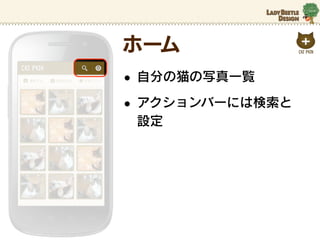
ホーム • 自分の猫の写真一覧 • アクションバーには検索と
設定
15.
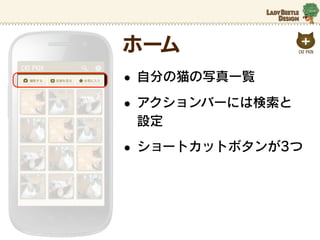
ホーム • 自分の猫の写真一覧 • アクションバーには検索と
設定 • ショートカットボタンが3つ
16.
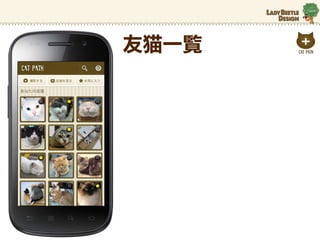
友猫一覧
17.
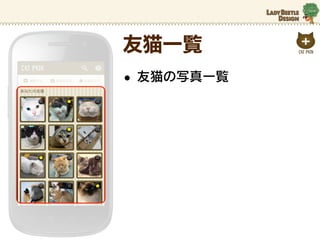
友猫一覧 • 友猫の写真一覧
18.
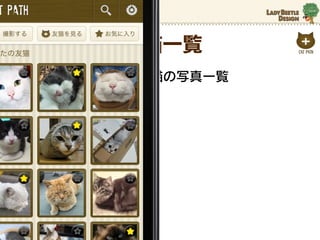
友猫一覧 • 友猫の写真一覧
19.
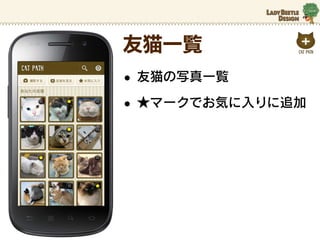
友猫一覧 • 友猫の写真一覧 • ★マークでお気に入りに追加
20.
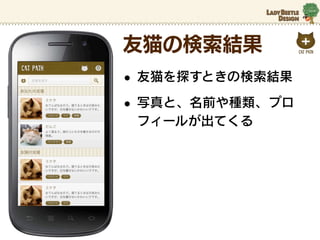
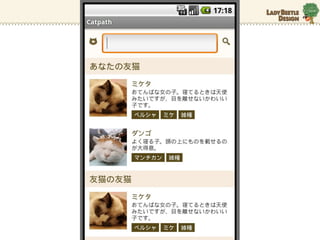
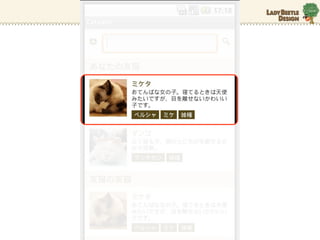
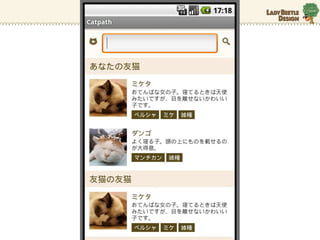
友猫の検索結果 • 友猫を探すときの検索結果 • 写真と、名前や種類、プロ
フィールが出てくる
21.
まず、最低限の レイアウトで 作ってみた
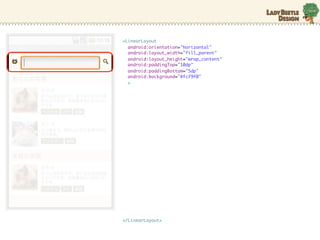
23.
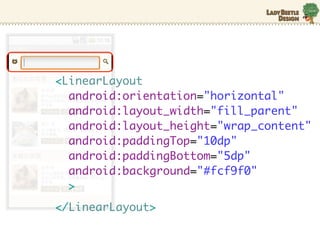
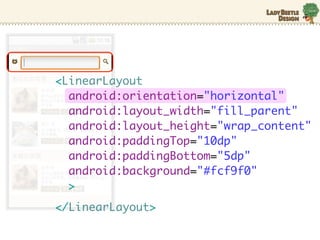
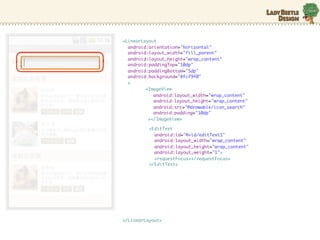
<LinearLayout android:orientation="horizontal"
android:layout_width="fill_parent" android:layout_height="wrap_content" android:paddingTop="10dp" android:paddingBottom="5dp" android:background="#fcf9f0" > </LinearLayout>
24.
<LinearLayout android:orientation="horizontal"
android:layout_width="fill_parent" android:layout_height="wrap_content" android:paddingTop="10dp" android:paddingBottom="5dp" android:background="#fcf9f0" > </LinearLayout>
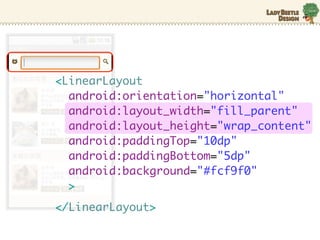
25.
<LinearLayout android:orientation="horizontal"
android:layout_width="fill_parent" android:layout_height="wrap_content" android:paddingTop="10dp" android:paddingBottom="5dp" android:background="#fcf9f0" > </LinearLayout>
26.
<LinearLayout android:orientation="horizontal"
android:layout_width="fill_parent" android:layout_height="wrap_content" android:paddingTop="10dp" android:paddingBottom="5dp" android:background="#fcf9f0" > </LinearLayout>
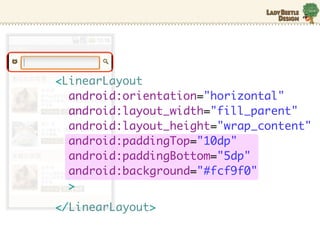
27.
<LinearLayout android:orientation="horizontal"
android:layout_width="fill_parent" android:layout_height="wrap_content" android:paddingTop="10dp" android:paddingBottom="5dp" android:background="#fcf9f0" > </LinearLayout>
28.
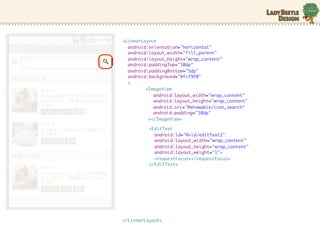
<LinearLayout
android:orientation="horizontal" android:layout_width="fill_parent" android:layout_height="wrap_content" android:paddingTop="10dp" android:paddingBottom="5dp" android:background="#fcf9f0" > <ImageView android:layout_width="wrap_content" android:layout_height="wrap_content" android:src="@drawable/icon_search" android:padding="10dp" ></ImageView> </LinearLayout>
29.
<LinearLayout
android:orientation="horizontal" android:layout_width="fill_parent" android:layout_height="wrap_content" android:paddingTop="10dp" android:paddingBottom="5dp" android:background="#fcf9f0" > <ImageView icon_search.png android:layout_width="wrap_content" android:layout_height="wrap_content" android:src="@drawable/icon_search" android:padding="10dp" ></ImageView> </LinearLayout>
30.
<LinearLayout android:orientation="horizontal"
android:layout_width="fill_parent" android:layout_height="wrap_content" android:paddingTop="10dp" android:paddingBottom="5dp" android:background="#fcf9f0" > <ImageView android:layout_width="wrap_content" android:layout_height="wrap_content" android:src="@drawable/icon_search" android:padding="10dp" ></ImageView> </LinearLayout>
31.
<LinearLayout
android:orientation="horizontal" android:layout_width="fill_parent" android:layout_height="wrap_content" android:paddingTop="10dp" android:paddingBottom="5dp" android:background="#fcf9f0" > <ImageView android:layout_width="wrap_content" android:layout_height="wrap_content" android:src="@drawable/icon_search" <EditText android:padding="10dp" ></ImageView> android:id="@+id/editText1" android:layout_width="wrap_content" android:layout_height="wrap_content" android:layout_weight="1"> <requestFocus></requestFocus> </EditText> </LinearLayout>
32.
<LinearLayout android:orientation="horizontal"
android:layout_width="fill_parent" android:layout_height="wrap_content" android:paddingTop="10dp" android:paddingBottom="5dp" android:background="#fcf9f0" > <ImageView android:layout_width="wrap_content" android:layout_height="wrap_content" android:src="@drawable/icon_search" android:padding="10dp" ></ImageView> <EditText android:id="@+id/editText1" android:layout_width="wrap_content" android:layout_height="wrap_content" android:layout_weight="1"> <requestFocus></requestFocus> </EditText> </LinearLayout>
33.
<LinearLayout android:orientation="horizontal"
android:layout_width="fill_parent" android:layout_height="wrap_content" android:paddingTop="10dp" android:paddingBottom="5dp" android:background="#fcf9f0" > <ImageView android:layout_width="wrap_content" android:layout_height="wrap_content" android:src="@drawable/icon_search" android:padding="10dp" ></ImageView> <EditText android:id="@+id/editText1" android:layout_width="wrap_content" android:layout_height="wrap_content" android:layout_weight="1"> <requestFocus></requestFocus> </EditText> </LinearLayout>
34.
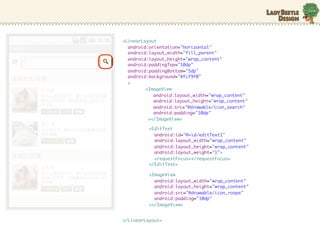
<LinearLayout android:orientation="horizontal"
android:layout_width="fill_parent" android:layout_height="wrap_content" android:paddingTop="10dp" android:paddingBottom="5dp" android:background="#fcf9f0" > <ImageView android:layout_width="wrap_content" android:layout_height="wrap_content" android:src="@drawable/icon_search" android:padding="10dp" ></ImageView> <EditText android:id="@+id/editText1" android:layout_width="wrap_content" android:layout_height="wrap_content" android:layout_weight="1"> <requestFocus></requestFocus> </EditText> <ImageView android:layout_width="wrap_content" android:layout_height="wrap_content" android:src="@drawable/icon_roope" android:padding="10dp" ></ImageView> </LinearLayout>
36.
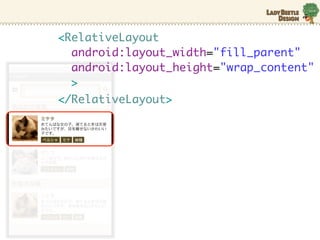
<RelativeLayout android:layout_width="fill_parent"
android:layout_height="wrap_content" > </RelativeLayout>
37.
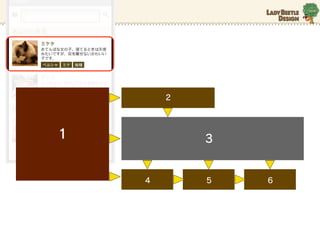
2 1
3 4 5 6
38.
RelativeLayoutは わりとなんでもできそう
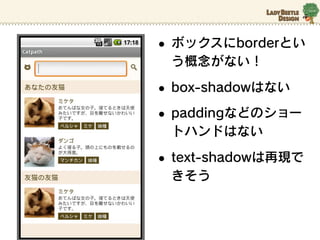
40.
• ボックスにborderとい う概念がない! •
box-shadowはない • paddingなどのショー トハンドはない • text-shadowは再現で きそう
41.
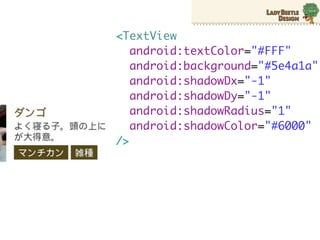
<TextView
android:textColor="#FFF" android:background="#5e4a1a" android:shadowDx="-1" android:shadowDy="-1" android:shadowRadius="1" android:shadowColor="#6000" />
42.
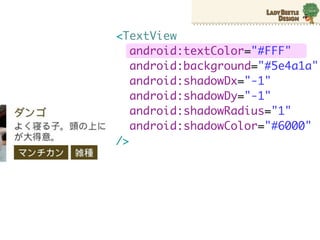
<TextView
android:textColor="#FFF" android:background="#5e4a1a" android:shadowDx="-1" android:shadowDy="-1" android:shadowRadius="1" android:shadowColor="#6000" />
43.
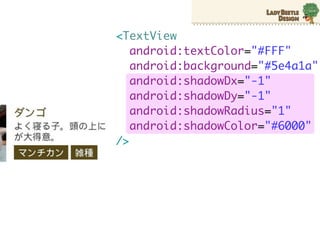
<TextView
android:textColor="#FFF" android:background="#5e4a1a" android:shadowDx="-1" android:shadowDy="-1" android:shadowRadius="1" android:shadowColor="#6000" />
45.
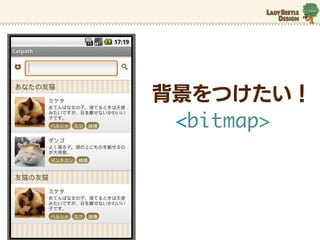
背景をつけたい! <bitmap>
46.
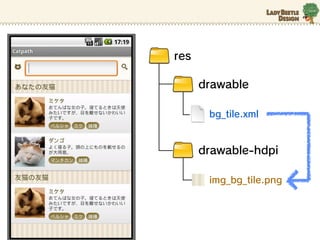
res
drawable bg_tile.xml drawable-hdpi img_bg_tile.png
47.
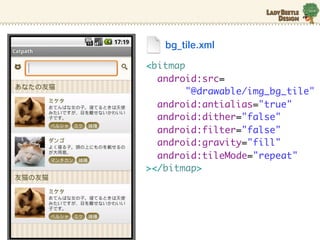
bg_tile.xml <bitmap android:src=
"@drawable/img_bg_tile" android:antialias="true" android:dither="false" android:filter="false" android:gravity="fill" android:tileMode="repeat" ></bitmap>
48.
bg_tile.xml <bitmap android:src=
"@drawable/img_bg_tile" android:antialias="true" android:dither="false" android:filter="false" android:gravity="fill" android:tileMode="repeat" ></bitmap> img_bg_tile.png
49.
bg_tile.xml <bitmap android:src=
"@drawable/img_bg_tile" android:antialias="true" android:dither="false" android:filter="false" android:gravity="fill" android:tileMode="repeat" ></bitmap> img_bg_tile.png
50.
main.xml <LinearLayout android:background=
"@drawable/bg_tile" > bg_tile.xml
51.
グラーデーション
境界線 角丸 <shape>
52.
res
drawable bg_tile.xml drawable-hdpi img_bg_tile.png
53.
res
drawable bg_tile.xml bg_kind.xml drawable-hdpi img_bg_tile.png
54.
bg_kind.xml <shape android:shape="rectangle"> <gradient
android:startColor="#856f2e" android:endColor="#b0a278" android:angle="270" ></gradient> <stroke android:width="1dp" android:color="#856f2e" /> <corners android:radius="10dp" /> </shape>
55.
bg_kind.xml <shape android:shape="rectangle"> <gradient
android:startColor="#856f2e" android:endColor="#b0a278" android:angle="270" ></gradient> <stroke android:width="1dp" android:color="#856f2e" /> <corners android:radius="10dp" /> </shape>
56.
bg_kind.xml <shape android:shape="rectangle"> <gradient
android:startColor="#856f2e" android:endColor="#b0a278" android:angle="270" ></gradient> <stroke android:width="1dp" android:color="#856f2e" /> <corners android:radius="10dp" /> </shape>
57.
bg_kind.xml <shape android:shape="rectangle"> <gradient
android:startColor="#856f2e" android:endColor="#b0a278" android:angle="270" ></gradient> <stroke android:width="1dp" android:color="#856f2e" /> <corners android:radius="10dp" /> </shape>
58.
main.xml <LinearLayout android:background=
"@drawable/bg_kind" > bg_kind.xml
61.
10月17日
12月14日 17:00∼22:00 15日 赤井さんに 自分で レクチャー やってみた していただく
62.
とにかくまる1日
63.
アプリとして実機で 見れるとさいこーに 気分がいい
64.
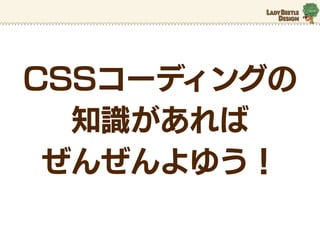
CSSコーディングの 知識があれば
ぜんぜんよゆう!
65.
ぜひ!
Download



![[ABC2012S]Android2x/3x/4x対応アプリ開発Tips](https://cdn.slidesharecdn.com/ss_thumbnails/abc2012sandroid234kanbara-120324082804-phpapp02-thumbnail.jpg?width=640&height=640&fit=bounds)


