HTC 2012
                             Connector Training
                             Ralf Nientiedt
Innovation   Intelligence®
                             May 15th, 2012
Copyright © 2012 Altair Engineering, Inc. Proprietary and Confidential. All rights reserved.


Agenda Connector Training

•         Introduction
            •  What are Connectors? Why to use them? How do they work?
•         New connector panel structure
           •  Where to create the connectors?
           •  Final connection routines for
                                 •         Spots / Seams
                                 •         Bolts
•         Live demonstrations
            •  Connector Browser
            •  Part Replacement (reconnect rules)
            •  Spot, Seam, Bolt Mesh Imprint and resolve conflicts
            •  Seam Partitioning
            •  et. al
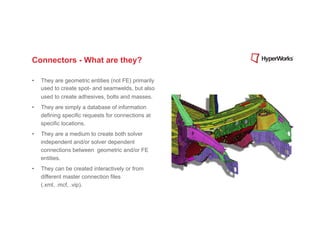
Connectors - What are they?

•    They are geometric entities (not FE) primarily
     used to create spot- and seamwelds, but also
     used to create adhesives, bolts and masses.
•    They are simply a database of information
     defining specific requests for connections at
     specific locations.
•    They are a medium to create both solver
     independent and/or solver dependent
     connections between geometric and/or FE
     entities.
•    They can be created interactively or from
     different master connection files
     (.xml, .mcf, .vip).
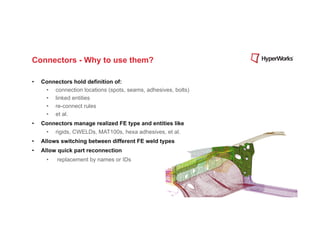
Connectors - Why to use them?

•    Connectors hold definition of:
      •  connection locations (spots, seams, adhesives, bolts)
      •  linked entities
      •  re-connect rules
      •  et al.
•    Connectors manage realized FE type and entities like
       •    rigids, CWELDs, MAT100s, hexa adhesives, et al.
•    Allows switching between different FE weld types
•    Allow quick part reconnection
       •    replacement by names or IDs
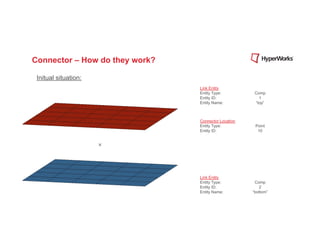
Connector – How do they work?

 Initual situation:
                                Link Entity
                                Entity Type:          Comp
                                Entity ID:              1
                                Entity Name:          “top”


                                Connector Location
                                Entity Type:          Point
                                Entity ID:             10


                                Link Entity
                                Entity Type:          Comp
                                Entity ID:              2
                                Entity Name:         “bottom”
Connector – How do they work?

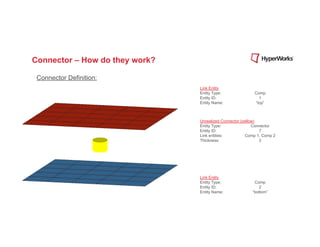
 Connector Definition:
                                Link Entity
                                Entity Type:               Comp
                                Entity ID:                   1
                                Entity Name:               “top”


                                Unrealized Connector (yellow)
                                Entity Type:               Connector
                                Entity ID:                    7
                                Link entities:          Comp 1, Comp 2
                                Thickness:                    2


                                Link Entity
                                Entity Type:               Comp
                                Entity ID:                   2
                                Entity Name:              “bottom”
Connector – How do they work?

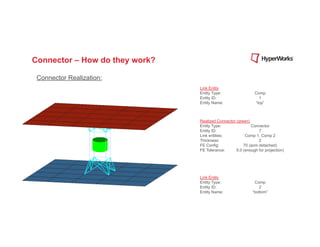
 Connector Realization:
                                Link Entity
                                Entity Type:                  Comp
                                Entity ID:                      1
                                Entity Name:                  “top”


                                Realized Connector (green)
                                Entity Type:               Connector
                                Entity ID:                     7
                                Link entities:          Comp 1, Comp 2
                                Thickness:                     2
                                FE Config:             70 (acm detached)
                                FE Tolerance:      5.0 (enough for projection)


                                Link Entity
                                Entity Type:                 Comp
                                Entity ID:                     2
                                Entity Name:                “bottom”
Connector – How do they work?

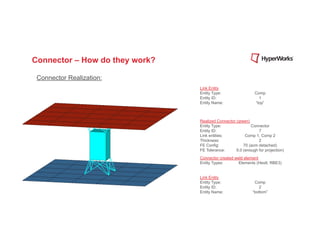
 Connector Realization:
                                Link Entity
                                Entity Type:                  Comp
                                Entity ID:                      1
                                Entity Name:                  “top”


                                Realized Connector (green)
                                Entity Type:               Connector
                                Entity ID:                     7
                                Link entities:          Comp 1, Comp 2
                                Thickness:                     2
                                FE Config:             70 (acm detached)
                                FE Tolerance:      5.0 (enough for projection)
                                Connector created weld element
                                Entity Types:       Elements (Hex8, RBE3)


                                Link Entity
                                Entity Type:                 Comp
                                Entity ID:                     2
                                Entity Name:                “bottom”
Connector – How do they work?

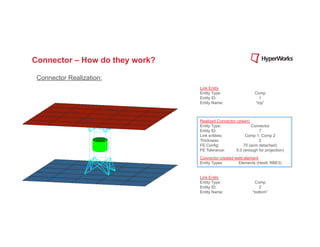
 Connector Realization:
                                Link Entity
                                Entity Type:                  Comp
                                Entity ID:                      1
                                Entity Name:                  “top”


                                Realized Connector (green)
                                Entity Type:               Connector
                                Entity ID:                     7
                                Link entities:          Comp 1, Comp 2
                                Thickness:                     2
                                FE Config:             70 (acm detached)
                                FE Tolerance:      5.0 (enough for projection)
                                Connector created weld element
                                Entity Types:       Elements (Hex8, RBE3)


                                Link Entity
                                Entity Type:                 Comp
                                Entity ID:                     2
                                Entity Name:                “bottom”
Copyright © 2012 Altair Engineering, Inc. Proprietary and Confidential. All rights reserved.


Connector – How do they work?


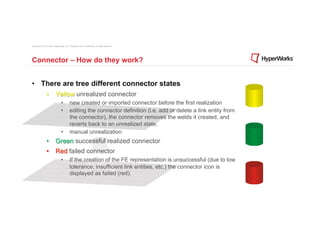
•  There are tree different connector states
                •  Yellow unrealized connector
                                 •         new created or imported connector before the first realization
                                 •         editing the connector definition (i.e. add or delete a link entity from
                                           the connector), the connector removes the welds it created, and
                                           reverts back to an unrealized state.
                                 •         manual unrealization
                •  Green successful realized connector
                •  Red failed connector
                                 •         If the creation of the FE representation is unsuccessful (due to low
                                           tolerance, insufficient link entities, etc.) the connector icon is
                                           displayed as failed (red).
Copyright © 2012 Altair Engineering, Inc. Proprietary and Confidential. All rights reserved.


Connector – How do they work?


•  Separating the FE representation from the connector definition comes
          with a lot of advantages
                •  Connector can easily be re-realized as a weld of a different configuration without
                          redefining it.
                •  If you edit the connector definition (i.e. add or delete a link entity from the
                          connector), the connector removes the welds it created, and reverts back to an
                          unrealized state.
                •  If the creation of the FE representation is unsuccessful (due to low tolerance,
                          insufficient link entities, etc.) the connector icon is displayed as failed (red).
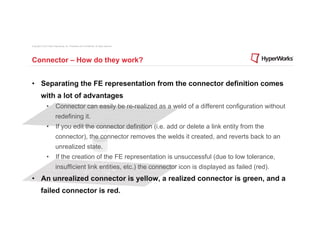
•  An unrealized connector is yellow, a realized connector is green, and a
          failed connector is red.
Copyright © 2012 Altair Engineering, Inc. Proprietary and Confidential. All rights reserved.


Connectors - Where to create them?


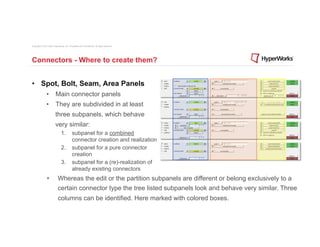
•  Spot, Bolt, Seam, Area Panels
                •  Main connector panels
                •  They are subdivided in at least
                          three subpanels, which behave
                          very similar:
                                 1.  subpanel for a combined
                                     connector creation and realization
                                 2.  subpanel for a pure connector
                                     creation
                                 3.  subpanel for a (re)-realization of
                                     already existing connectors
                 •           Whereas the edit or the partition subpanels are different or belong exclusively to a
                             certain connector type the tree listed subpanels look and behave very similar. Three
                             columns can be identified. Here marked with colored boxes.
Copyright © 2012 Altair Engineering, Inc. Proprietary and Confidential. All rights reserved.


Connectors - Where to create them?


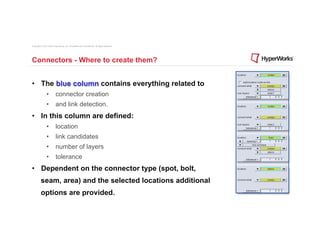
•  The blue column contains everything related to
                •  connector creation
                •  and link detection.
•  In this column are defined:
                •  location
                •  link candidates
                •  number of layers
                •  tolerance
•  Dependent on the connector type (spot, bolt,
          seam, area) and the selected locations additional
          options are provided.
Copyright © 2012 Altair Engineering, Inc. Proprietary and Confidential. All rights reserved.


Connectors - Where to create them?


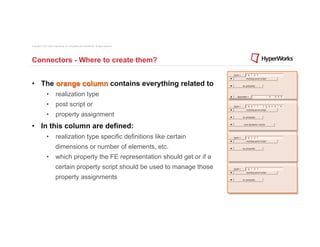
•  The orange column contains everything related to
                •  realization type
                •  post script or
                •  property assignment
•  In this column are defined:
                •  realization type specific definitions like certain
                          dimensions or number of elements, etc.
                •  which property the FE representation should get or if a
                          certain property script should be used to manage those
                          property assignments
Copyright © 2012 Altair Engineering, Inc. Proprietary and Confidential. All rights reserved.


Connectors - Where to create them?


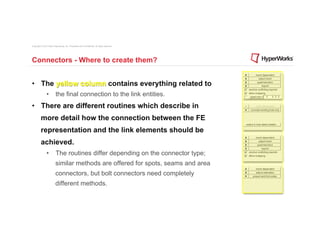
•  The yellow column contains everything related to
                •  the final connection to the link entities.
•  There are different routines which describe in
          more detail how the connection between the FE
          representation and the link elements should be
          achieved.
                •  The routines differ depending on the connector type;
                          similar methods are offered for spots, seams and area
                          connectors, but bolt connectors need completely
                          different methods.
Copyright © 2012 Altair Engineering, Inc. Proprietary and Confidential. All rights reserved.


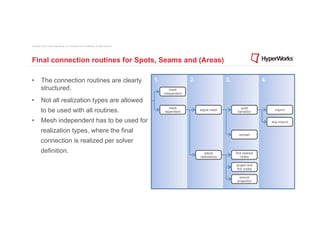
Final connection routines for Spots, Seams and (Areas)

•  The connection routines are clearly                                                         1.                 2.                  3.                  4.
   structured.                                                                                         mesh
                                                                                                    independent

•  Not all realization types are allowed
                                                                                                      mesh                                     quad
          to be used with all routines.                                                             dependent
                                                                                                                       adjust mesh
                                                                                                                                            transition
                                                                                                                                                                 imprint


•  Mesh independent has to be used for                                                                                                                         skip imprint

          realization types, where the final
                                                                                                                                             remesh

          connection is realized per solver
          definition.                                                                                                     adjust           find nearest
                                                                                                                       realizations           nodes

                                                                                                                                           project and
                                                                                                                                           find nodes

                                                                                                                                             ensure
                                                                                                                                            projection
Copyright © 2012 Altair Engineering, Inc. Proprietary and Confidential. All rights reserved.


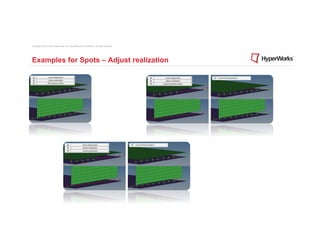
Examples for Spots – Adjust realization
Copyright © 2012 Altair Engineering, Inc. Proprietary and Confidential. All rights reserved.


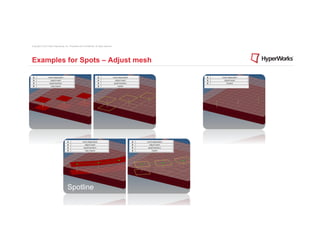
Examples for Spots – Adjust mesh


                                        Spotline
Copyright © 2012 Altair Engineering, Inc. Proprietary and Confidential. All rights reserved.


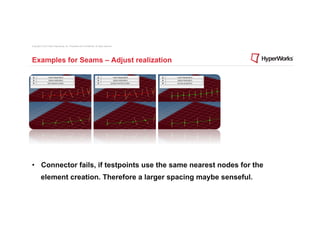
Examples for Seams – Adjust realization


•  Connector fails, if testpoints use the same nearest nodes for the
          element creation. Therefore a larger spacing maybe senseful.
Copyright © 2012 Altair Engineering, Inc. Proprietary and Confidential. All rights reserved.


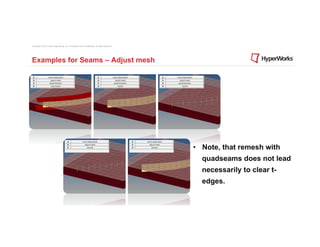
Examples for Seams – Adjust mesh


                                                                                               •  Note, that remesh with
                                                                                                 quadseams does not lead
                                                                                                 necessarily to clear t-
                                                                                                 edges.
Copyright © 2012 Altair Engineering, Inc. Proprietary and Confidential. All rights reserved.


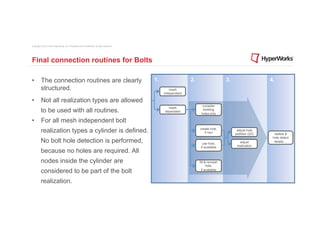
Final connection routines for Bolts

•  The connection routines are clearly                                                         1.                 2.                   3.                   4.
   structured.                                                                                         mesh
                                                                                                    independent

•  Not all realization types are allowed
                                                                                                                         consider
                                                                                                      mesh
          to be used with all routines.                                                             dependent
                                                                                                                         existing
                                                                                                                        holes only

•  For all mesh independent bolt
          realization types a cylinder is defined.                                                                     create hole,
                                                                                                                          if non
                                                                                                                                             adjust hole
                                                                                                                                            position (2D)     realize &
                                                                                                                                                             hole detect
          No bolt hole detection is performed,                                                                          use hole,              adjust         details . .
                                                                                                                       if available          realization
          because no holes are required. All
          nodes inside the cylinder are                                                                                fill & remesh
                                                                                                                             hole,
          considered to be part of the bolt                                                                             if available


          realization.
Copyright © 2012 Altair Engineering, Inc. Proprietary and Confidential. All rights reserved.


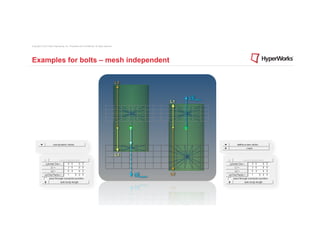
Examples for bolts – mesh independent
Copyright © 2012 Altair Engineering, Inc. Proprietary and Confidential. All rights reserved.


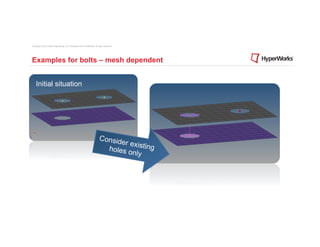
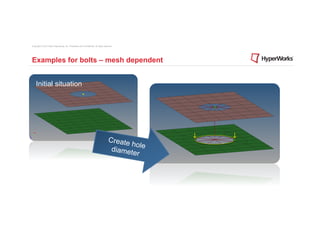
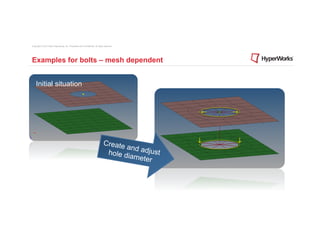
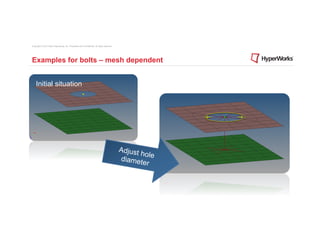
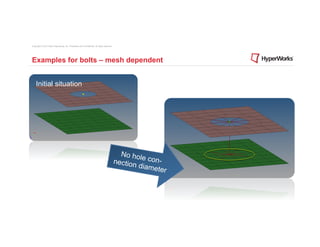
Examples for bolts – mesh dependent


    Initial situation


                                                                             Consid
                                                                                    e r e xi s
                                                                               holes o ting
                                                                                         nly
Copyright © 2012 Altair Engineering, Inc. Proprietary and Confidential. All rights reserved.


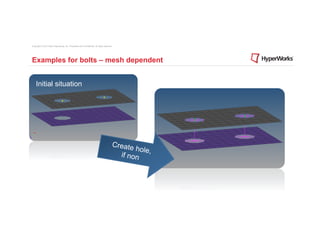
Examples for bolts – mesh dependent


    Initial situation


                                                                                           Create
                                                                                                  hole,
                                                                                             if non
Copyright © 2012 Altair Engineering, Inc. Proprietary and Confidential. All rights reserved.


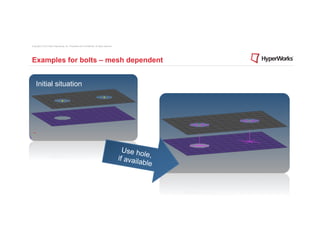
Examples for bolts – mesh dependent


    Initial situation


                                                                                                 Use ho
                                                                                                        le
                                                                                               if availa ,
                                                                                                        ble
Copyright © 2012 Altair Engineering, Inc. Proprietary and Confidential. All rights reserved.


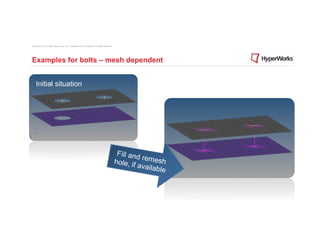
Examples for bolts – mesh dependent


    Initial situation


                                                                                                Fill and
                                                                                                         r
                                                                                               hole, if emesh
                                                                                                       availab
                                                                                                               le
Copyright © 2012 Altair Engineering, Inc. Proprietary and Confidential. All rights reserved.


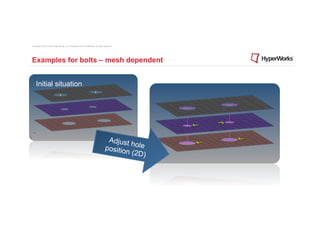
Examples for bolts – mesh dependent


    Initial situation


                                                                                    Adjust
                                                                                           h
                                                                                   position ole
                                                                                           (2D)
Copyright © 2012 Altair Engineering, Inc. Proprietary and Confidential. All rights reserved.


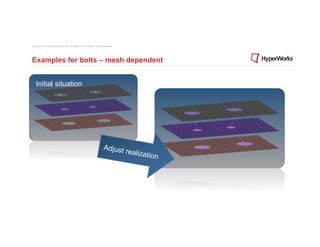
Examples for bolts – mesh dependent


    Initial situation


                                                                                  Adjust
                                                                                               realiza
                                                                                                         tion
Copyright © 2012 Altair Engineering, Inc. Proprietary and Confidential. All rights reserved.


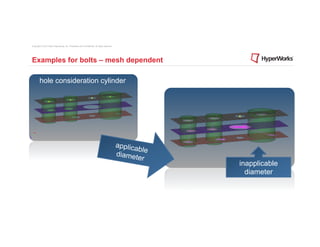
Examples for bolts – mesh dependent

        hole consideration cylinder


                                                                                               applica
                                                                                                          ble
                                                                                               d i a me t
                                                                                                         er
                                                                                                                inapplicable
                                                                                                                  diameter
Copyright © 2012 Altair Engineering, Inc. Proprietary and Confidential. All rights reserved.


Examples for bolts – mesh dependent


    Initial situation


                                                                                       Create
                                                                                                 hol
                                                                                        d i a me t e
                                                                                                  er
Copyright © 2012 Altair Engineering, Inc. Proprietary and Confidential. All rights reserved.


Examples for bolts – mesh dependent


    Initial situation


                                                                                 Create
                                                                                        and ad
                                                                                  hole di      just
                                                                                          ameter
Copyright © 2012 Altair Engineering, Inc. Proprietary and Confidential. All rights reserved.


Examples for bolts – mesh dependent


    Initial situation


                                                                                               Adjust
                                                                                                        hol
                                                                                               d i a me t e
                                                                                                         er
Copyright © 2012 Altair Engineering, Inc. Proprietary and Confidential. All rights reserved.


Examples for bolts – mesh dependent


    Initial situation


                                                                                                 No hole
                                                                                               nection    con-
                                                                                                       diamet
                                                                                                             er
Copyright © 2012 Altair Engineering, Inc. Proprietary and Confidential. All rights reserved.


Examples for bolts – mesh dependent


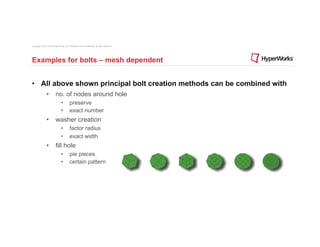
•  All above shown principal bolt creation methods can be combined with
                •  no. of nodes around hole
                                 •         preserve
                                 •         exact number
                •  washer creation
                                 •         factor radius
                                 •         exact width
                •  fill hole
                                 •         pie pieces
                                 •         certain pattern
Demonstrations
Innovation Intelligence®
Connector Browser
Innovation Intelligence®
Copyright © 2012 Altair Engineering, Inc. Proprietary and Confidential. All rights reserved.


Connector Browser


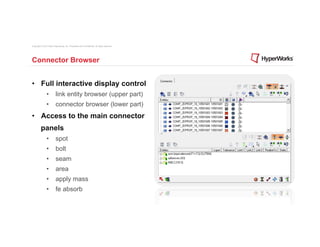
•  Full interactive display control
                •  link entity browser (upper part)
                •  connector browser (lower part)
•  Access to the main connector
          panels
                •  spot
                •  bolt
                •  seam
                •  area
                •  apply mass
                •  fe absorb
Connector Browser
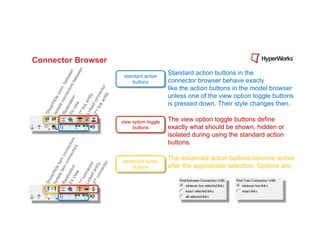
                     standard action
                                         Standard action buttons in the
                         buttons         connector browser behave exacly
                                         like the action buttons in the model browser
                                         unless one of the view option toggle buttons
                                         is pressed down. Their style changes then.

                    view option toggle   The view option toggle buttons define
                         buttons         exactly what should be shown, hidden or
                                         isolated during using the standard action
                                         buttons.

                    advanced action
                                         The advanced action buttons become active
                        buttons          after the appropriate selection. Options are:
Change realization type
                           Replace part
Innovation Intelligence®
1D connections
                           •  nearest node
Innovation Intelligence®   •  various imprints
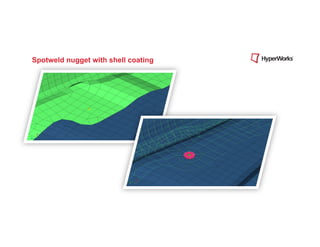
Spotweld nugget with shell coating
Copyright © 2012 Altair Engineering, Inc. Proprietary and Confidential. All rights reserved.


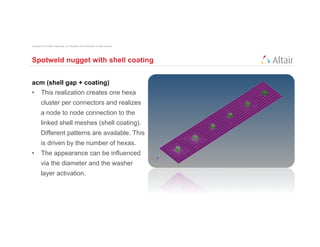
Spotweld nugget with shell coating


acm (shell gap + coating)
•  This realization creates one hexa
          cluster per connectors and realizes
          a node to node connection to the
          linked shell meshes (shell coating).
          Different patterns are available. This
          is driven by the number of hexas.
•  The appearance can be influenced
          via the diameter and the washer
          layer activation.
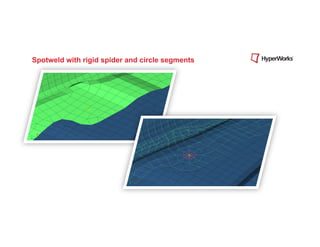
Spotweld with rigid spider and circle segments
Copyright © 2012 Altair Engineering, Inc. Proprietary and Confidential. All rights reserved.


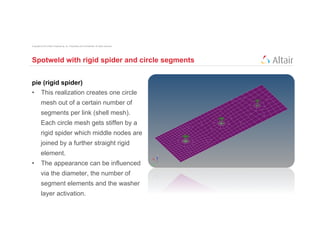
Spotweld with rigid spider and circle segments


pie (rigid spider)
•  This realization creates one circle
          mesh out of a certain number of
          segments per link (shell mesh).
          Each circle mesh gets stiffen by a
          rigid spider which middle nodes are
          joined by a further straight rigid
          element.
•  The appearance can be influenced
          via the diameter, the number of
          segment elements and the washer
          layer activation.
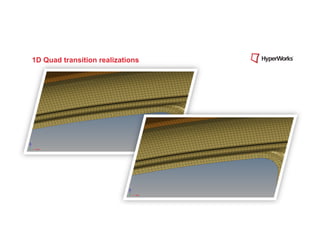
1D Quad transition realizations
2D connections
                           •    various imprints
Innovation Intelligence®
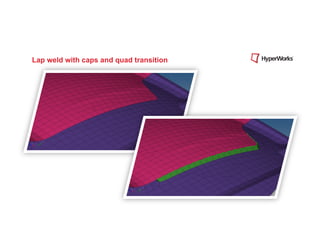
Lap weld with caps and quad transition
Copyright © 2012 Altair Engineering, Inc. Proprietary and Confidential. All rights reserved.


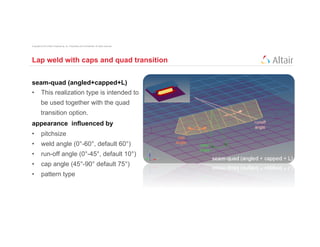
Lap weld with caps and quad transition


seam-quad (angled+capped+L)
•  This realization type is intended to
          be used together with the quad
          transition option.
appearance influenced by
•  pitchsize
•  weld angle (0°-60°, default 60°)
•  run-off angle (0°-45°, default 10°)
•  cap angle (45°-90° default 75°)
•  pattern type
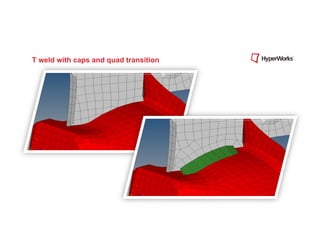
T weld with caps and quad transition
Copyright © 2012 Altair Engineering, Inc. Proprietary and Confidential. All rights reserved.


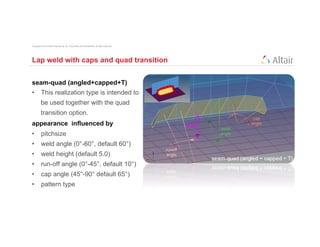
Lap weld with caps and quad transition


seam-quad (angled+capped+T)
•  This realization type is intended to
          be used together with the quad
          transition option.
appearance influenced by
•  pitchsize
•  weld angle (0°-60°, default 60°)
•  weld height (default 5.0)
•  run-off angle (0°-45°, default 10°)
•  cap angle (45°-90° default 65°)
•  pattern type
2D connections
                           •    conflicting imprints
Innovation Intelligence®
Copyright © 2012 Altair Engineering, Inc. Proprietary and Confidential. All rights reserved.


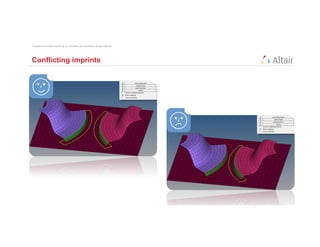
Conflicting imprints
Copyright © 2012 Altair Engineering, Inc. Proprietary and Confidential. All rights reserved.


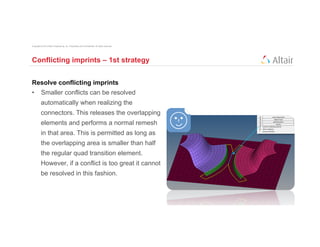
Conflicting imprints – 1st strategy


Resolve conflicting imprints
•  Smaller conflicts can be resolved
          automatically when realizing the
          connectors. This releases the overlapping
          elements and performs a normal remesh
          in that area. This is permitted as long as
          the overlapping area is smaller than half
          the regular quad transition element.
          However, if a conflict is too great it cannot
          be resolved in this fashion.
Copyright © 2012 Altair Engineering, Inc. Proprietary and Confidential. All rights reserved.


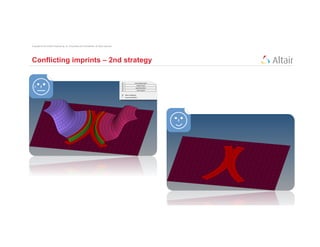
Conflicting imprints – 2nd strategy
Copyright © 2012 Altair Engineering, Inc. Proprietary and Confidential. All rights reserved.


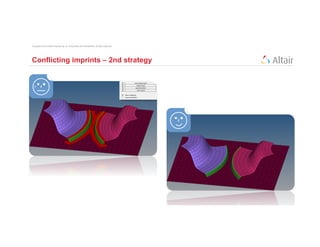
Conflicting imprints – 2nd strategy
Copyright © 2012 Altair Engineering, Inc. Proprietary and Confidential. All rights reserved.


Conflicting imprints – 2nd strategy


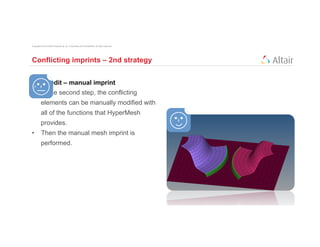
Mesh edit – manual imprint
•  In the second step, the conflicting
          elements can be manually modified with
          all of the functions that HyperMesh
          provides.
•  Then the manual mesh imprint is
          performed.
2D connections
                           •    bolt imprint
Innovation Intelligence®
Seam Partition
Innovation Intelligence®
Copyright © 2012 Altair Engineering, Inc. Proprietary and Confidential. All rights reserved.


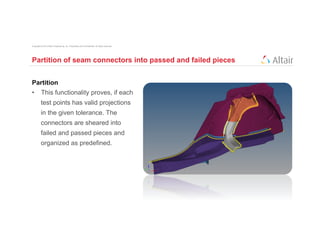
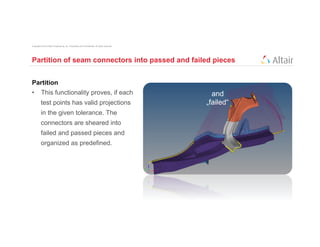
Partition of seam connectors into passed and failed pieces


Partition
•  This functionality proves, if each
          test points has valid projections
          in the given tolerance. The
          connectors are sheared into
          failed and passed pieces and
          organized as predefined.
Copyright © 2012 Altair Engineering, Inc. Proprietary and Confidential. All rights reserved.


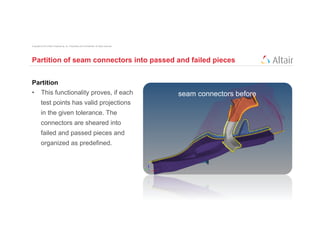
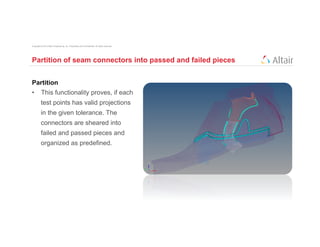
Partition of seam connectors into passed and failed pieces


Partition
•  This functionality proves, if each                                                          seam connectors before
          test points has valid projections
          in the given tolerance. The
          connectors are sheared into
          failed and passed pieces and
          organized as predefined.
Copyright © 2012 Altair Engineering, Inc. Proprietary and Confidential. All rights reserved.


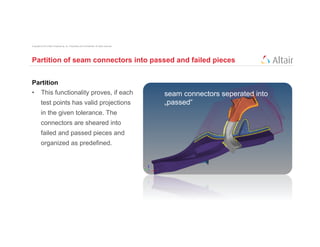
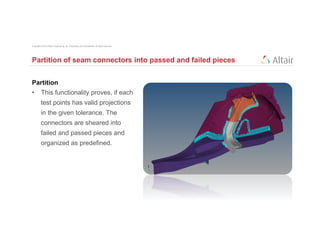
Partition of seam connectors into passed and failed pieces


Partition
•  This functionality proves, if each                                                          seam connectors seperated into
          test points has valid projections                                                    „passed“
          in the given tolerance. The
          connectors are sheared into
          failed and passed pieces and
          organized as predefined.
Copyright © 2012 Altair Engineering, Inc. Proprietary and Confidential. All rights reserved.


Partition of seam connectors into passed and failed pieces


Partition
•  This functionality proves, if each                                                            and
          test points has valid projections                                                    „failed“
          in the given tolerance. The
          connectors are sheared into
          failed and passed pieces and
          organized as predefined.
Copyright © 2012 Altair Engineering, Inc. Proprietary and Confidential. All rights reserved.


Partition of seam connectors into passed and failed pieces


Partition
•  This functionality proves, if each
          test points has valid projections
          in the given tolerance. The
          connectors are sheared into
          failed and passed pieces and
          organized as predefined.
Copyright © 2012 Altair Engineering, Inc. Proprietary and Confidential. All rights reserved.


Partition of seam connectors into passed and failed pieces


Partition
•  This functionality proves, if each
          test points has valid projections
          in the given tolerance. The
          connectors are sheared into
          failed and passed pieces and
          organized as predefined.
Copyright © 2012 Altair Engineering, Inc. Proprietary and Confidential. All rights reserved.


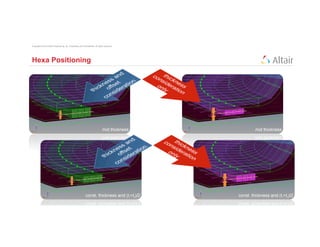
Hexa Positioning
Copyright © 2012 Altair Engineering, Inc. Proprietary and Confidential. All rights reserved.


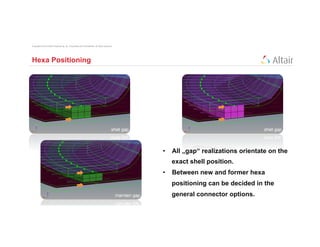
Hexa Positioning


                                                                                               •  All „gap“ realizations orientate on the
                                                                                                 exact shell position.
                                                                                               •  Between new and former hexa
                                                                                                 positioning can be decided in the
                                                                                                 general connector options.
Link Conservation
Innovation Intelligence®
Copyright © 2012 Altair Engineering, Inc. Proprietary and Confidential. All rights reserved.


Thank you!

AltaiHTC 2012 Connector Training

  • 1.
    HTC 2012 Connector Training Ralf Nientiedt Innovation Intelligence® May 15th, 2012
  • 2.
    Copyright © 2012Altair Engineering, Inc. Proprietary and Confidential. All rights reserved. Agenda Connector Training •  Introduction •  What are Connectors? Why to use them? How do they work? •  New connector panel structure •  Where to create the connectors? •  Final connection routines for •  Spots / Seams •  Bolts •  Live demonstrations •  Connector Browser •  Part Replacement (reconnect rules) •  Spot, Seam, Bolt Mesh Imprint and resolve conflicts •  Seam Partitioning •  et. al
  • 3.
    Connectors - Whatare they? •  They are geometric entities (not FE) primarily used to create spot- and seamwelds, but also used to create adhesives, bolts and masses. •  They are simply a database of information defining specific requests for connections at specific locations. •  They are a medium to create both solver independent and/or solver dependent connections between geometric and/or FE entities. •  They can be created interactively or from different master connection files (.xml, .mcf, .vip).
  • 4.
    Connectors - Whyto use them? •  Connectors hold definition of: •  connection locations (spots, seams, adhesives, bolts) •  linked entities •  re-connect rules •  et al. •  Connectors manage realized FE type and entities like •  rigids, CWELDs, MAT100s, hexa adhesives, et al. •  Allows switching between different FE weld types •  Allow quick part reconnection •  replacement by names or IDs
  • 5.
    Connector – Howdo they work? Initual situation: Link Entity Entity Type: Comp Entity ID: 1 Entity Name: “top” Connector Location Entity Type: Point Entity ID: 10 Link Entity Entity Type: Comp Entity ID: 2 Entity Name: “bottom”
  • 6.
    Connector – Howdo they work? Connector Definition: Link Entity Entity Type: Comp Entity ID: 1 Entity Name: “top” Unrealized Connector (yellow) Entity Type: Connector Entity ID: 7 Link entities: Comp 1, Comp 2 Thickness: 2 Link Entity Entity Type: Comp Entity ID: 2 Entity Name: “bottom”
  • 7.
    Connector – Howdo they work? Connector Realization: Link Entity Entity Type: Comp Entity ID: 1 Entity Name: “top” Realized Connector (green) Entity Type: Connector Entity ID: 7 Link entities: Comp 1, Comp 2 Thickness: 2 FE Config: 70 (acm detached) FE Tolerance: 5.0 (enough for projection) Link Entity Entity Type: Comp Entity ID: 2 Entity Name: “bottom”
  • 8.
    Connector – Howdo they work? Connector Realization: Link Entity Entity Type: Comp Entity ID: 1 Entity Name: “top” Realized Connector (green) Entity Type: Connector Entity ID: 7 Link entities: Comp 1, Comp 2 Thickness: 2 FE Config: 70 (acm detached) FE Tolerance: 5.0 (enough for projection) Connector created weld element Entity Types: Elements (Hex8, RBE3) Link Entity Entity Type: Comp Entity ID: 2 Entity Name: “bottom”
  • 9.
    Connector – Howdo they work? Connector Realization: Link Entity Entity Type: Comp Entity ID: 1 Entity Name: “top” Realized Connector (green) Entity Type: Connector Entity ID: 7 Link entities: Comp 1, Comp 2 Thickness: 2 FE Config: 70 (acm detached) FE Tolerance: 5.0 (enough for projection) Connector created weld element Entity Types: Elements (Hex8, RBE3) Link Entity Entity Type: Comp Entity ID: 2 Entity Name: “bottom”
  • 10.
    Copyright © 2012Altair Engineering, Inc. Proprietary and Confidential. All rights reserved. Connector – How do they work? •  There are tree different connector states •  Yellow unrealized connector •  new created or imported connector before the first realization •  editing the connector definition (i.e. add or delete a link entity from the connector), the connector removes the welds it created, and reverts back to an unrealized state. •  manual unrealization •  Green successful realized connector •  Red failed connector •  If the creation of the FE representation is unsuccessful (due to low tolerance, insufficient link entities, etc.) the connector icon is displayed as failed (red).
  • 11.
    Copyright © 2012Altair Engineering, Inc. Proprietary and Confidential. All rights reserved. Connector – How do they work? •  Separating the FE representation from the connector definition comes with a lot of advantages •  Connector can easily be re-realized as a weld of a different configuration without redefining it. •  If you edit the connector definition (i.e. add or delete a link entity from the connector), the connector removes the welds it created, and reverts back to an unrealized state. •  If the creation of the FE representation is unsuccessful (due to low tolerance, insufficient link entities, etc.) the connector icon is displayed as failed (red). •  An unrealized connector is yellow, a realized connector is green, and a failed connector is red.
  • 12.
    Copyright © 2012Altair Engineering, Inc. Proprietary and Confidential. All rights reserved. Connectors - Where to create them? •  Spot, Bolt, Seam, Area Panels •  Main connector panels •  They are subdivided in at least three subpanels, which behave very similar: 1.  subpanel for a combined connector creation and realization 2.  subpanel for a pure connector creation 3.  subpanel for a (re)-realization of already existing connectors •  Whereas the edit or the partition subpanels are different or belong exclusively to a certain connector type the tree listed subpanels look and behave very similar. Three columns can be identified. Here marked with colored boxes.
  • 13.
    Copyright © 2012Altair Engineering, Inc. Proprietary and Confidential. All rights reserved. Connectors - Where to create them? •  The blue column contains everything related to •  connector creation •  and link detection. •  In this column are defined: •  location •  link candidates •  number of layers •  tolerance •  Dependent on the connector type (spot, bolt, seam, area) and the selected locations additional options are provided.
  • 14.
    Copyright © 2012Altair Engineering, Inc. Proprietary and Confidential. All rights reserved. Connectors - Where to create them? •  The orange column contains everything related to •  realization type •  post script or •  property assignment •  In this column are defined: •  realization type specific definitions like certain dimensions or number of elements, etc. •  which property the FE representation should get or if a certain property script should be used to manage those property assignments
  • 15.
    Copyright © 2012Altair Engineering, Inc. Proprietary and Confidential. All rights reserved. Connectors - Where to create them? •  The yellow column contains everything related to •  the final connection to the link entities. •  There are different routines which describe in more detail how the connection between the FE representation and the link elements should be achieved. •  The routines differ depending on the connector type; similar methods are offered for spots, seams and area connectors, but bolt connectors need completely different methods.
  • 16.
    Copyright © 2012Altair Engineering, Inc. Proprietary and Confidential. All rights reserved. Final connection routines for Spots, Seams and (Areas) •  The connection routines are clearly 1. 2. 3. 4. structured. mesh independent •  Not all realization types are allowed mesh quad to be used with all routines. dependent adjust mesh transition imprint •  Mesh independent has to be used for skip imprint realization types, where the final remesh connection is realized per solver definition. adjust find nearest realizations nodes project and find nodes ensure projection
  • 17.
    Copyright © 2012Altair Engineering, Inc. Proprietary and Confidential. All rights reserved. Examples for Spots – Adjust realization
  • 18.
    Copyright © 2012Altair Engineering, Inc. Proprietary and Confidential. All rights reserved. Examples for Spots – Adjust mesh Spotline
  • 19.
    Copyright © 2012Altair Engineering, Inc. Proprietary and Confidential. All rights reserved. Examples for Seams – Adjust realization •  Connector fails, if testpoints use the same nearest nodes for the element creation. Therefore a larger spacing maybe senseful.
  • 20.
    Copyright © 2012Altair Engineering, Inc. Proprietary and Confidential. All rights reserved. Examples for Seams – Adjust mesh •  Note, that remesh with quadseams does not lead necessarily to clear t- edges.
  • 21.
    Copyright © 2012Altair Engineering, Inc. Proprietary and Confidential. All rights reserved. Final connection routines for Bolts •  The connection routines are clearly 1. 2. 3. 4. structured. mesh independent •  Not all realization types are allowed consider mesh to be used with all routines. dependent existing holes only •  For all mesh independent bolt realization types a cylinder is defined. create hole, if non adjust hole position (2D) realize & hole detect No bolt hole detection is performed, use hole, adjust details . . if available realization because no holes are required. All nodes inside the cylinder are fill & remesh hole, considered to be part of the bolt if available realization.
  • 22.
    Copyright © 2012Altair Engineering, Inc. Proprietary and Confidential. All rights reserved. Examples for bolts – mesh independent
  • 23.
    Copyright © 2012Altair Engineering, Inc. Proprietary and Confidential. All rights reserved. Examples for bolts – mesh dependent Initial situation Consid e r e xi s holes o ting nly
  • 24.
    Copyright © 2012Altair Engineering, Inc. Proprietary and Confidential. All rights reserved. Examples for bolts – mesh dependent Initial situation Create hole, if non
  • 25.
    Copyright © 2012Altair Engineering, Inc. Proprietary and Confidential. All rights reserved. Examples for bolts – mesh dependent Initial situation Use ho le if availa , ble
  • 26.
    Copyright © 2012Altair Engineering, Inc. Proprietary and Confidential. All rights reserved. Examples for bolts – mesh dependent Initial situation Fill and r hole, if emesh availab le
  • 27.
    Copyright © 2012Altair Engineering, Inc. Proprietary and Confidential. All rights reserved. Examples for bolts – mesh dependent Initial situation Adjust h position ole (2D)
  • 28.
    Copyright © 2012Altair Engineering, Inc. Proprietary and Confidential. All rights reserved. Examples for bolts – mesh dependent Initial situation Adjust realiza tion
  • 29.
    Copyright © 2012Altair Engineering, Inc. Proprietary and Confidential. All rights reserved. Examples for bolts – mesh dependent hole consideration cylinder applica ble d i a me t er inapplicable diameter
  • 30.
    Copyright © 2012Altair Engineering, Inc. Proprietary and Confidential. All rights reserved. Examples for bolts – mesh dependent Initial situation Create hol d i a me t e er
  • 31.
    Copyright © 2012Altair Engineering, Inc. Proprietary and Confidential. All rights reserved. Examples for bolts – mesh dependent Initial situation Create and ad hole di just ameter
  • 32.
    Copyright © 2012Altair Engineering, Inc. Proprietary and Confidential. All rights reserved. Examples for bolts – mesh dependent Initial situation Adjust hol d i a me t e er
  • 33.
    Copyright © 2012Altair Engineering, Inc. Proprietary and Confidential. All rights reserved. Examples for bolts – mesh dependent Initial situation No hole nection con- diamet er
  • 34.
    Copyright © 2012Altair Engineering, Inc. Proprietary and Confidential. All rights reserved. Examples for bolts – mesh dependent •  All above shown principal bolt creation methods can be combined with •  no. of nodes around hole •  preserve •  exact number •  washer creation •  factor radius •  exact width •  fill hole •  pie pieces •  certain pattern
  • 35.
  • 36.
  • 37.
    Copyright © 2012Altair Engineering, Inc. Proprietary and Confidential. All rights reserved. Connector Browser •  Full interactive display control •  link entity browser (upper part) •  connector browser (lower part) •  Access to the main connector panels •  spot •  bolt •  seam •  area •  apply mass •  fe absorb
  • 38.
    Connector Browser standard action Standard action buttons in the buttons connector browser behave exacly like the action buttons in the model browser unless one of the view option toggle buttons is pressed down. Their style changes then. view option toggle The view option toggle buttons define buttons exactly what should be shown, hidden or isolated during using the standard action buttons. advanced action The advanced action buttons become active buttons after the appropriate selection. Options are:
  • 39.
    Change realization type Replace part Innovation Intelligence®
  • 40.
    1D connections •  nearest node Innovation Intelligence® •  various imprints
  • 41.
    Spotweld nugget withshell coating
  • 42.
    Copyright © 2012Altair Engineering, Inc. Proprietary and Confidential. All rights reserved. Spotweld nugget with shell coating acm (shell gap + coating) •  This realization creates one hexa cluster per connectors and realizes a node to node connection to the linked shell meshes (shell coating). Different patterns are available. This is driven by the number of hexas. •  The appearance can be influenced via the diameter and the washer layer activation.
  • 43.
    Spotweld with rigidspider and circle segments
  • 44.
    Copyright © 2012Altair Engineering, Inc. Proprietary and Confidential. All rights reserved. Spotweld with rigid spider and circle segments pie (rigid spider) •  This realization creates one circle mesh out of a certain number of segments per link (shell mesh). Each circle mesh gets stiffen by a rigid spider which middle nodes are joined by a further straight rigid element. •  The appearance can be influenced via the diameter, the number of segment elements and the washer layer activation.
  • 45.
    1D Quad transitionrealizations
  • 46.
    2D connections •  various imprints Innovation Intelligence®
  • 47.
    Lap weld withcaps and quad transition
  • 48.
    Copyright © 2012Altair Engineering, Inc. Proprietary and Confidential. All rights reserved. Lap weld with caps and quad transition seam-quad (angled+capped+L) •  This realization type is intended to be used together with the quad transition option. appearance influenced by •  pitchsize •  weld angle (0°-60°, default 60°) •  run-off angle (0°-45°, default 10°) •  cap angle (45°-90° default 75°) •  pattern type
  • 49.
    T weld withcaps and quad transition
  • 50.
    Copyright © 2012Altair Engineering, Inc. Proprietary and Confidential. All rights reserved. Lap weld with caps and quad transition seam-quad (angled+capped+T) •  This realization type is intended to be used together with the quad transition option. appearance influenced by •  pitchsize •  weld angle (0°-60°, default 60°) •  weld height (default 5.0) •  run-off angle (0°-45°, default 10°) •  cap angle (45°-90° default 65°) •  pattern type
  • 51.
    2D connections •  conflicting imprints Innovation Intelligence®
  • 52.
    Copyright © 2012Altair Engineering, Inc. Proprietary and Confidential. All rights reserved. Conflicting imprints
  • 53.
    Copyright © 2012Altair Engineering, Inc. Proprietary and Confidential. All rights reserved. Conflicting imprints – 1st strategy Resolve conflicting imprints •  Smaller conflicts can be resolved automatically when realizing the connectors. This releases the overlapping elements and performs a normal remesh in that area. This is permitted as long as the overlapping area is smaller than half the regular quad transition element. However, if a conflict is too great it cannot be resolved in this fashion.
  • 54.
    Copyright © 2012Altair Engineering, Inc. Proprietary and Confidential. All rights reserved. Conflicting imprints – 2nd strategy
  • 55.
    Copyright © 2012Altair Engineering, Inc. Proprietary and Confidential. All rights reserved. Conflicting imprints – 2nd strategy
  • 56.
    Copyright © 2012Altair Engineering, Inc. Proprietary and Confidential. All rights reserved. Conflicting imprints – 2nd strategy Mesh edit – manual imprint •  In the second step, the conflicting elements can be manually modified with all of the functions that HyperMesh provides. •  Then the manual mesh imprint is performed.
  • 57.
    2D connections •  bolt imprint Innovation Intelligence®
  • 58.
  • 59.
    Copyright © 2012Altair Engineering, Inc. Proprietary and Confidential. All rights reserved. Partition of seam connectors into passed and failed pieces Partition •  This functionality proves, if each test points has valid projections in the given tolerance. The connectors are sheared into failed and passed pieces and organized as predefined.
  • 60.
    Copyright © 2012Altair Engineering, Inc. Proprietary and Confidential. All rights reserved. Partition of seam connectors into passed and failed pieces Partition •  This functionality proves, if each seam connectors before test points has valid projections in the given tolerance. The connectors are sheared into failed and passed pieces and organized as predefined.
  • 61.
    Copyright © 2012Altair Engineering, Inc. Proprietary and Confidential. All rights reserved. Partition of seam connectors into passed and failed pieces Partition •  This functionality proves, if each seam connectors seperated into test points has valid projections „passed“ in the given tolerance. The connectors are sheared into failed and passed pieces and organized as predefined.
  • 62.
    Copyright © 2012Altair Engineering, Inc. Proprietary and Confidential. All rights reserved. Partition of seam connectors into passed and failed pieces Partition •  This functionality proves, if each and test points has valid projections „failed“ in the given tolerance. The connectors are sheared into failed and passed pieces and organized as predefined.
  • 63.
    Copyright © 2012Altair Engineering, Inc. Proprietary and Confidential. All rights reserved. Partition of seam connectors into passed and failed pieces Partition •  This functionality proves, if each test points has valid projections in the given tolerance. The connectors are sheared into failed and passed pieces and organized as predefined.
  • 64.
    Copyright © 2012Altair Engineering, Inc. Proprietary and Confidential. All rights reserved. Partition of seam connectors into passed and failed pieces Partition •  This functionality proves, if each test points has valid projections in the given tolerance. The connectors are sheared into failed and passed pieces and organized as predefined.
  • 65.
    Copyright © 2012Altair Engineering, Inc. Proprietary and Confidential. All rights reserved. Hexa Positioning
  • 66.
    Copyright © 2012Altair Engineering, Inc. Proprietary and Confidential. All rights reserved. Hexa Positioning •  All „gap“ realizations orientate on the exact shell position. •  Between new and former hexa positioning can be decided in the general connector options.
  • 67.
  • 68.
    Copyright © 2012Altair Engineering, Inc. Proprietary and Confidential. All rights reserved. Thank you!