Alma Cloud Apps
Label Afdrukken: SpineOMatic
LIBIS gebruikersdag 2022
Vangelis Palaskas
2
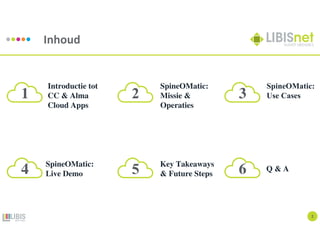
Inhoud
Introductie tot
CC & Alma
Cloud Apps
SpineOMatic:
Missie &
Operaties
SpineOMatic:
Use Cases
SpineOMatic:
Live Demo
Key Takeaways
& Future Steps
Q & A
1 2 3
4 5 6
Introductie
Introductie tot Cloud Computing
4
Cloud Computing
Definitie
Cloud computing is:
Het leveren van verschillende diensten via Internet. Die services omvatten toegang tot een pool van
gemeenschappelijke bronnen, zoals: data storage, servers, databases, networking, and applications.
Het wordt zo genoemd omdat de informatie op afstand toegankelijk is in de 'cloud' of een virtuele ruimte.
- Investopedia, 2022
5
Cloud Computing
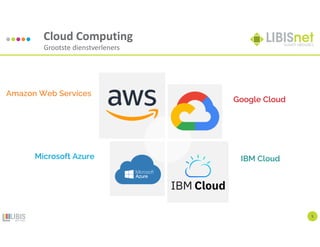
Grootste dienstverleners
Amazon Web Services
Google Cloud
IBM Cloud
Microsoft Azure
6
Cloud Computing
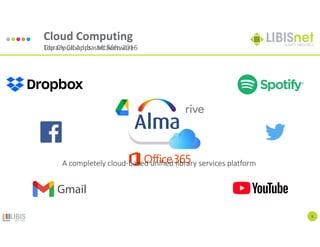
Top Cloud Apps - McAfee 2016
A completely cloud-based unified library services platform
Library Cloud-based Software
7
Cloud Computing
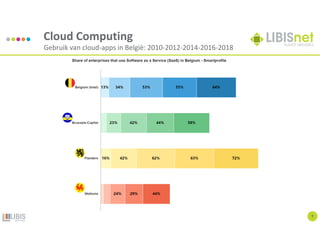
Gebruik van cloud-apps in België: 2010-2012-2014-2016-2018
Introductie
Introductie tot Alma Cloud Apps
9
Alma Cloud Apps
Doel
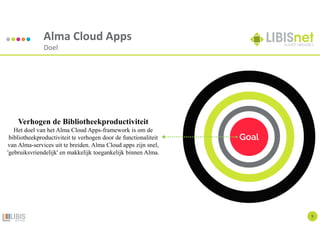
Goal
Verhogen de Bibliotheekproductiviteit
Het doel van het Alma Cloud Apps-framework is om de
bibliotheekproductiviteit te verhogen door de functionaliteit
van Alma-services uit te breiden. Alma Cloud apps zijn snel,
'gebruiksvriendelijk' en makkelijk toegankelijk binnen Alma.
10
Alma Cloud Apps
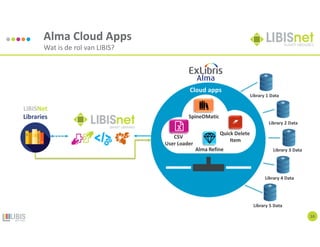
Wat is de rol van LIBIS?
11
Alma Cloud Apps
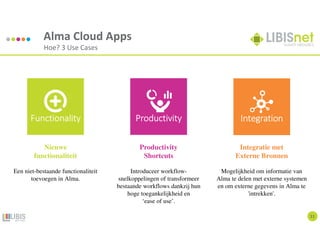
Hoe? 3 Use Cases
Nieuwe
functionaliteit
Een niet-bestaande functionaliteit
toevoegen in Alma.
Productivity
Shortcuts
Introduceer workflow-
snelkoppelingen of transformeer
bestaande workflows dankzij hun
hoge toegankelijkheid en
‘ease of use’.
Integratie met
Externe Bronnen
Mogelijkheid om informatie van
Alma te delen met externe systemen
en om externe gegevens in Alma te
'intrekken'.
Functionality
Functionality
Functionality
Functionality Productivity
Productivity
Productivity
Productivity Integration
Integration
Integration
Integration
12
Alma Cloud Apps
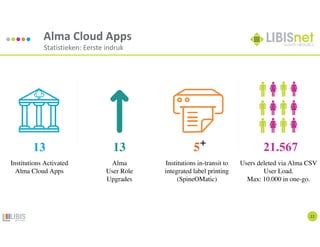
Statistieken: Eerste indruk
13 13 5 21.567
Institutions Activated
Alma Cloud Apps
Alma
User Role
Upgrades
Institutions in-transit to
integrated label printing
(SpineOMatic)
Users deleted via Alma CSV
User Load.
Max: 10.000 in one-go.
SpineOMatic:
Missie & Operaties
Een geïntegreerde oplossing voor
het printen van etiketten van Alma
14
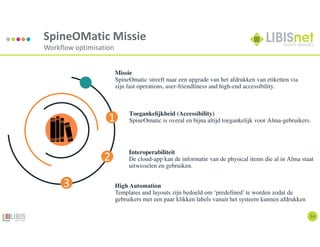
SpineOMatic Missie
Workflow optimisation
Missie
SpineOmatic streeft naar een upgrade van het afdrukken van etiketten via
zijn fast operations, user-friendliness and high-end accessibility.
Toegankelijkheid (Accessibility)
SpineOmatic is overal en bijna altijd toegankelijk voor Alma-gebruikers.
Interoperabiliteit
De cloud-app kan de informatie van de physical items die al in Alma staat
uitwisselen en gebruiken.
High Automation
Templates and layouts zijn bedoeld om ‘predefined’ te worden zodat de
gebruikers met een paar klikken labels vanuit het systeem kunnen afdrukken
1
2
3
15
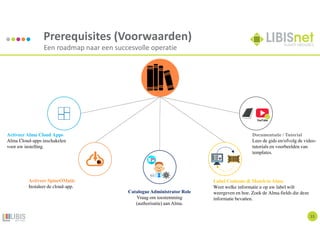
Prerequisites (Voorwaarden)
Een roadmap naar een succesvolle operatie
Activeer Alma Cloud Apps
Alma Cloud-apps inschakelen
voor uw instelling.
Documentatie / Tutorial
Lees de gids en/ofvolg de video-
tutorials en voorbeelden van
templates.
Activeer SpineOMatic
Instaleer de cloud-app.
Label Contents & Match in Alma
Weet welke informatie u op uw label wilt
weergeven en hoe. Zoek de Alma-fields die deze
informatie bevatten.
Catalogue Administrator Role
Vraag om toestemming
(authorisatie) aan Alma.
YouTube
16
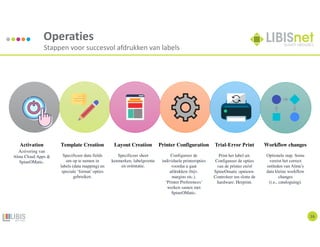
Operaties
Stappen voor succesvol afdrukken van labels
Activation
Activering van
Alma Cloud Apps &
SpineOMatic.
Template Creation
Specificeer data fields
om op te nemen in
labels (data mapping) en
speciale ‘format’ opties
gebruiken.
Layout Creation
Specificeer sheet
kenmerken, labelgrootte
en oriëntatie.
Printer Configuration
Configureer de
individuele printeropties
voordat u gaat
afdrukken (bijv.
margins etc.).
‘Printer Preferences’
werken samen met
SpineOMatic.
Trial-Error Print
Print het label uit.
Configureer de opties
van de printer en/of
SpineOmatic opnieuw.
Controleer ten slotte de
hardware. Herprint.
Workflow changes
Optionele stap. Soms
vereist het correct
ontleden van Alma’s
data kleine workflow
changes
(i.e., cataloguing).
18
Workflow Optimisation
Change = Chance
SpineOMatic:
Use Cases
Instellingen in-transit
20
SpineOMatic Use Cases
KU Leuven bibliotheken
Location: LOUK
Call Number: 7.071 HOOG (SAMU) 2021
Barcode(CODE39): KUL 977949
Location: LOUK: Art History (stackroom)
Device: Zebra TLP 28244
Location: BTAB
Call Number: 094.3: 830 "18" [2021]
Barcode: KUL935357
Location: BCMAG: Tabularium – Magazijn
Device: Zebra GX420t
Alma Title:
Samuel van Hoogstraten's Introduction to the academy of painting; or, The visible
world Samuel van Hoogstraten ; edited by Celeste Brusati ; translation by Jaap Jacobs
Alma Title:
The Myth of Abstraction The Hidden Origins of Abstract Art in German Literature
Spine label Barcode (CODE39) Spine label Barcode (CODE39)
21
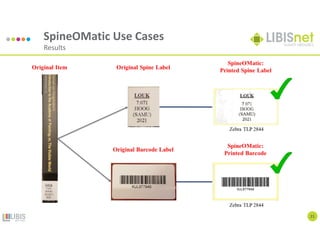
SpineOMatic Use Cases
Results
SpineOMatic Use Cases
Nationale Bank van België
23
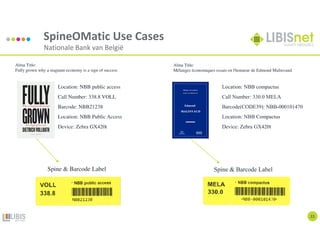
Location: NBB compactus
Call Number: 330.0 MELA
Barcode(CODE39): NBB-000101470
Location: NBB Compactus
Device: Zebra GX420t
Location: NBB public access
Call Number: 338.8 VOLL
Barcode: NBB21238
Location: NBB Public Access
Device: Zebra GX420t
Alma Title:
Mélanges économiques essais en l'honneur de Edmond Malinvaud
Alma Title:
Fully grown why a stagnant economy is a sign of success
Spine & Barcode Label Spine & Barcode Label
24
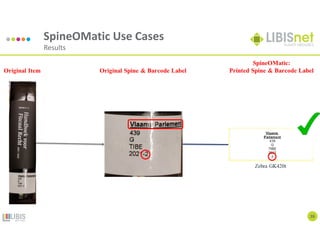
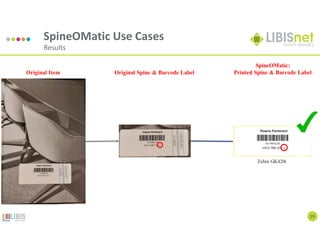
SpineOMatic Use Cases
Results
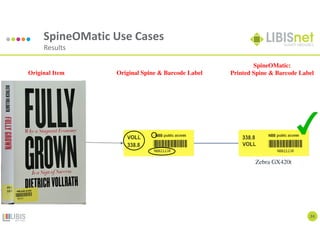
Original Spine & Barcode Label
Zebra GX420t
SpineOMatic:
Printed Spine & Barcode Label
Original Item
25
SpineOMatic Use Cases
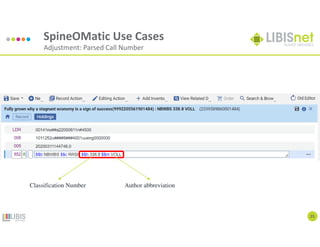
Adjustment: Parsed Call Number
Classification Number Author abbreviation
SpineOMatic Use Cases
Vlaams Parlement
27
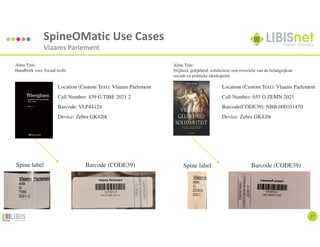
Location (Custom Text): Vlaams Parlement
Call Number: 655 G ZEMN 2021
Barcode(CODE39): NBB-000101470
Device: Zebra GK420t
Location (Custom Text): Vlaams Parlement
Call Number: 439 G TIBE 2021 2
Barcode: VLP44124
Device: Zebra GK420t
Alma Title:
Vrijheid, gelijkheid, solidariteit: een overzicht van de belangrijkste
sociale en politieke ideologieën
Alma Title:
Handboek voor fiscaal recht.
Spine label Barcode (CODE39) Spine label Barcode (CODE39)
28
SpineOMatic Use Cases
Results
29
SpineOMatic Use Cases
Results
SpineOMatic:
Live Demo
Hoe werkt het?
32
Live Demo
Hoe werkt het cloud-app?
Key Takeaways
Een recap van SpineOMatic
34
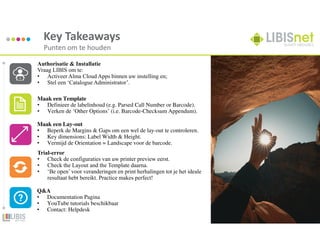
Key Takeaways
Punten om te houden
Authorisatie & Installatie
Vraag LIBIS om te:
• Activeer Alma Cloud Apps binnen uw instelling en;
• Stel een ‘Catalogue Administrator’.
Maak een Template
• Definieer de labelinhoud (e.g. Parsed Call Number or Barcode).
• Verken de ‘Other Options’ (i.e. Barcode-Checksum Appendum).
Maak een Lay-out
• Beperk de Margins & Gaps om een wel de lay-out te controleren.
• Key dimensions: Label Width & Height.
• Vermijd de Orientation = Landscape voor de barcode.
Trial-error
• Check de configuraties van uw printer preview eerst.
• Check the Layout and the Template daarna.
• ‘Be open’ voor veranderingen en print herhalingen tot je het ideale
resultaat hebt bereikt. Practice makes perfect!
Q&A
• Documentation Pagina
• YouTube tutorials beschikbaar
• Contact: Helpdesk
Future Steps
SpineOMatic en Cloud Apps roll-out
36
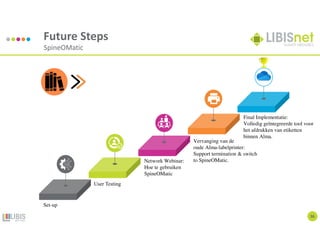
Future Steps
SpineOMatic
User Testing
Network Webinar:
Hoe te gebruiken
SpineOMatic
Vervanging van de
oude Alma-labelprinter:
Support termination & switch
to SpineOMatic.
Final Implementatie:
Volledig geïntegreerde tool voor
het afdrukken van etiketten
binnen Alma.
Set-up
37
Future Steps
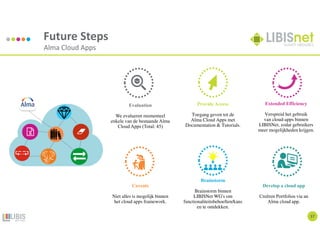
Alma Cloud Apps
Evaluation
We evalueren momenteel
enkele van de bestaande Alma
Cloud Apps (Total: 45)
Caveats
Niet alles is mogelijk binnen
het cloud apps framework.
Provide Access
Toegang geven tot de
Alma Cloud Apps met
Documentation & Tutorials.
Brainstorm
Brainstorm binnen
LIBISNet WG's om
functionaliteitsbehoeften/kans
en te ontdekken.
Extended Efficiency
Verspreid het gebruik
van cloud-apps binnen
LIBISNet, zodat gebruikers
meer mogelijkheden krijgen.
Develop a cloud app
Creëren Portfolios via an
Alma cloud app.
Q&A
Documentatie – Tutorials - Contact
39
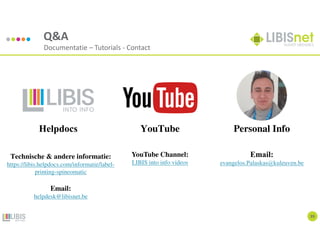
Q&A
Documentatie – Tutorials - Contact
Technische & andere informatie:
https://libis.helpdocs.com/informatie/label-
printing-spineomatic
Email:
helpdesk@libisnet.be
YouTube Channel:
LIBIS into info videos
Email:
evangelos.Palaskas@kuleuven.be
YouTube Personal Info
Helpdocs
40
www.libis.be
into-info@libis.be
+32 16 32 22 66
Contact
@LIBISintoinfo Slidelib
De Croylaan 54
PB 5592
B-3001 Leuven
Evangelos (Vangelis) Palaskas
Application manager LIBISnet@KU Leuven
Address: W. de Croylaan 54 - Bus 5592,
3001 Heverlee
Tel: +32 16 37 21 68
E-mail: evangelos.Palaskas@kuleuven.be
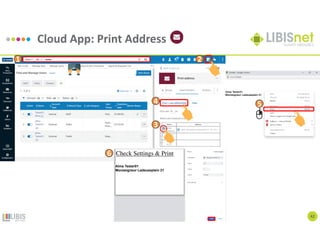
Cloud App: Print Address
42
1 2
3
5
4
6 Check Settings & Print

Alma Cloud Apps in een stroomversnelling?

  • 1.
    Alma Cloud Apps LabelAfdrukken: SpineOMatic LIBIS gebruikersdag 2022 Vangelis Palaskas
  • 2.
    2 Inhoud Introductie tot CC &Alma Cloud Apps SpineOMatic: Missie & Operaties SpineOMatic: Use Cases SpineOMatic: Live Demo Key Takeaways & Future Steps Q & A 1 2 3 4 5 6
  • 3.
  • 4.
    4 Cloud Computing Definitie Cloud computingis: Het leveren van verschillende diensten via Internet. Die services omvatten toegang tot een pool van gemeenschappelijke bronnen, zoals: data storage, servers, databases, networking, and applications. Het wordt zo genoemd omdat de informatie op afstand toegankelijk is in de 'cloud' of een virtuele ruimte. - Investopedia, 2022
  • 5.
    5 Cloud Computing Grootste dienstverleners AmazonWeb Services Google Cloud IBM Cloud Microsoft Azure
  • 6.
    6 Cloud Computing Top CloudApps - McAfee 2016 A completely cloud-based unified library services platform Library Cloud-based Software
  • 7.
    7 Cloud Computing Gebruik vancloud-apps in België: 2010-2012-2014-2016-2018
  • 8.
  • 9.
    9 Alma Cloud Apps Doel Goal Verhogende Bibliotheekproductiviteit Het doel van het Alma Cloud Apps-framework is om de bibliotheekproductiviteit te verhogen door de functionaliteit van Alma-services uit te breiden. Alma Cloud apps zijn snel, 'gebruiksvriendelijk' en makkelijk toegankelijk binnen Alma.
  • 10.
    10 Alma Cloud Apps Watis de rol van LIBIS?
  • 11.
    11 Alma Cloud Apps Hoe?3 Use Cases Nieuwe functionaliteit Een niet-bestaande functionaliteit toevoegen in Alma. Productivity Shortcuts Introduceer workflow- snelkoppelingen of transformeer bestaande workflows dankzij hun hoge toegankelijkheid en ‘ease of use’. Integratie met Externe Bronnen Mogelijkheid om informatie van Alma te delen met externe systemen en om externe gegevens in Alma te 'intrekken'. Functionality Functionality Functionality Functionality Productivity Productivity Productivity Productivity Integration Integration Integration Integration
  • 12.
    12 Alma Cloud Apps Statistieken:Eerste indruk 13 13 5 21.567 Institutions Activated Alma Cloud Apps Alma User Role Upgrades Institutions in-transit to integrated label printing (SpineOMatic) Users deleted via Alma CSV User Load. Max: 10.000 in one-go.
  • 13.
    SpineOMatic: Missie & Operaties Eengeïntegreerde oplossing voor het printen van etiketten van Alma
  • 14.
    14 SpineOMatic Missie Workflow optimisation Missie SpineOmaticstreeft naar een upgrade van het afdrukken van etiketten via zijn fast operations, user-friendliness and high-end accessibility. Toegankelijkheid (Accessibility) SpineOmatic is overal en bijna altijd toegankelijk voor Alma-gebruikers. Interoperabiliteit De cloud-app kan de informatie van de physical items die al in Alma staat uitwisselen en gebruiken. High Automation Templates and layouts zijn bedoeld om ‘predefined’ te worden zodat de gebruikers met een paar klikken labels vanuit het systeem kunnen afdrukken 1 2 3
  • 15.
    15 Prerequisites (Voorwaarden) Een roadmapnaar een succesvolle operatie Activeer Alma Cloud Apps Alma Cloud-apps inschakelen voor uw instelling. Documentatie / Tutorial Lees de gids en/ofvolg de video- tutorials en voorbeelden van templates. Activeer SpineOMatic Instaleer de cloud-app. Label Contents & Match in Alma Weet welke informatie u op uw label wilt weergeven en hoe. Zoek de Alma-fields die deze informatie bevatten. Catalogue Administrator Role Vraag om toestemming (authorisatie) aan Alma. YouTube
  • 16.
    16 Operaties Stappen voor succesvolafdrukken van labels Activation Activering van Alma Cloud Apps & SpineOMatic. Template Creation Specificeer data fields om op te nemen in labels (data mapping) en speciale ‘format’ opties gebruiken. Layout Creation Specificeer sheet kenmerken, labelgrootte en oriëntatie. Printer Configuration Configureer de individuele printeropties voordat u gaat afdrukken (bijv. margins etc.). ‘Printer Preferences’ werken samen met SpineOMatic. Trial-Error Print Print het label uit. Configureer de opties van de printer en/of SpineOmatic opnieuw. Controleer ten slotte de hardware. Herprint. Workflow changes Optionele stap. Soms vereist het correct ontleden van Alma’s data kleine workflow changes (i.e., cataloguing).
  • 17.
  • 18.
  • 19.
    20 SpineOMatic Use Cases KULeuven bibliotheken Location: LOUK Call Number: 7.071 HOOG (SAMU) 2021 Barcode(CODE39): KUL 977949 Location: LOUK: Art History (stackroom) Device: Zebra TLP 28244 Location: BTAB Call Number: 094.3: 830 "18" [2021] Barcode: KUL935357 Location: BCMAG: Tabularium – Magazijn Device: Zebra GX420t Alma Title: Samuel van Hoogstraten's Introduction to the academy of painting; or, The visible world Samuel van Hoogstraten ; edited by Celeste Brusati ; translation by Jaap Jacobs Alma Title: The Myth of Abstraction The Hidden Origins of Abstract Art in German Literature Spine label Barcode (CODE39) Spine label Barcode (CODE39)
  • 20.
  • 21.
    SpineOMatic Use Cases NationaleBank van België 23 Location: NBB compactus Call Number: 330.0 MELA Barcode(CODE39): NBB-000101470 Location: NBB Compactus Device: Zebra GX420t Location: NBB public access Call Number: 338.8 VOLL Barcode: NBB21238 Location: NBB Public Access Device: Zebra GX420t Alma Title: Mélanges économiques essais en l'honneur de Edmond Malinvaud Alma Title: Fully grown why a stagnant economy is a sign of success Spine & Barcode Label Spine & Barcode Label
  • 22.
    24 SpineOMatic Use Cases Results OriginalSpine & Barcode Label Zebra GX420t SpineOMatic: Printed Spine & Barcode Label Original Item
  • 23.
    25 SpineOMatic Use Cases Adjustment:Parsed Call Number Classification Number Author abbreviation
  • 24.
    SpineOMatic Use Cases VlaamsParlement 27 Location (Custom Text): Vlaams Parlement Call Number: 655 G ZEMN 2021 Barcode(CODE39): NBB-000101470 Device: Zebra GK420t Location (Custom Text): Vlaams Parlement Call Number: 439 G TIBE 2021 2 Barcode: VLP44124 Device: Zebra GK420t Alma Title: Vrijheid, gelijkheid, solidariteit: een overzicht van de belangrijkste sociale en politieke ideologieën Alma Title: Handboek voor fiscaal recht. Spine label Barcode (CODE39) Spine label Barcode (CODE39)
  • 25.
  • 26.
  • 27.
  • 28.
    32 Live Demo Hoe werkthet cloud-app?
  • 29.
    Key Takeaways Een recapvan SpineOMatic
  • 30.
    34 Key Takeaways Punten omte houden Authorisatie & Installatie Vraag LIBIS om te: • Activeer Alma Cloud Apps binnen uw instelling en; • Stel een ‘Catalogue Administrator’. Maak een Template • Definieer de labelinhoud (e.g. Parsed Call Number or Barcode). • Verken de ‘Other Options’ (i.e. Barcode-Checksum Appendum). Maak een Lay-out • Beperk de Margins & Gaps om een wel de lay-out te controleren. • Key dimensions: Label Width & Height. • Vermijd de Orientation = Landscape voor de barcode. Trial-error • Check de configuraties van uw printer preview eerst. • Check the Layout and the Template daarna. • ‘Be open’ voor veranderingen en print herhalingen tot je het ideale resultaat hebt bereikt. Practice makes perfect! Q&A • Documentation Pagina • YouTube tutorials beschikbaar • Contact: Helpdesk
  • 31.
    Future Steps SpineOMatic enCloud Apps roll-out
  • 32.
    36 Future Steps SpineOMatic User Testing NetworkWebinar: Hoe te gebruiken SpineOMatic Vervanging van de oude Alma-labelprinter: Support termination & switch to SpineOMatic. Final Implementatie: Volledig geïntegreerde tool voor het afdrukken van etiketten binnen Alma. Set-up
  • 33.
    37 Future Steps Alma CloudApps Evaluation We evalueren momenteel enkele van de bestaande Alma Cloud Apps (Total: 45) Caveats Niet alles is mogelijk binnen het cloud apps framework. Provide Access Toegang geven tot de Alma Cloud Apps met Documentation & Tutorials. Brainstorm Brainstorm binnen LIBISNet WG's om functionaliteitsbehoeften/kans en te ontdekken. Extended Efficiency Verspreid het gebruik van cloud-apps binnen LIBISNet, zodat gebruikers meer mogelijkheden krijgen. Develop a cloud app Creëren Portfolios via an Alma cloud app.
  • 34.
  • 35.
    39 Q&A Documentatie – Tutorials- Contact Technische & andere informatie: https://libis.helpdocs.com/informatie/label- printing-spineomatic Email: helpdesk@libisnet.be YouTube Channel: LIBIS into info videos Email: evangelos.Palaskas@kuleuven.be YouTube Personal Info Helpdocs
  • 36.
  • 37.
    www.libis.be into-info@libis.be +32 16 3222 66 Contact @LIBISintoinfo Slidelib De Croylaan 54 PB 5592 B-3001 Leuven Evangelos (Vangelis) Palaskas Application manager LIBISnet@KU Leuven Address: W. de Croylaan 54 - Bus 5592, 3001 Heverlee Tel: +32 16 37 21 68 E-mail: evangelos.Palaskas@kuleuven.be
  • 38.
    Cloud App: PrintAddress 42 1 2 3 5 4 6 Check Settings & Print