REMINDER
Check in on the
COLLABORATE mobile app
Allocations and Cross Charges:
Session 1 of :4: Expense Allocations
(GL)
Prepared by: Reggie Galloway
Session ID#: 10031
@
Expense Allocations (GL):
Explorer Session 1 of 4
Leveraging Allocations
for Cost-Plus
Intercompany Billings
Agenda
■ Collaborative SIG sessions
■ Introduction
■ Intercompany billings & the case for automation
■ Current billing process
■ Requirements and approach
■ Complexities
■ What might be next?
Collaborative SIG Sessions
Session ID Session Date and Time Room
10031
Allocations and Cross Charges
- Session 1of 4: Expense
Allocations (GL)
Tue. Apr. 14
9:45-10:45
Breakers L
10028
Allocations and Cross Charges
- Session 2 of 4: Sub-Ledger
Expense Allocations (Projects
and Payables)
Tue. Apr. 14
11:00-12:00
Breakers L
10029
Allocations and Cross Charges
- Session 3 of 4: Direct Charges
and Intercompany via
Subledgers
Tue. Apr. 14
2:00-3:00
Breakers L
10030
Allocations and Cross Charges
- Session 4 of 4: Review and
Panel Discussion
Tue. Apr. 14
3:15-4:15
Breakers L
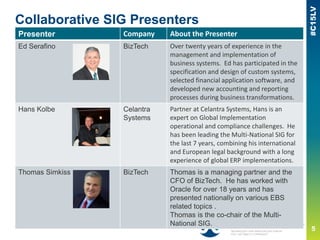
Collaborative SIG Presenters
Presenter Company About the Presenter
Ed Serafino BizTech Over twenty years of experience in the
management and implementation of
business systems. Ed has participated in the
specification and design of custom systems,
selected financial application software, and
developed new accounting and reporting
processes during business transformations.
Hans Kolbe Celantra
Systems
Partner at Celantra Systems, Hans is an
expert on Global Implementation
operational and compliance challenges. He
has been leading the Multi-National SIG for
the last 7 years, combining his international
and European legal background with a long
experience of global ERP implementations.
Thomas Simkiss BizTech Thomas is a managing partner and the
CFO of BizTech. He has worked with
Oracle for over 18 years and has
presented nationally on various EBS
related topics .
Thomas is the co-chair of the Multi-
National SIG.
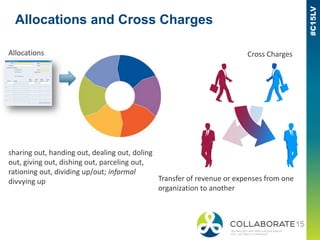
Allocations and Cross Charges
Allocations Cross Charges
sharing out, handing out, dealing out, doling
out, giving out, dishing out, parceling out,
rationing out, dividing up/out; informal
divvying up Transfer of revenue or expenses from one
organization to another
Reggie Galloway
■ Reggie Galloway has worked in the
Finance/Accounting systems at Qualcomm for over
14 years. For the past 2 years, has worked on
Oracle implementations across the world and
specializes in leveraging Oracle functionality to
help automate work that the users did manually
■ reggieg@qualcomm.com
■ www.qualcomm.com
3
Company Overview
Qualcomm has been in business for 30 years
World’s largest fabless semiconductor company, #1 in wireless
FY14 Revenue $26.5B
Global Company with offices all around the world
Qualcomm Financial Systems Are Global
10
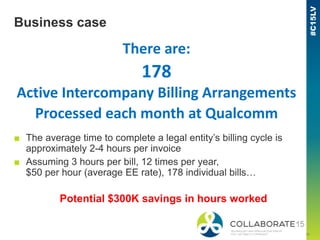
Business case
There are:
178
Active Intercompany Billing Arrangements
Processed each month at Qualcomm
■ The average time to complete a legal entity’s billing cycle is
approximately 2-4 hours per invoice
■ Assuming 3 hours per bill, 12 times per year,
$50 per hour (average EE rate), 178 individual bills…
Potential $300K savings in hours worked
11
The goal
Provide an automated mechanism
to accurately create
month-end intercompany
cost-plus journal entries
Qualcomm Intercompany Billing
■ P&L Based
■ Each P&L section can have a different rate
■ P&L consists of the following costs
— Direct Costs – based on Account
— Indirect Costs – based on Department
Current Allocation Process
Export to Excel
Oracle Trial balance User-driven process!
Modify the Data
Manual Excel Invoice
ADI Journal Entry
Manual processes are prone to error!
Benefits of Automating Allocation Process
■ Accuracy
— Real Time reporting will ensure that all costs were billed correctly
■ Consistency
— Universal solution can be rolled out easily to all locations
— Helps reinforce standardization globally
■ Time
— Gives back time on the last day of close by speeding up the Cost
Plus Billing process by 2-4 hours per billing
Gather the facts…
Local Accountants
update allocation
information
Enter variables
into
Questionnaire
Local Accountants
review test results
Yes
Send Questionnaire to
Accountants
Create (or modify)
allocations in
Oracle
Run Allocation Process
for previous month in
test environment
Deploy to
Production
Correct
Results?
No
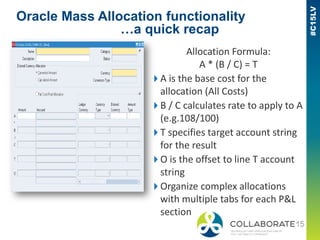
Oracle Mass Allocation functionality
…a quick recap
Allocation Formula:
A * (B / C) = T
A is the base cost for the
allocation (All Costs)
B / C calculates rate to apply to A
(e.g.108/100)
T specifies target account string
for the result
O is the offset to line T account
string
Organize complex allocations
with multiple tabs for each P&L
section
Defining “A”
Grouping Expenses in P&L Categories
Indirect Pooled Department Expenses
Direct Natural Accounts
Department parent values
PL_CS
PL_RD
PL_GA
PL_SM
Direct Account parent values
4X_CS
4X_RD
4X_GA
4X_SM
Cost of Sales
R&D
G&A
Sales & Mktng
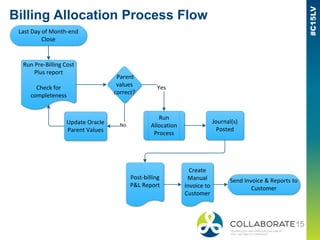
Billing Allocation Process Flow
Run Pre-Billing Cost
Plus report
Check for
completeness
Run
Allocation
Process
Journal(s)
Posted
Post-billing
P&L Report
Create
Manual
Invoice to
Customer
Update Oracle
Parent Values
Parent
values
correct?
Yes
No
Send Invoice & Reports to
Customer
Last Day of Month-end
Close
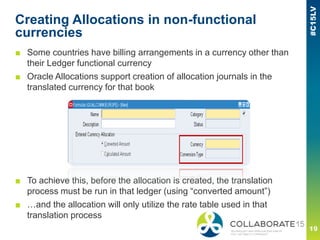
Creating Allocations in non-functional
currencies
■ Some countries have billing arrangements in a currency other than
their Ledger functional currency
■ Oracle Allocations support creation of allocation journals in the
translated currency for that book
■ To achieve this, before the allocation is created, the translation
process must be run in that ledger (using “converted amount”)
■ …and the allocation will only utilize the rate table used in that
translation process
Other Complexities
■ In some cases, entities must bill at a Specific rate
for hedging purpose
■ …and the rate is not the month-end rate stored in Oracle
Solution
■ Utilize “C” portion of allocation formula and target
currency to achieve desired rate
■ Populate “C” using a statistical account JE
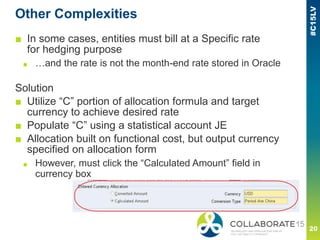
■ Allocation built on functional cost, but output currency
specified on allocation form
■ However, must click the “Calculated Amount” field in
currency box
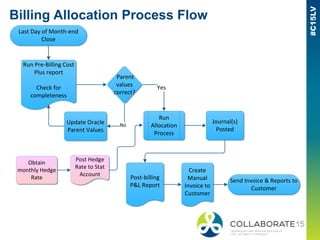
Billing Allocation Process Flow
Run Pre-Billing Cost
Plus report
Check for
completeness
Run
Allocation
Process
Journal(s)
Posted
Post-billing
P&L Report
Create
Manual
Invoice to
Customer
Update Oracle
Parent Values
Parent
values
correct?
Yes
No
Send Invoice & Reports to
Customer
Last Day of Month-end
Close
Post Hedge
Rate to Stat
Account
Obtain
monthly Hedge
Rate
What might be next?
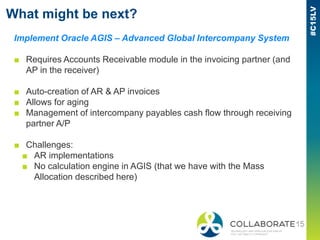
Implement Oracle AGIS – Advanced Global Intercompany System
■ Requires Accounts Receivable module in the invoicing partner (and
AP in the receiver)
■ Auto-creation of AR & AP invoices
■ Allows for aging
■ Management of intercompany payables cash flow through receiving
partner A/P
■ Challenges:
■ AR implementations
■ No calculation engine in AGIS (that we have with the Mass
Allocation described here)
Questions?
Please complete the session
evaluation
We appreciate your feedback and insight
You may complete the session evaluation either
on paper or online via the mobile app

Allocation and Cross Charges

  • 1.
    REMINDER Check in onthe COLLABORATE mobile app Allocations and Cross Charges: Session 1 of :4: Expense Allocations (GL) Prepared by: Reggie Galloway Session ID#: 10031 @
  • 2.
    Expense Allocations (GL): ExplorerSession 1 of 4 Leveraging Allocations for Cost-Plus Intercompany Billings
  • 3.
    Agenda ■ Collaborative SIGsessions ■ Introduction ■ Intercompany billings & the case for automation ■ Current billing process ■ Requirements and approach ■ Complexities ■ What might be next?
  • 4.
    Collaborative SIG Sessions SessionID Session Date and Time Room 10031 Allocations and Cross Charges - Session 1of 4: Expense Allocations (GL) Tue. Apr. 14 9:45-10:45 Breakers L 10028 Allocations and Cross Charges - Session 2 of 4: Sub-Ledger Expense Allocations (Projects and Payables) Tue. Apr. 14 11:00-12:00 Breakers L 10029 Allocations and Cross Charges - Session 3 of 4: Direct Charges and Intercompany via Subledgers Tue. Apr. 14 2:00-3:00 Breakers L 10030 Allocations and Cross Charges - Session 4 of 4: Review and Panel Discussion Tue. Apr. 14 3:15-4:15 Breakers L
  • 5.
    Collaborative SIG Presenters PresenterCompany About the Presenter Ed Serafino BizTech Over twenty years of experience in the management and implementation of business systems. Ed has participated in the specification and design of custom systems, selected financial application software, and developed new accounting and reporting processes during business transformations. Hans Kolbe Celantra Systems Partner at Celantra Systems, Hans is an expert on Global Implementation operational and compliance challenges. He has been leading the Multi-National SIG for the last 7 years, combining his international and European legal background with a long experience of global ERP implementations. Thomas Simkiss BizTech Thomas is a managing partner and the CFO of BizTech. He has worked with Oracle for over 18 years and has presented nationally on various EBS related topics . Thomas is the co-chair of the Multi- National SIG.
  • 6.
    Allocations and CrossCharges Allocations Cross Charges sharing out, handing out, dealing out, doling out, giving out, dishing out, parceling out, rationing out, dividing up/out; informal divvying up Transfer of revenue or expenses from one organization to another
  • 7.
    Reggie Galloway ■ ReggieGalloway has worked in the Finance/Accounting systems at Qualcomm for over 14 years. For the past 2 years, has worked on Oracle implementations across the world and specializes in leveraging Oracle functionality to help automate work that the users did manually ■ reggieg@qualcomm.com ■ www.qualcomm.com 3
  • 8.
    Company Overview Qualcomm hasbeen in business for 30 years World’s largest fabless semiconductor company, #1 in wireless FY14 Revenue $26.5B Global Company with offices all around the world
  • 9.
  • 10.
    10 Business case There are: 178 ActiveIntercompany Billing Arrangements Processed each month at Qualcomm ■ The average time to complete a legal entity’s billing cycle is approximately 2-4 hours per invoice ■ Assuming 3 hours per bill, 12 times per year, $50 per hour (average EE rate), 178 individual bills… Potential $300K savings in hours worked
  • 11.
    11 The goal Provide anautomated mechanism to accurately create month-end intercompany cost-plus journal entries
  • 12.
    Qualcomm Intercompany Billing ■P&L Based ■ Each P&L section can have a different rate ■ P&L consists of the following costs — Direct Costs – based on Account — Indirect Costs – based on Department
  • 13.
    Current Allocation Process Exportto Excel Oracle Trial balance User-driven process! Modify the Data Manual Excel Invoice ADI Journal Entry Manual processes are prone to error!
  • 14.
    Benefits of AutomatingAllocation Process ■ Accuracy — Real Time reporting will ensure that all costs were billed correctly ■ Consistency — Universal solution can be rolled out easily to all locations — Helps reinforce standardization globally ■ Time — Gives back time on the last day of close by speeding up the Cost Plus Billing process by 2-4 hours per billing
  • 15.
    Gather the facts… LocalAccountants update allocation information Enter variables into Questionnaire Local Accountants review test results Yes Send Questionnaire to Accountants Create (or modify) allocations in Oracle Run Allocation Process for previous month in test environment Deploy to Production Correct Results? No
  • 16.
    Oracle Mass Allocationfunctionality …a quick recap Allocation Formula: A * (B / C) = T A is the base cost for the allocation (All Costs) B / C calculates rate to apply to A (e.g.108/100) T specifies target account string for the result O is the offset to line T account string Organize complex allocations with multiple tabs for each P&L section
  • 17.
    Defining “A” Grouping Expensesin P&L Categories Indirect Pooled Department Expenses Direct Natural Accounts Department parent values PL_CS PL_RD PL_GA PL_SM Direct Account parent values 4X_CS 4X_RD 4X_GA 4X_SM Cost of Sales R&D G&A Sales & Mktng
  • 18.
    Billing Allocation ProcessFlow Run Pre-Billing Cost Plus report Check for completeness Run Allocation Process Journal(s) Posted Post-billing P&L Report Create Manual Invoice to Customer Update Oracle Parent Values Parent values correct? Yes No Send Invoice & Reports to Customer Last Day of Month-end Close
  • 19.
    Creating Allocations innon-functional currencies ■ Some countries have billing arrangements in a currency other than their Ledger functional currency ■ Oracle Allocations support creation of allocation journals in the translated currency for that book ■ To achieve this, before the allocation is created, the translation process must be run in that ledger (using “converted amount”) ■ …and the allocation will only utilize the rate table used in that translation process
  • 20.
    Other Complexities ■ Insome cases, entities must bill at a Specific rate for hedging purpose ■ …and the rate is not the month-end rate stored in Oracle Solution ■ Utilize “C” portion of allocation formula and target currency to achieve desired rate ■ Populate “C” using a statistical account JE ■ Allocation built on functional cost, but output currency specified on allocation form ■ However, must click the “Calculated Amount” field in currency box
  • 21.
    Billing Allocation ProcessFlow Run Pre-Billing Cost Plus report Check for completeness Run Allocation Process Journal(s) Posted Post-billing P&L Report Create Manual Invoice to Customer Update Oracle Parent Values Parent values correct? Yes No Send Invoice & Reports to Customer Last Day of Month-end Close Post Hedge Rate to Stat Account Obtain monthly Hedge Rate
  • 22.
    What might benext? Implement Oracle AGIS – Advanced Global Intercompany System ■ Requires Accounts Receivable module in the invoicing partner (and AP in the receiver) ■ Auto-creation of AR & AP invoices ■ Allows for aging ■ Management of intercompany payables cash flow through receiving partner A/P ■ Challenges: ■ AR implementations ■ No calculation engine in AGIS (that we have with the Mass Allocation described here)
  • 23.
  • 24.
    Please complete thesession evaluation We appreciate your feedback and insight You may complete the session evaluation either on paper or online via the mobile app