 A method that includes all the steps of
solving a problem in order is known as an
algorithm.
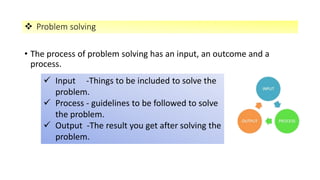
• The process of problem solving has an input, an outcome and a
process.
 Problem solving
 Input -Things to be included to solve the
problem.
 Process - guidelines to be followed to solve
the problem.
 Output -The result you get after solving the
problem.
Algorithms :Example 1
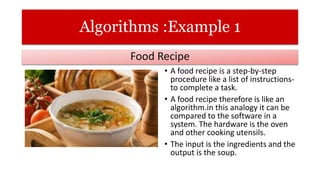
• A food recipe is a step-by-step
procedure like a list of instructions-
to complete a task.
• A food recipe therefore is like an
algorithm.in this analogy it can be
compared to the software in a
system. The hardware is the oven
and other cooking utensils.
• The input is the ingredients and the
output is the soup.
Food Recipe
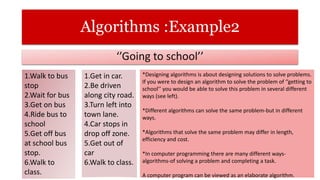
Algorithms :Example2
‘’Going to school’’
1.Walk to bus
stop
2.Wait for bus
3.Get on bus
4.Ride bus to
school
5.Get off bus
at school bus
stop.
6.Walk to
class.
1.Get in car.
2.Be driven
along city road.
3.Turn left into
town lane.
4.Car stops in
drop off zone.
5.Get out of
car
6.Walk to class.
*Designing algorithms is about designing solutions to solve problems.
If you were to design an algorithm to solve the problem of ‘’getting to
school’’ you would be able to solve this problem in several different
ways (see left).
*Different algorithms can solve the same problem-but in different
ways.
*Algorithms that solve the same problem may differ in length,
efficiency and cost.
*In computer programming there are many different ways-
algorithms-of solving a problem and completing a task.
A computer program can be viewed as an elaborate algorithm.
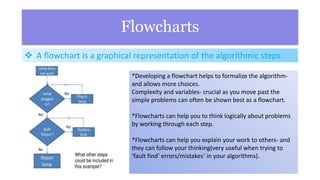
Flowcharts
*Developing a flowchart helps to formalize the algorithm-
and allows more choices.
Complexity and variables- crucial as you move past the
simple problems can often be shown best as a flowchart.
*Flowcharts can help you to think logically about problems
by working through each step.
*Flowcharts can help you explain your work to others- and
they can follow your thinking(very useful when trying to
‘fault find’ errors/mistakes’ in your algorithms).
 A flowchart is a graphical representation of the algorithmic steps.
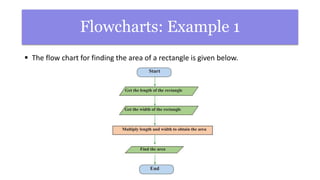
Flowcharts: Example 1
 The flow chart for finding the area of a rectangle is given below.
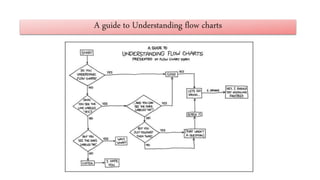
A guide to Understanding flow charts

Algorithms and flow chart

  • 2.
     A methodthat includes all the steps of solving a problem in order is known as an algorithm.
  • 3.
    • The processof problem solving has an input, an outcome and a process.  Problem solving  Input -Things to be included to solve the problem.  Process - guidelines to be followed to solve the problem.  Output -The result you get after solving the problem.
  • 4.
    Algorithms :Example 1 •A food recipe is a step-by-step procedure like a list of instructions- to complete a task. • A food recipe therefore is like an algorithm.in this analogy it can be compared to the software in a system. The hardware is the oven and other cooking utensils. • The input is the ingredients and the output is the soup. Food Recipe
  • 5.
    Algorithms :Example2 ‘’Going toschool’’ 1.Walk to bus stop 2.Wait for bus 3.Get on bus 4.Ride bus to school 5.Get off bus at school bus stop. 6.Walk to class. 1.Get in car. 2.Be driven along city road. 3.Turn left into town lane. 4.Car stops in drop off zone. 5.Get out of car 6.Walk to class. *Designing algorithms is about designing solutions to solve problems. If you were to design an algorithm to solve the problem of ‘’getting to school’’ you would be able to solve this problem in several different ways (see left). *Different algorithms can solve the same problem-but in different ways. *Algorithms that solve the same problem may differ in length, efficiency and cost. *In computer programming there are many different ways- algorithms-of solving a problem and completing a task. A computer program can be viewed as an elaborate algorithm.
  • 6.
    Flowcharts *Developing a flowcharthelps to formalize the algorithm- and allows more choices. Complexity and variables- crucial as you move past the simple problems can often be shown best as a flowchart. *Flowcharts can help you to think logically about problems by working through each step. *Flowcharts can help you explain your work to others- and they can follow your thinking(very useful when trying to ‘fault find’ errors/mistakes’ in your algorithms).  A flowchart is a graphical representation of the algorithmic steps.
  • 7.
    Flowcharts: Example 1 The flow chart for finding the area of a rectangle is given below.
  • 8.
    A guide toUnderstanding flow charts