Copyright © 2014 Oracle and/or its affiliates. All rights reserved. |
Alert & Case Management
User Management
Role Entitlement
Analyst
have increasing levels of capabilities within the application, allowing clients to assign individuals to roles
that best suit their duties and responsibilities
Supervisor role has maximum abilities with respect to interacting with, and taking actions on, alerts
Executive role provides view access to alerts for executive oversight
Auditor
Internal and External Auditor roles exist to provide view access to support internal audit as well as
externally driven audits
Admin
role provides access to administration screens that support the setup and configuration of users as well
as basic configuration of the application
Data Miner role provides access to administration tools that support the maintenance and tuning of scenarios
Watch List
Management
Supervisor
role can be given to a user with responsibility for maintaining watch lists and watch list members
Components
Tabs
Manage
Suppression
Rules
Functionality
Alert & Case
Actions
Manage
Trusted Pairs
Functionality
Financials
Functionality
Admin Tools
Reports
Watch list
Management
Privilege
Matrix
Copyright © 2014 Oracle and/or its affiliates. All rights reserved. |
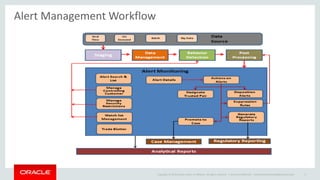
Alert Management Workflow
Oracle Confidential – Internal/Restricted/Highly Restricted 2
Copyright © 2014 Oracle and/or its affiliates. All rights reserved. |
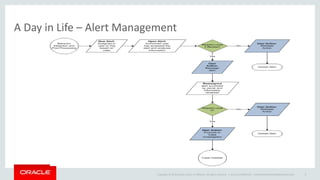
A Day in Life – Alert Management
Oracle Confidential – Internal/Restricted/Highly Restricted 3
Copyright © 2014 Oracle and/or its affiliates. All rights reserved. |
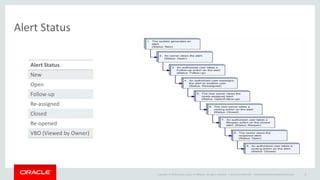
Alert Status
Oracle Confidential – Internal/Restricted/Highly Restricted 4
Alert Status
New
Open
Follow-up
Re-assigned
Closed
Re-opened
VBO (Viewed by Owner)
Copyright © 2014 Oracle and/or its affiliates. All rights reserved. |
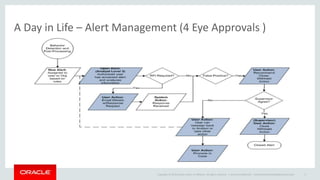
A Day in Life – Alert Management (4 Eye Approvals )
Oracle Confidential – Internal/Restricted/Highly Restricted 5
Copyright © 2014 Oracle and/or its affiliates. All rights reserved. |
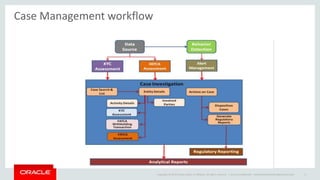
Case Management workflow
Oracle Confidential – Internal/Restricted/Highly Restricted 6
Copyright © 2014 Oracle and/or its affiliates. All rights reserved. |
A Day in Life – Case Management
Oracle Confidential – Internal/Restricted/Highly Restricted 7
Copyright © 2014 Oracle and/or its affiliates. All rights reserved. |
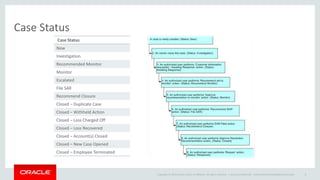
Case Status
Oracle Confidential – Internal/Restricted/Highly Restricted 8
Case Status
New
Investigation
Recommended Monitor
Monitor
Escalated
File SAR
Recommend Closure
Closed – Duplicate Case
Closed – Withheld Action
Closed – Loss Charged Off
Closed – Loss Recovered
Closed – Account(s) Closed
Closed – New Case Opened
Closed – Employee Terminated
© 2008 Oracle Corporation – Proprietary and Confidential
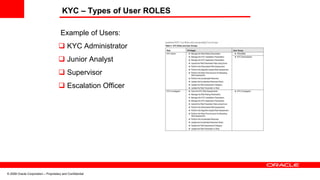
KYC – Types of User ROLES
Example of Users:
 KYC Administrator
 Junior Analyst
 Supervisor
 Escalation Officer
© 2008 Oracle Corporation – Proprietary and Confidential
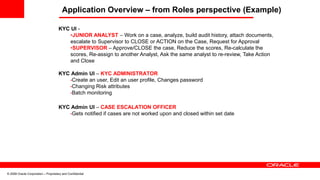
Application Overview – from Roles perspective (Example)
KYC UI -
•JUNIOR ANALYST – Work on a case, analyze, build audit history, attach documents,
escalate to Supervisor to CLOSE or ACTION on the Case, Request for Approval
•SUPERVISOR – Approve/CLOSE the case, Reduce the scores, Re-calculate the
scores, Re-assign to another Analyst, Ask the same analyst to re-review, Take Action
and Close
KYC Admin UI – KYC ADMINISTRATOR
•Create an user, Edit an user profile, Changes password
•Changing Risk attributes
•Batch monitoring
KYC Admin UI – CASE ESCALATION OFFICER
•Gets notified if cases are not worked upon and closed within set date
© 2008 Oracle Corporation – Proprietary and Confidential
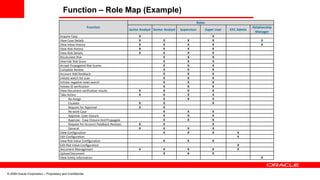
Function – Role Map (Example)
Function
Roles
Junior Analyst Senior Analyst Supervisor Super User KYC Admin
Relationship
Manager
Acquire Case X X
View Case Details X X X X X
View Inbox History X X X X X
View Risk History X X X X
View Risk Details X X X X
Recalculate Risk X X X
Override Risk Score X X X
Accept Propagated Risk Scores X X X
Complete Review X X X
Account-Add feedback X X X
Initiate watch list scan X X X
Initiate negative news search X X X
Initiate ID verification X X X
View Document verification results X X X X
Take Action X X X X
Re-Assign X X X
Escalate X X X
Request for Approval X X
Re-work Case X X X
Approve- Case Closure X X X
Approve - Case Closure And Propagate X X X
Request for Account Feedback Revision X X X
General X X X X
View Configuration X X X X
Edit Configuration X
View Risk Value Configuration X X X
Edit Risk Value Configuration X
Document Management X X X X X
Upload Document X X X
View Entity Information X
© 2008 Oracle Corporation – Proprietary and Confidential
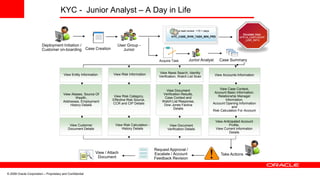
KYC - Junior Analyst – A Day in Life
View Entity Information View Risk Information View News Search, Identity
Verification, Watch List Scan
View Aliases, Source Of
Wealth,
Addresses, Employment
History Details
View Risk Category,
Effective Risk Source,
CCR and CIP Details
View Document
Verification Results,
Case Context and
Watch List Response,
Dow Jones Factiva
Details
View Customer
Document Details
View Risk Calculation -
History Details
Take Actions
Case Creation
User Group -
Junior
Acquire Task Junior Analyst Case Summary
View Anticipated Account
Profile,
View Current information
Details
View Case Context,
Account Basic Information,
Relationship Manager
Information,
Account Opening Information
and
Risk Calculation For Account
View Accounts Information
Is task review <10 > days
KYC_CASE_RVW_TASK_MIN_PRD
Escalate User
APPLN_CMPLNGRP
_USR_INFO
Deployment Initiation /
Customer on-boarding
Request Approval /
Escalate / Account
Feedback Revision
View / Attach
Document
View Document
Verification Details
© 2008 Oracle Corporation – Proprietary and Confidential
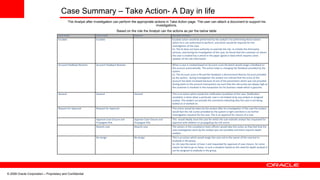
Case Summary – Take Action- A Day in life
The Analyst after investigation can perform the appropriate actions in Take Action page. The user can attach a document to support his
investigations.
Based on the role the Analyst can the actions as per the below table
Junior Analyst Senior Analyst Supervisor Description of Actions
Escalate Escalate Escalate action would be performed by the analyst’s for performing those actions
which he is not authorized to perform, and which would be required for the
investigation of the case.
Ex: The JA does not have authority to override the risk, re-initiate the third party
services, and during his investigation of the case, he found that the customer on whom
the case is created has a article in the paper (good or bad) which requires some
updates of the risk information
Account Feedback Revision Account Feedback Revision When a case is created based on Account score the batch would assign a feedback to
the account automatically. This action helps in changing the feedback provided by the
system
Ex: The Account score is 90 and the feedback is Recommend Restrict Account provided
by the system, during investigation the analyst has noticed that the score of this
account has been increased because of one of the parameters which was not provided
during batch or the account transactions are such that the risk scores are always high as
the customer is involved in the transaction for his business needs which is genuine.
General General General This is an action which avoids the notification escalation of the case. Notification
escalation is done when a particular case is not looked at by any analyst or assigned
analyst. The analyst can provide the comments indicating why the case is not being
looked at or worked on.
Request for Approval Request for Approval This action would be taken by the analyst after his investigation of the case the analyst
would feel the risk scores provided by the system is right and there is no further
investigation required for the case. This is an approval for closure of a case.
Approve Case Closure and
Propagate Risk
Approve Case Closure and
Propagate Risk
This would ideally close the case for which the sub-ordinate analyst has requested for
approval with addition to propagating the risk scores
Rework case Rework case The seniors in the compliance team officers would take this action as they feel that the
case investigation done by the analyst was not complete and there requires depth
analysis
Re-Assign Re-Assign This is an action which would assign the case not to the owner of the case but to
anybody in the group.
Ex: JA1 was the owner of Case 1 and requested for approval of case closure, for some
reason he had to go on leave. In such a situation based on the need for depth analysis it
can be assigned to anybody in the group.

Alert & Case Management & KYC-Workflow.pptx

  • 1.
    Copyright © 2014Oracle and/or its affiliates. All rights reserved. | Alert & Case Management User Management Role Entitlement Analyst have increasing levels of capabilities within the application, allowing clients to assign individuals to roles that best suit their duties and responsibilities Supervisor role has maximum abilities with respect to interacting with, and taking actions on, alerts Executive role provides view access to alerts for executive oversight Auditor Internal and External Auditor roles exist to provide view access to support internal audit as well as externally driven audits Admin role provides access to administration screens that support the setup and configuration of users as well as basic configuration of the application Data Miner role provides access to administration tools that support the maintenance and tuning of scenarios Watch List Management Supervisor role can be given to a user with responsibility for maintaining watch lists and watch list members Components Tabs Manage Suppression Rules Functionality Alert & Case Actions Manage Trusted Pairs Functionality Financials Functionality Admin Tools Reports Watch list Management Privilege Matrix
  • 2.
    Copyright © 2014Oracle and/or its affiliates. All rights reserved. | Alert Management Workflow Oracle Confidential – Internal/Restricted/Highly Restricted 2
  • 3.
    Copyright © 2014Oracle and/or its affiliates. All rights reserved. | A Day in Life – Alert Management Oracle Confidential – Internal/Restricted/Highly Restricted 3
  • 4.
    Copyright © 2014Oracle and/or its affiliates. All rights reserved. | Alert Status Oracle Confidential – Internal/Restricted/Highly Restricted 4 Alert Status New Open Follow-up Re-assigned Closed Re-opened VBO (Viewed by Owner)
  • 5.
    Copyright © 2014Oracle and/or its affiliates. All rights reserved. | A Day in Life – Alert Management (4 Eye Approvals ) Oracle Confidential – Internal/Restricted/Highly Restricted 5
  • 6.
    Copyright © 2014Oracle and/or its affiliates. All rights reserved. | Case Management workflow Oracle Confidential – Internal/Restricted/Highly Restricted 6
  • 7.
    Copyright © 2014Oracle and/or its affiliates. All rights reserved. | A Day in Life – Case Management Oracle Confidential – Internal/Restricted/Highly Restricted 7
  • 8.
    Copyright © 2014Oracle and/or its affiliates. All rights reserved. | Case Status Oracle Confidential – Internal/Restricted/Highly Restricted 8 Case Status New Investigation Recommended Monitor Monitor Escalated File SAR Recommend Closure Closed – Duplicate Case Closed – Withheld Action Closed – Loss Charged Off Closed – Loss Recovered Closed – Account(s) Closed Closed – New Case Opened Closed – Employee Terminated
  • 9.
    © 2008 OracleCorporation – Proprietary and Confidential KYC – Types of User ROLES Example of Users:  KYC Administrator  Junior Analyst  Supervisor  Escalation Officer
  • 10.
    © 2008 OracleCorporation – Proprietary and Confidential Application Overview – from Roles perspective (Example) KYC UI - •JUNIOR ANALYST – Work on a case, analyze, build audit history, attach documents, escalate to Supervisor to CLOSE or ACTION on the Case, Request for Approval •SUPERVISOR – Approve/CLOSE the case, Reduce the scores, Re-calculate the scores, Re-assign to another Analyst, Ask the same analyst to re-review, Take Action and Close KYC Admin UI – KYC ADMINISTRATOR •Create an user, Edit an user profile, Changes password •Changing Risk attributes •Batch monitoring KYC Admin UI – CASE ESCALATION OFFICER •Gets notified if cases are not worked upon and closed within set date
  • 11.
    © 2008 OracleCorporation – Proprietary and Confidential Function – Role Map (Example) Function Roles Junior Analyst Senior Analyst Supervisor Super User KYC Admin Relationship Manager Acquire Case X X View Case Details X X X X X View Inbox History X X X X X View Risk History X X X X View Risk Details X X X X Recalculate Risk X X X Override Risk Score X X X Accept Propagated Risk Scores X X X Complete Review X X X Account-Add feedback X X X Initiate watch list scan X X X Initiate negative news search X X X Initiate ID verification X X X View Document verification results X X X X Take Action X X X X Re-Assign X X X Escalate X X X Request for Approval X X Re-work Case X X X Approve- Case Closure X X X Approve - Case Closure And Propagate X X X Request for Account Feedback Revision X X X General X X X X View Configuration X X X X Edit Configuration X View Risk Value Configuration X X X Edit Risk Value Configuration X Document Management X X X X X Upload Document X X X View Entity Information X
  • 12.
    © 2008 OracleCorporation – Proprietary and Confidential KYC - Junior Analyst – A Day in Life View Entity Information View Risk Information View News Search, Identity Verification, Watch List Scan View Aliases, Source Of Wealth, Addresses, Employment History Details View Risk Category, Effective Risk Source, CCR and CIP Details View Document Verification Results, Case Context and Watch List Response, Dow Jones Factiva Details View Customer Document Details View Risk Calculation - History Details Take Actions Case Creation User Group - Junior Acquire Task Junior Analyst Case Summary View Anticipated Account Profile, View Current information Details View Case Context, Account Basic Information, Relationship Manager Information, Account Opening Information and Risk Calculation For Account View Accounts Information Is task review <10 > days KYC_CASE_RVW_TASK_MIN_PRD Escalate User APPLN_CMPLNGRP _USR_INFO Deployment Initiation / Customer on-boarding Request Approval / Escalate / Account Feedback Revision View / Attach Document View Document Verification Details
  • 13.
    © 2008 OracleCorporation – Proprietary and Confidential Case Summary – Take Action- A Day in life The Analyst after investigation can perform the appropriate actions in Take Action page. The user can attach a document to support his investigations. Based on the role the Analyst can the actions as per the below table Junior Analyst Senior Analyst Supervisor Description of Actions Escalate Escalate Escalate action would be performed by the analyst’s for performing those actions which he is not authorized to perform, and which would be required for the investigation of the case. Ex: The JA does not have authority to override the risk, re-initiate the third party services, and during his investigation of the case, he found that the customer on whom the case is created has a article in the paper (good or bad) which requires some updates of the risk information Account Feedback Revision Account Feedback Revision When a case is created based on Account score the batch would assign a feedback to the account automatically. This action helps in changing the feedback provided by the system Ex: The Account score is 90 and the feedback is Recommend Restrict Account provided by the system, during investigation the analyst has noticed that the score of this account has been increased because of one of the parameters which was not provided during batch or the account transactions are such that the risk scores are always high as the customer is involved in the transaction for his business needs which is genuine. General General General This is an action which avoids the notification escalation of the case. Notification escalation is done when a particular case is not looked at by any analyst or assigned analyst. The analyst can provide the comments indicating why the case is not being looked at or worked on. Request for Approval Request for Approval This action would be taken by the analyst after his investigation of the case the analyst would feel the risk scores provided by the system is right and there is no further investigation required for the case. This is an approval for closure of a case. Approve Case Closure and Propagate Risk Approve Case Closure and Propagate Risk This would ideally close the case for which the sub-ordinate analyst has requested for approval with addition to propagating the risk scores Rework case Rework case The seniors in the compliance team officers would take this action as they feel that the case investigation done by the analyst was not complete and there requires depth analysis Re-Assign Re-Assign This is an action which would assign the case not to the owner of the case but to anybody in the group. Ex: JA1 was the owner of Case 1 and requested for approval of case closure, for some reason he had to go on leave. In such a situation based on the need for depth analysis it can be assigned to anybody in the group.