Agile UX Research Practices Applied
                         AGILE ALLIANCE 2012 CONFERENCE


           MIKI KONNO, AUGUST 15TH 2012
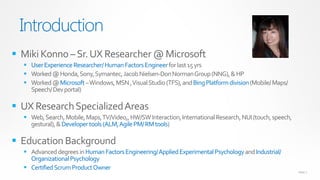
Introduction
 Miki Konno – Sr. UX Researcher @ Microsoft
   User Experience Researcher/ Human Factors Engineer for last 15 yrs
   Worked @ Honda, Sony, Symantec, Jacob Nielsen-Don Norman Group (NNG), & HP
   Worked @ Microsoft – Windows, MSN , Visual Studio (TFS), and Bing Platform division (Mobile/ Maps/
    Speech/ Dev portal)

 UX Research Specialized Areas
   Web, Search, Mobile, Maps, TV/Video,, HW/SW Interaction, International Research, NUI (touch, speech,
    gestural), & Developer tools (ALM, Agile PM/ RM tools)

 Education Background
   Advanced degrees in Human Factors Engineering/ Applied Experimental Psychology and Industrial/
    Organizational Psychology
   Certified Scrum Product Owner
                                                                                                           PAGE 2
Typical UX Research Data Acquiring Cycle
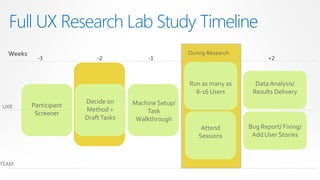
Full UX Research Lab Study Timeline
  Weeks                                                During Research
            -3              -2             -1                                   +2


                                                       Run as many as      Data Analysis/
                                                         8-16 Users       Results Delivery
                        Decide on     Machine Setup/
UXR       Participant
                        Method +          Task
           Screener
                        Draft Tasks    Walkthrough
                                                           Attend        Bug Report/ Fixing/
                                                          Sessions        Add User Stories


TEAM
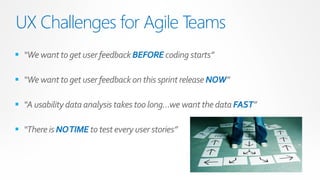
UX Challenges for Agile Teams
 “We want to get user feedback BEFORE coding starts”

 “We want to get user feedback on this sprint release NOW”

 “A usability data analysis takes too long…we want the data FAST”

 “There is NO TIME to test every user stories”
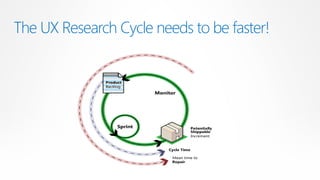
The UX Research Cycle needs to be faster!
What have we done in the Agile Environment?
 – Microsoft TFS & Bing Teams Case Studies

      RITE Study
      Online Customer Panel
      Quick Pulse Study
      Team Involvement with Personas
Agile UX Research Processes
   1. RITE: Rapid Iterative Testing & Evaluation
     – Continuous design iterations in one day
     – Design elements/ UI design exploration
     – Design improvements in small increments
RITE: Rapid Iterative Testing & Evaluation
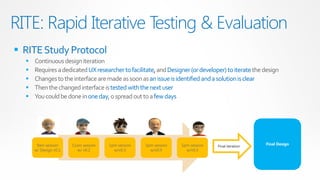
 RITE Study Protocol
     Continuous design iteration
     Requires a dedicated UX researcher to facilitate, and Designer (or developer) to iterate the design
     Changes to the interface are made as soon as an issue is identified and a solution is clear
     Then the changed interface is tested with the next user
     You could be done in one day, o spread out to a few days


       9am session     11am session   1pm session   3pm session   5pm session                      Final Design
                                                                                Final iteration
      w/ Design v0.1      w/ v0.2       w/v0.3        w/v0.4        w/v0.5
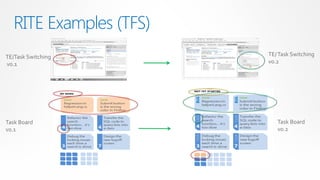
RITE Examples (TFS)
TE/Task Switching        TE/ Task Switching
v0.1                     v0.2


Task Board                  Task Board
v0.1                        v0.2
RITE Study Pros & Cons
 Pros                                              Cons
   Agile                                             Technical feasibility
      You can complete the study in short time           Some features may not be technically feasible
   Collaborative                                          to change quickly
      The team (UX researcher, PM, Designer, or      Feature limitations
       Developer) needs to come to an                     Not all features can be included in the
       agreement on each design revision                   prototype
   Visual                                            Quality and performance
      Design Improvements are instantly visible          Hi-fidelity prototypes could have faster
   Cost less                                              performance and better quality, so it could be
                                                           misleading
      It can be done by one designer (or
       developers) in one day
Agile UX Research Processes
  2. Online Customer Panel
     Online feedback panel with target users
     Product Owners run Bi-weekly panels
     Same panel members can see the product improvement over time
Online Customer Panel
 What is the online customer panel?
         A group of pre-screened participants who have expressed a willingness to participate in
          customer feedback sessions online

 5-6 customers are recruited to participate in online panels
         Make sure that they are the target users
         Make sure that they are able to commit to the length of time needed
         Make sure to recruit the right type of participants

 Product Owner to run the online panels
         One hour of the participants time is needed every other week
         Can use any types of materials (e.g., wireframe, interactive prototype, or sprint demos)
         Get customer feedback on attitudes and opinions

 Results are available instantly
 Feedback can be recorded with customer consent (NDA ready)
         Through Skype, Lync, Live Meeting, OneNote, Adobe Connect, WebEx etc.
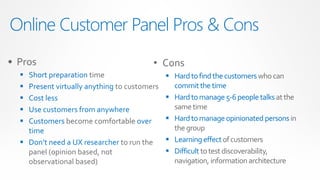
Online Customer Panel Pros & Cons
• Pros                                   • Cons
   Short preparation time                     Hard to find the customers who can
   Present virtually anything to customers     commit the time
   Cost less                                  Hard to manage 5-6 people talks at the
   Use customers from anywhere                 same time
   Customers become comfortable over          Hard to manage opinionated persons in
    time                                        the group
   Don’t need a UX researcher to run the      Learning effect of customers
    panel (opinion based, not                  Difficult to test discoverability,
    observational based)                        navigation, information architecture
Agile UX Research Processes
3. Quick Pulse Study
     Continuous user feedback with sprint cadence
     One week from start to finish
     Meet team’s urgent needs/ tweaks quickly
     Work well with user stories / features
     Flexible to test anything (i.e., mockups, builds)
     Minimal advanced planning
     Immediate product impact
     Personas for recruiting
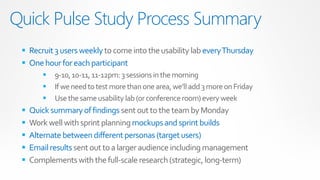
Quick Pulse Study Process Summary
  Recruit 3 users weekly to come into the usability lab every Thursday
  One hour for each participant
           9-10, 10-11, 11-12pm: 3 sessions in the morning
           If we need to test more than one area, we’ll add 3 more on Friday
           Use the same usability lab (or conference room) every week
    Quick summary of findings sent out to the team by Monday
    Work well with sprint planning mockups and sprint builds
    Alternate between different personas (target users)
    Email results sent out to a larger audience including management
    Complements with the full-scale research (strategic, long-term)
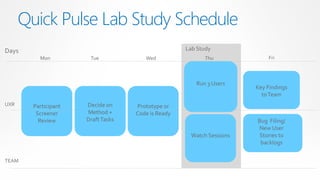
Quick Pulse Lab Study Schedule
Days                                                Lab Study
          Mon          Tue             Wed                Thu              Fri


                                                       Run 3 Users
                                                                       Key Findings
                                                                         to Team
UXR     Participant   Decide on     Prototype or
         Screener     Method +      Code is Ready
          Review      Draft Tasks                                      Bug Filing/
                                                                       New User
                                                      Watch Sessions    Stories to
                                                                        backlogs

TEAM
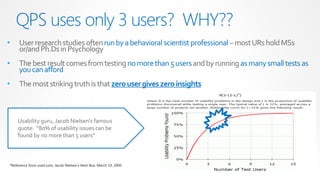
QPS uses only 3 users? WHY??
•    User research studies often run by a behavioral scientist professional – most URs hold MSs
     or/and Ph.Ds in Psychology
•    The best result comes from testing no more than 5 users and by running as many small tests as
     you can afford
•    The most striking truth is that zero user gives zero insights


    Usability guru, Jacob Nielsen's famous
    quote: “80% of usability issues can be
    found by no more than 5 users”


*Reference from useit.com, Jacob Nielsen’s Alert Box, March 19, 2000
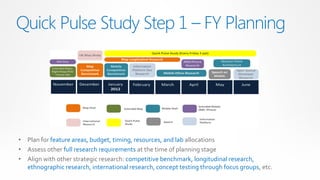
Quick Pulse Study Step 1 – FY Planning


• Plan for feature areas, budget, timing, resources, and lab allocations
• Assess other full research requirements at the time of planning stage
• Align with other strategic research: competitive benchmark, longitudinal research,
  ethnographic research, international research, concept testing through focus groups, etc.
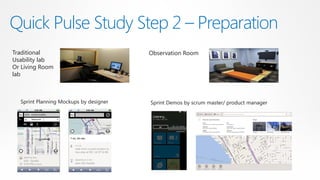
Quick Pulse Study Step 2 – Preparation
Traditional                             Observation Room
Usability lab
Or Living Room
lab


  Sprint Planning Mockups by designer   Sprint Demos by scrum master/ product manager
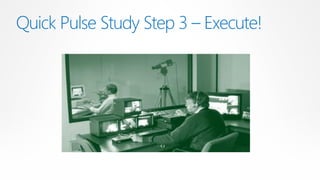
Quick Pulse Study Step 3 – Execute!
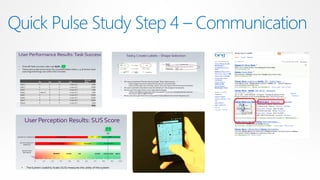
Quick Pulse Study Step 4 – Communication


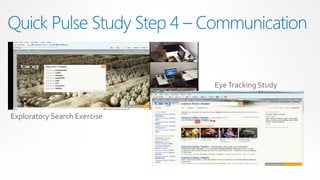
                              Eye Tracking Study


Exploratory Search Exercise
Quick Pulse Study Step 4 – Communication


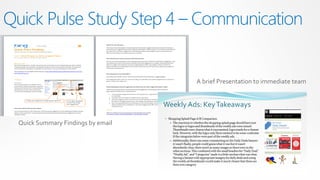
                                    A brief Presentation to immediate team


  Quick Summary Findings by email
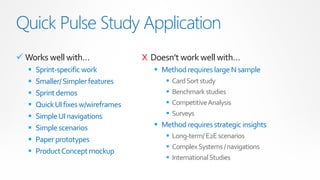
Quick Pulse Study Application
 Works well with…                  X Doesn’t work well with…
     Sprint-specific work              Method requires large N sample
     Smaller/ Simpler features              Card Sort study
     Sprint demos                           Benchmark studies
     Quick UI fixes w/wireframes            Competitive Analysis
     Simple UI navigations                  Surveys
     Simple scenarios                  Method requires strategic insights
                                           Long-term/ E2E scenarios
     Paper prototypes
                                           Complex Systems / navigations
     Product Concept mockup
                                           International Studies
FAQ: Quick Pulse Study

  What if….we don’t have a UX Researcher?
   Scrum Product Owner could run it, if not hire a UX researcher


  What if….we don’t have a usability lab?
    You can use online- meetings, conference rooms, at the coffee shops, at the
     conferences
FAQ: Quick Pulse Study

  What if….we don’t have enough budget to recruit ever week?
    You can ask volunteer customers through company website, social media


  What if….we don’t believe usability study data?
    I’ll personally come to your company and educate your team 
Q&A: Quick Pulse Study

    • Any more questions on Quick Pulse Study?
Agile UX Research Processes
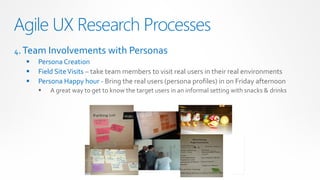
4. Team Involvements with Personas
     Persona Creation
     Field Site Visits – take team members to visit real users in their real environments
     Persona Happy hour - Bring the real users (persona profiles) in on Friday afternoon
         A great way to get to know the target users in an informal setting with snacks & drinks
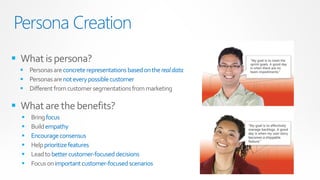
Persona Creation
 What is persona?
   Personas are concrete representations based on the real data
   Personas are not every possible customer
   Different from customer segmentations from marketing

 What are the benefits?
     Bring focus
     Build empathy
     Encourage consensus
     Help prioritize features
     Lead to better customer-focused decisions
     Focus on important customer-focused scenarios
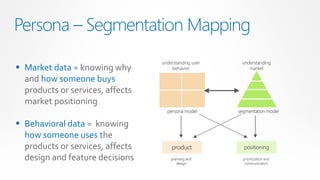
Persona – Segmentation Mapping
                                  understanding user    understanding
 Market data = knowing why           behavior             market

  and how someone buys
  products or services, affects
  market positioning
                                    persona model      segmentation model

 Behavioral data = knowing
  how someone uses the
  products or services, affects       product            positioning

  design and feature decisions        planning and
                                         design
                                                         prioritization and
                                                          communication
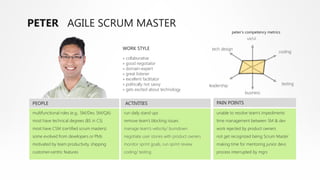
PETER AGILE SCRUM MASTER
                                                                                                        peter’s competency metrics
                                                                                                                ux/ui

                                              WORK STYLE                                    tech design
                                                                                                                                 coding
                                              » collaborative
                                              » good negotiator
                                              » domain-expert
                                              » great listener
                                              » excellent facilitator
                                              » politically not savvy                      leadership                                testing
                                              » gets excited about technology
                                                                                                               business

PEOPLE                                         ACTIVITIES                                     PAIN POINTS

multifunctional roles (e.g., SM/Dev, SM/QA)   run daily stand ups                             unable to resolve team’s impediments
most have technical degrees (BS in CS)        remove team’s blocking issues                   time management between SM & dev
most have CSM (certified scrum masters)       manage team’s velocity/ burndown                work rejected by product owners
some evolved from developers or PMs           negotiate user stories with product owners      not get recognized being Scrum Master
motivated by team productivity, shipping      monitor sprint goals, run sprint review         making time for mentoring junior devs
customer-centric features                     coding/ testing                                 process interrupted by mgrs
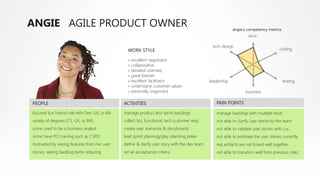
ANGIE AGILE PRODUCT OWNER                                                                                  angie’s competency metrics
                                                                                                                   ux/ui

                                                                                               tech design
                                                WORK STYLE                                                                           coding

                                                » excellent negotiator
                                                » collaborative
                                                » detailed oriented
                                                » great listener
                                                » excellent facilitator                       leadership                                testing
                                                » understand customer values
                                                » extremely organized                                             business

PEOPLE                                        ACTIVITIES                                         PAIN POINTS

focused but hybrid role with Dev, UX, or BA   manage product and sprint backlogs                 manage backlogs with multiple tools
variety of degrees (CS, UX, or BA)            collect biz, functional, tech customer reqs        not able to clarify user stories to the team
some used to be a business analyst            create user scenarios & storyboards                not able to validate user stories with cus
some have PO training such as CSPO            lead sprint planning/play planning poker           not able to estimate the user stories correctly
motivated by seeing features from her user    define & clarify user story with the dev team      req artifacts are not linked well together
stories, seeing backlog items reducing        set an acceptance criteria                         not able to transition well from previous roles
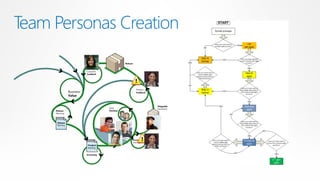
Team Personas Creation
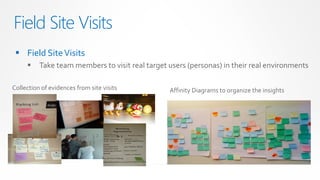
Field Site Visits
  Field Site Visits
         Take team members to visit real target users (personas) in their real environments

Collection of evidences from site visits         Affinity Diagrams to organize the insights
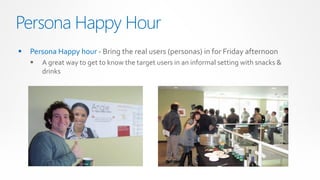
Persona Happy Hour
   Persona Happy hour - Bring the real users (personas) in for Friday afternoon
       A great way to get to know the target users in an informal setting with snacks &
        drinks
Q&A
Please contact mkonno@microsoft.com for any further questions

Agile2012 presentation miki_konno (aug2012)

  • 1.
    Agile UX ResearchPractices Applied AGILE ALLIANCE 2012 CONFERENCE MIKI KONNO, AUGUST 15TH 2012
  • 2.
    Introduction  Miki Konno– Sr. UX Researcher @ Microsoft  User Experience Researcher/ Human Factors Engineer for last 15 yrs  Worked @ Honda, Sony, Symantec, Jacob Nielsen-Don Norman Group (NNG), & HP  Worked @ Microsoft – Windows, MSN , Visual Studio (TFS), and Bing Platform division (Mobile/ Maps/ Speech/ Dev portal)  UX Research Specialized Areas  Web, Search, Mobile, Maps, TV/Video,, HW/SW Interaction, International Research, NUI (touch, speech, gestural), & Developer tools (ALM, Agile PM/ RM tools)  Education Background  Advanced degrees in Human Factors Engineering/ Applied Experimental Psychology and Industrial/ Organizational Psychology  Certified Scrum Product Owner PAGE 2
  • 3.
    Typical UX ResearchData Acquiring Cycle
  • 4.
    Full UX ResearchLab Study Timeline Weeks During Research -3 -2 -1 +2 Run as many as Data Analysis/ 8-16 Users Results Delivery Decide on Machine Setup/ UXR Participant Method + Task Screener Draft Tasks Walkthrough Attend Bug Report/ Fixing/ Sessions Add User Stories TEAM
  • 5.
    UX Challenges forAgile Teams  “We want to get user feedback BEFORE coding starts”  “We want to get user feedback on this sprint release NOW”  “A usability data analysis takes too long…we want the data FAST”  “There is NO TIME to test every user stories”
  • 6.
    The UX ResearchCycle needs to be faster!
  • 7.
    What have wedone in the Agile Environment? – Microsoft TFS & Bing Teams Case Studies  RITE Study  Online Customer Panel  Quick Pulse Study  Team Involvement with Personas
  • 8.
    Agile UX ResearchProcesses 1. RITE: Rapid Iterative Testing & Evaluation – Continuous design iterations in one day – Design elements/ UI design exploration – Design improvements in small increments
  • 9.
    RITE: Rapid IterativeTesting & Evaluation  RITE Study Protocol  Continuous design iteration  Requires a dedicated UX researcher to facilitate, and Designer (or developer) to iterate the design  Changes to the interface are made as soon as an issue is identified and a solution is clear  Then the changed interface is tested with the next user  You could be done in one day, o spread out to a few days 9am session 11am session 1pm session 3pm session 5pm session Final Design Final iteration w/ Design v0.1 w/ v0.2 w/v0.3 w/v0.4 w/v0.5
  • 10.
    RITE Examples (TFS) TE/TaskSwitching TE/ Task Switching v0.1 v0.2 Task Board Task Board v0.1 v0.2
  • 11.
    RITE Study Pros& Cons  Pros  Cons  Agile  Technical feasibility  You can complete the study in short time  Some features may not be technically feasible  Collaborative to change quickly  The team (UX researcher, PM, Designer, or  Feature limitations Developer) needs to come to an  Not all features can be included in the agreement on each design revision prototype  Visual  Quality and performance  Design Improvements are instantly visible  Hi-fidelity prototypes could have faster  Cost less performance and better quality, so it could be misleading  It can be done by one designer (or developers) in one day
  • 12.
    Agile UX ResearchProcesses 2. Online Customer Panel  Online feedback panel with target users  Product Owners run Bi-weekly panels  Same panel members can see the product improvement over time
  • 13.
    Online Customer Panel What is the online customer panel?  A group of pre-screened participants who have expressed a willingness to participate in customer feedback sessions online  5-6 customers are recruited to participate in online panels  Make sure that they are the target users  Make sure that they are able to commit to the length of time needed  Make sure to recruit the right type of participants  Product Owner to run the online panels  One hour of the participants time is needed every other week  Can use any types of materials (e.g., wireframe, interactive prototype, or sprint demos)  Get customer feedback on attitudes and opinions  Results are available instantly  Feedback can be recorded with customer consent (NDA ready)  Through Skype, Lync, Live Meeting, OneNote, Adobe Connect, WebEx etc.
  • 14.
    Online Customer PanelPros & Cons • Pros • Cons  Short preparation time  Hard to find the customers who can  Present virtually anything to customers commit the time  Cost less  Hard to manage 5-6 people talks at the  Use customers from anywhere same time  Customers become comfortable over  Hard to manage opinionated persons in time the group  Don’t need a UX researcher to run the  Learning effect of customers panel (opinion based, not  Difficult to test discoverability, observational based) navigation, information architecture
  • 15.
    Agile UX ResearchProcesses 3. Quick Pulse Study  Continuous user feedback with sprint cadence  One week from start to finish  Meet team’s urgent needs/ tweaks quickly  Work well with user stories / features  Flexible to test anything (i.e., mockups, builds)  Minimal advanced planning  Immediate product impact  Personas for recruiting
  • 16.
    Quick Pulse StudyProcess Summary  Recruit 3 users weekly to come into the usability lab every Thursday  One hour for each participant  9-10, 10-11, 11-12pm: 3 sessions in the morning  If we need to test more than one area, we’ll add 3 more on Friday  Use the same usability lab (or conference room) every week  Quick summary of findings sent out to the team by Monday  Work well with sprint planning mockups and sprint builds  Alternate between different personas (target users)  Email results sent out to a larger audience including management  Complements with the full-scale research (strategic, long-term)
  • 17.
    Quick Pulse LabStudy Schedule Days Lab Study Mon Tue Wed Thu Fri Run 3 Users Key Findings to Team UXR Participant Decide on Prototype or Screener Method + Code is Ready Review Draft Tasks Bug Filing/ New User Watch Sessions Stories to backlogs TEAM
  • 18.
    QPS uses only3 users? WHY?? • User research studies often run by a behavioral scientist professional – most URs hold MSs or/and Ph.Ds in Psychology • The best result comes from testing no more than 5 users and by running as many small tests as you can afford • The most striking truth is that zero user gives zero insights Usability guru, Jacob Nielsen's famous quote: “80% of usability issues can be found by no more than 5 users” *Reference from useit.com, Jacob Nielsen’s Alert Box, March 19, 2000
  • 19.
    Quick Pulse StudyStep 1 – FY Planning • Plan for feature areas, budget, timing, resources, and lab allocations • Assess other full research requirements at the time of planning stage • Align with other strategic research: competitive benchmark, longitudinal research, ethnographic research, international research, concept testing through focus groups, etc.
  • 20.
    Quick Pulse StudyStep 2 – Preparation Traditional Observation Room Usability lab Or Living Room lab Sprint Planning Mockups by designer Sprint Demos by scrum master/ product manager
  • 21.
    Quick Pulse StudyStep 3 – Execute!
  • 22.
    Quick Pulse StudyStep 4 – Communication
  • 23.
    Quick Pulse StudyStep 4 – Communication Eye Tracking Study Exploratory Search Exercise
  • 24.
    Quick Pulse StudyStep 4 – Communication A brief Presentation to immediate team Quick Summary Findings by email
  • 25.
    Quick Pulse StudyApplication  Works well with… X Doesn’t work well with…  Sprint-specific work  Method requires large N sample  Smaller/ Simpler features  Card Sort study  Sprint demos  Benchmark studies  Quick UI fixes w/wireframes  Competitive Analysis  Simple UI navigations  Surveys  Simple scenarios  Method requires strategic insights  Long-term/ E2E scenarios  Paper prototypes  Complex Systems / navigations  Product Concept mockup  International Studies
  • 26.
    FAQ: Quick PulseStudy  What if….we don’t have a UX Researcher?  Scrum Product Owner could run it, if not hire a UX researcher  What if….we don’t have a usability lab?  You can use online- meetings, conference rooms, at the coffee shops, at the conferences
  • 27.
    FAQ: Quick PulseStudy  What if….we don’t have enough budget to recruit ever week?  You can ask volunteer customers through company website, social media  What if….we don’t believe usability study data?  I’ll personally come to your company and educate your team 
  • 28.
    Q&A: Quick PulseStudy • Any more questions on Quick Pulse Study?
  • 29.
    Agile UX ResearchProcesses 4. Team Involvements with Personas  Persona Creation  Field Site Visits – take team members to visit real users in their real environments  Persona Happy hour - Bring the real users (persona profiles) in on Friday afternoon  A great way to get to know the target users in an informal setting with snacks & drinks
  • 30.
    Persona Creation  Whatis persona?  Personas are concrete representations based on the real data  Personas are not every possible customer  Different from customer segmentations from marketing  What are the benefits?  Bring focus  Build empathy  Encourage consensus  Help prioritize features  Lead to better customer-focused decisions  Focus on important customer-focused scenarios
  • 31.
    Persona – SegmentationMapping understanding user understanding  Market data = knowing why behavior market and how someone buys products or services, affects market positioning persona model segmentation model  Behavioral data = knowing how someone uses the products or services, affects product positioning design and feature decisions planning and design prioritization and communication
  • 32.
    PETER AGILE SCRUMMASTER peter’s competency metrics ux/ui WORK STYLE tech design coding » collaborative » good negotiator » domain-expert » great listener » excellent facilitator » politically not savvy leadership testing » gets excited about technology business PEOPLE ACTIVITIES PAIN POINTS multifunctional roles (e.g., SM/Dev, SM/QA) run daily stand ups unable to resolve team’s impediments most have technical degrees (BS in CS) remove team’s blocking issues time management between SM & dev most have CSM (certified scrum masters) manage team’s velocity/ burndown work rejected by product owners some evolved from developers or PMs negotiate user stories with product owners not get recognized being Scrum Master motivated by team productivity, shipping monitor sprint goals, run sprint review making time for mentoring junior devs customer-centric features coding/ testing process interrupted by mgrs
  • 33.
    ANGIE AGILE PRODUCTOWNER angie’s competency metrics ux/ui tech design WORK STYLE coding » excellent negotiator » collaborative » detailed oriented » great listener » excellent facilitator leadership testing » understand customer values » extremely organized business PEOPLE ACTIVITIES PAIN POINTS focused but hybrid role with Dev, UX, or BA manage product and sprint backlogs manage backlogs with multiple tools variety of degrees (CS, UX, or BA) collect biz, functional, tech customer reqs not able to clarify user stories to the team some used to be a business analyst create user scenarios & storyboards not able to validate user stories with cus some have PO training such as CSPO lead sprint planning/play planning poker not able to estimate the user stories correctly motivated by seeing features from her user define & clarify user story with the dev team req artifacts are not linked well together stories, seeing backlog items reducing set an acceptance criteria not able to transition well from previous roles
  • 34.
  • 35.
    Field Site Visits  Field Site Visits  Take team members to visit real target users (personas) in their real environments Collection of evidences from site visits Affinity Diagrams to organize the insights
  • 36.
    Persona Happy Hour  Persona Happy hour - Bring the real users (personas) in for Friday afternoon  A great way to get to know the target users in an informal setting with snacks & drinks
  • 37.
    Q&A Please contact mkonno@microsoft.comfor any further questions