


All rights reserved by Postman Inc
Advanced API
Debugging
Arlemi Turpault
Senior Developer Advocate
Joyce Lin
Head of Developer Relations
SENIOR DEVELOPER ADVOCATE, POSTMAN
Arlemi
Turpault
@arlemi
HEAD OF DEVREL, POSTMAN
Joyce Lin
@petuniaGray
1 Understanding API behavior
2 Debugging practices (tools and tactics)
3 Debugging strategies
5 Q&A
4 Resources
@arlemi
Agenda
● What is your primary area of focus?
● How much experience do you have
using Postman?
@arlemi
A little about you
Learning Objectives
At the end of this session, you will be able to:
● Explore methods for understanding API behavior, including updating user
inputs to change the API response
● Debug and troubleshoot unexpected behavior
● Establish visibility for monitors, webhooks, and CLI
● Isolate dependencies with mock servers
● Set up notifications and alerts
● Explain recommended strategies for debugging
@arlemi
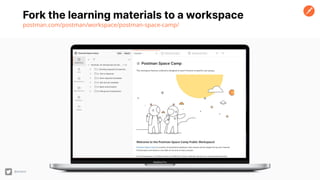
Fork the learning materials to a workspace
postman.com/postman/workspace/postman-space-camp/
@arlemi
Debugging
Strategies
METHODOLOGIES
@petuniaGray
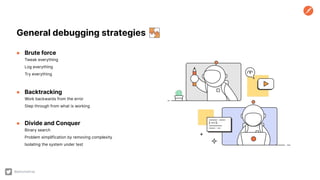
● Brute force
Tweak everything
Log everything
Try everything
● Backtracking
Work backwards from the error
Step through from what is working
● Divide and Conquer
Binary search
Problem simplification by removing complexity
Isolating the system under test
General debugging strategies
@petuniaGray
Tools and Tactics in
Postman
DEBUGGING
@petuniaGray
Client
– Manipulation + lnspection
● Parameters, headers, bodies
● Parse response
● Inspect variables
● HTTP status codes and error
messages
● Test results
● History for replay and reference
Console
– Calls + Logs
● Network calls, TLS encryption
● Log statements, errors, warnings
● Inspect variables
● Validate execution order
● Conditional breakpoints
● Postman console vs. DevTools
Tools and tactics [for a single API call]
@petuniaGray
Mock servers
– Isolate system under test
● Re-create edge cases (e.g. 429)
● Stub out dependencies (e.g.
third-party services or other internal
microservices)
● Set starting point for a scenario, or
swap out a specific call
Running collections
– Runner
● Postman console
● History for replay, reference, and export
● Log response data
– Monitors and Webhooks
● Monitor console and history
– Newman
● CLI output, files (JSON, HTMLextra)
Tools and tactics [for a sequence of API calls]
@petuniaGray
Working With Your
Favorite Tools
INTEGRATIONS
@petuniaGray
Work with your
favorite tools
[integrations]
@petuniaGray
Work with your
favorite tools
[integrations]
@petuniaGray
Detecting bugs early [alerting]
@petuniaGray
Monitoring and Observability
– Lots of integrations
● CI/CD integrations (e.g. CircleCI, Travis CI)
● Alerting Integrations (e.g. PagerDuty, Slack)
● Gateway Integrations (e.g. AWS Gateway)
– Postman to roll your own
● Test automation
● Monitor notifications
● Postman API and webhooks
During this session, we learned how to:
● Explore methods for understanding API behavior, including updating user
inputs to change the API response
● Debug and troubleshoot unexpected behavior
● Establish visibility for monitors, webhooks, and CLI
● Isolate dependencies with mock servers
● Set up notifications and alerts
● Explain recommended strategies for debugging
@arlemi
Learning Objectives
A few things to look forward to:
● Uptime Monitoring 📊
● WYSIWYG Documentation 📜
● Super Admin
● … and some more :)
Postman product roadmap
go.pstmn.io/public-roadmap
@arlemi
What’s next?
Additional Resources
Postman Answers
postman.com/postman/workspace/postman-answers/
30 Days of Postman for Developers
postman.com/postman/workspace/30-days-of-postman-for-developers/
Postman Space Camp
postman.com/postman/workspace/postman-space-camp/
Community Forum
community.postman.com
@arlemi
Q&A
@arlemi

Advanced API Debugging

  • 1.
    All rights reservedby Postman Inc Advanced API Debugging Arlemi Turpault Senior Developer Advocate Joyce Lin Head of Developer Relations
  • 2.
    SENIOR DEVELOPER ADVOCATE,POSTMAN Arlemi Turpault @arlemi HEAD OF DEVREL, POSTMAN Joyce Lin @petuniaGray
  • 3.
    1 Understanding APIbehavior 2 Debugging practices (tools and tactics) 3 Debugging strategies 5 Q&A 4 Resources @arlemi Agenda
  • 4.
    ● What isyour primary area of focus? ● How much experience do you have using Postman? @arlemi A little about you
  • 5.
    Learning Objectives At theend of this session, you will be able to: ● Explore methods for understanding API behavior, including updating user inputs to change the API response ● Debug and troubleshoot unexpected behavior ● Establish visibility for monitors, webhooks, and CLI ● Isolate dependencies with mock servers ● Set up notifications and alerts ● Explain recommended strategies for debugging @arlemi
  • 6.
    Fork the learningmaterials to a workspace postman.com/postman/workspace/postman-space-camp/ @arlemi
  • 7.
  • 8.
    ● Brute force Tweakeverything Log everything Try everything ● Backtracking Work backwards from the error Step through from what is working ● Divide and Conquer Binary search Problem simplification by removing complexity Isolating the system under test General debugging strategies @petuniaGray
  • 9.
    Tools and Tacticsin Postman DEBUGGING @petuniaGray
  • 10.
    Client – Manipulation +lnspection ● Parameters, headers, bodies ● Parse response ● Inspect variables ● HTTP status codes and error messages ● Test results ● History for replay and reference Console – Calls + Logs ● Network calls, TLS encryption ● Log statements, errors, warnings ● Inspect variables ● Validate execution order ● Conditional breakpoints ● Postman console vs. DevTools Tools and tactics [for a single API call] @petuniaGray Mock servers – Isolate system under test ● Re-create edge cases (e.g. 429) ● Stub out dependencies (e.g. third-party services or other internal microservices) ● Set starting point for a scenario, or swap out a specific call
  • 11.
    Running collections – Runner ●Postman console ● History for replay, reference, and export ● Log response data – Monitors and Webhooks ● Monitor console and history – Newman ● CLI output, files (JSON, HTMLextra) Tools and tactics [for a sequence of API calls] @petuniaGray
  • 12.
    Working With Your FavoriteTools INTEGRATIONS @petuniaGray
  • 13.
    Work with your favoritetools [integrations] @petuniaGray
  • 14.
    Work with your favoritetools [integrations] @petuniaGray
  • 15.
    Detecting bugs early[alerting] @petuniaGray Monitoring and Observability – Lots of integrations ● CI/CD integrations (e.g. CircleCI, Travis CI) ● Alerting Integrations (e.g. PagerDuty, Slack) ● Gateway Integrations (e.g. AWS Gateway) – Postman to roll your own ● Test automation ● Monitor notifications ● Postman API and webhooks
  • 16.
    During this session,we learned how to: ● Explore methods for understanding API behavior, including updating user inputs to change the API response ● Debug and troubleshoot unexpected behavior ● Establish visibility for monitors, webhooks, and CLI ● Isolate dependencies with mock servers ● Set up notifications and alerts ● Explain recommended strategies for debugging @arlemi Learning Objectives
  • 17.
    A few thingsto look forward to: ● Uptime Monitoring 📊 ● WYSIWYG Documentation 📜 ● Super Admin ● … and some more :) Postman product roadmap go.pstmn.io/public-roadmap @arlemi What’s next?
  • 18.
    Additional Resources Postman Answers postman.com/postman/workspace/postman-answers/ 30Days of Postman for Developers postman.com/postman/workspace/30-days-of-postman-for-developers/ Postman Space Camp postman.com/postman/workspace/postman-space-camp/ Community Forum community.postman.com @arlemi
  • 19.