Amazon
Dropbox
Uber
Instagram
Youtube
WHAT IS PYTHON
9
• Python is a popular programming language.
• It was created by Guido van Rossum, and released in 1991.
• It is used for:
⮚web development (server-side).
⮚software development.
⮚mathematics.
⮚system scripting.
WHY PYTHON IS WIDELY USE?
10
• The python language is one of the most accessible programming
languages
• Python works on different platforms (Windows, Mac, Linux etc).
• Python has a simple syntax.
• Python is easy to code.
• Python runs on an interpreter system, meaning that code can be
executed as soon as it is written.
• Python is a object Oriented Programming Language
IDE – FOR PYTHON
11
• Jupyter IDE can be use for python coding.
• Jupyter is a free, open-source, interactive web tool that allows
editing and running files via a web browser.
• To launch a Jupyter notebook, open your terminal and navigate to
the directory where you would like to save your notebook.
• Then type the command Jupyter notebook and the program will
instantiate a local server at localhost:8888
ALGORITHM
The step by step procedure to solve an
identified problem is called an
algorithm.
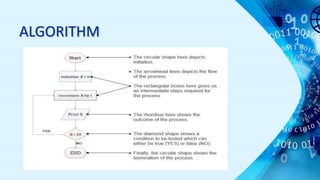
ALGORITHM
• PRINT 1 TO 20
STEPS
STEP 1:Initialize X as 0
STEP 2:Increment X by 1
STEP 3:Print X
STEP 4:If X is less than 20 then go back to
step 2
ALGORITHM
FLOWCHART
• A flowchart is the graphical or pictorial
representation of an algorithm with the
help of different symbols, shapes and
arrows in order to demonstrate a
process or a program.
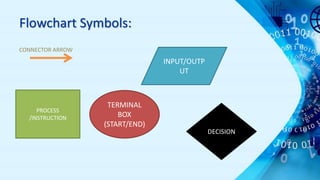
Flowchart Symbols:
CONNECTOR ARROW
PROCESS
/INSTRUCTION
TERMINAL
BOX
(START/END)
INPUT/OUTP
UT
DECISION
ALGORITHM
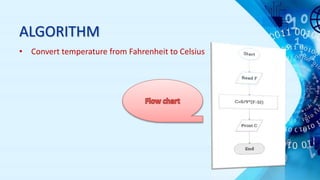
• Convert temperature from Fahrenheit to Celsius
PROGRAM
• A computer program is a collection of instructions
that perform a specific task when executed by a
computer.
• Examples- BASIC, Java, C, C++, Ruby, Python, Pascal etc.
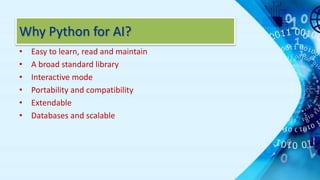
Why Python for AI?
• Easy to learn, read and maintain
• A broad standard library
• Interactive mode
• Portability and compatibility
• Extendable
• Databases and scalable
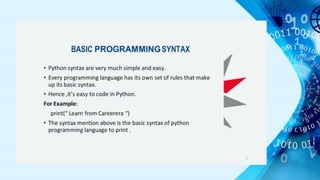
BASIC PROGRAMMING SYNTAX
20
• Python syntax are very much simple and easy.
• Every programming language has its own set of rules that make
up its basic syntax.
• Hence ,it’s easy to code in Python.
For Example:
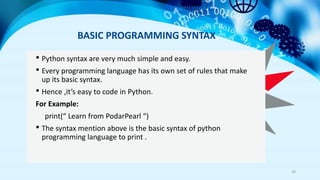
print(“ Learn from PodarPearl “)
• The syntax mention above is the basic syntax of python
programming language to print .
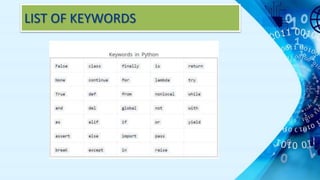
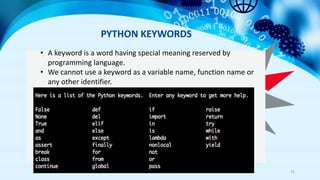
PYTHON KEYWORDS
21
• A keyword is a word having special meaning reserved by
programming language.
• We cannot use a keyword as a variable name, function name or
any other identifier.
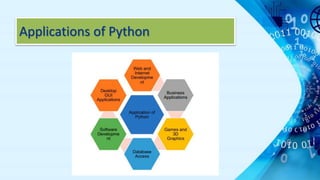
Applications of Python
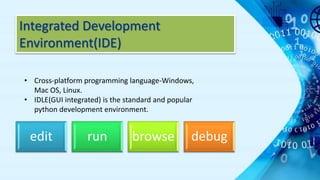
Integrated Development
Environment(IDE)
edit run browse debug
• Cross-platform programming language-Windows,
Mac OS, Linux.
• IDLE(GUI integrated) is the standard and popular
python development environment.
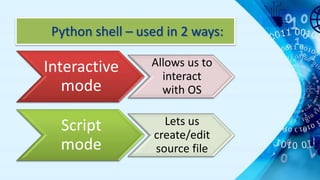
Python shell – used in 2 ways:
Interactive
mode
Allows us to
interact
with OS
Script
mode
Lets us
create/edit
source file
Python script/program
• Python statements written in a
particular sequence to solve a problem
is known as Python script/program.
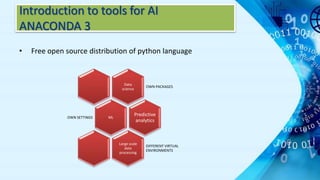
Introduction to tools for AI
ANACONDA 3
• Free open source distribution of python language
Data
science
OWN PACKAGES
ML
OWN SETTINGS
Predictive
analytics
Large scale
data
processing
DIFFERENT VIRTUAL
ENVIRONMENTS
Anaconda navigator
• Is a desktop GUI included in Anaconda that allows you
to launch applications and easily manage conda
packages, environments and channels without the
need to use command line commands.
What did we install?
• Anaconda prompt – Anaconda’s Command line
Interface(CLI) : is a Python CLI where we can create
different virtual environments and install packages
into them as per our need.
Jupyter Notebook
• Powerful tool for interactively developing and
presenting AI related projects.
• Possible to use different programming languages
• Python is commonly used language in it.
NOTEBOOK
It integrates codes and its output into a single document
that combines visualisations, narrative text,
mathematical equations.
Data science, analysis and science.
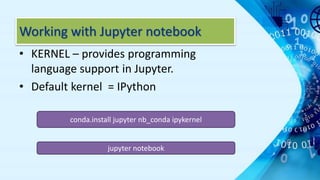
Working with Jupyter notebook
• KERNEL – provides programming
language support in Jupyter.
• Default kernel = IPython
conda.install jupyter nb_conda ipykernel
jupyter notebook
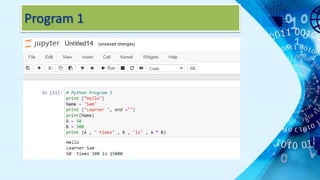
Program 1
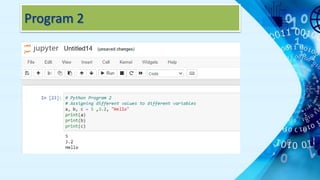
Program 2
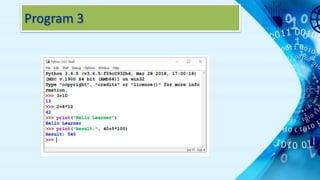
Program 3
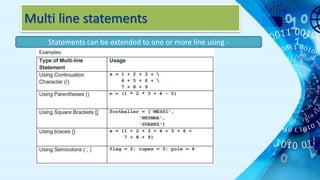
Multi line statements
Statements can be extended to one or more line using -
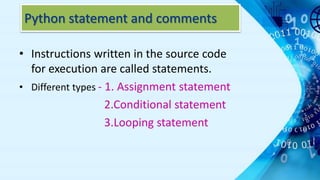
Python statement and comments
• Instructions written in the source code
for execution are called statements.
• Different types - 1. Assignment statement
2.Conditional statement
3.Looping statement
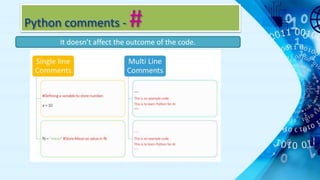
Python comments - #
It doesn’t affect the outcome of the code.
LIST OF KEYWORDS
KEYWORDS & IDENTIFIERS
• Keywords – are the reserved words in python used by
python interpreter to recognize the structure of the
program.
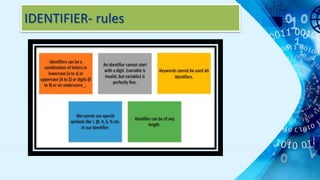
• Identifier – is a name given to the entities like class,
variables, functions etc. It helps to differentiate one
entity from another.
• (Entity is a python library for automated object validation and
serialization)
IDENTIFIER- rules
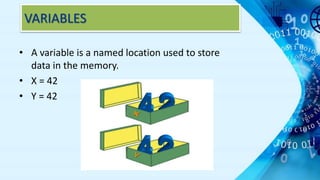
VARIABLES
• A variable is a named location used to store
data in the memory.
• X = 42
• Y = 42
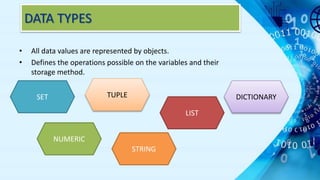
DATA TYPES
• All data values are represented by objects.
• Defines the operations possible on the variables and their
storage method.
NUMERIC
LIST
SET TUPLE
STRING
DICTIONARY
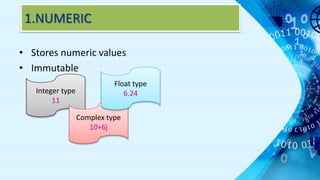
1.NUMERIC
• Stores numeric values
• Immutable
Integer type
11
Complex type
10+6j
Float type
6.24
2.LIST
• Store elements of different types
• Most versatile type in python
States = [‘Punjab’ , ‘Haryana’ , ‘Rajasthan’, 28]
print(States)
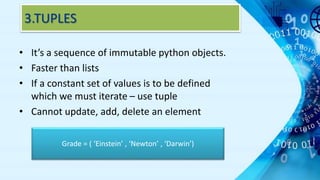
3.TUPLES
• It’s a sequence of immutable python objects.
• Faster than lists
• If a constant set of values is to be defined
which we must iterate – use tuple
• Cannot update, add, delete an element
Grade = ( ‘Einstein’ , ‘Newton’ , ‘Darwin’)
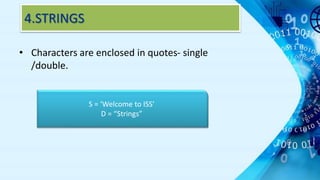
4.STRINGS
• Characters are enclosed in quotes- single
/double.
S = ‘Welcome to ISS’
D = “Strings”
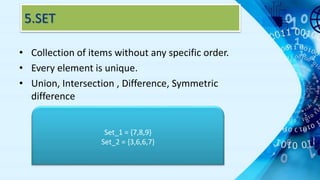
5.SET
• Collection of items without any specific order.
• Every element is unique.
• Union, Intersection , Difference, Symmetric
difference
Set_1 = {7,8,9}
Set_2 = {3,6,6,7}
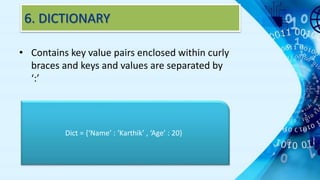
6. DICTIONARY
• Contains key value pairs enclosed within curly
braces and keys and values are separated by
‘:’
Dict = {‘Name’ : ‘Karthik’ , ‘Age’ : 20}
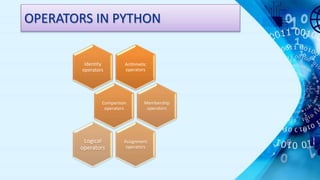
OPERATORS IN PYTHON
Arithmetic
operators
Identity
operators
Comparison
operators
Membership
operators
Assignment
operators
Logical
operators
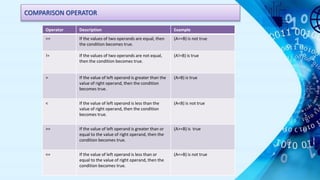
COMPARISON OPERATOR
Operator Description Example
== If the values of two operands are equal, then
the condition becomes true.
(A==B) is not true
!= If the values of two operands are not equal,
then the condition becomes true.
(A!=B) is true
> If the value of left operand is greater than the
value of right operand, then the condition
becomes true.
(A>B) is true
< If the value of left operand is less than the
value of right operand, then the condition
becomes true.
(A<B) is not true
>= If the value of left operand is greater than or
equal to the value of right operand, then the
condition becomes true.
(A>=B) is true
<= If the value of left operand is less than or
equal to the value of right operand, then the
condition becomes true.
(A<=B) is not true
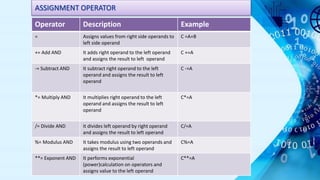
ASSIGNMENT OPERATOR
Operator Description Example
= Assigns values from right side operands to
left side operand
C =A+B
+= Add AND It adds right operand to the left operand
and assigns the result to left operand
C +=A
-= Subtract AND It subtract right operand to the left
operand and assigns the result to left
operand
C -=A
*= Multiply AND It multiplies right operand to the left
operand and assigns the result to left
operand
C*=A
/= Divide AND It divides left operand by right operand
and assigns the result to left operand
C/=A
%= Modulus AND It takes modulus using two operands and
assigns the result to left operand
C%=A
**= Exponent AND It performs exponential
(power)calculation on operators and
assigns value to the left operand
C**=A
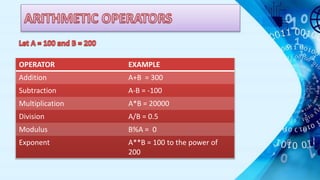
OPERATOR EXAMPLE
Addition A+B = 300
Subtraction A-B = -100
Multiplication A*B = 20000
Division A/B = 0.5
Modulus B%A = 0
Exponent A**B = 100 to the power of
200
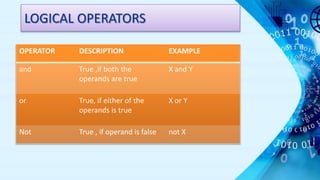
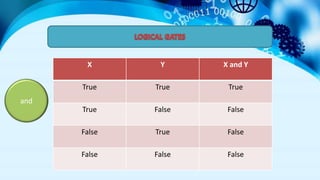
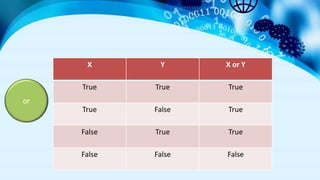
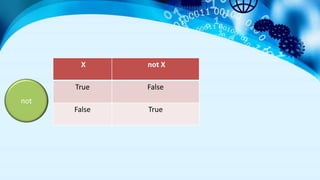
LOGICAL OPERATORS
OPERATOR DESCRIPTION EXAMPLE
and True ,if both the
operands are true
X and Y
or True, if either of the
operands is true
X or Y
Not True , if operand is false not X
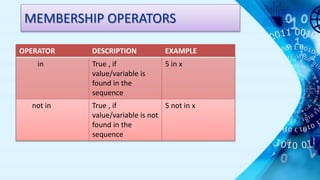
MEMBERSHIP OPERATORS
OPERATOR DESCRIPTION EXAMPLE
in True , if
value/variable is
found in the
sequence
5 in x
not in True , if
value/variable is not
found in the
sequence
5 not in x
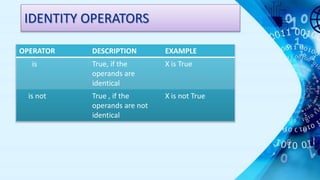
IDENTITY OPERATORS
OPERATOR DESCRIPTION EXAMPLE
is True, if the
operands are
identical
X is True
is not True , if the
operands are not
identical
X is not True
X Y X and Y
True True True
True False False
False True False
False False False
and
X Y X or Y
True True True
True False True
False True True
False False False
or
X not X
True False
False True
not
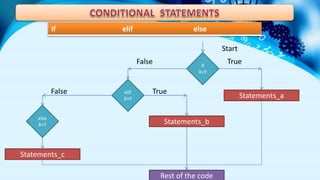
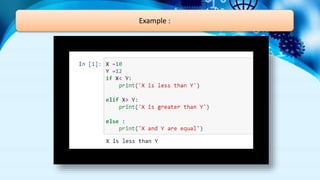
if elif else
If
X<Y
else
X=Y
elIf
X>Y Statements_a
Statements_c
Statements_b
Rest of the code
Start
False
False
True
True
Example :
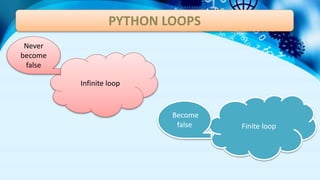
PYTHON LOOPS
Infinite loop
Finite loop
Never
become
false
Become
false
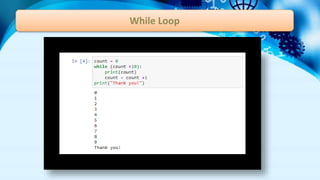
While Loop
• The condition is checked and if it is true, control will move
inside the loop and execute the statements until the
condition becomes false.
• When we are unsure about the number of iterations
While Loop
For Loop
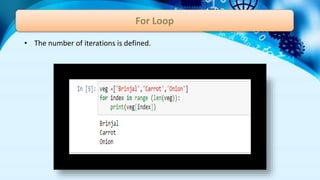
• The number of iterations is defined.
Nested Loops
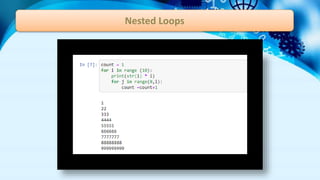
• A loop within a loop.
• For loop inside a while loop or the other way round.
• For loop inside a for loop.
• While loop inside a while loop.
Nested Loops
Python Functions
Uses :
1. Code reusability
2.Code organization and documentation
3.Abstraction
4.Extensibility and Scalability

Advance Python programming languages-Simple Easy learning

  • 2.
  • 5.
  • 6.
  • 7.
  • 8.
  • 9.
    WHAT IS PYTHON 9 •Python is a popular programming language. • It was created by Guido van Rossum, and released in 1991. • It is used for: ⮚web development (server-side). ⮚software development. ⮚mathematics. ⮚system scripting.
  • 10.
    WHY PYTHON ISWIDELY USE? 10 • The python language is one of the most accessible programming languages • Python works on different platforms (Windows, Mac, Linux etc). • Python has a simple syntax. • Python is easy to code. • Python runs on an interpreter system, meaning that code can be executed as soon as it is written. • Python is a object Oriented Programming Language
  • 11.
    IDE – FORPYTHON 11 • Jupyter IDE can be use for python coding. • Jupyter is a free, open-source, interactive web tool that allows editing and running files via a web browser. • To launch a Jupyter notebook, open your terminal and navigate to the directory where you would like to save your notebook. • Then type the command Jupyter notebook and the program will instantiate a local server at localhost:8888
  • 12.
    ALGORITHM The step bystep procedure to solve an identified problem is called an algorithm.
  • 13.
    ALGORITHM • PRINT 1TO 20 STEPS STEP 1:Initialize X as 0 STEP 2:Increment X by 1 STEP 3:Print X STEP 4:If X is less than 20 then go back to step 2
  • 14.
  • 15.
    FLOWCHART • A flowchartis the graphical or pictorial representation of an algorithm with the help of different symbols, shapes and arrows in order to demonstrate a process or a program.
  • 16.
  • 17.
    ALGORITHM • Convert temperaturefrom Fahrenheit to Celsius
  • 18.
    PROGRAM • A computerprogram is a collection of instructions that perform a specific task when executed by a computer. • Examples- BASIC, Java, C, C++, Ruby, Python, Pascal etc.
  • 19.
    Why Python forAI? • Easy to learn, read and maintain • A broad standard library • Interactive mode • Portability and compatibility • Extendable • Databases and scalable
  • 20.
    BASIC PROGRAMMING SYNTAX 20 •Python syntax are very much simple and easy. • Every programming language has its own set of rules that make up its basic syntax. • Hence ,it’s easy to code in Python. For Example: print(“ Learn from PodarPearl “) • The syntax mention above is the basic syntax of python programming language to print .
  • 21.
    PYTHON KEYWORDS 21 • Akeyword is a word having special meaning reserved by programming language. • We cannot use a keyword as a variable name, function name or any other identifier.
  • 22.
  • 23.
    Integrated Development Environment(IDE) edit runbrowse debug • Cross-platform programming language-Windows, Mac OS, Linux. • IDLE(GUI integrated) is the standard and popular python development environment.
  • 24.
    Python shell –used in 2 ways: Interactive mode Allows us to interact with OS Script mode Lets us create/edit source file
  • 25.
    Python script/program • Pythonstatements written in a particular sequence to solve a problem is known as Python script/program.
  • 27.
    Introduction to toolsfor AI ANACONDA 3 • Free open source distribution of python language Data science OWN PACKAGES ML OWN SETTINGS Predictive analytics Large scale data processing DIFFERENT VIRTUAL ENVIRONMENTS
  • 28.
    Anaconda navigator • Isa desktop GUI included in Anaconda that allows you to launch applications and easily manage conda packages, environments and channels without the need to use command line commands. What did we install? • Anaconda prompt – Anaconda’s Command line Interface(CLI) : is a Python CLI where we can create different virtual environments and install packages into them as per our need.
  • 29.
    Jupyter Notebook • Powerfultool for interactively developing and presenting AI related projects. • Possible to use different programming languages • Python is commonly used language in it. NOTEBOOK It integrates codes and its output into a single document that combines visualisations, narrative text, mathematical equations. Data science, analysis and science.
  • 30.
    Working with Jupyternotebook • KERNEL – provides programming language support in Jupyter. • Default kernel = IPython conda.install jupyter nb_conda ipykernel jupyter notebook
  • 31.
  • 32.
  • 33.
  • 34.
    Multi line statements Statementscan be extended to one or more line using -
  • 35.
    Python statement andcomments • Instructions written in the source code for execution are called statements. • Different types - 1. Assignment statement 2.Conditional statement 3.Looping statement
  • 36.
    Python comments -# It doesn’t affect the outcome of the code.
  • 37.
  • 38.
    KEYWORDS & IDENTIFIERS •Keywords – are the reserved words in python used by python interpreter to recognize the structure of the program. • Identifier – is a name given to the entities like class, variables, functions etc. It helps to differentiate one entity from another. • (Entity is a python library for automated object validation and serialization)
  • 39.
  • 40.
    VARIABLES • A variableis a named location used to store data in the memory. • X = 42 • Y = 42
  • 41.
    DATA TYPES • Alldata values are represented by objects. • Defines the operations possible on the variables and their storage method. NUMERIC LIST SET TUPLE STRING DICTIONARY
  • 42.
    1.NUMERIC • Stores numericvalues • Immutable Integer type 11 Complex type 10+6j Float type 6.24
  • 43.
    2.LIST • Store elementsof different types • Most versatile type in python States = [‘Punjab’ , ‘Haryana’ , ‘Rajasthan’, 28] print(States)
  • 44.
    3.TUPLES • It’s asequence of immutable python objects. • Faster than lists • If a constant set of values is to be defined which we must iterate – use tuple • Cannot update, add, delete an element Grade = ( ‘Einstein’ , ‘Newton’ , ‘Darwin’)
  • 45.
    4.STRINGS • Characters areenclosed in quotes- single /double. S = ‘Welcome to ISS’ D = “Strings”
  • 46.
    5.SET • Collection ofitems without any specific order. • Every element is unique. • Union, Intersection , Difference, Symmetric difference Set_1 = {7,8,9} Set_2 = {3,6,6,7}
  • 47.
    6. DICTIONARY • Containskey value pairs enclosed within curly braces and keys and values are separated by ‘:’ Dict = {‘Name’ : ‘Karthik’ , ‘Age’ : 20}
  • 48.
  • 49.
    COMPARISON OPERATOR Operator DescriptionExample == If the values of two operands are equal, then the condition becomes true. (A==B) is not true != If the values of two operands are not equal, then the condition becomes true. (A!=B) is true > If the value of left operand is greater than the value of right operand, then the condition becomes true. (A>B) is true < If the value of left operand is less than the value of right operand, then the condition becomes true. (A<B) is not true >= If the value of left operand is greater than or equal to the value of right operand, then the condition becomes true. (A>=B) is true <= If the value of left operand is less than or equal to the value of right operand, then the condition becomes true. (A<=B) is not true
  • 50.
    ASSIGNMENT OPERATOR Operator DescriptionExample = Assigns values from right side operands to left side operand C =A+B += Add AND It adds right operand to the left operand and assigns the result to left operand C +=A -= Subtract AND It subtract right operand to the left operand and assigns the result to left operand C -=A *= Multiply AND It multiplies right operand to the left operand and assigns the result to left operand C*=A /= Divide AND It divides left operand by right operand and assigns the result to left operand C/=A %= Modulus AND It takes modulus using two operands and assigns the result to left operand C%=A **= Exponent AND It performs exponential (power)calculation on operators and assigns value to the left operand C**=A
  • 51.
    OPERATOR EXAMPLE Addition A+B= 300 Subtraction A-B = -100 Multiplication A*B = 20000 Division A/B = 0.5 Modulus B%A = 0 Exponent A**B = 100 to the power of 200
  • 52.
    LOGICAL OPERATORS OPERATOR DESCRIPTIONEXAMPLE and True ,if both the operands are true X and Y or True, if either of the operands is true X or Y Not True , if operand is false not X
  • 53.
    MEMBERSHIP OPERATORS OPERATOR DESCRIPTIONEXAMPLE in True , if value/variable is found in the sequence 5 in x not in True , if value/variable is not found in the sequence 5 not in x
  • 54.
    IDENTITY OPERATORS OPERATOR DESCRIPTIONEXAMPLE is True, if the operands are identical X is True is not True , if the operands are not identical X is not True
  • 55.
    X Y Xand Y True True True True False False False True False False False False and
  • 56.
    X Y Xor Y True True True True False True False True True False False False or
  • 57.
    X not X TrueFalse False True not
  • 58.
    if elif else If X<Y else X=Y elIf X>YStatements_a Statements_c Statements_b Rest of the code Start False False True True
  • 59.
  • 60.
    PYTHON LOOPS Infinite loop Finiteloop Never become false Become false
  • 61.
    While Loop • Thecondition is checked and if it is true, control will move inside the loop and execute the statements until the condition becomes false. • When we are unsure about the number of iterations
  • 62.
  • 63.
    For Loop • Thenumber of iterations is defined.
  • 64.
    Nested Loops • Aloop within a loop. • For loop inside a while loop or the other way round. • For loop inside a for loop. • While loop inside a while loop.
  • 65.
  • 66.
    Python Functions Uses : 1.Code reusability 2.Code organization and documentation 3.Abstraction 4.Extensibility and Scalability