UmbrellaManagementPlatform
Accela Web Platform
Accela is Innovile's Configuration Management solution for Mobile Networks OSS
(Operation Support System).
I. Data Planning : New Site Data Creator for RF Planning Engineers
II. Consistency Analysis : Consistency Checks for Optimisation Engineers
III. Operational Support : Routine and Bulky Job Facilitator for OSS/OMC Engineers
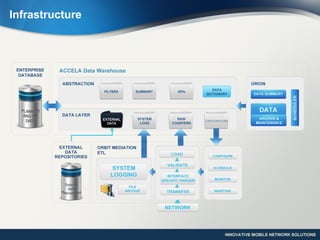
Infrastructure
Data Planning prepares complete Cell Data Transcript in three quick steps
1. Select the site
2. Run the planning functions
3. Export XML ready to be run at OSS
Major Benefits
 Web based, No installation required
 No CPU-Memory limitations
 Automates Cell Data Transcript preparation
 Minimises human dependent errors
 Prepares Data Transcript in less than 10 minutes
 Satelite/Street/Terrain view map powered by Google Maps™
Plan
Act
Integrate
Check
Data Planning Overview
Operational Support Overview
Operational Support aims to:
 Process operations on bulk numbers of cells
 Decrease the paperwork and e-mailing time by
automatically gathering the required data
 Automate ongoing processes between several
departments
 Create accurate and reliable XML definitions for
OSS with simple button clicks, for time consuming
and frequently used network operation tasks
Consistency Analysis Overview
 Easy-to-use Inconsistency
Management via web interface
 Oracle powered program
performance
 Schedulable e-mail sending for
selected Workspace results
 Extensive list of pre-defined
inconsistency check functions
 Easy and quick addition of new
functions without any interference in the
working system
 Easy export of results to excel files
 Easy online tracking of results via web page
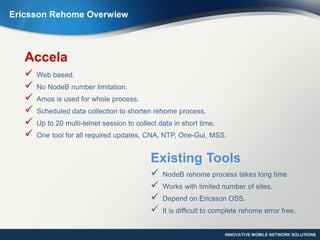
Ericsson Rehome Overwiew
Ericsson Rehome Module is one of Accela‘s Operational Support Modules.
Ericsson Rehome Overwiew
Existing Tools
 NodeB rehome process takes long time
 Works with limited number of sites.
 Depend on Ericsson OSS.
 It is difficult to complete rehome error free.
Accela
 Web based.
 No NodeB number limitation.
 Amos is used for whole process.
 Scheduled data collection to shorten rehome process.
 Up to 20 multi-telnet session to collect data in short time.
 One tool for all required updates, CNA, NTP, One-Gui, MSS.
Data Collection
• Scheduled or On-
Demand Collection
• NodeB Alarms
• NTP Values
• Performance Reports
• Cell States
• Rehome Data
Implementation
• LAC
• Service Area
• IUB
• UtranCell
• Neighbour
• NTP
• One-Gui
• CNA
• MSS
Validation
• Cell States
• Neighbour Counts
• NTP values
• NodeB Alarms
• Performance Reports
Major Functions
Data Collection
 User can schedule data collection prior to rehome process.
 Once data collection is finished, user is notified with email.
 On-Demand data collection is also available.
 User can decide to start rehome process or not by seeingll required inputs like existing alarms,
performance reports and cell states.
 Rehome list can be modified after analysing all these inputs.
Scheduled or
On-Demand
Collection
NodeB Alarms
NTP
Values
Performance
Reports
Cell
States
Rehome
Data Data Collection
Implementation
 User can proceed step by
step with grouped functions
 Detailed process reports
provided to the user for
each steps
 All requried updates can be
done from the tool itself.
Implementation
LAC
Service
Area
IUB
UtranCell
Neighbour
NTP
One-Gui
CNA
MSS
Validation
 Validation function provides Performance, Alarm and Comparison reports
to the user.
Validation
Cell States
Neighbour Counts
NTP values
NodeB Alarms
Performance
Reports
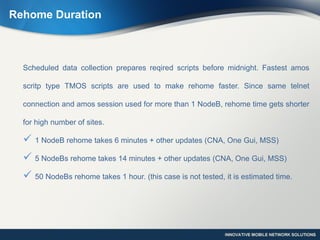
Rehome Duration
Scheduled data collection prepares reqired scripts before midnight. Fastest amos
scritp type TMOS scripts are used to make rehome faster. Since same telnet
connection and amos session used for more than 1 NodeB, rehome time gets shorter
for high number of sites.
 1 NodeB rehome takes 6 minutes + other updates (CNA, One Gui, MSS)
 5 NodeBs rehome takes 14 minutes + other updates (CNA, One Gui, MSS)
 50 NodeBs rehome takes 1 hour. (this case is not tested, it is estimated time.
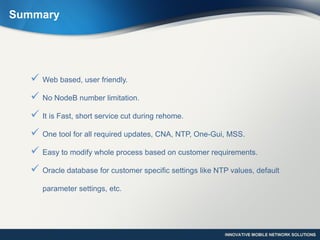
Summary
 Web based, user friendly.
 No NodeB number limitation.
 It is Fast, short service cut during rehome.
 One tool for all required updates, CNA, NTP, One-Gui, MSS.
 Easy to modify whole process based on customer requirements.
 Oracle database for customer specific settings like NTP values, default
parameter settings, etc.
For More Information
+90 232 282 0265
info@innovile.com
Visit us
www.innovile.com
Contact

Accela Ericsson Rehome Module

  • 1.
  • 2.
    Accela Web Platform Accelais Innovile's Configuration Management solution for Mobile Networks OSS (Operation Support System). I. Data Planning : New Site Data Creator for RF Planning Engineers II. Consistency Analysis : Consistency Checks for Optimisation Engineers III. Operational Support : Routine and Bulky Job Facilitator for OSS/OMC Engineers
  • 3.
  • 4.
    Data Planning preparescomplete Cell Data Transcript in three quick steps 1. Select the site 2. Run the planning functions 3. Export XML ready to be run at OSS Major Benefits  Web based, No installation required  No CPU-Memory limitations  Automates Cell Data Transcript preparation  Minimises human dependent errors  Prepares Data Transcript in less than 10 minutes  Satelite/Street/Terrain view map powered by Google Maps™ Plan Act Integrate Check Data Planning Overview
  • 5.
    Operational Support Overview OperationalSupport aims to:  Process operations on bulk numbers of cells  Decrease the paperwork and e-mailing time by automatically gathering the required data  Automate ongoing processes between several departments  Create accurate and reliable XML definitions for OSS with simple button clicks, for time consuming and frequently used network operation tasks
  • 6.
    Consistency Analysis Overview Easy-to-use Inconsistency Management via web interface  Oracle powered program performance  Schedulable e-mail sending for selected Workspace results  Extensive list of pre-defined inconsistency check functions  Easy and quick addition of new functions without any interference in the working system  Easy export of results to excel files  Easy online tracking of results via web page
  • 7.
    Ericsson Rehome Overwiew EricssonRehome Module is one of Accela‘s Operational Support Modules.
  • 8.
    Ericsson Rehome Overwiew ExistingTools  NodeB rehome process takes long time  Works with limited number of sites.  Depend on Ericsson OSS.  It is difficult to complete rehome error free. Accela  Web based.  No NodeB number limitation.  Amos is used for whole process.  Scheduled data collection to shorten rehome process.  Up to 20 multi-telnet session to collect data in short time.  One tool for all required updates, CNA, NTP, One-Gui, MSS.
  • 9.
    Data Collection • Scheduledor On- Demand Collection • NodeB Alarms • NTP Values • Performance Reports • Cell States • Rehome Data Implementation • LAC • Service Area • IUB • UtranCell • Neighbour • NTP • One-Gui • CNA • MSS Validation • Cell States • Neighbour Counts • NTP values • NodeB Alarms • Performance Reports Major Functions
  • 10.
    Data Collection  Usercan schedule data collection prior to rehome process.  Once data collection is finished, user is notified with email.  On-Demand data collection is also available.  User can decide to start rehome process or not by seeingll required inputs like existing alarms, performance reports and cell states.  Rehome list can be modified after analysing all these inputs. Scheduled or On-Demand Collection NodeB Alarms NTP Values Performance Reports Cell States Rehome Data Data Collection
  • 11.
    Implementation  User canproceed step by step with grouped functions  Detailed process reports provided to the user for each steps  All requried updates can be done from the tool itself. Implementation LAC Service Area IUB UtranCell Neighbour NTP One-Gui CNA MSS
  • 12.
    Validation  Validation functionprovides Performance, Alarm and Comparison reports to the user. Validation Cell States Neighbour Counts NTP values NodeB Alarms Performance Reports
  • 13.
    Rehome Duration Scheduled datacollection prepares reqired scripts before midnight. Fastest amos scritp type TMOS scripts are used to make rehome faster. Since same telnet connection and amos session used for more than 1 NodeB, rehome time gets shorter for high number of sites.  1 NodeB rehome takes 6 minutes + other updates (CNA, One Gui, MSS)  5 NodeBs rehome takes 14 minutes + other updates (CNA, One Gui, MSS)  50 NodeBs rehome takes 1 hour. (this case is not tested, it is estimated time.
  • 14.
    Summary  Web based,user friendly.  No NodeB number limitation.  It is Fast, short service cut during rehome.  One tool for all required updates, CNA, NTP, One-Gui, MSS.  Easy to modify whole process based on customer requirements.  Oracle database for customer specific settings like NTP values, default parameter settings, etc.
  • 15.
    For More Information +90232 282 0265 info@innovile.com Visit us www.innovile.com Contact