Evaluation of abc WOW! - Kids' Alphabet
Flash Cards and Letters Song Software
Done by: Shamsa 92099 , Noora 94985
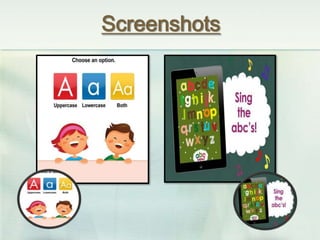
Screenshots
Overview about the courseware
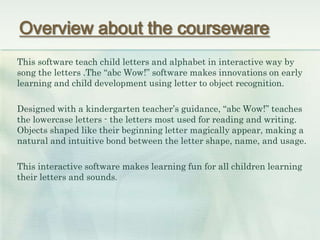
This software teach child letters and alphabet in interactive way by
song the letters .The “abc Wow!” software makes innovations on early
learning and child development using letter to object recognition.
Designed with a kindergarten teacher’s guidance, “abc Wow!” teaches
the lowercase letters - the letters most used for reading and writing.
Objects shaped like their beginning letter magically appear, making a
natural and intuitive bond between the letter shape, name, and usage.
This interactive software makes learning fun for all children learning
their letters and sounds.
A bout The Software
The purpose of evaluation:
To understand the needs of teachers and develop the software
Audience:
Teachers of English who teach the first grade at school
Suggest and develop an evaluation technique
We use questionnaire to develop doing by Google
Drive:
https://docsgoogle.com/forms/d/10grMcxDoSoRTQ4A6btI5PS1klh6
8rgj1wK-lc6yidlI/viewform.
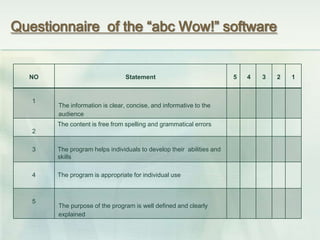
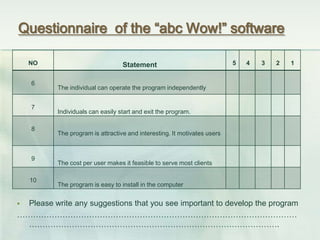
Questionnaire of the “abc Wow!” software
NO Statement 5 4 3 2 1
1
The information is clear, concise, and informative to the
audience
2
The content is free from spelling and grammatical errors
3 The program helps individuals to develop their abilities and
skills
4 The program is appropriate for individual use
5
The purpose of the program is well defined and clearly
explained
Questionnaire of the “abc Wow!” software
 Please write any suggestions that you see important to develop the program
……………………………………………………………………………………………
………………………………………………………………………………….
NO Statement 5 4 3 2 1
6
The individual can operate the program independently
7
Individuals can easily start and exit the program.
8
The program is attractive and interesting. It motivates users
9
The cost per user makes it feasible to serve most clients
10
The program is easy to install in the computer
The Results of The Questionnaire
We divide the items to Pedagogical and Technical parts. In addition, we put the results
Of each item in the table. Each table has three columns. Each table shows the degree
satisfaction , the number of responses ( out of 25 responses ) and the percentage of
responses. For example, as you see to the table below for the first items in our questio
We see that there are 20 responses out 25 to agree Of the first item and the percentag
80% . On other hand , there is not any responses to strongly disagree. Also, we see tha
there are 5 responses to strongly agree and the percentage is 20%.
The Results of The Questionnaire
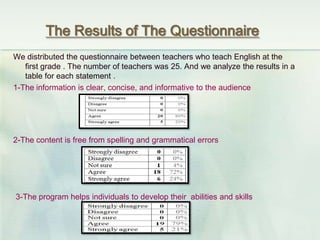
We distributed the questionnaire between teachers who teach English at the
first grade . The number of teachers was 25. And we analyze the results in a
table for each statement .
1-The information is clear, concise, and informative to the audience
2-The content is free from spelling and grammatical errors
3-The program helps individuals to develop their abilities and skills
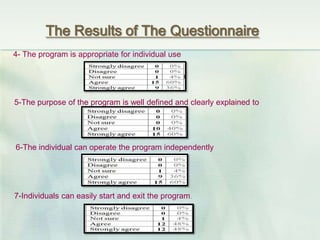
The Results of The Questionnaire
4- The program is appropriate for individual use
5-The purpose of the program is well defined and clearly explained to
6-The individual can operate the program independently
7-Individuals can easily start and exit the program.
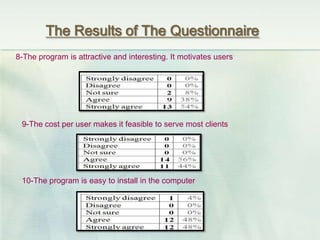
The Results of The Questionnaire
8-The program is attractive and interesting. It motivates users
9-The cost per user makes it feasible to serve most clients
10-The program is easy to install in the computer
The Results of The Questionnaire
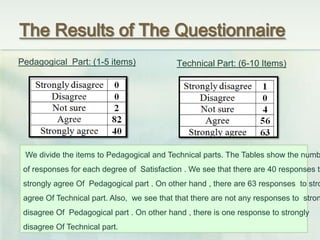
Pedagogical Part: (1-5 items) Technical Part: (6-10 Items)
We divide the items to Pedagogical and Technical parts. The Tables show the numb
of responses for each degree of Satisfaction . We see that there are 40 responses to
strongly agree Of Pedagogical part . On other hand , there are 63 responses to stro
agree Of Technical part. Also, we see that that there are not any responses to stron
disagree Of Pedagogical part . On other hand , there is one response to strongly
disagree Of Technical part.
References

Abc evaluation

  • 1.
    Evaluation of abcWOW! - Kids' Alphabet Flash Cards and Letters Song Software Done by: Shamsa 92099 , Noora 94985
  • 2.
  • 3.
    Overview about thecourseware This software teach child letters and alphabet in interactive way by song the letters .The “abc Wow!” software makes innovations on early learning and child development using letter to object recognition. Designed with a kindergarten teacher’s guidance, “abc Wow!” teaches the lowercase letters - the letters most used for reading and writing. Objects shaped like their beginning letter magically appear, making a natural and intuitive bond between the letter shape, name, and usage. This interactive software makes learning fun for all children learning their letters and sounds.
  • 4.
    A bout TheSoftware The purpose of evaluation: To understand the needs of teachers and develop the software Audience: Teachers of English who teach the first grade at school Suggest and develop an evaluation technique We use questionnaire to develop doing by Google Drive: https://docsgoogle.com/forms/d/10grMcxDoSoRTQ4A6btI5PS1klh6 8rgj1wK-lc6yidlI/viewform.
  • 5.
    Questionnaire of the“abc Wow!” software NO Statement 5 4 3 2 1 1 The information is clear, concise, and informative to the audience 2 The content is free from spelling and grammatical errors 3 The program helps individuals to develop their abilities and skills 4 The program is appropriate for individual use 5 The purpose of the program is well defined and clearly explained
  • 6.
    Questionnaire of the“abc Wow!” software  Please write any suggestions that you see important to develop the program …………………………………………………………………………………………… …………………………………………………………………………………. NO Statement 5 4 3 2 1 6 The individual can operate the program independently 7 Individuals can easily start and exit the program. 8 The program is attractive and interesting. It motivates users 9 The cost per user makes it feasible to serve most clients 10 The program is easy to install in the computer
  • 7.
    The Results ofThe Questionnaire We divide the items to Pedagogical and Technical parts. In addition, we put the results Of each item in the table. Each table has three columns. Each table shows the degree satisfaction , the number of responses ( out of 25 responses ) and the percentage of responses. For example, as you see to the table below for the first items in our questio We see that there are 20 responses out 25 to agree Of the first item and the percentag 80% . On other hand , there is not any responses to strongly disagree. Also, we see tha there are 5 responses to strongly agree and the percentage is 20%.
  • 8.
    The Results ofThe Questionnaire We distributed the questionnaire between teachers who teach English at the first grade . The number of teachers was 25. And we analyze the results in a table for each statement . 1-The information is clear, concise, and informative to the audience 2-The content is free from spelling and grammatical errors 3-The program helps individuals to develop their abilities and skills
  • 9.
    The Results ofThe Questionnaire 4- The program is appropriate for individual use 5-The purpose of the program is well defined and clearly explained to 6-The individual can operate the program independently 7-Individuals can easily start and exit the program.
  • 10.
    The Results ofThe Questionnaire 8-The program is attractive and interesting. It motivates users 9-The cost per user makes it feasible to serve most clients 10-The program is easy to install in the computer
  • 11.
    The Results ofThe Questionnaire Pedagogical Part: (1-5 items) Technical Part: (6-10 Items) We divide the items to Pedagogical and Technical parts. The Tables show the numb of responses for each degree of Satisfaction . We see that there are 40 responses to strongly agree Of Pedagogical part . On other hand , there are 63 responses to stro agree Of Technical part. Also, we see that that there are not any responses to stron disagree Of Pedagogical part . On other hand , there is one response to strongly disagree Of Technical part.
  • 12.