ABAP 7.02 New Features
New String Functions


     Johann Fößleitner, Cadaxo GmbH   https://twitter.com/foessleitnerj
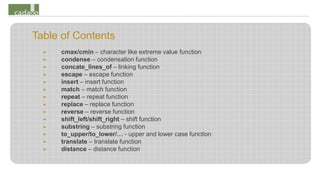
Table of Contents
  ➤   cmax/cmin – character like extreme value function
  ➤   condense – condensation function
  ➤   concate_lines_of – linking function
  ➤   escape – escape function
  ➤   insert – insert function
  ➤   match – match function
  ➤   repeat – repeat function
  ➤   replace – replace function
  ➤   reverse – reverse function
  ➤   shift_left/shift_right – shift function
  ➤   substring – substring function
  ➤   to_upper/to_lower/… - upper and lower case function
  ➤   translate – translate function
  ➤   distance – distance function
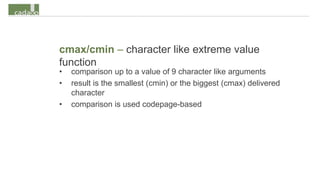
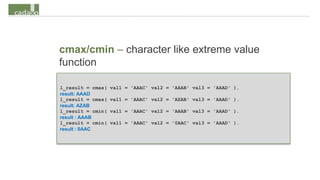
cmax/cmin – character like extreme value
function
•   comparison up to a value of 9 character like arguments
•   result is the smallest (cmin) or the biggest (cmax) delivered
    character
•   comparison is used codepage-based
cmax/cmin – character like extreme value
function

l_result = cmax(   val1 = 'AAAC' val2 = 'AAAB' val3 = 'AAAD' ).
result: AAAD
l_result = cmax(   val1 = 'AAAC' val2 = 'AZAB' val3 = 'AAAD' ).
result: AZAB
l_result = cmin(   val1 = 'AAAC' val2 = 'AAAB' val3 = 'AAAD' ).
result : AAAB
l_result = cmin(   val1 = 'AAAC' val2 = '0AAC' val3 = 'AAAD' ).
result : 0AAC
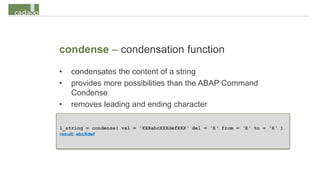
condense – condensation function
•   condensates the content of a string
•   provides more possibilities than the ABAP Command
    Condense
•   removes leading and ending character

l_string = condense( val = ‘XXXabcXXXdefXXX‘ del = ‘X‘ from = ‘X‘ to = ‘X‘ ).
result: abcXdef
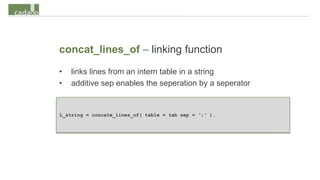
concat_lines_of – linking function
•   links lines from an intern table in a string
•   additive sep enables the seperation by a seperator


L_string = concate_lines_of( table = tab sep = ‘;‘ ).
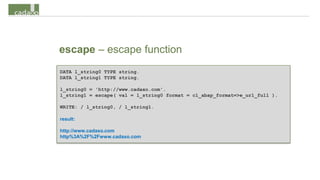
escape – escape function
• enables the rule-based replacing of a string with escape
  symbols
• usable rules are defined as constants in
  CL_ABAP_FORMAT
escape – escape function
DATA l_string0 TYPE string.
DATA l_string1 TYPE string.

l_string0 = 'http://www.cadaxo.com'.
l_string1 = escape( val = l_string0 format = cl_abap_format=>e_url_full ).

WRITE: / l_string0, / l_string1.

result:

http://www.cadaxo.com
http%3A%2F%2Fwww.cadaxo.com
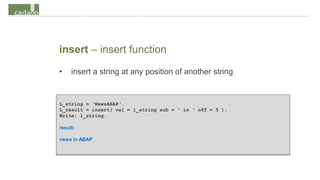
insert – insert function
•    insert a string at any position of another string


L_string = ‘NewsABAP‘.
L_result = insert( val = l_string sub = ‘ in ‘ off = 5 ).
Write: l_string.

result:

news in ABAP
match – match function
•   searches for a text with a specific Regex accordance
•   more information of Regex can be gathered from SAP online
    documentation
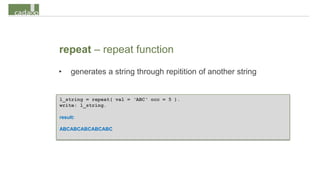
repeat – repeat function
•    generates a string through repitition of another string


l_string = repeat( val = ‘ABC‘ occ = 5 ).
write: l_string.

result:

ABCABCABCABCABC
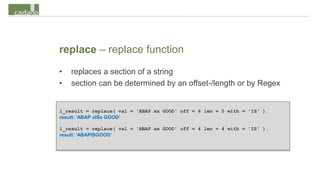
replace – replace function
•   replaces a section of a string
•   section can be determined by an offset-/length or by Regex


l_result = replace( val = 'ABAP xx GOOD' off = 6 len = 0 with = 'IS' ).
result: ‘ABAP xISx GOOD‘

l_result = replace( val = 'ABAP xx GOOD' off = 4 len = 4 with = 'IS' ).
result: ‘ABAPISGOOD‘
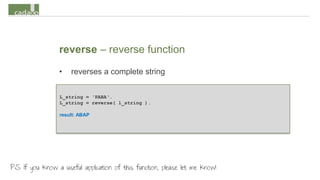
reverse – reverse function
                 •   reverses a complete string


                 L_string = ‘PABA‘.
                 L_string = reverse( l_string ).

                 result: ABAP


PS: If you know a useful application of this function, please let me know!
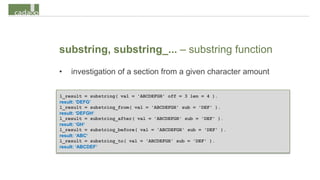
substring, substring_... – substring function
•   investigation of a section from a given character amount

l_result = substring( val = 'ABCDEFGH' off = 3 len = 4 ).
result: ‘DEFG‘
l_result = substring_from( val = 'ABCDEFGH' sub = 'DEF' ).
result: ‘DEFGH‘
l_result = substring_after( val = 'ABCDEFGH' sub = 'DEF' ).
result: ‘GH‘
l_result = substring_before( val = 'ABCDEFGH' sub = 'DEF' ).
result: ‘ABC‘
l_result = substring_to( val = 'ABCDEFGH' sub = 'DEF' ).
result: ‘ABCDEF‘
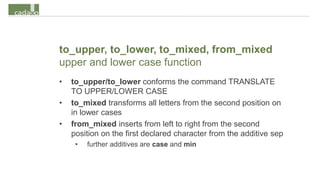
to_upper, to_lower, to_mixed, from_mixed
upper and lower case function
•   to_upper/to_lower conforms the command TRANSLATE
    TO UPPER/LOWER CASE
•   to_mixed transforms all letters from the second position on
    in lower cases
•   from_mixed inserts from left to right from the second
    position on the first declared character from the additive sep
     •   further additives are case and min
to_upper, to_lower, to_mixed, from_mixed
upper and lower case function


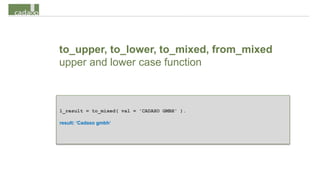
l_result = to_mixed( val = 'CADAXO GMBH' ).

result: ‘Cadaxo gmbh‘
distance – distance function
                   •   investigates the edit distance (Levenshtein-distance) of to
                       strings
                         •   minimal amount of insert, delete or replace processes to get from string
                             1 to string 2

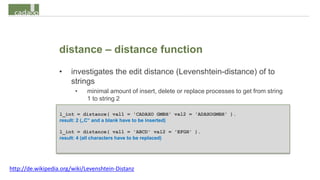
                   l_int = distance( val1 = 'CADAXO GMBH' val2 = 'ADAXOGMBH' ).
                   result: 2 („C“ and a blank have to be inserted)

                   l_int = distance( val1 = 'ABCD' val2 = 'EFGH' ).
                   result: 4 (all characters have to be replaced)


http://de.wikipedia.org/wiki/Levenshtein-Distanz
Cadaxo gmbh, founded in 2009, set out to simplify the SAP working
environment with small add-ons.

              SQL Cockpit 2.0 – the most efficient Analysis add on for
              SAP environments, business users, software developers and
              support alike. SQL Cockpit enable quick and flexible data
              retrievel (without report development and without
              transports) directly in the SAP productive system.

              http://www.cadaxo.com/content/en/products/sql-cockpit.html


                                                  http://com.slideshare.net/cadaxogmbh
                                                  http://www.youtube.com/CadaxoGmbH
                                                  http://www.linkedin.com/company/cadaxo-gmbh
                                                  https://twitter.com/cadaxo
The multiplication or the translation of this document or
sections out of it is without the expressively authorisation of
Cadaxo GmbH prohibited.

SAP®, ABAP™, R/3®, SAP NetWeaver® are brands or
registered brands of the SAP AG.

All other products are brands or registered brands of the
particular company.

© 2013 Cadaxo GesmbH. All rights reserved.

Abap 7 02 new features - new string functions

  • 1.
    ABAP 7.02 NewFeatures New String Functions Johann Fößleitner, Cadaxo GmbH https://twitter.com/foessleitnerj
  • 2.
    Table of Contents ➤ cmax/cmin – character like extreme value function ➤ condense – condensation function ➤ concate_lines_of – linking function ➤ escape – escape function ➤ insert – insert function ➤ match – match function ➤ repeat – repeat function ➤ replace – replace function ➤ reverse – reverse function ➤ shift_left/shift_right – shift function ➤ substring – substring function ➤ to_upper/to_lower/… - upper and lower case function ➤ translate – translate function ➤ distance – distance function
  • 3.
    cmax/cmin – characterlike extreme value function • comparison up to a value of 9 character like arguments • result is the smallest (cmin) or the biggest (cmax) delivered character • comparison is used codepage-based
  • 4.
    cmax/cmin – characterlike extreme value function l_result = cmax( val1 = 'AAAC' val2 = 'AAAB' val3 = 'AAAD' ). result: AAAD l_result = cmax( val1 = 'AAAC' val2 = 'AZAB' val3 = 'AAAD' ). result: AZAB l_result = cmin( val1 = 'AAAC' val2 = 'AAAB' val3 = 'AAAD' ). result : AAAB l_result = cmin( val1 = 'AAAC' val2 = '0AAC' val3 = 'AAAD' ). result : 0AAC
  • 5.
    condense – condensationfunction • condensates the content of a string • provides more possibilities than the ABAP Command Condense • removes leading and ending character l_string = condense( val = ‘XXXabcXXXdefXXX‘ del = ‘X‘ from = ‘X‘ to = ‘X‘ ). result: abcXdef
  • 6.
    concat_lines_of – linkingfunction • links lines from an intern table in a string • additive sep enables the seperation by a seperator L_string = concate_lines_of( table = tab sep = ‘;‘ ).
  • 7.
    escape – escapefunction • enables the rule-based replacing of a string with escape symbols • usable rules are defined as constants in CL_ABAP_FORMAT
  • 8.
    escape – escapefunction DATA l_string0 TYPE string. DATA l_string1 TYPE string. l_string0 = 'http://www.cadaxo.com'. l_string1 = escape( val = l_string0 format = cl_abap_format=>e_url_full ). WRITE: / l_string0, / l_string1. result: http://www.cadaxo.com http%3A%2F%2Fwww.cadaxo.com
  • 9.
    insert – insertfunction • insert a string at any position of another string L_string = ‘NewsABAP‘. L_result = insert( val = l_string sub = ‘ in ‘ off = 5 ). Write: l_string. result: news in ABAP
  • 10.
    match – matchfunction • searches for a text with a specific Regex accordance • more information of Regex can be gathered from SAP online documentation
  • 11.
    repeat – repeatfunction • generates a string through repitition of another string l_string = repeat( val = ‘ABC‘ occ = 5 ). write: l_string. result: ABCABCABCABCABC
  • 12.
    replace – replacefunction • replaces a section of a string • section can be determined by an offset-/length or by Regex l_result = replace( val = 'ABAP xx GOOD' off = 6 len = 0 with = 'IS' ). result: ‘ABAP xISx GOOD‘ l_result = replace( val = 'ABAP xx GOOD' off = 4 len = 4 with = 'IS' ). result: ‘ABAPISGOOD‘
  • 13.
    reverse – reversefunction • reverses a complete string L_string = ‘PABA‘. L_string = reverse( l_string ). result: ABAP PS: If you know a useful application of this function, please let me know!
  • 14.
    substring, substring_... –substring function • investigation of a section from a given character amount l_result = substring( val = 'ABCDEFGH' off = 3 len = 4 ). result: ‘DEFG‘ l_result = substring_from( val = 'ABCDEFGH' sub = 'DEF' ). result: ‘DEFGH‘ l_result = substring_after( val = 'ABCDEFGH' sub = 'DEF' ). result: ‘GH‘ l_result = substring_before( val = 'ABCDEFGH' sub = 'DEF' ). result: ‘ABC‘ l_result = substring_to( val = 'ABCDEFGH' sub = 'DEF' ). result: ‘ABCDEF‘
  • 15.
    to_upper, to_lower, to_mixed,from_mixed upper and lower case function • to_upper/to_lower conforms the command TRANSLATE TO UPPER/LOWER CASE • to_mixed transforms all letters from the second position on in lower cases • from_mixed inserts from left to right from the second position on the first declared character from the additive sep • further additives are case and min
  • 16.
    to_upper, to_lower, to_mixed,from_mixed upper and lower case function l_result = to_mixed( val = 'CADAXO GMBH' ). result: ‘Cadaxo gmbh‘
  • 17.
    distance – distancefunction • investigates the edit distance (Levenshtein-distance) of to strings • minimal amount of insert, delete or replace processes to get from string 1 to string 2 l_int = distance( val1 = 'CADAXO GMBH' val2 = 'ADAXOGMBH' ). result: 2 („C“ and a blank have to be inserted) l_int = distance( val1 = 'ABCD' val2 = 'EFGH' ). result: 4 (all characters have to be replaced) http://de.wikipedia.org/wiki/Levenshtein-Distanz
  • 18.
    Cadaxo gmbh, foundedin 2009, set out to simplify the SAP working environment with small add-ons. SQL Cockpit 2.0 – the most efficient Analysis add on for SAP environments, business users, software developers and support alike. SQL Cockpit enable quick and flexible data retrievel (without report development and without transports) directly in the SAP productive system. http://www.cadaxo.com/content/en/products/sql-cockpit.html http://com.slideshare.net/cadaxogmbh http://www.youtube.com/CadaxoGmbH http://www.linkedin.com/company/cadaxo-gmbh https://twitter.com/cadaxo
  • 19.
    The multiplication orthe translation of this document or sections out of it is without the expressively authorisation of Cadaxo GmbH prohibited. SAP®, ABAP™, R/3®, SAP NetWeaver® are brands or registered brands of the SAP AG. All other products are brands or registered brands of the particular company. © 2013 Cadaxo GesmbH. All rights reserved.