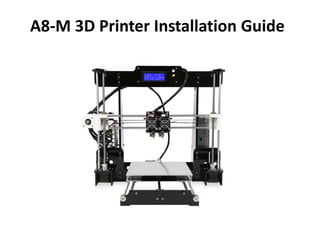
A8-M 3D Printer Installation Guide
A8-M Assembly Instructions
Attention:
1.Please make sure the package not
broken when you receive it.
2.Please check the printer parts
according to the packing list.
3. Please contract your supplier if
any questions.
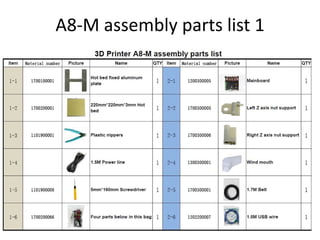
A8-M assembly parts list 1
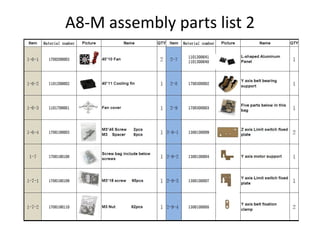
A8-M assembly parts list 2
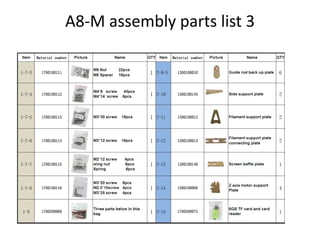
A8-M assembly parts list 3
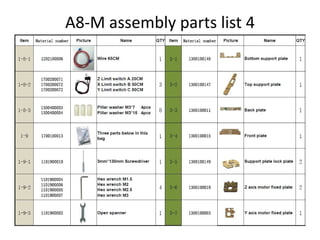
A8-M assembly parts list 4
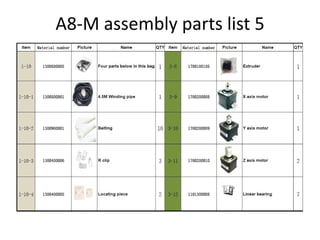
A8-M assembly parts list 5
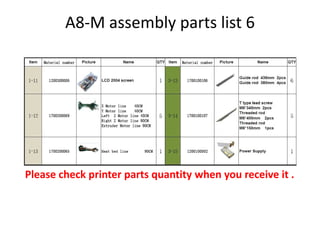
A8-M assembly parts list 6
Please check printer parts quantity when you receive it .
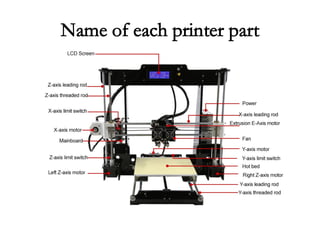
Name of each printer part
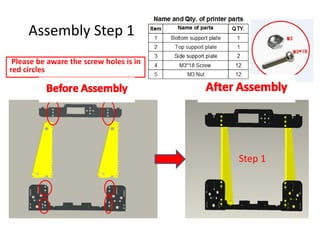
Assembly Step 1
Step 1
Please be aware the screw holes is in
red circles
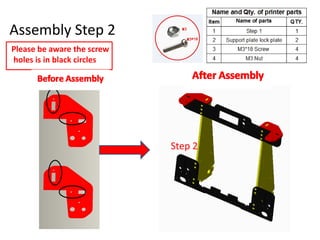
Assembly Step 2
Step 2
Please be aware the screw
holes is in black circles
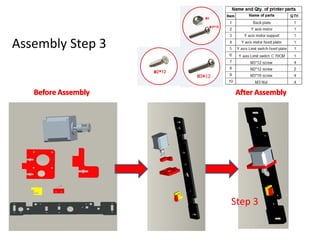
Assembly Step 3
Step 3
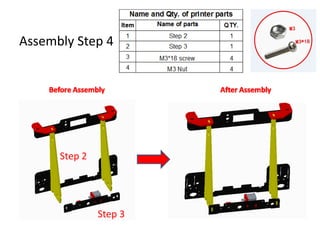
Assembly Step 4
Step 2
Step 3
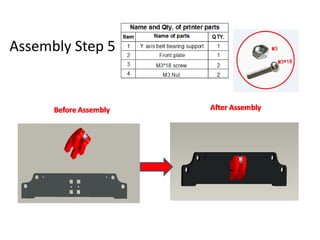
Assembly Step 5
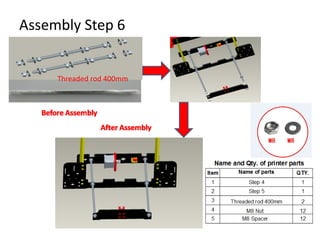
Assembly Step 6
Threaded rod 400mm
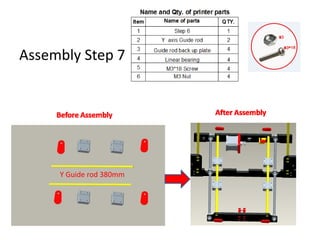
Assembly Step 7
Y Guide rod 380mm
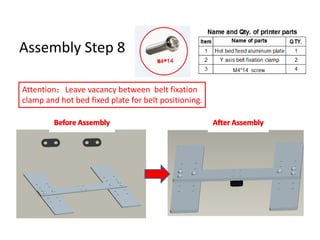
Assembly Step 8
Attention:Leave vacancy between belt fixation
clamp and hot bed fixed plate for belt positioning.
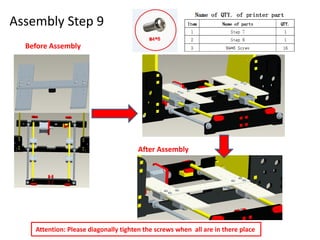
Assembly Step 9
Attention: Please diagonally tighten the screws when all are in there place
Before Assembly
After Assembly
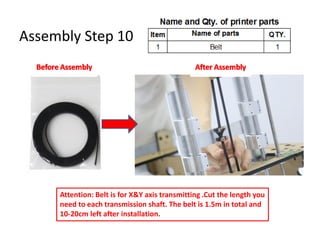
Assembly Step 10
Attention: Belt is for X&Y axis transmitting .Cut the length you
need to each transmission shaft. The belt is 1.5m in total and
10-20cm left after installation.
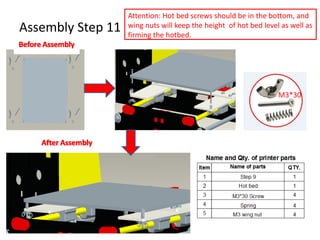
Assembly Step 11
Attention: Hot bed screws should be in the bottom, and
wing nuts will keep the height of hot bed level as well as
firming the hotbed.
M3*30
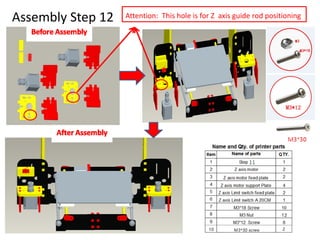
Assembly Step 12 Attention: This hole is for Z axis guide rod positioning
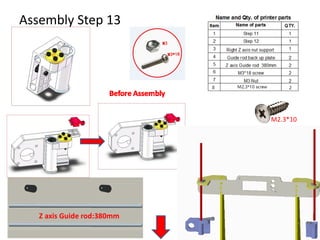
Assembly Step 13
Z axis Guide rod:380mm
M2.3*10
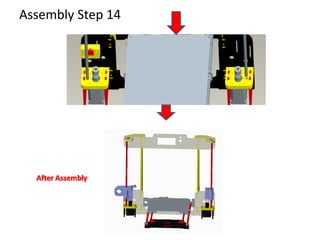
Assembly Step 14
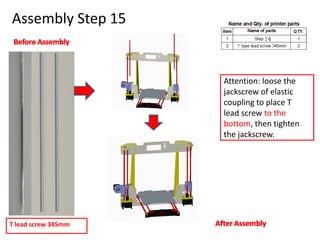
Assembly Step 15
Attention: loose the
jackscrew of elastic
coupling to place T
lead screw to the
bottom, then tighten
the jackscrew.
T lead screw 345mm
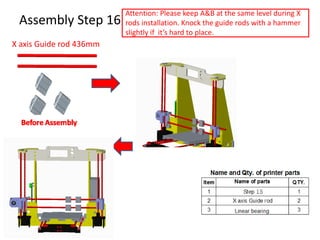
Assembly Step 16
Attention: Please keep A&B at the same level during X
rods installation. Knock the guide rods with a hammer
slightly if it’s hard to place.
X axis Guide rod 436mm
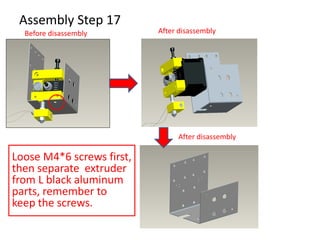
Assembly Step 17
Loose M4*6 screws first,
then separate extruder
from L black aluminum
parts, remember to
keep the screws.
Before disassembly After disassembly
After disassembly
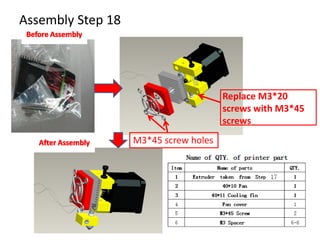
Assembly Step 18
Replace M3*20
screws with M3*45
screws
M3*45 screw holes
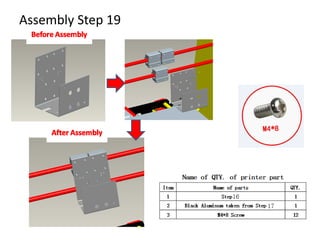
Assembly Step 19
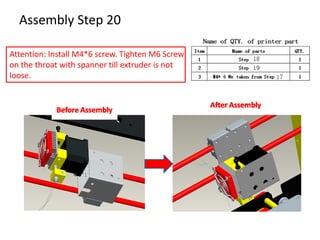
Assembly Step 20
Attention: Install M4*6 screw. Tighten M6 Screw
on the throat with spanner till extruder is not
loose.
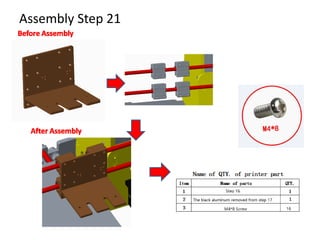
Assembly Step 21
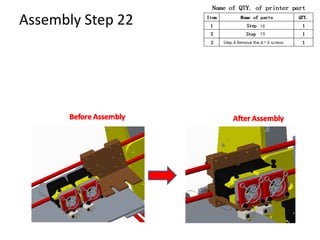
Assembly Step 22
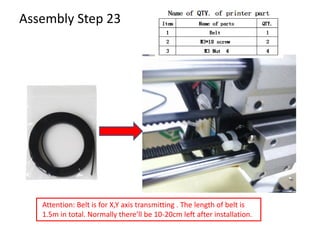
Assembly Step 23
Attention: Belt is for X,Y axis transmitting . The length of belt is
1.5m in total. Normally there’ll be 10-20cm left after installation.
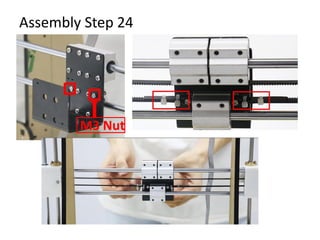
Assembly Step 24
M3 Nut
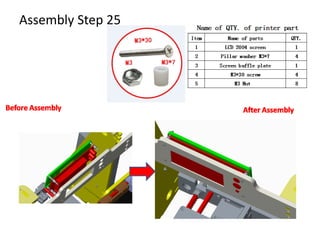
Assembly Step 25
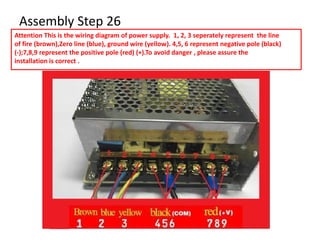
Assembly Step 26
Attention This is the wiring diagram of power supply. 1, 2, 3 seperately represent the line
of fire (brown),Zero line (blue), ground wire (yellow). 4,5, 6 represent negative pole (black)
(-);7,8,9 represent the positive pole (red) (+).To avoid danger , please assure the
installation is correct .
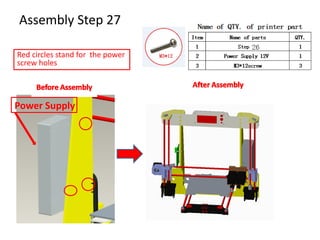
Assembly Step 27
Red circles stand for the power
screw holes
Power Supply
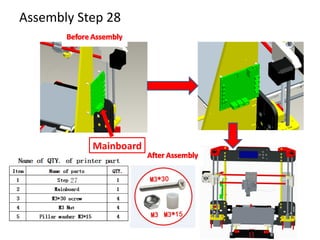
Assembly Step 28
Mainboard
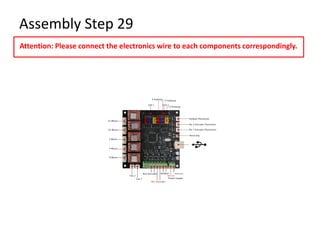
Assembly Step 29
Attention: Please connect the electronics wire to each components correspondingly.
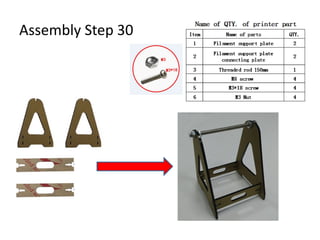
Assembly Step 30
Installation Complete
• Congratulations ! You have just made
yourself a 3D printer !
• Please contact your 3D printer supplier if any
puzzles during using process.
• Thank you for choosing our products, we will
always provide you more services.

A8-M Double sprinkler 3D Printer Installation Instructions-1.0.pdf