A Step by Step Guide
on how to register you own
FREE eUnittrust account
Introduction to eUnittrust
eUnittrust is one of the first online unit trust platform that offer
Malaysian investors an option to take control and manage their own
unit trust investment. Launched in 2008, the eUnittrust platform
owned by Phillip Capital Malaysia is fast gaining recognition among
Malaysian investors thanks to the growth in high speed broadband
and smarts phones.
The convenience of making unit trust investment through this
platform has been widely embraced by the younger Malaysian
generation (Gen-X and Gen-Y). Another surprising fact is the more IT
savvy generation of baby boomers are also starting to make the
transition from agent/consultant based unit trust investing to online
unit trust investing.
If you’re ready to make your transition from
conventional to online unit trust investing,
then lets get started by following these simple
steps on how to register a FREE eUnittrust
account.
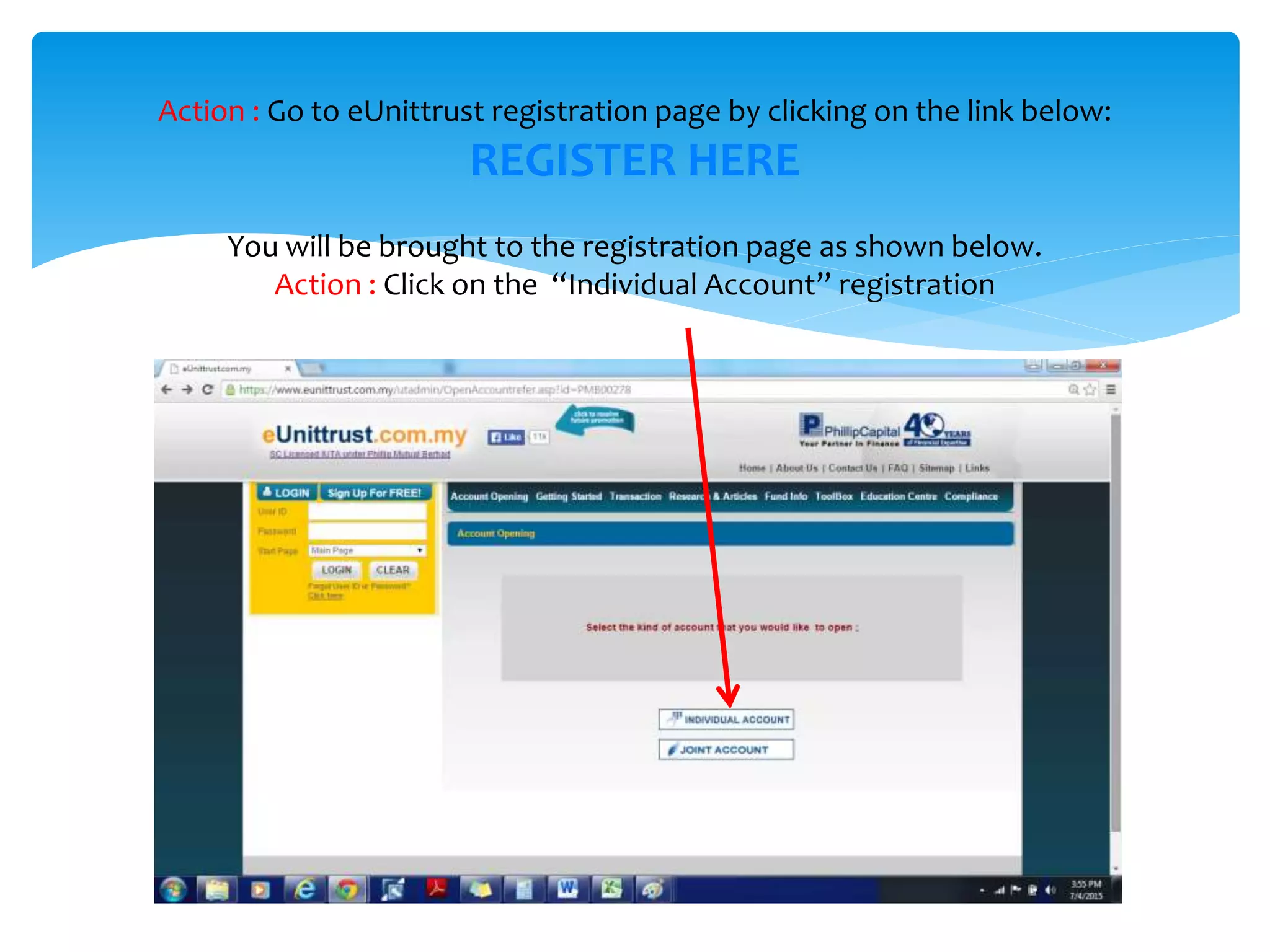
Action : Go to eUnittrust registration page by clicking on the link below:
REGISTER HERE
You will be brought to the registration page as shown below.
Action : Click on the “Individual Account” registration
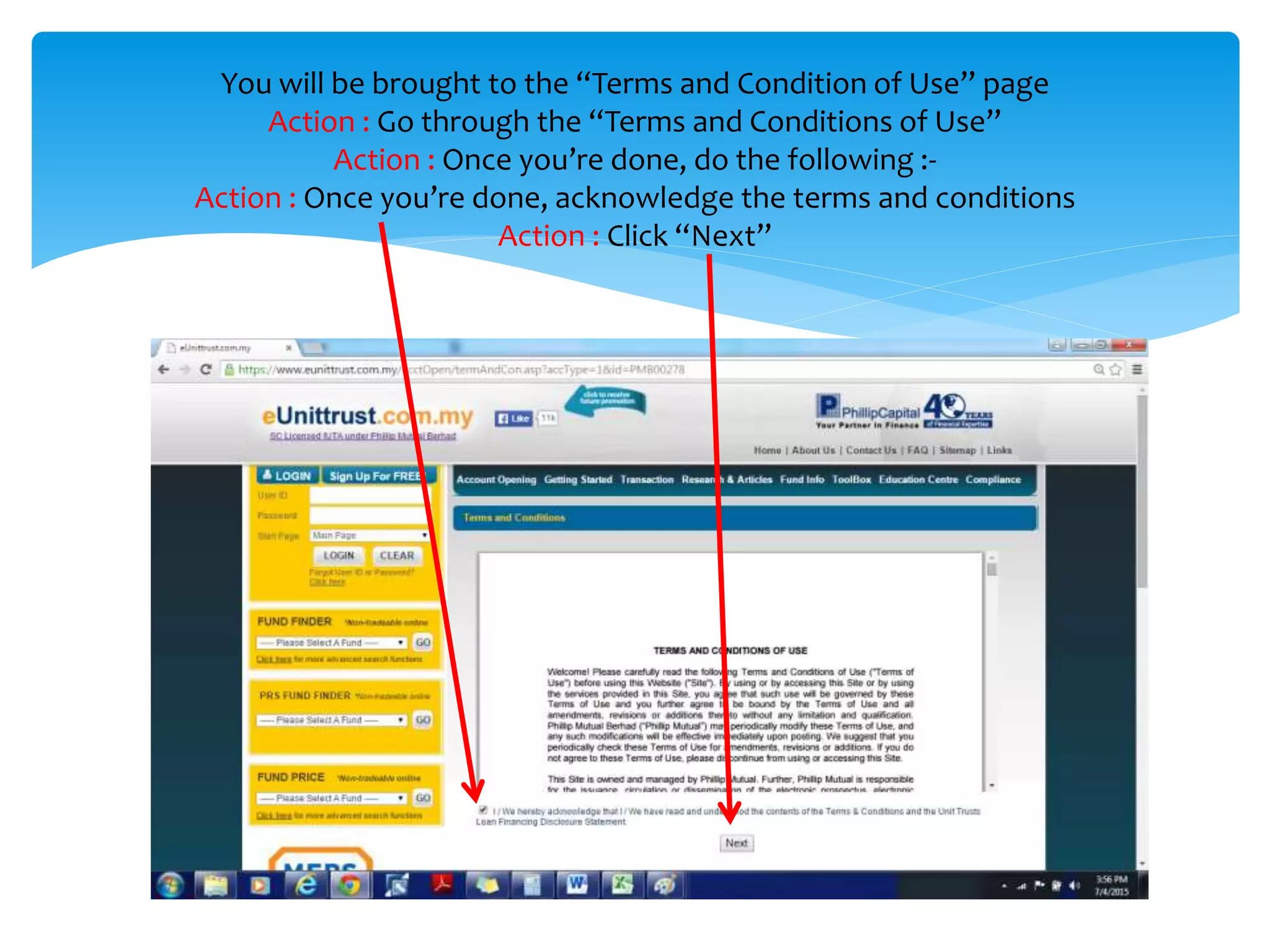
You will be brought to the “Terms and Condition of Use” page
Action : Go through the “Terms and Conditions of Use”
Action : Once you’re done, do the following :-
Action : Once you’re done, acknowledge the terms and conditions
Action : Click “Next”
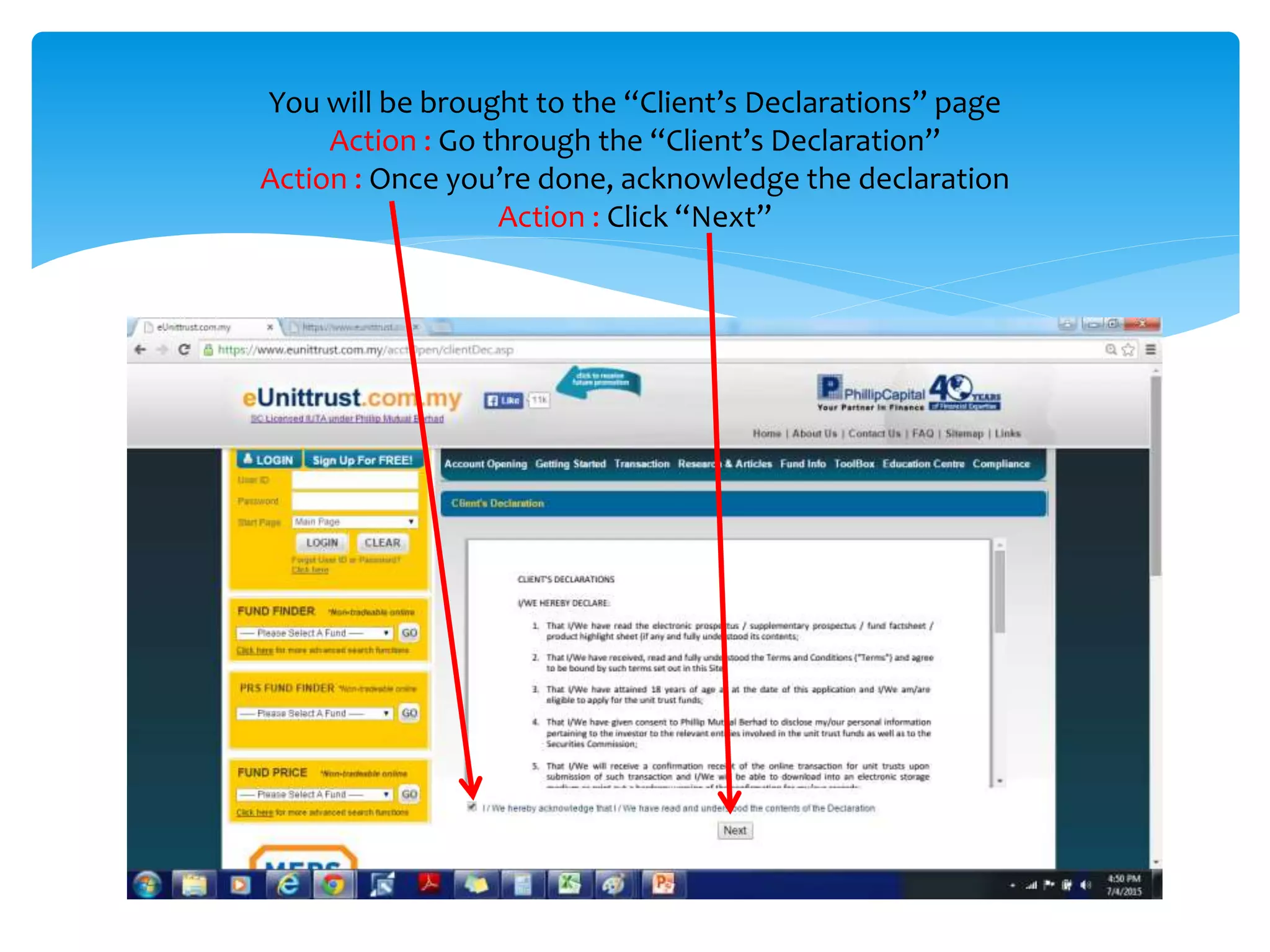
You will be brought to the “Client’s Declarations” page
Action : Go through the “Client’s Declaration”
Action : Once you’re done, acknowledge the declaration
Action : Click “Next”
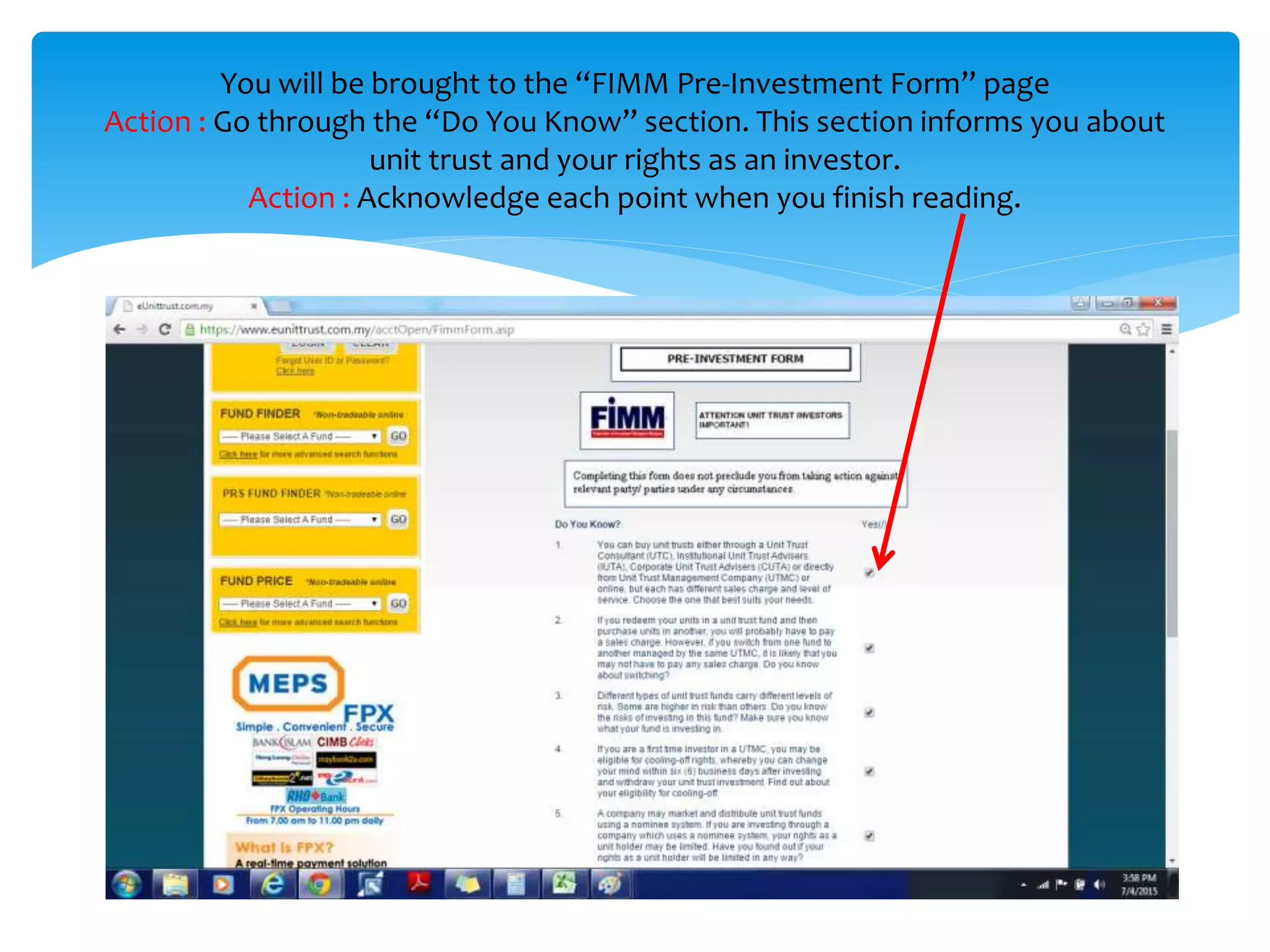
You will be brought to the “FIMM Pre-Investment Form” page
Action : Go through the “Do You Know” section. This section informs you about
unit trust and your rights as an investor.
Action : Acknowledge each point when you finish reading.
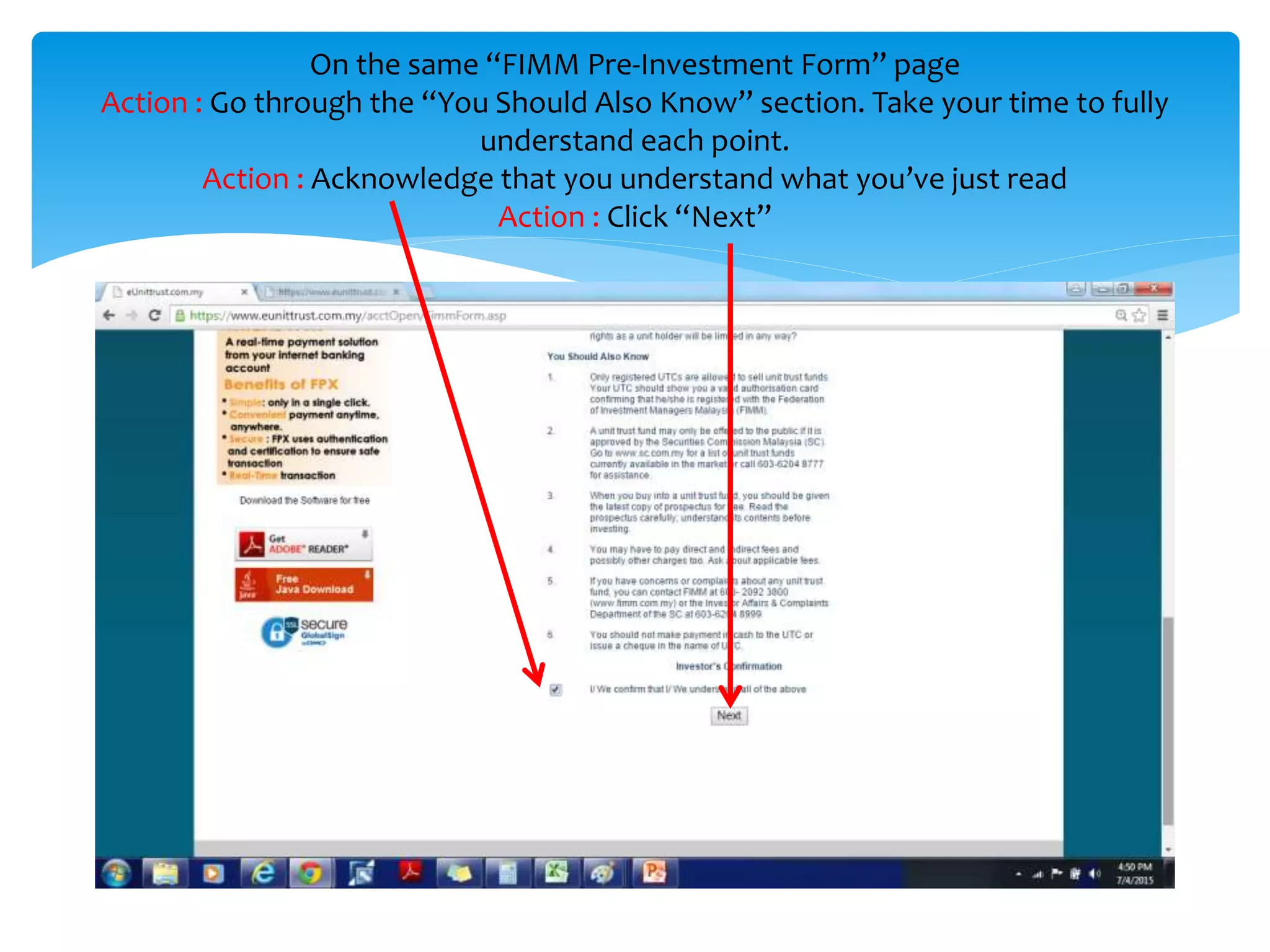
On the same “FIMM Pre-Investment Form” page
Action : Go through the “You Should Also Know” section. Take your time to fully
understand each point.
Action : Acknowledge that you understand what you’ve just read
Action : Click “Next”
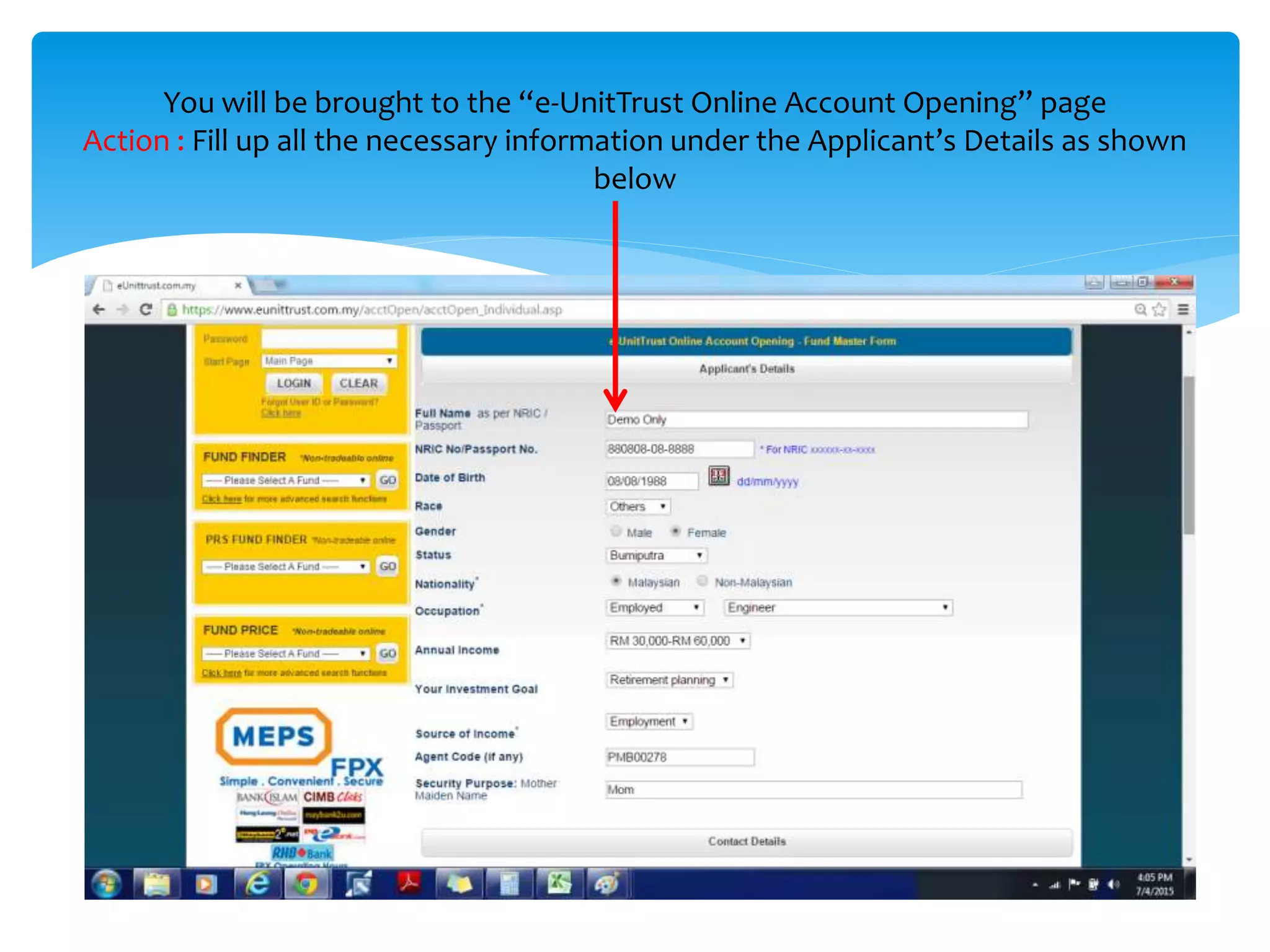
You will be brought to the “e-UnitTrust Online Account Opening” page
Action : Fill up all the necessary information under the Applicant’s Details as shown
below
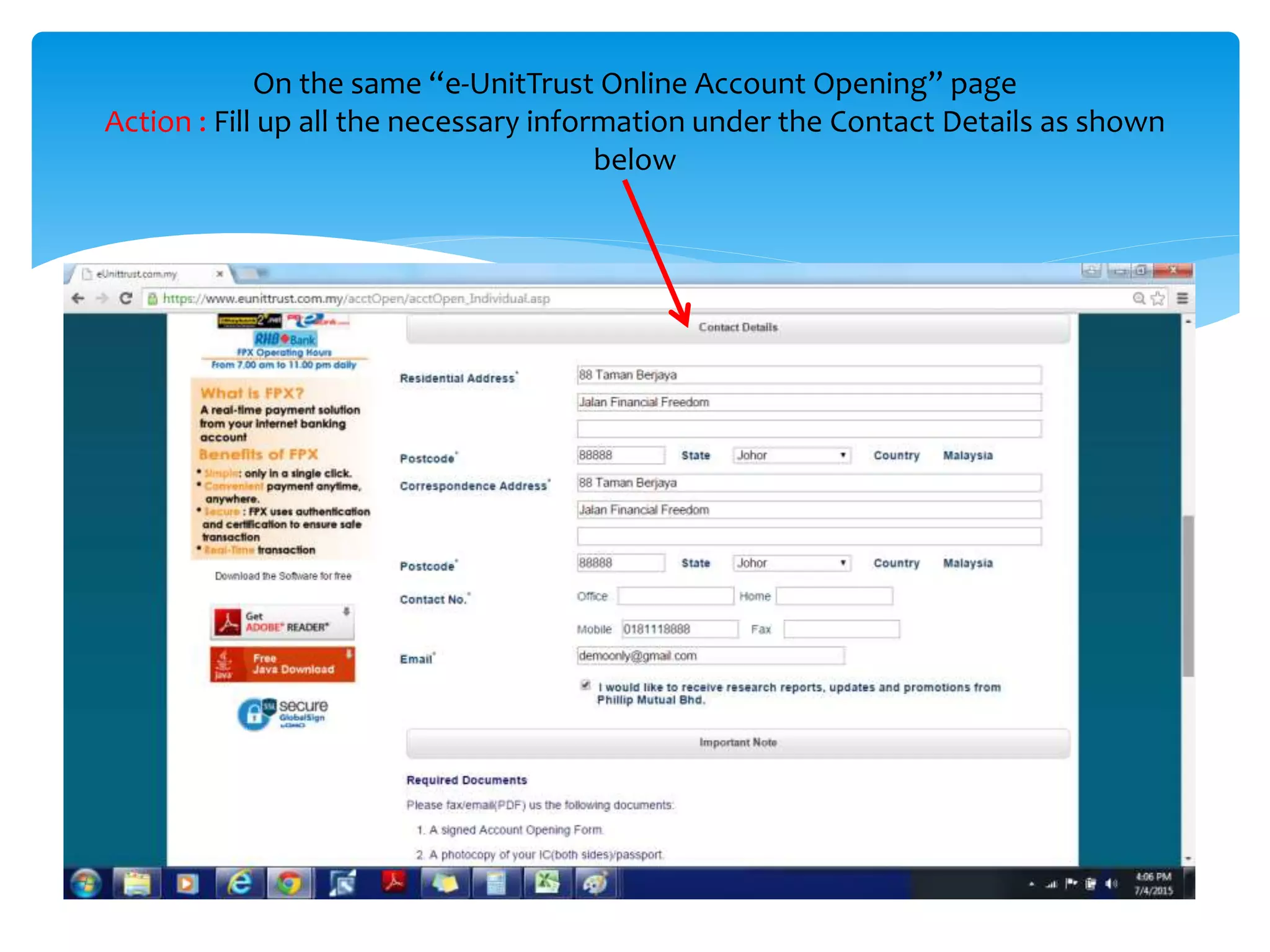
On the same “e-UnitTrust Online Account Opening” page
Action : Fill up all the necessary information under the Contact Details as shown
below
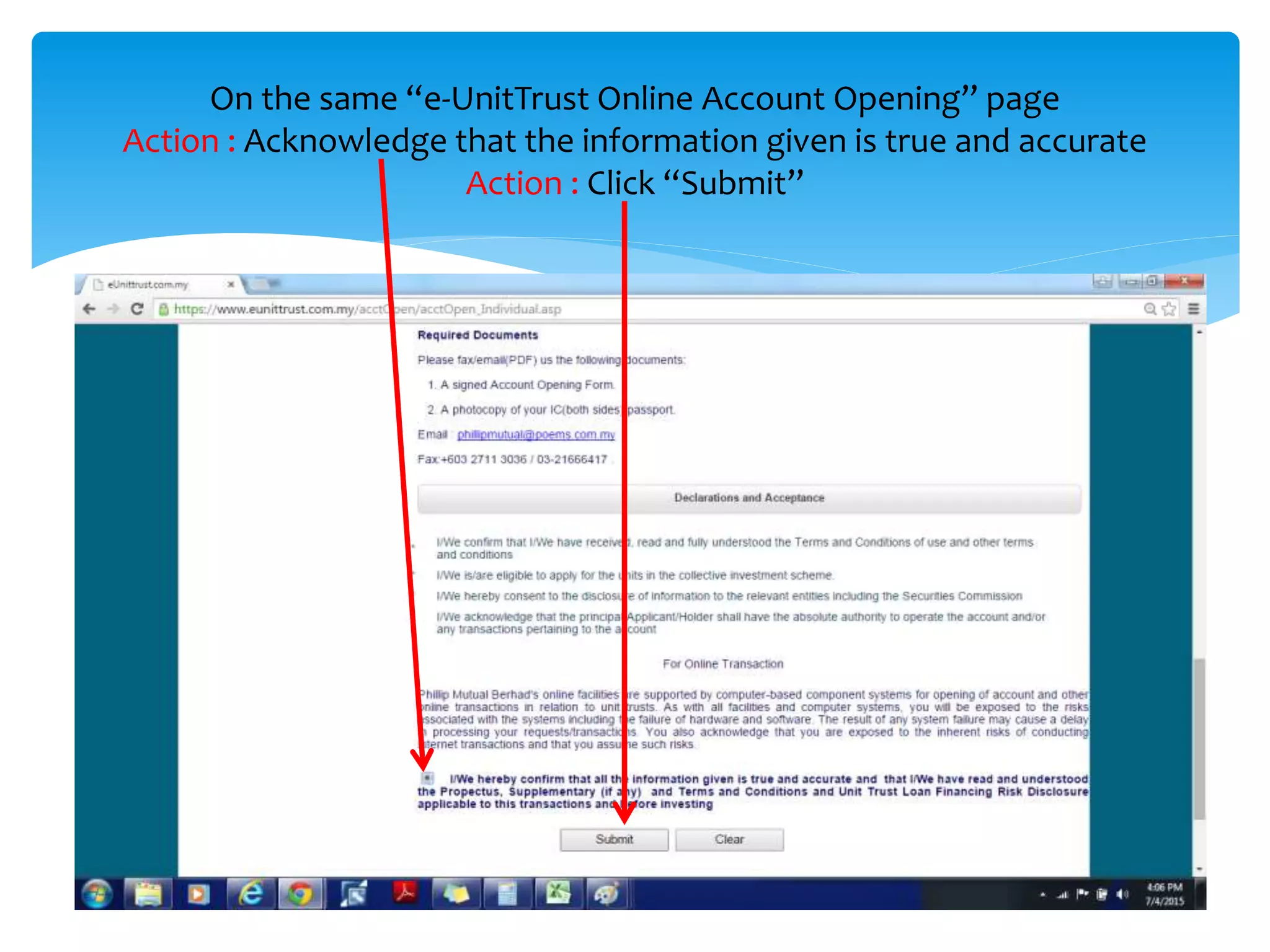
On the same “e-UnitTrust Online Account Opening” page
Action : Acknowledge that the information given is true and accurate
Action : Click “Submit”
You will be brought to the “First Applicant’s Details” page.
Action : Double check the details that you’ve entered earlier and ensure that all of it
are correct”
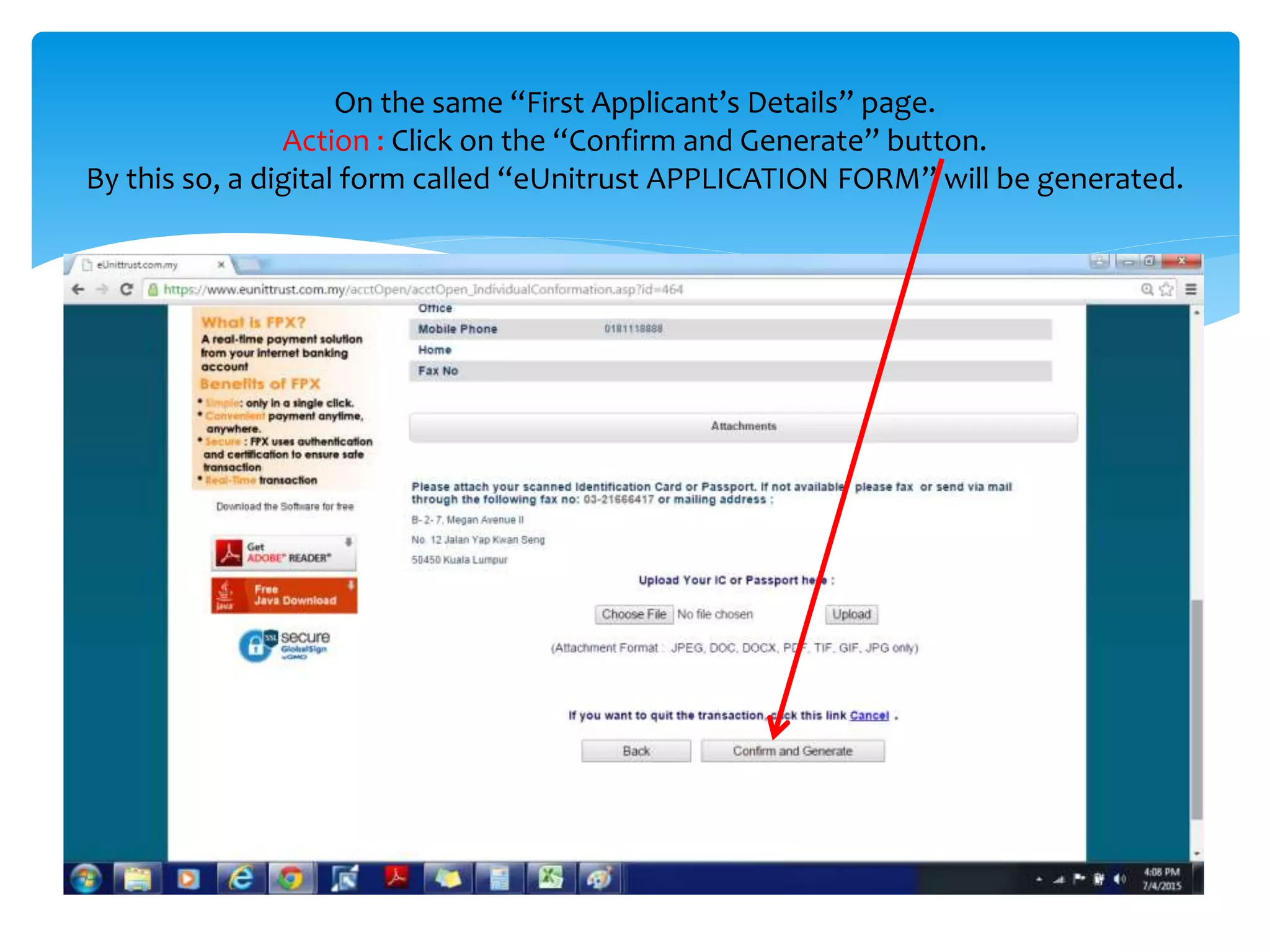
On the same “First Applicant’s Details” page.
Action : Click on the “Confirm and Generate” button.
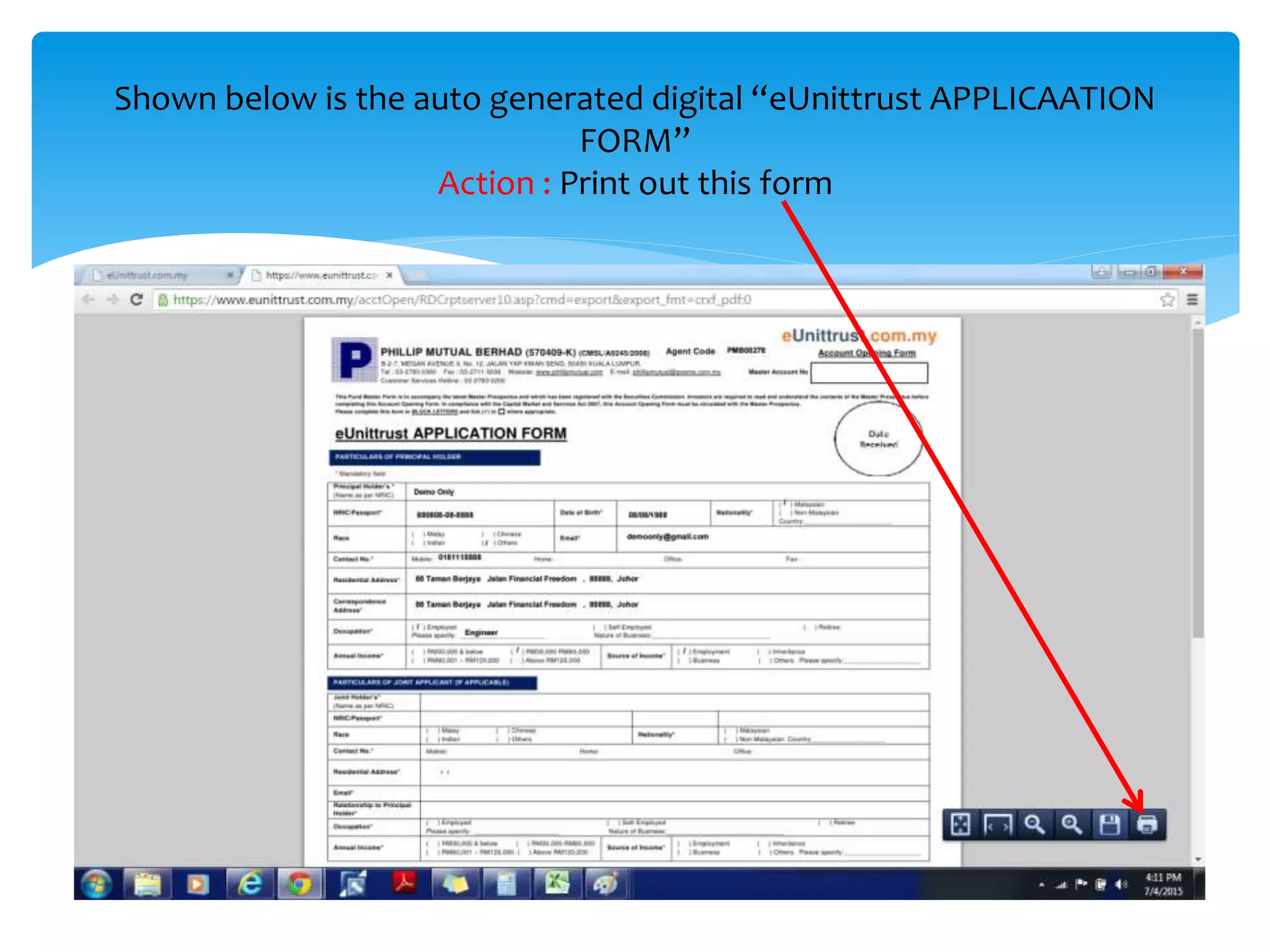
By doing so, a digital form called “eUnitrust APPLICATION FORM” will be
generated.
Shown below is the auto generated digital “eUnittrust APPLICAATION
FORM”
Action : Print out this form
On the printed out “eUnittrust APPLICAATION FORM”
Action : Place your signature on the “Signature of Main Application”ou can either:
Action : Place the Date
Action : Scan this signed form into digital pdf format.
The final step is to:
Once you’ve completed all the registration, all that is left is
for you to wait for your Account ID and Password to be sent
to you via email. This should take between 1-3 business days.
Facing difficulties to register?
If you face any problems during your registration, you may
contact eUnittrust Client Service Personnel at
(603) 2783 0200
for further assistance.
Almost There!
Upon successful registration of your eUnittrust account, just
send me an email at:
shanesee03@gmail.com
Do state your full name and eUnittrust account ID in the
email.
Once I’ve received your email and verified your account
opening with eUnittrust, I’ll immediately sent over a copy
of my self written e-book entitled "The Basics of Investing In
Unit Trust“ absolutely FREE!
Added bonus from Invest Made Easy

A step by step guide to open an eUnittrust account

  • 1.
    A Step byStep Guide on how to register you own FREE eUnittrust account
  • 2.
    Introduction to eUnittrust eUnittrustis one of the first online unit trust platform that offer Malaysian investors an option to take control and manage their own unit trust investment. Launched in 2008, the eUnittrust platform owned by Phillip Capital Malaysia is fast gaining recognition among Malaysian investors thanks to the growth in high speed broadband and smarts phones. The convenience of making unit trust investment through this platform has been widely embraced by the younger Malaysian generation (Gen-X and Gen-Y). Another surprising fact is the more IT savvy generation of baby boomers are also starting to make the transition from agent/consultant based unit trust investing to online unit trust investing.
  • 3.
    If you’re readyto make your transition from conventional to online unit trust investing, then lets get started by following these simple steps on how to register a FREE eUnittrust account.
  • 4.
    Action : Goto eUnittrust registration page by clicking on the link below: REGISTER HERE You will be brought to the registration page as shown below. Action : Click on the “Individual Account” registration
  • 5.
    You will bebrought to the “Terms and Condition of Use” page Action : Go through the “Terms and Conditions of Use” Action : Once you’re done, do the following :- Action : Once you’re done, acknowledge the terms and conditions Action : Click “Next”
  • 6.
    You will bebrought to the “Client’s Declarations” page Action : Go through the “Client’s Declaration” Action : Once you’re done, acknowledge the declaration Action : Click “Next”
  • 7.
    You will bebrought to the “FIMM Pre-Investment Form” page Action : Go through the “Do You Know” section. This section informs you about unit trust and your rights as an investor. Action : Acknowledge each point when you finish reading.
  • 8.
    On the same“FIMM Pre-Investment Form” page Action : Go through the “You Should Also Know” section. Take your time to fully understand each point. Action : Acknowledge that you understand what you’ve just read Action : Click “Next”
  • 9.
    You will bebrought to the “e-UnitTrust Online Account Opening” page Action : Fill up all the necessary information under the Applicant’s Details as shown below
  • 10.
    On the same“e-UnitTrust Online Account Opening” page Action : Fill up all the necessary information under the Contact Details as shown below
  • 11.
    On the same“e-UnitTrust Online Account Opening” page Action : Acknowledge that the information given is true and accurate Action : Click “Submit”
  • 12.
    You will bebrought to the “First Applicant’s Details” page. Action : Double check the details that you’ve entered earlier and ensure that all of it are correct”
  • 13.
    On the same“First Applicant’s Details” page. Action : Click on the “Confirm and Generate” button. By doing so, a digital form called “eUnitrust APPLICATION FORM” will be generated.
  • 14.
    Shown below isthe auto generated digital “eUnittrust APPLICAATION FORM” Action : Print out this form
  • 15.
    On the printedout “eUnittrust APPLICAATION FORM” Action : Place your signature on the “Signature of Main Application”ou can either: Action : Place the Date Action : Scan this signed form into digital pdf format.
  • 16.
  • 17.
    Once you’ve completedall the registration, all that is left is for you to wait for your Account ID and Password to be sent to you via email. This should take between 1-3 business days. Facing difficulties to register? If you face any problems during your registration, you may contact eUnittrust Client Service Personnel at (603) 2783 0200 for further assistance. Almost There!
  • 18.
    Upon successful registrationof your eUnittrust account, just send me an email at: shanesee03@gmail.com Do state your full name and eUnittrust account ID in the email. Once I’ve received your email and verified your account opening with eUnittrust, I’ll immediately sent over a copy of my self written e-book entitled "The Basics of Investing In Unit Trust“ absolutely FREE! Added bonus from Invest Made Easy