A (Fairly) Complete Guide
to Performance Budgets
@tameverts
#SmashingConf
@tameverts
webperf.social/@tammy
@tameverts
speedcurve.com/benchmarks
speedcurve.com/newsletter/
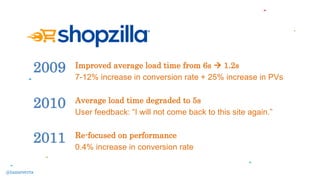
Improved average load time from 6s  1.2s
7-12% increase in conversion rate + 25% increase in PVs
Average load time degraded to 5s
User feedback: “I will not come back to this site again.”
Re-focused on performance
0.4% increase in conversion rate
2010
2011
2009
@tameverts
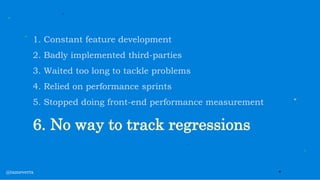
1. Constant feature development
2. Badly implemented third-parties
3. Waited too long to tackle problems
4. Relied on performance sprints
5. Stopped doing front-end performance measurement
6. No way to track regressions
@tameverts
timkadlec.com/2013/01/setting-a-performance-budget/
csswizardry.com/2020/01/performance-budgets-pragmatically/
speedcurve.com/customers/tag/performance-budgets/
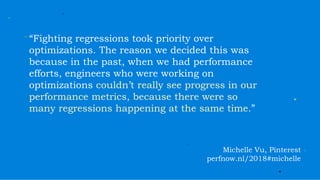
“Fighting regressions took priority over
optimizations. The reason we decided this was
because in the past, when we had performance
efforts, engineers who were working on
optimizations couldn’t really see progress in our
performance metrics, because there were so
many regressions happening at the same time.”
Michelle Vu, Pinterest
perfnow.nl/2018#michelle
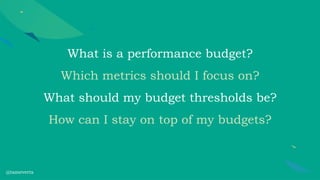
What is a performance budget?
Which metrics should I focus on?
What should my budget thresholds be?
How can I stay on top of my budgets?
@tameverts
What is a performance budget?
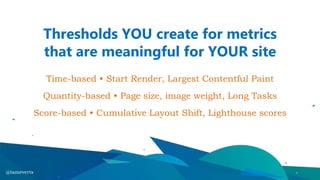
Thresholds YOU create for metrics
that are meaningful for YOUR site
Time-based • Start Render, Largest Contentful Paint
Quantity-based • Page size, image weight, Long Tasks
Score-based • Cumulative Layout Shift, Lighthouse scores
@tameverts
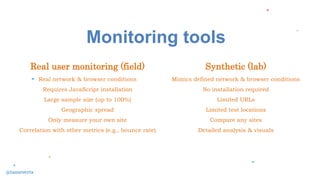
Monitoring tools
Synthetic (lab)
Mimics defined network & browser conditions
No installation required
Limited URLs
Limited test locations
Compare any sites
Detailed analysis & visuals
Real user monitoring (field)
Real network & browser conditions
Requires JavaScript installation
Large sample size (up to 100%)
Geographic spread
Only measure your own site
Correlation with other metrics (e.g., bounce rate)
@tameverts
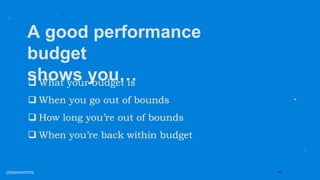
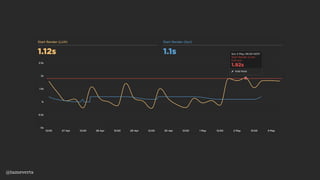
A good performance
budget
shows you…
 What your budget is
 When you go out of bounds
 How long you’re out of bounds
 When you’re back within budget
@tameverts
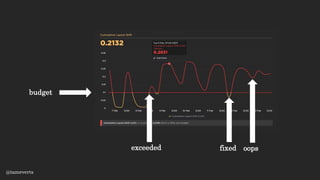
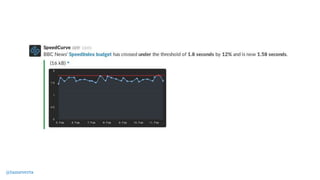
Budgets can be passive (e.g. charts)
Get alerts so you can investigate
Even break the build
budget
exceeded fixed
@tameverts
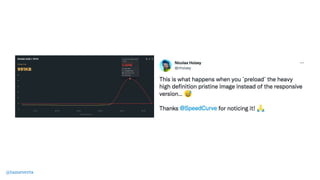
oops
Which metrics
should I focus on?
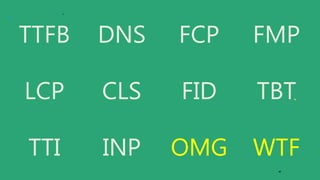
TTFB DNS FCP FMP
LCP CLS FID TBT
TTI INP OMG WTF
50+ synthetic metrics
30+ RUM metrics
25 additional metrics for EACH third party
∞ custom metrics
Minimum Viable Budget
Is the page loading?
Can I use it?
How does it feel?
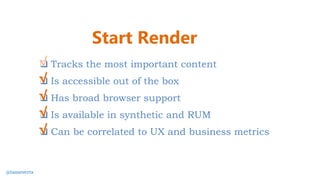
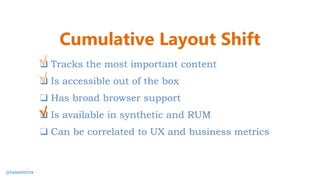
❑ Tracks the most important content
❑ Is accessible out of the box
❑ Is available in synthetic and RUM
❑ Can be correlated to UX and business metrics
❑ Has broad browser support
The ideal UX metric…
@tameverts
Is the page loading?
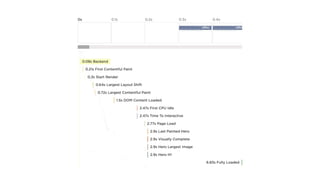
Backend time
The time from the start of the initial navigation
until the first byte is received by the browser
(AKA Time to First Byte)
Synthetic & RUM
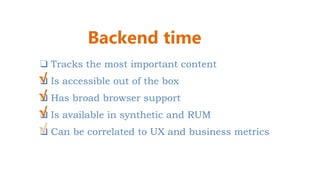
❑ Tracks the most important content
❑ Is accessible out of the box
❑ Has broad browser support
❑ Is available in synthetic and RUM
❑ Can be correlated to UX and business metrics
√
√
√
Backend time
√
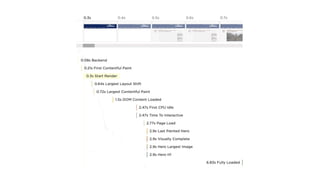
Start Render
The time from the start of navigation
until the first non-white content is painted
Synthetic & RUM
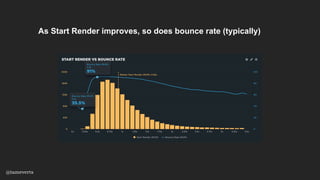
As Start Render improves, so does bounce rate (typically)
@tameverts
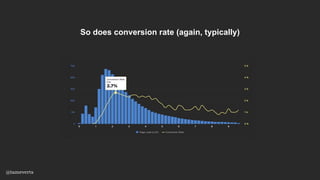
So does conversion rate (again, typically)
@tameverts
❑ Tracks the most important content
❑ Is accessible out of the box
❑ Has broad browser support
❑ Is available in synthetic and RUM
❑ Can be correlated to UX and business metrics
√
√
√
Start Render
√
√
@tameverts
Can I use the page?
43
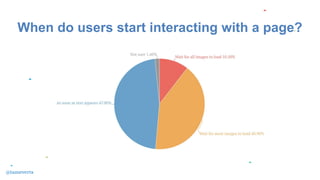
When do users start interacting with a page?
@tameverts
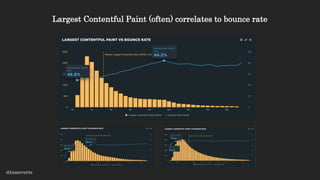
Largest Contentful Paint
(LCP)
Amount of time it takes for the largest visual element
(image or video) to render
Synthetic & RUM
(Chromium browsers only)
Largest Contentful Paint (often) correlates to bounce rate
@tameverts
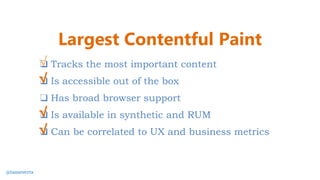
❑ Tracks the most important content
❑ Is accessible out of the box
❑ Has broad browser support
❑ Is available in synthetic and RUM
❑ Can be correlated to UX and business metrics
√
√
Largest Contentful Paint
√
√
@tameverts
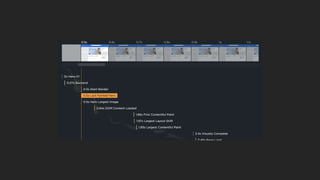
Last Painted Hero (LPH)
When the last piece of critical content
(hero image, first H1) is painted in the browser.
Synthetic
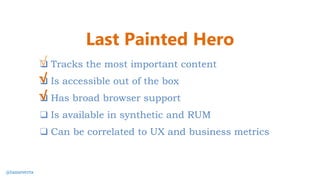
❑ Tracks the most important content
❑ Is accessible out of the box
❑ Has broad browser support
❑ Is available in synthetic and RUM
❑ Can be correlated to UX and business metrics
√
√
Last Painted Hero
√
@tameverts
How does the page
feel?
Cumulative Layout Shift (CLS)
Aggregate score that reflects how much
page elements shift during rendering
Synthetic & RUM
(Chromium browsers only)
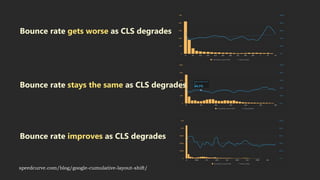
Bounce rate gets worse as CLS degrades
Bounce rate improves as CLS degrades
Bounce rate stays the same as CLS degrades
speedcurve.com/blog/google-cumulative-layout-shift/
❑ Tracks the most important content
❑ Is accessible out of the box
❑ Has broad browser support
❑ Is available in synthetic and RUM
❑ Can be correlated to UX and business metrics
√
√
Cumulative Layout Shift
@tameverts
√
Long Tasks
Any JavaScript function that takes >50ms to execute
Long Tasks don’t always block page rendering,
but they can cause the page to feel janky
Synthetic & RUM
57
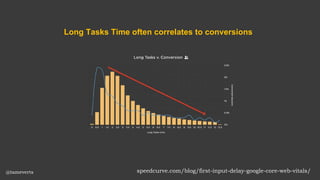
speedcurve.com/blog/first-input-delay-google-core-web-vitals/
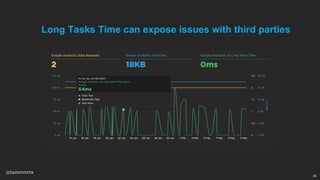
Long Tasks Time often correlates to conversions
@tameverts
59
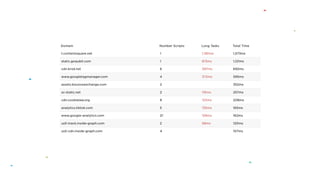
Long Tasks Time can expose issues with third parties
@tameverts
❑ Tracks the most important content
❑ Is accessible out of the box
❑ Has broad browser support
❑ Is available in synthetic and RUM
❑ Can be correlated to UX and business metrics
√
Long Tasks
@tameverts
√
√
√
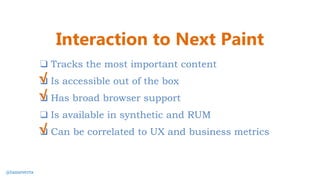
Interaction to Next Paint (INP)
Measures a page's responsiveness
to individual user interactions
Observes latency and reports a single value
that all (or nearly all) interactions are below
RUM
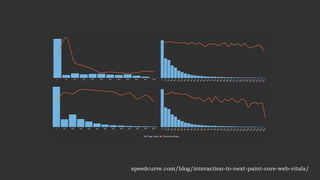
speedcurve.com/blog/interaction-to-next-paint-core-web-vitals/
❑ Tracks the most important content
❑ Is accessible out of the box
❑ Has broad browser support
❑ Is available in synthetic and RUM
❑ Can be correlated to UX and business metrics
√
Interaction to Next Paint
@tameverts
√
√
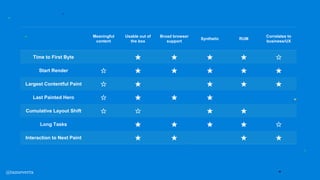
Meaningful
content
Usable out of
the box
Broad browser
support
Synthetic RUM
Correlates to
business/UX
Time to First Byte ★ ★ ★ ★ ☆
Start Render ☆ ★ ★ ★ ★ ★
Largest Contentful Paint ☆ ★ ★ ★ ★
Last Painted Hero ☆ ★ ★ ★
Cumulative Layout Shift ☆ ☆ ★ ★
Long Tasks ★ ★ ★ ★ ☆
Interaction to Next Paint ★ ★ ★ ★
@tameverts
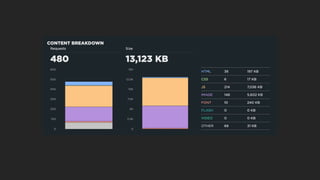
Page weight &
complexity
@tameverts
What should
my budget thresholds be?
performance budgets
performance goals
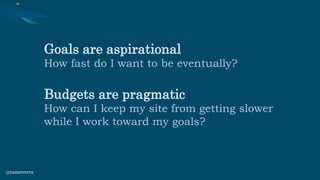
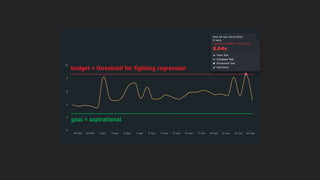
Goals are aspirational
How fast do I want to be eventually?
Budgets are pragmatic
How can I keep my site from getting slower
while I work toward my goals?
@tameverts
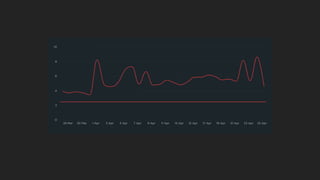
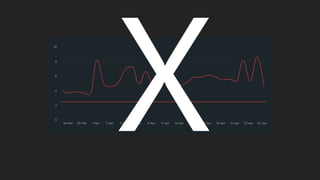
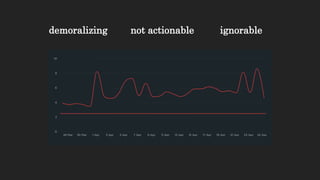
demoralizing not actionable ignorable
As you optimize your pages (and
hopefully get faster!) update
your budgets
How do I manage
my budgets?
Should I set up budgets
in RUM, synthetic, or both?
Scenario 1
Create budgets in RUM,
and drill down via
synthetic
@tameverts
Scenario 2
Create budgets in
synthetic,
and integrate with CI/CD
@tameverts
Should I create
performance budgets
for every metric I track?
Do I need performance budgets
for all my pages?
1. Product
2. Category
3. Home
4. Cart
5. Search
@tameverts
Who should be responsible
for managing budgets?
Everyone* who touches a page
should understand the performance
impact of their choices
*Yes, this includes marketing people
For example…
If your marketing team is responsible for adding
and maintaining third-party tags, they should:
 Have a basic understanding of the metrics (such as Long Tasks Time)
 Collaborate on setting the budget
 Receive alerts when the budget is violated
 Participate (or at least have visibility) in identifying and fixing the issue
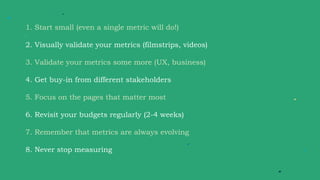
1. Start small (even a single metric will do!)
2. Visually validate your metrics (filmstrips, videos)
3. Validate your metrics some more (UX, business)
4. Get buy-in from different stakeholders
5. Focus on the pages that matter most
6. Revisit your budgets regularly (2-4 weeks)
7. Remember that metrics are always evolving
8. Never stop measuring
Thank you!
@tameverts
webperf.social/@tammy
A Complete Guide to Performance Budgets
speedcurve.com/blog/performance-budgets/
Setting a Performance Budget
timkadlec.com/2013/01/setting-a-performance-budget/
Performance Budgets, Pragmatically
csswizardry.com/2020/01/performance-budgets-pragmatically/
Web Vitals
web.dev/vitals/
Farewell FID… hello Interaction to Next Paint
speedcurve.com/blog/interaction-to-next-paint-core-web-vitals/
Cumulative Layout Shift: What it measures (and what it doesn’t)
speedcurve.com/blog/google-cumulative-layout-shift/

A (Fairly) Complete Guide to Performance Budgets [SmashingConf SF 2023]

  • 1.
    A (Fairly) CompleteGuide to Performance Budgets @tameverts #SmashingConf
  • 2.
  • 3.
  • 4.
  • 5.
  • 7.
    Improved average loadtime from 6s  1.2s 7-12% increase in conversion rate + 25% increase in PVs Average load time degraded to 5s User feedback: “I will not come back to this site again.” Re-focused on performance 0.4% increase in conversion rate 2010 2011 2009 @tameverts
  • 8.
    1. Constant featuredevelopment 2. Badly implemented third-parties 3. Waited too long to tackle problems 4. Relied on performance sprints 5. Stopped doing front-end performance measurement 6. No way to track regressions @tameverts
  • 11.
  • 12.
  • 13.
  • 14.
    “Fighting regressions tookpriority over optimizations. The reason we decided this was because in the past, when we had performance efforts, engineers who were working on optimizations couldn’t really see progress in our performance metrics, because there were so many regressions happening at the same time.” Michelle Vu, Pinterest perfnow.nl/2018#michelle
  • 16.
    What is aperformance budget? Which metrics should I focus on? What should my budget thresholds be? How can I stay on top of my budgets? @tameverts
  • 17.
    What is aperformance budget?
  • 18.
    Thresholds YOU createfor metrics that are meaningful for YOUR site Time-based • Start Render, Largest Contentful Paint Quantity-based • Page size, image weight, Long Tasks Score-based • Cumulative Layout Shift, Lighthouse scores @tameverts
  • 19.
    Monitoring tools Synthetic (lab) Mimicsdefined network & browser conditions No installation required Limited URLs Limited test locations Compare any sites Detailed analysis & visuals Real user monitoring (field) Real network & browser conditions Requires JavaScript installation Large sample size (up to 100%) Geographic spread Only measure your own site Correlation with other metrics (e.g., bounce rate) @tameverts
  • 21.
    A good performance budget showsyou…  What your budget is  When you go out of bounds  How long you’re out of bounds  When you’re back within budget @tameverts
  • 22.
    Budgets can bepassive (e.g. charts) Get alerts so you can investigate Even break the build
  • 23.
  • 24.
  • 26.
    TTFB DNS FCPFMP LCP CLS FID TBT TTI INP OMG WTF
  • 28.
    50+ synthetic metrics 30+RUM metrics 25 additional metrics for EACH third party ∞ custom metrics
  • 30.
  • 31.
    Is the pageloading? Can I use it? How does it feel?
  • 32.
    ❑ Tracks themost important content ❑ Is accessible out of the box ❑ Is available in synthetic and RUM ❑ Can be correlated to UX and business metrics ❑ Has broad browser support The ideal UX metric… @tameverts
  • 33.
    Is the pageloading?
  • 34.
    Backend time The timefrom the start of the initial navigation until the first byte is received by the browser (AKA Time to First Byte) Synthetic & RUM
  • 36.
    ❑ Tracks themost important content ❑ Is accessible out of the box ❑ Has broad browser support ❑ Is available in synthetic and RUM ❑ Can be correlated to UX and business metrics √ √ √ Backend time √
  • 37.
    Start Render The timefrom the start of navigation until the first non-white content is painted Synthetic & RUM
  • 39.
    As Start Renderimproves, so does bounce rate (typically) @tameverts
  • 40.
    So does conversionrate (again, typically) @tameverts
  • 41.
    ❑ Tracks themost important content ❑ Is accessible out of the box ❑ Has broad browser support ❑ Is available in synthetic and RUM ❑ Can be correlated to UX and business metrics √ √ √ Start Render √ √ @tameverts
  • 42.
    Can I usethe page?
  • 43.
    43 When do usersstart interacting with a page? @tameverts
  • 44.
    Largest Contentful Paint (LCP) Amountof time it takes for the largest visual element (image or video) to render Synthetic & RUM (Chromium browsers only)
  • 46.
    Largest Contentful Paint(often) correlates to bounce rate @tameverts
  • 47.
    ❑ Tracks themost important content ❑ Is accessible out of the box ❑ Has broad browser support ❑ Is available in synthetic and RUM ❑ Can be correlated to UX and business metrics √ √ Largest Contentful Paint √ √ @tameverts
  • 48.
    Last Painted Hero(LPH) When the last piece of critical content (hero image, first H1) is painted in the browser. Synthetic
  • 50.
    ❑ Tracks themost important content ❑ Is accessible out of the box ❑ Has broad browser support ❑ Is available in synthetic and RUM ❑ Can be correlated to UX and business metrics √ √ Last Painted Hero √ @tameverts
  • 51.
    How does thepage feel?
  • 52.
    Cumulative Layout Shift(CLS) Aggregate score that reflects how much page elements shift during rendering Synthetic & RUM (Chromium browsers only)
  • 54.
    Bounce rate getsworse as CLS degrades Bounce rate improves as CLS degrades Bounce rate stays the same as CLS degrades speedcurve.com/blog/google-cumulative-layout-shift/
  • 55.
    ❑ Tracks themost important content ❑ Is accessible out of the box ❑ Has broad browser support ❑ Is available in synthetic and RUM ❑ Can be correlated to UX and business metrics √ √ Cumulative Layout Shift @tameverts √
  • 56.
    Long Tasks Any JavaScriptfunction that takes >50ms to execute Long Tasks don’t always block page rendering, but they can cause the page to feel janky Synthetic & RUM
  • 57.
  • 58.
  • 59.
    59 Long Tasks Timecan expose issues with third parties @tameverts
  • 60.
    ❑ Tracks themost important content ❑ Is accessible out of the box ❑ Has broad browser support ❑ Is available in synthetic and RUM ❑ Can be correlated to UX and business metrics √ Long Tasks @tameverts √ √ √
  • 61.
    Interaction to NextPaint (INP) Measures a page's responsiveness to individual user interactions Observes latency and reports a single value that all (or nearly all) interactions are below RUM
  • 62.
  • 63.
    ❑ Tracks themost important content ❑ Is accessible out of the box ❑ Has broad browser support ❑ Is available in synthetic and RUM ❑ Can be correlated to UX and business metrics √ Interaction to Next Paint @tameverts √ √
  • 64.
    Meaningful content Usable out of thebox Broad browser support Synthetic RUM Correlates to business/UX Time to First Byte ★ ★ ★ ★ ☆ Start Render ☆ ★ ★ ★ ★ ★ Largest Contentful Paint ☆ ★ ★ ★ ★ Last Painted Hero ☆ ★ ★ ★ Cumulative Layout Shift ☆ ☆ ★ ★ Long Tasks ★ ★ ★ ★ ☆ Interaction to Next Paint ★ ★ ★ ★ @tameverts
  • 65.
  • 67.
  • 69.
    What should my budgetthresholds be?
  • 70.
  • 71.
    Goals are aspirational Howfast do I want to be eventually? Budgets are pragmatic How can I keep my site from getting slower while I work toward my goals? @tameverts
  • 75.
  • 76.
    As you optimizeyour pages (and hopefully get faster!) update your budgets
  • 77.
    How do Imanage my budgets?
  • 78.
    Should I setup budgets in RUM, synthetic, or both?
  • 79.
    Scenario 1 Create budgetsin RUM, and drill down via synthetic
  • 80.
  • 81.
    Scenario 2 Create budgetsin synthetic, and integrate with CI/CD
  • 82.
  • 83.
    Should I create performancebudgets for every metric I track?
  • 87.
    Do I needperformance budgets for all my pages?
  • 88.
    1. Product 2. Category 3.Home 4. Cart 5. Search @tameverts
  • 89.
    Who should beresponsible for managing budgets?
  • 91.
    Everyone* who touchesa page should understand the performance impact of their choices *Yes, this includes marketing people
  • 92.
    For example… If yourmarketing team is responsible for adding and maintaining third-party tags, they should:  Have a basic understanding of the metrics (such as Long Tasks Time)  Collaborate on setting the budget  Receive alerts when the budget is violated  Participate (or at least have visibility) in identifying and fixing the issue
  • 94.
    1. Start small(even a single metric will do!) 2. Visually validate your metrics (filmstrips, videos) 3. Validate your metrics some more (UX, business) 4. Get buy-in from different stakeholders 5. Focus on the pages that matter most 6. Revisit your budgets regularly (2-4 weeks) 7. Remember that metrics are always evolving 8. Never stop measuring
  • 95.
  • 96.
    A Complete Guideto Performance Budgets speedcurve.com/blog/performance-budgets/ Setting a Performance Budget timkadlec.com/2013/01/setting-a-performance-budget/ Performance Budgets, Pragmatically csswizardry.com/2020/01/performance-budgets-pragmatically/ Web Vitals web.dev/vitals/ Farewell FID… hello Interaction to Next Paint speedcurve.com/blog/interaction-to-next-paint-core-web-vitals/ Cumulative Layout Shift: What it measures (and what it doesn’t) speedcurve.com/blog/google-cumulative-layout-shift/