A Crash Course on
Serverless Applications in Python
James Saryerwinnie
@jsaryer
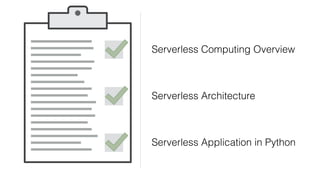
Serverless Computing Overview
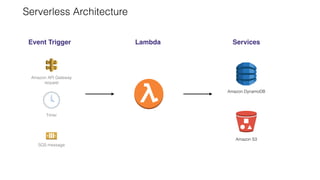
Serverless Architecture
Serverless Application in Python
Serverless Computing Overview
Serverless Architecture
Serverless Application in Python
Serverless Computing Overview
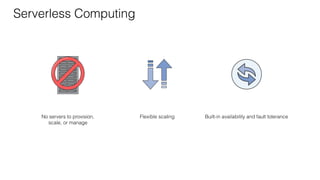
Build and run applications without thinking about servers
No servers to provision,
scale, or manage
Flexible scaling Built-in availability and fault tolerance
Serverless Computing
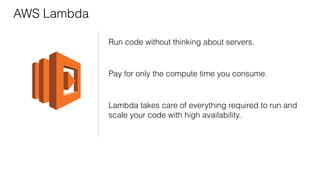
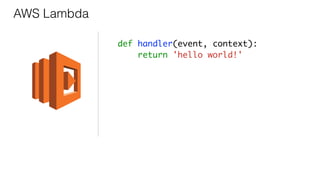
AWS Lambda
Run code without thinking about servers.
Pay for only the compute time you consume.
Lambda takes care of everything required to run and
scale your code with high availability.
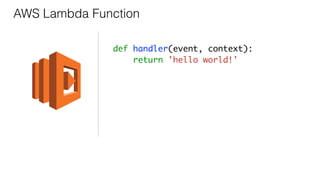
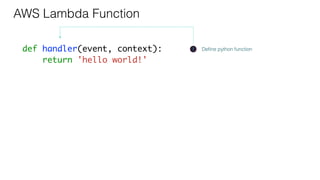
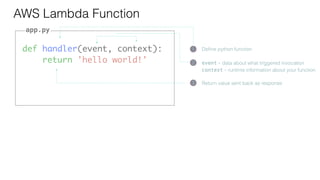
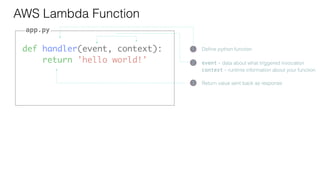
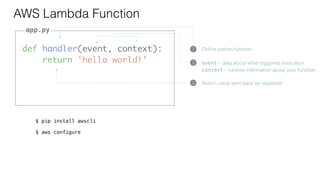
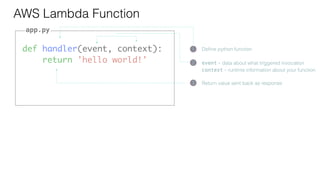
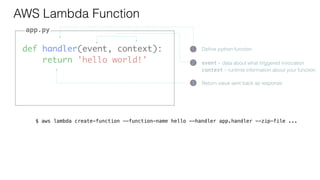
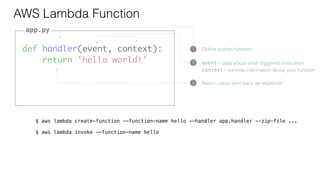
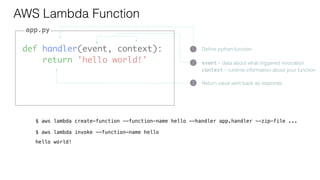
AWS Lambda Function
def handler(event, context):
return 'hello world!'
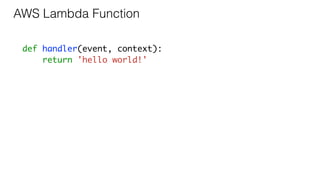
def handler(event, context):
return 'hello world!'
AWS Lambda Function
def handler(event, context):
return 'hello world!'
AWS Lambda Function
1 Define python function
def handler(event, context):
return 'hello world!'
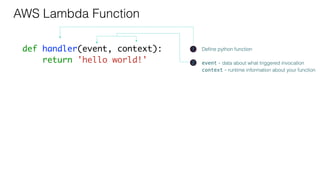
AWS Lambda Function
1 Define python function
2 event - data about what triggered invocation
context - runtime information about your function
def handler(event, context):
return 'hello world!'
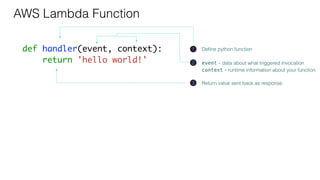
AWS Lambda Function
1 Define python function
3 Return value sent back as response
2 event - data about what triggered invocation
context - runtime information about your function
def handler(event, context):
return 'hello world!'
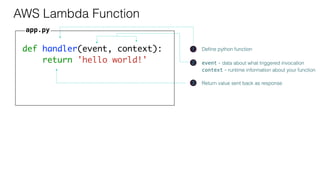
AWS Lambda Function
1 Define python function
3 Return value sent back as response
2 event - data about what triggered invocation
context - runtime information about your function
app.py
def handler(event, context):
return 'hello world!'
AWS Lambda Function
1 Define python function
3 Return value sent back as response
2 event - data about what triggered invocation
context - runtime information about your function
app.py
def handler(event, context):
return 'hello world!'
AWS Lambda Function
1 Define python function
3 Return value sent back as response
2 event - data about what triggered invocation
context - runtime information about your function
app.py
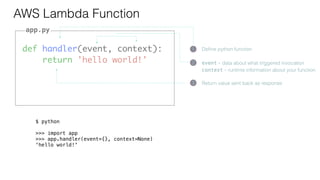
$ python
>>> import app
>>> app.handler(event={}, context=None)
'hello world!'
def handler(event, context):
return 'hello world!'
AWS Lambda Function
1 Define python function
3 Return value sent back as response
2 event - data about what triggered invocation
context - runtime information about your function
app.py
def handler(event, context):
return 'hello world!'
AWS Lambda Function
1 Define python function
3 Return value sent back as response
2 event - data about what triggered invocation
context - runtime information about your function
app.py
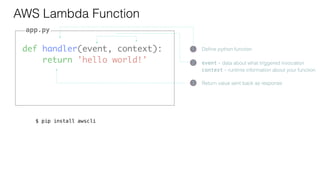
$ pip install awscli
def handler(event, context):
return 'hello world!'
AWS Lambda Function
1 Define python function
3 Return value sent back as response
2 event - data about what triggered invocation
context - runtime information about your function
app.py
$ pip install awscli
$ aws configure
def handler(event, context):
return 'hello world!'
AWS Lambda Function
1 Define python function
3 Return value sent back as response
2 event - data about what triggered invocation
context - runtime information about your function
app.py
def handler(event, context):
return 'hello world!'
AWS Lambda Function
1 Define python function
3 Return value sent back as response
2 event - data about what triggered invocation
context - runtime information about your function
app.py
$ aws lambda create-function --function-name hello --handler app.handler --zip-file ...
def handler(event, context):
return 'hello world!'
AWS Lambda Function
1 Define python function
3 Return value sent back as response
2 event - data about what triggered invocation
context - runtime information about your function
app.py
$ aws lambda create-function --function-name hello --handler app.handler --zip-file ...
$ aws lambda invoke --function-name hello
def handler(event, context):
return 'hello world!'
AWS Lambda Function
1 Define python function
3 Return value sent back as response
2 event - data about what triggered invocation
context - runtime information about your function
app.py
$ aws lambda create-function --function-name hello --handler app.handler --zip-file ...
$ aws lambda invoke --function-name hello
hello world!
def handler(event, context):
return event['foo'].upper()
AWS Lambda Function Input
app.py
def handler(event, context):
return event['foo'].upper()
AWS Lambda Function Input
app.py
$ aws lambda invoke --function-name hello --payload '{"foo": "bar"}'
def handler(event, context):
return event['foo'].upper()
AWS Lambda Function Input
app.py
$ aws lambda invoke --function-name hello --payload '{"foo": "bar"}'
def handler(event, context):
return event['foo'].upper()
AWS Lambda Function Input
app.py
$ aws lambda invoke --function-name hello --payload '{"foo": "bar"}'
BAR
def handler(event, context):
return event['foo'].upper()
AWS Lambda Function Input
app.py
$ aws lambda invoke --function-name hello --payload '{"foo": "bar"}'
BAR
$ aws lambda invoke --function-name hello --payload '{"foo": "baz"}'
def handler(event, context):
return event['foo'].upper()
AWS Lambda Function Input
app.py
$ aws lambda invoke --function-name hello --payload '{"foo": "bar"}'
BAR
$ aws lambda invoke --function-name hello --payload '{"foo": "baz"}'
BAZ
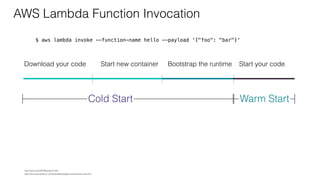
AWS Lambda Function Invocation
https://docs.aws.amazon.com/lambda/latest/dg/running-lambda-code.html
https://youtu.be/oQFORsso2go?t=422
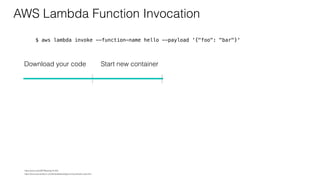
AWS Lambda Function Invocation
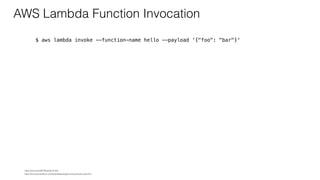
$ aws lambda invoke --function-name hello --payload '{"foo": "bar"}'
https://docs.aws.amazon.com/lambda/latest/dg/running-lambda-code.html
https://youtu.be/oQFORsso2go?t=422
AWS Lambda Function Invocation
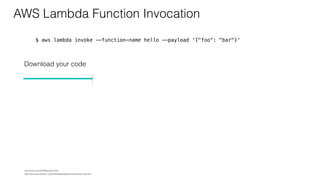
$ aws lambda invoke --function-name hello --payload '{"foo": "bar"}'
Download your code
https://docs.aws.amazon.com/lambda/latest/dg/running-lambda-code.html
https://youtu.be/oQFORsso2go?t=422
AWS Lambda Function Invocation
$ aws lambda invoke --function-name hello --payload '{"foo": "bar"}'
Download your code Start new container
https://docs.aws.amazon.com/lambda/latest/dg/running-lambda-code.html
https://youtu.be/oQFORsso2go?t=422
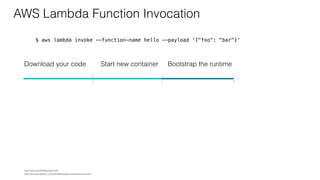
AWS Lambda Function Invocation
$ aws lambda invoke --function-name hello --payload '{"foo": "bar"}'
Download your code Start new container Bootstrap the runtime
https://docs.aws.amazon.com/lambda/latest/dg/running-lambda-code.html
https://youtu.be/oQFORsso2go?t=422
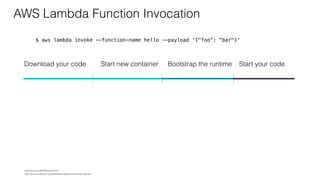
AWS Lambda Function Invocation
$ aws lambda invoke --function-name hello --payload '{"foo": "bar"}'
Start your codeDownload your code Start new container Bootstrap the runtime
https://docs.aws.amazon.com/lambda/latest/dg/running-lambda-code.html
https://youtu.be/oQFORsso2go?t=422
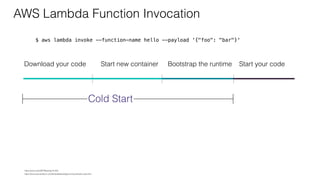
AWS Lambda Function Invocation
$ aws lambda invoke --function-name hello --payload '{"foo": "bar"}'
Start your codeDownload your code Start new container Bootstrap the runtime
Cold Start
https://docs.aws.amazon.com/lambda/latest/dg/running-lambda-code.html
https://youtu.be/oQFORsso2go?t=422
AWS Lambda Function Invocation
$ aws lambda invoke --function-name hello --payload '{"foo": "bar"}'
Start your codeDownload your code Start new container Bootstrap the runtime
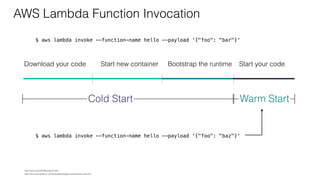
Cold Start Warm Start
https://docs.aws.amazon.com/lambda/latest/dg/running-lambda-code.html
https://youtu.be/oQFORsso2go?t=422
AWS Lambda Function Invocation
$ aws lambda invoke --function-name hello --payload '{"foo": "bar"}'
Start your codeDownload your code Start new container Bootstrap the runtime
Cold Start Warm Start
$ aws lambda invoke --function-name hello --payload '{"foo": "baz"}'
https://docs.aws.amazon.com/lambda/latest/dg/running-lambda-code.html
https://youtu.be/oQFORsso2go?t=422
Focus on your core product instead of
worrying about managing and
operating servers or runtimes.
Serverless Computing Overview
Serverless Architecture
Serverless Application in Python
Serverless Architecture Patterns
Serverless Architecture
Event Trigger Lambda Services
Amazon API Gateway
request
Timer
SQS message
Amazon DynamoDB
Amazon S3
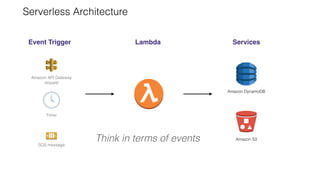
Serverless Architecture
Event Trigger Lambda Services
Amazon API Gateway
request
Timer
SQS message
Amazon DynamoDB
Amazon S3Think in terms of events
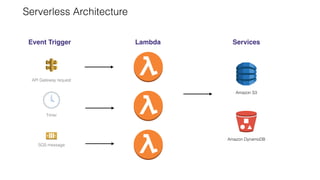
Serverless Architecture
Event Trigger Lambda Services
API Gateway request
Timer
SQS message
Amazon S3
Amazon DynamoDB
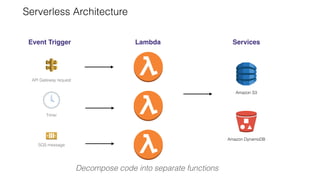
Serverless Architecture
Event Trigger Lambda Services
API Gateway request
Timer
SQS message
Amazon S3
Amazon DynamoDB
Decompose code into separate functions
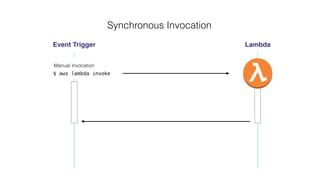
Synchronous Invocation
Event Trigger Lambda
Manual invocation
$ aws lambda invoke
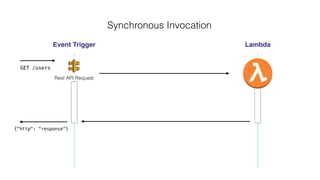
Synchronous Invocation
Event Trigger Lambda
GET /users
Rest API Request
{"http": "response"}
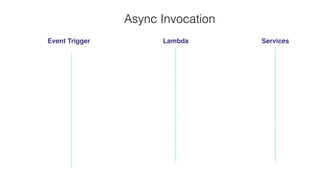
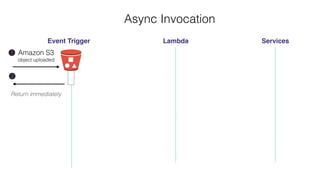
Async Invocation
Event Trigger Lambda Services
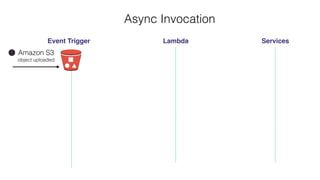
Async Invocation
Event Trigger Lambda Services
Amazon S3
object uploaded
1
Return immediately
2
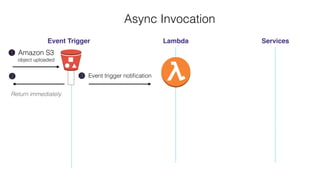
Async Invocation
Event Trigger Lambda Services
Amazon S3
object uploaded
1
Return immediately
2
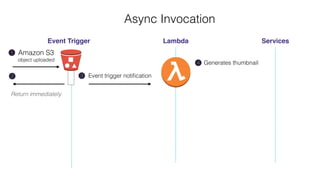
Async Invocation
Event Trigger Lambda Services
Amazon S3
object uploaded
1
Event trigger notification3
Return immediately
2
Async Invocation
Event Trigger Lambda Services
Amazon S3
object uploaded
1
Generates thumbnail4
Event trigger notification3
Return immediately
2
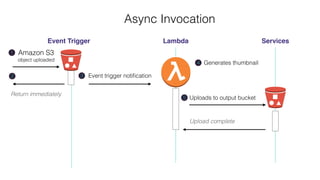
Async Invocation
Event Trigger Lambda Services
Amazon S3
object uploaded
1
Generates thumbnail4
Uploads to output bucket
Upload complete
5
Event trigger notification3
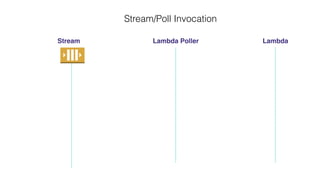
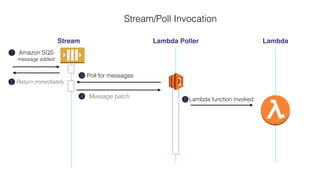
Stream/Poll Invocation
Stream Lambda Poller Lambda
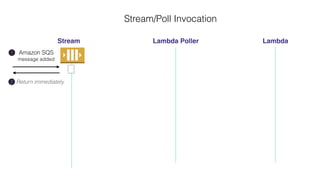
Stream/Poll Invocation
Stream Lambda Poller Lambda
Return immediately2
Amazon SQS
message added
1
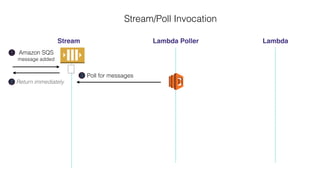
Stream/Poll Invocation
Stream Lambda Poller Lambda
Return immediately2
Amazon SQS
message added
1
3 Poll for messages
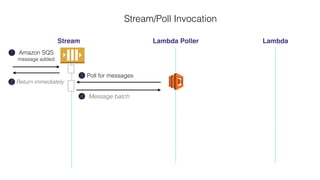
Stream/Poll Invocation
Stream Lambda Poller Lambda
Return immediately2
Amazon SQS
message added
1
3 Poll for messages
Message batch4
Lambda function invoked5
Stream/Poll Invocation
Stream Lambda Poller Lambda
Return immediately2
Amazon SQS
message added
1
3 Poll for messages
Message batch4
Lambda function invoked5
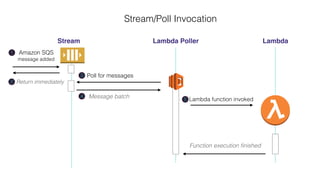
Stream/Poll Invocation
Stream Lambda Poller Lambda
Function execution finished
Return immediately2
Amazon SQS
message added
1
3 Poll for messages
Message batch4
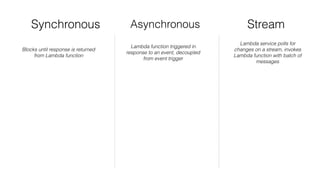
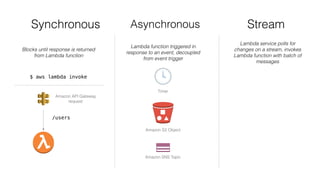
Synchronous Asynchronous Stream
Blocks until response is returned
from Lambda function
Lambda function triggered in
response to an event, decoupled
from event trigger
Lambda service polls for
changes on a stream, invokes
Lambda function with batch of
messages
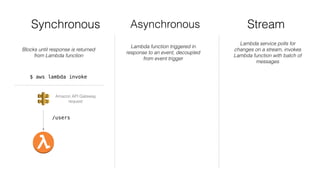
Synchronous Asynchronous Stream
Blocks until response is returned
from Lambda function
Lambda function triggered in
response to an event, decoupled
from event trigger
Lambda service polls for
changes on a stream, invokes
Lambda function with batch of
messages
$ aws lambda invoke
Amazon API Gateway
request
/users
Synchronous Asynchronous Stream
Blocks until response is returned
from Lambda function
Lambda function triggered in
response to an event, decoupled
from event trigger
Lambda service polls for
changes on a stream, invokes
Lambda function with batch of
messages
Timer
Amazon S3 Object
Amazon SNS Topic
$ aws lambda invoke
Amazon API Gateway
request
/users
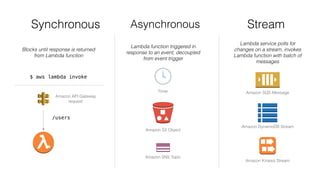
Synchronous Asynchronous Stream
Blocks until response is returned
from Lambda function
Lambda function triggered in
response to an event, decoupled
from event trigger
Lambda service polls for
changes on a stream, invokes
Lambda function with batch of
messages
Timer
Amazon S3 Object
Amazon SNS Topic
Amazon SQS Message
Amazon DynamoDB Stream
Amazon Kinesis Stream
$ aws lambda invoke
Amazon API Gateway
request
/users
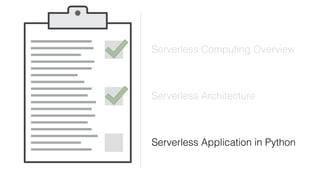
Serverless Computing Overview
Serverless Architecture
Serverless Application in Python
Serverless Applications in Python
AWS Lambda
def handler(event, context):
return 'hello world!'
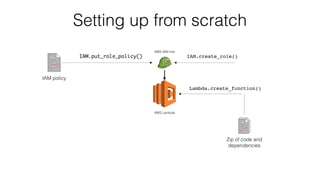
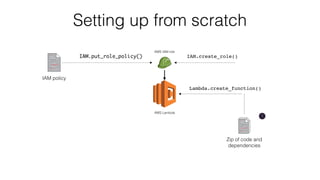
Setting up from scratch
AWS Lambda
AWS IAM role
IAM.create_role()IAM.put_role_policy()
Lambda.create_function()
Zip of code and
dependencies
IAM policy
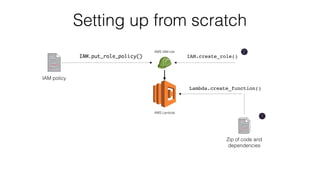
Setting up from scratch
AWS Lambda
AWS IAM role
IAM.create_role()IAM.put_role_policy()
Lambda.create_function()
Zip of code and
dependencies
IAM policy
1
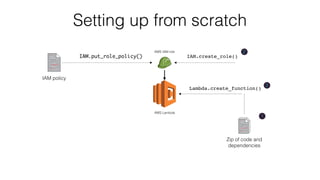
Setting up from scratch
AWS Lambda
AWS IAM role
IAM.create_role()IAM.put_role_policy()
Lambda.create_function()
Zip of code and
dependencies
IAM policy
1
2
Setting up from scratch
AWS Lambda
AWS IAM role
IAM.create_role()IAM.put_role_policy()
Lambda.create_function()
Zip of code and
dependencies
IAM policy
1
2
3
Creating our first Lambda function
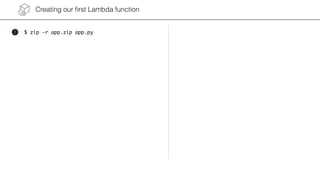
$ zip -r app.zip app.py1
Creating our first Lambda function
$ zip -r app.zip app.py1
2 $ aws iam create-role 
--role-name MyApp 
--assume-role-policy-document '{
"Version": "2012-10-17",
"Statement": [{
"Sid": "",
"Effect": "Allow",
"Principal": {
"Service": "lambda.amazonaws.com"
},
"Action": "sts:AssumeRole"
}]
}'
Creating our first Lambda function
$ zip -r app.zip app.py $ aws lambda create-function 
--function-name Hello 
--role-name MyApp 
--runtime python3.6 
--handler app.handler 
--zip-file fileb://app.zip
1
2
3
$ aws iam create-role 
--role-name MyApp 
--assume-role-policy-document '{
"Version": "2012-10-17",
"Statement": [{
"Sid": "",
"Effect": "Allow",
"Principal": {
"Service": "lambda.amazonaws.com"
},
"Action": "sts:AssumeRole"
}]
}'
Creating our first Lambda function
$ zip -r app.zip app.py $ aws lambda create-function 
--function-name Hello 
--role-name MyApp 
--runtime python3.6 
--handler app.handler 
--zip-file fileb://app.zip
1
2
3
$ aws iam create-role 
--role-name MyApp 
--assume-role-policy-document '{
"Version": "2012-10-17",
"Statement": [{
"Sid": "",
"Effect": "Allow",
"Principal": {
"Service": "lambda.amazonaws.com"
},
"Action": "sts:AssumeRole"
}]
}'
Creating our first Lambda function
$ zip -r app.zip app.py $ aws lambda create-function 
--function-name Hello 
--role-name MyApp 
--runtime python3.6 
--handler app.handler 
--zip-file fileb://app.zip
1
2
3
$ aws iam create-role 
--role-name MyApp 
--assume-role-policy-document '{
"Version": "2012-10-17",
"Statement": [{
"Sid": "",
"Effect": "Allow",
"Principal": {
"Service": "lambda.amazonaws.com"
},
"Action": "sts:AssumeRole"
}]
}'
Return immediately
2
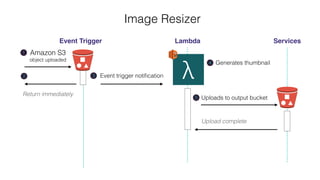
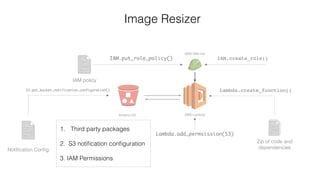
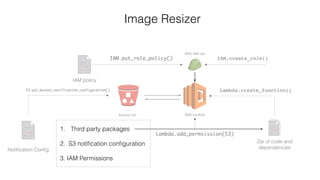
Image Resizer
Event Trigger Lambda Services
Amazon S3
object uploaded
1
λEvent trigger notification3
Generates thumbnail4
Uploads to output bucket
Upload complete
5
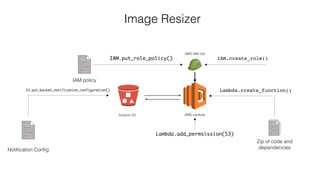
Amazon S3 AWS Lambda
AWS IAM role
IAM.create_role()IAM.put_role_policy()
Lambda.create_function()S3.put_bucket_notification_configuration()
Zip of code and
dependenciesNotification Config
IAM policy
Lambda.add_permsission(S3)
Image Resizer
Amazon S3 AWS Lambda
AWS IAM role
IAM.create_role()IAM.put_role_policy()
Lambda.create_function()S3.put_bucket_notification_configuration()
Zip of code and
dependenciesNotification Config
IAM policy
Lambda.add_permsission(S3)
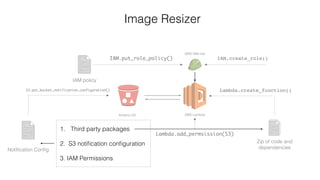
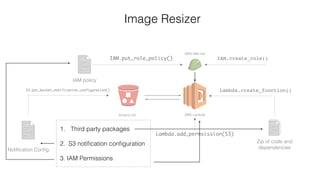
Image Resizer
1. Third party packages
2. S3 notification configuration
3. IAM Permissions
Amazon S3 AWS Lambda
AWS IAM role
IAM.create_role()IAM.put_role_policy()
Lambda.create_function()S3.put_bucket_notification_configuration()
Zip of code and
dependenciesNotification Config
IAM policy
Lambda.add_permsission(S3)
Image Resizer
1. Third party packages
2. S3 notification configuration
3. IAM Permissions
Amazon S3 AWS Lambda
AWS IAM role
IAM.create_role()IAM.put_role_policy()
Lambda.create_function()S3.put_bucket_notification_configuration()
Zip of code and
dependenciesNotification Config
IAM policy
Lambda.add_permsission(S3)
Image Resizer
1. Third party packages
2. S3 notification configuration
3. IAM Permissions
Amazon S3 AWS Lambda
AWS IAM role
IAM.create_role()IAM.put_role_policy()
Lambda.create_function()S3.put_bucket_notification_configuration()
Zip of code and
dependenciesNotification Config
IAM policy
Lambda.add_permsission(S3)
Image Resizer
1. Third party packages
2. S3 notification configuration
3. IAM Permissions
AWS Chalice
Python serverless framework for AWS
Quickly create and deploy serverless applications
Integration with many AWS services
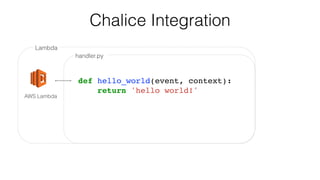
Lambda
handler.py
AWS Lambda
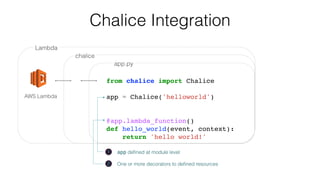
Chalice Integration
def hello_world(event, context):
return 'hello world!'
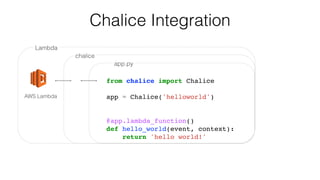
Lambda
chalice
app.py
AWS Lambda
from chalice import Chalice
app = Chalice('helloworld')
@app.lambda_function()
def hello_world(event, context):
return 'hello world!'
Chalice Integration
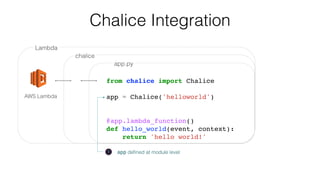
Lambda
chalice
app.py
AWS Lambda
from chalice import Chalice
app = Chalice('helloworld')
@app.lambda_function()
def hello_world(event, context):
return 'hello world!'
Chalice Integration
1 app defined at module level
Lambda
chalice
app.py
AWS Lambda
from chalice import Chalice
app = Chalice('helloworld')
@app.lambda_function()
def hello_world(event, context):
return 'hello world!'
Chalice Integration
1 app defined at module level
2 One or more decorators to defined resources
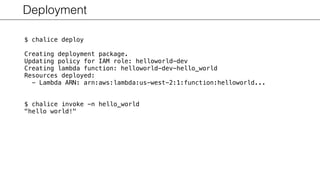
Deployment
$ chalice deploy
Creating deployment package.
Updating policy for IAM role: helloworld-dev
Creating lambda function: helloworld-dev-hello_world
Resources deployed:
- Lambda ARN: arn:aws:lambda:us-west-2:1:function:helloworld...
$ chalice invoke -n hello_world
"hello world!"
S3 Image Resizer app.py
import tempfile
import boto3
from PIL import Image
from chalice import Chalice
app = Chalice(app_name='s3resize', debug=True)
s3_client = boto3.client('s3')
@app.on_s3_event(bucket='mybucket',
prefix='images/', suffix='.jpg')
def resize_image(event):
app.log.debug("Resizing image for s3://%s/%s",
event.bucket, event.key)
with tempfile.NamedTemporaryFile('w') as f:
s3_client.download_file(event.bucket, event.key, f.name)
resized_file = f.name + '.thumbnail.jpg'
with open(Image.open(f.name)) as image:
image.thumbnail((256, 256))
image.save(resized_file)
s3_client.upload_file(
filename=resized_file,
bucket='mybucket',
key=f'thumbnails/{event.key.split("/", 1)[1]}'
)
S3 Image Resizer app.py
import tempfile
import boto3
from PIL import Image
from chalice import Chalice
app = Chalice(app_name='s3resize', debug=True)
s3_client = boto3.client('s3')
@app.on_s3_event(bucket='mybucket',
prefix='images/', suffix='.jpg')
def resize_image(event):
app.log.debug("Resizing image for s3://%s/%s",
event.bucket, event.key)
with tempfile.NamedTemporaryFile('w') as f:
s3_client.download_file(event.bucket, event.key, f.name)
resized_file = f.name + '.thumbnail.jpg'
with open(Image.open(f.name)) as image:
image.thumbnail((256, 256))
image.save(resized_file)
s3_client.upload_file(
filename=resized_file,
bucket='mybucket',
key=f'thumbnails/{event.key.split("/", 1)[1]}'
)
3rd party package
with C extension
automatically handled
from requirements.txt
S3 Image Resizer app.py
import tempfile
import boto3
from PIL import Image
from chalice import Chalice
app = Chalice(app_name='s3resize', debug=True)
s3_client = boto3.client('s3')
@app.on_s3_event(bucket='mybucket',
prefix='images/', suffix='.jpg')
def resize_image(event):
app.log.debug("Resizing image for s3://%s/%s",
event.bucket, event.key)
with tempfile.NamedTemporaryFile('w') as f:
s3_client.download_file(event.bucket, event.key, f.name)
resized_file = f.name + '.thumbnail.jpg'
with open(Image.open(f.name)) as image:
image.thumbnail((256, 256))
image.save(resized_file)
s3_client.upload_file(
filename=resized_file,
bucket='mybucket',
key=f'thumbnails/{event.key.split("/", 1)[1]}'
)
Client created in module scope
Only part of cold-start time
S3 Image Resizer app.py
import tempfile
import boto3
from PIL import Image
from chalice import Chalice
app = Chalice(app_name='s3resize', debug=True)
s3_client = boto3.client('s3')
@app.on_s3_event(bucket='mybucket',
prefix='images/', suffix='.jpg')
def resize_image(event):
app.log.debug("Resizing image for s3://%s/%s",
event.bucket, event.key)
with tempfile.NamedTemporaryFile('w') as f:
s3_client.download_file(event.bucket, event.key, f.name)
resized_file = f.name + '.thumbnail.jpg'
with open(Image.open(f.name)) as image:
image.thumbnail((256, 256))
image.save(resized_file)
s3_client.upload_file(
filename=resized_file,
bucket='mybucket',
key=f'thumbnails/{event.key.split("/", 1)[1]}'
)
Client created in module scope
Only part of cold-start time
Start your codeDownload your code Start new container Bootstrap the runtime
Cold Start Warm Start
Module Import
S3 Image Resizer app.py
import tempfile
import boto3
from PIL import Image
from chalice import Chalice
app = Chalice(app_name='s3resize', debug=True)
s3_client = boto3.client('s3')
@app.on_s3_event(bucket='mybucket',
prefix='images/', suffix='.jpg')
def resize_image(event):
app.log.debug("Resizing image for s3://%s/%s",
event.bucket, event.key)
with tempfile.NamedTemporaryFile('w') as f:
s3_client.download_file(event.bucket, event.key, f.name)
resized_file = f.name + '.thumbnail.jpg'
with open(Image.open(f.name)) as image:
image.thumbnail((256, 256))
image.save(resized_file)
s3_client.upload_file(
filename=resized_file,
bucket='mybucket',
key=f'thumbnails/{event.key.split("/", 1)[1]}'
)
Trigger function when
objects uploaded to
s3://mybucket/images/**/*.jpg
S3 Image Resizer app.py
import tempfile
import boto3
from PIL import Image
from chalice import Chalice
app = Chalice(app_name='s3resize', debug=True)
s3_client = boto3.client('s3')
@app.on_s3_event(bucket='mybucket',
prefix='images/', suffix='.jpg')
def resize_image(event):
app.log.debug("Resizing image for s3://%s/%s",
event.bucket, event.key)
with tempfile.NamedTemporaryFile('w') as f:
s3_client.download_file(event.bucket, event.key, f.name)
resized_file = f.name + '.thumbnail.jpg'
with open(Image.open(f.name)) as image:
image.thumbnail((256, 256))
image.save(resized_file)
s3_client.upload_file(
filename=resized_file,
bucket='mybucket',
key=f'thumbnails/{event.key.split("/", 1)[1]}'
)
S3 Image Resizer app.py
import tempfile
import boto3
from PIL import Image
from chalice import Chalice
app = Chalice(app_name='s3resize', debug=True)
s3_client = boto3.client('s3')
@app.on_s3_event(bucket='mybucket',
prefix='images/', suffix='.jpg')
def resize_image(event):
app.log.debug("Resizing image for s3://%s/%s",
event.bucket, event.key)
with tempfile.NamedTemporaryFile('w') as f:
s3_client.download_file(event.bucket, event.key, f.name)
resized_file = f.name + '.thumbnail.jpg'
with open(Image.open(f.name)) as image:
image.thumbnail((256, 256))
image.save(resized_file)
s3_client.upload_file(
filename=resized_file,
bucket='mybucket',
key=f'thumbnails/{event.key.split("/", 1)[1]}'
)
Event dictionary mapped to
python object
download_file method from boto3
will download file parts in parallel
S3 Image Resizer app.py
import tempfile
import boto3
from PIL import Image
from chalice import Chalice
app = Chalice(app_name='s3resize', debug=True)
s3_client = boto3.client('s3')
@app.on_s3_event(bucket='mybucket',
prefix='images/', suffix='.jpg')
def resize_image(event):
app.log.debug("Resizing image for s3://%s/%s",
event.bucket, event.key)
with tempfile.NamedTemporaryFile('w') as f:
s3_client.download_file(event.bucket, event.key, f.name)
resized_file = f.name + '.thumbnail.jpg'
with open(Image.open(f.name)) as image:
image.thumbnail((256, 256))
image.save(resized_file)
s3_client.upload_file(
filename=resized_file,
bucket='mybucket',
key=f'thumbnails/{event.key.split("/", 1)[1]}'
)
Generate 256x256 image and save
image to a temporary file.
S3 Image Resizer app.py
import tempfile
import boto3
from PIL import Image
from chalice import Chalice
app = Chalice(app_name='s3resize', debug=True)
s3_client = boto3.client('s3')
@app.on_s3_event(bucket='mybucket',
prefix='images/', suffix='.jpg')
def resize_image(event):
app.log.debug("Resizing image for s3://%s/%s",
event.bucket, event.key)
with tempfile.NamedTemporaryFile('w') as f:
s3_client.download_file(event.bucket, event.key, f.name)
resized_file = f.name + '.thumbnail.jpg'
with open(Image.open(f.name)) as image:
image.thumbnail((256, 256))
image.save(resized_file)
s3_client.upload_file(
filename=resized_file,
bucket='mybucket',
key=f'thumbnails/{event.key.split("/", 1)[1]}'
)
Upload thumbnail back to S3.
upload_file from boto3
will use parallelized multi part
uploaded if needed.
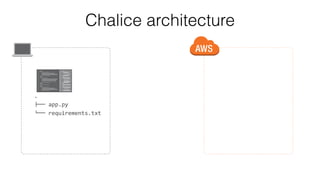
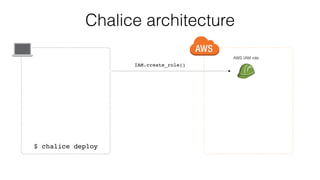
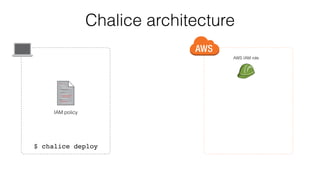
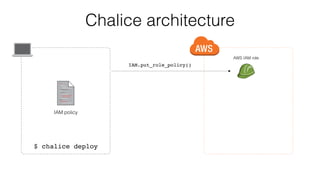
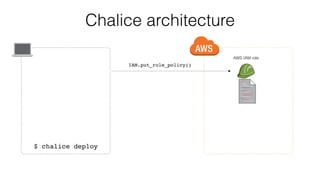
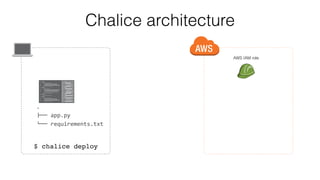
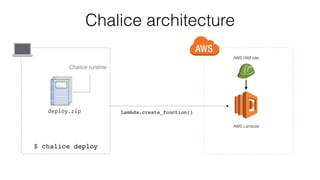
Chalice architecture
.
!"" app.py
#"" requirements.txt
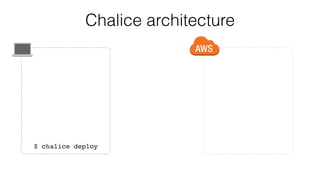
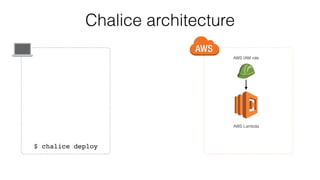
Chalice architecture
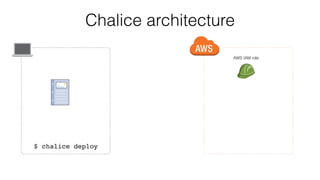
$ chalice deploy
Chalice architecture
AWS IAM role
IAM.create_role()
$ chalice deploy
Chalice architecture
AWS IAM role
$ chalice deploy
IAM policy
Chalice architecture
AWS IAM role
IAM.put_role_policy()
$ chalice deploy
IAM policy
Chalice architecture
AWS IAM role
IAM.put_role_policy()
$ chalice deploy
Chalice architecture
AWS IAM role
$ chalice deploy
.
!"" app.py
#"" requirements.txt
Chalice architecture
AWS IAM role
$ chalice deploy
Chalice architecture
AWS IAM role
$ chalice deploy
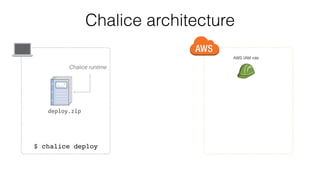
deploy.zip
Chalice runtime
Chalice architecture
AWS IAM role
$ chalice deploy
deploy.zip
Chalice runtime
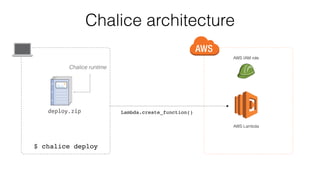
Lambda.create_function()
AWS Lambda
Chalice architecture
AWS IAM role
$ chalice deploy
deploy.zip
Chalice runtime
Lambda.create_function()
AWS Lambda
Chalice architecture
AWS IAM role
$ chalice deploy
AWS Lambda
Chalice architecture
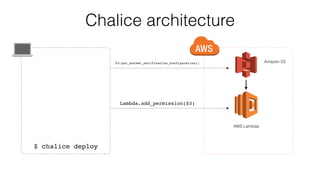
$ chalice deploy
S3.put_bucket_notification_configuration()
AWS Lambda
Amazon S3
Lambda.add_permission(S3)
@app.on_s3_event('mybucket')
def resize_image(event):
pass
@app.schedule('rate(5 minutes)')
def rate_handler(event):
pass
@app.on_sns_message(topic='mytopic')
def handler(event):
pass
@app.on_sqs_message(queue='myqueue')
def handler(event):
pass
@app.lambda_function()
def handler(event, context):
pass
@app.route('/resource/{value}',
methods=['PUT'])
def resource(value):
pass
@app.authorizer(ttl_seconds=30)
def jwt_auth(auth_request):
pass
Additional Chalice Decorators
Serverless Computing Overview
Serverless Architecture
Serverless Application in Python
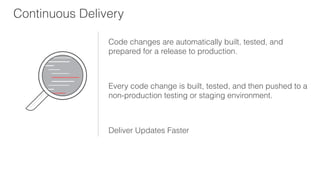
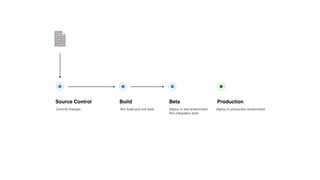
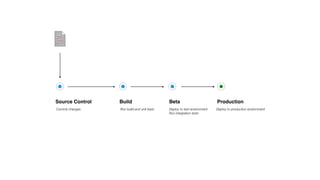
Continuous Delivery
Code changes are automatically built, tested, and
prepared for a release to production.
Every code change is built, tested, and then pushed to a
non-production testing or staging environment.
Deliver Updates Faster
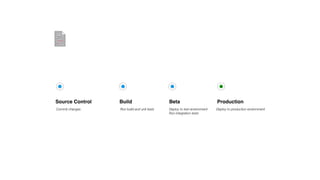
Source Control Build Beta Production
Commit changes Run build and unit tests Deploy to test environment
Run integration tests
Deploy to production environment
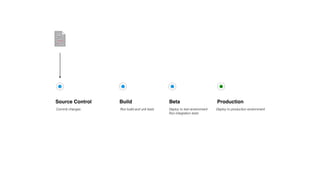
Source Control Build Beta Production
Commit changes Run build and unit tests Deploy to test environment
Run integration tests
Deploy to production environment
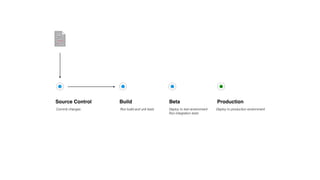
Source Control Build Beta Production
Commit changes Run build and unit tests Deploy to test environment
Run integration tests
Deploy to production environment
Source Control Build Beta Production
Commit changes Run build and unit tests Deploy to test environment
Run integration tests
Deploy to production environment
Source Control Build Beta Production
Commit changes Run build and unit tests Deploy to test environment
Run integration tests
Deploy to production environment
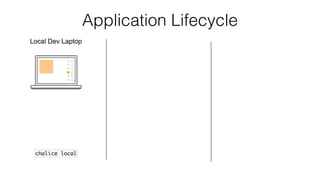
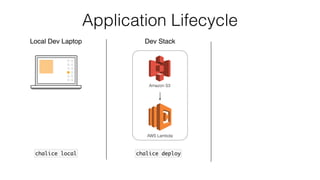
Application Lifecycle
Local Dev Laptop
chalice local
Application Lifecycle
Local Dev Laptop
chalice local
Dev Stack
AWS Lambda
chalice deploy
Amazon S3
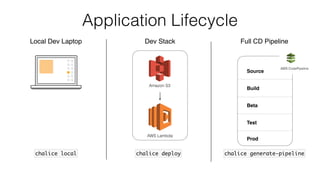
Application Lifecycle
Local Dev Laptop
chalice local
Full CD Pipeline
Source
Build
Beta
Test
Prod
AWS CodePipeline
chalice generate-pipeline
Dev Stack
AWS Lambda
chalice deploy
Amazon S3
Next Steps
Todo App tutorial: https://chalice-workshop.readthedocs.io/en/latest/todo-app/index.html
Media query tutorial: https://chalice-workshop.readthedocs.io/en/latest/media-query/index.html
Chalice GitHub repository: https://github.com/aws/chalice
Chalice documentation: http://chalice.readthedocs.io/en/latest/
Serverless Black Belt (re:Invent 2017): https://www.youtube.com/watch?v=oQFORsso2go
Thanks!
James Saryerwinnie
@jsaryer

A Crash Course on Serverless Applications in Python

  • 1.
    A Crash Courseon Serverless Applications in Python James Saryerwinnie @jsaryer
  • 2.
    Serverless Computing Overview ServerlessArchitecture Serverless Application in Python
  • 3.
    Serverless Computing Overview ServerlessArchitecture Serverless Application in Python
  • 4.
    Serverless Computing Overview Buildand run applications without thinking about servers
  • 5.
    No servers toprovision, scale, or manage Flexible scaling Built-in availability and fault tolerance Serverless Computing
  • 6.
    AWS Lambda Run codewithout thinking about servers. Pay for only the compute time you consume. Lambda takes care of everything required to run and scale your code with high availability.
  • 7.
    AWS Lambda Function defhandler(event, context): return 'hello world!'
  • 8.
    def handler(event, context): return'hello world!' AWS Lambda Function
  • 9.
    def handler(event, context): return'hello world!' AWS Lambda Function 1 Define python function
  • 10.
    def handler(event, context): return'hello world!' AWS Lambda Function 1 Define python function 2 event - data about what triggered invocation context - runtime information about your function
  • 11.
    def handler(event, context): return'hello world!' AWS Lambda Function 1 Define python function 3 Return value sent back as response 2 event - data about what triggered invocation context - runtime information about your function
  • 12.
    def handler(event, context): return'hello world!' AWS Lambda Function 1 Define python function 3 Return value sent back as response 2 event - data about what triggered invocation context - runtime information about your function app.py
  • 13.
    def handler(event, context): return'hello world!' AWS Lambda Function 1 Define python function 3 Return value sent back as response 2 event - data about what triggered invocation context - runtime information about your function app.py
  • 14.
    def handler(event, context): return'hello world!' AWS Lambda Function 1 Define python function 3 Return value sent back as response 2 event - data about what triggered invocation context - runtime information about your function app.py $ python >>> import app >>> app.handler(event={}, context=None) 'hello world!'
  • 15.
    def handler(event, context): return'hello world!' AWS Lambda Function 1 Define python function 3 Return value sent back as response 2 event - data about what triggered invocation context - runtime information about your function app.py
  • 16.
    def handler(event, context): return'hello world!' AWS Lambda Function 1 Define python function 3 Return value sent back as response 2 event - data about what triggered invocation context - runtime information about your function app.py $ pip install awscli
  • 17.
    def handler(event, context): return'hello world!' AWS Lambda Function 1 Define python function 3 Return value sent back as response 2 event - data about what triggered invocation context - runtime information about your function app.py $ pip install awscli $ aws configure
  • 18.
    def handler(event, context): return'hello world!' AWS Lambda Function 1 Define python function 3 Return value sent back as response 2 event - data about what triggered invocation context - runtime information about your function app.py
  • 19.
    def handler(event, context): return'hello world!' AWS Lambda Function 1 Define python function 3 Return value sent back as response 2 event - data about what triggered invocation context - runtime information about your function app.py $ aws lambda create-function --function-name hello --handler app.handler --zip-file ...
  • 20.
    def handler(event, context): return'hello world!' AWS Lambda Function 1 Define python function 3 Return value sent back as response 2 event - data about what triggered invocation context - runtime information about your function app.py $ aws lambda create-function --function-name hello --handler app.handler --zip-file ... $ aws lambda invoke --function-name hello
  • 21.
    def handler(event, context): return'hello world!' AWS Lambda Function 1 Define python function 3 Return value sent back as response 2 event - data about what triggered invocation context - runtime information about your function app.py $ aws lambda create-function --function-name hello --handler app.handler --zip-file ... $ aws lambda invoke --function-name hello hello world!
  • 22.
    def handler(event, context): returnevent['foo'].upper() AWS Lambda Function Input app.py
  • 23.
    def handler(event, context): returnevent['foo'].upper() AWS Lambda Function Input app.py $ aws lambda invoke --function-name hello --payload '{"foo": "bar"}'
  • 24.
    def handler(event, context): returnevent['foo'].upper() AWS Lambda Function Input app.py $ aws lambda invoke --function-name hello --payload '{"foo": "bar"}'
  • 25.
    def handler(event, context): returnevent['foo'].upper() AWS Lambda Function Input app.py $ aws lambda invoke --function-name hello --payload '{"foo": "bar"}' BAR
  • 26.
    def handler(event, context): returnevent['foo'].upper() AWS Lambda Function Input app.py $ aws lambda invoke --function-name hello --payload '{"foo": "bar"}' BAR $ aws lambda invoke --function-name hello --payload '{"foo": "baz"}'
  • 27.
    def handler(event, context): returnevent['foo'].upper() AWS Lambda Function Input app.py $ aws lambda invoke --function-name hello --payload '{"foo": "bar"}' BAR $ aws lambda invoke --function-name hello --payload '{"foo": "baz"}' BAZ
  • 28.
    AWS Lambda FunctionInvocation https://docs.aws.amazon.com/lambda/latest/dg/running-lambda-code.html https://youtu.be/oQFORsso2go?t=422
  • 29.
    AWS Lambda FunctionInvocation $ aws lambda invoke --function-name hello --payload '{"foo": "bar"}' https://docs.aws.amazon.com/lambda/latest/dg/running-lambda-code.html https://youtu.be/oQFORsso2go?t=422
  • 30.
    AWS Lambda FunctionInvocation $ aws lambda invoke --function-name hello --payload '{"foo": "bar"}' Download your code https://docs.aws.amazon.com/lambda/latest/dg/running-lambda-code.html https://youtu.be/oQFORsso2go?t=422
  • 31.
    AWS Lambda FunctionInvocation $ aws lambda invoke --function-name hello --payload '{"foo": "bar"}' Download your code Start new container https://docs.aws.amazon.com/lambda/latest/dg/running-lambda-code.html https://youtu.be/oQFORsso2go?t=422
  • 32.
    AWS Lambda FunctionInvocation $ aws lambda invoke --function-name hello --payload '{"foo": "bar"}' Download your code Start new container Bootstrap the runtime https://docs.aws.amazon.com/lambda/latest/dg/running-lambda-code.html https://youtu.be/oQFORsso2go?t=422
  • 33.
    AWS Lambda FunctionInvocation $ aws lambda invoke --function-name hello --payload '{"foo": "bar"}' Start your codeDownload your code Start new container Bootstrap the runtime https://docs.aws.amazon.com/lambda/latest/dg/running-lambda-code.html https://youtu.be/oQFORsso2go?t=422
  • 34.
    AWS Lambda FunctionInvocation $ aws lambda invoke --function-name hello --payload '{"foo": "bar"}' Start your codeDownload your code Start new container Bootstrap the runtime Cold Start https://docs.aws.amazon.com/lambda/latest/dg/running-lambda-code.html https://youtu.be/oQFORsso2go?t=422
  • 35.
    AWS Lambda FunctionInvocation $ aws lambda invoke --function-name hello --payload '{"foo": "bar"}' Start your codeDownload your code Start new container Bootstrap the runtime Cold Start Warm Start https://docs.aws.amazon.com/lambda/latest/dg/running-lambda-code.html https://youtu.be/oQFORsso2go?t=422
  • 36.
    AWS Lambda FunctionInvocation $ aws lambda invoke --function-name hello --payload '{"foo": "bar"}' Start your codeDownload your code Start new container Bootstrap the runtime Cold Start Warm Start $ aws lambda invoke --function-name hello --payload '{"foo": "baz"}' https://docs.aws.amazon.com/lambda/latest/dg/running-lambda-code.html https://youtu.be/oQFORsso2go?t=422
  • 37.
    Focus on yourcore product instead of worrying about managing and operating servers or runtimes.
  • 38.
    Serverless Computing Overview ServerlessArchitecture Serverless Application in Python
  • 39.
  • 40.
    Serverless Architecture Event TriggerLambda Services Amazon API Gateway request Timer SQS message Amazon DynamoDB Amazon S3
  • 41.
    Serverless Architecture Event TriggerLambda Services Amazon API Gateway request Timer SQS message Amazon DynamoDB Amazon S3Think in terms of events
  • 42.
    Serverless Architecture Event TriggerLambda Services API Gateway request Timer SQS message Amazon S3 Amazon DynamoDB
  • 43.
    Serverless Architecture Event TriggerLambda Services API Gateway request Timer SQS message Amazon S3 Amazon DynamoDB Decompose code into separate functions
  • 44.
    Synchronous Invocation Event TriggerLambda Manual invocation $ aws lambda invoke
  • 45.
    Synchronous Invocation Event TriggerLambda GET /users Rest API Request {"http": "response"}
  • 46.
  • 47.
    Async Invocation Event TriggerLambda Services Amazon S3 object uploaded 1
  • 48.
    Return immediately 2 Async Invocation EventTrigger Lambda Services Amazon S3 object uploaded 1
  • 49.
    Return immediately 2 Async Invocation EventTrigger Lambda Services Amazon S3 object uploaded 1 Event trigger notification3
  • 50.
    Return immediately 2 Async Invocation EventTrigger Lambda Services Amazon S3 object uploaded 1 Generates thumbnail4 Event trigger notification3
  • 51.
    Return immediately 2 Async Invocation EventTrigger Lambda Services Amazon S3 object uploaded 1 Generates thumbnail4 Uploads to output bucket Upload complete 5 Event trigger notification3
  • 52.
  • 53.
    Stream/Poll Invocation Stream LambdaPoller Lambda Return immediately2 Amazon SQS message added 1
  • 54.
    Stream/Poll Invocation Stream LambdaPoller Lambda Return immediately2 Amazon SQS message added 1 3 Poll for messages
  • 55.
    Stream/Poll Invocation Stream LambdaPoller Lambda Return immediately2 Amazon SQS message added 1 3 Poll for messages Message batch4
  • 56.
    Lambda function invoked5 Stream/PollInvocation Stream Lambda Poller Lambda Return immediately2 Amazon SQS message added 1 3 Poll for messages Message batch4
  • 57.
    Lambda function invoked5 Stream/PollInvocation Stream Lambda Poller Lambda Function execution finished Return immediately2 Amazon SQS message added 1 3 Poll for messages Message batch4
  • 58.
    Synchronous Asynchronous Stream Blocksuntil response is returned from Lambda function Lambda function triggered in response to an event, decoupled from event trigger Lambda service polls for changes on a stream, invokes Lambda function with batch of messages
  • 59.
    Synchronous Asynchronous Stream Blocksuntil response is returned from Lambda function Lambda function triggered in response to an event, decoupled from event trigger Lambda service polls for changes on a stream, invokes Lambda function with batch of messages $ aws lambda invoke Amazon API Gateway request /users
  • 60.
    Synchronous Asynchronous Stream Blocksuntil response is returned from Lambda function Lambda function triggered in response to an event, decoupled from event trigger Lambda service polls for changes on a stream, invokes Lambda function with batch of messages Timer Amazon S3 Object Amazon SNS Topic $ aws lambda invoke Amazon API Gateway request /users
  • 61.
    Synchronous Asynchronous Stream Blocksuntil response is returned from Lambda function Lambda function triggered in response to an event, decoupled from event trigger Lambda service polls for changes on a stream, invokes Lambda function with batch of messages Timer Amazon S3 Object Amazon SNS Topic Amazon SQS Message Amazon DynamoDB Stream Amazon Kinesis Stream $ aws lambda invoke Amazon API Gateway request /users
  • 62.
    Serverless Computing Overview ServerlessArchitecture Serverless Application in Python
  • 63.
  • 64.
    AWS Lambda def handler(event,context): return 'hello world!'
  • 65.
    Setting up fromscratch AWS Lambda AWS IAM role IAM.create_role()IAM.put_role_policy() Lambda.create_function() Zip of code and dependencies IAM policy
  • 66.
    Setting up fromscratch AWS Lambda AWS IAM role IAM.create_role()IAM.put_role_policy() Lambda.create_function() Zip of code and dependencies IAM policy 1
  • 67.
    Setting up fromscratch AWS Lambda AWS IAM role IAM.create_role()IAM.put_role_policy() Lambda.create_function() Zip of code and dependencies IAM policy 1 2
  • 68.
    Setting up fromscratch AWS Lambda AWS IAM role IAM.create_role()IAM.put_role_policy() Lambda.create_function() Zip of code and dependencies IAM policy 1 2 3
  • 69.
    Creating our firstLambda function
  • 70.
    Creating our firstLambda function $ zip -r app.zip app.py1
  • 71.
    Creating our firstLambda function $ zip -r app.zip app.py1 2 $ aws iam create-role --role-name MyApp --assume-role-policy-document '{ "Version": "2012-10-17", "Statement": [{ "Sid": "", "Effect": "Allow", "Principal": { "Service": "lambda.amazonaws.com" }, "Action": "sts:AssumeRole" }] }'
  • 72.
    Creating our firstLambda function $ zip -r app.zip app.py $ aws lambda create-function --function-name Hello --role-name MyApp --runtime python3.6 --handler app.handler --zip-file fileb://app.zip 1 2 3 $ aws iam create-role --role-name MyApp --assume-role-policy-document '{ "Version": "2012-10-17", "Statement": [{ "Sid": "", "Effect": "Allow", "Principal": { "Service": "lambda.amazonaws.com" }, "Action": "sts:AssumeRole" }] }'
  • 73.
    Creating our firstLambda function $ zip -r app.zip app.py $ aws lambda create-function --function-name Hello --role-name MyApp --runtime python3.6 --handler app.handler --zip-file fileb://app.zip 1 2 3 $ aws iam create-role --role-name MyApp --assume-role-policy-document '{ "Version": "2012-10-17", "Statement": [{ "Sid": "", "Effect": "Allow", "Principal": { "Service": "lambda.amazonaws.com" }, "Action": "sts:AssumeRole" }] }'
  • 74.
    Creating our firstLambda function $ zip -r app.zip app.py $ aws lambda create-function --function-name Hello --role-name MyApp --runtime python3.6 --handler app.handler --zip-file fileb://app.zip 1 2 3 $ aws iam create-role --role-name MyApp --assume-role-policy-document '{ "Version": "2012-10-17", "Statement": [{ "Sid": "", "Effect": "Allow", "Principal": { "Service": "lambda.amazonaws.com" }, "Action": "sts:AssumeRole" }] }'
  • 75.
    Return immediately 2 Image Resizer EventTrigger Lambda Services Amazon S3 object uploaded 1 λEvent trigger notification3 Generates thumbnail4 Uploads to output bucket Upload complete 5
  • 76.
    Amazon S3 AWSLambda AWS IAM role IAM.create_role()IAM.put_role_policy() Lambda.create_function()S3.put_bucket_notification_configuration() Zip of code and dependenciesNotification Config IAM policy Lambda.add_permsission(S3) Image Resizer
  • 77.
    Amazon S3 AWSLambda AWS IAM role IAM.create_role()IAM.put_role_policy() Lambda.create_function()S3.put_bucket_notification_configuration() Zip of code and dependenciesNotification Config IAM policy Lambda.add_permsission(S3) Image Resizer 1. Third party packages 2. S3 notification configuration 3. IAM Permissions
  • 78.
    Amazon S3 AWSLambda AWS IAM role IAM.create_role()IAM.put_role_policy() Lambda.create_function()S3.put_bucket_notification_configuration() Zip of code and dependenciesNotification Config IAM policy Lambda.add_permsission(S3) Image Resizer 1. Third party packages 2. S3 notification configuration 3. IAM Permissions
  • 79.
    Amazon S3 AWSLambda AWS IAM role IAM.create_role()IAM.put_role_policy() Lambda.create_function()S3.put_bucket_notification_configuration() Zip of code and dependenciesNotification Config IAM policy Lambda.add_permsission(S3) Image Resizer 1. Third party packages 2. S3 notification configuration 3. IAM Permissions
  • 80.
    Amazon S3 AWSLambda AWS IAM role IAM.create_role()IAM.put_role_policy() Lambda.create_function()S3.put_bucket_notification_configuration() Zip of code and dependenciesNotification Config IAM policy Lambda.add_permsission(S3) Image Resizer 1. Third party packages 2. S3 notification configuration 3. IAM Permissions
  • 81.
    AWS Chalice Python serverlessframework for AWS Quickly create and deploy serverless applications Integration with many AWS services
  • 82.
    Lambda handler.py AWS Lambda Chalice Integration defhello_world(event, context): return 'hello world!'
  • 83.
    Lambda chalice app.py AWS Lambda from chaliceimport Chalice app = Chalice('helloworld') @app.lambda_function() def hello_world(event, context): return 'hello world!' Chalice Integration
  • 84.
    Lambda chalice app.py AWS Lambda from chaliceimport Chalice app = Chalice('helloworld') @app.lambda_function() def hello_world(event, context): return 'hello world!' Chalice Integration 1 app defined at module level
  • 85.
    Lambda chalice app.py AWS Lambda from chaliceimport Chalice app = Chalice('helloworld') @app.lambda_function() def hello_world(event, context): return 'hello world!' Chalice Integration 1 app defined at module level 2 One or more decorators to defined resources
  • 86.
    Deployment $ chalice deploy Creatingdeployment package. Updating policy for IAM role: helloworld-dev Creating lambda function: helloworld-dev-hello_world Resources deployed: - Lambda ARN: arn:aws:lambda:us-west-2:1:function:helloworld... $ chalice invoke -n hello_world "hello world!"
  • 87.
    S3 Image Resizerapp.py import tempfile import boto3 from PIL import Image from chalice import Chalice app = Chalice(app_name='s3resize', debug=True) s3_client = boto3.client('s3') @app.on_s3_event(bucket='mybucket', prefix='images/', suffix='.jpg') def resize_image(event): app.log.debug("Resizing image for s3://%s/%s", event.bucket, event.key) with tempfile.NamedTemporaryFile('w') as f: s3_client.download_file(event.bucket, event.key, f.name) resized_file = f.name + '.thumbnail.jpg' with open(Image.open(f.name)) as image: image.thumbnail((256, 256)) image.save(resized_file) s3_client.upload_file( filename=resized_file, bucket='mybucket', key=f'thumbnails/{event.key.split("/", 1)[1]}' )
  • 88.
    S3 Image Resizerapp.py import tempfile import boto3 from PIL import Image from chalice import Chalice app = Chalice(app_name='s3resize', debug=True) s3_client = boto3.client('s3') @app.on_s3_event(bucket='mybucket', prefix='images/', suffix='.jpg') def resize_image(event): app.log.debug("Resizing image for s3://%s/%s", event.bucket, event.key) with tempfile.NamedTemporaryFile('w') as f: s3_client.download_file(event.bucket, event.key, f.name) resized_file = f.name + '.thumbnail.jpg' with open(Image.open(f.name)) as image: image.thumbnail((256, 256)) image.save(resized_file) s3_client.upload_file( filename=resized_file, bucket='mybucket', key=f'thumbnails/{event.key.split("/", 1)[1]}' ) 3rd party package with C extension automatically handled from requirements.txt
  • 89.
    S3 Image Resizerapp.py import tempfile import boto3 from PIL import Image from chalice import Chalice app = Chalice(app_name='s3resize', debug=True) s3_client = boto3.client('s3') @app.on_s3_event(bucket='mybucket', prefix='images/', suffix='.jpg') def resize_image(event): app.log.debug("Resizing image for s3://%s/%s", event.bucket, event.key) with tempfile.NamedTemporaryFile('w') as f: s3_client.download_file(event.bucket, event.key, f.name) resized_file = f.name + '.thumbnail.jpg' with open(Image.open(f.name)) as image: image.thumbnail((256, 256)) image.save(resized_file) s3_client.upload_file( filename=resized_file, bucket='mybucket', key=f'thumbnails/{event.key.split("/", 1)[1]}' ) Client created in module scope Only part of cold-start time
  • 90.
    S3 Image Resizerapp.py import tempfile import boto3 from PIL import Image from chalice import Chalice app = Chalice(app_name='s3resize', debug=True) s3_client = boto3.client('s3') @app.on_s3_event(bucket='mybucket', prefix='images/', suffix='.jpg') def resize_image(event): app.log.debug("Resizing image for s3://%s/%s", event.bucket, event.key) with tempfile.NamedTemporaryFile('w') as f: s3_client.download_file(event.bucket, event.key, f.name) resized_file = f.name + '.thumbnail.jpg' with open(Image.open(f.name)) as image: image.thumbnail((256, 256)) image.save(resized_file) s3_client.upload_file( filename=resized_file, bucket='mybucket', key=f'thumbnails/{event.key.split("/", 1)[1]}' ) Client created in module scope Only part of cold-start time Start your codeDownload your code Start new container Bootstrap the runtime Cold Start Warm Start Module Import
  • 91.
    S3 Image Resizerapp.py import tempfile import boto3 from PIL import Image from chalice import Chalice app = Chalice(app_name='s3resize', debug=True) s3_client = boto3.client('s3') @app.on_s3_event(bucket='mybucket', prefix='images/', suffix='.jpg') def resize_image(event): app.log.debug("Resizing image for s3://%s/%s", event.bucket, event.key) with tempfile.NamedTemporaryFile('w') as f: s3_client.download_file(event.bucket, event.key, f.name) resized_file = f.name + '.thumbnail.jpg' with open(Image.open(f.name)) as image: image.thumbnail((256, 256)) image.save(resized_file) s3_client.upload_file( filename=resized_file, bucket='mybucket', key=f'thumbnails/{event.key.split("/", 1)[1]}' ) Trigger function when objects uploaded to s3://mybucket/images/**/*.jpg
  • 92.
    S3 Image Resizerapp.py import tempfile import boto3 from PIL import Image from chalice import Chalice app = Chalice(app_name='s3resize', debug=True) s3_client = boto3.client('s3') @app.on_s3_event(bucket='mybucket', prefix='images/', suffix='.jpg') def resize_image(event): app.log.debug("Resizing image for s3://%s/%s", event.bucket, event.key) with tempfile.NamedTemporaryFile('w') as f: s3_client.download_file(event.bucket, event.key, f.name) resized_file = f.name + '.thumbnail.jpg' with open(Image.open(f.name)) as image: image.thumbnail((256, 256)) image.save(resized_file) s3_client.upload_file( filename=resized_file, bucket='mybucket', key=f'thumbnails/{event.key.split("/", 1)[1]}' )
  • 93.
    S3 Image Resizerapp.py import tempfile import boto3 from PIL import Image from chalice import Chalice app = Chalice(app_name='s3resize', debug=True) s3_client = boto3.client('s3') @app.on_s3_event(bucket='mybucket', prefix='images/', suffix='.jpg') def resize_image(event): app.log.debug("Resizing image for s3://%s/%s", event.bucket, event.key) with tempfile.NamedTemporaryFile('w') as f: s3_client.download_file(event.bucket, event.key, f.name) resized_file = f.name + '.thumbnail.jpg' with open(Image.open(f.name)) as image: image.thumbnail((256, 256)) image.save(resized_file) s3_client.upload_file( filename=resized_file, bucket='mybucket', key=f'thumbnails/{event.key.split("/", 1)[1]}' ) Event dictionary mapped to python object download_file method from boto3 will download file parts in parallel
  • 94.
    S3 Image Resizerapp.py import tempfile import boto3 from PIL import Image from chalice import Chalice app = Chalice(app_name='s3resize', debug=True) s3_client = boto3.client('s3') @app.on_s3_event(bucket='mybucket', prefix='images/', suffix='.jpg') def resize_image(event): app.log.debug("Resizing image for s3://%s/%s", event.bucket, event.key) with tempfile.NamedTemporaryFile('w') as f: s3_client.download_file(event.bucket, event.key, f.name) resized_file = f.name + '.thumbnail.jpg' with open(Image.open(f.name)) as image: image.thumbnail((256, 256)) image.save(resized_file) s3_client.upload_file( filename=resized_file, bucket='mybucket', key=f'thumbnails/{event.key.split("/", 1)[1]}' ) Generate 256x256 image and save image to a temporary file.
  • 95.
    S3 Image Resizerapp.py import tempfile import boto3 from PIL import Image from chalice import Chalice app = Chalice(app_name='s3resize', debug=True) s3_client = boto3.client('s3') @app.on_s3_event(bucket='mybucket', prefix='images/', suffix='.jpg') def resize_image(event): app.log.debug("Resizing image for s3://%s/%s", event.bucket, event.key) with tempfile.NamedTemporaryFile('w') as f: s3_client.download_file(event.bucket, event.key, f.name) resized_file = f.name + '.thumbnail.jpg' with open(Image.open(f.name)) as image: image.thumbnail((256, 256)) image.save(resized_file) s3_client.upload_file( filename=resized_file, bucket='mybucket', key=f'thumbnails/{event.key.split("/", 1)[1]}' ) Upload thumbnail back to S3. upload_file from boto3 will use parallelized multi part uploaded if needed.
  • 96.
  • 97.
  • 98.
    Chalice architecture AWS IAMrole IAM.create_role() $ chalice deploy
  • 99.
    Chalice architecture AWS IAMrole $ chalice deploy IAM policy
  • 100.
    Chalice architecture AWS IAMrole IAM.put_role_policy() $ chalice deploy IAM policy
  • 101.
    Chalice architecture AWS IAMrole IAM.put_role_policy() $ chalice deploy
  • 102.
    Chalice architecture AWS IAMrole $ chalice deploy . !"" app.py #"" requirements.txt
  • 103.
    Chalice architecture AWS IAMrole $ chalice deploy
  • 104.
    Chalice architecture AWS IAMrole $ chalice deploy deploy.zip Chalice runtime
  • 105.
    Chalice architecture AWS IAMrole $ chalice deploy deploy.zip Chalice runtime Lambda.create_function() AWS Lambda
  • 106.
    Chalice architecture AWS IAMrole $ chalice deploy deploy.zip Chalice runtime Lambda.create_function() AWS Lambda
  • 107.
    Chalice architecture AWS IAMrole $ chalice deploy AWS Lambda
  • 108.
    Chalice architecture $ chalicedeploy S3.put_bucket_notification_configuration() AWS Lambda Amazon S3 Lambda.add_permission(S3)
  • 109.
    @app.on_s3_event('mybucket') def resize_image(event): pass @app.schedule('rate(5 minutes)') defrate_handler(event): pass @app.on_sns_message(topic='mytopic') def handler(event): pass @app.on_sqs_message(queue='myqueue') def handler(event): pass @app.lambda_function() def handler(event, context): pass @app.route('/resource/{value}', methods=['PUT']) def resource(value): pass @app.authorizer(ttl_seconds=30) def jwt_auth(auth_request): pass Additional Chalice Decorators
  • 110.
    Serverless Computing Overview ServerlessArchitecture Serverless Application in Python
  • 111.
    Continuous Delivery Code changesare automatically built, tested, and prepared for a release to production. Every code change is built, tested, and then pushed to a non-production testing or staging environment. Deliver Updates Faster
  • 112.
    Source Control BuildBeta Production Commit changes Run build and unit tests Deploy to test environment Run integration tests Deploy to production environment
  • 113.
    Source Control BuildBeta Production Commit changes Run build and unit tests Deploy to test environment Run integration tests Deploy to production environment
  • 114.
    Source Control BuildBeta Production Commit changes Run build and unit tests Deploy to test environment Run integration tests Deploy to production environment
  • 115.
    Source Control BuildBeta Production Commit changes Run build and unit tests Deploy to test environment Run integration tests Deploy to production environment
  • 116.
    Source Control BuildBeta Production Commit changes Run build and unit tests Deploy to test environment Run integration tests Deploy to production environment
  • 117.
  • 118.
    Application Lifecycle Local DevLaptop chalice local
  • 119.
    Application Lifecycle Local DevLaptop chalice local Dev Stack AWS Lambda chalice deploy Amazon S3
  • 120.
    Application Lifecycle Local DevLaptop chalice local Full CD Pipeline Source Build Beta Test Prod AWS CodePipeline chalice generate-pipeline Dev Stack AWS Lambda chalice deploy Amazon S3
  • 121.
    Next Steps Todo Apptutorial: https://chalice-workshop.readthedocs.io/en/latest/todo-app/index.html Media query tutorial: https://chalice-workshop.readthedocs.io/en/latest/media-query/index.html Chalice GitHub repository: https://github.com/aws/chalice Chalice documentation: http://chalice.readthedocs.io/en/latest/ Serverless Black Belt (re:Invent 2017): https://www.youtube.com/watch?v=oQFORsso2go
  • 122.