+  Mats Bryntse, November 2008 www.mankz.com/ext.ppt High Performance Ajax with ASP.NET and ExtJS
Agenda About me Setting up VS for working with JavaScript Debugging efficiently What is ExtJS? Setting up ExtJS Example 1 – Ajax request Example 2 – Grid/FormPanel in ViewPort Error handling in Ajax/Ext apps Ajax performance Conclusions Questions
2 sides of Mats SW engineer in Sweden at Avensia AB 5 years working with .NET, 1 year using Ext No affilitation with Ext nor MS. Alias ’Mankz’ in Ext forum
Setting up Visual Studio  for working with JavaScript Get  VS 2008 SP1  (adds JS intellisense) First in your JS files, add Ext intellisense by using    /// <reference  src=”YourExtFolder/adapter/ext/ext-base.js”/> ///  <reference  src=”YourExtFolder/ext-all-debug.js”/> Use  JavaScriptLint / JsLint / JSure , map as External Tool or as a PostBuild command to find quickly find syntax errors Decorate web services with  [ScriptService]   attribute to be able to call from script No snippet support for JS No function browsing as for cs/aspx/... files Editing huge JS files like the ext-all-debug.js (35k lines) is a disaster in VS, there are other alternatives (Aptana Studio, JsEclipse)
Debugging efficiently Use the  debugger;  keyword in your JavaScript files Use  Fiddler  (if nothing turns up in the log use  localhost.  or   computer name for IE7) Fiddler works for FF too ( by modifying proxy settings ) Fiddler plugins :  JSONViewer ,  SyntaxView Use  FireBug  - plugins  YSlow ,  FireCookie  etc IE developer  toolbar - features ”Disable script”, ”Disable cookies” etc CustomErrors  property in web.config controls if callstack is included in web service exception Get a ”view rendered source” plugin, for  Firefox  and for  IE
What is ExtJS? What is ExtJS?  Including the full Ext library minified (not GZIPped) means around  550kb  of JS and  80kb  CSS Also simplifies DOM-operations & event handling etc, though if that is the only thing you need you can find smaller libraries that fit your purpose better. Jquery weighs in at 15kb (minified and GZIPped) Nice online documentation:  http://extjs.com/deploy/dev/docs/
Setting up ExtJS Latest ExtJS version is 2.2 Including on a page: <link href=&quot;ext-2.2/resources/css/ext-all.css&quot; rel=&quot;stylesheet&quot; type=&quot;text/css&quot; /> <script src=&quot;ext-2.2/adapter/ext/ext-base.js&quot; type=&quot;text/javascript&quot;></script> <script src=&quot;ext-2.2/ext-all-debug.js&quot; type=&quot;text/javascript&quot;></script> Include any Ext theme CSS file after the default ext-all.css
Example 1 – Ext.ajax.Request Code....
Example 1 – Worth noting DOM ready detection - Ext.onReady(function(){ ... })  Watch out for OnReady bug (called twice) in Ext2.2, user patch available but is not official.  Thread  in ExtJS forums : Keep Ext overrides in a separate .js file JSON data returned by .NET is served differently in .NET 3.5 and .NET 2.0 .NET 2.0 : Served bare .NET 3.5 :  Wrapped in {d:} to protect agaist  JSON hijacking Using ’jsonData’ applies header ”application/json” Content-Type: application/json; charset=UTF-8 Using ’params’ property applies  ” Content-Type: application/x-www-form-urlencoded; charset=UTF-8” Using the  [ScriptMethod(ResponseFormat = ResponseFormat.Xml/Json)]  doesn’t always seem to produce the expected result. How you pass parameters to .NET control how the data is being served
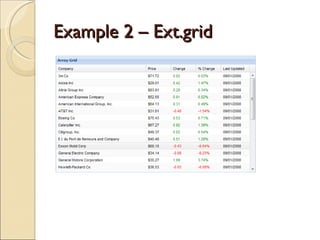
Example 2 – Ext.grid
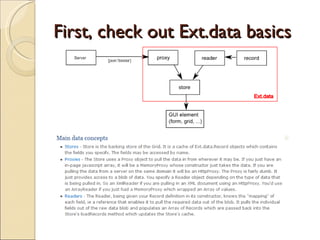
First, check out Ext.data basics
Example 2 - Code Ext.onReady(function() { Ext.BLANK_IMAGE_URL = 'ext-2.2/resources/images/default/s.gif'; Ext.QuickTips.init(); var record = Ext.data.Record.create([ {name: 'Country'}, {name: 'LastName'}, {name: 'FirstName'}, {name: 'ShippedDate', type:'date', dateFormat:'msajaxdate'}, {name: 'OrderID'}, {name: 'SaleAmount'} ]); ...
Example 2 – Worth noting Always add  Ext.BLANK_IMAGE_URL = 'ext-2.2/resources/images/default/s.gif'; If you want JSON data in your widgets, create a custom HttpProxy to get the parameters json encoded If returning data as DataTable/DataView/DataSet create custom a JavaScriptConverter to avoid  circular reference issue . Remember to set the  root  property of the JsonReader Create override to handle MS JSON date format Watch out for the  maxJsonLength   attribute in web.config, default value is 102400 characters Same origin policy applies to XHR requests. Can be resolved by using ScriptTagProxy, see Ext forums. Watch out for saving state in cookies using  Ext.state.CookieProvider,  Ext auto-generates component id’s
Error handling in Ajax/Ext apps When data doesn’t load as expected, first determine where the error is occurring (client or server) by using Fiddler/Firebug. When using web services you loose the functionality of  Application_Error  in global.asax To be able to log errors and control what’s being sent over the wire, you could either  Wrap each web service call in try/catch blocks, lots of extra code Use an AOP library(for example  PostSharp AOP ) to inject the try/catch code at compile time Catch & Log JavaScript errors using window.onerror. Check  PDF  by Nicholas Zakas on Enterprise JavaScript Error Handling. window.onerror does not catch the ”Operation aborted” error if you modify the DOM too early. Ext.lib.Ajax.request = Ext.lib.Ajax.request.createInterceptor(function(method, uri, cb, data, options) { options.failure = options.failure || function(response, options) { // Log error }; });
AJAX performance Follow the tips from  Yahoo Exceptional Performance  team and use Yslow Use script combining, minification ( YUICompressor ) and GZIP Web service output can be GZIPped as well, test in Fiddler by setting Rules->Apply GZIP encoding Use caching, make sure right versions of js/css files are being served. Append version number or last file write date. Be aware of memory usage, Ext can be heavy on memory. IE6/IE7 have memory issues, use  Drip/SIEve  to track memory leaks. Lots of information on  this  in Ext Forums
Conclusions Not using the ASP.NET Page model anymore. Remember to disable viewstate. Pages without any .NET controls could be changed to static HTML pages instead. You don’t have to use pages anymore, new apps could use Single Page Interface pattern for maximum performance.  History/back-button and bookmarking is harder though.
Questions ? My email: mats.bryntse@avensia.se

Silicon Valley CodeCamp 2008: High performance Ajax with ExtJS and ASP.NET

  • 1.
    + MatsBryntse, November 2008 www.mankz.com/ext.ppt High Performance Ajax with ASP.NET and ExtJS
  • 2.
    Agenda About meSetting up VS for working with JavaScript Debugging efficiently What is ExtJS? Setting up ExtJS Example 1 – Ajax request Example 2 – Grid/FormPanel in ViewPort Error handling in Ajax/Ext apps Ajax performance Conclusions Questions
  • 3.
    2 sides ofMats SW engineer in Sweden at Avensia AB 5 years working with .NET, 1 year using Ext No affilitation with Ext nor MS. Alias ’Mankz’ in Ext forum
  • 4.
    Setting up VisualStudio for working with JavaScript Get VS 2008 SP1 (adds JS intellisense) First in your JS files, add Ext intellisense by using /// <reference src=”YourExtFolder/adapter/ext/ext-base.js”/> /// <reference src=”YourExtFolder/ext-all-debug.js”/> Use JavaScriptLint / JsLint / JSure , map as External Tool or as a PostBuild command to find quickly find syntax errors Decorate web services with [ScriptService] attribute to be able to call from script No snippet support for JS No function browsing as for cs/aspx/... files Editing huge JS files like the ext-all-debug.js (35k lines) is a disaster in VS, there are other alternatives (Aptana Studio, JsEclipse)
  • 5.
    Debugging efficiently Usethe debugger; keyword in your JavaScript files Use Fiddler (if nothing turns up in the log use localhost. or computer name for IE7) Fiddler works for FF too ( by modifying proxy settings ) Fiddler plugins : JSONViewer , SyntaxView Use FireBug - plugins YSlow , FireCookie etc IE developer toolbar - features ”Disable script”, ”Disable cookies” etc CustomErrors property in web.config controls if callstack is included in web service exception Get a ”view rendered source” plugin, for Firefox and for IE
  • 6.
    What is ExtJS?What is ExtJS? Including the full Ext library minified (not GZIPped) means around 550kb of JS and 80kb CSS Also simplifies DOM-operations & event handling etc, though if that is the only thing you need you can find smaller libraries that fit your purpose better. Jquery weighs in at 15kb (minified and GZIPped) Nice online documentation: http://extjs.com/deploy/dev/docs/
  • 7.
    Setting up ExtJSLatest ExtJS version is 2.2 Including on a page: <link href=&quot;ext-2.2/resources/css/ext-all.css&quot; rel=&quot;stylesheet&quot; type=&quot;text/css&quot; /> <script src=&quot;ext-2.2/adapter/ext/ext-base.js&quot; type=&quot;text/javascript&quot;></script> <script src=&quot;ext-2.2/ext-all-debug.js&quot; type=&quot;text/javascript&quot;></script> Include any Ext theme CSS file after the default ext-all.css
  • 8.
    Example 1 –Ext.ajax.Request Code....
  • 9.
    Example 1 –Worth noting DOM ready detection - Ext.onReady(function(){ ... }) Watch out for OnReady bug (called twice) in Ext2.2, user patch available but is not official. Thread in ExtJS forums : Keep Ext overrides in a separate .js file JSON data returned by .NET is served differently in .NET 3.5 and .NET 2.0 .NET 2.0 : Served bare .NET 3.5 : Wrapped in {d:} to protect agaist JSON hijacking Using ’jsonData’ applies header ”application/json” Content-Type: application/json; charset=UTF-8 Using ’params’ property applies ” Content-Type: application/x-www-form-urlencoded; charset=UTF-8” Using the [ScriptMethod(ResponseFormat = ResponseFormat.Xml/Json)] doesn’t always seem to produce the expected result. How you pass parameters to .NET control how the data is being served
  • 10.
    Example 2 –Ext.grid
  • 11.
    First, check outExt.data basics
  • 12.
    Example 2 -Code Ext.onReady(function() { Ext.BLANK_IMAGE_URL = 'ext-2.2/resources/images/default/s.gif'; Ext.QuickTips.init(); var record = Ext.data.Record.create([ {name: 'Country'}, {name: 'LastName'}, {name: 'FirstName'}, {name: 'ShippedDate', type:'date', dateFormat:'msajaxdate'}, {name: 'OrderID'}, {name: 'SaleAmount'} ]); ...
  • 13.
    Example 2 –Worth noting Always add Ext.BLANK_IMAGE_URL = 'ext-2.2/resources/images/default/s.gif'; If you want JSON data in your widgets, create a custom HttpProxy to get the parameters json encoded If returning data as DataTable/DataView/DataSet create custom a JavaScriptConverter to avoid circular reference issue . Remember to set the root property of the JsonReader Create override to handle MS JSON date format Watch out for the maxJsonLength attribute in web.config, default value is 102400 characters Same origin policy applies to XHR requests. Can be resolved by using ScriptTagProxy, see Ext forums. Watch out for saving state in cookies using Ext.state.CookieProvider, Ext auto-generates component id’s
  • 14.
    Error handling inAjax/Ext apps When data doesn’t load as expected, first determine where the error is occurring (client or server) by using Fiddler/Firebug. When using web services you loose the functionality of Application_Error in global.asax To be able to log errors and control what’s being sent over the wire, you could either Wrap each web service call in try/catch blocks, lots of extra code Use an AOP library(for example PostSharp AOP ) to inject the try/catch code at compile time Catch & Log JavaScript errors using window.onerror. Check PDF by Nicholas Zakas on Enterprise JavaScript Error Handling. window.onerror does not catch the ”Operation aborted” error if you modify the DOM too early. Ext.lib.Ajax.request = Ext.lib.Ajax.request.createInterceptor(function(method, uri, cb, data, options) { options.failure = options.failure || function(response, options) { // Log error }; });
  • 15.
    AJAX performance Followthe tips from Yahoo Exceptional Performance team and use Yslow Use script combining, minification ( YUICompressor ) and GZIP Web service output can be GZIPped as well, test in Fiddler by setting Rules->Apply GZIP encoding Use caching, make sure right versions of js/css files are being served. Append version number or last file write date. Be aware of memory usage, Ext can be heavy on memory. IE6/IE7 have memory issues, use Drip/SIEve to track memory leaks. Lots of information on this in Ext Forums
  • 16.
    Conclusions Not usingthe ASP.NET Page model anymore. Remember to disable viewstate. Pages without any .NET controls could be changed to static HTML pages instead. You don’t have to use pages anymore, new apps could use Single Page Interface pattern for maximum performance. History/back-button and bookmarking is harder though.
  • 17.
    Questions ? Myemail: mats.bryntse@avensia.se