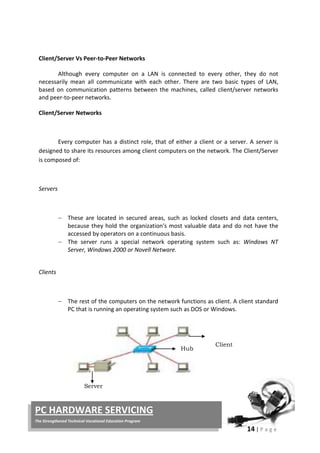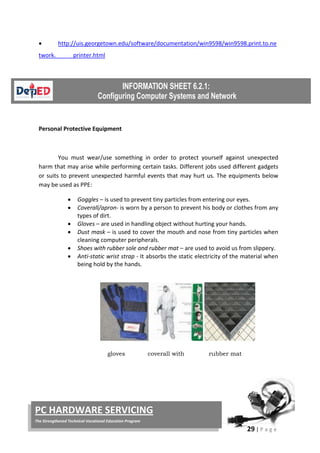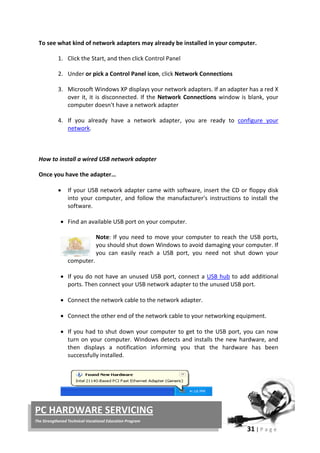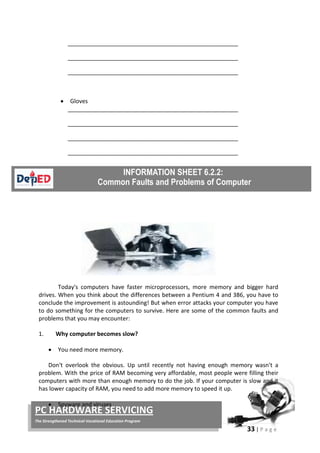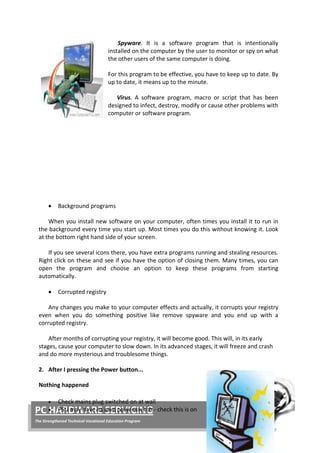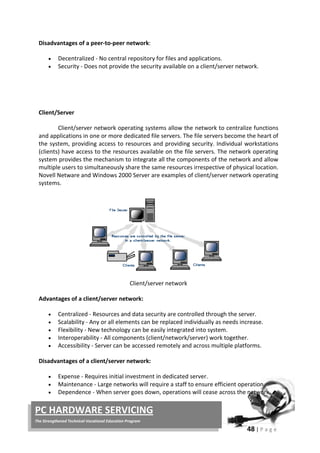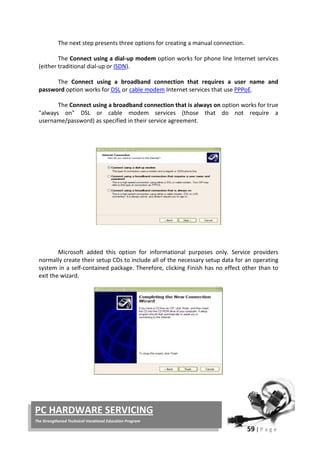


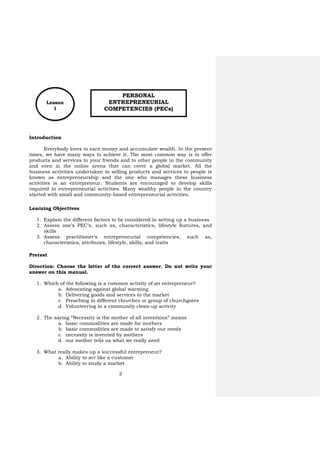
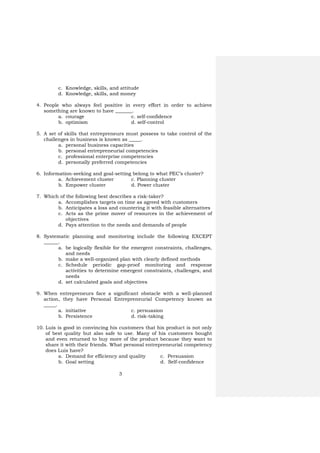

Compilation by Ben: r_borres@yahoo.com        


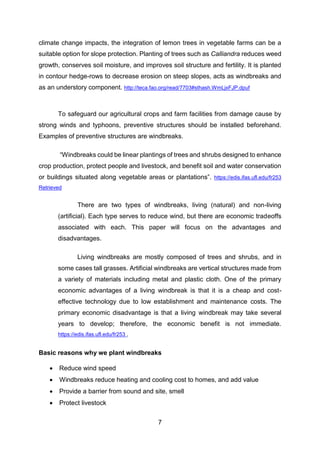
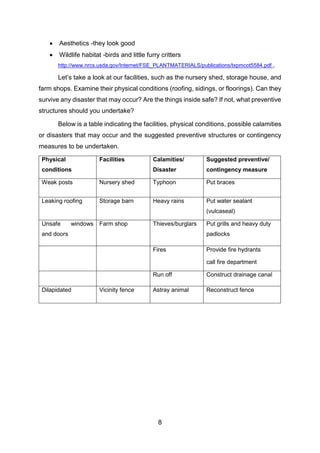
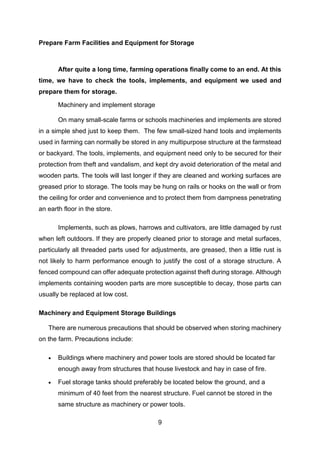
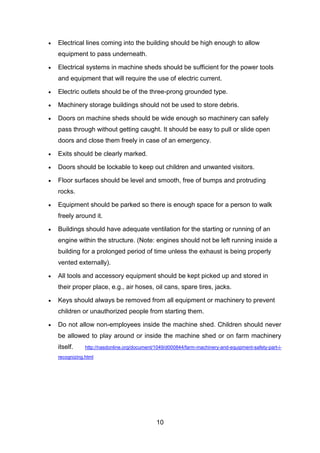
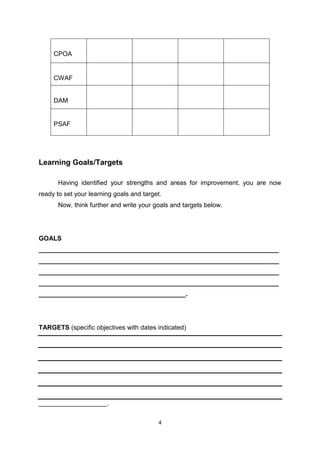
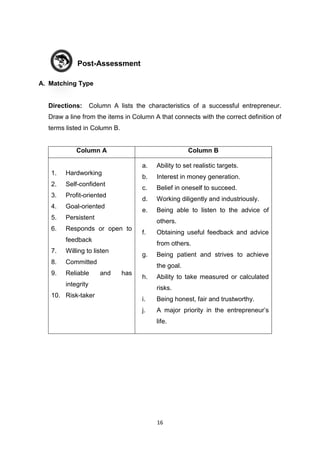
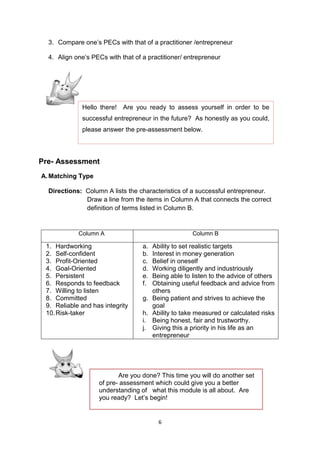
GRADE 9 
Learning Module 
 
TLE 
(Selected) 
 
 
Compilation by Ben: r_borres@yahoo.com        
 
 
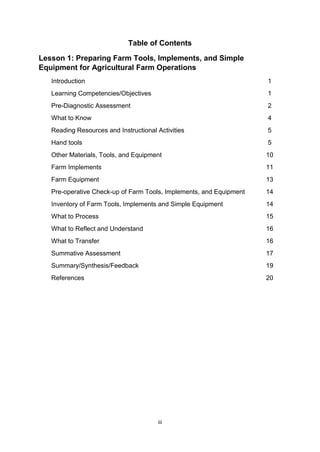
CONTENTS  
1. Agricultural Crop Production  
2. Agriculture ‐ Aquaculture  
3. Agriculture ‐ Food (Fish) Processing  
4. Horti._Prep. and Maintaining Tools 
5. Horti._Prep. Tools 
6. Horti._Securing Farm Tools 
7. Horticulture  
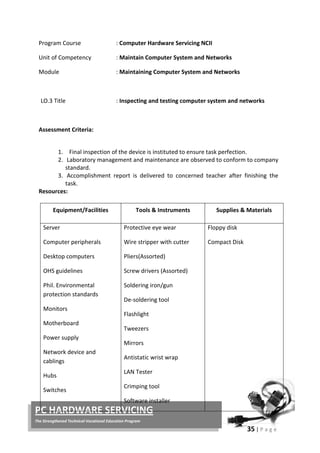
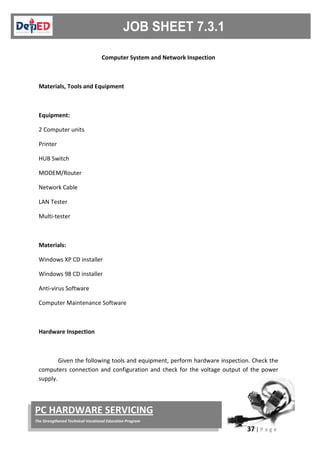
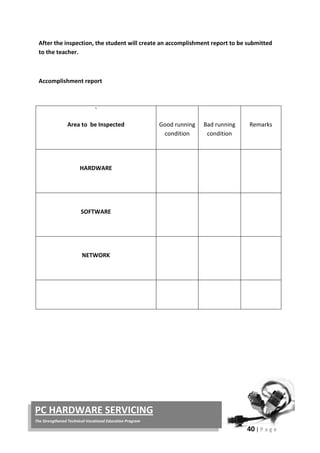
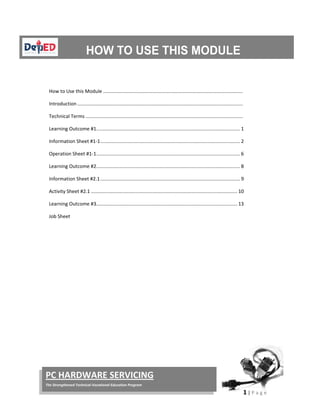
8. PC Servicing ‐ Configuring‐of‐computer‐systems‐and‐
networks 
9. PC Servicing ‐ maintaining‐of‐computer‐systems‐and‐
networks 
10. PC Servicing ‐ terminating‐and‐connecting‐of‐electrical‐
wirings‐and‐electronics‐circuits‐2nd
 
11. TLE ‐ Selected 
 
Compilation by Ben: r_borres@yahoo.com        


LEARNING MODULES 
 
AGRICULTURAL
CROP PRODUCTION
AGRICULTURAL CROP
PRODUCTION
(ENTREPRENEURSHIP)
Module 1
Department of Education
Republic of the Philippines
This instructional material was collaboratively developed
and reviewed by educators from public and private schools,
colleges, and/or universities. We encourage teachers and
other education stakeholders to email their feedback,
comments, and recommendations to the Department of
Education at action@deped.gov.ph.
We value your feedback and recommendations.
Technology and Livelihood Education – Grade 9
Agricultural Crop Production
Learner’s Material
First Edition, 2014
Republic Act 8293, section 176 states that: No copyright shall subsist in any
work of the Government of the Philippines. However, prior approval of the
government agency or office wherein the work is created shall be necessary for
exploitation of such work for profit. Such agency or office may, among other things,
impose as a condition the payment of royalties.
Borrowed materials (i.e., songs, stories, poems, pictures, photos, brand
names, trademarks, etc.) included in this book are owned by their respective
copyright holders. Every effort has been exerted to locate and seek permission to
use these materials from their respective copyright owners. The publisher and
authors do not represent nor claim ownership over them.
Published by the Department of Education
Secretary: Br. Armin A. Luistro FSC
Undersecretary: Dina S. Ocampo, Ph.D.
Department of Education-Instructional Materials Council Secretariat
(DepEd-IMCS)
Office Address: 5th Floor Mabini Building, DepEd Complex
Meralco Avenue, Pasig City
Philippines 1600
Telefax: (02) 634-1054 or 634-1072
E-mail Address: imcsetd@yahoo.com
Development Team of the Learner’s Material
Consultant: Andres Z. Taguiam, Ph.D.
Subject Specialist & Management:: Emmanuel S. Valdez
Albert B. Erni
Authors:
JESUS B. NAZARENO, MDM
RODOLFO C. SAJORDA
Validated By:
ANICIA P. LORICA
Reviewers: Pacifico T. Vizmonte Jr.
Illustrator: Erich David Garcia
Language Editor: Brenda B. Corpuz
Layout Artists and Encoders: Jocelyn M. Gamo and Joel G. Castillo
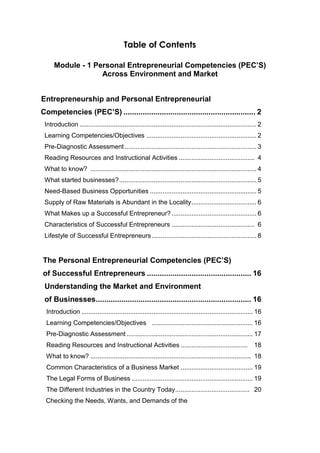
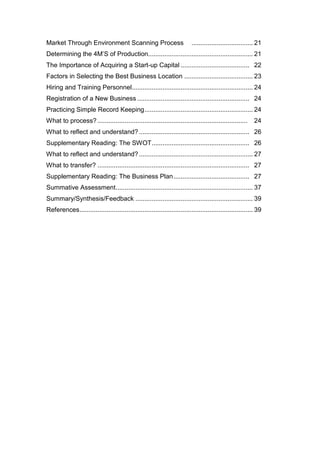
Table of Contents
MODULE I - ENTRPRENEURSHIP
LESSON 1 Personal Entrepreneurial
Competencies (PECs) .....................................................2
Introduction...................................................................................2
Learning Objectives........................................................................2
Pre-Test .........................................................................................2
What to Know ................................................................................4
What to Process ...........................................................................12
What to Reflect On and Understand.............................................13
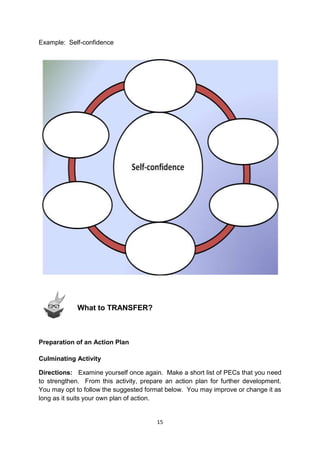
What to Transfer..........................................................................13
Post-Test......................................................................................15
Summary.....................................................................................17
Definition of Terms ......................................................................17
References ...................................................................................18
LESSON 2 Market and Environment.............................19
Introduction.................................................................................19
Learning Objectives......................................................................19
Pre-Test .......................................................................................20
What to Know ..............................................................................22
What to Process ...........................................................................30
What to Reflect On and Understand.............................................32
What to Transfer..........................................................................32
Post-Test......................................................................................43
Summary.....................................................................................45
Glossary of Terms ........................................................................46
References ...................................................................................46
1
MODULE 1
ENTREPRENEURSHIP
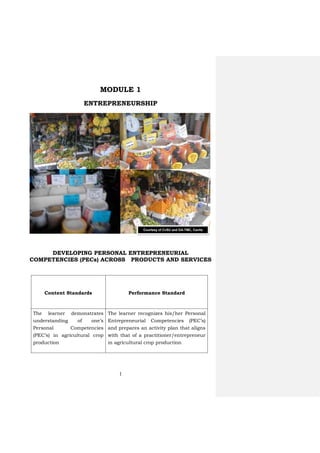
DEVELOPING PERSONAL ENTREPRENEURIAL
COMPETENCIES (PECs) ACROSS PRODUCTS AND SERVICES
Content Standards Performance Standard
The learner demonstrates
understanding of one’s
Personal Competencies
(PEC’s) in agricultural crop
production
The learner recognizes his/her Personal
Entrepreneurial Competencies (PEC’s)
and prepares an activity plan that aligns
with that of a practitioner/entrepreneur
in agricultural crop production
Courtesy of CvSU and DA-TMC, Cavite
2
Introduction
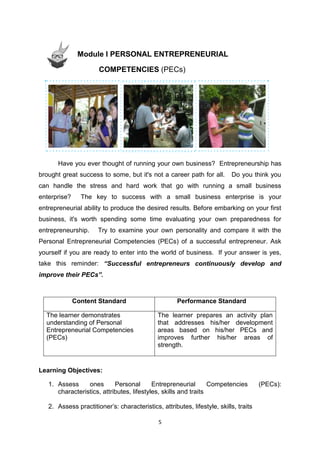
Everybody loves to earn money and accumulate wealth. In the present
times, we have many ways to achieve it. The most common way is to offer
products and services to your friends and to other people in the community
and even in the online arena that can cover a global market. All the
business activities undertaken in selling products and services to people is
known as entrepreneurship and the one who manages these business
activities is an entrepreneur. Students are encouraged to develop skills
required in entrepreneurial activities. Many wealthy people in the country
started with small and community-based entrepreneurial activities.
Learning Objectives
1. Explain the different factors to be considered in setting up a business
2. Assess one’s PEC’s, such as, characteristics, lifestyle features, and
skills
3. Assess practitioner’s entrepreneurial competencies, such as,
characteristics, attributes, lifestyle, skills, and traits
Pretest
Direction: Choose the letter of the correct answer. Do not write your
answer on this manual.
1. Which of the following is a common activity of an entrepreneur?
a. Advocating against global warming
b. Delivering goods and services to the market
c. Preaching in different churches or group of churchgoers
d. Volunteering in a community clean-up activity
2. The saying “Necessity is the mother of all inventions” means
a. basic commodities are made for mothers
b. basic commodities are made to satisfy our needs
c. necessity is invented by mothers
d. our mother tells us what we really need
3. What really makes up a successful entrepreneur?
a. Ability to act like a customer
b. Ability to study a market
PERSONAL
ENTREPRENEURIAL
COMPETENCIES (PECs)
Lesson
1
3
c. Knowledge, skills, and attitude
d. Knowledge, skills, and money
4. People who always feel positive in every effort in order to achieve
something are known to have _______.
a. courage c. self-confidence
b. optimism d. self-control
5. A set of skills that entrepreneurs must possess to take control of the
challenges in business is known as _____.
a. personal business capacities
b. personal entrepreneurial competencies
c. professional enterprise competencies
d. personally preferred competencies
6. Information-seeking and goal-setting belong to what PEC’s cluster?
a. Achievement cluster c. Planning cluster
b. Empower cluster d. Power cluster
7. Which of the following best describes a risk-taker?
a. Accomplishes targets on time as agreed with customers
b. Anticipates a loss and countering it with feasible alternatives
c. Acts as the prime mover of resources in the achievement of
objectives
d. Pays attention to the needs and demands of people
8. Systematic planning and monitoring include the following EXCEPT
______.
a. be logically flexible for the emergent constraints, challenges,
and needs
b. make a well-organized plan with clearly defined methods
c. Schedule periodic gap-proof monitoring and response
activities to determine emergent constraints, challenges, and
needs
d. set calculated goals and objectives
9. When entrepreneurs face a significant obstacle with a well-planned
action, they have Personal Entrepreneurial Competency known as
_____.
a. initiative c. persuasion
b. Persistence d. risk-taking
10. Luis is good in convincing his customers that his product is not only
of best quality but also safe to use. Many of his customers bought
and even returned to buy more of the product because they want to
share it with their friends. What personal entrepreneurial competency
does Luis have?
a. Demand for efficiency and quality c. Persuasion
b. Goal setting d. Self-confidence
4
READING RESOURCES AND INSTRUCTIONAL ACTIVITIES
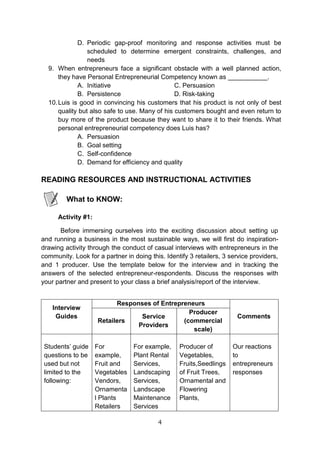
Activity #1:
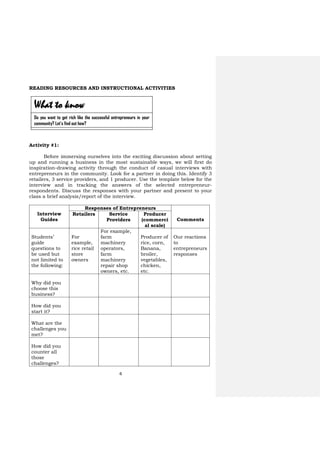
Before immersing ourselves into the exciting discussion about setting
up and running a business in the most sustainable ways, we will first do
inspiration-drawing activity through the conduct of casual interviews with
entrepreneurs in the community. Look for a partner in doing this. Identify 3
retailers, 3 service providers, and 1 producer. Use the template below for the
interview and in tracking the answers of the selected entrepreneur-
respondents. Discuss the responses with your partner and present to your
class a brief analysis/report of the interview.
Interview
Guides
Responses of Entrepreneurs
Comments
Retailers Service
Providers
Producer
(commerci
al scale)
Students’
guide
questions to
be used but
not limited to
the following:
For
example,
rice retail
store
owners
For example,
farm
machinery
operators,
farm
machinery
repair shop
owners, etc.
Producer of
rice, corn,
Banana,
broiler,
vegetables,
chicken,
etc.
Our reactions
to
entrepreneurs
responses
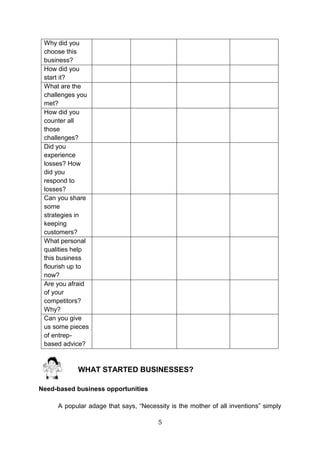
Why did you
choose this
business?
How did you
start it?
What are the
challenges you
met?
How did you
counter all
those
challenges?
What to know
Do you want to get rich like the successful entrepreneurs in your
community? Let’s find out how?
5
Did you
experience
losses? How
did you
respond to
losses?
Can you share
some
strategies in
keeping
customers?
What personal
qualities help
this business
flourish up to
now?
Are you afraid
of your
competitors?
Why?
Can you give
us some
pieces of
entrep-based
advice?
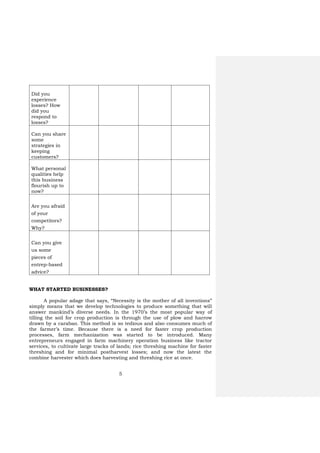
WHAT STARTED BUSINESSES?
A popular adage that says, “Necessity is the mother of all inventions”
simply means that we develop technologies to produce something that will
answer mankind’s diverse needs. In the 1970’s the most popular way of
tilling the soil for crop production is through the use of plow and harrow
drawn by a carabao. This method is so tedious and also consumes much of
the farmer’s time. Because there is a need for faster crop production
processes, farm mechanization was started to be introduced. Many
entrepreneurs engaged in farm machinery operation business like tractor
services, to cultivate large tracks of lands; rice threshing machine for faster
threshing and for minimal postharvest losses; and now the latest the
combine harvester which does harvesting and threshing rice at once.
6
Need-based business opportunities
WHAT MAKES UP A SUCCESSFUL ENTREPRENEUR?
Knowledge alone does not guarantee success in a business. Skills
developed can greatly help in the production process but it is not an
assurance to the sustainability of the business as well. It takes right
attitude combined with adequate knowledge, competitive skills, and
upheld passion to make significant revenues, profit, and sustainability of
the chosen business.
Courtesy of CvSU and DA-TMC, Cavite
7
Supply of raw materials is abundant in the locality
An accomplished entrepreneur has so much to share with business
enthusiasts like us. Many were not born with a silver spoon meaning most
of them came from poor families. They have passion to produce and sell to
an identified market or even to serve target clients. These contributed to
their success. Likewise, they accumulated wealth because they possess
characteristics, lifestyles, and skills, suited to their chosen businesses.
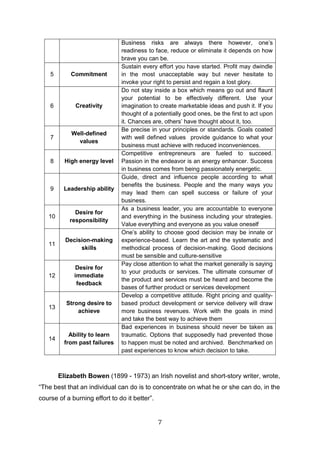
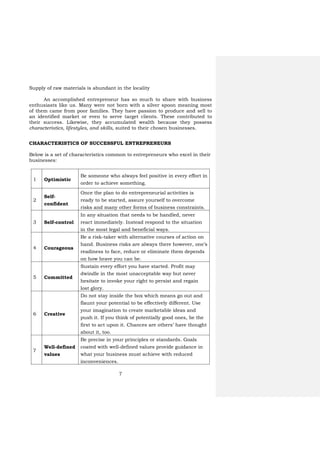
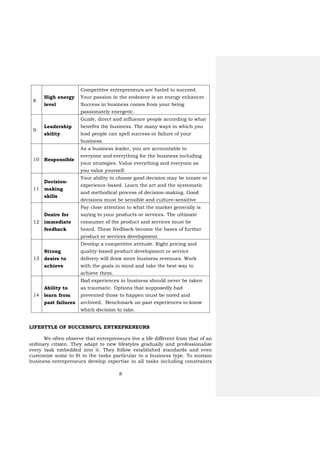
CHARACTERISTICS OF SUCCESSFUL ENTREPRENEURS
Below is a set of characteristics common to entrepreneurs who excel in their
businesses:
1 Optimistic
Be someone who always feel positive in every effort in
order to achieve something.
2
Self-
confident
Once the plan to do entrepreneurial activities is
ready to be started, assure yourself to overcome
risks and many other forms of business constraints.
3 Self-control
In any situation that needs to be handled, never
react immediately. Instead respond to the situation
in the most legal and beneficial ways.
4 Courageous
Be a risk-taker with alternative courses of action on
hand. Business risks are always there however, one’s
readiness to face, reduce or eliminate them depends
on how brave you can be.
5 Committed
Sustain every effort you have started. Profit may
dwindle in the most unacceptable way but never
hesitate to invoke your right to persist and regain
lost glory.
6 Creative
Do not stay inside the box which means go out and
flaunt your potential to be effectively different. Use
your imagination to create marketable ideas and
push it. If you think of potentially good ones, be the
first to act upon it. Chances are others’ have thought
about it, too.
7
Well-defined
values
Be precise in your principles or standards. Goals
coated with well-defined values provide guidance in
what your business must achieve with reduced
inconveniences.
8
8
High energy
level
Competitive entrepreneurs are fueled to succeed.
Your passion in the endeavor is an energy enhancer.
Success in business comes from your being
passionately energetic.
9
Leadership
ability
Guide, direct and influence people according to what
benefits the business. The many ways in which you
lead people can spell success or failure of your
business.
10 Responsible
As a business leader, you are accountable to
everyone and everything for the business including
your strategies. Value everything and everyone as
you value yourself.
11
Decision-
making
skills
Your ability to choose good decision may be innate or
experience-based. Learn the art and the systematic
and methodical process of decision-making. Good
decisions must be sensible and culture-sensitive
12
Desire for
immediate
feedback
Pay close attention to what the market generally is
saying to your products or services. The ultimate
consumer of the product and services must be
heard. These feedback become the bases of further
product or services development.
13
Strong
desire to
achieve
Develop a competitive attitude. Right pricing and
quality-based product development or service
delivery will draw more business revenues. Work
with the goals in mind and take the best way to
achieve them.
14
Ability to
learn from
past failures
Bad experiences in business should never be taken
as traumatic. Options that supposedly had
prevented those to happen must be noted and
archived. Benchmark on past experiences to know
which decision to take.
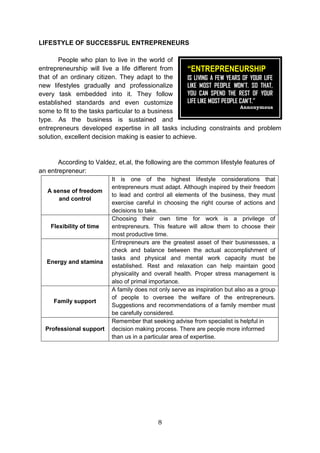
LIFESTYLE OF SUCCESSFUL ENTREPRENEURS
We often observe that entrepreneurs live a life different from that of an
ordinary citizen. They adapt to new lifestyles gradually and professionalize
every task embedded into it. They follow established standards and even
customize some to fit to the tasks particular to a business type. To sustain
business entrepreneurs develop expertise in all tasks including constraints
9
and problem solution. Decision making is excellent.
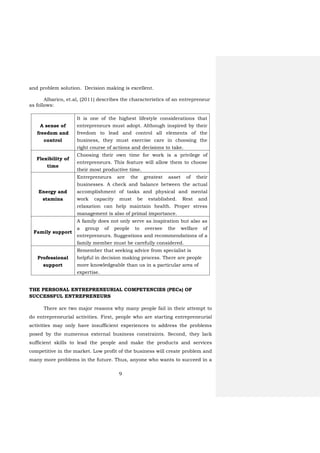
Albarico, et.al, (2011) describes the characteristics of an entrepreneur
as follows:
A sense of
freedom and
control
It is one of the highest lifestyle considerations that
entrepreneurs must adopt. Although inspired by their
freedom to lead and control all elements of the
business, they must exercise care in choosing the
right course of actions and decisions to take.
Flexibility of
time
Choosing their own time for work is a privilege of
entrepreneurs. This feature will allow them to choose
their most productive time.
Energy and
stamina
Entrepreneurs are the greatest asset of their
businesses. A check and balance between the actual
accomplishment of tasks and physical and mental
work capacity must be established. Rest and
relaxation can help maintain health. Proper stress
management is also of primal importance.
Family support
A family does not only serve as inspiration but also as
a group of people to oversee the welfare of
entrepreneurs. Suggestions and recommendations of a
family member must be carefully considered.
Professional
support
Remember that seeking advice from specialist is
helpful in decision making process. There are people
more knowledgeable than us in a particular area of
expertise.
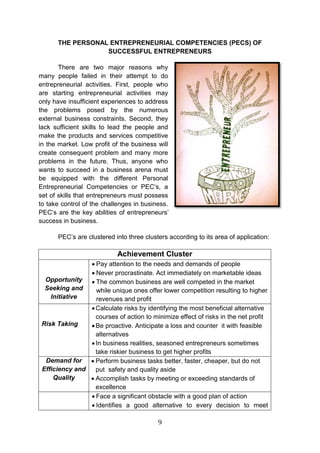
THE PERSONAL ENTREPRENEURIAL COMPETENCIES (PECs) OF
SUCCESSFUL ENTREPRENEURS
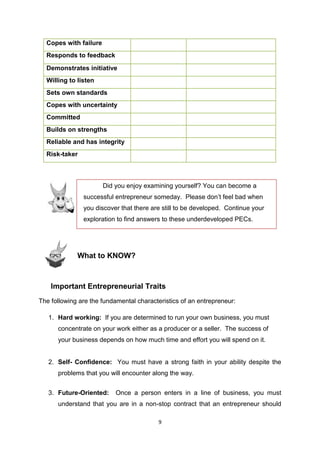
There are two major reasons why many people fail in their attempt to
do entrepreneurial activities. First, people who are starting entrepreneurial
activities may only have insufficient experiences to address the problems
posed by the numerous external business constraints. Second, they lack
sufficient skills to lead the people and make the products and services
competitive in the market. Low profit of the business will create problem and
many more problems in the future. Thus, anyone who wants to succeed in a
10
business arena must be equipped with the different personal
entrepreneurial competencies or PECs, a set of skills that entrepreneurs
must possess to take control of the challenges in business. PECs are the key
abilities of entrepreneurs’ success in business.
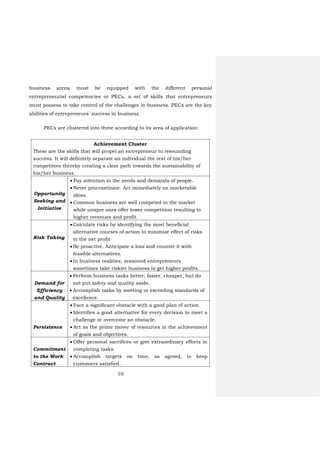
PECs are clustered into three according to its area of application:
Achievement Cluster
These are the skills that will propel an entrepreneur to resounding
success. It will definitely separate an individual the rest of his/her
competitors thereby creating a clear path towards the sustainability of
his/her business.
Opportunity
Seeking and
Initiative
 Pay attention to the needs and demands of people.
 Never procrastinate. Act immediately on marketable
ideas.
 Common business are well competed in the market
while unique ones offer lower competition resulting to
higher revenues and profit.
Risk Taking
Calculate risks by identifying the most beneficial
alternative courses of action to minimize effect of risks
in the net profit
Be proactive. Anticipate a loss and counter it with
feasible alternatives.
In business realities, seasoned entrepreneurs
sometimes take riskier business to get higher profits.
Demand for
Efficiency
and Quality
 Perform business tasks better, faster, cheaper, but do
not put safety and quality aside.
 Accomplish tasks by meeting or exceeding standards of
excellence.
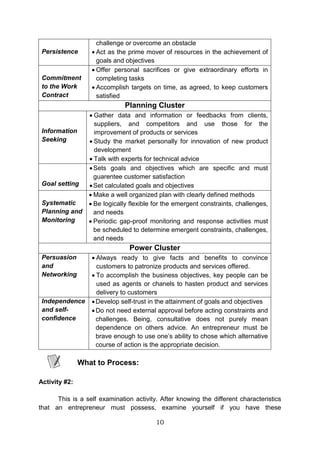
Persistence
 Face a significant obstacle with a good plan of action.
 Identifies a good alternative for every decision to meet a
challenge or overcome an obstacle.
 Act as the prime mover of resources in the achievement
of goals and objectives.
Commitment
to the Work
Contract
 Offer personal sacrifices or give extraordinary efforts in
completing tasks.
 Accomplish targets on time, as agreed, to keep
customers satisfied.
11
Power Cluster
These skills represent the personal touch of creativity and decisiveness
of the entrepreneur. It is the ability to expand, convince and sustain
customers to hasten business development.
Persuasion
and
Networking
 Always be ready to give facts and benefits to convince
customers to patronize products and services offered.
 To accomplish the business objectives, key people can
be used as agents or channels to hasten product and
services delivery to customers.
Independence
and self-
Develop self-trust in the attainment of goals and
objectives.
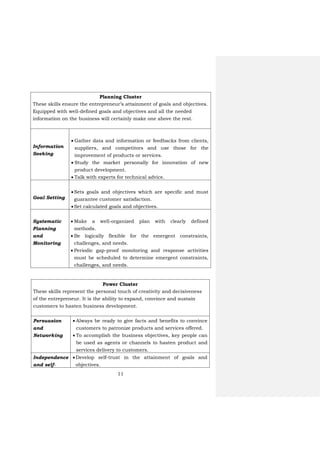
Planning Cluster
These skills ensure the entrepreneur’s attainment of goals and objectives.
Equipped with well-defined goals and objectives and all the needed
information on the business will certainly make one above the rest.
Information
Seeking
 Gather data and information or feedbacks from clients,
suppliers, and competitors and use those for the
improvement of products or services.
 Study the market personally for innovation of new
product development.
 Talk with experts for technical advice.
Goal Setting
Sets goals and objectives which are specific and must
guarantee customer satisfaction.
Set calculated goals and objectives.
Systematic
Planning
and
Monitoring
 Make a well-organized plan with clearly defined
methods.
 Be logically flexible for the emergent constraints,
challenges, and needs.
 Periodic gap-proof monitoring and response activities
must be scheduled to determine emergent constraints,
challenges, and needs.
12
confidence Do not need external approval before acting
constraints and challenges. Being consultative does
not purely mean dependence on others’ advice. An
entrepreneur must be brave enough use one’s ability to
choose which alternative course of action is the most
appropriate.
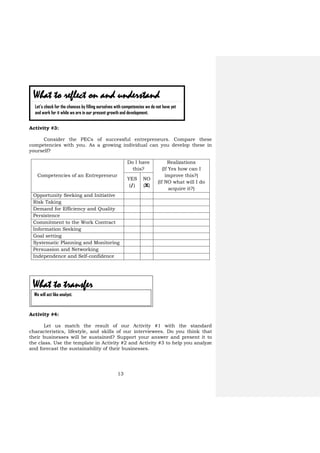
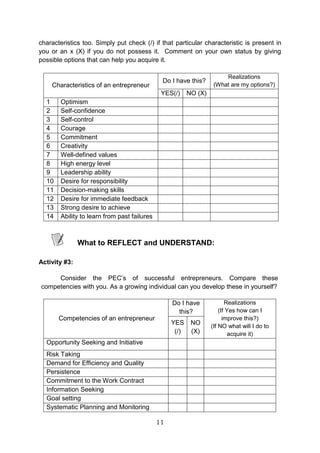
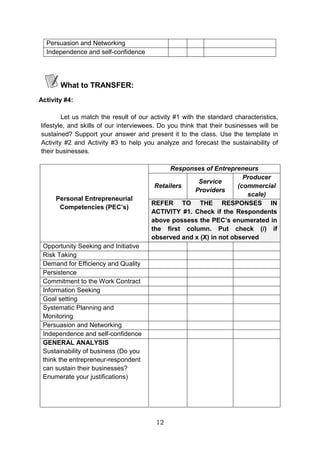
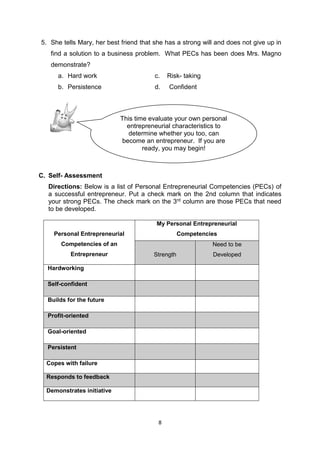
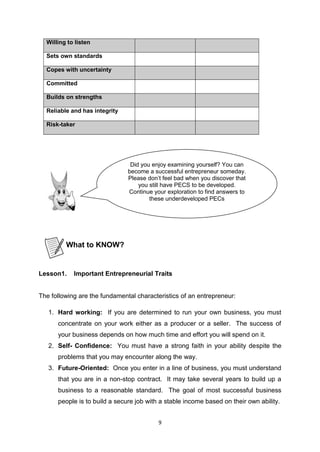
Activity #2:
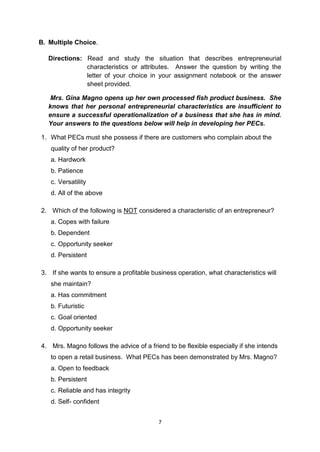
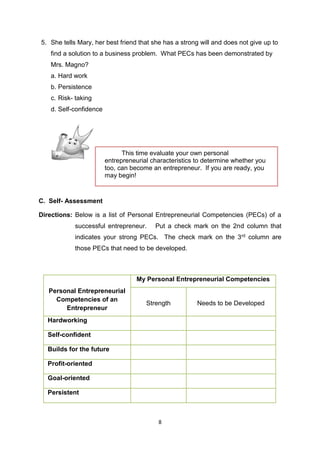
This is a self-examination activity. After knowing the different characteristics
that an entrepreneur must possess, examine yourself if you have these
characteristics too. Simply put check () if that particular characteristic is
present in you or an x (X) if you do not possess it. Comment on your own
status by giving possible options that can help you acquire it.
Characteristics of an Entrepreneur
Do I have
this?
Realizations
(What are my
options?)
YES
()
NO
(X)
1 Optimism
2 Self-confidence
3 Self-control
4 Courage
5 Commitment
6 Creatively
7 Well-defined values
8 High energy level
9 Leadership ability
10 Desire for responsibility
11 Decision-making skills
12 Desire for immediate feedback
13 Strong desire to achieve
14
Ability to learn from past
failures
At this point, let us examine ourselves if we can really become
successful entrepreneurs. Let us know our chances.
What to process
Commented [H1]:
13
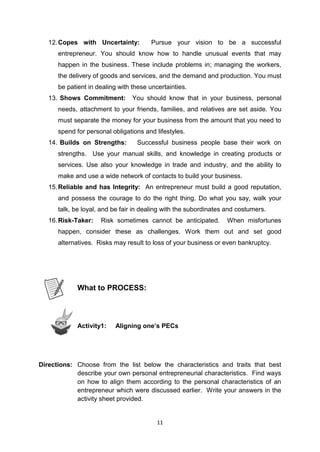
Activity #3:
Consider the PECs of successful entrepreneurs. Compare these
competencies with you. As a growing individual can you develop these in
yourself?
Competencies of an Entrepreneur
Do I have
this?
Realizations
(If Yes how can I
improve this?)
(If NO what will I do
acquire it?)
YES
(/)
NO
(X)
Opportunity Seeking and Initiative
Risk Taking
Demand for Efficiency and Quality
Persistence
Commitment to the Work Contract
Information Seeking
Goal setting
Systematic Planning and Monitoring
Persuasion and Networking
Independence and Self-confidence
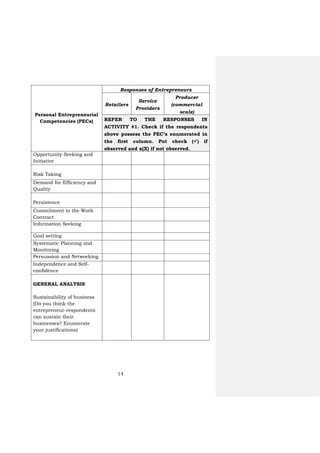
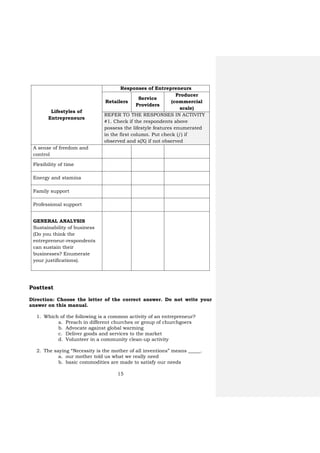
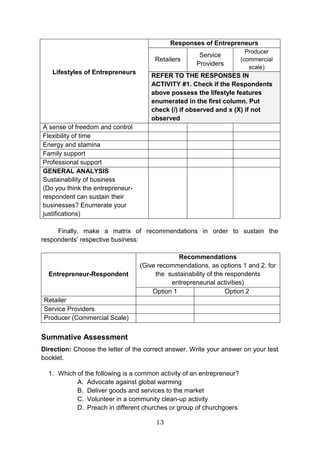
Activity #4:
Let us match the result of our Activity #1 with the standard
characteristics, lifestyle, and skills of our interviewees. Do you think that
their businesses will be sustained? Support your answer and present it to
the class. Use the template in Activity #2 and Activity #3 to help you analyze
and forecast the sustainability of their businesses.
What to reflect on and understand
Let’s check for the chances by filling ourselves with competencies we do not have yet
and work for it while we are in our present growth and development.
What to transfer
We will act like analyst.
14
Personal Entrepreneurial
Competencies (PECs)
Responses of Entrepreneurs
Retailers
Service
Providers
Producer
(commercial
scale)
REFER TO THE RESPONSES IN
ACTIVITY #1. Check if the respondents
above possess the PEC’s enumerated in
the first column. Put check () if
observed and x(X) if not observed.
Opportunity Seeking and
Initiative
Risk Taking
Demand for Efficiency and
Quality
Persistence
Commitment to the Work
Contract
Information Seeking
Goal setting
Systematic Planning and
Monitoring
Persuasion and Networking
Independence and Self-
confidence
GENERAL ANALYSIS
Sustainability of business
(Do you think the
entrepreneur-respondents
can sustain their
businesses? Enumerate
your justifications)
15
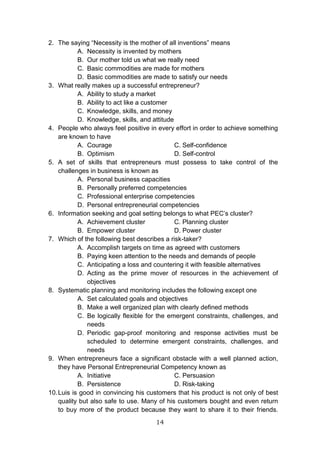
Lifestyles of
Entrepreneurs
Responses of Entrepreneurs
Retailers
Service
Providers
Producer
(commercial
scale)
REFER TO THE RESPONSES IN ACTIVITY
#1. Check if the respondents above
possess the lifestyle features enumerated
in the first column. Put check (/) if
observed and x(X) if not observed
A sense of freedom and
control
Flexibility of time
Energy and stamina
Family support
Professional support
GENERAL ANALYSIS
Sustainability of business
(Do you think the
entrepreneur-respondents
can sustain their
businesses? Enumerate
your justifications).
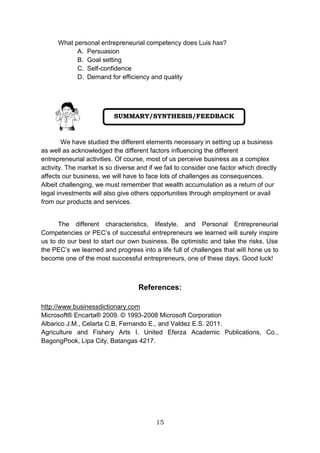
Posttest
Direction: Choose the letter of the correct answer. Do not write your
answer on this manual.
1. Which of the following is a common activity of an entrepreneur?
a. Preach in different churches or group of churchgoers
b. Advocate against global warming
c. Deliver goods and services to the market
d. Volunteer in a community clean-up activity
2. The saying “Necessity is the mother of all inventions” means _____.
a. our mother told us what we really need
b. basic commodities are made to satisfy our needs
16
c. basic commodities are made for mothers
d. necessity is invented by mothers
3. What really makes up a successful entrepreneur?
a. Knowledge, skills, and attitude
b. Knowledge, skills, and money
c. Ability to study a market
d. Ability to act like a customer
4. People who always feel positive in every effort in order to achieve
something are known to have _____.
a. self-control c. self-confidence
b. courage d. optimism
5. A set of skills that entrepreneurs must possess to take control of the
challenges in business is known as _____.
a. personal entrepreneurial competencies
b. personal business capacities
c. personally preferred competencies
d. professional enterprise competencies
6. Information seeking and goal setting belong to what PEC’s cluster?
a. Achievement cluster c. Power cluster
b. Planning cluster d. Empower cluster
7. Which of the following best describes a risk-taker?
a. Paying attention to the needs and demands of people
b. Acting as the prime mover of resources in the achievement of
objectives
c. Accomplishing targets on time as agreed with customers
d. Anticipating a loss and countering it with feasible
alternatives
8. Systematic planning and monitoring include the following EXCEPT
_____.
a. set calculated goals and objectives
b. make a well-organized plan with clearly defined methods
c. be logically flexible for the emergent constraints, challenges,
and needs
d. Schedule periodic gap-proof monitoring and response
activities to determine emergent constraints, challenges, and
needs
9. When entrepreneurs face a significant obstacle with a well-planned
action, they have Personal Entrepreneurial Competency known as
_____.
a. persuasion c. persistence
b. initiative d. risk-taking
17
10. Luis is good in convincing his customers that his product is not only of
best quality but also safe to use. Many of his customers bought and
even return to buy more of the product because they want to share it
with their friends. What personal entrepreneurial competency does Luis
have?
a. Demand for efficiency and quality
b. Goal setting
c. Persuasion
d. Self-confidence
We have studied the different factors in setting up an entrepreneurial
activity. It can be perceived as a complex activity. The market is so diverse
and if we fail to consider one factor which directly affects our business, we
will have to face lots of challenges as consequences. Albeit challenging, we
must remember that wealth accumulation as a return of our legal
investments will also give others opportunities for employment or for making
our products and services available.
The different characteristics, lifestyle, and Personal Entrepreneurial
Competencies or PEC’s of successful entrepreneurs we learned will surely
inspire us to do our best to start our own business. Be optimistic and take
the risks. Use the PEC’s we learned and progress into a life full of challenges
that will hone us to become one of the most successful entrepreneurs, one of
these days. Good luck guys!
Business refers to any activity that ultimately buys and sells goods,
makes products, or provides services to a market.
Competency is an ability to do something, especially measured against
a standard.
Entrepreneurs a person who has a possession of enterprise, venture or
idea and assumes significant accountability for the inherent
risks and the outcome.
Entrepreneurship refers to the business activity of an entrepreneur.
Summary
Glossary of Terms
18
Goal is anything an entrepreneur wants to achieve.
Leadership is the activity of leading a group of people or an organization or
the ability to do this.
Lifestyle is a way of living of individuals, families (households), and
societies, manifested in their way of coping with their physical,
psychological, social, and economic environments from
day to day.
Objective is a specific result that a person or system aims to achieve within
a time and with available resources.
Need is anything required by someone in order to satisfy particular goals
and objective basis.
Sustainability of business is the ability to maintain or support business
over the long term.
References:
http://www.businessdictionary.com
Microsoft® Encarta® 2009. © 1993-2008 Microsoft Corporation
Albarico J.M., Celarta C.B, Fernando E., and Valdez E.S. 2011.
Agriculture and Fishery Arts I. United Eferza Academic Publications,
Co., BagongPook, Lipa City, Batangas 4217.
19
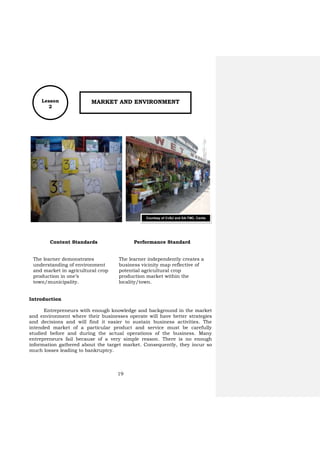
Lesson
2
MARKET AND ENVIRONMENT
Content Standards Performance Standard
The learner demonstrates
understanding of environment
and market in agricultural crop
production in one’s
town/municipality.
The learner independently creates a
business vicinity map reflective of
potential agricultural crop
production market within the
locality/town.
Introduction
Entrepreneurs with enough knowledge and background in the market
and environment where their businesses operate will have better strategies
and decisions and will find it easier to sustain business activities. The
intended market of a particular product and service must be carefully
studied before and during the actual operations of the business. Many
entrepreneurs fail because of a very simple reason. There is no enough
information gathered about the target market. Consequently, they incur so
much losses leading to bankruptcy.
Courtesy of CvSU and DA-TMC, Cavite
20
Learning Objectives
1. Determine the common characteristics of a business market
2. Describe the legal forms of business
3. Describe the different industries in the country today
4. Map and analyze the opportunities offered by the industries in the
community
5. Check the needs, wants. and demands of the market through
environmental scanning process
6. Know the 4M’s of production
7. Discuss the importance of acquiring a start-up capital
8. Make a business plan
9. Apply the standards in selecting the best business location
10. Assess the internal and external environment of the business
through Strength, Weaknesses, Opportunities, and Threats method of
business assessment
11. Practice simple record keeping
Pretest
Direction: Choose the letter of the correct answer. Do not write your
answer on this manual.
1. Which term refers to a group of people with economically important
needs and demands which opens entrepreneurial opportunities to
everyone?
a. Environment c. Geography
b. Ethnicity d. Market
2. Which type of business is owned by only 1 person?
a. Cooperative c. Partnership
b. Corporation d. Sole Proprietorship
3. Which of the following is NOT considered an emerging industry in the
Philippines?
a. Agribusiness c. Creative Industries
b. Power and utilities d. Renewable Energy
4. In the 4M’s of production, which M refers to the persons in the
business known as the labor force?
a. Machines c. Materials
b. Manpower d. Money
21
5. The process of recording the money received and spent by the
operations of the business is known as _____.
a. bookkeeping c. administering
b. booking d. posting
6. Which combination is focused on the internal assessment of the
business?
a. Opportunities and Threats c. Strengths and Threats
b. Strengths and Weaknesses d. Weaknesses and Threats
7. Which combination is focused on the external assessment of the
business?
a. Opportunities and Threats c. Strengths and Threats
b. Strengths and Weaknesses d. Weaknesses and Threats
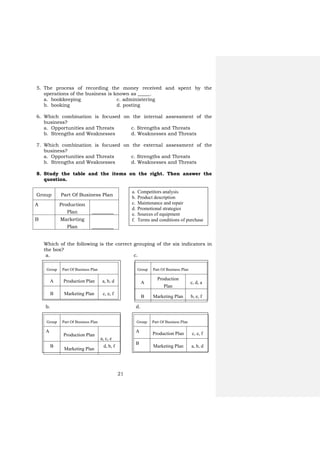
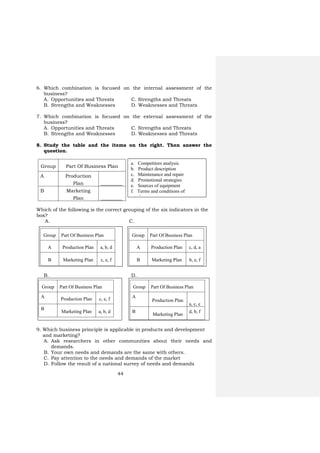
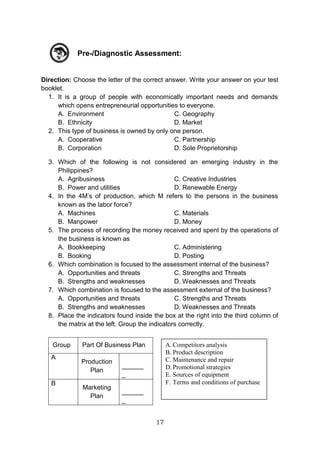
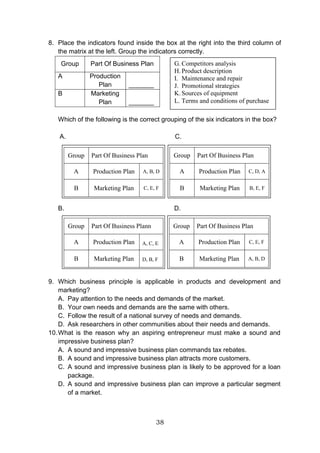
8. Study the table and the items on the right. Then answer the
question.
Group Part Of Business Plan
A Production
Plan _________
B Marketing
Plan _________
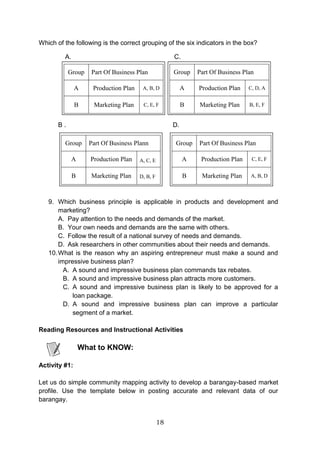
Which of the following is the correct grouping of the six indicators in
the box?
a. c.
b. d.
a. Competitors analysis
b. Product description
c. Maintenance and repair
d. Promotional strategies
e. Sources of equipment
f. Terms and conditions of purchase
Group Part Of Business Plan
A Production Plan a, b, d
B Marketing Plan c, e, f
Group Part Of Business Plan
A
Production
Plan
c, d, a
B Marketing Plan b, e, f
Group Part Of Business Plan
A
Production Plan
a, c, e
B
Marketing Plan
d, b, f
Group Part Of Business Plan
A Production Plan c, e, f
B
Marketing Plan a, b, d
22
9. Which business principle is applicable in products and development
and marketing?
a. Ask researchers in other communities about their needs and
demands.
b. Follow the result of a national survey of needs and demands.
c. Pay attention to the needs and demands of the market.
d. Your own needs and demands are the same with others.
10. What is the reason why an aspiring entrepreneur must make a sound
and impressive business plan?
a. A sound and impressive business plan is likely to be approved for a
loan package.
b. A sound and impressive business plan attracts more customers.
c. A sound and impressive business plan commands tax rebates.
d. A sound and impressive business plan can improve a particular
segment of a market.
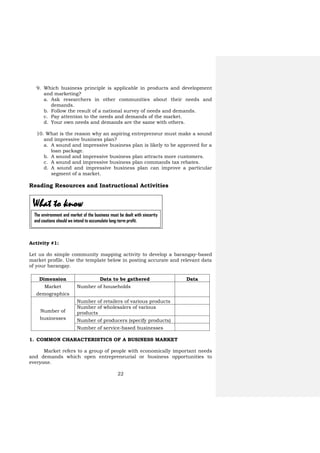
Reading Resources and Instructional Activities
Activity #1:
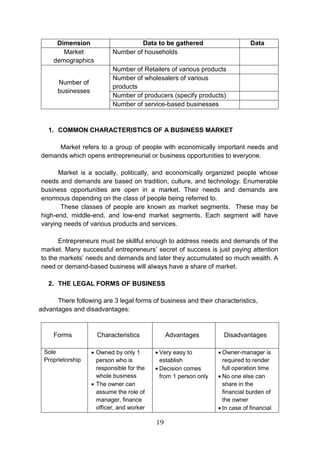
Let us do simple community mapping activity to develop a barangay-based
market profile. Use the template below in posting accurate and relevant data
of your barangay.
Dimension Data to be gathered Data
Market
demographics
Number of households
Number of
businesses
Number of retailers of various products
Number of wholesalers of various
products
Number of producers (specify products)
Number of service-based businesses
1. COMMON CHARACTERISTICS OF A BUSINESS MARKET
Market refers to a group of people with economically important needs
and demands which open entrepreneurial or business opportunities to
everyone.
What to know
The environment and market of the business must be dealt with sincerity
and cautions should we intend to accumulate long-term profit.
23
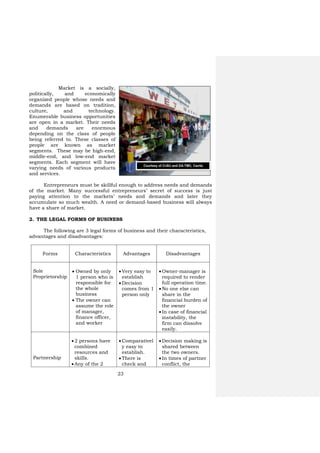
Market is a socially,
politically, and economically
organized people whose needs and
demands are based on tradition,
culture, and technology.
Enumerable business opportunities
are open in a market. Their needs
and demands are enormous
depending on the class of people
being referred to. These classes of
people are known as market
segments. These may be high-end,
middle-end, and low-end market
segments. Each segment will have
varying needs of various products
and services.
Entrepreneurs must be skillful enough to address needs and demands
of the market. Many successful entrepreneurs’ secret of success is just
paying attention to the markets’ needs and demands and later they
accumulate so much wealth. A need or demand-based business will always
have a share of market.
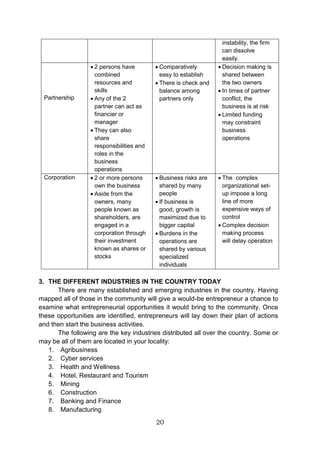
2. THE LEGAL FORMS OF BUSINESS
The following are 3 legal forms of business and their characteristics,
advantages and disadvantages:
Forms Characteristics Advantages Disadvantages
Sole
Proprietorship
 Owned by only
1 person who is
responsible for
the whole
business
 The owner can
assume the role
of manager,
finance officer,
and worker
 Very easy to
establish
 Decision
comes from 1
person only
 Owner-manager is
required to render
full operation time.
 No one else can
share in the
financial burden of
the owner
 In case of financial
instability, the
firm can dissolve
easily.
Partnership
 2 persons have
combined
resources and
skills.
 Any of the 2
 Comparativel
y easy to
establish.
 There is
check and
 Decision making is
shared between
the two owners.
 In times of partner
conflict, the
Courtesy of CvSU and DA-TMC, Cavite
24
partner can act
as financier or
manager.
 They can also
share
responsibilities
and roles in the
business
operations.
balance
among
partners
only.
business is at risk.
 Limited funding
may constraint
business
operations.
Corporation  2 or more
persons own the
business.
 Aside from the
owners, many
people known as
shareholders,
are engaged in a
corporation
through their
investment
known as
shares or
stocks.
 Business
risks are
shared by
many people.
 If business is
good, growth
is maximized
due to bigger
capital.
 Burdens in
the
operations
are shared by
various
specialized
individuals.
 The complex
organizational set-
up imposes a long
line of more
expensive ways of
control.
 Complex decision
making process
will delay
operation.
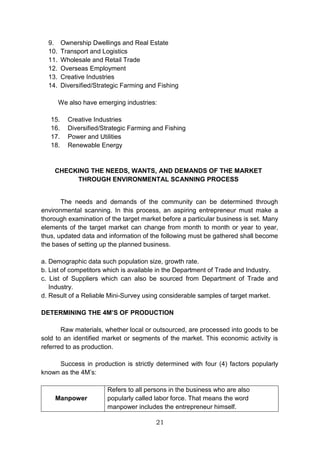
3. THE DIFFERENT INDUSTRIES IN THE COUNTRY TODAY
There are many established and emerging industries in the country.
Having mapped all of those in the community will give a would-be
entrepreneur a chance to examine what entrepreneurial opportunities may
be brought to the community. Once these opportunities are identified,
entrepreneurs will lay down their plan of actions and then start the
business activities. Some or may be all of the industries listed below are
located in your locality that could be related to agribusiness:
1. Health and Wellness (organic agri-products)
2. Hotel, Restaurant and Tourism (Specialized farm products)
3. Banking and Finance(Financing crop production )
4. Manufacturing/Processing (Farm products as raw materials)
5. Transport and Logistics (From farm to market)
6. Wholesale and Retail Trade (Farm products and inputs)
7. Creative Industries (Using farm by-products)
8. Diversified/Strategic Farming and Fishing
9. High value crop production
25
4. CHECKING THE NEEDS, WANTS. AND DEMANDS OF THE MARKET
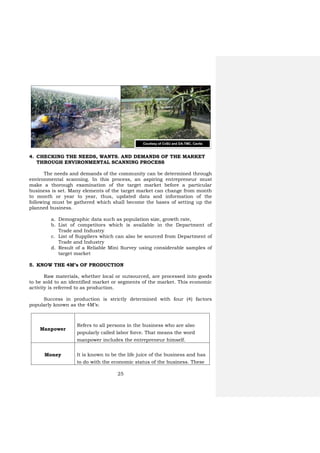
THROUGH ENVIRONMENTAL SCANNING PROCESS
The needs and demands of the community can be determined through
environmental scanning. In this process, an aspiring entrepreneur must
make a thorough examination of the target market before a particular
business is set. Many elements of the target market can change from month
to month or year to year, thus, updated data and information of the
following must be gathered which shall become the bases of setting up the
planned business.
a. Demographic data such as population size, growth rate,
b. List of competitors which is available in the Department of
Trade and Industry
c. List of Suppliers which can also be sourced from Department of
Trade and Industry
d. Result of a Reliable Mini Survey using considerable samples of
target market
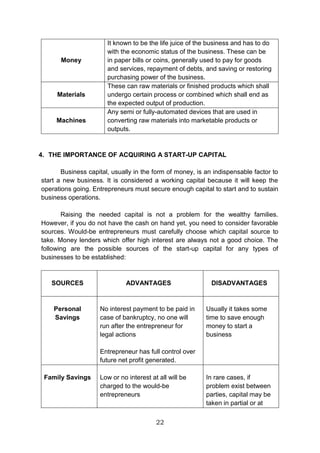
5. KNOW THE 4M’s OF PRODUCTION
Raw materials, whether local or outsourced, are processed into goods
to be sold to an identified market or segments of the market. This economic
activity is referred to as production.
Success in production is strictly determined with four (4) factors
popularly known as the 4M’s:
Manpower
Refers to all persons in the business who are also
popularly called labor force. That means the word
manpower includes the entrepreneur himself.
Money It is known to be the life juice of the business and has
to do with the economic status of the business. These
Courtesy of CvSU and DA-TMC, Cavite
26
can be in paper bills or coins, generally used to pay for
goods and services, repayment of debts, and saving or
restoring purchasing power of the business.
Materials
These can be raw materials or finished products which
shall undergo certain process or combined procedures
which shall end as the expected output of production.
Machines
Any semi or fully-automated devices that are used in
converting raw materials into marketable products or
outputs.
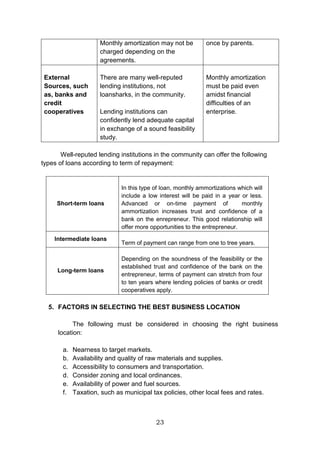
6. THE IMPORTANCE OF ACQUIRING A START-UP CAPITAL
Business capital, usually in the form of money, is an indispensable
factor to start a new business. It is considered a working capital because it
will keep the operations going. Entrepreneurs must secure enough capital to
start and to sustain business operations.
Raising the needed capital is not a problem for the wealthy families.
However, if you do not have the cash on hand yet, you need to consider
favorable sources. Would-be entrepreneurs must carefully choose which
capital source to take. Money lenders which offer high interest are always
not a good choice. The following are the possible sources of the start-up
capital for any types of businesses to be established:
SOURCES ADVANTAGES DISADVANTAGES
Personal
Savings
No interest payment to be
paid.
In case of bankruptcy, no one
will run after the
entrepreneur for legal actions
Entrepreneur has full control
over future net profit
generated.
Usually it takes some
time to save enough
money to start a
business.
Family Savings Low or no interest at all will
be charged to the would-be
In rare cases, if
problem exists
27
entrepreneurs.
Monthly amortizations may
not be charged depending on
the agreements.
between parties,
capital may be taken
in partial or at once
by parents.
External
Sources, such
as, banks and
credit
cooperatives
There are many well-reputed
lending institutions, not loan
sharks, in the community.
Lending institutions can
confidently lend adequate
capital in exchange of a
sound feasibility study.
Monthly
amortizations must
be paid even amidst
financial difficulties
of an enterprise.
Well-reputed lending institutions in the community can offer the
following types of loans according to term of repayment:
Short-term loans
In this type of loan, monthly
amortizations which will include low
interest will be paid one year or less.
Advanced or on-time payment of
monthly amortization increases trust
and confidence of a bank on the
entrepreneur. This good relationship
will offer more opportunities to the
entrepreneur.
Intermediate loans Term of payment can range from one
to three years.
Long-term loans
Depending on the soundness of the
feasibility or the established trust
and confidence of the bank on the
entrepreneur, terms of payment can
stretch from four to ten years where
lending policies of banks or credit
cooperatives apply.
28
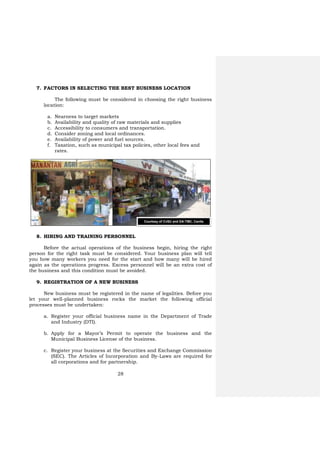
7. FACTORS IN SELECTING THE BEST BUSINESS LOCATION
The following must be considered in choosing the right business
location:
a. Nearness to target markets
b. Availability and quality of raw materials and supplies
c. Accessibility to consumers and transportation.
d. Consider zoning and local ordinances.
e. Availability of power and fuel sources.
f. Taxation, such as municipal tax policies, other local fees and
rates.
8. HIRING AND TRAINING PERSONNEL
Before the actual operations of the business begin, hiring the right
person for the right task must be considered. Your business plan will tell
you how many workers you need for the start and how many will be hired
again as the operations progress. Excess personnel will be an extra cost of
the business and this condition must be avoided.
9. REGISTRATION OF A NEW BUSINESS
New business must be registered in the name of legalities. Before you
let your well-planned business rocks the market the following official
processes must be undertaken:
a. Register your official business name in the Department of Trade
and Industry (DTI).
b. Apply for a Mayor’s Permit to operate the business and the
Municipal Business License of the business.
c. Register your business at the Securities and Exchange Commission
(SEC). The Articles of Incorporation and By-Laws are required for
all corporations and for partnership.
Courtesy of CvSU and DA-TMC, Cavite
29
d. Register your business in the Bureau of Internal Revenue
whereupon your business will be assigned a Tax Identification
Number (TIN).
e. Register your employees with the PhilHealth, PAG-IBIG, and Social
Security System (SSS). Registration in other agencies which
provide welfare and other insurance benefits must also be
consulted and legally followed.
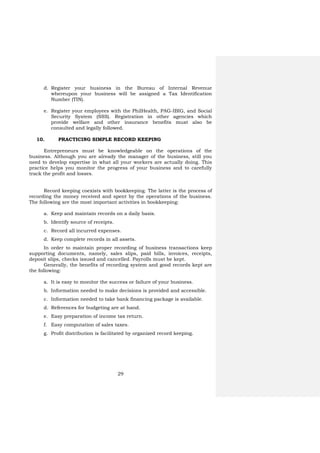
10. PRACTICING SIMPLE RECORD KEEPING
Entrepreneurs must be knowledgeable on the operations of the
business. Although you are already the manager of the business, still you
need to develop expertise in what all your workers are actually doing. This
practice helps you monitor the progress of your business and to carefully
track the profit and losses.
Record keeping coexists with bookkeeping. The latter is the process of
recording the money received and spent by the operations of the business.
The following are the most important activities in bookkeeping:
a. Keep and maintain records on a daily basis.
b. Identify source of receipts.
c. Record all incurred expenses.
d. Keep complete records in all assets.
In order to maintain proper recording of business transactions keep
supporting documents, namely, sales slips, paid bills, invoices, receipts,
deposit slips, checks issued and cancelled. Payrolls must be kept.
Generally, the benefits of recording system and good records kept are
the following:
a. It is easy to monitor the success or failure of your business.
b. Information needed to make decisions is provided and accessible.
c. Information needed to take bank financing package is available.
d. References for budgeting are at hand.
e. Easy preparation of income tax return.
f. Easy computation of sales taxes.
g. Profit distribution is facilitated by organized record keeping.
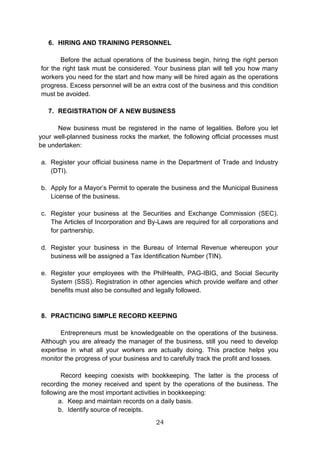
30
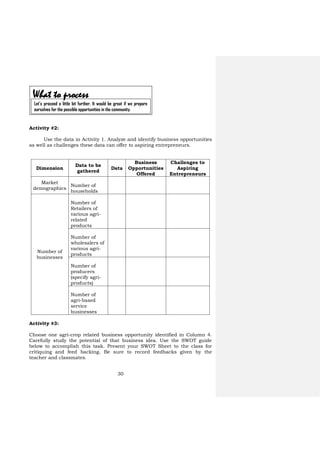
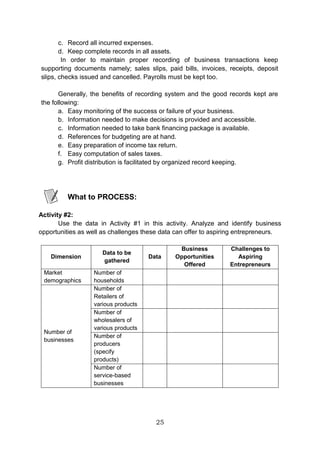
Activity #2:
Use the data in Activity 1. Analyze and identify business opportunities
as well as challenges these data can offer to aspiring entrepreneurs.
Dimension
Data to be
gathered
Data
Business
Opportunities
Offered
Challenges to
Aspiring
Entrepreneurs
Market
demographics
Number of
households
Number of
businesses
Number of
Retailers of
various agri-
related
products
Number of
wholesalers of
various agri-
products
Number of
producers
(specify agri-
products)
Number of
agri-based
service
businesses
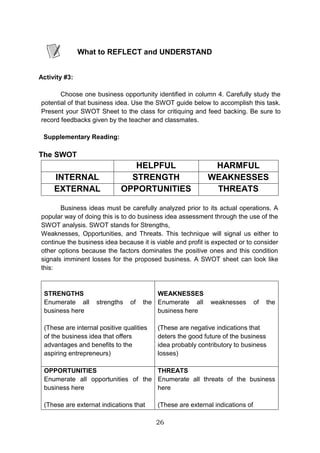
Activity #3:
Choose one agri-crop related business opportunity identified in Column 4.
Carefully study the potential of that business idea. Use the SWOT guide
below to accomplish this task. Present your SWOT Sheet to the class for
critiquing and feed backing. Be sure to record feedbacks given by the
teacher and classmates.
What to process
Let’s proceed a little bit further. It would be great if we prepare
ourselves for the possible opportunities in the community.
31
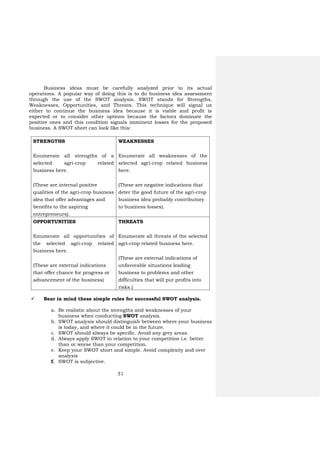
Business ideas must be carefully analyzed prior to its actual
operations. A popular way of doing this is to do business idea assessment
through the use of the SWOT analysis. SWOT stands for Strengths,
Weaknesses, Opportunities, and Threats. This technique will signal us
either to continue the business idea because it is viable and profit is
expected or to consider other options because the factors dominate the
positive ones and this condition signals imminent losses for the proposed
business. A SWOT sheet can look like this:
STRENGTHS
Enumerate all strengths of a
selected agri-crop related
business here.
(These are internal positive
qualities of the agri-crop business
idea that offer advantages and
benefits to the aspiring
entrepreneurs).
WEAKNESSES
Enumerate all weaknesses of the
selected agri-crop related business
here.
(These are negative indications that
deter the good future of the agri-crop
business idea probably contributory
to business losses).
OPPORTUNITIES
Enumerate all opportunities of
the selected agri-crop related
business here.
(These are external indications
that offer chance for progress or
advancement of the business)
THREATS
Enumerate all threats of the selected
agri-crop related business here.
(These are external indications of
unfavorable situations leading
business to problems and other
difficulties that will put profits into
risks.)
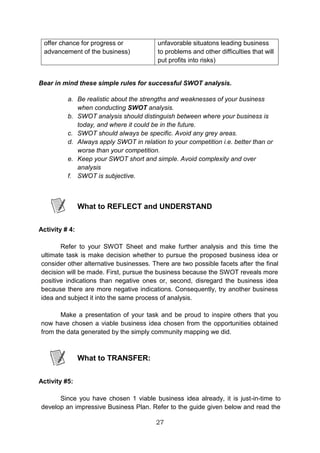
 Bear in mind these simple rules for successful SWOT analysis.
a. Be realistic about the strengths and weaknesses of your
business when conducting SWOT analysis.
b. SWOT analysis should distinguish between where your business
is today, and where it could be in the future.
c. SWOT should always be specific. Avoid any grey areas.
d. Always apply SWOT in relation to your competition i.e. better
than or worse than your competition.
e. Keep your SWOT short and simple. Avoid complexity and over
analysis
f. SWOT is subjective.
32
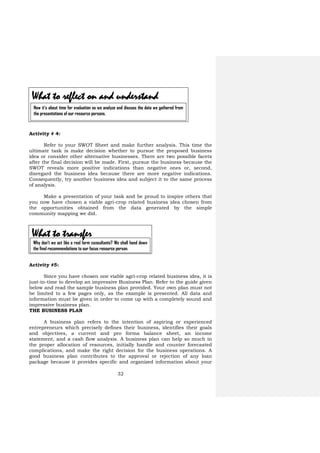
Activity # 4:
Refer to your SWOT Sheet and make further analysis. This time the
ultimate task is make decision whether to pursue the proposed business
idea or consider other alternative businesses. There are two possible facets
after the final decision will be made. First, pursue the business because the
SWOT reveals more positive indications than negative ones or, second,
disregard the business idea because there are more negative indications.
Consequently, try another business idea and subject it to the same process
of analysis.
Make a presentation of your task and be proud to inspire others that
you now have chosen a viable agri-crop related business idea chosen from
the opportunities obtained from the data generated by the simple
community mapping we did.
Activity #5:
Since you have chosen one viable agri-crop related business idea, it is
just-in-time to develop an impressive Business Plan. Refer to the guide given
below and read the sample business plan provided. Your own plan must not
be limited to a few pages only, as the example is presented. All data and
information must be given in order to come up with a completely sound and
impressive business plan.
THE BUSINESS PLAN
A business plan refers to the intention of aspiring or experienced
entrepreneurs which precisely defines their business, identifies their goals
and objectives, a current and pro forma balance sheet, an income
statement, and a cash flow analysis. A business plan can help so much in
the proper allocation of resources, initially handle and counter forecasted
complications, and make the right decision for the business operations. A
good business plan contributes to the approval or rejection of any loan
package because it provides specific and organized information about your
What to reflect on and understand
Now it’s about time for evaluation as we analyze and discuss the data we gathered from
the presentations of our resource persons.
What to transfer
Why don’t we act like a real farm consultants? We shall hand down
the final recommendations to our focus resource person.
33
proposed business and how you will repay borrowed money. A business plan
is equivalent to a business resume.
A business plan has five major parts, namely, the executive summary,
marketing plan, production plan, organization and management plan, and
financial plan.
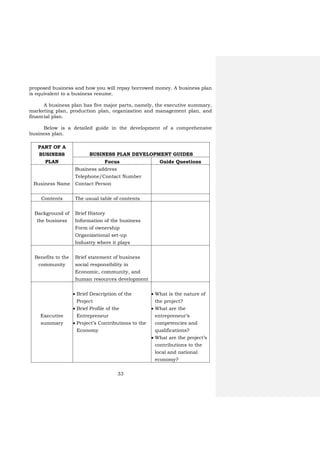
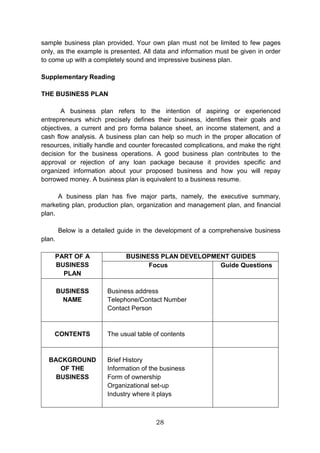
Below is a detailed guide in the development of a comprehensive
business plan.
PART OF A
BUSINESS
PLAN
BUSINESS PLAN DEVELOPMENT GUIDES
Focus Guide Questions
Business Name
Business address
Telephone/Contact Number
Contact Person
Contents The usual table of contents
Background of
the business
Brief History
Information of the business
Form of ownership
Organizational set-up
Industry where it plays
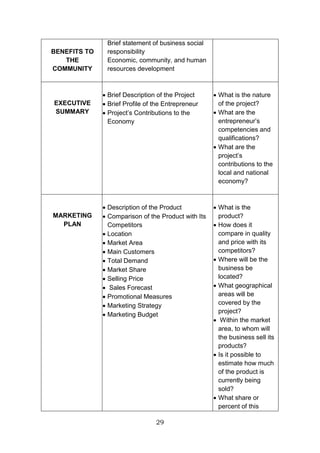
Benefits to the
community
Brief statement of business
social responsibility in
Economic, community, and
human resources development
Executive
summary
 Brief Description of the
Project
 Brief Profile of the
Entrepreneur
 Project’s Contributions to the
Economy
 What is the nature of
the project?
 What are the
entrepreneur’s
competencies and
qualifications?
 What are the project’s
contributions to the
local and national
economy?
34
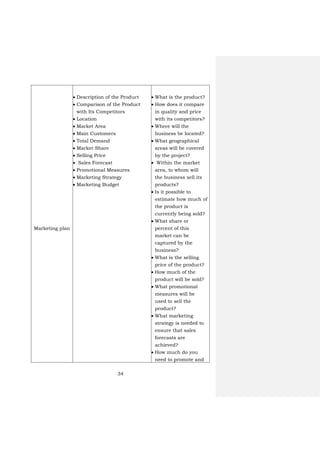
Marketing plan
 Description of the Product
 Comparison of the Product
with Its Competitors
 Location
 Market Area
 Main Customers
 Total Demand
 Market Share
 Selling Price
 Sales Forecast
 Promotional Measures
 Marketing Strategy
 Marketing Budget
 What is the product?
 How does it compare
in quality and price
with its competitors?
 Where will the
business be located?
 What geographical
areas will be covered
by the project?
 Within the market
area, to whom will
the business sell its
products?
 Is it possible to
estimate how much of
the product is
currently being sold?
 What share or
percent of this
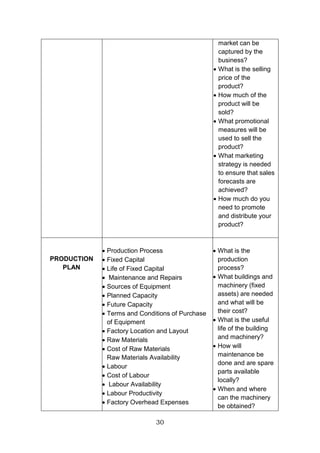
market can be
captured by the
business?
 What is the selling
price of the product?
 How much of the
product will be sold?
 What promotional
measures will be
used to sell the
product?
 What marketing
strategy is needed to
ensure that sales
forecasts are
achieved?
 How much do you
need to promote and
35
distribute your
product?
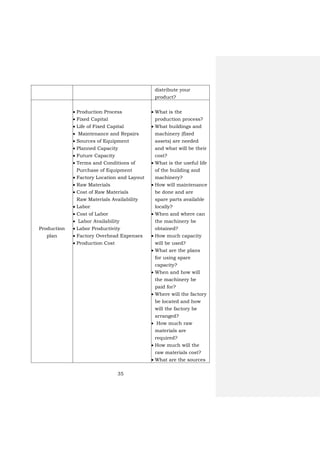
Production
plan
 Production Process
 Fixed Capital
 Life of Fixed Capital
 Maintenance and Repairs
 Sources of Equipment
 Planned Capacity
 Future Capacity
 Terms and Conditions of
Purchase of Equipment
 Factory Location and Layout
 Raw Materials
 Cost of Raw Materials
Raw Materials Availability
 Labor
 Cost of Labor
 Labor Availability
 Labor Productivity
 Factory Overhead Expenses
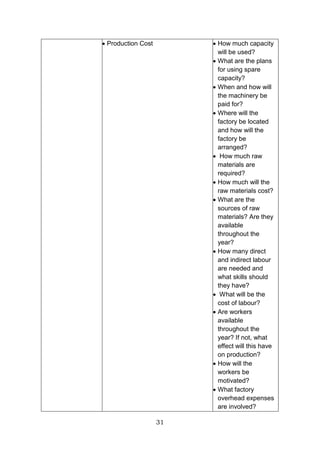
 Production Cost
 What is the
production process?
 What buildings and
machinery (fixed
assets) are needed
and what will be their
cost?
 What is the useful life
of the building and
machinery?
 How will maintenance
be done and are
spare parts available
locally?
 When and where can
the machinery be
obtained?
 How much capacity
will be used?
 What are the plans
for using spare
capacity?
 When and how will
the machinery be
paid for?
 Where will the factory
be located and how
will the factory be
arranged?
 How much raw
materials are
required?
 How much will the
raw materials cost?
 What are the sources
36
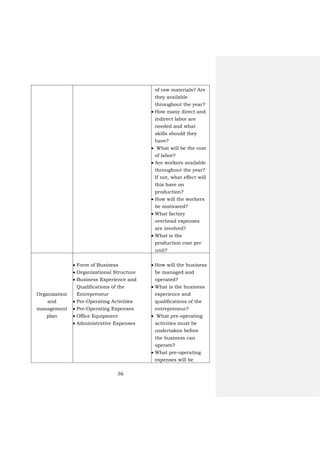
of raw materials? Are
they available
throughout the year?
 How many direct and
indirect labor are
needed and what
skills should they
have?
 What will be the cost
of labor?
 Are workers available
throughout the year?
If not, what effect will
this have on
production?
 How will the workers
be motivated?
 What factory
overhead expenses
are involved?
 What is the
production cost per
unit?
Organization
and
management
plan
 Form of Business
 Organizational Structure
 Business Experience and
Qualifications of the
Entrepreneur
 Pre-Operating Activities
 Pre-Operating Expenses
 Office Equipment
 Administrative Expenses
 How will the business
be managed and
operated?
 What is the business
experience and
qualifications of the
entrepreneur?
 What pre-operating
activities must be
undertaken before
the business can
operate?
 What pre-operating
expenses will be
37
incurred?
 What fixed assets will
be required for the
office?
 What administrative
cost will be incurred?
Financial plan
 Project Cost
 Financing Plan and Loan
Requirement
 Security for Loan
 Profit and Loss Statement
 Cash Flow Statement
 Balance Sheet
 Loan Repayment Schedule
 Break-even Point (BEP)
 Return on Investment (ROI)
 Financial Analysis
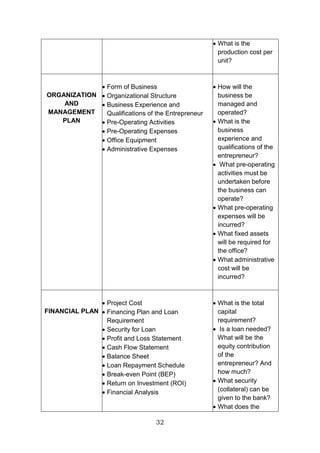
 What is the total
capital requirement?
 Is a loan needed?
What will be the
equity contribution of
the entrepreneur?
And how much?
 What security
(collateral) can be
given to the bank?
 What does the Profit
and Loss Statement
indicate?
 What does the Cash
Flow Statement
indicate?
 What does the
Balance Sheet
indicate?
 What is the loan
repayment schedule?
 What is the break-
even point (BEP)?
 What is the return of
investment (ROI)?
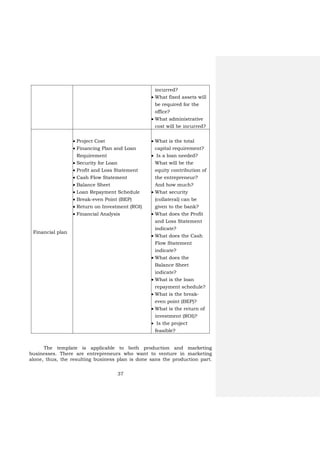
 Is the project
feasible?
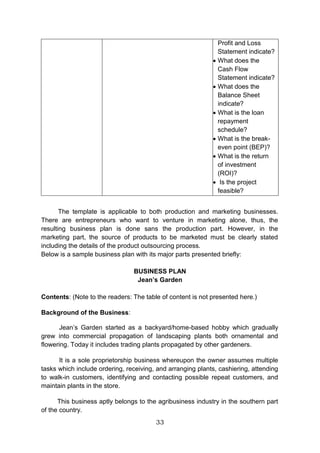
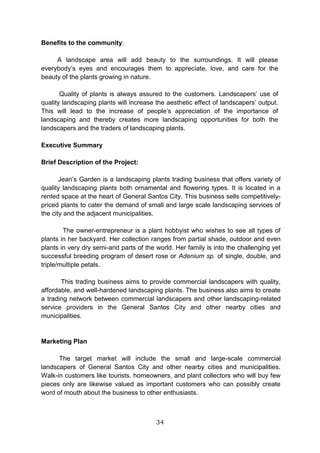
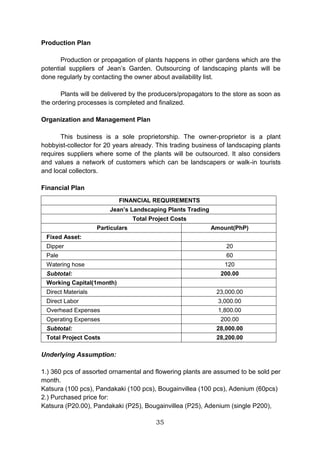
The template is applicable to both production and marketing
businesses. There are entrepreneurs who want to venture in marketing
alone, thus, the resulting business plan is done sans the production part.
38
However, in the marketing part, the source of products to be marketed must
be clearly stated including the details of the product outsourcing process.
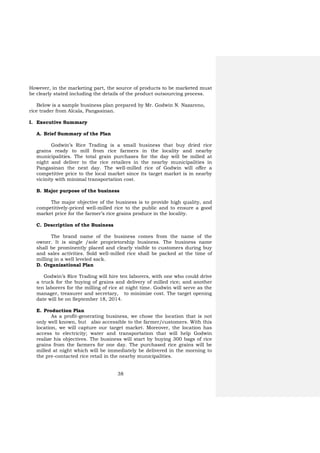
Below is a sample business plan prepared by Mr. Godwin N. Nazareno,
rice trader from Alcala, Pangasinan.
I. Executive Summary
A. Brief Summary of the Plan
Godwin’s Rice Trading is a small business that buy dried rice
grains ready to mill from rice farmers in the locality and nearby
municipalities. The total grain purchases for the day will be milled at
night and deliver to the rice retailers in the nearby municipalities in
Pangasinan the next day. The well-milled rice of Godwin will offer a
competitive price to the local market since its target market is in nearby
vicinity with minimal transportation cost.
B. Major purpose of the business
The major objective of the business is to provide high quality, and
competitively-priced well-milled rice to the public and to ensure a good
market price for the farmer’s rice grains produce in the locality.
C. Description of the Business
The brand name of the business comes from the name of the
owner. It is single /sole proprietorship business. The business name
shall be prominently placed and clearly visible to customers during buy
and sales activities. Sold well-milled rice shall be packed at the time of
milling in a well leveled sack.
D. Organizational Plan
Godwin’s Rice Trading will hire ten laborers, with one who could drive
a truck for the buying of grains and delivery of milled rice; and another
ten laborers for the milling of rice at night time. Godwin will serve as the
manager, treasurer and secretary, to minimize cost. The target opening
date will be on September 18, 2014.
E. Production Plan
As a profit-generating business, we chose the location that is not
only well known, but also accessible to the farmer/customers. With this
location, we will capture our target market. Moreover, the location has
access to electricity; water and transportation that will help Godwin
realize his objectives. The business will start by buying 300 bags of rice
grains from the farmers for one day. The purchased rice grains will be
milled at night which will be immediately be delivered in the morning to
the pre-contacted rice retail in the nearby municipalities.
39
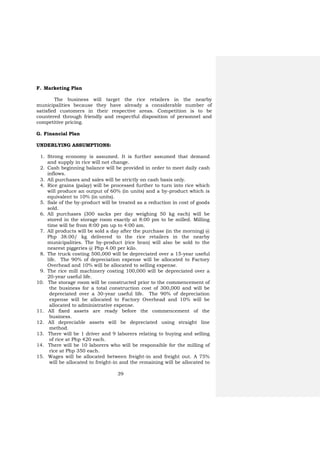
F. Marketing Plan
The business will target the rice retailers in the nearby
municipalities because they have already a considerable number of
satisfied customers in their respective areas. Competition is to be
countered through friendly and respectful disposition of personnel and
competitive pricing.
G. Financial Plan
UNDERLYING ASSUMPTIONS:
1. Strong economy is assumed. It is further assumed that demand
and supply in rice will not change.
2. Cash beginning balance will be provided in order to meet daily cash
inflows.
3. All purchases and sales will be strictly on cash basis only.
4. Rice grains (palay) will be processed further to turn into rice which
will produce an output of 60% (in units) and a by-product which is
equivalent to 10% (in units).
5. Sale of the by-product will be treated as a reduction in cost of goods
sold.
6. All purchases (300 sacks per day weighing 50 kg each) will be
stored in the storage room exactly at 8:00 pm to be milled. Milling
time will be from 8:00 pm up to 4:00 am.
7. All products will be sold a day after the purchase (in the morning) @
Php 38.00/ kg delivered to the rice retailers in the nearby
municipalities. The by-product (rice bran) will also be sold to the
nearest piggeries @ Php 4.00 per kilo.
8. The truck costing 500,000 will be depreciated over a 15-year useful
life. The 90% of depreciation expense will be allocated to Factory
Overhead and 10% will be allocated to selling expense.
9. The rice mill machinery costing 100,000 will be depreciated over a
20-year useful life.
10. The storage room will be constructed prior to the commencement of
the business for a total construction cost of 300,000 and will be
depreciated over a 30-year useful life. The 90% of depreciation
expense will be allocated to Factory Overhead and 10% will be
allocated to administrative expense.
11. All fixed assets are ready before the commencement of the
business.
12. All depreciable assets will be depreciated using straight line
method.
13. There will be 1 driver and 9 laborers relating to buying and selling
of rice at Php 420 each.
14. There will be 10 laborers who will be responsible for the milling of
rice at Php 350 each.
15. Wages will be allocated between freight-in and freight out. A 75%
will be allocated to freight-in and the remaining will be allocated to
40
freight-out. Also, it will be paid on daily basis in order to help
them in their daily needs.
16. The owner will be the manager, treasurer of the business.
17. Utilities expense of 20,000 will be allocated 90% on Factory
Overhead and 10% on General and administrative expense.
18. For simplicity purposes, assume that the tax rate will be 32%.
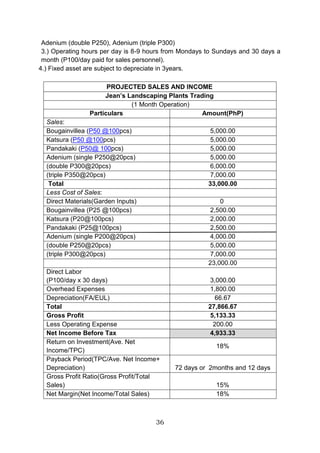
A. Projections will be made for a time period of 1 month only.
A. TOTAL INVESTMENTS
ORGANIZATION COST
CASH P 330,000.00
OFFICE SUPPLIES 1,000.00
TRUCK 500,000.00
RICE MILL MACHINERY 100,000.00
LAND 100,000.00
STORAGE ROOM P 300,000.00
TOTAL INVESTMENTS P 1,331,000.00
B. PROJECTED DAILY CASH OUTFLOW
PURCHASES @ PHP 21/KG P 315,000.00
FREIGHT IN:
WAGES P 3,150.00
GASOLINE P 1,500.00 P 4,650.00
DIRECT LABOR 3,000.00
FREIGHT OUT:
WAGES P1,050.00
GASOLINE 500.00 P 1,550.00
TOTAL DAILY CASH OUTFLOW P324,200.00
*300 sacks x 50kg x Php 21.00
**Php 420.00 x 10 Laborers x 0 .75
***Php 420.00 x 10 Laborers x 0.25
41
C. PROJECTED DAILY CASH INFLOW
SALES @ PHP 38/KG P342,000.00
SALE OF BY PRODUCT (RICE BRAN) 6,000.00
TOTAL DAILY CASH INFLOW P348,000.00
*300 Sacks x 50kgx 0.60 (milling recovery) x Php 38.00
**300 Sacks x 50kg x 0.10 x Php 4.00
D. STATEMENT OF FINANCIAL POSITION-BEGINNING
GODWIN'S RICE TRADING
AS OF XXX
ASSETS
Current Assets:
Cash P330,000.00
Office Supplies 1,000.00 P331,000.00
Non-current Assets:
Land 100,000.00
Truck 500,000.00
Rice Mill 100,000.00
Storage room P300,000.00 P1,000,000.00
Total Assets P1,331,000.00
TOTAL LIABILITIES AND OWNER'S
EQUITY
Mr. Godwin's Capital P1,331,000.00
42
E. INCOME STATEMENT
GODWIN’S RICE TRADING
INCOME STATEMENT
FOR THE MONTH________
Sales(300x50x.6x38x3) P 10,260,000.00
Cost of goods sold
Purchases (315,000x30Days) P 9,450,000.00
Freight-in (4,650x30Days) 139,500.00
Direct labor (10LaboresxPhp350x30Days) 105,000.00
Factory overhead
Utilities Expense (Php20,000 x 0.9) P 18,000.00
Depreciation- Storage Room(300,000/30)(0.9) (1/12) 750.00
Depreciation- Rice Mill Machine (100,000/20) (1/12) 416.67
Depreciation- Truck (500,000/15)(0.9)(1/12) P 2,500 .00 P 21,667.00
Sale of By-product (6,000 x 30) P-180,000.00 P 9,536,167.00
Gross Profit P 723,833.00
Selling Expense
Freight-out (1550x30) P 46,500.00
Depreciation- Truck (500,000/15)(0.1)(1/12) 277.078.00
Packaging (300Sacks x .6 x Php10 x 30Days P 54,000.00 P100,778.00
General And Administrative expense
Office Supplies P 1,000.00
Utilities Expense (20,000 x 0.1) P 2,000.00
Depreciation- Storage Room(300,000/30)(0.1) (1/12) P83.33.00 P3,083.00
Net Income Before Tax P 619,972.00
Income Tax Expense P 198,391.11
Net Income After Tax P 421,581.00
Return on Investments = = = .31674
Payback Period= = = 3.127283 yrs
Gross Profit Ratio= = = 0.070549
Net Margin Ratio= = = 0.0410898
H. Financial Statement
The projected sale for 1 month is amounting to P10,200,000.00 at
a price of @ P38.00/kg for well-milled rice less all the expenses and tax
it has a projected net income of P 421,581. Financial ratios show that
Gross Profit IS 7% and Net Margin Ratio is 4% each. The investment
costs will be recovered within approximately 3 years and 2 months.
I. Critical analysis
Risk is always present in any form of business. That includes
Godwin’s Rice Trading business. The foreseen problem is not being able
43
Posttest
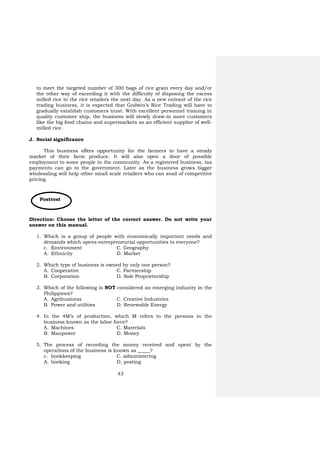
to meet the targeted number of 300 bags of rice grain every day and/or
the other way of exceeding it with the difficulty of disposing the excess
milled rice to the rice retailers the next day. As a new entrant of the rice
trading business, it is expected that Godwin’s Rice Trading will have to
gradually establish customers trust. With excellent personnel training in
quality customer ship, the business will slowly draw-in more customers
like the big food chains and supermarkets as an efficient supplier of well-
milled rice.
J. Social significance
This business offers opportunity for the farmers to have a steady
market of their farm produce. It will also open a door of possible
employment to some people in the community. As a registered business, tax
payments can go to the government. Later as the business grows bigger
wholesaling will help other small scale retailers who can avail of competitive
pricing.
Direction: Choose the letter of the correct answer. Do not write your
answer on this manual.
1. Which is a group of people with economically important needs and
demands which opens entrepreneurial opportunities to everyone?
c. Environment C. Geography
A. Ethnicity D. Market
2. Which type of business is owned by only one person?
A. Cooperative C. Partnership
B. Corporation D. Sole Proprietorship
3. Which of the following is NOT considered an emerging industry in the
Philippines?
A. Agribusiness C. Creative Industries
B. Power and utilities D. Renewable Energy
4. In the 4M’s of production, which M refers to the persons in the
business known as the labor force?
A. Machines C. Materials
B. Manpower D. Money
5. The process of recording the money received and spent by the
operations of the business is known as _____?
c. bookkeeping C. administering
A. booking D. posting
44
Group Part Of Business Plan
A
Production Plan
a, c, e
B
Marketing Plan
d, b, f
Group Part Of Business Plan
A Production Plan c, e, f
B
Marketing Plan a, b, d
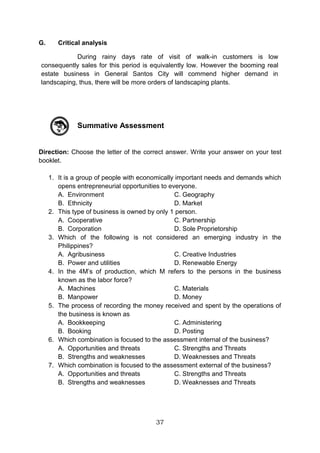
6. Which combination is focused on the internal assessment of the
business?
A. Opportunities and Threats C. Strengths and Threats
B. Strengths and Weaknesses D. Weaknesses and Threats
7. Which combination is focused on the external assessment of the
business?
A. Opportunities and Threats C. Strengths and Threats
B. Strengths and Weaknesses D. Weaknesses and Threats
8. Study the table and the items on the right. Then answer the
question.
Group Part Of Business Plan
A Production
Plan _________
B Marketing
Plan _________
Which of the following is the correct grouping of the six indicators in the
box?
A. C.
B. D.
9. Which business principle is applicable in products and development
and marketing?
A. Ask researchers in other communities about their needs and
demands.
B. Your own needs and demands are the same with others.
C. Pay attention to the needs and demands of the market
D. Follow the result of a national survey of needs and demands
a. Competitors analysis
b. Product description
c. Maintenance and repair
d. Promotional strategies
e. Sources of equipment
f. Terms and conditions of
purchase
Group Part Of Business Plan
A Production Plan a, b, d
B Marketing Plan c, e, f
Group Part Of Business Plan
A Production Plan c, d, a
B Marketing Plan b, e, f
45
10. What is the reason why an aspiring entrepreneur must make a sound
and impressive business plan?
A. A sound and impressive business plan is likely to be approved for a
loan package.
B. A sound and impressive business plan attracts more customers.
C. A sound and impressive business plan commands tax rebates.
D. A sound and impressive business plan can improve a particular
segment of a market.
Now we know that market and environment are the two major factors
that dictate any business activities. It is so diverse, however; this diversity
offers numerous opportunities for businesses.
An aspiring entrepreneur must consider a lot of factors prior to setting
up a business. Careful examination on the needs and demands must be
made. Competition must be clearly addressed because it may either lead to
accumulation of profit or worse, incurring losses depending on how
entrepreneurs manage their businesses.
Other important task of entrepreneurs is to determine how much
capital is needed to start a business. Selection of the best business location
is crucial, too. Record keeping or bookkeeping is also a skill that
entrepreneurs must possess so he/she can personally ascertain the
financial status of the business.
Entrepreneurs play a very important role in the national growth and
development. Aside from tax payment to the government, an entrepreneur is
responsible human resources development. Employment, whether casual,
probationary, and permanent, offers workplace trainings which help
employees in their personal and professional growth.
Entrepreneurs must not only possess passion for the business but
personally learn the work of their employee as well. The benefit of this best
practice is that entrepreneurs will find it easier to track the operations of the
business including its profitability.
Finally, getting all these business prerequisites into the heart and
mind of entrepreneurs and together with adequate knowledge, skills and
work values, their businesses will be sustained.
SUMMARY
46
Capital refers to money invested in a business to generate income.
Environmental scanning refers to careful monitoring of the internal and
external environment of an organization purposely done to detect early
signs of opportunities and threats that may influence present and
future plans of the business.
Industry is a commercialized, standardized, and organized economic activity
connected with the production, manufacture, or construction of a
particular product or range of products in which many people are
involved.
Market refers to a group of people with economically important needs and
demands which open entrepreneurial or business opportunities to
everyone.
Opportunities in SWOT analysis in is the exploitable set of circumstances
with uncertain outcome, requiring commitment of resources and
involving exposure to risk.
Personnel people employed in an organization.
Production is the processes of transforming inputs such as raw materials,
semi-finished goods, subassemblies and intangible inputs, namely,
ideas, information, knowledge into goods or services.
Strength in SWOT analysis is the capital, knowledge, skill, or other
advantage that a firm has or can acquire over its competitors in
meeting the needs of its customers.
Threats in SWOT analysis are negative indications that can cause a risk to
become a loss, expressed as an aggregate of risk, consequences of
risk, and the likelihood of the occurrence of the event.
Weaknesses in SWOT analysis refers to any negative indications that
increases the risk of a losses and failure
REFERENCES:
http://www.businessdictionary.com
Microsoft® Encarta® 2009. © 1993-2008 Microsoft Corporation
Albarico J.M., Celarta C.B, Fernando E., and Valdez E.S. 2011.
Agriculture and Fishery Arts I. United Eferza Academic Publications,
Co., Bagong Pook, Lipa City, Batangas 4217.
Glossary of Terms
Compilation by Ben: r_borres@yahoo.com        


LEARNING MODULES 
 
Horticulture
AFA- HORTICULTURE
(PERSONAL ENTREPRENEURIAL
COMPETENCIES (PEC’S)
ACROSS MARKET AND
ENVIRONMENT)
Module 1
Department of Education
Republic of the Philippines
This instructional material was collaboratively
developed and reviewed by educators from public
and private schools, colleges, and/or universities. We
encourage teachers and other education
stakeholders to email their feedback, comments, and
recommendations to the Department of Education at
action@deped.gov.ph.
We value your feedback and
recommendations.
Technology and Livelihood Education – Grade 9
AFA-Horticulture
Learner’s Material
First Edition, 2014
Republic Act 8293, section 176 states that: No copyright shall subsist in any
work of the Government of the Philippines. However, prior approval of the
government agency or office wherein the work is created shall be necessary for
exploitation of such work for profit. Such agency or office may, among other things,
impose as a condition the payment of royalties.
Borrowed materials (i.e., songs, stories, poems, pictures, photos, brand
names, trademarks, etc.) included in this book are owned by their respective
copyright holders. Every effort has been exerted to locate and seek permission to
use these materials from their respective copyright owners. The publisher and
authors do not represent nor claim ownership over them.
Published by the Department of Education
Secretary: Br. Armin A. Luistro FSC
Undersecretary: Dina S. Ocampo, Ph.D.
Department of Education-Instructional Materials Council Secretariat
(DepEd-IMCS)
Office Address: 5th Floor Mabini Building, DepEd Complex
Meralco Avenue, Pasig City
Philippines 1600
Telefax: (02) 634-1054 or 634-1072
E-mail Address: imcsetd@yahoo.com
Development Team of the Learner’s Material
Consultant: Andres Z. Taguiam, Phd.
Authors: Ofelia F. Bernardo, May Martinez-Leano, Mario S. Donio,
William V. Engay, Levi P. Siazar
Validators/Reviewers: Pedrito S. Nituoral, Rey G. Aleman
Language Editor: Naida U. Rivera,
Illustrator : Erich David Garcia
Subject Specialists and Management: Emmanuel S. Valdez, Albert B. Erni,
Layout Artists/Encoders: Jocelyn M. Gamo, Joel G. Castillo
Table of Contents
Module - 1 Personal Entrepreneurial Competencies (PEC’S)
Across Environment and Market
Entrepreneurship and Personal Entrepreneurial
Competencies (PEC’S) .............................................................. 2
Introduction .................................................................................................. 2
Learning Competencies/Objectives ............................................................. 2
Pre-Diagnostic Assessment......................................................................... 3
Reading Resources and Instructional Activities .......................................... 4
What to know? ............................................................................................ 4
What started businesses?............................................................................ 5
Need-Based Business Opportunities ........................................................... 5
Supply of Raw Materials is Abundant in the Locality.................................... 6
What Makes up a Successful Entrepreneur?............................................... 6
Characteristics of Successful Entrepreneurs .............................................. 6
Lifestyle of Successful Entrepreneurs.......................................................... 8
The Personal Entrepreneurial Competencies (PEC’S)
of Successful Entrepreneurs ................................................. 16
Understanding the Market and Environment
of Businesses......................................................................... 16
Introduction ............................................................................................... 16
Learning Competencies/Objectives ........................................................ 16
Pre-Diagnostic Assessment...................................................................... 17
Reading Resources and Instructional Activities ..................................... 18
What to know? ......................................................................................... 18
Common Characteristics of a Business Market ........................................ 19
The Legal Forms of Business ................................................................... 19
The Different Industries in the Country Today......................................... 20
Checking the Needs, Wants, and Demands of the
Market Through Environment Scanning Process .................................. 21
Determining the 4M’S of Production.......................................................... 21
The Importance of Acquiring a Start-up Capital ...................................... 22
Factors in Selecting the Best Business Location ...................................... 23
Hiring and Training Personnel................................................................... 24
Registration of a New Business .............................................................. 24
Practicing Simple Record Keeping............................................................ 24
What to process? ................................................................................... 24
What to reflect and understand? ............................................................. 26
Supplementary Reading: The SWOT...................................................... 26
What to reflect and understand? ............................................................... 27
What to transfer? .................................................................................... 27
Supplementary Reading: The Business Plan.......................................... 27
Summative Assessment............................................................................ 37
Summary/Synthesis/Feedback ................................................................. 39
References................................................................................................ 39
1
INTRODUCTION
This Learner’s Materials on Conducting Pre-Agricultural Farm Operations
contains various Learning Competencies designed to develop the knowledge,
skills, and attitude of Grade 9 Technology and Livelihood (TLE) students. It covers
four (4) modules namely: Personal Entrepreneurial Competencies (PECs) across
the environment and market, 2. Preparing farm tools, implements, and simple
equipment, 3. Preparing and maintaining farm tools, implements, simple
equipment, and facilities, and 4. Securing farm tools, implements, simple
equipment, and facilities. Each module is subdivided into several lessons with the
following parts: I – Introduction, giving an overview of the lesson; II – The Learning
Competencies/Objectives contain specific topics about a certain Learning
Competency; III – The Pre-Diagnostic Assessment provides evaluation of the prior
learning of students; IV – the Reading Resources and Instructional activities
include the content and activities about what the students must know, what to
process, what to reflect and understand, and what to transfer. These activities
could be done in school, at home, and in the community. V – The Summative
Assessment evaluates how much the students have learned; and VI – The
Summary/Synthesis/Feedback give generalization and enhancement on a specific
module. A glossary section is at the back page of the Learner’s Materials as further
reference, and a List of References to acknowledge the sources of the ideas taken
from them.
Conducting pre-agricultural farm operations is one of the Core
Competencies in Agricultural Crop Production NC II. Students must be able to take
the five (5) core competencies to finish the course. The teacher must conduct
Institutional Assessment towards the end of the school year to evaluate the
underpinning knowledge, skills, and attitudes of the students based from the set of
criteria in the Training Regulations/prepared by Technical Education and Skills
Development Authority (TESDA)
2
AFA - HORTICULTURE GRADE 9
Module 1
PERSONAL ENTREPRENEURIAL COMPETENCIES (PEC’S)
ACROSS MARKET AND ENVIRONMENT
Content Standards Performance Standard
The learner demonstrates
understanding of one’s Personal
Competencies (PEC’s) across
horticultural products and
services
The learner recognizes his/her Personal
Competencies (PEC’s) across horticultural
products and services and prepares an
activity plan that aligns with that of a
practitioner/entrepreneur in Horticulture
ENTREPRENEURSHIP AND PERSONAL
ENTREPRENEURIAL COMPETENCIES (PECS)
Introduction
Everybody loves to earn money and accumulate wealth and in the present
times, we have many ways to achieve it. The most common way is to offer good
quality agricultural products and services to your friends and to other people in the
community and even in the online arena that can cover a global market. All the
business activities undertaken in selling products and services to people is known as
entrepreneurship and the one who manage these business activities is an
entrepreneur. Students are encouraged to develop skills required in entrepreneurial
activities. Many wealthy people in the country had started in small and community-
based entrepreneurial activities.
Learning Competencies/Objectives
1. Identify the different factors to be considered in setting up a business
2. Assess one’s PEC’s, in terms of, characteristics, lifestyle features , and skills
3. Assess practitioner’s entrepreneurial competencies, in terms of,
characteristics, attributes, lifestyle, skills, and traits
3
Pre-/Diagnostic Assessment:
Direction: Choose the letter of the correct answer. Write your answer on your test
booklet.
1. Which of the following is a common activity of an entrepreneur?
A. Advocate against global warming
B. Deliver goods and services to the market
C. Volunteer in a community clean-up activity
D. Preach in different churches or group of churchgoers
2. The saying “Necessity is the mother of all inventions” means ____________.
A. Necessity is invented by mothers
B. Our mother told us what we really need
C. Basic commodities are made for mothers
D. Basic commodities are made to satisfy our needs
3. What really makes up a successful entrepreneur?
A. Ability to study a market
B. Ability to act like a customer
C. Knowledge, skills, and money
D. Knowledge, skills, and attitude
4. People who always feel positive in every effort in order to achieve something
are known to have ______________.
A. Courage C. Self-confidence
B. Optimism D. Self-control
5. A set of skills that entrepreneurs must possess to take control of the
challenges in business is known as _____________.
A. Personal business capacities
B. Personally preferred competencies
C. Professional enterprise competencies
D. Personal entrepreneurial competencies
6. Information seeking and goal setting belongs to what PEC’s cluster?
A. Achievement cluster C. Planning cluster
B. Empower cluster D. Power cluster
7. Which of the following best describes a risk-taker?
A. Accomplish targets on time as agreed with customers
B. Paying keen attention to the needs and demands of people
C. Anticipating a loss and countering it with feasible alternatives
D. Acting as the prime mover of resources in the achievement of
objectives
8. Systematic planning and monitoring includes the following except one.
A. Set calculated goals and objectives
B. Make a well organized plan with clearly defined methods
C. Be logically flexible for the emergent constraints, challenges, and
needs
4
D. Periodic gap-proof monitoring and response activities must be
scheduled to determine emergent constraints, challenges, and
needs
9. When entrepreneurs face a significant obstacle with a well planned action,
they have Personal Entrepreneurial Competency known as ___________.
A. Initiative C. Persuasion
B. Persistence D. Risk-taking
10.Luis is good in convincing his customers that his product is not only of best
quality but also safe to use. Many of his customers bought and even return to
buy more of the product because they want to share it to their friends. What
personal entrepreneurial competency does Luis has?
A. Persuasion
B. Goal setting
C. Self-confidence
D. Demand for efficiency and quality
READING RESOURCES AND INSTRUCTIONAL ACTIVITIES
What to KNOW:
Activity #1:
Before immersing ourselves into the exciting discussion about setting up
and running a business in the most sustainable ways, we will first do inspiration-
drawing activity through the conduct of casual interviews with entrepreneurs in the
community. Look for a partner in doing this. Identify 3 retailers, 3 service providers,
and 1 producer. Use the template below for the interview and in tracking the
answers of the selected entrepreneur-respondents. Discuss the responses with
your partner and present to your class a brief analysis/report of the interview.
Interview
Guides
Responses of Entrepreneurs
Comments
Retailers
Service
Providers
Producer
(commercial
scale)
Students’ guide
questions to be
used but not
limited to the
following:
For
example,
Fruit and
Vegetables
Vendors,
Ornamenta
l Plants
Retailers
For example,
Plant Rental
Services,
Landscaping
Services,
Landscape
Maintenance
Services
Producer of
Vegetables,
Fruits,Seedlings
of Fruit Trees,
Ornamental and
Flowering
Plants,
Our reactions
to
entrepreneurs
responses
5
Why did you
choose this
business?
How did you
start it?
What are the
challenges you
met?
How did you
counter all
those
challenges?
Did you
experience
losses? How
did you
respond to
losses?
Can you share
some
strategies in
keeping
customers?
What personal
qualities help
this business
flourish up to
now?
Are you afraid
of your
competitors?
Why?
Can you give
us some pieces
of entrep-
based advice?
WHAT STARTED BUSINESSES?
Need-based business opportunities
A popular adage that says, “Necessity is the mother of all inventions” simply
6
means that we develop technologies to produce something that will answer
mankind’s diverse needs. In 1980’s the most popular way of long distance
communication is through a snail mail, telegraph, or long distance telephone calls
which is not only expensive but also consume much of our time. Because there is a
need for faster communication flows as global economy has grown into scale,
cellular phones came to the market to answer our communication-related needs.
Today, global communication is already at the tip of our fingers.
SUPPLY OF RAW MATERIALS IS ABUNDANT IN THE LOCALITY
Business investors are happy if the raw materials and other resources are
readily available in the community. Aside from secured volume of quantity, this
opportunity is cheaper as when the entrepreneur outsource production inputs from
other places.
WHAT MAKES UP A SUCCESSFUL ENTREPRENEUR?
Knowledge alone does not guarantee success in a business. Skills developed
can greatly help in the production process but it is not an assurance to the
sustainability of the business as well. It takes right attitude combined with adequate
knowledge, competitive skills, and upheld passion to make significant revenues,
profit, and sustainability of the chosen business.
Accomplished entrepreneur have so much to share to business enthusiasts
like us. Many are not born with a silver spoon meaning most of them came from poor
families. They have passion to produce and sell to an identified market or even to
serve target clients which contributed to their success. Likewise, they accumulated
wealth because they possess entrepreneurial characteristics, lifestyles, and skills,
suited to their chosen businesses.
CHARACTERISTICS OF SUCCESSFUL ENTREPRENEURS
The set of characteristics common to entrepreneurs who excel in their
businesses are the following:
1 Optimism
Be a someone who always feel positive in every effort in
order to achieve something.
2 Self-confidence
Once the plan to do entrepreneurial activities is ready to
be started, assure yourself to overcome risks and many
other forms of business constraints.
3 Self-control
In any situations that needs to be handled, never react
immediately. Instead respond to the situation in the most
legal and beneficial ways.
4 Courage Be a risk-taker with alternative courses of action on hand.
7
Business risks are always there however, one’s
readiness to face, reduce or eliminate it depends on how
brave you can be.
5 Commitment
Sustain every effort you have started. Profit may dwindle
in the most unacceptable way but never hesitate to
invoke your right to persist and regain a lost glory.
6 Creativity
Do not stay inside a box which means go out and flaunt
your potential to be effectively different. Use your
imagination to create marketable ideas and push it. If you
thought of a potentially good ones, be the first to act upon
it. Chances are, others’ have thought about it, too.
7
Well-defined
values
Be precise in your principles or standards. Goals coated
with well defined values provide guidance to what your
business must achieve with reduced inconveniences.
8 High energy level
Competitive entrepreneurs are fueled to succeed.
Passion in the endeavor is an energy enhancer. Success
in business comes from being passionately energetic.
9 Leadership ability
Guide, direct and influence people according to what
benefits the business. People and the many ways you
may lead them can spell success or failure of your
business.
10
Desire for
responsibility
As a business leader, you are accountable to everyone
and everything in the business including your strategies.
Value everything and everyone as you value oneself
11
Decision-making
skills
One’s ability to choose good decision may be innate or
experience-based. Learn the art and the systematic and
methodical process of decision-making. Good decisions
must be sensible and culture-sensitive
12
Desire for
immediate
feedback
Pay close attention to what the market generally is saying
to your products or services. The ultimate consumer of
the product and services must be heard and become the
bases of further product or services development
13
Strong desire to
achieve
Develop a competitive attitude. Right pricing and quality-
based product development or service delivery will draw
more business revenues. Work with the goals in mind
and take the best way to achieve them
14
Ability to learn
from past failures
Bad experiences in business should never be taken as
traumatic. Options that supposedly had prevented those
to happen must be noted and archived. Benchmarked on
past experiences to know which decision to take.
Elizabeth Bowen (1899 - 1973) an Irish novelist and short-story writer, wrote,
“The best that an individual can do is to concentrate on what he or she can do, in the
course of a burning effort to do it better”.
8
LIFESTYLE OF SUCCESSFUL ENTREPRENEURS
People who plan to live in the world of
entrepreneurship will live a life different from
that of an ordinary citizen. They adapt to the
new lifestyles gradually and professionalize
every task embedded into it. They follow
established standards and even customize
some to fit to the tasks particular to a business
type. As the business is sustained and
entrepreneurs developed expertise in all tasks including constraints and problem
solution, excellent decision making is easier to achieve.
According to Valdez, et.al, the following are the common lifestyle features of
an entrepreneur:
A sense of freedom
and control
It is one of the highest lifestyle considerations that
entrepreneurs must adapt. Although inspired by their freedom
to lead and control all elements of the business, they must
exercise careful in choosing the right course of actions and
decisions to take.
Flexibility of time
Choosing their own time for work is a privilege of
entrepreneurs. This feature will allow them to choose their
most productive time.
Energy and stamina
Entrepreneurs are the greatest asset of their businessses, a
check and balance between the actual accomplishment of
tasks and physical and mental work capacity must be
established. Rest and relaxation can help maintain good
physicality and overall health. Proper stress management is
also of primal importance.
Family support
A family does not only serve as inspiration but also as a group
of people to oversee the welfare of the entrepreneurs.
Suggestions and recommendations of a family member must
be carefully considered.
Professional support
Remember that seeking advise from specialist is helpful in
decision making process. There are people more informed
than us in a particular area of expertise.
“ENTREPRENEURSHIP
IS LIVING A FEW YEARS OF YOUR LIFE
LIKE MOST PEOPLE WON’T. SO THAT,
YOU CAN SPEND THE REST OF YOUR
LIFE LIKE MOST PEOPLE CAN’T.”
Annonymous
9
THE PERSONAL ENTREPRENEURIAL COMPETENCIES (PECS) OF
SUCCESSFUL ENTREPRENEURS
There are two major reasons why
many people failed in their attempt to do
entrepreneurial activities. First, people who
are starting entrepreneurial activities may
only have insufficient experiences to address
the problems posed by the numerous
external business constraints. Second, they
lack sufficient skills to lead the people and
make the products and services competitive
in the market. Low profit of the business will
create consequent problem and many more
problems in the future. Thus, anyone who
wants to succeed in a business arena must
be equipped with the different Personal
Entrepreneurial Competencies or PEC’s, a
set of skills that entrepreneurs must possess
to take control of the challenges in business.
PEC’s are the key abilities of entrepreneurs’
success in business.
PEC’s are clustered into three clusters according to its area of application:
Achievement Cluster
Opportunity
Seeking and
Initiative
 Pay attention to the needs and demands of people
 Never procrastinate. Act immediately on marketable ideas
 The common business are well competed in the market
while unique ones offer lower competition resulting to higher
revenues and profit
Risk Taking
Calculate risks by identifying the most beneficial alternative
courses of action to minimize effect of risks in the net profit
Be proactive. Anticipate a loss and counter it with feasible
alternatives
In business realities, seasoned entrepreneurs sometimes
take riskier business to get higher profits
Demand for
Efficiency and
Quality
 Perform business tasks better, faster, cheaper, but do not
put safety and quality aside
 Accomplish tasks by meeting or exceeding standards of
excellence
 Face a significant obstacle with a good plan of action
 Identifies a good alternative to every decision to meet
10
Persistence
challenge or overcome an obstacle
 Act as the prime mover of resources in the achievement of
goals and objectives
Commitment
to the Work
Contract
 Offer personal sacrifices or give extraordinary efforts in
completing tasks
 Accomplish targets on time, as agreed, to keep customers
satisfied
Planning Cluster
Information
Seeking
 Gather data and information or feedbacks from clients,
suppliers, and competitors and use those for the
improvement of products or services
 Study the market personally for innovation of new product
development
 Talk with experts for technical advice
Goal setting
Sets goals and objectives which are specific and must
guarentee customer satisfaction
Set calculated goals and objectives
Systematic
Planning and
Monitoring
 Make a well organized plan with clearly defined methods
 Be logically flexible for the emergent constraints, challenges,
and needs
 Periodic gap-proof monitoring and response activities must
be scheduled to determine emergent constraints, challenges,
and needs
Power Cluster
Persuasion
and
Networking
 Always ready to give facts and benefits to convince
customers to patronize products and services offered.
 To accomplish the business objectives, key people can be
used as agents or chanels to hasten product and services
delivery to customers
Independence
and self-
confidence
Develop self-trust in the attainment of goals and objectives
Do not need external approval before acting constraints and
challenges. Being, consultative does not purely mean
dependence on others advice. An entrepreneur must be
brave enough to use one’s ability to chose which alternative
course of action is the appropriate decision.
What to Process:
Activity #2:
This is a self examination activity. After knowing the different characteristics
that an entrepreneur must possess, examine yourself if you have these
11
characteristics too. Simply put check (/) if that particular characteristic is present in
you or an x (X) if you do not possess it. Comment on your own status by giving
possible options that can help you acquire it.
Characteristics of an entrepreneur
Do I have this?
Realizations
(What are my options?)
YES(/) NO (X)
1 Optimism
2 Self-confidence
3 Self-control
4 Courage
5 Commitment
6 Creativity
7 Well-defined values
8 High energy level
9 Leadership ability
10 Desire for responsibility
11 Decision-making skills
12 Desire for immediate feedback
13 Strong desire to achieve
14 Ability to learn from past failures
What to REFLECT and UNDERSTAND:
Activity #3:
Consider the PEC’s of successful entrepreneurs. Compare these
competencies with you. As a growing individual can you develop these in yourself?
Competencies of an entrepreneur
Do I have
this?
Realizations
(If Yes how can I
improve this?)
(If NO what will I do to
acquire it)
YES
(/)
NO
(X)
Opportunity Seeking and Initiative
Risk Taking
Demand for Efficiency and Quality
Persistence
Commitment to the Work Contract
Information Seeking
Goal setting
Systematic Planning and Monitoring
12
Persuasion and Networking
Independence and self-confidence
What to TRANSFER:
Activity #4:
Let us match the result of our activity #1 with the standard characteristics,
lifestyle, and skills of our interviewees. Do you think that their businesses will be
sustained? Support your answer and present it to the class. Use the template in
Activity #2 and Activity #3 to help you analyze and forecast the sustainability of
their businesses.
Personal Entrepreneurial
Competencies (PEC’s)
Responses of Entrepreneurs
Retailers
Service
Providers
Producer
(commercial
scale)
REFER TO THE RESPONSES IN
ACTIVITY #1. Check if the Respondents
above possess the PEC’s enumerated in
the first column. Put check (/) if
observed and x (X) in not observed
Opportunity Seeking and Initiative
Risk Taking
Demand for Efficiency and Quality
Persistence
Commitment to the Work Contract
Information Seeking
Goal setting
Systematic Planning and
Monitoring
Persuasion and Networking
Independence and self-confidence
GENERAL ANALYSIS
Sustainability of business (Do you
think the entrepreneur-respondent
can sustain their businesses?
Enumerate your justifications)
13
Lifestyles of Entrepreneurs
Responses of Entrepreneurs
Retailers
Service
Providers
Producer
(commercial
scale)
REFER TO THE RESPONSES IN
ACTIVITY #1. Check if the Respondents
above possess the lifestyle features
enumerated in the first column. Put
check (/) if observed and x (X) if not
observed
A sense of freedom and control
Flexibility of time
Energy and stamina
Family support
Professional support
GENERAL ANALYSIS
Sustainability of business
(Do you think the entrepreneur-
respondent can sustain their
businesses? Enumerate your
justifications)
Finally, make a matrix of recommendations in order to sustain the
respondents’ respective business:
Entrepreneur-Respondent
Recommendations
(Give recommendations, as options 1 and 2, for
the sustainability of the respondents
entrepreneurial activities)
Option 1 Option 2
Retailer
Service Providers
Producer (Commercial Scale)
Summative Assessment
Direction: Choose the letter of the correct answer. Write your answer on your test
booklet.
1. Which of the following is a common activity of an entrepreneur?
A. Advocate against global warming
B. Deliver goods and services to the market
C. Volunteer in a community clean-up activity
D. Preach in different churches or group of churchgoers
14
2. The saying “Necessity is the mother of all inventions” means
A. Necessity is invented by mothers
B. Our mother told us what we really need
C. Basic commodities are made for mothers
D. Basic commodities are made to satisfy our needs
3. What really makes up a successful entrepreneur?
A. Ability to study a market
B. Ability to act like a customer
C. Knowledge, skills, and money
D. Knowledge, skills, and attitude
4. People who always feel positive in every effort in order to achieve something
are known to have
A. Courage C. Self-confidence
B. Optimism D. Self-control
5. A set of skills that entrepreneurs must possess to take control of the
challenges in business is known as
A. Personal business capacities
B. Personally preferred competencies
C. Professional enterprise competencies
D. Personal entrepreneurial competencies
6. Information seeking and goal setting belongs to what PEC’s cluster?
A. Achievement cluster C. Planning cluster
B. Empower cluster D. Power cluster
7. Which of the following best describes a risk-taker?
A. Accomplish targets on time as agreed with customers
B. Paying keen attention to the needs and demands of people
C. Anticipating a loss and countering it with feasible alternatives
D. Acting as the prime mover of resources in the achievement of
objectives
8. Systematic planning and monitoring includes the following except one
A. Set calculated goals and objectives
B. Make a well organized plan with clearly defined methods
C. Be logically flexible for the emergent constraints, challenges, and
needs
D. Periodic gap-proof monitoring and response activities must be
scheduled to determine emergent constraints, challenges, and
needs
9. When entrepreneurs face a significant obstacle with a well planned action,
they have Personal Entrepreneurial Competency known as
A. Initiative C. Persuasion
B. Persistence D. Risk-taking
10.Luis is good in convincing his customers that his product is not only of best
quality but also safe to use. Many of his customers bought and even return
to buy more of the product because they want to share it to their friends.
15
What personal entrepreneurial competency does Luis has?
A. Persuasion
B. Goal setting
C. Self-confidence
D. Demand for efficiency and quality
We have studied the different elements necessary in setting up a business
as well as acknowledged the different factors influencing the different
entrepreneurial activities. Of course, most of us perceive business as a complex
activity. The market is so diverse and if we fail to consider one factor which directly
affects our business, we will have to face lots of challenges as consequences.
Albeit challenging, we must remember that wealth accumulation as a return of our
legal investments will also give others opportunities through employment or avail
from our products and services.
The different characteristics, lifestyle, and Personal Entrepreneurial
Competencies or PEC’s of successful entrepreneurs we learned will surely inspire
us to do our best to start our own business. Be optimistic and take the risks. Use
the PEC’s we learned and progress into a life full of challenges that will hone us to
become one of the most successful entrepreneurs, one of these days. Good luck!
References:
http://www.businessdictionary.com
Microsoft® Encarta® 2009. © 1993-2008 Microsoft Corporation
Albarico J.M., Celarta C.B, Fernando E., and Valdez E.S. 2011.
Agriculture and Fishery Arts I. United Eferza Academic Publications, Co.,
BagongPook, Lipa City, Batangas 4217.
SUMMARY/SYNTHESIS/FEEDBACK
16
PERSONAL ENTREPRENEURIAL COMPETENCIES
(PEC’S)
ACROSS MARKET AND ENVIRONMENT
Content Standards Performance Standard
The learner demonstrates understanding
of Market and Environment across
Horticultural products and services
The learner independently generates
a business idea related to
Horticulture based on the analysis of
environment and market in
Horticulture
UNDERSTANDING THE MARKET
AND ENVRINOMENT OF BUSINESS
Introduction
Entrepreneurs with enough knowledge and background in the market and
environment where their businesses operate will have better strategies and
decisions and will find it easier to sustain business activities. The intended market
of a particular product and service must be carefully studied before and during the
actual operations of the business. Many entrepreneurs failed because of a very
simple reason; there is no enough information gathered about the target market,
consequently, they incurred so much losses leading to bankruptcy.
Learning Competencies/Objectives
1. Determine the common characteristics of a business market
2. Identify the legal forms of business
3. Describe the different industries in the country today
4. Map and analyze the opportunities offered by the industries in the community
5. Check the needs, wants. and demands of the market through environmental
scanning process
6. Determine the 4M’s of production
7. Discuss the importance of acquiring a start-up capital
8. Make a business plan
9. Apply the standards in selecting the best business location
10.Assess the internal and external environment of the business through
Strength, Weaknesses, Opportunities, and Threats method of business
assessment
11.Practice simple record keeping
17
Pre-/Diagnostic Assessment:
Direction: Choose the letter of the correct answer. Write your answer on your test
booklet.
1. It is a group of people with economically important needs and demands
which opens entrepreneurial opportunities to everyone.
A. Environment C. Geography
B. Ethnicity D. Market
2. This type of business is owned by only one person.
A. Cooperative C. Partnership
B. Corporation D. Sole Proprietorship
3. Which of the following is not considered an emerging industry in the
Philippines?
A. Agribusiness C. Creative Industries
B. Power and utilities D. Renewable Energy
4. In the 4M’s of production, which M refers to the persons in the business
known as the labor force?
A. Machines C. Materials
B. Manpower D. Money
5. The process of recording the money received and spent by the operations of
the business is known as
A. Bookkeeping C. Administering
B. Booking D. Posting
6. Which combination is focused to the assessment internal of the business?
A. Opportunities and threats C. Strengths and Threats
B. Strengths and weaknesses D. Weaknesses and Threats
7. Which combination is focused to the assessment external of the business?
A. Opportunities and threats C. Strengths and Threats
B. Strengths and weaknesses D. Weaknesses and Threats
8. Place the indicators found inside the box at the right into the third column of
the matrix at the left. Group the indicators correctly.
Group Part Of Business Plan
A
Production
Plan
______
_
B
Marketing
Plan
______
_
A. Competitors analysis
B. Product description
C. Maintenance and repair
D. Promotional strategies
E. Sources of equipment
F. Terms and conditions of purchase
18
Which of the following is the correct grouping of the six indicators in the box?
A. C.
B . D.
9. Which business principle is applicable in products and development and
marketing?
A. Pay attention to the needs and demands of the market.
B. Your own needs and demands are the same with others.
C. Follow the result of a national survey of needs and demands.
D. Ask researchers in other communities about their needs and demands.
10.What is the reason why an aspiring entrepreneur must make a sound and
impressive business plan?
A. A sound and impressive business plan commands tax rebates.
B. A sound and impressive business plan attracts more customers.
C. A sound and impressive business plan is likely to be approved for a
loan package.
D. A sound and impressive business plan can improve a particular
segment of a market.
Reading Resources and Instructional Activities
What to KNOW:
Activity #1:
Let us do simple community mapping activity to develop a barangay-based market
profile. Use the template below in posting accurate and relevant data of our
barangay.
Group Part Of Business Plan
A Production Plan A, B, D
B Marketing Plan C, E, F
Group Part Of Business Plan
A Production Plan C, D, A
B Marketing Plan B, E, F
Group Part Of Business Plann
A Production Plan A, C, E
B Marketing Plan D, B, F
Group Part Of Business Plan
A Production Plan C, E, F
B Marketing Plan A, B, D
19
Dimension Data to be gathered Data
Market
demographics
Number of households
Number of
businesses
Number of Retailers of various products
Number of wholesalers of various
products
Number of producers (specify products)
Number of service-based businesses
1. COMMON CHARACTERISTICS OF A BUSINESS MARKET
Market refers to a group of people with economically important needs and
demands which opens entrepreneurial or business opportunities to everyone.
Market is a socially, politically, and economically organized people whose
needs and demands are based on tradition, culture, and technology. Enumerable
business opportunities are open in a market. Their needs and demands are
enormous depending on the class of people being referred to.
These classes of people are known as market segments. These may be
high-end, middle-end, and low-end market segments. Each segment will have
varying needs of various products and services.
Entrepreneurs must be skillful enough to address needs and demands of the
market. Many successful entrepreneurs’ secret of success is just paying attention
to the markets’ needs and demands and later they accumulated so much wealth. A
need or demand-based business will always have a share of market.
2. THE LEGAL FORMS OF BUSINESS
There following are 3 legal forms of business and their characteristics,
advantages and disadvantages:
Forms Characteristics Advantages Disadvantages
Sole
Proprietorship
 Owned by only 1
person who is
responsible for the
whole business
 The owner can
assume the role of
manager, finance
officer, and worker
 Very easy to
establish
 Decision comes
from 1 person only
 Owner-manager is
required to render
full operation time
 No one else can
share in the
financial burden of
the owner
 In case of financial
20
instability, the firm
can dissolve
easily.
Partnership
 2 persons have
combined
resources and
skills
 Any of the 2
partner can act as
financier or
manager
 They can also
share
responsibilities and
roles in the
business
operations
 Comparatively
easy to establish
 There is check and
balance among
partners only
 Decision making is
shared between
the two owners
 In times of partner
conflict, the
business is at risk
 Limited funding
may constraint
business
operations
Corporation  2 or more persons
own the business
 Aside from the
owners, many
people known as
shareholders, are
engaged in a
corporation through
their investment
known as shares or
stocks
 Business risks are
shared by many
people
 If business is
good, growth is
maximized due to
bigger capital
 Burdens in the
operations are
shared by various
specialized
individuals
 The complex
organizational set-
up impose a long
line of more
expensive ways of
control
 Complex decision
making process
will delay operation
3. THE DIFFERENT INDUSTRIES IN THE COUNTRY TODAY
There are many established and emerging industries in the country. Having
mapped all of those in the community will give a would-be entrepreneur a chance to
examine what entrepreneurial opportunities it would bring to the community. Once
these opportunities are identified, entrepreneurs will lay down their plan of actions
and then start the business activities.
The following are the key industries distributed all over the country. Some or
may be all of them are located in your locality:
1. Agribusiness
2. Cyber services
3. Health and Wellness
4. Hotel, Restaurant and Tourism
5. Mining
6. Construction
7. Banking and Finance
8. Manufacturing
21
9. Ownership Dwellings and Real Estate
10. Transport and Logistics
11. Wholesale and Retail Trade
12. Overseas Employment
13. Creative Industries
14. Diversified/Strategic Farming and Fishing
We also have emerging industries:
15. Creative Industries
16. Diversified/Strategic Farming and Fishing
17. Power and Utilities
18. Renewable Energy
CHECKING THE NEEDS, WANTS, AND DEMANDS OF THE MARKET
THROUGH ENVIRONMENTAL SCANNING PROCESS
The needs and demands of the community can be determined through
environmental scanning. In this process, an aspiring entrepreneur must make a
thorough examination of the target market before a particular business is set. Many
elements of the target market can change from month to month or year to year,
thus, updated data and information of the following must be gathered shall become
the bases of setting up the planned business.
a. Demographic data such population size, growth rate.
b. List of competitors which is available in the Department of Trade and Industry.
c. List of Suppliers which can also be sourced from Department of Trade and
Industry.
d. Result of a Reliable Mini-Survey using considerable samples of target market.
DETERMINING THE 4M’S OF PRODUCTION
Raw materials, whether local or outsourced, are processed into goods to be
sold to an identified market or segments of the market. This economic activity is
referred to as production.
Success in production is strictly determined with four (4) factors popularly
known as the 4M’s:
Manpower
Refers to all persons in the business who are also
popularly called labor force. That means the word
manpower includes the entrepreneur himself.
22
Money
It known to be the life juice of the business and has to do
with the economic status of the business. These can be
in paper bills or coins, generally used to pay for goods
and services, repayment of debts, and saving or restoring
purchasing power of the business.
Materials
These can raw materials or finished products which shall
undergo certain process or combined which shall end as
the expected output of production.
Machines
Any semi or fully-automated devices that are used in
converting raw materials into marketable products or
outputs.
4. THE IMPORTANCE OF ACQUIRING A START-UP CAPITAL
Business capital, usually in the form of money, is an indispensable factor to
start a new business. It is considered a working capital because it will keep the
operations going. Entrepreneurs must secure enough capital to start and to sustain
business operations.
Raising the needed capital is not a problem for the wealthy families.
However, if you do not have the cash on hand yet, you need to consider favorable
sources. Would-be entrepreneurs must carefully choose which capital source to
take. Money lenders which offer high interest are always not a good choice. The
following are the possible sources of the start-up capital for any types of
businesses to be established:
SOURCES ADVANTAGES DISADVANTAGES
Personal
Savings
No interest payment to be paid in
case of bankruptcy, no one will
run after the entrepreneur for
legal actions
Entrepreneur has full control over
future net profit generated.
Usually it takes some
time to save enough
money to start a
business
Family Savings Low or no interest at all will be
charged to the would-be
entrepreneurs
In rare cases, if
problem exist between
parties, capital may be
taken in partial or at
23
Monthly amortization may not be
charged depending on the
agreements.
once by parents.
External
Sources, such
as, banks and
credit
cooperatives
There are many well-reputed
lending institutions, not
loansharks, in the community.
Lending institutions can
confidently lend adequate capital
in exchange of a sound feasibility
study.
Monthly amortization
must be paid even
amidst financial
difficulties of an
enterprise.
Well-reputed lending institutions in the community can offer the following
types of loans according to term of repayment:
Short-term loans
In this type of loan, monthly ammortizations which will
include a low interest will be paid in a year or less.
Advanced or on-time payment of monthly
ammortization increases trust and confidence of a
bank on the enrepreneur. This good relationship will
offer more opportunities to the entrepreneur.
Intermediate loans
Term of payment can range from one to tree years.
Long-term loans
Depending on the soundness of the feasibility or the
established trust and confidence of the bank on the
entrepreneur, terms of payment can stretch from four
to ten years where lending policies of banks or credit
cooperatives apply.
5. FACTORS IN SELECTING THE BEST BUSINESS LOCATION
The following must be considered in choosing the right business
location:
a. Nearness to target markets.
b. Availability and quality of raw materials and supplies.
c. Accessibility to consumers and transportation.
d. Consider zoning and local ordinances.
e. Availability of power and fuel sources.
f. Taxation, such as municipal tax policies, other local fees and rates.
24
6. HIRING AND TRAINING PERSONNEL
Before the actual operations of the business begin, hiring the right person
for the right task must be considered. Your business plan will tell you how many
workers you need for the start and how many will be hired again as the operations
progress. Excess personnel will be an extra cost of the business and this condition
must be avoided.
7. REGISTRATION OF A NEW BUSINESS
New business must be registered in the name of legalities. Before you let
your well-planned business rocks the market, the following official processes must
be undertaken:
a. Register your official business name in the Department of Trade and Industry
(DTI).
b. Apply for a Mayor’s Permit to operate the business and the Municipal Business
License of the business.
c. Register your business at the Securities and Exchange Commission (SEC).
The Articles of Incorporation and By-Laws are required for all corporations and
for partnership.
d. Register your business in the Bureau of Internal Revenue whereupon your
business will be assigned a Tax Identification Number (TIN).
e. Register your employees with the PhilHealth, PAG-IBIG, and Social Security
System (SSS). Registration in other agencies which provide welfare and other
benefits must also be consulted and legally followed.
8. PRACTICING SIMPLE RECORD KEEPING
Entrepreneurs must be knowledgeable on the operations of the business.
Although you are already the manager of the business, still you need to develop
expertise in what all your workers are actually doing. This practice helps you
monitor the progress of your business and to carefully track the profit and losses.
Record keeping coexists with bookkeeping. The latter is the process of
recording the money received and spent by the operations of the business. The
following are the most important activities in bookkeeping:
a. Keep and maintain records on a daily basis.
b. Identify source of receipts.
25
c. Record all incurred expenses.
d. Keep complete records in all assets.
In order to maintain proper recording of business transactions keep
supporting documents namely; sales slips, paid bills, invoices, receipts, deposit
slips, checks issued and cancelled. Payrolls must be kept too.
Generally, the benefits of recording system and the good records kept are
the following:
a. Easy monitoring of the success or failure of your business.
b. Information needed to make decisions is provided and accessible.
c. Information needed to take bank financing package is available.
d. References for budgeting are at hand.
e. Easy preparation of income tax return.
f. Easy computation of sales taxes.
g. Profit distribution is facilitated by organized record keeping.
What to PROCESS:
Activity #2:
Use the data in Activity #1 in this activity. Analyze and identify business
opportunities as well as challenges these data can offer to aspiring entrepreneurs.
Dimension
Data to be
gathered
Data
Business
Opportunities
Offered
Challenges to
Aspiring
Entrepreneurs
Market
demographics
Number of
households
Number of
businesses
Number of
Retailers of
various products
Number of
wholesalers of
various products
Number of
producers
(specify
products)
Number of
service-based
businesses
26
What to REFLECT and UNDERSTAND
Activity #3:
Choose one business opportunity identified in column 4. Carefully study the
potential of that business idea. Use the SWOT guide below to accomplish this task.
Present your SWOT Sheet to the class for critiquing and feed backing. Be sure to
record feedbacks given by the teacher and classmates.
Supplementary Reading:
The SWOT
HELPFUL HARMFUL
INTERNAL STRENGTH WEAKNESSES
EXTERNAL OPPORTUNITIES THREATS
Business ideas must be carefully analyzed prior to its actual operations. A
popular way of doing this is to do business idea assessment through the use of the
SWOT analysis. SWOT stands for Strengths,
Weaknesses, Opportunities, and Threats. This technique will signal us either to
continue the business idea because it is viable and profit is expected or to consider
other options because the factors dominates the positive ones and this condition
signals imminent losses for the proposed business. A SWOT sheet can look like
this:
STRENGTHS
Enumerate all strengths of the
business here
(These are internal positive qualities
of the business idea that offers
advantages and benefits to the
aspiring entrepreneurs)
WEAKNESSES
Enumerate all weaknesses of the
business here
(These are negative indications that
deters the good future of the business
idea probably contributory to business
losses)
OPPORTUNITIES
Enumerate all opportunities of the
business here
(These are externat indications that
THREATS
Enumerate all threats of the business
here
(These are external indications of
27
offer chance for progress or
advancement of the business)
unfavorable situatons leading business
to problems and other difficulties that will
put profits into risks)
Bear in mind these simple rules for successful SWOT analysis.
a. Be realistic about the strengths and weaknesses of your business
when conducting SWOT analysis.
b. SWOT analysis should distinguish between where your business is
today, and where it could be in the future.
c. SWOT should always be specific. Avoid any grey areas.
d. Always apply SWOT in relation to your competition i.e. better than or
worse than your competition.
e. Keep your SWOT short and simple. Avoid complexity and over
analysis
f. SWOT is subjective.
What to REFLECT and UNDERSTAND
Activity # 4:
Refer to your SWOT Sheet and make further analysis and this time the
ultimate task is make decision whether to pursue the proposed business idea or
consider other alternative businesses. There are two possible facets after the final
decision will be made. First, pursue the business because the SWOT reveals more
positive indications than negative ones or, second, disregard the business idea
because there are more negative indications. Consequently, try another business
idea and subject it into the same process of analysis.
Make a presentation of your task and be proud to inspire others that you
now have chosen a viable business idea chosen from the opportunities obtained
from the data generated by the simply community mapping we did.
What to TRANSFER:
Activity #5:
Since you have chosen 1 viable business idea already, it is just-in-time to
develop an impressive Business Plan. Refer to the guide given below and read the
28
sample business plan provided. Your own plan must not be limited to few pages
only, as the example is presented. All data and information must be given in order
to come up with a completely sound and impressive business plan.
Supplementary Reading
THE BUSINESS PLAN
A business plan refers to the intention of aspiring or experienced
entrepreneurs which precisely defines their business, identifies their goals and
objectives, a current and pro forma balance sheet, an income statement, and a
cash flow analysis. A business plan can help so much in the proper allocation of
resources, initially handle and counter forecasted complications, and make the right
decision for the business operations. A good business plan contributes to the
approval or rejection of any loan package because it provides specific and
organized information about your proposed business and how you will repay
borrowed money. A business plan is equivalent to a business resume.
A business plan has five major parts, namely, the executive summary,
marketing plan, production plan, organization and management plan, and financial
plan.
Below is a detailed guide in the development of a comprehensive business
plan.
PART OF A
BUSINESS
PLAN
BUSINESS PLAN DEVELOPMENT GUIDES
Focus Guide Questions
BUSINESS
NAME
Business address
Telephone/Contact Number
Contact Person
CONTENTS The usual table of contents
BACKGROUND
OF THE
BUSINESS
Brief History
Information of the business
Form of ownership
Organizational set-up
Industry where it plays
29
BENEFITS TO
THE
COMMUNITY
Brief statement of business social
responsibility
Economic, community, and human
resources development
EXECUTIVE
SUMMARY
 Brief Description of the Project
 Brief Profile of the Entrepreneur
 Project’s Contributions to the
Economy
 What is the nature
of the project?
 What are the
entrepreneur’s
competencies and
qualifications?
 What are the
project’s
contributions to the
local and national
economy?
MARKETING
PLAN
 Description of the Product
 Comparison of the Product with Its
Competitors
 Location
 Market Area
 Main Customers
 Total Demand
 Market Share
 Selling Price
 Sales Forecast
 Promotional Measures
 Marketing Strategy
 Marketing Budget
 What is the
product?
 How does it
compare in quality
and price with its
competitors?
 Where will be the
business be
located?
 What geographical
areas will be
covered by the
project?
 Within the market
area, to whom will
the business sell its
products?
 Is it possible to
estimate how much
of the product is
currently being
sold?
 What share or
percent of this
30
market can be
captured by the
business?
 What is the selling
price of the
product?
 How much of the
product will be
sold?
 What promotional
measures will be
used to sell the
product?
 What marketing
strategy is needed
to ensure that sales
forecasts are
achieved?
 How much do you
need to promote
and distribute your
product?
PRODUCTION
PLAN
 Production Process
 Fixed Capital
 Life of Fixed Capital
 Maintenance and Repairs
 Sources of Equipment
 Planned Capacity
 Future Capacity
 Terms and Conditions of Purchase
of Equipment
 Factory Location and Layout
 Raw Materials
 Cost of Raw Materials
Raw Materials Availability
 Labour
 Cost of Labour
 Labour Availability
 Labour Productivity
 Factory Overhead Expenses
 What is the
production
process?
 What buildings and
machinery (fixed
assets) are needed
and what will be
their cost?
 What is the useful
life of the building
and machinery?
 How will
maintenance be
done and are spare
parts available
locally?
 When and where
can the machinery
be obtained?
31
 Production Cost  How much capacity
will be used?
 What are the plans
for using spare
capacity?
 When and how will
the machinery be
paid for?
 Where will the
factory be located
and how will the
factory be
arranged?
 How much raw
materials are
required?
 How much will the
raw materials cost?
 What are the
sources of raw
materials? Are they
available
throughout the
year?
 How many direct
and indirect labour
are needed and
what skills should
they have?
 What will be the
cost of labour?
 Are workers
available
throughout the
year? If not, what
effect will this have
on production?
 How will the
workers be
motivated?
 What factory
overhead expenses
are involved?
32
 What is the
production cost per
unit?
ORGANIZATION
AND
MANAGEMENT
PLAN
 Form of Business
 Organizational Structure
 Business Experience and
Qualifications of the Entrepreneur
 Pre-Operating Activities
 Pre-Operating Expenses
 Office Equipment
 Administrative Expenses
 How will the
business be
managed and
operated?
 What is the
business
experience and
qualifications of the
entrepreneur?
 What pre-operating
activities must be
undertaken before
the business can
operate?
 What pre-operating
expenses will be
incurred?
 What fixed assets
will be required for
the office?
 What administrative
cost will be
incurred?
FINANCIAL PLAN
 Project Cost
 Financing Plan and Loan
Requirement
 Security for Loan
 Profit and Loss Statement
 Cash Flow Statement
 Balance Sheet
 Loan Repayment Schedule
 Break-even Point (BEP)
 Return on Investment (ROI)
 Financial Analysis
 What is the total
capital
requirement?
 Is a loan needed?
What will be the
equity contribution
of the
entrepreneur? And
how much?
 What security
(collateral) can be
given to the bank?
 What does the
33
Profit and Loss
Statement indicate?
 What does the
Cash Flow
Statement indicate?
 What does the
Balance Sheet
indicate?
 What is the loan
repayment
schedule?
 What is the break-
even point (BEP)?
 What is the return
of investment
(ROI)?
 Is the project
feasible?
The template is applicable to both production and marketing businesses.
There are entrepreneurs who want to venture in marketing alone, thus, the
resulting business plan is done sans the production part. However, in the
marketing part, the source of products to be marketed must be clearly stated
including the details of the product outsourcing process.
Below is a sample business plan with its major parts presented briefly:
BUSINESS PLAN
Jean’s Garden
Contents: (Note to the readers: The table of content is not presented here.)
Background of the Business:
Jean’s Garden started as a backyard/home-based hobby which gradually
grew into commercial propagation of landscaping plants both ornamental and
flowering. Today it includes trading plants propagated by other gardeners.
It is a sole proprietorship business whereupon the owner assumes multiple
tasks which include ordering, receiving, and arranging plants, cashiering, attending
to walk-in customers, identifying and contacting possible repeat customers, and
maintain plants in the store.
This business aptly belongs to the agribusiness industry in the southern part
of the country.
34
Benefits to the community:
A landscape area will add beauty to the surroundings. It will please
everybody’s eyes and encourages them to appreciate, love, and care for the
beauty of the plants growing in nature.
Quality of plants is always assured to the customers. Landscapers’ use of
quality landscaping plants will increase the aesthetic effect of landscapers’ output.
This will lead to the increase of people’s appreciation of the importance of
landscaping and thereby creates more landscaping opportunities for both the
landscapers and the traders of landscaping plants.
Executive Summary
Brief Description of the Project:
Jean’s Garden is a landscaping plants trading business that offers variety of
quality landscaping plants both ornamental and flowering types. It is located in a
rented space at the heart of General Santos City. This business sells competitively-
priced plants to cater the demand of small and large scale landscaping services of
the city and the adjacent municipalities.
The owner-entrepreneur is a plant hobbyist who wishes to see all types of
plants in her backyard. Her collection ranges from partial shade, outdoor and even
plants in very dry semi-arid parts of the world. Her family is into the challenging yet
successful breeding program of desert rose or Adenium sp. of single, double, and
triple/multiple petals.
This trading business aims to provide commercial landscapers with quality,
affordable, and well-hardened landscaping plants. The business also aims to create
a trading network between commercial landscapers and other landscaping-related
service providers in the General Santos City and other nearby cities and
municipalities.
Marketing Plan
The target market will include the small and large-scale commercial
landscapers of General Santos City and other nearby cities and municipalities.
Walk-in customers like tourists, homeowners, and plant collectors who will buy few
pieces only are likewise valued as important customers who can possibly create
word of mouth about the business to other enthusiasts.
35
Production Plan
Production or propagation of plants happens in other gardens which are the
potential suppliers of Jean’s Garden. Outsourcing of landscaping plants will be
done regularly by contacting the owner about availability list.
Plants will be delivered by the producers/propagators to the store as soon as
the ordering processes is completed and finalized.
Organization and Management Plan
This business is a sole proprietorship. The owner-proprietor is a plant
hobbyist-collector for 20 years already. This trading business of landscaping plants
requires suppliers where some of the plants will be outsourced. It also considers
and values a network of customers which can be landscapers or walk-in tourists
and local collectors.
Financial Plan
Underlying Assumption:
1.) 360 pcs of assorted ornamental and flowering plants are assumed to be sold per
month.
Katsura (100 pcs), Pandakaki (100 pcs), Bougainvillea (100 pcs), Adenium (60pcs)
2.) Purchased price for:
Katsura (P20.00), Pandakaki (P25), Bougainvillea (P25), Adenium (single P200),
FINANCIAL REQUIREMENTS
Jean’s Landscaping Plants Trading
Total Project Costs
Particulars Amount(PhP)
Fixed Asset:
Dipper 20
Pale 60
Watering hose 120
Subtotal: 200.00
Working Capital(1month)
Direct Materials 23,000.00
Direct Labor 3,000.00
Overhead Expenses 1,800.00
Operating Expenses 200.00
Subtotal: 28,000.00
Total Project Costs 28,200.00
36
Adenium (double P250), Adenium (triple P300)
3.) Operating hours per day is 8-9 hours from Mondays to Sundays and 30 days a
month (P100/day paid for sales personnel).
4.) Fixed asset are subject to depreciate in 3years.
PROJECTED SALES AND INCOME
Jean’s Landscaping Plants Trading
(1 Month Operation)
Particulars Amount(PhP)
Sales:
Bougainvillea (P50 @100pcs) 5,000.00
Katsura (P50 @100pcs) 5,000.00
Pandakaki (P50@ 100pcs) 5,000.00
Adenium (single P250@20pcs) 5,000.00
(double P300@20pcs) 6,000.00
(triple P350@20pcs) 7,000.00
Total 33,000.00
Less Cost of Sales:
Direct Materials(Garden Inputs) 0
Bougainvillea (P25 @100pcs) 2,500.00
Katsura (P20@100pcs) 2,000.00
Pandakaki (P25@100pcs) 2,500.00
Adenium (single P200@20pcs) 4,000.00
(double P250@20pcs) 5,000.00
(triple P300@20pcs) 7,000.00
23,000.00
Direct Labor
(P100/day x 30 days) 3,000.00
Overhead Expenses 1,800.00
Depreciation(FA/EUL) 66.67
Total 27,866.67
Gross Profit 5,133.33
Less Operating Expense 200.00
Net Income Before Tax 4,933.33
Return on Investment(Ave. Net
Income/TPC)
18%
Payback Period(TPC/Ave. Net Income+
Depreciation) 72 days or 2months and 12 days
Gross Profit Ratio(Gross Profit/Total
Sales) 15%
Net Margin(Net Income/Total Sales) 18%
37
G. Critical analysis
During rainy days rate of visit of walk-in customers is low
consequently sales for this period is equivalently low. However the booming real
estate business in General Santos City will commend higher demand in
landscaping, thus, there will be more orders of landscaping plants.
Summative Assessment
Direction: Choose the letter of the correct answer. Write your answer on your test
booklet.
1. It is a group of people with economically important needs and demands which
opens entrepreneurial opportunities to everyone.
A. Environment C. Geography
B. Ethnicity D. Market
2. This type of business is owned by only 1 person.
A. Cooperative C. Partnership
B. Corporation D. Sole Proprietorship
3. Which of the following is not considered an emerging industry in the
Philippines?
A. Agribusiness C. Creative Industries
B. Power and utilities D. Renewable Energy
4. In the 4M’s of production, which M refers to the persons in the business
known as the labor force?
A. Machines C. Materials
B. Manpower D. Money
5. The process of recording the money received and spent by the operations of
the business is known as
A. Bookkeeping C. Administering
B. Booking D. Posting
6. Which combination is focused to the assessment internal of the business?
A. Opportunities and threats C. Strengths and Threats
B. Strengths and weaknesses D. Weaknesses and Threats
7. Which combination is focused to the assessment external of the business?
A. Opportunities and threats C. Strengths and Threats
B. Strengths and weaknesses D. Weaknesses and Threats
38
8. Place the indicators found inside the box at the right into the third column of
the matrix at the left. Group the indicators correctly.
Group Part Of Business Plan
A Production
Plan _______
B Marketing
Plan _______
Which of the following is the correct grouping of the six indicators in the box?
A. C.
B. D.
9. Which business principle is applicable in products and development and
marketing?
A. Pay attention to the needs and demands of the market.
B. Your own needs and demands are the same with others.
C. Follow the result of a national survey of needs and demands.
D. Ask researchers in other communities about their needs and demands.
10.What is the reason why an aspiring entrepreneur must make a sound and
impressive business plan?
A. A sound and impressive business plan commands tax rebates.
B. A sound and impressive business plan attracts more customers.
C. A sound and impressive business plan is likely to be approved for a loan
package.
D. A sound and impressive business plan can improve a particular segment
of a market.
G. Competitors analysis
H. Product description
I. Maintenance and repair
J. Promotional strategies
K. Sources of equipment
L. Terms and conditions of purchase
Group Part Of Business Plan
A Production Plan A, B, D
B Marketing Plan C, E, F
Group Part Of Business Plan
A Production Plan C, D, A
B Marketing Plan B, E, F
Group Part Of Business Plann
A Production Plan A, C, E
B Marketing Plan D, B, F
Group Part Of Business Plan
A Production Plan C, E, F
B Marketing Plan A, B, D
39
Now we know that the market and environment are the two major factors
that dictate any business activities. It is so diverse however, this diversity offers
numerous opportunities for businesses.
An aspiring entrepreneur must consider a lot of factors prior to setting up a
business. Careful examination on the needs and demands must be made.
Competition must be clearly addressed because it may either lead to accumulation
of profit or, worse, incurring losses depending on how entrepreneurs manage their
businesses.
Other important task of entrepreneurs is to determine how much capital is
needed to start a business. Selection of the best business location is crucial too.
Record keeping or bookkeeping is also a skill that entrepreneurs must possess so
he can personally ascertain the financial status of the business.
Entrepreneurs play a very important role in the national growth and
development. Aside from tax payment to the government, an entrepreneur is
responsible of the human resources development. Employment, whether casual,
probationary, and permanent, offers workplace trainings which help employees’
personal and professional growth.
Entrepreneurs must not only possess passion of the business but personally
learn the works of their employee as well. The benefit of this best practice is that
entrepreneurs will find it easier to track the operations of the business including its
profitability.
Finally, getting all these business prerequisites into the heart and mind of
entrepreneurs and together with adequate knowledge, skills and work values, their
businesses will be sustained.
References
http://www.businessdictionary.com Retrieved November 23, 2013
Microsoft® Encarta® 2009. © 1993-2008 Microsoft Corporation
Albarico J.M., C.B, Celarta, E., Fernando, and E.S.Valdez 2011.
Agriculture and Fishery Arts I. United Eferza Academic Publications, Co.,
BagongPook, Lipa City, Batangas 4217.
SUMMARY/SYNTHESIS/FEEDBACK
HORTICULTURE
Preparing Farm Tools, Implements, and Simple
Equipment for Agricultural Farm Operations
Department of Education
Republic of the Philippines
This instructional material was collaboratively developed
and reviewed by educators from public and private schools,
colleges, and or/universities. We encourage teachers and other
education stakeholders to email their feedback, comments, and
recommendations to the Department of Education at
action@deped.gov.ph.
We value your feedback and recommendations.
Technology and Livelihood Education (TLE) – Grade 9
Learner’s Material
First Edition, 2013
ISBN:
Republic Act 8293, section 176 states that: No copyright shall subsist in any work
of the Government of the Philippines. However, prior approval of the government
agency or office wherein the work is created shall be necessary for exploitation of such
work for profit. Such agency or office may, among other things, impose as a condition
the payment of royalties.
Borrowed materials (i.e., songs, stories, poems, pictures, photos, brand names,
trademarks, etc.) included in this book are owned by their respective copyright holders.
Every effort has been exerted to locate and seek permission to use these materials
from their respective copyright owners. The publisher and authors do not represent
nor claim ownership over them.
Published by the Department of Education
Secretary: Br. Armin A. Luistro FSC
Undersecretary: Dr. Dina S. Ocampo
Department of Education-Instructional Materials Council Secretariat
(DepEd-IMCS)
Office Address: 5th Floor Mabini Building, DepEd Complex
Meralco Avenue, Pasig City
Philippines 1600
Telefax: (02) 634-1054 or 634-1072
E-mail Address: imcsetd@yahoo.com
Development Team of the Learner’s Material
Consultant: Andres Z. Taguiam, PhD
Student Teacher Supervisor, Technological University of the Philippines
Authors: Ofelia F. Bernardo, Jones Rural School, Jones, Isabela
May Martinez-Leano, Bukig National Agricultural & Technical School,
Bukig, Aparri, Cagayan
Mario S. Donio, Educational Program Specialist I, Division of Saraggani
William V. Engay, Head Teacher III, Itwais National Agricultural High
School, Basco, Bataan
Levi P. Siazar Head Teacher VI, F.F. Halili National Agricultural School,
Sta.Maria, Bulacan
Validators/Reviewers: Pedrito S. Nituoral, PhD
Central Luzon State University, Science City of Munoz, Nueva Ecija
Rey G. Aleman
Language Editor: Naida U. Rivera, PhD
Department of English and Comparative Literature, UP Diliman Campus,
Quezon City
Illustrator: Erich David Garcia
Principal I, National High School, Macabebe, Pampanga
Subject Specialists and Management: Emmanuel S. Valdez, Vocational School Administrator
Albert B. Erni, Education Program Specialist II
Layout Artists/Encoders: Jocelyn M. Gamo,Teacher I, F.F. Halili National Agricultural School
Joel G. Castillo, Teacher I, F.F. Halili National Agricultural School
iii
Table of Contents
Lesson 1: Preparing Farm Tools, Implements, and Simple
Equipment for Agricultural Farm Operations
Introduction 1
Learning Competencies/Objectives 1
Pre-Diagnostic Assessment 2
What to Know 4
Reading Resources and Instructional Activities 5
Hand tools 5
Other Materials, Tools, and Equipment 10
Farm Implements 11
Farm Equipment 13
Pre-operative Check-up of Farm Tools, Implements, and Equipment 14
Inventory of Farm Tools, Implements and Simple Equipment 14
What to Process 15
What to Reflect and Understand 16
What to Transfer 16
Summative Assessment 17
Summary/Synthesis/Feedback 19
References 20
iv
INTRODUCTION
This Learner’s Materials on Conducting Pre-Agricultural Farm Operations
contains various Learning Competencies designed to develop the knowledge, skills,
and attitude of Grade 9 Technology and Livelihood (TLE) students. It covers four (4)
modules namely: Personal Entrepreneurial Competencies (PECs) across the
environment and market, 2. Preparing farm tools, implements, and simple
equipment, 3. Preparing and maintaining farm tools, implements, simple equipment,
and facilities, and 4. Securing farm tools, implements, simple equipment, and
facilities. Each module is subdivided into several lessons with the following parts: I –
Introduction, giving an overview of the lesson; II – The Learning
Competencies/Objectives contain specific topics about a certain Learning
Competency; III – The Pre-Diagnostic Assessment provides evaluation of the prior
learning of students; IV – the Reading Resources and Instructional activities include
the content and activities about what the students must know, what to process, what
to reflect and understand, and what to transfer. These activities could be done in
school, at home, and in the community. V –The Summative Assessment evaluates
how much the students have learned; and VI – The Summary/Synthesis/Feedback
give generalization and enhancement on a specific module. A glossary section is at
the back page of the Learner’s Materials as further reference, and a List of
References to acknowledge the sources of the ideas taken from them.
Conducting pre-agricultural farm operations is one of the Core Competencies
in Agricultural Crop Production NC II. Students must be able to take the five (5) core
competencies to finish the course. The teacher must conduct Institutional
Assessment towards the end of the school year to evaluate the underpinning
knowledge, skills, and attitudes of the students based from the set of criteria in the
Training Regulations/prepared by Technical Education and Skills Development
Authority (TESDA).
1
MODULE 2
Conducting Pre-agricultural Farm Operations
TOPIC: Preparing Farm Tools, Implements, and Simple Equipment for
Agricultural Farm Operations
Content Standard Performance Standard
The learner demonstrates
understanding in preparing farmtools,
implements, and simple equipment for
agricultural farm operations.
The learner independently prepares
farm tools, implements, and simple
equipment for agricultural farm
operations in accordance with the
Manufacturer’s Manual.
Lesson 1: Preparing Farm Tools, Implements, and Simple
Equipment for Agricultural Farm Operations
Introduction
The lesson deals with the identification and classification of tools, implements,
and simple equipment according to use. It also includes the pre-operative check-up
of farm tools, implements, and simple equipment for agricultural farm operations.
Learning Competencies/Objectives
At the end of the quarter, the students are expected to:
1. Identify and classify tools, implements and simple equipment according to
use;
2. Perform basic operative check-up of farm tools, implements, and simple
equipment in accordance with the manufacturer’s manual.
3. Conduct beginning inventory of tools, implements, and simple equipment;
and,
4. Segregate and treat tools with wear and corrosion according to a
maintenance schedule.
2
Pre-Diagnostic Assessment:
A. Choose the best answer by writing only the letter in your quiz notebook.
1. Farm tools, implements and equipment are very important in agricultural
crop production because:
A. They make work faster
B. They make work easier
C. They save time and effort
D. All reasons above are correct
2. Use the appropriate tool for a specific task will result to quality performance.
Which of the following tools is least used for digging garden plots?
A. Bolo
B. Grub-hoe
C. Pick mattock
D. Light hoe
3. Which of the following harvesting tools is seldom used in harvesting
cucurbits and solanaceous crops?
A. Harvesting knife
B. Harvesting scissors
C. Pruning shears
D. Scythe
4. It is a tool with one end flattened and the other pointed at a right angle
toward its handle.
A. Bolo
B. Crowbar
C. Pick mattock
D. Spade
5. Small seeded vegetable crops are usually pre-germinated to attain quality
seedlings. Which among the following methods of seedling production is
not applicable for planting in a wide production area?
A. Seed box
B. Seedling tray
C. Seedbed
D. Individual plastic bags
3
6. Which among the following are not classified as digging tools?
A. Shovel, spade
B. Bolo, knife
C. Pick-mattock, grub-hoe
D. Crowbar, post hole digger
7. Farm equipment are used to facilitate initial tillage operation in a wide
tract of land. Which among the following equipment is used to perform the
task stated above?
A. Tractor with disc plow
B. Tractor with disc harrow
C. Tractor with rotavator
D. Tractor with seed driller
8. It is a tool with tines used to loosen the soil, dig out root crops, and turn
over materials in a compost heap.
A. Hand fork
B. Spading fork
C. Pick-mattock
D. Toothharrow
9. The inventory of tools, implements and simple equipment is conducted for
the following reasons except:
A. To find out lost items
B. To segregate and repair damaged tools
C. To check the items that are present
D. To determine available tools, implements, and equipment for use
10.Which among the following is not a cultivating tool?
A. Hand fork
B. Spading fork
C. Hand trowel
D. Hand cultivator
4
What to KNOW
Activity 1
Let’s find out how much you know about farm tools, implements, and simple
equipment. Some of you may be sons and daughters of farmers who have some
experience in farming. In this activity you will do simple recall or will give ideas on the
topics you will discuss with your Learning Barkada.
Divide the class into four groups with equal members to form four Learning
Barkadas. Select your leader and the rapporteur who will take down notes on
discussions/decisions your group will make.
The following topics will be picked by your leader for you to discuss.
1. How to differentiate farm tools, implements, and simple equipment from each
other?
2. How are tools classified? Give at least 3 examples under each classification
that you know.
3. What is an inventory? Prepare an inventory form for tools, implements, and
simple equipment for your school.
4. Why is a pre-operative check up of tools, implements, and simple equipment
necessary?
The availability of farm tools, implements, and simple equipment is one of the
important factors needed to make farm work easier, better, and faster. These make
tools, implements, and equipment play a very important role in successful
agricultural crop production operations. However, their availability alone does not
guarantee success in production if the farmer/owner does not know how to use
them. For the farmer/owner to perform agricultural operations successfully, he/she
must have a good working knowledge of tools, implements, and equipment prior to
use.
5
Reading Resources and Instructional Activities
Classifications of tools
According to Asuncion, (1983), the following are the farm tools classified
according to use:
Digging tools
1. Crowbar (bareta) is used for
digging big holes and for digging
out big stones tree and stumps.
2. Pick-mattock (mattock) is
used for digging canals,
breaking hard topsoil (flattened
blade), and digging up stones
and tree stumps (pointed
portion).
3. Grub-hoe(asarol) is used for
breaking hard topsoil and
pulverizing soil
4. Spade is used for
removing trash or soil,
digging canals or
ditches, and mixing soil
media.
5. Shovel (pala) is used in
removing trash, digging
loose soil, moving soil
from one place to
another, and for mixing
soil media.
6
6. Spading fork(tinidor)is
used for
loosening the soil,
digging out root
crops, and turning over
the materials in a
compost heap.
Cutting Tools
1. Bolo (itak)is used for
cutting weeds, bamboo
poles and pegs use for
construction and trellis.
2. Pruning shears are used for
cutting branches of planting
materials and unnecessary or
unproductive branches of plants.
3. Axe is used for cutting trunks or
branches of trees and bigger posts.
4. Knives are used for cutting
planting materials, harvesting, and
used in performing other operations
in crop production.
7
Cultivating tools
1. Light hoe is used for loosening,
leveling, and digging out furrows for
planting.
2. Hand trowel is used for loosening
or cultivating the soil around the
growing plants and putting small a
amount of manure and compost in
the soil.
3. Hand fork are used for cultivating
the soil in between rows of plants.
4. Hand cultivator (pangbakulkul) is
used for cultivating the garden plot
by loosening the soil and removing
weeds growing around the plant.
5. Rake (kalaykay) is used for cleaning
the ground and leveling the topsoil.
8
Harvesting tools
1. Harvesting
knives/scissors/pruning shears
are used for harvesting vegetables
crops.
2. Scythe is used for harvesting rice
and for cutting grasses for animal
feeds.
3. Bolo (itak) is used for harvesting
bananas, sugarcane, and other
crops.
Carpentry tools
1. Hammer is used to draw and
remove nails and to drive nails into
wood .
2. Cross cut saw is used to cut
wood when doing some repair of
tools, constructing compost piles
and fixing vicinity fence.
3. Pliers are used in repairs of
tools and other carpentry works.
9
4. Screw drivers are used tighten
and loosen knots and bolts.
5. Chisel is used smoothen wooden
handle of garden tools and implements.
Measuring tools
1. Weighing balance is used for weighing
Harvests and fertilizers.
2. Meter stick is used for measuring
garden plots and heights of plants.
3. Steel tape is used for measuring
distance of planting in lay outing
an area.
4. Foot rule is used for measuring
the height of seedlings.
10
Other materials
1. Knapsack sprayer is used for applying
insecticides, herbicides, and foliar fertilizers.
2. Trigger sprayer is used in
applying insecticides/fungicides in
seedboxes/seedtrays/seedbeds.
3. Sprinklers are used for watering
Seedlings and other plants, such as
vegetables and ornamentals.
4. Wheel barrow is used for hauling and
transporting growing media, fertilizers,
and farm supplies.
5. Crates are used for carrying harvests
(fruits, vegetables, and cut flowers)
from the point of production to the
market.
6. Seed trays are containers used for
raising or growing seedlings.
11
7. Seed boxes are containers used in
growing vegetable seedlings.
Farm Implements
Farm implements are accessories pulled by draft animals or mounted to
machineries that are usually used in land preparation. They are usually made
of an iron or other metals.
Examples:
1. Plows. They refer to farm implements used in land preparation for
agricultural crop production. They are either pulled by a draft animal or a
tractor. The plow is specifically used for tilling wide areas, making
furrows, and for inter- row cultivation.
Plows pulled by draft animals are made of either pure metal or wood and
their combination of metal and wood.
Native plow Disc plow
12
2. Harrow. The native wooden harrow is made up of wood with metal teeth and
pulled by draft animals while disc harrow is made up of metal mounted to a
tractor. Harrows are used for pulverizing the soil.
Native Wooden Harrow Disc harrow
3. Rotavator. The rotavator is an implement mounted to a tractor also used for
pulverizing the soil.
Rotavator
13
Farm Equipment
Farm equipment are machineries used in land preparation and in transporting
farm inputs and products. To use these machineries, a highly skilled operator is
needed to perform the task.
1. Hand tractor is used to pull a plow and harrow in preparing the field for planting.
2. Four-wheel tractor is used to pull a disc plow and a disc harrow in preparing a
much wider area of land.
3. Water pump is used to draw water from a source for use in irrigating the field.
Hand Tractor Four Wheel Tractor Water Pump
14
PRE-OPERATIVE CHECK UP OF FARM TOOLS, IMPLEMENTS, AND SIMPLE
EQUIPMENT
Inventory of Farm Tools, Implements and Simple Equipment
An inventory is initially prepared to check the items that are present, available
for use, operational, and adequate for the training activities.
An inventory should be done at the beginning of the school year to provide a
list of the existing tools, implements, and equipment. It is important because you will
find out how many are serviceable and need repair. As a result, accidents can be
prevented because damaged tools will be brought to the farm shop for repair.
Students must be aware of their responsibilities as borrowers. They should replace
lost and repair damaged tools.
Likewise, a yearend inventory is essential to ensure that the tools,
implements, and equipment are still complete and in good condition, ready for use in
the next school year.
Below is a sample of an inventory record form.
Table 1. Sample Inventory Record
Date Unit Qty Item Remarks
In Good
condition
Needs
Repair
6/2/2014 Pcs 25 Bolo 20 5
Unit 2 Hand tractor with
complete
accessories
2
Set 3 Soil-testing kit
(STK)
3
15
Imagine that the long, hot summer vacation has finally come to an end. It is
the beginning of the school year and you are ready to start working in your vegetable
gardens. But before you start, check the tools, implements, and equipment you plan
to use.
Dressed in your working clothes and armed with your personal protective
equipment (PPE), proceed to the shop to retrieve your tools so that you can start
clearing away the last remnants of the summer and begin breaking the soil for a new
year. Imagine your frustration when you see that the tools covered with rust and dirt
from the last vacation. It seems that on this nice day, you will be spending more time
cleaning and repairing tools than actually using them.
What to PROCESS
Activity 2
In Activity 1, a group was assigned to give the classification of tools. After
discussing this topic, the group was requested to post their output in front of the
room for the class to assess. Find out how many correct ideas they have.
Now, after learning the different classifications of tools, all Learning Barkadas
will classify the tools in your tool room. List down all the tools under each
classification. Present your output to the class in 3 minutes. The Learning Barkada
that will get the most number of correct answers will be rated 5, 4, for the second
highest, etc.
16
What to REFLECT and UNDERSTAND
Activity 3
You have just learned the importance of having an inventory of tools. You have
also seen an example of an inventory record form. You already know the
classifications of tools. This time, each Learning Barkada will prepare an inventory of
tools according to their classification. Prepare your output on a short bond paper after
encoding it.
What to TRANSFER
Activity 4
Farmer – Student Encounter
Interview a farmer about the farm tools, implements and simple
equipment he has. Construct interview questions and show them to your teacher for
correction and approval. To facilitate your task, prepare a table where you will
indicate the tools, implements, and equipment the farmer possess. Tools should be
listed under each classification. Compare your output with that of your Learning
Barkada.
Present your output to the class.
Summary/Synthesis/Feedback
Tools, implements, and simple equipment facilitate work. As the user, bear in
mind that safety precautions on knowing the proper use of these tools can lead to a
safe and successful endeavor. Before using any of the tools, implements and
equipment, always check whether or not they are still usable or serviceable. It is also
17
good practice to always check with or refer to the manual of operations as prescribed
by the manufacturer. When necessary, seek assistance of a skilled operator.
Keep a record of tools, implements, and simple equipment so you know what
tools are stored in the tool room.
Tools that are defective should be segregated and fixed immediately to
prevent accidents.
Summative Assessment
Multiple Choice
Directions: Choose the best answer by writing only the LETTER in your quiz
notebook.
1. Which of the following harvesting tools is seldom used in harvesting
cucurbits and solanaceous crops?
A. Harvesting knife
B. Harvesting scissors
C. Pruning shears
D. Scythe
2. Which among the following are not classified as digging tools?
A. Shovel, spade
B. Bolo, knife
C. Pickmattoc, grub-hoe
D. Crowbar, post hole digger
3. It is a tool with one end flattened and the other pointed at a right angle
toward its handle.
A. Bolo
B. Crowbar
C. Pick mattock
D. Spade
18
4. Using the appropriate tool for a specific task will result to quality
performance. Which of the following tools is least used for digging garden
plots?
A. Bolo
B. Grub-hoe
C. Pick-mattock
D. Light hoe
5. Farm equipment are used to facilitate initial tillage operation in a wide
tract of land. Which among the following equipment is used to perform the
task stated above?
A. Tractor with disc plow
B. Tractor with disc harrow
C. Tractor with rotavator
D. Tractor with seed driller
6. Which among the following is not a cultivating tool?
A. Hand fork
B. Spading fork
C. Hand trowel
D. Hand cultivator
7. Farm tools, implements and equipment are very important in agricultural
crop production because:
A. They make work faster
B. They make work easier
C. They save time and effort
D. All reason above are correct
8. It is a tool with tines used to loosen the soil, dig out root crops, and turn
over materials in a compost heap.
A. Hand fork
B. Spading fork
C. Pickmattock
D. Tooth harrow
19
9. Small seeded vegetable crops are usually pre-germinated to attain quality
seedlings. Which among the following methods of seedling production is
not applicable for planting in a wide production area?
A. Seed box
B. Seedling tray
C. Seedbed
D. Individual plastic bags
10.The inventory of tools, implements and simple equipment is conducted for
the following reasons except:
A. To find out lost items
B. To segregate and repair damaged tools
C. To check the items that are present
D. To determine available tools, implements, and equipment for use
Summary/Synthesis/Feedback
The lesson in this module on horticulture was an eye opener to what you can
do in the workplace. The course is designed to prepare you to be farmers or farm
technologists in the future; that is, if you decide to become either a farmer or farm
technologist. But even if you don’t, you will surely learn a lot from the activities in this
model and thus develop an appreciation for the valuable contributions of farmers to
food production.
The different knowledge and skills acquired in horticulture are essential for
you to become good crop producers. Such factor in the preparation of farm tools,
implements and simple equipment for horticultural farm operations will help you a lot.
Likewise, it is expected that this module will help you develop some of the skills
required on pre-horticultural farm operations that may someday enable you to
prosper in your venture into agricultural crop production.
20
References
Asuncion, Jr. R. G. 1983. Elementary Agriculture. Saint Mary’s Publishing, Inc..,
Quezon City, Philippines
http://www.antiquefarmtools.info. Retrieved November 23, 2013
http://www.cdc.gov/niosh/pdfs/01-111b. Retrieved November 23, 2013
http://www.ebc.com.au. Retrieved November 23, 2013
HORTICULTURE
Securing Farm Tools,
Implements, Equipment,
and Facilities
Department of Education
Republic of the Philippines
This instructional material was collaboratively developed
and reviewed by educators from public and private schools,
colleges, and or/universities. We encourage teachers and other
education stakeholders to email their feedback, comments, and
recommendations to the Department of Education at
action@deped.gov.ph.
We value your feedback and recommendations.
Technology and Livelihood Education (TLE) – Grade 9
Learner’s Material
First Edition, 2013
ISBN:
Republic Act 8293, section 176 states that: No copyright shall subsist in any work
of the Government of the Philippines. However, prior approval of the government
agency or office wherein the work is created shall be necessary for exploitation of such
work for profit. Such agency or office may, among other things, impose as a condition
the payment of royalties.
Borrowed materials (i.e., songs, stories, poems, pictures, photos, brand names,
trademarks, etc.) included in this book are owned by their respective copyright holders.
Every effort has been exerted to locate and seek permission to use these materials
from their respective copyright owners. The publisher and authors do not represent
nor claim ownership over them.
Published by the Department of Education
Secretary: Br. Armin A. Luistro FSC
Undersecretary: Dr. Dina S. Ocampo
Department of Education-Instructional Materials Council Secretariat
(DepEd-IMCS)
Office Address: 5th Floor Mabini Building, DepEd Complex
Meralco Avenue, Pasig City
Philippines 1600
Telefax: (02) 634-1054 or 634-1072
E-mail Address: imcsetd@yahoo.com
Development Team of the Learner’s Material
Consultant: Andres Z. Taguiam, PhD
Student Teacher Supervisor, Technological University of the Philippines
Authors: Ofelia F. Bernardo, Jones Rural School, Jones, Isabela
May Martinez-Leano, Bukig National Agricultural & Technical School,
Bukig, Aparri, Cagayan
Mario S. Donio, Educational Program Specialist I, Division of Saraggani
William V. Engay, Head Teacher III, Itwais National Agricultural High
School, Basco, Bataan
Levi P. Siazar Head Teacher VI, F.F. Halili National Agricultural School,
Sta.Maria, Bulacan
Validators/Reviewers: Pedrito S. Nituoral, PhD
Central Luzon State University, Science City of Munoz, Nueva Ecija
Rey G. Aleman
Language Editor: Naida U. Rivera, PhD
Department of English and Comparative Literature, UP Diliman Campus,
Quezon City
Illustrator: Erich David Garcia
Principal I, National High School, Macabebe, Pampanga
Subject Specialists and Management: Emmanuel S. Valdez, Vocational School Administrator
Albert B. Erni, Education Program Specialist II
Layout Artists/Encoders: Jocelyn M. Gamo,Teacher I, F.F. Halili National Agricultural School
Joel G. Castillo, Teacher I, F.F. Halili National Agricultural School
iii
Table of Contents
Preparing Farm Tools, Implements, and Simple Equipment for
Agricultural Farm Operation
Introduction…………………………………………………………………… 1
Learning Competencies/Objectives………………………………………… 1
Pre-Diagnostic Assessment………………………………………………… 2
What to Know………………………………………………………………… 4
Reading Resources and Instructional Activities…………………………… 4
Simple Repair and Modification of Tools and Implements………………… 4
Important Features of a Safe and Efficient Workshop……………………… 5
Installation of Preventive Structure…………………………………………… 6
Prepare Farm Facilities and Equipment for Storage……………………… 9
Machinery and Equipment Storage Buildings……………………………… 9
Storage of Fertilizers and Other Non-hazardous Materials………………… 12
What to Process……………………………………………………………… 13
What to Reflect and Understand…………………………………………… 14
What to Transfer……………………………………………………………… 14
Summative Assessment……………………………………………………… 14
Summary/Synthesis/Feedback……………………………………………… 15
References…………………………………………………………………… 16
Glossary……………………………………………………………………… 17
1
QUARTER 4
Conducting Pre-agricultural Farm Operations
Topic: Securing Farm Tools, Implements, Simple
Equipment, and Facilities
Courtesy: Jones Rural School, Jones, Isabela
Content Standards Performance Standard
The learner demonstrates
understanding in securing farm tools,
implements, simple equipment, and
facilities.
The learner independently secures
farm tools, implements, simple
equipment, and facilities according to
approved practices.
2
Securing Farm Tools, Implements, Equipment, and Facilities
Introduction
This lesson deals with the safety of farm tools, implements, simple equipment,
and farm facilities. It includes simple repair, installation of preventive structures, and
storage.
Learning Competencies/Objectives
At the end of the quarter, the students are expected to:
1. Perform simple repair and modification of farm tools, implements and
equipment
2. Install preventive structures in the farm
3. Maintain and store farm tools, implements, and simple equipment
according to approved practices
Pre-Diagnostic Assessment:
Directions: Read the questions carefully and choose the letter of the correct
answer. Write the answer in your quiz notebook.
1. Which of the following less describe a work shop?
A. Provides an area for repairs
B. Provides an area for storage
C. Provides an area for lectures
D. Provides an area where work can be carried out during
inclement weather
2. Which of the following is not true about a work shop?
A Presence of water supply for convenience and safety
B. Presence of wide entrance only for large equipment
C. Presence of storage cabinet for tools, supplies, and spare parts
3
D. Presence of fire extinguishers
3. What is the advantage of living windbreaks?
A. Protect people and livestock
B. Benefit soil and water conservation
C. Wildlife habitat for birds and little furry creatures
D. Take several years to develop, therefore, the economic
benefit is not immediate
4. Hazardous materials should be stored in a safe place to prevent
accidents. Which of the following is not a good practice in storing
hazardous materials?
A. Flammable and poisonous materials should be stored in a separate
room or cupboard
B. Hazardous products must be well-ventilated
C. Hazardous materials are kept in places which children cannot reach
D. Unconsumed or extra chemicals are stored in empty beverage
bottles.
5. Which among the following practices of storing garden tools is not
effective?
A. Remove any dirt or rust
B. Sharpen tools
C. Store tools on the ground
D. Spray metal parts with a good coat of lubricating oil
4
What to KNOW:
Activity 1
Below are some of the farm facilities in agri-crop production. Draw a square
if the facilities are familiar to you and a triangle if it is not, opposite each column.
Put a () if you know how to describe and (x) if you don’t in the next column.
Farm Facility
Remarks
Familiar Not familiar
Can
describe
Can’t
describe
1. Storage barn
2. Shop building
3. Nursery
4. Vicinity fence
5. Greenhouse
Reading Resources and Instructional Activities
Simple Repair and Modification of Tools and Implements
“Repair means to restore by replacing a part or putting together what is torn or
broken” http://www.merriam-webster.com/dictionary/repair
A workshop provides a focal point at the farmstead for the repair and
maintenance of machines, implements and structures. It also provides a place
where tools can be stored in an orderly manner, a store for supplies and spare
parts, and a shelter where work can be carried out during inclement weather. A
facility of this type should be available on every farm. The size and design of a
5
workshop, however, should be commensurate with the size of the farm and the
work to be done in the shop.
http://www.fao.org/docrep/s1250e/s1250e19.htm Retrieved
Important Features of a Safe and Efficient Workshop
1. Sufficient room for the largest machine that may need repair, including
workspace around it. If the machine is large, truss roof construction may be needed
to provide the required space without intermediate supports.
2. An entrance that is both wide enough and high enough for the largest equipment
that the shop has been designed to accommodate. If the building is enclosed with
either solid walls or wire netting, a second door is essential for safety in case of
fire.
3. Some means of lifting and supporting heavy loads. When the roof span is 3m
or less, a timber beam is often adequate. For larger spans or very heavy loads a
truss will be required. Alternatively, a portable hoist can be used.
4. Electric lighting and electrical service for power tools.
5. A water supply for both convenience and safety.
6. One or more fire extinguishers of a type suitable for fuel fires. Two or three
buckets of dry sand are a possible substitute or supplement for a fire extinguisher.
7. Storage cabinets for tools, supplies and spare parts. Sturdy doors can be locked
for security and also provide space to hang tools and display small supplies for
easy access.
8. .A heavy workbench attached to the wall or otherwise firmly supported. It should
be 1 m high, up to 800mm deep and at least 3m long and equipped with a large
vice. There must be sufficient clear space around it to maneuver work pieces and,
if attached to a solid wall, ample window openings above it to provide light.
http://www.fao.org/docrep/s1250e/s1250e19.htm
Simple garden tools are easy to repair. Spend a little time checking your garden
tools for things to fix and recycle.
6
To replace a tool handle:
1. Clamp the tool blade in a bench vise.
2. Remove the handle from the hasp using a drill, hammer, or other tools
as needed.
3. Insert the new handle into the hasp.
4. Tighten the handle in the hasp using fasteners. Use a screw and
screwdriver to firmly attach the handle to the tool head.
To fix a leaky hose:
1. Cut through the hose on either side of the bad section using a sharp knife.
2. Attach male and female hose couplings to the cut ends, following the
directions that come with the couplings. If the new hose fittings don't slide in
easily, try softening the ends of the hose in hot water or lubricating them with
soap or cooking oil.
To fix a broken tooth of a rake or fork:
Bring this to the shop and weld the broken portion of the tools. Do the same
with the other tools and implements that need welding. For farm machineries that
need repair, contact expert mechanics to do the job.
Installation of Preventive Structure
It has been observed that as we go on with our agricultural crop production
work we often experience the occurrence of inclement weather. Before it is too late,
we think of preventive measures we can take to safeguard our crops, tools, and other
facilities. We should not only focus our attention on the occurrence of inclement
weather, but we also have to consider other elements that may cause loss or damage
to our property, such as stray animals, fire, and thieves.
The Philippines is particularly prone to natural disasters due to its geographical
location and physical environment. The country experiences an average of 20
typhoons yearly, which trigger landslides, flashfloods, mudslides, widespread flooding,
and cause destruction and damages to homes, community buildings, communications,
infrastructure, and agriculture. To address these hazards and [to] slow [down] setting
7
climate change impacts, the integration of lemon trees in vegetable farms can be a
suitable option for slope protection. Planting of trees such as Calliandra reduces weed
growth, conserves soil moisture, and improves soil structure and fertility. It is planted
in contour hedge-rows to decrease erosion on steep slopes, acts as windbreaks and
as an understory component. http://teca.fao.org/read/7703#sthash.WmLjxFJP.dpuf
To safeguard our agricultural crops and farm facilities from damage cause by
strong winds and typhoons, preventive structures should be installed beforehand.
Examples of preventive structures are windbreaks.
“Windbreaks could be linear plantings of trees and shrubs designed to enhance
crop production, protect people and livestock, and benefit soil and water conservation
or buildings situated along vegetable areas or plantations”. https://edis.ifas.ufl.edu/fr253
Retrieved
There are two types of windbreaks, living (natural) and non-living
(artificial). Each type serves to reduce wind, but there are economic tradeoffs
associated with each. This paper will focus on the advantages and
disadvantages.
Living windbreaks are mostly composed of trees and shrubs, and in
some cases tall grasses. Artificial windbreaks are vertical structures made from
a variety of materials including metal and plastic cloth. One of the primary
economic advantages of a living windbreak is that it is a cheap and cost-
effective technology due to low establishment and maintenance costs. The
primary economic disadvantage is that a living windbreak may take several
years to develop; therefore, the economic benefit is not immediate.
https://edis.ifas.ufl.edu/fr253 ,
Basic reasons why we plant windbreaks
 Reduce wind speed
 Windbreaks reduce heating and cooling cost to homes, and add value
 Provide a barrier from sound and site, smell
 Protect livestock
8
 Aesthetics -they look good
 Wildlife habitat -birds and little furry critters
http://www.nrcs.usda.gov/Internet/FSE_PLANTMATERIALS/publications/txpmcot5584.pdf ,
Let’s take a look at our facilities, such as the nursery shed, storage house, and
farm shops. Examine their physical conditions (roofing, sidings, or floorings). Can they
survive any disaster that may occur? Are the things inside safe? If not, what preventive
structures should you undertake?
Below is a table indicating the facilities, physical conditions, possible calamities
or disasters that may occur and the suggested preventive structures or contingency
measures to be undertaken.
Physical
conditions
Facilities Calamities/
Disaster
Suggested preventive/
contingency measure
Weak posts Nursery shed Typhoon Put braces
Leaking roofing Storage barn Heavy rains Put water sealant
(vulcaseal)
Unsafe windows
and doors
Farm shop Thieves/burglars Put grills and heavy duty
padlocks
Fires Provide fire hydrants
call fire department
Run off Construct drainage canal
Dilapidated Vicinity fence Astray animal Reconstruct fence
9
Prepare Farm Facilities and Equipment for Storage
After quite a long time, farming operations finally come to an end. At this
time, we have to check the tools, implements, and equipment we used and
prepare them for storage.
Machinery and implement storage
On many small-scale farms or schools machineries and implements are stored
in a simple shed just to keep them. The few small-sized hand tools and implements
used in farming can normally be stored in any multipurpose structure at the farmstead
or backyard. The tools, implements, and equipment need only to be secured for their
protection from theft and vandalism, and kept dry avoid deterioration of the metal and
wooden parts. The tools will last longer if they are cleaned and working surfaces are
greased prior to storage. The tools may be hung on rails or hooks on the wall or from
the ceiling for order and convenience and to protect them from dampness penetrating
an earth floor in the store.
Implements, such as plows, harrows and cultivators, are little damaged by rust
when left outdoors. If they are properly cleaned prior to storage and metal surfaces,
particularly all threaded parts used for adjustments, are greased, then a little rust is
not likely to harm performance enough to justify the cost of a storage structure. A
fenced compound can offer adequate protection against theft during storage. Although
implements containing wooden parts are more susceptible to decay, those parts can
usually be replaced at low cost.
Machinery and Equipment Storage Buildings
There are numerous precautions that should be observed when storing machinery
on the farm. Precautions include:
 Buildings where machinery and power tools are stored should be located far
enough away from structures that house livestock and hay in case of fire.
 Fuel storage tanks should preferably be located below the ground, and a
minimum of 40 feet from the nearest structure. Fuel cannot be stored in the
same structure as machinery or power tools.
10
 Electrical lines coming into the building should be high enough to allow
equipment to pass underneath.
 Electrical systems in machine sheds should be sufficient for the power tools
and equipment that will require the use of electric current.
 Electric outlets should be of the three-prong grounded type.
 Machinery storage buildings should not be used to store debris.
 Doors on machine sheds should be wide enough so machinery can safely
pass through without getting caught. It should be easy to pull or slide open
doors and close them freely in case of an emergency.
 Exits should be clearly marked.
 Doors should be lockable to keep out children and unwanted visitors.
 Floor surfaces should be level and smooth, free of bumps and protruding
rocks.
 Equipment should be parked so there is enough space for a person to walk
freely around it.
 Buildings should have adequate ventilation for the starting or running of an
engine within the structure. (Note: engines should not be left running inside a
building for a prolonged period of time unless the exhaust is being properly
vented externally).
 All tools and accessory equipment should be kept picked up and stored in
their proper place, e.g., air hoses, oil cans, spare tires, jacks.
 Keys should always be removed from all equipment or machinery to prevent
children or unauthorized people from starting them.
 Do not allow non-employees inside the machine shed. Children should never
be allowed to play around or inside the machine shed or on farm machinery
itself. http://nasdonline.org/document/1049/d000844/farm-machinery-and-equipment-safety-part-i-
recognizing.html
11
Fuel and chemical storage
Many materials that are used on farms fall into the category of
"hazardous materials," since they are either highly flammable or
poisonous. Other materials frequently used on farms, such as fertilizers
and cement, also have special storage requirements, mainly because
they are hydroscopic, i.e., they tend to pick up moisture from the
atmosphere. http://www.fao.org/docrep/s1250e/s1250e19.htm
Storage of Hazardous Products
Generally speaking, accidents that happen among children are due to the
carelessness of adults. Hazardous products are not kept in places where children
could not reach them. Unconsumed chemicals are kept in bottles of beverages and
not properly labeled.
Hazardous materials stored on farms normally include the following:
 Highly flammable materials, such as engine fuel and oil, such as petrol,
diesel, kerosene and lubricating oils.
 Gases, such as butane, propane and acetylene. (Oxygen promotes the
combustion of other materials and must be handled carefully.)
 Paints containing flammable solvents, cellulose thinner or alcohol.
 Poisonous materials such as herbicides, insecticides, rat poison and sheep
and cattle dips.
 Acids and alkali such as detergents, cleaning liquids, lye and quicklime (CaO).
 Medicines, such as veterinary drugs and supplies. Some drugs may require
refrigeration.
 Wood preservatives and corrosion inhibiting paints.
http://www.fao.org/docrep/s1250e/s1250e19.htm
To prevent accidents, precautions should be taken, especially in
storing hazardous materials. Hazardous materials should always be
stored in a separate location containing only those materials. If the
quantities are larger, flammable and poisonous materials should be
12
stored in separate rooms. Ideally each type of material should have its
own storage space, that is, its own shelf in a cupboard or a storage room,
or its own room in a cooperative or merchant store. Any storage for
hazardous products must be well ventilated so that explosive or toxic
fumes cannot accumulate.
http://www.fao.org/docrep/s1250e/s1250e19.htm retrieved
We should take note that some chemicals are harmful to the skin; therefore,
washing facilities should be available nearby for immediate use.
Storage of Fertilizers and Other Non-hazardous Materials
Some fertilizers are hydroscopic and easily pick up moisture from humid
air or from the ground. This causes them to become lumpy and to deteriorate.
Fertilizers and cement are normally sold in plastic - lined bags offering some
degree of protection. They should be handled and stored so that the bags are
not punctured or otherwise damaged. In addition, the storage conditions should
be as dry as possible. Bags should be placed on a raised platform in the
storage. This will allow ventilation and prevent ground moisture from
penetrating from below. The pile should be protected from rain by a roof or
some other type of watertight cover. Fertilizer can be very corrosive to metals
and should not be stored close to machinery or tools.
http://www.fao.org/docrep/s1250e/s1250e19.htm retrieved
Greenhouses
A greenhouse is a structure using natural light within which optimum conditions
may be achieved for the propagation and growing of agricultural crops, for plant
research or for isolating plants from disease or insects.
Greenhouses should be located in an open areas with no shade from
trees or buildings and with access to roads. The land should be nearly level and
well drained. If possible, the site should be sheltered from excessive wind.
However, normal air movement is essential for natural ventilation systems and
to prevent locally stagnant conditions.
A good, clean water supply is of paramount importance.
13
Electricity will be required if ventilation is to be mechanized and if
stationary machinery is to be used in the greenhouse.
http://www.fao.org/docrep/s1250e/s1250e19.htm retrieved
Regarding the preparation of garden tools for long storage, you can adopt some
of these practical practices:
 Begin by gathering all hand tools and removing any dirt or rust with a wire
brush, steel wool, or light sandpaper.
 Sharpen the tools using a file that is made specifically for this task.
Remember to move the file in one direction only, and at a 45-degree angle
Sand wooden handles with sandpaper and follow up with a coat of paste wax
or linseed oil if necessary.
 Spray all metal parts with a good coat of lubricating oil. This will prevent rust
when your tools are stored in your tool shed or garage.
 Store your tools in a high place above the ground and in a dry spot.
 Drain water hoses and hang them in the garage or in the workshop.
 Don’t forget about the lawn mower. If you don’t have the chance to use up
the gas before storing it, add a gas stabilizer to the fuel tank to prevent
corrosion.
By following these few basic preparatory steps, you can ensure that on the
following year, you’ll be working in your garden instead of working on your garden
tools. With proper care of the farm tools, implements, and equipment, you can also
save yourself from buying new ones to replace them.
What to PROCESS:
Activity 2
Conduct an interview on experienced crop producers in the locality on how
they secure and store their farm facilities. Make sure you answer the following
questions:
14
1. What tools, implements, and equipment do farmers have to store?
2. How do they secure and store their tools, implements, and simple equipment?
3. What preventive structures do these farmers have?
What to REFLECT and UNDERSTAND:
Activity 3
Visit the school nursery and greenhouse. Are these facilities secured?
Make a report of your findings and submit it to your teacher.
What to TRANSFER:
Activity 4
Visit the shop of the school and take note of whether the tools, implements, and
equipment are properly arranged and stored. Check if the tools, implements, and
equipment are prepared for long storage since the school year is about to end. Report
your findings to your teacher.
Summative Assessment
Directions: Read the questions carefully and choose the letter of the correct
answer. Write the answer in your quiz notebook.
1. Which of the following is not true of a work shop?
A. Presence of water supply for convenience and safety
B. Presence of wide entrance only for large equipment
C. Presence of storage cabinet for tools, supplies, and spare parts
D. Presence of fire extinguishers
2. What is the advantage of living windbreaks?
A. Protects people and livestock
B. Benefits soil and water conservation
15
C. Wildlife habitat for birds and little furry creatures
D. Takes several years to develop; therefore, the economic benefit is
not immediate
3. Which of the following less describe a work shop?
A. Provides an area for repairs
B. Provides an area for storage
C. Provides an area for lectures
D. Provides an area where work can be carried out during inclement
weather
4. Which among the following practices of storing garden tools is not
effective?
A. Remove any dirt or rust
B. Sharpen tools
C. Store tools on the ground
D. Spray metal parts with a good coat of lubricating oil
5. Hazardous materials should be stored in a safe place to prevent
accidents. Which among the following is not a good practice in storing
hazardous materials?
A. Flammable and poisonous materials should be stored in a separate
room or cupboard
B. Hazardous products must be well ventilated
C. Hazardous materials are kept in places which children cannot reach
D. Unconsumed or extra chemicals are stored in empty beverage bottle
Summary/Synthesis/Feedback
The availability of tools, implements, simple equipment, and
facilities is one of the important factors to attain success in agricultural crop
production. These materials are not easy to obtain because they are
expensive. Relative to this, these materials should be handled with extra
care to preserve their serviceability, effectiveness, and availability. These
should be stored in safe places but before they are stored they must be
cleaned, sharpened, or oiled ready for long storage.
16
References
http://www.fao.org/docrep/s1250e/s1250e19.htm Retrieved April 13, 2014
http://nasdonline.org/document/1049/d000844/farm-machinery-and-
equipment-safety-part-i-recognizing.html Retrieved April 13, 2014
http://www.fao.org/docrep/s1250e/s1250e19.htm. Retrieved April 13, 2014
http://www.nrcs.usda.gov/Internet/FSE_PLANTMATERIALS/publications/txpm
cot5584.pdf Retrieved April 13, 2014
https://edis.ifas.ufl.edu/fr253 Retrieved April 13, 2014
http://teca.fao.org/read/7703#sthash.WmLjxFJP.dpuf Retrieved April 13,
2013
17
GLOSSARY
Business refers to any activity which entails the buying and selling of goods. The
manufacturing of products or providing services to a market.
Capital refers to money invested in a business to generate income.
Competency is an ability to do something, especially measured against a standard.
Contingency means the state of preparedness for possible emergencies.
Disaster refers to a calamity, such as a flood, tornado, fire, plane crash, etc., that
happens suddenly and causes damage to several properties
Entrepreneurs are those who initiate or finance business ideas. They are popularly
known as businessmen.
Entrepreneurship refers to the business activity of an entrepreneur.
Equipment are powered-tool machineries used in farming
Environmental scanning refers to careful monitoring of the internal and external
environment of an organization purposely done to detect early signs of
opportunities and threats that may influence present and future plans of the
business.
Facilities refer to something built designed or created to provide a service or fulfill a
need
18
Farm implements are accessories pulled by animals or mounted to machineries to
make the work easier
Goal is anything an entrepreneur wants to achieve.
Greenhouse is a structure in which seedlings are propagated before they are brought
to the nursery shed. In most greenhouses, the environmental condition is
controlled.
Hand tools are objects that are usually light and are used without the help of
animals and machines
Industry is a commercialized, standardized, and organized economic activity
connected with the production, manufacture, or construction of a particular
product or range of products in which many people are involved.
Inclement weather means severe environmental conditions such, as typhoons and
heavy rain.
Leadership is the capacity or ability to lead a group of people or an organization.
Lifestyle is way of living of individuals, families (households), and societies, which
they manifest in coping with their physical, psychological, social, and economic
environments on a day-to-day basis.
Maintenance is work performed regularly to keep a machine, building, or piece of
equipment in good condition and in good working order.
Manual handling refers to any activity that requires a person to use force to push,
hold, restrain, or carry an object.
19
Market refers to a group of people with economically important needs and demands.
The market opens entrepreneurial or business opportunities to everyone.
Nursery is a light structure where seedlings are cared for before being planted. It also
serves as a shed which provides shade for growers raising seedlings.
Need is anything required by someone in order to satisfy particular goals
and objectives.
Objective is a specific result that a person or system aims to achieve within a
time frame and with available resources.
Opportunities in SWOT analysis it is the exploitable set of circumstances with
uncertain outcome, requiring commitment of resources and involving exposure
to risk.
Personnel refer to people employed in an organization.
Prepare means to take the necessary action to put something into a state where it is
fit for use for a particular event or purpose.
Production is the process of transforming inputs, such as raw materials, semi-finished
goods, subassemblies and intangible inputs, namely, ideas, information,
knowledge into goods or services.
Repair means to restore the good condition of something broken or damaged.
Shop building refers to a building where hand tools are stored and repaired.
20
Storage barn is a building where agricultural chemicals and other materials are
stored.
Strengths in SWOT analysis, are the capital, knowledge, skill, or other advantages
that a firm has or can acquire over its competitors in meeting the needs of its
customers.
Sustainability of business is the ability to maintain or support business over the
long term.
Threats in SWOT analysis are negative indications that can cause a risk or become
a loss, expressed as an aggregate of risk, consequences of risk, and the
likelihood of the occurrence of the event.
Weaknesses in SWOT analysis refer to any negative indications that increase the
risk of a loss and failure.
Compilation by Ben: r_borres@yahoo.com        


LEARNING MODULES
 
Agriculture
and Fishery
Agriculture and
Fishery
(Aquaculture)
Learner’s Material
Module 1
Department of Education
Republic of the Philippines
This instructional material was collaboratively
developed and reviewed by educators from public and
private schools, colleges, and/or universities. We
encourage teachers and other education stakeholders
to email their feedback, comments, and
recommendations to the Department of Education at
action@deped.gov.ph.
We value your feedback and recommendations.
Technology and Livelihood Education – Grade 9
Agriculture and Fishery (Aquaculture)
Learner’s Material
First Edition, 2014
Republic Act 8293, section 176 states that: No copyright shall subsist in any
work of the Government of the Philippines. However, prior approval of the
government agency or office wherein the work is created shall be necessary for
exploitation of such work for profit. Such agency or office may, among other things,
impose as a condition the payment of royalties.
Borrowed materials (i.e., songs, stories, poems, pictures, photos, brand
names, trademarks, etc.) included in this book are owned by their respective
copyright holders. Every effort has been exerted to locate and seek permission to
use these materials from their respective copyright owners. The publisher and
authors do not represent nor claim ownership over them.
Published by the Department of Education
Secretary: Br. Armin A. Luistro FSC
Undersecretary: Dina S. Ocampo, Ph.D.
Department of Education-Instructional Materials Council Secretariat
(DepEd-IMCS)
Office Address: 5th Floor Mabini Building, DepEd Complex
Meralco Avenue, Pasig City
Philippines 1600
Telefax: (02) 634-1054 or 634-1072
E-mail Address: imcsetd@yahoo.com
Development Team of the Learner’s Material
Consultant: Andres Z. Taguiam, Ph.D.
Authors: Blair D. Castillon, Ph.D, Editha P. Durante,
Ma. Corazon D. Maguate, Rosa F. Vasquez
Ruby Jane S. Buising
Reviewers: Leo I. Moral Jr.
Dr. Jose Abucay
Illustrator: Adonis A. Erni
Subject Specialists: Albert B. Erni and Emmanuel S. Valdez
Layout Artists and Encoders: Jocelyn M. Gamo, and Joel G. Castillo
Table of Contents
Introduction ........................................................................................1
General Objectives..............................................................................1
What is this Learning Material About .....................................................2
How Do You Use the Module................................................................2
Pre-assessment..................................................................................3
Learning Goals/ Targets.......................................................................4
Module I Personal Entrepreneurial Competencies (PECs).................... 5
Learning Objectives.............................................................................6
Pre-Assessment..................................................................................6
Self-Assessment .................................................................................8
What to Know .....................................................................................9
What to Process................................................................................11
What to Reflect and Understand .........................................................13
What to Transfer ...............................................................................15
Sample Action Plan ...........................................................................15
Post-Assessment ..............................................................................16
1
TECHNOLOGY AND LIVELIHOOD EDUCATION
AGRICULTURE AND FISHERY
Specialization
(Aquaculture)
Grade 9
Introduction
This learning material will equip you with the knowledge, skills and attitudes
pertaining to Aquaculture. It covers one core competency that a Grade 9
Technology and Livelihood education (TLE) student ought to learn.
It is composed of six modules.
Module 1: Personal Entrepreneurial Competencies
Module 2: Environment and Market
Module 3: Conduct Pre-Operational Aquaculture Activities
Module 4: Changing the Water of Aquaculture Facility
Module 5: Monitor and Analyze Mortalities
Module 6: Prepare and Secure Aquaculture Facilities
As you go through the process of learning the six modules gaining the
knowledge and skills in Aquaculture, you will have the readiness to participate in any
fishery program of the government and promote economic progress of your
community and the country.
General Objectives:
At the end of the module, you are expected to
 Demonstrate understanding of the underlying theories in aquaculture.
 Demonstrate understanding of one’s Personal Entrepreneurial
Competencies and Skill (PECs) in Aquaculture.
 Demonstrate understanding of environment and market in Aquaculture in
one’s town/municipality.
 Demonstrate understanding on the preparation of tools, equipment and
aquaculture facilities for operation.
 Select appropriate method of water exchange in aquaculture facility.
2
 Determine and analyze mortality.
 Prepare and secure Aquaculture facilities.
What Is This Learning Material About?
Aquaculture
K to 12 – Technology and Livelihood Education
This learning material has 6 Modules. Each Module has the following parts.
Learning Objectives
 Content Standards
Performance Standards
Pre-Assessment
 Reading Resources/ Instructional Activities
 What to KNOW?
 What to PROCESS?
 What to REFLECT or UNDERSTAND?
 What to TRANSFER?
 Post Assessment
How Do You Use The Module?
To get the most from every module, you need to do the following:
1. Begin by reading and understanding the Learning Objective/s, Content and
Performance Standards. These will tell you what you should know and be
able to do at the end of each module.
2. Find out what you already know by taking the Pretest. If you get 80% to 100%
of the items correctly, you may proceed to the next Module. This means that
you need not to go through the Module because you already know what it is
about. If you failed to get 80% to 100% correctly, go through the Module and
review especially those items which you failed to answer correctly.
3
3. Do the required Learning Activities. They begin with one or more Information
Sheets. An Information Sheet contains important notes or basic information
that you need to know. After reading the Information Sheet, test yourself on
how much you learned by means of the Self-check. Do not hesitate to go back
to the Information Sheet when you do not get all test items correctly. This will
ensure your mastery of basic information.
4. Demonstrate what you learned by doing what the Activity / Operation /Job
Sheet directs you to do.
5. You must be able to apply what you have learned in another activity or in real
life situation.
6. Accomplish the Scoring Rubrics for you to know how well you performed.
Each lesson also provides you with references and definitions of key terms for
your guide. They can be of great help. Use them fully.
Pre-Assessment
Directions: Provide information on what you already know in the first column (K),
and what you want to know in the second column (W). You will record what you have
learned in the third column (L) as the lesson progress. In the fourth column (S) So
What is used to list ways in which the new knowledge will be useful to you in relation
to Personal Entrepreneurial Competencies (PECs), Environment and Marketing
(E&M), Conduct Pre-Operation Aquaculture Activities (CPOA), Changing Water of
Aquaculture facility (CWAF), Determine and Analyze Mortality (DAM), Prepare and
Secure Aquaculture Facilities (PSAF).
K (Know) W (Want) L (Learned) S (So What)
PECs
E &M
4
CPOA
CWAF
DAM
PSAF
Learning Goals/Targets
Having identified your strengths and areas for improvement, you are now
ready to set your learning goals and target.
Now, think further and write your goals and targets below.
GOALS
___________________________________________________________________
___________________________________________________________________
___________________________________________________________________
___________________________________________________________________
_________________________________________.
TARGETS (specific objectives with dates indicated)
___________________.
5
Module 1. Personal Entrepreneurial
Competencies (PECs)
Have you ever thought of running
your own business? Entrepreneurship has
brought great success to some, but it's not a career path for all. Do you think you
can handle the stress and hard work that go with running a small business
enterprise? The key to succeed in a small business enterprise is your
entrepreneurial ability to produce the desired results. Before embarking on your first
business, it's worth spending some time evaluating your own preparedness for
entrepreneurship. Try to examine your own personality and compare it with the
Personal Entrepreneurial Competencies (PECs) of a successful entrepreneur. Ask
yourself if you are ready to enter into the world of business. If your answer is yes,
take this reminder: “Successful entrepreneurs continuously develop and
improve their PECs”.
Content Standard Performance Standard
The learner demonstrates
understanding of Personal
Entrepreneurial Competencies
(PECs).
The learner prepares an activity plan that
addresses his/her development areas based
on his/her PECs and improves further his/her
areas of strength.
6
Learning Objectives:
1. Assess ones’ Personal Entrepreneurial Competencies (PECs):
characteristics, attributes, lifestyles, skills and traits.
2. Assess practitioner’s characteristics, attributes, lifestyle, skills, and traits.
3. Compare one’s PECs with that of a practitioner /entrepreneur.
4. Align one’s PECs with that of a practitioner/ entrepreneur.
Pre- Assessment
A.Matching Type
Directions: Column A lists the characteristics of a successful entrepreneur.
Draw a line from the items in Column A that connects with the
correct definition of terms listed in Column B.
Column A Column B
1.Hardworking
2.Self-confident
3.Profit-Oriented
4.Goal-Oriented
5.Persistent
6.Responds to feedback
7.Willing to listen
8.Committed
9.Reliable and has integrity
10.Risk-taker
a. Ability to set realistic targets.
b. Interest in money generation.
c. Belief in oneself to succeed.
d. Working diligently and industriously.
e. Being able to listen to the advice of
others.
f. Obtaining useful feedback and advice
from others.
g. Being patient and strives to achieve the
goal.
h. Ability to take measured or calculated
risks.
i. Being honest, fair and trustworthy.
j. A major priority in the entrepreneur’s
life.
Hello there! Are you ready to assess
yourself to become a successful
entrepreneur in the future? As honest
as you could, please answer the pre-
assessment below.
7
B. Multiple Choice.
Directions: Read and study the situation that describes the entrepreneurial
characteristics or attributes. Answer the question by writing the
letter of your choice in your assignment notebook or in the answer
sheet provided.
Mrs. Gina Magno opens her own processed fish product business. She
knows that her personal entrepreneurial characteristics are insufficient to
ensure a successful operation of the business that she has in mind. Your
answers to the questions below will help in developing her PECs.
1. What PECs must she possess if there are customers who complain about the
quality of her product?
a. Hardworking c. Versatile
b. Patient d. All of the above
2. Which of the following is NOT considered a characteristic of an entrepreneur?
a. Copes with failure c. Opportunity seeker
b. Dependent d. Persistent
3. If she wants to ensure a profitable business operation, what characteristic must
she maintain?
a. Committed c. Goal oriented
b. Futuristic d. Opportunity seeker
4. Mrs. Magno follows the advice of a friend to be flexible especially if she intends
to open a retail business. What PECs does Mrs. Magno demonstrate?
a. Open to feedback c. Reliable and has integrity
b. Persistent d. Confident
Are you done? This time you will do
another set of pre-assessment
which could give you a better
understanding of what this module
is all about. Are you ready? So,
let’s begin!
8
5. She tells Mary, her best friend that she has a strong will and does not give up in
find a solution to a business problem. What PECs has been does Mrs. Magno
demonstrate?
a. Hard work c. Risk- taking
b. Persistence d. Confident
C. Self- Assessment
Directions: Below is a list of Personal Entrepreneurial Competencies (PECs) of
a successful entrepreneur. Put a check mark on the 2nd column that indicates
your strong PECs. The check mark on the 3rd column are those PECs that need
to be developed.
Personal Entrepreneurial
Competencies of an
Entrepreneur
My Personal Entrepreneurial
Competencies
Strength
Need to be
Developed
Hardworking
Self-confident
Builds for the future
Profit-oriented
Goal-oriented
Persistent
Copes with failure
Responds to feedback
Demonstrates initiative
This time evaluate your own personal
entrepreneurial characteristics to
determine whether you too, can
become an entrepreneur. If you are
ready, you may begin!
9
Willing to listen
Sets own standards
Copes with uncertainty
Committed
Builds on strengths
Reliable and has integrity
Risk-taker
What to KNOW?
Lesson1. Important Entrepreneurial Traits
The following are the fundamental characteristics of an entrepreneur:
1. Hard working: If you are determined to run your own business, you must
concentrate on your work either as a producer or a seller. The success of
your business depends on how much time and effort you will spend on it.
2. Self- Confidence: You must have a strong faith in your ability despite the
problems that you may encounter along the way.
3. Future-Oriented: Once you enter in a line of business, you must understand
that you are in a non-stop contract. It may take several years to build up a
business to a reasonable standard. The goal of most successful business
people is to build a secure job with a stable income based on their own ability.
Did you enjoy examining yourself? You can
become a successful entrepreneur someday.
Please don’t feel bad when you discover that
you still have PECS to be developed.
Continue your exploration to find answers to
these underdeveloped PECs
10
4. Profit-Oriented: When you enter into the world of business, obviously, you
are looking for income because you know that this will be your bread and
butter not only for you but also for your family. Therefore, you must see to it
that the business can generate income. Another plan of action is to expand
your own business through the use of your generated income.
5. Goal-Oriented: An entrepreneur is forward looking. You must have an
advanced preparation for your business. You must set a long-term goal for
the activities that are needed, an extensive preparation for the production
process and procedures that you need to go through to acquire, human and
non-human resources. Everything in your business will have to be set
clearly, organized, and well-planned depending on the goal you want to
achieve.
6. Persistence: Differences in opinion and judgment. Your opponent can be a
part of the rejection on what you intend to do for your endeavor. As an
entrepreneur, you must be firm, strong-willed, and stick or follow what you
believe is the best.
7. Copes with Failure: “Learn from your mistakes”. As an entrepreneur, you
must learn how to deal with the frustrations and failures. Instead, turn these
into productive learning experiences.
8. Responds to Feedback or Open to Feedback: You must be concerned to
know how well you are doing and keep track of your performance. You must
obtain useful feedback and advice from others.
9. Takes the Initiative: A successful entrepreneur takes the initiative. You
must put yourself in a position where you, personally, are responsible for the
failure or success of your business.
10. Shows Willingness to Listen: Take time to listen to the advice,
suggestions, and recommendations of fellow entrepreneurs. It will help your
business grow.
11.Set your Own Standards: This involves developing and using logical, step-
by-step plans to reach the goal; offering evaluation alternatives, monitoring
progress, and switching to successful strategies. To be a successful
entrepreneur, you must take into consideration that sales and production
depend on your own standards.
11
12.Copes with Uncertainty: Pursue your vision to be a successful
entrepreneur. You should know how to handle unusual events that may
happen in the business. These include problems in; managing the workers,
the delivery of goods and services, and the demand and production. You must
be patient in dealing with these uncertainties.
13. Shows Commitment: You should know that in your business, personal
needs, attachment to your friends, families, and relatives are set aside. You
must separate the money for your business from the amount that you need to
spend for personal obligations and lifestyles.
14. Builds on Strengths: Successful business people base their work on
strengths. Use your manual skills, and knowledge in creating products or
services. Use also your knowledge in trade and industry, and the ability to
make and use a wide network of contacts to build your business.
15.Reliable and has Integrity: An entrepreneur must build a good reputation,
and possess the courage to do the right thing. Do what you say, walk your
talk, be loyal, and be fair in dealing with the subordinates and costumers.
16.Risk-Taker: Risk sometimes cannot be anticipated. When misfortunes
happen, consider these as challenges. Work them out and set good
alternatives. Risks may result to loss of your business or even bankruptcy.
What to PROCESS:
Activity1: Aligning one’s PECs
Directions: Choose from the list below the characteristics and traits that best
describe your own personal entrepreneurial characteristics. Find ways
on how to align them according to the personal characteristics of an
entrepreneur which were discussed earlier. Write your answers in the
activity sheet provided.
12
Example: My PECs
My PECs My Simple Definition
Things to do to align with PECs of a
successful entrepreneur.
1.Creative
2.Organized
3. Competent
4. Observant
Activity 2. My PECs that need to be further improved
Directions: At the center of the street are arrows where positive and negative
characteristics and traits are written. Pick out the positive PECs that
Creative Resourceful Persistent Organized
Independent Confident Risk taker Observant
Competent Trustworthy Optimistic Passionate
Flexible Sensitive Committed Strong–minded
Knowledgeable Hardworking Decision-maker Dynamic
Efficient Persevering Decisive Reliable Courteous
Try to design a concept map that
indicates your traits, characteristics
and skills that you need to possess in
order to become a successful
entrepreneur.
13
you are already strong at, and write them down below the blank arrows
on the left side. PECs written on the arrows at the right side are the
negative characteristics that need to be further improved.
What to REFLECT and UNDERSTAND?
Strengthening your Identified PECs
Here are your guides on how to strengthen your own PECs.
1. React positively to criticisms and be open to feedback.
2. Always demonstrate positive attitude to achieve a desired goal.
3. Always project strong and well-balanced behavior.
4. Always exercise the assertive style in your work environment.
5. Avoid being too passive and too aggressive.
6. Don’t let anyone worsen your business life.
7. Prioritize your business goal rather than your personal goal in order to become
a successful entrepreneur.
8. Acquire specific skills for creating and maintaining a conducive work
environment.
9. Be responsible in everything you do in your business.
10. Always observe business ethics in putting up a business.
14
Activity 1 My techniques to strengthen PECs
Directions: From the given chart below, write at least six techniques on how you
could strengthen your own PECs. Write the PECs that you feel you still
need to focus on to strengthen them.
Example: Self-confidence
Self-
confidence
Hello! I’m here once again check whether
you have achieved a certain point when
you could honestly tell that you are already
successful in strengthening your own
PECs.
Let’s see!
15
What to TRANSFER:
Preparation of an Action Plan
Culminating Activity
Directions: Examine yourself once again. Make a list of PECs that you need to
strengthen. Then, prepare an action plan to develop them further. You may opt to
follow the suggested format below. You may improve or change it as long as it suits
your own plan of action.
Sample Action Plan
Specific Purpose Statement: ( Your vision of your future)
Ex. Developing self-confidence in retail business.
Focus
Area
Current
Situation Goal
Measures
of
Success
Actions
Required
Time
Frame
Reward/
Recognition
My
PECs
I
I need to
develop my
undefined
characterise
-tics need
for my retail
business.
such as:
_________
__________
__________
__________
______
-
To exercise
my own
PECs during
selling and
producing
products/
services
-To become
successful in
my chosen
business.
Achieve100
%
completion
of
developme
nt of my
own PECs
through
selling and
production
of products,
and proper
manner in
dealing with
people.
-Selling
finished
products
derived from
culminating
activities in my
chosen
career.
-Participate
in skills
competition
sponsored by
the NGO, and
GOs
-During the
culminating
activities
-After
learning
the
principles,
theories, and
process in
the chosen
business
-Earns
expected
income
-Outstanding
performance
in selling and
promoting
products and
services
Answer the post assessment below to
determine whether there is a significant
increase in your understanding of PECs.
Good Luck!
16
Post-Assessment
A. Matching Type
Directions: Column A lists the characteristics of a successful entrepreneur.
Draw a line from the items in Column A that connects with the correct definition of
terms listed in Column B.
Column A Column B
1. Hardworking
2. Self-confident
3. Profit-oriented
4. Goal-oriented
5. Persistent
6. Responds or open to
feedback
7. Willing to listen
8. Committed
9. Reliable and has
integrity
10. Risk-taker
a. Ability to set realistic targets.
b. Interest in money generation.
c. Belief in oneself to succeed.
d. Working diligently and industriously.
e. Being able to listen to the advice of
others.
f. Obtaining useful feedback and advice
from others.
g. Being patient and strives to achieve
the goal.
h. Ability to take measured or calculated
risks.
i. Being honest, fair and trustworthy.
j. A major priority in the entrepreneur’s
life.
17
B. Multiple Choice
Directions: Read and study the situation that describes entrepreneurial
characteristics. Then answer the question by writing the letter of your choice
in your assignment notebook or in the provided answer sheet.
1. What PECs must she possess if there are customers who complain about the
quality of her product?
a. Hardworking
b. Patient
c. Versatile
d. All of the above
2. Which of the following is NOT considered as a characteristic of an
entrepreneur?
a. Copes with failure
b. Dependent
c. Opportunity seeker
d. Persistent
3. If she wants to ensure a profitable business operation, what characteristic will
she maintain?
a. Committed
b. Futuristic
c. Goal oriented
d. Opportunity seeker
4. Mrs. Magno follows the advice of a friend to be flexible especially if she
intends to open a retail business. What PECs does Mrs. Magno
demonstrate?
a. Open to feedback
b. Persistent
c. Reliable and has integrity
d. Self- confident
5. She tells Mary, her best friend that she has a strong will and does not give up
in finding a solution to a business problem. What PECs does Mrs. Magno
demonstrate?
a. Hard work
b. Persistence
c. Risk- taking
d. Self-confidence
Mrs. Gina Magno opens her own processed fish products business.
She knows that her personal entrepreneurial characteristics are insufficient to
ensure a successful operation of the business she has in mind. Your answers
to the questions below will help in developing her PECs.
AGRICULTURE AND
FISHERY ARTS FOOD
(FISH) PROCESSING
Learner’s Material
Module 1
Department of Education
Republic of the Philippines
This instructional material was collaboratively
developed and reviewed by educators from public and
private schools, colleges, and/or universities. We
encourage teachers and other education stakeholders
to email their feedback, comments, and
recommendations to the Department of Education at
action@deped.gov.ph.
We value your feedback and recommendations.
Technology and Livelihood Education – Grade 9
Food (Fish) Processing
Learner’s Material
First Edition, 2014
Republic Act 8293, section 176 states that: No copyright shall subsist in any
work of the Government of the Philippines. However, prior approval of the
government agency or office wherein the work is created shall be necessary for
exploitation of such work for profit. Such agency or office may, among other things,
impose as a condition the payment of royalties.
Borrowed materials (i.e., songs, stories, poems, pictures, photos, brand
names, trademarks, etc.) included in this book are owned by their respective
copyright holders. Every effort has been exerted to locate and seek permission to
use these materials from their respective copyright owners. The publisher and
authors do not represent nor claim ownership over them.
Published by the Department of Education
Secretary: Br. Armin A. Luistro FSC
Undersecretary: Dina S. Ocampo, Ph.D.
Department of Education-Instructional Materials Council Secretariat
(DepEd-IMCS)
Office Address: 5th Floor Mabini Building, DepEd Complex
Meralco Avenue, Pasig City
Philippines 1600
Telefax: (02) 634-1054 or 634-1072
E-mail Address: imcsetd@yahoo.com
Development Team of the Learner’s Material
Consultant: Andres Z. Taguiam, Ph.D.
Authors: Blair D. Castillon, Ph.D., Editha P. Durante, Ma. Corazon G. Maguate,
Rosa F. Vasquez, Zenaida R. Delantar and Ruby Jane S. Buising
Reviewers: Janet Orden Saturno
Illustrator: Erich David Garcia
Language Editor: Dr. Pamela Constantino
Subject Specialists: Albert B. Erni and Emmanuel S. Valdez
Management Team: Jocelyn DR Andaya, Bella O. Mariñas
and Jose D. Tuguinayo Jr.
Layout Artists and Encoders: Jocelyn M. Gamo & Joel G. Castillo
Table of Contents
Introduction.................................................................................... 1
What Is This Learning Material About ....................................................2
How Do You Use The Module?.............................................................2
Pre-Assessment..................................................................................3
Learning Goals and Targets .................................................................4
Module I: Personal Entrepreneurial Competencies (PECs)................... 5
Learning Objectives.............................................................................5
Pre-Assessment..................................................................................6
What to Know .....................................................................................9
Lesson1 Important Entrepreneurial Traits...............................................9
What to Process................................................................................12
What to Reflect and Understand .........................................................14
What to Transfer ...............................................................................15
Post- Assessment ............................................................................16
1
TECHNOLOGY AND LIVELIHOOD EDUCATION
AGRICULTURE AND FISHERY ARTS
FOOD (FISH) PROCESSING
Grade 9
Introduction
Welcome!
The Food (Fish) Processing is a course which comprises the knowledge, skills
and attitude for Fish Processors and leads to the specialization on Food Processing
NC I, II and III
The course Food (Fish) Processing contains training materials and activities
related to environment and market implementation of sampling procedure,
inspection and sorting of materials and products, dispensation of non-bulk
ingredients and preparation of raw and packaging materials and supplies for
processing. These personal entrepreneurial competencies, are the core
competencies that need to be satisfied to qualify for assessment for Food
Processing NC I.
In this course, you are required to go through a series of learning activities in
order to complete each learning outcome. Most of the time you will do the task
related to each learning outcome and apply what you have learned in class. You can
approach your teacher if you have questions and clarifications.
General Objectives:
At the end of this course, you are expected to:
 Recognize Personal Entrepreneurial Competencies ( PECs) and skills needed in
Food( Fish) Processing.
2
 Recognize and understand the potential customer/market in food processing
(E&M)
 Create new business ideas in Fish Processing by using various techniques
 Implement sampling procedures (SP)
 Inspect and sort raw materials and products (IS)
 Dispense non-bulk ingredients (DI)
 Prepare raw and packaging materials and supplies for processing (PR)
What Is This Learning Material About?
This learning material has 5 Modules. Each Module has the following parts:
 Content Standards
 Performance Standards
 Learning Objectives
 Pre-Assessment
 Reading Resources/Instructional Activities
 What to KNOW?
 What to PROCESS?
 What to REFLECT and UNDERSTAND?
 What to TRANSFER?
 Post Assessment
How Do You Use The Module?
To get the most out of every module, you need to do the following:
1. Begin by reading and understanding the Content and Performance Standards
and Learning Objectives. These will tell you what you should know and be
able to do at the end of each module.
2. Find out what you know about the module by taking the Pre-assessment.
3
3. Do the required Learning Activities. Start with the Information Sheets. An
Information Sheet contains important notes or basic information. This will
ensure your mastery of basic information needed in each module.
4. Demonstrate what you have learned by doing what the Activity / Operation
/Job Sheet directs you to do.
5. Find out what you already know about the information given by taking the
Post-assessment
6. You must be able to apply what you have learned in another activity or in real
life situation.
7. Accomplish the Scoring Rubrics for you to know how well you performed. The
learning material also provides you with references and definition of key terms
for your guidance. They can be of great help. Use them fully.
You need to complete this course Fish Processing to take the assessment for Food
Processing NC I before moving to the next course Food Processing NC II
Pre-Assessment
Directions: Provide information on what you already know in the first column (K),
and what you want to know in the second column (W). You will record what you have
learned in the third column (L) as the lesson proceeds. In the fourth column (S) So
What list ways by which the new knowledge will be useful for you in terms of
Personal Entrepreneurial Competencies (PECs) Environment and Marketing (E&M),
Sampling Procedure (SP), Inspection and Sorting (IS), Dispensing Non-Bulk
Ingredients (DI), and Preparing Raw and Packaging Materials and Supplies for
Processing (PR).
K (Know) W (Want) L (Learned) S (So What)
PECs
4
E & M
SP
IS
DI
PR
Learning Goals/Targets
Having identified your strengths and areas for improvement, you should now
be ready to set your learning goals and target.
Now, think further and write your goals and targets below.
GOALS
___________________________________________________________________
___________________________________________________________________
___________________________________________________________________
_______________________________________________________
TARGETS (specific objectives with dates indicated)
___________________________________________________________________
___________________________________________________________________
___________________________________________________________________
___________________________________________________________________
______________________________________________________
5
Module I PERSONAL ENTREPRENEURIAL
COMPETENCIES (PECs)
Have you ever thought of running your own business? Entrepreneurship has
brought great success to some, but it's not a career path for all. Do you think you
can handle the stress and hard work that go with running a small business
enterprise? The key to success with a small business enterprise is your
entrepreneurial ability to produce the desired results. Before embarking on your first
business, it's worth spending some time evaluating your own preparedness for
entrepreneurship. Try to examine your own personality and compare it with the
Personal Entrepreneurial Competencies (PECs) of a successful entrepreneur. Ask
yourself if you are ready to enter into the world of business. If your answer is yes,
take this reminder: “Successful entrepreneurs continuously develop and
improve their PECs”.
Content Standard Performance Standard
The learner demonstrates
understanding of Personal
Entrepreneurial Competencies
(PECs)
The learner prepares an activity plan
that addresses his/her development
areas based on his/her PECs and
improves further his/her areas of
strength.
Learning Objectives:
1. Assess ones Personal Entrepreneurial Competencies (PECs):
characteristics, attributes, lifestyles, skills and traits
2. Assess practitioner’s: characteristics, attributes, lifestyle, skills, traits
6
Are you done? This time you will do another set
of pre- assessment which could give you a better
understanding of what this module is all about. Are
you ready? Let’s begin!
3. Compare one’s PECs with that of a practitioner /entrepreneur
4. Align one’s PECs with that of a practitioner/ entrepreneur
Pre- Assessment
A.Matching Type
Directions: Column A lists the characteristics of a successful entrepreneur.
Draw a line from the items in Column A that connects the correct
definition of terms listed in Column B.
Column A Column B
1. Hardworking
2. Self-confident
3. Profit-Oriented
4. Goal-Oriented
5. Persistent
6. Responds to feedback
7. Willing to listen
8. Committed
9. Reliable and has integrity
10.Risk-taker
a. Ability to set realistic targets
b. Interest in money generation
c. Belief in oneself
d. Working diligently and industriously
e. Being able to listen to the advice of others
f. Obtaining useful feedback and advice from
others
g. Being patient and strives to achieve the
goal
h. Ability to take measured or calculated risks
i. Being honest, fair and trustworthy.
j. Giving this a priority in his life as an
entrepreneur
Hello there! Are you ready to assess yourself in order to be
successful entrepreneur in the future? As honestly as you could,
please answer the pre-assessment below.
7
B. Multiple Choice.
Directions: Read and study the situation that describes entrepreneurial
characteristics or attributes. Answer the question by writing the
letter of your choice in your assignment notebook or the answer
sheet provided.
Mrs. Gina Magno opens up her own processed fish product business. She
knows that her personal entrepreneurial characteristics are insufficient to
ensure a successful operationalization of a business that she has in mind.
Your answers to the questions below will help in developing her PECs.
1. What PECs must she possess if there are customers who complain about the
quality of her product?
a. Hardwork
b. Patience
c. Versatility
d. All of the above
2. Which of the following is NOT considered a characteristic of an entrepreneur?
a. Copes with failure
b. Dependent
c. Opportunity seeker
d. Persistent
3. If she wants to ensure a profitable business operation, what characteristics will
she maintain?
a. Has commitment
b. Futuristic
c. Goal oriented
d. Opportunity seeker
4. Mrs. Magno follows the advice of a friend to be flexible especially if she intends
to open a retail business. What PECs has been demonstrated by Mrs. Magno?
a. Open to feedback
b. Persistent
c. Reliable and has integrity
d. Self- confident
8
This time evaluate your own personal
entrepreneurial characteristics to determine whether you
too, can become an entrepreneur. If you are ready, you
may begin!
5. She tells Mary, her best friend that she has a strong will and does not give up to
find a solution to a business problem. What PECs has been demonstrated by
Mrs. Magno?
a. Hard work
b. Persistence
c. Risk- taking
d. Self-confidence
C. Self- Assessment
Directions: Below is a list of Personal Entrepreneurial Competencies (PECs) of a
successful entrepreneur. Put a check mark on the 2nd column that
indicates your strong PECs. The check mark on the 3rd column are
those PECs that need to be developed.
Personal Entrepreneurial
Competencies of an
Entrepreneur
My Personal Entrepreneurial Competencies
Strength Needs to be Developed
Hardworking
Self-confident
Builds for the future
Profit-oriented
Goal-oriented
Persistent
9
Did you enjoy examining yourself? You can become a
successful entrepreneur someday. Please don’t feel bad when
you discover that there are still to be developed. Continue your
exploration to find answers to these underdeveloped PECs.
Copes with failure
Responds to feedback
Demonstrates initiative
Willing to listen
Sets own standards
Copes with uncertainty
Committed
Builds on strengths
Reliable and has integrity
Risk-taker
What to KNOW?
Important Entrepreneurial Traits
The following are the fundamental characteristics of an entrepreneur:
1. Hard working: If you are determined to run your own business, you must
concentrate on your work either as a producer or a seller. The success of
your business depends on how much time and effort you will spend on it.
2. Self- Confidence: You must have a strong faith in your ability despite the
problems that you will encounter along the way.
3. Future-Oriented: Once a person enters in a line of business, you must
understand that you are in a non-stop contract that an entrepreneur should
10
understand. It may take several years to build up a business to a reasonable
standard. The goal for most successful business people is to build a secure
job and stable income for themselves based on their own ability.
4. Profit-Oriented: When you enter into the world of business, obviously, you
are looking for income because you know that this will be your bread and
butter not only for you but also for your family.
Therefore, you must see to it that the business can generate income. Another
plan of action is to expand your own business with generated income.
5. Goal-Oriented: An entrepreneur is forward-looking. You have an advance
preparation for your business. Set a long-term goal for the activities that are
needed make an extensive preparation for the production process and
procedures that you need to go through to acquire human and non-human
resources. Everything in your business will have to be set clearly, organized,
and planned depending on the goal you want to achieve.
6. Persistence: Because of differences in opinion and judgment, your opponent
can be a part of the rejection on what you intend to do for your endeavor. As
an entrepreneur, you must be firm, strong-willed, and stick to or follow your
own belief.
7. Copes with Failure: “Learn from your mistakes”. As an entrepreneur, you
must learn how to deal with the frustrations and failures; Turn these into
productive learning experiences.
8. Open and Responds to Feedback: You must be concerned to know how
well you are doing and keep track of your performance. You must obtain
useful feedback and advice from others.
9. Take the Initiative: A successful entrepreneur takes the initiative. You must
put yourself in a position where you are personally responsible for the failure
or success of your business.
11
10. Willing to Listen: Take time to listen to the advice, suggestions, and
recommendations of fellow entrepreneurs. It will help your business grow.
11.Set your Own Standards: This involves developing and using logical, step-
by-step plans to reach the goals, or offering evaluation alternatives,
monitoring progress, and switching to successful strategies for the goal you
want to achieve. To be a successful entrepreneur, you must take into
consideration that sales and production depend on your own standards.
12. Copes with Uncertainty: Pursue your vision to be a successful
entrepreneur. Know how to handle unusual events and problems that may
occur in the business like in managing the workers, delivery of goods and
services, and demand and production. You must be patient in dealing with
these uncertainties.
13. Committed: You should know that in your business, personal needs,
attachment to your friends, families and relatives are set aside. You must
separate the money for your business from the amount that you need to
spend for personal obligations and lifestyles.
14. Builds on Strengths: Successful business people base their work on
strengths. Use your manual skills, knowledge in creating products or
services, knowledge in trade and industry, ability to make contacts and use
these to expand your business.
15.Reliable and has Integrity: An entrepreneur must build a good reputation,
possess the courage to do the right thing, do what you say, walk your talk, be
loyal, and be fair in dealing with the subordinates and costumers.
16.Risk-Taker: Risk sometimes cannot be anticipated. When misfortunes
happen, consider these as challenges and work them out and set good
alternatives. Risks may result to loss of your business or even bankruptcy.
12
What to PROCESS
My PECs My simple definition Things to do to align with PECs to
be a successful entrepreneur
1. Creative
2. Organized
3. Competent
4. Observant
Example of my PECs
Activity1: Aligning one’s PECs
Directions: Choose from the list below the characteristics and traits that best
describe your own personal entrepreneurial characteristics. Find ways
on how to align them according to the personal entrepreneurial
characteristics of an entrepreneur as were discussed earlier. Write
your answers in the activity sheet provided.
Try to design a concept map that indicates your traits,
characteristics and skills that you need to possess in order to
become a successful entrepreneur.
Creative Resourceful Persistent Organized Independent
Confident Risk taker Observant Competent Trustworthy
Optimistic Passionate Flexible Sensitive Committed
Dynamic Efficient Hardworking Decision-maker Reliable
Knowledgeable Persevering Decisive Strong–minded Courteous
13
Activity 2. My PECs that need to be further improved
Directions: At the center of the street are arrows where positive and negative
characteristics and traits are written. Pick out the positive PECs that
you are already strong at, and write them down on the blank arrows on
the left side. PECs written on the arrows at the right side are the
negative characteristics that need to be further improved.
14
What to Reflect and Understand?
Strengthening your Identified PECs
Here are your guides on how to strengthen your own PECs:
1. React positively to criticisms and be open to feedback.
2. Always demonstrate positive attitude to achieve a desired goal.
3. Always project strong and well-balanced behavior.
4. Always exercise the assertive style in your work environment.
5. Avoid being too passive and too aggressive.
6. Don’t let anyone worsen your business life.
7. Prioritize your business goal rather than personal goal.
8. Acquire specific skills for creating and maintaining a conducive work
environment.
9. Be responsible in everything you do in your business.
10. Always observe business ethics.
Activity 1. My techniques to strengthen PECs
Directions: From the given chart below, write at least six techniques on how you
would strengthen your own PECs. Write the PECs that you feel you still
need to focus on to strengthen these.
Hello! I’m here once again
reminding you whether you have
achieved a certain point that you could
honestly tell that you are already
successful in strengthening your own
PECs.
Let’ s see!
15
Example: Self-confidence
What to TRANSFER?
Preparation of an Action Plan
Culminating Activity
Directions: Examine yourself once again. Make a short list of PECs that you need
to strengthen. From this activity, prepare an action plan for further development.
You may opt to follow the suggested format below. You may improve or change it as
long as it suits your own plan of action.
16
Sample Action Plan
Specific Purpose Statement: ( Your vision of your future)
Ex. Developing self-confidence in starting a Smoked Fish Processing Industry.
Focus
Area
Current
Situation Goal
Measures
of Success
Actions
Required
Time
Frame
Reward/
Recognition
My PECs
I
I need to
develop my
undefined
characteristi
c needed
for my
business
such as:
_________
_________
_________
_________
____
-
To exercise
my own
PECs during
selling and
producing
products/
services
-To become
proficient in
my chosen
skill.
Achieve 100%
completion of
development
of my own
PECs
through
selling and
production of
products;
observe
proper
decorum
when dealing
with people.
-Selling
finished
products
derived from
culminating
activities in
any chosen
career.
-Participate in
skills
competition
sponsored
by the NGO
and GO
-During
culminating
activities
-After
learning
the
principles,
theories,
process
and any
chosen
caree
-Earns
expected
income
-Outstanding
performance
in selling and
promoting
products and
services
Post-Assessment
A. Matching Type
Directions: Column A lists the characteristics of a successful entrepreneur.
Draw a line from the items in Column A that connects the correct definition of
terms listed in Column B.
Answer the post assessment below to determine whether
there is significant increase in your understanding of PECs.
Good Luck!
17
Column A Column B
1. Hardworking
2. Self-confident
3. Profit-oriented
4. Goal-oriented
5. Persistent
6. Responds or open to feedback
7. Willing to listen
8. Committed
9. Reliable and has integrity
10. Risk-taker
a. Ability to set realistic targets
b. Interest in money generation
c. Belief in oneself
d. Working diligently and industriously.
e. Being able to listen to the advice of others
f. Obtaining useful feedback and advice
from others
g. Being patient and strives to achieve the
goal
h. Ability to take measured or calculated
risks
i. Being honest, fair and trustworthy
j. Given this a priority in his life as an
entrepreneur
Multiple Choice.
Directions: Read and study the situation that describes entrepreneurial
characteristics. Then answer the question by writing the letter of
your choice in your assignment notebook or in the provided answer
sheet.
Mrs. Gina Magno opens up her own processed fish products business.
She knows that her personal entrepreneurial characteristics are insufficient
to ensure a successful operationalization of a business she has in mind.
Your answers to the questions below will help in developing her PECs.
1. What PECs must she possess if there are customers who complain about the
quality of her product?
a. Hardwork
b. Patience
c. Versatility
d. All of the above
2. Which of the following is NOT considered a characteristic of an
entrepreneur?
a. Copes with failure
b. Dependent
18
c. Opportunity seeker
d. Persistent
3. If she wants to ensure a profitable business operation, what characteristic will
she maintain?
a. Has commitment
b. Futuristic
c. Goal oriented
d. Opportunity seeker
4. Mrs. Magno follows the advice of a friend to be flexible especially if she
intends to open a retail business. What PECs has been demonstrated by
Mrs. Magno?
a. Open to feedback
b. Persistent
c. Reliable and has integrity
d. Self- confident
5. She tells Mary, her best friend that she has a strong will and does not give up
to find a solution to a business problem. What PECs has been demonstrated
by Mrs. Magno?
a. Hard work
b. Persistence
c. Risk- taking
d. Self-confidence
Compilation by Ben: r_borres@yahoo.com        


LEARNING MODULES 
 
PC Servicing
and Maintenance
1 | P a g e
PC HARDWARE SERVICING
The Strengthened Technical-Vocational Education Program
Page
How to Use this Module ..................................................................................................................................iii
Introduction .....................................................................................................................................................iv
Technical Terms ................................................................................................................................................v
Learning Outcome # 1...................................................................................................................................... 1
Information Sheet # 6.1.1................................................................................................................................ 2
Activity Sheet # 6.1.1 ....................................................................................................................................... 3
Information Sheet # 6.1.2................................................................................................................................ 4
Self Check # 6.1.2........................................................................................................................................... 15
Information Sheet # 6.1.3.............................................................................................................................. 16
Self Check # 6.1.3........................................................................................................................................... 21
Activity Sheet # 6.1.3 ..................................................................................................................................... 22
Learning Outcome # 2.................................................................................................................................... 23
Information Sheet # 6.2.1.............................................................................................................................. 24
Self Check # 6.2.1........................................................................................................................................... 27
Information Sheet # 6.2.2.............................................................................................................................. 28
Operation Sheet # 6.2.2................................................................................................................................. 33
Information Sheet #.6.2.3.....................................…………………………………………………………...34
Information Sheet # 6.2.4.............................................................................................................................. 43
Information Sheet # 6.2.5.............................................................................................................................. 46
Operation Sheet # 6.2.5 ................................................................................................. 54
Information Sheet # 6.2.6.............................................................................................................................. 55
Activity Sheet # 6.2.5 ..................................................................................................................................... 56
Learning Outcome # 3.................................................................................................................................... 57
2 | P a g e
PC HARDWARE SERVICING
The Strengthened Technical-Vocational Education Program
Information Sheet # 6.3.1 ............................................................................................................................. 58
Operation Sheet # 6.3.1................................................................................................................................. 64
Answer Keys................................................................................................................................................... 65
3 | P a g e
PC HARDWARE SERVICING
The Strengthened Technical-Vocational Education Program
Welcome to the Module “Configuring Computer System and Networks”. This module
contains training materials and activities for you to complete.
The unit of competency “Configure Computer System and Networks” contains knowledge,
skills and attitudes required for a Computer Hardware Servicing NC II course.
You are required to go through a series of learning activities in order to complete each of the
learning outcomes of the module. In each learning outcome there are Information Sheets,
Operation Sheets, Job Sheet and Activity Sheets. Follow these activities on your own and answer
the Self-Check at the end of each learning activity.
If you have questions, don’t hesitate to ask your teacher for assistance.
Recognition of Prior Learning (RPL)
You may already have some of the knowledge and skills covered in this module because you
have:
o been working for some time
o completed training in this area.
If you can demonstrate to your teacher that you are competent in a particular skill or skills,
talk to him/her about having them formally recognized so you don’t have to do the same training
again. If you have a qualification or Certificate of Competency from previous trainings show it to
your teacher. If the skills you acquired are still current and relevant to this module, they may become
part of the evidence you can present for RPL. If you are not sure about the currency of your skills,
discuss it with your teacher.
After completing this module ask your teacher to assess your competency. Result of your
assessment will be recorded in your competency profile. All the learning activities are designed for
you to complete at your own pace.
Inside this module you will find the activities for you to complete followed by relevant
information sheets for each learning outcome. Each learning outcome may have more than one
learning activity.
4 | P a g e
PC HARDWARE SERVICING
The Strengthened Technical-Vocational Education Program
Program/ Course: Computer Hardware Servicing NC II
Unit of Competency: Configure Computer System and Networks
Module: Configuring Computer System and Networks
INTRODUCTION:
This module contains information and suggested learning activities on Computer Hardware
Servicing II. It includes training materials and activities for you to complete.
Completion of this module will help you better understand the succeeding module on the
Maintaining Computer System and Networks.
This module consists of 3 learning outcomes. Each learning outcome contains learning
activities supported by each instruction sheets. Before you perform the instructions read the
information sheets and answer the self-check and activities provided to as certain to yourself and
your teacher that you have acquired the knowledge necessary to perform the skill portion of the
particular learning outcome.
Upon completion of this module, report to your teacher for assessment to check your
achievement of knowledge and skills requirement of this module. If you pass the assessment, you
will be given a certificate of completion.
SUMMARY OF LEARNING OUTCOMES:
Upon completion of the module you should be able to:
LO1 Arrange, plan and prepare for configuration task
LO2 Configure a computer system
LO3 Analyze and try-out the configured computer system
PRE-REQUISITES:
You must have completed module 5 “Diagnose and Troubleshoot Computer System” before
studying this module.
5 | P a g e
PC HARDWARE SERVICING
The Strengthened Technical-Vocational Education Program
Bluetooth - wireless connection used to send and received messages
Coverall - apparel suit won to protect the body
E-mail - electronic messages received via internet
Fax - abbreviation of facsimile; the electronic transmission of copies of
documents for reproduction at a remote location.
Internet - abbreviation for internetwork. A set of corrupt networks made up of
a large number of smaller networks.
Intranet - set of interconnected networks using the Internet Protocol
Modem - translates between digital signals that the computer uses, and analog
signals suitable for transmission over telephone lines.
Network - interconnected group of computers
PDA - abbreviation for Personal Digital Assistant; a tiny pen-based palm top
computer that combines fax, e-mail and simple word processing into
an easy-to-use unit that fits, into pocket.
OH&S - Occupational Health & Safety
Peer-to-peer network - a network architecture in which driver files and printers on
every PC can be available to every other PC on the network.
Policies - approach, code, system, guidelines, theory, line
Server - any computer that makes access to files, printing, communications, or
other services available to users of the network.
Software - an application program or an operating system that the computer executes
Storage Media - devices used to store data from the computer.
Topology - map of a network
USB - abbreviation of Universal Serial Bus
Wide Area Network - network that connects users across large distances, others
cross the geographical boundaries of cities or state.
6 | P a g e
PC HARDWARE SERVICING
The Strengthened Technical-Vocational Education Program
Program/ Course: Computer Hardware Servicing NC II
Unit of Competency: Configure Computer System and Networks
Module: Configuring Computer System and Networks
Learning Outcome 1: Arrange, plan and prepare for configuration task
Assessment Criteria:
1. The laboratory teacher’s instruction in identifying computer system network to be
configured is followed.
2. The Configuration plan, organized and prepared based on the job requirements, is
followed.
3. Performance of computer system network for configuration purposes is validated
along with its specification.
4. Appropriate materials for the task are used to conform to OH& S standards.
5. Tools, equipment, and testing devices that conform to OHS standards are used to
accomplish the task.
References:
• http://www.workcover.nsw.gov.au/OHS/default.htm
• www.industrialrelations.nsw.gov.au/resources/workplace_pp.pdf
• http://en.wikipedia.org/wiki/Network
• http://www.wikihow.com/Make-a-Network-Cable
• http://en.wikipedia.org/wiki/Network_topology
• http://en.wikipedia.org/wiki/IP_addresses
7 | P a g e
PC HARDWARE SERVICING
The Strengthened Technical-Vocational Education Program
Occupational Health and Safety (OHS) refers to the legislation, policies, procedures
and activities that aim to protect the health, safety and welfare of all people at the
workplace.
Every worker has a right to healthy and safe work and to a work environment that
enables them to live a socially and economically productive life. Safety practices should be
learned early and always adhered to when working with any electrical device including
personal computers and peripherals.
Personal safety while working with PC’s
Here are some safety precautions to take before working with any computer devices:
• Before doing anything, listen to your teacher’s instruction to prevent accidents or
any unwanted events that may occur on your workplace.
• Do not work on computer when you are wet because you might get electrocuted.
• Do not remove internal devices of the computer when it is turned on.
• Be sure not to mix electronic components and water.
• Avoid playing or running while inside the room.
• Always wear personal protective equipments (PPE) like coverall, shoes with rubber
sole, anti-static wrist strap, etc.
• Ask for assistance from your teacher when it comes on dealing with computer
devices.
• Applying safety measure when handling tools and equipment are necessary to
avoid certain damages.
The student is further expected to maintain good health, to be neat in personal
appearance and to practice safe working procedures at all time with appropriate
equipment.
8 | P a g e
PC HARDWARE SERVICING
The Strengthened Technical-Vocational Education Program
1. Group yourselves into six members.
2. Conduct a simulation on: “Applying OH&S Policies and Procedures”.
3. The performance will be rated according to the following:
Performance Criteria:
5 - Have shown five OH&S policies in different areas
4 - Have shown four OH&S policies in different areas
3 - Have shown three OH&S policies in different areas
2 - Have shown two OH&S policies in different areas
1 - Have not shown any OH&S policies
9 | P a g e
PC HARDWARE SERVICING
The Strengthened Technical-Vocational Education Program
A computer network is an interconnected group of computers.
Computer Network
In general, the term network can refer to any interconnected group or system.
More specifically, a network is any method of sharing information between two systems
(human or mechanical).
BENEFITS OF SHARING INFORMATION VIA NETWORK
In addition to reducing hardware costs by sharing expensive printers and other
peripherals among multiple users, networks provide additional benefits to the users.
 Software and data files can be shared for access by multiple users
 Electronic mail e-mail can be sent and received
 Collaboration features allow contributions by multiple users to a single document
 Remote-control programs can be used to troubleshoot problems or show new users
how to perform a task
SHARED HARDWARE COMPONENTS
Virtually, any storage or output device can be shared over a network, but the most
common devices to be used over a network include:
 Printers
 Disk drives
 CD-ROM and optical drives
 Modems
 Fax
 Tape backup units
10 | P a g e
PC HARDWARE SERVICING
The Strengthened Technical-Vocational Education Program
Network Topology signifies the way in which intelligent devices in the network see
their logical relations to one another. The use of the term "logical" here is significant. That
is, network topology is independent of the "physical" layout of the network. Even if
networked computers are physically placed in a linear arrangement, if they are connected
via a hub, the network has a Star topology, rather than a Bus Topology. In this regard the
visual and operational characteristics of a network are distinct; the logical network
topology is not necessarily the same as the physical layout.
network topology
• Bus Topology
It is often used when network installation is small, simple or temporary. On a
typical bus network the cable is just 1 or more wires with no active electronics to amplify
the signal or pass it along from computer to computer. This makes the bus a passive
topology. When 1 computer sends a signal up the wire all the computers receive the
information but only one with the address that matches accepts the information, the rest
disregard the message.
Bus Topology
Advantages:
1) Easy to use and to understand.
2) Requires least amount of cable to connect the computers together. It is therefore
less expensive than other cabling arrangements.
3) It is easy to extend a bus; two cables can be joined into 1 longer cable with a BNC,
Barrel connector making a longer cable and allowing more computers to join the
network.
11 | P a g e
PC HARDWARE SERVICING
The Strengthened Technical-Vocational Education Program
Disadvantages:
1) Heavy network traffic can slow a bus considerably as only 1 computer can send a
message at a time.
2) It is difficult to troubleshoot the bus. A cable break or loose connector causes
reflection and stops all the activity.
• STAR TOPOLOGY
In this kind of topology all the cables run from the computers to the central location where
they are all connected by a device called hub or switch. Each computer on a star network
communicates with a central device that resends the message either to each computer or
only to the destination computer, example if it is a hub then it will send to all and if it is a
switch then it will send to only destination computer. When network expansion is expected
and when the greater reliability is needed, star topology is the best.
Star Topology
Advantages:
1) It is easy to modify and add new computers without disturbing the rest of the
network.
2) The center of the star network is a good place to diagnose the faults.
3) Single computer failure does not necessarily bring down the whole star network.
Disadvantages:
1) If the central device fails, the whole network fails to operate.
2) Star networking is expensive because all network cables must be pulled to one
central point, requires more cable than other network topologies.
12 | P a g e
PC HARDWARE SERVICING
The Strengthened Technical-Vocational Education Program
• RING TOPOLOGY
In this type each computer is connected to the next computer with the last one
connected to the first. Each retransmits what it receives from the previous computer. The
message flows around the ring in one direction. The ring network does not subject to signal
loss problem as a bus network experiences. There is no termination because there is no
end to the ring.
Ring Topology
Advantages:
1) Each node has equal access.
2) Capable of high speed data transfer.
Disadvantages:
1) Failure of one computer on the ring can affect the whole network.
2) Difficult to troubleshoot the network.
•
Types of networks
Below is a list of the most common types of computer networks in order of scale.
A personal area network (PAN) is a computer network used for communication
among computer devices close to one person. Some examples of devices that may be used
in a PAN are printers, fax machines, telephones, PDA’s or scanners. The reach of a PAN is
typically within about 20-30 feet (approximately 6-9 meters).
Personal Area Network (PAN)
13 | P a g e
PC HARDWARE SERVICING
The Strengthened Technical-Vocational Education Program
Personal area networks may be wired with computer buses such as USB] and
FireWire. A wireless personal area network (WPAN) can also be made possible with
network technologies such as Bluetooth.
Personal Area Network
•
A network covering a small geographic area, like a home, office, or building. Current
LANs are most likely to be based on Ethernet technology. For example, a library will have a
wired or wireless LAN for users to interconnect local devices (e.g., printers and servers) and
to connect to the internet. All of the PCs in the library are connected by
Local Area Network (LAN)
category 5 (Cat5)
cable, running the IEEE 802.3 protocol through a system of interconnection devices and
eventually connect to the internet. The cables to the servers are on Cat 5e enhanced cable,
which will support IEEE 802.3 at 1 GB/s.
The staff computers (bright green) can get to the color printer, checkout records,
and the academic network and the Internet. All user computers can get to the Internet and
the card catalog. Each workgroup can get to its local printer. Note that the printers are not
accessible from outside their workgroup.
Local Area Network
Hub
Server
Workgroup of
Computers
14 | P a g e
PC HARDWARE SERVICING
The Strengthened Technical-Vocational Education Program
Client/Server Vs Peer-to-Peer Networks
Although every computer on a LAN is connected to every other, they do not
necessarily mean all communicate with each other. There are two basic types of LAN,
based on communication patterns between the machines, called client/server networks
and peer-to-peer networks.
Client/Server Networks
Every computer has a distinct role, that of either a client or a server. A server is
designed to share its resources among client computers on the network. The Client/Server
is composed of:
Servers
− These are located in secured areas, such as locked closets and data centers,
because they hold the organization's most valuable data and do not have the
accessed by operators on a continuous basis.
− The server runs a special network operating system such as: Windows NT
Server, Windows 2000 or Novell Netware.
Clients
− The rest of the computers on the network functions as client. A client standard
PC that is running an operating system such as DOS or Windows.
Hub
Server
Client
15 | P a g e
PC HARDWARE SERVICING
The Strengthened Technical-Vocational Education Program
Example of Client/Server
Peer-to-Peer Network
In a peer-to-peer network, every computer is equal and can communicate with
other computer on a network to which it has been granted access rights. Essentially, every
computer in this network functions as both server and client. Peer-to-peer network can be
as small as two computers as many as hundreds of units.
There is no theoretical limit to the size of a peer-to-peer network, performance
drops significantly and security becomes a major headache on peer -based network with
more than 10 computers. Also, Microsoft imposes a 10-station limit on computers running
Windows 2000 Professional who are sharing resources with other system. For this reason,
it is better you switch to a client/server network when your network climbs to 10 stations.
Example of Peer-to-Peer Network
CAMPUS AREA NETWORK (CAN)
A network that connects two or more LANs but that is limited to a specific and
contiguous geographical area such as a college campus, industrial complex, or a military
base. A CAN may be considered a type of MAN (metropolitan area network), but is
generally limited to an area that is smaller than a typical MAN. This term is most often used
16 | P a g e
PC HARDWARE SERVICING
The Strengthened Technical-Vocational Education Program
to discuss the implementation of networks for a contiguous area. This should not be
confused with a Controller Area Network.
Campus Area Network
A Metropolitan Area Network is a network that connects two or more Local Area
Networks or Campus Area Networks together but does not extend beyond the boundaries
of the immediate town, city, or metropolitan area. Multiple routers, switches & hubs are
connected to create a MAN.
Metropolitan Area Network (MAN)
Metropolitan Network
A WAN is a data communications network that covers a relatively broad geographic
area (i.e. one city to another and one country to another country) and that often uses
transmission facilities provided by common carriers, such as telephone companies. WAN
technologies generally function at the lower three layers of the
Wide Area Network (WAN)
OSI reference model: the
physical layer, the data link layer, and the network layer.
17 | P a g e
PC HARDWARE SERVICING
The Strengthened Technical-Vocational Education Program
Wide Area Network
Global area networks (GAN) specifications are in development by several groups,
and there is no common definition. In general, however, a GAN is a model for supporting
mobile communications across an arbitrary number of wireless LANs, satellite coverage
areas, etc. The key challenge in mobile communications is "handing off" the user
communications from one local coverage area to the next. In IEEE Project 802, this involves
a succession of terrestrial
Global Area Network (GAN)
Wireless local area networks (WLAN).
Global Area Network
18 | P a g e
PC HARDWARE SERVICING
The Strengthened Technical-Vocational Education Program
Two or more networks or network segments connected using devices that operate
at layer 3 (the 'network' layer) of the OSI Basic Reference Model, such as a router. Any
interconnection among or between public, private, commercial, industrial, or
governmental networks may also be defined as an internetwork.
In modern practice, the interconnected networks use the Internet Protocol. There
are at least three variants of internetwork, depending on who administers and who
participates in them:
Internetwork
• Intranet
• Extranet
• Internet
Intranets and extranets may or may not have connections to the Internet. If
connected to the Internet, the intranet or extranet is normally protected from being
accessed from the Internet without proper authorization. The Internet is not considered to
be a part of the intranet or extranet, although it may serve as a portal for access to
portions of an extranet.
An intranet is a set of interconnected networks, using
the
Intranet
Internet Protocol and uses IP-based tools such as web
browsers and ftp tools, that is under the control of a single
administrative entity. That administrative entity closes the
intranet to the rest of the world, and allows only specific
users. Most commonly, an intranet is the internal network of
a company or other enterprise.
An extranet is a network or internetwork that is
limited in scope to a single organization or entity but
which also has limited connections to the networks of
one or more other usually, but not necessarily,
trusted organizations or entities (e.g. a company's
customers may be given access to some part of its intranet
creating in this way an extranet, while at the same time
the customers may not be considered 'trusted' from a
security standpoint). Technically, an extranet may also
be categorized as a CAN, MAN, WAN, or other type of
network, although, by definition, an extranet cannot
consist of a single LAN; it must have at least one connection with an external network.
Extranet
19 | P a g e
PC HARDWARE SERVICING
The Strengthened Technical-Vocational Education Program
Internet
A specific internetwork, consisting of a worldwide interconnection of
governmental, academic, public, and private networks based upon the Advanced Research
Projects Agency Network (ARPANET) developed by ARPA of the U.S. Department of
Defense – also home to the World Wide Web (WWW) and referred to as the 'Internet' with
a capital 'I' to distinguish it from other generic internetworks.
Participants in the Internet, or their service providers, use IP Addresses obtained
from address registries that control assignments. Service providers and large enterprises
also exchange information on the reach ability of their address ranges through the Border
Gateway Protocol (BGP).
20 | P a g e
PC HARDWARE SERVICING
The Strengthened Technical-Vocational Education Program
I. Identify the following. Choose your answer from the grid below. Use a separate sheet of
paper in answering.
______________ 1. The World Wide Web.
______________ 2. The internal network of a company or other enterprise.
______________ 3. A model for supporting mobile communications across an arbitrary
number of wireless LANs.
______________ 4. A data communications network that covers a relatively broad
geographic area.
______________ 5. A network that connects two or more Local Area Networks or
Campus Area Networks together.
______________ 6. It signifies the way in which intelligent devices in the network see
their logical relations to one another
______________ 7. It is the interconnected group of computers.
______________ 8. A network covering a small geographic area, like a home.
______________ 9. All the cables run from the computers to the central location where
they are all connected by hub.
______________10. Each computer is connected to the next computer with the last one
connected to the first.
Topology Ring Topology Bus Topology
Network Star Topology GAN
LAN Extranet MAN
WAN Internet Intranet
21 | P a g e
PC HARDWARE SERVICING
The Strengthened Technical-Vocational Education Program
1.
These are the following materials needed in the Configuration task:
Connectors
- It is used to connect external devices to the computer system.
2. Adapter
- A piece of hardware that plugs into an expansion slot in your computer.
3. Wires and Cables
- It is used to connect computers for network.
22 | P a g e
PC HARDWARE SERVICING
The Strengthened Technical-Vocational Education Program
4.
- This software packages are used to install new drivers needed in setting up your
computer.
Appropriate software
5. Computer storage media
- These help you in saving data and providing backup for your files such as diskette,
compact disc, flash drives and memory cards.
6. Reference book
- These are books that will provide topics about networking or related books on
computer.
23 | P a g e
PC HARDWARE SERVICING
The Strengthened Technical-Vocational Education Program
7. Manuals
- These provide instructions for certain operation or task.
8. Cable tie
- It is used to organized wires and cables used in connecting computers to avoid
tangling.
24 | P a g e
PC HARDWARE SERVICING
The Strengthened Technical-Vocational Education Program
These are the following tools/ testing devices needed in the
configuration task:
−
1. Screw drivers
Flat screw driver is used to fasten negative slotted
screws.
− Philips Screw driver is used to fasten positive slotted screws.
−
2. Pliers
Side Cutter pliers is used for cutting and trimming of
−
connecting wires or terminal leads in the circuit board.
Long nose pliers is used for holding, bending
and stretching the lead of electronics component and
connecting wire.
−
3. Soldering iron/gun
It is used to join two or more metal conductors with the
support of soldering lead melted around it.
−
4. Multi-tester
It is used by technician for measuring current, voltage and
resistance.
5. Magnifying glass
25 | P a g e
PC HARDWARE SERVICING
The Strengthened Technical-Vocational Education Program
− It is a device made of glass with handle. It exaggerates or increase the apparent size
of an object.
6. Safety apparel suit (coverall)
- It is used by the person for body protection.
7. Anti-static wrist strap
- It absorbs the static electricity of the material when being
hold by the hands.
8. Tweezers
- It is used to hold the small sensitive part of the
computer.
9. Mini-vacuum cleaner
- It is used for cleaning sensitive parts of the computer.
Note: Apply safety precautions when handling the materials, tools and testing
devices for safe keeping purposes and long lasting use.
26 | P a g e
PC HARDWARE SERVICING
The Strengthened Technical-Vocational Education Program
I. Identify the following. Use a separate sheet of paper in answering.
______________ 1. It is a tool used to hold the small sensitive parts of computer.
______________ 2. A device made glass with handle, to exaggerate or to increase
the apparent size of an object.
______________ 3. It is an instrument used by technician for measuring
current, voltage and resistance.
______________ 4. It is a tool used for cutting and trimming of connecting wires
or terminal leads in the circuit board.
______________ 5. It is a tool used to join two or more metal conductors with
the
support of soldering lead melted around it.
______________ 6. It is a material used to organize wires and cables used in
connecting computers to avoid tangling.
______________ 7. These are the materials that are used in saving data and
providing backup for your files such as diskette, compact disc,
flash drives and memory cards.
______________ 8. It is a piece of hardware that plugs into an expansion slot in
your computer.
______________ 9. It is a reference material that provides you instructions for
certain operation or task.
______________ 10. It is a tool used for holding, bending and stretching the lead of
electronics component and connecting wire.
27 | P a g e
PC HARDWARE SERVICING
The Strengthened Technical-Vocational Education Program
1. Choose five materials, tools and testing devices discussed in the lesson. Demonstrate the
use of the following tools and materials.
2. The performance will be rated according to the following:
Performance Criteria:
5 - Has demonstrated and discussed five materials
4 - Has demonstrated and discussed four materials
3 - Has demonstrated and discussed three materials
2 - Has demonstrated and discussed two materials
1 - Has not demonstrated and discussed any materials
28 | P a g e
PC HARDWARE SERVICING
The Strengthened Technical-Vocational Education Program
Program/ Course: Computer Hardware Servicing NC II
Unit of Competency: Configure Computer System and Networks
Module: Configuring Computer System and Networks
Learning Outcome 2: Configure a computer system
Assessment Criteria:
• OHS policies are followed in selecting personal protection gadgets.
• Manufacturer’s instruction manual is followed for normal system network
operation.
• Diagnostic SOP for the purpose of troubleshooting is followed strictly.
• Synchronization with the SOP configuration system and network configuration
are performed.
• Accidental events are prioritized based on OHS.
References:
• http://en.wikipedia.org/wiki/Personal_protective_equipment
• http://www.pcguide.com/ts/x/sys/crash.htm
• http://www.sciam.com/article.cfm?id=why-do-computers-crash&print=true
• http://catalyst.washington.edu/help/computing_fundamentals/troubleshootingxp/
com
mon_hardware.html
• http://www.ivc.k12.il.us/ivchigh/Departments/computer.htm
• http://www.johnniemccoy.com/
• http://www.microsoft.com/windowsxp/using/networking/setup/netadapter.mspx
• http://support.microsoft.com/servicedesks/ShowMeHow/3061261.asx
• http://support.microsoft.com/kb/250927
29 | P a g e
PC HARDWARE SERVICING
The Strengthened Technical-Vocational Education Program
• http://uis.georgetown.edu/software/documentation/win9598/win9598.print.to.ne
twork. printer.html
Personal Protective Equipment
You must wear/use something in order to protect yourself against unexpected
harm that may arise while performing certain tasks. Different jobs used different gadgets
or suits to prevent unexpected harmful events that may hurt us. The equipments below
may be used as PPE:
• Goggles – is used to prevent tiny particles from entering our eyes.
• Coverall/apron- is worn by a person to prevent his body or clothes from any
types of dirt.
• Gloves – are used in handling object without hurting your hands.
• Dust mask – is used to cover the mouth and nose from tiny particles when
cleaning computer peripherals.
• Shoes with rubber sole and rubber mat – are used to avoid us from slippery.
• Anti-static wrist strap - It absorbs the static electricity of the material when
being hold by the hands.
gloves coverall with rubber mat
30 | P a g e
PC HARDWARE SERVICING
The Strengthened Technical-Vocational Education Program
Manufacturer’s Instruction Guide
Manufacturer’s Instruction Guide or simply manual may be a big help for you
especially when you bought new materials or appliances at home. You don’t have to be
professional to operate the material but by just following the procedure/steps listed on the
manual, it may lighten your work. Manual usually covers all the functions and steps in
configuring the material and/or on how to operate it. Manuals also provide steps in
troubleshooting.
This is an example of what you may see on a Manufacturer’s Instruction Guide.
How to install a wired network adapter
To connect to a network, your computer needs a network adapter. Fortunately,
most computer manufacturers know that connecting to the Internet or other computers is
important to computer users, and they include a network adapter with your computer.
If you need to add a network adapter, first choose which method you want to use
to install it. Most people prefer to use a USB (Universal Serial Bus) network adapter,
because it's easy to install. If you have a portable computer, you might find a CardBus (also
known as PCMCIA or PC Card) or CF network adapter better meets your needs. If you have
a desktop computer with the proper amount of available space, you may also have the
option of adding an internal network adapter.
The instructions you follow to install a network adapter depend on how you
connect it.
How to determine if you have a network adapter
Many newer computers have a network adapter built in that you can use to
connect to a wired network. If you want to install a wired network adapter and aren't sure
whether your computer already has one, look for a network port on the back of the
computer. Network ports resemble phone jacks, but they are slightly larger and have eight
pins inside.
goggles apron shoes with anti-static
bb l i t t
31 | P a g e
PC HARDWARE SERVICING
The Strengthened Technical-Vocational Education Program
To see what kind of network adapters may already be installed in your computer.
1. Click the Start, and then click Control Panel
2. Under or pick a Control Panel icon, click Network Connections
3. Microsoft Windows XP displays your network adapters. If an adapter has a red X
over it, it is disconnected. If the Network Connections window is blank, your
computer doesn't have a network adapter
4. If you already have a network adapter, you are ready to configure your
network.
How to install a wired USB network adapter
Once you have the adapter…
• If your USB network adapter came with software, insert the CD or floppy disk
into your computer, and follow the manufacturer's instructions to install the
software.
• Find an available USB port on your computer.
Note: If you need to move your computer to reach the USB ports,
you should shut down Windows to avoid damaging your computer. If
you can easily reach a USB port, you need not shut down your
computer.
• If you do not have an unused USB port, connect a USB hub to add additional
ports. Then connect your USB network adapter to the unused USB port.
• Connect the network cable to the network adapter.
• Connect the other end of the network cable to your networking equipment.
• If you had to shut down your computer to get to the USB port, you can now
turn on your computer. Windows detects and installs the new hardware, and
then displays a notification informing you that the hardware has been
successfully installed.
32 | P a g e
PC HARDWARE SERVICING
The Strengthened Technical-Vocational Education Program
I. Give the functions of the following PPE Use a separate sheet of paper in answering.
• Goggles
_____________________________________________________
_____________________________________________________
_____________________________________________________
_____________________________________________________
• Coverall
_____________________________________________________
_____________________________________________________
_____________________________________________________
_____________________________________________________
• Apron
_____________________________________________________
33 | P a g e
PC HARDWARE SERVICING
The Strengthened Technical-Vocational Education Program
_____________________________________________________
_____________________________________________________
_____________________________________________________
• Gloves
_____________________________________________________
_____________________________________________________
_____________________________________________________
_____________________________________________________
Today's computers have faster microprocessors, more memory and bigger hard
drives. When you think about the differences between a Pentium 4 and 386, you have to
conclude the improvement is astounding! But when error attacks your computer you have
to do something for the computers to survive. Here are some of the common faults and
problems that you may encounter:
1. Why computer becomes slow?
• You need more memory.
Don't overlook the obvious. Up until recently not having enough memory wasn't a
problem. With the price of RAM becoming very affordable, most people were filling their
computers with more than enough memory to do the job. If your computer is slow and it
has lower capacity of RAM, you need to add more memory to speed it up.
• Spyware and viruses
34 | P a g e
PC HARDWARE SERVICING
The Strengthened Technical-Vocational Education Program
Spyware. It is a software program that is intentionally
installed on the computer by the user to monitor or spy on what
the other users of the same computer is doing.
For this program to be effective, you have to keep up to date. By
up to date, it means up to the minute.
Virus. A software program, macro or script that has been
designed to infect, destroy, modify or cause other problems with
computer or software program.
• Background programs
When you install new software on your computer, often times you install it to run in
the background every time you start up. Most times you do this without knowing it. Look
at the bottom right hand side of your screen.
If you see several icons there, you have extra programs running and stealing resources.
Right click on these and see if you have the option of closing them. Many times, you can
open the program and choose an option to keep these programs from starting
automatically.
• Corrupted registry
Any changes you make to your computer effects and actually, it corrupts your registry
even when you do something positive like remove spyware and you end up with a
corrupted registry.
After months of corrupting your registry, it will become good. This will, in its early
stages, cause your computer to slow down. In its advanced stages, it will freeze and crash
and do more mysterious and troublesome things.
2. After I pressing the Power button...
Nothing happened
• Check mains plug switched on at wall
• PSU may have its own power switch - check this is on
35 | P a g e
PC HARDWARE SERVICING
The Strengthened Technical-Vocational Education Program
• Check PSU-to-Motherboard cable(s) are correctly connected
• Check front panel power switch is correctly connected
• Check Reset button is not stuck 'in'
• Check mains cable fuse
There was a loud bang (possibly with smoke) at the back of the PC Case
• PSU was faulty or set to incorrect voltage for mains supply system. Replace PSU
PC is on but monitor shows no display and a sequence of beeps emits from the PC
• Check fitting of CPU, RAM, Video card, sound card etc. If necessary, remove and
refit these components
• Check the motherboard manual and perform a BIOS reset procedure
• This may indicate a faulty motherboard
PC is on but monitor shows no display and one beep emits from the PC
• Check monitor is switched on at the wall socket
• Check monitor power cable is connected correctly
• Check that the monitor's signal cable is connected correctly to both the PC and
Monitor
• Check that the monitor is switched on at its front panel
• This may indicate a faulty video card
PC is on but there are no power and/or HDD lights on the PC case front panel
• Check correct connection of front panel connectors to the motherboard (see
motherboard manual)
• This 'may' indicate a faulty Motherboard
PC is on but HDD does not spin up
• Check power connector to HDD is properly connected
• Check IDE ribbon cable is correctly connected to both Motherboard and HDD
• This may indicate a faulty Hard Drive
PC is on but CD-ROM shows no lights/will not eject tray
• Check power connector to CD-ROM is properly connected
36 | P a g e
PC HARDWARE SERVICING
The Strengthened Technical-Vocational Education Program
• Check IDE ribbon cable is correctly connected to both Motherboard and CD-ROM
• This may indicate a faulty CD-ROM Drive
PC is on but the CPU fan/fans do not spin
• Disconnect the power immediately to prevent damage to the CPU from overheating
• Check fan power cables are correctly connected to the relevant power connector
(in most cases, a motherboard FAN connector or one of the PSU power connectors)
• Disconnect the power and carefully spin the fan blades with a finger. If there is any
resistance to this movement, this may indicate a faulty fan unit
On boot up, the monitor shows corrupted display
• Check seating of CPU, RAM, Video card, sound card
etc. If necessary, remove and refit these
components
• Check the motherboard manual and perform a BIOS
reset procedure
• This may indicate a faulty Motherboard or Video
card
On boot up, display shows incorrect CPU type/speed
• Check the motherboard manual for the appropriate CPU jumper settings (where
applicable)
• Check BIOS settings for CPU type (see Motherboard Manual)
• Perform a BIOS reset procedure
• Perform a BIOS update (with an updated BIOS, the Motherboard may support your
CPU)
• This may indicate a faulty/old motherboard
On boot up, display shows incorrect RAM total
• Check correct seating of Memory Modules in slots
• In cases of two or more modules, this may indicate a faulty module
• This may indicate a faulty/old motherboard
On boot up, display shows - FDD/Keyboard/Mouse not found (or similar)
• Check correct connection of device described, In the case of the FDD, check its
ribbon and power connections
• Check that the BIOS is configured correctly for the device described
• This may indicate a fault with the described device or Motherboard
37 | P a g e
PC HARDWARE SERVICING
The Strengthened Technical-Vocational Education Program
The monitor shows no picture
• Is the power light on?
• Are the cables plugged in?
• Check brightness and contrast settings.
• Swap the monitor with another one, reboot the machine and see if it works. If the
computer works the monitor has probably gone bad. If it still fails to work,
something in the CPU perhaps a video card has gone bad.
Computer displays limited colors.
• Check display options for the monitor usually under control panel under the display
icon. Select at least 256 colors for standard display. If you had 16 color selected,
this may be why your screen displays limited colors. Some programs such as
FastCat require you to set display settings to 256 colors.
Signs of Video Display Troubles
If your screen is completely white or gray and you hear buzzing noises, this could
indicate video card troubles. Before you panic, make sure all cables are secured from
monitor to CPU. Try using another power cord for the monitor to see if this may be the
problem.
If screen appears distorted around the edges and the color does not look right, you
may have incorrect display adapters. Select Start, Settings, and Control Panel. Double click
on System Icon and select Device Manager. You will see a listing of devices. Double click
on Display adapters to view the type. If there is a yellow exclamation point next to device,
there is a conflict. To view conflicts for a certain device, click on the device, select
properties, and select the general tab. There should be a description of the device and
why it is not working properly.
Printer Does Not Print.
• Are all cables connected and is the printer turned on?
• Is the printer online?
• Is there paper in the tray?
• Is the printer an Inkjet/Deskjet or a Laserjet?
• If it's an inkjet, is the ink cartridge out of ink. Remove cartridge, hold up to light or
gently shake it to see if it is empty.
•
Things to Try...
38 | P a g e
PC HARDWARE SERVICING
The Strengthened Technical-Vocational Education Program
Do you have correct print drivers installed? Find print drivers under Device Manager.
• Check to be sure you have correct print drivers installed. Double click on System
Icon and select Device Manager. You will see a listing of devices. Double click on
the Ports button to view the type. If there is a yellow exclamation point next to
device, there is a conflict.
Title: Identifying Common Faults and Errors of Computer
Equipment, Tools and Materials: System Unit, Monitor, Keyboard, Mouse, Printer
Given the necessary tools, materials and equipment identify the common faults and
errors of computer when you detached the following:
Devices Port
- Keyboard - PS/2
- Mouse - PS/2
- Hard disk - IDE cable
- Floppy disk drive - IDE cable
- CD-Rom drive - IDE cable
39 | P a g e
PC HARDWARE SERVICING
The Strengthened Technical-Vocational Education Program
List the messages or errors it will prompt you. You will be assessed using the
following criteria:
What is a Network?
A network consists of two or more computers that are linked in order to share
resources (such as printers and CD-ROMs), exchange files, or allow electronic
communications. The computers on a network may be linked through cables, telephone
lines, radio waves, satellites, or infrared light beams.
The three basic types of networks include:
• Local Area Network (LAN)
• Metropolitan Area Network (MAN)
- RAM chip - Memory slot
CRITERIA RATING
• Safety Precautions are observed. 30%
• All the peripherals are properly inspected. 20%
• Standard checking of different peripherals is strictly noted. 30%
• Proper boot-up and shutdown of the computer is observed. 20%
Total: 100%
40 | P a g e
PC HARDWARE SERVICING
The Strengthened Technical-Vocational Education Program
• Wide Area Network (WAN)
Advantages of Installing a Network
• Speed. Networks provide a very rapid method for sharing and transferring files.
Without a network, files are shared by copying them to floppy disks, then carrying
or sending the disks from one computer to another. This method of transferring
files (referred to as sneaker-net) is very time-consuming.
• Cost. Network cable versions of many popular software programs are available at
considerable savings when compared to buying individually licensed copies. Besides
monetary savings, sharing a program on a network allows for easier upgrading of
the program. The changes have to be done only once, on the file server, instead of
on all the individual workstations.
• Security. Files and programs on a network can be designated as "copy inhibit," so
that you do not have to worry about illegal copying of programs. Also, passwords
can be established for specific directories to restrict access to authorized users.
• Centralized Software Management. One of the greatest benefits of installing a
network is the fact that all of the software can be loaded on one computer (the file
server). This eliminates that need to spend time and energy installing updates and
tracking files on independent computers throughout the building.
• Resource Sharing. Sharing resources is another area in which a network exceeds
stand-alone computers. Most establishments cannot afford enough laser printers,
fax machines, modems, scanners, and CD-ROM players for each computer.
However, if these or similar peripherals are added to a network, they can be shared
by many users.
• Electronic Mail. The presence of a network provides the hardware necessary to
install an e-mail system. E-mail aids in personal and professional communication for
all school personnel, and it facilitates the dissemination of general information to
the entire school staff. Electronic mail on a LAN can enable students to
communicate with teachers and peers at their own school. If the LAN is connected
to the Internet, students can communicate with others throughout the world.
• Flexible Access. School networks allow students to access their files from
computers throughout the school. Students can begin an assignment in their
classroom, save part of it on a public access area of the network, and then go to the
media center after school to finish their work. Students can also work cooperatively
through the network.
• Workgroup Computing. Workgroup software (such as Microsoft BackOffice) allows
many users to work on a document or project concurrently. For example, educators
located at various schools within a county could simultaneously contribute their
ideas about new curriculum standards to the same document and spreadsheets.
41 | P a g e
PC HARDWARE SERVICING
The Strengthened Technical-Vocational Education Program
Disadvantages of Installing a School Network
• Expensive to Install. Although a network will generally save money over time, the
initial costs of installation can be prohibitive. Cables, network cards, and software
are expensive, and the installation may require the services of a technician.
• Requires Administrative Time. Proper maintenance of a network requires
considerable time and expertise. Many schools have installed a network, only to
find that they did not budget for the necessary administrative support.
• File Server May Fail. Although a file server is no more susceptible to failure than
any other computer, when the files server "goes down," the entire network may
come to a halt. When this happens, the entire school may lose access to necessary
programs and files.
• Cables May Break. Some of the configurations are designed to minimize the
inconvenience of a broken cable; with other configurations, one broken cable can
stop the entire network.
What is a Protocol?
A protocol is a set of rules that governs the communications between computers on
a network. These rules include guidelines that regulate the following characteristics of a
network: access method, allowed physical topologies, types of cabling, and speed of data
transfer.
The most common protocols are:
• Ethernet
• Local Talk
• Token Ring
• FDDI
• ATM
What is Networking Hardware?
Networking hardware includes all computers, peripherals, interface cards and other
equipment needed to perform data-processing and communications within the network.
CLICK on the terms below to learn more about those pieces of networking hardware.
42 | P a g e
PC HARDWARE SERVICING
The Strengthened Technical-Vocational Education Program
This section provides information on the following components:
• File Servers
• Workstations
• Network Interface Cards
• Switches
• Repeaters
• Bridges
• Routers
File Servers
A file server stands at the heart of most networks. It is a very fast computer with a
large amount of RAM and storage space, along with a fast network interface card. The
network operating system software resides on this computer, along with any software
applications and data files that need to be shared.
Workstations
All of the user computers connected to a network are called workstations. A typical
workstation is a computer that is configured with a network interface card, networking
software, and the appropriate cables. Workstations do not necessarily need floppy disk
drives because files can be saved on the file server. Almost any computer can serve as a
network workstation.
Network Interface Cards
The network interface card (NIC) provides the physical connection between the
network and the computer workstation. Most NICs are internal, with the card fitting into
an expansion slot inside the computer. Some computers, such as Mac Classics, use external
boxes which are attached to a serial port or a SCSI port. Laptop computers can now be
purchased with a network interface card built-in or with network cards that slip into a
PCMCIA slot.
43 | P a g e
PC HARDWARE SERVICING
The Strengthened Technical-Vocational Education Program
Network interface cards are a major factor in determining the speed and
performance of a network. It is a good idea to use the fastest network card available for
the type of workstation you are using.
Switch
A concentrator is a device that provides a central connection point for cables from
workstations, servers, and peripherals. In a star topology, twisted-pair wire is run from
each workstation to a central switch/hub. Most switches are active, that is they electrically
amplify the signal as it moves from one device to another. Switches no longer broadcast
network packets as hubs did in the past, they memorize addressing of computers and send
the information to the correct location directly. Switches are:
• Usually configured with 8, 12, or 24 RJ-45 ports
• Often used in a star or star-wired ring topology
• Sold with specialized software for port management
• Also called hubs
• Usually installed in a standardized metal rack that also may store net modems,
bridges, or routers
Repeaters
Since a signal loses strength as it passes along a cable, it is often necessary to boost
the signal with a device called a repeater. The repeater electrically amplifies the signal it
receives and rebroadcasts it. Repeaters can be separate devices or they can be
incorporated into a concentrator. They are used when the total length of your network
cable exceeds the standards set for the type of cable being used.
Bridges
A bridge is a device that allows you to segment a large network into two smaller,
more efficient networks. If you are adding to an older wiring scheme and want the new
network to be up-to-date, a bridge can connect the two.
A bridge monitors the information traffic on both sides of the network so that it can
pass packets of information to the correct location. Most bridges can "listen" to the
network and automatically figure out the address of each computer on both sides of the
bridge. The bridge can inspect each message and, if necessary, broadcast it on the other
side of the network.
44 | P a g e
PC HARDWARE SERVICING
The Strengthened Technical-Vocational Education Program
The bridge manages the traffic to maintain optimum performance on both sides of
the network. You might say that the bridge is like a traffic cop at a busy intersection during
rush hour. It keeps information flowing on both sides of the network, but it does not allow
unnecessary traffic through. Bridges can be used to connect different types of cabling, or
physical topologies. They must, however, be used between networks with the same
protocol.
Routers
A router translates information from one network to another; it is similar to a super
intelligent bridge. Routers select the best path to route a message, based on the
destination address and origin. The router can direct traffic to prevent head-on collisions,
and is smart enough to know when to direct traffic along back roads and shortcuts.
If you have a school LAN that you want to connect to the Internet, you will need to
purchase a router. In this case, the router serves as the translator between the information
on your LAN and the Internet. It also determines the best route to send the data over the
Internet. Routers can:
• Direct signal traffic efficiently
• Route messages between any two protocols
• Route messages between linear bus, star, and star-wired ring topologies
• Route messages across fiber optic, coaxial, and twisted-pair cabling
What is Network Cabling?
Cable is the medium through which information usually moves from one network
device to another. There are several types of cable which are commonly used with LANs. In
some cases, a network will utilize only one type of cable, other networks will use a variety
of cable types. The type of cable chosen for a network is related to the network's topology,
protocol, and size. Understanding the characteristics of different types of cable and how
they relate to other aspects of a network is necessary for the development of a successful
network.
The following sections discuss the types of cables used in networks and other related
topics.
• Unshielded Twisted Pair (UTP) Cable
• Shielded Twisted Pair (STP) Cable
• Coaxial Cable
• Fiber Optic Cable
• Wireless LANs
45 | P a g e
PC HARDWARE SERVICING
The Strengthened Technical-Vocational Education Program
Unshielded Twisted Pair (UTP) Cable
Twisted pair cabling comes in two varieties: shielded and unshielded. Unshielded
twisted pair (UTP) is the most popular and is generally the best option for school networks
(See fig. 1).
Unshielded twisted pair
Categories of Unshielded Twisted Pair
Type Use
Category 1 Voice Only (Telephone Wire)
Category 2 Data to 4 Mbps (Local Talk)
Category 3 Data to 10 Mbps (Ethernet)
Category 4 Data to 20 Mbps (16 Mbps Token Ring)
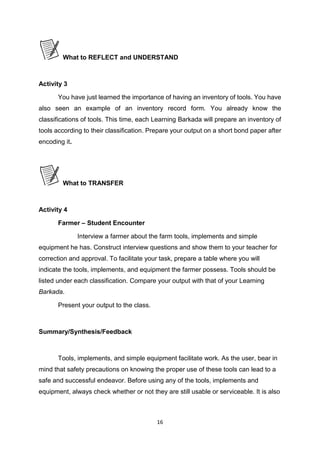
Category 5 Data to 100 Mbps (Fast Ethernet)
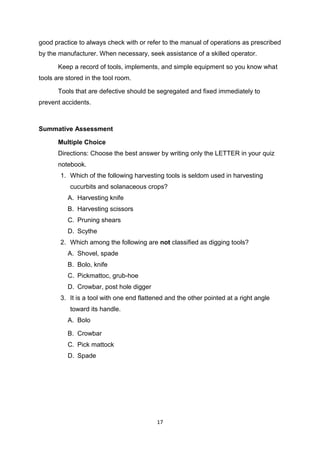
Unshielded Twisted Pair Connector
The standard connector for unshielded twisted pair cabling is an RJ-45 connector.
This is a plastic connector that looks like a large telephone-style connector. A slot allows
the RJ-45 to be inserted only one way. RJ stands for Registered Jack, implying that the
connector follows a standard borrowed from the telephone industry. This standard
designates which wire goes with each pin inside the connector.
46 | P a g e
PC HARDWARE SERVICING
The Strengthened Technical-Vocational Education Program
RJ-45 connector
Shielded Twisted Pair (STP) Cable
A disadvantage of UTP is that it may be susceptible to radio and electrical frequency
interference. Shielded twisted pair (STP) is suitable for environments with electrical
interference; however, the extra shielding can make the cables quite bulky. Shielded
twisted pair is often used on networks using Token Ring topology.
Coaxial Cable
Coaxial cabling has a single copper conductor at its center. A plastic layer provides
insulation between the center conductor and a braided metal shield. The metal shield
helps to block any outside interference from fluorescent lights, motors, and other
computers.
Coaxial cable
Although coaxial cabling is difficult to install, it is highly resistant to signal
interference. In addition, it can support greater cable lengths between network devices
than twisted pair cable. The two types of coaxial cabling are thick coaxial and thin coaxial.
Wireless LANs
Not all networks are connected with cabling; some networks are wireless. Wireless
LANs use high frequency radio signals, infrared light beams, or lasers to communicate
between the workstations and the file server or hubs. Each workstation and file server on a
wireless network has some sort of transceiver/antenna to send and receive the data.
Information is relayed between transceivers as if they were physically connected. For
longer distance, wireless communications can also take place through cellular telephone
technology, microwave transmission, or by satellite.
47 | P a g e
PC HARDWARE SERVICING
The Strengthened Technical-Vocational Education Program
Wireless networks are great for allowing laptop computers or remote computers to
connect to the LAN. Wireless networks are also beneficial in older buildings where it may
be difficult or impossible to install cables.
What is a Network Operating System?
Unlike operating systems, such as DOS and Windows, that are designed for single
users to control one computer, network operating systems (NOS) coordinate the activities
of multiple computers across a network. The network operating system acts as a director
to keep the network running smoothly.
The two major types of network operating systems are:
• Peer-to-Peer
• Client/Server
Peer-to-Peer
Peer-to-peer network operating systems allow users to share resources and files
located on their computers and to access shared resources found on other computers.
However, they do not have a file server or a centralized management source. In a peer-to-
peer network, all computers are considered equal; they all have the same abilities to use
the resources available on the network. Peer-to-peer networks are designed primarily for
small to medium local area networks. AppleShare and Windows for Workgroups are
examples of programs that can function as peer-to-peer network operating systems.
Peer-to-peer network
Advantages of a peer-to-peer network:
• Less initial expense - No need for a dedicated server.
• Setup - An operating system (such as Windows XP) already in place may only need
to be reconfigured for peer-to-peer operations.
48 | P a g e
PC HARDWARE SERVICING
The Strengthened Technical-Vocational Education Program
Disadvantages of a peer-to-peer network:
• Decentralized - No central repository for files and applications.
• Security - Does not provide the security available on a client/server network.
Client/Server
Client/server network operating systems allow the network to centralize functions
and applications in one or more dedicated file servers. The file servers become the heart of
the system, providing access to resources and providing security. Individual workstations
(clients) have access to the resources available on the file servers. The network operating
system provides the mechanism to integrate all the components of the network and allow
multiple users to simultaneously share the same resources irrespective of physical location.
Novell Netware and Windows 2000 Server are examples of client/server network operating
systems.
Client/server network
Advantages of a client/server network:
• Centralized - Resources and data security are controlled through the server.
• Scalability - Any or all elements can be replaced individually as needs increase.
• Flexibility - New technology can be easily integrated into system.
• Interoperability - All components (client/network/server) work together.
• Accessibility - Server can be accessed remotely and across multiple platforms.
Disadvantages of a client/server network:
• Expense - Requires initial investment in dedicated server.
• Maintenance - Large networks will require a staff to ensure efficient operation.
• Dependence - When server goes down, operations will cease across the network.
49 | P a g e
PC HARDWARE SERVICING
The Strengthened Technical-Vocational Education Program
UTP Cable
A UTP cable (category 5) is one of the most popular LAN cables. This cable consists
of 4 twisted pairs of metal wires (that means there are 8 wires in the cable). Adding RJ45
connectors at both ends of the UTP cable it becomes a LAN cable they usually use.
Preparation
You need a UTP Cable, Crimping Tool, RJ45, and Cutter
Making Cable
Follow the steps below.
50 | P a g e
PC HARDWARE SERVICING
The Strengthened Technical-Vocational Education Program
1. Remove the outmost vinyl shield for 12mm at one end of the cable (we call this side
A-side).
2. Arrange the metal wires in parallel (refer the each section's wire arrangement
table). Don't remove the shield of each metal line.
3. Insert the metal wires into RJ45 connector on keeping the metal wire arrangement.
4. Set the RJ45 connector (with the cable) on the pliers, and squeeze it tightly.
5. Make the other side of the cable (we call this side B-side) in the same way.
6. After you made it, you don't need to take care of the direction of the cable. (Any
cable in this page is directionless --- that means you can set either end of the cable
to either device.)
How to see the wire arrangement
Take the UTP cable with your left hand and a RJ45 connector with your right hand.
Hold the RJ45 connector in the way you can see the contact metal face of the RJ45
connector.
The tables below are for the case where the UTP cable consists of green/green-white,
orange/orange-white, blue/blue-white, brown/brown-white twisted pairs.
10 Base T / 100 Base T Straight
10BaseT and 100BaseT are most common mode of LAN. You can use UTP category-
5 cable for both mode. (You can use UTP category-3 cable for 10BaseT, in which there are
only 3 wires inside the cable.)
A straight cable is used to connect a computer to a hub. You can use it to connect 2
51 | P a g e
PC HARDWARE SERVICING
The Strengthened Technical-Vocational Education Program
hubs in the case one of the hubs has an uplink port (and you use normal port on the other
hub).
10 Base T / 100 Base T Cross
A cross cable for 10BaseT and 100BaseT is used to connect 2 computers directly
(with ONLY the UTP cable). It is also used when you connect 2 hubs with a normal port on
both hubs. (In other words, the cross cable is used relatively in a rare case.)
Pin ID side A side B
1 orange-white orange-white
2 orange orange
3 green-white green-white
4 blue blue
5 blue-white blue-white
6 green green
7 brown-white brown-white
8 brown brown
52 | P a g e
PC HARDWARE SERVICING
The Strengthened Technical-Vocational Education Program
1 orange-white green-white
2 orange green
3 green-white orange-white
4 blue blue
5 blue-white blue-white
6 green orange
7 brown-white brown-white
8 brown brown
To create a peer network, you must have the following components:
•
A network interface or Local Area Network (LAN) adapter for each computer. The same
manufacturer and model of network card is preferred.
• Cabling that is supported by the network cards.
• Windows 98 drivers for the network cards.
• A common network protocol.
• A unique computer name for each computer.
To create a peer network, follow these steps for each computer connected to the network:
1. Shut down the computer and install the network card and appropriate
cabling for each computer.
53 | P a g e
PC HARDWARE SERVICING
The Strengthened Technical-Vocational Education Program
NOTE: For information about how to configure your network adapters and physically
connect your computers, consult the documentation included with your network
adapters or contact the manufacturer(s) of your network adapters.
2. Start Windows and install the network drivers. Windows may detect your network card
and install the drivers when you start the computer. If the network card drivers are not
included with Windows, follow the manufacturer's instructions about how to install the
network drivers.
.
3. Choose a client and a common protocol for each computer. To do this, follow these
steps:
a. Click Start, point to Settings, click Control Panel, and then double-click
Network.
b. Click Add, click Client, and then click Add.
c. In the Manufacturers box, click the appropriate manufacturer, click the
appropriate client in the Network Clients box, and then click OK.
d. Click Add, click Protocol, and then click Add.
e. In the Manufacturers box, click the appropriate manufacturer, click the
appropriate protocol in the Network Protocol box, and then click OK.
.
4. Configure a peer server. Each computer that is configured for File and Printer Sharing
can act as a server. To configure a computer for File and Printer Sharing, use the following
steps:
a. Click Start, point to Settings, click Control Panel, and then double-click Network.
b. Click File and Print Sharing, click one or both options to share files and printers,
click OK, and then click OK again.
54 | P a g e
PC HARDWARE SERVICING
The Strengthened Technical-Vocational Education Program
c. Click Yes when you are prompted to restart your computer.
.
5. Give each computer a unique computer name. To do this, use the following steps:
a. Click Start, point to Settings, click Control Panel, and then double-click
Network.
b. On the Identification tab, type a unique name in the Computer name
c.
box.
Click OK, and then click Yes when you are prompted to restart your
computer.
NOTE: The computer name must be unique for each computer on the
network and should be no more than 15 characters in length. In small
networks, the workgroup name should be the same for each computer so
that all computers are visible in the same workgroup when browsing. You
should not use spaces or the following characters in computer and
workgroup names:
Windows XP Networking
As in previous versions of Windows, Windows XP provides a wizard for network
connection setup. Wizards break down a task into individual steps and guide the user
through the steps one at a time.
The Windows XP New Connection Wizard supports two basic types of Internet
connections, dialup and broadband.
To access the network connection setup wizard in Windows XP, navigate through
the Start menu to the Connect To and Show all connections options as shown below.
55 | P a g e
PC HARDWARE SERVICING
The Strengthened Technical-Vocational Education Program
The same feature is also accessible via the Network Connections icon in Control
Panel.
Choosing either of the above options causes a new window to appear on the
desktop as shown below. On the right, this window displays icons for any pre-existing
connections. The Create a new connection option on the left allows new connections to be
set up.
Types of Windows XP Network
Connection Setup
56 | P a g e
PC HARDWARE SERVICING
The Strengthened Technical-Vocational Education Program
Clicking the Create a new connection option from the Network Connections dialog
activates the wizard as shown below.
Clicking Next presents the user with three main choices for Internet and private
network setup as shown below.
The Connect to the Internet option supports several types of Internet connection
setup. This option allows the user to choose from a list of ISPs, use a setup CD-ROM
provided by their ISP, or set up a connection manually.
Connect to the network at my workplace supports client-side set up of both dialup
remote access and VPN services.
The Set up an advanced connection option supports serial, parallel and infrared
port networking setups. This option also allows the user to enable certain types of
incoming network connections.
57 | P a g e
PC HARDWARE SERVICING
The Strengthened Technical-Vocational Education Program
Setting up an Internet Connection
The Getting Ready page presents three choices as shown below:
The Choose from a list of Internet Service Providers option gives instructions for
setting up an account with an ISP, then making the Internet connection through that new
account.
The Set up my connection manually option sets up connections for accounts that
have already been opened with an ISP (username and password are ready for use).
The Use the CD I got from an ISP option should be used when possessing an
installation CD-ROM from one of the service providers.
By default the first option Get online with MSN (Microsoft Network) is selected. To
set up a new connection to MSN, click Finish. To set up a new connection to various other
ISPs, change the radio button selection to the second option and then click Finish.
MSN Internet Connection Setup
After choosing MSN and clicking Finish, the Windows XP network connection wizard
closes and a new window opens as shown below.
58 | P a g e
PC HARDWARE SERVICING
The Strengthened Technical-Vocational Education Program
This window leads to the MSN Explorer Wizard. Answering Yes to this question
creates a key in the Windows Registry that allows access to MSN email from the Windows
XP Start Menu. Answering No to this question skips that step. After answering either Yes or
No, the MSN wizard launches automatically.
The MSN wizard sets up an MSN account and dial-up Internet connection but
require a working phone line connected to a working modem.
Other ISP Internet Connection Setup
After choosing an alternate ISP and clicking Finish, the Windows XP network connection
wizard closes and a new Windows Explorer window opens as shown below.
The first shortcut launches the MSN window shown above. The second shortcut
launches a new Internet Connection Wizard. This wizard dials a public phone number to
obtain a list of ISP referrals from Microsoft. Obviously, this wizard will provide a limited list
of service providers and not necessarily the best ones for each individual's needs.
These shortcuts, installed in C:Program FilesOnline Services, can be accessed at
any time from Windows Explorer. It is not necessary to navigate through the Windows XP
network connection wizard to execute them.
This wizard assumes an account has been opened previously. Manual connections
require the username (account name) and password from a working ISP service. Dial-up
connections also require a telephone number; broadband connections do not.
59 | P a g e
PC HARDWARE SERVICING
The Strengthened Technical-Vocational Education Program
The next step presents three options for creating a manual connection.
The Connect using a dial-up modem option works for phone line Internet services
(either traditional dial-up or ISDN).
The Connect using a broadband connection that requires a user name and
password option works for DSL or cable modem Internet services that use PPPoE.
The Connect using a broadband connection that is always on option works for true
"always on" DSL or cable modem services (those that do not require a
username/password) as specified in their service agreement.
Microsoft added this option for informational purposes only. Service providers
normally create their setup CDs to include all of the necessary setup data for an operating
system in a self-contained package. Therefore, clicking Finish has no effect other than to
exit the wizard.
60 | P a g e
PC HARDWARE SERVICING
The Strengthened Technical-Vocational Education Program
Setting XP Network Connection
Equipment, Tools and Materials Required:
- UTP cables
- 4 Computer units
- 1 hub
Given the following materials, set-up a network connection on four computers.
CRITERIA PASSED FAILED
• Safety Precautions are observed.
• All the UTP are properly connected to the computer and
hub.
• Computers are properly connected and seen in the
network.
• Proper boot-up and shutdown of the computer is observed.
Total:
61 | P a g e
PC HARDWARE SERVICING
The Strengthened Technical-Vocational Education Program
Accident reports may contain the following details:
• Name of person injured
• Date and Time of accident
• Type of Injury
• First Aid given
• Action taken to prevent further accidents.
With this kind of report, the teacher and the students could see what type of
accident mostly occur on their place that they could already prevent it from coming.
Sample Accident Report
ACCIDENT, DANGEROUS OCCURRENCE AND INCIDENT REPORT
Name: _______________________________ Date: ________________
Year & Section: ______________________
A. Subject of Report
(Please tick the box)
• Injury
• Dangerous occurrence
• Damage to equipment
• Accidents/incidents with the potential to injure or cause damage
• Health Condition
62 | P a g e
PC HARDWARE SERVICING
The Strengthened Technical-Vocational Education Program
B. Place, Date, Time:
Exact location of event: ___________________________________
Time of event: ____________________________________________
Teacher-in-charge at the time of event: ___________________
C. Nature of Injury:
___________________________________________________________
___________________________________________________________
___________________________________________________________
D. First Aid Treatment:
___________________________________________________________
___________________________________________________________
___________________________________________________________
Checked by: ____________________________
I. Simulation
1. Group yourselves into six.
2. Show some situation where it can lead to an unwanted accidental event.
Show the class on how you would come up with this.
3. The performance will be rated according to the following:
Performance Criteria:
5 - Excellently performed
4 - Very Satisfactorily performed
3 - Satisfactorily performed
2 - Fairly performed
1 - Poorly performed
63 | P a g e
PC HARDWARE SERVICING
The Strengthened Technical-Vocational Education Program
II. Make an Accident Report that you may encounter inside the computer laboratory.
Program/ Course: Computer Hardware Servicing NC II
Unit of Competency: Configure Computer System and Networks
Module: Configuring Computer System and Networks
Learning Outcome 3: Analyze and try-out the configured computer system.
Assessment Criteria:
1. Another round of inspection and test following the specified manufacturer’s instruction
is carried out.
2. Safe operation of the network and system is assured guaranteed 100%.
References:
• Introduction to PC Hardware and Troubleshooting by Mike Myers
64 | P a g e
PC HARDWARE SERVICING
The Strengthened Technical-Vocational Education Program
• http://support.microsoft.com
You have learned from Information Sheet #2.2.6 how to configure a Peer-to-Peer
network and XP connection with Internet. Now to check if the LAN connection is really
working, you must try to share your resources and accessed shared resources of other
computer. Make sure that you follow the standard operating procedures in configuring
network to achieve successful operation.
Sharing Resources and Accessing Shared Resources
1. Open My Computer, double-click
the C: drive, and create a new
folder on the C: drive. Name it
Shared. Right-click the Shared
folder and select Properties.
65 | P a g e
PC HARDWARE SERVICING
The Strengthened Technical-Vocational Education Program
2. In the Shared Properties dialog box,
select the Sharing tab. Notice that the. Select
the Share This Folder button. Type the Share
Name. Click Apply and the computer you are
linked to should be able to view your Shared
folder.
3. Right-click My Network Places, which
should be located on your desktop. Select
Properties. Right-click your connection (look for a name like Local Area Connection) and
again select Properties. In your Local Area Connection Properties dialog box, select File and
Print Sharing for Microsoft Networks and click OK. If you don’t see an option for File and
Print Sharing, click Install and select a service and then click Add. Now select the File and
Print Sharing option.
4. Open My Network Places- double-click the icon- and select the Entire Network option
under Other Places at the left of the window. In the main (right-hand) pane, you should see
one or more options. Double-click the Microsoft Windows Network icon.
5. You’re now at the main network screen, where you should see what’s called a
workgroup. A workgroup is a basic group of computers connected to the same Ethernet
Local Disk (C:PC 1)
66 | P a g e
PC HARDWARE SERVICING
The Strengthened Technical-Vocational Education Program
network. Double-click the workgroup to see all the computers connected to your Ethernet
network.
At this point, you can access any of the other computers and see what folders they
have shared. If you don’t see any computer but your own, just wait a few minutes and
refresh your screen. Then it’s time to troubleshoot the network problems.
In a network, other peripherals such as printer and faxes could also be shared. You could
use one computer in a network of 10 computers. Click the Print command, when the dialog
box appears click Find Printer. Then click Browse. Find the location of the printer you will
use.
If you don’t have any printer installed in your computer, here’s the step on how:
TO ADD A PRINTER:
1. Click Start button, then point to Printer and Faxes.
67 | P a g e
PC HARDWARE SERVICING
The Strengthened Technical-Vocational Education Program
2. A window will be displayed showing Click Add a Printer on the Taskpane (if there are
printers already installed).
3. To continue, click Next.
4. Select what kind of printer you are going to connect, Local printer or Network printer.
68 | P a g e
PC HARDWARE SERVICING
The Strengthened Technical-Vocational Education Program
5. Select Printer port.
6. Below Manufacturer, Click on the name of the printer's manufacturer. Manufacturers
are listed in alphabetical order and you may have to click on the little down arrow until
the manufacturer's name appears in the list.
Below Model, Click on the model of the printer you will be using. Model names are
listed in alphabetical order and you may need to click on the little down arrow until the
model name appears in the list.
Note: You can often find the manufacturer and model names by looking on the printer
itself.
7. Click the Next button. Windows will check to see if it has the software necessary to
communicate with the printer (the software your computer needs to communicate
with devices like printers, monitors, and disk drives is known as a driver). If so, it will
install the software automatically.
Note: If you receive a message saying that Windows was unable to locate the
necessary files, you will need to get the necessary software before continuing.
Most often, the printer manufacturer's Web site will have a section called
Drivers, from which you can download the software necessary to use their products. If you
69 | P a g e
PC HARDWARE SERVICING
The Strengthened Technical-Vocational Education Program
are unable to locate the software on the manufacturer's Web site, inquire within your
department to see if someone is in possession of a software installation disk for the
printer. Once you have obtained the necessary software, click here for instructions on
installing a driver.
• Assign your Printer name. Click Next. If you want to test page, click Yes. Click Next.
9. Then Finish. Right-click on the printer you installed. Click Set as Default.
70 | P a g e
PC HARDWARE SERVICING
The Strengthened Technical-Vocational Education Program
Writing an Accomplishment Report
Accomplishment Report is done when you have finished a certain job. This report
may be in narrative or tabular form.
Sample of an Accomplishment Report
ACCOMPLISHMENT REPORT
Name: ___________________________ Date:_________________
Assigned Task Working Properly Not Working Connected in a
Network
PC 1 √ √
PC 2 √ √
PC 3 √
Printer √ √
Accessing Printer in a Network
Materials, Equipments:
- Computer Units
- Hub
- Printer
71 | P a g e
PC HARDWARE SERVICING
The Strengthened Technical-Vocational Education Program
• Given the following materials and equipments, access one document file on other
computer in a network.
• Print the file you open with the use of the network printer.
• Make an Accomplishment Report on this operation.
Self-Check# 6.1.2
1. Internet
CRITERIA RATING
• Computers are connected in the network. 30%
• All the peripherals are properly inspected. 20%
• Shared files are located and opened a document in the
computer.
30%
• Accessed file has been printed. 20%
Total: 100%
72 | P a g e
PC HARDWARE SERVICING
The Strengthened Technical-Vocational Education Program
2. Intranet
3. GAN
4. WAN
5. MAN
6. Topology
7. Network
8. LAN
9. Star topology
10. Ring topology
Self-Check# 6.1.3
• tweezers
• magnifying glass
• multi-tester
• side-cutter pliers
• soldering iron
• cable tie
• Computer Storage device
• adapter
• manuals
• long nose pliers
Self-Check #6.2.1
Googles
- used to prevent tiny particles from entering our eyes
73 | P a g e
PC HARDWARE SERVICING
The Strengthened Technical-Vocational Education Program
Coverall
-worn to prevent the body or clothes from any types of dirt
Apron
-also worn to protect the body from dirt
Gloves
-used in handling objects without hurting the hands.
1 | P a g e
PC HARDWARE SERVICING
The Strengthened Technical-Vocational Education Program
Page
How to Use this Module .....................................................................................................................ii
Introduction .......................................................................................................................................iii
Technical Terms .................................................................................................................................iv
Learning Outcome # 1........................................................................................................................ 1
Information Sheet # 7.1.1.................................................................................................................. 2
Operation Sheet # 7.1.1..................................................................................................................... 8
Learning Outcome # 2........................................................................................................................ 9
Information Sheet # 7.2.1................................................................................................................ 11
Self Check # 7.2.1............................................................................................................................. 14
Information Sheet # 7.2.2................................................................................................................ 15
Operation Sheet # 7.2.2................................................................................................................... 20
Self check # 7.2.2 ............................................................................................................................. 22
Information Sheet # 7.2.3................................................................................................................ 23
Operation Sheet # 7.2.3................................................................................................................... 30
Learning Outcome # 3...................................................................................................................... 31
Job Sheet # 7.3.1.............................................................................................................................. 33
Answer keys ..................................................................................................................................... 37
2 | P a g e
PC HARDWARE SERVICING
The Strengthened Technical-Vocational Education Program
Welcome to the Module “Maintaining of Computer System and Networks”. This module
contains training materials and activities for you to complete.
The unit of competency “Maintain Computer System and Networks” contains
knowledge, skills and attitudes required for a Computer Hardware Servicing NC II course.
You are required to go through a series of learning activities in order to complete
each of the learning outcomes of the module. In each learning outcome there are
Information Sheets, Job Sheets, Operation Sheets, and Activity Sheets. Follow these
activities on your own and answer the Self-Check at the end of each learning activity.
If you have questions, don’t hesitate to ask your facilitator for assistance.
Recognition of Prior Learning (RPL)
You may already have some of the knowledge and skills covered in this module
because you have:
o been working for some time
o already have completed training in this area.
If you can demonstrate to your teacher that you are competent in a particular skill
or skills, talk to him/her about having them formally recognized so you don’t have to do he
same training again. If you have a qualification or Certificate of Competency from previous
trainings show it to your teacher. If the skills you acquired are still current and relevant to
this module, they may become part of the evidence you can present for RPL. If you are not
sure about the currency of your skills, discuss it with your teacher.
After completing this module ask your teacher to assess your competency. Result of
your assessment will be recorded in your competency profile. All the learning activities are
designed for you to complete at your own pace.
Inside this module you will find the activities for you to complete followed by
relevant information sheets for each learning outcome. Each learning outcome may have
more than one learning activity.
3 | P a g e
PC HARDWARE SERVICING
The Strengthened Technical-Vocational Education Program
Course : Computer Hardware Servicing NC II
Unit of Competency : Maintain Computer System and Networks
Module : Maintaining Computer Systems and Networks
INTRODUCTION
This module contains information and suggested learning activities on Computer
Hardware Servicing NC II. It includes the following competencies: plan and prepare
maintenance procedures; maintain computer system and networks; and inspect and test
computer system and networks.
It consists of 3 learning outcomes. Each learning outcome contains learning
activities supported by each instructional sheet. Upon completion of this module, report to
your teacher for assessment of what you achieved in terms of knowledge and skills
requirement in this module. If you pass the assessment, you will be given a certificate of
completion.
SUMMARY OF LEARNING OUTCOMES:
Upon completion of the module you should be able to:
LO1. Plan and prepare maintenance procedures
LO2. Maintain computer system and networks
LO3. Inspect and test computer system and networks
PRE-REQUISITES:
You must have completed module 5 “Diagnose and Troubleshoot Computer
System” and module 6 “Configure Computer Systems and Networks” before studying this
module.
4 | P a g e
PC HARDWARE SERVICING
The Strengthened Technical-Vocational Education Program
 OHS –

Occupational Health and Safety
Port hub /Port

– is a connector on the back of a computer or other device. A port is
either a serial port or a parallel port.
Modem

- (Modulator-Demodulator) The modem is a device that allows a given
computer to share data or otherwise a device which let computers exchange
information
USB

– (Universal Serial Port)
Scanner

- is an input device that read text or illustration printed on paper, translates
the information into a form that a computer can use.
Printer

- is a piece of hardware that produces a paper copy (also known as ‘hardcopy’)
of the information generated by the computer.
Flash drive

– a portable storage device which is plug directly to the USB port.
Network –

a group of computers and associated devices that are connected by
communications facilities.
OS (Operating system)

software that controls the allocation and use of programs and
data that a computer uses.
Software

– programs and data that a computer uses.
Maintenance

- is the testing and cleaning of equipment.
Planning – is both the organizational process of creating and maintaining a plan; and
the psychological process of thinking about the activities required to create a desired
future on some scale
 Computer System

- The complete computer made up of the CPU, memory and related
electronics (main cabinet), all the peripheral devices connected to it and its operating
system. Computer systems fall into two broad divisions: clients and servers. Client
machines fall into three categories from low to high end: laptop, desktop and
workstation. Servers range from small to large: low-end servers, midrange servers and
mainframes.
Defragmentation –

the process of reorganizing and rewriting files so that they occupy
one large continuous area on your hard disk.
CRT

– (Cathode Ray Tube) A display device used in computer monitors and television
sets.
Boot sector

– The part of the formatted disk containing the operating system loading a
program.
Virus – A program intended to damage your computer system without your
knowledge and permission.
5 | P a g e
PC HARDWARE SERVICING
The Strengthened Technical-Vocational Education Program
Course : Computer Hardware Servicing NC II
Unit of Competency : Maintain Computer System and Networks
Module : Maintaining Computer System and Networks
Learning Outcome 1: Plan and Prepare Maintenance Procedures
Assessment Criteria:
1. Planning and preparing for maintenance task is organized as a prerequisite.
2. OHS policies are carried out along with the task.
3. Computer system is regularly checked in compliance with maintenance procedures.
4. Appropriate materials are used for ensuring work delivery that conforms with task
specifications.
5. Proper tools, equipment and testing devices for maintenance purposes are
obtained and checked against correct operation and safety.
6. Computer system and network are maintained based on the manual instructions
References:
1. Bigelow, Stephen J., PC Technician’s Troubleshooting, McGraw Hill
2. Kelly,DianneRose, Computer Maintenance and Troubleshooting Handbook Rose
Nelson WEB: http://home.comcast.net/~
3. Sandler,Corey, Fix Your Own PC,MIS Press
4. Kuhlman, Dave, dkuhlman@rexx.com
http://www.rexx.com/~dkuhlman Dave Kuhlman. This documentation is
covered by The MIT License: http://www.opensource.org/licenses/mit-license
5. Meyers,Mike,Introduction to PC Hardware and Troubleshooting,McgrawHill
6. www.eserviceinfo.com
7. http:/csd/2.computer.org
8. http:/sevier.com/wps
9. www.yahoo.com
6 | P a g e
PC HARDWARE SERVICING
The Strengthened Technical-Vocational Education Program
Plan and Prepare Maintenance Procedures
Introduction:
Planning and preparing systematic maintenance procedure save time, money and
frustration. It is a good idea and opportunity to learn the proper care and maintenance of
your computer.
PC maintenance is an important topic for anyone who owns a PC. Looking after your
PC properly ensures you of trouble-free use. Regular PC maintenance also keeps the
machine’s performance optimal.
A. Plan Maintenance Procedures for Computer System and Networking.
1. Design a systematic maintenance plan for hardware.
• Design a monitoring, evaluating and updating plan.
• Place your computer in a well-ventilated area.
• Schedule use of computer for its longer life.
• Move the computer only when it is turned off and unplugged.
• Treat your computer properly.
• Maintain your hard disk
2. Design a systematic maintenance plan for your software.
• Backup your files
• Install or secure passwords
• Delete temporary files
• Update anti-virus and spy ware
7 | P a g e
PC HARDWARE SERVICING
The Strengthened Technical-Vocational Education Program
MONTHLY COMPUTER MAINTENANCE PLAN
JUNE JULY AUG SEPT OCT NOV DEC
Anti virus
software
checkups
Disk space
utilization
Defragmentation
of hard drives
Troubleshoot
hardware and
software issues
TYPES OF MAINTENANCE PROCEDURE:
(1) Hardware maintenance is the testing and cleaning of equipment.
(2) Information system maintenance is the routine updating of master files, such as
adding and deleting employees and customers and changing credit limits and product
prices.
(3) Software or program maintenance is the updating of application programs in order to
meet changing information requirements, such as adding new functions and changing
data formats. It also includes fixing bugs and adapting the software to new hardware
devices.
(4) Disk or file maintenance is the periodic reorganizing of disk files that have become
fragmented due to continuous updating.
8 | P a g e
PC HARDWARE SERVICING
The Strengthened Technical-Vocational Education Program
Work place procedures
• Identify hazards and assess risk.
• Execution of OHS policies are carried out along with the task.
Following certain procedure is very important to perform a given operation or
evolution or in reaction to a given event. The table below shows different elements and
their corresponding performance criteria to be able to identify occupational health and
safety hazards, and assess risk, as well as follow instructions and procedure in the
workplace with minimal supervision. The students will also be capable of participating and
contributing to OHS management issues.
ELEMENT PERFORMANCE CRITERIA
1. Identify hazards and assess risk. 1.1 Identify hazards in the work area and
during the performance of
workplace duties.
1.2 Assess level of risk
2. Follow procedures and
strategies for risk control.
2.1 Report hazards in the work area to
designated personnel according to
workplace procedures
2.2 Follow workplace procedures and
work instructions for assessing and
controlling risks with minimal
supervision.
2.3 Whenever necessary, within the scope
of responsibilities and
competencies, follow workplace
procedures for dealing with hazards
and incidents, fire and/or other
emergencies.
9 | P a g e
PC HARDWARE SERVICING
The Strengthened Technical-Vocational Education Program
ELEMENT PERFORMANCE CRITERIA
3. Contribute to OHS in the
workplace.
3.1 Describe employee’s rights regarding
consultation on OH&S matters
3.2 Raise task and/or job specific OH&S
issues with appropriate people in
accordance with workplace
procedures and relevant OH&S
legislative requirements
3.3 Contribute to participative
arrangement for OH&S management
in the workplace within
organisational procedures and the
scope of responsibilities and
competencies
3.4 Provide feedback to supervisor on
hazards in work area in line with
organisational OH&S policies and
procedures
3.5 Provide support in implementing
procedures to control risks in
accordance with organisational
procedures
Examples of OHS issues which may
need to be raised by workers with
designated personnel may include:
 Identified Hazards
 Problems encountered in managing
risks associated with hazards
 Clarification on understanding of OHS
policies and procedures
 Communication and consultation
processes
 Follow up on reports and feedback.
 Effectiveness of risk controls in place
 Training needs
10 | P a g e
PC HARDWARE SERVICING
The Strengthened Technical-Vocational Education Program
Materials, Tools, Equipment and Testing Devices.
Programming Tools
(1) Programming tools are used for software development or system maintenance.
Virtually, any program or utility that helps programmers or users develop
applications or maintain their computers can be called a tool. Examples of
programming tools are compilers, interpreters, assemblers, 4GLs, editors,
debuggers and application generators.
(2) Programming tools help the user analyze or search for data. For example, query
and report programs are often called query tools and report tools.
(3) An on-screen function in a graphics program; for example, line draw, circle draw or
brush tool.
(4) A software control panel for setting user preferences.
(5) Sometimes people will call any software a "tool." For example, the phrase, "there
aren't any tools to do that job" means that no application is available to perform
the required processing.
11 | P a g e
PC HARDWARE SERVICING
The Strengthened Technical-Vocational Education Program
Equipment/Facilities Tools & Instruments Supplies & Materials
Server
Computer peripherals
Desktop computers
OHS guidelines
Phil. Environmental
protection standards
Monitors
Motherboard
Power supply
Network device and
cablings
Hubs
Switches
LAN Cards
Printers and
Scanners
Routers
USB Flash Drives
Protective eye wear
Wire stripper with cutter
Pliers(Assorted)
Screw drivers (Assorted)
Soldering iron/gun
De-soldering tool
Flashlight
Tweezers
Mirrors
Antistatic wrist wrap
LAN Tester
Crimping tool
Software installer
Work bench
Magnifying glass
Floppy disk
Compact Disk
12 | P a g e
PC HARDWARE SERVICING
The Strengthened Technical-Vocational Education Program
Plan and Prepare Maintenance Procedure
1. Prepare/Design a daily maintenance plan for your hardware, ( time allotment: 1 week)
MAINTENANCE TASK MON TUE WED THUR FRI
Recalibrate the battery
Clean computer case
Clean the keyboard
Clean the mouse
Clean the screen
Clean up hard drives
2. Design a systematic daily plan for your software, ( time allotment: 1 week)
MAINTENANCE TASK MON TUE WED THUR FRIDAY
Create an emergency diskette
Check for viruses
Back up files
Defragment hard drive
Scan hard drive for errors
13 | P a g e
PC HARDWARE SERVICING
The Strengthened Technical-Vocational Education Program
Program course : Computer Hardware Servicing NCII
Unit of Competency : Maintain Computer System and Networks
Module : Maintaining Computer System and Networks
LO.2 : Maintain Computer System and Networks
Assessment Criteria:
1. Appropriate personal protective equipment are used in conformity with the
standard procedures.
2. Periodic maintenance of the equipment is performed following manufacturer’s
requirements.
3. Established procedures are followed in case of repair and parts replacements.
4. Accidental events or conditions are responded to in accordance with the
established standards.
Resources:
Equipment/Facilities Tools & Instruments Supplies & Materials
Server
Computer peripherals
Desktop computers
OHS guidelines
Phil. Environmental
protection standards
Monitors
Motherboard
Power supply
Network device and
cablings
Hubs
Switches
LAN Cards
Printers and Scanners
Routers
Protective eye wear
Wire stripper with cutter
Pliers(Assorted)
Screw drivers (Assorted)
Soldering iron/gun
De-soldering tool
Flashlight
Tweezers
Mirrors
Antistatic wrist wrap
LAN Tester
Crimping tool
Software installer
Work bench
Magnifying glass
Floppy disk
Compact Disk
14 | P a g e
PC HARDWARE SERVICING
The Strengthened Technical-Vocational Education Program
USB Flash Drives
Reference:
1. McLaughlin,Robert, Sasser,Susan, Ralston,Mary.Fix Your Own PC
2. Meralco Faoundation.
.Philippine Graphic
Arts, Inc Tandang Sora St.Caloocan City
Microcomputer Servicing Plus
3. Legaspi,Carlos, Caiña, Mark Anthony.
. Pasig City, Philippines.
Operate A Personal Computer
4. Bigelow,Stephen J. PC Technician’s Troubleshooting ,McGaw Hill
. Dasmariñas
Computer Learning Center.Dasmariñas,Cavite, Philippines
5. www.helpwithpcs.com
6. http://en.wikipedia.org
7. www.techsoup.org
8. www.howstuffworks.com
9. www.microsoft.com/technet/network
15 | P a g e
PC HARDWARE SERVICING
The Strengthened Technical-Vocational Education Program
Tools and equipment used to protect the user and the computer system.
Types of personal protective devices
1. Anti-static devices
2. Power surge protectors
3. Personal equipments
ESD (Electro Static Discharge)
-A small amount of static electricity that can destroy small parts of your computer.
Anti-static devices
Devices designed to protect the computer from static electricity.
Examples:
1. Anti-static wrist strap
2. Anti-static mat
3. Anti-static bag
4. Anti-static spray
Power surge protectors
Devices designed to protect the computer from sudden power surges from
intermittent power sources.
Examples:
1. AVR (Automatic Voltage Regulators)
2. UPS (Uninterrupted Power Supply)
Personal Equipment
1. Small paint brush
2. Screw drivers
3. Pliers and tweezers
4. Compressed air
5. Handheld vacuum
16 | P a g e
PC HARDWARE SERVICING
The Strengthened Technical-Vocational Education Program
Periodic Maintenance Scheme
Regular scheduled upkeep of your computer will keep you and your computer in working
smoothly.
Daily Schedule
• Update virus and spyware definitions
• Do incremental backup – back up updated files for each date.
• Reboot upon crash- Reboot the computer to fix your pc upon crash.
Weekly
• Full virus and spyware scan
• Complete backup of files
• Patch up –Get latest software update for your operating system.
Monthly
• Clean your PC inside and out.
• Defrag your hard drive to speed up its operation.
Yearly
• Check your programs – clean up unused programs
• Reformat your hard drive and reinstall the operating system
• Make a full diagnostic check on hardware and software
17 | P a g e
PC HARDWARE SERVICING
The Strengthened Technical-Vocational Education Program
Sample Maintenance scheme
Preventive Maintenance Activity
Recommended
Frequency
Auto?
Scan hard disk file systems for errors Daily Yes
Scan for viruses Daily Yes
Back up data Daily No
Clean CRT screen Weekly No
Defragment hard disks Monthly Yes
Scan for hard disk read errors Weekly Yes
Clean mouse Monthly No
Check for full hard disk volumes and
remove unnecessary files
Monthly No
Update virus definition files Monthly Sometimes
Check power protection devices to ensure
they are still protecting the system
Quarterly No
Check power supply fan for ventilation and
dirt buildup and clean if necessary
Quarterly No
Back up CMOS information Quarterly No
Update emergency boot floppies Quarterly No
Clean floppy disk drive internals and
read/write heads
Quarterly (depending
on use)
No
Check processor temperature, inspect heat
sink and fan to ensure they are working
Annually (or
whenever case is
opened)
No
Check hard disk for temperature and
vibration
Annually (or
whenever case is
opened)
No
Clean exterior of case Annually No
Clean exterior of monitor Annually No
Check and clean interior, motherboard and
expansion cards if necessary
Annually No
Check internal connections and cables Annually No
Clean keyboard Annually No
18 | P a g e
PC HARDWARE SERVICING
The Strengthened Technical-Vocational Education Program
Answer the following questions
1. For somebody who always works with computers, what personal protective devices
do you usually use? How often do you use them?
2. Computers should be protected from static electricity to prevent component
malfunction. What anti-static devices can you utilize to avoid such malfunction?
19 | P a g e
PC HARDWARE SERVICING
The Strengthened Technical-Vocational Education Program
Cleaning the Mouse
1. Shut down the PC before cleaning the mouse.
2. Roll the mouse over onto its back and remove the ball access slide cover.
3. Wash the mouse ball with water.
4. Inspect the mouse ball’s chamber, for lint, dirt and threads and carefully remove
any you find with tweezers.
5. Blow out the mouse ball chamber with compressed air.
6. If needed, you can use isopropyl alcohol to clean the exterior of the mouse.
7. Reconnect the mouse and restart the computer to give it a complete test
20 | P a g e
PC HARDWARE SERVICING
The Strengthened Technical-Vocational Education Program
Cleaning the Monitor
1. Turn off the monitor and unplug it from the power source.
2. Using compressed air, clean away any dust on the top of the monitor’s case.
3. Use a soft cloth and isopropyl alcohol to clean the outside of the monitor.
4. Use an antistatic cleaner to clean the glass of the monitor.
5. Reconnect the monitor and test the performance.
1 2
3 4
21 | P a g e
PC HARDWARE SERVICING
The Strengthened Technical-Vocational Education Program
Procedure in cleaning the keyboard
1. Shut down the computer and turn off the computer.
2. Disconnect the keyboard from the computer and lay it upside-down on a flat, clean
work surface.
3. Remove the screws that hold together the keyboard case.
4. Holding the case together, turn the keyboard over, and then remove the top cover.
Use the compressed gas and/or brush and vacuum to clean out the keys.
5. Taking care not to dislodge any keys, remove the key assembly from the case.
6. If the keyboard has a circuit card attached to the key assembly, remove it and set it
aside.
7. Remove the screws that hold the back metal plate to the key assembly. Put the
screws in a cup or another container so you won’t lose them.
8. Carefully lift off the metal plate. What you find underneath depends on the design
of the keyboard. Carefully lift and clean the contacts on the card with the alcohol
and cloth.
9. Probably, there will be some type of rubber pad between the printed circuit and
the back of the keys. Carefully lift this up and clean any spill residue from the pad as
well as the backs of the keys.
10. Reassemble the pads, printed circuit, circuit card and metal plate, and then turn the
assembly right-side up again.
11. It would be a good idea to remove the keys and clean them, as well. They should
pop off. Just don’t remove more than a few at a time, because you’ll have a real
nightmare to figure out which key go where. Clean under them with the alcohol
and cloth.
22 | P a g e
PC HARDWARE SERVICING
The Strengthened Technical-Vocational Education Program
Printer Cleaning
Inkjet Printer
1. Clean the print nozzle regularly. Most inkjet printers have a built-in utility to clean
or unclog the print head nozzles. You should do this regularly, especially if the
printer sits idle for a couple of weeks.
2. Never turn a printer off by pulling the plug from the power source. Always use the
printer’s power switch to turn it off. The printer has some built-in functions, such
as parking the print head that are tied to the power-off function of the printer’s
on/off switch.
3. Use inkjet quality paper.
4. Dust and paper scraps and bits can collect in the bottom of the paper path in an
inkjet printer. Remove the paper scraps and blow out any dust or paper bits that
have accumulated with compressed air.
23 | P a g e
PC HARDWARE SERVICING
The Strengthened Technical-Vocational Education Program
Cleaning your system unit
Cleaning the system unit and its parts is not really difficult to do; you just need the proper
tools to clean it properly. Using compressed air antistatic strap and a Phillips screw driver
you can effectively clean your unit
The parts that need cleaning are the ff:
1. Motherboard
2. Memory
3. Interface cards
4. Hard drives
5. Optical Drives
6. System Case
24 | P a g e
PC HARDWARE SERVICING
The Strengthened Technical-Vocational Education Program
Computer Hardware Maintenance and Cleaning
Equipment and Materials:
Equipment
System unit
Monitor
Keyboard and Mouse
Printer
Materials
Screw driver
Air Compressor
Anti-static Strap
Computer Hardware Maintenance and Cleaning
The student is provided with the necessary equipment and materials to clean the different
hardware components of a computer unit.
25 | P a g e
PC HARDWARE SERVICING
The Strengthened Technical-Vocational Education Program
You will be assessed using the following criteria
Evaluation:
CRITERIA
Passed Failed
1. Periodic maintenance is observed
2. Observance of safety precautions.
3. Appropriate materials are used in cleaning the hardware
components.
4. Confirmation of computers normal function.
26 | P a g e
PC HARDWARE SERVICING
The Strengthened Technical-Vocational Education Program
Write your answers on your answer sheet:
1. Enumerate the basic tools needed in cleaning your system unit.
2. Can we use anti-static glass cleaner when cleaning the monitor? Yes or No.
Why?
3. Is it safe to clean your printer when it is still on? Explain.
4. Why do we need to shutdown our computer unit before we clean and
disassemble?
27 | P a g e
PC HARDWARE SERVICING
The Strengthened Technical-Vocational Education Program
Computer Virus
 A virus is a destructive executable program that infects the
other programs in the system and spreads by replicating
itself.
 Such a program is designed to damage the victim’s computer
files.
 Viruses are coded by malicious programmers in a way that
they can spread in the system without one's permission and knowledge.
Virus Origins and History
People create viruses. A person has to write the code, test it to make sure it
spreads properly and then release the virus. A person also designs the virus's attack phase,
whether it's a silly message or destruction of a hard disk. So why do people do it?
There are at least three reasons. The first is the same psychology that drives
vandals and arsonists. Why would someone want to bust the window on someone else's
car, or spray-paint signs on buildings or burn down a beautiful forest? For some people,
that seems to be a thrill. If that sort of person happens to know computer programming,
then he or she may funnel energy into the creation of destructive viruses.
The second reason has to do with the thrill of watching things blow up. Many
people have a fascination with things like explosions and car wrecks. When you were
growing up, there was probably a kid in your neighborhood who learned how to make
gunpowder and then built bigger and bigger bombs until he either got bored or did some
serious damage to himself. Creating a virus that spreads quickly is a little like that -- it
creates a bomb inside a computer, and the more computers that get infected the more
"fun" the explosion.
The third reason probably involves bragging rights, or the thrill of doing it. Sort of
like Mount Everest. The mountain is there, so someone is compelled to climb it. If you are a
certain type of programmer and you see a security hole that could be exploited, you might
simply be compelled to exploit the hole yourself before someone else beats you to it.
Traditional computer viruses were first widely seen in the late 1980s, and they
came about because of several factors. The first factor was the spread of personal
computers (PCs). Prior to the 1980s, home computers were nearly non-existent or they
were toys. Real computers were rare, and they were locked away for use by "experts."
During the 1980s, real computers started to spread to businesses and homes because of
the popularity of the IBM PC (released in 1982) and the Apple Macintosh (released in
1984). By the late 1980s, PCs were widespread in businesses, homes and college campuses.
28 | P a g e
PC HARDWARE SERVICING
The Strengthened Technical-Vocational Education Program
The second factor is the use of computer bulletin boards. People could dial up a
bulletin board with a modem and download programs of all types. Games are extremely
popular, and so are simple word processors, spreadsheets, etc. Bulletin boards lead to the
precursor of the virus known as the Trojan horse. A Trojan horse is a program that sounds
really cool when you read about it. So you download it. When you run the program,
however, it does something uncool like erasing your disk. So you think you are getting a
neat game, but it wipes out your system. Trojan horses only hit a small number of people
because they are discovered quickly. Either the bulletin board owner would erase the file
from the system or people would send out messages to warn one another.
Different Aspects of Computer Virus
Finder- searches for the new uninfected files and the
Replicator- actually targets these files and infects it by multiplying itself.
Types of virus
Resident Viruses
This type of virus is a permanent which dwells in the RAM memory. From there it can
overcome and interrupt all of the operations executed by the system: corrupting files
and programs that are opened, closed, copied, renamed etc.
Examples include: Randex, CMJ, Meve, and MrKlunky.
Direct Action Viruses
The main purpose of this virus is to replicate and take action when it is executed. When
a specific condition is met, the virus will go into action and infect files in the directory or
folder that it is in and in directories that are specified in the AUTOEXEC.BAT file PATH.
This batch file is always located in the root directory of the hard disk and carries out
certain operations when the computer is booted.
Overwrite Viruses
Virus of this kind is characterized by the fact that it deletes the information contained in
the files that it infects, rendering them partially or totally useless once they have been
infected.
The only way to clean a file infected by an overwrite virus is to delete the file
completely, thus losing the original content.
29 | P a g e
PC HARDWARE SERVICING
The Strengthened Technical-Vocational Education Program
Examples of this virus include: Way, Trj.Reboot, Trivial.88.D.
Boot Virus
This type of virus affects the boot sector of a floppy or hard disk. This is a crucial part of
a disk, in which information on the disk itself is stored together with a program that
makes it possible to boot (start) the computer from the disk.
The best way of avoiding boot viruses is to ensure that floppy disks are write-protected
and never start your computer with an unknown floppy disk in the disk drive.
Examples of boot viruses include: Polyboot.B, AntiEXE.
Macro Virus
Macro viruses infect files that are created using certain applications or programs that
contain macros. These mini-programs make it possible to automate series of operations
so that they are performed as a single action, thereby saving the user from having to
carry them out one by one.
Examples of macro viruses: Relax, Melissa.A, Bablas, O97M/Y2K.
Directory Virus
Directory viruses change the paths that indicate the location of a file. By executing a
program (file with the extension .EXE or .COM) which has been infected by a virus, you
are unknowingly running the virus program, while the original file and program have
been previously moved by the virus.
Once infected it becomes impossible to locate the original files.
Polymorphic Virus
Polymorphic viruses encrypt or encode themselves in a different way (using different
algorithms and encryption keys) every time they infect a system.
This makes it impossible for anti-viruses to find them using string or signature searches
(because they are different in each encryption) and also enables them to create a large
number of copies of themselves.
Examples include: Elkern, Marburg, Satan Bug, and Tuareg.
30 | P a g e
PC HARDWARE SERVICING
The Strengthened Technical-Vocational Education Program
File Infectors
This type of virus infects programs or executable files (files with an .EXE or .COM
extension). When one of these programs is run, directly or indirectly, the virus is
activated, producing the damaging effects it is programmed to carry out. The majority
of existing viruses belong to this category, and can be classified depending on the
actions that they carry out.
Companion Viruses
Companion viruses can be considered file infector viruses like resident or direct action
types. They are known as companion viruses because once they get into the system
they "accompany" the other files that already exist. In other words, in order to carry out
their infection routines, companion viruses can wait in memory until a program is run
(resident viruses) or act immediately by making copies of themselves (direct action
viruses).
Some examples include: Stator, Asimov.1539, and Terrax.1069
FAT Virus
The file allocation table or FAT is the part of a disk used to connect information and is a
vital part of the normal functioning of the computer.
This type of virus attack can be especially dangerous, by preventing access to certain
sections of the disk where important files are stored. Damage caused can result in
information losses from individual files or even entire directories.
Worms
A worm is a program very similar to a virus; it has the ability to self-replicate, and can
lead to negative effects on your system and most importantly they are detected and
eliminated by anti-viruses.
Examples of worms include: PSWBugbear.B, Lovgate.F, Trile.C, Sobig.D, Mapson.
Trojans or Trojan Horses
Another unsavory breed of malicious code are Trojans or Trojan horses, which unlike
viruses do not reproduce by infecting other files, nor do they self-replicate like worms.
Logic Bombs
They are not considered viruses because they do not replicate. They are not even
programs in their own right but rather camouflaged segments of other programs.
31 | P a g e
PC HARDWARE SERVICING
The Strengthened Technical-Vocational Education Program
How do Virus Affect a System?
• It corrupts files
• It slows down the speed of the computer system
• It causes the system to hang frequently
• It deletes various files
Sources of Virus Infection
A virus can enter the system and infect it through various sources. Some of the sources are
• Infected CDs, DVDs, pen drives, etc
• E-mail
• Browsing infected sites
• Downloading files from the internet
Steps to Remove Viruses
Removing viruses, though technical, is yet a very simple process if all the required steps are
properly followed.
The basic steps are:
• Buy or download an antivirus software(AVG Anti-virus)
• Install the antivirus software
32 | P a g e
PC HARDWARE SERVICING
The Strengthened Technical-Vocational Education Program
• Update antivirus software with the latest virus definitions
• Do a complete system scan
Methods of Eliminating Viruses
Removing the virus – When the virus can be easily identified and can be removed without
affecting other files, then the antivirus removes it from the host place.
Quarantine – This is done when the virus cannot be easily identified removed from the file
and the removal of virus means the removal of the complete file. In this method, although
the virus is not eliminated, it is rendered inactive by moving the file into "quarantine" and
renaming it.
Anti-virus Software
Software is designed to cure virus infected machines. An anti-virus is a program that
searches for, identifies and removes potential viruses existing in the computer system
33 | P a g e
PC HARDWARE SERVICING
The Strengthened Technical-Vocational Education Program
Examples of Anti-virus software
• Symantec Norton antivirus
• AVG antivirus
• McAfee Scan
• Microsoft Antivirus
• Kaspersky
• Avast
34 | P a g e
PC HARDWARE SERVICING
The Strengthened Technical-Vocational Education Program
Virus removal
Equipment and Materials:
Equipment
System unit
Monitor
Keyboard and Mouse
Materials
Anti-virus Software (Any Anti-virus software)
Virus removal
Provided with the necessary equipment and materials troubleshoot the virus infected area.
You will be assessed using the following criteria
Evaluation:
CRITERIA
Passed Failed
1.Periodic maintenance is observed
2. Safety precautions are observed.
3. Appropriate materials are used in virus removal.
4. Computers Normal function is confirmed.
35 | P a g e
PC HARDWARE SERVICING
The Strengthened Technical-Vocational Education Program
Program Course : Computer Hardware Servicing NCII
Unit of Competency : Maintain Computer System and Networks
Module : Maintaining Computer System and Networks
LO.3 Title : Inspecting and testing computer system and networks
Assessment Criteria:
1. Final inspection of the device is instituted to ensure task perfection.
2. Laboratory management and maintenance are observed to conform to company
standard.
3. Accomplishment report is delivered to concerned teacher after finishing the
task.
Resources:
Equipment/Facilities Tools & Instruments Supplies & Materials
Server
Computer peripherals
Desktop computers
OHS guidelines
Phil. Environmental
protection standards
Monitors
Motherboard
Power supply
Network device and
cablings
Hubs
Switches
Protective eye wear
Wire stripper with cutter
Pliers(Assorted)
Screw drivers (Assorted)
Soldering iron/gun
De-soldering tool
Flashlight
Tweezers
Mirrors
Antistatic wrist wrap
LAN Tester
Crimping tool
Software installer
Floppy disk
Compact Disk
36 | P a g e
PC HARDWARE SERVICING
The Strengthened Technical-Vocational Education Program
LAN Cards
Printers and Scanners
Routers
USB Flash Drives
Work bench
Magnifying glass
Allen key .05-.25
IC insertion/extraction tool
RS-232 pin
insertion/extraction tool
Reference:
1. McLaughlin,Robert, Sasser,Susan, Ralston,Mary.Fix Your Own PC.Philippine Graphic
Arts, Inc Tandang Sora St.Caloocan City
2. Meralco Faoundation. Microcomputer Servicing Plus
3. Legaspi,Carlos, Caiña, Mark Anthony.
. Pasig City, Philippines.
Operate A Personal Computer
4. Bigelow,Stephen J. PC Technician’s Troubleshooting ,McGaw Hill
. Dasmariñas
Computer Learning Center.Dasmariñas,Cavite, Philippines
5. www.helpwithpcs.com
6. http://en.wikipedia.org
7. www.techsoup.org
8. www.howstuffworks.com
9. www.microsoft.com/technet/network
37 | P a g e
PC HARDWARE SERVICING
The Strengthened Technical-Vocational Education Program
Computer System and Network Inspection
Materials, Tools and Equipment
Equipment:
2 Computer units
Printer
HUB Switch
MODEM/Router
Network Cable
LAN Tester
Multi-tester
Materials:
Windows XP CD installer
Windows 98 CD installer
Anti-virus Software
Computer Maintenance Software
Hardware Inspection
Given the following tools and equipment, perform hardware inspection. Check the
computers connection and configuration and check for the voltage output of the power
supply.
38 | P a g e
PC HARDWARE SERVICING
The Strengthened Technical-Vocational Education Program
Software Inspection
Given the following materials, perform software inspection.
Check for the ff:
1. Viruses
2. Unnecessary software
3. Drivers are installed
Network Inspection
Given the following tools, perform network inspection.
Check the ff:
1. File and printer sharing
2. Internet connection
3. Proper cable connection
You will be assessed using the following criteria
Evaluation:
CRITERIA Passed Failed
1. Sequence of steps.
2. Observance safety precautions.
3. Proper inspection of hardware components.
4. Proper inspection of the power supply.
39 | P a g e
PC HARDWARE SERVICING
The Strengthened Technical-Vocational Education Program
Network and Internet Inspection
You will be assessed using the following criteria
Evaluation:
CRITERIA Passed Failed
1. Sequence of steps.
2. Observance of safety precautions.
3. Proper inspection of network components.
4. Proper inspection of network connection.
Software Inspection
You will be assessed using the following criteria
Evaluation:
CRITERIA Passed Failed
1. Sequence of steps.
2. Observance of safety precautions.
3. Proper inspection of operating system.
4. Proper virus removal.
40 | P a g e
PC HARDWARE SERVICING
The Strengthened Technical-Vocational Education Program
After the inspection, the student will create an accomplishment report to be submitted
to the teacher.
Accomplishment report
`
Area to be Inspected Good running
condition
Bad running
condition
Remarks
HARDWARE
SOFTWARE
NETWORK
41 | P a g e
PC HARDWARE SERVICING
The Strengthened Technical-Vocational Education Program
Answer key# 7.2.1
1. Personal protective devices are the tools and equipment used to protect the user
and the computer system
2. Anti-static devices
• Anti-static wrist strap
• Anti-static mat
• Anti-static bag
• Anti-static spray
Answer Key #7.2.2
1. Compress Air, Phillip Screw driver, Anti-static strap
2. Yes
3. No
4. To avoid the risk of electrical shock.
 
1 | P a g e  
 
PC HARDWARE SERVICING 
The Strengthened Technical‐Vocational Education Program 


How to Use this Module .......................................................................................................  
Introduction ..........................................................................................................................  
Technical Terms ....................................................................................................................  
Learning Outcome #1 .......................................................................................................... 1 
Information Sheet #1‐1 ....................................................................................................... 2 
Operation Sheet #1‐1 .......................................................................................................... 6 
Learning Outcome #2 .......................................................................................................... 8 
Information Sheet #2.1 ....................................................................................................... 9        
Activity Sheet #2.1 ............................................................................................................ 10 
Learning Outcome #3 ........................................................................................................ 13 
Job Sheet 


2 | P a g e  
 
PC HARDWARE SERVICING 
The Strengthened Technical‐Vocational Education Program 
Welcome to the Module “Terminating and Connecting Electrical Wiring and
Electronic Circuits”. This module contains training materials and activities for you to
complete.
The unit of competency “Terminate and Connect Electrical Wiring and Electronic
Circuits” contains knowledge, skills and attitudes required for a Computer Hardware
Servicing NC II course.
You are required to go through a series of learning activities in order to complete
each of the learning outcomes of the module. In each learning outcome there are Job
Sheets, and Activity Sheets. Follow these activities on your own and answer the Self-Check
at the end of each learning activity.
If you have questions, do not hesitate to ask your teacher for assistance.
Recognition of Prior Learning (RPL)
You may already have some of the knowledge and skills covered in this module
because you have:
o been working for some time
o completed training in this area.
If you can demonstrate to your teacher that you are competent in a particular skill or
skills, talk to him/her about having them formally recognized so you do not have to do the
same training again. If you have a qualification or Certificate of Competency from previous
trainings show it to your teacher. If the skills you acquired are still current and relevant to
this module, they may become part of the evidence you can present for RPL. If you are not
sure about the currency of your skills, discuss it with your teacher.
After completing this module ask your teacher to assess your competency. Result of
your assessment will be recorded in your competency profile. All the learning activities are
designed for you to complete at your own pace.
Inside this module you will find the activities for you to complete followed by
relevant information sheets for each learning outcome. Each learning outcome may have
more than one learning activity.


3 | P a g e  
 
PC HARDWARE SERVICING 
The Strengthened Technical‐Vocational Education Program 
 
 
Program/Course : Computer Hardware Servicing NC II
Unit of Competency : Terminate and Connect Electrical Wiring and Electronic
Circuits
Module : Terminating and Connecting Electrical Wiring and
Electronic Circuits
INTRODUCTION
 
This module contains information and suggested learning activities on Computer Hardware 
Servicing  NC  II.  It  includes  the  following  competencies:  plan  and  prepare  for  termination/ 
connections  of  electrical  wiring/electronic  circuits,  terminate/connect  electrical  wiring/electronic 
circuits, and test termination/connections of electrical wiring/electronic circuits. 
          It consists of three (3) learning outcomes. Each learning outcome contains learning activities 
supported by each instructional sheet. Upon completion of this module, report to your teacher to 
assess  your  achievement  of  knowledge  and  skills  requirement  of  this  module.  If  you  pass  the 
assessment, you will be given a certificate of completion. 
SUMMARY OF LEARNING OUTCOMES: 
 
  Upon completion of the module you should be able to: 
LO1.  Plan and prepare for termination and connection of electrical wiring and electronic circuits. 
LO2.  Terminate and connect electrical wiring and electronic circuits. 
LO3.  Test Termination and connection of electrical wiring and /electronic circuit. 
 
REFERENCES: 
 
1. Agpaoa, Feliciano, Interior and Exterior Wiring Troubleshooting, National books Store, 1991 
2. Enriquez,  Michael,  Simple  Electronics  (Basic)  Fully  Illustrated,  Antonio  M.  Andes  Sr. 
Electronics Book Series 
3. www.electronics‐lab.com  
4. www.wikipedia.com 


4 | P a g e  
 
PC HARDWARE SERVICING 
The Strengthened Technical‐Vocational Education Program 


Voltage   ‐  The  measure  of  the  push  on  each  electron  which  makes  the  electron 
move.  The  term  potential  difference  and  voltage  are  often  used 
interchangeably  to  mean  the  “push”,  thus,  you  may  see  the  term 
electromotive  force  (EMF)  or  just  the  word  potential  to  describe  the 
electron push in certain instances.  
 
Current  ‐ The flow of electrons in the circuit. 
 
Resistance  ‐ The opposition to current flow. 
 
Power      ‐ The rate of doing work. 
 
Resistor  ‐ A device designed intentionally to have a definite amount of  
                                       resistance 
 
Capacitor     ‐ A device that stores electrical energy. 
Termination - The point where a line, channel or circuit ends.
 
OHS                ‐ Occupational Health and Safety 


5 | P a g e  
 
PC HARDWARE SERVICING 
The Strengthened Technical‐Vocational Education Program 
 
Program/ Course  :  Computer Hardware Servicing NC II 
Unit of Competency  :  Terminate and Connect Electrical Wiring and Electronic 
Circuits 
Module #3  :  Terminating and Connecting Electrical Wiring and Electronic 
Circuits 
 
Learning Outcome 1: Plan and Prepare for Termination and Connection of Electrical 
Wiring and Electronic Circuits 
   
Assessment Criteria: 
 
1. Materials are checked according to specifications and task. 
2. Appropriate tools and equipment are selected according to task requirements. 
3. Task is planned to ensure that OHS guidelines and procedures are followed. 
4.  Electrical wiring electronics circuits are appropriately prepared for connection/ 
termination in accordance with instructions and worksite procedure. 
 
References: 
1. Agpaoa,  Feliciano,  Interior  and  Exterior  Wiring  Troubleshooting,  National  books 
Store, 1991 
2. Enriquez, Michael, Simple Electronics (Basic) Fully Illustrated, Antonio M. Andes Sr. 
Electronics Book Series 
3. Cardenas, Elpidio, Fundamentals and Elements of Electricity, National Book Store, 
1991 
4. www.wikipedia.com 


6 | P a g e  
 
PC HARDWARE SERVICING 
The Strengthened Technical‐Vocational Education Program 
  
 
Direct Current and Alternating Current 
Direct Current or DC is the first type of current because it was easy to produce. This type of 
current always flows in one direction. One of the disadvantages of using DC is the excessive 
voltage drop and power loss in the power lines in a long distance transmission. Batteries are 
common sources of direct current. 
 
Alternating Current or AC is the solution to the problem of DC. AC allows the flow of current 
in two directions. Today, it is possible to step‐up electricity, a power station, transmit it to 
any distant place and step it down to for consumption. A transformer is the device used for 
stepping‐up  or  stepping‐down  AC  voltage.  Common  sources  of  AC  are  found  in  our  AC 
outlet (Typically, 220 volts, in the Philippines). 


OHM’S LAW AND POWER LAW 
 
Ohm’s  law  states  that,  for  a  constant  current,  the  current  in  a  circuit  is  directly 
proportional to the total voltage acting in the circuit and inversely proportional to the 
total resistance of the circuit. 
 
 
AC and DC Wave Form 
 
7 | P a g e  
 
PC HARDWARE SERVICING 
The Strengthened Technical‐Vocational Education Program 
 
The law may be expressed by the following equation if the current I is in amperes, EMF E is 
in volts, and the resistance R is in ohms.  
 
The  relationship  of  the  foregoing three variables  was  discovered  by  Georg  Simon  Ohm, 
who  theorized  that  current  is  in  direct  proportion  to  resistance.  The  relationship  is 
explained algebraically, using this formula: 


R = E/I
Resistance
E = I x R I = E/R
Voltage Current
where:
E – EMF in Volts
R – Resistance
I – Current in Amperes
 
8 | P a g e  
 
PC HARDWARE SERVICING 
The Strengthened Technical‐Vocational Education Program 


A. Practice Problems: 
 
1.  


2.  


E = 25 V 
R = 25 Ω 
Required… 
 
G. I 
 
H. P 


I = ? 
E = ? 
R = 72 Ω 
Required… 
 
E. E 
 
F. P 


I = 9A 
E = ? 
P = 100W 
Required… 
 
C. R 
 
D. E 


I = 25 A 
 
9 | P a g e  
 
PC HARDWARE SERVICING 
The Strengthened Technical‐Vocational Education Program 
3.  


E = ? 
P = 350 W
Required… 
 
A. E 
 
B. R 


I = 4.5A 
 
10 | P a g e  
 
PC HARDWARE SERVICING 
The Strengthened Technical‐Vocational Education Program 
 
    A Simple circuit contains the minimum things needed to have a functioning electric 
circuit. A simple circuit requires the following: 
 AC/DC source 
 Equipment that will operate on either an AC or DC power source 
 Battery – A dc voltage source containing two or more cells that convert 
chemical energy to electrical energy. 
 Cell‐  Single  unit  used  to  convert  chemical  energy  into  a  DC  electrical 
voltage. 
 FUSE 
Once you design a simple circuit on electronics, it 
is important to include a   fuse  in  the  primary  or 
secondary of a transformer. 
 Fuse  is  a  safety  device  used  to  protect  an 
electrical circuit from the effect of excessive 
current. Its essential component  is  usually  a 
strip  of  metal  that  will  melt  at  a  given 
temperature. A fuse is so designed that the strip of metal can easily be 
placed  in  the  electric  circuit.  If  the  current  in  the  circuit  exceed  a 
predetermined value, the fusible metal will melt and thus break, or open 
the circuit. 
 A  fuse  is  usually  rated  in  Amperes,  which  represent  the  maximum 
continuous current it could handle without blowing. 
 The  most  popular  type  of  fuse  in  Electronics  is  3AG  type.  This  code 
describes  the  case  size  and  material  where  “G”  indicates  a  glass 
materials and “A” indicates that intended for automotive application. A 
3AG fuse measures approximately 32mm x 6mm. 
 
 Wires and Cable 
 A wire is a single slender rod or filament of 
drawn metal. This definition restricts the term 
to  what  would  ordinarily  be  understood  as 
solid wire. The word “slender” is used because 
the  length  of  a  wire  is  usually  large  when 
compared to its diameter. If a wire is covered 
with  insulation,  It  is  an  insulated  wire. 
Although  the  term  “wire”  properly  refers  to 
the metal, it also includes the insulation.  
 A conductor is a wire suitable for carrying 
an electric current.  
 
 
11 | P a g e  
 
PC HARDWARE SERVICING 
The Strengthened Technical‐Vocational Education Program 
 A stranded conductor is a conductor composed of a group of wire or any 
combination of group of wires. The wires in a stranded conductor are usually 
twisted together and not insulated from each other.  
 
 
 A  cable  is  either  a  stranded  conductor  (single‐conductor  cable)  or  a 
combination  of  conductors  insulated  from  one  another  (multiple‐conductor 
cable). The term “cable” is a general one and usually applies only to the large 
sizes of conductor. A small cable is more often called a stranded wire or cord 
(such as that used for an iron or a lamp cord). Cables may be bare or insulated. 
Insulated cables may be sheathed (covered) with lead, or protective armor.   
 
 Switch and its function 
 Switch is a device used to break an electric current or transfer it to another 
conductor. Switches are commonly used to open or close a circuit. Closed is 
the ON position, while open is OFF position. Normally, switch is installed in 
series with the line carrying current from 
the power source to the load.  
 A  switch  is  a  mechanical  device  used  to 
connect  and  disconnect  a  circuit  at  will. 
Switches  cover  a  wide  range  of  types, 
from  subminiature  up  to  industrial  plant 
switching  megawatts  of  power  on  high 
voltage distribution lines. 
 Switch  is  a  manually  operated  device 
capable of making, breaking, or changing 
the  connection  in  an  electronics  or 
electrical  circuit.  A  switch  connected  in 
series with one of the connecting wires of simple circuit affords a means of 
controlling the current in the circuit.  
 Switch function 
o When the switch is closed, the electron finds an interrupted path in the 
circuit. 
o Open is the OFF position of the switch, while closed is the ON position.  
o When the switch is opened, the current delivered by the power supply is 
normally insufficient to jump the switch gap in the form of an arc and the 
electron flow in the circuit is blocked.  
 
 Load  –  a  source  drives  a  load.  Whatever  component  or  piece  of  equipment  is 
connected to a source and draws current from a source is a load on that source.  
o The following are examples but not limited to: 
 Bulb  
 Appliances 
 
 
12 | P a g e  
 
PC HARDWARE SERVICING 
The Strengthened Technical‐Vocational Education Program 
 
 
I. Classifications of Electronic Component  
A. Passive  devices  ‐  A  Passive  Device  is  one  that  contributes  no  power  gain 
(amplification) to a circuit or system. It has no control action and does not 
require any input other than a signal to perform its function. In other words, 
"A  component  with  no  brains!"  Examples  are  Resistors,  Capacitors  and 
Inductors. 
RESISTOR 
 
 
This is the most common component in electronics. 
It  is  used  mainly  to  control  current  and  voltage 
within the circuit. You can identify a simple resistor 
by its simple cigar shape with a wire lead coming 
out  of  each  end.  It  uses  a  system  of  color  coded 
bands  to  identify  the  value  of  the  component 
(measured in Ohms) 


Capacitors, or "caps", vary in size and shape ‐ from 
a small surface mount model up to a huge electric 
motor cap the size of paint can. Whatever the size 
or  shape,  the  purpose  is  the  same.  It  stores 
electrical energy in the form of electrostatic charge.


It is charged with a magnetic field and when that 
field  collapses  it produces  current  in the  opposite 
direction. Inductors are used in Alternating Current 
circuits to oppose changes in the existing current. 


13 | P a g e  
 
PC HARDWARE SERVICING 
The Strengthened Technical‐Vocational Education Program 
B. Active Devices are components that are capable of controlling voltages or 
currents  and  can  create  a  switching  action  in  the  circuit.  In  other  words, 
"Devices  with  smarts!"  Examples  are  Diodes,  Transistors  and  Integrated 
circuits. 
 
Diodes  are  basically  a  one‐way  valve  for  electrical 
current.  They  let  it  flow  in  one  direction  (from 
positive to negative) and not in the other direction.  
Most diodes are similar in appearance to a resistor 
and will have a painted line on one end showing the 
direction  or  flow  (white  side  is  negative).  If  the 
negative side is on the negative end of the circuit, 
current will flow. If the negative is on the positive 
side of the circuit no current will flow. 


LEDs are simply diodes that emit light of one form 
or  another.  They  are  used  as  indicator  devices. 
Example: LED lit equals machine on. They come in 
several  sizes  and  colors.  Some  even  emit  Infrared 
Light which cannot be seen by the human eye. 


The  transistor  is  possibly  the  most  important 
invention  of  this  decade.   It  performs  two  basic 
functions. 1) It acts as a switch turning current on 
and  off.  2)  It  acts  as  an  amplifier.  This  makes  an 
output  signal  that  is  a  magnified  version  of  the 
input signal. 


Integrated  Circuits,  or  ICs,  are  complex  circuits 
inside  one  simple  package.  Silicon  and  metals  are 
used  to  simulate  resistors,  capacitors,  transistors, 
etc. It is a space saving miracle.  


14 | P a g e  
 
PC HARDWARE SERVICING 
The Strengthened Technical‐Vocational Education Program 
 ELECTRONIC SCHEMATIC SYMBOLS 
 
Wires and connections 
 Component    Circuit Symbol Function of Component 
Wire 
To pass current very easily from one part of 
a circuit to another. 
Wires joined 
A 'blob' should be drawn where wires are 
connected (joined), but it is sometimes 
omitted. Wires connected at 'crossroads' 
should be staggered slightly to form two T‐
junctions, as shown on the right. 
Wires not joined 
In complex diagrams it is often necessary to 
draw wires crossing even though they are 
not connected. I prefer the 'bridge' symbol 
shown on the right because the simple 
crossing on the left may be misread as a 
joint where you have forgotten to add a 
'blob'! 
Power Supplies/Source 
 Component    Circuit Symbol Function of Component 
Cell 
Supplies electrical energy.
The larger terminal (on the left) is positive (+). 
A single cell is often called a battery, but 
strictly a battery is two or more cells joined 
together. 
Battery 
Supplies electrical energy. A battery is more 
than one cell. 
The larger terminal (on the left) is positive (+). 
DC supply 
Supplies electrical energy.
DC = Direct Current, always flowing in one 
direction. 
 
15 | P a g e  
 
PC HARDWARE SERVICING 
The Strengthened Technical‐Vocational Education Program 
AC supply 
Supplies electrical energy.
AC = Alternating Current, continually changing 
direction. 
Fuse 
A safety device which will 'blow' (melt) if the 
current flowing through it exceeds a specified 
value. 
Transformer 
 
Two coils of wire linked by an iron core. 
Transformers are used to step up (increase) 
and step down (decrease) AC voltages. Energy 
is transferred between the coils by the 
magnetic field in the core. There is no electrical 
connection between the coils. 
Earth 
(Ground)   
A connection to earth. For many electronic 
circuits this is the 0V (zero volts) of the power 
supply, but for mains electricity and some 
radio circuits it really means the earth. It is also 
known as ground. 
Output Devices/Loads: Lamps, Heater, Motor
 Component    Circuit Symbol Function of Component 
Lamp (lighting) 
A transducer which converts electrical 
energy to light. This symbol is used for a 
lamp providing illumination, for example a 
car headlamp or torch bulb. 
Lamp (indicator) 

A transducer which converts electrical 
energy to light. This symbol is used for a 
lamp which is an indicator, for example a 
warning light on a car dashboard. 
Heater 
A transducer which converts electrical 
energy to heat. 
Motor 
A transducer which converts electrical 
energy to kinetic energy (motion). 
 
16 | P a g e  
 
PC HARDWARE SERVICING 
The Strengthened Technical‐Vocational Education Program 
Bell 
 
A transducer which converts electrical 
energy to sound. 
Buzzer 
 
A transducer which converts electrical 
energy to sound. 
 
 
Inductor 
(Coil, Solenoid) 


A coil of wire which creates a magnetic field 
when current passes through it. It may have 
an iron core inside the coil. It can be used 
as a transducer converting electrical energy 
to mechanical energy by pulling on 
something. 
Switches 
 Component    Circuit Symbol Function of Component 
Push Switch 
(push‐to‐
make) 
A push switch allows current to flow only when the 
button is pressed. This is the switch used to operate a 
doorbell. 
Push‐to‐Break 
Switch 
This type of push switch is normally closed (on); it is 
open (off) only when the button is pressed. 
On‐Off Switch 
(SPST) 
SPST = Single Pole, Single Throw.
An on‐off switch allows current to flow only when it 
is in the closed (on) position. 
2‐way Switch 
(SPDT) 
SPDT = Single Pole, Double Throw.
A 2‐way changeover switch directs the flow of 
current to one of two routes according to its position. 
Some SPDT switches have a central off position and 
are described as 'on‐off‐on'. 
 
17 | P a g e  
 
PC HARDWARE SERVICING 
The Strengthened Technical‐Vocational Education Program 
Dual On‐Off 
Switch 
(DPST) 
DPST = Double Pole, Single Throw.
A dual on‐off switch which is often used to switch 
mains electricity because it can isolate both the live 
and neutral connections. 


Complete the table below:  
 
A. Identify each of these symbols: 


COMPONENTS  SYMBOLS 
1. 
 
2. 
 
 
3. 
 
4. 
 
5. 


18 | P a g e  
 
PC HARDWARE SERVICING 
The Strengthened Technical‐Vocational Education Program 
B. Identify the following basic electronic components 
 
COMPONENT  FIGURE
 
1.  


2.  


3.  


4.  


19 | P a g e  
 
PC HARDWARE SERVICING 
The Strengthened Technical‐Vocational Education Program 
 
A simple circuit contains the minimum things needed to have a functioning electric 
circuit 
 Source‐ a device used to supply AC or DC voltage 
 Consuming‐ any device that consumes voltage, whatever component or piece of 
equipment that is connected to a source and draws current from a source is a 
load on that source. 
 Controlling‐  any  device  having  two  states,  on  (closed)  or  off  (open).  Ideally 
having zero impedance when closed and infinite impedance when open.  
 Protecting‐a  component  used  to  open  the  circuit  when  current  exceeds  a 
predetermined maximum value. 
 Connecting‐  a  material  that  conducts  electric  current  very  well  and  used  to 
connect a complete path for current.  


 Procedure in Circuit Designing 
1. Prepare all the tools and materials needed.  
2. By using schematic symbol, make a simple circuit with the following : 
a. load 
b. consuming device 
c. protecting device 
d. consuming device 
e. connecting device 
3. Make  sure  that  the  circuit  has  the  following    requirement  that  a 
simple circuit must have: 
a. A source of electrical potential difference or voltage. 
b. A  conductive  path  which  would  allow  for  the 
movement of charges. 
c. An electrical resistance which is loosely defined as any 
object that uses electricity to do work.  
 
4. Test  the  designed  circuit  by  comparing  it  with  the  sample  circuit 
produced by your teacher.  
 
 
CONTROLLING
CONSUMING
source
Connecting device
 
20 | P a g e  
 
PC HARDWARE SERVICING 
The Strengthened Technical‐Vocational Education Program 
 
 
A. Fill in the blanks with what is referred to by each of the following. 
 
1. _______________________ Interconnection  of  components  which  provides  an 
electrical path between two or more components.  
2. _______________________ A type of circuit in which the flow of current is cut off. 
3. _______________________ A circuit in which the components are connected from 
end  to  end  so  that  the current  has  only  one  path  to 
follow through the circuit. 
4. _______________________ A  circuit  where  there  is  more  than  one  path  for  the 
current to flow through. 
5. _______________________ A device used to supply AC or DC voltage. 
6. _______________________ Any device having two states, ON or OFF.  
7. _______________________ A safety device used to protect an electrical circuit 
from the effect of excessive current.   
8. _______________________ pathway for carrying an electrical current. 
9. _______________________ Components  or  pieces  of  equipment  connected  to  a 
source   which draws current from a source.  
10. _______________________ A DC voltage source containing two or more cells that 
convert chemical energy to electrical energy.  


21 | P a g e  
 
PC HARDWARE SERVICING 
The Strengthened Technical‐Vocational Education Program 
 
 
A. Initial Steps in Using Analog Multi‐tester 
 
1. Connect the test probe to the appropriate jack.  
The red test probe to the positive (+) jack and the black to the common (‐) jack. 


2. Check if the pointer rests exactly at the infinite zero position in ohmmeter range. 


‐COM 
(Black) 
  + POS 
(Red) 
 
22 | P a g e  
 
PC HARDWARE SERVICING 
The Strengthened Technical‐Vocational Education Program 


3. Check the probes if they are in condition. (Ohmmeter calibration) 
a. Set the Multi‐tester to corresponding selector resistance range. 
b. Short the two test probes lead together. 


Zero Ohm 
Adjustment 
knob
Note: 
The pointer should deflect 
towards zero ohm reading 
 
23 | P a g e  
 
PC HARDWARE SERVICING 
The Strengthened Technical‐Vocational Education Program 


B. Resistance Measurements 
1. Always do the “Initial Steps in Using Analog Multi‐tester”. 
2. In  testing  resistors,  capacitors,  diodes  etc.  do  not  touch  both  test  probe  lead, 
because  our  body  also  has  resistance  that  could  affect  the  reading  value  of  the 
electronic components we are testing. 
3. If you do not know the value of the resistor to be measured, find the ohmmeter 
selector setting until you have a clear reading in the ohmmeter scale. 


Zero
ohm
Adjust the ohm adjustment if the
pointer could not rest exactly at “O”
ohm reading.
As indicated, the pointer rests out of
the range of ohmmeter scale. Adjust
the ohm adjustment counter
clockwise until the pointer rests “O”
ohm reading.
Ohmmeter Selector 
Range 
(x1, x10, x1K, x10K 
ohms) 
Ohm 
Adjustment 
Ohmmeter Scale 
(From infinite to Zero) 
 
Infinite Resistance 
open resistor – Open 
connection or 
 
24 | P a g e  
 
PC HARDWARE SERVICING 
The Strengthened Technical‐Vocational Education Program 
4. Select the desired resistance range scale with selector switch. 


25 | P a g e  
 
PC HARDWARE SERVICING 
The Strengthened Technical‐Vocational Education Program 


Testing a 55 K ohm resistance 
Range: x10 Kohm 
The pointer stops at 5.5 in x10K 
range on selector switch 
Testing a 55 K ohm resistance 
Range: x1 K ohm 
The  setting  (x1K  in  56K  Ohm  resistor)  is  not  an 
advisable setting in testing 55 K ohms resistance. Because, 
the  pointer  stops  somewhere  in  50.  You  cannot  clearly 
read the resistance value, unlike in x10K ohm setting. 

Grade 9 Learning Module in Technology and Livelihood Education - Selected

  • 1.
    Compilation by Ben: r_borres@yahoo.com              GRADE 9  Learning Module    TLE  (Selected)     
  • 2.
    Compilation by Ben: r_borres@yahoo.com            CONTENTS   1. Agricultural Crop Production   2. Agriculture ‐ Aquaculture   3. Agriculture ‐ Food (Fish) Processing   4. Horti._Prep. and Maintaining Tools  5. Horti._Prep. Tools  6. Horti._Securing Farm Tools  7. Horticulture   8. PC Servicing ‐ Configuring‐of‐computer‐systems‐and‐ networks  9. PC Servicing ‐ maintaining‐of‐computer‐systems‐and‐ networks  10. PC Servicing ‐ terminating‐and‐connecting‐of‐electrical‐ wirings‐and‐electronics‐circuits‐2nd   11. TLE ‐ Selected   
  • 3.
    Compilation by Ben: r_borres@yahoo.com              LEARNING MODULES    AGRICULTURAL CROP PRODUCTION
  • 4.
    AGRICULTURAL CROP PRODUCTION (ENTREPRENEURSHIP) Module 1 Departmentof Education Republic of the Philippines This instructional material was collaboratively developed and reviewed by educators from public and private schools, colleges, and/or universities. We encourage teachers and other education stakeholders to email their feedback, comments, and recommendations to the Department of Education at action@deped.gov.ph. We value your feedback and recommendations.
  • 5.
    Technology and LivelihoodEducation – Grade 9 Agricultural Crop Production Learner’s Material First Edition, 2014 Republic Act 8293, section 176 states that: No copyright shall subsist in any work of the Government of the Philippines. However, prior approval of the government agency or office wherein the work is created shall be necessary for exploitation of such work for profit. Such agency or office may, among other things, impose as a condition the payment of royalties. Borrowed materials (i.e., songs, stories, poems, pictures, photos, brand names, trademarks, etc.) included in this book are owned by their respective copyright holders. Every effort has been exerted to locate and seek permission to use these materials from their respective copyright owners. The publisher and authors do not represent nor claim ownership over them. Published by the Department of Education Secretary: Br. Armin A. Luistro FSC Undersecretary: Dina S. Ocampo, Ph.D. Department of Education-Instructional Materials Council Secretariat (DepEd-IMCS) Office Address: 5th Floor Mabini Building, DepEd Complex Meralco Avenue, Pasig City Philippines 1600 Telefax: (02) 634-1054 or 634-1072 E-mail Address: imcsetd@yahoo.com Development Team of the Learner’s Material Consultant: Andres Z. Taguiam, Ph.D. Subject Specialist & Management:: Emmanuel S. Valdez Albert B. Erni Authors: JESUS B. NAZARENO, MDM RODOLFO C. SAJORDA Validated By: ANICIA P. LORICA Reviewers: Pacifico T. Vizmonte Jr. Illustrator: Erich David Garcia Language Editor: Brenda B. Corpuz Layout Artists and Encoders: Jocelyn M. Gamo and Joel G. Castillo
  • 6.
    Table of Contents MODULEI - ENTRPRENEURSHIP LESSON 1 Personal Entrepreneurial Competencies (PECs) .....................................................2 Introduction...................................................................................2 Learning Objectives........................................................................2 Pre-Test .........................................................................................2 What to Know ................................................................................4 What to Process ...........................................................................12 What to Reflect On and Understand.............................................13 What to Transfer..........................................................................13 Post-Test......................................................................................15 Summary.....................................................................................17 Definition of Terms ......................................................................17 References ...................................................................................18 LESSON 2 Market and Environment.............................19 Introduction.................................................................................19 Learning Objectives......................................................................19 Pre-Test .......................................................................................20 What to Know ..............................................................................22 What to Process ...........................................................................30 What to Reflect On and Understand.............................................32 What to Transfer..........................................................................32 Post-Test......................................................................................43 Summary.....................................................................................45 Glossary of Terms ........................................................................46 References ...................................................................................46
  • 7.
    1 MODULE 1 ENTREPRENEURSHIP DEVELOPING PERSONALENTREPRENEURIAL COMPETENCIES (PECs) ACROSS PRODUCTS AND SERVICES Content Standards Performance Standard The learner demonstrates understanding of one’s Personal Competencies (PEC’s) in agricultural crop production The learner recognizes his/her Personal Entrepreneurial Competencies (PEC’s) and prepares an activity plan that aligns with that of a practitioner/entrepreneur in agricultural crop production Courtesy of CvSU and DA-TMC, Cavite
  • 8.
    2 Introduction Everybody loves toearn money and accumulate wealth. In the present times, we have many ways to achieve it. The most common way is to offer products and services to your friends and to other people in the community and even in the online arena that can cover a global market. All the business activities undertaken in selling products and services to people is known as entrepreneurship and the one who manages these business activities is an entrepreneur. Students are encouraged to develop skills required in entrepreneurial activities. Many wealthy people in the country started with small and community-based entrepreneurial activities. Learning Objectives 1. Explain the different factors to be considered in setting up a business 2. Assess one’s PEC’s, such as, characteristics, lifestyle features, and skills 3. Assess practitioner’s entrepreneurial competencies, such as, characteristics, attributes, lifestyle, skills, and traits Pretest Direction: Choose the letter of the correct answer. Do not write your answer on this manual. 1. Which of the following is a common activity of an entrepreneur? a. Advocating against global warming b. Delivering goods and services to the market c. Preaching in different churches or group of churchgoers d. Volunteering in a community clean-up activity 2. The saying “Necessity is the mother of all inventions” means a. basic commodities are made for mothers b. basic commodities are made to satisfy our needs c. necessity is invented by mothers d. our mother tells us what we really need 3. What really makes up a successful entrepreneur? a. Ability to act like a customer b. Ability to study a market PERSONAL ENTREPRENEURIAL COMPETENCIES (PECs) Lesson 1
  • 9.
    3 c. Knowledge, skills,and attitude d. Knowledge, skills, and money 4. People who always feel positive in every effort in order to achieve something are known to have _______. a. courage c. self-confidence b. optimism d. self-control 5. A set of skills that entrepreneurs must possess to take control of the challenges in business is known as _____. a. personal business capacities b. personal entrepreneurial competencies c. professional enterprise competencies d. personally preferred competencies 6. Information-seeking and goal-setting belong to what PEC’s cluster? a. Achievement cluster c. Planning cluster b. Empower cluster d. Power cluster 7. Which of the following best describes a risk-taker? a. Accomplishes targets on time as agreed with customers b. Anticipates a loss and countering it with feasible alternatives c. Acts as the prime mover of resources in the achievement of objectives d. Pays attention to the needs and demands of people 8. Systematic planning and monitoring include the following EXCEPT ______. a. be logically flexible for the emergent constraints, challenges, and needs b. make a well-organized plan with clearly defined methods c. Schedule periodic gap-proof monitoring and response activities to determine emergent constraints, challenges, and needs d. set calculated goals and objectives 9. When entrepreneurs face a significant obstacle with a well-planned action, they have Personal Entrepreneurial Competency known as _____. a. initiative c. persuasion b. Persistence d. risk-taking 10. Luis is good in convincing his customers that his product is not only of best quality but also safe to use. Many of his customers bought and even returned to buy more of the product because they want to share it with their friends. What personal entrepreneurial competency does Luis have? a. Demand for efficiency and quality c. Persuasion b. Goal setting d. Self-confidence
  • 10.
    4 READING RESOURCES ANDINSTRUCTIONAL ACTIVITIES Activity #1: Before immersing ourselves into the exciting discussion about setting up and running a business in the most sustainable ways, we will first do inspiration-drawing activity through the conduct of casual interviews with entrepreneurs in the community. Look for a partner in doing this. Identify 3 retailers, 3 service providers, and 1 producer. Use the template below for the interview and in tracking the answers of the selected entrepreneur- respondents. Discuss the responses with your partner and present to your class a brief analysis/report of the interview. Interview Guides Responses of Entrepreneurs Comments Retailers Service Providers Producer (commerci al scale) Students’ guide questions to be used but not limited to the following: For example, rice retail store owners For example, farm machinery operators, farm machinery repair shop owners, etc. Producer of rice, corn, Banana, broiler, vegetables, chicken, etc. Our reactions to entrepreneurs responses Why did you choose this business? How did you start it? What are the challenges you met? How did you counter all those challenges? What to know Do you want to get rich like the successful entrepreneurs in your community? Let’s find out how?
  • 11.
    5 Did you experience losses? How didyou respond to losses? Can you share some strategies in keeping customers? What personal qualities help this business flourish up to now? Are you afraid of your competitors? Why? Can you give us some pieces of entrep-based advice? WHAT STARTED BUSINESSES? A popular adage that says, “Necessity is the mother of all inventions” simply means that we develop technologies to produce something that will answer mankind’s diverse needs. In the 1970’s the most popular way of tilling the soil for crop production is through the use of plow and harrow drawn by a carabao. This method is so tedious and also consumes much of the farmer’s time. Because there is a need for faster crop production processes, farm mechanization was started to be introduced. Many entrepreneurs engaged in farm machinery operation business like tractor services, to cultivate large tracks of lands; rice threshing machine for faster threshing and for minimal postharvest losses; and now the latest the combine harvester which does harvesting and threshing rice at once.
  • 12.
    6 Need-based business opportunities WHATMAKES UP A SUCCESSFUL ENTREPRENEUR? Knowledge alone does not guarantee success in a business. Skills developed can greatly help in the production process but it is not an assurance to the sustainability of the business as well. It takes right attitude combined with adequate knowledge, competitive skills, and upheld passion to make significant revenues, profit, and sustainability of the chosen business. Courtesy of CvSU and DA-TMC, Cavite
  • 13.
    7 Supply of rawmaterials is abundant in the locality An accomplished entrepreneur has so much to share with business enthusiasts like us. Many were not born with a silver spoon meaning most of them came from poor families. They have passion to produce and sell to an identified market or even to serve target clients. These contributed to their success. Likewise, they accumulated wealth because they possess characteristics, lifestyles, and skills, suited to their chosen businesses. CHARACTERISTICS OF SUCCESSFUL ENTREPRENEURS Below is a set of characteristics common to entrepreneurs who excel in their businesses: 1 Optimistic Be someone who always feel positive in every effort in order to achieve something. 2 Self- confident Once the plan to do entrepreneurial activities is ready to be started, assure yourself to overcome risks and many other forms of business constraints. 3 Self-control In any situation that needs to be handled, never react immediately. Instead respond to the situation in the most legal and beneficial ways. 4 Courageous Be a risk-taker with alternative courses of action on hand. Business risks are always there however, one’s readiness to face, reduce or eliminate them depends on how brave you can be. 5 Committed Sustain every effort you have started. Profit may dwindle in the most unacceptable way but never hesitate to invoke your right to persist and regain lost glory. 6 Creative Do not stay inside the box which means go out and flaunt your potential to be effectively different. Use your imagination to create marketable ideas and push it. If you think of potentially good ones, be the first to act upon it. Chances are others’ have thought about it, too. 7 Well-defined values Be precise in your principles or standards. Goals coated with well-defined values provide guidance in what your business must achieve with reduced inconveniences.
  • 14.
    8 8 High energy level Competitive entrepreneursare fueled to succeed. Your passion in the endeavor is an energy enhancer. Success in business comes from your being passionately energetic. 9 Leadership ability Guide, direct and influence people according to what benefits the business. The many ways in which you lead people can spell success or failure of your business. 10 Responsible As a business leader, you are accountable to everyone and everything for the business including your strategies. Value everything and everyone as you value yourself. 11 Decision- making skills Your ability to choose good decision may be innate or experience-based. Learn the art and the systematic and methodical process of decision-making. Good decisions must be sensible and culture-sensitive 12 Desire for immediate feedback Pay close attention to what the market generally is saying to your products or services. The ultimate consumer of the product and services must be heard. These feedback become the bases of further product or services development. 13 Strong desire to achieve Develop a competitive attitude. Right pricing and quality-based product development or service delivery will draw more business revenues. Work with the goals in mind and take the best way to achieve them. 14 Ability to learn from past failures Bad experiences in business should never be taken as traumatic. Options that supposedly had prevented those to happen must be noted and archived. Benchmark on past experiences to know which decision to take. LIFESTYLE OF SUCCESSFUL ENTREPRENEURS We often observe that entrepreneurs live a life different from that of an ordinary citizen. They adapt to new lifestyles gradually and professionalize every task embedded into it. They follow established standards and even customize some to fit to the tasks particular to a business type. To sustain business entrepreneurs develop expertise in all tasks including constraints
  • 15.
    9 and problem solution.Decision making is excellent. Albarico, et.al, (2011) describes the characteristics of an entrepreneur as follows: A sense of freedom and control It is one of the highest lifestyle considerations that entrepreneurs must adopt. Although inspired by their freedom to lead and control all elements of the business, they must exercise care in choosing the right course of actions and decisions to take. Flexibility of time Choosing their own time for work is a privilege of entrepreneurs. This feature will allow them to choose their most productive time. Energy and stamina Entrepreneurs are the greatest asset of their businesses. A check and balance between the actual accomplishment of tasks and physical and mental work capacity must be established. Rest and relaxation can help maintain health. Proper stress management is also of primal importance. Family support A family does not only serve as inspiration but also as a group of people to oversee the welfare of entrepreneurs. Suggestions and recommendations of a family member must be carefully considered. Professional support Remember that seeking advice from specialist is helpful in decision making process. There are people more knowledgeable than us in a particular area of expertise. THE PERSONAL ENTREPRENEURIAL COMPETENCIES (PECs) OF SUCCESSFUL ENTREPRENEURS There are two major reasons why many people fail in their attempt to do entrepreneurial activities. First, people who are starting entrepreneurial activities may only have insufficient experiences to address the problems posed by the numerous external business constraints. Second, they lack sufficient skills to lead the people and make the products and services competitive in the market. Low profit of the business will create problem and many more problems in the future. Thus, anyone who wants to succeed in a
  • 16.
    10 business arena mustbe equipped with the different personal entrepreneurial competencies or PECs, a set of skills that entrepreneurs must possess to take control of the challenges in business. PECs are the key abilities of entrepreneurs’ success in business. PECs are clustered into three according to its area of application: Achievement Cluster These are the skills that will propel an entrepreneur to resounding success. It will definitely separate an individual the rest of his/her competitors thereby creating a clear path towards the sustainability of his/her business. Opportunity Seeking and Initiative  Pay attention to the needs and demands of people.  Never procrastinate. Act immediately on marketable ideas.  Common business are well competed in the market while unique ones offer lower competition resulting to higher revenues and profit. Risk Taking Calculate risks by identifying the most beneficial alternative courses of action to minimize effect of risks in the net profit Be proactive. Anticipate a loss and counter it with feasible alternatives. In business realities, seasoned entrepreneurs sometimes take riskier business to get higher profits. Demand for Efficiency and Quality  Perform business tasks better, faster, cheaper, but do not put safety and quality aside.  Accomplish tasks by meeting or exceeding standards of excellence. Persistence  Face a significant obstacle with a good plan of action.  Identifies a good alternative for every decision to meet a challenge or overcome an obstacle.  Act as the prime mover of resources in the achievement of goals and objectives. Commitment to the Work Contract  Offer personal sacrifices or give extraordinary efforts in completing tasks.  Accomplish targets on time, as agreed, to keep customers satisfied.
  • 17.
    11 Power Cluster These skillsrepresent the personal touch of creativity and decisiveness of the entrepreneur. It is the ability to expand, convince and sustain customers to hasten business development. Persuasion and Networking  Always be ready to give facts and benefits to convince customers to patronize products and services offered.  To accomplish the business objectives, key people can be used as agents or channels to hasten product and services delivery to customers. Independence and self- Develop self-trust in the attainment of goals and objectives. Planning Cluster These skills ensure the entrepreneur’s attainment of goals and objectives. Equipped with well-defined goals and objectives and all the needed information on the business will certainly make one above the rest. Information Seeking  Gather data and information or feedbacks from clients, suppliers, and competitors and use those for the improvement of products or services.  Study the market personally for innovation of new product development.  Talk with experts for technical advice. Goal Setting Sets goals and objectives which are specific and must guarantee customer satisfaction. Set calculated goals and objectives. Systematic Planning and Monitoring  Make a well-organized plan with clearly defined methods.  Be logically flexible for the emergent constraints, challenges, and needs.  Periodic gap-proof monitoring and response activities must be scheduled to determine emergent constraints, challenges, and needs.
  • 18.
    12 confidence Do notneed external approval before acting constraints and challenges. Being consultative does not purely mean dependence on others’ advice. An entrepreneur must be brave enough use one’s ability to choose which alternative course of action is the most appropriate. Activity #2: This is a self-examination activity. After knowing the different characteristics that an entrepreneur must possess, examine yourself if you have these characteristics too. Simply put check () if that particular characteristic is present in you or an x (X) if you do not possess it. Comment on your own status by giving possible options that can help you acquire it. Characteristics of an Entrepreneur Do I have this? Realizations (What are my options?) YES () NO (X) 1 Optimism 2 Self-confidence 3 Self-control 4 Courage 5 Commitment 6 Creatively 7 Well-defined values 8 High energy level 9 Leadership ability 10 Desire for responsibility 11 Decision-making skills 12 Desire for immediate feedback 13 Strong desire to achieve 14 Ability to learn from past failures At this point, let us examine ourselves if we can really become successful entrepreneurs. Let us know our chances. What to process Commented [H1]:
  • 19.
    13 Activity #3: Consider thePECs of successful entrepreneurs. Compare these competencies with you. As a growing individual can you develop these in yourself? Competencies of an Entrepreneur Do I have this? Realizations (If Yes how can I improve this?) (If NO what will I do acquire it?) YES (/) NO (X) Opportunity Seeking and Initiative Risk Taking Demand for Efficiency and Quality Persistence Commitment to the Work Contract Information Seeking Goal setting Systematic Planning and Monitoring Persuasion and Networking Independence and Self-confidence Activity #4: Let us match the result of our Activity #1 with the standard characteristics, lifestyle, and skills of our interviewees. Do you think that their businesses will be sustained? Support your answer and present it to the class. Use the template in Activity #2 and Activity #3 to help you analyze and forecast the sustainability of their businesses. What to reflect on and understand Let’s check for the chances by filling ourselves with competencies we do not have yet and work for it while we are in our present growth and development. What to transfer We will act like analyst.
  • 20.
    14 Personal Entrepreneurial Competencies (PECs) Responsesof Entrepreneurs Retailers Service Providers Producer (commercial scale) REFER TO THE RESPONSES IN ACTIVITY #1. Check if the respondents above possess the PEC’s enumerated in the first column. Put check () if observed and x(X) if not observed. Opportunity Seeking and Initiative Risk Taking Demand for Efficiency and Quality Persistence Commitment to the Work Contract Information Seeking Goal setting Systematic Planning and Monitoring Persuasion and Networking Independence and Self- confidence GENERAL ANALYSIS Sustainability of business (Do you think the entrepreneur-respondents can sustain their businesses? Enumerate your justifications)
  • 21.
    15 Lifestyles of Entrepreneurs Responses ofEntrepreneurs Retailers Service Providers Producer (commercial scale) REFER TO THE RESPONSES IN ACTIVITY #1. Check if the respondents above possess the lifestyle features enumerated in the first column. Put check (/) if observed and x(X) if not observed A sense of freedom and control Flexibility of time Energy and stamina Family support Professional support GENERAL ANALYSIS Sustainability of business (Do you think the entrepreneur-respondents can sustain their businesses? Enumerate your justifications). Posttest Direction: Choose the letter of the correct answer. Do not write your answer on this manual. 1. Which of the following is a common activity of an entrepreneur? a. Preach in different churches or group of churchgoers b. Advocate against global warming c. Deliver goods and services to the market d. Volunteer in a community clean-up activity 2. The saying “Necessity is the mother of all inventions” means _____. a. our mother told us what we really need b. basic commodities are made to satisfy our needs
  • 22.
    16 c. basic commoditiesare made for mothers d. necessity is invented by mothers 3. What really makes up a successful entrepreneur? a. Knowledge, skills, and attitude b. Knowledge, skills, and money c. Ability to study a market d. Ability to act like a customer 4. People who always feel positive in every effort in order to achieve something are known to have _____. a. self-control c. self-confidence b. courage d. optimism 5. A set of skills that entrepreneurs must possess to take control of the challenges in business is known as _____. a. personal entrepreneurial competencies b. personal business capacities c. personally preferred competencies d. professional enterprise competencies 6. Information seeking and goal setting belong to what PEC’s cluster? a. Achievement cluster c. Power cluster b. Planning cluster d. Empower cluster 7. Which of the following best describes a risk-taker? a. Paying attention to the needs and demands of people b. Acting as the prime mover of resources in the achievement of objectives c. Accomplishing targets on time as agreed with customers d. Anticipating a loss and countering it with feasible alternatives 8. Systematic planning and monitoring include the following EXCEPT _____. a. set calculated goals and objectives b. make a well-organized plan with clearly defined methods c. be logically flexible for the emergent constraints, challenges, and needs d. Schedule periodic gap-proof monitoring and response activities to determine emergent constraints, challenges, and needs 9. When entrepreneurs face a significant obstacle with a well-planned action, they have Personal Entrepreneurial Competency known as _____. a. persuasion c. persistence b. initiative d. risk-taking
  • 23.
    17 10. Luis isgood in convincing his customers that his product is not only of best quality but also safe to use. Many of his customers bought and even return to buy more of the product because they want to share it with their friends. What personal entrepreneurial competency does Luis have? a. Demand for efficiency and quality b. Goal setting c. Persuasion d. Self-confidence We have studied the different factors in setting up an entrepreneurial activity. It can be perceived as a complex activity. The market is so diverse and if we fail to consider one factor which directly affects our business, we will have to face lots of challenges as consequences. Albeit challenging, we must remember that wealth accumulation as a return of our legal investments will also give others opportunities for employment or for making our products and services available. The different characteristics, lifestyle, and Personal Entrepreneurial Competencies or PEC’s of successful entrepreneurs we learned will surely inspire us to do our best to start our own business. Be optimistic and take the risks. Use the PEC’s we learned and progress into a life full of challenges that will hone us to become one of the most successful entrepreneurs, one of these days. Good luck guys! Business refers to any activity that ultimately buys and sells goods, makes products, or provides services to a market. Competency is an ability to do something, especially measured against a standard. Entrepreneurs a person who has a possession of enterprise, venture or idea and assumes significant accountability for the inherent risks and the outcome. Entrepreneurship refers to the business activity of an entrepreneur. Summary Glossary of Terms
  • 24.
    18 Goal is anythingan entrepreneur wants to achieve. Leadership is the activity of leading a group of people or an organization or the ability to do this. Lifestyle is a way of living of individuals, families (households), and societies, manifested in their way of coping with their physical, psychological, social, and economic environments from day to day. Objective is a specific result that a person or system aims to achieve within a time and with available resources. Need is anything required by someone in order to satisfy particular goals and objective basis. Sustainability of business is the ability to maintain or support business over the long term. References: http://www.businessdictionary.com Microsoft® Encarta® 2009. © 1993-2008 Microsoft Corporation Albarico J.M., Celarta C.B, Fernando E., and Valdez E.S. 2011. Agriculture and Fishery Arts I. United Eferza Academic Publications, Co., BagongPook, Lipa City, Batangas 4217.
  • 25.
    19 Lesson 2 MARKET AND ENVIRONMENT ContentStandards Performance Standard The learner demonstrates understanding of environment and market in agricultural crop production in one’s town/municipality. The learner independently creates a business vicinity map reflective of potential agricultural crop production market within the locality/town. Introduction Entrepreneurs with enough knowledge and background in the market and environment where their businesses operate will have better strategies and decisions and will find it easier to sustain business activities. The intended market of a particular product and service must be carefully studied before and during the actual operations of the business. Many entrepreneurs fail because of a very simple reason. There is no enough information gathered about the target market. Consequently, they incur so much losses leading to bankruptcy. Courtesy of CvSU and DA-TMC, Cavite
  • 26.
    20 Learning Objectives 1. Determinethe common characteristics of a business market 2. Describe the legal forms of business 3. Describe the different industries in the country today 4. Map and analyze the opportunities offered by the industries in the community 5. Check the needs, wants. and demands of the market through environmental scanning process 6. Know the 4M’s of production 7. Discuss the importance of acquiring a start-up capital 8. Make a business plan 9. Apply the standards in selecting the best business location 10. Assess the internal and external environment of the business through Strength, Weaknesses, Opportunities, and Threats method of business assessment 11. Practice simple record keeping Pretest Direction: Choose the letter of the correct answer. Do not write your answer on this manual. 1. Which term refers to a group of people with economically important needs and demands which opens entrepreneurial opportunities to everyone? a. Environment c. Geography b. Ethnicity d. Market 2. Which type of business is owned by only 1 person? a. Cooperative c. Partnership b. Corporation d. Sole Proprietorship 3. Which of the following is NOT considered an emerging industry in the Philippines? a. Agribusiness c. Creative Industries b. Power and utilities d. Renewable Energy 4. In the 4M’s of production, which M refers to the persons in the business known as the labor force? a. Machines c. Materials b. Manpower d. Money
  • 27.
    21 5. The processof recording the money received and spent by the operations of the business is known as _____. a. bookkeeping c. administering b. booking d. posting 6. Which combination is focused on the internal assessment of the business? a. Opportunities and Threats c. Strengths and Threats b. Strengths and Weaknesses d. Weaknesses and Threats 7. Which combination is focused on the external assessment of the business? a. Opportunities and Threats c. Strengths and Threats b. Strengths and Weaknesses d. Weaknesses and Threats 8. Study the table and the items on the right. Then answer the question. Group Part Of Business Plan A Production Plan _________ B Marketing Plan _________ Which of the following is the correct grouping of the six indicators in the box? a. c. b. d. a. Competitors analysis b. Product description c. Maintenance and repair d. Promotional strategies e. Sources of equipment f. Terms and conditions of purchase Group Part Of Business Plan A Production Plan a, b, d B Marketing Plan c, e, f Group Part Of Business Plan A Production Plan c, d, a B Marketing Plan b, e, f Group Part Of Business Plan A Production Plan a, c, e B Marketing Plan d, b, f Group Part Of Business Plan A Production Plan c, e, f B Marketing Plan a, b, d
  • 28.
    22 9. Which businessprinciple is applicable in products and development and marketing? a. Ask researchers in other communities about their needs and demands. b. Follow the result of a national survey of needs and demands. c. Pay attention to the needs and demands of the market. d. Your own needs and demands are the same with others. 10. What is the reason why an aspiring entrepreneur must make a sound and impressive business plan? a. A sound and impressive business plan is likely to be approved for a loan package. b. A sound and impressive business plan attracts more customers. c. A sound and impressive business plan commands tax rebates. d. A sound and impressive business plan can improve a particular segment of a market. Reading Resources and Instructional Activities Activity #1: Let us do simple community mapping activity to develop a barangay-based market profile. Use the template below in posting accurate and relevant data of your barangay. Dimension Data to be gathered Data Market demographics Number of households Number of businesses Number of retailers of various products Number of wholesalers of various products Number of producers (specify products) Number of service-based businesses 1. COMMON CHARACTERISTICS OF A BUSINESS MARKET Market refers to a group of people with economically important needs and demands which open entrepreneurial or business opportunities to everyone. What to know The environment and market of the business must be dealt with sincerity and cautions should we intend to accumulate long-term profit.
  • 29.
    23 Market is asocially, politically, and economically organized people whose needs and demands are based on tradition, culture, and technology. Enumerable business opportunities are open in a market. Their needs and demands are enormous depending on the class of people being referred to. These classes of people are known as market segments. These may be high-end, middle-end, and low-end market segments. Each segment will have varying needs of various products and services. Entrepreneurs must be skillful enough to address needs and demands of the market. Many successful entrepreneurs’ secret of success is just paying attention to the markets’ needs and demands and later they accumulate so much wealth. A need or demand-based business will always have a share of market. 2. THE LEGAL FORMS OF BUSINESS The following are 3 legal forms of business and their characteristics, advantages and disadvantages: Forms Characteristics Advantages Disadvantages Sole Proprietorship  Owned by only 1 person who is responsible for the whole business  The owner can assume the role of manager, finance officer, and worker  Very easy to establish  Decision comes from 1 person only  Owner-manager is required to render full operation time.  No one else can share in the financial burden of the owner  In case of financial instability, the firm can dissolve easily. Partnership  2 persons have combined resources and skills.  Any of the 2  Comparativel y easy to establish.  There is check and  Decision making is shared between the two owners.  In times of partner conflict, the Courtesy of CvSU and DA-TMC, Cavite
  • 30.
    24 partner can act asfinancier or manager.  They can also share responsibilities and roles in the business operations. balance among partners only. business is at risk.  Limited funding may constraint business operations. Corporation  2 or more persons own the business.  Aside from the owners, many people known as shareholders, are engaged in a corporation through their investment known as shares or stocks.  Business risks are shared by many people.  If business is good, growth is maximized due to bigger capital.  Burdens in the operations are shared by various specialized individuals.  The complex organizational set- up imposes a long line of more expensive ways of control.  Complex decision making process will delay operation. 3. THE DIFFERENT INDUSTRIES IN THE COUNTRY TODAY There are many established and emerging industries in the country. Having mapped all of those in the community will give a would-be entrepreneur a chance to examine what entrepreneurial opportunities may be brought to the community. Once these opportunities are identified, entrepreneurs will lay down their plan of actions and then start the business activities. Some or may be all of the industries listed below are located in your locality that could be related to agribusiness: 1. Health and Wellness (organic agri-products) 2. Hotel, Restaurant and Tourism (Specialized farm products) 3. Banking and Finance(Financing crop production ) 4. Manufacturing/Processing (Farm products as raw materials) 5. Transport and Logistics (From farm to market) 6. Wholesale and Retail Trade (Farm products and inputs) 7. Creative Industries (Using farm by-products) 8. Diversified/Strategic Farming and Fishing 9. High value crop production
  • 31.
    25 4. CHECKING THENEEDS, WANTS. AND DEMANDS OF THE MARKET THROUGH ENVIRONMENTAL SCANNING PROCESS The needs and demands of the community can be determined through environmental scanning. In this process, an aspiring entrepreneur must make a thorough examination of the target market before a particular business is set. Many elements of the target market can change from month to month or year to year, thus, updated data and information of the following must be gathered which shall become the bases of setting up the planned business. a. Demographic data such as population size, growth rate, b. List of competitors which is available in the Department of Trade and Industry c. List of Suppliers which can also be sourced from Department of Trade and Industry d. Result of a Reliable Mini Survey using considerable samples of target market 5. KNOW THE 4M’s OF PRODUCTION Raw materials, whether local or outsourced, are processed into goods to be sold to an identified market or segments of the market. This economic activity is referred to as production. Success in production is strictly determined with four (4) factors popularly known as the 4M’s: Manpower Refers to all persons in the business who are also popularly called labor force. That means the word manpower includes the entrepreneur himself. Money It is known to be the life juice of the business and has to do with the economic status of the business. These Courtesy of CvSU and DA-TMC, Cavite
  • 32.
    26 can be inpaper bills or coins, generally used to pay for goods and services, repayment of debts, and saving or restoring purchasing power of the business. Materials These can be raw materials or finished products which shall undergo certain process or combined procedures which shall end as the expected output of production. Machines Any semi or fully-automated devices that are used in converting raw materials into marketable products or outputs. 6. THE IMPORTANCE OF ACQUIRING A START-UP CAPITAL Business capital, usually in the form of money, is an indispensable factor to start a new business. It is considered a working capital because it will keep the operations going. Entrepreneurs must secure enough capital to start and to sustain business operations. Raising the needed capital is not a problem for the wealthy families. However, if you do not have the cash on hand yet, you need to consider favorable sources. Would-be entrepreneurs must carefully choose which capital source to take. Money lenders which offer high interest are always not a good choice. The following are the possible sources of the start-up capital for any types of businesses to be established: SOURCES ADVANTAGES DISADVANTAGES Personal Savings No interest payment to be paid. In case of bankruptcy, no one will run after the entrepreneur for legal actions Entrepreneur has full control over future net profit generated. Usually it takes some time to save enough money to start a business. Family Savings Low or no interest at all will be charged to the would-be In rare cases, if problem exists
  • 33.
    27 entrepreneurs. Monthly amortizations may notbe charged depending on the agreements. between parties, capital may be taken in partial or at once by parents. External Sources, such as, banks and credit cooperatives There are many well-reputed lending institutions, not loan sharks, in the community. Lending institutions can confidently lend adequate capital in exchange of a sound feasibility study. Monthly amortizations must be paid even amidst financial difficulties of an enterprise. Well-reputed lending institutions in the community can offer the following types of loans according to term of repayment: Short-term loans In this type of loan, monthly amortizations which will include low interest will be paid one year or less. Advanced or on-time payment of monthly amortization increases trust and confidence of a bank on the entrepreneur. This good relationship will offer more opportunities to the entrepreneur. Intermediate loans Term of payment can range from one to three years. Long-term loans Depending on the soundness of the feasibility or the established trust and confidence of the bank on the entrepreneur, terms of payment can stretch from four to ten years where lending policies of banks or credit cooperatives apply.
  • 34.
    28 7. FACTORS INSELECTING THE BEST BUSINESS LOCATION The following must be considered in choosing the right business location: a. Nearness to target markets b. Availability and quality of raw materials and supplies c. Accessibility to consumers and transportation. d. Consider zoning and local ordinances. e. Availability of power and fuel sources. f. Taxation, such as municipal tax policies, other local fees and rates. 8. HIRING AND TRAINING PERSONNEL Before the actual operations of the business begin, hiring the right person for the right task must be considered. Your business plan will tell you how many workers you need for the start and how many will be hired again as the operations progress. Excess personnel will be an extra cost of the business and this condition must be avoided. 9. REGISTRATION OF A NEW BUSINESS New business must be registered in the name of legalities. Before you let your well-planned business rocks the market the following official processes must be undertaken: a. Register your official business name in the Department of Trade and Industry (DTI). b. Apply for a Mayor’s Permit to operate the business and the Municipal Business License of the business. c. Register your business at the Securities and Exchange Commission (SEC). The Articles of Incorporation and By-Laws are required for all corporations and for partnership. Courtesy of CvSU and DA-TMC, Cavite
  • 35.
    29 d. Register yourbusiness in the Bureau of Internal Revenue whereupon your business will be assigned a Tax Identification Number (TIN). e. Register your employees with the PhilHealth, PAG-IBIG, and Social Security System (SSS). Registration in other agencies which provide welfare and other insurance benefits must also be consulted and legally followed. 10. PRACTICING SIMPLE RECORD KEEPING Entrepreneurs must be knowledgeable on the operations of the business. Although you are already the manager of the business, still you need to develop expertise in what all your workers are actually doing. This practice helps you monitor the progress of your business and to carefully track the profit and losses. Record keeping coexists with bookkeeping. The latter is the process of recording the money received and spent by the operations of the business. The following are the most important activities in bookkeeping: a. Keep and maintain records on a daily basis. b. Identify source of receipts. c. Record all incurred expenses. d. Keep complete records in all assets. In order to maintain proper recording of business transactions keep supporting documents, namely, sales slips, paid bills, invoices, receipts, deposit slips, checks issued and cancelled. Payrolls must be kept. Generally, the benefits of recording system and good records kept are the following: a. It is easy to monitor the success or failure of your business. b. Information needed to make decisions is provided and accessible. c. Information needed to take bank financing package is available. d. References for budgeting are at hand. e. Easy preparation of income tax return. f. Easy computation of sales taxes. g. Profit distribution is facilitated by organized record keeping.
  • 36.
    30 Activity #2: Use thedata in Activity 1. Analyze and identify business opportunities as well as challenges these data can offer to aspiring entrepreneurs. Dimension Data to be gathered Data Business Opportunities Offered Challenges to Aspiring Entrepreneurs Market demographics Number of households Number of businesses Number of Retailers of various agri- related products Number of wholesalers of various agri- products Number of producers (specify agri- products) Number of agri-based service businesses Activity #3: Choose one agri-crop related business opportunity identified in Column 4. Carefully study the potential of that business idea. Use the SWOT guide below to accomplish this task. Present your SWOT Sheet to the class for critiquing and feed backing. Be sure to record feedbacks given by the teacher and classmates. What to process Let’s proceed a little bit further. It would be great if we prepare ourselves for the possible opportunities in the community.
  • 37.
    31 Business ideas mustbe carefully analyzed prior to its actual operations. A popular way of doing this is to do business idea assessment through the use of the SWOT analysis. SWOT stands for Strengths, Weaknesses, Opportunities, and Threats. This technique will signal us either to continue the business idea because it is viable and profit is expected or to consider other options because the factors dominate the positive ones and this condition signals imminent losses for the proposed business. A SWOT sheet can look like this: STRENGTHS Enumerate all strengths of a selected agri-crop related business here. (These are internal positive qualities of the agri-crop business idea that offer advantages and benefits to the aspiring entrepreneurs). WEAKNESSES Enumerate all weaknesses of the selected agri-crop related business here. (These are negative indications that deter the good future of the agri-crop business idea probably contributory to business losses). OPPORTUNITIES Enumerate all opportunities of the selected agri-crop related business here. (These are external indications that offer chance for progress or advancement of the business) THREATS Enumerate all threats of the selected agri-crop related business here. (These are external indications of unfavorable situations leading business to problems and other difficulties that will put profits into risks.)  Bear in mind these simple rules for successful SWOT analysis. a. Be realistic about the strengths and weaknesses of your business when conducting SWOT analysis. b. SWOT analysis should distinguish between where your business is today, and where it could be in the future. c. SWOT should always be specific. Avoid any grey areas. d. Always apply SWOT in relation to your competition i.e. better than or worse than your competition. e. Keep your SWOT short and simple. Avoid complexity and over analysis f. SWOT is subjective.
  • 38.
    32 Activity # 4: Referto your SWOT Sheet and make further analysis. This time the ultimate task is make decision whether to pursue the proposed business idea or consider other alternative businesses. There are two possible facets after the final decision will be made. First, pursue the business because the SWOT reveals more positive indications than negative ones or, second, disregard the business idea because there are more negative indications. Consequently, try another business idea and subject it to the same process of analysis. Make a presentation of your task and be proud to inspire others that you now have chosen a viable agri-crop related business idea chosen from the opportunities obtained from the data generated by the simple community mapping we did. Activity #5: Since you have chosen one viable agri-crop related business idea, it is just-in-time to develop an impressive Business Plan. Refer to the guide given below and read the sample business plan provided. Your own plan must not be limited to a few pages only, as the example is presented. All data and information must be given in order to come up with a completely sound and impressive business plan. THE BUSINESS PLAN A business plan refers to the intention of aspiring or experienced entrepreneurs which precisely defines their business, identifies their goals and objectives, a current and pro forma balance sheet, an income statement, and a cash flow analysis. A business plan can help so much in the proper allocation of resources, initially handle and counter forecasted complications, and make the right decision for the business operations. A good business plan contributes to the approval or rejection of any loan package because it provides specific and organized information about your What to reflect on and understand Now it’s about time for evaluation as we analyze and discuss the data we gathered from the presentations of our resource persons. What to transfer Why don’t we act like a real farm consultants? We shall hand down the final recommendations to our focus resource person.
  • 39.
    33 proposed business andhow you will repay borrowed money. A business plan is equivalent to a business resume. A business plan has five major parts, namely, the executive summary, marketing plan, production plan, organization and management plan, and financial plan. Below is a detailed guide in the development of a comprehensive business plan. PART OF A BUSINESS PLAN BUSINESS PLAN DEVELOPMENT GUIDES Focus Guide Questions Business Name Business address Telephone/Contact Number Contact Person Contents The usual table of contents Background of the business Brief History Information of the business Form of ownership Organizational set-up Industry where it plays Benefits to the community Brief statement of business social responsibility in Economic, community, and human resources development Executive summary  Brief Description of the Project  Brief Profile of the Entrepreneur  Project’s Contributions to the Economy  What is the nature of the project?  What are the entrepreneur’s competencies and qualifications?  What are the project’s contributions to the local and national economy?
  • 40.
    34 Marketing plan  Descriptionof the Product  Comparison of the Product with Its Competitors  Location  Market Area  Main Customers  Total Demand  Market Share  Selling Price  Sales Forecast  Promotional Measures  Marketing Strategy  Marketing Budget  What is the product?  How does it compare in quality and price with its competitors?  Where will the business be located?  What geographical areas will be covered by the project?  Within the market area, to whom will the business sell its products?  Is it possible to estimate how much of the product is currently being sold?  What share or percent of this market can be captured by the business?  What is the selling price of the product?  How much of the product will be sold?  What promotional measures will be used to sell the product?  What marketing strategy is needed to ensure that sales forecasts are achieved?  How much do you need to promote and
  • 41.
    35 distribute your product? Production plan  ProductionProcess  Fixed Capital  Life of Fixed Capital  Maintenance and Repairs  Sources of Equipment  Planned Capacity  Future Capacity  Terms and Conditions of Purchase of Equipment  Factory Location and Layout  Raw Materials  Cost of Raw Materials Raw Materials Availability  Labor  Cost of Labor  Labor Availability  Labor Productivity  Factory Overhead Expenses  Production Cost  What is the production process?  What buildings and machinery (fixed assets) are needed and what will be their cost?  What is the useful life of the building and machinery?  How will maintenance be done and are spare parts available locally?  When and where can the machinery be obtained?  How much capacity will be used?  What are the plans for using spare capacity?  When and how will the machinery be paid for?  Where will the factory be located and how will the factory be arranged?  How much raw materials are required?  How much will the raw materials cost?  What are the sources
  • 42.
    36 of raw materials?Are they available throughout the year?  How many direct and indirect labor are needed and what skills should they have?  What will be the cost of labor?  Are workers available throughout the year? If not, what effect will this have on production?  How will the workers be motivated?  What factory overhead expenses are involved?  What is the production cost per unit? Organization and management plan  Form of Business  Organizational Structure  Business Experience and Qualifications of the Entrepreneur  Pre-Operating Activities  Pre-Operating Expenses  Office Equipment  Administrative Expenses  How will the business be managed and operated?  What is the business experience and qualifications of the entrepreneur?  What pre-operating activities must be undertaken before the business can operate?  What pre-operating expenses will be
  • 43.
    37 incurred?  What fixedassets will be required for the office?  What administrative cost will be incurred? Financial plan  Project Cost  Financing Plan and Loan Requirement  Security for Loan  Profit and Loss Statement  Cash Flow Statement  Balance Sheet  Loan Repayment Schedule  Break-even Point (BEP)  Return on Investment (ROI)  Financial Analysis  What is the total capital requirement?  Is a loan needed? What will be the equity contribution of the entrepreneur? And how much?  What security (collateral) can be given to the bank?  What does the Profit and Loss Statement indicate?  What does the Cash Flow Statement indicate?  What does the Balance Sheet indicate?  What is the loan repayment schedule?  What is the break- even point (BEP)?  What is the return of investment (ROI)?  Is the project feasible? The template is applicable to both production and marketing businesses. There are entrepreneurs who want to venture in marketing alone, thus, the resulting business plan is done sans the production part.
  • 44.
    38 However, in themarketing part, the source of products to be marketed must be clearly stated including the details of the product outsourcing process. Below is a sample business plan prepared by Mr. Godwin N. Nazareno, rice trader from Alcala, Pangasinan. I. Executive Summary A. Brief Summary of the Plan Godwin’s Rice Trading is a small business that buy dried rice grains ready to mill from rice farmers in the locality and nearby municipalities. The total grain purchases for the day will be milled at night and deliver to the rice retailers in the nearby municipalities in Pangasinan the next day. The well-milled rice of Godwin will offer a competitive price to the local market since its target market is in nearby vicinity with minimal transportation cost. B. Major purpose of the business The major objective of the business is to provide high quality, and competitively-priced well-milled rice to the public and to ensure a good market price for the farmer’s rice grains produce in the locality. C. Description of the Business The brand name of the business comes from the name of the owner. It is single /sole proprietorship business. The business name shall be prominently placed and clearly visible to customers during buy and sales activities. Sold well-milled rice shall be packed at the time of milling in a well leveled sack. D. Organizational Plan Godwin’s Rice Trading will hire ten laborers, with one who could drive a truck for the buying of grains and delivery of milled rice; and another ten laborers for the milling of rice at night time. Godwin will serve as the manager, treasurer and secretary, to minimize cost. The target opening date will be on September 18, 2014. E. Production Plan As a profit-generating business, we chose the location that is not only well known, but also accessible to the farmer/customers. With this location, we will capture our target market. Moreover, the location has access to electricity; water and transportation that will help Godwin realize his objectives. The business will start by buying 300 bags of rice grains from the farmers for one day. The purchased rice grains will be milled at night which will be immediately be delivered in the morning to the pre-contacted rice retail in the nearby municipalities.
  • 45.
    39 F. Marketing Plan Thebusiness will target the rice retailers in the nearby municipalities because they have already a considerable number of satisfied customers in their respective areas. Competition is to be countered through friendly and respectful disposition of personnel and competitive pricing. G. Financial Plan UNDERLYING ASSUMPTIONS: 1. Strong economy is assumed. It is further assumed that demand and supply in rice will not change. 2. Cash beginning balance will be provided in order to meet daily cash inflows. 3. All purchases and sales will be strictly on cash basis only. 4. Rice grains (palay) will be processed further to turn into rice which will produce an output of 60% (in units) and a by-product which is equivalent to 10% (in units). 5. Sale of the by-product will be treated as a reduction in cost of goods sold. 6. All purchases (300 sacks per day weighing 50 kg each) will be stored in the storage room exactly at 8:00 pm to be milled. Milling time will be from 8:00 pm up to 4:00 am. 7. All products will be sold a day after the purchase (in the morning) @ Php 38.00/ kg delivered to the rice retailers in the nearby municipalities. The by-product (rice bran) will also be sold to the nearest piggeries @ Php 4.00 per kilo. 8. The truck costing 500,000 will be depreciated over a 15-year useful life. The 90% of depreciation expense will be allocated to Factory Overhead and 10% will be allocated to selling expense. 9. The rice mill machinery costing 100,000 will be depreciated over a 20-year useful life. 10. The storage room will be constructed prior to the commencement of the business for a total construction cost of 300,000 and will be depreciated over a 30-year useful life. The 90% of depreciation expense will be allocated to Factory Overhead and 10% will be allocated to administrative expense. 11. All fixed assets are ready before the commencement of the business. 12. All depreciable assets will be depreciated using straight line method. 13. There will be 1 driver and 9 laborers relating to buying and selling of rice at Php 420 each. 14. There will be 10 laborers who will be responsible for the milling of rice at Php 350 each. 15. Wages will be allocated between freight-in and freight out. A 75% will be allocated to freight-in and the remaining will be allocated to
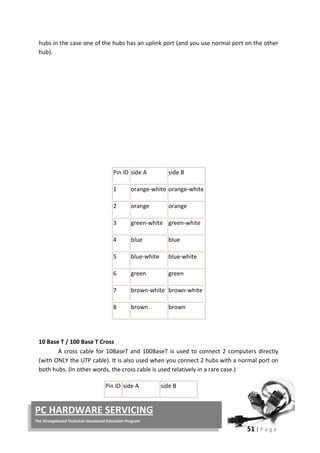
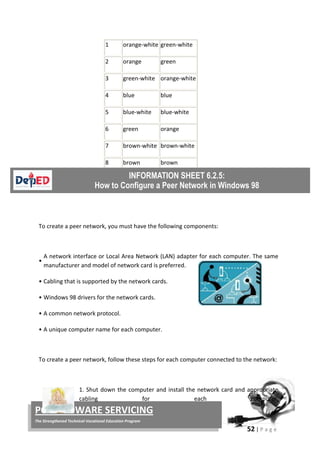
  • 46.
    40 freight-out. Also, itwill be paid on daily basis in order to help them in their daily needs. 16. The owner will be the manager, treasurer of the business. 17. Utilities expense of 20,000 will be allocated 90% on Factory Overhead and 10% on General and administrative expense. 18. For simplicity purposes, assume that the tax rate will be 32%. A. Projections will be made for a time period of 1 month only. A. TOTAL INVESTMENTS ORGANIZATION COST CASH P 330,000.00 OFFICE SUPPLIES 1,000.00 TRUCK 500,000.00 RICE MILL MACHINERY 100,000.00 LAND 100,000.00 STORAGE ROOM P 300,000.00 TOTAL INVESTMENTS P 1,331,000.00 B. PROJECTED DAILY CASH OUTFLOW PURCHASES @ PHP 21/KG P 315,000.00 FREIGHT IN: WAGES P 3,150.00 GASOLINE P 1,500.00 P 4,650.00 DIRECT LABOR 3,000.00 FREIGHT OUT: WAGES P1,050.00 GASOLINE 500.00 P 1,550.00 TOTAL DAILY CASH OUTFLOW P324,200.00 *300 sacks x 50kg x Php 21.00 **Php 420.00 x 10 Laborers x 0 .75 ***Php 420.00 x 10 Laborers x 0.25
  • 47.
    41 C. PROJECTED DAILYCASH INFLOW SALES @ PHP 38/KG P342,000.00 SALE OF BY PRODUCT (RICE BRAN) 6,000.00 TOTAL DAILY CASH INFLOW P348,000.00 *300 Sacks x 50kgx 0.60 (milling recovery) x Php 38.00 **300 Sacks x 50kg x 0.10 x Php 4.00 D. STATEMENT OF FINANCIAL POSITION-BEGINNING GODWIN'S RICE TRADING AS OF XXX ASSETS Current Assets: Cash P330,000.00 Office Supplies 1,000.00 P331,000.00 Non-current Assets: Land 100,000.00 Truck 500,000.00 Rice Mill 100,000.00 Storage room P300,000.00 P1,000,000.00 Total Assets P1,331,000.00 TOTAL LIABILITIES AND OWNER'S EQUITY Mr. Godwin's Capital P1,331,000.00
  • 48.
    42 E. INCOME STATEMENT GODWIN’SRICE TRADING INCOME STATEMENT FOR THE MONTH________ Sales(300x50x.6x38x3) P 10,260,000.00 Cost of goods sold Purchases (315,000x30Days) P 9,450,000.00 Freight-in (4,650x30Days) 139,500.00 Direct labor (10LaboresxPhp350x30Days) 105,000.00 Factory overhead Utilities Expense (Php20,000 x 0.9) P 18,000.00 Depreciation- Storage Room(300,000/30)(0.9) (1/12) 750.00 Depreciation- Rice Mill Machine (100,000/20) (1/12) 416.67 Depreciation- Truck (500,000/15)(0.9)(1/12) P 2,500 .00 P 21,667.00 Sale of By-product (6,000 x 30) P-180,000.00 P 9,536,167.00 Gross Profit P 723,833.00 Selling Expense Freight-out (1550x30) P 46,500.00 Depreciation- Truck (500,000/15)(0.1)(1/12) 277.078.00 Packaging (300Sacks x .6 x Php10 x 30Days P 54,000.00 P100,778.00 General And Administrative expense Office Supplies P 1,000.00 Utilities Expense (20,000 x 0.1) P 2,000.00 Depreciation- Storage Room(300,000/30)(0.1) (1/12) P83.33.00 P3,083.00 Net Income Before Tax P 619,972.00 Income Tax Expense P 198,391.11 Net Income After Tax P 421,581.00 Return on Investments = = = .31674 Payback Period= = = 3.127283 yrs Gross Profit Ratio= = = 0.070549 Net Margin Ratio= = = 0.0410898 H. Financial Statement The projected sale for 1 month is amounting to P10,200,000.00 at a price of @ P38.00/kg for well-milled rice less all the expenses and tax it has a projected net income of P 421,581. Financial ratios show that Gross Profit IS 7% and Net Margin Ratio is 4% each. The investment costs will be recovered within approximately 3 years and 2 months. I. Critical analysis Risk is always present in any form of business. That includes Godwin’s Rice Trading business. The foreseen problem is not being able
  • 49.
    43 Posttest to meet thetargeted number of 300 bags of rice grain every day and/or the other way of exceeding it with the difficulty of disposing the excess milled rice to the rice retailers the next day. As a new entrant of the rice trading business, it is expected that Godwin’s Rice Trading will have to gradually establish customers trust. With excellent personnel training in quality customer ship, the business will slowly draw-in more customers like the big food chains and supermarkets as an efficient supplier of well- milled rice. J. Social significance This business offers opportunity for the farmers to have a steady market of their farm produce. It will also open a door of possible employment to some people in the community. As a registered business, tax payments can go to the government. Later as the business grows bigger wholesaling will help other small scale retailers who can avail of competitive pricing. Direction: Choose the letter of the correct answer. Do not write your answer on this manual. 1. Which is a group of people with economically important needs and demands which opens entrepreneurial opportunities to everyone? c. Environment C. Geography A. Ethnicity D. Market 2. Which type of business is owned by only one person? A. Cooperative C. Partnership B. Corporation D. Sole Proprietorship 3. Which of the following is NOT considered an emerging industry in the Philippines? A. Agribusiness C. Creative Industries B. Power and utilities D. Renewable Energy 4. In the 4M’s of production, which M refers to the persons in the business known as the labor force? A. Machines C. Materials B. Manpower D. Money 5. The process of recording the money received and spent by the operations of the business is known as _____? c. bookkeeping C. administering A. booking D. posting
  • 50.
    44 Group Part OfBusiness Plan A Production Plan a, c, e B Marketing Plan d, b, f Group Part Of Business Plan A Production Plan c, e, f B Marketing Plan a, b, d 6. Which combination is focused on the internal assessment of the business? A. Opportunities and Threats C. Strengths and Threats B. Strengths and Weaknesses D. Weaknesses and Threats 7. Which combination is focused on the external assessment of the business? A. Opportunities and Threats C. Strengths and Threats B. Strengths and Weaknesses D. Weaknesses and Threats 8. Study the table and the items on the right. Then answer the question. Group Part Of Business Plan A Production Plan _________ B Marketing Plan _________ Which of the following is the correct grouping of the six indicators in the box? A. C. B. D. 9. Which business principle is applicable in products and development and marketing? A. Ask researchers in other communities about their needs and demands. B. Your own needs and demands are the same with others. C. Pay attention to the needs and demands of the market D. Follow the result of a national survey of needs and demands a. Competitors analysis b. Product description c. Maintenance and repair d. Promotional strategies e. Sources of equipment f. Terms and conditions of purchase Group Part Of Business Plan A Production Plan a, b, d B Marketing Plan c, e, f Group Part Of Business Plan A Production Plan c, d, a B Marketing Plan b, e, f
  • 51.
    45 10. What isthe reason why an aspiring entrepreneur must make a sound and impressive business plan? A. A sound and impressive business plan is likely to be approved for a loan package. B. A sound and impressive business plan attracts more customers. C. A sound and impressive business plan commands tax rebates. D. A sound and impressive business plan can improve a particular segment of a market. Now we know that market and environment are the two major factors that dictate any business activities. It is so diverse, however; this diversity offers numerous opportunities for businesses. An aspiring entrepreneur must consider a lot of factors prior to setting up a business. Careful examination on the needs and demands must be made. Competition must be clearly addressed because it may either lead to accumulation of profit or worse, incurring losses depending on how entrepreneurs manage their businesses. Other important task of entrepreneurs is to determine how much capital is needed to start a business. Selection of the best business location is crucial, too. Record keeping or bookkeeping is also a skill that entrepreneurs must possess so he/she can personally ascertain the financial status of the business. Entrepreneurs play a very important role in the national growth and development. Aside from tax payment to the government, an entrepreneur is responsible human resources development. Employment, whether casual, probationary, and permanent, offers workplace trainings which help employees in their personal and professional growth. Entrepreneurs must not only possess passion for the business but personally learn the work of their employee as well. The benefit of this best practice is that entrepreneurs will find it easier to track the operations of the business including its profitability. Finally, getting all these business prerequisites into the heart and mind of entrepreneurs and together with adequate knowledge, skills and work values, their businesses will be sustained. SUMMARY
  • 52.
    46 Capital refers tomoney invested in a business to generate income. Environmental scanning refers to careful monitoring of the internal and external environment of an organization purposely done to detect early signs of opportunities and threats that may influence present and future plans of the business. Industry is a commercialized, standardized, and organized economic activity connected with the production, manufacture, or construction of a particular product or range of products in which many people are involved. Market refers to a group of people with economically important needs and demands which open entrepreneurial or business opportunities to everyone. Opportunities in SWOT analysis in is the exploitable set of circumstances with uncertain outcome, requiring commitment of resources and involving exposure to risk. Personnel people employed in an organization. Production is the processes of transforming inputs such as raw materials, semi-finished goods, subassemblies and intangible inputs, namely, ideas, information, knowledge into goods or services. Strength in SWOT analysis is the capital, knowledge, skill, or other advantage that a firm has or can acquire over its competitors in meeting the needs of its customers. Threats in SWOT analysis are negative indications that can cause a risk to become a loss, expressed as an aggregate of risk, consequences of risk, and the likelihood of the occurrence of the event. Weaknesses in SWOT analysis refers to any negative indications that increases the risk of a losses and failure REFERENCES: http://www.businessdictionary.com Microsoft® Encarta® 2009. © 1993-2008 Microsoft Corporation Albarico J.M., Celarta C.B, Fernando E., and Valdez E.S. 2011. Agriculture and Fishery Arts I. United Eferza Academic Publications, Co., Bagong Pook, Lipa City, Batangas 4217. Glossary of Terms
  • 53.
    Compilation by Ben: r_borres@yahoo.com              LEARNING MODULES    Horticulture
  • 54.
    AFA- HORTICULTURE (PERSONAL ENTREPRENEURIAL COMPETENCIES(PEC’S) ACROSS MARKET AND ENVIRONMENT) Module 1 Department of Education Republic of the Philippines This instructional material was collaboratively developed and reviewed by educators from public and private schools, colleges, and/or universities. We encourage teachers and other education stakeholders to email their feedback, comments, and recommendations to the Department of Education at action@deped.gov.ph. We value your feedback and recommendations.
  • 55.
    Technology and LivelihoodEducation – Grade 9 AFA-Horticulture Learner’s Material First Edition, 2014 Republic Act 8293, section 176 states that: No copyright shall subsist in any work of the Government of the Philippines. However, prior approval of the government agency or office wherein the work is created shall be necessary for exploitation of such work for profit. Such agency or office may, among other things, impose as a condition the payment of royalties. Borrowed materials (i.e., songs, stories, poems, pictures, photos, brand names, trademarks, etc.) included in this book are owned by their respective copyright holders. Every effort has been exerted to locate and seek permission to use these materials from their respective copyright owners. The publisher and authors do not represent nor claim ownership over them. Published by the Department of Education Secretary: Br. Armin A. Luistro FSC Undersecretary: Dina S. Ocampo, Ph.D. Department of Education-Instructional Materials Council Secretariat (DepEd-IMCS) Office Address: 5th Floor Mabini Building, DepEd Complex Meralco Avenue, Pasig City Philippines 1600 Telefax: (02) 634-1054 or 634-1072 E-mail Address: imcsetd@yahoo.com Development Team of the Learner’s Material Consultant: Andres Z. Taguiam, Phd. Authors: Ofelia F. Bernardo, May Martinez-Leano, Mario S. Donio, William V. Engay, Levi P. Siazar Validators/Reviewers: Pedrito S. Nituoral, Rey G. Aleman Language Editor: Naida U. Rivera, Illustrator : Erich David Garcia Subject Specialists and Management: Emmanuel S. Valdez, Albert B. Erni, Layout Artists/Encoders: Jocelyn M. Gamo, Joel G. Castillo
  • 56.
    Table of Contents Module- 1 Personal Entrepreneurial Competencies (PEC’S) Across Environment and Market Entrepreneurship and Personal Entrepreneurial Competencies (PEC’S) .............................................................. 2 Introduction .................................................................................................. 2 Learning Competencies/Objectives ............................................................. 2 Pre-Diagnostic Assessment......................................................................... 3 Reading Resources and Instructional Activities .......................................... 4 What to know? ............................................................................................ 4 What started businesses?............................................................................ 5 Need-Based Business Opportunities ........................................................... 5 Supply of Raw Materials is Abundant in the Locality.................................... 6 What Makes up a Successful Entrepreneur?............................................... 6 Characteristics of Successful Entrepreneurs .............................................. 6 Lifestyle of Successful Entrepreneurs.......................................................... 8 The Personal Entrepreneurial Competencies (PEC’S) of Successful Entrepreneurs ................................................. 16 Understanding the Market and Environment of Businesses......................................................................... 16 Introduction ............................................................................................... 16 Learning Competencies/Objectives ........................................................ 16 Pre-Diagnostic Assessment...................................................................... 17 Reading Resources and Instructional Activities ..................................... 18 What to know? ......................................................................................... 18 Common Characteristics of a Business Market ........................................ 19 The Legal Forms of Business ................................................................... 19 The Different Industries in the Country Today......................................... 20 Checking the Needs, Wants, and Demands of the
  • 57.
    Market Through EnvironmentScanning Process .................................. 21 Determining the 4M’S of Production.......................................................... 21 The Importance of Acquiring a Start-up Capital ...................................... 22 Factors in Selecting the Best Business Location ...................................... 23 Hiring and Training Personnel................................................................... 24 Registration of a New Business .............................................................. 24 Practicing Simple Record Keeping............................................................ 24 What to process? ................................................................................... 24 What to reflect and understand? ............................................................. 26 Supplementary Reading: The SWOT...................................................... 26 What to reflect and understand? ............................................................... 27 What to transfer? .................................................................................... 27 Supplementary Reading: The Business Plan.......................................... 27 Summative Assessment............................................................................ 37 Summary/Synthesis/Feedback ................................................................. 39 References................................................................................................ 39
  • 58.
    1 INTRODUCTION This Learner’s Materialson Conducting Pre-Agricultural Farm Operations contains various Learning Competencies designed to develop the knowledge, skills, and attitude of Grade 9 Technology and Livelihood (TLE) students. It covers four (4) modules namely: Personal Entrepreneurial Competencies (PECs) across the environment and market, 2. Preparing farm tools, implements, and simple equipment, 3. Preparing and maintaining farm tools, implements, simple equipment, and facilities, and 4. Securing farm tools, implements, simple equipment, and facilities. Each module is subdivided into several lessons with the following parts: I – Introduction, giving an overview of the lesson; II – The Learning Competencies/Objectives contain specific topics about a certain Learning Competency; III – The Pre-Diagnostic Assessment provides evaluation of the prior learning of students; IV – the Reading Resources and Instructional activities include the content and activities about what the students must know, what to process, what to reflect and understand, and what to transfer. These activities could be done in school, at home, and in the community. V – The Summative Assessment evaluates how much the students have learned; and VI – The Summary/Synthesis/Feedback give generalization and enhancement on a specific module. A glossary section is at the back page of the Learner’s Materials as further reference, and a List of References to acknowledge the sources of the ideas taken from them. Conducting pre-agricultural farm operations is one of the Core Competencies in Agricultural Crop Production NC II. Students must be able to take the five (5) core competencies to finish the course. The teacher must conduct Institutional Assessment towards the end of the school year to evaluate the underpinning knowledge, skills, and attitudes of the students based from the set of criteria in the Training Regulations/prepared by Technical Education and Skills Development Authority (TESDA)
  • 59.
    2 AFA - HORTICULTUREGRADE 9 Module 1 PERSONAL ENTREPRENEURIAL COMPETENCIES (PEC’S) ACROSS MARKET AND ENVIRONMENT Content Standards Performance Standard The learner demonstrates understanding of one’s Personal Competencies (PEC’s) across horticultural products and services The learner recognizes his/her Personal Competencies (PEC’s) across horticultural products and services and prepares an activity plan that aligns with that of a practitioner/entrepreneur in Horticulture ENTREPRENEURSHIP AND PERSONAL ENTREPRENEURIAL COMPETENCIES (PECS) Introduction Everybody loves to earn money and accumulate wealth and in the present times, we have many ways to achieve it. The most common way is to offer good quality agricultural products and services to your friends and to other people in the community and even in the online arena that can cover a global market. All the business activities undertaken in selling products and services to people is known as entrepreneurship and the one who manage these business activities is an entrepreneur. Students are encouraged to develop skills required in entrepreneurial activities. Many wealthy people in the country had started in small and community- based entrepreneurial activities. Learning Competencies/Objectives 1. Identify the different factors to be considered in setting up a business 2. Assess one’s PEC’s, in terms of, characteristics, lifestyle features , and skills 3. Assess practitioner’s entrepreneurial competencies, in terms of, characteristics, attributes, lifestyle, skills, and traits
  • 60.
    3 Pre-/Diagnostic Assessment: Direction: Choosethe letter of the correct answer. Write your answer on your test booklet. 1. Which of the following is a common activity of an entrepreneur? A. Advocate against global warming B. Deliver goods and services to the market C. Volunteer in a community clean-up activity D. Preach in different churches or group of churchgoers 2. The saying “Necessity is the mother of all inventions” means ____________. A. Necessity is invented by mothers B. Our mother told us what we really need C. Basic commodities are made for mothers D. Basic commodities are made to satisfy our needs 3. What really makes up a successful entrepreneur? A. Ability to study a market B. Ability to act like a customer C. Knowledge, skills, and money D. Knowledge, skills, and attitude 4. People who always feel positive in every effort in order to achieve something are known to have ______________. A. Courage C. Self-confidence B. Optimism D. Self-control 5. A set of skills that entrepreneurs must possess to take control of the challenges in business is known as _____________. A. Personal business capacities B. Personally preferred competencies C. Professional enterprise competencies D. Personal entrepreneurial competencies 6. Information seeking and goal setting belongs to what PEC’s cluster? A. Achievement cluster C. Planning cluster B. Empower cluster D. Power cluster 7. Which of the following best describes a risk-taker? A. Accomplish targets on time as agreed with customers B. Paying keen attention to the needs and demands of people C. Anticipating a loss and countering it with feasible alternatives D. Acting as the prime mover of resources in the achievement of objectives 8. Systematic planning and monitoring includes the following except one. A. Set calculated goals and objectives B. Make a well organized plan with clearly defined methods C. Be logically flexible for the emergent constraints, challenges, and needs
  • 61.
    4 D. Periodic gap-proofmonitoring and response activities must be scheduled to determine emergent constraints, challenges, and needs 9. When entrepreneurs face a significant obstacle with a well planned action, they have Personal Entrepreneurial Competency known as ___________. A. Initiative C. Persuasion B. Persistence D. Risk-taking 10.Luis is good in convincing his customers that his product is not only of best quality but also safe to use. Many of his customers bought and even return to buy more of the product because they want to share it to their friends. What personal entrepreneurial competency does Luis has? A. Persuasion B. Goal setting C. Self-confidence D. Demand for efficiency and quality READING RESOURCES AND INSTRUCTIONAL ACTIVITIES What to KNOW: Activity #1: Before immersing ourselves into the exciting discussion about setting up and running a business in the most sustainable ways, we will first do inspiration- drawing activity through the conduct of casual interviews with entrepreneurs in the community. Look for a partner in doing this. Identify 3 retailers, 3 service providers, and 1 producer. Use the template below for the interview and in tracking the answers of the selected entrepreneur-respondents. Discuss the responses with your partner and present to your class a brief analysis/report of the interview. Interview Guides Responses of Entrepreneurs Comments Retailers Service Providers Producer (commercial scale) Students’ guide questions to be used but not limited to the following: For example, Fruit and Vegetables Vendors, Ornamenta l Plants Retailers For example, Plant Rental Services, Landscaping Services, Landscape Maintenance Services Producer of Vegetables, Fruits,Seedlings of Fruit Trees, Ornamental and Flowering Plants, Our reactions to entrepreneurs responses
  • 62.
    5 Why did you choosethis business? How did you start it? What are the challenges you met? How did you counter all those challenges? Did you experience losses? How did you respond to losses? Can you share some strategies in keeping customers? What personal qualities help this business flourish up to now? Are you afraid of your competitors? Why? Can you give us some pieces of entrep- based advice? WHAT STARTED BUSINESSES? Need-based business opportunities A popular adage that says, “Necessity is the mother of all inventions” simply
  • 63.
    6 means that wedevelop technologies to produce something that will answer mankind’s diverse needs. In 1980’s the most popular way of long distance communication is through a snail mail, telegraph, or long distance telephone calls which is not only expensive but also consume much of our time. Because there is a need for faster communication flows as global economy has grown into scale, cellular phones came to the market to answer our communication-related needs. Today, global communication is already at the tip of our fingers. SUPPLY OF RAW MATERIALS IS ABUNDANT IN THE LOCALITY Business investors are happy if the raw materials and other resources are readily available in the community. Aside from secured volume of quantity, this opportunity is cheaper as when the entrepreneur outsource production inputs from other places. WHAT MAKES UP A SUCCESSFUL ENTREPRENEUR? Knowledge alone does not guarantee success in a business. Skills developed can greatly help in the production process but it is not an assurance to the sustainability of the business as well. It takes right attitude combined with adequate knowledge, competitive skills, and upheld passion to make significant revenues, profit, and sustainability of the chosen business. Accomplished entrepreneur have so much to share to business enthusiasts like us. Many are not born with a silver spoon meaning most of them came from poor families. They have passion to produce and sell to an identified market or even to serve target clients which contributed to their success. Likewise, they accumulated wealth because they possess entrepreneurial characteristics, lifestyles, and skills, suited to their chosen businesses. CHARACTERISTICS OF SUCCESSFUL ENTREPRENEURS The set of characteristics common to entrepreneurs who excel in their businesses are the following: 1 Optimism Be a someone who always feel positive in every effort in order to achieve something. 2 Self-confidence Once the plan to do entrepreneurial activities is ready to be started, assure yourself to overcome risks and many other forms of business constraints. 3 Self-control In any situations that needs to be handled, never react immediately. Instead respond to the situation in the most legal and beneficial ways. 4 Courage Be a risk-taker with alternative courses of action on hand.
  • 64.
    7 Business risks arealways there however, one’s readiness to face, reduce or eliminate it depends on how brave you can be. 5 Commitment Sustain every effort you have started. Profit may dwindle in the most unacceptable way but never hesitate to invoke your right to persist and regain a lost glory. 6 Creativity Do not stay inside a box which means go out and flaunt your potential to be effectively different. Use your imagination to create marketable ideas and push it. If you thought of a potentially good ones, be the first to act upon it. Chances are, others’ have thought about it, too. 7 Well-defined values Be precise in your principles or standards. Goals coated with well defined values provide guidance to what your business must achieve with reduced inconveniences. 8 High energy level Competitive entrepreneurs are fueled to succeed. Passion in the endeavor is an energy enhancer. Success in business comes from being passionately energetic. 9 Leadership ability Guide, direct and influence people according to what benefits the business. People and the many ways you may lead them can spell success or failure of your business. 10 Desire for responsibility As a business leader, you are accountable to everyone and everything in the business including your strategies. Value everything and everyone as you value oneself 11 Decision-making skills One’s ability to choose good decision may be innate or experience-based. Learn the art and the systematic and methodical process of decision-making. Good decisions must be sensible and culture-sensitive 12 Desire for immediate feedback Pay close attention to what the market generally is saying to your products or services. The ultimate consumer of the product and services must be heard and become the bases of further product or services development 13 Strong desire to achieve Develop a competitive attitude. Right pricing and quality- based product development or service delivery will draw more business revenues. Work with the goals in mind and take the best way to achieve them 14 Ability to learn from past failures Bad experiences in business should never be taken as traumatic. Options that supposedly had prevented those to happen must be noted and archived. Benchmarked on past experiences to know which decision to take. Elizabeth Bowen (1899 - 1973) an Irish novelist and short-story writer, wrote, “The best that an individual can do is to concentrate on what he or she can do, in the course of a burning effort to do it better”.
  • 65.
    8 LIFESTYLE OF SUCCESSFULENTREPRENEURS People who plan to live in the world of entrepreneurship will live a life different from that of an ordinary citizen. They adapt to the new lifestyles gradually and professionalize every task embedded into it. They follow established standards and even customize some to fit to the tasks particular to a business type. As the business is sustained and entrepreneurs developed expertise in all tasks including constraints and problem solution, excellent decision making is easier to achieve. According to Valdez, et.al, the following are the common lifestyle features of an entrepreneur: A sense of freedom and control It is one of the highest lifestyle considerations that entrepreneurs must adapt. Although inspired by their freedom to lead and control all elements of the business, they must exercise careful in choosing the right course of actions and decisions to take. Flexibility of time Choosing their own time for work is a privilege of entrepreneurs. This feature will allow them to choose their most productive time. Energy and stamina Entrepreneurs are the greatest asset of their businessses, a check and balance between the actual accomplishment of tasks and physical and mental work capacity must be established. Rest and relaxation can help maintain good physicality and overall health. Proper stress management is also of primal importance. Family support A family does not only serve as inspiration but also as a group of people to oversee the welfare of the entrepreneurs. Suggestions and recommendations of a family member must be carefully considered. Professional support Remember that seeking advise from specialist is helpful in decision making process. There are people more informed than us in a particular area of expertise. “ENTREPRENEURSHIP IS LIVING A FEW YEARS OF YOUR LIFE LIKE MOST PEOPLE WON’T. SO THAT, YOU CAN SPEND THE REST OF YOUR LIFE LIKE MOST PEOPLE CAN’T.” Annonymous
  • 66.
    9 THE PERSONAL ENTREPRENEURIALCOMPETENCIES (PECS) OF SUCCESSFUL ENTREPRENEURS There are two major reasons why many people failed in their attempt to do entrepreneurial activities. First, people who are starting entrepreneurial activities may only have insufficient experiences to address the problems posed by the numerous external business constraints. Second, they lack sufficient skills to lead the people and make the products and services competitive in the market. Low profit of the business will create consequent problem and many more problems in the future. Thus, anyone who wants to succeed in a business arena must be equipped with the different Personal Entrepreneurial Competencies or PEC’s, a set of skills that entrepreneurs must possess to take control of the challenges in business. PEC’s are the key abilities of entrepreneurs’ success in business. PEC’s are clustered into three clusters according to its area of application: Achievement Cluster Opportunity Seeking and Initiative  Pay attention to the needs and demands of people  Never procrastinate. Act immediately on marketable ideas  The common business are well competed in the market while unique ones offer lower competition resulting to higher revenues and profit Risk Taking Calculate risks by identifying the most beneficial alternative courses of action to minimize effect of risks in the net profit Be proactive. Anticipate a loss and counter it with feasible alternatives In business realities, seasoned entrepreneurs sometimes take riskier business to get higher profits Demand for Efficiency and Quality  Perform business tasks better, faster, cheaper, but do not put safety and quality aside  Accomplish tasks by meeting or exceeding standards of excellence  Face a significant obstacle with a good plan of action  Identifies a good alternative to every decision to meet
  • 67.
    10 Persistence challenge or overcomean obstacle  Act as the prime mover of resources in the achievement of goals and objectives Commitment to the Work Contract  Offer personal sacrifices or give extraordinary efforts in completing tasks  Accomplish targets on time, as agreed, to keep customers satisfied Planning Cluster Information Seeking  Gather data and information or feedbacks from clients, suppliers, and competitors and use those for the improvement of products or services  Study the market personally for innovation of new product development  Talk with experts for technical advice Goal setting Sets goals and objectives which are specific and must guarentee customer satisfaction Set calculated goals and objectives Systematic Planning and Monitoring  Make a well organized plan with clearly defined methods  Be logically flexible for the emergent constraints, challenges, and needs  Periodic gap-proof monitoring and response activities must be scheduled to determine emergent constraints, challenges, and needs Power Cluster Persuasion and Networking  Always ready to give facts and benefits to convince customers to patronize products and services offered.  To accomplish the business objectives, key people can be used as agents or chanels to hasten product and services delivery to customers Independence and self- confidence Develop self-trust in the attainment of goals and objectives Do not need external approval before acting constraints and challenges. Being, consultative does not purely mean dependence on others advice. An entrepreneur must be brave enough to use one’s ability to chose which alternative course of action is the appropriate decision. What to Process: Activity #2: This is a self examination activity. After knowing the different characteristics that an entrepreneur must possess, examine yourself if you have these
  • 68.
    11 characteristics too. Simplyput check (/) if that particular characteristic is present in you or an x (X) if you do not possess it. Comment on your own status by giving possible options that can help you acquire it. Characteristics of an entrepreneur Do I have this? Realizations (What are my options?) YES(/) NO (X) 1 Optimism 2 Self-confidence 3 Self-control 4 Courage 5 Commitment 6 Creativity 7 Well-defined values 8 High energy level 9 Leadership ability 10 Desire for responsibility 11 Decision-making skills 12 Desire for immediate feedback 13 Strong desire to achieve 14 Ability to learn from past failures What to REFLECT and UNDERSTAND: Activity #3: Consider the PEC’s of successful entrepreneurs. Compare these competencies with you. As a growing individual can you develop these in yourself? Competencies of an entrepreneur Do I have this? Realizations (If Yes how can I improve this?) (If NO what will I do to acquire it) YES (/) NO (X) Opportunity Seeking and Initiative Risk Taking Demand for Efficiency and Quality Persistence Commitment to the Work Contract Information Seeking Goal setting Systematic Planning and Monitoring
  • 69.
    12 Persuasion and Networking Independenceand self-confidence What to TRANSFER: Activity #4: Let us match the result of our activity #1 with the standard characteristics, lifestyle, and skills of our interviewees. Do you think that their businesses will be sustained? Support your answer and present it to the class. Use the template in Activity #2 and Activity #3 to help you analyze and forecast the sustainability of their businesses. Personal Entrepreneurial Competencies (PEC’s) Responses of Entrepreneurs Retailers Service Providers Producer (commercial scale) REFER TO THE RESPONSES IN ACTIVITY #1. Check if the Respondents above possess the PEC’s enumerated in the first column. Put check (/) if observed and x (X) in not observed Opportunity Seeking and Initiative Risk Taking Demand for Efficiency and Quality Persistence Commitment to the Work Contract Information Seeking Goal setting Systematic Planning and Monitoring Persuasion and Networking Independence and self-confidence GENERAL ANALYSIS Sustainability of business (Do you think the entrepreneur-respondent can sustain their businesses? Enumerate your justifications)
  • 70.
    13 Lifestyles of Entrepreneurs Responsesof Entrepreneurs Retailers Service Providers Producer (commercial scale) REFER TO THE RESPONSES IN ACTIVITY #1. Check if the Respondents above possess the lifestyle features enumerated in the first column. Put check (/) if observed and x (X) if not observed A sense of freedom and control Flexibility of time Energy and stamina Family support Professional support GENERAL ANALYSIS Sustainability of business (Do you think the entrepreneur- respondent can sustain their businesses? Enumerate your justifications) Finally, make a matrix of recommendations in order to sustain the respondents’ respective business: Entrepreneur-Respondent Recommendations (Give recommendations, as options 1 and 2, for the sustainability of the respondents entrepreneurial activities) Option 1 Option 2 Retailer Service Providers Producer (Commercial Scale) Summative Assessment Direction: Choose the letter of the correct answer. Write your answer on your test booklet. 1. Which of the following is a common activity of an entrepreneur? A. Advocate against global warming B. Deliver goods and services to the market C. Volunteer in a community clean-up activity D. Preach in different churches or group of churchgoers
  • 71.
    14 2. The saying“Necessity is the mother of all inventions” means A. Necessity is invented by mothers B. Our mother told us what we really need C. Basic commodities are made for mothers D. Basic commodities are made to satisfy our needs 3. What really makes up a successful entrepreneur? A. Ability to study a market B. Ability to act like a customer C. Knowledge, skills, and money D. Knowledge, skills, and attitude 4. People who always feel positive in every effort in order to achieve something are known to have A. Courage C. Self-confidence B. Optimism D. Self-control 5. A set of skills that entrepreneurs must possess to take control of the challenges in business is known as A. Personal business capacities B. Personally preferred competencies C. Professional enterprise competencies D. Personal entrepreneurial competencies 6. Information seeking and goal setting belongs to what PEC’s cluster? A. Achievement cluster C. Planning cluster B. Empower cluster D. Power cluster 7. Which of the following best describes a risk-taker? A. Accomplish targets on time as agreed with customers B. Paying keen attention to the needs and demands of people C. Anticipating a loss and countering it with feasible alternatives D. Acting as the prime mover of resources in the achievement of objectives 8. Systematic planning and monitoring includes the following except one A. Set calculated goals and objectives B. Make a well organized plan with clearly defined methods C. Be logically flexible for the emergent constraints, challenges, and needs D. Periodic gap-proof monitoring and response activities must be scheduled to determine emergent constraints, challenges, and needs 9. When entrepreneurs face a significant obstacle with a well planned action, they have Personal Entrepreneurial Competency known as A. Initiative C. Persuasion B. Persistence D. Risk-taking 10.Luis is good in convincing his customers that his product is not only of best quality but also safe to use. Many of his customers bought and even return to buy more of the product because they want to share it to their friends.
  • 72.
    15 What personal entrepreneurialcompetency does Luis has? A. Persuasion B. Goal setting C. Self-confidence D. Demand for efficiency and quality We have studied the different elements necessary in setting up a business as well as acknowledged the different factors influencing the different entrepreneurial activities. Of course, most of us perceive business as a complex activity. The market is so diverse and if we fail to consider one factor which directly affects our business, we will have to face lots of challenges as consequences. Albeit challenging, we must remember that wealth accumulation as a return of our legal investments will also give others opportunities through employment or avail from our products and services. The different characteristics, lifestyle, and Personal Entrepreneurial Competencies or PEC’s of successful entrepreneurs we learned will surely inspire us to do our best to start our own business. Be optimistic and take the risks. Use the PEC’s we learned and progress into a life full of challenges that will hone us to become one of the most successful entrepreneurs, one of these days. Good luck! References: http://www.businessdictionary.com Microsoft® Encarta® 2009. © 1993-2008 Microsoft Corporation Albarico J.M., Celarta C.B, Fernando E., and Valdez E.S. 2011. Agriculture and Fishery Arts I. United Eferza Academic Publications, Co., BagongPook, Lipa City, Batangas 4217. SUMMARY/SYNTHESIS/FEEDBACK
  • 73.
    16 PERSONAL ENTREPRENEURIAL COMPETENCIES (PEC’S) ACROSSMARKET AND ENVIRONMENT Content Standards Performance Standard The learner demonstrates understanding of Market and Environment across Horticultural products and services The learner independently generates a business idea related to Horticulture based on the analysis of environment and market in Horticulture UNDERSTANDING THE MARKET AND ENVRINOMENT OF BUSINESS Introduction Entrepreneurs with enough knowledge and background in the market and environment where their businesses operate will have better strategies and decisions and will find it easier to sustain business activities. The intended market of a particular product and service must be carefully studied before and during the actual operations of the business. Many entrepreneurs failed because of a very simple reason; there is no enough information gathered about the target market, consequently, they incurred so much losses leading to bankruptcy. Learning Competencies/Objectives 1. Determine the common characteristics of a business market 2. Identify the legal forms of business 3. Describe the different industries in the country today 4. Map and analyze the opportunities offered by the industries in the community 5. Check the needs, wants. and demands of the market through environmental scanning process 6. Determine the 4M’s of production 7. Discuss the importance of acquiring a start-up capital 8. Make a business plan 9. Apply the standards in selecting the best business location 10.Assess the internal and external environment of the business through Strength, Weaknesses, Opportunities, and Threats method of business assessment 11.Practice simple record keeping
  • 74.
    17 Pre-/Diagnostic Assessment: Direction: Choosethe letter of the correct answer. Write your answer on your test booklet. 1. It is a group of people with economically important needs and demands which opens entrepreneurial opportunities to everyone. A. Environment C. Geography B. Ethnicity D. Market 2. This type of business is owned by only one person. A. Cooperative C. Partnership B. Corporation D. Sole Proprietorship 3. Which of the following is not considered an emerging industry in the Philippines? A. Agribusiness C. Creative Industries B. Power and utilities D. Renewable Energy 4. In the 4M’s of production, which M refers to the persons in the business known as the labor force? A. Machines C. Materials B. Manpower D. Money 5. The process of recording the money received and spent by the operations of the business is known as A. Bookkeeping C. Administering B. Booking D. Posting 6. Which combination is focused to the assessment internal of the business? A. Opportunities and threats C. Strengths and Threats B. Strengths and weaknesses D. Weaknesses and Threats 7. Which combination is focused to the assessment external of the business? A. Opportunities and threats C. Strengths and Threats B. Strengths and weaknesses D. Weaknesses and Threats 8. Place the indicators found inside the box at the right into the third column of the matrix at the left. Group the indicators correctly. Group Part Of Business Plan A Production Plan ______ _ B Marketing Plan ______ _ A. Competitors analysis B. Product description C. Maintenance and repair D. Promotional strategies E. Sources of equipment F. Terms and conditions of purchase
  • 75.
    18 Which of thefollowing is the correct grouping of the six indicators in the box? A. C. B . D. 9. Which business principle is applicable in products and development and marketing? A. Pay attention to the needs and demands of the market. B. Your own needs and demands are the same with others. C. Follow the result of a national survey of needs and demands. D. Ask researchers in other communities about their needs and demands. 10.What is the reason why an aspiring entrepreneur must make a sound and impressive business plan? A. A sound and impressive business plan commands tax rebates. B. A sound and impressive business plan attracts more customers. C. A sound and impressive business plan is likely to be approved for a loan package. D. A sound and impressive business plan can improve a particular segment of a market. Reading Resources and Instructional Activities What to KNOW: Activity #1: Let us do simple community mapping activity to develop a barangay-based market profile. Use the template below in posting accurate and relevant data of our barangay. Group Part Of Business Plan A Production Plan A, B, D B Marketing Plan C, E, F Group Part Of Business Plan A Production Plan C, D, A B Marketing Plan B, E, F Group Part Of Business Plann A Production Plan A, C, E B Marketing Plan D, B, F Group Part Of Business Plan A Production Plan C, E, F B Marketing Plan A, B, D
  • 76.
    19 Dimension Data tobe gathered Data Market demographics Number of households Number of businesses Number of Retailers of various products Number of wholesalers of various products Number of producers (specify products) Number of service-based businesses 1. COMMON CHARACTERISTICS OF A BUSINESS MARKET Market refers to a group of people with economically important needs and demands which opens entrepreneurial or business opportunities to everyone. Market is a socially, politically, and economically organized people whose needs and demands are based on tradition, culture, and technology. Enumerable business opportunities are open in a market. Their needs and demands are enormous depending on the class of people being referred to. These classes of people are known as market segments. These may be high-end, middle-end, and low-end market segments. Each segment will have varying needs of various products and services. Entrepreneurs must be skillful enough to address needs and demands of the market. Many successful entrepreneurs’ secret of success is just paying attention to the markets’ needs and demands and later they accumulated so much wealth. A need or demand-based business will always have a share of market. 2. THE LEGAL FORMS OF BUSINESS There following are 3 legal forms of business and their characteristics, advantages and disadvantages: Forms Characteristics Advantages Disadvantages Sole Proprietorship  Owned by only 1 person who is responsible for the whole business  The owner can assume the role of manager, finance officer, and worker  Very easy to establish  Decision comes from 1 person only  Owner-manager is required to render full operation time  No one else can share in the financial burden of the owner  In case of financial
  • 77.
    20 instability, the firm candissolve easily. Partnership  2 persons have combined resources and skills  Any of the 2 partner can act as financier or manager  They can also share responsibilities and roles in the business operations  Comparatively easy to establish  There is check and balance among partners only  Decision making is shared between the two owners  In times of partner conflict, the business is at risk  Limited funding may constraint business operations Corporation  2 or more persons own the business  Aside from the owners, many people known as shareholders, are engaged in a corporation through their investment known as shares or stocks  Business risks are shared by many people  If business is good, growth is maximized due to bigger capital  Burdens in the operations are shared by various specialized individuals  The complex organizational set- up impose a long line of more expensive ways of control  Complex decision making process will delay operation 3. THE DIFFERENT INDUSTRIES IN THE COUNTRY TODAY There are many established and emerging industries in the country. Having mapped all of those in the community will give a would-be entrepreneur a chance to examine what entrepreneurial opportunities it would bring to the community. Once these opportunities are identified, entrepreneurs will lay down their plan of actions and then start the business activities. The following are the key industries distributed all over the country. Some or may be all of them are located in your locality: 1. Agribusiness 2. Cyber services 3. Health and Wellness 4. Hotel, Restaurant and Tourism 5. Mining 6. Construction 7. Banking and Finance 8. Manufacturing
  • 78.
    21 9. Ownership Dwellingsand Real Estate 10. Transport and Logistics 11. Wholesale and Retail Trade 12. Overseas Employment 13. Creative Industries 14. Diversified/Strategic Farming and Fishing We also have emerging industries: 15. Creative Industries 16. Diversified/Strategic Farming and Fishing 17. Power and Utilities 18. Renewable Energy CHECKING THE NEEDS, WANTS, AND DEMANDS OF THE MARKET THROUGH ENVIRONMENTAL SCANNING PROCESS The needs and demands of the community can be determined through environmental scanning. In this process, an aspiring entrepreneur must make a thorough examination of the target market before a particular business is set. Many elements of the target market can change from month to month or year to year, thus, updated data and information of the following must be gathered shall become the bases of setting up the planned business. a. Demographic data such population size, growth rate. b. List of competitors which is available in the Department of Trade and Industry. c. List of Suppliers which can also be sourced from Department of Trade and Industry. d. Result of a Reliable Mini-Survey using considerable samples of target market. DETERMINING THE 4M’S OF PRODUCTION Raw materials, whether local or outsourced, are processed into goods to be sold to an identified market or segments of the market. This economic activity is referred to as production. Success in production is strictly determined with four (4) factors popularly known as the 4M’s: Manpower Refers to all persons in the business who are also popularly called labor force. That means the word manpower includes the entrepreneur himself.
  • 79.
    22 Money It known tobe the life juice of the business and has to do with the economic status of the business. These can be in paper bills or coins, generally used to pay for goods and services, repayment of debts, and saving or restoring purchasing power of the business. Materials These can raw materials or finished products which shall undergo certain process or combined which shall end as the expected output of production. Machines Any semi or fully-automated devices that are used in converting raw materials into marketable products or outputs. 4. THE IMPORTANCE OF ACQUIRING A START-UP CAPITAL Business capital, usually in the form of money, is an indispensable factor to start a new business. It is considered a working capital because it will keep the operations going. Entrepreneurs must secure enough capital to start and to sustain business operations. Raising the needed capital is not a problem for the wealthy families. However, if you do not have the cash on hand yet, you need to consider favorable sources. Would-be entrepreneurs must carefully choose which capital source to take. Money lenders which offer high interest are always not a good choice. The following are the possible sources of the start-up capital for any types of businesses to be established: SOURCES ADVANTAGES DISADVANTAGES Personal Savings No interest payment to be paid in case of bankruptcy, no one will run after the entrepreneur for legal actions Entrepreneur has full control over future net profit generated. Usually it takes some time to save enough money to start a business Family Savings Low or no interest at all will be charged to the would-be entrepreneurs In rare cases, if problem exist between parties, capital may be taken in partial or at
  • 80.
    23 Monthly amortization maynot be charged depending on the agreements. once by parents. External Sources, such as, banks and credit cooperatives There are many well-reputed lending institutions, not loansharks, in the community. Lending institutions can confidently lend adequate capital in exchange of a sound feasibility study. Monthly amortization must be paid even amidst financial difficulties of an enterprise. Well-reputed lending institutions in the community can offer the following types of loans according to term of repayment: Short-term loans In this type of loan, monthly ammortizations which will include a low interest will be paid in a year or less. Advanced or on-time payment of monthly ammortization increases trust and confidence of a bank on the enrepreneur. This good relationship will offer more opportunities to the entrepreneur. Intermediate loans Term of payment can range from one to tree years. Long-term loans Depending on the soundness of the feasibility or the established trust and confidence of the bank on the entrepreneur, terms of payment can stretch from four to ten years where lending policies of banks or credit cooperatives apply. 5. FACTORS IN SELECTING THE BEST BUSINESS LOCATION The following must be considered in choosing the right business location: a. Nearness to target markets. b. Availability and quality of raw materials and supplies. c. Accessibility to consumers and transportation. d. Consider zoning and local ordinances. e. Availability of power and fuel sources. f. Taxation, such as municipal tax policies, other local fees and rates.
  • 81.
    24 6. HIRING ANDTRAINING PERSONNEL Before the actual operations of the business begin, hiring the right person for the right task must be considered. Your business plan will tell you how many workers you need for the start and how many will be hired again as the operations progress. Excess personnel will be an extra cost of the business and this condition must be avoided. 7. REGISTRATION OF A NEW BUSINESS New business must be registered in the name of legalities. Before you let your well-planned business rocks the market, the following official processes must be undertaken: a. Register your official business name in the Department of Trade and Industry (DTI). b. Apply for a Mayor’s Permit to operate the business and the Municipal Business License of the business. c. Register your business at the Securities and Exchange Commission (SEC). The Articles of Incorporation and By-Laws are required for all corporations and for partnership. d. Register your business in the Bureau of Internal Revenue whereupon your business will be assigned a Tax Identification Number (TIN). e. Register your employees with the PhilHealth, PAG-IBIG, and Social Security System (SSS). Registration in other agencies which provide welfare and other benefits must also be consulted and legally followed. 8. PRACTICING SIMPLE RECORD KEEPING Entrepreneurs must be knowledgeable on the operations of the business. Although you are already the manager of the business, still you need to develop expertise in what all your workers are actually doing. This practice helps you monitor the progress of your business and to carefully track the profit and losses. Record keeping coexists with bookkeeping. The latter is the process of recording the money received and spent by the operations of the business. The following are the most important activities in bookkeeping: a. Keep and maintain records on a daily basis. b. Identify source of receipts.
  • 82.
    25 c. Record allincurred expenses. d. Keep complete records in all assets. In order to maintain proper recording of business transactions keep supporting documents namely; sales slips, paid bills, invoices, receipts, deposit slips, checks issued and cancelled. Payrolls must be kept too. Generally, the benefits of recording system and the good records kept are the following: a. Easy monitoring of the success or failure of your business. b. Information needed to make decisions is provided and accessible. c. Information needed to take bank financing package is available. d. References for budgeting are at hand. e. Easy preparation of income tax return. f. Easy computation of sales taxes. g. Profit distribution is facilitated by organized record keeping. What to PROCESS: Activity #2: Use the data in Activity #1 in this activity. Analyze and identify business opportunities as well as challenges these data can offer to aspiring entrepreneurs. Dimension Data to be gathered Data Business Opportunities Offered Challenges to Aspiring Entrepreneurs Market demographics Number of households Number of businesses Number of Retailers of various products Number of wholesalers of various products Number of producers (specify products) Number of service-based businesses
  • 83.
    26 What to REFLECTand UNDERSTAND Activity #3: Choose one business opportunity identified in column 4. Carefully study the potential of that business idea. Use the SWOT guide below to accomplish this task. Present your SWOT Sheet to the class for critiquing and feed backing. Be sure to record feedbacks given by the teacher and classmates. Supplementary Reading: The SWOT HELPFUL HARMFUL INTERNAL STRENGTH WEAKNESSES EXTERNAL OPPORTUNITIES THREATS Business ideas must be carefully analyzed prior to its actual operations. A popular way of doing this is to do business idea assessment through the use of the SWOT analysis. SWOT stands for Strengths, Weaknesses, Opportunities, and Threats. This technique will signal us either to continue the business idea because it is viable and profit is expected or to consider other options because the factors dominates the positive ones and this condition signals imminent losses for the proposed business. A SWOT sheet can look like this: STRENGTHS Enumerate all strengths of the business here (These are internal positive qualities of the business idea that offers advantages and benefits to the aspiring entrepreneurs) WEAKNESSES Enumerate all weaknesses of the business here (These are negative indications that deters the good future of the business idea probably contributory to business losses) OPPORTUNITIES Enumerate all opportunities of the business here (These are externat indications that THREATS Enumerate all threats of the business here (These are external indications of
  • 84.
    27 offer chance forprogress or advancement of the business) unfavorable situatons leading business to problems and other difficulties that will put profits into risks) Bear in mind these simple rules for successful SWOT analysis. a. Be realistic about the strengths and weaknesses of your business when conducting SWOT analysis. b. SWOT analysis should distinguish between where your business is today, and where it could be in the future. c. SWOT should always be specific. Avoid any grey areas. d. Always apply SWOT in relation to your competition i.e. better than or worse than your competition. e. Keep your SWOT short and simple. Avoid complexity and over analysis f. SWOT is subjective. What to REFLECT and UNDERSTAND Activity # 4: Refer to your SWOT Sheet and make further analysis and this time the ultimate task is make decision whether to pursue the proposed business idea or consider other alternative businesses. There are two possible facets after the final decision will be made. First, pursue the business because the SWOT reveals more positive indications than negative ones or, second, disregard the business idea because there are more negative indications. Consequently, try another business idea and subject it into the same process of analysis. Make a presentation of your task and be proud to inspire others that you now have chosen a viable business idea chosen from the opportunities obtained from the data generated by the simply community mapping we did. What to TRANSFER: Activity #5: Since you have chosen 1 viable business idea already, it is just-in-time to develop an impressive Business Plan. Refer to the guide given below and read the
  • 85.
    28 sample business planprovided. Your own plan must not be limited to few pages only, as the example is presented. All data and information must be given in order to come up with a completely sound and impressive business plan. Supplementary Reading THE BUSINESS PLAN A business plan refers to the intention of aspiring or experienced entrepreneurs which precisely defines their business, identifies their goals and objectives, a current and pro forma balance sheet, an income statement, and a cash flow analysis. A business plan can help so much in the proper allocation of resources, initially handle and counter forecasted complications, and make the right decision for the business operations. A good business plan contributes to the approval or rejection of any loan package because it provides specific and organized information about your proposed business and how you will repay borrowed money. A business plan is equivalent to a business resume. A business plan has five major parts, namely, the executive summary, marketing plan, production plan, organization and management plan, and financial plan. Below is a detailed guide in the development of a comprehensive business plan. PART OF A BUSINESS PLAN BUSINESS PLAN DEVELOPMENT GUIDES Focus Guide Questions BUSINESS NAME Business address Telephone/Contact Number Contact Person CONTENTS The usual table of contents BACKGROUND OF THE BUSINESS Brief History Information of the business Form of ownership Organizational set-up Industry where it plays
  • 86.
    29 BENEFITS TO THE COMMUNITY Brief statementof business social responsibility Economic, community, and human resources development EXECUTIVE SUMMARY  Brief Description of the Project  Brief Profile of the Entrepreneur  Project’s Contributions to the Economy  What is the nature of the project?  What are the entrepreneur’s competencies and qualifications?  What are the project’s contributions to the local and national economy? MARKETING PLAN  Description of the Product  Comparison of the Product with Its Competitors  Location  Market Area  Main Customers  Total Demand  Market Share  Selling Price  Sales Forecast  Promotional Measures  Marketing Strategy  Marketing Budget  What is the product?  How does it compare in quality and price with its competitors?  Where will be the business be located?  What geographical areas will be covered by the project?  Within the market area, to whom will the business sell its products?  Is it possible to estimate how much of the product is currently being sold?  What share or percent of this
  • 87.
    30 market can be capturedby the business?  What is the selling price of the product?  How much of the product will be sold?  What promotional measures will be used to sell the product?  What marketing strategy is needed to ensure that sales forecasts are achieved?  How much do you need to promote and distribute your product? PRODUCTION PLAN  Production Process  Fixed Capital  Life of Fixed Capital  Maintenance and Repairs  Sources of Equipment  Planned Capacity  Future Capacity  Terms and Conditions of Purchase of Equipment  Factory Location and Layout  Raw Materials  Cost of Raw Materials Raw Materials Availability  Labour  Cost of Labour  Labour Availability  Labour Productivity  Factory Overhead Expenses  What is the production process?  What buildings and machinery (fixed assets) are needed and what will be their cost?  What is the useful life of the building and machinery?  How will maintenance be done and are spare parts available locally?  When and where can the machinery be obtained?
  • 88.
    31  Production Cost How much capacity will be used?  What are the plans for using spare capacity?  When and how will the machinery be paid for?  Where will the factory be located and how will the factory be arranged?  How much raw materials are required?  How much will the raw materials cost?  What are the sources of raw materials? Are they available throughout the year?  How many direct and indirect labour are needed and what skills should they have?  What will be the cost of labour?  Are workers available throughout the year? If not, what effect will this have on production?  How will the workers be motivated?  What factory overhead expenses are involved?
  • 89.
    32  What isthe production cost per unit? ORGANIZATION AND MANAGEMENT PLAN  Form of Business  Organizational Structure  Business Experience and Qualifications of the Entrepreneur  Pre-Operating Activities  Pre-Operating Expenses  Office Equipment  Administrative Expenses  How will the business be managed and operated?  What is the business experience and qualifications of the entrepreneur?  What pre-operating activities must be undertaken before the business can operate?  What pre-operating expenses will be incurred?  What fixed assets will be required for the office?  What administrative cost will be incurred? FINANCIAL PLAN  Project Cost  Financing Plan and Loan Requirement  Security for Loan  Profit and Loss Statement  Cash Flow Statement  Balance Sheet  Loan Repayment Schedule  Break-even Point (BEP)  Return on Investment (ROI)  Financial Analysis  What is the total capital requirement?  Is a loan needed? What will be the equity contribution of the entrepreneur? And how much?  What security (collateral) can be given to the bank?  What does the
  • 90.
    33 Profit and Loss Statementindicate?  What does the Cash Flow Statement indicate?  What does the Balance Sheet indicate?  What is the loan repayment schedule?  What is the break- even point (BEP)?  What is the return of investment (ROI)?  Is the project feasible? The template is applicable to both production and marketing businesses. There are entrepreneurs who want to venture in marketing alone, thus, the resulting business plan is done sans the production part. However, in the marketing part, the source of products to be marketed must be clearly stated including the details of the product outsourcing process. Below is a sample business plan with its major parts presented briefly: BUSINESS PLAN Jean’s Garden Contents: (Note to the readers: The table of content is not presented here.) Background of the Business: Jean’s Garden started as a backyard/home-based hobby which gradually grew into commercial propagation of landscaping plants both ornamental and flowering. Today it includes trading plants propagated by other gardeners. It is a sole proprietorship business whereupon the owner assumes multiple tasks which include ordering, receiving, and arranging plants, cashiering, attending to walk-in customers, identifying and contacting possible repeat customers, and maintain plants in the store. This business aptly belongs to the agribusiness industry in the southern part of the country.
  • 91.
    34 Benefits to thecommunity: A landscape area will add beauty to the surroundings. It will please everybody’s eyes and encourages them to appreciate, love, and care for the beauty of the plants growing in nature. Quality of plants is always assured to the customers. Landscapers’ use of quality landscaping plants will increase the aesthetic effect of landscapers’ output. This will lead to the increase of people’s appreciation of the importance of landscaping and thereby creates more landscaping opportunities for both the landscapers and the traders of landscaping plants. Executive Summary Brief Description of the Project: Jean’s Garden is a landscaping plants trading business that offers variety of quality landscaping plants both ornamental and flowering types. It is located in a rented space at the heart of General Santos City. This business sells competitively- priced plants to cater the demand of small and large scale landscaping services of the city and the adjacent municipalities. The owner-entrepreneur is a plant hobbyist who wishes to see all types of plants in her backyard. Her collection ranges from partial shade, outdoor and even plants in very dry semi-arid parts of the world. Her family is into the challenging yet successful breeding program of desert rose or Adenium sp. of single, double, and triple/multiple petals. This trading business aims to provide commercial landscapers with quality, affordable, and well-hardened landscaping plants. The business also aims to create a trading network between commercial landscapers and other landscaping-related service providers in the General Santos City and other nearby cities and municipalities. Marketing Plan The target market will include the small and large-scale commercial landscapers of General Santos City and other nearby cities and municipalities. Walk-in customers like tourists, homeowners, and plant collectors who will buy few pieces only are likewise valued as important customers who can possibly create word of mouth about the business to other enthusiasts.
  • 92.
    35 Production Plan Production orpropagation of plants happens in other gardens which are the potential suppliers of Jean’s Garden. Outsourcing of landscaping plants will be done regularly by contacting the owner about availability list. Plants will be delivered by the producers/propagators to the store as soon as the ordering processes is completed and finalized. Organization and Management Plan This business is a sole proprietorship. The owner-proprietor is a plant hobbyist-collector for 20 years already. This trading business of landscaping plants requires suppliers where some of the plants will be outsourced. It also considers and values a network of customers which can be landscapers or walk-in tourists and local collectors. Financial Plan Underlying Assumption: 1.) 360 pcs of assorted ornamental and flowering plants are assumed to be sold per month. Katsura (100 pcs), Pandakaki (100 pcs), Bougainvillea (100 pcs), Adenium (60pcs) 2.) Purchased price for: Katsura (P20.00), Pandakaki (P25), Bougainvillea (P25), Adenium (single P200), FINANCIAL REQUIREMENTS Jean’s Landscaping Plants Trading Total Project Costs Particulars Amount(PhP) Fixed Asset: Dipper 20 Pale 60 Watering hose 120 Subtotal: 200.00 Working Capital(1month) Direct Materials 23,000.00 Direct Labor 3,000.00 Overhead Expenses 1,800.00 Operating Expenses 200.00 Subtotal: 28,000.00 Total Project Costs 28,200.00
  • 93.
    36 Adenium (double P250),Adenium (triple P300) 3.) Operating hours per day is 8-9 hours from Mondays to Sundays and 30 days a month (P100/day paid for sales personnel). 4.) Fixed asset are subject to depreciate in 3years. PROJECTED SALES AND INCOME Jean’s Landscaping Plants Trading (1 Month Operation) Particulars Amount(PhP) Sales: Bougainvillea (P50 @100pcs) 5,000.00 Katsura (P50 @100pcs) 5,000.00 Pandakaki (P50@ 100pcs) 5,000.00 Adenium (single P250@20pcs) 5,000.00 (double P300@20pcs) 6,000.00 (triple P350@20pcs) 7,000.00 Total 33,000.00 Less Cost of Sales: Direct Materials(Garden Inputs) 0 Bougainvillea (P25 @100pcs) 2,500.00 Katsura (P20@100pcs) 2,000.00 Pandakaki (P25@100pcs) 2,500.00 Adenium (single P200@20pcs) 4,000.00 (double P250@20pcs) 5,000.00 (triple P300@20pcs) 7,000.00 23,000.00 Direct Labor (P100/day x 30 days) 3,000.00 Overhead Expenses 1,800.00 Depreciation(FA/EUL) 66.67 Total 27,866.67 Gross Profit 5,133.33 Less Operating Expense 200.00 Net Income Before Tax 4,933.33 Return on Investment(Ave. Net Income/TPC) 18% Payback Period(TPC/Ave. Net Income+ Depreciation) 72 days or 2months and 12 days Gross Profit Ratio(Gross Profit/Total Sales) 15% Net Margin(Net Income/Total Sales) 18%
  • 94.
    37 G. Critical analysis Duringrainy days rate of visit of walk-in customers is low consequently sales for this period is equivalently low. However the booming real estate business in General Santos City will commend higher demand in landscaping, thus, there will be more orders of landscaping plants. Summative Assessment Direction: Choose the letter of the correct answer. Write your answer on your test booklet. 1. It is a group of people with economically important needs and demands which opens entrepreneurial opportunities to everyone. A. Environment C. Geography B. Ethnicity D. Market 2. This type of business is owned by only 1 person. A. Cooperative C. Partnership B. Corporation D. Sole Proprietorship 3. Which of the following is not considered an emerging industry in the Philippines? A. Agribusiness C. Creative Industries B. Power and utilities D. Renewable Energy 4. In the 4M’s of production, which M refers to the persons in the business known as the labor force? A. Machines C. Materials B. Manpower D. Money 5. The process of recording the money received and spent by the operations of the business is known as A. Bookkeeping C. Administering B. Booking D. Posting 6. Which combination is focused to the assessment internal of the business? A. Opportunities and threats C. Strengths and Threats B. Strengths and weaknesses D. Weaknesses and Threats 7. Which combination is focused to the assessment external of the business? A. Opportunities and threats C. Strengths and Threats B. Strengths and weaknesses D. Weaknesses and Threats
  • 95.
    38 8. Place theindicators found inside the box at the right into the third column of the matrix at the left. Group the indicators correctly. Group Part Of Business Plan A Production Plan _______ B Marketing Plan _______ Which of the following is the correct grouping of the six indicators in the box? A. C. B. D. 9. Which business principle is applicable in products and development and marketing? A. Pay attention to the needs and demands of the market. B. Your own needs and demands are the same with others. C. Follow the result of a national survey of needs and demands. D. Ask researchers in other communities about their needs and demands. 10.What is the reason why an aspiring entrepreneur must make a sound and impressive business plan? A. A sound and impressive business plan commands tax rebates. B. A sound and impressive business plan attracts more customers. C. A sound and impressive business plan is likely to be approved for a loan package. D. A sound and impressive business plan can improve a particular segment of a market. G. Competitors analysis H. Product description I. Maintenance and repair J. Promotional strategies K. Sources of equipment L. Terms and conditions of purchase Group Part Of Business Plan A Production Plan A, B, D B Marketing Plan C, E, F Group Part Of Business Plan A Production Plan C, D, A B Marketing Plan B, E, F Group Part Of Business Plann A Production Plan A, C, E B Marketing Plan D, B, F Group Part Of Business Plan A Production Plan C, E, F B Marketing Plan A, B, D
  • 96.
    39 Now we knowthat the market and environment are the two major factors that dictate any business activities. It is so diverse however, this diversity offers numerous opportunities for businesses. An aspiring entrepreneur must consider a lot of factors prior to setting up a business. Careful examination on the needs and demands must be made. Competition must be clearly addressed because it may either lead to accumulation of profit or, worse, incurring losses depending on how entrepreneurs manage their businesses. Other important task of entrepreneurs is to determine how much capital is needed to start a business. Selection of the best business location is crucial too. Record keeping or bookkeeping is also a skill that entrepreneurs must possess so he can personally ascertain the financial status of the business. Entrepreneurs play a very important role in the national growth and development. Aside from tax payment to the government, an entrepreneur is responsible of the human resources development. Employment, whether casual, probationary, and permanent, offers workplace trainings which help employees’ personal and professional growth. Entrepreneurs must not only possess passion of the business but personally learn the works of their employee as well. The benefit of this best practice is that entrepreneurs will find it easier to track the operations of the business including its profitability. Finally, getting all these business prerequisites into the heart and mind of entrepreneurs and together with adequate knowledge, skills and work values, their businesses will be sustained. References http://www.businessdictionary.com Retrieved November 23, 2013 Microsoft® Encarta® 2009. © 1993-2008 Microsoft Corporation Albarico J.M., C.B, Celarta, E., Fernando, and E.S.Valdez 2011. Agriculture and Fishery Arts I. United Eferza Academic Publications, Co., BagongPook, Lipa City, Batangas 4217. SUMMARY/SYNTHESIS/FEEDBACK
  • 97.
    HORTICULTURE Preparing Farm Tools,Implements, and Simple Equipment for Agricultural Farm Operations Department of Education Republic of the Philippines This instructional material was collaboratively developed and reviewed by educators from public and private schools, colleges, and or/universities. We encourage teachers and other education stakeholders to email their feedback, comments, and recommendations to the Department of Education at action@deped.gov.ph. We value your feedback and recommendations.
  • 98.
    Technology and LivelihoodEducation (TLE) – Grade 9 Learner’s Material First Edition, 2013 ISBN: Republic Act 8293, section 176 states that: No copyright shall subsist in any work of the Government of the Philippines. However, prior approval of the government agency or office wherein the work is created shall be necessary for exploitation of such work for profit. Such agency or office may, among other things, impose as a condition the payment of royalties. Borrowed materials (i.e., songs, stories, poems, pictures, photos, brand names, trademarks, etc.) included in this book are owned by their respective copyright holders. Every effort has been exerted to locate and seek permission to use these materials from their respective copyright owners. The publisher and authors do not represent nor claim ownership over them. Published by the Department of Education Secretary: Br. Armin A. Luistro FSC Undersecretary: Dr. Dina S. Ocampo Department of Education-Instructional Materials Council Secretariat (DepEd-IMCS) Office Address: 5th Floor Mabini Building, DepEd Complex Meralco Avenue, Pasig City Philippines 1600 Telefax: (02) 634-1054 or 634-1072 E-mail Address: imcsetd@yahoo.com Development Team of the Learner’s Material Consultant: Andres Z. Taguiam, PhD Student Teacher Supervisor, Technological University of the Philippines Authors: Ofelia F. Bernardo, Jones Rural School, Jones, Isabela May Martinez-Leano, Bukig National Agricultural & Technical School, Bukig, Aparri, Cagayan Mario S. Donio, Educational Program Specialist I, Division of Saraggani William V. Engay, Head Teacher III, Itwais National Agricultural High School, Basco, Bataan Levi P. Siazar Head Teacher VI, F.F. Halili National Agricultural School, Sta.Maria, Bulacan Validators/Reviewers: Pedrito S. Nituoral, PhD Central Luzon State University, Science City of Munoz, Nueva Ecija Rey G. Aleman Language Editor: Naida U. Rivera, PhD Department of English and Comparative Literature, UP Diliman Campus, Quezon City Illustrator: Erich David Garcia Principal I, National High School, Macabebe, Pampanga Subject Specialists and Management: Emmanuel S. Valdez, Vocational School Administrator Albert B. Erni, Education Program Specialist II Layout Artists/Encoders: Jocelyn M. Gamo,Teacher I, F.F. Halili National Agricultural School Joel G. Castillo, Teacher I, F.F. Halili National Agricultural School
  • 99.
    iii Table of Contents Lesson1: Preparing Farm Tools, Implements, and Simple Equipment for Agricultural Farm Operations Introduction 1 Learning Competencies/Objectives 1 Pre-Diagnostic Assessment 2 What to Know 4 Reading Resources and Instructional Activities 5 Hand tools 5 Other Materials, Tools, and Equipment 10 Farm Implements 11 Farm Equipment 13 Pre-operative Check-up of Farm Tools, Implements, and Equipment 14 Inventory of Farm Tools, Implements and Simple Equipment 14 What to Process 15 What to Reflect and Understand 16 What to Transfer 16 Summative Assessment 17 Summary/Synthesis/Feedback 19 References 20
  • 100.
    iv INTRODUCTION This Learner’s Materialson Conducting Pre-Agricultural Farm Operations contains various Learning Competencies designed to develop the knowledge, skills, and attitude of Grade 9 Technology and Livelihood (TLE) students. It covers four (4) modules namely: Personal Entrepreneurial Competencies (PECs) across the environment and market, 2. Preparing farm tools, implements, and simple equipment, 3. Preparing and maintaining farm tools, implements, simple equipment, and facilities, and 4. Securing farm tools, implements, simple equipment, and facilities. Each module is subdivided into several lessons with the following parts: I – Introduction, giving an overview of the lesson; II – The Learning Competencies/Objectives contain specific topics about a certain Learning Competency; III – The Pre-Diagnostic Assessment provides evaluation of the prior learning of students; IV – the Reading Resources and Instructional activities include the content and activities about what the students must know, what to process, what to reflect and understand, and what to transfer. These activities could be done in school, at home, and in the community. V –The Summative Assessment evaluates how much the students have learned; and VI – The Summary/Synthesis/Feedback give generalization and enhancement on a specific module. A glossary section is at the back page of the Learner’s Materials as further reference, and a List of References to acknowledge the sources of the ideas taken from them. Conducting pre-agricultural farm operations is one of the Core Competencies in Agricultural Crop Production NC II. Students must be able to take the five (5) core competencies to finish the course. The teacher must conduct Institutional Assessment towards the end of the school year to evaluate the underpinning knowledge, skills, and attitudes of the students based from the set of criteria in the Training Regulations/prepared by Technical Education and Skills Development Authority (TESDA).
  • 101.
    1 MODULE 2 Conducting Pre-agriculturalFarm Operations TOPIC: Preparing Farm Tools, Implements, and Simple Equipment for Agricultural Farm Operations Content Standard Performance Standard The learner demonstrates understanding in preparing farmtools, implements, and simple equipment for agricultural farm operations. The learner independently prepares farm tools, implements, and simple equipment for agricultural farm operations in accordance with the Manufacturer’s Manual. Lesson 1: Preparing Farm Tools, Implements, and Simple Equipment for Agricultural Farm Operations Introduction The lesson deals with the identification and classification of tools, implements, and simple equipment according to use. It also includes the pre-operative check-up of farm tools, implements, and simple equipment for agricultural farm operations. Learning Competencies/Objectives At the end of the quarter, the students are expected to: 1. Identify and classify tools, implements and simple equipment according to use; 2. Perform basic operative check-up of farm tools, implements, and simple equipment in accordance with the manufacturer’s manual. 3. Conduct beginning inventory of tools, implements, and simple equipment; and, 4. Segregate and treat tools with wear and corrosion according to a maintenance schedule.
  • 102.
    2 Pre-Diagnostic Assessment: A. Choosethe best answer by writing only the letter in your quiz notebook. 1. Farm tools, implements and equipment are very important in agricultural crop production because: A. They make work faster B. They make work easier C. They save time and effort D. All reasons above are correct 2. Use the appropriate tool for a specific task will result to quality performance. Which of the following tools is least used for digging garden plots? A. Bolo B. Grub-hoe C. Pick mattock D. Light hoe 3. Which of the following harvesting tools is seldom used in harvesting cucurbits and solanaceous crops? A. Harvesting knife B. Harvesting scissors C. Pruning shears D. Scythe 4. It is a tool with one end flattened and the other pointed at a right angle toward its handle. A. Bolo B. Crowbar C. Pick mattock D. Spade 5. Small seeded vegetable crops are usually pre-germinated to attain quality seedlings. Which among the following methods of seedling production is not applicable for planting in a wide production area? A. Seed box B. Seedling tray C. Seedbed D. Individual plastic bags
  • 103.
    3 6. Which amongthe following are not classified as digging tools? A. Shovel, spade B. Bolo, knife C. Pick-mattock, grub-hoe D. Crowbar, post hole digger 7. Farm equipment are used to facilitate initial tillage operation in a wide tract of land. Which among the following equipment is used to perform the task stated above? A. Tractor with disc plow B. Tractor with disc harrow C. Tractor with rotavator D. Tractor with seed driller 8. It is a tool with tines used to loosen the soil, dig out root crops, and turn over materials in a compost heap. A. Hand fork B. Spading fork C. Pick-mattock D. Toothharrow 9. The inventory of tools, implements and simple equipment is conducted for the following reasons except: A. To find out lost items B. To segregate and repair damaged tools C. To check the items that are present D. To determine available tools, implements, and equipment for use 10.Which among the following is not a cultivating tool? A. Hand fork B. Spading fork C. Hand trowel D. Hand cultivator
  • 104.
    4 What to KNOW Activity1 Let’s find out how much you know about farm tools, implements, and simple equipment. Some of you may be sons and daughters of farmers who have some experience in farming. In this activity you will do simple recall or will give ideas on the topics you will discuss with your Learning Barkada. Divide the class into four groups with equal members to form four Learning Barkadas. Select your leader and the rapporteur who will take down notes on discussions/decisions your group will make. The following topics will be picked by your leader for you to discuss. 1. How to differentiate farm tools, implements, and simple equipment from each other? 2. How are tools classified? Give at least 3 examples under each classification that you know. 3. What is an inventory? Prepare an inventory form for tools, implements, and simple equipment for your school. 4. Why is a pre-operative check up of tools, implements, and simple equipment necessary? The availability of farm tools, implements, and simple equipment is one of the important factors needed to make farm work easier, better, and faster. These make tools, implements, and equipment play a very important role in successful agricultural crop production operations. However, their availability alone does not guarantee success in production if the farmer/owner does not know how to use them. For the farmer/owner to perform agricultural operations successfully, he/she must have a good working knowledge of tools, implements, and equipment prior to use.
  • 105.
    5 Reading Resources andInstructional Activities Classifications of tools According to Asuncion, (1983), the following are the farm tools classified according to use: Digging tools 1. Crowbar (bareta) is used for digging big holes and for digging out big stones tree and stumps. 2. Pick-mattock (mattock) is used for digging canals, breaking hard topsoil (flattened blade), and digging up stones and tree stumps (pointed portion). 3. Grub-hoe(asarol) is used for breaking hard topsoil and pulverizing soil 4. Spade is used for removing trash or soil, digging canals or ditches, and mixing soil media. 5. Shovel (pala) is used in removing trash, digging loose soil, moving soil from one place to another, and for mixing soil media.
  • 106.
    6 6. Spading fork(tinidor)is usedfor loosening the soil, digging out root crops, and turning over the materials in a compost heap. Cutting Tools 1. Bolo (itak)is used for cutting weeds, bamboo poles and pegs use for construction and trellis. 2. Pruning shears are used for cutting branches of planting materials and unnecessary or unproductive branches of plants. 3. Axe is used for cutting trunks or branches of trees and bigger posts. 4. Knives are used for cutting planting materials, harvesting, and used in performing other operations in crop production.
  • 107.
    7 Cultivating tools 1. Lighthoe is used for loosening, leveling, and digging out furrows for planting. 2. Hand trowel is used for loosening or cultivating the soil around the growing plants and putting small a amount of manure and compost in the soil. 3. Hand fork are used for cultivating the soil in between rows of plants. 4. Hand cultivator (pangbakulkul) is used for cultivating the garden plot by loosening the soil and removing weeds growing around the plant. 5. Rake (kalaykay) is used for cleaning the ground and leveling the topsoil.
  • 108.
    8 Harvesting tools 1. Harvesting knives/scissors/pruningshears are used for harvesting vegetables crops. 2. Scythe is used for harvesting rice and for cutting grasses for animal feeds. 3. Bolo (itak) is used for harvesting bananas, sugarcane, and other crops. Carpentry tools 1. Hammer is used to draw and remove nails and to drive nails into wood . 2. Cross cut saw is used to cut wood when doing some repair of tools, constructing compost piles and fixing vicinity fence. 3. Pliers are used in repairs of tools and other carpentry works.
  • 109.
    9 4. Screw driversare used tighten and loosen knots and bolts. 5. Chisel is used smoothen wooden handle of garden tools and implements. Measuring tools 1. Weighing balance is used for weighing Harvests and fertilizers. 2. Meter stick is used for measuring garden plots and heights of plants. 3. Steel tape is used for measuring distance of planting in lay outing an area. 4. Foot rule is used for measuring the height of seedlings.
  • 110.
    10 Other materials 1. Knapsacksprayer is used for applying insecticides, herbicides, and foliar fertilizers. 2. Trigger sprayer is used in applying insecticides/fungicides in seedboxes/seedtrays/seedbeds. 3. Sprinklers are used for watering Seedlings and other plants, such as vegetables and ornamentals. 4. Wheel barrow is used for hauling and transporting growing media, fertilizers, and farm supplies. 5. Crates are used for carrying harvests (fruits, vegetables, and cut flowers) from the point of production to the market. 6. Seed trays are containers used for raising or growing seedlings.
  • 111.
    11 7. Seed boxesare containers used in growing vegetable seedlings. Farm Implements Farm implements are accessories pulled by draft animals or mounted to machineries that are usually used in land preparation. They are usually made of an iron or other metals. Examples: 1. Plows. They refer to farm implements used in land preparation for agricultural crop production. They are either pulled by a draft animal or a tractor. The plow is specifically used for tilling wide areas, making furrows, and for inter- row cultivation. Plows pulled by draft animals are made of either pure metal or wood and their combination of metal and wood. Native plow Disc plow
  • 112.
    12 2. Harrow. Thenative wooden harrow is made up of wood with metal teeth and pulled by draft animals while disc harrow is made up of metal mounted to a tractor. Harrows are used for pulverizing the soil. Native Wooden Harrow Disc harrow 3. Rotavator. The rotavator is an implement mounted to a tractor also used for pulverizing the soil. Rotavator
  • 113.
    13 Farm Equipment Farm equipmentare machineries used in land preparation and in transporting farm inputs and products. To use these machineries, a highly skilled operator is needed to perform the task. 1. Hand tractor is used to pull a plow and harrow in preparing the field for planting. 2. Four-wheel tractor is used to pull a disc plow and a disc harrow in preparing a much wider area of land. 3. Water pump is used to draw water from a source for use in irrigating the field. Hand Tractor Four Wheel Tractor Water Pump
  • 114.
    14 PRE-OPERATIVE CHECK UPOF FARM TOOLS, IMPLEMENTS, AND SIMPLE EQUIPMENT Inventory of Farm Tools, Implements and Simple Equipment An inventory is initially prepared to check the items that are present, available for use, operational, and adequate for the training activities. An inventory should be done at the beginning of the school year to provide a list of the existing tools, implements, and equipment. It is important because you will find out how many are serviceable and need repair. As a result, accidents can be prevented because damaged tools will be brought to the farm shop for repair. Students must be aware of their responsibilities as borrowers. They should replace lost and repair damaged tools. Likewise, a yearend inventory is essential to ensure that the tools, implements, and equipment are still complete and in good condition, ready for use in the next school year. Below is a sample of an inventory record form. Table 1. Sample Inventory Record Date Unit Qty Item Remarks In Good condition Needs Repair 6/2/2014 Pcs 25 Bolo 20 5 Unit 2 Hand tractor with complete accessories 2 Set 3 Soil-testing kit (STK) 3
  • 115.
    15 Imagine that thelong, hot summer vacation has finally come to an end. It is the beginning of the school year and you are ready to start working in your vegetable gardens. But before you start, check the tools, implements, and equipment you plan to use. Dressed in your working clothes and armed with your personal protective equipment (PPE), proceed to the shop to retrieve your tools so that you can start clearing away the last remnants of the summer and begin breaking the soil for a new year. Imagine your frustration when you see that the tools covered with rust and dirt from the last vacation. It seems that on this nice day, you will be spending more time cleaning and repairing tools than actually using them. What to PROCESS Activity 2 In Activity 1, a group was assigned to give the classification of tools. After discussing this topic, the group was requested to post their output in front of the room for the class to assess. Find out how many correct ideas they have. Now, after learning the different classifications of tools, all Learning Barkadas will classify the tools in your tool room. List down all the tools under each classification. Present your output to the class in 3 minutes. The Learning Barkada that will get the most number of correct answers will be rated 5, 4, for the second highest, etc.
  • 116.
    16 What to REFLECTand UNDERSTAND Activity 3 You have just learned the importance of having an inventory of tools. You have also seen an example of an inventory record form. You already know the classifications of tools. This time, each Learning Barkada will prepare an inventory of tools according to their classification. Prepare your output on a short bond paper after encoding it. What to TRANSFER Activity 4 Farmer – Student Encounter Interview a farmer about the farm tools, implements and simple equipment he has. Construct interview questions and show them to your teacher for correction and approval. To facilitate your task, prepare a table where you will indicate the tools, implements, and equipment the farmer possess. Tools should be listed under each classification. Compare your output with that of your Learning Barkada. Present your output to the class. Summary/Synthesis/Feedback Tools, implements, and simple equipment facilitate work. As the user, bear in mind that safety precautions on knowing the proper use of these tools can lead to a safe and successful endeavor. Before using any of the tools, implements and equipment, always check whether or not they are still usable or serviceable. It is also
  • 117.
    17 good practice toalways check with or refer to the manual of operations as prescribed by the manufacturer. When necessary, seek assistance of a skilled operator. Keep a record of tools, implements, and simple equipment so you know what tools are stored in the tool room. Tools that are defective should be segregated and fixed immediately to prevent accidents. Summative Assessment Multiple Choice Directions: Choose the best answer by writing only the LETTER in your quiz notebook. 1. Which of the following harvesting tools is seldom used in harvesting cucurbits and solanaceous crops? A. Harvesting knife B. Harvesting scissors C. Pruning shears D. Scythe 2. Which among the following are not classified as digging tools? A. Shovel, spade B. Bolo, knife C. Pickmattoc, grub-hoe D. Crowbar, post hole digger 3. It is a tool with one end flattened and the other pointed at a right angle toward its handle. A. Bolo B. Crowbar C. Pick mattock D. Spade
  • 118.
    18 4. Using theappropriate tool for a specific task will result to quality performance. Which of the following tools is least used for digging garden plots? A. Bolo B. Grub-hoe C. Pick-mattock D. Light hoe 5. Farm equipment are used to facilitate initial tillage operation in a wide tract of land. Which among the following equipment is used to perform the task stated above? A. Tractor with disc plow B. Tractor with disc harrow C. Tractor with rotavator D. Tractor with seed driller 6. Which among the following is not a cultivating tool? A. Hand fork B. Spading fork C. Hand trowel D. Hand cultivator 7. Farm tools, implements and equipment are very important in agricultural crop production because: A. They make work faster B. They make work easier C. They save time and effort D. All reason above are correct 8. It is a tool with tines used to loosen the soil, dig out root crops, and turn over materials in a compost heap. A. Hand fork B. Spading fork C. Pickmattock D. Tooth harrow
  • 119.
    19 9. Small seededvegetable crops are usually pre-germinated to attain quality seedlings. Which among the following methods of seedling production is not applicable for planting in a wide production area? A. Seed box B. Seedling tray C. Seedbed D. Individual plastic bags 10.The inventory of tools, implements and simple equipment is conducted for the following reasons except: A. To find out lost items B. To segregate and repair damaged tools C. To check the items that are present D. To determine available tools, implements, and equipment for use Summary/Synthesis/Feedback The lesson in this module on horticulture was an eye opener to what you can do in the workplace. The course is designed to prepare you to be farmers or farm technologists in the future; that is, if you decide to become either a farmer or farm technologist. But even if you don’t, you will surely learn a lot from the activities in this model and thus develop an appreciation for the valuable contributions of farmers to food production. The different knowledge and skills acquired in horticulture are essential for you to become good crop producers. Such factor in the preparation of farm tools, implements and simple equipment for horticultural farm operations will help you a lot. Likewise, it is expected that this module will help you develop some of the skills required on pre-horticultural farm operations that may someday enable you to prosper in your venture into agricultural crop production.
  • 120.
    20 References Asuncion, Jr. R.G. 1983. Elementary Agriculture. Saint Mary’s Publishing, Inc.., Quezon City, Philippines http://www.antiquefarmtools.info. Retrieved November 23, 2013 http://www.cdc.gov/niosh/pdfs/01-111b. Retrieved November 23, 2013 http://www.ebc.com.au. Retrieved November 23, 2013
  • 121.
    HORTICULTURE Securing Farm Tools, Implements,Equipment, and Facilities Department of Education Republic of the Philippines This instructional material was collaboratively developed and reviewed by educators from public and private schools, colleges, and or/universities. We encourage teachers and other education stakeholders to email their feedback, comments, and recommendations to the Department of Education at action@deped.gov.ph. We value your feedback and recommendations.
  • 122.
    Technology and LivelihoodEducation (TLE) – Grade 9 Learner’s Material First Edition, 2013 ISBN: Republic Act 8293, section 176 states that: No copyright shall subsist in any work of the Government of the Philippines. However, prior approval of the government agency or office wherein the work is created shall be necessary for exploitation of such work for profit. Such agency or office may, among other things, impose as a condition the payment of royalties. Borrowed materials (i.e., songs, stories, poems, pictures, photos, brand names, trademarks, etc.) included in this book are owned by their respective copyright holders. Every effort has been exerted to locate and seek permission to use these materials from their respective copyright owners. The publisher and authors do not represent nor claim ownership over them. Published by the Department of Education Secretary: Br. Armin A. Luistro FSC Undersecretary: Dr. Dina S. Ocampo Department of Education-Instructional Materials Council Secretariat (DepEd-IMCS) Office Address: 5th Floor Mabini Building, DepEd Complex Meralco Avenue, Pasig City Philippines 1600 Telefax: (02) 634-1054 or 634-1072 E-mail Address: imcsetd@yahoo.com Development Team of the Learner’s Material Consultant: Andres Z. Taguiam, PhD Student Teacher Supervisor, Technological University of the Philippines Authors: Ofelia F. Bernardo, Jones Rural School, Jones, Isabela May Martinez-Leano, Bukig National Agricultural & Technical School, Bukig, Aparri, Cagayan Mario S. Donio, Educational Program Specialist I, Division of Saraggani William V. Engay, Head Teacher III, Itwais National Agricultural High School, Basco, Bataan Levi P. Siazar Head Teacher VI, F.F. Halili National Agricultural School, Sta.Maria, Bulacan Validators/Reviewers: Pedrito S. Nituoral, PhD Central Luzon State University, Science City of Munoz, Nueva Ecija Rey G. Aleman Language Editor: Naida U. Rivera, PhD Department of English and Comparative Literature, UP Diliman Campus, Quezon City Illustrator: Erich David Garcia Principal I, National High School, Macabebe, Pampanga Subject Specialists and Management: Emmanuel S. Valdez, Vocational School Administrator Albert B. Erni, Education Program Specialist II Layout Artists/Encoders: Jocelyn M. Gamo,Teacher I, F.F. Halili National Agricultural School Joel G. Castillo, Teacher I, F.F. Halili National Agricultural School
  • 123.
    iii Table of Contents PreparingFarm Tools, Implements, and Simple Equipment for Agricultural Farm Operation Introduction…………………………………………………………………… 1 Learning Competencies/Objectives………………………………………… 1 Pre-Diagnostic Assessment………………………………………………… 2 What to Know………………………………………………………………… 4 Reading Resources and Instructional Activities…………………………… 4 Simple Repair and Modification of Tools and Implements………………… 4 Important Features of a Safe and Efficient Workshop……………………… 5 Installation of Preventive Structure…………………………………………… 6 Prepare Farm Facilities and Equipment for Storage……………………… 9 Machinery and Equipment Storage Buildings……………………………… 9 Storage of Fertilizers and Other Non-hazardous Materials………………… 12 What to Process……………………………………………………………… 13 What to Reflect and Understand…………………………………………… 14 What to Transfer……………………………………………………………… 14 Summative Assessment……………………………………………………… 14 Summary/Synthesis/Feedback……………………………………………… 15 References…………………………………………………………………… 16 Glossary……………………………………………………………………… 17
  • 124.
    1 QUARTER 4 Conducting Pre-agriculturalFarm Operations Topic: Securing Farm Tools, Implements, Simple Equipment, and Facilities Courtesy: Jones Rural School, Jones, Isabela Content Standards Performance Standard The learner demonstrates understanding in securing farm tools, implements, simple equipment, and facilities. The learner independently secures farm tools, implements, simple equipment, and facilities according to approved practices.
  • 125.
    2 Securing Farm Tools,Implements, Equipment, and Facilities Introduction This lesson deals with the safety of farm tools, implements, simple equipment, and farm facilities. It includes simple repair, installation of preventive structures, and storage. Learning Competencies/Objectives At the end of the quarter, the students are expected to: 1. Perform simple repair and modification of farm tools, implements and equipment 2. Install preventive structures in the farm 3. Maintain and store farm tools, implements, and simple equipment according to approved practices Pre-Diagnostic Assessment: Directions: Read the questions carefully and choose the letter of the correct answer. Write the answer in your quiz notebook. 1. Which of the following less describe a work shop? A. Provides an area for repairs B. Provides an area for storage C. Provides an area for lectures D. Provides an area where work can be carried out during inclement weather 2. Which of the following is not true about a work shop? A Presence of water supply for convenience and safety B. Presence of wide entrance only for large equipment C. Presence of storage cabinet for tools, supplies, and spare parts
  • 126.
    3 D. Presence offire extinguishers 3. What is the advantage of living windbreaks? A. Protect people and livestock B. Benefit soil and water conservation C. Wildlife habitat for birds and little furry creatures D. Take several years to develop, therefore, the economic benefit is not immediate 4. Hazardous materials should be stored in a safe place to prevent accidents. Which of the following is not a good practice in storing hazardous materials? A. Flammable and poisonous materials should be stored in a separate room or cupboard B. Hazardous products must be well-ventilated C. Hazardous materials are kept in places which children cannot reach D. Unconsumed or extra chemicals are stored in empty beverage bottles. 5. Which among the following practices of storing garden tools is not effective? A. Remove any dirt or rust B. Sharpen tools C. Store tools on the ground D. Spray metal parts with a good coat of lubricating oil
  • 127.
    4 What to KNOW: Activity1 Below are some of the farm facilities in agri-crop production. Draw a square if the facilities are familiar to you and a triangle if it is not, opposite each column. Put a () if you know how to describe and (x) if you don’t in the next column. Farm Facility Remarks Familiar Not familiar Can describe Can’t describe 1. Storage barn 2. Shop building 3. Nursery 4. Vicinity fence 5. Greenhouse Reading Resources and Instructional Activities Simple Repair and Modification of Tools and Implements “Repair means to restore by replacing a part or putting together what is torn or broken” http://www.merriam-webster.com/dictionary/repair A workshop provides a focal point at the farmstead for the repair and maintenance of machines, implements and structures. It also provides a place where tools can be stored in an orderly manner, a store for supplies and spare parts, and a shelter where work can be carried out during inclement weather. A facility of this type should be available on every farm. The size and design of a
  • 128.
    5 workshop, however, shouldbe commensurate with the size of the farm and the work to be done in the shop. http://www.fao.org/docrep/s1250e/s1250e19.htm Retrieved Important Features of a Safe and Efficient Workshop 1. Sufficient room for the largest machine that may need repair, including workspace around it. If the machine is large, truss roof construction may be needed to provide the required space without intermediate supports. 2. An entrance that is both wide enough and high enough for the largest equipment that the shop has been designed to accommodate. If the building is enclosed with either solid walls or wire netting, a second door is essential for safety in case of fire. 3. Some means of lifting and supporting heavy loads. When the roof span is 3m or less, a timber beam is often adequate. For larger spans or very heavy loads a truss will be required. Alternatively, a portable hoist can be used. 4. Electric lighting and electrical service for power tools. 5. A water supply for both convenience and safety. 6. One or more fire extinguishers of a type suitable for fuel fires. Two or three buckets of dry sand are a possible substitute or supplement for a fire extinguisher. 7. Storage cabinets for tools, supplies and spare parts. Sturdy doors can be locked for security and also provide space to hang tools and display small supplies for easy access. 8. .A heavy workbench attached to the wall or otherwise firmly supported. It should be 1 m high, up to 800mm deep and at least 3m long and equipped with a large vice. There must be sufficient clear space around it to maneuver work pieces and, if attached to a solid wall, ample window openings above it to provide light. http://www.fao.org/docrep/s1250e/s1250e19.htm Simple garden tools are easy to repair. Spend a little time checking your garden tools for things to fix and recycle.
  • 129.
    6 To replace atool handle: 1. Clamp the tool blade in a bench vise. 2. Remove the handle from the hasp using a drill, hammer, or other tools as needed. 3. Insert the new handle into the hasp. 4. Tighten the handle in the hasp using fasteners. Use a screw and screwdriver to firmly attach the handle to the tool head. To fix a leaky hose: 1. Cut through the hose on either side of the bad section using a sharp knife. 2. Attach male and female hose couplings to the cut ends, following the directions that come with the couplings. If the new hose fittings don't slide in easily, try softening the ends of the hose in hot water or lubricating them with soap or cooking oil. To fix a broken tooth of a rake or fork: Bring this to the shop and weld the broken portion of the tools. Do the same with the other tools and implements that need welding. For farm machineries that need repair, contact expert mechanics to do the job. Installation of Preventive Structure It has been observed that as we go on with our agricultural crop production work we often experience the occurrence of inclement weather. Before it is too late, we think of preventive measures we can take to safeguard our crops, tools, and other facilities. We should not only focus our attention on the occurrence of inclement weather, but we also have to consider other elements that may cause loss or damage to our property, such as stray animals, fire, and thieves. The Philippines is particularly prone to natural disasters due to its geographical location and physical environment. The country experiences an average of 20 typhoons yearly, which trigger landslides, flashfloods, mudslides, widespread flooding, and cause destruction and damages to homes, community buildings, communications, infrastructure, and agriculture. To address these hazards and [to] slow [down] setting
  • 130.
    7 climate change impacts,the integration of lemon trees in vegetable farms can be a suitable option for slope protection. Planting of trees such as Calliandra reduces weed growth, conserves soil moisture, and improves soil structure and fertility. It is planted in contour hedge-rows to decrease erosion on steep slopes, acts as windbreaks and as an understory component. http://teca.fao.org/read/7703#sthash.WmLjxFJP.dpuf To safeguard our agricultural crops and farm facilities from damage cause by strong winds and typhoons, preventive structures should be installed beforehand. Examples of preventive structures are windbreaks. “Windbreaks could be linear plantings of trees and shrubs designed to enhance crop production, protect people and livestock, and benefit soil and water conservation or buildings situated along vegetable areas or plantations”. https://edis.ifas.ufl.edu/fr253 Retrieved There are two types of windbreaks, living (natural) and non-living (artificial). Each type serves to reduce wind, but there are economic tradeoffs associated with each. This paper will focus on the advantages and disadvantages. Living windbreaks are mostly composed of trees and shrubs, and in some cases tall grasses. Artificial windbreaks are vertical structures made from a variety of materials including metal and plastic cloth. One of the primary economic advantages of a living windbreak is that it is a cheap and cost- effective technology due to low establishment and maintenance costs. The primary economic disadvantage is that a living windbreak may take several years to develop; therefore, the economic benefit is not immediate. https://edis.ifas.ufl.edu/fr253 , Basic reasons why we plant windbreaks  Reduce wind speed  Windbreaks reduce heating and cooling cost to homes, and add value  Provide a barrier from sound and site, smell  Protect livestock
  • 131.
    8  Aesthetics -theylook good  Wildlife habitat -birds and little furry critters http://www.nrcs.usda.gov/Internet/FSE_PLANTMATERIALS/publications/txpmcot5584.pdf , Let’s take a look at our facilities, such as the nursery shed, storage house, and farm shops. Examine their physical conditions (roofing, sidings, or floorings). Can they survive any disaster that may occur? Are the things inside safe? If not, what preventive structures should you undertake? Below is a table indicating the facilities, physical conditions, possible calamities or disasters that may occur and the suggested preventive structures or contingency measures to be undertaken. Physical conditions Facilities Calamities/ Disaster Suggested preventive/ contingency measure Weak posts Nursery shed Typhoon Put braces Leaking roofing Storage barn Heavy rains Put water sealant (vulcaseal) Unsafe windows and doors Farm shop Thieves/burglars Put grills and heavy duty padlocks Fires Provide fire hydrants call fire department Run off Construct drainage canal Dilapidated Vicinity fence Astray animal Reconstruct fence
  • 132.
    9 Prepare Farm Facilitiesand Equipment for Storage After quite a long time, farming operations finally come to an end. At this time, we have to check the tools, implements, and equipment we used and prepare them for storage. Machinery and implement storage On many small-scale farms or schools machineries and implements are stored in a simple shed just to keep them. The few small-sized hand tools and implements used in farming can normally be stored in any multipurpose structure at the farmstead or backyard. The tools, implements, and equipment need only to be secured for their protection from theft and vandalism, and kept dry avoid deterioration of the metal and wooden parts. The tools will last longer if they are cleaned and working surfaces are greased prior to storage. The tools may be hung on rails or hooks on the wall or from the ceiling for order and convenience and to protect them from dampness penetrating an earth floor in the store. Implements, such as plows, harrows and cultivators, are little damaged by rust when left outdoors. If they are properly cleaned prior to storage and metal surfaces, particularly all threaded parts used for adjustments, are greased, then a little rust is not likely to harm performance enough to justify the cost of a storage structure. A fenced compound can offer adequate protection against theft during storage. Although implements containing wooden parts are more susceptible to decay, those parts can usually be replaced at low cost. Machinery and Equipment Storage Buildings There are numerous precautions that should be observed when storing machinery on the farm. Precautions include:  Buildings where machinery and power tools are stored should be located far enough away from structures that house livestock and hay in case of fire.  Fuel storage tanks should preferably be located below the ground, and a minimum of 40 feet from the nearest structure. Fuel cannot be stored in the same structure as machinery or power tools.
  • 133.
    10  Electrical linescoming into the building should be high enough to allow equipment to pass underneath.  Electrical systems in machine sheds should be sufficient for the power tools and equipment that will require the use of electric current.  Electric outlets should be of the three-prong grounded type.  Machinery storage buildings should not be used to store debris.  Doors on machine sheds should be wide enough so machinery can safely pass through without getting caught. It should be easy to pull or slide open doors and close them freely in case of an emergency.  Exits should be clearly marked.  Doors should be lockable to keep out children and unwanted visitors.  Floor surfaces should be level and smooth, free of bumps and protruding rocks.  Equipment should be parked so there is enough space for a person to walk freely around it.  Buildings should have adequate ventilation for the starting or running of an engine within the structure. (Note: engines should not be left running inside a building for a prolonged period of time unless the exhaust is being properly vented externally).  All tools and accessory equipment should be kept picked up and stored in their proper place, e.g., air hoses, oil cans, spare tires, jacks.  Keys should always be removed from all equipment or machinery to prevent children or unauthorized people from starting them.  Do not allow non-employees inside the machine shed. Children should never be allowed to play around or inside the machine shed or on farm machinery itself. http://nasdonline.org/document/1049/d000844/farm-machinery-and-equipment-safety-part-i- recognizing.html
  • 134.
    11 Fuel and chemicalstorage Many materials that are used on farms fall into the category of "hazardous materials," since they are either highly flammable or poisonous. Other materials frequently used on farms, such as fertilizers and cement, also have special storage requirements, mainly because they are hydroscopic, i.e., they tend to pick up moisture from the atmosphere. http://www.fao.org/docrep/s1250e/s1250e19.htm Storage of Hazardous Products Generally speaking, accidents that happen among children are due to the carelessness of adults. Hazardous products are not kept in places where children could not reach them. Unconsumed chemicals are kept in bottles of beverages and not properly labeled. Hazardous materials stored on farms normally include the following:  Highly flammable materials, such as engine fuel and oil, such as petrol, diesel, kerosene and lubricating oils.  Gases, such as butane, propane and acetylene. (Oxygen promotes the combustion of other materials and must be handled carefully.)  Paints containing flammable solvents, cellulose thinner or alcohol.  Poisonous materials such as herbicides, insecticides, rat poison and sheep and cattle dips.  Acids and alkali such as detergents, cleaning liquids, lye and quicklime (CaO).  Medicines, such as veterinary drugs and supplies. Some drugs may require refrigeration.  Wood preservatives and corrosion inhibiting paints. http://www.fao.org/docrep/s1250e/s1250e19.htm To prevent accidents, precautions should be taken, especially in storing hazardous materials. Hazardous materials should always be stored in a separate location containing only those materials. If the quantities are larger, flammable and poisonous materials should be
  • 135.
    12 stored in separaterooms. Ideally each type of material should have its own storage space, that is, its own shelf in a cupboard or a storage room, or its own room in a cooperative or merchant store. Any storage for hazardous products must be well ventilated so that explosive or toxic fumes cannot accumulate. http://www.fao.org/docrep/s1250e/s1250e19.htm retrieved We should take note that some chemicals are harmful to the skin; therefore, washing facilities should be available nearby for immediate use. Storage of Fertilizers and Other Non-hazardous Materials Some fertilizers are hydroscopic and easily pick up moisture from humid air or from the ground. This causes them to become lumpy and to deteriorate. Fertilizers and cement are normally sold in plastic - lined bags offering some degree of protection. They should be handled and stored so that the bags are not punctured or otherwise damaged. In addition, the storage conditions should be as dry as possible. Bags should be placed on a raised platform in the storage. This will allow ventilation and prevent ground moisture from penetrating from below. The pile should be protected from rain by a roof or some other type of watertight cover. Fertilizer can be very corrosive to metals and should not be stored close to machinery or tools. http://www.fao.org/docrep/s1250e/s1250e19.htm retrieved Greenhouses A greenhouse is a structure using natural light within which optimum conditions may be achieved for the propagation and growing of agricultural crops, for plant research or for isolating plants from disease or insects. Greenhouses should be located in an open areas with no shade from trees or buildings and with access to roads. The land should be nearly level and well drained. If possible, the site should be sheltered from excessive wind. However, normal air movement is essential for natural ventilation systems and to prevent locally stagnant conditions. A good, clean water supply is of paramount importance.
  • 136.
    13 Electricity will berequired if ventilation is to be mechanized and if stationary machinery is to be used in the greenhouse. http://www.fao.org/docrep/s1250e/s1250e19.htm retrieved Regarding the preparation of garden tools for long storage, you can adopt some of these practical practices:  Begin by gathering all hand tools and removing any dirt or rust with a wire brush, steel wool, or light sandpaper.  Sharpen the tools using a file that is made specifically for this task. Remember to move the file in one direction only, and at a 45-degree angle Sand wooden handles with sandpaper and follow up with a coat of paste wax or linseed oil if necessary.  Spray all metal parts with a good coat of lubricating oil. This will prevent rust when your tools are stored in your tool shed or garage.  Store your tools in a high place above the ground and in a dry spot.  Drain water hoses and hang them in the garage or in the workshop.  Don’t forget about the lawn mower. If you don’t have the chance to use up the gas before storing it, add a gas stabilizer to the fuel tank to prevent corrosion. By following these few basic preparatory steps, you can ensure that on the following year, you’ll be working in your garden instead of working on your garden tools. With proper care of the farm tools, implements, and equipment, you can also save yourself from buying new ones to replace them. What to PROCESS: Activity 2 Conduct an interview on experienced crop producers in the locality on how they secure and store their farm facilities. Make sure you answer the following questions:
  • 137.
    14 1. What tools,implements, and equipment do farmers have to store? 2. How do they secure and store their tools, implements, and simple equipment? 3. What preventive structures do these farmers have? What to REFLECT and UNDERSTAND: Activity 3 Visit the school nursery and greenhouse. Are these facilities secured? Make a report of your findings and submit it to your teacher. What to TRANSFER: Activity 4 Visit the shop of the school and take note of whether the tools, implements, and equipment are properly arranged and stored. Check if the tools, implements, and equipment are prepared for long storage since the school year is about to end. Report your findings to your teacher. Summative Assessment Directions: Read the questions carefully and choose the letter of the correct answer. Write the answer in your quiz notebook. 1. Which of the following is not true of a work shop? A. Presence of water supply for convenience and safety B. Presence of wide entrance only for large equipment C. Presence of storage cabinet for tools, supplies, and spare parts D. Presence of fire extinguishers 2. What is the advantage of living windbreaks? A. Protects people and livestock B. Benefits soil and water conservation
  • 138.
    15 C. Wildlife habitatfor birds and little furry creatures D. Takes several years to develop; therefore, the economic benefit is not immediate 3. Which of the following less describe a work shop? A. Provides an area for repairs B. Provides an area for storage C. Provides an area for lectures D. Provides an area where work can be carried out during inclement weather 4. Which among the following practices of storing garden tools is not effective? A. Remove any dirt or rust B. Sharpen tools C. Store tools on the ground D. Spray metal parts with a good coat of lubricating oil 5. Hazardous materials should be stored in a safe place to prevent accidents. Which among the following is not a good practice in storing hazardous materials? A. Flammable and poisonous materials should be stored in a separate room or cupboard B. Hazardous products must be well ventilated C. Hazardous materials are kept in places which children cannot reach D. Unconsumed or extra chemicals are stored in empty beverage bottle Summary/Synthesis/Feedback The availability of tools, implements, simple equipment, and facilities is one of the important factors to attain success in agricultural crop production. These materials are not easy to obtain because they are expensive. Relative to this, these materials should be handled with extra care to preserve their serviceability, effectiveness, and availability. These should be stored in safe places but before they are stored they must be cleaned, sharpened, or oiled ready for long storage.
  • 139.
    16 References http://www.fao.org/docrep/s1250e/s1250e19.htm Retrieved April13, 2014 http://nasdonline.org/document/1049/d000844/farm-machinery-and- equipment-safety-part-i-recognizing.html Retrieved April 13, 2014 http://www.fao.org/docrep/s1250e/s1250e19.htm. Retrieved April 13, 2014 http://www.nrcs.usda.gov/Internet/FSE_PLANTMATERIALS/publications/txpm cot5584.pdf Retrieved April 13, 2014 https://edis.ifas.ufl.edu/fr253 Retrieved April 13, 2014 http://teca.fao.org/read/7703#sthash.WmLjxFJP.dpuf Retrieved April 13, 2013
  • 140.
    17 GLOSSARY Business refers toany activity which entails the buying and selling of goods. The manufacturing of products or providing services to a market. Capital refers to money invested in a business to generate income. Competency is an ability to do something, especially measured against a standard. Contingency means the state of preparedness for possible emergencies. Disaster refers to a calamity, such as a flood, tornado, fire, plane crash, etc., that happens suddenly and causes damage to several properties Entrepreneurs are those who initiate or finance business ideas. They are popularly known as businessmen. Entrepreneurship refers to the business activity of an entrepreneur. Equipment are powered-tool machineries used in farming Environmental scanning refers to careful monitoring of the internal and external environment of an organization purposely done to detect early signs of opportunities and threats that may influence present and future plans of the business. Facilities refer to something built designed or created to provide a service or fulfill a need
  • 141.
    18 Farm implements areaccessories pulled by animals or mounted to machineries to make the work easier Goal is anything an entrepreneur wants to achieve. Greenhouse is a structure in which seedlings are propagated before they are brought to the nursery shed. In most greenhouses, the environmental condition is controlled. Hand tools are objects that are usually light and are used without the help of animals and machines Industry is a commercialized, standardized, and organized economic activity connected with the production, manufacture, or construction of a particular product or range of products in which many people are involved. Inclement weather means severe environmental conditions such, as typhoons and heavy rain. Leadership is the capacity or ability to lead a group of people or an organization. Lifestyle is way of living of individuals, families (households), and societies, which they manifest in coping with their physical, psychological, social, and economic environments on a day-to-day basis. Maintenance is work performed regularly to keep a machine, building, or piece of equipment in good condition and in good working order. Manual handling refers to any activity that requires a person to use force to push, hold, restrain, or carry an object.
  • 142.
    19 Market refers toa group of people with economically important needs and demands. The market opens entrepreneurial or business opportunities to everyone. Nursery is a light structure where seedlings are cared for before being planted. It also serves as a shed which provides shade for growers raising seedlings. Need is anything required by someone in order to satisfy particular goals and objectives. Objective is a specific result that a person or system aims to achieve within a time frame and with available resources. Opportunities in SWOT analysis it is the exploitable set of circumstances with uncertain outcome, requiring commitment of resources and involving exposure to risk. Personnel refer to people employed in an organization. Prepare means to take the necessary action to put something into a state where it is fit for use for a particular event or purpose. Production is the process of transforming inputs, such as raw materials, semi-finished goods, subassemblies and intangible inputs, namely, ideas, information, knowledge into goods or services. Repair means to restore the good condition of something broken or damaged. Shop building refers to a building where hand tools are stored and repaired.
  • 143.
    20 Storage barn isa building where agricultural chemicals and other materials are stored. Strengths in SWOT analysis, are the capital, knowledge, skill, or other advantages that a firm has or can acquire over its competitors in meeting the needs of its customers. Sustainability of business is the ability to maintain or support business over the long term. Threats in SWOT analysis are negative indications that can cause a risk or become a loss, expressed as an aggregate of risk, consequences of risk, and the likelihood of the occurrence of the event. Weaknesses in SWOT analysis refer to any negative indications that increase the risk of a loss and failure.
  • 144.
    Compilation by Ben: r_borres@yahoo.com              LEARNING MODULES   Agriculture and Fishery
  • 145.
    Agriculture and Fishery (Aquaculture) Learner’s Material Module1 Department of Education Republic of the Philippines This instructional material was collaboratively developed and reviewed by educators from public and private schools, colleges, and/or universities. We encourage teachers and other education stakeholders to email their feedback, comments, and recommendations to the Department of Education at action@deped.gov.ph. We value your feedback and recommendations.
  • 146.
    Technology and LivelihoodEducation – Grade 9 Agriculture and Fishery (Aquaculture) Learner’s Material First Edition, 2014 Republic Act 8293, section 176 states that: No copyright shall subsist in any work of the Government of the Philippines. However, prior approval of the government agency or office wherein the work is created shall be necessary for exploitation of such work for profit. Such agency or office may, among other things, impose as a condition the payment of royalties. Borrowed materials (i.e., songs, stories, poems, pictures, photos, brand names, trademarks, etc.) included in this book are owned by their respective copyright holders. Every effort has been exerted to locate and seek permission to use these materials from their respective copyright owners. The publisher and authors do not represent nor claim ownership over them. Published by the Department of Education Secretary: Br. Armin A. Luistro FSC Undersecretary: Dina S. Ocampo, Ph.D. Department of Education-Instructional Materials Council Secretariat (DepEd-IMCS) Office Address: 5th Floor Mabini Building, DepEd Complex Meralco Avenue, Pasig City Philippines 1600 Telefax: (02) 634-1054 or 634-1072 E-mail Address: imcsetd@yahoo.com Development Team of the Learner’s Material Consultant: Andres Z. Taguiam, Ph.D. Authors: Blair D. Castillon, Ph.D, Editha P. Durante, Ma. Corazon D. Maguate, Rosa F. Vasquez Ruby Jane S. Buising Reviewers: Leo I. Moral Jr. Dr. Jose Abucay Illustrator: Adonis A. Erni Subject Specialists: Albert B. Erni and Emmanuel S. Valdez Layout Artists and Encoders: Jocelyn M. Gamo, and Joel G. Castillo
  • 147.
    Table of Contents Introduction........................................................................................1 General Objectives..............................................................................1 What is this Learning Material About .....................................................2 How Do You Use the Module................................................................2 Pre-assessment..................................................................................3 Learning Goals/ Targets.......................................................................4 Module I Personal Entrepreneurial Competencies (PECs).................... 5 Learning Objectives.............................................................................6 Pre-Assessment..................................................................................6 Self-Assessment .................................................................................8 What to Know .....................................................................................9 What to Process................................................................................11 What to Reflect and Understand .........................................................13 What to Transfer ...............................................................................15 Sample Action Plan ...........................................................................15 Post-Assessment ..............................................................................16
  • 148.
    1 TECHNOLOGY AND LIVELIHOODEDUCATION AGRICULTURE AND FISHERY Specialization (Aquaculture) Grade 9 Introduction This learning material will equip you with the knowledge, skills and attitudes pertaining to Aquaculture. It covers one core competency that a Grade 9 Technology and Livelihood education (TLE) student ought to learn. It is composed of six modules. Module 1: Personal Entrepreneurial Competencies Module 2: Environment and Market Module 3: Conduct Pre-Operational Aquaculture Activities Module 4: Changing the Water of Aquaculture Facility Module 5: Monitor and Analyze Mortalities Module 6: Prepare and Secure Aquaculture Facilities As you go through the process of learning the six modules gaining the knowledge and skills in Aquaculture, you will have the readiness to participate in any fishery program of the government and promote economic progress of your community and the country. General Objectives: At the end of the module, you are expected to  Demonstrate understanding of the underlying theories in aquaculture.  Demonstrate understanding of one’s Personal Entrepreneurial Competencies and Skill (PECs) in Aquaculture.  Demonstrate understanding of environment and market in Aquaculture in one’s town/municipality.  Demonstrate understanding on the preparation of tools, equipment and aquaculture facilities for operation.  Select appropriate method of water exchange in aquaculture facility.
  • 149.
    2  Determine andanalyze mortality.  Prepare and secure Aquaculture facilities. What Is This Learning Material About? Aquaculture K to 12 – Technology and Livelihood Education This learning material has 6 Modules. Each Module has the following parts. Learning Objectives  Content Standards Performance Standards Pre-Assessment  Reading Resources/ Instructional Activities  What to KNOW?  What to PROCESS?  What to REFLECT or UNDERSTAND?  What to TRANSFER?  Post Assessment How Do You Use The Module? To get the most from every module, you need to do the following: 1. Begin by reading and understanding the Learning Objective/s, Content and Performance Standards. These will tell you what you should know and be able to do at the end of each module. 2. Find out what you already know by taking the Pretest. If you get 80% to 100% of the items correctly, you may proceed to the next Module. This means that you need not to go through the Module because you already know what it is about. If you failed to get 80% to 100% correctly, go through the Module and review especially those items which you failed to answer correctly.
  • 150.
    3 3. Do therequired Learning Activities. They begin with one or more Information Sheets. An Information Sheet contains important notes or basic information that you need to know. After reading the Information Sheet, test yourself on how much you learned by means of the Self-check. Do not hesitate to go back to the Information Sheet when you do not get all test items correctly. This will ensure your mastery of basic information. 4. Demonstrate what you learned by doing what the Activity / Operation /Job Sheet directs you to do. 5. You must be able to apply what you have learned in another activity or in real life situation. 6. Accomplish the Scoring Rubrics for you to know how well you performed. Each lesson also provides you with references and definitions of key terms for your guide. They can be of great help. Use them fully. Pre-Assessment Directions: Provide information on what you already know in the first column (K), and what you want to know in the second column (W). You will record what you have learned in the third column (L) as the lesson progress. In the fourth column (S) So What is used to list ways in which the new knowledge will be useful to you in relation to Personal Entrepreneurial Competencies (PECs), Environment and Marketing (E&M), Conduct Pre-Operation Aquaculture Activities (CPOA), Changing Water of Aquaculture facility (CWAF), Determine and Analyze Mortality (DAM), Prepare and Secure Aquaculture Facilities (PSAF). K (Know) W (Want) L (Learned) S (So What) PECs E &M
  • 151.
    4 CPOA CWAF DAM PSAF Learning Goals/Targets Having identifiedyour strengths and areas for improvement, you are now ready to set your learning goals and target. Now, think further and write your goals and targets below. GOALS ___________________________________________________________________ ___________________________________________________________________ ___________________________________________________________________ ___________________________________________________________________ _________________________________________. TARGETS (specific objectives with dates indicated) ___________________.
  • 152.
    5 Module 1. PersonalEntrepreneurial Competencies (PECs) Have you ever thought of running your own business? Entrepreneurship has brought great success to some, but it's not a career path for all. Do you think you can handle the stress and hard work that go with running a small business enterprise? The key to succeed in a small business enterprise is your entrepreneurial ability to produce the desired results. Before embarking on your first business, it's worth spending some time evaluating your own preparedness for entrepreneurship. Try to examine your own personality and compare it with the Personal Entrepreneurial Competencies (PECs) of a successful entrepreneur. Ask yourself if you are ready to enter into the world of business. If your answer is yes, take this reminder: “Successful entrepreneurs continuously develop and improve their PECs”. Content Standard Performance Standard The learner demonstrates understanding of Personal Entrepreneurial Competencies (PECs). The learner prepares an activity plan that addresses his/her development areas based on his/her PECs and improves further his/her areas of strength.
  • 153.
    6 Learning Objectives: 1. Assessones’ Personal Entrepreneurial Competencies (PECs): characteristics, attributes, lifestyles, skills and traits. 2. Assess practitioner’s characteristics, attributes, lifestyle, skills, and traits. 3. Compare one’s PECs with that of a practitioner /entrepreneur. 4. Align one’s PECs with that of a practitioner/ entrepreneur. Pre- Assessment A.Matching Type Directions: Column A lists the characteristics of a successful entrepreneur. Draw a line from the items in Column A that connects with the correct definition of terms listed in Column B. Column A Column B 1.Hardworking 2.Self-confident 3.Profit-Oriented 4.Goal-Oriented 5.Persistent 6.Responds to feedback 7.Willing to listen 8.Committed 9.Reliable and has integrity 10.Risk-taker a. Ability to set realistic targets. b. Interest in money generation. c. Belief in oneself to succeed. d. Working diligently and industriously. e. Being able to listen to the advice of others. f. Obtaining useful feedback and advice from others. g. Being patient and strives to achieve the goal. h. Ability to take measured or calculated risks. i. Being honest, fair and trustworthy. j. A major priority in the entrepreneur’s life. Hello there! Are you ready to assess yourself to become a successful entrepreneur in the future? As honest as you could, please answer the pre- assessment below.
  • 154.
    7 B. Multiple Choice. Directions:Read and study the situation that describes the entrepreneurial characteristics or attributes. Answer the question by writing the letter of your choice in your assignment notebook or in the answer sheet provided. Mrs. Gina Magno opens her own processed fish product business. She knows that her personal entrepreneurial characteristics are insufficient to ensure a successful operation of the business that she has in mind. Your answers to the questions below will help in developing her PECs. 1. What PECs must she possess if there are customers who complain about the quality of her product? a. Hardworking c. Versatile b. Patient d. All of the above 2. Which of the following is NOT considered a characteristic of an entrepreneur? a. Copes with failure c. Opportunity seeker b. Dependent d. Persistent 3. If she wants to ensure a profitable business operation, what characteristic must she maintain? a. Committed c. Goal oriented b. Futuristic d. Opportunity seeker 4. Mrs. Magno follows the advice of a friend to be flexible especially if she intends to open a retail business. What PECs does Mrs. Magno demonstrate? a. Open to feedback c. Reliable and has integrity b. Persistent d. Confident Are you done? This time you will do another set of pre-assessment which could give you a better understanding of what this module is all about. Are you ready? So, let’s begin!
  • 155.
    8 5. She tellsMary, her best friend that she has a strong will and does not give up in find a solution to a business problem. What PECs has been does Mrs. Magno demonstrate? a. Hard work c. Risk- taking b. Persistence d. Confident C. Self- Assessment Directions: Below is a list of Personal Entrepreneurial Competencies (PECs) of a successful entrepreneur. Put a check mark on the 2nd column that indicates your strong PECs. The check mark on the 3rd column are those PECs that need to be developed. Personal Entrepreneurial Competencies of an Entrepreneur My Personal Entrepreneurial Competencies Strength Need to be Developed Hardworking Self-confident Builds for the future Profit-oriented Goal-oriented Persistent Copes with failure Responds to feedback Demonstrates initiative This time evaluate your own personal entrepreneurial characteristics to determine whether you too, can become an entrepreneur. If you are ready, you may begin!
  • 156.
    9 Willing to listen Setsown standards Copes with uncertainty Committed Builds on strengths Reliable and has integrity Risk-taker What to KNOW? Lesson1. Important Entrepreneurial Traits The following are the fundamental characteristics of an entrepreneur: 1. Hard working: If you are determined to run your own business, you must concentrate on your work either as a producer or a seller. The success of your business depends on how much time and effort you will spend on it. 2. Self- Confidence: You must have a strong faith in your ability despite the problems that you may encounter along the way. 3. Future-Oriented: Once you enter in a line of business, you must understand that you are in a non-stop contract. It may take several years to build up a business to a reasonable standard. The goal of most successful business people is to build a secure job with a stable income based on their own ability. Did you enjoy examining yourself? You can become a successful entrepreneur someday. Please don’t feel bad when you discover that you still have PECS to be developed. Continue your exploration to find answers to these underdeveloped PECs
  • 157.
    10 4. Profit-Oriented: Whenyou enter into the world of business, obviously, you are looking for income because you know that this will be your bread and butter not only for you but also for your family. Therefore, you must see to it that the business can generate income. Another plan of action is to expand your own business through the use of your generated income. 5. Goal-Oriented: An entrepreneur is forward looking. You must have an advanced preparation for your business. You must set a long-term goal for the activities that are needed, an extensive preparation for the production process and procedures that you need to go through to acquire, human and non-human resources. Everything in your business will have to be set clearly, organized, and well-planned depending on the goal you want to achieve. 6. Persistence: Differences in opinion and judgment. Your opponent can be a part of the rejection on what you intend to do for your endeavor. As an entrepreneur, you must be firm, strong-willed, and stick or follow what you believe is the best. 7. Copes with Failure: “Learn from your mistakes”. As an entrepreneur, you must learn how to deal with the frustrations and failures. Instead, turn these into productive learning experiences. 8. Responds to Feedback or Open to Feedback: You must be concerned to know how well you are doing and keep track of your performance. You must obtain useful feedback and advice from others. 9. Takes the Initiative: A successful entrepreneur takes the initiative. You must put yourself in a position where you, personally, are responsible for the failure or success of your business. 10. Shows Willingness to Listen: Take time to listen to the advice, suggestions, and recommendations of fellow entrepreneurs. It will help your business grow. 11.Set your Own Standards: This involves developing and using logical, step- by-step plans to reach the goal; offering evaluation alternatives, monitoring progress, and switching to successful strategies. To be a successful entrepreneur, you must take into consideration that sales and production depend on your own standards.
  • 158.
    11 12.Copes with Uncertainty:Pursue your vision to be a successful entrepreneur. You should know how to handle unusual events that may happen in the business. These include problems in; managing the workers, the delivery of goods and services, and the demand and production. You must be patient in dealing with these uncertainties. 13. Shows Commitment: You should know that in your business, personal needs, attachment to your friends, families, and relatives are set aside. You must separate the money for your business from the amount that you need to spend for personal obligations and lifestyles. 14. Builds on Strengths: Successful business people base their work on strengths. Use your manual skills, and knowledge in creating products or services. Use also your knowledge in trade and industry, and the ability to make and use a wide network of contacts to build your business. 15.Reliable and has Integrity: An entrepreneur must build a good reputation, and possess the courage to do the right thing. Do what you say, walk your talk, be loyal, and be fair in dealing with the subordinates and costumers. 16.Risk-Taker: Risk sometimes cannot be anticipated. When misfortunes happen, consider these as challenges. Work them out and set good alternatives. Risks may result to loss of your business or even bankruptcy. What to PROCESS: Activity1: Aligning one’s PECs Directions: Choose from the list below the characteristics and traits that best describe your own personal entrepreneurial characteristics. Find ways on how to align them according to the personal characteristics of an entrepreneur which were discussed earlier. Write your answers in the activity sheet provided.
  • 159.
    12 Example: My PECs MyPECs My Simple Definition Things to do to align with PECs of a successful entrepreneur. 1.Creative 2.Organized 3. Competent 4. Observant Activity 2. My PECs that need to be further improved Directions: At the center of the street are arrows where positive and negative characteristics and traits are written. Pick out the positive PECs that Creative Resourceful Persistent Organized Independent Confident Risk taker Observant Competent Trustworthy Optimistic Passionate Flexible Sensitive Committed Strong–minded Knowledgeable Hardworking Decision-maker Dynamic Efficient Persevering Decisive Reliable Courteous Try to design a concept map that indicates your traits, characteristics and skills that you need to possess in order to become a successful entrepreneur.
  • 160.
    13 you are alreadystrong at, and write them down below the blank arrows on the left side. PECs written on the arrows at the right side are the negative characteristics that need to be further improved. What to REFLECT and UNDERSTAND? Strengthening your Identified PECs Here are your guides on how to strengthen your own PECs. 1. React positively to criticisms and be open to feedback. 2. Always demonstrate positive attitude to achieve a desired goal. 3. Always project strong and well-balanced behavior. 4. Always exercise the assertive style in your work environment. 5. Avoid being too passive and too aggressive. 6. Don’t let anyone worsen your business life. 7. Prioritize your business goal rather than your personal goal in order to become a successful entrepreneur. 8. Acquire specific skills for creating and maintaining a conducive work environment. 9. Be responsible in everything you do in your business. 10. Always observe business ethics in putting up a business.
  • 161.
    14 Activity 1 Mytechniques to strengthen PECs Directions: From the given chart below, write at least six techniques on how you could strengthen your own PECs. Write the PECs that you feel you still need to focus on to strengthen them. Example: Self-confidence Self- confidence Hello! I’m here once again check whether you have achieved a certain point when you could honestly tell that you are already successful in strengthening your own PECs. Let’s see!
  • 162.
    15 What to TRANSFER: Preparationof an Action Plan Culminating Activity Directions: Examine yourself once again. Make a list of PECs that you need to strengthen. Then, prepare an action plan to develop them further. You may opt to follow the suggested format below. You may improve or change it as long as it suits your own plan of action. Sample Action Plan Specific Purpose Statement: ( Your vision of your future) Ex. Developing self-confidence in retail business. Focus Area Current Situation Goal Measures of Success Actions Required Time Frame Reward/ Recognition My PECs I I need to develop my undefined characterise -tics need for my retail business. such as: _________ __________ __________ __________ ______ - To exercise my own PECs during selling and producing products/ services -To become successful in my chosen business. Achieve100 % completion of developme nt of my own PECs through selling and production of products, and proper manner in dealing with people. -Selling finished products derived from culminating activities in my chosen career. -Participate in skills competition sponsored by the NGO, and GOs -During the culminating activities -After learning the principles, theories, and process in the chosen business -Earns expected income -Outstanding performance in selling and promoting products and services Answer the post assessment below to determine whether there is a significant increase in your understanding of PECs. Good Luck!
  • 163.
    16 Post-Assessment A. Matching Type Directions:Column A lists the characteristics of a successful entrepreneur. Draw a line from the items in Column A that connects with the correct definition of terms listed in Column B. Column A Column B 1. Hardworking 2. Self-confident 3. Profit-oriented 4. Goal-oriented 5. Persistent 6. Responds or open to feedback 7. Willing to listen 8. Committed 9. Reliable and has integrity 10. Risk-taker a. Ability to set realistic targets. b. Interest in money generation. c. Belief in oneself to succeed. d. Working diligently and industriously. e. Being able to listen to the advice of others. f. Obtaining useful feedback and advice from others. g. Being patient and strives to achieve the goal. h. Ability to take measured or calculated risks. i. Being honest, fair and trustworthy. j. A major priority in the entrepreneur’s life.
  • 164.
    17 B. Multiple Choice Directions:Read and study the situation that describes entrepreneurial characteristics. Then answer the question by writing the letter of your choice in your assignment notebook or in the provided answer sheet. 1. What PECs must she possess if there are customers who complain about the quality of her product? a. Hardworking b. Patient c. Versatile d. All of the above 2. Which of the following is NOT considered as a characteristic of an entrepreneur? a. Copes with failure b. Dependent c. Opportunity seeker d. Persistent 3. If she wants to ensure a profitable business operation, what characteristic will she maintain? a. Committed b. Futuristic c. Goal oriented d. Opportunity seeker 4. Mrs. Magno follows the advice of a friend to be flexible especially if she intends to open a retail business. What PECs does Mrs. Magno demonstrate? a. Open to feedback b. Persistent c. Reliable and has integrity d. Self- confident 5. She tells Mary, her best friend that she has a strong will and does not give up in finding a solution to a business problem. What PECs does Mrs. Magno demonstrate? a. Hard work b. Persistence c. Risk- taking d. Self-confidence Mrs. Gina Magno opens her own processed fish products business. She knows that her personal entrepreneurial characteristics are insufficient to ensure a successful operation of the business she has in mind. Your answers to the questions below will help in developing her PECs.
  • 165.
    AGRICULTURE AND FISHERY ARTSFOOD (FISH) PROCESSING Learner’s Material Module 1 Department of Education Republic of the Philippines This instructional material was collaboratively developed and reviewed by educators from public and private schools, colleges, and/or universities. We encourage teachers and other education stakeholders to email their feedback, comments, and recommendations to the Department of Education at action@deped.gov.ph. We value your feedback and recommendations.
  • 166.
    Technology and LivelihoodEducation – Grade 9 Food (Fish) Processing Learner’s Material First Edition, 2014 Republic Act 8293, section 176 states that: No copyright shall subsist in any work of the Government of the Philippines. However, prior approval of the government agency or office wherein the work is created shall be necessary for exploitation of such work for profit. Such agency or office may, among other things, impose as a condition the payment of royalties. Borrowed materials (i.e., songs, stories, poems, pictures, photos, brand names, trademarks, etc.) included in this book are owned by their respective copyright holders. Every effort has been exerted to locate and seek permission to use these materials from their respective copyright owners. The publisher and authors do not represent nor claim ownership over them. Published by the Department of Education Secretary: Br. Armin A. Luistro FSC Undersecretary: Dina S. Ocampo, Ph.D. Department of Education-Instructional Materials Council Secretariat (DepEd-IMCS) Office Address: 5th Floor Mabini Building, DepEd Complex Meralco Avenue, Pasig City Philippines 1600 Telefax: (02) 634-1054 or 634-1072 E-mail Address: imcsetd@yahoo.com Development Team of the Learner’s Material Consultant: Andres Z. Taguiam, Ph.D. Authors: Blair D. Castillon, Ph.D., Editha P. Durante, Ma. Corazon G. Maguate, Rosa F. Vasquez, Zenaida R. Delantar and Ruby Jane S. Buising Reviewers: Janet Orden Saturno Illustrator: Erich David Garcia Language Editor: Dr. Pamela Constantino Subject Specialists: Albert B. Erni and Emmanuel S. Valdez Management Team: Jocelyn DR Andaya, Bella O. Mariñas and Jose D. Tuguinayo Jr. Layout Artists and Encoders: Jocelyn M. Gamo & Joel G. Castillo
  • 167.
    Table of Contents Introduction....................................................................................1 What Is This Learning Material About ....................................................2 How Do You Use The Module?.............................................................2 Pre-Assessment..................................................................................3 Learning Goals and Targets .................................................................4 Module I: Personal Entrepreneurial Competencies (PECs)................... 5 Learning Objectives.............................................................................5 Pre-Assessment..................................................................................6 What to Know .....................................................................................9 Lesson1 Important Entrepreneurial Traits...............................................9 What to Process................................................................................12 What to Reflect and Understand .........................................................14 What to Transfer ...............................................................................15 Post- Assessment ............................................................................16
  • 168.
    1 TECHNOLOGY AND LIVELIHOODEDUCATION AGRICULTURE AND FISHERY ARTS FOOD (FISH) PROCESSING Grade 9 Introduction Welcome! The Food (Fish) Processing is a course which comprises the knowledge, skills and attitude for Fish Processors and leads to the specialization on Food Processing NC I, II and III The course Food (Fish) Processing contains training materials and activities related to environment and market implementation of sampling procedure, inspection and sorting of materials and products, dispensation of non-bulk ingredients and preparation of raw and packaging materials and supplies for processing. These personal entrepreneurial competencies, are the core competencies that need to be satisfied to qualify for assessment for Food Processing NC I. In this course, you are required to go through a series of learning activities in order to complete each learning outcome. Most of the time you will do the task related to each learning outcome and apply what you have learned in class. You can approach your teacher if you have questions and clarifications. General Objectives: At the end of this course, you are expected to:  Recognize Personal Entrepreneurial Competencies ( PECs) and skills needed in Food( Fish) Processing.
  • 169.
    2  Recognize andunderstand the potential customer/market in food processing (E&M)  Create new business ideas in Fish Processing by using various techniques  Implement sampling procedures (SP)  Inspect and sort raw materials and products (IS)  Dispense non-bulk ingredients (DI)  Prepare raw and packaging materials and supplies for processing (PR) What Is This Learning Material About? This learning material has 5 Modules. Each Module has the following parts:  Content Standards  Performance Standards  Learning Objectives  Pre-Assessment  Reading Resources/Instructional Activities  What to KNOW?  What to PROCESS?  What to REFLECT and UNDERSTAND?  What to TRANSFER?  Post Assessment How Do You Use The Module? To get the most out of every module, you need to do the following: 1. Begin by reading and understanding the Content and Performance Standards and Learning Objectives. These will tell you what you should know and be able to do at the end of each module. 2. Find out what you know about the module by taking the Pre-assessment.
  • 170.
    3 3. Do therequired Learning Activities. Start with the Information Sheets. An Information Sheet contains important notes or basic information. This will ensure your mastery of basic information needed in each module. 4. Demonstrate what you have learned by doing what the Activity / Operation /Job Sheet directs you to do. 5. Find out what you already know about the information given by taking the Post-assessment 6. You must be able to apply what you have learned in another activity or in real life situation. 7. Accomplish the Scoring Rubrics for you to know how well you performed. The learning material also provides you with references and definition of key terms for your guidance. They can be of great help. Use them fully. You need to complete this course Fish Processing to take the assessment for Food Processing NC I before moving to the next course Food Processing NC II Pre-Assessment Directions: Provide information on what you already know in the first column (K), and what you want to know in the second column (W). You will record what you have learned in the third column (L) as the lesson proceeds. In the fourth column (S) So What list ways by which the new knowledge will be useful for you in terms of Personal Entrepreneurial Competencies (PECs) Environment and Marketing (E&M), Sampling Procedure (SP), Inspection and Sorting (IS), Dispensing Non-Bulk Ingredients (DI), and Preparing Raw and Packaging Materials and Supplies for Processing (PR). K (Know) W (Want) L (Learned) S (So What) PECs
  • 171.
    4 E & M SP IS DI PR LearningGoals/Targets Having identified your strengths and areas for improvement, you should now be ready to set your learning goals and target. Now, think further and write your goals and targets below. GOALS ___________________________________________________________________ ___________________________________________________________________ ___________________________________________________________________ _______________________________________________________ TARGETS (specific objectives with dates indicated) ___________________________________________________________________ ___________________________________________________________________ ___________________________________________________________________ ___________________________________________________________________ ______________________________________________________
  • 172.
    5 Module I PERSONALENTREPRENEURIAL COMPETENCIES (PECs) Have you ever thought of running your own business? Entrepreneurship has brought great success to some, but it's not a career path for all. Do you think you can handle the stress and hard work that go with running a small business enterprise? The key to success with a small business enterprise is your entrepreneurial ability to produce the desired results. Before embarking on your first business, it's worth spending some time evaluating your own preparedness for entrepreneurship. Try to examine your own personality and compare it with the Personal Entrepreneurial Competencies (PECs) of a successful entrepreneur. Ask yourself if you are ready to enter into the world of business. If your answer is yes, take this reminder: “Successful entrepreneurs continuously develop and improve their PECs”. Content Standard Performance Standard The learner demonstrates understanding of Personal Entrepreneurial Competencies (PECs) The learner prepares an activity plan that addresses his/her development areas based on his/her PECs and improves further his/her areas of strength. Learning Objectives: 1. Assess ones Personal Entrepreneurial Competencies (PECs): characteristics, attributes, lifestyles, skills and traits 2. Assess practitioner’s: characteristics, attributes, lifestyle, skills, traits
  • 173.
    6 Are you done?This time you will do another set of pre- assessment which could give you a better understanding of what this module is all about. Are you ready? Let’s begin! 3. Compare one’s PECs with that of a practitioner /entrepreneur 4. Align one’s PECs with that of a practitioner/ entrepreneur Pre- Assessment A.Matching Type Directions: Column A lists the characteristics of a successful entrepreneur. Draw a line from the items in Column A that connects the correct definition of terms listed in Column B. Column A Column B 1. Hardworking 2. Self-confident 3. Profit-Oriented 4. Goal-Oriented 5. Persistent 6. Responds to feedback 7. Willing to listen 8. Committed 9. Reliable and has integrity 10.Risk-taker a. Ability to set realistic targets b. Interest in money generation c. Belief in oneself d. Working diligently and industriously e. Being able to listen to the advice of others f. Obtaining useful feedback and advice from others g. Being patient and strives to achieve the goal h. Ability to take measured or calculated risks i. Being honest, fair and trustworthy. j. Giving this a priority in his life as an entrepreneur Hello there! Are you ready to assess yourself in order to be successful entrepreneur in the future? As honestly as you could, please answer the pre-assessment below.
  • 174.
    7 B. Multiple Choice. Directions:Read and study the situation that describes entrepreneurial characteristics or attributes. Answer the question by writing the letter of your choice in your assignment notebook or the answer sheet provided. Mrs. Gina Magno opens up her own processed fish product business. She knows that her personal entrepreneurial characteristics are insufficient to ensure a successful operationalization of a business that she has in mind. Your answers to the questions below will help in developing her PECs. 1. What PECs must she possess if there are customers who complain about the quality of her product? a. Hardwork b. Patience c. Versatility d. All of the above 2. Which of the following is NOT considered a characteristic of an entrepreneur? a. Copes with failure b. Dependent c. Opportunity seeker d. Persistent 3. If she wants to ensure a profitable business operation, what characteristics will she maintain? a. Has commitment b. Futuristic c. Goal oriented d. Opportunity seeker 4. Mrs. Magno follows the advice of a friend to be flexible especially if she intends to open a retail business. What PECs has been demonstrated by Mrs. Magno? a. Open to feedback b. Persistent c. Reliable and has integrity d. Self- confident
  • 175.
    8 This time evaluateyour own personal entrepreneurial characteristics to determine whether you too, can become an entrepreneur. If you are ready, you may begin! 5. She tells Mary, her best friend that she has a strong will and does not give up to find a solution to a business problem. What PECs has been demonstrated by Mrs. Magno? a. Hard work b. Persistence c. Risk- taking d. Self-confidence C. Self- Assessment Directions: Below is a list of Personal Entrepreneurial Competencies (PECs) of a successful entrepreneur. Put a check mark on the 2nd column that indicates your strong PECs. The check mark on the 3rd column are those PECs that need to be developed. Personal Entrepreneurial Competencies of an Entrepreneur My Personal Entrepreneurial Competencies Strength Needs to be Developed Hardworking Self-confident Builds for the future Profit-oriented Goal-oriented Persistent
  • 176.
    9 Did you enjoyexamining yourself? You can become a successful entrepreneur someday. Please don’t feel bad when you discover that there are still to be developed. Continue your exploration to find answers to these underdeveloped PECs. Copes with failure Responds to feedback Demonstrates initiative Willing to listen Sets own standards Copes with uncertainty Committed Builds on strengths Reliable and has integrity Risk-taker What to KNOW? Important Entrepreneurial Traits The following are the fundamental characteristics of an entrepreneur: 1. Hard working: If you are determined to run your own business, you must concentrate on your work either as a producer or a seller. The success of your business depends on how much time and effort you will spend on it. 2. Self- Confidence: You must have a strong faith in your ability despite the problems that you will encounter along the way. 3. Future-Oriented: Once a person enters in a line of business, you must understand that you are in a non-stop contract that an entrepreneur should
  • 177.
    10 understand. It maytake several years to build up a business to a reasonable standard. The goal for most successful business people is to build a secure job and stable income for themselves based on their own ability. 4. Profit-Oriented: When you enter into the world of business, obviously, you are looking for income because you know that this will be your bread and butter not only for you but also for your family. Therefore, you must see to it that the business can generate income. Another plan of action is to expand your own business with generated income. 5. Goal-Oriented: An entrepreneur is forward-looking. You have an advance preparation for your business. Set a long-term goal for the activities that are needed make an extensive preparation for the production process and procedures that you need to go through to acquire human and non-human resources. Everything in your business will have to be set clearly, organized, and planned depending on the goal you want to achieve. 6. Persistence: Because of differences in opinion and judgment, your opponent can be a part of the rejection on what you intend to do for your endeavor. As an entrepreneur, you must be firm, strong-willed, and stick to or follow your own belief. 7. Copes with Failure: “Learn from your mistakes”. As an entrepreneur, you must learn how to deal with the frustrations and failures; Turn these into productive learning experiences. 8. Open and Responds to Feedback: You must be concerned to know how well you are doing and keep track of your performance. You must obtain useful feedback and advice from others. 9. Take the Initiative: A successful entrepreneur takes the initiative. You must put yourself in a position where you are personally responsible for the failure or success of your business.
  • 178.
    11 10. Willing toListen: Take time to listen to the advice, suggestions, and recommendations of fellow entrepreneurs. It will help your business grow. 11.Set your Own Standards: This involves developing and using logical, step- by-step plans to reach the goals, or offering evaluation alternatives, monitoring progress, and switching to successful strategies for the goal you want to achieve. To be a successful entrepreneur, you must take into consideration that sales and production depend on your own standards. 12. Copes with Uncertainty: Pursue your vision to be a successful entrepreneur. Know how to handle unusual events and problems that may occur in the business like in managing the workers, delivery of goods and services, and demand and production. You must be patient in dealing with these uncertainties. 13. Committed: You should know that in your business, personal needs, attachment to your friends, families and relatives are set aside. You must separate the money for your business from the amount that you need to spend for personal obligations and lifestyles. 14. Builds on Strengths: Successful business people base their work on strengths. Use your manual skills, knowledge in creating products or services, knowledge in trade and industry, ability to make contacts and use these to expand your business. 15.Reliable and has Integrity: An entrepreneur must build a good reputation, possess the courage to do the right thing, do what you say, walk your talk, be loyal, and be fair in dealing with the subordinates and costumers. 16.Risk-Taker: Risk sometimes cannot be anticipated. When misfortunes happen, consider these as challenges and work them out and set good alternatives. Risks may result to loss of your business or even bankruptcy.
  • 179.
    12 What to PROCESS MyPECs My simple definition Things to do to align with PECs to be a successful entrepreneur 1. Creative 2. Organized 3. Competent 4. Observant Example of my PECs Activity1: Aligning one’s PECs Directions: Choose from the list below the characteristics and traits that best describe your own personal entrepreneurial characteristics. Find ways on how to align them according to the personal entrepreneurial characteristics of an entrepreneur as were discussed earlier. Write your answers in the activity sheet provided. Try to design a concept map that indicates your traits, characteristics and skills that you need to possess in order to become a successful entrepreneur. Creative Resourceful Persistent Organized Independent Confident Risk taker Observant Competent Trustworthy Optimistic Passionate Flexible Sensitive Committed Dynamic Efficient Hardworking Decision-maker Reliable Knowledgeable Persevering Decisive Strong–minded Courteous
  • 180.
    13 Activity 2. MyPECs that need to be further improved Directions: At the center of the street are arrows where positive and negative characteristics and traits are written. Pick out the positive PECs that you are already strong at, and write them down on the blank arrows on the left side. PECs written on the arrows at the right side are the negative characteristics that need to be further improved.
  • 181.
    14 What to Reflectand Understand? Strengthening your Identified PECs Here are your guides on how to strengthen your own PECs: 1. React positively to criticisms and be open to feedback. 2. Always demonstrate positive attitude to achieve a desired goal. 3. Always project strong and well-balanced behavior. 4. Always exercise the assertive style in your work environment. 5. Avoid being too passive and too aggressive. 6. Don’t let anyone worsen your business life. 7. Prioritize your business goal rather than personal goal. 8. Acquire specific skills for creating and maintaining a conducive work environment. 9. Be responsible in everything you do in your business. 10. Always observe business ethics. Activity 1. My techniques to strengthen PECs Directions: From the given chart below, write at least six techniques on how you would strengthen your own PECs. Write the PECs that you feel you still need to focus on to strengthen these. Hello! I’m here once again reminding you whether you have achieved a certain point that you could honestly tell that you are already successful in strengthening your own PECs. Let’ s see!
  • 182.
    15 Example: Self-confidence What toTRANSFER? Preparation of an Action Plan Culminating Activity Directions: Examine yourself once again. Make a short list of PECs that you need to strengthen. From this activity, prepare an action plan for further development. You may opt to follow the suggested format below. You may improve or change it as long as it suits your own plan of action.
  • 183.
    16 Sample Action Plan SpecificPurpose Statement: ( Your vision of your future) Ex. Developing self-confidence in starting a Smoked Fish Processing Industry. Focus Area Current Situation Goal Measures of Success Actions Required Time Frame Reward/ Recognition My PECs I I need to develop my undefined characteristi c needed for my business such as: _________ _________ _________ _________ ____ - To exercise my own PECs during selling and producing products/ services -To become proficient in my chosen skill. Achieve 100% completion of development of my own PECs through selling and production of products; observe proper decorum when dealing with people. -Selling finished products derived from culminating activities in any chosen career. -Participate in skills competition sponsored by the NGO and GO -During culminating activities -After learning the principles, theories, process and any chosen caree -Earns expected income -Outstanding performance in selling and promoting products and services Post-Assessment A. Matching Type Directions: Column A lists the characteristics of a successful entrepreneur. Draw a line from the items in Column A that connects the correct definition of terms listed in Column B. Answer the post assessment below to determine whether there is significant increase in your understanding of PECs. Good Luck!
  • 184.
    17 Column A ColumnB 1. Hardworking 2. Self-confident 3. Profit-oriented 4. Goal-oriented 5. Persistent 6. Responds or open to feedback 7. Willing to listen 8. Committed 9. Reliable and has integrity 10. Risk-taker a. Ability to set realistic targets b. Interest in money generation c. Belief in oneself d. Working diligently and industriously. e. Being able to listen to the advice of others f. Obtaining useful feedback and advice from others g. Being patient and strives to achieve the goal h. Ability to take measured or calculated risks i. Being honest, fair and trustworthy j. Given this a priority in his life as an entrepreneur Multiple Choice. Directions: Read and study the situation that describes entrepreneurial characteristics. Then answer the question by writing the letter of your choice in your assignment notebook or in the provided answer sheet. Mrs. Gina Magno opens up her own processed fish products business. She knows that her personal entrepreneurial characteristics are insufficient to ensure a successful operationalization of a business she has in mind. Your answers to the questions below will help in developing her PECs. 1. What PECs must she possess if there are customers who complain about the quality of her product? a. Hardwork b. Patience c. Versatility d. All of the above 2. Which of the following is NOT considered a characteristic of an entrepreneur? a. Copes with failure b. Dependent
  • 185.
    18 c. Opportunity seeker d.Persistent 3. If she wants to ensure a profitable business operation, what characteristic will she maintain? a. Has commitment b. Futuristic c. Goal oriented d. Opportunity seeker 4. Mrs. Magno follows the advice of a friend to be flexible especially if she intends to open a retail business. What PECs has been demonstrated by Mrs. Magno? a. Open to feedback b. Persistent c. Reliable and has integrity d. Self- confident 5. She tells Mary, her best friend that she has a strong will and does not give up to find a solution to a business problem. What PECs has been demonstrated by Mrs. Magno? a. Hard work b. Persistence c. Risk- taking d. Self-confidence
  • 186.
    Compilation by Ben: r_borres@yahoo.com              LEARNING MODULES    PC Servicing and Maintenance
  • 187.
    1 | Pa g e PC HARDWARE SERVICING The Strengthened Technical-Vocational Education Program Page How to Use this Module ..................................................................................................................................iii Introduction .....................................................................................................................................................iv Technical Terms ................................................................................................................................................v Learning Outcome # 1...................................................................................................................................... 1 Information Sheet # 6.1.1................................................................................................................................ 2 Activity Sheet # 6.1.1 ....................................................................................................................................... 3 Information Sheet # 6.1.2................................................................................................................................ 4 Self Check # 6.1.2........................................................................................................................................... 15 Information Sheet # 6.1.3.............................................................................................................................. 16 Self Check # 6.1.3........................................................................................................................................... 21 Activity Sheet # 6.1.3 ..................................................................................................................................... 22 Learning Outcome # 2.................................................................................................................................... 23 Information Sheet # 6.2.1.............................................................................................................................. 24 Self Check # 6.2.1........................................................................................................................................... 27 Information Sheet # 6.2.2.............................................................................................................................. 28 Operation Sheet # 6.2.2................................................................................................................................. 33 Information Sheet #.6.2.3.....................................…………………………………………………………...34 Information Sheet # 6.2.4.............................................................................................................................. 43 Information Sheet # 6.2.5.............................................................................................................................. 46 Operation Sheet # 6.2.5 ................................................................................................. 54 Information Sheet # 6.2.6.............................................................................................................................. 55 Activity Sheet # 6.2.5 ..................................................................................................................................... 56 Learning Outcome # 3.................................................................................................................................... 57
  • 188.
    2 | Pa g e PC HARDWARE SERVICING The Strengthened Technical-Vocational Education Program Information Sheet # 6.3.1 ............................................................................................................................. 58 Operation Sheet # 6.3.1................................................................................................................................. 64 Answer Keys................................................................................................................................................... 65
  • 189.
    3 | Pa g e PC HARDWARE SERVICING The Strengthened Technical-Vocational Education Program Welcome to the Module “Configuring Computer System and Networks”. This module contains training materials and activities for you to complete. The unit of competency “Configure Computer System and Networks” contains knowledge, skills and attitudes required for a Computer Hardware Servicing NC II course. You are required to go through a series of learning activities in order to complete each of the learning outcomes of the module. In each learning outcome there are Information Sheets, Operation Sheets, Job Sheet and Activity Sheets. Follow these activities on your own and answer the Self-Check at the end of each learning activity. If you have questions, don’t hesitate to ask your teacher for assistance. Recognition of Prior Learning (RPL) You may already have some of the knowledge and skills covered in this module because you have: o been working for some time o completed training in this area. If you can demonstrate to your teacher that you are competent in a particular skill or skills, talk to him/her about having them formally recognized so you don’t have to do the same training again. If you have a qualification or Certificate of Competency from previous trainings show it to your teacher. If the skills you acquired are still current and relevant to this module, they may become part of the evidence you can present for RPL. If you are not sure about the currency of your skills, discuss it with your teacher. After completing this module ask your teacher to assess your competency. Result of your assessment will be recorded in your competency profile. All the learning activities are designed for you to complete at your own pace. Inside this module you will find the activities for you to complete followed by relevant information sheets for each learning outcome. Each learning outcome may have more than one learning activity.
  • 190.
    4 | Pa g e PC HARDWARE SERVICING The Strengthened Technical-Vocational Education Program Program/ Course: Computer Hardware Servicing NC II Unit of Competency: Configure Computer System and Networks Module: Configuring Computer System and Networks INTRODUCTION: This module contains information and suggested learning activities on Computer Hardware Servicing II. It includes training materials and activities for you to complete. Completion of this module will help you better understand the succeeding module on the Maintaining Computer System and Networks. This module consists of 3 learning outcomes. Each learning outcome contains learning activities supported by each instruction sheets. Before you perform the instructions read the information sheets and answer the self-check and activities provided to as certain to yourself and your teacher that you have acquired the knowledge necessary to perform the skill portion of the particular learning outcome. Upon completion of this module, report to your teacher for assessment to check your achievement of knowledge and skills requirement of this module. If you pass the assessment, you will be given a certificate of completion. SUMMARY OF LEARNING OUTCOMES: Upon completion of the module you should be able to: LO1 Arrange, plan and prepare for configuration task LO2 Configure a computer system LO3 Analyze and try-out the configured computer system PRE-REQUISITES: You must have completed module 5 “Diagnose and Troubleshoot Computer System” before studying this module.
  • 191.
    5 | Pa g e PC HARDWARE SERVICING The Strengthened Technical-Vocational Education Program Bluetooth - wireless connection used to send and received messages Coverall - apparel suit won to protect the body E-mail - electronic messages received via internet Fax - abbreviation of facsimile; the electronic transmission of copies of documents for reproduction at a remote location. Internet - abbreviation for internetwork. A set of corrupt networks made up of a large number of smaller networks. Intranet - set of interconnected networks using the Internet Protocol Modem - translates between digital signals that the computer uses, and analog signals suitable for transmission over telephone lines. Network - interconnected group of computers PDA - abbreviation for Personal Digital Assistant; a tiny pen-based palm top computer that combines fax, e-mail and simple word processing into an easy-to-use unit that fits, into pocket. OH&S - Occupational Health & Safety Peer-to-peer network - a network architecture in which driver files and printers on every PC can be available to every other PC on the network. Policies - approach, code, system, guidelines, theory, line Server - any computer that makes access to files, printing, communications, or other services available to users of the network. Software - an application program or an operating system that the computer executes Storage Media - devices used to store data from the computer. Topology - map of a network USB - abbreviation of Universal Serial Bus Wide Area Network - network that connects users across large distances, others cross the geographical boundaries of cities or state.
  • 192.
    6 | Pa g e PC HARDWARE SERVICING The Strengthened Technical-Vocational Education Program Program/ Course: Computer Hardware Servicing NC II Unit of Competency: Configure Computer System and Networks Module: Configuring Computer System and Networks Learning Outcome 1: Arrange, plan and prepare for configuration task Assessment Criteria: 1. The laboratory teacher’s instruction in identifying computer system network to be configured is followed. 2. The Configuration plan, organized and prepared based on the job requirements, is followed. 3. Performance of computer system network for configuration purposes is validated along with its specification. 4. Appropriate materials for the task are used to conform to OH& S standards. 5. Tools, equipment, and testing devices that conform to OHS standards are used to accomplish the task. References: • http://www.workcover.nsw.gov.au/OHS/default.htm • www.industrialrelations.nsw.gov.au/resources/workplace_pp.pdf • http://en.wikipedia.org/wiki/Network • http://www.wikihow.com/Make-a-Network-Cable • http://en.wikipedia.org/wiki/Network_topology • http://en.wikipedia.org/wiki/IP_addresses
  • 193.
    7 | Pa g e PC HARDWARE SERVICING The Strengthened Technical-Vocational Education Program Occupational Health and Safety (OHS) refers to the legislation, policies, procedures and activities that aim to protect the health, safety and welfare of all people at the workplace. Every worker has a right to healthy and safe work and to a work environment that enables them to live a socially and economically productive life. Safety practices should be learned early and always adhered to when working with any electrical device including personal computers and peripherals. Personal safety while working with PC’s Here are some safety precautions to take before working with any computer devices: • Before doing anything, listen to your teacher’s instruction to prevent accidents or any unwanted events that may occur on your workplace. • Do not work on computer when you are wet because you might get electrocuted. • Do not remove internal devices of the computer when it is turned on. • Be sure not to mix electronic components and water. • Avoid playing or running while inside the room. • Always wear personal protective equipments (PPE) like coverall, shoes with rubber sole, anti-static wrist strap, etc. • Ask for assistance from your teacher when it comes on dealing with computer devices. • Applying safety measure when handling tools and equipment are necessary to avoid certain damages. The student is further expected to maintain good health, to be neat in personal appearance and to practice safe working procedures at all time with appropriate equipment.
  • 194.
    8 | Pa g e PC HARDWARE SERVICING The Strengthened Technical-Vocational Education Program 1. Group yourselves into six members. 2. Conduct a simulation on: “Applying OH&S Policies and Procedures”. 3. The performance will be rated according to the following: Performance Criteria: 5 - Have shown five OH&S policies in different areas 4 - Have shown four OH&S policies in different areas 3 - Have shown three OH&S policies in different areas 2 - Have shown two OH&S policies in different areas 1 - Have not shown any OH&S policies
  • 195.
    9 | Pa g e PC HARDWARE SERVICING The Strengthened Technical-Vocational Education Program A computer network is an interconnected group of computers. Computer Network In general, the term network can refer to any interconnected group or system. More specifically, a network is any method of sharing information between two systems (human or mechanical). BENEFITS OF SHARING INFORMATION VIA NETWORK In addition to reducing hardware costs by sharing expensive printers and other peripherals among multiple users, networks provide additional benefits to the users.  Software and data files can be shared for access by multiple users  Electronic mail e-mail can be sent and received  Collaboration features allow contributions by multiple users to a single document  Remote-control programs can be used to troubleshoot problems or show new users how to perform a task SHARED HARDWARE COMPONENTS Virtually, any storage or output device can be shared over a network, but the most common devices to be used over a network include:  Printers  Disk drives  CD-ROM and optical drives  Modems  Fax  Tape backup units
  • 196.
    10 | Pa g e PC HARDWARE SERVICING The Strengthened Technical-Vocational Education Program Network Topology signifies the way in which intelligent devices in the network see their logical relations to one another. The use of the term "logical" here is significant. That is, network topology is independent of the "physical" layout of the network. Even if networked computers are physically placed in a linear arrangement, if they are connected via a hub, the network has a Star topology, rather than a Bus Topology. In this regard the visual and operational characteristics of a network are distinct; the logical network topology is not necessarily the same as the physical layout. network topology • Bus Topology It is often used when network installation is small, simple or temporary. On a typical bus network the cable is just 1 or more wires with no active electronics to amplify the signal or pass it along from computer to computer. This makes the bus a passive topology. When 1 computer sends a signal up the wire all the computers receive the information but only one with the address that matches accepts the information, the rest disregard the message. Bus Topology Advantages: 1) Easy to use and to understand. 2) Requires least amount of cable to connect the computers together. It is therefore less expensive than other cabling arrangements. 3) It is easy to extend a bus; two cables can be joined into 1 longer cable with a BNC, Barrel connector making a longer cable and allowing more computers to join the network.
  • 197.
    11 | Pa g e PC HARDWARE SERVICING The Strengthened Technical-Vocational Education Program Disadvantages: 1) Heavy network traffic can slow a bus considerably as only 1 computer can send a message at a time. 2) It is difficult to troubleshoot the bus. A cable break or loose connector causes reflection and stops all the activity. • STAR TOPOLOGY In this kind of topology all the cables run from the computers to the central location where they are all connected by a device called hub or switch. Each computer on a star network communicates with a central device that resends the message either to each computer or only to the destination computer, example if it is a hub then it will send to all and if it is a switch then it will send to only destination computer. When network expansion is expected and when the greater reliability is needed, star topology is the best. Star Topology Advantages: 1) It is easy to modify and add new computers without disturbing the rest of the network. 2) The center of the star network is a good place to diagnose the faults. 3) Single computer failure does not necessarily bring down the whole star network. Disadvantages: 1) If the central device fails, the whole network fails to operate. 2) Star networking is expensive because all network cables must be pulled to one central point, requires more cable than other network topologies.
  • 198.
    12 | Pa g e PC HARDWARE SERVICING The Strengthened Technical-Vocational Education Program • RING TOPOLOGY In this type each computer is connected to the next computer with the last one connected to the first. Each retransmits what it receives from the previous computer. The message flows around the ring in one direction. The ring network does not subject to signal loss problem as a bus network experiences. There is no termination because there is no end to the ring. Ring Topology Advantages: 1) Each node has equal access. 2) Capable of high speed data transfer. Disadvantages: 1) Failure of one computer on the ring can affect the whole network. 2) Difficult to troubleshoot the network. • Types of networks Below is a list of the most common types of computer networks in order of scale. A personal area network (PAN) is a computer network used for communication among computer devices close to one person. Some examples of devices that may be used in a PAN are printers, fax machines, telephones, PDA’s or scanners. The reach of a PAN is typically within about 20-30 feet (approximately 6-9 meters). Personal Area Network (PAN)
  • 199.
    13 | Pa g e PC HARDWARE SERVICING The Strengthened Technical-Vocational Education Program Personal area networks may be wired with computer buses such as USB] and FireWire. A wireless personal area network (WPAN) can also be made possible with network technologies such as Bluetooth. Personal Area Network • A network covering a small geographic area, like a home, office, or building. Current LANs are most likely to be based on Ethernet technology. For example, a library will have a wired or wireless LAN for users to interconnect local devices (e.g., printers and servers) and to connect to the internet. All of the PCs in the library are connected by Local Area Network (LAN) category 5 (Cat5) cable, running the IEEE 802.3 protocol through a system of interconnection devices and eventually connect to the internet. The cables to the servers are on Cat 5e enhanced cable, which will support IEEE 802.3 at 1 GB/s. The staff computers (bright green) can get to the color printer, checkout records, and the academic network and the Internet. All user computers can get to the Internet and the card catalog. Each workgroup can get to its local printer. Note that the printers are not accessible from outside their workgroup. Local Area Network Hub Server Workgroup of Computers
  • 200.
    14 | Pa g e PC HARDWARE SERVICING The Strengthened Technical-Vocational Education Program Client/Server Vs Peer-to-Peer Networks Although every computer on a LAN is connected to every other, they do not necessarily mean all communicate with each other. There are two basic types of LAN, based on communication patterns between the machines, called client/server networks and peer-to-peer networks. Client/Server Networks Every computer has a distinct role, that of either a client or a server. A server is designed to share its resources among client computers on the network. The Client/Server is composed of: Servers − These are located in secured areas, such as locked closets and data centers, because they hold the organization's most valuable data and do not have the accessed by operators on a continuous basis. − The server runs a special network operating system such as: Windows NT Server, Windows 2000 or Novell Netware. Clients − The rest of the computers on the network functions as client. A client standard PC that is running an operating system such as DOS or Windows. Hub Server Client
  • 201.
    15 | Pa g e PC HARDWARE SERVICING The Strengthened Technical-Vocational Education Program Example of Client/Server Peer-to-Peer Network In a peer-to-peer network, every computer is equal and can communicate with other computer on a network to which it has been granted access rights. Essentially, every computer in this network functions as both server and client. Peer-to-peer network can be as small as two computers as many as hundreds of units. There is no theoretical limit to the size of a peer-to-peer network, performance drops significantly and security becomes a major headache on peer -based network with more than 10 computers. Also, Microsoft imposes a 10-station limit on computers running Windows 2000 Professional who are sharing resources with other system. For this reason, it is better you switch to a client/server network when your network climbs to 10 stations. Example of Peer-to-Peer Network CAMPUS AREA NETWORK (CAN) A network that connects two or more LANs but that is limited to a specific and contiguous geographical area such as a college campus, industrial complex, or a military base. A CAN may be considered a type of MAN (metropolitan area network), but is generally limited to an area that is smaller than a typical MAN. This term is most often used
  • 202.
    16 | Pa g e PC HARDWARE SERVICING The Strengthened Technical-Vocational Education Program to discuss the implementation of networks for a contiguous area. This should not be confused with a Controller Area Network. Campus Area Network A Metropolitan Area Network is a network that connects two or more Local Area Networks or Campus Area Networks together but does not extend beyond the boundaries of the immediate town, city, or metropolitan area. Multiple routers, switches & hubs are connected to create a MAN. Metropolitan Area Network (MAN) Metropolitan Network A WAN is a data communications network that covers a relatively broad geographic area (i.e. one city to another and one country to another country) and that often uses transmission facilities provided by common carriers, such as telephone companies. WAN technologies generally function at the lower three layers of the Wide Area Network (WAN) OSI reference model: the physical layer, the data link layer, and the network layer.
  • 203.
    17 | Pa g e PC HARDWARE SERVICING The Strengthened Technical-Vocational Education Program Wide Area Network Global area networks (GAN) specifications are in development by several groups, and there is no common definition. In general, however, a GAN is a model for supporting mobile communications across an arbitrary number of wireless LANs, satellite coverage areas, etc. The key challenge in mobile communications is "handing off" the user communications from one local coverage area to the next. In IEEE Project 802, this involves a succession of terrestrial Global Area Network (GAN) Wireless local area networks (WLAN). Global Area Network
  • 204.
    18 | Pa g e PC HARDWARE SERVICING The Strengthened Technical-Vocational Education Program Two or more networks or network segments connected using devices that operate at layer 3 (the 'network' layer) of the OSI Basic Reference Model, such as a router. Any interconnection among or between public, private, commercial, industrial, or governmental networks may also be defined as an internetwork. In modern practice, the interconnected networks use the Internet Protocol. There are at least three variants of internetwork, depending on who administers and who participates in them: Internetwork • Intranet • Extranet • Internet Intranets and extranets may or may not have connections to the Internet. If connected to the Internet, the intranet or extranet is normally protected from being accessed from the Internet without proper authorization. The Internet is not considered to be a part of the intranet or extranet, although it may serve as a portal for access to portions of an extranet. An intranet is a set of interconnected networks, using the Intranet Internet Protocol and uses IP-based tools such as web browsers and ftp tools, that is under the control of a single administrative entity. That administrative entity closes the intranet to the rest of the world, and allows only specific users. Most commonly, an intranet is the internal network of a company or other enterprise. An extranet is a network or internetwork that is limited in scope to a single organization or entity but which also has limited connections to the networks of one or more other usually, but not necessarily, trusted organizations or entities (e.g. a company's customers may be given access to some part of its intranet creating in this way an extranet, while at the same time the customers may not be considered 'trusted' from a security standpoint). Technically, an extranet may also be categorized as a CAN, MAN, WAN, or other type of network, although, by definition, an extranet cannot consist of a single LAN; it must have at least one connection with an external network. Extranet
  • 205.
    19 | Pa g e PC HARDWARE SERVICING The Strengthened Technical-Vocational Education Program Internet A specific internetwork, consisting of a worldwide interconnection of governmental, academic, public, and private networks based upon the Advanced Research Projects Agency Network (ARPANET) developed by ARPA of the U.S. Department of Defense – also home to the World Wide Web (WWW) and referred to as the 'Internet' with a capital 'I' to distinguish it from other generic internetworks. Participants in the Internet, or their service providers, use IP Addresses obtained from address registries that control assignments. Service providers and large enterprises also exchange information on the reach ability of their address ranges through the Border Gateway Protocol (BGP).
  • 206.
    20 | Pa g e PC HARDWARE SERVICING The Strengthened Technical-Vocational Education Program I. Identify the following. Choose your answer from the grid below. Use a separate sheet of paper in answering. ______________ 1. The World Wide Web. ______________ 2. The internal network of a company or other enterprise. ______________ 3. A model for supporting mobile communications across an arbitrary number of wireless LANs. ______________ 4. A data communications network that covers a relatively broad geographic area. ______________ 5. A network that connects two or more Local Area Networks or Campus Area Networks together. ______________ 6. It signifies the way in which intelligent devices in the network see their logical relations to one another ______________ 7. It is the interconnected group of computers. ______________ 8. A network covering a small geographic area, like a home. ______________ 9. All the cables run from the computers to the central location where they are all connected by hub. ______________10. Each computer is connected to the next computer with the last one connected to the first. Topology Ring Topology Bus Topology Network Star Topology GAN LAN Extranet MAN WAN Internet Intranet
  • 207.
    21 | Pa g e PC HARDWARE SERVICING The Strengthened Technical-Vocational Education Program 1. These are the following materials needed in the Configuration task: Connectors - It is used to connect external devices to the computer system. 2. Adapter - A piece of hardware that plugs into an expansion slot in your computer. 3. Wires and Cables - It is used to connect computers for network.
  • 208.
    22 | Pa g e PC HARDWARE SERVICING The Strengthened Technical-Vocational Education Program 4. - This software packages are used to install new drivers needed in setting up your computer. Appropriate software 5. Computer storage media - These help you in saving data and providing backup for your files such as diskette, compact disc, flash drives and memory cards. 6. Reference book - These are books that will provide topics about networking or related books on computer.
  • 209.
    23 | Pa g e PC HARDWARE SERVICING The Strengthened Technical-Vocational Education Program 7. Manuals - These provide instructions for certain operation or task. 8. Cable tie - It is used to organized wires and cables used in connecting computers to avoid tangling.
  • 210.
    24 | Pa g e PC HARDWARE SERVICING The Strengthened Technical-Vocational Education Program These are the following tools/ testing devices needed in the configuration task: − 1. Screw drivers Flat screw driver is used to fasten negative slotted screws. − Philips Screw driver is used to fasten positive slotted screws. − 2. Pliers Side Cutter pliers is used for cutting and trimming of − connecting wires or terminal leads in the circuit board. Long nose pliers is used for holding, bending and stretching the lead of electronics component and connecting wire. − 3. Soldering iron/gun It is used to join two or more metal conductors with the support of soldering lead melted around it. − 4. Multi-tester It is used by technician for measuring current, voltage and resistance. 5. Magnifying glass
  • 211.
    25 | Pa g e PC HARDWARE SERVICING The Strengthened Technical-Vocational Education Program − It is a device made of glass with handle. It exaggerates or increase the apparent size of an object. 6. Safety apparel suit (coverall) - It is used by the person for body protection. 7. Anti-static wrist strap - It absorbs the static electricity of the material when being hold by the hands. 8. Tweezers - It is used to hold the small sensitive part of the computer. 9. Mini-vacuum cleaner - It is used for cleaning sensitive parts of the computer. Note: Apply safety precautions when handling the materials, tools and testing devices for safe keeping purposes and long lasting use.
  • 212.
    26 | Pa g e PC HARDWARE SERVICING The Strengthened Technical-Vocational Education Program I. Identify the following. Use a separate sheet of paper in answering. ______________ 1. It is a tool used to hold the small sensitive parts of computer. ______________ 2. A device made glass with handle, to exaggerate or to increase the apparent size of an object. ______________ 3. It is an instrument used by technician for measuring current, voltage and resistance. ______________ 4. It is a tool used for cutting and trimming of connecting wires or terminal leads in the circuit board. ______________ 5. It is a tool used to join two or more metal conductors with the support of soldering lead melted around it. ______________ 6. It is a material used to organize wires and cables used in connecting computers to avoid tangling. ______________ 7. These are the materials that are used in saving data and providing backup for your files such as diskette, compact disc, flash drives and memory cards. ______________ 8. It is a piece of hardware that plugs into an expansion slot in your computer. ______________ 9. It is a reference material that provides you instructions for certain operation or task. ______________ 10. It is a tool used for holding, bending and stretching the lead of electronics component and connecting wire.
  • 213.
    27 | Pa g e PC HARDWARE SERVICING The Strengthened Technical-Vocational Education Program 1. Choose five materials, tools and testing devices discussed in the lesson. Demonstrate the use of the following tools and materials. 2. The performance will be rated according to the following: Performance Criteria: 5 - Has demonstrated and discussed five materials 4 - Has demonstrated and discussed four materials 3 - Has demonstrated and discussed three materials 2 - Has demonstrated and discussed two materials 1 - Has not demonstrated and discussed any materials
  • 214.
    28 | Pa g e PC HARDWARE SERVICING The Strengthened Technical-Vocational Education Program Program/ Course: Computer Hardware Servicing NC II Unit of Competency: Configure Computer System and Networks Module: Configuring Computer System and Networks Learning Outcome 2: Configure a computer system Assessment Criteria: • OHS policies are followed in selecting personal protection gadgets. • Manufacturer’s instruction manual is followed for normal system network operation. • Diagnostic SOP for the purpose of troubleshooting is followed strictly. • Synchronization with the SOP configuration system and network configuration are performed. • Accidental events are prioritized based on OHS. References: • http://en.wikipedia.org/wiki/Personal_protective_equipment • http://www.pcguide.com/ts/x/sys/crash.htm • http://www.sciam.com/article.cfm?id=why-do-computers-crash&print=true • http://catalyst.washington.edu/help/computing_fundamentals/troubleshootingxp/ com mon_hardware.html • http://www.ivc.k12.il.us/ivchigh/Departments/computer.htm • http://www.johnniemccoy.com/ • http://www.microsoft.com/windowsxp/using/networking/setup/netadapter.mspx • http://support.microsoft.com/servicedesks/ShowMeHow/3061261.asx • http://support.microsoft.com/kb/250927
  • 215.
    29 | Pa g e PC HARDWARE SERVICING The Strengthened Technical-Vocational Education Program • http://uis.georgetown.edu/software/documentation/win9598/win9598.print.to.ne twork. printer.html Personal Protective Equipment You must wear/use something in order to protect yourself against unexpected harm that may arise while performing certain tasks. Different jobs used different gadgets or suits to prevent unexpected harmful events that may hurt us. The equipments below may be used as PPE: • Goggles – is used to prevent tiny particles from entering our eyes. • Coverall/apron- is worn by a person to prevent his body or clothes from any types of dirt. • Gloves – are used in handling object without hurting your hands. • Dust mask – is used to cover the mouth and nose from tiny particles when cleaning computer peripherals. • Shoes with rubber sole and rubber mat – are used to avoid us from slippery. • Anti-static wrist strap - It absorbs the static electricity of the material when being hold by the hands. gloves coverall with rubber mat
  • 216.
    30 | Pa g e PC HARDWARE SERVICING The Strengthened Technical-Vocational Education Program Manufacturer’s Instruction Guide Manufacturer’s Instruction Guide or simply manual may be a big help for you especially when you bought new materials or appliances at home. You don’t have to be professional to operate the material but by just following the procedure/steps listed on the manual, it may lighten your work. Manual usually covers all the functions and steps in configuring the material and/or on how to operate it. Manuals also provide steps in troubleshooting. This is an example of what you may see on a Manufacturer’s Instruction Guide. How to install a wired network adapter To connect to a network, your computer needs a network adapter. Fortunately, most computer manufacturers know that connecting to the Internet or other computers is important to computer users, and they include a network adapter with your computer. If you need to add a network adapter, first choose which method you want to use to install it. Most people prefer to use a USB (Universal Serial Bus) network adapter, because it's easy to install. If you have a portable computer, you might find a CardBus (also known as PCMCIA or PC Card) or CF network adapter better meets your needs. If you have a desktop computer with the proper amount of available space, you may also have the option of adding an internal network adapter. The instructions you follow to install a network adapter depend on how you connect it. How to determine if you have a network adapter Many newer computers have a network adapter built in that you can use to connect to a wired network. If you want to install a wired network adapter and aren't sure whether your computer already has one, look for a network port on the back of the computer. Network ports resemble phone jacks, but they are slightly larger and have eight pins inside. goggles apron shoes with anti-static bb l i t t
  • 217.
    31 | Pa g e PC HARDWARE SERVICING The Strengthened Technical-Vocational Education Program To see what kind of network adapters may already be installed in your computer. 1. Click the Start, and then click Control Panel 2. Under or pick a Control Panel icon, click Network Connections 3. Microsoft Windows XP displays your network adapters. If an adapter has a red X over it, it is disconnected. If the Network Connections window is blank, your computer doesn't have a network adapter 4. If you already have a network adapter, you are ready to configure your network. How to install a wired USB network adapter Once you have the adapter… • If your USB network adapter came with software, insert the CD or floppy disk into your computer, and follow the manufacturer's instructions to install the software. • Find an available USB port on your computer. Note: If you need to move your computer to reach the USB ports, you should shut down Windows to avoid damaging your computer. If you can easily reach a USB port, you need not shut down your computer. • If you do not have an unused USB port, connect a USB hub to add additional ports. Then connect your USB network adapter to the unused USB port. • Connect the network cable to the network adapter. • Connect the other end of the network cable to your networking equipment. • If you had to shut down your computer to get to the USB port, you can now turn on your computer. Windows detects and installs the new hardware, and then displays a notification informing you that the hardware has been successfully installed.
  • 218.
    32 | Pa g e PC HARDWARE SERVICING The Strengthened Technical-Vocational Education Program I. Give the functions of the following PPE Use a separate sheet of paper in answering. • Goggles _____________________________________________________ _____________________________________________________ _____________________________________________________ _____________________________________________________ • Coverall _____________________________________________________ _____________________________________________________ _____________________________________________________ _____________________________________________________ • Apron _____________________________________________________
  • 219.
    33 | Pa g e PC HARDWARE SERVICING The Strengthened Technical-Vocational Education Program _____________________________________________________ _____________________________________________________ _____________________________________________________ • Gloves _____________________________________________________ _____________________________________________________ _____________________________________________________ _____________________________________________________ Today's computers have faster microprocessors, more memory and bigger hard drives. When you think about the differences between a Pentium 4 and 386, you have to conclude the improvement is astounding! But when error attacks your computer you have to do something for the computers to survive. Here are some of the common faults and problems that you may encounter: 1. Why computer becomes slow? • You need more memory. Don't overlook the obvious. Up until recently not having enough memory wasn't a problem. With the price of RAM becoming very affordable, most people were filling their computers with more than enough memory to do the job. If your computer is slow and it has lower capacity of RAM, you need to add more memory to speed it up. • Spyware and viruses
  • 220.
    34 | Pa g e PC HARDWARE SERVICING The Strengthened Technical-Vocational Education Program Spyware. It is a software program that is intentionally installed on the computer by the user to monitor or spy on what the other users of the same computer is doing. For this program to be effective, you have to keep up to date. By up to date, it means up to the minute. Virus. A software program, macro or script that has been designed to infect, destroy, modify or cause other problems with computer or software program. • Background programs When you install new software on your computer, often times you install it to run in the background every time you start up. Most times you do this without knowing it. Look at the bottom right hand side of your screen. If you see several icons there, you have extra programs running and stealing resources. Right click on these and see if you have the option of closing them. Many times, you can open the program and choose an option to keep these programs from starting automatically. • Corrupted registry Any changes you make to your computer effects and actually, it corrupts your registry even when you do something positive like remove spyware and you end up with a corrupted registry. After months of corrupting your registry, it will become good. This will, in its early stages, cause your computer to slow down. In its advanced stages, it will freeze and crash and do more mysterious and troublesome things. 2. After I pressing the Power button... Nothing happened • Check mains plug switched on at wall • PSU may have its own power switch - check this is on
  • 221.
    35 | Pa g e PC HARDWARE SERVICING The Strengthened Technical-Vocational Education Program • Check PSU-to-Motherboard cable(s) are correctly connected • Check front panel power switch is correctly connected • Check Reset button is not stuck 'in' • Check mains cable fuse There was a loud bang (possibly with smoke) at the back of the PC Case • PSU was faulty or set to incorrect voltage for mains supply system. Replace PSU PC is on but monitor shows no display and a sequence of beeps emits from the PC • Check fitting of CPU, RAM, Video card, sound card etc. If necessary, remove and refit these components • Check the motherboard manual and perform a BIOS reset procedure • This may indicate a faulty motherboard PC is on but monitor shows no display and one beep emits from the PC • Check monitor is switched on at the wall socket • Check monitor power cable is connected correctly • Check that the monitor's signal cable is connected correctly to both the PC and Monitor • Check that the monitor is switched on at its front panel • This may indicate a faulty video card PC is on but there are no power and/or HDD lights on the PC case front panel • Check correct connection of front panel connectors to the motherboard (see motherboard manual) • This 'may' indicate a faulty Motherboard PC is on but HDD does not spin up • Check power connector to HDD is properly connected • Check IDE ribbon cable is correctly connected to both Motherboard and HDD • This may indicate a faulty Hard Drive PC is on but CD-ROM shows no lights/will not eject tray • Check power connector to CD-ROM is properly connected
  • 222.
    36 | Pa g e PC HARDWARE SERVICING The Strengthened Technical-Vocational Education Program • Check IDE ribbon cable is correctly connected to both Motherboard and CD-ROM • This may indicate a faulty CD-ROM Drive PC is on but the CPU fan/fans do not spin • Disconnect the power immediately to prevent damage to the CPU from overheating • Check fan power cables are correctly connected to the relevant power connector (in most cases, a motherboard FAN connector or one of the PSU power connectors) • Disconnect the power and carefully spin the fan blades with a finger. If there is any resistance to this movement, this may indicate a faulty fan unit On boot up, the monitor shows corrupted display • Check seating of CPU, RAM, Video card, sound card etc. If necessary, remove and refit these components • Check the motherboard manual and perform a BIOS reset procedure • This may indicate a faulty Motherboard or Video card On boot up, display shows incorrect CPU type/speed • Check the motherboard manual for the appropriate CPU jumper settings (where applicable) • Check BIOS settings for CPU type (see Motherboard Manual) • Perform a BIOS reset procedure • Perform a BIOS update (with an updated BIOS, the Motherboard may support your CPU) • This may indicate a faulty/old motherboard On boot up, display shows incorrect RAM total • Check correct seating of Memory Modules in slots • In cases of two or more modules, this may indicate a faulty module • This may indicate a faulty/old motherboard On boot up, display shows - FDD/Keyboard/Mouse not found (or similar) • Check correct connection of device described, In the case of the FDD, check its ribbon and power connections • Check that the BIOS is configured correctly for the device described • This may indicate a fault with the described device or Motherboard
  • 223.
    37 | Pa g e PC HARDWARE SERVICING The Strengthened Technical-Vocational Education Program The monitor shows no picture • Is the power light on? • Are the cables plugged in? • Check brightness and contrast settings. • Swap the monitor with another one, reboot the machine and see if it works. If the computer works the monitor has probably gone bad. If it still fails to work, something in the CPU perhaps a video card has gone bad. Computer displays limited colors. • Check display options for the monitor usually under control panel under the display icon. Select at least 256 colors for standard display. If you had 16 color selected, this may be why your screen displays limited colors. Some programs such as FastCat require you to set display settings to 256 colors. Signs of Video Display Troubles If your screen is completely white or gray and you hear buzzing noises, this could indicate video card troubles. Before you panic, make sure all cables are secured from monitor to CPU. Try using another power cord for the monitor to see if this may be the problem. If screen appears distorted around the edges and the color does not look right, you may have incorrect display adapters. Select Start, Settings, and Control Panel. Double click on System Icon and select Device Manager. You will see a listing of devices. Double click on Display adapters to view the type. If there is a yellow exclamation point next to device, there is a conflict. To view conflicts for a certain device, click on the device, select properties, and select the general tab. There should be a description of the device and why it is not working properly. Printer Does Not Print. • Are all cables connected and is the printer turned on? • Is the printer online? • Is there paper in the tray? • Is the printer an Inkjet/Deskjet or a Laserjet? • If it's an inkjet, is the ink cartridge out of ink. Remove cartridge, hold up to light or gently shake it to see if it is empty. • Things to Try...
  • 224.
    38 | Pa g e PC HARDWARE SERVICING The Strengthened Technical-Vocational Education Program Do you have correct print drivers installed? Find print drivers under Device Manager. • Check to be sure you have correct print drivers installed. Double click on System Icon and select Device Manager. You will see a listing of devices. Double click on the Ports button to view the type. If there is a yellow exclamation point next to device, there is a conflict. Title: Identifying Common Faults and Errors of Computer Equipment, Tools and Materials: System Unit, Monitor, Keyboard, Mouse, Printer Given the necessary tools, materials and equipment identify the common faults and errors of computer when you detached the following: Devices Port - Keyboard - PS/2 - Mouse - PS/2 - Hard disk - IDE cable - Floppy disk drive - IDE cable - CD-Rom drive - IDE cable
  • 225.
    39 | Pa g e PC HARDWARE SERVICING The Strengthened Technical-Vocational Education Program List the messages or errors it will prompt you. You will be assessed using the following criteria: What is a Network? A network consists of two or more computers that are linked in order to share resources (such as printers and CD-ROMs), exchange files, or allow electronic communications. The computers on a network may be linked through cables, telephone lines, radio waves, satellites, or infrared light beams. The three basic types of networks include: • Local Area Network (LAN) • Metropolitan Area Network (MAN) - RAM chip - Memory slot CRITERIA RATING • Safety Precautions are observed. 30% • All the peripherals are properly inspected. 20% • Standard checking of different peripherals is strictly noted. 30% • Proper boot-up and shutdown of the computer is observed. 20% Total: 100%
  • 226.
    40 | Pa g e PC HARDWARE SERVICING The Strengthened Technical-Vocational Education Program • Wide Area Network (WAN) Advantages of Installing a Network • Speed. Networks provide a very rapid method for sharing and transferring files. Without a network, files are shared by copying them to floppy disks, then carrying or sending the disks from one computer to another. This method of transferring files (referred to as sneaker-net) is very time-consuming. • Cost. Network cable versions of many popular software programs are available at considerable savings when compared to buying individually licensed copies. Besides monetary savings, sharing a program on a network allows for easier upgrading of the program. The changes have to be done only once, on the file server, instead of on all the individual workstations. • Security. Files and programs on a network can be designated as "copy inhibit," so that you do not have to worry about illegal copying of programs. Also, passwords can be established for specific directories to restrict access to authorized users. • Centralized Software Management. One of the greatest benefits of installing a network is the fact that all of the software can be loaded on one computer (the file server). This eliminates that need to spend time and energy installing updates and tracking files on independent computers throughout the building. • Resource Sharing. Sharing resources is another area in which a network exceeds stand-alone computers. Most establishments cannot afford enough laser printers, fax machines, modems, scanners, and CD-ROM players for each computer. However, if these or similar peripherals are added to a network, they can be shared by many users. • Electronic Mail. The presence of a network provides the hardware necessary to install an e-mail system. E-mail aids in personal and professional communication for all school personnel, and it facilitates the dissemination of general information to the entire school staff. Electronic mail on a LAN can enable students to communicate with teachers and peers at their own school. If the LAN is connected to the Internet, students can communicate with others throughout the world. • Flexible Access. School networks allow students to access their files from computers throughout the school. Students can begin an assignment in their classroom, save part of it on a public access area of the network, and then go to the media center after school to finish their work. Students can also work cooperatively through the network. • Workgroup Computing. Workgroup software (such as Microsoft BackOffice) allows many users to work on a document or project concurrently. For example, educators located at various schools within a county could simultaneously contribute their ideas about new curriculum standards to the same document and spreadsheets.
  • 227.
    41 | Pa g e PC HARDWARE SERVICING The Strengthened Technical-Vocational Education Program Disadvantages of Installing a School Network • Expensive to Install. Although a network will generally save money over time, the initial costs of installation can be prohibitive. Cables, network cards, and software are expensive, and the installation may require the services of a technician. • Requires Administrative Time. Proper maintenance of a network requires considerable time and expertise. Many schools have installed a network, only to find that they did not budget for the necessary administrative support. • File Server May Fail. Although a file server is no more susceptible to failure than any other computer, when the files server "goes down," the entire network may come to a halt. When this happens, the entire school may lose access to necessary programs and files. • Cables May Break. Some of the configurations are designed to minimize the inconvenience of a broken cable; with other configurations, one broken cable can stop the entire network. What is a Protocol? A protocol is a set of rules that governs the communications between computers on a network. These rules include guidelines that regulate the following characteristics of a network: access method, allowed physical topologies, types of cabling, and speed of data transfer. The most common protocols are: • Ethernet • Local Talk • Token Ring • FDDI • ATM What is Networking Hardware? Networking hardware includes all computers, peripherals, interface cards and other equipment needed to perform data-processing and communications within the network. CLICK on the terms below to learn more about those pieces of networking hardware.
  • 228.
    42 | Pa g e PC HARDWARE SERVICING The Strengthened Technical-Vocational Education Program This section provides information on the following components: • File Servers • Workstations • Network Interface Cards • Switches • Repeaters • Bridges • Routers File Servers A file server stands at the heart of most networks. It is a very fast computer with a large amount of RAM and storage space, along with a fast network interface card. The network operating system software resides on this computer, along with any software applications and data files that need to be shared. Workstations All of the user computers connected to a network are called workstations. A typical workstation is a computer that is configured with a network interface card, networking software, and the appropriate cables. Workstations do not necessarily need floppy disk drives because files can be saved on the file server. Almost any computer can serve as a network workstation. Network Interface Cards The network interface card (NIC) provides the physical connection between the network and the computer workstation. Most NICs are internal, with the card fitting into an expansion slot inside the computer. Some computers, such as Mac Classics, use external boxes which are attached to a serial port or a SCSI port. Laptop computers can now be purchased with a network interface card built-in or with network cards that slip into a PCMCIA slot.
  • 229.
    43 | Pa g e PC HARDWARE SERVICING The Strengthened Technical-Vocational Education Program Network interface cards are a major factor in determining the speed and performance of a network. It is a good idea to use the fastest network card available for the type of workstation you are using. Switch A concentrator is a device that provides a central connection point for cables from workstations, servers, and peripherals. In a star topology, twisted-pair wire is run from each workstation to a central switch/hub. Most switches are active, that is they electrically amplify the signal as it moves from one device to another. Switches no longer broadcast network packets as hubs did in the past, they memorize addressing of computers and send the information to the correct location directly. Switches are: • Usually configured with 8, 12, or 24 RJ-45 ports • Often used in a star or star-wired ring topology • Sold with specialized software for port management • Also called hubs • Usually installed in a standardized metal rack that also may store net modems, bridges, or routers Repeaters Since a signal loses strength as it passes along a cable, it is often necessary to boost the signal with a device called a repeater. The repeater electrically amplifies the signal it receives and rebroadcasts it. Repeaters can be separate devices or they can be incorporated into a concentrator. They are used when the total length of your network cable exceeds the standards set for the type of cable being used. Bridges A bridge is a device that allows you to segment a large network into two smaller, more efficient networks. If you are adding to an older wiring scheme and want the new network to be up-to-date, a bridge can connect the two. A bridge monitors the information traffic on both sides of the network so that it can pass packets of information to the correct location. Most bridges can "listen" to the network and automatically figure out the address of each computer on both sides of the bridge. The bridge can inspect each message and, if necessary, broadcast it on the other side of the network.
  • 230.
    44 | Pa g e PC HARDWARE SERVICING The Strengthened Technical-Vocational Education Program The bridge manages the traffic to maintain optimum performance on both sides of the network. You might say that the bridge is like a traffic cop at a busy intersection during rush hour. It keeps information flowing on both sides of the network, but it does not allow unnecessary traffic through. Bridges can be used to connect different types of cabling, or physical topologies. They must, however, be used between networks with the same protocol. Routers A router translates information from one network to another; it is similar to a super intelligent bridge. Routers select the best path to route a message, based on the destination address and origin. The router can direct traffic to prevent head-on collisions, and is smart enough to know when to direct traffic along back roads and shortcuts. If you have a school LAN that you want to connect to the Internet, you will need to purchase a router. In this case, the router serves as the translator between the information on your LAN and the Internet. It also determines the best route to send the data over the Internet. Routers can: • Direct signal traffic efficiently • Route messages between any two protocols • Route messages between linear bus, star, and star-wired ring topologies • Route messages across fiber optic, coaxial, and twisted-pair cabling What is Network Cabling? Cable is the medium through which information usually moves from one network device to another. There are several types of cable which are commonly used with LANs. In some cases, a network will utilize only one type of cable, other networks will use a variety of cable types. The type of cable chosen for a network is related to the network's topology, protocol, and size. Understanding the characteristics of different types of cable and how they relate to other aspects of a network is necessary for the development of a successful network. The following sections discuss the types of cables used in networks and other related topics. • Unshielded Twisted Pair (UTP) Cable • Shielded Twisted Pair (STP) Cable • Coaxial Cable • Fiber Optic Cable • Wireless LANs
  • 231.
    45 | Pa g e PC HARDWARE SERVICING The Strengthened Technical-Vocational Education Program Unshielded Twisted Pair (UTP) Cable Twisted pair cabling comes in two varieties: shielded and unshielded. Unshielded twisted pair (UTP) is the most popular and is generally the best option for school networks (See fig. 1). Unshielded twisted pair Categories of Unshielded Twisted Pair Type Use Category 1 Voice Only (Telephone Wire) Category 2 Data to 4 Mbps (Local Talk) Category 3 Data to 10 Mbps (Ethernet) Category 4 Data to 20 Mbps (16 Mbps Token Ring) Category 5 Data to 100 Mbps (Fast Ethernet) Unshielded Twisted Pair Connector The standard connector for unshielded twisted pair cabling is an RJ-45 connector. This is a plastic connector that looks like a large telephone-style connector. A slot allows the RJ-45 to be inserted only one way. RJ stands for Registered Jack, implying that the connector follows a standard borrowed from the telephone industry. This standard designates which wire goes with each pin inside the connector.
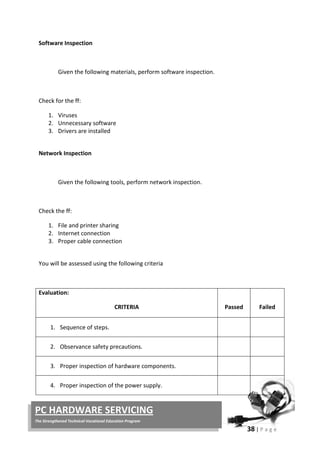
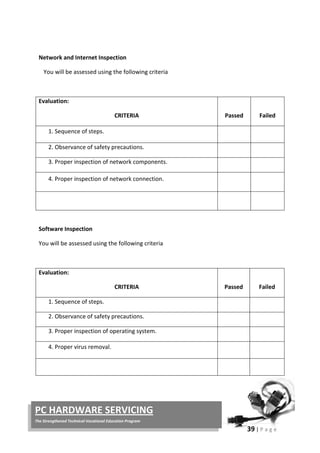
  • 232.
    46 | Pa g e PC HARDWARE SERVICING The Strengthened Technical-Vocational Education Program RJ-45 connector Shielded Twisted Pair (STP) Cable A disadvantage of UTP is that it may be susceptible to radio and electrical frequency interference. Shielded twisted pair (STP) is suitable for environments with electrical interference; however, the extra shielding can make the cables quite bulky. Shielded twisted pair is often used on networks using Token Ring topology. Coaxial Cable Coaxial cabling has a single copper conductor at its center. A plastic layer provides insulation between the center conductor and a braided metal shield. The metal shield helps to block any outside interference from fluorescent lights, motors, and other computers. Coaxial cable Although coaxial cabling is difficult to install, it is highly resistant to signal interference. In addition, it can support greater cable lengths between network devices than twisted pair cable. The two types of coaxial cabling are thick coaxial and thin coaxial. Wireless LANs Not all networks are connected with cabling; some networks are wireless. Wireless LANs use high frequency radio signals, infrared light beams, or lasers to communicate between the workstations and the file server or hubs. Each workstation and file server on a wireless network has some sort of transceiver/antenna to send and receive the data. Information is relayed between transceivers as if they were physically connected. For longer distance, wireless communications can also take place through cellular telephone technology, microwave transmission, or by satellite.
  • 233.
    47 | Pa g e PC HARDWARE SERVICING The Strengthened Technical-Vocational Education Program Wireless networks are great for allowing laptop computers or remote computers to connect to the LAN. Wireless networks are also beneficial in older buildings where it may be difficult or impossible to install cables. What is a Network Operating System? Unlike operating systems, such as DOS and Windows, that are designed for single users to control one computer, network operating systems (NOS) coordinate the activities of multiple computers across a network. The network operating system acts as a director to keep the network running smoothly. The two major types of network operating systems are: • Peer-to-Peer • Client/Server Peer-to-Peer Peer-to-peer network operating systems allow users to share resources and files located on their computers and to access shared resources found on other computers. However, they do not have a file server or a centralized management source. In a peer-to- peer network, all computers are considered equal; they all have the same abilities to use the resources available on the network. Peer-to-peer networks are designed primarily for small to medium local area networks. AppleShare and Windows for Workgroups are examples of programs that can function as peer-to-peer network operating systems. Peer-to-peer network Advantages of a peer-to-peer network: • Less initial expense - No need for a dedicated server. • Setup - An operating system (such as Windows XP) already in place may only need to be reconfigured for peer-to-peer operations.
  • 234.
    48 | Pa g e PC HARDWARE SERVICING The Strengthened Technical-Vocational Education Program Disadvantages of a peer-to-peer network: • Decentralized - No central repository for files and applications. • Security - Does not provide the security available on a client/server network. Client/Server Client/server network operating systems allow the network to centralize functions and applications in one or more dedicated file servers. The file servers become the heart of the system, providing access to resources and providing security. Individual workstations (clients) have access to the resources available on the file servers. The network operating system provides the mechanism to integrate all the components of the network and allow multiple users to simultaneously share the same resources irrespective of physical location. Novell Netware and Windows 2000 Server are examples of client/server network operating systems. Client/server network Advantages of a client/server network: • Centralized - Resources and data security are controlled through the server. • Scalability - Any or all elements can be replaced individually as needs increase. • Flexibility - New technology can be easily integrated into system. • Interoperability - All components (client/network/server) work together. • Accessibility - Server can be accessed remotely and across multiple platforms. Disadvantages of a client/server network: • Expense - Requires initial investment in dedicated server. • Maintenance - Large networks will require a staff to ensure efficient operation. • Dependence - When server goes down, operations will cease across the network.
  • 235.
    49 | Pa g e PC HARDWARE SERVICING The Strengthened Technical-Vocational Education Program UTP Cable A UTP cable (category 5) is one of the most popular LAN cables. This cable consists of 4 twisted pairs of metal wires (that means there are 8 wires in the cable). Adding RJ45 connectors at both ends of the UTP cable it becomes a LAN cable they usually use. Preparation You need a UTP Cable, Crimping Tool, RJ45, and Cutter Making Cable Follow the steps below.
  • 236.
    50 | Pa g e PC HARDWARE SERVICING The Strengthened Technical-Vocational Education Program 1. Remove the outmost vinyl shield for 12mm at one end of the cable (we call this side A-side). 2. Arrange the metal wires in parallel (refer the each section's wire arrangement table). Don't remove the shield of each metal line. 3. Insert the metal wires into RJ45 connector on keeping the metal wire arrangement. 4. Set the RJ45 connector (with the cable) on the pliers, and squeeze it tightly. 5. Make the other side of the cable (we call this side B-side) in the same way. 6. After you made it, you don't need to take care of the direction of the cable. (Any cable in this page is directionless --- that means you can set either end of the cable to either device.) How to see the wire arrangement Take the UTP cable with your left hand and a RJ45 connector with your right hand. Hold the RJ45 connector in the way you can see the contact metal face of the RJ45 connector. The tables below are for the case where the UTP cable consists of green/green-white, orange/orange-white, blue/blue-white, brown/brown-white twisted pairs. 10 Base T / 100 Base T Straight 10BaseT and 100BaseT are most common mode of LAN. You can use UTP category- 5 cable for both mode. (You can use UTP category-3 cable for 10BaseT, in which there are only 3 wires inside the cable.) A straight cable is used to connect a computer to a hub. You can use it to connect 2
  • 237.
    51 | Pa g e PC HARDWARE SERVICING The Strengthened Technical-Vocational Education Program hubs in the case one of the hubs has an uplink port (and you use normal port on the other hub). 10 Base T / 100 Base T Cross A cross cable for 10BaseT and 100BaseT is used to connect 2 computers directly (with ONLY the UTP cable). It is also used when you connect 2 hubs with a normal port on both hubs. (In other words, the cross cable is used relatively in a rare case.) Pin ID side A side B Pin ID side A side B 1 orange-white orange-white 2 orange orange 3 green-white green-white 4 blue blue 5 blue-white blue-white 6 green green 7 brown-white brown-white 8 brown brown
  • 238.
    52 | Pa g e PC HARDWARE SERVICING The Strengthened Technical-Vocational Education Program 1 orange-white green-white 2 orange green 3 green-white orange-white 4 blue blue 5 blue-white blue-white 6 green orange 7 brown-white brown-white 8 brown brown To create a peer network, you must have the following components: • A network interface or Local Area Network (LAN) adapter for each computer. The same manufacturer and model of network card is preferred. • Cabling that is supported by the network cards. • Windows 98 drivers for the network cards. • A common network protocol. • A unique computer name for each computer. To create a peer network, follow these steps for each computer connected to the network: 1. Shut down the computer and install the network card and appropriate cabling for each computer.
  • 239.
    53 | Pa g e PC HARDWARE SERVICING The Strengthened Technical-Vocational Education Program NOTE: For information about how to configure your network adapters and physically connect your computers, consult the documentation included with your network adapters or contact the manufacturer(s) of your network adapters. 2. Start Windows and install the network drivers. Windows may detect your network card and install the drivers when you start the computer. If the network card drivers are not included with Windows, follow the manufacturer's instructions about how to install the network drivers. . 3. Choose a client and a common protocol for each computer. To do this, follow these steps: a. Click Start, point to Settings, click Control Panel, and then double-click Network. b. Click Add, click Client, and then click Add. c. In the Manufacturers box, click the appropriate manufacturer, click the appropriate client in the Network Clients box, and then click OK. d. Click Add, click Protocol, and then click Add. e. In the Manufacturers box, click the appropriate manufacturer, click the appropriate protocol in the Network Protocol box, and then click OK. . 4. Configure a peer server. Each computer that is configured for File and Printer Sharing can act as a server. To configure a computer for File and Printer Sharing, use the following steps: a. Click Start, point to Settings, click Control Panel, and then double-click Network. b. Click File and Print Sharing, click one or both options to share files and printers, click OK, and then click OK again.
  • 240.
    54 | Pa g e PC HARDWARE SERVICING The Strengthened Technical-Vocational Education Program c. Click Yes when you are prompted to restart your computer. . 5. Give each computer a unique computer name. To do this, use the following steps: a. Click Start, point to Settings, click Control Panel, and then double-click Network. b. On the Identification tab, type a unique name in the Computer name c. box. Click OK, and then click Yes when you are prompted to restart your computer. NOTE: The computer name must be unique for each computer on the network and should be no more than 15 characters in length. In small networks, the workgroup name should be the same for each computer so that all computers are visible in the same workgroup when browsing. You should not use spaces or the following characters in computer and workgroup names: Windows XP Networking As in previous versions of Windows, Windows XP provides a wizard for network connection setup. Wizards break down a task into individual steps and guide the user through the steps one at a time. The Windows XP New Connection Wizard supports two basic types of Internet connections, dialup and broadband. To access the network connection setup wizard in Windows XP, navigate through the Start menu to the Connect To and Show all connections options as shown below.
  • 241.
    55 | Pa g e PC HARDWARE SERVICING The Strengthened Technical-Vocational Education Program The same feature is also accessible via the Network Connections icon in Control Panel. Choosing either of the above options causes a new window to appear on the desktop as shown below. On the right, this window displays icons for any pre-existing connections. The Create a new connection option on the left allows new connections to be set up. Types of Windows XP Network Connection Setup
  • 242.
    56 | Pa g e PC HARDWARE SERVICING The Strengthened Technical-Vocational Education Program Clicking the Create a new connection option from the Network Connections dialog activates the wizard as shown below. Clicking Next presents the user with three main choices for Internet and private network setup as shown below. The Connect to the Internet option supports several types of Internet connection setup. This option allows the user to choose from a list of ISPs, use a setup CD-ROM provided by their ISP, or set up a connection manually. Connect to the network at my workplace supports client-side set up of both dialup remote access and VPN services. The Set up an advanced connection option supports serial, parallel and infrared port networking setups. This option also allows the user to enable certain types of incoming network connections.
  • 243.
    57 | Pa g e PC HARDWARE SERVICING The Strengthened Technical-Vocational Education Program Setting up an Internet Connection The Getting Ready page presents three choices as shown below: The Choose from a list of Internet Service Providers option gives instructions for setting up an account with an ISP, then making the Internet connection through that new account. The Set up my connection manually option sets up connections for accounts that have already been opened with an ISP (username and password are ready for use). The Use the CD I got from an ISP option should be used when possessing an installation CD-ROM from one of the service providers. By default the first option Get online with MSN (Microsoft Network) is selected. To set up a new connection to MSN, click Finish. To set up a new connection to various other ISPs, change the radio button selection to the second option and then click Finish. MSN Internet Connection Setup After choosing MSN and clicking Finish, the Windows XP network connection wizard closes and a new window opens as shown below.
  • 244.
    58 | Pa g e PC HARDWARE SERVICING The Strengthened Technical-Vocational Education Program This window leads to the MSN Explorer Wizard. Answering Yes to this question creates a key in the Windows Registry that allows access to MSN email from the Windows XP Start Menu. Answering No to this question skips that step. After answering either Yes or No, the MSN wizard launches automatically. The MSN wizard sets up an MSN account and dial-up Internet connection but require a working phone line connected to a working modem. Other ISP Internet Connection Setup After choosing an alternate ISP and clicking Finish, the Windows XP network connection wizard closes and a new Windows Explorer window opens as shown below. The first shortcut launches the MSN window shown above. The second shortcut launches a new Internet Connection Wizard. This wizard dials a public phone number to obtain a list of ISP referrals from Microsoft. Obviously, this wizard will provide a limited list of service providers and not necessarily the best ones for each individual's needs. These shortcuts, installed in C:Program FilesOnline Services, can be accessed at any time from Windows Explorer. It is not necessary to navigate through the Windows XP network connection wizard to execute them. This wizard assumes an account has been opened previously. Manual connections require the username (account name) and password from a working ISP service. Dial-up connections also require a telephone number; broadband connections do not.
  • 245.
    59 | Pa g e PC HARDWARE SERVICING The Strengthened Technical-Vocational Education Program The next step presents three options for creating a manual connection. The Connect using a dial-up modem option works for phone line Internet services (either traditional dial-up or ISDN). The Connect using a broadband connection that requires a user name and password option works for DSL or cable modem Internet services that use PPPoE. The Connect using a broadband connection that is always on option works for true "always on" DSL or cable modem services (those that do not require a username/password) as specified in their service agreement. Microsoft added this option for informational purposes only. Service providers normally create their setup CDs to include all of the necessary setup data for an operating system in a self-contained package. Therefore, clicking Finish has no effect other than to exit the wizard.
  • 246.
    60 | Pa g e PC HARDWARE SERVICING The Strengthened Technical-Vocational Education Program Setting XP Network Connection Equipment, Tools and Materials Required: - UTP cables - 4 Computer units - 1 hub Given the following materials, set-up a network connection on four computers. CRITERIA PASSED FAILED • Safety Precautions are observed. • All the UTP are properly connected to the computer and hub. • Computers are properly connected and seen in the network. • Proper boot-up and shutdown of the computer is observed. Total:
  • 247.
    61 | Pa g e PC HARDWARE SERVICING The Strengthened Technical-Vocational Education Program Accident reports may contain the following details: • Name of person injured • Date and Time of accident • Type of Injury • First Aid given • Action taken to prevent further accidents. With this kind of report, the teacher and the students could see what type of accident mostly occur on their place that they could already prevent it from coming. Sample Accident Report ACCIDENT, DANGEROUS OCCURRENCE AND INCIDENT REPORT Name: _______________________________ Date: ________________ Year & Section: ______________________ A. Subject of Report (Please tick the box) • Injury • Dangerous occurrence • Damage to equipment • Accidents/incidents with the potential to injure or cause damage • Health Condition
  • 248.
    62 | Pa g e PC HARDWARE SERVICING The Strengthened Technical-Vocational Education Program B. Place, Date, Time: Exact location of event: ___________________________________ Time of event: ____________________________________________ Teacher-in-charge at the time of event: ___________________ C. Nature of Injury: ___________________________________________________________ ___________________________________________________________ ___________________________________________________________ D. First Aid Treatment: ___________________________________________________________ ___________________________________________________________ ___________________________________________________________ Checked by: ____________________________ I. Simulation 1. Group yourselves into six. 2. Show some situation where it can lead to an unwanted accidental event. Show the class on how you would come up with this. 3. The performance will be rated according to the following: Performance Criteria: 5 - Excellently performed 4 - Very Satisfactorily performed 3 - Satisfactorily performed 2 - Fairly performed 1 - Poorly performed
  • 249.
    63 | Pa g e PC HARDWARE SERVICING The Strengthened Technical-Vocational Education Program II. Make an Accident Report that you may encounter inside the computer laboratory. Program/ Course: Computer Hardware Servicing NC II Unit of Competency: Configure Computer System and Networks Module: Configuring Computer System and Networks Learning Outcome 3: Analyze and try-out the configured computer system. Assessment Criteria: 1. Another round of inspection and test following the specified manufacturer’s instruction is carried out. 2. Safe operation of the network and system is assured guaranteed 100%. References: • Introduction to PC Hardware and Troubleshooting by Mike Myers
  • 250.
    64 | Pa g e PC HARDWARE SERVICING The Strengthened Technical-Vocational Education Program • http://support.microsoft.com You have learned from Information Sheet #2.2.6 how to configure a Peer-to-Peer network and XP connection with Internet. Now to check if the LAN connection is really working, you must try to share your resources and accessed shared resources of other computer. Make sure that you follow the standard operating procedures in configuring network to achieve successful operation. Sharing Resources and Accessing Shared Resources 1. Open My Computer, double-click the C: drive, and create a new folder on the C: drive. Name it Shared. Right-click the Shared folder and select Properties.
  • 251.
    65 | Pa g e PC HARDWARE SERVICING The Strengthened Technical-Vocational Education Program 2. In the Shared Properties dialog box, select the Sharing tab. Notice that the. Select the Share This Folder button. Type the Share Name. Click Apply and the computer you are linked to should be able to view your Shared folder. 3. Right-click My Network Places, which should be located on your desktop. Select Properties. Right-click your connection (look for a name like Local Area Connection) and again select Properties. In your Local Area Connection Properties dialog box, select File and Print Sharing for Microsoft Networks and click OK. If you don’t see an option for File and Print Sharing, click Install and select a service and then click Add. Now select the File and Print Sharing option. 4. Open My Network Places- double-click the icon- and select the Entire Network option under Other Places at the left of the window. In the main (right-hand) pane, you should see one or more options. Double-click the Microsoft Windows Network icon. 5. You’re now at the main network screen, where you should see what’s called a workgroup. A workgroup is a basic group of computers connected to the same Ethernet Local Disk (C:PC 1)
  • 252.
    66 | Pa g e PC HARDWARE SERVICING The Strengthened Technical-Vocational Education Program network. Double-click the workgroup to see all the computers connected to your Ethernet network. At this point, you can access any of the other computers and see what folders they have shared. If you don’t see any computer but your own, just wait a few minutes and refresh your screen. Then it’s time to troubleshoot the network problems. In a network, other peripherals such as printer and faxes could also be shared. You could use one computer in a network of 10 computers. Click the Print command, when the dialog box appears click Find Printer. Then click Browse. Find the location of the printer you will use. If you don’t have any printer installed in your computer, here’s the step on how: TO ADD A PRINTER: 1. Click Start button, then point to Printer and Faxes.
  • 253.
    67 | Pa g e PC HARDWARE SERVICING The Strengthened Technical-Vocational Education Program 2. A window will be displayed showing Click Add a Printer on the Taskpane (if there are printers already installed). 3. To continue, click Next. 4. Select what kind of printer you are going to connect, Local printer or Network printer.
  • 254.
    68 | Pa g e PC HARDWARE SERVICING The Strengthened Technical-Vocational Education Program 5. Select Printer port. 6. Below Manufacturer, Click on the name of the printer's manufacturer. Manufacturers are listed in alphabetical order and you may have to click on the little down arrow until the manufacturer's name appears in the list. Below Model, Click on the model of the printer you will be using. Model names are listed in alphabetical order and you may need to click on the little down arrow until the model name appears in the list. Note: You can often find the manufacturer and model names by looking on the printer itself. 7. Click the Next button. Windows will check to see if it has the software necessary to communicate with the printer (the software your computer needs to communicate with devices like printers, monitors, and disk drives is known as a driver). If so, it will install the software automatically. Note: If you receive a message saying that Windows was unable to locate the necessary files, you will need to get the necessary software before continuing. Most often, the printer manufacturer's Web site will have a section called Drivers, from which you can download the software necessary to use their products. If you
  • 255.
    69 | Pa g e PC HARDWARE SERVICING The Strengthened Technical-Vocational Education Program are unable to locate the software on the manufacturer's Web site, inquire within your department to see if someone is in possession of a software installation disk for the printer. Once you have obtained the necessary software, click here for instructions on installing a driver. • Assign your Printer name. Click Next. If you want to test page, click Yes. Click Next. 9. Then Finish. Right-click on the printer you installed. Click Set as Default.
  • 256.
    70 | Pa g e PC HARDWARE SERVICING The Strengthened Technical-Vocational Education Program Writing an Accomplishment Report Accomplishment Report is done when you have finished a certain job. This report may be in narrative or tabular form. Sample of an Accomplishment Report ACCOMPLISHMENT REPORT Name: ___________________________ Date:_________________ Assigned Task Working Properly Not Working Connected in a Network PC 1 √ √ PC 2 √ √ PC 3 √ Printer √ √ Accessing Printer in a Network Materials, Equipments: - Computer Units - Hub - Printer
  • 257.
    71 | Pa g e PC HARDWARE SERVICING The Strengthened Technical-Vocational Education Program • Given the following materials and equipments, access one document file on other computer in a network. • Print the file you open with the use of the network printer. • Make an Accomplishment Report on this operation. Self-Check# 6.1.2 1. Internet CRITERIA RATING • Computers are connected in the network. 30% • All the peripherals are properly inspected. 20% • Shared files are located and opened a document in the computer. 30% • Accessed file has been printed. 20% Total: 100%
  • 258.
    72 | Pa g e PC HARDWARE SERVICING The Strengthened Technical-Vocational Education Program 2. Intranet 3. GAN 4. WAN 5. MAN 6. Topology 7. Network 8. LAN 9. Star topology 10. Ring topology Self-Check# 6.1.3 • tweezers • magnifying glass • multi-tester • side-cutter pliers • soldering iron • cable tie • Computer Storage device • adapter • manuals • long nose pliers Self-Check #6.2.1 Googles - used to prevent tiny particles from entering our eyes
  • 259.
    73 | Pa g e PC HARDWARE SERVICING The Strengthened Technical-Vocational Education Program Coverall -worn to prevent the body or clothes from any types of dirt Apron -also worn to protect the body from dirt Gloves -used in handling objects without hurting the hands.
  • 260.
    1 | Pa g e PC HARDWARE SERVICING The Strengthened Technical-Vocational Education Program Page How to Use this Module .....................................................................................................................ii Introduction .......................................................................................................................................iii Technical Terms .................................................................................................................................iv Learning Outcome # 1........................................................................................................................ 1 Information Sheet # 7.1.1.................................................................................................................. 2 Operation Sheet # 7.1.1..................................................................................................................... 8 Learning Outcome # 2........................................................................................................................ 9 Information Sheet # 7.2.1................................................................................................................ 11 Self Check # 7.2.1............................................................................................................................. 14 Information Sheet # 7.2.2................................................................................................................ 15 Operation Sheet # 7.2.2................................................................................................................... 20 Self check # 7.2.2 ............................................................................................................................. 22 Information Sheet # 7.2.3................................................................................................................ 23 Operation Sheet # 7.2.3................................................................................................................... 30 Learning Outcome # 3...................................................................................................................... 31 Job Sheet # 7.3.1.............................................................................................................................. 33 Answer keys ..................................................................................................................................... 37
  • 261.
    2 | Pa g e PC HARDWARE SERVICING The Strengthened Technical-Vocational Education Program Welcome to the Module “Maintaining of Computer System and Networks”. This module contains training materials and activities for you to complete. The unit of competency “Maintain Computer System and Networks” contains knowledge, skills and attitudes required for a Computer Hardware Servicing NC II course. You are required to go through a series of learning activities in order to complete each of the learning outcomes of the module. In each learning outcome there are Information Sheets, Job Sheets, Operation Sheets, and Activity Sheets. Follow these activities on your own and answer the Self-Check at the end of each learning activity. If you have questions, don’t hesitate to ask your facilitator for assistance. Recognition of Prior Learning (RPL) You may already have some of the knowledge and skills covered in this module because you have: o been working for some time o already have completed training in this area. If you can demonstrate to your teacher that you are competent in a particular skill or skills, talk to him/her about having them formally recognized so you don’t have to do he same training again. If you have a qualification or Certificate of Competency from previous trainings show it to your teacher. If the skills you acquired are still current and relevant to this module, they may become part of the evidence you can present for RPL. If you are not sure about the currency of your skills, discuss it with your teacher. After completing this module ask your teacher to assess your competency. Result of your assessment will be recorded in your competency profile. All the learning activities are designed for you to complete at your own pace. Inside this module you will find the activities for you to complete followed by relevant information sheets for each learning outcome. Each learning outcome may have more than one learning activity.
  • 262.
    3 | Pa g e PC HARDWARE SERVICING The Strengthened Technical-Vocational Education Program Course : Computer Hardware Servicing NC II Unit of Competency : Maintain Computer System and Networks Module : Maintaining Computer Systems and Networks INTRODUCTION This module contains information and suggested learning activities on Computer Hardware Servicing NC II. It includes the following competencies: plan and prepare maintenance procedures; maintain computer system and networks; and inspect and test computer system and networks. It consists of 3 learning outcomes. Each learning outcome contains learning activities supported by each instructional sheet. Upon completion of this module, report to your teacher for assessment of what you achieved in terms of knowledge and skills requirement in this module. If you pass the assessment, you will be given a certificate of completion. SUMMARY OF LEARNING OUTCOMES: Upon completion of the module you should be able to: LO1. Plan and prepare maintenance procedures LO2. Maintain computer system and networks LO3. Inspect and test computer system and networks PRE-REQUISITES: You must have completed module 5 “Diagnose and Troubleshoot Computer System” and module 6 “Configure Computer Systems and Networks” before studying this module.
  • 263.
    4 | Pa g e PC HARDWARE SERVICING The Strengthened Technical-Vocational Education Program  OHS –  Occupational Health and Safety Port hub /Port  – is a connector on the back of a computer or other device. A port is either a serial port or a parallel port. Modem  - (Modulator-Demodulator) The modem is a device that allows a given computer to share data or otherwise a device which let computers exchange information USB  – (Universal Serial Port) Scanner  - is an input device that read text or illustration printed on paper, translates the information into a form that a computer can use. Printer  - is a piece of hardware that produces a paper copy (also known as ‘hardcopy’) of the information generated by the computer. Flash drive  – a portable storage device which is plug directly to the USB port. Network –  a group of computers and associated devices that are connected by communications facilities. OS (Operating system)  software that controls the allocation and use of programs and data that a computer uses. Software  – programs and data that a computer uses. Maintenance  - is the testing and cleaning of equipment. Planning – is both the organizational process of creating and maintaining a plan; and the psychological process of thinking about the activities required to create a desired future on some scale  Computer System  - The complete computer made up of the CPU, memory and related electronics (main cabinet), all the peripheral devices connected to it and its operating system. Computer systems fall into two broad divisions: clients and servers. Client machines fall into three categories from low to high end: laptop, desktop and workstation. Servers range from small to large: low-end servers, midrange servers and mainframes. Defragmentation –  the process of reorganizing and rewriting files so that they occupy one large continuous area on your hard disk. CRT  – (Cathode Ray Tube) A display device used in computer monitors and television sets. Boot sector  – The part of the formatted disk containing the operating system loading a program. Virus – A program intended to damage your computer system without your knowledge and permission.
  • 264.
    5 | Pa g e PC HARDWARE SERVICING The Strengthened Technical-Vocational Education Program Course : Computer Hardware Servicing NC II Unit of Competency : Maintain Computer System and Networks Module : Maintaining Computer System and Networks Learning Outcome 1: Plan and Prepare Maintenance Procedures Assessment Criteria: 1. Planning and preparing for maintenance task is organized as a prerequisite. 2. OHS policies are carried out along with the task. 3. Computer system is regularly checked in compliance with maintenance procedures. 4. Appropriate materials are used for ensuring work delivery that conforms with task specifications. 5. Proper tools, equipment and testing devices for maintenance purposes are obtained and checked against correct operation and safety. 6. Computer system and network are maintained based on the manual instructions References: 1. Bigelow, Stephen J., PC Technician’s Troubleshooting, McGraw Hill 2. Kelly,DianneRose, Computer Maintenance and Troubleshooting Handbook Rose Nelson WEB: http://home.comcast.net/~ 3. Sandler,Corey, Fix Your Own PC,MIS Press 4. Kuhlman, Dave, dkuhlman@rexx.com http://www.rexx.com/~dkuhlman Dave Kuhlman. This documentation is covered by The MIT License: http://www.opensource.org/licenses/mit-license 5. Meyers,Mike,Introduction to PC Hardware and Troubleshooting,McgrawHill 6. www.eserviceinfo.com 7. http:/csd/2.computer.org 8. http:/sevier.com/wps 9. www.yahoo.com
  • 265.
    6 | Pa g e PC HARDWARE SERVICING The Strengthened Technical-Vocational Education Program Plan and Prepare Maintenance Procedures Introduction: Planning and preparing systematic maintenance procedure save time, money and frustration. It is a good idea and opportunity to learn the proper care and maintenance of your computer. PC maintenance is an important topic for anyone who owns a PC. Looking after your PC properly ensures you of trouble-free use. Regular PC maintenance also keeps the machine’s performance optimal. A. Plan Maintenance Procedures for Computer System and Networking. 1. Design a systematic maintenance plan for hardware. • Design a monitoring, evaluating and updating plan. • Place your computer in a well-ventilated area. • Schedule use of computer for its longer life. • Move the computer only when it is turned off and unplugged. • Treat your computer properly. • Maintain your hard disk 2. Design a systematic maintenance plan for your software. • Backup your files • Install or secure passwords • Delete temporary files • Update anti-virus and spy ware
  • 266.
    7 | Pa g e PC HARDWARE SERVICING The Strengthened Technical-Vocational Education Program MONTHLY COMPUTER MAINTENANCE PLAN JUNE JULY AUG SEPT OCT NOV DEC Anti virus software checkups Disk space utilization Defragmentation of hard drives Troubleshoot hardware and software issues TYPES OF MAINTENANCE PROCEDURE: (1) Hardware maintenance is the testing and cleaning of equipment. (2) Information system maintenance is the routine updating of master files, such as adding and deleting employees and customers and changing credit limits and product prices. (3) Software or program maintenance is the updating of application programs in order to meet changing information requirements, such as adding new functions and changing data formats. It also includes fixing bugs and adapting the software to new hardware devices. (4) Disk or file maintenance is the periodic reorganizing of disk files that have become fragmented due to continuous updating.
  • 267.
    8 | Pa g e PC HARDWARE SERVICING The Strengthened Technical-Vocational Education Program Work place procedures • Identify hazards and assess risk. • Execution of OHS policies are carried out along with the task. Following certain procedure is very important to perform a given operation or evolution or in reaction to a given event. The table below shows different elements and their corresponding performance criteria to be able to identify occupational health and safety hazards, and assess risk, as well as follow instructions and procedure in the workplace with minimal supervision. The students will also be capable of participating and contributing to OHS management issues. ELEMENT PERFORMANCE CRITERIA 1. Identify hazards and assess risk. 1.1 Identify hazards in the work area and during the performance of workplace duties. 1.2 Assess level of risk 2. Follow procedures and strategies for risk control. 2.1 Report hazards in the work area to designated personnel according to workplace procedures 2.2 Follow workplace procedures and work instructions for assessing and controlling risks with minimal supervision. 2.3 Whenever necessary, within the scope of responsibilities and competencies, follow workplace procedures for dealing with hazards and incidents, fire and/or other emergencies.
  • 268.
    9 | Pa g e PC HARDWARE SERVICING The Strengthened Technical-Vocational Education Program ELEMENT PERFORMANCE CRITERIA 3. Contribute to OHS in the workplace. 3.1 Describe employee’s rights regarding consultation on OH&S matters 3.2 Raise task and/or job specific OH&S issues with appropriate people in accordance with workplace procedures and relevant OH&S legislative requirements 3.3 Contribute to participative arrangement for OH&S management in the workplace within organisational procedures and the scope of responsibilities and competencies 3.4 Provide feedback to supervisor on hazards in work area in line with organisational OH&S policies and procedures 3.5 Provide support in implementing procedures to control risks in accordance with organisational procedures Examples of OHS issues which may need to be raised by workers with designated personnel may include:  Identified Hazards  Problems encountered in managing risks associated with hazards  Clarification on understanding of OHS policies and procedures  Communication and consultation processes  Follow up on reports and feedback.  Effectiveness of risk controls in place  Training needs
  • 269.
    10 | Pa g e PC HARDWARE SERVICING The Strengthened Technical-Vocational Education Program Materials, Tools, Equipment and Testing Devices. Programming Tools (1) Programming tools are used for software development or system maintenance. Virtually, any program or utility that helps programmers or users develop applications or maintain their computers can be called a tool. Examples of programming tools are compilers, interpreters, assemblers, 4GLs, editors, debuggers and application generators. (2) Programming tools help the user analyze or search for data. For example, query and report programs are often called query tools and report tools. (3) An on-screen function in a graphics program; for example, line draw, circle draw or brush tool. (4) A software control panel for setting user preferences. (5) Sometimes people will call any software a "tool." For example, the phrase, "there aren't any tools to do that job" means that no application is available to perform the required processing.
  • 270.
    11 | Pa g e PC HARDWARE SERVICING The Strengthened Technical-Vocational Education Program Equipment/Facilities Tools & Instruments Supplies & Materials Server Computer peripherals Desktop computers OHS guidelines Phil. Environmental protection standards Monitors Motherboard Power supply Network device and cablings Hubs Switches LAN Cards Printers and Scanners Routers USB Flash Drives Protective eye wear Wire stripper with cutter Pliers(Assorted) Screw drivers (Assorted) Soldering iron/gun De-soldering tool Flashlight Tweezers Mirrors Antistatic wrist wrap LAN Tester Crimping tool Software installer Work bench Magnifying glass Floppy disk Compact Disk
  • 271.
    12 | Pa g e PC HARDWARE SERVICING The Strengthened Technical-Vocational Education Program Plan and Prepare Maintenance Procedure 1. Prepare/Design a daily maintenance plan for your hardware, ( time allotment: 1 week) MAINTENANCE TASK MON TUE WED THUR FRI Recalibrate the battery Clean computer case Clean the keyboard Clean the mouse Clean the screen Clean up hard drives 2. Design a systematic daily plan for your software, ( time allotment: 1 week) MAINTENANCE TASK MON TUE WED THUR FRIDAY Create an emergency diskette Check for viruses Back up files Defragment hard drive Scan hard drive for errors
  • 272.
    13 | Pa g e PC HARDWARE SERVICING The Strengthened Technical-Vocational Education Program Program course : Computer Hardware Servicing NCII Unit of Competency : Maintain Computer System and Networks Module : Maintaining Computer System and Networks LO.2 : Maintain Computer System and Networks Assessment Criteria: 1. Appropriate personal protective equipment are used in conformity with the standard procedures. 2. Periodic maintenance of the equipment is performed following manufacturer’s requirements. 3. Established procedures are followed in case of repair and parts replacements. 4. Accidental events or conditions are responded to in accordance with the established standards. Resources: Equipment/Facilities Tools & Instruments Supplies & Materials Server Computer peripherals Desktop computers OHS guidelines Phil. Environmental protection standards Monitors Motherboard Power supply Network device and cablings Hubs Switches LAN Cards Printers and Scanners Routers Protective eye wear Wire stripper with cutter Pliers(Assorted) Screw drivers (Assorted) Soldering iron/gun De-soldering tool Flashlight Tweezers Mirrors Antistatic wrist wrap LAN Tester Crimping tool Software installer Work bench Magnifying glass Floppy disk Compact Disk
  • 273.
    14 | Pa g e PC HARDWARE SERVICING The Strengthened Technical-Vocational Education Program USB Flash Drives Reference: 1. McLaughlin,Robert, Sasser,Susan, Ralston,Mary.Fix Your Own PC 2. Meralco Faoundation. .Philippine Graphic Arts, Inc Tandang Sora St.Caloocan City Microcomputer Servicing Plus 3. Legaspi,Carlos, Caiña, Mark Anthony. . Pasig City, Philippines. Operate A Personal Computer 4. Bigelow,Stephen J. PC Technician’s Troubleshooting ,McGaw Hill . Dasmariñas Computer Learning Center.Dasmariñas,Cavite, Philippines 5. www.helpwithpcs.com 6. http://en.wikipedia.org 7. www.techsoup.org 8. www.howstuffworks.com 9. www.microsoft.com/technet/network
  • 274.
    15 | Pa g e PC HARDWARE SERVICING The Strengthened Technical-Vocational Education Program Tools and equipment used to protect the user and the computer system. Types of personal protective devices 1. Anti-static devices 2. Power surge protectors 3. Personal equipments ESD (Electro Static Discharge) -A small amount of static electricity that can destroy small parts of your computer. Anti-static devices Devices designed to protect the computer from static electricity. Examples: 1. Anti-static wrist strap 2. Anti-static mat 3. Anti-static bag 4. Anti-static spray Power surge protectors Devices designed to protect the computer from sudden power surges from intermittent power sources. Examples: 1. AVR (Automatic Voltage Regulators) 2. UPS (Uninterrupted Power Supply) Personal Equipment 1. Small paint brush 2. Screw drivers 3. Pliers and tweezers 4. Compressed air 5. Handheld vacuum
  • 275.
    16 | Pa g e PC HARDWARE SERVICING The Strengthened Technical-Vocational Education Program Periodic Maintenance Scheme Regular scheduled upkeep of your computer will keep you and your computer in working smoothly. Daily Schedule • Update virus and spyware definitions • Do incremental backup – back up updated files for each date. • Reboot upon crash- Reboot the computer to fix your pc upon crash. Weekly • Full virus and spyware scan • Complete backup of files • Patch up –Get latest software update for your operating system. Monthly • Clean your PC inside and out. • Defrag your hard drive to speed up its operation. Yearly • Check your programs – clean up unused programs • Reformat your hard drive and reinstall the operating system • Make a full diagnostic check on hardware and software
  • 276.
    17 | Pa g e PC HARDWARE SERVICING The Strengthened Technical-Vocational Education Program Sample Maintenance scheme Preventive Maintenance Activity Recommended Frequency Auto? Scan hard disk file systems for errors Daily Yes Scan for viruses Daily Yes Back up data Daily No Clean CRT screen Weekly No Defragment hard disks Monthly Yes Scan for hard disk read errors Weekly Yes Clean mouse Monthly No Check for full hard disk volumes and remove unnecessary files Monthly No Update virus definition files Monthly Sometimes Check power protection devices to ensure they are still protecting the system Quarterly No Check power supply fan for ventilation and dirt buildup and clean if necessary Quarterly No Back up CMOS information Quarterly No Update emergency boot floppies Quarterly No Clean floppy disk drive internals and read/write heads Quarterly (depending on use) No Check processor temperature, inspect heat sink and fan to ensure they are working Annually (or whenever case is opened) No Check hard disk for temperature and vibration Annually (or whenever case is opened) No Clean exterior of case Annually No Clean exterior of monitor Annually No Check and clean interior, motherboard and expansion cards if necessary Annually No Check internal connections and cables Annually No Clean keyboard Annually No
  • 277.
    18 | Pa g e PC HARDWARE SERVICING The Strengthened Technical-Vocational Education Program Answer the following questions 1. For somebody who always works with computers, what personal protective devices do you usually use? How often do you use them? 2. Computers should be protected from static electricity to prevent component malfunction. What anti-static devices can you utilize to avoid such malfunction?
  • 278.
    19 | Pa g e PC HARDWARE SERVICING The Strengthened Technical-Vocational Education Program Cleaning the Mouse 1. Shut down the PC before cleaning the mouse. 2. Roll the mouse over onto its back and remove the ball access slide cover. 3. Wash the mouse ball with water. 4. Inspect the mouse ball’s chamber, for lint, dirt and threads and carefully remove any you find with tweezers. 5. Blow out the mouse ball chamber with compressed air. 6. If needed, you can use isopropyl alcohol to clean the exterior of the mouse. 7. Reconnect the mouse and restart the computer to give it a complete test
  • 279.
    20 | Pa g e PC HARDWARE SERVICING The Strengthened Technical-Vocational Education Program Cleaning the Monitor 1. Turn off the monitor and unplug it from the power source. 2. Using compressed air, clean away any dust on the top of the monitor’s case. 3. Use a soft cloth and isopropyl alcohol to clean the outside of the monitor. 4. Use an antistatic cleaner to clean the glass of the monitor. 5. Reconnect the monitor and test the performance. 1 2 3 4
  • 280.
    21 | Pa g e PC HARDWARE SERVICING The Strengthened Technical-Vocational Education Program Procedure in cleaning the keyboard 1. Shut down the computer and turn off the computer. 2. Disconnect the keyboard from the computer and lay it upside-down on a flat, clean work surface. 3. Remove the screws that hold together the keyboard case. 4. Holding the case together, turn the keyboard over, and then remove the top cover. Use the compressed gas and/or brush and vacuum to clean out the keys. 5. Taking care not to dislodge any keys, remove the key assembly from the case. 6. If the keyboard has a circuit card attached to the key assembly, remove it and set it aside. 7. Remove the screws that hold the back metal plate to the key assembly. Put the screws in a cup or another container so you won’t lose them. 8. Carefully lift off the metal plate. What you find underneath depends on the design of the keyboard. Carefully lift and clean the contacts on the card with the alcohol and cloth. 9. Probably, there will be some type of rubber pad between the printed circuit and the back of the keys. Carefully lift this up and clean any spill residue from the pad as well as the backs of the keys. 10. Reassemble the pads, printed circuit, circuit card and metal plate, and then turn the assembly right-side up again. 11. It would be a good idea to remove the keys and clean them, as well. They should pop off. Just don’t remove more than a few at a time, because you’ll have a real nightmare to figure out which key go where. Clean under them with the alcohol and cloth.
  • 281.
    22 | Pa g e PC HARDWARE SERVICING The Strengthened Technical-Vocational Education Program Printer Cleaning Inkjet Printer 1. Clean the print nozzle regularly. Most inkjet printers have a built-in utility to clean or unclog the print head nozzles. You should do this regularly, especially if the printer sits idle for a couple of weeks. 2. Never turn a printer off by pulling the plug from the power source. Always use the printer’s power switch to turn it off. The printer has some built-in functions, such as parking the print head that are tied to the power-off function of the printer’s on/off switch. 3. Use inkjet quality paper. 4. Dust and paper scraps and bits can collect in the bottom of the paper path in an inkjet printer. Remove the paper scraps and blow out any dust or paper bits that have accumulated with compressed air.
  • 282.
    23 | Pa g e PC HARDWARE SERVICING The Strengthened Technical-Vocational Education Program Cleaning your system unit Cleaning the system unit and its parts is not really difficult to do; you just need the proper tools to clean it properly. Using compressed air antistatic strap and a Phillips screw driver you can effectively clean your unit The parts that need cleaning are the ff: 1. Motherboard 2. Memory 3. Interface cards 4. Hard drives 5. Optical Drives 6. System Case
  • 283.
    24 | Pa g e PC HARDWARE SERVICING The Strengthened Technical-Vocational Education Program Computer Hardware Maintenance and Cleaning Equipment and Materials: Equipment System unit Monitor Keyboard and Mouse Printer Materials Screw driver Air Compressor Anti-static Strap Computer Hardware Maintenance and Cleaning The student is provided with the necessary equipment and materials to clean the different hardware components of a computer unit.
  • 284.
    25 | Pa g e PC HARDWARE SERVICING The Strengthened Technical-Vocational Education Program You will be assessed using the following criteria Evaluation: CRITERIA Passed Failed 1. Periodic maintenance is observed 2. Observance of safety precautions. 3. Appropriate materials are used in cleaning the hardware components. 4. Confirmation of computers normal function.
  • 285.
    26 | Pa g e PC HARDWARE SERVICING The Strengthened Technical-Vocational Education Program Write your answers on your answer sheet: 1. Enumerate the basic tools needed in cleaning your system unit. 2. Can we use anti-static glass cleaner when cleaning the monitor? Yes or No. Why? 3. Is it safe to clean your printer when it is still on? Explain. 4. Why do we need to shutdown our computer unit before we clean and disassemble?
  • 286.
    27 | Pa g e PC HARDWARE SERVICING The Strengthened Technical-Vocational Education Program Computer Virus  A virus is a destructive executable program that infects the other programs in the system and spreads by replicating itself.  Such a program is designed to damage the victim’s computer files.  Viruses are coded by malicious programmers in a way that they can spread in the system without one's permission and knowledge. Virus Origins and History People create viruses. A person has to write the code, test it to make sure it spreads properly and then release the virus. A person also designs the virus's attack phase, whether it's a silly message or destruction of a hard disk. So why do people do it? There are at least three reasons. The first is the same psychology that drives vandals and arsonists. Why would someone want to bust the window on someone else's car, or spray-paint signs on buildings or burn down a beautiful forest? For some people, that seems to be a thrill. If that sort of person happens to know computer programming, then he or she may funnel energy into the creation of destructive viruses. The second reason has to do with the thrill of watching things blow up. Many people have a fascination with things like explosions and car wrecks. When you were growing up, there was probably a kid in your neighborhood who learned how to make gunpowder and then built bigger and bigger bombs until he either got bored or did some serious damage to himself. Creating a virus that spreads quickly is a little like that -- it creates a bomb inside a computer, and the more computers that get infected the more "fun" the explosion. The third reason probably involves bragging rights, or the thrill of doing it. Sort of like Mount Everest. The mountain is there, so someone is compelled to climb it. If you are a certain type of programmer and you see a security hole that could be exploited, you might simply be compelled to exploit the hole yourself before someone else beats you to it. Traditional computer viruses were first widely seen in the late 1980s, and they came about because of several factors. The first factor was the spread of personal computers (PCs). Prior to the 1980s, home computers were nearly non-existent or they were toys. Real computers were rare, and they were locked away for use by "experts." During the 1980s, real computers started to spread to businesses and homes because of the popularity of the IBM PC (released in 1982) and the Apple Macintosh (released in 1984). By the late 1980s, PCs were widespread in businesses, homes and college campuses.
  • 287.
    28 | Pa g e PC HARDWARE SERVICING The Strengthened Technical-Vocational Education Program The second factor is the use of computer bulletin boards. People could dial up a bulletin board with a modem and download programs of all types. Games are extremely popular, and so are simple word processors, spreadsheets, etc. Bulletin boards lead to the precursor of the virus known as the Trojan horse. A Trojan horse is a program that sounds really cool when you read about it. So you download it. When you run the program, however, it does something uncool like erasing your disk. So you think you are getting a neat game, but it wipes out your system. Trojan horses only hit a small number of people because they are discovered quickly. Either the bulletin board owner would erase the file from the system or people would send out messages to warn one another. Different Aspects of Computer Virus Finder- searches for the new uninfected files and the Replicator- actually targets these files and infects it by multiplying itself. Types of virus Resident Viruses This type of virus is a permanent which dwells in the RAM memory. From there it can overcome and interrupt all of the operations executed by the system: corrupting files and programs that are opened, closed, copied, renamed etc. Examples include: Randex, CMJ, Meve, and MrKlunky. Direct Action Viruses The main purpose of this virus is to replicate and take action when it is executed. When a specific condition is met, the virus will go into action and infect files in the directory or folder that it is in and in directories that are specified in the AUTOEXEC.BAT file PATH. This batch file is always located in the root directory of the hard disk and carries out certain operations when the computer is booted. Overwrite Viruses Virus of this kind is characterized by the fact that it deletes the information contained in the files that it infects, rendering them partially or totally useless once they have been infected. The only way to clean a file infected by an overwrite virus is to delete the file completely, thus losing the original content.
  • 288.
    29 | Pa g e PC HARDWARE SERVICING The Strengthened Technical-Vocational Education Program Examples of this virus include: Way, Trj.Reboot, Trivial.88.D. Boot Virus This type of virus affects the boot sector of a floppy or hard disk. This is a crucial part of a disk, in which information on the disk itself is stored together with a program that makes it possible to boot (start) the computer from the disk. The best way of avoiding boot viruses is to ensure that floppy disks are write-protected and never start your computer with an unknown floppy disk in the disk drive. Examples of boot viruses include: Polyboot.B, AntiEXE. Macro Virus Macro viruses infect files that are created using certain applications or programs that contain macros. These mini-programs make it possible to automate series of operations so that they are performed as a single action, thereby saving the user from having to carry them out one by one. Examples of macro viruses: Relax, Melissa.A, Bablas, O97M/Y2K. Directory Virus Directory viruses change the paths that indicate the location of a file. By executing a program (file with the extension .EXE or .COM) which has been infected by a virus, you are unknowingly running the virus program, while the original file and program have been previously moved by the virus. Once infected it becomes impossible to locate the original files. Polymorphic Virus Polymorphic viruses encrypt or encode themselves in a different way (using different algorithms and encryption keys) every time they infect a system. This makes it impossible for anti-viruses to find them using string or signature searches (because they are different in each encryption) and also enables them to create a large number of copies of themselves. Examples include: Elkern, Marburg, Satan Bug, and Tuareg.
  • 289.
    30 | Pa g e PC HARDWARE SERVICING The Strengthened Technical-Vocational Education Program File Infectors This type of virus infects programs or executable files (files with an .EXE or .COM extension). When one of these programs is run, directly or indirectly, the virus is activated, producing the damaging effects it is programmed to carry out. The majority of existing viruses belong to this category, and can be classified depending on the actions that they carry out. Companion Viruses Companion viruses can be considered file infector viruses like resident or direct action types. They are known as companion viruses because once they get into the system they "accompany" the other files that already exist. In other words, in order to carry out their infection routines, companion viruses can wait in memory until a program is run (resident viruses) or act immediately by making copies of themselves (direct action viruses). Some examples include: Stator, Asimov.1539, and Terrax.1069 FAT Virus The file allocation table or FAT is the part of a disk used to connect information and is a vital part of the normal functioning of the computer. This type of virus attack can be especially dangerous, by preventing access to certain sections of the disk where important files are stored. Damage caused can result in information losses from individual files or even entire directories. Worms A worm is a program very similar to a virus; it has the ability to self-replicate, and can lead to negative effects on your system and most importantly they are detected and eliminated by anti-viruses. Examples of worms include: PSWBugbear.B, Lovgate.F, Trile.C, Sobig.D, Mapson. Trojans or Trojan Horses Another unsavory breed of malicious code are Trojans or Trojan horses, which unlike viruses do not reproduce by infecting other files, nor do they self-replicate like worms. Logic Bombs They are not considered viruses because they do not replicate. They are not even programs in their own right but rather camouflaged segments of other programs.
  • 290.
    31 | Pa g e PC HARDWARE SERVICING The Strengthened Technical-Vocational Education Program How do Virus Affect a System? • It corrupts files • It slows down the speed of the computer system • It causes the system to hang frequently • It deletes various files Sources of Virus Infection A virus can enter the system and infect it through various sources. Some of the sources are • Infected CDs, DVDs, pen drives, etc • E-mail • Browsing infected sites • Downloading files from the internet Steps to Remove Viruses Removing viruses, though technical, is yet a very simple process if all the required steps are properly followed. The basic steps are: • Buy or download an antivirus software(AVG Anti-virus) • Install the antivirus software
  • 291.
    32 | Pa g e PC HARDWARE SERVICING The Strengthened Technical-Vocational Education Program • Update antivirus software with the latest virus definitions • Do a complete system scan Methods of Eliminating Viruses Removing the virus – When the virus can be easily identified and can be removed without affecting other files, then the antivirus removes it from the host place. Quarantine – This is done when the virus cannot be easily identified removed from the file and the removal of virus means the removal of the complete file. In this method, although the virus is not eliminated, it is rendered inactive by moving the file into "quarantine" and renaming it. Anti-virus Software Software is designed to cure virus infected machines. An anti-virus is a program that searches for, identifies and removes potential viruses existing in the computer system
  • 292.
    33 | Pa g e PC HARDWARE SERVICING The Strengthened Technical-Vocational Education Program Examples of Anti-virus software • Symantec Norton antivirus • AVG antivirus • McAfee Scan • Microsoft Antivirus • Kaspersky • Avast
  • 293.
    34 | Pa g e PC HARDWARE SERVICING The Strengthened Technical-Vocational Education Program Virus removal Equipment and Materials: Equipment System unit Monitor Keyboard and Mouse Materials Anti-virus Software (Any Anti-virus software) Virus removal Provided with the necessary equipment and materials troubleshoot the virus infected area. You will be assessed using the following criteria Evaluation: CRITERIA Passed Failed 1.Periodic maintenance is observed 2. Safety precautions are observed. 3. Appropriate materials are used in virus removal. 4. Computers Normal function is confirmed.
  • 294.
    35 | Pa g e PC HARDWARE SERVICING The Strengthened Technical-Vocational Education Program Program Course : Computer Hardware Servicing NCII Unit of Competency : Maintain Computer System and Networks Module : Maintaining Computer System and Networks LO.3 Title : Inspecting and testing computer system and networks Assessment Criteria: 1. Final inspection of the device is instituted to ensure task perfection. 2. Laboratory management and maintenance are observed to conform to company standard. 3. Accomplishment report is delivered to concerned teacher after finishing the task. Resources: Equipment/Facilities Tools & Instruments Supplies & Materials Server Computer peripherals Desktop computers OHS guidelines Phil. Environmental protection standards Monitors Motherboard Power supply Network device and cablings Hubs Switches Protective eye wear Wire stripper with cutter Pliers(Assorted) Screw drivers (Assorted) Soldering iron/gun De-soldering tool Flashlight Tweezers Mirrors Antistatic wrist wrap LAN Tester Crimping tool Software installer Floppy disk Compact Disk
  • 295.
    36 | Pa g e PC HARDWARE SERVICING The Strengthened Technical-Vocational Education Program LAN Cards Printers and Scanners Routers USB Flash Drives Work bench Magnifying glass Allen key .05-.25 IC insertion/extraction tool RS-232 pin insertion/extraction tool Reference: 1. McLaughlin,Robert, Sasser,Susan, Ralston,Mary.Fix Your Own PC.Philippine Graphic Arts, Inc Tandang Sora St.Caloocan City 2. Meralco Faoundation. Microcomputer Servicing Plus 3. Legaspi,Carlos, Caiña, Mark Anthony. . Pasig City, Philippines. Operate A Personal Computer 4. Bigelow,Stephen J. PC Technician’s Troubleshooting ,McGaw Hill . Dasmariñas Computer Learning Center.Dasmariñas,Cavite, Philippines 5. www.helpwithpcs.com 6. http://en.wikipedia.org 7. www.techsoup.org 8. www.howstuffworks.com 9. www.microsoft.com/technet/network
  • 296.
    37 | Pa g e PC HARDWARE SERVICING The Strengthened Technical-Vocational Education Program Computer System and Network Inspection Materials, Tools and Equipment Equipment: 2 Computer units Printer HUB Switch MODEM/Router Network Cable LAN Tester Multi-tester Materials: Windows XP CD installer Windows 98 CD installer Anti-virus Software Computer Maintenance Software Hardware Inspection Given the following tools and equipment, perform hardware inspection. Check the computers connection and configuration and check for the voltage output of the power supply.
  • 297.
    38 | Pa g e PC HARDWARE SERVICING The Strengthened Technical-Vocational Education Program Software Inspection Given the following materials, perform software inspection. Check for the ff: 1. Viruses 2. Unnecessary software 3. Drivers are installed Network Inspection Given the following tools, perform network inspection. Check the ff: 1. File and printer sharing 2. Internet connection 3. Proper cable connection You will be assessed using the following criteria Evaluation: CRITERIA Passed Failed 1. Sequence of steps. 2. Observance safety precautions. 3. Proper inspection of hardware components. 4. Proper inspection of the power supply.
  • 298.
    39 | Pa g e PC HARDWARE SERVICING The Strengthened Technical-Vocational Education Program Network and Internet Inspection You will be assessed using the following criteria Evaluation: CRITERIA Passed Failed 1. Sequence of steps. 2. Observance of safety precautions. 3. Proper inspection of network components. 4. Proper inspection of network connection. Software Inspection You will be assessed using the following criteria Evaluation: CRITERIA Passed Failed 1. Sequence of steps. 2. Observance of safety precautions. 3. Proper inspection of operating system. 4. Proper virus removal.
  • 299.
    40 | Pa g e PC HARDWARE SERVICING The Strengthened Technical-Vocational Education Program After the inspection, the student will create an accomplishment report to be submitted to the teacher. Accomplishment report ` Area to be Inspected Good running condition Bad running condition Remarks HARDWARE SOFTWARE NETWORK
  • 300.
    41 | Pa g e PC HARDWARE SERVICING The Strengthened Technical-Vocational Education Program Answer key# 7.2.1 1. Personal protective devices are the tools and equipment used to protect the user and the computer system 2. Anti-static devices • Anti-static wrist strap • Anti-static mat • Anti-static bag • Anti-static spray Answer Key #7.2.2 1. Compress Air, Phillip Screw driver, Anti-static strap 2. Yes 3. No 4. To avoid the risk of electrical shock.
  • 301.
      1 | P a ge     PC HARDWARE SERVICING  The Strengthened Technical‐Vocational Education Program                                                                                                                                                     How to Use this Module .......................................................................................................   Introduction ..........................................................................................................................   Technical Terms ....................................................................................................................   Learning Outcome #1 .......................................................................................................... 1  Information Sheet #1‐1 ....................................................................................................... 2  Operation Sheet #1‐1 .......................................................................................................... 6  Learning Outcome #2 .......................................................................................................... 8  Information Sheet #2.1 ....................................................................................................... 9         Activity Sheet #2.1 ............................................................................................................ 10  Learning Outcome #3 ........................................................................................................ 13  Job Sheet                                         
  • 302.
      2 | P a ge     PC HARDWARE SERVICING  The Strengthened Technical‐Vocational Education Program  Welcome to the Module “Terminating and Connecting Electrical Wiring and Electronic Circuits”. This module contains training materials and activities for you to complete. The unit of competency “Terminate and Connect Electrical Wiring and Electronic Circuits” contains knowledge, skills and attitudes required for a Computer Hardware Servicing NC II course. You are required to go through a series of learning activities in order to complete each of the learning outcomes of the module. In each learning outcome there are Job Sheets, and Activity Sheets. Follow these activities on your own and answer the Self-Check at the end of each learning activity. If you have questions, do not hesitate to ask your teacher for assistance. Recognition of Prior Learning (RPL) You may already have some of the knowledge and skills covered in this module because you have: o been working for some time o completed training in this area. If you can demonstrate to your teacher that you are competent in a particular skill or skills, talk to him/her about having them formally recognized so you do not have to do the same training again. If you have a qualification or Certificate of Competency from previous trainings show it to your teacher. If the skills you acquired are still current and relevant to this module, they may become part of the evidence you can present for RPL. If you are not sure about the currency of your skills, discuss it with your teacher. After completing this module ask your teacher to assess your competency. Result of your assessment will be recorded in your competency profile. All the learning activities are designed for you to complete at your own pace. Inside this module you will find the activities for you to complete followed by relevant information sheets for each learning outcome. Each learning outcome may have more than one learning activity.                
  • 303.
      3 | P a ge     PC HARDWARE SERVICING  The Strengthened Technical‐Vocational Education Program      Program/Course : Computer Hardware Servicing NC II Unit of Competency : Terminate and Connect Electrical Wiring and Electronic Circuits Module : Terminating and Connecting Electrical Wiring and Electronic Circuits INTRODUCTION   This module contains information and suggested learning activities on Computer Hardware  Servicing  NC  II.  It  includes  the  following  competencies:  plan  and  prepare  for  termination/  connections  of  electrical  wiring/electronic  circuits,  terminate/connect  electrical  wiring/electronic  circuits, and test termination/connections of electrical wiring/electronic circuits.            It consists of three (3) learning outcomes. Each learning outcome contains learning activities  supported by each instructional sheet. Upon completion of this module, report to your teacher to  assess  your  achievement  of  knowledge  and  skills  requirement  of  this  module.  If  you  pass  the  assessment, you will be given a certificate of completion.  SUMMARY OF LEARNING OUTCOMES:      Upon completion of the module you should be able to:  LO1.  Plan and prepare for termination and connection of electrical wiring and electronic circuits.  LO2.  Terminate and connect electrical wiring and electronic circuits.  LO3.  Test Termination and connection of electrical wiring and /electronic circuit.    REFERENCES:    1. Agpaoa, Feliciano, Interior and Exterior Wiring Troubleshooting, National books Store, 1991  2. Enriquez,  Michael,  Simple  Electronics  (Basic)  Fully  Illustrated,  Antonio  M.  Andes  Sr.  Electronics Book Series  3. www.electronics‐lab.com   4. www.wikipedia.com     
  • 304.
      4 | P a ge     PC HARDWARE SERVICING  The Strengthened Technical‐Vocational Education Program          Voltage   ‐  The  measure  of  the  push  on  each  electron  which  makes  the  electron  move.  The  term  potential  difference  and  voltage  are  often  used  interchangeably  to  mean  the  “push”,  thus,  you  may  see  the  term  electromotive  force  (EMF)  or  just  the  word  potential  to  describe  the  electron push in certain instances.     Current  ‐ The flow of electrons in the circuit.    Resistance  ‐ The opposition to current flow.    Power      ‐ The rate of doing work.    Resistor  ‐ A device designed intentionally to have a definite amount of                                          resistance    Capacitor     ‐ A device that stores electrical energy.  Termination - The point where a line, channel or circuit ends.   OHS                ‐ Occupational Health and Safety                 
  • 305.
      5 | P a ge     PC HARDWARE SERVICING  The Strengthened Technical‐Vocational Education Program    Program/ Course  :  Computer Hardware Servicing NC II  Unit of Competency  :  Terminate and Connect Electrical Wiring and Electronic  Circuits  Module #3  :  Terminating and Connecting Electrical Wiring and Electronic  Circuits    Learning Outcome 1: Plan and Prepare for Termination and Connection of Electrical  Wiring and Electronic Circuits      Assessment Criteria:    1. Materials are checked according to specifications and task.  2. Appropriate tools and equipment are selected according to task requirements.  3. Task is planned to ensure that OHS guidelines and procedures are followed.  4.  Electrical wiring electronics circuits are appropriately prepared for connection/  termination in accordance with instructions and worksite procedure.    References:  1. Agpaoa,  Feliciano,  Interior  and  Exterior  Wiring  Troubleshooting,  National  books  Store, 1991  2. Enriquez, Michael, Simple Electronics (Basic) Fully Illustrated, Antonio M. Andes Sr.  Electronics Book Series  3. Cardenas, Elpidio, Fundamentals and Elements of Electricity, National Book Store,  1991  4. www.wikipedia.com               
  • 306.
      6 | P a ge     PC HARDWARE SERVICING  The Strengthened Technical‐Vocational Education Program       Direct Current and Alternating Current  Direct Current or DC is the first type of current because it was easy to produce. This type of  current always flows in one direction. One of the disadvantages of using DC is the excessive  voltage drop and power loss in the power lines in a long distance transmission. Batteries are  common sources of direct current.    Alternating Current or AC is the solution to the problem of DC. AC allows the flow of current  in two directions. Today, it is possible to step‐up electricity, a power station, transmit it to  any distant place and step it down to for consumption. A transformer is the device used for  stepping‐up  or  stepping‐down  AC  voltage.  Common  sources  of  AC  are  found  in  our  AC  outlet (Typically, 220 volts, in the Philippines).                      OHM’S LAW AND POWER LAW    Ohm’s  law  states  that,  for  a  constant  current,  the  current  in  a  circuit  is  directly  proportional to the total voltage acting in the circuit and inversely proportional to the  total resistance of the circuit.      AC and DC Wave Form 
  • 307.
      7 | P a ge     PC HARDWARE SERVICING  The Strengthened Technical‐Vocational Education Program    The law may be expressed by the following equation if the current I is in amperes, EMF E is  in volts, and the resistance R is in ohms.     The  relationship  of  the  foregoing three variables  was  discovered  by  Georg  Simon  Ohm,  who  theorized  that  current  is  in  direct  proportion  to  resistance.  The  relationship  is  explained algebraically, using this formula:                                            R = E/I Resistance E = I x R I = E/R Voltage Current where: E – EMF in Volts R – Resistance I – Current in Amperes
  • 308.
      8 | P a ge     PC HARDWARE SERVICING  The Strengthened Technical‐Vocational Education Program        A. Practice Problems:    1.               2.                                 E = 25 V  R = 25 Ω  Required…    G. I    H. P          I = ?  E = ?  R = 72 Ω  Required…    E. E    F. P          I = 9A  E = ?  P = 100W  Required…    C. R    D. E          I = 25 A 
  • 309.
      9 | P a ge     PC HARDWARE SERVICING  The Strengthened Technical‐Vocational Education Program  3.                                                     E = ?  P = 350 W Required…    A. E    B. R          I = 4.5A 
  • 310.
      10 | P a ge     PC HARDWARE SERVICING  The Strengthened Technical‐Vocational Education Program        A Simple circuit contains the minimum things needed to have a functioning electric  circuit. A simple circuit requires the following:   AC/DC source   Equipment that will operate on either an AC or DC power source   Battery – A dc voltage source containing two or more cells that convert  chemical energy to electrical energy.   Cell‐  Single  unit  used  to  convert  chemical  energy  into  a  DC  electrical  voltage.   FUSE  Once you design a simple circuit on electronics, it  is important to include a   fuse  in  the  primary  or  secondary of a transformer.   Fuse  is  a  safety  device  used  to  protect  an  electrical circuit from the effect of excessive  current. Its essential component  is  usually  a  strip  of  metal  that  will  melt  at  a  given  temperature. A fuse is so designed that the strip of metal can easily be  placed  in  the  electric  circuit.  If  the  current  in  the  circuit  exceed  a  predetermined value, the fusible metal will melt and thus break, or open  the circuit.   A  fuse  is  usually  rated  in  Amperes,  which  represent  the  maximum  continuous current it could handle without blowing.   The  most  popular  type  of  fuse  in  Electronics  is  3AG  type.  This  code  describes  the  case  size  and  material  where  “G”  indicates  a  glass  materials and “A” indicates that intended for automotive application. A  3AG fuse measures approximately 32mm x 6mm.     Wires and Cable   A wire is a single slender rod or filament of  drawn metal. This definition restricts the term  to  what  would  ordinarily  be  understood  as  solid wire. The word “slender” is used because  the  length  of  a  wire  is  usually  large  when  compared to its diameter. If a wire is covered  with  insulation,  It  is  an  insulated  wire.  Although  the  term  “wire”  properly  refers  to  the metal, it also includes the insulation.    A conductor is a wire suitable for carrying  an electric current.    
  • 311.
      11 | P a ge     PC HARDWARE SERVICING  The Strengthened Technical‐Vocational Education Program   A stranded conductor is a conductor composed of a group of wire or any  combination of group of wires. The wires in a stranded conductor are usually  twisted together and not insulated from each other.        A  cable  is  either  a  stranded  conductor  (single‐conductor  cable)  or  a  combination  of  conductors  insulated  from  one  another  (multiple‐conductor  cable). The term “cable” is a general one and usually applies only to the large  sizes of conductor. A small cable is more often called a stranded wire or cord  (such as that used for an iron or a lamp cord). Cables may be bare or insulated.  Insulated cables may be sheathed (covered) with lead, or protective armor.       Switch and its function   Switch is a device used to break an electric current or transfer it to another  conductor. Switches are commonly used to open or close a circuit. Closed is  the ON position, while open is OFF position. Normally, switch is installed in  series with the line carrying current from  the power source to the load.    A  switch  is  a  mechanical  device  used  to  connect  and  disconnect  a  circuit  at  will.  Switches  cover  a  wide  range  of  types,  from  subminiature  up  to  industrial  plant  switching  megawatts  of  power  on  high  voltage distribution lines.   Switch  is  a  manually  operated  device  capable of making, breaking, or changing  the  connection  in  an  electronics  or  electrical  circuit.  A  switch  connected  in  series with one of the connecting wires of simple circuit affords a means of  controlling the current in the circuit.    Switch function  o When the switch is closed, the electron finds an interrupted path in the  circuit.  o Open is the OFF position of the switch, while closed is the ON position.   o When the switch is opened, the current delivered by the power supply is  normally insufficient to jump the switch gap in the form of an arc and the  electron flow in the circuit is blocked.      Load  –  a  source  drives  a  load.  Whatever  component  or  piece  of  equipment  is  connected to a source and draws current from a source is a load on that source.   o The following are examples but not limited to:   Bulb    Appliances   
  • 312.
      12 | P a ge     PC HARDWARE SERVICING  The Strengthened Technical‐Vocational Education Program      I. Classifications of Electronic Component   A. Passive  devices  ‐  A  Passive  Device  is  one  that  contributes  no  power  gain  (amplification) to a circuit or system. It has no control action and does not  require any input other than a signal to perform its function. In other words,  "A  component  with  no  brains!"  Examples  are  Resistors,  Capacitors  and  Inductors.  RESISTOR      This is the most common component in electronics.  It  is  used  mainly  to  control  current  and  voltage  within the circuit. You can identify a simple resistor  by its simple cigar shape with a wire lead coming  out  of  each  end.  It  uses  a  system  of  color  coded  bands  to  identify  the  value  of  the  component  (measured in Ohms)            Capacitors, or "caps", vary in size and shape ‐ from  a small surface mount model up to a huge electric  motor cap the size of paint can. Whatever the size  or  shape,  the  purpose  is  the  same.  It  stores  electrical energy in the form of electrostatic charge.             It is charged with a magnetic field and when that  field  collapses  it produces  current  in the  opposite  direction. Inductors are used in Alternating Current  circuits to oppose changes in the existing current.     
  • 313.
      13 | P a ge     PC HARDWARE SERVICING  The Strengthened Technical‐Vocational Education Program  B. Active Devices are components that are capable of controlling voltages or  currents  and  can  create  a  switching  action  in  the  circuit.  In  other  words,  "Devices  with  smarts!"  Examples  are  Diodes,  Transistors  and  Integrated  circuits.    Diodes  are  basically  a  one‐way  valve  for  electrical  current.  They  let  it  flow  in  one  direction  (from  positive to negative) and not in the other direction.   Most diodes are similar in appearance to a resistor  and will have a painted line on one end showing the  direction  or  flow  (white  side  is  negative).  If  the  negative side is on the negative end of the circuit,  current will flow. If the negative is on the positive  side of the circuit no current will flow.        LEDs are simply diodes that emit light of one form  or  another.  They  are  used  as  indicator  devices.  Example: LED lit equals machine on. They come in  several  sizes  and  colors.  Some  even  emit  Infrared  Light which cannot be seen by the human eye.            The  transistor  is  possibly  the  most  important  invention  of  this  decade.   It  performs  two  basic  functions. 1) It acts as a switch turning current on  and  off.  2)  It  acts  as  an  amplifier.  This  makes  an  output  signal  that  is  a  magnified  version  of  the  input signal.          Integrated  Circuits,  or  ICs,  are  complex  circuits  inside  one  simple  package.  Silicon  and  metals  are  used  to  simulate  resistors,  capacitors,  transistors,  etc. It is a space saving miracle.      
  • 314.
      14 | P a ge     PC HARDWARE SERVICING  The Strengthened Technical‐Vocational Education Program   ELECTRONIC SCHEMATIC SYMBOLS    Wires and connections   Component    Circuit Symbol Function of Component  Wire  To pass current very easily from one part of  a circuit to another.  Wires joined  A 'blob' should be drawn where wires are  connected (joined), but it is sometimes  omitted. Wires connected at 'crossroads'  should be staggered slightly to form two T‐ junctions, as shown on the right.  Wires not joined  In complex diagrams it is often necessary to  draw wires crossing even though they are  not connected. I prefer the 'bridge' symbol  shown on the right because the simple  crossing on the left may be misread as a  joint where you have forgotten to add a  'blob'!  Power Supplies/Source   Component    Circuit Symbol Function of Component  Cell  Supplies electrical energy. The larger terminal (on the left) is positive (+).  A single cell is often called a battery, but  strictly a battery is two or more cells joined  together.  Battery  Supplies electrical energy. A battery is more  than one cell.  The larger terminal (on the left) is positive (+).  DC supply  Supplies electrical energy. DC = Direct Current, always flowing in one  direction. 
  • 315.
      15 | P a ge     PC HARDWARE SERVICING  The Strengthened Technical‐Vocational Education Program  AC supply  Supplies electrical energy. AC = Alternating Current, continually changing  direction.  Fuse  A safety device which will 'blow' (melt) if the  current flowing through it exceeds a specified  value.  Transformer    Two coils of wire linked by an iron core.  Transformers are used to step up (increase)  and step down (decrease) AC voltages. Energy  is transferred between the coils by the  magnetic field in the core. There is no electrical  connection between the coils.  Earth  (Ground)    A connection to earth. For many electronic  circuits this is the 0V (zero volts) of the power  supply, but for mains electricity and some  radio circuits it really means the earth. It is also  known as ground.  Output Devices/Loads: Lamps, Heater, Motor  Component    Circuit Symbol Function of Component  Lamp (lighting)  A transducer which converts electrical  energy to light. This symbol is used for a  lamp providing illumination, for example a  car headlamp or torch bulb.  Lamp (indicator)  A transducer which converts electrical  energy to light. This symbol is used for a  lamp which is an indicator, for example a  warning light on a car dashboard.  Heater  A transducer which converts electrical  energy to heat.  Motor  A transducer which converts electrical  energy to kinetic energy (motion). 
  • 316.
      16 | P a ge     PC HARDWARE SERVICING  The Strengthened Technical‐Vocational Education Program  Bell    A transducer which converts electrical  energy to sound.  Buzzer    A transducer which converts electrical  energy to sound.      Inductor  (Coil, Solenoid)            A coil of wire which creates a magnetic field  when current passes through it. It may have  an iron core inside the coil. It can be used  as a transducer converting electrical energy  to mechanical energy by pulling on  something.  Switches   Component    Circuit Symbol Function of Component  Push Switch  (push‐to‐ make)  A push switch allows current to flow only when the  button is pressed. This is the switch used to operate a  doorbell.  Push‐to‐Break  Switch  This type of push switch is normally closed (on); it is  open (off) only when the button is pressed.  On‐Off Switch  (SPST)  SPST = Single Pole, Single Throw. An on‐off switch allows current to flow only when it  is in the closed (on) position.  2‐way Switch  (SPDT)  SPDT = Single Pole, Double Throw. A 2‐way changeover switch directs the flow of  current to one of two routes according to its position.  Some SPDT switches have a central off position and  are described as 'on‐off‐on'. 
  • 317.
      17 | P a ge     PC HARDWARE SERVICING  The Strengthened Technical‐Vocational Education Program  Dual On‐Off  Switch  (DPST)  DPST = Double Pole, Single Throw. A dual on‐off switch which is often used to switch  mains electricity because it can isolate both the live  and neutral connections.          Complete the table below:     A. Identify each of these symbols:        COMPONENTS  SYMBOLS  1.    2.      3.    4.    5.       
  • 318.
      18 | P a ge     PC HARDWARE SERVICING  The Strengthened Technical‐Vocational Education Program  B. Identify the following basic electronic components    COMPONENT  FIGURE   1.             2.         3.             4.                
  • 319.
      19 | P a ge     PC HARDWARE SERVICING  The Strengthened Technical‐Vocational Education Program    A simple circuit contains the minimum things needed to have a functioning electric  circuit   Source‐ a device used to supply AC or DC voltage   Consuming‐ any device that consumes voltage, whatever component or piece of  equipment that is connected to a source and draws current from a source is a  load on that source.   Controlling‐  any  device  having  two  states,  on  (closed)  or  off  (open).  Ideally  having zero impedance when closed and infinite impedance when open.    Protecting‐a  component  used  to  open  the  circuit  when  current  exceeds  a  predetermined maximum value.   Connecting‐  a  material  that  conducts  electric  current  very  well  and  used  to  connect a complete path for current.                  Procedure in Circuit Designing  1. Prepare all the tools and materials needed.   2. By using schematic symbol, make a simple circuit with the following :  a. load  b. consuming device  c. protecting device  d. consuming device  e. connecting device  3. Make  sure  that  the  circuit  has  the  following    requirement  that  a  simple circuit must have:  a. A source of electrical potential difference or voltage.  b. A  conductive  path  which  would  allow  for  the  movement of charges.  c. An electrical resistance which is loosely defined as any  object that uses electricity to do work.     4. Test  the  designed  circuit  by  comparing  it  with  the  sample  circuit  produced by your teacher.       CONTROLLING CONSUMING source Connecting device
  • 320.
      20 | P a ge     PC HARDWARE SERVICING  The Strengthened Technical‐Vocational Education Program      A. Fill in the blanks with what is referred to by each of the following.    1. _______________________ Interconnection  of  components  which  provides  an  electrical path between two or more components.   2. _______________________ A type of circuit in which the flow of current is cut off.  3. _______________________ A circuit in which the components are connected from  end  to  end  so  that  the current  has  only  one  path  to  follow through the circuit.  4. _______________________ A  circuit  where  there  is  more  than  one  path  for  the  current to flow through.  5. _______________________ A device used to supply AC or DC voltage.  6. _______________________ Any device having two states, ON or OFF.   7. _______________________ A safety device used to protect an electrical circuit  from the effect of excessive current.    8. _______________________ pathway for carrying an electrical current.  9. _______________________ Components  or  pieces  of  equipment  connected  to  a  source   which draws current from a source.   10. _______________________ A DC voltage source containing two or more cells that  convert chemical energy to electrical energy.        
  • 321.
      21 | P a ge     PC HARDWARE SERVICING  The Strengthened Technical‐Vocational Education Program      A. Initial Steps in Using Analog Multi‐tester    1. Connect the test probe to the appropriate jack.   The red test probe to the positive (+) jack and the black to the common (‐) jack.                    2. Check if the pointer rests exactly at the infinite zero position in ohmmeter range.                        ‐COM  (Black)    + POS  (Red) 
  • 322.
      22 | P a ge     PC HARDWARE SERVICING  The Strengthened Technical‐Vocational Education Program                3. Check the probes if they are in condition. (Ohmmeter calibration)  a. Set the Multi‐tester to corresponding selector resistance range.  b. Short the two test probes lead together.                                    Zero Ohm  Adjustment  knob Note:  The pointer should deflect  towards zero ohm reading 
  • 323.
      23 | P a ge     PC HARDWARE SERVICING  The Strengthened Technical‐Vocational Education Program                      B. Resistance Measurements  1. Always do the “Initial Steps in Using Analog Multi‐tester”.  2. In  testing  resistors,  capacitors,  diodes  etc.  do  not  touch  both  test  probe  lead,  because  our  body  also  has  resistance  that  could  affect  the  reading  value  of  the  electronic components we are testing.  3. If you do not know the value of the resistor to be measured, find the ohmmeter  selector setting until you have a clear reading in the ohmmeter scale.                          Zero ohm Adjust the ohm adjustment if the pointer could not rest exactly at “O” ohm reading. As indicated, the pointer rests out of the range of ohmmeter scale. Adjust the ohm adjustment counter clockwise until the pointer rests “O” ohm reading. Ohmmeter Selector  Range  (x1, x10, x1K, x10K  ohms)  Ohm  Adjustment  Ohmmeter Scale  (From infinite to Zero)    Infinite Resistance  open resistor – Open  connection or 
  • 324.
      24 | P a ge     PC HARDWARE SERVICING  The Strengthened Technical‐Vocational Education Program  4. Select the desired resistance range scale with selector switch.                                                       
  • 325.
      25 | P a ge     PC HARDWARE SERVICING  The Strengthened Technical‐Vocational Education Program                                                                      Testing a 55 K ohm resistance  Range: x10 Kohm  The pointer stops at 5.5 in x10K  range on selector switch  Testing a 55 K ohm resistance  Range: x1 K ohm  The  setting  (x1K  in  56K  Ohm  resistor)  is  not  an  advisable setting in testing 55 K ohms resistance. Because,  the  pointer  stops  somewhere  in  50.  You  cannot  clearly  read the resistance value, unlike in x10K ohm setting.