The Helicopter Game
1. Open Scratch
2. Delete the Cat
3. Add the helicopter
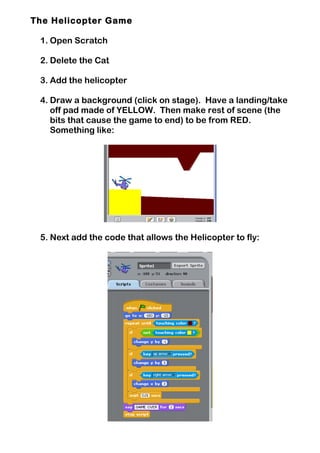
4. Draw a background (click on stage). Have a landing/take
off pad made of YELLOW. Then make rest of scene (the
bits that cause the game to end) to be from RED.
Something like:
5. Next add the code that allows the Helicopter to fly:
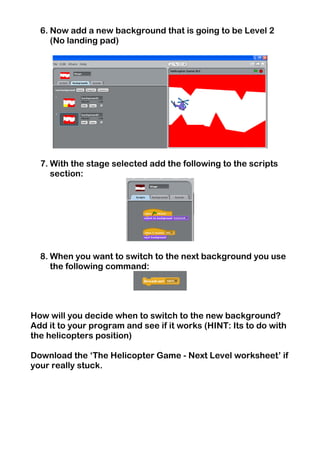
6. Now add a new background that is going to be Level 2
(No landing pad)
7. With the stage selected add the following to the scripts
section:
8. When you want to switch to the next background you use
the following command:
How will you decide when to switch to the new background?
Add it to your program and see if it works (HINT: Its to do with
the helicopters position)
Download the ‘The Helicopter Game - Next Level worksheet’ if
your really stuck.

8. the helicopter game

  • 1.
    The Helicopter Game 1.Open Scratch 2. Delete the Cat 3. Add the helicopter 4. Draw a background (click on stage). Have a landing/take off pad made of YELLOW. Then make rest of scene (the bits that cause the game to end) to be from RED. Something like: 5. Next add the code that allows the Helicopter to fly:
  • 2.
    6. Now adda new background that is going to be Level 2 (No landing pad) 7. With the stage selected add the following to the scripts section: 8. When you want to switch to the next background you use the following command: How will you decide when to switch to the new background? Add it to your program and see if it works (HINT: Its to do with the helicopters position) Download the ‘The Helicopter Game - Next Level worksheet’ if your really stuck.