Download free for 30 days
Sign in
Upload
Language (EN)
Support
Business
Mobile
Social Media
Marketing
Technology
Art & Photos
Career
Design
Education
Presentations & Public Speaking
Government & Nonprofit
Healthcare
Internet
Law
Leadership & Management
Automotive
Engineering
Software
Recruiting & HR
Retail
Sales
Services
Science
Small Business & Entrepreneurship
Food
Environment
Economy & Finance
Data & Analytics
Investor Relations
Sports
Spiritual
News & Politics
Travel
Self Improvement
Real Estate
Entertainment & Humor
Health & Medicine
Devices & Hardware
Lifestyle
Change Language
Language
English
Español
Português
Français
Deutsche
Cancel
Save
Submit search
EN
Uploaded by
Nitigan Nakjuatong
1,101 views
662305 08
ใบงานที่ 8 วิชา Java ครับ
Read more
0
Save
Share
Embed
Embed presentation
Download
Downloaded 36 times
1
/ 8
2
/ 8
3
/ 8
4
/ 8
5
/ 8
6
/ 8
7
/ 8
8
/ 8
More Related Content
PDF
662305 Lab7new
by
Nitigan Nakjuatong
PDF
Java-Answer Chapter 12-13 (For Print)
by
Wongyos Keardsri
PDF
Java-Answer Chapter 12-13
by
Wongyos Keardsri
PDF
Java-Answer Chapter 05-06
by
Wongyos Keardsri
PDF
Java-Answer Chapter 05-06 (For Print)
by
Wongyos Keardsri
PDF
คลาสและการเขียนโปรแกรมเชิงวัตถุเบื้องต้น
by
Finian Nian
PDF
บทที่ 5 คลาส
by
Theeravaj Tum
PDF
4.Oop
by
UsableLabs
662305 Lab7new
by
Nitigan Nakjuatong
Java-Answer Chapter 12-13 (For Print)
by
Wongyos Keardsri
Java-Answer Chapter 12-13
by
Wongyos Keardsri
Java-Answer Chapter 05-06
by
Wongyos Keardsri
Java-Answer Chapter 05-06 (For Print)
by
Wongyos Keardsri
คลาสและการเขียนโปรแกรมเชิงวัตถุเบื้องต้น
by
Finian Nian
บทที่ 5 คลาส
by
Theeravaj Tum
4.Oop
by
UsableLabs
Similar to 662305 08
PDF
Applet 3 design_class_composition
by
Nitigan Nakjuatong
PDF
Basic Event Listener
by
kunemata
PDF
Applet 5 class_inheritance
by
Nitigan Nakjuatong
PDF
Applet 5 class_inheritance
by
Nitigan Nakjuatong
PDF
Applet 6 mouse_keyboard
by
Nitigan Nakjuatong
PDF
คลาสและการเขียนโปรแกรมเชิงวัตถุเบื้องต้น
by
Finian Nian
PDF
Java-Chapter 13 Advanced Classes and Objects
by
Wongyos Keardsri
PPT
Control structure
by
Nitigan Nakjuatong
PDF
Java-Chapter 02 Data Operations and Processing
by
Wongyos Keardsri
PDF
Java-Chapter 08 Methods
by
Wongyos Keardsri
PDF
Intro jade
by
Chaiwat Luejai
PDF
01 การงานตัวควบคุมเบื้องต้น
by
Natthaphon Moraphen
PDF
ใบความรู้ที่ 4 การเขียนโปรแกรมด้วย visual basic 2010
by
Nattapon
PDF
662327 08-2-53 [โหมดความเข้ากันได้]
by
Deity Toon
PPT
Java Programming [5/12] : Build Graphical User Interface
by
IMC Institute
PDF
capture แต่ล่ะ week 59170060 group1
by
Thamon Monwan
PDF
แนวคิดในการเขียนโปรแกรม
by
เทวัญ ภูพานทอง
PDF
Java 7&12 6 2
by
Mook Sasivimon
PPT
พื้นฐานภาษาจาวา
by
Aeew Autaporn
PPT
MIDP Application Control
by
Jenchoke Tachagomain
Applet 3 design_class_composition
by
Nitigan Nakjuatong
Basic Event Listener
by
kunemata
Applet 5 class_inheritance
by
Nitigan Nakjuatong
Applet 5 class_inheritance
by
Nitigan Nakjuatong
Applet 6 mouse_keyboard
by
Nitigan Nakjuatong
คลาสและการเขียนโปรแกรมเชิงวัตถุเบื้องต้น
by
Finian Nian
Java-Chapter 13 Advanced Classes and Objects
by
Wongyos Keardsri
Control structure
by
Nitigan Nakjuatong
Java-Chapter 02 Data Operations and Processing
by
Wongyos Keardsri
Java-Chapter 08 Methods
by
Wongyos Keardsri
Intro jade
by
Chaiwat Luejai
01 การงานตัวควบคุมเบื้องต้น
by
Natthaphon Moraphen
ใบความรู้ที่ 4 การเขียนโปรแกรมด้วย visual basic 2010
by
Nattapon
662327 08-2-53 [โหมดความเข้ากันได้]
by
Deity Toon
Java Programming [5/12] : Build Graphical User Interface
by
IMC Institute
capture แต่ล่ะ week 59170060 group1
by
Thamon Monwan
แนวคิดในการเขียนโปรแกรม
by
เทวัญ ภูพานทอง
Java 7&12 6 2
by
Mook Sasivimon
พื้นฐานภาษาจาวา
by
Aeew Autaporn
MIDP Application Control
by
Jenchoke Tachagomain
More from Nitigan Nakjuatong
PDF
วิธีการกำหนดสิทธิให้กับ Directory
by
Nitigan Nakjuatong
PDF
Applet 7 image_j_panel
by
Nitigan Nakjuatong
PDF
662305 LAB13
by
Nitigan Nakjuatong
PDF
662305 LAB12
by
Nitigan Nakjuatong
PDF
Applet 7 image_j_panel
by
Nitigan Nakjuatong
PDF
Applet 4 class_composition
by
Nitigan Nakjuatong
PDF
662305 11
by
Nitigan Nakjuatong
PDF
662305 10
by
Nitigan Nakjuatong
PDF
662305 09
by
Nitigan Nakjuatong
PDF
Applet 2 container and action_listener
by
Nitigan Nakjuatong
PDF
New Assingment3 array2D
by
Nitigan Nakjuatong
PDF
Assingment3 array2 d
by
Nitigan Nakjuatong
PDF
Lab 6 new
by
Nitigan Nakjuatong
PPT
Array2D
by
Nitigan Nakjuatong
PPT
Array
by
Nitigan Nakjuatong
PPT
Method part2
by
Nitigan Nakjuatong
PPT
Method JAVA
by
Nitigan Nakjuatong
PPT
Set putty to use numeric keyboard in pico
by
Nitigan Nakjuatong
PDF
Putty basic setting
by
Nitigan Nakjuatong
วิธีการกำหนดสิทธิให้กับ Directory
by
Nitigan Nakjuatong
Applet 7 image_j_panel
by
Nitigan Nakjuatong
662305 LAB13
by
Nitigan Nakjuatong
662305 LAB12
by
Nitigan Nakjuatong
Applet 7 image_j_panel
by
Nitigan Nakjuatong
Applet 4 class_composition
by
Nitigan Nakjuatong
662305 11
by
Nitigan Nakjuatong
662305 10
by
Nitigan Nakjuatong
662305 09
by
Nitigan Nakjuatong
Applet 2 container and action_listener
by
Nitigan Nakjuatong
New Assingment3 array2D
by
Nitigan Nakjuatong
Assingment3 array2 d
by
Nitigan Nakjuatong
Lab 6 new
by
Nitigan Nakjuatong
Array2D
by
Nitigan Nakjuatong
Array
by
Nitigan Nakjuatong
Method part2
by
Nitigan Nakjuatong
Method JAVA
by
Nitigan Nakjuatong
Set putty to use numeric keyboard in pico
by
Nitigan Nakjuatong
Putty basic setting
by
Nitigan Nakjuatong
662305 08
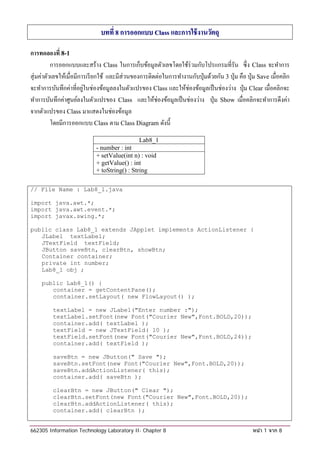
1.
บทที่ 8 การออกแบบ
Class และการใช้ งานวัตถุ การทดลองที่ 8-1 การออกแบบและสร้าง Class ในการเก็บขอมลตวเลขโดยใช้ร่วมกับโปรแกรมที่รัน ซ่ ึ ง Class จะทําการ ้ ู ั สุ่ มค่าตัวเลขให้เมื่อมีการเรี ยกใช้ และมีส่วนของการติดต่อในการทํางานกับปุ่ มด้วยกัน 3 ป่ ุม คือ ป่ ุม Save เม่ือคลิก จะทําการบันทึกค่าที่อยูในช่องข้อมูลลงในตัวแปรของ Class และใหช่องขอมลเป็นช่องวาง ป่ ุม Clear เม่ือคลิกจะ ่ ้ ้ ู ่ ทําการบันทึกค่าศูนย์ลงในตัวแปรของ Class และให้ช่องข้อมูลเป็ นช่องว่าง ป่ ุม Show เมื่อคลิกจะทําการดึงค่า จากตัวแปรของ Class มาแสดงในช่องข้อมูล โดยมีการออกแบบ Class ตาม Class Diagram ดงน้ ี ั Lab8_1 - number : int + setValue(int n) : void + getValue() : int + toString() : String // File Name : Lab8_1.java import java.awt.*; import java.awt.event.*; import javax.swing.*; public class Lab8_1 extends JApplet implements ActionListener { JLabel textLabel; JTextField textField; JButton saveBtn, clearBtn, showBtn; Container container; private int number; Lab8_1 obj ; public Lab8_1() { container = getContentPane(); container.setLayout( new FlowLayout() ); textLabel = new JLabel("Enter number :"); textLabel.setFont(new Font("Courier New",Font.BOLD,20)); container.add( textLabel ); textField = new JTextField( 10 ); textField.setFont(new Font("Courier New",Font.BOLD,24)); container.add( textField ); saveBtn = new JButton(" Save "); saveBtn.setFont(new Font("Courier New",Font.BOLD,20)); saveBtn.addActionListener( this); container.add( saveBtn ); clearBtn = new JButton(" Clear "); clearBtn.setFont(new Font("Courier New",Font.BOLD,20)); clearBtn.addActionListener( this); container.add( clearBtn ); 662305 Information Technology Laboratory II- Chapter 8 หน ้า 1 จาก 8
2.
showBtn = new
JButton(" Show "); showBtn.setFont(new Font("Courier New",Font.BOLD,20)); showBtn.addActionListener( this); container.add( showBtn ); } public void init() { obj = new Lab8_1( ); obj.setValue( (int) (Math.random() * 100) ); textField.setText(obj.toString()); } public void setValue(int n) { number = n; } public int getValue() { return(number); } public String toString() { return( Integer.toString(getValue()) ); } public void actionPerformed( ActionEvent event ) { if (event.getSource() == saveBtn) { int value = Integer.parseInt(textField.getText()); obj.setValue(value); textField.setText(""); } else if (event.getSource() == clearBtn) { obj.setValue( 0 ); textField.setText(""); } else if (event.getSource() == showBtn) { textField.setText(obj.toString()); } } } ผลลัพธ์ 662305 Information Technology Laboratory II- Chapter 8 หน ้า 2 จาก 8
3.
การทดลองที่ 8-2
การออกแบบและสร้าง Class ในการเก็บขอมลตวเลขจานวนเตม มีชื่อคลาส Number เป็นคลาสต่างหาก ้ ู ั ํ ็ ซ่ ึ ง Class น้ ีจะมี constructor แบบไม่มีพารามิเตอร์ โดยจะทําการสุ่ มค่าตัวเลขให้เมื่อมีการเรี ยกใช้ และ constructor แบบ1 พารามิเตอร์เป็นตวเลขจานวนเตม ั ํ ็ โดยมีการออกแบบ Class ตาม Class Diagram ดงน้ ี ั Number - number : int + Number() + Number(int n) + setValue(int n) : void + getValue() : int + toString() : String // File Name : Lab8_2.java import java.awt.*; import java.awt.event.*; import javax.swing.*; public class Lab8_2 extends JApplet implements ActionListener { JLabel textLabel; JTextField textField; JButton saveBtn, clearBtn, showBtn; Container container; Number obj; public void init( ) { container = getContentPane(); container.setLayout( new FlowLayout() ); textLabel = new JLabel("Enter number :"); textLabel.setFont(new Font("Courier New",Font.BOLD,20)); container.add( textLabel ); textField = new JTextField( 10 ); textField.setFont(new Font("Courier New",Font.BOLD,24)); container.add( textField ); saveBtn = new JButton(" Save "); saveBtn.setFont(new Font("Courier New",Font.BOLD,20)); saveBtn.addActionListener( this); 662305 Information Technology Laboratory II- Chapter 8 หน ้า 3 จาก 8
4.
container.add( saveBtn );
clearBtn = new JButton(" Clear "); clearBtn.setFont(new Font("Courier New",Font.BOLD,20)); clearBtn.addActionListener( this); container.add( clearBtn ); showBtn = new JButton(" Show "); showBtn.setFont(new Font("Courier New",Font.BOLD,20)); showBtn.addActionListener( this); container.add( showBtn ); obj = new Number(); textField.setText(obj.toString()); } public void actionPerformed( ActionEvent event ) { if (event.getSource() == saveBtn) { int value = Integer.parseInt(textField.getText()); obj.setValue(value); textField.setText(""); } else if (event.getSource() == clearBtn) { obj.setValue( 0 ); textField.setText(""); } else if (event.getSource() == showBtn) { textField.setText(obj.toString()); } } } /* Number.java */ class Number { private int number; public Number() { setValue((int) (Math.random() * 100)); } public Number(int n) { setValue( n ); } public void setValue(int n) { number = n; } public int getValue() { return(number); } public String toString() { 662305 Information Technology Laboratory II- Chapter 8 หน ้า 4 จาก 8
5.
return(Integer.toString(getValue()));
} } ผลลัพธ์ ให้นกศึกษาเพิ่มการตรวจสอบค่าในส่ วนของการกดปุ่ ม Save โดยหากยงไม่มีค่าก็ไม่ตองใหมีการบนทึก ั ั ้ ้ ั เพอไม่ใหเ้ กิดขอผดพลาดข้ ึน ่ื ้ ิ การทดลองที่ 8-3 การออกแบบคลาสเพิ่มเติมโดยเพิ่มความสามารถของคลาส Number ในการทํางานคือสามารถบวก ลบ คูณและ หารตวเลขได้ โดยตั้งชื่อคลาส NumberNew และบันทึกไฟล์แยกกัน ั โดยมีการออกแบบคลาสตาม Class Diagram ดงน้ ี ั NumberNew - number : int + NumberNew() + NumberNew(int n) + setValue(int n) : void + getValue() : int + toString() : String + add(int n) : void + subtract(int n) : void + multiply(int n) : void + divide(int n) : void 662305 Information Technology Laboratory II- Chapter 8 หน ้า 5 จาก 8
6.
/* Filename :
NumberNew.java */ public class NumberNew { private int number; public NumberNew() { setValue((int) (Math.random() * 100)); } public NumberNew(int n) { setValue( n ); } public void setValue(int n) { number = n; } public int getValue() { return(number); } public String toString() { return(Integer.toString(getValue())); } public void add(int n) { setValue( getValue() + n); } public void sub(int n) { setValue( getValue() - n); } public void mul(int n) { setValue( getValue() * n); } public void div(int n) { setValue( getValue() / n); } } /* Filename : Lab8_3.java */ import java.awt.*; import java.awt.event.*; import javax.swing.*; public class Lab8_3 extends JApplet implements ActionListener { JLabel textLabel; JTextField textField; JButton saveBtn, clearBtn, showBtn; JButton addBtn, subBtn, mulBtn, divBtn; Container container; NumberNew obj; 662305 Information Technology Laboratory II- Chapter 8 หน ้า 6 จาก 8
7.
public Lab8_3()
{ container = getContentPane(); container.setLayout( new FlowLayout() ); textLabel = new JLabel("Enter number :"); textLabel.setFont(new Font("Courier New",Font.BOLD,20)); container.add( textLabel ); textField = new JTextField( 10 ); textField.setFont(new Font("Courier New",Font.BOLD,24)); container.add( textField ); saveBtn = new JButton(" Save "); saveBtn.setFont(new Font("Courier New",Font.BOLD,20)); saveBtn.addActionListener( this); container.add( saveBtn ); clearBtn = new JButton(" Clear "); clearBtn.setFont(new Font("Courier New",Font.BOLD,20)); clearBtn.addActionListener( this); container.add( clearBtn ); showBtn = new JButton(" Show "); showBtn.setFont(new Font("Courier New",Font.BOLD,20)); showBtn.addActionListener( this); container.add( showBtn ); addBtn = new JButton(" + "); addBtn.setFont(new Font("Courier New",Font.BOLD,20)); addBtn.addActionListener( this); container.add( addBtn ); subBtn = new JButton(" - "); subBtn.setFont(new Font("Courier New",Font.BOLD,20)); subBtn.addActionListener( this); container.add( subBtn ); mulBtn = new JButton(" * "); mulBtn.setFont(new Font("Courier New",Font.BOLD,20)); mulBtn.addActionListener( this); container.add( mulBtn ); divBtn = new JButton(" / "); divBtn.setFont(new Font("Courier New",Font.BOLD,20)); divBtn.addActionListener( this); container.add( divBtn ); // create obj of class NumberNew obj = new NumberNew(); textField.setText(obj.toString()); } public void actionPerformed( ActionEvent event ) { if (event.getSource() == saveBtn) { int value = Integer.parseInt(textField.getText()); obj.setValue(value); textField.setText(""); 662305 Information Technology Laboratory II- Chapter 8 หน ้า 7 จาก 8
8.
}
else if (event.getSource() == clearBtn) { obj.setValue( 0 ); textField.setText(""); } else if (event.getSource() == showBtn) { textField.setText(obj.toString()); } else if (event.getSource() == addBtn) { int value = Integer.parseInt(textField.getText()); obj.add(value); textField.setText(obj.toString()); } else if (event.getSource() == subBtn) { int value = Integer.parseInt(textField.getText()); obj.subtract(value); textField.setText(obj.toString()); } else if (event.getSource() == mulBtn) { int value = Integer.parseInt(textField.getText()); obj.multiply(value); textField.setText(obj.toString()); } else if (event.getSource() == divBtn) { int value = Integer.parseInt(textField.getText()); obj.divide(value); textField.setText(obj.toString()); } } } ผลลัพธ์ 662305 Information Technology Laboratory II- Chapter 8 หน ้า 8 จาก 8
Download



![662327 08-2-53 [โหมดความเข้ากันได้]](https://cdn.slidesharecdn.com/ss_thumbnails/662327-08-2-53-101227043802-phpapp02-thumbnail.jpg?width=640&height=640&fit=bounds)
![Java Programming [5/12] : Build Graphical User Interface](https://cdn.slidesharecdn.com/ss_thumbnails/chapter5-130103204811-phpapp01-thumbnail.jpg?width=640&height=640&fit=bounds)


