Presentation on
Cache memory
1
C ontent:
1. Introduction to cache memory
2.Location of cache memory
3. Types of cache memory
4. Locality
5.Cache mapping
6.Example of cache memory
7. Applications of cache memory
8.Cache performance
9. Pros & cons of cache memory
3
Cache memory
Fig: Cache Memory Position
Cache memory: cache memory is a small-sized type of volatile computer
memory that provides high-speed data access to a processor and stores
frequently used computer programs, applications and data.
Cache memory acts as an buffer between ram and cpu, which provides
faster service.
4
Location of Cache
memory
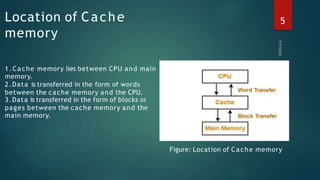
1.Cache memory lies between CPU and main
memory.
2.Data is transferred in the form of words
between the cache memory and the CPU.
3.Data is transferred in the form of blocks or
pages between the cache memory and the
main memory.
Figure: Location of Cache memory
5
Types of cache memory:
There a re three types of c a c he
memory: 1) direct-mapped cache
2) fully associative cache
3) K-way-set-associative cache
6
Types of cache memory:
1. Direct-Mapped Cache:
Direct-mapped cache maps in single cache line of cache memory
location. It can be used once per address in a timely manner. This type of
cache memory performance is lower than others.
2. Fully Associative Cache:
Each memory location in a fully organized cache can be cached to any
cache line. This type of memory significantly reduces the amount of
cache-line missed, considered a complex type of cache memory
implementation.
3. K-Way-Set-Associative Cache:
K-way-set-associative cache, the most common cache implementation,
memory address can be stored in any n line of any cache.
7
Locality:
Temporary locality refers to the reuse of certain
relatively short period of time.
2. Spatial locality:
locations.
data and / or resources in a
It is based on the principle of locality of reference. There are two ways with which
da ta or instruc tion is fetc hed from ma in memory a nd get stored in c a c he
memory. These two ways are the following:
1. Temporary locality
2. Spatial locality
1. Temporary locality:
Spatial locality refers to the use of data elements in relatively close storage
8
Cache mapping
□
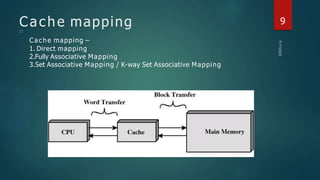
Cache mapping –
1. Direct mapping
2.Fully Associative Mapping
3.Set Associative Mapping / K-way Set Associative Mapping
9
Direct mapping
□
□
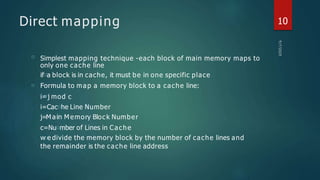
Simplest mapping technique -each block of main memory maps to
only one cache line
if□a block is in cache, it must be in one specific place
Formula to map a memory block to a cache line:
i=
□j mod c
i=Cac□he Line Number
j=M a□
in M emory Bloc k Number
c=Nu□mber of Lines in Cache
w□e divide the memory block by the number of cache lines and
the remainder is the cache line address
10
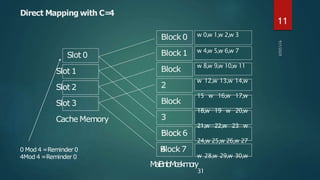
Direct Mapping with C=
4
Slot 1
Slot 2
Slot 3
Cache Memory
Block 0
Block
2
Block
3
B
4lock 7
Slot 0 Block 1
B
Bl
lo
oc
ck
k 6
0 Mod 4 =Reminder 0
4Mod 4 =Reminder 0
w 0,w 1,w 2,w 3
w 4,w 5,w 6,w 7
w 8,w 9,w 10,w 11
w 12,w 13,w 14,w
15 w 16,w 17,w
18,w 19 w 20,w
21,w 22,w 23 w
24,w 25,w 26,w 27
w 28,w 29,w 30,w
M
a
i
B
n
l
o
M
c
e
k
m
o
r
y
31
11
Direct Mapping pros & cons
□
□
□
□
Simple
Inexpensive
Fixed location for given block
If a program accesses 2 blocks that map to the same line
repeatedly, cache misses are very high –condition called thrashing
12
Fully Associative Mapping
□
A fully associative mapping scheme can overcome the problems of
the direct mapping scheme .
Block 0
Block 2
Slot 0
Slot 1
Slot 2
Slot 3
Cache Memory
Block 1
Block
3
Block
4
B
Bl
lo
oc
ck
k 7
Main
Memory
Block can map to any slot
Tag used to identify which block is in which
slot
All slots searched in parallel for target
13
K-way Set Associative Mapping
□
□
□
□
Two-way set associative gives much better performance than direct
mapping
Just one extra slot avoids the thrashing problem
Four-way set associative gives only slightly better performance over
two-way
Further increases in the size of the set has little effect other than
increased cost of the hardware!
14
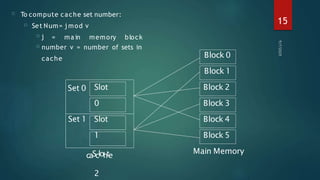
□
□ j = ma in memory block
□ number v = number of sets in
cache
To compute cache set number:
□ Set Num= j mod v
Set 0
Set 1
Slot
0
Slot
1
Block 0
Block 2
Block 3
Block 4
Block 5
Main Memory
Block 1
caSclohte
2
15
Imagine you’re doing research at a library. You need
to refer to books, but there’s really only a handful of
books that are useful for the research you’re doing
right now. Then what’s the solution.
For web services, the vast amount of data is the world
wide web and the small amount you keep nearby is
stored in your computer as a cache.
16
Example of Cache
Application of Cache Memory
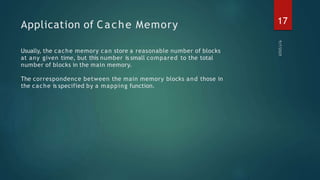
Usually, the cache memory can store a reasonable number of blocks
at any given time, but this number is small compared to the total
number of blocks in the main memory.
The correspondence between the main memory blocks and those in
the cache is specified by a mapping function.
17
Cache Performance
□
□
When the processor needs to rea d or write a loca tion in ma in
memory,it firstchecksforacorresponding entryinthecache.
The performance of cache memory is frequently measured in terms
of a quantity called Hit ratio.
Hit ratio= Cache hit/( Cache hit + Cache miss)
= no. of hits/ total accesses
18
Improve Cache Performance
□
□
□
□
Reducing the miss rate.
Reducing the miss penalty.
Reduce the time to hit in cache.
We can improve Cache performance using higher cache block size.
□ We can improve Cache performance using higher associativity.
19
Pros. & Cons. of Cache Memory
Pros. of Cache:
20
□
□
□
□
□ Cache memory is faster than
main memory.
It consumes less access time as
compared to main memory.
It stores the program that can
be executed within a short
period of time.
It stores data for temporary
use.
Cons. Of Cache:
□ Cache memory has limited
capacity.
Cache works only for cache-
friendly data, not for data
structures that hang together
via pointers, such as a list.
It is more expensive.
□
Thank You
21

475841235-Presentation-on-Cache-memory-Operating-system-CSE-309-1-pptx.pdf.pptx

  • 1.
  • 3.
    C ontent: 1. Introductionto cache memory 2.Location of cache memory 3. Types of cache memory 4. Locality 5.Cache mapping 6.Example of cache memory 7. Applications of cache memory 8.Cache performance 9. Pros & cons of cache memory 3
  • 4.
    Cache memory Fig: CacheMemory Position Cache memory: cache memory is a small-sized type of volatile computer memory that provides high-speed data access to a processor and stores frequently used computer programs, applications and data. Cache memory acts as an buffer between ram and cpu, which provides faster service. 4
  • 5.
    Location of Cache memory 1.Cachememory lies between CPU and main memory. 2.Data is transferred in the form of words between the cache memory and the CPU. 3.Data is transferred in the form of blocks or pages between the cache memory and the main memory. Figure: Location of Cache memory 5
  • 6.
    Types of cachememory: There a re three types of c a c he memory: 1) direct-mapped cache 2) fully associative cache 3) K-way-set-associative cache 6
  • 7.
    Types of cachememory: 1. Direct-Mapped Cache: Direct-mapped cache maps in single cache line of cache memory location. It can be used once per address in a timely manner. This type of cache memory performance is lower than others. 2. Fully Associative Cache: Each memory location in a fully organized cache can be cached to any cache line. This type of memory significantly reduces the amount of cache-line missed, considered a complex type of cache memory implementation. 3. K-Way-Set-Associative Cache: K-way-set-associative cache, the most common cache implementation, memory address can be stored in any n line of any cache. 7
  • 8.
    Locality: Temporary locality refersto the reuse of certain relatively short period of time. 2. Spatial locality: locations. data and / or resources in a It is based on the principle of locality of reference. There are two ways with which da ta or instruc tion is fetc hed from ma in memory a nd get stored in c a c he memory. These two ways are the following: 1. Temporary locality 2. Spatial locality 1. Temporary locality: Spatial locality refers to the use of data elements in relatively close storage 8
  • 9.
    Cache mapping □ Cache mapping– 1. Direct mapping 2.Fully Associative Mapping 3.Set Associative Mapping / K-way Set Associative Mapping 9
  • 10.
    Direct mapping □ □ Simplest mappingtechnique -each block of main memory maps to only one cache line if□a block is in cache, it must be in one specific place Formula to map a memory block to a cache line: i= □j mod c i=Cac□he Line Number j=M a□ in M emory Bloc k Number c=Nu□mber of Lines in Cache w□e divide the memory block by the number of cache lines and the remainder is the cache line address 10
  • 11.
    Direct Mapping withC= 4 Slot 1 Slot 2 Slot 3 Cache Memory Block 0 Block 2 Block 3 B 4lock 7 Slot 0 Block 1 B Bl lo oc ck k 6 0 Mod 4 =Reminder 0 4Mod 4 =Reminder 0 w 0,w 1,w 2,w 3 w 4,w 5,w 6,w 7 w 8,w 9,w 10,w 11 w 12,w 13,w 14,w 15 w 16,w 17,w 18,w 19 w 20,w 21,w 22,w 23 w 24,w 25,w 26,w 27 w 28,w 29,w 30,w M a i B n l o M c e k m o r y 31 11
  • 12.
    Direct Mapping pros& cons □ □ □ □ Simple Inexpensive Fixed location for given block If a program accesses 2 blocks that map to the same line repeatedly, cache misses are very high –condition called thrashing 12
  • 13.
    Fully Associative Mapping □ Afully associative mapping scheme can overcome the problems of the direct mapping scheme . Block 0 Block 2 Slot 0 Slot 1 Slot 2 Slot 3 Cache Memory Block 1 Block 3 Block 4 B Bl lo oc ck k 7 Main Memory Block can map to any slot Tag used to identify which block is in which slot All slots searched in parallel for target 13
  • 14.
    K-way Set AssociativeMapping □ □ □ □ Two-way set associative gives much better performance than direct mapping Just one extra slot avoids the thrashing problem Four-way set associative gives only slightly better performance over two-way Further increases in the size of the set has little effect other than increased cost of the hardware! 14
  • 15.
    □ □ j =ma in memory block □ number v = number of sets in cache To compute cache set number: □ Set Num= j mod v Set 0 Set 1 Slot 0 Slot 1 Block 0 Block 2 Block 3 Block 4 Block 5 Main Memory Block 1 caSclohte 2 15
  • 16.
    Imagine you’re doingresearch at a library. You need to refer to books, but there’s really only a handful of books that are useful for the research you’re doing right now. Then what’s the solution. For web services, the vast amount of data is the world wide web and the small amount you keep nearby is stored in your computer as a cache. 16 Example of Cache
  • 17.
    Application of CacheMemory Usually, the cache memory can store a reasonable number of blocks at any given time, but this number is small compared to the total number of blocks in the main memory. The correspondence between the main memory blocks and those in the cache is specified by a mapping function. 17
  • 18.
    Cache Performance □ □ When theprocessor needs to rea d or write a loca tion in ma in memory,it firstchecksforacorresponding entryinthecache. The performance of cache memory is frequently measured in terms of a quantity called Hit ratio. Hit ratio= Cache hit/( Cache hit + Cache miss) = no. of hits/ total accesses 18
  • 19.
    Improve Cache Performance □ □ □ □ Reducingthe miss rate. Reducing the miss penalty. Reduce the time to hit in cache. We can improve Cache performance using higher cache block size. □ We can improve Cache performance using higher associativity. 19
  • 20.
    Pros. & Cons.of Cache Memory Pros. of Cache: 20 □ □ □ □ □ Cache memory is faster than main memory. It consumes less access time as compared to main memory. It stores the program that can be executed within a short period of time. It stores data for temporary use. Cons. Of Cache: □ Cache memory has limited capacity. Cache works only for cache- friendly data, not for data structures that hang together via pointers, such as a list. It is more expensive. □
  • 21.