Oracle Quality
Part 1
2
February 4, 2025
TCS Internal
Objective
Objective
 This training will help Associates in understanding 11.5.10.2 Version of
Oracle Quality.
 This training will help Associates in understanding how to Implement
Oracle Quality considering the real life case studies.
3
February 4, 2025
TCS Internal
Agenda
Agenda
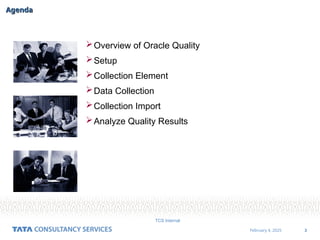
Overview of Oracle Quality
Setup
Collection Element
Data Collection
Collection Import
Analyze Quality Results
4
February 4, 2025
TCS Internal
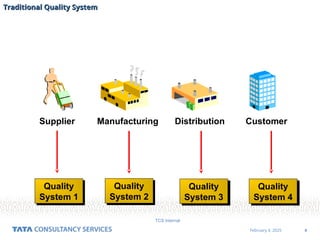
Supplier Manufacturing Distribution Customer
Quality
System 1
Quality
System 2
Quality
System 3
Quality
System 4
Traditional Quality System
5
February 4, 2025
TCS Internal
Supplier Manufacturing Distribution Customer
Oracle Quality Repository
Oracle Quality System
6
February 4, 2025
TCS Internal
Overview of Oracle Quality
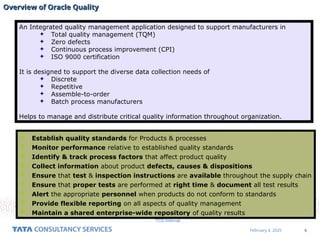
An Integrated quality management application designed to support manufacturers in
 Total quality management (TQM)
 Zero defects
 Continuous process improvement (CPI)
 ISO 9000 certification
It is designed to support the diverse data collection needs of
 Discrete
 Repetitive
 Assemble-to-order
 Batch process manufacturers
Helps to manage and distribute critical quality information throughout organization.
 Establish quality standards for Products & processes
 Monitor performance relative to established quality standards
 Identify & track process factors that affect product quality
 Collect information about product defects, causes & dispositions
 Ensure that test & inspection instructions are available throughout the supply chain
 Ensure that proper tests are performed at right time & document all test results
 Alert the appropriate personnel when products do not conform to standards
 Provide flexible reporting on all aspects of quality management
 Maintain a shared enterprise-wide repository of quality results
7
February 4, 2025
TCS Internal
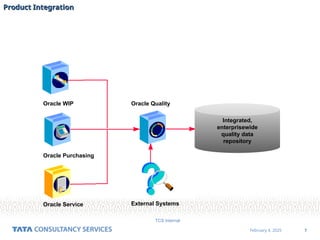
Oracle Service
Oracle WIP
Oracle Purchasing
Oracle Quality
External Systems
Integrated,
enterprisewide
quality data
repository
Product Integration
Product Integration
8
February 4, 2025
TCS Internal
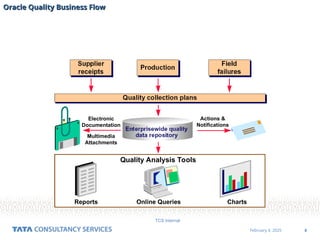
Electronic
Documentation
Multimedia
Attachments
Actions &
Notifications
Quality Analysis Tools
Reports Online Queries Charts
Oracle Quality Business Flow
9
February 4, 2025
TCS Internal
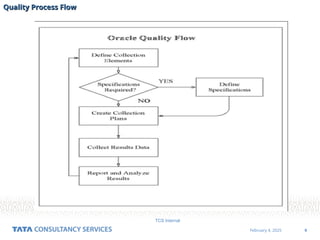
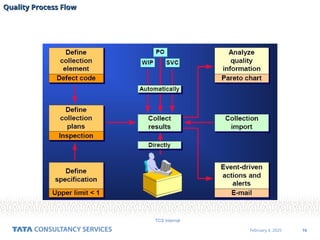
Quality Process Flow
10
February 4, 2025
TCS Internal
Quality Process Flow
11
February 4, 2025
TCS Internal
Security Functions
Security Functions
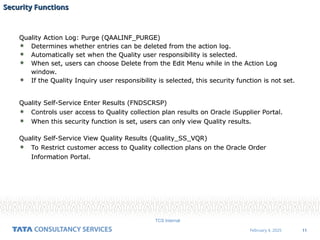
Quality Action Log: Purge (QAALINF_PURGE)
 Determines whether entries can be deleted from the action log.
 Automatically set when the Quality user responsibility is selected.
 When set, users can choose Delete from the Edit Menu while in the Action Log
window.
 If the Quality Inquiry user responsibility is selected, this security function is not set.
Quality Self-Service Enter Results (FNDSCRSP)
 Controls user access to Quality collection plan results on Oracle iSupplier Portal.
 When this security function is set, users can only view Quality results.
Quality Self-Service View Quality Results (Quality_SS_VQR)
 To Restrict customer access to Quality collection plans on the Oracle Order
Information Portal.
12
February 4, 2025
TCS Internal
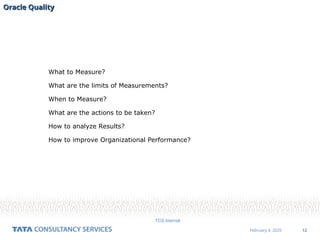
What to Measure?
What are the limits of Measurements?
When to Measure?
What are the actions to be taken?
How to analyze Results?
How to improve Organizational Performance?
Oracle Quality
Oracle Quality
13
February 4, 2025
TCS Internal
Setup Considerations
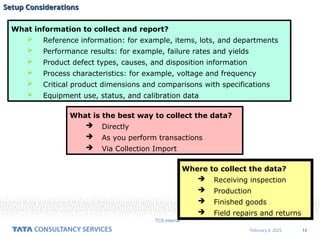
What information to collect and report?
 Reference information: for example, items, lots, and departments
 Performance results: for example, failure rates and yields
 Product defect types, causes, and disposition information
 Process characteristics: for example, voltage and frequency
 Critical product dimensions and comparisons with specifications
 Equipment use, status, and calibration data
Where to collect the data?
 Receiving inspection
 Production
 Finished goods
 Field repairs and returns
What is the best way to collect the data?
 Directly
 As you perform transactions
 Via Collection Import
14
February 4, 2025
TCS Internal
Setup Considerations
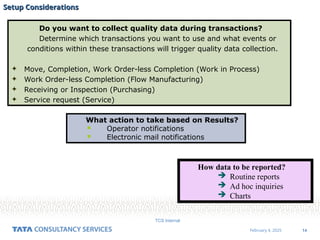
Do you want to collect quality data during transactions?
Determine which transactions you want to use and what events or
conditions within these transactions will trigger quality data collection.
 Move, Completion, Work Order-less Completion (Work in Process)
 Work Order-less Completion (Flow Manufacturing)
 Receiving or Inspection (Purchasing)
 Service request (Service)
What action to take based on Results?
 Operator notifications
 Electronic mail notifications
How data to be reported?
 Routine reports
 Ad hoc inquiries
 Charts
15
February 4, 2025
TCS Internal
Profile Options
Profile Options
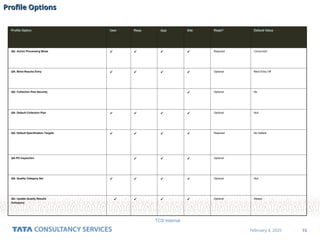
Profile Option User Resp App Site Reqd? Default Value
QA: Action Processing Mode     Required Concurrent
QA: Blind Results Entry     Optional Blind Entry Off
QA: Collection Plan Security  Optional No
QA: Default Collection Plan     Optional Null
QA: Default Specification Targets     Required No Default
QA:PO Inspection    Optional
QA: Quality Category Set     Optional Null
QA: Update Quality Results
Autoquery
    Optional Always
16
February 4, 2025
TCS Internal
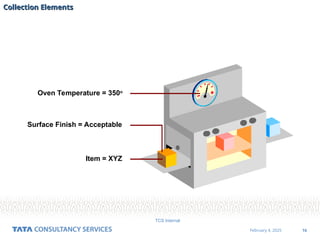
Item = XYZ
Surface Finish = Acceptable
Oven Temperature = 350o
Collection Elements
Collection Elements
17
February 4, 2025
TCS Internal
Collection Elements
Collection Elements
18
February 4, 2025
TCS Internal
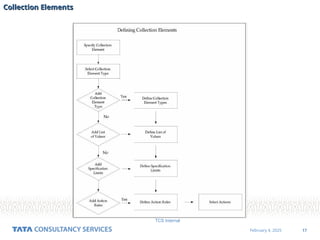
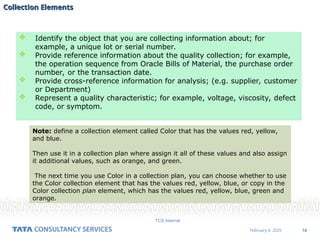
 Identify the object that you are collecting information about; for
example, a unique lot or serial number.
 Provide reference information about the quality collection; for example,
the operation sequence from Oracle Bills of Material, the purchase order
number, or the transaction date.
 Provide cross-reference information for analysis; (e.g. supplier, customer
or Department)
 Represent a quality characteristic; for example, voltage, viscosity, defect
code, or symptom.
Note: define a collection element called Color that has the values red, yellow,
and blue.
Then use it in a collection plan where assign it all of these values and also assign
it additional values, such as orange, and green.
The next time you use Color in a collection plan, you can choose whether to use
the Color collection element that has the values red, yellow, blue, or copy in the
Color collection plan element, which has the values red, yellow, blue, green and
orange.
Collection Elements
Collection Elements
19
February 4, 2025
TCS Internal
Collection Element Types
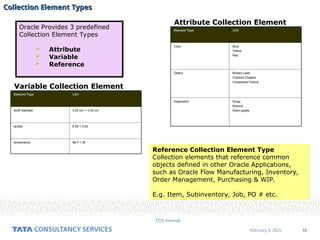
Oracle Provides 3 predefined
Collection Element Types
 Attribute
 Variable
 Reference
Element Type LOV
Color Blue
Yellow
Red
Defect Broken Lead
Cracked Chassis
Component Failure
Disposition Scrap
Rework
Down-grade
Attribute Collection Element
Element Type LOV
shaft diameter 3.25 cm. + 0.05 cm.
acidity 6.55 + 0.05
temperature 98 F + 20
Variable Collection Element
Reference Collection Element Type
Collection elements that reference common
objects defined in other Oracle Applications,
such as Oracle Flow Manufacturing, Inventory,
Order Management, Purchasing & WIP.
E.g. Item, Subinventory, Job, PO # etc.
20
February 4, 2025
TCS Internal
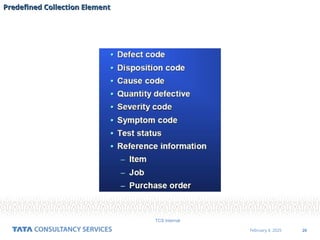
Predefined Collection Element
21
February 4, 2025
TCS Internal
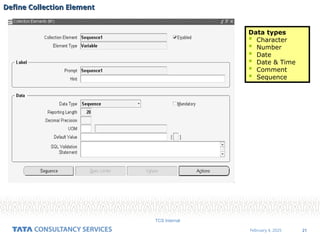
Define Collection Element
Data types
 Character
 Number
 Date
 Date & Time
 Comment
 Sequence
22
February 4, 2025
TCS Internal
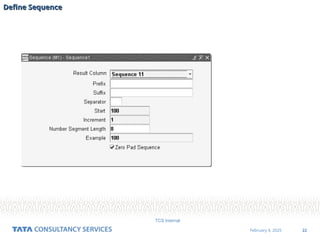
Define Sequence
Define Sequence
23
February 4, 2025
TCS Internal
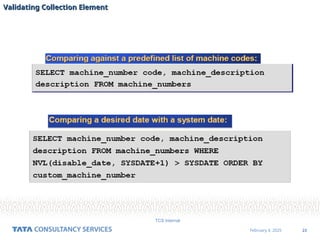
Validating Collection Element
24
February 4, 2025
TCS Internal
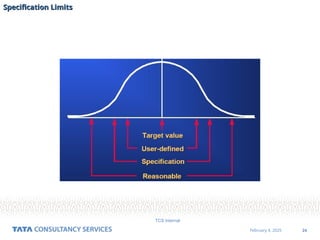
Specification Limits
25
February 4, 2025
TCS Internal
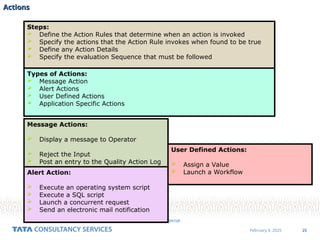
Actions
Actions
Steps:
 Define the Action Rules that determine when an action is invoked
 Specify the actions that the Action Rule invokes when found to be true
 Define any Action Details
 Specify the evaluation Sequence that must be followed
Types of Actions:
 Message Action
 Alert Actions
 User Defined Actions
 Application Specific Actions
Message Actions:
 Display a message to Operator
 Reject the Input
 Post an entry to the Quality Action Log
Alert Action:
 Execute an operating system script
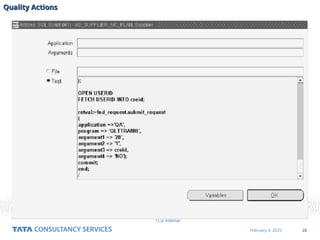
 Execute a SQL script
 Launch a concurrent request
 Send an electronic mail notification
User Defined Actions:
 Assign a Value
 Launch a Workflow
26
February 4, 2025
TCS Internal
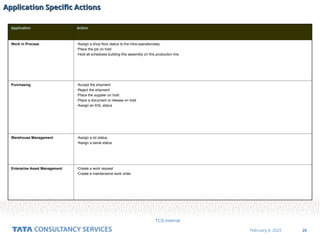
Application Specific Actions
Application Action
Work in Process •Assign a shop floor status to the intra-operationstep
•Place the job on hold
•Hold all schedules building this assembly on this production line
Purchasing •Accept the shipment
•Reject the shipment
•Place the supplier on hold
•Place a document or release on hold
•Assign an ASL status
Warehouse Management •Assign a lot status
•Assign a serial status
Enterprise Asset Management •Create a work request
•Create a maintenance work order
27
February 4, 2025
TCS Internal
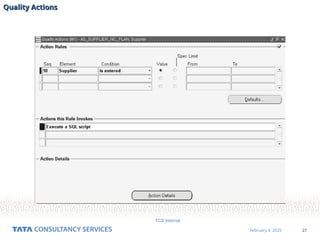
Quality Actions
Quality Actions
28
February 4, 2025
TCS Internal
Quality Actions
Quality Actions
29
February 4, 2025
TCS Internal
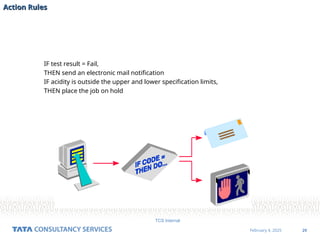
IF test result = Fail,
THEN send an electronic mail notification
IF acidity is outside the upper and lower specification limits,
THEN place the job on hold
Action Rules
Action Rules
30
February 4, 2025
TCS Internal
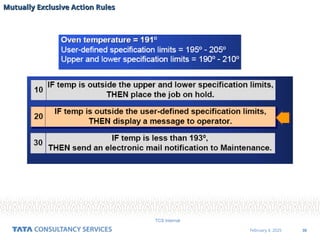
Mutually Exclusive Action Rules
31
February 4, 2025
TCS Internal
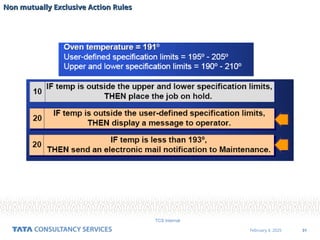
Non mutually Exclusive Action Rules
32
February 4, 2025
TCS Internal
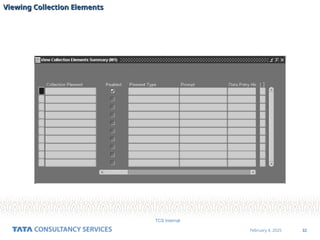
Viewing Collection Elements
33
February 4, 2025
TCS Internal
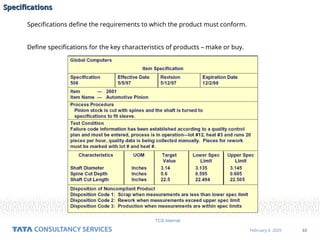
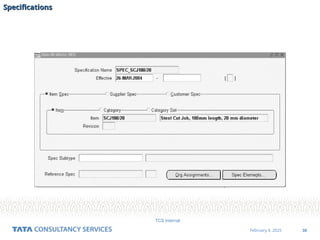
Specifications
Specifications
Specifications define the requirements to which the product must conform.
Define specifications for the key characteristics of products – make or buy.
34
February 4, 2025
TCS Internal
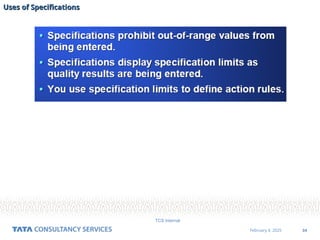
Uses of Specifications
35
February 4, 2025
TCS Internal
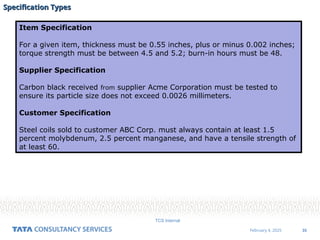
Specification Types
Specification Types
Item Specification
For a given item, thickness must be 0.55 inches, plus or minus 0.002 inches;
torque strength must be between 4.5 and 5.2; burn-in hours must be 48.
Supplier Specification
Carbon black received from supplier Acme Corporation must be tested to
ensure its particle size does not exceed 0.0026 millimeters.
Customer Specification
Steel coils sold to customer ABC Corp. must always contain at least 1.5
percent molybdenum, 2.5 percent manganese, and have a tensile strength of
at least 60.
36
February 4, 2025
TCS Internal
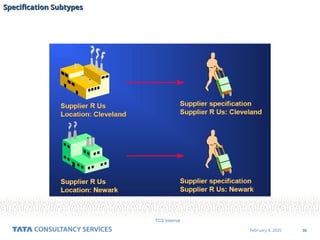
Specification Subtypes
37
February 4, 2025
TCS Internal
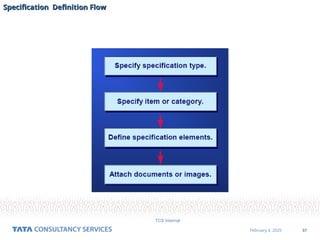
Specification Definition Flow
38
February 4, 2025
TCS Internal
Specifications
Specifications
39
February 4, 2025
TCS Internal
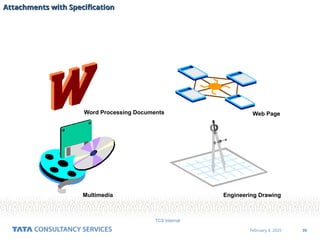
Word Processing Documents
Multimedia Engineering Drawing
Web Page
Attachments with Specification
40
February 4, 2025
TCS Internal
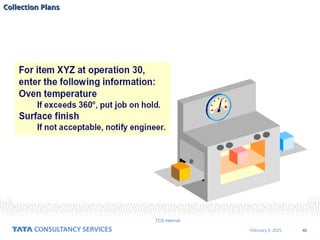
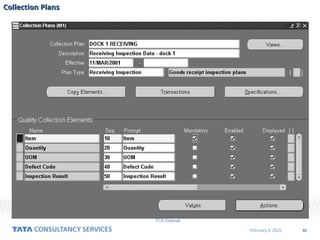
Collection Plans
Collection Plans
41
February 4, 2025
TCS Internal
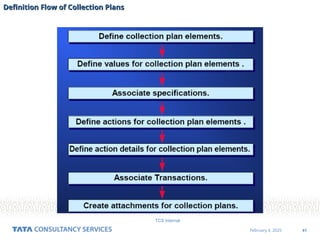
Definition Flow of Collection Plans
42
February 4, 2025
TCS Internal
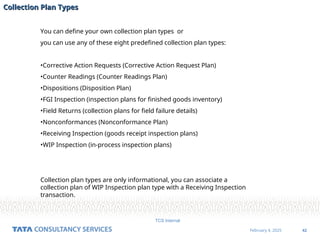
Collection Plan Types
You can define your own collection plan types or
you can use any of these eight predefined collection plan types:
•Corrective Action Requests (Corrective Action Request Plan)
•Counter Readings (Counter Readings Plan)
•Dispositions (Disposition Plan)
•FGI Inspection (inspection plans for finished goods inventory)
•Field Returns (collection plans for field failure details)
•Nonconformances (Nonconformance Plan)
•Receiving Inspection (goods receipt inspection plans)
•WIP Inspection (in-process inspection plans)
Collection plan types are only informational, you can associate a
collection plan of WIP Inspection plan type with a Receiving Inspection
transaction.
43
February 4, 2025
TCS Internal
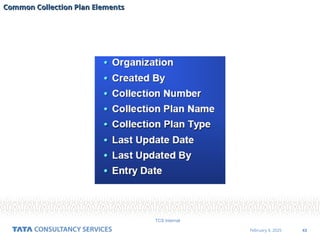
Common Collection Plan Elements
44
February 4, 2025
TCS Internal
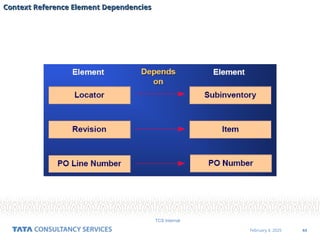
Context Reference Element Dependencies
45
February 4, 2025
TCS Internal
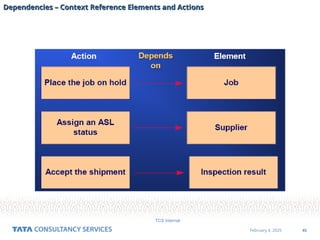
Dependencies – Context Reference Elements and Actions
46
February 4, 2025
TCS Internal
Collection Plans
Collection Plans
47
February 4, 2025
TCS Internal
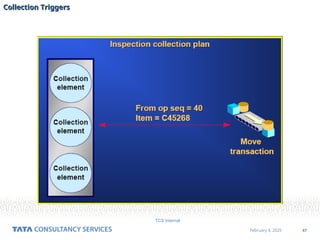
Collection Triggers
Collection Triggers
48
February 4, 2025
TCS Internal
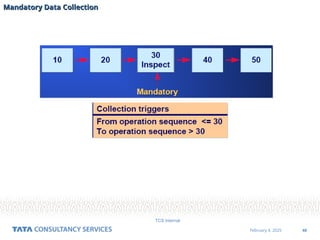
Mandatory Data Collection
49
February 4, 2025
TCS Internal
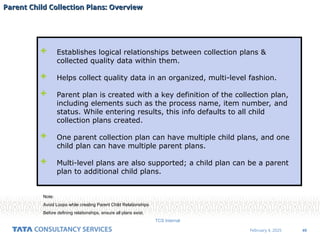
Parent Child Collection Plans: Overview
 Establishes logical relationships between collection plans &
collected quality data within them.
 Helps collect quality data in an organized, multi-level fashion.
 Parent plan is created with a key definition of the collection plan,
including elements such as the process name, item number, and
status. While entering results, this info defaults to all child
collection plans created.
 One parent collection plan can have multiple child plans, and one
child plan can have multiple parent plans.
 Multi-level plans are also supported; a child plan can be a parent
plan to additional child plans.
Note:
Avoid Loops while creating Parent Child Relationships
Before defining relationships, ensure all plans exist.
50
February 4, 2025
TCS Internal
Parent Child Collection Plans: Steps
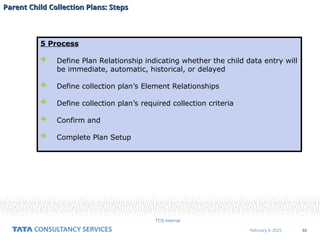
5 Process
 Define Plan Relationship indicating whether the child data entry will
be immediate, automatic, historical, or delayed
 Define collection plan’s Element Relationships
 Define collection plan’s required collection criteria
 Confirm and
 Complete Plan Setup
51
February 4, 2025
TCS Internal
Define Plan Relationship
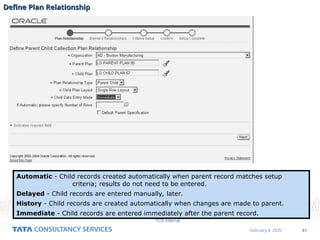
Automatic - Child records created automatically when parent record matches setup
criteria; results do not need to be entered.
Delayed - Child records are entered manually, later.
History - Child records are created automatically when changes are made to parent.
Immediate - Child records are entered immediately after the parent record.
52
February 4, 2025
TCS Internal
Define Elemental relationship
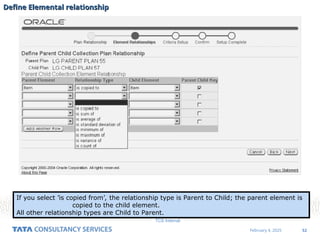
If you select ’is copied from’, the relationship type is Parent to Child; the parent element is
copied to the child element.
All other relationship types are Child to Parent.
53
February 4, 2025
TCS Internal
Define Criteria Setup
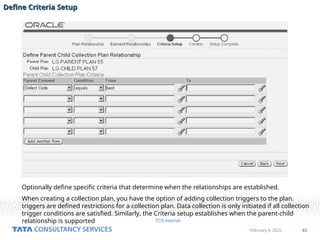
Optionally define specific criteria that determine when the relationships are established.
When creating a collection plan, you have the option of adding collection triggers to the plan.
triggers are defined restrictions for a collection plan. Data collection is only initiated if all collection
trigger conditions are satisfied. Similarly, the Criteria setup establishes when the parent-child
relationship is supported
54
February 4, 2025
TCS Internal
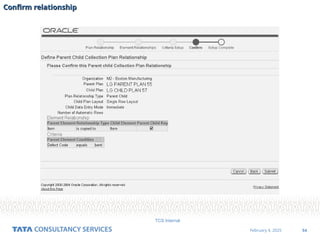
Confirm relationship

3 EBS Quality v1.0standard with opm-I.ppt

  • 1.
  • 2.
    2 February 4, 2025 TCSInternal Objective Objective  This training will help Associates in understanding 11.5.10.2 Version of Oracle Quality.  This training will help Associates in understanding how to Implement Oracle Quality considering the real life case studies.
  • 3.
    3 February 4, 2025 TCSInternal Agenda Agenda Overview of Oracle Quality Setup Collection Element Data Collection Collection Import Analyze Quality Results
  • 4.
    4 February 4, 2025 TCSInternal Supplier Manufacturing Distribution Customer Quality System 1 Quality System 2 Quality System 3 Quality System 4 Traditional Quality System Traditional Quality System
  • 5.
    5 February 4, 2025 TCSInternal Supplier Manufacturing Distribution Customer Oracle Quality Repository Oracle Quality System Oracle Quality System
  • 6.
    6 February 4, 2025 TCSInternal Overview of Oracle Quality Overview of Oracle Quality An Integrated quality management application designed to support manufacturers in  Total quality management (TQM)  Zero defects  Continuous process improvement (CPI)  ISO 9000 certification It is designed to support the diverse data collection needs of  Discrete  Repetitive  Assemble-to-order  Batch process manufacturers Helps to manage and distribute critical quality information throughout organization.  Establish quality standards for Products & processes  Monitor performance relative to established quality standards  Identify & track process factors that affect product quality  Collect information about product defects, causes & dispositions  Ensure that test & inspection instructions are available throughout the supply chain  Ensure that proper tests are performed at right time & document all test results  Alert the appropriate personnel when products do not conform to standards  Provide flexible reporting on all aspects of quality management  Maintain a shared enterprise-wide repository of quality results
  • 7.
    7 February 4, 2025 TCSInternal Oracle Service Oracle WIP Oracle Purchasing Oracle Quality External Systems Integrated, enterprisewide quality data repository Product Integration Product Integration
  • 8.
    8 February 4, 2025 TCSInternal Electronic Documentation Multimedia Attachments Actions & Notifications Quality Analysis Tools Reports Online Queries Charts Oracle Quality Business Flow Oracle Quality Business Flow
  • 9.
    9 February 4, 2025 TCSInternal Quality Process Flow Quality Process Flow
  • 10.
    10 February 4, 2025 TCSInternal Quality Process Flow Quality Process Flow
  • 11.
    11 February 4, 2025 TCSInternal Security Functions Security Functions Quality Action Log: Purge (QAALINF_PURGE)  Determines whether entries can be deleted from the action log.  Automatically set when the Quality user responsibility is selected.  When set, users can choose Delete from the Edit Menu while in the Action Log window.  If the Quality Inquiry user responsibility is selected, this security function is not set. Quality Self-Service Enter Results (FNDSCRSP)  Controls user access to Quality collection plan results on Oracle iSupplier Portal.  When this security function is set, users can only view Quality results. Quality Self-Service View Quality Results (Quality_SS_VQR)  To Restrict customer access to Quality collection plans on the Oracle Order Information Portal.
  • 12.
    12 February 4, 2025 TCSInternal What to Measure? What are the limits of Measurements? When to Measure? What are the actions to be taken? How to analyze Results? How to improve Organizational Performance? Oracle Quality Oracle Quality
  • 13.
    13 February 4, 2025 TCSInternal Setup Considerations Setup Considerations What information to collect and report?  Reference information: for example, items, lots, and departments  Performance results: for example, failure rates and yields  Product defect types, causes, and disposition information  Process characteristics: for example, voltage and frequency  Critical product dimensions and comparisons with specifications  Equipment use, status, and calibration data Where to collect the data?  Receiving inspection  Production  Finished goods  Field repairs and returns What is the best way to collect the data?  Directly  As you perform transactions  Via Collection Import
  • 14.
    14 February 4, 2025 TCSInternal Setup Considerations Setup Considerations Do you want to collect quality data during transactions? Determine which transactions you want to use and what events or conditions within these transactions will trigger quality data collection.  Move, Completion, Work Order-less Completion (Work in Process)  Work Order-less Completion (Flow Manufacturing)  Receiving or Inspection (Purchasing)  Service request (Service) What action to take based on Results?  Operator notifications  Electronic mail notifications How data to be reported?  Routine reports  Ad hoc inquiries  Charts
  • 15.
    15 February 4, 2025 TCSInternal Profile Options Profile Options Profile Option User Resp App Site Reqd? Default Value QA: Action Processing Mode     Required Concurrent QA: Blind Results Entry     Optional Blind Entry Off QA: Collection Plan Security  Optional No QA: Default Collection Plan     Optional Null QA: Default Specification Targets     Required No Default QA:PO Inspection    Optional QA: Quality Category Set     Optional Null QA: Update Quality Results Autoquery     Optional Always
  • 16.
    16 February 4, 2025 TCSInternal Item = XYZ Surface Finish = Acceptable Oven Temperature = 350o Collection Elements Collection Elements
  • 17.
    17 February 4, 2025 TCSInternal Collection Elements Collection Elements
  • 18.
    18 February 4, 2025 TCSInternal  Identify the object that you are collecting information about; for example, a unique lot or serial number.  Provide reference information about the quality collection; for example, the operation sequence from Oracle Bills of Material, the purchase order number, or the transaction date.  Provide cross-reference information for analysis; (e.g. supplier, customer or Department)  Represent a quality characteristic; for example, voltage, viscosity, defect code, or symptom. Note: define a collection element called Color that has the values red, yellow, and blue. Then use it in a collection plan where assign it all of these values and also assign it additional values, such as orange, and green. The next time you use Color in a collection plan, you can choose whether to use the Color collection element that has the values red, yellow, blue, or copy in the Color collection plan element, which has the values red, yellow, blue, green and orange. Collection Elements Collection Elements
  • 19.
    19 February 4, 2025 TCSInternal Collection Element Types Collection Element Types Oracle Provides 3 predefined Collection Element Types  Attribute  Variable  Reference Element Type LOV Color Blue Yellow Red Defect Broken Lead Cracked Chassis Component Failure Disposition Scrap Rework Down-grade Attribute Collection Element Element Type LOV shaft diameter 3.25 cm. + 0.05 cm. acidity 6.55 + 0.05 temperature 98 F + 20 Variable Collection Element Reference Collection Element Type Collection elements that reference common objects defined in other Oracle Applications, such as Oracle Flow Manufacturing, Inventory, Order Management, Purchasing & WIP. E.g. Item, Subinventory, Job, PO # etc.
  • 20.
    20 February 4, 2025 TCSInternal Predefined Collection Element Predefined Collection Element
  • 21.
    21 February 4, 2025 TCSInternal Define Collection Element Define Collection Element Data types  Character  Number  Date  Date & Time  Comment  Sequence
  • 22.
    22 February 4, 2025 TCSInternal Define Sequence Define Sequence
  • 23.
    23 February 4, 2025 TCSInternal Validating Collection Element Validating Collection Element
  • 24.
    24 February 4, 2025 TCSInternal Specification Limits Specification Limits
  • 25.
    25 February 4, 2025 TCSInternal Actions Actions Steps:  Define the Action Rules that determine when an action is invoked  Specify the actions that the Action Rule invokes when found to be true  Define any Action Details  Specify the evaluation Sequence that must be followed Types of Actions:  Message Action  Alert Actions  User Defined Actions  Application Specific Actions Message Actions:  Display a message to Operator  Reject the Input  Post an entry to the Quality Action Log Alert Action:  Execute an operating system script  Execute a SQL script  Launch a concurrent request  Send an electronic mail notification User Defined Actions:  Assign a Value  Launch a Workflow
  • 26.
    26 February 4, 2025 TCSInternal Application Specific Actions Application Specific Actions Application Action Work in Process •Assign a shop floor status to the intra-operationstep •Place the job on hold •Hold all schedules building this assembly on this production line Purchasing •Accept the shipment •Reject the shipment •Place the supplier on hold •Place a document or release on hold •Assign an ASL status Warehouse Management •Assign a lot status •Assign a serial status Enterprise Asset Management •Create a work request •Create a maintenance work order
  • 27.
    27 February 4, 2025 TCSInternal Quality Actions Quality Actions
  • 28.
    28 February 4, 2025 TCSInternal Quality Actions Quality Actions
  • 29.
    29 February 4, 2025 TCSInternal IF test result = Fail, THEN send an electronic mail notification IF acidity is outside the upper and lower specification limits, THEN place the job on hold Action Rules Action Rules
  • 30.
    30 February 4, 2025 TCSInternal Mutually Exclusive Action Rules Mutually Exclusive Action Rules
  • 31.
    31 February 4, 2025 TCSInternal Non mutually Exclusive Action Rules Non mutually Exclusive Action Rules
  • 32.
    32 February 4, 2025 TCSInternal Viewing Collection Elements Viewing Collection Elements
  • 33.
    33 February 4, 2025 TCSInternal Specifications Specifications Specifications define the requirements to which the product must conform. Define specifications for the key characteristics of products – make or buy.
  • 34.
    34 February 4, 2025 TCSInternal Uses of Specifications Uses of Specifications
  • 35.
    35 February 4, 2025 TCSInternal Specification Types Specification Types Item Specification For a given item, thickness must be 0.55 inches, plus or minus 0.002 inches; torque strength must be between 4.5 and 5.2; burn-in hours must be 48. Supplier Specification Carbon black received from supplier Acme Corporation must be tested to ensure its particle size does not exceed 0.0026 millimeters. Customer Specification Steel coils sold to customer ABC Corp. must always contain at least 1.5 percent molybdenum, 2.5 percent manganese, and have a tensile strength of at least 60.
  • 36.
    36 February 4, 2025 TCSInternal Specification Subtypes Specification Subtypes
  • 37.
    37 February 4, 2025 TCSInternal Specification Definition Flow Specification Definition Flow
  • 38.
    38 February 4, 2025 TCSInternal Specifications Specifications
  • 39.
    39 February 4, 2025 TCSInternal Word Processing Documents Multimedia Engineering Drawing Web Page Attachments with Specification Attachments with Specification
  • 40.
    40 February 4, 2025 TCSInternal Collection Plans Collection Plans
  • 41.
    41 February 4, 2025 TCSInternal Definition Flow of Collection Plans Definition Flow of Collection Plans
  • 42.
    42 February 4, 2025 TCSInternal Collection Plan Types Collection Plan Types You can define your own collection plan types or you can use any of these eight predefined collection plan types: •Corrective Action Requests (Corrective Action Request Plan) •Counter Readings (Counter Readings Plan) •Dispositions (Disposition Plan) •FGI Inspection (inspection plans for finished goods inventory) •Field Returns (collection plans for field failure details) •Nonconformances (Nonconformance Plan) •Receiving Inspection (goods receipt inspection plans) •WIP Inspection (in-process inspection plans) Collection plan types are only informational, you can associate a collection plan of WIP Inspection plan type with a Receiving Inspection transaction.
  • 43.
    43 February 4, 2025 TCSInternal Common Collection Plan Elements Common Collection Plan Elements
  • 44.
    44 February 4, 2025 TCSInternal Context Reference Element Dependencies Context Reference Element Dependencies
  • 45.
    45 February 4, 2025 TCSInternal Dependencies – Context Reference Elements and Actions Dependencies – Context Reference Elements and Actions
  • 46.
    46 February 4, 2025 TCSInternal Collection Plans Collection Plans
  • 47.
    47 February 4, 2025 TCSInternal Collection Triggers Collection Triggers
  • 48.
    48 February 4, 2025 TCSInternal Mandatory Data Collection Mandatory Data Collection
  • 49.
    49 February 4, 2025 TCSInternal Parent Child Collection Plans: Overview Parent Child Collection Plans: Overview  Establishes logical relationships between collection plans & collected quality data within them.  Helps collect quality data in an organized, multi-level fashion.  Parent plan is created with a key definition of the collection plan, including elements such as the process name, item number, and status. While entering results, this info defaults to all child collection plans created.  One parent collection plan can have multiple child plans, and one child plan can have multiple parent plans.  Multi-level plans are also supported; a child plan can be a parent plan to additional child plans. Note: Avoid Loops while creating Parent Child Relationships Before defining relationships, ensure all plans exist.
  • 50.
    50 February 4, 2025 TCSInternal Parent Child Collection Plans: Steps Parent Child Collection Plans: Steps 5 Process  Define Plan Relationship indicating whether the child data entry will be immediate, automatic, historical, or delayed  Define collection plan’s Element Relationships  Define collection plan’s required collection criteria  Confirm and  Complete Plan Setup
  • 51.
    51 February 4, 2025 TCSInternal Define Plan Relationship Define Plan Relationship Automatic - Child records created automatically when parent record matches setup criteria; results do not need to be entered. Delayed - Child records are entered manually, later. History - Child records are created automatically when changes are made to parent. Immediate - Child records are entered immediately after the parent record.
  • 52.
    52 February 4, 2025 TCSInternal Define Elemental relationship Define Elemental relationship If you select ’is copied from’, the relationship type is Parent to Child; the parent element is copied to the child element. All other relationship types are Child to Parent.
  • 53.
    53 February 4, 2025 TCSInternal Define Criteria Setup Define Criteria Setup Optionally define specific criteria that determine when the relationships are established. When creating a collection plan, you have the option of adding collection triggers to the plan. triggers are defined restrictions for a collection plan. Data collection is only initiated if all collection trigger conditions are satisfied. Similarly, the Criteria setup establishes when the parent-child relationship is supported
  • 54.
    54 February 4, 2025 TCSInternal Confirm relationship Confirm relationship