2MANAGEMENTINFORMATIONSYSTEMS
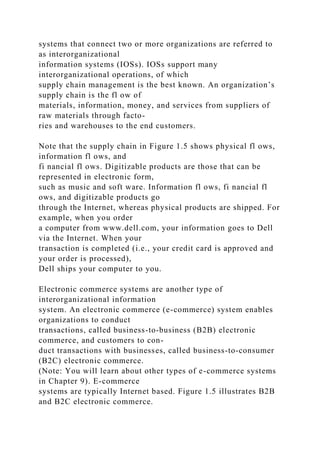
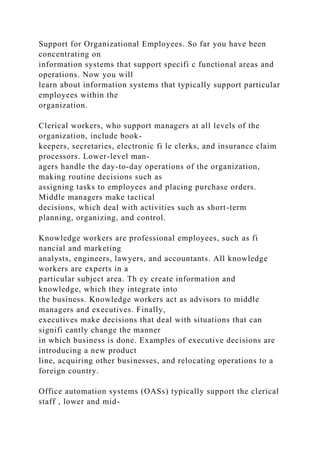
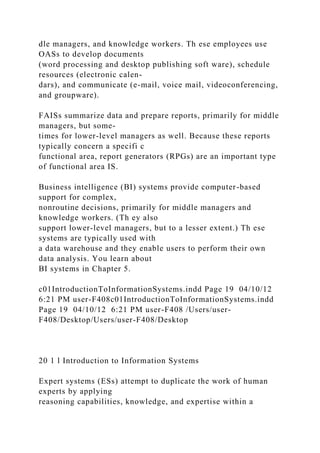
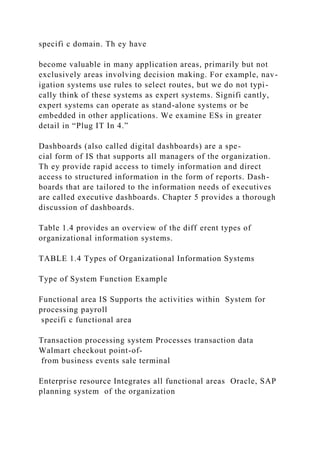
MOVING BUSINESS FORWARD
RAINER PRINCE WATSON
FMTOC.indd Page xx 11/17/12 12:19 AM user-
t044FMTOC.indd Page xx 11/17/12 12:19 AM user-t044
/Volumes/203/MH01820/bri06988/disk1of1/0073406988/Volum
es/203/MH01820/bri06988/disk1of1/0073406988
This page is intentionally left blank
For more information, visit www.wileyplus.com
builds students’ confidence because it takes the guesswork
out of studying by providing students with a clear roadmap:
It offers interactive resources along with a complete digital
textbook that help
students learn more. With , students take more initiative so
you’ll have
greater impact on their achievement in the classroom and
beyond.
WileyPLUS
WileyPLUS
FMTOC.indd Page i 20/11/12 9:01 PM user-f409FMTOC.indd
Page i 20/11/12 9:01 PM user-f409
http://www.wileyplus.com
ALL THE HELP, RESOURCES, AND PERSONAL
SUPPORT YOU AND YOUR STUDENTS NEED!
www.wileyplus.com/resources
Technical Support 24/7
FAQs, online chat,
and phone support
www.wileyplus.com/support
Student support from an
experienced student user
Collaborate with your colleagues,
find a mentor, attend virtual and live
events, and view resources
2-Minute Tutorials and all
of the resources you and your
students need to get started
Your Account Manager,
providing personal training
and support
www.WhereFacultyConnect.com
Pre-loaded, ready-to-use
assignments and presentations
created by subject matter experts
Partner
Quick
Start
© Courtney Keating/
iStockphoto
WileyPLUS
FMTOC.indd Page ii 20/11/12 9:01 PM user-f409FMTOC.indd
Page ii 20/11/12 9:01 PM user-f409
Management
Information
Systems
Moving Business Forward
Second Edition
FMTOC.indd Page iii 11/17/12 12:19 AM user-
t044FMTOC.indd Page iii 11/17/12 12:19 AM user-t044
/Volumes/203/MH01820/bri06988/disk1of1/0073406988/Volum
es/203/MH01820/bri06988/disk1of1/0073406988
FMTOC.indd Page iv 11/17/12 12:19 AM user-
t044FMTOC.indd Page iv 11/17/12 12:19 AM user-t044
/Volumes/203/MH01820/bri06988/disk1of1/0073406988/Volum
es/203/MH01820/bri06988/disk1of1/0073406988
This page is intentionally left blank
R. Kelly Rainer, Jr.
Brad Prince
Hugh Watson
Management
Information
Systems
Moving Business Forward
Second Edition
FMTOC.indd Page v 11/17/12 12:19 AM user-
t044FMTOC.indd Page v 11/17/12 12:19 AM user-t044
/Volumes/203/MH01820/bri06988/disk1of1/0073406988/Volum
es/203/MH01820/bri06988/disk1of1/0073406988
Library of Congress Cataloging-in-Publication Data
Rainer, R. Kelly (Rex Kelly)
Management information systems / R. Kelly Rainer, Jr., Brad
Prince, Hugh Watson.—Second edition.
pages cm
Includes index.
ISBN 978-1-118-44359-0 (pbk.)
1. Management information systems. I. Watson, Hugh J. II.
Prince, Brad, 1978- III. Title.
HD30.213.R35 2013
658.4’038011—dc23
2012046981
Publisher Don Fowley
Executive Editor Beth Lang Golub
Content Manager Kevin Holm
Production Editor Tim Lindner
Executive Marketing Manager Chris Ruel
Marketing Assistant Marissa Carroll
Design Director Harry Nolan
Product Designer Jenny Welter
Editorial Operations Manager Melissa Edwards
Senior Designer Maureen Eide
Senior Photo Editor Lisa Gee
Cover Designer Jasmine Lee
Senior Content Editor Wendy Ashenberg
Assistant Editor Samantha Mandel
Editorial Program Assistant Katherine Willis
Content Assistant Helen Seachrist
Production Management Services Aptara®, Inc.
This book was set in Minion Pro 10/12 by Aptara®, Inc. and
printed and bound by Quad Graphics.
This book is printed on acid free paper. �
Founded in 1807, John Wiley & Sons, Inc., has been a valued
source of knowledge and understanding for more than 200
years, helping people around the
world meet their needs and fulfi ll their aspirations. Our
company is built on a foundation of principles that include
responsibility to the communities we
serve and where we live and work. In 2008, we launched a
Corporate Citizenship Initiative, a global effort to address the
environmental, social, economic,
and ethical challenges we face in our business. Among the
issues we are addressing are carbon impact, paper specifi
cations and procurement, ethical conduct
within our business and among our vendors, and community and
charitable support. For more information, please visit our Web
site: www.wiley.com/go/
citizenship.
Copyright © 2013 John Wiley & Sons, Inc. All rights reserved.
No part of this publication may be reproduced, stored in a
retrieval system, or transmitted in
any form or by any means, electronic, mechanical,
photocopying, recording, scanning or otherwise, except as
permitted under Sections 107 or 108 of the 1976
United States Copyright Act, without either the prior written
permission of the Publisher, or authorization through payment
of the appropriate per-copy fee
to the Copyright Clearance Center, Inc., 222 Rosewood Drive,
Danvers, MA 01923 (Web site: www.copyright.com). Requests
to the Publisher for permission
should be addressed to the Permissions Department, John Wiley
& Sons, Inc., 111 River Street, Hoboken, NJ 07030-5774, (201)
748-6011, fax (201) 748-6008,
or online at: www.wiley.com/go/permissions.
Evaluation copies are provided to qualifi ed academics and
professionals for review purposes only, for use in their courses
during the next academic year.
These copies are licensed and may not be sold or transferred to
a third party. Upon completion of the review period, please
return the evaluation copy to
Wiley. Return instructions and a free of charge return shipping
label are available at: www.wiley.com/go/returnlabel. If you
have chosen to adopt this textbook
for use in your course, please accept this book as your
complimentary desk copy. Outside of the United States, please
contact your local sales representative.
ISBN-13: 978-1-118-44359-0
BRV ISBN: 978-1-118-47768-7
Printed in the United States of America
10 9 8 7 6 5 4 3 2 1
http://www.copyright.com
http://www.wiley.com/go/permissions
Dear Student,
Why are you here? We are not asking you a philosophical
question—that is a diff erent
course. We are asking, “Why are you about to spend an entire
term learning about informa-
tion systems? Why are you—an accounting major, or a
marketing or management major—
being required to study this topic?” You may be asking,
“What’s in IT for me?” Th e short
answer is that “IT’s About Business,” and the longer answer is
the goal of this book.
Information systems are making the world a very small place
and are contributing to
rapidly increasing global competition. As a result, organizations
are constantly trying to
fi nd ways to gain a competitive advantage—by achieving
operational excellence, developing
new products and services, developing new business models,
providing superb customer
service, improving decision making, and so on. It should be
obvious, then, that an introduc-
tory course in information systems is critically important for
success in your chosen career.
Rapid advances in information systems mean that, as business
students, change will be
the only constant you will encounter in today’s dynamic digital
business environment. We
wrote this book for business students of all majors who will
soon become business profes-
sionals. We have three goals in mind:
1. To help you be immediately successful when you join your
organization
2. To help you understand the importance of information
systems for individuals,
organizations, and society as a whole
3. To enable you to become informed users of your
organization’s information
systems
To accomplish these goals, we have tried to provide the
essential, relevant knowledge that
you need to understand to eff ectively use information systems
in your careers.

Th e way we propose to do this is by keeping you actively
involved in the material. Every
section of the chapters has an activity that asks you to do
something beyond just reading the
textbook that will help you see why the content is useful for
your future business career.
We hope you will enjoy this active approach and successfully
complete the course with a
richer understanding of what’s in IT for you.
Kelly Rainer, Brad Prince, and Hugh Watson
vii
FMTOC.indd Page vii 11/17/12 12:19 AM user-
t044FMTOC.indd Page vii 11/17/12 12:19 AM user-t044
/Volumes/203/MH01820/bri06988/disk1of1/0073406988/Volum
es/203/MH01820/bri06988/disk1of1/0073406988
Dear Instructor,
We are like you. All of us who teach the introductory course in
information systems realize
that it is diffi cult for students to understand the importance
and relevance of the topics in
the course. As a result, students oft en memorize the content
just before the exam, and then
forget it as soon as the exam is over. We all want to engage
students at a much deeper level.
We know that the best way to accomplish this objective is
through hands-on active learning,
leading to increased student engagement in our course content.
Accordingly, active learning and student engagement are key
principles of our new book.
We recognize the need to actively involve students in problem
solving, creative thinking,
and capitalizing on opportunities. Every section of every
chapter includes extensive hands-
on exercises, activities, and mini-cases. End-of-chapter material
also includes exercises that
require students to use soft ware application tools. Th rough
these activities, we enable stu-
dents to understand how to do something with the concepts they
learn, such as meet busi-
ness goals using information systems, confi gure products, and
use spreadsheets and data-
bases to facilitate problem solving.
Th e preface on the next page further outlines the goals,
features, and support material
provided with our new text. We hope you will enjoy teaching
with this approach!
Kelly Rainer, Brad Prince, and Hugh Watson
viii
FMTOC.indd Page viii 11/17/12 12:19 AM user-
t044FMTOC.indd Page viii 11/17/12 12:19 AM user-t044
/Volumes/203/MH01820/bri06988/disk1of1/0073406988/Volum
es/203/MH01820/bri06988/disk1of1/0073406988
Preface
Chapter Organization
Each chapter contains the following elements:
• Chapter Outline: Lists the major concepts covered in each
chapter.
• Learning Objectives: Provide an overview of the key learning
goals that students
should achieve aft er reading the chapter.
• Chapter-Opening Case: A short case that focuses on a small
or start-up company
that is using information systems to solve a business problem.
Cases in introductory
information systems textbooks typically involve very large
organizations. In contrast,
our chapter-opening cases demonstrate that small and start-up
companies also have
business problems that they address using information systems.
Students will see that
small fi rms usually have to be quite creative in building and
implementing IS solu-
tions, because they do not have MIS departments or large
budgets. Th ese small-busi-
ness cases also add an entrepreneurial fl avor to each chapter
for students who are
planning to start their own businesses.
• Ruby’s Club Internship Case:
• At the start of each chapter is a “Ruby’s Club internship
scenario” that presents a
problem at Ruby’s Club, a downtown music venue that needs
help with redesigning
its online presence, overhauling its technological infrastructure,
etc. Th roughout
the semester, the student is presented with problems as if he/she
were working as an
IT intern for Ruby’s Club. Each chapter-opening scenario
presents a business prob-
lem that the student will be able to solve aft er reading that
chapter.
• Th roughout the chapter are “Ruby’s Club Questions” that
help students focus on
the concepts they will need to solve the Ruby’s Club business
problem. At the end
of each chapter is a “Ruby’s Club Internship Assignment” that
puts students into
the role of an IT Intern. Many assignments are in the form of a
business letter that
students must address to their employers to solve the problem.
Ultimately, this
provides students with an opportunity to apply the knowledge
they have gained in
a business setting, instead of just on their exams.
A supplementary chapter on business writing is available in
WileyPLUS for students
who need a review.
• Apply the Concept Activities: Th is book’s unique
pedagogical structure is designed
to keep students actively engaged with the course material.
Reading material in each
chapter subsection is immediately followed by an “Apply the
Concept” activity. Th ese
activities include links to online videos and articles and other
hands-on activities that
require students to immediately apply what they have learned.
Via WileyPLUS,
instructors can assign a section of text along with an Apply the
Concept activity and
gradable quiz. Each Apply the Concept has the following
elements:
> Background (places the activity in the context of relevant
reading material)
> Activity (a hands-on activity that students carry out)
> Deliverable (various tasks for students to complete as
they perform the
activity)
> Discussion Questions (discussion questions regarding the
activity)
Quiz Questions (assignable in WileyPLUS, or available on the
Book Companion Site)
ix
FMTOC.indd Page ix 21/11/12 11:14 AM user-
F391FMTOC.indd Page ix 21/11/12 11:14 AM user-F391
/Users/user-F391/Desktop/Users/user-F391/Desktop
x Preface
• IT’s About Business: Short cases that demonstrate real-world
applications of IT to
business. Each case is accompanied by questions relating the
case to concepts covered
in the chapter. Icons relate these boxes to the specifi c
functional areas.
• IT’s Personal: Sprinkled throughout the chapters, these short
vignettes explain the
relevance of MIS concepts to students’ daily lives.
• Before You Go On: End-of-section reviews prompt students
to pause and test their
understanding of concepts before moving on to the next section.
• Examples: Interspersed throughout the text, these highlight
the use (and misuse) of
information systems by real-world organizations, thereby
illustrating the concepts
discussed in the chapter.
• What’s in IT for Me?: A unique end-of-chapter summary that
demonstrates the rel-
evance of each key chapter topic to diff erent functional areas,
including accounting,
fi nance, marketing, production/operations management, human
resources manage-
ment, and management information systems. Th is cross-
functional focus makes the
book accessible for students from any major.
• Summary: Keyed to the Learning Objectives listed at the
beginning of the chapter,
the summary enables students to review major concepts
covered.
• Discussion Questions and Problem-Solving Activities:
Provide practice through
active learning. Th ese exercises are hands-on opportunities to
apply the concepts dis-
cussed in the chapter.
• Collaboration Exercises: Team exercises that require
students to take on diff erent
functional roles and collaborative to solve business problems.
Th ese exercises allow
students to get fi rst-hand experience solving business problems
using IS tools while
also experiencing an authentic business team dynamic.
• Closing Cases: Each chapter concludes with two cases about
business problems
faced by actual companies and how they used IS to solve those
issues. Th e cases are
broken down into four parts: a description of the problem, an
overview of the IS solu-
tion implemented, a presentation of the results of the
implementation, and an analy-
sis of key takeaways from the case. Each case is followed by
discussion questions, so
that students can further explore the concepts presented in the
case.
• Spreadsheet Activity: Every chapter includes a hands-on
spreadsheet project that
requires students to practice their Excel skills while using
concepts learned in the
chapter. Each activity includes deliverables and discussion
questions, with multiple
choice quiz questions also assignable in WileyPLUS for
automatic grading or down-
loadable through the Book Companion Site. WileyPLUS
includes an Excel Lab Manual
for students who need introductory coverage or review.
• Database Activity: Every chapter includes a hands-on
database project that requires
students to practice their Access skills while using concepts
learned in the chapter. Each
activity includes deliverables, quiz questions, and discussion
questions. Th ese can be
assigned within WileyPLUS for automatic grading. WileyPLUS
includes an Access Lab
Manual for students who need introductory coverage or review.
• Glossary: A study tool that highlights vocabulary within the
chapters and facilitates
studying.
Key Features
Student Engagement
As discussed in the note addressed to instructors at the
beginning of this preface, one of the
chief goals of this text is to engage students at a level beyond
recognition of key terms. We
believe the best way to achieve this goal is through hands-on,
active learning that will lead
to increased student engagement with the course and its content.
Accordingly, every section of every chapter provides resources
that actively involve
students in problem solving, creative thinking, and capitalizing
on opportunities. Every
FMTOC.indd Page x 21/11/12 11:14 AM user-
F391FMTOC.indd Page x 21/11/12 11:14 AM user-F391
/Users/user-F391/Desktop/Users/user-F391/Desktop
Preface xi
chapter includes extensive hands-on exercises, activities, and
mini-cases, including exer-
cises that require students to solve business problems using
Excel and Access.
Cross-Functional Approach
We emphasize the importance of information systems by calling
attention in every chapter
to how that chapter’s topic relates to each business major. Icons
guide students to relevant
issues for their specifi c functional area—accounting (ACC), fi
nance (FIN), marketing
(MKT), operations management (OM), human resources
management (HRM), and man-
agement information systems (MIS). Chapters conclude with a
detailed summary (entitled
‘What’s in IT for Me?’) of how key concepts in the chapter
relate to each functional area.
Additionally, each chapter has a collaboration exercise that
helps students view the same
problem from the perspective of diff erent functional areas.
Diversifi ed and Unique Examples
from Different Industries
Extensive use of vivid examples from large corporations, small
businesses, and government
and not-for-profi t organizations enlivens the concepts from the
chapter. Th e examples illus-
trate everything from the capabilities of information systems, to
their cost and justifi cation
and the innovative ways that corporations are using IS in their
operations. Small businesses
have been included in recognition of the fact that many students
will work for small-to
mid-sized companies, and some will even start their own small
business. In fact, some stu-
dents may already be working at local businesses, and the
concepts they are learning in class
can be readily observed or put into practice in their part-time
jobs. Each chapter constantly
highlights the integral connection between business and IS. Th
is connection is especially
evident in the chapter-opening and closing cases, the “IT’s
About Business” boxes, and the
highlighted examples.
Successes and Failures
Many textbooks present examples of the successful
implementation of information systems,
and our book is no exception. However, we go one step beyond
by also providing numerous
examples of IS failures, in the context of lessons that can be
learned from such failures.
Misuse of information systems can be very expensive.
Global Focus
An understanding of global competition, partnerships, and
trading is essential to success in
a modern business environment. Th erefore, we provide a broad
selection of international
cases and examples. We discuss the role of information systems
in facilitating export and
import, the management of international companies, and
electronic trading around the
globe. Th ese global examples are highlighted with the global
icon.
Innovation and Creativity
In today’s rapidly changing business environment, creativity
and innovation are necessary
for a business to operate eff ectively and profi tably. Th
roughout our book, we demonstrate
how information systems facilitate these processes.
Focus on Ethics
With corporate scandals appearing in the headlines almost daily,
ethics and ethical ques-
tions have come to the forefront of business people’s minds. In
addition to devoting an
entire chapter to ethics and privacy (Chapter 6), we have
included examples and cases
throughout the text that focus on business ethics. Th ese
examples are highlighted with the
ethics icon.
FMTOC.indd Page xi 11/17/12 12:19 AM user-
t044FMTOC.indd Page xi 11/17/12 12:19 AM user-t044
/Volumes/203/MH01820/bri06988/disk1of1/0073406988/Volum
es/203/MH01820/bri06988/disk1of1/0073406988
xii Preface
What’s New in the Second Edition?
• New chapter on social computing, focusing on how
organizations use social
computing for business purposes
• New “Plug IT In” on cloud computing, featuring expanded
coverage of this
important topic
• All new or updated chapter opening and closing cases
• All new or updated “IT’s About Business”
• All new or updated examples
• Remodeled student activities that provide a variety of
thought-provoking, gradable
homework assignments
• New “IT’s Personal” vignettes that bring home to students
the personal relevance
of concepts
• New “Collaboration Exercises” that require students to take
on diff erent functional
roles and use collaborative soft ware to solve business problems
• Spreadsheet and Database Activities that have been revised
to incorporate
reviewer feedback
• Remodeled Learning Objectives that clearly defi ne learning
goals for each section
of book content
• New images and updated interior design that promote visual
learning and easy
teaching use
Online Supplements
www.wiley.com/college/rainer
Our book also facilitates the teaching of an Introduction to
Information Systems course
by providing extensive support materials for instructors and
students. Visit www.wiley.
com/college/rainer to access the Student and Instructor
Companion Sites.
Instructor’s Manual
Th e Instructor’s Manual includes a chapter overview, teaching
tips and strategies, answers to
all end-of-chapter questions, supplemental mini-cases with
essay questions and answers,
and experiential exercises that relate to particular topics. It also
includes answers and solu-
tions to all spreadsheet and database activities, along with a
guide to teaching these exer-
cises, and links to the separate Excel and Access solutions fi
les.
Test Bank
Th e test bank is a comprehensive resource for test questions.
Each chapter contains multiple
choice, true/false, short answer, and essay questions. In
addition, each chapter includes
“Apply Your Knowledge” questions that require more creative
thought to answer. Each mul-
tiple choice and true/false question is labeled to indicate its
level of diffi culty: easy, medium,
or hard.
Th e test bank is available for use in Respondus’ easy-to-use
soft ware. Respondus® is a
powerful tool for creating and managing exams that can be
printed or published directly to
Blackboard, WebCT, Desire2Learn, eCollege, ANGEL, and
other learning systems. For
more information on Respondus® and the Respondus Test Bank
Network, please visit
www.respondus.com.
PowerPoint Presentations
Th e PowerPoint Presentations consist of a series of slides for
each chapter. Th e slides are
designed around each chapter’s content, incorporating key
points from the chapter and
FMTOC.indd Page xii 21/11/12 7:22 PM user-
f409FMTOC.indd Page xii 21/11/12 7:22 PM user-f409
Preface xiii
chapter illustrations as appropriate, as well as real-life
examples from the Web. Th e slides
also include links to relevant videos and articles to enhance
classroom discussion. Th ey
make extensive use of images and video clips.
Student PowerPoints
Posted on the Student Companion Site, these are stripped-down
versions of the Instructor
slides that students can use for note-taking.
Image Library
All textbook fi gures are available for download from the Web
site. Th ese fi gures can easily
be added to PowerPoint presentations.
Wiley Information Systems Hub
Th is community Web site is free and open to all instructors
who teach an Introduction to
IS/MIS course, regardless of book in use. Th e Hub is topic
driven and is a place to ask ques-
tions, respond to ideas with comments of your own, share
videos, assignments, cases, and
news links with other users, and much more. We are delighted
to announce David Firth of
the University of Montana as the community manager for the
site. Please check the Instruc-
tor Companion Site for information on how to join.
Updates
(http://wileyinformationsystemsupdates.com)
Weekly updates, harvested from around the Internet by David
Firth of the University of
Montana, provide you with the latest IT news and issues. Th ese
are posted every Monday
morning throughout the year at
http://wileyinformationsystemsupdates.com/ and feed
through to the Wiley Information Systems Hub. Th ey include
links to current articles and
videos as well as discussion questions to assign or use in class.
BusinessExtra Select
Th is feature allows instructors to package the text with lab
manuals, cases, articles, and
other real-world content from sources such as INSEAD, Ivey
and Harvard Business School
cases, Fortune, Th e Economist, and Th e Wall Street Journal.
You can combine the book with
the content you choose to create a fully customized textbook.
For additional information,
please visit www.wiley.com/college/bxs.
Practice Quizzes
Th ese multiple choice conceptual questions reinforce
knowledge and understanding of
basic concepts. Th ey are available in Respondus, the
WileyPLUS course, and the Book
Companion Site.
WileyPLUS
Th is online teaching and learning environment integrates the
entire digital textbook with
the most eff ective instructor and student resources to
accommodate every learning style.
With WileyPLUS:
• Students achieve concept mastery in a rich, structured
environment that is
available 24/7.
• Instructors personalize and manage their course more eff
ectively with assessment,
assignments, grade tracking, and more.
WileyPLUS can complement the textbook or replace the printed
textbook altogether.
FMTOC.indd Page xiii 21/11/12 11:14 AM user-
F391FMTOC.indd Page xiii 21/11/12 11:14 AM user-F391
/Users/user-F391/Desktop/Users/user-F391/Desktop
xiv Preface
For Students
Diff erent learning styles, diff erent levels of profi ciency, diff
erent levels of preparation—each
of your students is unique. WileyPLUS empowers each student
to take advantage of his or
her strengths.
• Integrated, multimedia resources—including audio and visual
exhibits—provide
multiple study paths to fi t each student’s learning preferences
and encourage active
learning. Resources include
> E-book
> Minilecture by author for each chapter section
> Student PowerPoints for note taking
> Video interviews with managers
> Lab Manual for Microsoft Offi ce 2010
• WileyPLUS also includes many opportunities for self-
assessment. Students can take
control of their own learning and practice until they master the
material. Resources
include
> Automatically graded practice questions from the Test Bank
> Pre- and postlecture quizzes
> Vocabulary fl ash cards and quizzes
For Instructors
WileyPLUS empowers you with the tools and resources you
need to make your teaching as
eff ective as possible.
• You can customize your classroom presentation with a
wealth of resources and function-
ality. You can even add your own materials to your WileyPLUS
course. Resources include
> PowerPoint presentations
> Link to weekly updates
> Library of additional “IT’s About Business” cases
• With WileyPLUS you can identify students who are falling
behind and intervene
accordingly, without having to wait for them to come to offi ce
hours.
• WileyPLUS simplifi es and automates such tasks as assessing
student performance,
creating assignments, scoring student work, tracking grades,
and more.
Acknowledgments
Creating, developing, and producing a text for the introduction
to information systems
course is a formidable undertaking. Along the way, we were
fortunate to receive continuous
evaluation, criticism, and direction from many colleagues who
regularly teach this course.
We would like to acknowledge the contributions made by the
following individuals who
participated in focus groups, telesessions, surveys, chapter
walkthroughs, class tests, and
reviews:
Monica Adya Marquette University
Lawrence Andrew Western Illinois University, Macomb
Orakwue (Bay) Arinze Drexel
Laura Atkins James Madison University
Nick Ball Brigham Young University
Nicholas Barnes Nicholls College
Susan Barzottini Manchester CC
Kristi Berg Minot State University
Andy Borchers Lipscomb University
David Bouchard Metropolitan State University
Dave Bourgeois Biola University
Mari Buche Michigan Tech University
FMTOC.indd Page xiv 21/11/12 11:14 AM user-
F391FMTOC.indd Page xiv 21/11/12 11:14 AM user-F391
/Users/user-F391/Desktop/Users/user-F391/Desktop
Preface xv
Richard Burkhard San Jose State University
Ashley Bush Florida State University
Donald Carpenter Mesa State College
Teuta Cata Northern Kentucky University
Wendy Ceccucci Quinnipiac University
Susan Chinn University of Southern ME, Portland
Richard Christensen Metropolitan State University
Dmitriy Chulkov Indiana University Kokomo
Phillip Coleman Western Kentucky University
Emilio Collar Western CT State University
Daniel Connolly University of Denver
Lee Cornell Minnesota State University, Mankato
David Croasdell University of Nevada, Reno
Reet Cronk Harding University
Marcia Daley Clark, Atlanta
Donald Danner San Francisco State University
Roy DeJoie Purdue, West Lafayette
Dawna Dewire Babson College
Kevin Duff y Wright State
Lauren Eder Rider University
Ahmed Eshra St. John’s University
Roger Finnegan Metropolitan State University
Th omas Fischer Metropolitan State University
Jerry Flatto University of Indianapolis
Jonathan Frankel University Massachusetts, Boston
Judith Gebauer University of North Carolina, Wilmington
Jennifer Gerow Virginia Military Institute
Matt Graham University of Maine
Katie Gray University of Texas, Austin
Penelope (Sue) Greenberg Widener University
Naveen Gudigantala University of Portland
Saurabh Gupta University of North Florida
Bernard Han Western Michigan University
Hyo-Joo Han Georgia Southern College
John Hagle Texas State Technical College
Peter Haried University of Wisconsin, LaCrosse
Ranida Harris Indiana University Southeast
Roslin Hauck Illinois State University
Jun He University of Michigan, Dearborn
Richard Herschel St. Joseph’s University
Bodgan Hoanca University of Alaska
Mary Carole Hollingsworth Georgia Perimeter College,
Clarkston Campus
Terri Holly Indian River State College
Derrick Huang Florida Atlantic University
Maggie Hutchison Flagler College
Mark Hwang Central Michigan University
Lynn Isvik Upper Iowa University, Fayette
Arpan Jani University of Wisconsin, River Falls
Jonathan Jelen St. John’s University
Nenad Jukic Loyola University
Stephen Klein Ramapo College
Brian Kovar Kansas State University
Subodha Kumar Texas A&M
Diane Lending James Madison University
Kevin Lertwachara Cal Poly San Luis Obispo
Terry Letsche Wartburg College
FMTOC.indd Page xv 11/17/12 12:19 AM user-
t044FMTOC.indd Page xv 11/17/12 12:19 AM user-t044
/Volumes/203/MH01820/bri06988/disk1of1/0073406988/Volum
es/203/MH01820/bri06988/disk1of1/0073406988
xvi Preface
Victor Lipe Trident Tech
Chuck Litecky Southern Illinois University, Carbondale
Joan Lumpkin Wright State
Nicole Lytle Cal State, San Bernardino
George Mangalaraj Western Illinois University
Parand Mansouri-Rad University of Texas, El Paso
Michael Martel Ohio University
Nancy Martin Southern Illinois University, Carbondale
Richard McMahon University of Houston, Downtown
Tony McRae Collin College
Vishal Midha University of Texas, Pan American
Esmail Mohebbi University West Florida
Luvai Motiwalla University Mass Online
Mahdi Nasereddin Penn State, Berks
Sandra K. Newton Sonoma State University
Ann O’Brien University of Wisconsin, Madison
Sungjune Park University of North Carolina, Charlotte
Yang Park Georgia Southwestern State University
Alan Peace West Virginia University
Jacqueline Pike Duquesne University
Tony Pittarese East Tennessee State University
Jennifer Pitts Columbus State University
Richard Platt University of West Florida
Larisa Preiser Cal Poly, Pomona
Michelle Ramim Nova Southeastern University
Alison Rampersad Lynn University
Ralph Reilly University of Hartford
Wes Rhea Kennesaw State University
Julio Rivera University of Alabama, Birmingham
Th omas Roberts William Patterson University
Cynthia Ruppel Nova Southeastern University
Russell Sabadosa Manchester CC
Tom Sandman Cal State, Sacramento
Kala Seal Loyola Marymount
Tod Sedbrook University of Northern Colorado
Elaine Seeman East Carolina University
Richard Segall Arkansas State University
Lee Sellers EOU—Mt. Hood Metro Center
Judy Ann Serwatka Purdue, North Central
John Seydel Arkansas State University
Jollean Sinclaire Arkansas State University
Vivek Shah Texas State, San Marcos
Mehrdad Sharbaf Loyola Marymount
Suengjae Shin Mississippi State University, Meridian
Todd Stabenow Hawkeye Community College
Jo Lynne Stalnaker University of Wyoming
Cynthia Stone Indiana University
Nathan Stout University of Oklahoma
Yi Sun California State University, San Marcos
Winston Tellis Fairfi eld University
Doug Francis Tuggle Chapman University
Wendy Urban Temple University
Darlene de Vida Lower Columbia College
James Villars Metropolitan State University
Padmal Vitharana Syracuse University
Haibo Wang Texas A&M International
Hong Wang NC Carolina A&T State University
FMTOC.indd Page xvi 11/17/12 12:19 AM user-
t044FMTOC.indd Page xvi 11/17/12 12:19 AM user-t044
/Volumes/203/MH01820/bri06988/disk1of1/0073406988/Volum
es/203/MH01820/bri06988/disk1of1/0073406988
Preface xvii
June Wei University of West Florida
Melody White University of North Texas
Rosemary Wild Cal Poly San Luis Obispo
Tom Wilder Cal State, Chico
Karen Williams University of Texas, San Antonio
Marie Wright Western CT
Yaquan Xu Virginia State University
Bee Yew Fayetteville State University
Jigish Zaveri Morgan State University
Grace Zhang Augusta State University
Wei Zhang University of Massachusetts, Boston
Zuopeng Zhang SUNY, Plattsburgh
Fan Zhao Florida Gulf Coast University
Robert Zwick Yeshiva University
Special thanks to contributors Dawna Dewire, Joan Lumpkin,
Kevin Lertwachara, Roy
DeJoie, and Kala Seal for working on the Apply the Concept
activities that appear in every
chapter. Th anks also to Efrem Mallach for creating the
database activities; to Dawna Dewire
for writing test questions; to Aditi Mukherjee, Judy Serwatka,
and Ranida Harris for working
on the Instructor’s Manual; and to Terri Holly, Penelope
Greenberg, and Aditi Mukherjee for
writing quiz questions. We are grateful for the dedication and
creativity of all these con-
tributors in helping us craft this new text.
We would like to thank the Wiley team: Beth Lang Golub,
Executive Editor; Samantha
Mandel, Assistant Editor; Jenny Welter, Product Designer;
Wendy Ashenberg, Content Edi-
tor; and Chris Ruel, Executive Marketing Manager. We also
thank the Content Manage-
ment team, including Kevin Holm, Content Manager; Jill
Spikereit and Tim Lindner, Pro-
duction Editors; and Dennis Free of Aptara. And thanks to
Maureen Eide, Senior Designer;
and Lisa Gee, Photo Editor. We would also like to thank
Samantha Mandel for managing all
the many details of this new text and her skillful and thorough
editing of the manuscript.
FMTOC.indd Page xvii 11/17/12 12:19 AM user-
t044FMTOC.indd Page xvii 11/17/12 12:19 AM user-t044
/Volumes/203/MH01820/bri06988/disk1of1/0073406988/Volum
es/203/MH01820/bri06988/disk1of1/0073406988
FMTOC.indd Page xviii 11/17/12 12:19 AM user-
t044FMTOC.indd Page xviii 11/17/12 12:19 AM user-t044
/Volumes/203/MH01820/bri06988/disk1of1/0073406988/Volum
es/203/MH01820/bri06988/disk1of1/0073406988
This page is intentionally left blank
Chapter 1 | Introduction to Information Systems 2
Chapter 2 | Organizational Strategy, Competitive
Advantage, and Information Systems 42
Chapter 3 | Data and Knowledge Management 78
Chapter 4 | Telecommunications and Networking 122
Chapter 5 | Business Intelligence 168
Chapter 6 | Ethics and Privacy 202
Chapter 7 | Information Security 226
Chapter 8 | Social Computing 272
Chapter 9 | E-Business and E-Commerce 324
Chapter 10 | Wireless, Mobile Computing, and Mobile
Commerce 364
Chapter 11 | Information Systems Within the Organization 408
Chapter 12 | Extending the Organization to Customers 436
Chapter 13 | Extending the Organization Along the
Supply Chain 466
Chapter 14 | Acquiring Information Systems and
Applications 490
Plug IT In 1 | Business Processes and Business Process
Management 530
Plug IT In 2 | Hardware and Software 539
Plug IT In 3 | Cloud Computing 561
Plug IT In 4 | Intelligent Systems 586
Plug IT In 5 | Project Management 601
Plug IT In 6 | Protecting Your Information Assets 612
Photo Credits 635
Index 636
Brief Contents
xix
FMTOC.indd Page xix 11/17/12 12:19 AM user-
t044FMTOC.indd Page xix 11/17/12 12:19 AM user-t044
/Volumes/203/MH01820/bri06988/disk1of1/0073406988/Volum
es/203/MH01820/bri06988/disk1of1/0073406988
FMTOC.indd Page xx 11/17/12 12:19 AM user-
t044FMTOC.indd Page xx 11/17/12 12:19 AM user-t044
/Volumes/203/MH01820/bri06988/disk1of1/0073406988/Volum
es/203/MH01820/bri06988/disk1of1/0073406988
This page is intentionally left blank
Contents
Chapter 1 | Introduction to Information
Systems 2
1.1 Why Should I Study Information Systems? 5
1.2 Overview of Computer-Based Information Systems 12
1.3 How Does IT Impact Organizations? 22
1.4 Why Are Information Systems Important to Society? 25
Chapter 2 | Organizational Strategy,
Competitive Advantage,
and Information Systems 42
2.1 Business Pressures, Organizational Responses,
and IT Support 45
2.2 Competitive Advantage and Strategic
Information Systems 56
2.3 Business–IT Alignment 63
Chapter 3 | Data and Knowledge
Management 78
3.1 Managing Data 81
3.2 The Database Approach 85
3.3 Database Management Systems 91
3.4 Data Warehouses and Data Marts 97
3.5 Knowledge Management 105
Chapter 4 | Telecommunications
and Networking 122
4.1 What Is a Computer Network? 125
4.2 Network Fundamentals 128
4.3 The Internet and the World Wide Web 134
4.4 Network Applications 140
Chapter 5 | Business Intelligence 168
5.1 Managers and Decision Making 171
5.2 What Is Business Intelligence? 176
5.3 Business Intelligence Applications for Data Analysis 180
5.4 Business Intelligence Applications for Presenting
Results 183
5.5 Business Intelligence in Action: Corporate
Performance Management 190
Chapter 6 | Ethics and Privacy 202
6.1 Ethical Issues 204
6.2 Privacy 209
Chapter 7 | Information Security 226
7.1 Introduction to Information Security 229
7.2 Unintentional Threats to Information Systems 231
7.3 Deliberate Threats to Information Systems 235
7.4 What Organizations Are Doing to Protect
Information Resources 243
7.5 Information Security Controls 245
Chapter 8 | Social Computing 272
8.1 Web 2.0 275
8.2 Fundamentals of Social Computing in Business 283
8.3 Social Computing in Business: Shopping 286
8.4 Social Computing in Business: Marketing 293
8.5 Social Computing in Business: Customer
Relationship Management 301
8.6 Social Computing in Business: Human Resource
Management 303
8.7 Crowdsourcing 307
Chapter 9 | E-Business and
E-Commerce 324
9.1 Overview of E-Business and E-Commerce 328
9.2 Business-to-Consumer (B2C) Electronic
Commerce 335
9.3 Business-to-Business (B2B) Electronic
Commerce 346
9.4 Ethical and Legal Issues in E-Business 348
Chapter 10 | Wireless, Mobile Computing,
and Mobile Commerce 364
10.1 Wireless Technologies 367
10.2 Wireless Computer Networks and Internet
Access 374
10.3 Mobile Computing and Mobile Commerce 383
10.4 Pervasive Computing 390
10.5 Wireless Security 395
xxi
FMTOC.indd Page xxi 11/17/12 12:19 AM user-
t044FMTOC.indd Page xxi 11/17/12 12:19 AM user-t044
/Volumes/203/MH01820/bri06988/disk1of1/0073406988/Volum
es/203/MH01820/bri06988/disk1of1/0073406988
xxii Contents
Chapter 11 | Information Systems
Within the Organization 408
11.1 Transaction Processing Systems 410
11.2 Functional Area Information Systems 412
11.3 Enterprise Resource Planning Systems 419
11.4 Reports 424
Chapter 12 | Extending the Organization
to Customers 436
12.1 Defi ning Customer Relationship Management 439
12.2 Operational Customer Relationship Management
Systems 443
12.3 Analytical Customer Relationship Management
Systems 449
12.4 Other Types of Customer Relationship
Management Systems 450
Chapter 13 | Extending the Organization
Along the Supply Chain 466
13.1 Supply Chains 468
13.2 Supply Chain Management 471
13.3 Information Technology Support for Supply Chain
Management 476
Chapter 14 | Acquiring Information
Systems and Applications 490
14.1 Planning for and Justifying IT Applications 493
14.2 Strategies for Acquiring IT Applications 497
14.3 The Traditional Systems Development Life Cycle 503
14.4 Alternative Methods and Tools for Systems
Development 511
14.5 Vendor and Software Selection 517
Plug IT In 1 | Business Processes and
Business Process
Management 530
PI1.1 Business Processes 530
PI1.2 Business Process Reengineering and Business
Process Management 535
Plug IT In 2 | Hardware and Software 539
PI2.1 Introduction to Hardware 540
PI2.2 Introduction to Software 551
Plug IT In 3 | Cloud Computing 561
PI3.1 Introduction 562
PI3.2 What Is Cloud Computing? 563
PI3.3 Different Types of Clouds 568
PI3.4 Cloud Computing Services 569
PI3.5 Cloud Computing Benefi ts 573
PI3.6 Concerns and Risks with Cloud Computing 576
PI3.7 Web Services and Service-Oriented
Architecture 579
Plug IT In 4 | Intelligent Systems 586
PI4.1 Introduction to Intelligent Systems 586
PI4.2 Expert Systems 589
PI4.3 Neural Networks 593
PI4.4 Fuzzy Logic 595
PI4.5 Genetic Algorithms 595
PI4.6 Intelligent Agents 596
Plug IT In 5 | Project Management 601
PI5.1 Project Management for Information Systems
Projects 601
PI5.2 The Project Management Process 603
PI5.3 The Project Management Body of Knowledge 605
Plug IT In 6 | Protecting Your Information
Assets 612
PI6.1 How to Protect Your Assets: The Basics 612
PI6.2 Behavioral Actions to Protect Your Information
Assets 613
PI6.3 Computer-Based Actions to Protect Your
Information Assets 616
Photo Credits 635
Index 636
FMTOC.indd Page xxii 11/17/12 12:19 AM user-
t044FMTOC.indd Page xxii 11/17/12 12:19 AM user-t044
/Volumes/203/MH01820/bri06988/disk1of1/0073406988/Volum
es/203/MH01820/bri06988/disk1of1/0073406988
FMTOC.indd Page iv 11/17/12 12:19 AM user-
t044FMTOC.indd Page iv 11/17/12 12:19 AM user-t044
/Volumes/203/MH01820/bri06988/disk1of1/0073406988/Volum
es/203/MH01820/bri06988/disk1of1/0073406988
This page is intentionally left blank
1
CHAPTER OUTLINE
1.1 Why Should I Study
Information Systems?
1.2 Overview of Computer-Based
Information Systems
1.3 How Does IT Impact
Organizations?
1.4 Why Are Information Systems
Important to Society?
Introduction to
Information Systems
LEARNING OBJECTIVES >>>
1. Identify the reasons why being an informed user of
information systems is
important in today’s world.
2. Describe the various types of computer-based information
systems in an
organization.
3. Discuss ways in which information technology can aff ect
managers and
nonmanagerial workers.
4. Identify positive and negative societal eff ects of the
increased use
of information technology.
c01IntroductionToInformationSystems.indd Page 2 04/10/12
6:20 PM user-F408c01IntroductionToInformationSystems.indd
Page 2 04/10/12 6:20 PM user-F408 /Users/user-
F408/Desktop/Users/user-F408/Desktop
Warby Parker (www.warbyparker.com) is an online eyewear
retailer founded in 2010. Th e idea for the company was
conceived when the fi rm’s founders (MBA students at the time)
wondered why glasses—uncomplicated, easily breakable, and
mass produced—were typically quite expensive ($500 or more,
for example). Th ey felt that they knew why. Th e optical
industry
is an oligopoly, meaning that a small number of companies
monopolize the business and are making large margins.
Consider, for example, Luxottica (www.luxottica.com), based
in Milan, Italy. It owns LensCraft ers, Pearle Vision, Sunglass
Hut, and the optical shops in Target and Sears. It also owns
Ray-Ban, Oakley, and Oliver Peoples. Based on license agree-
ments, it manufactures eyewear for more than 20 top brands,
including Chanel, Burberry, Prada, and Stella McCartney.
Warby Parker’s founders realized that Luxottica had “created
the
illusion of choice,” while in fact they monopolized the industry.
Warby Parker uses the same materials and the same
Chinese factories as Luxottica. It then sells its glasses
at a lower price because it does not have to pay
licensing fees, which can amount to
as much as 15 percent of the $100
wholesale cost of a pair of glasses.
Warby Parker also does not have to
deal with retailers, whose markups
can double prices.
Warby Parker’s business model allows customers to test the
company’s retro-style glasses via a mail-order, try-it-at-home
program. Th e glasses (including prescription lenses) cost a
mere
$95, and customers may test up to fi ve frames at a time. On its
Web site, Warby Parker even off ers a way to upload photos and
“try on” frames virtually. Such large-scale individualized
shopping experiences have attracted a devoted following among
young, trendy professionals and have made the fi rm a commer-
cial success.
By mid-2011, Warby Parker had sold more than 50,000 pairs of
glasses. Th e company raised $1.5 million from investors in
May
2011. Although Warby Parker currently only has a > > >
OPENING CASE > Warby Parker
Ruby’s Club is a small jazz club that opened in 2000 after its
owners, Ruben and Lisa, graduated from
college. Throughout their college years, they played together in
a jazz band and earned business degrees
in management and marketing, respectively. They decided to put
their collective knowledge together and
open their own club.
Ruby’s Club has been very successful. However, they realize
that they can now be more successful by
collecting, analyzing, and using the data that is available to
them. To do this, they need to upgrade their
infrastructure. This is the perfect time to upgrade everything
because they have recently closed for renovation.
Information technology (IT) was not even taught when they
were in college, so they have not used much
(if any) technology in their club. While they are considering its
use as they restructure, they are not sure how
much and in what ways they should pursue the use of IT. To
help them on this front, they have hired you as
an IT intern to help answer many of their questions about
technology. They have teamed up with your IT
professor and designed questions to go along with the topics
you will be learning about in your information
systems course. This Internship is designed to accomplish two
things. First, it will give them (Ruben and Lisa)
the benefi t of learning technology in a class that was not
offered when they were in school. Second, it will
give you the benefi t of applying the textbook knowledge you
learn to the real world.
As this chapter states, your generation is considered Homo
conexus. This constant connectivity has to play a
role in the restructuring of Ruby’s Club. It is your job to help
Ruben and Lisa understand exactly how this will
look. As you read through the chapters, you will be provided
with some discussion questions to help you
consider the impact of ISs on Ruby’s Club.
© Amanda Rohde/iStockphoto
RUBY’S CLUB
c01IntroductionToInformationSystems.indd Page 3 04/10/12
6:20 PM user-F408c01IntroductionToInformationSystems.indd
Page 3 04/10/12 6:20 PM user-F408 /Users/user-
F408/Desktop/Users/user-F408/Desktop
4 1 l Introduction to Information Systems
Sources: Compiled from L. Sanders, “Ditto Lets You Try on
Glasses via
Webcam,” San Francisco Chronicle, April 27, 2012; D. Muse,
“Th e New
Startup Scene: From Silicon Strip to Silicon Mitten,” Forbes,
December 19,
2011; S. Berfi eld, “A Startup’s New Prescription for Eyewear,”
Bloomberg
BusinessWeek, July 4–10, 2011; D. Mau, “Warby Parker vs.
Eyefl y,”
Fashionista, June 6, 2011; H. Elliot, “Th e New Model for
Retail: Buying
Glasses Online,” Forbes, January 17, 2011; N. Perlroth, “Name
You Need
to Know in 2011: Warby Parker,” Forbes, November 22, 2010;
www.
warbyparker.com, www.eyefl y.com, accessed February 18,
2012.
Questions
1. Provide two examples of how Warby Parker uses
information technology to support its business
model.
2. How might Warby Parker further use information
technology to counter large competitors who want to
copy their business model? Be specifi c.
small, appointment-only showroom, it will soon be opening a
2,500-square-foot store in New York City.
In addition to enjoying great commercial success, Warby Parker
also has a social mission. For every pair of glasses it sells, it
provides subsidies to help someone in need buy a pair—
although not one of Warby’s creations.
Th e company’s success is inspiring competition from more
established retailers. For example, in June 2011, the discount
fashion site Bluefl y (www.bluefl y.com) introduced Eyefl y
(www.eyefl y.com), which sells custom, vintage-looking
glasses for $99.
Another competitor is Ditto (www.ditto.com), where shoppers
use a computer webcam to record a video of their faces and
create a virtual, three-dimensional “you.” Th en, shoppers can
virtually try on diff erent frames, look side to side, and blink.
Shoppers can solicit feedback from friends on Facebook by
sharing shots of their virtual selves wearing diff erent frames.
Introduction
Before you proceed, it is important to defi ne information
technology and information sys-
tems. Information technology (IT) relates to any computer-
based tool that people use to
work with information and to support the information and
information-processing needs
of an organization. An information system (IS) collects,
processes, stores, analyzes, and
disseminates information for a specifi c purpose.
IT has far-reaching eff ects on us as individuals, on
organizations, and on our planet.
Although this book is largely devoted to the many ways in
which IT has transformed mod-
ern organizations, you will also learn about the signifi cant
impacts of IT on individuals and
societies, the global economy, and our physical environment. In
addition, IT is making our
world smaller, enabling more and more people to communicate,
collaborate, and compete,
thereby leveling the digital playing fi eld.
When you graduate, either you will start your own business or
you will go to work for
an organization, whether it is public sector, private sector, for
profi t, or not for profi t. Your
organization will have to survive and compete in an
environment that has been radically
changed by information technology. Th is environment is
global, massively interconnected,
intensely competitive, 24/7/365, real time, rapidly changing,
and information intensive. To
compete successfully, your organization must use IT eff
ectively.
As the Warby Parker case illustrates, small business owners do
not need to be experts
in technology to be successful. Th e core competency of Warby
Parker’s business is not tech-
nology. Rather, it is the company’s business model. However,
the company is eff ectively
using IT to support its business model and thus to create a
successful business.
As you read this chapter and this book, keep in mind that the
information technolo-
gies you will learn about are important to businesses of all
sizes. No matter what area of
business you major in, what industry you work for, or the size
of your company, you will
benefi t from learning about IT. Who knows? Maybe you will
have a great idea and use the
tools you learn about in this class to make your dream a reality
much the way Warby
Parker has!
c01IntroductionToInformationSystems.indd Page 4 04/10/12
6:20 PM user-F408c01IntroductionToInformationSystems.indd
Page 4 04/10/12 6:20 PM user-F408 /Users/user-
F408/Desktop/Users/user-F408/Desktop
Why Should I Study Information Systems? 5
Th e modern environment is not only intensely competitive for
your organization, but
for you as well. You must compete with human talent from
around the world. Th erefore,
you will also have to make eff ective use of IT.
Accordingly, this chapter begins with a discussion of why you
should become
knowledgeable about IT. It also distinguishes among data,
information, and knowledge,
and it diff erentiates computer-based information systems from
application programs.
Finally, it considers the impacts of information systems on
organizations and on society
in general.
1.1 Why Should I Study Information Systems?
You are the most connected generation in history. You have
grown up online. You are, quite
literally, never out of touch. You use more information
technologies (in the form of digital
devices) for more tasks, and are bombarded with more
information, than any generation in
history. Th e MIT Technology Review refers to you as Homo
conexus. Information technolo-
gies are so deeply embedded in your life that your daily routines
would be almost unrecog-
nizable to a college student just 20 years ago.
Essentially, you are practicing continuous computing, where
you are surrounded with
a movable information network. Your network is created by
constant cooperation between
the digital devices you carry (for example, laptops, media
players, and smart phones); the
wireline and wireless networks that you access as you move
about; and Web-based tools for
fi nding information and communicating and collaborating with
other people. Your network
enables you to pull information about virtually anything from
anywhere, at any time, and to
push your own ideas back to the Web, from wherever you are,
via a mobile device. Th ink of
everything you do online, oft en with your phone: register for
classes; take classes (and not
just at your university); access class syllabi, information,
PowerPoints, and lectures; research
class papers and presentations; conduct banking; pay your bills;
research, shop, and buy
products from companies or other people; sell your “stuff ”;
search for, and apply for, jobs;
make your travel reservations (hotel, airline, rental car); have
your own blog and post your
own podcasts and videocasts to it; have your own page on
Facebook; make and upload
videos to YouTube; take, edit, and print your own digital
photographs; “burn” your own
custom-music CDs and DVDs; use RSS feeds to create your
personal electronic newspaper;
text and tweet your friends and family throughout your day; and
many other activities.
(Note: If any of these terms are unfamiliar to you, do not worry.
You will learn about every-
thing mentioned here in detail later in this book.)
The Informed User—You!
So, the question is, Why should you learn about ISs and ITs?
Aft er all, you can comfortably use a computer (or other elec-
tronic device) to perform many activities, you have been surf-
ing the Web for years, and you feel confi dent that you can
man-
age any IT application that your organization’s management
information systems (MIS) department installs. Th e answer
lies in your becoming an informed user—that is, a person
knowledgeable about information systems and information
technology. Th ere are several reasons why you should be an
informed user.
In general, informed users tend to get more value from
whatever technologies they use. You will enjoy many benefi ts
from being an informed user of IT. First, you will benefi t more
from your organization’s IT applications because you
will understand what is “behind” those applications
(see Figure 1.1). Th at is, what you see on your com-
puter screen is brought to you by your MIS depart-
ment operating “behind” your screen. Second, you will be in a
Students today are connected by many devices—almost
all are wireless.
Media Bakery
c01IntroductionToInformationSystems.indd Page 5 04/10/12
6:20 PM user-F408c01IntroductionToInformationSystems.indd
Page 5 04/10/12 6:20 PM user-F408 /Users/user-
F408/Desktop/Users/user-F408/Desktop
6 1 l Introduction to Information Systems
position to enhance the quality of your organization’s IT
applications with your input. Th ird,
even as a new graduate, you will quickly be in a position to
recommend—and perhaps help
select—the IT applications that your organization will use.
Fourth, being an informed user
will enable you to keep abreast of both new information
technologies and rapid develop-
ments in existing technologies. In fact, as you will see in the
chapter’s Closing Case 1, every
company today is a technology company, making it even more
important for you to be an
informed user of information technologies.
Remaining “on top of things” will help you to anticipate the
impacts that “new and
improved” technologies will have on your organization and to
make recommendations on
the adoption and use of these technologies. Finally, you will
understand how IT can be used
to improve your organization’s performance and teamwork as
well as your own productivity.
Managing the IS function within an organization is no longer
the exclusive respon-
sibility of the IS department. Rather, users now play key roles
in every step of this pro-
cess. Our overall objective in this book is for you to be able to
immediately contribute to
managing the IS function in your organization from your user’s
perspective. In short, we
want to help you become a very informed user!
In addition, if you wish to become an entrepreneur, then being
an informed user will
help you use IT when you start your own business. IT’s About
Business 1.1 illustrates how
you can build your own apps for your startup company or small
business.
IT Offers Career Opportunities
Because IT is vital to the operation of modern businesses, it off
ers many employment
opportunities. Th e demand for traditional IT staff —
programmers, business analysts, sys-
tems analysts, and designers—is substantial. In addition, many
well-paid jobs exist in areas
such as the Internet and electronic commerce (e-commerce),
mobile commerce, network
security, telecommunications, and multimedia design.
Th e ISs fi eld includes the people in organizations who design
and build information
systems, the people who use those systems, and the people
responsible for managing those
systems. At the top of the list is the chief information offi cer
(CIO).
Th e CIO is the executive who is in charge of the IS function. In
most modern organiza-
tions, the CIO works with the chief executive offi cer (CEO),
the chief fi nancial offi cer
Figure 1.1 IT skills open many
doors because IT is so widely
used. What do you think is
this woman’s job? © Slaomir Fajer/iStockphoto
USERS MIS
c01IntroductionToInformationSystems.indd Page 6 04/10/12
6:20 PM user-F408c01IntroductionToInformationSystems.indd
Page 6 04/10/12 6:20 PM user-F408 /Users/user-
F408/Desktop/Users/user-F408/Desktop
Why Should I Study Information Systems? 7
Businesses Create Their Own Apps
Small business owners are increasingly dependent on
mobile applications (apps). According to a 2011 survey
by AT&T, about 70 percent of small businesses use
mobile apps for operations and almost 40 percent said
it would be diffi cult to survive without them. According
to a report published by the Small Business & Entrepre-
neurship Council in June 2011, mobile apps can help
small businesses save about 6 hours of working time
per week. The study also estimated that small busi-
nesses are saving over 1,095 million hours of working
time a year by using mobile apps.
Small business owners who want to create mobile
apps—whether to market their products and services
to customers or to improve internal productivity—are
fi nding many alternatives to hiring professional pro-
grammers. These alternatives include Appsbar (www.
appsbar.com), MyAppBuilder (http://myappbuilder.com),
AppBreeder (www.appbreeder.com), AppsGeyser (www.
appsgeyser.com), Mobile Roadie (www.mobileroadie.
com), and AppMakr (www.appmakr.com). Let’s look at
several examples of small business owners who built
their own mobile apps.
• Realtor Nick Galiano wanted to create an app
that would let his clients browse his fi rm’s home
listings from their mobile phones. Professional
software developers estimated that he would
have to spend $30,000 for apps that could run
on iPhones, BlackBerrys, and Android devices.
Then Galiano found Appsbar, a company that
builds apps at no charge. Appsbar makes money
from advertising placed inside the apps it
develops. Not only did Galiano save the $30,000
he would have spent hiring developers for his
app, but he saw an increase in business and
customer satisfaction.
• Lauren Kay’s child care business SmartSitting
(www.smartsitting.com) saved about 30 hours of
work monthly when she discovered that she
could create her own app. She used tools
from Zoho (www.zoho.com) to automatically
convert the time sheets submitted by her 215
sitters into invoices. These time savings meant
monetary savings from $500 to $600 per month.
• Do-it-yourself apps can also be used to create
more complex applications for businesses. Greg
Taylor, who runs an investment advisory fi rm
called Powerline Advisors, created an app that
brings together a wide range of data from fi ve
different online sources that could not be found
in a single location. These include easily acces-
sible sources such as Yahoo! Finance, in addition
to harder-to-fi nd information such as company
balance sheets and cash fl ow statements. He
paid programmers about $700 to implement his
app and put about 200 hours of “sweat equity”
into the app. Taylor updates the data in his app
every night and pays a provider called Xignite
(www.xignite.com) about $100 per month for
corporate fi nancial data. The app integrates the
data from different sources, allowing Taylor to
gain investment insights because he can more
easily see relationships among the different
types of fi nancial data. These insights enable
him to provide his clients with better investment
advice.
Sources: Compiled from K. Casey, “Appsbar Helps SMBs Build
Mobile Apps,” InformationWeek, April 28, 2011; S. Gerber,
“Mobile
App Development: 10 Tips for Small Business Owners,”
Mashable,
April 7, 2011; “AT&T Survey Shows Mobile Apps Integral to
Small
Business Operations, Remote Workers on the Rise, Facebook
Use Growing Rapidly,” www.att.com, March 15, 2001; King,
R. “DIY Apps Save Small Businesses Time, Money,”
Bloomberg
BusinessWeek, February 6, 2012; T. Kuittinen, “U.S.
Consumers
Shun Games—Mobile Apps Triumphant,” Forbes, January 13,
2012; B. Tinker, “2011: The Year Mobile Figured Out IT and
Vice
Versa,” Forbes, January 2, 2012; www.att.com, www.zoho.com,
accessed February 19, 2012.
Questions
1. Why are small businesses becoming so dependent
on mobile applications? Provide specifi c examples
to support your answer.
2. Would small businesses be more dependent on
mobile applications than large businesses? Why or
why not? Explain your answer.
3. Identify and evaluate the advantages and
disadvantages of do-it-yourself mobile apps.
ABOUT BUSINESS 1.1i
B i
T’S
c01IntroductionToInformationSystems.indd Page 7 04/10/12
6:20 PM user-F408c01IntroductionToInformationSystems.indd
Page 7 04/10/12 6:20 PM user-F408 /Users/user-
F408/Desktop/Users/user-F408/Desktop
8 1 l Introduction to Information Systems
(CFO), and other senior executives. Th erefore, he or she
active-
ly participates in the organization’s strategic planning process.
In today’s digital environment, the IS function has become
increasingly important and strategic within organizations. As a
result, although the majority of CIOs still rise from the IS
department, a growing number are coming up through the
ranks in the business units (e.g., marketing, fi nance, etc.). So,
regardless of your college major, you could become the CIO of
your organization one day. Th is is another reason to be an
informed user of information systems!
Table 1.1 provides a list of IT jobs along with a description
of each one. For further details about careers in IT, see www.
computerworld.com/careertopics/careers and www.monster.
com.
Career opportunities in IS are strong and are projected to
remain strong over the next 10 years. In fact, when Money
Magazine listed the “fastest growing jobs” in America in 2011,
8 of the top 20 jobs related directly to information technology.
Th ese jobs (with their ranks) are as follows:
• Soft ware developer (no. 1)
• Information technology consultant (no. 7)
• Database administrator (no. 8)
• Information technology business analyst (no. 11)
• Business systems analyst (no. 12)
• Soft ware development engineer (no. 13)
• Systems administrator (no. 14)
• Web developer (no. 18)
Not only do IS careers off er strong job growth, but the pay is
excellent as well. Th e
Bureau of Labor Statistics, an agency within the U.S.
Department of Labor responsible for
tracking and analyzing trends relating to the labor market, notes
that the median salary for
“computer and information systems managers” is approximately
$115,000.
Managing Information Resources
Managing information systems in modern organizations is a
diffi cult, complex task. Sev-
eral factors contribute to this complexity. First, information
systems have enormous strate-
gic value to organizations. Firms rely on them so heavily that,
in some cases, when these
systems are not working (even for a short time), the fi rm
cannot function. (Th is situation is
called “being hostage to information systems.”) Second,
information systems are very
expensive to acquire, operate, and maintain.
A third factor contributing to the diffi culty in managing
information systems is the
evolution of the MIS function within the organization. When
businesses fi rst began to use
computers in the early 1950s, the MIS department “owned” the
only computing resource in
the organization: the mainframe. At that time, end users did not
interact directly with the
mainframe.
In contrast, in the modern organization, computers are located
in all departments and
almost all employees use computers in their work. Th is
situation, known as end user comput-
ing, has led to a partnership between the MIS department and
the end users. Th e MIS depart-
ment now acts as more of a consultant to end users, viewing
them as customers. In fact, the
main function of the MIS department is to use IT to solve end
users’ business problems.
As a result of these developments, the responsibility for
managing information
resources is now divided between the MIS department and the
end users. Th is arrange-
ment raises several important questions: Which resources are
managed by whom? What is
the role of the MIS department, its structure, and its place
within the organization? What
It’s not just students. Today’s professionals must be able to
use computing technologies to do their job.
Howard Kingsnorth/Th e Image Bank/Getty Images, Inc.
c01IntroductionToInformationSystems.indd Page 8 04/10/12
6:21 PM user-F408c01IntroductionToInformationSystems.indd
Page 8 04/10/12 6:21 PM user-F408 /Users/user-
F408/Desktop/Users/user-F408/Desktop
Why Should I Study Information Systems? 9
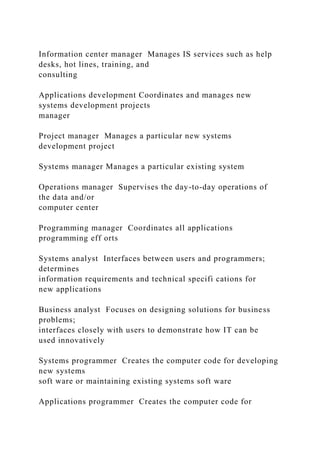
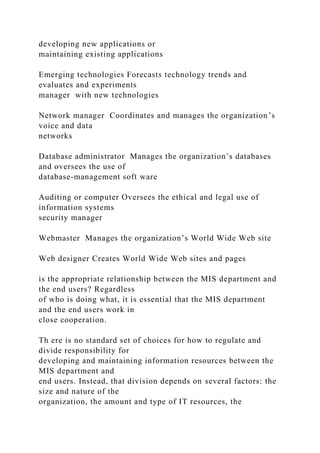
TABLE 1.1 IT Jobs
Position Job Description
Chief information offi cer Highest-ranking IS manager; is
responsible for all strategic
planning in the organization
IS director Manages all systems throughout the organization
and day-to-
day operations of the entire IS organization
Information center manager Manages IS services such as help
desks, hot lines, training, and
consulting
Applications development Coordinates and manages new
systems development projects
manager
Project manager Manages a particular new systems
development project
Systems manager Manages a particular existing system
Operations manager Supervises the day-to-day operations of
the data and/or
computer center
Programming manager Coordinates all applications
programming eff orts
Systems analyst Interfaces between users and programmers;
determines
information requirements and technical specifi cations for
new applications
Business analyst Focuses on designing solutions for business
problems;
interfaces closely with users to demonstrate how IT can be
used innovatively
Systems programmer Creates the computer code for developing
new systems
soft ware or maintaining existing systems soft ware
Applications programmer Creates the computer code for
developing new applications or
maintaining existing applications
Emerging technologies Forecasts technology trends and
evaluates and experiments
manager with new technologies
Network manager Coordinates and manages the organization’s
voice and data
networks
Database administrator Manages the organization’s databases
and oversees the use of
database-management soft ware
Auditing or computer Oversees the ethical and legal use of
information systems
security manager
Webmaster Manages the organization’s World Wide Web site
Web designer Creates World Wide Web sites and pages
is the appropriate relationship between the MIS department and
the end users? Regardless
of who is doing what, it is essential that the MIS department
and the end users work in
close cooperation.
Th ere is no standard set of choices for how to regulate and
divide responsibility for
developing and maintaining information resources between the
MIS department and
end users. Instead, that division depends on several factors: the
size and nature of the
organization, the amount and type of IT resources, the
organization’s attitudes toward
c01IntroductionToInformationSystems.indd Page 9 04/10/12
6:21 PM user-F408c01IntroductionToInformationSystems.indd
Page 9 04/10/12 6:21 PM user-F408 /Users/user-
F408/Desktop/Users/user-F408/Desktop
10 1 l Introduction to Information Systems
computing, the attitudes of top management toward computing,
the maturity level of the
technology, the amount and nature of outsourced IT work, and
even the countries in
which the company operates. Generally speaking, the MIS
department is responsible for
corporate-level and shared resources, and the end users are
responsible for departmen-
tal resources. Table 1.2 identifi es both the traditional func-
tions and various new, consultative functions of the MIS
department.
So, where do the end users come in? Take a close look at
Table 1.2. Under the traditional MIS functions, you will see
two functions for which you provide vital input. Under the
consultative MIS functions, you will see how the primary
responsibility for each function is exercised, and how the MIS
department acts as an advisor.
BEFORE YOU GO ON . . .
1. Rate yourself as an informed user.
(Be honest; this is not a test!)
2. Explain the benefi ts of being an informed
user of information systems.
3. Discuss the various career opportunities
offered in the IT fi eld.
TABLE 1.2 The Changing Role of the IS Department
Traditional Functions of the MIS Department
• Managing systems development and systems project
management
° As an end user, you will have critical input into the systems
development process. You will
learn about systems development in Chapter 14.
• Managing computer operations, including the computer center
• Staffi ng, training, and developing IS skills
• Providing technical services
• Infrastructure planning, development, and control
° As an end user, you will provide critical input about the IS
infrastructure needs of your
department.
New (Consultative) Functions of the MIS Department
• Initiating and designing specifi c strategic information
systems
° As an end user, your information needs will oft en mandate
the development of new
strategic information systems. You will decide which strategic
systems you need (because
you know your business needs better than the MIS department),
and you will provide
input into developing these systems.
• Incorporating the Internet and electronic commerce into the
business
° As an end user, you will be primarily responsible for eff
ectively using the Internet and
electronic commerce in your business. You will work with the
MIS department to
accomplish this task.
• Managing system integration including the Internet, intranets,
and extranets
° As an end user, your business needs will determine how you
want to use the Internet,
your corporate intranets, and extranets to accomplish your
goals. You will be primarily
responsible for advising the MIS department on the most eff
ective use of the Internet,
your corporate intranets, and extranets.
• Educating the non-MIS managers about IT
° Your department will be primarily responsible for advising the
MIS department on how
best to educate and train your employees about IT.
c01IntroductionToInformationSystems.indd Page 10 04/10/12
6:21 PM user-F408c01IntroductionToInformationSystems.indd
Page 10 04/10/12 6:21 PM user-F408 /Users/user-
F408/Desktop/Users/user-F408/Desktop
Why Should I Study Information Systems? 11
Apply the Concept 1.1
Background Th is section pointed out that technology is used to
move busi-
ness forward by connecting the business to its customers,
suppliers, partners,
etc. Th ose connections do not just exist to support businesses.
Do you realize how con-
nected you are? Computers and information systems have
become a part of our every-
day life at home. Most of you have a cell phone within reach
and have looked at it within
the past 5 minutes. No longer is a phone just a phone, it is your
connection to family,
friends, shopping, driving directions, entertainment (games,
movies, music, etc.), and
much more.
When you graduate and go to work, most businesses will require
you to interface with
computer information systems to post transactions or search for
information. And just as
there are many people working for Apple, Google, AT&T,
Verizon, and others making sure
your personal network and technology never fails, there are
many who work specifi cally in
IT to ensure that business IT is, in fact, moving business
forward.
Activity Visit http://www.wiley.com/go/rainer/applytheconcept
and click on the link
provided for Apply the Concept 1.1. You will be taken to
YouTube to learn more about the
IT people who work behind the scenes helping IT move business
forward. As you watch
the video, consider the following questions about all that is
involved in the job of an IT
manager.
• What is the schedule for an IT manager’s work?
• What training does an IT manager need?
• What jobs are available in the IT fi eld?
• Do you know anyone who works directly with IT?
• In which role from the video do you think that person works?
• Educating the MIS staff about the business
° Communication between the MIS department and the business
units is a two-way street.
You will be responsible for educating the MIS staff on your
business, its needs, and its
goals.
• Partnering with business-unit executives
° Essentially, you will be in a partnership with the MIS
department. You will be responsible
for seeing that this partnership is one “between equals” and
ensuring its success.
• Managing outsourcing
° Outsourcing is driven by business needs. Th erefore, the
outsourcing decision largely
resides with the business units (i.e., with you). Th e MIS
department, working closely with
you, will advise you on technical issues such as communications
bandwidth, security, and
so on.
• Proactively using business and technical knowledge to seed
innovative ideas about IT
° Your business needs will oft en drive innovative ideas about
how to eff ectively use
information systems to accomplish your goals. Th e best way to
bring these innovative uses
of IS to life is to partner closely with your MIS department.
Such close partnerships have
amazing synergies!
• Creating business alliances with business partners
° Th e needs of your business unit will drive these alliances,
typically along your supply
chain. Again, your MIS department will act as your advisor on
various issues, including
hardware and soft ware compatibility, implementing extranets,
communications, and
security.
c01IntroductionToInformationSystems.indd Page 11 04/10/12
6:21 PM user-F408c01IntroductionToInformationSystems.indd
Page 11 04/10/12 6:21 PM user-F408 /Users/user-
F408/Desktop/Users/user-F408/Desktop
12 1 l Introduction to Information Systems
1.2 Overview of Computer-Based
Information Systems
Organizations refer to their MIS functional area by several
names, including the MIS
Department, the Information Systems Department, the
Information Technology
Department, and the Information Services Department.
Regardless of the name, how-
ever, this functional area deals with the planning for—and the
development, manage-
ment, and use of—IT tools to help people perform all of the
tasks related to information
processing and management. IT relates to any computer-based
tool that people use to
work with information and to support the information and
information-processing
needs of an organization.
An IS collects, processes, stores, analyzes, and disseminates
information for a specifi c
purpose. It has been said that the purpose of ISs is to get the
right information to the right
people at the right time in the right amount and in the right
format. Because ISs are
intended to supply useful information, we need to diff erentiate
between information and
two closely related terms: data and knowledge (see Figure 1.2).
Data items refer to an elementary description of things, events,
activities, and transac-
tions that are recorded, classifi ed, and stored but are not
organized to convey any specifi c
meaning. Data items can be numbers, letters, fi gures, sounds,
and images. Examples of data
items are a collection of numbers (e.g., 3.11, 2.96, 3.95, 1.99,
2.08) and characters (e.g., B, A,
C, A, B, D, F, C).
Information refers to data that have been organized so that they
have meaning and
value to the recipient. For example, a grade point average
(GPA) by itself is data, but a
student’s name coupled with his or her GPA is information. Th
e recipient interprets the
meaning and draws conclusions and implications from the
information. Consider the
examples of data provided in the preceding paragraph. Within
the context of a university,
the numbers could be GPAs, and the letters could be grades in
an Introduction to MIS
class.
Knowledge consists of data and/or information that have been
organized and pro-
cessed to convey understanding, experience, accumulated
learning, and expertise as
they apply to a current business problem. For example, a
company recruiting at your
school has found over time that students with GPAs over 3.0
have experienced the great-
est success in its management program. Based on this
accumulated knowledge, that com-
pany may decide to interview only those students with GPAs
over 3.0. Organizational
Deliverable
Write a paragraph summary for your professor that explains the
major responsibilities of
the diff erent positions discussed in the video. Also point out
which area you would be most
interested in learning more about. Submit your paragraph to
your professor.
Quiz questions are assignable in WileyPLUS, and available on
the Book Companion
Site at http://www.wiley.com/college/rainer.
1. Given that Ruby’s customers are college-aged Homo conexus
users of
technology, do you think it will be possible for them to be
successful
moving into the future without a strong IT strategy?
2. If “informed users” provide more value to a company, can the
same
be said of “informed customers”?
Q U E S T I O N SRUBY’S CLUB
c01IntroductionToInformationSystems.indd Page 12 10/19/12
8:29 PM user-F393c01IntroductionToInformationSystems.indd
Page 12 10/19/12 8:29 PM user-F393 /Users/user-
F393/Desktop/Users/user-F393/Desktop
Overview of Computer-Based Information Systems 13
Knowledge
Information
Data
Figure 1.2 Binary Code, the
foundation of information and
knowledge, is the key to making
complex decisions.
3.16 3.16 1 John Jones 5 GPA *Job prospects
2.92 2.92 1 Sue Smith 5 GPA *Graduate school prospects
1.39 1.39 1 Kyle Owens 5 GPA *Scholarship prospects
3.95 3.95 1 Tom Elias 5 GPA
Data Information
[No context] [University context] Knowledge
GPA 5 grade point average (higher is better)
ERA 5 earned run average (lower is better); ERA is the number
of runs per nine innings accountable to a pitcher
[Professional baseball
[No context] pitcher context]
3.16 3.16 1 Ken Rice 5 ERA
2.92 2.92 1 Ed Dyas 5 ERA * Keep pitcher, trade pitcher, or
send
pitcher to minor leagues
1.39 1.39 1 Hugh Carr 5 ERA *Salary/contract negotiations
3.95 3.95 1 Nick Ford 5 ERA
You see that the same data items, with no context, can mean
entirely diff erent things in
diff erent contexts.
knowledge, which refl ects the experience and expertise of
many people, has great value
to all employees.
Consider this example:
© Chad Reischl/iStockphoto; Exactostock/SuperStock; ©
Tatiana Popova/iStockphoto
c01IntroductionToInformationSystems.indd Page 13 04/10/12
6:21 PM user-F408c01IntroductionToInformationSystems.indd
Page 13 04/10/12 6:21 PM user-F408 /Users/user-
F408/Desktop/Users/user-F408/Desktop
14 1 l Introduction to Information Systems
Now that you have a clearer understanding of data, information,
and knowledge, we
shift our focus to computer-based information systems. As we
noted, these systems process
data into information and knowledge that you can use.
A computer-based information system (CBIS) is an information
system that uses
computer technology to perform some or all of its intended
tasks. Although not all infor-
mation systems are computerized, today most are. For this
reason, the term information
system is typically used synonymously with computer-based
information system. Th e follow-
ing are the basic components of computer-based information
systems. Th e fi rst four are
called information technology (IT) components. Figure 1.3
shows how these four com-
ponents interact to form a CBIS.
• Hardware is a device such as a processor, monitor, keyboard,
or printer. Together,
these devices accept data and information, process them, and
display them.
• Software is a program or collection of programs that enable
the hardware to process
data.
• A database is a collection of related fi les or tables containing
data.
• A network is a connecting system (wireline or wireless) that
permits diff erent
computers to share resources.
• Procedures are the set of instructions about how to combine
hardware, soft ware,
databases, and networks in order to process information and
generate the desired
output.
• Users are those individuals who use the hardware and soft
ware, interface with it, or
utilize its output.
Figure 1.4 shows how these components are integrated to form
the wide variety of
information systems in an organization. Starting at the bottom
of the fi gure, you see that the
IT components of hardware, soft ware, networks (wireline and
wireless), and databases form
the information technology (IT) platform. IT personnel use
these components to develop
information systems, oversee security and risk, and manage
data. Th ese activities cumula-
tively are called information technology (IT) services. Th e IT
components plus IT ser-
vices comprise the organization’s information technology (IT)
infrastructure. At the top
of the pyramid are the various organizational information
systems.
Database
NetworkSoftware
Computer-based
information system
Procedures
Procedures Procedures
Procedures
Hardware
Figure 1.3 It takes technology
(hardware, software, databases,
and networks) with appropriate
procedures to make a CBIS
useful for people.
© Dzianis Kazlouski/iStockphoto; © Oleksiy Mark/iStockphoto;
© Blend_Images/iStockphoto;
© Alex Slobodkin/iStockphoto; © Alex Slobodkin/iStockphoto
c01IntroductionToInformationSystems.indd Page 14 04/10/12
6:21 PM user-F408c01IntroductionToInformationSystems.indd
Page 14 04/10/12 6:21 PM user-F408 /Users/user-
F408/Desktop/Users/user-F408/Desktop
Overview of Computer-Based Information Systems 15
Computer-based information systems have many capabilities.
Table 1.3 summarizes
the most important ones.
Information systems perform these various tasks via a wide
spectrum of applications.
An application (app) is a computer program designed to support
a specifi c task or business
process. (A synonymous term is application program.) Each
functional area or department
within a business organization uses dozens of application
programs. For instance, the
human resources department sometimes uses one application for
screening job applicants
and another for monitoring employee turnover. Th e collection
of application programs in a
single department is usually referred to as a departmental
information system (also known
as a functional area information system). For example, the
collection of application pro-
grams in the human resources area is called the human resources
information system (HRIS).
Collections of application programs—that is, departmental
information systems—are used
in other functional areas as well, such as accounting, fi nance,
marketing, and production/
operations. IT’s About Business 1.2 illustrates how U.S.
railroads are using information
systems to improve their operations.
Types of Computer-Based Information Systems
Modern organizations employ many diff erent types of
information systems. Figure 1.4 illus-
trates the diff erent types of information systems that function
within a single organization,
IT Personnel
IT Components
P
ro
d
u
ct
io
n
/O
p
er
at
io
n
s
M
an
ag
em
en
t
IS
H
u
m
an
R
es
o
u
rc
es
IS
M
ar
ke
ti
n
g
IS
F
in
an
ce
IS
A
cc
o
u
n
ti
n
g
IS
IT Services
Transaction Processing Systems
Enterprise Resource Planning Systems
Business Intelligence Dashboards
Expert Systems
Figure 1.4 How IT components
are integrated to form the wide
variety of information systems
within a single organization.
TABLE 1.3 Major Capabilities of Information Systems
• Perform high-speed, high-volume, numerical computations
• Provide fast, accurate communication and collaboration within
and among organizations
• Store huge amounts of information in an easy-to-access yet
small space
• Allow quick and inexpensive access to vast amounts of
information, worldwide
• Interpret vast amounts of data quickly and effi ciently
• Automate both semiautomatic business processes and manual
tasks
c01IntroductionToInformationSystems.indd Page 15 04/10/12
6:21 PM user-F408c01IntroductionToInformationSystems.indd
Page 15 04/10/12 6:21 PM user-F408 /Users/user-
F408/Desktop/Users/user-F408/Desktop
16 1 l Introduction to Information Systems
The Digitization of Railroads
Once a dying industry, railroads have made a major
comeback. They are now seeking to operate more
trains, carry more freight and passengers, and move at
faster speeds than ever before while at the same time
lowering their costs. In an effort to become more effi -
cient and safer as well, railroads are rapidly becoming
digitized. Major railroads are installing digital commu-
nications, sensors, computerized controls, and global
positioning receivers on their trains and tracks.
These new types of IT can gather intelligence on
location, size, and speed of trains, and then use that
information to make automated decisions about train
movement. Automated decisions will improve the
operating effi ciency of the railroads, thus saving mon-
ey. More importantly, automated decisions may save
lives.
The railroad industry is implementing
three major digital systems as it moves into
the second decade of the 21st century: a
positive train control system, electronically controlled
pneumatic brakes, and proactive monitoring and
detection systems. As you will see, each of these sys-
tems brings many potential benefi ts, but also comes
with its own set of issues and controversies.
ABOUT BUSINESS 1.2i
Th Di
T’S
and Figure 1.5 shows the diff erent types of information systems
that function among mul-
tiple organizations. You will study transaction processing
systems, management informa-
tion systems, and enterprise resource planning systems in
Chapter 11. You will learn about
customer relationship management (CRM) systems in Chapter
12 and supply chain man-
agement (SCM) systems in Chapter 13.
In the next section, you will learn about the numerous and
diverse types of information
systems employed by modern organizations. You will also read
about the types of support
these systems provide.
Business-to-business
electronic commerce
(B2B)
Business-to-business
electronic commerce
(B2B)
SUPPLIERS
S
up
pl
y
ch
ai
n
m
an
ag
em
en
t
C
ustom
er relationship
m
anagem
ent
Your
Organization
Business-to-consumer
electronic commerce
(B2C)
CUSTOMERS
Individuals
Information
Online orders
Payments
Online orders
Payments
Digital products
Digital products
Payments
Online orders
Physical products
Physical products
M
at
er
ial
s
Internet
Business
Figure 1.5 The different types of information systems that
function among multiple
organizations.
c01IntroductionToInformationSystems.indd Page 16 04/10/12
6:21 PM user-F408c01IntroductionToInformationSystems.indd
Page 16 04/10/12 6:21 PM user-F408 /Users/user-
F408/Desktop/Users/user-F408/Desktop
Overview of Computer-Based Information Systems 17
Positive Train Control
Positive train control (PTC) is essentially a traffi c system
for trains that utilizes on-board computers, digital
communications, and global positioning systems.
PTC enables central railroad control stations to see
trains’ locations. It also enables them to stop trains by
remote control if, for example, an engineer fails to
obey a signal.
PTC systems are designed to project an electronic
safety zone (or buffer) in front of, and behind, trains.
The size of a train’s buffer space is determined by its
length, weight, and braking capabilities. Under this sys-
tem, if one train were to encroach on another train’s
buffer zone, the electronic gear on the train whose buf-
fer was invaded would be alerted and its brakes would
automatically engage.
In addition to making it safer for trains to operate
closer together, such a system would also allow the
railroads to retire their light signals, thereby saving
themselves a considerable amount of money. However,
despite these potential costs savings, there is one
distinct advantage to keeping part of the light signal
system active. The light signals are connected to an
electrical circuit that runs through the rails, so if a break
in a rail occurs, the circuit is broken as well. This broken
circuit causes the nearest signal to turn red, stopping
trains in the vicinity.
The U.S. government has mandated that PTC sys-
tems be installed by the end of 2015 on major rail lines
used by passenger trains or by trains carrying highly
toxic chemicals. At the time of this writing (mid-2012),
the major railway companies are still resistant to imple-
menting PTC systems. These companies say that it will
cost $13 billion to install and maintain PTC systems, a
cost-prohibitive amount of money.
Electronically Controlled Pneumatic Brakes
Another digital development affecting railways is a new
kind of brake, known as the electronically controlled
pneumatic (or ECP), brake. ECP brakes are controlled
by electronic signals instead of air pressure, and there-
fore engage and release immediately and uniformly.
ECP brakes improve train handling, shorten braking
distances, lessen wear and tear on railcars, and lower
the risk of derailment.
Unfortunately, the cost and technical challenges of
implementing ECP brakes are likely to slow down their
adoption. For example, trains cannot be comprised of
cars with two different kinds of brakes, so replacing the
brakes on only some of the nation’s 1.6 million freight
cars would create a logistical nightmare for the rail-
roads. Further, railroads are already able to shorten
braking distances by placing additional locomotives in
the middle or rear of freight trains. This solution is tem-
porary, but one that the railroads favor at this time.
Proactive Monitoring and Detection Systems
The railroad industry is also working on methods of
predicting, rather than reacting to, equipment prob-
lems. Currently, devices such as hot-box detectors
beside rail lines measure temperatures as trains go past
and spot wheel bearings that have overheated. Once
these problems are spotted, trains have to stop to
repair the problem.
Railroad companies are also developing digital
monitoring systems that can measure stress levels on
wheels and other railcar components before serious
problems develop. These systems operate through
microphones that can pick up the sounds of axle bear-
ings and software algorithms that can then interpret
those sounds.
Railroads are also experimenting with putting sen-
sors directly on railcars. These sensors monitor issues
such as whether the dome lids on chemical tank cars
are open or closed. Chemical companies want this
information because lids are supposed to be closed
during transit to prevent vandalism. If they received
alerts when the lids were open, they could easily detect
any breach of the cars. The sensors can also monitor
temperatures inside railcars, a feature critical in the
case of food shipments.
Sources: Compiled from T. Aspray, “Railroad Stocks Are Still
on
Track,” Forbes, January 6, 2012; D. Machalaba, “The Little
Engine
Really Could,” The Wall Street Journal, May 23, 2011; R.
Lindsey,
“Really? You Gotta Let It Go,” Strategic Railroading, December
7, 2010; F. Roskind, “Positive Train Control Systems Economic
Analysis,” Federal Railroad Administration, July 10, 2009; K.
Jones,
“Engineer Texted Before Deadly Train Crash,”
InformationWeek,
March 3, 2009; www.nscorp.com, www.csx.com, www.
up.com, accessed February 19, 2012.
Questions
1. Describe how the three systems discussed in this
case can lead to safer railroads. Provide specifi c
examples.
2. What other information technologies could
railroads use to improve their performance?
c01IntroductionToInformationSystems.indd Page 17 04/10/12
6:21 PM user-F408c01IntroductionToInformationSystems.indd
Page 17 04/10/12 6:21 PM user-F408 /Users/user-
F408/Desktop/Users/user-F408/Desktop
18 1 l Introduction to Information Systems
Breadth of Support of Information Systems Certain
information systems support parts of organizations, others
support
entire organizations, and still others support groups of
organizations.
Th is section addresses all of these systems.
Recall that each department or functional area within an organi-
zation has its own collection of application programs, or
information
systems. Th ese functional area information systems (FAISs) are
supporting pillars for the information systems located at the top
of
Figure 1.4: business intelligence systems and dashboards. As
the
name suggests, each FAIS supports a particular functional area
with-
in the organization. Examples are accounting IS, fi nance IS,
production/
operations management (POM) IS, marketing IS, and human
resources IS.
Consider these examples of IT systems in the various functional
areas of an organization. In fi nance and accounting, managers
use IT
systems to forecast revenues and business activity, to determine
the
best sources and uses of funds, and to perform audits to ensure
that
the organization is fundamentally sound and that all fi nancial
reports
and documents are accurate.
In sales and marketing, managers use information technology to
perform the following functions:
• Product analysis: developing new goods and services.
• Site analysis: determining the best location for production
and
distribution facilities.
• Promotion analysis: identifying the best advertising
channels.
• Price analysis: setting product prices to obtain the highest
total
revenues.
Marketing managers also use IT to manage their relationships
with their customers.
In manufacturing, managers use IT to process customer orders,
develop production
schedules, control inventory levels, and monitor product
quality. Th ey also use IT to design
and manufacture products. Th ese processes are called
computer-assisted design (CAD) and
computer-assisted manufacturing (CAM).
Managers in human resources use IT to manage the recruiting
process, analyze and
screen job applicants, and hire new employees. Th ey also
employ IT to help employees
manage their careers, to administer performance tests to
employees, and to monitor
employee productivity. Finally, they rely on IT to manage
compensation and benefi ts
packages.
Two information systems support the entire organization:
enterprise resource plan-
ning systems and transaction processing systems. Enterprise
resource planning (ERP)
systems are designed to correct a lack of communication among
the FAISs. As a result,
Figure 1.4 shows ERP systems spanning the FAIS. ERP systems
were an important
innovation because the various FAISs were oft en developed as
stand-alone systems and
did not communicate eff ectively (if at all) with one another.
ERP systems resolve this
problem by tightly integrating the FAISs via a common
database. In doing so, they enhance
communications among the functional areas of an organization.
For this reason, experts
credit ERP systems with greatly increasing organizational
productivity.
A transaction processing system (TPS) supports the monitoring,
collection, storage,
and processing of data from the organization’s basic business
transactions, each of which
generates data. For example, when you are checking out of
Walmart, each time the cashier
swipes an item across the bar code reader, that is one
transaction. Defi nitions of a transac-
tion diff er throughout an organization. In accounting, for
example, a transaction is any-
thing that changes a fi rm’s chart of accounts. Th e information
system defi nition of a trans-
action is broader: A transaction is anything that changes the fi
rm’s database. Th e chart of
accounts is only part of the fi rm’s database. Consider a
scenario in which a student transfers
Data from a coupon center will be connected
to marketing and sales, but possibly inventory,
accounting, and much more.
© Sonda Dawes/Th e Image Works
c01IntroductionToInformationSystems.indd Page 18 04/10/12
6:21 PM user-F408c01IntroductionToInformationSystems.indd
Page 18 04/10/12 6:21 PM user-F408 /Users/user-
F408/Desktop/Users/user-F408/Desktop
Overview of Computer-Based Information Systems 19
from one section of an Introduction to MIS course to another
section. Th is move would be
a transaction in the university’s information system, but not a
transaction in the university’s
accounting department.
Th e TPS collects data continuously, typically in real time—that
is, as soon as the data are
generated—and provides the input data for the corporate
databases. TPSs are considered criti-
cal to the success of any enterprise because they support core
operations. Signifi cantly, nearly
all ERP systems are also TPSs, but not all TPSs are ERP
systems. In fact, modern ERP systems
incorporate many functions that have previously been handled
by the organization’s functional
area information systems. You study both TPSs and ERP
systems in detail in Chapter 11.
ERP systems and TPS function primarily within a single
organization. Information
systems that connect two or more organizations are referred to
as interorganizational
information systems (IOSs). IOSs support many
interorganizational operations, of which
supply chain management is the best known. An organization’s
supply chain is the fl ow of
materials, information, money, and services from suppliers of
raw materials through facto-
ries and warehouses to the end customers.
Note that the supply chain in Figure 1.5 shows physical fl ows,
information fl ows, and
fi nancial fl ows. Digitizable products are those that can be
represented in electronic form,
such as music and soft ware. Information fl ows, fi nancial fl
ows, and digitizable products go
through the Internet, whereas physical products are shipped. For
example, when you order
a computer from www.dell.com, your information goes to Dell
via the Internet. When your
transaction is completed (i.e., your credit card is approved and
your order is processed),
Dell ships your computer to you.
Electronic commerce systems are another type of
interorganizational information
system. An electronic commerce (e-commerce) system enables
organizations to conduct
transactions, called business-to-business (B2B) electronic
commerce, and customers to con-
duct transactions with businesses, called business-to-consumer
(B2C) electronic commerce.
(Note: You will learn about other types of e-commerce systems
in Chapter 9). E-commerce
systems are typically Internet based. Figure 1.5 illustrates B2B
and B2C electronic commerce.
Support for Organizational Employees. So far you have been
concentrating on
information systems that support specifi c functional areas and
operations. Now you will
learn about information systems that typically support particular
employees within the
organization.
Clerical workers, who support managers at all levels of the
organization, include book-
keepers, secretaries, electronic fi le clerks, and insurance claim
processors. Lower-level man-
agers handle the day-to-day operations of the organization,
making routine decisions such as
assigning tasks to employees and placing purchase orders.
Middle managers make tactical
decisions, which deal with activities such as short-term
planning, organizing, and control.
Knowledge workers are professional employees, such as fi
nancial and marketing
analysts, engineers, lawyers, and accountants. All knowledge
workers are experts in a
particular subject area. Th ey create information and
knowledge, which they integrate into
the business. Knowledge workers act as advisors to middle
managers and executives. Finally,
executives make decisions that deal with situations that can
signifi cantly change the manner
in which business is done. Examples of executive decisions are
introducing a new product
line, acquiring other businesses, and relocating operations to a
foreign country.
Office automation systems (OASs) typically support the clerical
staff , lower and mid-
dle managers, and knowledge workers. Th ese employees use
OASs to develop documents
(word processing and desktop publishing soft ware), schedule
resources (electronic calen-
dars), and communicate (e-mail, voice mail, videoconferencing,
and groupware).
FAISs summarize data and prepare reports, primarily for middle
managers, but some-
times for lower-level managers as well. Because these reports
typically concern a specifi c
functional area, report generators (RPGs) are an important type
of functional area IS.
Business intelligence (BI) systems provide computer-based
support for complex,
nonroutine decisions, primarily for middle managers and
knowledge workers. (Th ey also
support lower-level managers, but to a lesser extent.) Th ese
systems are typically used with
a data warehouse and they enable users to perform their own
data analysis. You learn about
BI systems in Chapter 5.
c01IntroductionToInformationSystems.indd Page 19 04/10/12
6:21 PM user-F408c01IntroductionToInformationSystems.indd
Page 19 04/10/12 6:21 PM user-F408 /Users/user-
F408/Desktop/Users/user-F408/Desktop
20 1 l Introduction to Information Systems
Expert systems (ESs) attempt to duplicate the work of human
experts by applying
reasoning capabilities, knowledge, and expertise within a
specifi c domain. Th ey have
become valuable in many application areas, primarily but not
exclusively areas involving decision making. For example, nav-
igation systems use rules to select routes, but we do not typi-
cally think of these systems as expert systems. Signifi cantly,
expert systems can operate as stand-alone systems or be
embedded in other applications. We examine ESs in greater
detail in “Plug IT In 4.”
Dashboards (also called digital dashboards) are a spe-
cial form of IS that supports all managers of the organization.
Th ey provide rapid access to timely information and direct
access to structured information in the form of reports. Dash-
boards that are tailored to the information needs of executives
are called executive dashboards. Chapter 5 provides a thorough
discussion of dashboards.
Table 1.4 provides an overview of the diff erent types of
organizational information systems.
TABLE 1.4 Types of Organizational Information Systems
Type of System Function Example
Functional area IS Supports the activities within System for
processing payroll
specifi c functional area
Transaction processing system Processes transaction data
Walmart checkout point-of-
from business events sale terminal
Enterprise resource Integrates all functional areas Oracle, SAP
planning system of the organization
Offi ce automation system Supports daily work activities
Microsoft Offi ce
of individuals and groups
Management information Produces reports summarized Report
on total sales for each
system from transaction data, usually customer
in one functional area
Decision support system Provides access to data and “What-if ”
analysis of changes
analysis tools in budget
Expert system Mimics human expert in a Credit card approval
analysis
particular area and makes
decisions
Executive dashboard Presents structured, Status of sales by
product
summarized information
about aspects of business
important to executives
Supply chain management Manages fl ows of products,
Walmart Retail Link system
system services, and information connecting suppliers to
among organizations Walmart
Electronic commerce system Enables transactions among
www.dell.com
organizations and between
organizations and customers
BEFORE YOU GO ON . . .
1. What is a computer-based information
system?
2. Describe the components of computer-
based information systems.
3. What is an application program?
4. Explain how information systems provide
support for knowledge workers.
5. As we move up the organization’s hierarchy
from clerical workers to executives, how
does the type of support provided by
information systems change?
c01IntroductionToInformationSystems.indd Page 20 04/10/12
6:21 PM user-F408c01IntroductionToInformationSystems.indd
Page 20 04/10/12 6:21 PM user-F408 /Users/user-
F408/Desktop/Users/user-F408/Desktop
Overview of Computer-Based Information Systems 21
Apply the Concept 1.2
Background Th is section discussed the various functional areas
that you will
most likely go to work in and the diff erent systems that support
them. It should be
no surprise that these are the very majors you can choose from
in most colleges of business.
Th ese four major functional areas are marketing/sales, fi
nance/accounting, manufacturing,
and human resources. Oft en, these diff erent functional areas
will use the same database and
networks within a company, but they will all use them to
support their specifi c needs. Th is
activity will help you develop a solid understanding of the role
of information systems within
the diff erent functional areas.
Activity Review the section material that describes the major
function of the following
departments in most companies: marketing/sales, fi
nance/accounting, manufacturing, and
human resources. Th en review the basic function of the
following types of information
systems: transaction processing, management information, and
decision support. Once you
have a solid understanding of the functional areas and
information systems that support
them you are ready to move forward with the activity!
Deliverable
Rebuild and complete the chart shown below with the activities
that may be completed by
each system for each department. To help out, we have pre-fi
lled one item in each type of
system. Once you complete your chart, submit it to your
professor.
Transaction Management Decision
Processing Information Support
Marketing/Sales Enter sales data
Accounting/Finance
Human Resources Comply with EEOC
Manufacturing Inventory reporting
Quiz questions are assignable in WileyPLUS, and available on
the Book Companion
Site at http://www.wiley.com/college/rainer.
1. Given that Ruby’s is a bar with a small food menu, what type
of
data do you think this establishment should collect from a
single
transaction (such as an order for food)?
2. How can Ruby’s use data from transactions over a month to
help
manage inventory?
3. If Ruben and Lisa have transactional data that is organized to
create
information regarding their customer base, why could
knowledge be
gained from this that would help them develop a marketing
plan?
Q U E S T I O N SRUBY’S CLUB
c01IntroductionToInformationSystems.indd Page 21 10/19/12
8:29 PM user-F393c01IntroductionToInformationSystems.indd
Page 21 10/19/12 8:29 PM user-F393 /Users/user-
F393/Desktop/Users/user-F393/Desktop
22 1 l Introduction to Information Systems
1.3 How Does IT Impact Organizations?
Th roughout this book, you will encounter numerous examples
of how IT aff ects various types
of organizations. Th is section provides an overview of the
impact of IT on modern organiza-
tions. As you read this section, you will learn how each of these
impacts will aff ect you as well.
IT Will Reduce the Number of Middle Managers
IT makes managers more productive, and it increases the
number of employees who can
report to a single manager. In these ways, IT ultimately
decreases the number of managers
and experts. It is reasonable to assume, therefore, that in the
coming years organizations
will have fewer managerial levels and fewer staff and line
managers. If this trend material-
izes, then promotional opportunities will decrease, making
promotions much more com-
petitive. Bottom line: Pay attention in school!
IT Will Change the Manager’s Job
One of the most important tasks of managers is making
decisions. One of the major conse-
quences of IT has been to change the manner in which managers
make many of their deci-
sions. In this way, IT ultimately has changed managers’ jobs.
IT oft en provides managers with near real-time information,
meaning that managers
have less time to make decisions, making their jobs even more
stressful. Fortunately, IT also
provides many tools—for example, business intelligence
applications such as dashboards,
search engines, and intranets—to help managers handle the
volumes of information they
must deal with on an ongoing basis.
We have been focusing on managers in general in this section.
Now, let’s focus on you.
Because of advances in IT, you will increasingly supervise
employees and teams who are
geographically dispersed. Employees can work from anywhere
at any time, and teams can
consist of employees who are literally dispersed throughout the
world. Information tech-
nologies such as telepresence systems (discussed in Chapter 4)
can help you manage these
employees even though you do not oft en see them face to face.
For these employees, elec-
tronic or “remote” supervision will become the norm. Remote
supervision places greater
emphasis on completed work and less emphasis on personal
contacts and offi ce politics.
You will have to reassure your employees that they are valued
members of the organization,
thereby diminishing any feelings they might have of being
isolated and “out of the loop.”
Will IT Eliminate Jobs?
One of the major concerns of every employee, part time or full
time, is job security. Relent-
less cost-cutting measures in modern organizations oft en lead
to large-scale layoff s. Put
simply, organizations are responding to today’s highly
competitive environment by doing
more with less. Regardless of your position, then, you
consistently will have to add value to
your organization and to make certain that your superiors are
aware of this value.
Many companies have responded to diffi cult economic times,
increased global competi-
tion, demands for customization, and increased consumer
sophistication by increasing their
investments in IT. In fact, as computers continue to advance in
terms of intelligence and
capabilities, the competitive advantage of replacing people with
machines is increasing rap-
idly. Th is process frequently leads to layoff s. At the same
time, however, IT creates entirely
new categories of jobs, such as electronic medical record
keeping and nanotechnology.
IT Impacts Employees at Work
Many people have experienced a loss of identity because of
computerization. Th ey feel like
“just another number” because computers reduce or eliminate
the human element that was
present in noncomputerized systems.
Th e Internet threatens to exert an even more isolating infl
uence than computers and
television. Encouraging people to work and shop from their
living rooms could produce
some unfortunate psychological eff ects, such as depression and
loneliness.
c01IntroductionToInformationSystems.indd Page 22 04/10/12
6:21 PM user-F408c01IntroductionToInformationSystems.indd
Page 22 04/10/12 6:21 PM user-F408 /Users/user-
F408/Desktop/Users/user-F408/Desktop
How Does IT Impact Organizations? 23
IT Impacts Employees’ Health and Safety. Although computers
and informa-
tion systems are generally regarded as agents of “progress,”
they can adversely aff ect indi-
viduals’ health and safety. To illustrate this point, we consider
two issues associated with IT:
job stress and long-term use of the keyboard.
An increase in an employee’s workload and/or responsibilities
can trigger job stress.
Although computerization has benefi ted organizations by
increasing productivity, it has also
created an ever-expanding workload for some employees. Some
workers feel overwhelmed
and have become increasingly anxious about their job
performance. Th ese feelings of stress
and anxiety can actually diminish rather than improve workers’
productivity while jeopardizing
their physical and mental health. Management can help to
alleviate these problems by provid-
ing training, redistributing the workload among workers, and
hiring more workers.
On a more specifi c level, the long-term use of keyboards can
lead to repetitive strain inju-
ries such as backaches and muscle tension in the wrists and fi
ngers. Carpal tunnel syndrome is
a particularly painful form of repetitive strain injury that aff
ects the wrists and hands.
Designers are aware of the potential problems associated with
the prolonged use of
computers. To address these problems, they continually attempt
to design a better comput-
ing environment. Th e science of designing machines and work
settings that minimize injury
and illness is called ergonomics. Th e goal of ergonomics is to
create an environment that is
safe, well lit, and comfortable. Examples of ergonomically
designed products are antiglare
screens that alleviate problems of fatigued or damaged eyesight
and chairs that contour the
human body to decrease backaches. Figure 1.6 displays some
sample ergonomic products.
IT Provides Opportunities for People with Disabilities.
Computers can cre-
ate new employment opportunities for people with disabilities
by integrating speech- and
vision-recognition capabilities. For example, individuals who
cannot type are able to use a
voice-operated keyboard, and individuals who cannot travel can
work at home.
Going further, adaptive equipment for computers permits people
with disabilities to per-
form tasks they would not normally be able to do. You should
note that the Web and graphical
user interfaces (e.g., Microsoft Windows) can still make life
diffi cult for people with impaired
Figure 1.6 Ergonomic products protect computer users.
(a) Wrist support. Media Bakery
(b) Back support. Media Bakery
(c) Eye-protection fi lter (optically coated glass). Media
Bakery
(d) Adjustable foot rest. Media Bakery
(a) (b)
(d)(c)
c01IntroductionToInformationSystems.indd Page 23 04/10/12
6:21 PM user-F408c01IntroductionToInformationSystems.indd
Page 23 04/10/12 6:21 PM user-F408 /Users/user-
F408/Desktop/Users/user-F408/Desktop
24 1 l Introduction to Information Systems
vision. Adding audible screen tips and voice interfaces to deal
with this problem essentially restores functionality to the way it
was before rich, graphical interfaces became standard.
Other devices help improve the quality of life for people
with disabilities in more mundane, but useful, ways. Examples
are a two-way writing telephone, a robotic page turner, a hair
brusher, and a hospital-bedside video trip to the zoo or the
museum. Several organizations specialize in IT designed for
people with disabilities.
Apply the Concept 1.3
Background Th is section points out that the whole reason
businesses use Infor-
mation Systems is that they add value to the daily activities. Th
is should not be a
surprise to you because you most likely use computers and
information systems for the very
same reason! Th ink of fi ve activities that you use your
computer for on a regular basis. Most
likely many of these activities have to do with school and your
classes. However, I would
guess that you also use your computer to communicate with
friends and family, to fi nd out
what movies are showing in theaters this weekend, or to check
fl ights for travel on your next
break. Most of us would miss our computers and the
information systems we have available
through them to help us with these tasks. Th ey add “value” to
our lives. Th e same is true for
most business organizations. Th ey depend on computer
information systems to complete
their daily tasks and to add value to their organization.
Activity Visit http://www.wiley.com/go/rainer/applytheconcept
and click on the link
provided for Apply the Concept 1.3. It will describe to you how
to use a computer to
your advantage. Be sure to listen for the reasons or ways that
computers provide value to
businesses. Consider whether you have seen any of these in
your own interactions with a
business as a consumer.
Deliverable
Based on the video, list fi ve benefi ts mentioned for using IS in
a business. However, there
are many other ways in which a business depends on
information systems. Also, name fi ve
other benefi ts an information system can provide. Th ink of
ways you have used IS to inter-
face with a business and the value you have found. Write a short
summary (based on the
chapter, the video, and your personal experiences) that
describes the many ways that com-
puters and IT add value to our lives. Submit this to your
instructor.
Quiz questions are assignable in WileyPLUS, and available on
the Book Companion
Site at http://www.wiley.com/college/rainer.
BEFORE YOU GO ON . . .
1. Why should employees in all functional areas
become knowledgeable about IT?
2. Describe how IT might change the
manager’s job.
3. Discuss several ways in which IT impacts
employees at work.
1. Ruben and Lisa have always spent hours going through paper
receipts
trying to determine past sales. They need these fi gures to know
purchase quantities for the products they sell. Given that some
of
their products have a short shelf life (perishable foods), this
needs to
be very accurate. In what ways could the capabilities of ISs help
them
accomplish this task?
2. What type of procedures would Ruben and Lisa need to
ensure that
the people interacting with the ISs are doing so in an
appropriate
manner (i.e., correctly inputting data, not using customer data,
etc.)?
Q U E S T I O N SRUBY’S CLUB
c01IntroductionToInformationSystems.indd Page 24 10/19/12
8:29 PM user-F393c01IntroductionToInformationSystems.indd
Page 24 10/19/12 8:29 PM user-F393 /Users/user-
F393/Desktop/Users/user-F393/Desktop
Why Are Information Systems Important to Society? 25
1.4 Why Are Information Systems Important
to Society?
Th is section explains in greater detail why IT is important to
society as a whole. Other
examples of the impacts of IT on society appear throughout the
book.
IT Affects Our Quality of Life
IT has signifi cant implications for our quality of life. Th e
workplace can be expanded from
the traditional 9-to-5 job at a central location to 24 hours a day
at any location. IT can pro-
vide employees with fl exibility that can signifi cantly improve
the quality of leisure time,
even if it does not increase the total amount of leisure time.
From the opposite perspective, however, IT can also place
employees on “constant call”
where they are never truly away from the offi ce, even when
they are on vacation. In fact, a
recent poll revealed that 80 percent of respondents took their
laptop computers on their
most recent vacations, and 100 percent took their cell phones.
Going further, 80 percent did
some work while vacationing, and almost all of them checked
their e-mail.
Robot Revolution on the Way
Once restricted largely to science fi ction movies, robots that
can perform practical tasks are
becoming more common. In fact, “cyberpooches,” nursebots,
and other mechanical beings
may be our companions before we know it. Around the world,
quasi-autonomous devices
have become increasingly common on factory fl oors, in
hospital corridors, and in farm
fi elds. In our homes, iRobot (www.irobot.com) produces the
Roomba to vacuum our fl oors,
the Scooba to wash our fl oors, the Dirt Dog to sweep our
garages, the Verro to clean our
pools, and the Looj to clean our gutters.
Telepresence robots are a recent development in the fi eld of
robotics. IT’s About
Business 1.3 illustrates how organizations use these robots.
Telepresence Robots
The Business Problem
In our modern digital world, knowledge workers can
work from anywhere via a process called telecommut-
ing. In fact, a new term, digital nomad, has appeared
that refers to someone who uses a variety of informa-
tion technologies such as smartphones, wireless Inter-
net access, and Web-based applications to work
remotely from a home, coffee shop, restaurant, airport,
airplane, Internet café, or other location.
Digital nomads present a couple of issues for
the offi ces that employ them. First, digital nomads lack
a “presence” in their respective offi ces. Second, it is
typically expensive and time-consuming for them to
travel to their offi ces—for example, to attend meetings.
Yet another busi-
ness issue occurs
when a person with
a highly desirable
skill is needed at a
distant location.
Examples of individ-
uals with such desir-
able skills include
surgeons, consul-
tants with expertise
in a specific industry,
salespeople who are
well known to high-
value clients, and
many others.
ABOUT BUSINESS 1.3i
T l
T’S
AFP/Gettv Images. Inc.
c01IntroductionToInformationSystems.indd Page 25 04/10/12
6:21 PM user-F408c01IntroductionToInformationSystems.indd
Page 25 04/10/12 6:21 PM user-F408 /Users/user-
F408/Desktop/Users/user-F408/Desktop
26 1 l Introduction to Information Systems
The telepresence robot provides a solution to all of
the issues listed earlier.
The IT
Solution
Telepresence robots have been humorously described
as a cross between a Segway and Wall-E. These robots
are designed to help companies save money on travel
and on expensive teleconferencing technology. The
robots enable people in remote offi ces or locations to
have a rich communications experience without having
to use a complicated videoconferencing system.
A telepresence robot has both a video camera and
a video screen embedded in its “head.” It also has
wheels and can be moved around remotely by com-
puter. It is designed to steer its way clear of obstacles
or people.
The robots let a person maintain a consistent con-
nection with co-workers, customers, or clients. The
human user controls the robot, located at a remote
location, and directs it to move around—for example,
around a conference room during a meeting—while
broadcasting what is going on to the human it repre-
sents. Interestingly, the robots actually break down
barriers of awkwardness that people sometimes feel in
person-to-person meetings.
Organizations are using telepresence robots for a
variety of applications. Consider the following examples:
• Dr. Johns was paged because a man had suf-
fered a stroke and someone had to quickly
decide which drug to give him. She hurried, not
to the emergency room 200 miles away where
the man had been admitted, but to a room in
her local hospital. She sat in front of computer
monitors, a keyboard, and a joystick that con-
trolled her assistant in the remote emergency
room: a telepresence robot.
She acknowledged the nurse and introduced
herself to the patient’s grandson, explaining that
she would question the patient to determine
what drug to give him. The robot’s stereophonic
hearing conveyed the answers and its hypersen-
sitive camera allowed her to zoom her view of
the room in and out, and swing the display left
and right.
By speaking directly with the patient, exam-
ining his face and how he controlled his hands,
and looking at the cardiac monitor in the emer-
gency room, Dr. Johns was able to assess the
stroke with the same accuracy as if she had been
physically present. She instructed the nurse to
give the patient a particular drug.
• Mike Beltzner, director of Firefox at the Mozilla
Corporation, is able to communicate with his
programmers in California from his home in
Toronto, Canada, by means of a telepresence
robot. His telepresence robot swivels his camera
eyes back and forth, and Mike can see the entire
room. He chats comfortably with the assembled
team. When the meeting ends, “Robo-Beltzner”
(as his colleagues call him), mingles in the room,
chatting. Mike fi nds that he is getting the same
kind of interpersonal connection during the
meetings that he would get if he were physically
present.
• Chad Evans, a software designer for Phillips
Healthcare, is located at his home in Atlanta,
Georgia, and his telepresence robot works at the
company’s headquarters in Santa Monica,
California. While he works at his desk in Atlanta,
he is visible on the monitor of his robot. His
colleagues can see at a glance whether he is
available for a chat. When Chad needs to go to
a meeting in California or visit a colleague, he
drives his robot to a desk or meeting room. If he
needs to go to a different fl oor, someone has
to press the elevator buttons for his robot. His
robot enables Chad to be as available and
transparent to his colleagues as though he were
physically present in the offi ce.
• Tom Serani’s boss was frustrated that while
Tom was on the road, his 20-person sales team
working the phones back at company headquar-
ters did not have the same “energy” as when
Tom was in the offi ce. As a result, Tom now has a
telepresence robot at company headquarters.
When he is traveling, Tom can roll his robot up
to an offi ce cubicle at headquarters, listen in
on a telephone sales pitch, and offer advice.
Interestingly, Tom’s boss noted that the telepres-
ence robot increased the sales team’s energy
level to the same level as when Tom was
physically in the offi ce.
The Results
Telepresence robots allow much greater fl exibility for
digital nomads. They provide a fl exible view into what
is happening in their offi ces, without requiring money
and time to be spent on travel. As you saw in the
examples above, companies benefi t from valuable
employees having a “presence” in the offi ce. Compa-
nies also use telepresence robots to connect with peo-
ple having specialized skills in remote locations.
c01IntroductionToInformationSystems.indd Page 26 04/10/12
6:21 PM user-F408c01IntroductionToInformationSystems.indd
Page 26 04/10/12 6:21 PM user-F408 /Users/user-
F408/Desktop/Users/user-F408/Desktop
Why Are Information Systems Important to Society? 27
In the near future, telepresence robots will
have artifi cial intelligence that allows them to
do some things on their own. Inevitably, these
robots will become “smarter” and more agile.
They will not only represent their human users, they will
augment them.
Sources: Compiled from K. Terry, “Roomba Maker Sets Sights
on
Telemedicine,” InformationWeek, February 2, 2012; D. Bennett,
“I’ll
Have My Robots Talk to Your Robots,” Bloomberg
BusinessWeek,
February 21–27, 2011; A. Diana, “12 Advances in Medical
Robotics,” InformationWeek, January 29, 2011; D. Terdiman,
“The Telepresence Robots Are Coming,” CNET.com, May 18,
2010;
J. Markoff, “The Boss Is Robotic, and Rolling Up Behind You,”
The
New York Times, September 4, 2010; www.anybots.com,
accessed
July 27, 2011.
Questions
1. What are the advantages of a telepresence robot
representing you at your offi ce? Provide specifi c
examples to support your answer.
2. What are the disadvantages of a telepresence
robot representing you at your offi ce? Provide
specifi c examples to support your answer.
In an example of precision agriculture, Carnegie Mellon
University in Pittsburgh has
developed self-directing tractors that harvest hundreds of acres
of crops around the clock
in California. Th ese “robot tractors” use global positioning
systems (GPSs) combined with
video image processing that identifi es rows of uncut crops.
Many robotic devices are also being developed for military
purposes. For example, the
Pentagon is researching self-driving vehicles and beelike
swarms of small surveillance
robots, each of which would contribute a diff erent view or
angle of a combat zone. Th e
Predator, an unmanned aerial vehicle (UAV), is being used in
Iraq, Libya, Pakistan, and
Afghanistan.
It probably will be a long time before we see robots making
decisions by themselves,
handling unfamiliar situations, and interacting with people.
Nevertheless, robots are
extremely helpful in various environments, particularly
environments that are repetitive,
harsh, or dangerous to humans.
Improvements in Health Care
IT has brought about major improvements in health care
delivery. Medical personnel
use IT to make better and faster diagnoses and to monitor
critically ill patients more
accurately. IT also has streamlined the process of researching
and developing new
drugs. Expert systems now help doctors diagnose diseases, and
machine vision is
enhancing the work of radiologists. Surgeons use virtual reality
to plan complex sur-
geries. They also have used a surgical robot to perform long-
distance surgery by
controlling the robot’s movements. In addition, doctors discuss
complex medical cases
via videoconferencing, and new computer simulations recreate
the sense of touch,
allowing doctors-in-training to perform virtual procedures
without risking harm to an
actual patient.
Of the thousands of other applications related to health care,
administrative systems
are critically important. Th ese systems range from detecting
insurance fraud to creating
nursing schedules to fi nancial and marketing management.
Th e Internet contains vast amounts of useful medical
information (see www.webmd.
com, for example). In an interesting study, researchers at the
Princess Alexandra Hospital
in Brisbane, Australia, identifi ed 26 diffi cult diagnostic cases
published in the New England
Journal of Medicine. Th ey selected three to fi ve search terms
from each case and then
conducted a Google search. Th e researchers selected and
recorded the three diagnoses
that Google ranked most prominently and that appeared to fi t
the symptoms and signs.
Th ey then compared these results with the correct diagnoses as
published in the journal.
Th ey discovered that their Google searches had found the
correct diagnosis in 15 of the
c01IntroductionToInformationSystems.indd Page 27 04/10/12
6:21 PM user-F408c01IntroductionToInformationSystems.indd
Page 27 04/10/12 6:21 PM user-F408 /Users/user-
F408/Desktop/Users/user-F408/Desktop
28 1 l Introduction to Information Systems
Apply the Concept 1.4
Background As you have read in this chapter, IS have made a
very signifi cant
impact on society. In fact, most all of us now use the Internet to
communicate with
friends, family, and colleagues. E-mail, Facebook, Twitter, text
messages, Skype, and all
other communication technologies run on and are supported by
IS. We can also collaborate
in ways that have never before been possible.
For example, what if you needed to plan a vacation with some
friends for spring break?
Although this may seem simple, you will use search tools, post
links, take notes, etc. Why
not give it a try?
Activity If you do not have a Google account (that provides
access to Gmail, Calendars,
Drive, YouTube, etc.), you will need to set one up for this
activity. Have your friends do the
same and share your usernames (not passwords) with each other.
Now sign into Google Drive (http://drive.google.com) and
create a new document.
Toward the right-hand side, you will see a “share” button. Click
this and add your friends’
Google email addresses in the share box. Be sure to give the
rights to edit.
Coordinate with them for all of you to sign on at the same time
and use the document
to type, share links, notes, ideas, etc., and plan your trip! Look
up hotels, activities, restau-
rants, and so on.
Deliverable
Download the document as a PDF when you have your trip all
planned out (and are a bit
bummed that you are not actually going) to submit to your
instructor. In addition, be pre-
pared to discuss some of the benefi ts of using of Google Drive
(or any tool that may become
available that would be similar to it). What are some ways in
which you could use this tool
on campus, at home, or at work?
Quiz questions are assignable in WileyPLUS, and available on
the Book Companion
Site at http://www.wiley.com/college/rainer.
BEFORE YOU GO ON . . .
1. What are some of the quality-of-life
improvements made possible by IT? Has IT
had any negative effects on our quality
of life?
2. Describe the robotic revolution, and
consider its possible implications for
humans.
3. Explain how IT has improved health care
practices.
26 cases, a success rate of 57 percent. Th e researchers cau-
tion, however, against the dangers of self-diagnosis. Th ey
maintain that people should use the information gained from
Google and medical Web sites such as WebMD only to
participate in their health care by asking questions of their
physician.
1. How might a well-designed information system impact
Ruby’s
employees? Specifi cally, how might it impact Ruben and Lisa?
What
aspects of running a club would be easier on a computer than on
paper?
2. Do you think the addition of an IS would create or eliminate
jobs at
Ruby’s?
Q U E S T I O N SRUBY’S CLUB
c01IntroductionToInformationSystems.indd Page 28 10/19/12
8:29 PM user-F393c01IntroductionToInformationSystems.indd
Page 28 10/19/12 8:29 PM user-F393 /Users/user-
F393/Desktop/Users/user-F393/Desktop
Summary 29
SUMMARY
1. Identify the reasons why being an informed user of
information systems is important in today’s world.
You will benefi t more from your organization’s IT applica-
tions because you will understand what is “behind” those
applications.
> You will be able to provide input into your organiza-
tion’s IT applications, thus improving the quality of
those applications.
> You will quickly be in a position to recommend, or
participate in, the selection of IT applications that your
organization will use.
> You will be able to keep up with rapid developments in
existing information technologies, as well as the intro-
duction of new technologies.
> You will understand the potential impacts that “new
and improved” technologies will have on your organi-
zation and, therefore, will be qualifi ed to make recom-
mendations concerning their adoption and use.
> You will play a key role in managing the information
systems in your organization.
> You will be in a position to use IT if you decide to start
your own business.
2. Describe the various types of computer-based informa-
tion systems in an organization.
> Transaction processing systems (TPS) support the
monitoring, collection, storage, and processing of data
from the organization’s basic business transactions,
each of which generates data.
> Functional area information systems (FAISs) support a
particular functional area within the organization.
> Interorganizational information systems (IOSs) sup-
port many interorganizational operations, of which
supply chain management is the best known.
> Enterprise resource planning (ERP) systems correct
a lack of communication among the FAISs by tightly
integrating the functional area ISs via a common
database.
> Electronic commerce (e-commerce) systems enable
organizations to conduct transactions with other orga-
nizations (called business-to-business (B2B) electronic
commerce), and with customers (called business-to-
consumer (B2C) electronic commerce).
> Offi ce automation systems (OASs) typically support
the clerical staff , lower and middle managers, and
knowledge workers, by enabling them to develop doc-
uments (word processing and desktop publishing soft -
ware), schedule resources (electronic calendars), and
communicate (e-mail, voice mail, videoconferencing,
and groupware).
> Business intelligence (BI) systems provide computer-
based support for complex, nonroutine decisions, pri-
marily for middle managers and knowledge workers.
> Expert systems (ESs) attempt to duplicate the work
of human experts by applying reasoning capabilities,
knowledge, and expertise within a specifi c domain.
What’s in for ME?
In a previous section of this chapter, we discussed how IT
supports each of the func-
tional areas of the organization. Here we examine the MIS
function.
FOR THE MIS MAJOR
Th e MIS function directly supports all other functional areas in
an organization.
Th at is, the MIS function is responsible for providing the
information that each
functional area needs in order to make decisions. Th e overall
objective of MIS personnel is
to help users improve performance and solve business problems
using IT. To accomplish
this objective, MIS personnel must understand both the
information requirements and the
technology associated with each functional area. Given their
position, however, MIS per-
sonnel must think “business needs” fi rst and “technology”
second.
ffT
c01IntroductionToInformationSystems.indd Page 29 04/10/12
6:21 PM user-F408c01IntroductionToInformationSystems.indd
Page 29 04/10/12 6:21 PM user-F408 /Users/user-
F408/Desktop/Users/user-F408/Desktop
30 1 l Introduction to Information Systems
3. Discuss ways in which information technology can
aff ect managers and nonmanagerial workers.
Potential IT impacts on managers:
> IT may reduce the number of middle managers.
> IT will provide managers with real-time or near real-
time information, meaning that managers will have
less time to make decisions.
> IT will increase the likelihood that managers will have
to supervise geographically dispersed employees and
teams.
Potential IT impacts on nonmanagerial workers:
> IT may eliminate jobs.
> IT may cause employees to experience a loss of identity.
> IT may cause job stress and physical problems, such as
repetitive stress injury.
4. Identify positive and negative societal eff ects of the
increased use of information technology.
Positive societal eff ects:
> IT can provide opportunities for people with
disabilities.
> IT can provide people with fl exibility in their work
(e.g., work from anywhere, anytime).
> Robots can take over mundane chores.
> IT can enable improvements in health care.
Negative societal eff ects:
> IT can cause health problems for individuals.
> IT can place employees on constant call.
> IT can potentially misinform patients about their
health problems.
application (app) A computer program designed to support a
specifi c task or business process.
business intelligence (BI) systems Provide computer-based
support for complex, nonroutine decisions, primarily for middle
managers and knowledge workers.
computer-based information system (CBIS) An informa-
tion system that uses computer technology to perform some or
all
of its intended tasks.
dashboards (or digital dashboards) A special form of IS that
supports all managers of the organization by providing rapid
access
to timely information and direct access to structured
information in
the form of reports.
data items Elementary descriptions of things, events, activities,
and transactions that are recorded, classifi ed, and stored but are
not
organized to convey any specifi c meaning.
database A collection of related fi les or tables containing data.
electronic commerce (e-commerce) system A type of in-
terorganizational information system that enables organizations
to
conduct transactions, called business-to-business (B2B)
electronic
commerce, and customers to conduct transactions with
businesses,
called business-to-consumer (B2C) electronic commerce.
enterprise resource planning (ERP) systems ISs that correct
a lack of communication among the FAISs by tightly integrating
the
functional area ISs via a common database.
ergonomics Th e science of adapting machines and work
environ-
ments to people with the goal of creating an environment that is
safe,
well lit, and comfortable.
expert systems (ESs) Attempt to duplicate the work of human
experts by applying reasoning capabilities, knowledge, and
expertise
within a specifi c domain.
functional area information systems (FAISs) ISs that sup-
port a particular functional area within the organization.
hardware A device such as a processor, monitor, keyboard, or
printer. Together, these devices accept data and information,
process
them, and display them.
information Data that have been organized so that they have
meaning and value to the recipient.
information system (IS) Collects, processes, stores, analyzes,
and disseminates information for a specifi c purpose.
information technology (IT) Relates to any computer-based
tool that people use to work with information and support the
infor-
mation and information processing needs of an organization.
information technology (IT) components Hardware, soft -
ware, databases, and networks.
information technology (IT) infrastructure IT components
plus IT services.
information technology (IT) platform Formed by the IT com-
ponents of hardware, soft ware, networks (wireline and
wireless), and
databases.
information technology (IT) services IT personnel use IT
components to perform these IT services: develop information
sys-
tems, oversee security and risk, and manage data.
informed user A person knowledgeable about information sys-
tems and information technology.
interorganizational information systems (IOSs) Informa-
tion systems that connect two or more organizations.
knowledge Data and/or information that have been organized
and processed to convey understanding, experience,
accumulated
learning, and expertise as they apply to a current problem or
activity.
>>> C H A P T E R G L O S S A R Y
c01IntroductionToInformationSystems.indd Page 30 04/10/12
6:21 PM user-F408c01IntroductionToInformationSystems.indd
Page 30 04/10/12 6:21 PM user-F408 /Users/user-
F408/Desktop/Users/user-F408/Desktop
Problem-Solving Activities 31
knowledge workers Professional employees, such as fi nancial
and marketing analysts, engineers, lawyers, and accountants,
who
are experts in a particular subject area and create information
and
knowledge, which they integrate into the business.
network A connecting system (wireline or wireless) that permits
diff erent computers to share resources.
office automation systems (OASs) Typically support clerical
staff , lower and middle managers, and knowledge workers to
develop
documents, schedule resources, and communicate.
procedures Th e set of instructions about how to combine the
components of information technology in order to process
informa-
tion and generate the desired output.
software A program or collection of programs that enable the
hardware to process data.
supply chain Th e fl ow of materials, information, money, and
services from suppliers of raw materials through factories and
ware-
houses to the end customers.
transaction processing system (TPS) Supports the monitor-
ing, collection, storage, and processing of data from the
organiza-
tion’s basic business transactions, each of which generates data.
1. Describe a business that you would like to start. Discuss
how you would use global outsourcing to accomplish
your goals.
2. Your university wants to recruit high-quality high
school students from your state. Provide examples of
(a) the data that your recruiters would gather in this
process, (b) the information that your recruiters would
process from these data, and (c) the types of knowledge
that your recruiters would infer from this information.
3. Can the terms data, information, and knowledge have
diff erent meanings for diff erent people? Support your
answer with examples.
4. Information technology makes it possible to “never be
out of touch.” Discuss the pros and cons of always being
available to your employers and clients (regardless of
where you are or what you are doing).
5. Robots have the positive impact of being able to relieve
humans from working in dangerous conditions. What
are some negative impacts of robots in the workplace?
6. Is it possible to endanger yourself by accessing too much
medical information on the Web? Why or why not?
Support your answer.
7. Is the vast amount of medical information on the Web
a good thing? Answer from the standpoint of a patient
and from the standpoint of a physician.
8. Describe other potential impacts of IT on societies as a
whole.
9. What are the major reasons why it is important for
employees in all functional areas to become familiar
with IT?
10. Refer to the study at Princess Alexandra Hospital (see
“Improvements in Health Care”). How do you feel about
Google searches fi nding the correct diagnosis in 57
percent of the cases? Are you impressed with these
results? Why or why not? What are the implications of
this study for self-diagnosis?
>>> D I S C U S S I O N Q U E S T I O N S
1. Visit some Web sites that off er employment opportunities in
IT. Prominent examples are www.dice.com, www.monster.
com, www.collegerecruiter.com, www.careerbuilder.com,
www.jobcentral.com, www.job.com, www.career.com,
www.simplyhired.com, and www.truecareers.com.
Compare the IT salaries to salaries off ered to accountants,
marketing personnel, fi nancial personnel, operations
personnel, and human resources personnel. For other
information on IT salaries, check Computerworld’s annual
salary survey.
2. Enter the Web site of UPS (www.ups.com).
a. Find out what information is available to customers
before they send a package.
b. Find out about the “package tracking” system.
c. Compute the cost of delivering a 10˝ 3 20˝ 3 15˝ box,
weighing 40 pounds, from your hometown to Long
Beach, California (or to Lansing, Michigan, if you live
in or near Long Beach). Compare the fastest delivery
against the least cost.
>>> P R O B L E M - S O LV I N G A C T I V I T I E S
c01IntroductionToInformationSystems.indd Page 31 04/10/12
6:21 PM user-F408c01IntroductionToInformationSystems.indd
Page 31 04/10/12 6:21 PM user-F408 /Users/user-
F408/Desktop/Users/user-F408/Desktop
32 1 l Introduction to Information Systems
3. Surf the Internet for information about the Department
of Homeland Security (DHS). Examine the available
information, and comment on the role of information
technologies in the department.
4. Access www.irobot.com, and investigate the company’s
robots for education and research. Surf the Web for other
companies that manufacture robots, and compare their
products with those of iRobot.
Background
Th is chapter has shown the many ways IS have changed
business. As you will learn through this course, there are
many jobs that have now been created as a result of the
growth of IS. Although many positions have been eliminated
(such as the typist), others have been created (soft ware
developers who write word processing programs).
Activity
Divide your team into the following functional areas:
marketing, accounting, fi nance, human relations, logistics.
Do some research as individuals to fi nd out what type of jobs
are related to IT for each area. Find some soft ware companies
that provide the systems (such as ADP for human resources)
and learn about the IT people involved in the organization
who support the various departments.
Once everyone has completed the research, meet as a
team and have a conversation about the current job market.
Work as a team to fi nd open positions related to the areas
you have found.
Deliverable
Build a short table that has four columns as shown in the
example below. Submit work to your instructor.
>>> C O L L A B O R AT I O N E X E R C I S E
CLOSING CASE 1 > Today, Every Company Is a
Technology Company
Sixty years into the computer revolution, 40 years into the age
of the microprocessor, and
20 years into the rise of the modern Internet, all of the
technology required to transform
industries through soft ware has been developed and integrated
and can be delivered glob-
ally. Over 2 billion people now access the Internet via
broadband connections. Worldwide,
over 5 billion people use cell phones. One billion of those 5
billion cell phone users have
smartphones that provide them with instant access to the
Internet at all times.
In addition, soft ware programming tools and Internet-based
services allow companies
in many industries to launch new soft ware-powered startups
without investing in new
infrastructure or training new employees. For example, in the
year 2000 the cost of a busi-
ness operating a basic Internet application was approximately
$150,000 per month. Operat-
ing that same application today in Amazon’s cloud (discussed in
detail in Plug IT In #3)
costs about $1,500 per month.
In essence, soft ware is disrupting every industry, and every
organization must prepare
for this disruption. Numerous companies have attempted to meet
the disruption challenge;
some have succeeded and some have failed.
Let’s look at examples of soft ware disruption across several
industries. In many of these
examples, you can fi rst see where soft ware disrupted the
previous market leading compa-
nies and then where a new company (or companies) used soft
ware to gain a competitive
advantage.
THE BUSINESS >>>
PROBLEM
SOFTWARE >>>
DISRUPTIONS
IS that Related IS Current Job
Department Supports Positions Opening
c01IntroductionToInformationSystems.indd Page 32 04/10/12
6:21 PM user-F408c01IntroductionToInformationSystems.indd
Page 32 04/10/12 6:21 PM user-F408 /Users/user-
F408/Desktop/Users/user-F408/Desktop
Closing Case 1: Today, Every Company Is a Technology
Company 33
● The book industry: A dramatic example of software disruption
is the fate of Borders
bookstore. In 2001, Borders agreed to hand over its online
business to Amazon because
the bookstore felt that online book sales were nonstrategic and
unimportant. Borders
fi led for bankruptcy in October 2011. That same month, the
www.borders.com Web
site was replaced with a redirect link to the Barnes & Noble
Web site (www.bn.com).
In January 2012, Barnes & Noble warned analysts it would lose
twice as much money
in 2012 than it had previously expected. The company was
considering splitting off its
growing Nook e-book business from its physical bookstores.
Today, the world’s largest bookseller, Amazon, is a soft ware
company. Its core capa-
bility is its soft ware engine for selling virtually anything online
with no retail stores nec-
essary. Amazon has even reorganized its Web site to promote its
Kindle digital books
over physical books. Now, even the books themselves are soft
ware.
● The music industry: Today’s dominant music companies are
software companies:
Apple’s iTunes (www.apple.com/itunes), Spotify
(www.spotify.com), and Pandora
(www.pandora.com). Traditional record labels today exist
largely to provide those
software companies with content. In mid-2012, the Recording
Industry Association of
America continues to fi ght battles over copyright infringement
and the illegal down-
load and sharing of digital music fi les.
● The video industry: Blockbuster was the industry leader until
disrupted by a software
company, Netfl ix (www.netfl ix.com). In mid-2012, Netfl ix
has the largest subscriber
base of any video service. Blockbuster declared bankruptcy in
February 2011 and was
acquired by Dish Networks in March 2011.
● The software industry: Incumbent software companies such as
Oracle and Microsoft are
increasingly threatened by software-as-a-service products (e.g.,
Salesforce.com) and An-
droid, an open-source operating system developed by the Open
Handset Alliance (www.
openhandsetalliance.com) and led by Google. (We discuss
operating systems in Plug IT
In #2 and software-as-a-service in Plug IT In #3).
● The videogame industry: Today, the fastest growing
entertainment companies are vid-
eogame makers—again, software. Examples of fast growing
videogame companies
include:
° Zynga (www.zynga.com) makes FarmVille and delivers its
games entirely online.
° Rovio (www.rovio.com), the maker of Angry Birds, made
almost $100 million in
revenue in 2011. The company was nearly bankrupt when it
launched Angry Birds on
the iPhone in late 2009.
° Minecraft (www.minecraft.net), another video game delivered
only online over the
Internet, was fi rst released in 2009. By February 2012, over 5
million people had
downloaded it. Interestingly, the creator of Minecraft, Markus
Persson, has never
spent any money to market his game. Sales grew only by word
of mouth.
● The photography industry: This industry was disrupted by
software years ago. Today it
is virtually impossible to buy a mobile phone that does not
include a software-powered
camera, and photos can be uploaded automatically to the
Internet for permanent ar-
chiving and global sharing. The previous market leader, Kodak,
has been replaced by
companies such as Shutterfl y (www.shutterfl y.com), Snapfi sh
(www.snapfi sh.com),
Flickr (www.fl ickr.com), and Instagram (www.instagram.com).
Kodak declared bank-
ruptcy in January 2012.
● The marketing industry: Today’s largest direct marketing
companies are Facebook (www.
facebook.com), Google (www.google.com), Groupon
(www.groupon.com), Living
Social (www.livingsocial.com), Foursquare
(www.foursquare.com), and others. These
companies are using software to disrupt the retail marketing
industry.
● The recruiting industry: LinkedIn (www.linkedin.com) is a
fast-growing recruiting com-
pany. For the fi rst time, employees can maintain their own
resumes on LinkedIn for
recruiters to search in real time.
● The fi nancial services industry: Software has transformed the
fi nancial services indus-
try. Practically every fi nancial transaction is performed by
software. And many of the
c01IntroductionToInformationSystems.indd Page 33 04/10/12
6:21 PM user-F408c01IntroductionToInformationSystems.indd
Page 33 04/10/12 6:21 PM user-F408 /Users/user-
F408/Desktop/Users/user-F408/Desktop
34 1 l Introduction to Information Systems
leading innovators in fi nancial services are software
companies. For example, Square
(https://squareup.com) allows anyone to accept credit card
payments with a mobile
phone.
Soft ware is also disrupting industries that operate primarily in
the physical world. Consider
these examples:
● The automobile industry: In modern cars, software is
responsible for running the en-
gines, controlling safety features, entertaining passengers,
guiding drivers to their desti-
nations, and connecting the car to mobile, satellite, and GPS
networks. Other software
functions in modern cars include Wi-Fi receivers, which turn
your car into a mobile hot
spot, software, which helps maximize fuel effi ciency, and
ultrasonic sensors, which en-
able automatic parallel parking.
Th e next step is to network all vehicles together. Th e creation
of soft ware-powered
driverless cars is already being undertaken at Google and major
car companies.
● Today’s leading real-world retailer, Wal-Mart, uses software
to power its logistics and
distribution capabilities, which it has used to become dominant
in its industry.
● The postal industry: FedEx, which early in its history took the
view that “the informa-
tion about the package is as important as the package itself,”
now employs hundreds of
developers who build and deploy software products for 350,000
customer sites.
● The oil and gas industry: Companies in this industry were
early innovators in supercom-
puting and data visualization and analysis, which are critically
important to oil and gas
exploration efforts.
● The agriculture industry: Agriculture is increasingly powered
by software as well, includ-
ing satellite analysis of soils linked to per-acre seed selection
software algorithms. In
addition, precision agriculture makes use of automated,
driverless tractors controlled by
global positioning systems and software.
● National defense: Even national defense is increasingly
software based. The modern
combat soldier is embedded in a web of software that provides
intelligence, communi-
cations, logistics, and weapons guidance. Software-powered
drone aircraft launch air-
strikes without putting human pilots at risk. Intelligence
agencies perform large-scale
data mining with software to uncover and track potential
terrorist plots.
As you have seen, an increasing number of major businesses
and industries are being run
on soft ware and delivered as online services—from motion
pictures to agriculture to
national defense. Regardless of the industry, companies face
constant competitive threats
from established rivals and entrepreneurial technology
companies that are developing dis-
ruptive soft ware. Th ese threats will force companies to
become more agile in the future and
respond to competitive threats more quickly, effi ciently, and
eff ectively.
Sources: Compiled from M. De La Merced, “Eastman Kodak
Files for Bankruptcy,” Th e Wall Street Journal,
January 19, 2012; J. Trachtenberg and M. Peers, “Barnes &
Noble Seeks Next Chapter,” Th e Wall Street Journal,
January 6, 2012; “Driverless Car: Google Awarded U.S. Patent
for Technology,” BBC News, December 15, 2011;
J. McKendrick, “Five Non-IT Companies Th at Are Now
Indistinguishable from Soft ware Companies,” ZDNet,
December 7, 2011; A. Bleicher, “Five Reasons Every Company
Should Act Like a Soft ware Startup,” Forbes,
November 14, 2011; B. Austen, “Th e End of Borders and the
Future of Books,” Bloomberg BusinessWeek, November
10, 2011; M. Andreessen, “Why Soft ware Is Eating the World,”
Th e Wall Street Journal, August 20, 2011; J. Knee,
“Why Content Isn’t King,” Th e Atlantic, July/August, 2011; J.
Checkler and J. Trachtenberg, “Bookseller Borders
Begins a New Chapter…11,” Th e Wall Street Journal, February
17, 2011.
Questions
1. If every company is now a technology company, then what
does this mean
for the company’s employees? Discuss your answer and provide
specifi c
examples to support your answer.
2. If every company is now a technology company, then what
does this mean
for every major in a college of business? Discuss your answer
and provide
specifi c examples to support your answer.
THE RESULTS >>>
c01IntroductionToInformationSystems.indd Page 34 04/10/12
6:21 PM user-F408c01IntroductionToInformationSystems.indd
Page 34 04/10/12 6:21 PM user-F408 /Users/user-
F408/Desktop/Users/user-F408/Desktop
Closing Case 2: The Arab Spring 35
CLOSING CASE 2 > The Arab Spring
Th e Arab Spring is a wave of demonstrations and protests
occurring in the Arab world.
Demonstrators have been demanding greater political freedom
and an end to autocracy. By
mid-2012, there have been revolutions in Tunisia and Egypt, a
civil war in Libya, civil upris-
ings in Bahrain, Syria, and Yemen, major protests in Algeria,
Iraq, Jordan, Kuwait, Morocco,
and Oman, and minor protests in Lebanon, Mauritania, Saudi
Arabia, and Sudan. Protest-
ers have made use of mobile communications, the Internet, and
social media to organize,
communicate, and raise awareness in the face of state repression
and Internet censorship. In
this case, we will look at three examples: Tunisia, Egypt, and
Syria.
Tunisia. In January 2011, the modern Arab world’s fi rst
successful popular uprising,
called the Jasmine Revolution (named for the national fl ower),
erupted in Tunisia when
Mohammed Bouazizi set himself on fi re. When he died 18 days
later, his story went viral,
providing millions of angry young Tunisians with a martyr. Vast
numbers of protestors took
to the streets, sparking the Jasmine Revolution.
Egypt. In January 2011, another popular uprising broke out in
Egypt. In 2010, Khaled
Saied, a young man from Alexandria, was beaten to death by the
police. Protesters rallied
around a Facebook page entitled “We Are All Khaled Saied.”
Mr. Saied’s death became the
focal point for Egyptians who had not previously been involved
in the protest movement.
Beginning on January 25, 2011, millions of protesters from a
variety of backgrounds and
religions demanded the overthrow of Egyptian President Hosni
Mubarak, who had held
offi ce since 1981.
Syria. An uprising began in Syria on January 26, 2011, when
Hasan Ali Akleh set himself
on fi re, protesting against the Syrian government. Since that
date, the protests have become
more widespread and violent. According to the United Nations,
by mid-2012 some 8,000
people had been killed and the confl ict was ongoing.
Tunisia. Th e Jasmine Revolution did not need any prominent
leaders to rally the protest-
ers or organize the demonstrations. Instead, the revolution was
fueled by a steady stream of
anonymous text messages and Twitter and Facebook updates.
Documents posted on
WikiLeaks (see Chapter 6), in which U.S. diplomats had
cataloged the corruption at the
highest levels of the Tunisian government, deepened the popular
rage. Mobile phone videos
posted online documented the government’s brutal response,
including images of police
beating and shooting protestors, resulting in at least a hundred
deaths. Th e protesters used
the one weapon they understood much better than the
government: the Internet. Young
Tunisians—educated, multilingual, and knowledgeable about
the Internet and social
media—devised strategies to evade the government’s crude fi
rewalls. Protestors spent sev-
eral hours each day on Facebook and other social networks. By
rendering the state televi-
sion and radio stations irrelevant, they were able to undermine
the regime’s propaganda for
the fi rst time in many years.
Egypt. In an eff ort to silence demonstrators, President Mubarak
“turned off the Inter-
net.” At 12:34 am on January 28, Egypt’s four primary Internet
providers—Link Egypt,
Vodafone/Raya, Telecom Egypt, and Etisalat Misr—all went
“dark.” Th at is, the four provid-
ers stopped transmitting all Internet traffi c into and out of
Egypt. Th e blackout appeared to
be designed to disrupt the organization of the country’s protest
movement.
“When countries block, we evolve,” wrote one activist from the
group We Rebuild in a
Twitter message on January 28. We Rebuild and other activist
groups scrambled to keep the
country connected to the outside world, turning to landline
telephones, fax machines, and
even ham radios to keep information fl owing in and out of
Egypt.
Th e activists were successful. On February 2, Egypt’s
embattled leaders realized that the
communications blockage was largely ineff ective and indeed
counterproductive. Th e shut-
down proved to be more a source of fresh anger than an
impediment to the protest move-
ment. Protesters had no trouble gathering larger and larger
crowds, culminating with an
<<< THE PROBLEM
<<< THE ROLE OF
INFORMATION
TECHNOLOGY
c01IntroductionToInformationSystems.indd Page 35 04/10/12
6:21 PM user-F408c01IntroductionToInformationSystems.indd
Page 35 04/10/12 6:21 PM user-F408 /Users/user-
F408/Desktop/Users/user-F408/Desktop
36 1 l Introduction to Information Systems
estimated 250,000 people who assembled in central Cairo on
January 29 to demand an end
to Mubarak’s rule.
Syria. Th e Internet is playing a major role in the organization
and coverage of the protests
in Syria. Th e largest Facebook page in support of the Syrian
uprising, called “Th e Syrian
Revolution 2011,” has more than 380,000 followers. Th e page
reports on news related to the
uprising.
Because the international news media were banned in Syria, the
main source of infor-
mation to the outside world has been private videos, usually
taken with mobile phone cam-
eras and uploaded to YouTube and Flickr. Such videos are diffi
cult to verify independently.
To add credibility to the videos, protestors oft en explicitly
mention the date and location of
the scene and show current newspaper issues.
Activists are organizing protests via Twitter and Facebook and
are using Skype and
Twitter to communicate because the regime oft en blocks cell
phone transmissions.
For example, Syrian activists are using an iPhone app called
“Souria Wa Bas” to dis-
seminate news and information about the confl ict. Th e app,
which works on both the
iPhone and iPad, includes recent news about opposition groups
and their activities, as well
as videos, maps, and photos.
Tunisia. On January 14, 2011, President Ben Ali was forced into
exile.
Egypt. On February 11, 2011, following weeks of determined
popular protest and pres-
sures, President Mubarak resigned from offi ce. On June 24,
2012, Egypt’s election commis-
sion announced that Muslim Brotherhood candidate Mohammed
Morsi had won Egypt’s
presidential election. However, as of mid-2012, the Supreme
Council of the Armed Forces
remains in power.
Syria. Th e confl ict continues in mid-2012. Some countries
have cut ties with the Assad
regime including the Gulf States, Libya, Tunisia, Britain, Spain,
Turkey, the United States,
and Belgium. In addition, the Arab League, Turkey, and most
Western powers have imposed
severe sanctions on Syria, including bans on trade and
transportation, isolating the Assad
regime.
Sources: Compiled from J. Peterson, “Th e Facebook
Revolutions: One Year On,” Th e Daily Caller, December 18,
2011; J. Harris, “Th e Year of the Networked Revolution,” Th e
Guardian, December 13, 2011; A. Hauslohner, “Th e
Revolution’s Second Act,” Time, December 5, 2011; J. Titlow,
“How Syrian Protesters Are Using the iPhone to Fuel
an Uprising,” ReadWriteWeb, November 18, 2011; A. Flamand
and H. Macleod, “Syria’s Protesters Turn to Face-
book to Expose ‘Citizen Spies,’” Th e Guardian, October 8,
2011; R. Ratnesar, “Not Just the Facebook Revolution,”
Bloomberg BusinessWeek, June 6–12, 2011; R. Mackey, “Social
Media Accounts of Protests in Syria,” Th e New York
Times, April 23, 2011; N. Blanford, “On Facebook and Twitter,
Spreading Revolution in Syria,” Th e Christian Sci-
ence Monitor, April 8, 2011; J. Solomon and C. Levinson,
“West to Isolate Gadhafi ,” Wall Street Journal, February
26–27, 2011; “Th e Faces of Egypt’s ‘Revolution 2.0,’”
CNN.com, February 21, 2011; “Aft er Egypt, People Power
Hits Like a Tsunami,” CNN.com, February 15, 2011; “Egyptian
President Steps Down Amidst Groundbreaking
Digital Revolution,” CNN.com, February 11, 2011; C.
Levinson, M. Coker, and J. Solomon, “How Cairo, U.S. Were
Blindsided by Revolution,” Wall Street Journal, February 2,
2011; P. McNamara, “Egypt Lift s Blockade on Internet
Service,” Network World, February 2, 2011; V. Blue, “#Egypt
Blocked in China: Is Internet Access a Human
Right?” ZDNet.com, January 31, 2011; V. Walt, “Tunisia’s
Nervous Neighbors Watch the Jasmine Revolution,”
Time, January 31, 2011; N. Gohring and R. McMillan, “Without
Internet, Egyptians Find New Ways to Get On-
line,” Computerworld, January 28, 2011; J. Robertson, “Th e
Day Part of the Internet Died: Egypt Goes Dark,” USA
Today, January 28, 2011; “Tunisia’s Revolution Should Be
Wake-Up Call to Middle East Autocrats,” Washington
Post, January 15, 2011.
Questions
1. Describe how information technology enabled the Jasmine
and Egyptian
revolutions.
2. Describe eff orts by the Tunisian and Egyptian governments
to quell the
revolutions. In particular, describe the eff orts that were
directed at informa-
tion technology.
3. Discuss how information technology contributed to higher
oil prices and
higher prices you pay for gasoline.
THE RESULTS >>>
c01IntroductionToInformationSystems.indd Page 36 04/10/12
6:21 PM user-F408c01IntroductionToInformationSystems.indd
Page 36 04/10/12 6:21 PM user-F408 /Users/user-
F408/Desktop/Users/user-F408/Desktop
Spreadsheet Activity 37
SPREADSHEET ACTIVITY
Objective: A spreadsheet is a software tool that
allows large amounts of data to be stored,
organized, analyzed, and presented in graphical
form. A spreadsheet is extremely useful because of
its ability to make simple work of a mundane task
(such as calculating the average inventory turnover
time for 1000 products). Although it is not diffi cult
to calculate averages, the sheer volume of the work
makes it very time-consuming. A spreadsheet allows
you to create your own “formula” and then apply
that formula to all 1000 products at the same time,
reducing the amount of work necessary dramatically.
Given these possibilities, you need to take some
time to consider the possible applications of a
spreadsheet. It is the endless application of the
spreadsheet that makes it so powerful. This activity
will show you that this tool can be used for a variety
of situations and purposes.
Chapter Connection: Data, information, and
knowledge are the main focus of this chapter.
Spreadsheets are just one of many tools (albeit the
most widespread and easily accessible) that can be
used to manage data, information, and knowledge.
Activity: As the text introduces the concepts of
data, information, and knowledge, this activity
will introduce you to the vast possibilities of using
spreadsheets to help manage and control data.
Unmanaged data will never provide information or
knowledge, and so it is imperative to understand not
only how to use a spreadsheet but the possibilities
of when to use it. Consider the following three
examples, and then develop your own ideas about
how spreadsheets can be used.
• Individual: Money is something everyone has to
deal with. A spreadsheet is a great tool to help
track and manage personal fi nances. Someone
with a spreadsheet budget can quickly see where
his or her money is being spent and make plans for
where it will go in the future. With a little creativity
and experience, one can quickly create a personal
spreadsheet that will help track fi nances without
purchasing a boxed program.
• Organizations: It is still the simple things that make
a big difference. Companies continue to seek
better ways to manage inventory, and often these
systems incorporate a spreadsheet. Many supply
chain management tools will export data into
spreadsheets for analysis. Once in a spreadsheet,
charts and graphs can be used to easily display
how inventory is being handled.
• Society: Every 10 years, the U.S. government performs
a census. Much of this information is available to the
public. A good deal of interesting information can
be gained by placing these data in a spreadsheet.
Charts and graphs can be used to analyze population
changes, employment rates, demographic
information, and trends over time. Spreadsheets can
be used to tell a story with this information.
Having read these descriptions, describe to your
professor how you might use a spreadsheet to help
manage the required maintenance on your vehicle.
Think about things like gas mileage, oil changes,
expenses, etc. What “math formulas” would you
use that a spreadsheet could help with? If it will
help, search the Web for “vehicle maintenance
spreadsheets” to see what other people do with it!
Ruben and Lisa are seriously considering integrating
technology into their club. However, they still need a
little convincing because of their lack of experience with
computers. Right now, they only have one old computer and it
is still running Windows XP. Just last year, they fi nally
decided
to have cable Internet installed so they could place product
orders quicker. Neither of them is on Facebook or Twitter.
For now, they need to know what types of ISs are
available and what they can do with them. With the
information in this chapter regarding the different types
and uses of ISs, write them a business letter detailing
how the use of ISs may help them manage their club on
a day-to-day basis. Be sure to include information about
the generation they serve and employ (Homo conexus)
and how they are already connected to and familiar with
computers and networks. Finally, submit your letter to
your instructor.
I N T E R N S H I P A S S I G N M E N TRUBY’S CLUB
c01IntroductionToInformationSystems.indd Page 37 04/10/12
6:21 PM user-F408c01IntroductionToInformationSystems.indd
Page 37 04/10/12 6:21 PM user-F408 /Users/user-
F408/Desktop/Users/user-F408/Desktop
Deliverable: You will provide a written description
that demonstrates the ways a spreadsheet can be
used to help keep up with routine maintenance on
a vehicle.
Discussion Questions:
1. For data to be turned into information, they often need
to be cleaned, organized, calculated, and ultimately
presented in some graphical format. Spreadsheets are
excellent at all of these. Discuss three tools that help
spreadsheets accomplish all of these goals.
2. Students have generated their own ideas for using
spreadsheets. Be prepared to discuss your ideas
with the class at large. Hopefully, you did not
all come up with the same possibilities as other
students, and this will help broaden their horizons
even more.
Suggested

2MANAGEMENTINFORMATIONSYSTEMSMOVING BUSINESS FORWARDRAIN.docx

  • 1.
    2MANAGEMENTINFORMATIONSYSTEMS MOVING BUSINESS FORWARD RAINERPRINCE WATSON FMTOC.indd Page xx 11/17/12 12:19 AM user- t044FMTOC.indd Page xx 11/17/12 12:19 AM user-t044 /Volumes/203/MH01820/bri06988/disk1of1/0073406988/Volum es/203/MH01820/bri06988/disk1of1/0073406988 This page is intentionally left blank For more information, visit www.wileyplus.com builds students’ confidence because it takes the guesswork out of studying by providing students with a clear roadmap: It offers interactive resources along with a complete digital textbook that help students learn more. With , students take more initiative so you’ll have greater impact on their achievement in the classroom and beyond. WileyPLUS WileyPLUS
  • 2.
    FMTOC.indd Page i20/11/12 9:01 PM user-f409FMTOC.indd Page i 20/11/12 9:01 PM user-f409 http://www.wileyplus.com ALL THE HELP, RESOURCES, AND PERSONAL SUPPORT YOU AND YOUR STUDENTS NEED! www.wileyplus.com/resources Technical Support 24/7 FAQs, online chat, and phone support www.wileyplus.com/support Student support from an experienced student user Collaborate with your colleagues, find a mentor, attend virtual and live events, and view resources 2-Minute Tutorials and all of the resources you and your students need to get started Your Account Manager, providing personal training and support www.WhereFacultyConnect.com
  • 3.
    Pre-loaded, ready-to-use assignments andpresentations created by subject matter experts Partner Quick Start © Courtney Keating/ iStockphoto WileyPLUS FMTOC.indd Page ii 20/11/12 9:01 PM user-f409FMTOC.indd Page ii 20/11/12 9:01 PM user-f409 Management Information Systems Moving Business Forward Second Edition FMTOC.indd Page iii 11/17/12 12:19 AM user- t044FMTOC.indd Page iii 11/17/12 12:19 AM user-t044 /Volumes/203/MH01820/bri06988/disk1of1/0073406988/Volum es/203/MH01820/bri06988/disk1of1/0073406988 FMTOC.indd Page iv 11/17/12 12:19 AM user-
  • 4.
    t044FMTOC.indd Page iv11/17/12 12:19 AM user-t044 /Volumes/203/MH01820/bri06988/disk1of1/0073406988/Volum es/203/MH01820/bri06988/disk1of1/0073406988 This page is intentionally left blank R. Kelly Rainer, Jr. Brad Prince Hugh Watson Management Information Systems Moving Business Forward Second Edition FMTOC.indd Page v 11/17/12 12:19 AM user- t044FMTOC.indd Page v 11/17/12 12:19 AM user-t044 /Volumes/203/MH01820/bri06988/disk1of1/0073406988/Volum es/203/MH01820/bri06988/disk1of1/0073406988 Library of Congress Cataloging-in-Publication Data Rainer, R. Kelly (Rex Kelly) Management information systems / R. Kelly Rainer, Jr., Brad Prince, Hugh Watson.—Second edition. pages cm Includes index. ISBN 978-1-118-44359-0 (pbk.) 1. Management information systems. I. Watson, Hugh J. II.
  • 5.
    Prince, Brad, 1978-III. Title. HD30.213.R35 2013 658.4’038011—dc23 2012046981 Publisher Don Fowley Executive Editor Beth Lang Golub Content Manager Kevin Holm Production Editor Tim Lindner Executive Marketing Manager Chris Ruel Marketing Assistant Marissa Carroll Design Director Harry Nolan Product Designer Jenny Welter Editorial Operations Manager Melissa Edwards Senior Designer Maureen Eide Senior Photo Editor Lisa Gee Cover Designer Jasmine Lee Senior Content Editor Wendy Ashenberg Assistant Editor Samantha Mandel Editorial Program Assistant Katherine Willis Content Assistant Helen Seachrist Production Management Services Aptara®, Inc. This book was set in Minion Pro 10/12 by Aptara®, Inc. and printed and bound by Quad Graphics. This book is printed on acid free paper. � Founded in 1807, John Wiley & Sons, Inc., has been a valued source of knowledge and understanding for more than 200 years, helping people around the world meet their needs and fulfi ll their aspirations. Our company is built on a foundation of principles that include responsibility to the communities we serve and where we live and work. In 2008, we launched a Corporate Citizenship Initiative, a global effort to address the
  • 6.
    environmental, social, economic, andethical challenges we face in our business. Among the issues we are addressing are carbon impact, paper specifi cations and procurement, ethical conduct within our business and among our vendors, and community and charitable support. For more information, please visit our Web site: www.wiley.com/go/ citizenship. Copyright © 2013 John Wiley & Sons, Inc. All rights reserved. No part of this publication may be reproduced, stored in a retrieval system, or transmitted in any form or by any means, electronic, mechanical, photocopying, recording, scanning or otherwise, except as permitted under Sections 107 or 108 of the 1976 United States Copyright Act, without either the prior written permission of the Publisher, or authorization through payment of the appropriate per-copy fee to the Copyright Clearance Center, Inc., 222 Rosewood Drive, Danvers, MA 01923 (Web site: www.copyright.com). Requests to the Publisher for permission should be addressed to the Permissions Department, John Wiley & Sons, Inc., 111 River Street, Hoboken, NJ 07030-5774, (201) 748-6011, fax (201) 748-6008, or online at: www.wiley.com/go/permissions. Evaluation copies are provided to qualifi ed academics and professionals for review purposes only, for use in their courses during the next academic year. These copies are licensed and may not be sold or transferred to a third party. Upon completion of the review period, please return the evaluation copy to Wiley. Return instructions and a free of charge return shipping label are available at: www.wiley.com/go/returnlabel. If you have chosen to adopt this textbook for use in your course, please accept this book as your
  • 7.
    complimentary desk copy.Outside of the United States, please contact your local sales representative. ISBN-13: 978-1-118-44359-0 BRV ISBN: 978-1-118-47768-7 Printed in the United States of America 10 9 8 7 6 5 4 3 2 1 http://www.copyright.com http://www.wiley.com/go/permissions Dear Student, Why are you here? We are not asking you a philosophical question—that is a diff erent course. We are asking, “Why are you about to spend an entire term learning about informa- tion systems? Why are you—an accounting major, or a marketing or management major— being required to study this topic?” You may be asking, “What’s in IT for me?” Th e short answer is that “IT’s About Business,” and the longer answer is the goal of this book. Information systems are making the world a very small place and are contributing to rapidly increasing global competition. As a result, organizations are constantly trying to fi nd ways to gain a competitive advantage—by achieving operational excellence, developing new products and services, developing new business models, providing superb customer service, improving decision making, and so on. It should be
  • 8.
    obvious, then, thatan introduc- tory course in information systems is critically important for success in your chosen career. Rapid advances in information systems mean that, as business students, change will be the only constant you will encounter in today’s dynamic digital business environment. We wrote this book for business students of all majors who will soon become business profes- sionals. We have three goals in mind: 1. To help you be immediately successful when you join your organization 2. To help you understand the importance of information systems for individuals, organizations, and society as a whole 3. To enable you to become informed users of your organization’s information systems To accomplish these goals, we have tried to provide the essential, relevant knowledge that you need to understand to eff ectively use information systems in your careers. Th e way we propose to do this is by keeping you actively involved in the material. Every section of the chapters has an activity that asks you to do something beyond just reading the textbook that will help you see why the content is useful for your future business career. We hope you will enjoy this active approach and successfully
  • 9.
    complete the coursewith a richer understanding of what’s in IT for you. Kelly Rainer, Brad Prince, and Hugh Watson vii FMTOC.indd Page vii 11/17/12 12:19 AM user- t044FMTOC.indd Page vii 11/17/12 12:19 AM user-t044 /Volumes/203/MH01820/bri06988/disk1of1/0073406988/Volum es/203/MH01820/bri06988/disk1of1/0073406988 Dear Instructor, We are like you. All of us who teach the introductory course in information systems realize that it is diffi cult for students to understand the importance and relevance of the topics in the course. As a result, students oft en memorize the content just before the exam, and then forget it as soon as the exam is over. We all want to engage students at a much deeper level. We know that the best way to accomplish this objective is through hands-on active learning, leading to increased student engagement in our course content. Accordingly, active learning and student engagement are key principles of our new book. We recognize the need to actively involve students in problem solving, creative thinking, and capitalizing on opportunities. Every section of every chapter includes extensive hands- on exercises, activities, and mini-cases. End-of-chapter material also includes exercises that
  • 10.
    require students touse soft ware application tools. Th rough these activities, we enable stu- dents to understand how to do something with the concepts they learn, such as meet busi- ness goals using information systems, confi gure products, and use spreadsheets and data- bases to facilitate problem solving. Th e preface on the next page further outlines the goals, features, and support material provided with our new text. We hope you will enjoy teaching with this approach! Kelly Rainer, Brad Prince, and Hugh Watson viii FMTOC.indd Page viii 11/17/12 12:19 AM user- t044FMTOC.indd Page viii 11/17/12 12:19 AM user-t044 /Volumes/203/MH01820/bri06988/disk1of1/0073406988/Volum es/203/MH01820/bri06988/disk1of1/0073406988 Preface Chapter Organization Each chapter contains the following elements: • Chapter Outline: Lists the major concepts covered in each chapter. • Learning Objectives: Provide an overview of the key learning goals that students should achieve aft er reading the chapter. • Chapter-Opening Case: A short case that focuses on a small or start-up company
  • 11.
    that is usinginformation systems to solve a business problem. Cases in introductory information systems textbooks typically involve very large organizations. In contrast, our chapter-opening cases demonstrate that small and start-up companies also have business problems that they address using information systems. Students will see that small fi rms usually have to be quite creative in building and implementing IS solu- tions, because they do not have MIS departments or large budgets. Th ese small-busi- ness cases also add an entrepreneurial fl avor to each chapter for students who are planning to start their own businesses. • Ruby’s Club Internship Case: • At the start of each chapter is a “Ruby’s Club internship scenario” that presents a problem at Ruby’s Club, a downtown music venue that needs help with redesigning its online presence, overhauling its technological infrastructure, etc. Th roughout the semester, the student is presented with problems as if he/she were working as an IT intern for Ruby’s Club. Each chapter-opening scenario presents a business prob- lem that the student will be able to solve aft er reading that chapter. • Th roughout the chapter are “Ruby’s Club Questions” that help students focus on the concepts they will need to solve the Ruby’s Club business problem. At the end
  • 12.
    of each chapteris a “Ruby’s Club Internship Assignment” that puts students into the role of an IT Intern. Many assignments are in the form of a business letter that students must address to their employers to solve the problem. Ultimately, this provides students with an opportunity to apply the knowledge they have gained in a business setting, instead of just on their exams. A supplementary chapter on business writing is available in WileyPLUS for students who need a review. • Apply the Concept Activities: Th is book’s unique pedagogical structure is designed to keep students actively engaged with the course material. Reading material in each chapter subsection is immediately followed by an “Apply the Concept” activity. Th ese activities include links to online videos and articles and other hands-on activities that require students to immediately apply what they have learned. Via WileyPLUS, instructors can assign a section of text along with an Apply the Concept activity and gradable quiz. Each Apply the Concept has the following elements: > Background (places the activity in the context of relevant reading material) > Activity (a hands-on activity that students carry out) > Deliverable (various tasks for students to complete as they perform the activity)
  • 13.
    > Discussion Questions(discussion questions regarding the activity) Quiz Questions (assignable in WileyPLUS, or available on the Book Companion Site) ix FMTOC.indd Page ix 21/11/12 11:14 AM user- F391FMTOC.indd Page ix 21/11/12 11:14 AM user-F391 /Users/user-F391/Desktop/Users/user-F391/Desktop x Preface • IT’s About Business: Short cases that demonstrate real-world applications of IT to business. Each case is accompanied by questions relating the case to concepts covered in the chapter. Icons relate these boxes to the specifi c functional areas. • IT’s Personal: Sprinkled throughout the chapters, these short vignettes explain the relevance of MIS concepts to students’ daily lives. • Before You Go On: End-of-section reviews prompt students to pause and test their understanding of concepts before moving on to the next section. • Examples: Interspersed throughout the text, these highlight the use (and misuse) of information systems by real-world organizations, thereby illustrating the concepts discussed in the chapter.
  • 14.
    • What’s inIT for Me?: A unique end-of-chapter summary that demonstrates the rel- evance of each key chapter topic to diff erent functional areas, including accounting, fi nance, marketing, production/operations management, human resources manage- ment, and management information systems. Th is cross- functional focus makes the book accessible for students from any major. • Summary: Keyed to the Learning Objectives listed at the beginning of the chapter, the summary enables students to review major concepts covered. • Discussion Questions and Problem-Solving Activities: Provide practice through active learning. Th ese exercises are hands-on opportunities to apply the concepts dis- cussed in the chapter. • Collaboration Exercises: Team exercises that require students to take on diff erent functional roles and collaborative to solve business problems. Th ese exercises allow students to get fi rst-hand experience solving business problems using IS tools while also experiencing an authentic business team dynamic. • Closing Cases: Each chapter concludes with two cases about business problems faced by actual companies and how they used IS to solve those issues. Th e cases are broken down into four parts: a description of the problem, an overview of the IS solu-
  • 15.
    tion implemented, apresentation of the results of the implementation, and an analy- sis of key takeaways from the case. Each case is followed by discussion questions, so that students can further explore the concepts presented in the case. • Spreadsheet Activity: Every chapter includes a hands-on spreadsheet project that requires students to practice their Excel skills while using concepts learned in the chapter. Each activity includes deliverables and discussion questions, with multiple choice quiz questions also assignable in WileyPLUS for automatic grading or down- loadable through the Book Companion Site. WileyPLUS includes an Excel Lab Manual for students who need introductory coverage or review. • Database Activity: Every chapter includes a hands-on database project that requires students to practice their Access skills while using concepts learned in the chapter. Each activity includes deliverables, quiz questions, and discussion questions. Th ese can be assigned within WileyPLUS for automatic grading. WileyPLUS includes an Access Lab Manual for students who need introductory coverage or review. • Glossary: A study tool that highlights vocabulary within the chapters and facilitates studying. Key Features Student Engagement
  • 16.
    As discussed inthe note addressed to instructors at the beginning of this preface, one of the chief goals of this text is to engage students at a level beyond recognition of key terms. We believe the best way to achieve this goal is through hands-on, active learning that will lead to increased student engagement with the course and its content. Accordingly, every section of every chapter provides resources that actively involve students in problem solving, creative thinking, and capitalizing on opportunities. Every FMTOC.indd Page x 21/11/12 11:14 AM user- F391FMTOC.indd Page x 21/11/12 11:14 AM user-F391 /Users/user-F391/Desktop/Users/user-F391/Desktop Preface xi chapter includes extensive hands-on exercises, activities, and mini-cases, including exer- cises that require students to solve business problems using Excel and Access. Cross-Functional Approach We emphasize the importance of information systems by calling attention in every chapter to how that chapter’s topic relates to each business major. Icons guide students to relevant issues for their specifi c functional area—accounting (ACC), fi nance (FIN), marketing (MKT), operations management (OM), human resources management (HRM), and man- agement information systems (MIS). Chapters conclude with a
  • 17.
    detailed summary (entitled ‘What’sin IT for Me?’) of how key concepts in the chapter relate to each functional area. Additionally, each chapter has a collaboration exercise that helps students view the same problem from the perspective of diff erent functional areas. Diversifi ed and Unique Examples from Different Industries Extensive use of vivid examples from large corporations, small businesses, and government and not-for-profi t organizations enlivens the concepts from the chapter. Th e examples illus- trate everything from the capabilities of information systems, to their cost and justifi cation and the innovative ways that corporations are using IS in their operations. Small businesses have been included in recognition of the fact that many students will work for small-to mid-sized companies, and some will even start their own small business. In fact, some stu- dents may already be working at local businesses, and the concepts they are learning in class can be readily observed or put into practice in their part-time jobs. Each chapter constantly highlights the integral connection between business and IS. Th is connection is especially evident in the chapter-opening and closing cases, the “IT’s About Business” boxes, and the highlighted examples. Successes and Failures Many textbooks present examples of the successful implementation of information systems, and our book is no exception. However, we go one step beyond by also providing numerous
  • 18.
    examples of ISfailures, in the context of lessons that can be learned from such failures. Misuse of information systems can be very expensive. Global Focus An understanding of global competition, partnerships, and trading is essential to success in a modern business environment. Th erefore, we provide a broad selection of international cases and examples. We discuss the role of information systems in facilitating export and import, the management of international companies, and electronic trading around the globe. Th ese global examples are highlighted with the global icon. Innovation and Creativity In today’s rapidly changing business environment, creativity and innovation are necessary for a business to operate eff ectively and profi tably. Th roughout our book, we demonstrate how information systems facilitate these processes. Focus on Ethics With corporate scandals appearing in the headlines almost daily, ethics and ethical ques- tions have come to the forefront of business people’s minds. In addition to devoting an entire chapter to ethics and privacy (Chapter 6), we have included examples and cases throughout the text that focus on business ethics. Th ese examples are highlighted with the ethics icon. FMTOC.indd Page xi 11/17/12 12:19 AM user- t044FMTOC.indd Page xi 11/17/12 12:19 AM user-t044
  • 19.
    /Volumes/203/MH01820/bri06988/disk1of1/0073406988/Volum es/203/MH01820/bri06988/disk1of1/0073406988 xii Preface What’s Newin the Second Edition? • New chapter on social computing, focusing on how organizations use social computing for business purposes • New “Plug IT In” on cloud computing, featuring expanded coverage of this important topic • All new or updated chapter opening and closing cases • All new or updated “IT’s About Business” • All new or updated examples • Remodeled student activities that provide a variety of thought-provoking, gradable homework assignments • New “IT’s Personal” vignettes that bring home to students the personal relevance of concepts • New “Collaboration Exercises” that require students to take on diff erent functional roles and use collaborative soft ware to solve business problems • Spreadsheet and Database Activities that have been revised to incorporate reviewer feedback • Remodeled Learning Objectives that clearly defi ne learning
  • 20.
    goals for eachsection of book content • New images and updated interior design that promote visual learning and easy teaching use Online Supplements www.wiley.com/college/rainer Our book also facilitates the teaching of an Introduction to Information Systems course by providing extensive support materials for instructors and students. Visit www.wiley. com/college/rainer to access the Student and Instructor Companion Sites. Instructor’s Manual Th e Instructor’s Manual includes a chapter overview, teaching tips and strategies, answers to all end-of-chapter questions, supplemental mini-cases with essay questions and answers, and experiential exercises that relate to particular topics. It also includes answers and solu- tions to all spreadsheet and database activities, along with a guide to teaching these exer- cises, and links to the separate Excel and Access solutions fi les. Test Bank Th e test bank is a comprehensive resource for test questions. Each chapter contains multiple choice, true/false, short answer, and essay questions. In addition, each chapter includes “Apply Your Knowledge” questions that require more creative
  • 21.
    thought to answer.Each mul- tiple choice and true/false question is labeled to indicate its level of diffi culty: easy, medium, or hard. Th e test bank is available for use in Respondus’ easy-to-use soft ware. Respondus® is a powerful tool for creating and managing exams that can be printed or published directly to Blackboard, WebCT, Desire2Learn, eCollege, ANGEL, and other learning systems. For more information on Respondus® and the Respondus Test Bank Network, please visit www.respondus.com. PowerPoint Presentations Th e PowerPoint Presentations consist of a series of slides for each chapter. Th e slides are designed around each chapter’s content, incorporating key points from the chapter and FMTOC.indd Page xii 21/11/12 7:22 PM user- f409FMTOC.indd Page xii 21/11/12 7:22 PM user-f409 Preface xiii chapter illustrations as appropriate, as well as real-life examples from the Web. Th e slides also include links to relevant videos and articles to enhance classroom discussion. Th ey make extensive use of images and video clips. Student PowerPoints Posted on the Student Companion Site, these are stripped-down
  • 22.
    versions of theInstructor slides that students can use for note-taking. Image Library All textbook fi gures are available for download from the Web site. Th ese fi gures can easily be added to PowerPoint presentations. Wiley Information Systems Hub Th is community Web site is free and open to all instructors who teach an Introduction to IS/MIS course, regardless of book in use. Th e Hub is topic driven and is a place to ask ques- tions, respond to ideas with comments of your own, share videos, assignments, cases, and news links with other users, and much more. We are delighted to announce David Firth of the University of Montana as the community manager for the site. Please check the Instruc- tor Companion Site for information on how to join. Updates (http://wileyinformationsystemsupdates.com) Weekly updates, harvested from around the Internet by David Firth of the University of Montana, provide you with the latest IT news and issues. Th ese are posted every Monday morning throughout the year at http://wileyinformationsystemsupdates.com/ and feed through to the Wiley Information Systems Hub. Th ey include links to current articles and videos as well as discussion questions to assign or use in class. BusinessExtra Select Th is feature allows instructors to package the text with lab manuals, cases, articles, and
  • 23.
    other real-world contentfrom sources such as INSEAD, Ivey and Harvard Business School cases, Fortune, Th e Economist, and Th e Wall Street Journal. You can combine the book with the content you choose to create a fully customized textbook. For additional information, please visit www.wiley.com/college/bxs. Practice Quizzes Th ese multiple choice conceptual questions reinforce knowledge and understanding of basic concepts. Th ey are available in Respondus, the WileyPLUS course, and the Book Companion Site. WileyPLUS Th is online teaching and learning environment integrates the entire digital textbook with the most eff ective instructor and student resources to accommodate every learning style. With WileyPLUS: • Students achieve concept mastery in a rich, structured environment that is available 24/7. • Instructors personalize and manage their course more eff ectively with assessment, assignments, grade tracking, and more. WileyPLUS can complement the textbook or replace the printed textbook altogether. FMTOC.indd Page xiii 21/11/12 11:14 AM user- F391FMTOC.indd Page xiii 21/11/12 11:14 AM user-F391 /Users/user-F391/Desktop/Users/user-F391/Desktop
  • 24.
    xiv Preface For Students Different learning styles, diff erent levels of profi ciency, diff erent levels of preparation—each of your students is unique. WileyPLUS empowers each student to take advantage of his or her strengths. • Integrated, multimedia resources—including audio and visual exhibits—provide multiple study paths to fi t each student’s learning preferences and encourage active learning. Resources include > E-book > Minilecture by author for each chapter section > Student PowerPoints for note taking > Video interviews with managers > Lab Manual for Microsoft Offi ce 2010 • WileyPLUS also includes many opportunities for self- assessment. Students can take control of their own learning and practice until they master the material. Resources include > Automatically graded practice questions from the Test Bank > Pre- and postlecture quizzes > Vocabulary fl ash cards and quizzes For Instructors WileyPLUS empowers you with the tools and resources you
  • 25.
    need to makeyour teaching as eff ective as possible. • You can customize your classroom presentation with a wealth of resources and function- ality. You can even add your own materials to your WileyPLUS course. Resources include > PowerPoint presentations > Link to weekly updates > Library of additional “IT’s About Business” cases • With WileyPLUS you can identify students who are falling behind and intervene accordingly, without having to wait for them to come to offi ce hours. • WileyPLUS simplifi es and automates such tasks as assessing student performance, creating assignments, scoring student work, tracking grades, and more. Acknowledgments Creating, developing, and producing a text for the introduction to information systems course is a formidable undertaking. Along the way, we were fortunate to receive continuous evaluation, criticism, and direction from many colleagues who regularly teach this course. We would like to acknowledge the contributions made by the following individuals who participated in focus groups, telesessions, surveys, chapter walkthroughs, class tests, and reviews:
  • 26.
    Monica Adya MarquetteUniversity Lawrence Andrew Western Illinois University, Macomb Orakwue (Bay) Arinze Drexel Laura Atkins James Madison University Nick Ball Brigham Young University Nicholas Barnes Nicholls College Susan Barzottini Manchester CC Kristi Berg Minot State University Andy Borchers Lipscomb University David Bouchard Metropolitan State University Dave Bourgeois Biola University Mari Buche Michigan Tech University FMTOC.indd Page xiv 21/11/12 11:14 AM user- F391FMTOC.indd Page xiv 21/11/12 11:14 AM user-F391 /Users/user-F391/Desktop/Users/user-F391/Desktop Preface xv Richard Burkhard San Jose State University Ashley Bush Florida State University Donald Carpenter Mesa State College Teuta Cata Northern Kentucky University Wendy Ceccucci Quinnipiac University Susan Chinn University of Southern ME, Portland Richard Christensen Metropolitan State University Dmitriy Chulkov Indiana University Kokomo Phillip Coleman Western Kentucky University Emilio Collar Western CT State University Daniel Connolly University of Denver Lee Cornell Minnesota State University, Mankato David Croasdell University of Nevada, Reno Reet Cronk Harding University Marcia Daley Clark, Atlanta
  • 27.
    Donald Danner SanFrancisco State University Roy DeJoie Purdue, West Lafayette Dawna Dewire Babson College Kevin Duff y Wright State Lauren Eder Rider University Ahmed Eshra St. John’s University Roger Finnegan Metropolitan State University Th omas Fischer Metropolitan State University Jerry Flatto University of Indianapolis Jonathan Frankel University Massachusetts, Boston Judith Gebauer University of North Carolina, Wilmington Jennifer Gerow Virginia Military Institute Matt Graham University of Maine Katie Gray University of Texas, Austin Penelope (Sue) Greenberg Widener University Naveen Gudigantala University of Portland Saurabh Gupta University of North Florida Bernard Han Western Michigan University Hyo-Joo Han Georgia Southern College John Hagle Texas State Technical College Peter Haried University of Wisconsin, LaCrosse Ranida Harris Indiana University Southeast Ranida Harris Indiana University Southeast Roslin Hauck Illinois State University Jun He University of Michigan, Dearborn Richard Herschel St. Joseph’s University Bodgan Hoanca University of Alaska Mary Carole Hollingsworth Georgia Perimeter College, Clarkston Campus Terri Holly Indian River State College Derrick Huang Florida Atlantic University Maggie Hutchison Flagler College Mark Hwang Central Michigan University Lynn Isvik Upper Iowa University, Fayette Arpan Jani University of Wisconsin, River Falls Jonathan Jelen St. John’s University
  • 28.
    Nenad Jukic LoyolaUniversity Stephen Klein Ramapo College Brian Kovar Kansas State University Subodha Kumar Texas A&M Diane Lending James Madison University Kevin Lertwachara Cal Poly San Luis Obispo Terry Letsche Wartburg College FMTOC.indd Page xv 11/17/12 12:19 AM user- t044FMTOC.indd Page xv 11/17/12 12:19 AM user-t044 /Volumes/203/MH01820/bri06988/disk1of1/0073406988/Volum es/203/MH01820/bri06988/disk1of1/0073406988 xvi Preface Victor Lipe Trident Tech Chuck Litecky Southern Illinois University, Carbondale Joan Lumpkin Wright State Nicole Lytle Cal State, San Bernardino George Mangalaraj Western Illinois University Parand Mansouri-Rad University of Texas, El Paso Michael Martel Ohio University Nancy Martin Southern Illinois University, Carbondale Richard McMahon University of Houston, Downtown Tony McRae Collin College Vishal Midha University of Texas, Pan American Esmail Mohebbi University West Florida Luvai Motiwalla University Mass Online Mahdi Nasereddin Penn State, Berks Sandra K. Newton Sonoma State University Ann O’Brien University of Wisconsin, Madison Sungjune Park University of North Carolina, Charlotte Yang Park Georgia Southwestern State University Alan Peace West Virginia University
  • 29.
    Jacqueline Pike DuquesneUniversity Tony Pittarese East Tennessee State University Jennifer Pitts Columbus State University Richard Platt University of West Florida Larisa Preiser Cal Poly, Pomona Michelle Ramim Nova Southeastern University Alison Rampersad Lynn University Ralph Reilly University of Hartford Wes Rhea Kennesaw State University Julio Rivera University of Alabama, Birmingham Th omas Roberts William Patterson University Cynthia Ruppel Nova Southeastern University Russell Sabadosa Manchester CC Tom Sandman Cal State, Sacramento Kala Seal Loyola Marymount Tod Sedbrook University of Northern Colorado Elaine Seeman East Carolina University Richard Segall Arkansas State University Lee Sellers EOU—Mt. Hood Metro Center Judy Ann Serwatka Purdue, North Central John Seydel Arkansas State University Jollean Sinclaire Arkansas State University Vivek Shah Texas State, San Marcos Mehrdad Sharbaf Loyola Marymount Suengjae Shin Mississippi State University, Meridian Todd Stabenow Hawkeye Community College Jo Lynne Stalnaker University of Wyoming Cynthia Stone Indiana University Nathan Stout University of Oklahoma Yi Sun California State University, San Marcos Winston Tellis Fairfi eld University Doug Francis Tuggle Chapman University Wendy Urban Temple University Darlene de Vida Lower Columbia College James Villars Metropolitan State University Padmal Vitharana Syracuse University
  • 30.
    Haibo Wang TexasA&M International Hong Wang NC Carolina A&T State University FMTOC.indd Page xvi 11/17/12 12:19 AM user- t044FMTOC.indd Page xvi 11/17/12 12:19 AM user-t044 /Volumes/203/MH01820/bri06988/disk1of1/0073406988/Volum es/203/MH01820/bri06988/disk1of1/0073406988 Preface xvii June Wei University of West Florida Melody White University of North Texas Rosemary Wild Cal Poly San Luis Obispo Tom Wilder Cal State, Chico Karen Williams University of Texas, San Antonio Marie Wright Western CT Yaquan Xu Virginia State University Bee Yew Fayetteville State University Jigish Zaveri Morgan State University Grace Zhang Augusta State University Wei Zhang University of Massachusetts, Boston Zuopeng Zhang SUNY, Plattsburgh Fan Zhao Florida Gulf Coast University Robert Zwick Yeshiva University Special thanks to contributors Dawna Dewire, Joan Lumpkin, Kevin Lertwachara, Roy DeJoie, and Kala Seal for working on the Apply the Concept activities that appear in every chapter. Th anks also to Efrem Mallach for creating the database activities; to Dawna Dewire for writing test questions; to Aditi Mukherjee, Judy Serwatka, and Ranida Harris for working on the Instructor’s Manual; and to Terri Holly, Penelope
  • 31.
    Greenberg, and AditiMukherjee for writing quiz questions. We are grateful for the dedication and creativity of all these con- tributors in helping us craft this new text. We would like to thank the Wiley team: Beth Lang Golub, Executive Editor; Samantha Mandel, Assistant Editor; Jenny Welter, Product Designer; Wendy Ashenberg, Content Edi- tor; and Chris Ruel, Executive Marketing Manager. We also thank the Content Manage- ment team, including Kevin Holm, Content Manager; Jill Spikereit and Tim Lindner, Pro- duction Editors; and Dennis Free of Aptara. And thanks to Maureen Eide, Senior Designer; and Lisa Gee, Photo Editor. We would also like to thank Samantha Mandel for managing all the many details of this new text and her skillful and thorough editing of the manuscript. FMTOC.indd Page xvii 11/17/12 12:19 AM user- t044FMTOC.indd Page xvii 11/17/12 12:19 AM user-t044 /Volumes/203/MH01820/bri06988/disk1of1/0073406988/Volum es/203/MH01820/bri06988/disk1of1/0073406988 FMTOC.indd Page xviii 11/17/12 12:19 AM user- t044FMTOC.indd Page xviii 11/17/12 12:19 AM user-t044 /Volumes/203/MH01820/bri06988/disk1of1/0073406988/Volum es/203/MH01820/bri06988/disk1of1/0073406988 This page is intentionally left blank
  • 32.
    Chapter 1 |Introduction to Information Systems 2 Chapter 2 | Organizational Strategy, Competitive Advantage, and Information Systems 42 Chapter 3 | Data and Knowledge Management 78 Chapter 4 | Telecommunications and Networking 122 Chapter 5 | Business Intelligence 168 Chapter 6 | Ethics and Privacy 202 Chapter 7 | Information Security 226 Chapter 8 | Social Computing 272 Chapter 9 | E-Business and E-Commerce 324 Chapter 10 | Wireless, Mobile Computing, and Mobile Commerce 364 Chapter 11 | Information Systems Within the Organization 408 Chapter 12 | Extending the Organization to Customers 436 Chapter 13 | Extending the Organization Along the Supply Chain 466 Chapter 14 | Acquiring Information Systems and Applications 490 Plug IT In 1 | Business Processes and Business Process Management 530 Plug IT In 2 | Hardware and Software 539
  • 33.
    Plug IT In3 | Cloud Computing 561 Plug IT In 4 | Intelligent Systems 586 Plug IT In 5 | Project Management 601 Plug IT In 6 | Protecting Your Information Assets 612 Photo Credits 635 Index 636 Brief Contents xix FMTOC.indd Page xix 11/17/12 12:19 AM user- t044FMTOC.indd Page xix 11/17/12 12:19 AM user-t044 /Volumes/203/MH01820/bri06988/disk1of1/0073406988/Volum es/203/MH01820/bri06988/disk1of1/0073406988 FMTOC.indd Page xx 11/17/12 12:19 AM user- t044FMTOC.indd Page xx 11/17/12 12:19 AM user-t044 /Volumes/203/MH01820/bri06988/disk1of1/0073406988/Volum es/203/MH01820/bri06988/disk1of1/0073406988 This page is intentionally left blank Contents Chapter 1 | Introduction to Information
  • 34.
    Systems 2 1.1 WhyShould I Study Information Systems? 5 1.2 Overview of Computer-Based Information Systems 12 1.3 How Does IT Impact Organizations? 22 1.4 Why Are Information Systems Important to Society? 25 Chapter 2 | Organizational Strategy, Competitive Advantage, and Information Systems 42 2.1 Business Pressures, Organizational Responses, and IT Support 45 2.2 Competitive Advantage and Strategic Information Systems 56 2.3 Business–IT Alignment 63 Chapter 3 | Data and Knowledge Management 78 3.1 Managing Data 81 3.2 The Database Approach 85 3.3 Database Management Systems 91 3.4 Data Warehouses and Data Marts 97 3.5 Knowledge Management 105 Chapter 4 | Telecommunications
  • 35.
    and Networking 122 4.1What Is a Computer Network? 125 4.2 Network Fundamentals 128 4.3 The Internet and the World Wide Web 134 4.4 Network Applications 140 Chapter 5 | Business Intelligence 168 5.1 Managers and Decision Making 171 5.2 What Is Business Intelligence? 176 5.3 Business Intelligence Applications for Data Analysis 180 5.4 Business Intelligence Applications for Presenting Results 183 5.5 Business Intelligence in Action: Corporate Performance Management 190 Chapter 6 | Ethics and Privacy 202 6.1 Ethical Issues 204 6.2 Privacy 209 Chapter 7 | Information Security 226 7.1 Introduction to Information Security 229 7.2 Unintentional Threats to Information Systems 231 7.3 Deliberate Threats to Information Systems 235 7.4 What Organizations Are Doing to Protect
  • 36.
    Information Resources 243 7.5Information Security Controls 245 Chapter 8 | Social Computing 272 8.1 Web 2.0 275 8.2 Fundamentals of Social Computing in Business 283 8.3 Social Computing in Business: Shopping 286 8.4 Social Computing in Business: Marketing 293 8.5 Social Computing in Business: Customer Relationship Management 301 8.6 Social Computing in Business: Human Resource Management 303 8.7 Crowdsourcing 307 Chapter 9 | E-Business and E-Commerce 324 9.1 Overview of E-Business and E-Commerce 328 9.2 Business-to-Consumer (B2C) Electronic Commerce 335 9.3 Business-to-Business (B2B) Electronic Commerce 346 9.4 Ethical and Legal Issues in E-Business 348 Chapter 10 | Wireless, Mobile Computing, and Mobile Commerce 364
  • 37.
    10.1 Wireless Technologies367 10.2 Wireless Computer Networks and Internet Access 374 10.3 Mobile Computing and Mobile Commerce 383 10.4 Pervasive Computing 390 10.5 Wireless Security 395 xxi FMTOC.indd Page xxi 11/17/12 12:19 AM user- t044FMTOC.indd Page xxi 11/17/12 12:19 AM user-t044 /Volumes/203/MH01820/bri06988/disk1of1/0073406988/Volum es/203/MH01820/bri06988/disk1of1/0073406988 xxii Contents Chapter 11 | Information Systems Within the Organization 408 11.1 Transaction Processing Systems 410 11.2 Functional Area Information Systems 412 11.3 Enterprise Resource Planning Systems 419 11.4 Reports 424 Chapter 12 | Extending the Organization to Customers 436
  • 38.
    12.1 Defi ningCustomer Relationship Management 439 12.2 Operational Customer Relationship Management Systems 443 12.3 Analytical Customer Relationship Management Systems 449 12.4 Other Types of Customer Relationship Management Systems 450 Chapter 13 | Extending the Organization Along the Supply Chain 466 13.1 Supply Chains 468 13.2 Supply Chain Management 471 13.3 Information Technology Support for Supply Chain Management 476 Chapter 14 | Acquiring Information Systems and Applications 490 14.1 Planning for and Justifying IT Applications 493 14.2 Strategies for Acquiring IT Applications 497 14.3 The Traditional Systems Development Life Cycle 503 14.4 Alternative Methods and Tools for Systems Development 511 14.5 Vendor and Software Selection 517
  • 39.
    Plug IT In1 | Business Processes and Business Process Management 530 PI1.1 Business Processes 530 PI1.2 Business Process Reengineering and Business Process Management 535 Plug IT In 2 | Hardware and Software 539 PI2.1 Introduction to Hardware 540 PI2.2 Introduction to Software 551 Plug IT In 3 | Cloud Computing 561 PI3.1 Introduction 562 PI3.2 What Is Cloud Computing? 563 PI3.3 Different Types of Clouds 568 PI3.4 Cloud Computing Services 569 PI3.5 Cloud Computing Benefi ts 573 PI3.6 Concerns and Risks with Cloud Computing 576 PI3.7 Web Services and Service-Oriented Architecture 579 Plug IT In 4 | Intelligent Systems 586 PI4.1 Introduction to Intelligent Systems 586 PI4.2 Expert Systems 589 PI4.3 Neural Networks 593
  • 40.
    PI4.4 Fuzzy Logic595 PI4.5 Genetic Algorithms 595 PI4.6 Intelligent Agents 596 Plug IT In 5 | Project Management 601 PI5.1 Project Management for Information Systems Projects 601 PI5.2 The Project Management Process 603 PI5.3 The Project Management Body of Knowledge 605 Plug IT In 6 | Protecting Your Information Assets 612 PI6.1 How to Protect Your Assets: The Basics 612 PI6.2 Behavioral Actions to Protect Your Information Assets 613 PI6.3 Computer-Based Actions to Protect Your Information Assets 616 Photo Credits 635 Index 636 FMTOC.indd Page xxii 11/17/12 12:19 AM user- t044FMTOC.indd Page xxii 11/17/12 12:19 AM user-t044 /Volumes/203/MH01820/bri06988/disk1of1/0073406988/Volum es/203/MH01820/bri06988/disk1of1/0073406988
  • 41.
    FMTOC.indd Page iv11/17/12 12:19 AM user- t044FMTOC.indd Page iv 11/17/12 12:19 AM user-t044 /Volumes/203/MH01820/bri06988/disk1of1/0073406988/Volum es/203/MH01820/bri06988/disk1of1/0073406988 This page is intentionally left blank 1 CHAPTER OUTLINE 1.1 Why Should I Study Information Systems? 1.2 Overview of Computer-Based Information Systems 1.3 How Does IT Impact Organizations? 1.4 Why Are Information Systems Important to Society? Introduction to Information Systems LEARNING OBJECTIVES >>> 1. Identify the reasons why being an informed user of information systems is important in today’s world.
  • 42.
    2. Describe thevarious types of computer-based information systems in an organization. 3. Discuss ways in which information technology can aff ect managers and nonmanagerial workers. 4. Identify positive and negative societal eff ects of the increased use of information technology. c01IntroductionToInformationSystems.indd Page 2 04/10/12 6:20 PM user-F408c01IntroductionToInformationSystems.indd Page 2 04/10/12 6:20 PM user-F408 /Users/user- F408/Desktop/Users/user-F408/Desktop Warby Parker (www.warbyparker.com) is an online eyewear retailer founded in 2010. Th e idea for the company was conceived when the fi rm’s founders (MBA students at the time) wondered why glasses—uncomplicated, easily breakable, and mass produced—were typically quite expensive ($500 or more, for example). Th ey felt that they knew why. Th e optical industry is an oligopoly, meaning that a small number of companies monopolize the business and are making large margins. Consider, for example, Luxottica (www.luxottica.com), based in Milan, Italy. It owns LensCraft ers, Pearle Vision, Sunglass Hut, and the optical shops in Target and Sears. It also owns Ray-Ban, Oakley, and Oliver Peoples. Based on license agree- ments, it manufactures eyewear for more than 20 top brands, including Chanel, Burberry, Prada, and Stella McCartney. Warby Parker’s founders realized that Luxottica had “created
  • 43.
    the illusion of choice,”while in fact they monopolized the industry. Warby Parker uses the same materials and the same Chinese factories as Luxottica. It then sells its glasses at a lower price because it does not have to pay licensing fees, which can amount to as much as 15 percent of the $100 wholesale cost of a pair of glasses. Warby Parker also does not have to deal with retailers, whose markups can double prices. Warby Parker’s business model allows customers to test the company’s retro-style glasses via a mail-order, try-it-at-home program. Th e glasses (including prescription lenses) cost a mere $95, and customers may test up to fi ve frames at a time. On its Web site, Warby Parker even off ers a way to upload photos and “try on” frames virtually. Such large-scale individualized shopping experiences have attracted a devoted following among young, trendy professionals and have made the fi rm a commer- cial success. By mid-2011, Warby Parker had sold more than 50,000 pairs of glasses. Th e company raised $1.5 million from investors in May 2011. Although Warby Parker currently only has a > > > OPENING CASE > Warby Parker Ruby’s Club is a small jazz club that opened in 2000 after its owners, Ruben and Lisa, graduated from college. Throughout their college years, they played together in a jazz band and earned business degrees
  • 44.
    in management andmarketing, respectively. They decided to put their collective knowledge together and open their own club. Ruby’s Club has been very successful. However, they realize that they can now be more successful by collecting, analyzing, and using the data that is available to them. To do this, they need to upgrade their infrastructure. This is the perfect time to upgrade everything because they have recently closed for renovation. Information technology (IT) was not even taught when they were in college, so they have not used much (if any) technology in their club. While they are considering its use as they restructure, they are not sure how much and in what ways they should pursue the use of IT. To help them on this front, they have hired you as an IT intern to help answer many of their questions about technology. They have teamed up with your IT professor and designed questions to go along with the topics you will be learning about in your information systems course. This Internship is designed to accomplish two things. First, it will give them (Ruben and Lisa) the benefi t of learning technology in a class that was not offered when they were in school. Second, it will give you the benefi t of applying the textbook knowledge you learn to the real world. As this chapter states, your generation is considered Homo conexus. This constant connectivity has to play a role in the restructuring of Ruby’s Club. It is your job to help Ruben and Lisa understand exactly how this will look. As you read through the chapters, you will be provided with some discussion questions to help you consider the impact of ISs on Ruby’s Club.
  • 45.
    © Amanda Rohde/iStockphoto RUBY’SCLUB c01IntroductionToInformationSystems.indd Page 3 04/10/12 6:20 PM user-F408c01IntroductionToInformationSystems.indd Page 3 04/10/12 6:20 PM user-F408 /Users/user- F408/Desktop/Users/user-F408/Desktop 4 1 l Introduction to Information Systems Sources: Compiled from L. Sanders, “Ditto Lets You Try on Glasses via Webcam,” San Francisco Chronicle, April 27, 2012; D. Muse, “Th e New Startup Scene: From Silicon Strip to Silicon Mitten,” Forbes, December 19, 2011; S. Berfi eld, “A Startup’s New Prescription for Eyewear,” Bloomberg BusinessWeek, July 4–10, 2011; D. Mau, “Warby Parker vs. Eyefl y,” Fashionista, June 6, 2011; H. Elliot, “Th e New Model for Retail: Buying Glasses Online,” Forbes, January 17, 2011; N. Perlroth, “Name You Need to Know in 2011: Warby Parker,” Forbes, November 22, 2010; www. warbyparker.com, www.eyefl y.com, accessed February 18, 2012. Questions 1. Provide two examples of how Warby Parker uses information technology to support its business
  • 46.
    model. 2. How mightWarby Parker further use information technology to counter large competitors who want to copy their business model? Be specifi c. small, appointment-only showroom, it will soon be opening a 2,500-square-foot store in New York City. In addition to enjoying great commercial success, Warby Parker also has a social mission. For every pair of glasses it sells, it provides subsidies to help someone in need buy a pair— although not one of Warby’s creations. Th e company’s success is inspiring competition from more established retailers. For example, in June 2011, the discount fashion site Bluefl y (www.bluefl y.com) introduced Eyefl y (www.eyefl y.com), which sells custom, vintage-looking glasses for $99. Another competitor is Ditto (www.ditto.com), where shoppers use a computer webcam to record a video of their faces and create a virtual, three-dimensional “you.” Th en, shoppers can virtually try on diff erent frames, look side to side, and blink. Shoppers can solicit feedback from friends on Facebook by sharing shots of their virtual selves wearing diff erent frames. Introduction Before you proceed, it is important to defi ne information technology and information sys- tems. Information technology (IT) relates to any computer- based tool that people use to work with information and to support the information and information-processing needs of an organization. An information system (IS) collects,
  • 47.
    processes, stores, analyzes,and disseminates information for a specifi c purpose. IT has far-reaching eff ects on us as individuals, on organizations, and on our planet. Although this book is largely devoted to the many ways in which IT has transformed mod- ern organizations, you will also learn about the signifi cant impacts of IT on individuals and societies, the global economy, and our physical environment. In addition, IT is making our world smaller, enabling more and more people to communicate, collaborate, and compete, thereby leveling the digital playing fi eld. When you graduate, either you will start your own business or you will go to work for an organization, whether it is public sector, private sector, for profi t, or not for profi t. Your organization will have to survive and compete in an environment that has been radically changed by information technology. Th is environment is global, massively interconnected, intensely competitive, 24/7/365, real time, rapidly changing, and information intensive. To compete successfully, your organization must use IT eff ectively. As the Warby Parker case illustrates, small business owners do not need to be experts in technology to be successful. Th e core competency of Warby Parker’s business is not tech- nology. Rather, it is the company’s business model. However, the company is eff ectively using IT to support its business model and thus to create a successful business.
  • 48.
    As you readthis chapter and this book, keep in mind that the information technolo- gies you will learn about are important to businesses of all sizes. No matter what area of business you major in, what industry you work for, or the size of your company, you will benefi t from learning about IT. Who knows? Maybe you will have a great idea and use the tools you learn about in this class to make your dream a reality much the way Warby Parker has! c01IntroductionToInformationSystems.indd Page 4 04/10/12 6:20 PM user-F408c01IntroductionToInformationSystems.indd Page 4 04/10/12 6:20 PM user-F408 /Users/user- F408/Desktop/Users/user-F408/Desktop Why Should I Study Information Systems? 5 Th e modern environment is not only intensely competitive for your organization, but for you as well. You must compete with human talent from around the world. Th erefore, you will also have to make eff ective use of IT. Accordingly, this chapter begins with a discussion of why you should become knowledgeable about IT. It also distinguishes among data, information, and knowledge, and it diff erentiates computer-based information systems from application programs. Finally, it considers the impacts of information systems on organizations and on society
  • 49.
    in general. 1.1 WhyShould I Study Information Systems? You are the most connected generation in history. You have grown up online. You are, quite literally, never out of touch. You use more information technologies (in the form of digital devices) for more tasks, and are bombarded with more information, than any generation in history. Th e MIT Technology Review refers to you as Homo conexus. Information technolo- gies are so deeply embedded in your life that your daily routines would be almost unrecog- nizable to a college student just 20 years ago. Essentially, you are practicing continuous computing, where you are surrounded with a movable information network. Your network is created by constant cooperation between the digital devices you carry (for example, laptops, media players, and smart phones); the wireline and wireless networks that you access as you move about; and Web-based tools for fi nding information and communicating and collaborating with other people. Your network enables you to pull information about virtually anything from anywhere, at any time, and to push your own ideas back to the Web, from wherever you are, via a mobile device. Th ink of everything you do online, oft en with your phone: register for classes; take classes (and not just at your university); access class syllabi, information, PowerPoints, and lectures; research class papers and presentations; conduct banking; pay your bills; research, shop, and buy products from companies or other people; sell your “stuff ”;
  • 50.
    search for, andapply for, jobs; make your travel reservations (hotel, airline, rental car); have your own blog and post your own podcasts and videocasts to it; have your own page on Facebook; make and upload videos to YouTube; take, edit, and print your own digital photographs; “burn” your own custom-music CDs and DVDs; use RSS feeds to create your personal electronic newspaper; text and tweet your friends and family throughout your day; and many other activities. (Note: If any of these terms are unfamiliar to you, do not worry. You will learn about every- thing mentioned here in detail later in this book.) The Informed User—You! So, the question is, Why should you learn about ISs and ITs? Aft er all, you can comfortably use a computer (or other elec- tronic device) to perform many activities, you have been surf- ing the Web for years, and you feel confi dent that you can man- age any IT application that your organization’s management information systems (MIS) department installs. Th e answer lies in your becoming an informed user—that is, a person knowledgeable about information systems and information technology. Th ere are several reasons why you should be an informed user. In general, informed users tend to get more value from whatever technologies they use. You will enjoy many benefi ts from being an informed user of IT. First, you will benefi t more from your organization’s IT applications because you will understand what is “behind” those applications (see Figure 1.1). Th at is, what you see on your com- puter screen is brought to you by your MIS depart-
  • 51.
    ment operating “behind”your screen. Second, you will be in a Students today are connected by many devices—almost all are wireless. Media Bakery c01IntroductionToInformationSystems.indd Page 5 04/10/12 6:20 PM user-F408c01IntroductionToInformationSystems.indd Page 5 04/10/12 6:20 PM user-F408 /Users/user- F408/Desktop/Users/user-F408/Desktop 6 1 l Introduction to Information Systems position to enhance the quality of your organization’s IT applications with your input. Th ird, even as a new graduate, you will quickly be in a position to recommend—and perhaps help select—the IT applications that your organization will use. Fourth, being an informed user will enable you to keep abreast of both new information technologies and rapid develop- ments in existing technologies. In fact, as you will see in the chapter’s Closing Case 1, every company today is a technology company, making it even more important for you to be an informed user of information technologies. Remaining “on top of things” will help you to anticipate the impacts that “new and improved” technologies will have on your organization and to make recommendations on the adoption and use of these technologies. Finally, you will understand how IT can be used
  • 52.
    to improve yourorganization’s performance and teamwork as well as your own productivity. Managing the IS function within an organization is no longer the exclusive respon- sibility of the IS department. Rather, users now play key roles in every step of this pro- cess. Our overall objective in this book is for you to be able to immediately contribute to managing the IS function in your organization from your user’s perspective. In short, we want to help you become a very informed user! In addition, if you wish to become an entrepreneur, then being an informed user will help you use IT when you start your own business. IT’s About Business 1.1 illustrates how you can build your own apps for your startup company or small business. IT Offers Career Opportunities Because IT is vital to the operation of modern businesses, it off ers many employment opportunities. Th e demand for traditional IT staff — programmers, business analysts, sys- tems analysts, and designers—is substantial. In addition, many well-paid jobs exist in areas such as the Internet and electronic commerce (e-commerce), mobile commerce, network security, telecommunications, and multimedia design. Th e ISs fi eld includes the people in organizations who design and build information systems, the people who use those systems, and the people responsible for managing those systems. At the top of the list is the chief information offi cer
  • 53.
    (CIO). Th e CIOis the executive who is in charge of the IS function. In most modern organiza- tions, the CIO works with the chief executive offi cer (CEO), the chief fi nancial offi cer Figure 1.1 IT skills open many doors because IT is so widely used. What do you think is this woman’s job? © Slaomir Fajer/iStockphoto USERS MIS c01IntroductionToInformationSystems.indd Page 6 04/10/12 6:20 PM user-F408c01IntroductionToInformationSystems.indd Page 6 04/10/12 6:20 PM user-F408 /Users/user- F408/Desktop/Users/user-F408/Desktop Why Should I Study Information Systems? 7 Businesses Create Their Own Apps Small business owners are increasingly dependent on mobile applications (apps). According to a 2011 survey by AT&T, about 70 percent of small businesses use mobile apps for operations and almost 40 percent said it would be diffi cult to survive without them. According to a report published by the Small Business & Entrepre- neurship Council in June 2011, mobile apps can help small businesses save about 6 hours of working time per week. The study also estimated that small busi- nesses are saving over 1,095 million hours of working time a year by using mobile apps.
  • 54.
    Small business ownerswho want to create mobile apps—whether to market their products and services to customers or to improve internal productivity—are fi nding many alternatives to hiring professional pro- grammers. These alternatives include Appsbar (www. appsbar.com), MyAppBuilder (http://myappbuilder.com), AppBreeder (www.appbreeder.com), AppsGeyser (www. appsgeyser.com), Mobile Roadie (www.mobileroadie. com), and AppMakr (www.appmakr.com). Let’s look at several examples of small business owners who built their own mobile apps. • Realtor Nick Galiano wanted to create an app that would let his clients browse his fi rm’s home listings from their mobile phones. Professional software developers estimated that he would have to spend $30,000 for apps that could run on iPhones, BlackBerrys, and Android devices. Then Galiano found Appsbar, a company that builds apps at no charge. Appsbar makes money from advertising placed inside the apps it develops. Not only did Galiano save the $30,000 he would have spent hiring developers for his app, but he saw an increase in business and customer satisfaction. • Lauren Kay’s child care business SmartSitting (www.smartsitting.com) saved about 30 hours of work monthly when she discovered that she could create her own app. She used tools from Zoho (www.zoho.com) to automatically convert the time sheets submitted by her 215 sitters into invoices. These time savings meant
  • 55.
    monetary savings from$500 to $600 per month. • Do-it-yourself apps can also be used to create more complex applications for businesses. Greg Taylor, who runs an investment advisory fi rm called Powerline Advisors, created an app that brings together a wide range of data from fi ve different online sources that could not be found in a single location. These include easily acces- sible sources such as Yahoo! Finance, in addition to harder-to-fi nd information such as company balance sheets and cash fl ow statements. He paid programmers about $700 to implement his app and put about 200 hours of “sweat equity” into the app. Taylor updates the data in his app every night and pays a provider called Xignite (www.xignite.com) about $100 per month for corporate fi nancial data. The app integrates the data from different sources, allowing Taylor to gain investment insights because he can more easily see relationships among the different types of fi nancial data. These insights enable him to provide his clients with better investment advice. Sources: Compiled from K. Casey, “Appsbar Helps SMBs Build Mobile Apps,” InformationWeek, April 28, 2011; S. Gerber, “Mobile App Development: 10 Tips for Small Business Owners,” Mashable, April 7, 2011; “AT&T Survey Shows Mobile Apps Integral to Small Business Operations, Remote Workers on the Rise, Facebook Use Growing Rapidly,” www.att.com, March 15, 2001; King, R. “DIY Apps Save Small Businesses Time, Money,” Bloomberg
  • 56.
    BusinessWeek, February 6,2012; T. Kuittinen, “U.S. Consumers Shun Games—Mobile Apps Triumphant,” Forbes, January 13, 2012; B. Tinker, “2011: The Year Mobile Figured Out IT and Vice Versa,” Forbes, January 2, 2012; www.att.com, www.zoho.com, accessed February 19, 2012. Questions 1. Why are small businesses becoming so dependent on mobile applications? Provide specifi c examples to support your answer. 2. Would small businesses be more dependent on mobile applications than large businesses? Why or why not? Explain your answer. 3. Identify and evaluate the advantages and disadvantages of do-it-yourself mobile apps. ABOUT BUSINESS 1.1i B i T’S c01IntroductionToInformationSystems.indd Page 7 04/10/12 6:20 PM user-F408c01IntroductionToInformationSystems.indd Page 7 04/10/12 6:20 PM user-F408 /Users/user- F408/Desktop/Users/user-F408/Desktop 8 1 l Introduction to Information Systems (CFO), and other senior executives. Th erefore, he or she active-
  • 57.
    ly participates inthe organization’s strategic planning process. In today’s digital environment, the IS function has become increasingly important and strategic within organizations. As a result, although the majority of CIOs still rise from the IS department, a growing number are coming up through the ranks in the business units (e.g., marketing, fi nance, etc.). So, regardless of your college major, you could become the CIO of your organization one day. Th is is another reason to be an informed user of information systems! Table 1.1 provides a list of IT jobs along with a description of each one. For further details about careers in IT, see www. computerworld.com/careertopics/careers and www.monster. com. Career opportunities in IS are strong and are projected to remain strong over the next 10 years. In fact, when Money Magazine listed the “fastest growing jobs” in America in 2011, 8 of the top 20 jobs related directly to information technology. Th ese jobs (with their ranks) are as follows: • Soft ware developer (no. 1) • Information technology consultant (no. 7) • Database administrator (no. 8) • Information technology business analyst (no. 11) • Business systems analyst (no. 12) • Soft ware development engineer (no. 13) • Systems administrator (no. 14) • Web developer (no. 18) Not only do IS careers off er strong job growth, but the pay is excellent as well. Th e Bureau of Labor Statistics, an agency within the U.S. Department of Labor responsible for tracking and analyzing trends relating to the labor market, notes
  • 58.
    that the mediansalary for “computer and information systems managers” is approximately $115,000. Managing Information Resources Managing information systems in modern organizations is a diffi cult, complex task. Sev- eral factors contribute to this complexity. First, information systems have enormous strate- gic value to organizations. Firms rely on them so heavily that, in some cases, when these systems are not working (even for a short time), the fi rm cannot function. (Th is situation is called “being hostage to information systems.”) Second, information systems are very expensive to acquire, operate, and maintain. A third factor contributing to the diffi culty in managing information systems is the evolution of the MIS function within the organization. When businesses fi rst began to use computers in the early 1950s, the MIS department “owned” the only computing resource in the organization: the mainframe. At that time, end users did not interact directly with the mainframe. In contrast, in the modern organization, computers are located in all departments and almost all employees use computers in their work. Th is situation, known as end user comput- ing, has led to a partnership between the MIS department and the end users. Th e MIS depart- ment now acts as more of a consultant to end users, viewing them as customers. In fact, the main function of the MIS department is to use IT to solve end
  • 59.
    users’ business problems. Asa result of these developments, the responsibility for managing information resources is now divided between the MIS department and the end users. Th is arrange- ment raises several important questions: Which resources are managed by whom? What is the role of the MIS department, its structure, and its place within the organization? What It’s not just students. Today’s professionals must be able to use computing technologies to do their job. Howard Kingsnorth/Th e Image Bank/Getty Images, Inc. c01IntroductionToInformationSystems.indd Page 8 04/10/12 6:21 PM user-F408c01IntroductionToInformationSystems.indd Page 8 04/10/12 6:21 PM user-F408 /Users/user- F408/Desktop/Users/user-F408/Desktop Why Should I Study Information Systems? 9 TABLE 1.1 IT Jobs Position Job Description Chief information offi cer Highest-ranking IS manager; is responsible for all strategic planning in the organization IS director Manages all systems throughout the organization and day-to- day operations of the entire IS organization
  • 60.
    Information center managerManages IS services such as help desks, hot lines, training, and consulting Applications development Coordinates and manages new systems development projects manager Project manager Manages a particular new systems development project Systems manager Manages a particular existing system Operations manager Supervises the day-to-day operations of the data and/or computer center Programming manager Coordinates all applications programming eff orts Systems analyst Interfaces between users and programmers; determines information requirements and technical specifi cations for new applications Business analyst Focuses on designing solutions for business problems; interfaces closely with users to demonstrate how IT can be used innovatively Systems programmer Creates the computer code for developing new systems soft ware or maintaining existing systems soft ware Applications programmer Creates the computer code for
  • 61.
    developing new applicationsor maintaining existing applications Emerging technologies Forecasts technology trends and evaluates and experiments manager with new technologies Network manager Coordinates and manages the organization’s voice and data networks Database administrator Manages the organization’s databases and oversees the use of database-management soft ware Auditing or computer Oversees the ethical and legal use of information systems security manager Webmaster Manages the organization’s World Wide Web site Web designer Creates World Wide Web sites and pages is the appropriate relationship between the MIS department and the end users? Regardless of who is doing what, it is essential that the MIS department and the end users work in close cooperation. Th ere is no standard set of choices for how to regulate and divide responsibility for developing and maintaining information resources between the MIS department and end users. Instead, that division depends on several factors: the size and nature of the organization, the amount and type of IT resources, the
  • 62.
    organization’s attitudes toward c01IntroductionToInformationSystems.inddPage 9 04/10/12 6:21 PM user-F408c01IntroductionToInformationSystems.indd Page 9 04/10/12 6:21 PM user-F408 /Users/user- F408/Desktop/Users/user-F408/Desktop 10 1 l Introduction to Information Systems computing, the attitudes of top management toward computing, the maturity level of the technology, the amount and nature of outsourced IT work, and even the countries in which the company operates. Generally speaking, the MIS department is responsible for corporate-level and shared resources, and the end users are responsible for departmen- tal resources. Table 1.2 identifi es both the traditional func- tions and various new, consultative functions of the MIS department. So, where do the end users come in? Take a close look at Table 1.2. Under the traditional MIS functions, you will see two functions for which you provide vital input. Under the consultative MIS functions, you will see how the primary responsibility for each function is exercised, and how the MIS department acts as an advisor. BEFORE YOU GO ON . . . 1. Rate yourself as an informed user. (Be honest; this is not a test!) 2. Explain the benefi ts of being an informed
  • 63.
    user of informationsystems. 3. Discuss the various career opportunities offered in the IT fi eld. TABLE 1.2 The Changing Role of the IS Department Traditional Functions of the MIS Department • Managing systems development and systems project management ° As an end user, you will have critical input into the systems development process. You will learn about systems development in Chapter 14. • Managing computer operations, including the computer center • Staffi ng, training, and developing IS skills • Providing technical services • Infrastructure planning, development, and control ° As an end user, you will provide critical input about the IS infrastructure needs of your department. New (Consultative) Functions of the MIS Department • Initiating and designing specifi c strategic information systems ° As an end user, your information needs will oft en mandate the development of new
  • 64.
    strategic information systems.You will decide which strategic systems you need (because you know your business needs better than the MIS department), and you will provide input into developing these systems. • Incorporating the Internet and electronic commerce into the business ° As an end user, you will be primarily responsible for eff ectively using the Internet and electronic commerce in your business. You will work with the MIS department to accomplish this task. • Managing system integration including the Internet, intranets, and extranets ° As an end user, your business needs will determine how you want to use the Internet, your corporate intranets, and extranets to accomplish your goals. You will be primarily responsible for advising the MIS department on the most eff ective use of the Internet, your corporate intranets, and extranets. • Educating the non-MIS managers about IT ° Your department will be primarily responsible for advising the MIS department on how best to educate and train your employees about IT. c01IntroductionToInformationSystems.indd Page 10 04/10/12 6:21 PM user-F408c01IntroductionToInformationSystems.indd Page 10 04/10/12 6:21 PM user-F408 /Users/user- F408/Desktop/Users/user-F408/Desktop
  • 65.
    Why Should IStudy Information Systems? 11 Apply the Concept 1.1 Background Th is section pointed out that technology is used to move busi- ness forward by connecting the business to its customers, suppliers, partners, etc. Th ose connections do not just exist to support businesses. Do you realize how con- nected you are? Computers and information systems have become a part of our every- day life at home. Most of you have a cell phone within reach and have looked at it within the past 5 minutes. No longer is a phone just a phone, it is your connection to family, friends, shopping, driving directions, entertainment (games, movies, music, etc.), and much more. When you graduate and go to work, most businesses will require you to interface with computer information systems to post transactions or search for information. And just as there are many people working for Apple, Google, AT&T, Verizon, and others making sure your personal network and technology never fails, there are many who work specifi cally in IT to ensure that business IT is, in fact, moving business forward. Activity Visit http://www.wiley.com/go/rainer/applytheconcept and click on the link
  • 66.
    provided for Applythe Concept 1.1. You will be taken to YouTube to learn more about the IT people who work behind the scenes helping IT move business forward. As you watch the video, consider the following questions about all that is involved in the job of an IT manager. • What is the schedule for an IT manager’s work? • What training does an IT manager need? • What jobs are available in the IT fi eld? • Do you know anyone who works directly with IT? • In which role from the video do you think that person works? • Educating the MIS staff about the business ° Communication between the MIS department and the business units is a two-way street. You will be responsible for educating the MIS staff on your business, its needs, and its goals. • Partnering with business-unit executives ° Essentially, you will be in a partnership with the MIS department. You will be responsible for seeing that this partnership is one “between equals” and ensuring its success. • Managing outsourcing ° Outsourcing is driven by business needs. Th erefore, the outsourcing decision largely resides with the business units (i.e., with you). Th e MIS department, working closely with you, will advise you on technical issues such as communications
  • 67.
    bandwidth, security, and soon. • Proactively using business and technical knowledge to seed innovative ideas about IT ° Your business needs will oft en drive innovative ideas about how to eff ectively use information systems to accomplish your goals. Th e best way to bring these innovative uses of IS to life is to partner closely with your MIS department. Such close partnerships have amazing synergies! • Creating business alliances with business partners ° Th e needs of your business unit will drive these alliances, typically along your supply chain. Again, your MIS department will act as your advisor on various issues, including hardware and soft ware compatibility, implementing extranets, communications, and security. c01IntroductionToInformationSystems.indd Page 11 04/10/12 6:21 PM user-F408c01IntroductionToInformationSystems.indd Page 11 04/10/12 6:21 PM user-F408 /Users/user- F408/Desktop/Users/user-F408/Desktop 12 1 l Introduction to Information Systems 1.2 Overview of Computer-Based Information Systems Organizations refer to their MIS functional area by several
  • 68.
    names, including theMIS Department, the Information Systems Department, the Information Technology Department, and the Information Services Department. Regardless of the name, how- ever, this functional area deals with the planning for—and the development, manage- ment, and use of—IT tools to help people perform all of the tasks related to information processing and management. IT relates to any computer-based tool that people use to work with information and to support the information and information-processing needs of an organization. An IS collects, processes, stores, analyzes, and disseminates information for a specifi c purpose. It has been said that the purpose of ISs is to get the right information to the right people at the right time in the right amount and in the right format. Because ISs are intended to supply useful information, we need to diff erentiate between information and two closely related terms: data and knowledge (see Figure 1.2). Data items refer to an elementary description of things, events, activities, and transac- tions that are recorded, classifi ed, and stored but are not organized to convey any specifi c meaning. Data items can be numbers, letters, fi gures, sounds, and images. Examples of data items are a collection of numbers (e.g., 3.11, 2.96, 3.95, 1.99, 2.08) and characters (e.g., B, A, C, A, B, D, F, C). Information refers to data that have been organized so that they
  • 69.
    have meaning and valueto the recipient. For example, a grade point average (GPA) by itself is data, but a student’s name coupled with his or her GPA is information. Th e recipient interprets the meaning and draws conclusions and implications from the information. Consider the examples of data provided in the preceding paragraph. Within the context of a university, the numbers could be GPAs, and the letters could be grades in an Introduction to MIS class. Knowledge consists of data and/or information that have been organized and pro- cessed to convey understanding, experience, accumulated learning, and expertise as they apply to a current business problem. For example, a company recruiting at your school has found over time that students with GPAs over 3.0 have experienced the great- est success in its management program. Based on this accumulated knowledge, that com- pany may decide to interview only those students with GPAs over 3.0. Organizational Deliverable Write a paragraph summary for your professor that explains the major responsibilities of the diff erent positions discussed in the video. Also point out which area you would be most interested in learning more about. Submit your paragraph to your professor. Quiz questions are assignable in WileyPLUS, and available on
  • 70.
    the Book Companion Siteat http://www.wiley.com/college/rainer. 1. Given that Ruby’s customers are college-aged Homo conexus users of technology, do you think it will be possible for them to be successful moving into the future without a strong IT strategy? 2. If “informed users” provide more value to a company, can the same be said of “informed customers”? Q U E S T I O N SRUBY’S CLUB c01IntroductionToInformationSystems.indd Page 12 10/19/12 8:29 PM user-F393c01IntroductionToInformationSystems.indd Page 12 10/19/12 8:29 PM user-F393 /Users/user- F393/Desktop/Users/user-F393/Desktop Overview of Computer-Based Information Systems 13 Knowledge Information Data Figure 1.2 Binary Code, the foundation of information and knowledge, is the key to making complex decisions. 3.16 3.16 1 John Jones 5 GPA *Job prospects
  • 71.
    2.92 2.92 1Sue Smith 5 GPA *Graduate school prospects 1.39 1.39 1 Kyle Owens 5 GPA *Scholarship prospects 3.95 3.95 1 Tom Elias 5 GPA Data Information [No context] [University context] Knowledge GPA 5 grade point average (higher is better) ERA 5 earned run average (lower is better); ERA is the number of runs per nine innings accountable to a pitcher [Professional baseball [No context] pitcher context] 3.16 3.16 1 Ken Rice 5 ERA 2.92 2.92 1 Ed Dyas 5 ERA * Keep pitcher, trade pitcher, or send pitcher to minor leagues 1.39 1.39 1 Hugh Carr 5 ERA *Salary/contract negotiations 3.95 3.95 1 Nick Ford 5 ERA You see that the same data items, with no context, can mean entirely diff erent things in diff erent contexts. knowledge, which refl ects the experience and expertise of many people, has great value to all employees. Consider this example: © Chad Reischl/iStockphoto; Exactostock/SuperStock; © Tatiana Popova/iStockphoto c01IntroductionToInformationSystems.indd Page 13 04/10/12
  • 72.
    6:21 PM user-F408c01IntroductionToInformationSystems.indd Page13 04/10/12 6:21 PM user-F408 /Users/user- F408/Desktop/Users/user-F408/Desktop 14 1 l Introduction to Information Systems Now that you have a clearer understanding of data, information, and knowledge, we shift our focus to computer-based information systems. As we noted, these systems process data into information and knowledge that you can use. A computer-based information system (CBIS) is an information system that uses computer technology to perform some or all of its intended tasks. Although not all infor- mation systems are computerized, today most are. For this reason, the term information system is typically used synonymously with computer-based information system. Th e follow- ing are the basic components of computer-based information systems. Th e fi rst four are called information technology (IT) components. Figure 1.3 shows how these four com- ponents interact to form a CBIS. • Hardware is a device such as a processor, monitor, keyboard, or printer. Together, these devices accept data and information, process them, and display them. • Software is a program or collection of programs that enable the hardware to process data.
  • 73.
    • A databaseis a collection of related fi les or tables containing data. • A network is a connecting system (wireline or wireless) that permits diff erent computers to share resources. • Procedures are the set of instructions about how to combine hardware, soft ware, databases, and networks in order to process information and generate the desired output. • Users are those individuals who use the hardware and soft ware, interface with it, or utilize its output. Figure 1.4 shows how these components are integrated to form the wide variety of information systems in an organization. Starting at the bottom of the fi gure, you see that the IT components of hardware, soft ware, networks (wireline and wireless), and databases form the information technology (IT) platform. IT personnel use these components to develop information systems, oversee security and risk, and manage data. Th ese activities cumula- tively are called information technology (IT) services. Th e IT components plus IT ser- vices comprise the organization’s information technology (IT) infrastructure. At the top of the pyramid are the various organizational information systems. Database
  • 74.
    NetworkSoftware Computer-based information system Procedures Procedures Procedures Procedures Hardware Figure1.3 It takes technology (hardware, software, databases, and networks) with appropriate procedures to make a CBIS useful for people. © Dzianis Kazlouski/iStockphoto; © Oleksiy Mark/iStockphoto; © Blend_Images/iStockphoto; © Alex Slobodkin/iStockphoto; © Alex Slobodkin/iStockphoto c01IntroductionToInformationSystems.indd Page 14 04/10/12 6:21 PM user-F408c01IntroductionToInformationSystems.indd Page 14 04/10/12 6:21 PM user-F408 /Users/user- F408/Desktop/Users/user-F408/Desktop Overview of Computer-Based Information Systems 15 Computer-based information systems have many capabilities. Table 1.3 summarizes the most important ones.
  • 75.
    Information systems performthese various tasks via a wide spectrum of applications. An application (app) is a computer program designed to support a specifi c task or business process. (A synonymous term is application program.) Each functional area or department within a business organization uses dozens of application programs. For instance, the human resources department sometimes uses one application for screening job applicants and another for monitoring employee turnover. Th e collection of application programs in a single department is usually referred to as a departmental information system (also known as a functional area information system). For example, the collection of application pro- grams in the human resources area is called the human resources information system (HRIS). Collections of application programs—that is, departmental information systems—are used in other functional areas as well, such as accounting, fi nance, marketing, and production/ operations. IT’s About Business 1.2 illustrates how U.S. railroads are using information systems to improve their operations. Types of Computer-Based Information Systems Modern organizations employ many diff erent types of information systems. Figure 1.4 illus- trates the diff erent types of information systems that function within a single organization, IT Personnel IT Components
  • 76.
  • 77.
  • 78.
    o u n ti n g IS IT Services Transaction ProcessingSystems Enterprise Resource Planning Systems Business Intelligence Dashboards Expert Systems Figure 1.4 How IT components are integrated to form the wide variety of information systems within a single organization. TABLE 1.3 Major Capabilities of Information Systems • Perform high-speed, high-volume, numerical computations • Provide fast, accurate communication and collaboration within and among organizations • Store huge amounts of information in an easy-to-access yet small space • Allow quick and inexpensive access to vast amounts of information, worldwide
  • 79.
    • Interpret vastamounts of data quickly and effi ciently • Automate both semiautomatic business processes and manual tasks c01IntroductionToInformationSystems.indd Page 15 04/10/12 6:21 PM user-F408c01IntroductionToInformationSystems.indd Page 15 04/10/12 6:21 PM user-F408 /Users/user- F408/Desktop/Users/user-F408/Desktop 16 1 l Introduction to Information Systems The Digitization of Railroads Once a dying industry, railroads have made a major comeback. They are now seeking to operate more trains, carry more freight and passengers, and move at faster speeds than ever before while at the same time lowering their costs. In an effort to become more effi - cient and safer as well, railroads are rapidly becoming digitized. Major railroads are installing digital commu- nications, sensors, computerized controls, and global positioning receivers on their trains and tracks. These new types of IT can gather intelligence on location, size, and speed of trains, and then use that information to make automated decisions about train movement. Automated decisions will improve the operating effi ciency of the railroads, thus saving mon- ey. More importantly, automated decisions may save lives.
  • 80.
    The railroad industryis implementing three major digital systems as it moves into the second decade of the 21st century: a positive train control system, electronically controlled pneumatic brakes, and proactive monitoring and detection systems. As you will see, each of these sys- tems brings many potential benefi ts, but also comes with its own set of issues and controversies. ABOUT BUSINESS 1.2i Th Di T’S and Figure 1.5 shows the diff erent types of information systems that function among mul- tiple organizations. You will study transaction processing systems, management informa- tion systems, and enterprise resource planning systems in Chapter 11. You will learn about customer relationship management (CRM) systems in Chapter 12 and supply chain man- agement (SCM) systems in Chapter 13. In the next section, you will learn about the numerous and diverse types of information systems employed by modern organizations. You will also read about the types of support these systems provide. Business-to-business electronic commerce (B2B) Business-to-business electronic commerce
  • 81.
  • 82.
    Organization Business-to-consumer electronic commerce (B2C) CUSTOMERS Individuals Information Online orders Payments Onlineorders Payments Digital products Digital products Payments Online orders Physical products Physical products M at
  • 83.
    er ial s Internet Business Figure 1.5 Thedifferent types of information systems that function among multiple organizations. c01IntroductionToInformationSystems.indd Page 16 04/10/12 6:21 PM user-F408c01IntroductionToInformationSystems.indd Page 16 04/10/12 6:21 PM user-F408 /Users/user- F408/Desktop/Users/user-F408/Desktop Overview of Computer-Based Information Systems 17 Positive Train Control Positive train control (PTC) is essentially a traffi c system for trains that utilizes on-board computers, digital communications, and global positioning systems. PTC enables central railroad control stations to see trains’ locations. It also enables them to stop trains by remote control if, for example, an engineer fails to obey a signal. PTC systems are designed to project an electronic safety zone (or buffer) in front of, and behind, trains. The size of a train’s buffer space is determined by its length, weight, and braking capabilities. Under this sys-
  • 84.
    tem, if onetrain were to encroach on another train’s buffer zone, the electronic gear on the train whose buf- fer was invaded would be alerted and its brakes would automatically engage. In addition to making it safer for trains to operate closer together, such a system would also allow the railroads to retire their light signals, thereby saving themselves a considerable amount of money. However, despite these potential costs savings, there is one distinct advantage to keeping part of the light signal system active. The light signals are connected to an electrical circuit that runs through the rails, so if a break in a rail occurs, the circuit is broken as well. This broken circuit causes the nearest signal to turn red, stopping trains in the vicinity. The U.S. government has mandated that PTC sys- tems be installed by the end of 2015 on major rail lines used by passenger trains or by trains carrying highly toxic chemicals. At the time of this writing (mid-2012), the major railway companies are still resistant to imple- menting PTC systems. These companies say that it will cost $13 billion to install and maintain PTC systems, a cost-prohibitive amount of money. Electronically Controlled Pneumatic Brakes Another digital development affecting railways is a new kind of brake, known as the electronically controlled pneumatic (or ECP), brake. ECP brakes are controlled by electronic signals instead of air pressure, and there- fore engage and release immediately and uniformly. ECP brakes improve train handling, shorten braking distances, lessen wear and tear on railcars, and lower the risk of derailment.
  • 85.
    Unfortunately, the costand technical challenges of implementing ECP brakes are likely to slow down their adoption. For example, trains cannot be comprised of cars with two different kinds of brakes, so replacing the brakes on only some of the nation’s 1.6 million freight cars would create a logistical nightmare for the rail- roads. Further, railroads are already able to shorten braking distances by placing additional locomotives in the middle or rear of freight trains. This solution is tem- porary, but one that the railroads favor at this time. Proactive Monitoring and Detection Systems The railroad industry is also working on methods of predicting, rather than reacting to, equipment prob- lems. Currently, devices such as hot-box detectors beside rail lines measure temperatures as trains go past and spot wheel bearings that have overheated. Once these problems are spotted, trains have to stop to repair the problem. Railroad companies are also developing digital monitoring systems that can measure stress levels on wheels and other railcar components before serious problems develop. These systems operate through microphones that can pick up the sounds of axle bear- ings and software algorithms that can then interpret those sounds. Railroads are also experimenting with putting sen- sors directly on railcars. These sensors monitor issues such as whether the dome lids on chemical tank cars are open or closed. Chemical companies want this information because lids are supposed to be closed
  • 86.
    during transit toprevent vandalism. If they received alerts when the lids were open, they could easily detect any breach of the cars. The sensors can also monitor temperatures inside railcars, a feature critical in the case of food shipments. Sources: Compiled from T. Aspray, “Railroad Stocks Are Still on Track,” Forbes, January 6, 2012; D. Machalaba, “The Little Engine Really Could,” The Wall Street Journal, May 23, 2011; R. Lindsey, “Really? You Gotta Let It Go,” Strategic Railroading, December 7, 2010; F. Roskind, “Positive Train Control Systems Economic Analysis,” Federal Railroad Administration, July 10, 2009; K. Jones, “Engineer Texted Before Deadly Train Crash,” InformationWeek, March 3, 2009; www.nscorp.com, www.csx.com, www. up.com, accessed February 19, 2012. Questions 1. Describe how the three systems discussed in this case can lead to safer railroads. Provide specifi c examples. 2. What other information technologies could railroads use to improve their performance? c01IntroductionToInformationSystems.indd Page 17 04/10/12 6:21 PM user-F408c01IntroductionToInformationSystems.indd Page 17 04/10/12 6:21 PM user-F408 /Users/user- F408/Desktop/Users/user-F408/Desktop
  • 87.
    18 1 lIntroduction to Information Systems Breadth of Support of Information Systems Certain information systems support parts of organizations, others support entire organizations, and still others support groups of organizations. Th is section addresses all of these systems. Recall that each department or functional area within an organi- zation has its own collection of application programs, or information systems. Th ese functional area information systems (FAISs) are supporting pillars for the information systems located at the top of Figure 1.4: business intelligence systems and dashboards. As the name suggests, each FAIS supports a particular functional area with- in the organization. Examples are accounting IS, fi nance IS, production/ operations management (POM) IS, marketing IS, and human resources IS. Consider these examples of IT systems in the various functional areas of an organization. In fi nance and accounting, managers use IT systems to forecast revenues and business activity, to determine the best sources and uses of funds, and to perform audits to ensure that the organization is fundamentally sound and that all fi nancial reports and documents are accurate.
  • 88.
    In sales andmarketing, managers use information technology to perform the following functions: • Product analysis: developing new goods and services. • Site analysis: determining the best location for production and distribution facilities. • Promotion analysis: identifying the best advertising channels. • Price analysis: setting product prices to obtain the highest total revenues. Marketing managers also use IT to manage their relationships with their customers. In manufacturing, managers use IT to process customer orders, develop production schedules, control inventory levels, and monitor product quality. Th ey also use IT to design and manufacture products. Th ese processes are called computer-assisted design (CAD) and computer-assisted manufacturing (CAM). Managers in human resources use IT to manage the recruiting process, analyze and screen job applicants, and hire new employees. Th ey also employ IT to help employees manage their careers, to administer performance tests to employees, and to monitor employee productivity. Finally, they rely on IT to manage compensation and benefi ts packages.
  • 89.
    Two information systemssupport the entire organization: enterprise resource plan- ning systems and transaction processing systems. Enterprise resource planning (ERP) systems are designed to correct a lack of communication among the FAISs. As a result, Figure 1.4 shows ERP systems spanning the FAIS. ERP systems were an important innovation because the various FAISs were oft en developed as stand-alone systems and did not communicate eff ectively (if at all) with one another. ERP systems resolve this problem by tightly integrating the FAISs via a common database. In doing so, they enhance communications among the functional areas of an organization. For this reason, experts credit ERP systems with greatly increasing organizational productivity. A transaction processing system (TPS) supports the monitoring, collection, storage, and processing of data from the organization’s basic business transactions, each of which generates data. For example, when you are checking out of Walmart, each time the cashier swipes an item across the bar code reader, that is one transaction. Defi nitions of a transac- tion diff er throughout an organization. In accounting, for example, a transaction is any- thing that changes a fi rm’s chart of accounts. Th e information system defi nition of a trans- action is broader: A transaction is anything that changes the fi rm’s database. Th e chart of accounts is only part of the fi rm’s database. Consider a scenario in which a student transfers
  • 90.
    Data from acoupon center will be connected to marketing and sales, but possibly inventory, accounting, and much more. © Sonda Dawes/Th e Image Works c01IntroductionToInformationSystems.indd Page 18 04/10/12 6:21 PM user-F408c01IntroductionToInformationSystems.indd Page 18 04/10/12 6:21 PM user-F408 /Users/user- F408/Desktop/Users/user-F408/Desktop Overview of Computer-Based Information Systems 19 from one section of an Introduction to MIS course to another section. Th is move would be a transaction in the university’s information system, but not a transaction in the university’s accounting department. Th e TPS collects data continuously, typically in real time—that is, as soon as the data are generated—and provides the input data for the corporate databases. TPSs are considered criti- cal to the success of any enterprise because they support core operations. Signifi cantly, nearly all ERP systems are also TPSs, but not all TPSs are ERP systems. In fact, modern ERP systems incorporate many functions that have previously been handled by the organization’s functional area information systems. You study both TPSs and ERP systems in detail in Chapter 11. ERP systems and TPS function primarily within a single organization. Information
  • 91.
    systems that connecttwo or more organizations are referred to as interorganizational information systems (IOSs). IOSs support many interorganizational operations, of which supply chain management is the best known. An organization’s supply chain is the fl ow of materials, information, money, and services from suppliers of raw materials through facto- ries and warehouses to the end customers. Note that the supply chain in Figure 1.5 shows physical fl ows, information fl ows, and fi nancial fl ows. Digitizable products are those that can be represented in electronic form, such as music and soft ware. Information fl ows, fi nancial fl ows, and digitizable products go through the Internet, whereas physical products are shipped. For example, when you order a computer from www.dell.com, your information goes to Dell via the Internet. When your transaction is completed (i.e., your credit card is approved and your order is processed), Dell ships your computer to you. Electronic commerce systems are another type of interorganizational information system. An electronic commerce (e-commerce) system enables organizations to conduct transactions, called business-to-business (B2B) electronic commerce, and customers to con- duct transactions with businesses, called business-to-consumer (B2C) electronic commerce. (Note: You will learn about other types of e-commerce systems in Chapter 9). E-commerce systems are typically Internet based. Figure 1.5 illustrates B2B and B2C electronic commerce.
  • 92.
    Support for OrganizationalEmployees. So far you have been concentrating on information systems that support specifi c functional areas and operations. Now you will learn about information systems that typically support particular employees within the organization. Clerical workers, who support managers at all levels of the organization, include book- keepers, secretaries, electronic fi le clerks, and insurance claim processors. Lower-level man- agers handle the day-to-day operations of the organization, making routine decisions such as assigning tasks to employees and placing purchase orders. Middle managers make tactical decisions, which deal with activities such as short-term planning, organizing, and control. Knowledge workers are professional employees, such as fi nancial and marketing analysts, engineers, lawyers, and accountants. All knowledge workers are experts in a particular subject area. Th ey create information and knowledge, which they integrate into the business. Knowledge workers act as advisors to middle managers and executives. Finally, executives make decisions that deal with situations that can signifi cantly change the manner in which business is done. Examples of executive decisions are introducing a new product line, acquiring other businesses, and relocating operations to a foreign country. Office automation systems (OASs) typically support the clerical staff , lower and mid-
  • 93.
    dle managers, andknowledge workers. Th ese employees use OASs to develop documents (word processing and desktop publishing soft ware), schedule resources (electronic calen- dars), and communicate (e-mail, voice mail, videoconferencing, and groupware). FAISs summarize data and prepare reports, primarily for middle managers, but some- times for lower-level managers as well. Because these reports typically concern a specifi c functional area, report generators (RPGs) are an important type of functional area IS. Business intelligence (BI) systems provide computer-based support for complex, nonroutine decisions, primarily for middle managers and knowledge workers. (Th ey also support lower-level managers, but to a lesser extent.) Th ese systems are typically used with a data warehouse and they enable users to perform their own data analysis. You learn about BI systems in Chapter 5. c01IntroductionToInformationSystems.indd Page 19 04/10/12 6:21 PM user-F408c01IntroductionToInformationSystems.indd Page 19 04/10/12 6:21 PM user-F408 /Users/user- F408/Desktop/Users/user-F408/Desktop 20 1 l Introduction to Information Systems Expert systems (ESs) attempt to duplicate the work of human experts by applying reasoning capabilities, knowledge, and expertise within a
  • 94.
    specifi c domain.Th ey have become valuable in many application areas, primarily but not exclusively areas involving decision making. For example, nav- igation systems use rules to select routes, but we do not typi- cally think of these systems as expert systems. Signifi cantly, expert systems can operate as stand-alone systems or be embedded in other applications. We examine ESs in greater detail in “Plug IT In 4.” Dashboards (also called digital dashboards) are a spe- cial form of IS that supports all managers of the organization. Th ey provide rapid access to timely information and direct access to structured information in the form of reports. Dash- boards that are tailored to the information needs of executives are called executive dashboards. Chapter 5 provides a thorough discussion of dashboards. Table 1.4 provides an overview of the diff erent types of organizational information systems. TABLE 1.4 Types of Organizational Information Systems Type of System Function Example Functional area IS Supports the activities within System for processing payroll specifi c functional area Transaction processing system Processes transaction data Walmart checkout point-of- from business events sale terminal Enterprise resource Integrates all functional areas Oracle, SAP planning system of the organization
  • 95.
    Offi ce automationsystem Supports daily work activities Microsoft Offi ce of individuals and groups Management information Produces reports summarized Report on total sales for each system from transaction data, usually customer in one functional area Decision support system Provides access to data and “What-if ” analysis of changes analysis tools in budget Expert system Mimics human expert in a Credit card approval analysis particular area and makes decisions Executive dashboard Presents structured, Status of sales by product summarized information about aspects of business important to executives Supply chain management Manages fl ows of products, Walmart Retail Link system system services, and information connecting suppliers to among organizations Walmart Electronic commerce system Enables transactions among www.dell.com organizations and between organizations and customers BEFORE YOU GO ON . . . 1. What is a computer-based information
  • 96.
    system? 2. Describe thecomponents of computer- based information systems. 3. What is an application program? 4. Explain how information systems provide support for knowledge workers. 5. As we move up the organization’s hierarchy from clerical workers to executives, how does the type of support provided by information systems change? c01IntroductionToInformationSystems.indd Page 20 04/10/12 6:21 PM user-F408c01IntroductionToInformationSystems.indd Page 20 04/10/12 6:21 PM user-F408 /Users/user- F408/Desktop/Users/user-F408/Desktop Overview of Computer-Based Information Systems 21 Apply the Concept 1.2 Background Th is section discussed the various functional areas that you will most likely go to work in and the diff erent systems that support them. It should be no surprise that these are the very majors you can choose from in most colleges of business. Th ese four major functional areas are marketing/sales, fi nance/accounting, manufacturing, and human resources. Oft en, these diff erent functional areas
  • 97.
    will use thesame database and networks within a company, but they will all use them to support their specifi c needs. Th is activity will help you develop a solid understanding of the role of information systems within the diff erent functional areas. Activity Review the section material that describes the major function of the following departments in most companies: marketing/sales, fi nance/accounting, manufacturing, and human resources. Th en review the basic function of the following types of information systems: transaction processing, management information, and decision support. Once you have a solid understanding of the functional areas and information systems that support them you are ready to move forward with the activity! Deliverable Rebuild and complete the chart shown below with the activities that may be completed by each system for each department. To help out, we have pre-fi lled one item in each type of system. Once you complete your chart, submit it to your professor. Transaction Management Decision Processing Information Support Marketing/Sales Enter sales data Accounting/Finance Human Resources Comply with EEOC
  • 98.
    Manufacturing Inventory reporting Quizquestions are assignable in WileyPLUS, and available on the Book Companion Site at http://www.wiley.com/college/rainer. 1. Given that Ruby’s is a bar with a small food menu, what type of data do you think this establishment should collect from a single transaction (such as an order for food)? 2. How can Ruby’s use data from transactions over a month to help manage inventory? 3. If Ruben and Lisa have transactional data that is organized to create information regarding their customer base, why could knowledge be gained from this that would help them develop a marketing plan? Q U E S T I O N SRUBY’S CLUB c01IntroductionToInformationSystems.indd Page 21 10/19/12 8:29 PM user-F393c01IntroductionToInformationSystems.indd Page 21 10/19/12 8:29 PM user-F393 /Users/user- F393/Desktop/Users/user-F393/Desktop 22 1 l Introduction to Information Systems 1.3 How Does IT Impact Organizations? Th roughout this book, you will encounter numerous examples
  • 99.
    of how ITaff ects various types of organizations. Th is section provides an overview of the impact of IT on modern organiza- tions. As you read this section, you will learn how each of these impacts will aff ect you as well. IT Will Reduce the Number of Middle Managers IT makes managers more productive, and it increases the number of employees who can report to a single manager. In these ways, IT ultimately decreases the number of managers and experts. It is reasonable to assume, therefore, that in the coming years organizations will have fewer managerial levels and fewer staff and line managers. If this trend material- izes, then promotional opportunities will decrease, making promotions much more com- petitive. Bottom line: Pay attention in school! IT Will Change the Manager’s Job One of the most important tasks of managers is making decisions. One of the major conse- quences of IT has been to change the manner in which managers make many of their deci- sions. In this way, IT ultimately has changed managers’ jobs. IT oft en provides managers with near real-time information, meaning that managers have less time to make decisions, making their jobs even more stressful. Fortunately, IT also provides many tools—for example, business intelligence applications such as dashboards, search engines, and intranets—to help managers handle the volumes of information they must deal with on an ongoing basis.
  • 100.
    We have beenfocusing on managers in general in this section. Now, let’s focus on you. Because of advances in IT, you will increasingly supervise employees and teams who are geographically dispersed. Employees can work from anywhere at any time, and teams can consist of employees who are literally dispersed throughout the world. Information tech- nologies such as telepresence systems (discussed in Chapter 4) can help you manage these employees even though you do not oft en see them face to face. For these employees, elec- tronic or “remote” supervision will become the norm. Remote supervision places greater emphasis on completed work and less emphasis on personal contacts and offi ce politics. You will have to reassure your employees that they are valued members of the organization, thereby diminishing any feelings they might have of being isolated and “out of the loop.” Will IT Eliminate Jobs? One of the major concerns of every employee, part time or full time, is job security. Relent- less cost-cutting measures in modern organizations oft en lead to large-scale layoff s. Put simply, organizations are responding to today’s highly competitive environment by doing more with less. Regardless of your position, then, you consistently will have to add value to your organization and to make certain that your superiors are aware of this value. Many companies have responded to diffi cult economic times, increased global competi- tion, demands for customization, and increased consumer
  • 101.
    sophistication by increasingtheir investments in IT. In fact, as computers continue to advance in terms of intelligence and capabilities, the competitive advantage of replacing people with machines is increasing rap- idly. Th is process frequently leads to layoff s. At the same time, however, IT creates entirely new categories of jobs, such as electronic medical record keeping and nanotechnology. IT Impacts Employees at Work Many people have experienced a loss of identity because of computerization. Th ey feel like “just another number” because computers reduce or eliminate the human element that was present in noncomputerized systems. Th e Internet threatens to exert an even more isolating infl uence than computers and television. Encouraging people to work and shop from their living rooms could produce some unfortunate psychological eff ects, such as depression and loneliness. c01IntroductionToInformationSystems.indd Page 22 04/10/12 6:21 PM user-F408c01IntroductionToInformationSystems.indd Page 22 04/10/12 6:21 PM user-F408 /Users/user- F408/Desktop/Users/user-F408/Desktop How Does IT Impact Organizations? 23 IT Impacts Employees’ Health and Safety. Although computers and informa- tion systems are generally regarded as agents of “progress,”
  • 102.
    they can adverselyaff ect indi- viduals’ health and safety. To illustrate this point, we consider two issues associated with IT: job stress and long-term use of the keyboard. An increase in an employee’s workload and/or responsibilities can trigger job stress. Although computerization has benefi ted organizations by increasing productivity, it has also created an ever-expanding workload for some employees. Some workers feel overwhelmed and have become increasingly anxious about their job performance. Th ese feelings of stress and anxiety can actually diminish rather than improve workers’ productivity while jeopardizing their physical and mental health. Management can help to alleviate these problems by provid- ing training, redistributing the workload among workers, and hiring more workers. On a more specifi c level, the long-term use of keyboards can lead to repetitive strain inju- ries such as backaches and muscle tension in the wrists and fi ngers. Carpal tunnel syndrome is a particularly painful form of repetitive strain injury that aff ects the wrists and hands. Designers are aware of the potential problems associated with the prolonged use of computers. To address these problems, they continually attempt to design a better comput- ing environment. Th e science of designing machines and work settings that minimize injury and illness is called ergonomics. Th e goal of ergonomics is to create an environment that is safe, well lit, and comfortable. Examples of ergonomically
  • 103.
    designed products areantiglare screens that alleviate problems of fatigued or damaged eyesight and chairs that contour the human body to decrease backaches. Figure 1.6 displays some sample ergonomic products. IT Provides Opportunities for People with Disabilities. Computers can cre- ate new employment opportunities for people with disabilities by integrating speech- and vision-recognition capabilities. For example, individuals who cannot type are able to use a voice-operated keyboard, and individuals who cannot travel can work at home. Going further, adaptive equipment for computers permits people with disabilities to per- form tasks they would not normally be able to do. You should note that the Web and graphical user interfaces (e.g., Microsoft Windows) can still make life diffi cult for people with impaired Figure 1.6 Ergonomic products protect computer users. (a) Wrist support. Media Bakery (b) Back support. Media Bakery (c) Eye-protection fi lter (optically coated glass). Media Bakery (d) Adjustable foot rest. Media Bakery (a) (b) (d)(c) c01IntroductionToInformationSystems.indd Page 23 04/10/12 6:21 PM user-F408c01IntroductionToInformationSystems.indd Page 23 04/10/12 6:21 PM user-F408 /Users/user-
  • 104.
    F408/Desktop/Users/user-F408/Desktop 24 1 lIntroduction to Information Systems vision. Adding audible screen tips and voice interfaces to deal with this problem essentially restores functionality to the way it was before rich, graphical interfaces became standard. Other devices help improve the quality of life for people with disabilities in more mundane, but useful, ways. Examples are a two-way writing telephone, a robotic page turner, a hair brusher, and a hospital-bedside video trip to the zoo or the museum. Several organizations specialize in IT designed for people with disabilities. Apply the Concept 1.3 Background Th is section points out that the whole reason businesses use Infor- mation Systems is that they add value to the daily activities. Th is should not be a surprise to you because you most likely use computers and information systems for the very same reason! Th ink of fi ve activities that you use your computer for on a regular basis. Most likely many of these activities have to do with school and your classes. However, I would guess that you also use your computer to communicate with friends and family, to fi nd out what movies are showing in theaters this weekend, or to check fl ights for travel on your next break. Most of us would miss our computers and the information systems we have available
  • 105.
    through them tohelp us with these tasks. Th ey add “value” to our lives. Th e same is true for most business organizations. Th ey depend on computer information systems to complete their daily tasks and to add value to their organization. Activity Visit http://www.wiley.com/go/rainer/applytheconcept and click on the link provided for Apply the Concept 1.3. It will describe to you how to use a computer to your advantage. Be sure to listen for the reasons or ways that computers provide value to businesses. Consider whether you have seen any of these in your own interactions with a business as a consumer. Deliverable Based on the video, list fi ve benefi ts mentioned for using IS in a business. However, there are many other ways in which a business depends on information systems. Also, name fi ve other benefi ts an information system can provide. Th ink of ways you have used IS to inter- face with a business and the value you have found. Write a short summary (based on the chapter, the video, and your personal experiences) that describes the many ways that com- puters and IT add value to our lives. Submit this to your instructor. Quiz questions are assignable in WileyPLUS, and available on the Book Companion Site at http://www.wiley.com/college/rainer. BEFORE YOU GO ON . . . 1. Why should employees in all functional areas
  • 106.
    become knowledgeable aboutIT? 2. Describe how IT might change the manager’s job. 3. Discuss several ways in which IT impacts employees at work. 1. Ruben and Lisa have always spent hours going through paper receipts trying to determine past sales. They need these fi gures to know purchase quantities for the products they sell. Given that some of their products have a short shelf life (perishable foods), this needs to be very accurate. In what ways could the capabilities of ISs help them accomplish this task? 2. What type of procedures would Ruben and Lisa need to ensure that the people interacting with the ISs are doing so in an appropriate manner (i.e., correctly inputting data, not using customer data, etc.)? Q U E S T I O N SRUBY’S CLUB c01IntroductionToInformationSystems.indd Page 24 10/19/12 8:29 PM user-F393c01IntroductionToInformationSystems.indd Page 24 10/19/12 8:29 PM user-F393 /Users/user- F393/Desktop/Users/user-F393/Desktop
  • 107.
    Why Are InformationSystems Important to Society? 25 1.4 Why Are Information Systems Important to Society? Th is section explains in greater detail why IT is important to society as a whole. Other examples of the impacts of IT on society appear throughout the book. IT Affects Our Quality of Life IT has signifi cant implications for our quality of life. Th e workplace can be expanded from the traditional 9-to-5 job at a central location to 24 hours a day at any location. IT can pro- vide employees with fl exibility that can signifi cantly improve the quality of leisure time, even if it does not increase the total amount of leisure time. From the opposite perspective, however, IT can also place employees on “constant call” where they are never truly away from the offi ce, even when they are on vacation. In fact, a recent poll revealed that 80 percent of respondents took their laptop computers on their most recent vacations, and 100 percent took their cell phones. Going further, 80 percent did some work while vacationing, and almost all of them checked their e-mail. Robot Revolution on the Way Once restricted largely to science fi ction movies, robots that can perform practical tasks are becoming more common. In fact, “cyberpooches,” nursebots, and other mechanical beings may be our companions before we know it. Around the world, quasi-autonomous devices
  • 108.
    have become increasinglycommon on factory fl oors, in hospital corridors, and in farm fi elds. In our homes, iRobot (www.irobot.com) produces the Roomba to vacuum our fl oors, the Scooba to wash our fl oors, the Dirt Dog to sweep our garages, the Verro to clean our pools, and the Looj to clean our gutters. Telepresence robots are a recent development in the fi eld of robotics. IT’s About Business 1.3 illustrates how organizations use these robots. Telepresence Robots The Business Problem In our modern digital world, knowledge workers can work from anywhere via a process called telecommut- ing. In fact, a new term, digital nomad, has appeared that refers to someone who uses a variety of informa- tion technologies such as smartphones, wireless Inter- net access, and Web-based applications to work remotely from a home, coffee shop, restaurant, airport, airplane, Internet café, or other location. Digital nomads present a couple of issues for the offi ces that employ them. First, digital nomads lack a “presence” in their respective offi ces. Second, it is typically expensive and time-consuming for them to travel to their offi ces—for example, to attend meetings. Yet another busi- ness issue occurs when a person with a highly desirable skill is needed at a
  • 109.
    distant location. Examples ofindivid- uals with such desir- able skills include surgeons, consul- tants with expertise in a specific industry, salespeople who are well known to high- value clients, and many others. ABOUT BUSINESS 1.3i T l T’S AFP/Gettv Images. Inc. c01IntroductionToInformationSystems.indd Page 25 04/10/12 6:21 PM user-F408c01IntroductionToInformationSystems.indd Page 25 04/10/12 6:21 PM user-F408 /Users/user- F408/Desktop/Users/user-F408/Desktop 26 1 l Introduction to Information Systems The telepresence robot provides a solution to all of the issues listed earlier. The IT Solution
  • 110.
    Telepresence robots havebeen humorously described as a cross between a Segway and Wall-E. These robots are designed to help companies save money on travel and on expensive teleconferencing technology. The robots enable people in remote offi ces or locations to have a rich communications experience without having to use a complicated videoconferencing system. A telepresence robot has both a video camera and a video screen embedded in its “head.” It also has wheels and can be moved around remotely by com- puter. It is designed to steer its way clear of obstacles or people. The robots let a person maintain a consistent con- nection with co-workers, customers, or clients. The human user controls the robot, located at a remote location, and directs it to move around—for example, around a conference room during a meeting—while broadcasting what is going on to the human it repre- sents. Interestingly, the robots actually break down barriers of awkwardness that people sometimes feel in person-to-person meetings.
  • 111.
    Organizations are usingtelepresence robots for a variety of applications. Consider the following examples: • Dr. Johns was paged because a man had suf- fered a stroke and someone had to quickly decide which drug to give him. She hurried, not to the emergency room 200 miles away where the man had been admitted, but to a room in her local hospital. She sat in front of computer monitors, a keyboard, and a joystick that con- trolled her assistant in the remote emergency room: a telepresence robot. She acknowledged the nurse and introduced herself to the patient’s grandson, explaining that she would question the patient to determine what drug to give him. The robot’s stereophonic hearing conveyed the answers and its hypersen- sitive camera allowed her to zoom her view of the room in and out, and swing the display left and right. By speaking directly with the patient, exam- ining his face and how he controlled his hands,
  • 112.
    and looking atthe cardiac monitor in the emer- gency room, Dr. Johns was able to assess the stroke with the same accuracy as if she had been physically present. She instructed the nurse to give the patient a particular drug. • Mike Beltzner, director of Firefox at the Mozilla Corporation, is able to communicate with his programmers in California from his home in Toronto, Canada, by means of a telepresence robot. His telepresence robot swivels his camera eyes back and forth, and Mike can see the entire room. He chats comfortably with the assembled team. When the meeting ends, “Robo-Beltzner” (as his colleagues call him), mingles in the room, chatting. Mike fi nds that he is getting the same kind of interpersonal connection during the meetings that he would get if he were physically present. • Chad Evans, a software designer for Phillips Healthcare, is located at his home in Atlanta, Georgia, and his telepresence robot works at the company’s headquarters in Santa Monica, California. While he works at his desk in Atlanta,
  • 113.
    he is visibleon the monitor of his robot. His colleagues can see at a glance whether he is available for a chat. When Chad needs to go to a meeting in California or visit a colleague, he drives his robot to a desk or meeting room. If he needs to go to a different fl oor, someone has to press the elevator buttons for his robot. His robot enables Chad to be as available and transparent to his colleagues as though he were physically present in the offi ce. • Tom Serani’s boss was frustrated that while Tom was on the road, his 20-person sales team working the phones back at company headquar- ters did not have the same “energy” as when Tom was in the offi ce. As a result, Tom now has a telepresence robot at company headquarters. When he is traveling, Tom can roll his robot up to an offi ce cubicle at headquarters, listen in on a telephone sales pitch, and offer advice. Interestingly, Tom’s boss noted that the telepres- ence robot increased the sales team’s energy level to the same level as when Tom was physically in the offi ce.
  • 114.
    The Results Telepresence robotsallow much greater fl exibility for digital nomads. They provide a fl exible view into what is happening in their offi ces, without requiring money and time to be spent on travel. As you saw in the examples above, companies benefi t from valuable employees having a “presence” in the offi ce. Compa- nies also use telepresence robots to connect with peo- ple having specialized skills in remote locations. c01IntroductionToInformationSystems.indd Page 26 04/10/12 6:21 PM user-F408c01IntroductionToInformationSystems.indd Page 26 04/10/12 6:21 PM user-F408 /Users/user- F408/Desktop/Users/user-F408/Desktop Why Are Information Systems Important to Society? 27 In the near future, telepresence robots will have artifi cial intelligence that allows them to do some things on their own. Inevitably, these robots will become “smarter” and more agile.
  • 115.
    They will notonly represent their human users, they will augment them. Sources: Compiled from K. Terry, “Roomba Maker Sets Sights on Telemedicine,” InformationWeek, February 2, 2012; D. Bennett, “I’ll Have My Robots Talk to Your Robots,” Bloomberg BusinessWeek, February 21–27, 2011; A. Diana, “12 Advances in Medical Robotics,” InformationWeek, January 29, 2011; D. Terdiman, “The Telepresence Robots Are Coming,” CNET.com, May 18, 2010; J. Markoff, “The Boss Is Robotic, and Rolling Up Behind You,” The New York Times, September 4, 2010; www.anybots.com, accessed July 27, 2011. Questions 1. What are the advantages of a telepresence robot representing you at your offi ce? Provide specifi c examples to support your answer.
  • 116.
    2. What arethe disadvantages of a telepresence robot representing you at your offi ce? Provide specifi c examples to support your answer. In an example of precision agriculture, Carnegie Mellon University in Pittsburgh has developed self-directing tractors that harvest hundreds of acres of crops around the clock in California. Th ese “robot tractors” use global positioning systems (GPSs) combined with video image processing that identifi es rows of uncut crops. Many robotic devices are also being developed for military purposes. For example, the Pentagon is researching self-driving vehicles and beelike swarms of small surveillance robots, each of which would contribute a diff erent view or angle of a combat zone. Th e Predator, an unmanned aerial vehicle (UAV), is being used in Iraq, Libya, Pakistan, and Afghanistan. It probably will be a long time before we see robots making decisions by themselves,
  • 117.
    handling unfamiliar situations,and interacting with people. Nevertheless, robots are extremely helpful in various environments, particularly environments that are repetitive, harsh, or dangerous to humans. Improvements in Health Care IT has brought about major improvements in health care delivery. Medical personnel use IT to make better and faster diagnoses and to monitor critically ill patients more accurately. IT also has streamlined the process of researching and developing new drugs. Expert systems now help doctors diagnose diseases, and machine vision is enhancing the work of radiologists. Surgeons use virtual reality to plan complex sur- geries. They also have used a surgical robot to perform long- distance surgery by controlling the robot’s movements. In addition, doctors discuss complex medical cases via videoconferencing, and new computer simulations recreate the sense of touch, allowing doctors-in-training to perform virtual procedures without risking harm to an
  • 118.
    actual patient. Of thethousands of other applications related to health care, administrative systems are critically important. Th ese systems range from detecting insurance fraud to creating nursing schedules to fi nancial and marketing management. Th e Internet contains vast amounts of useful medical information (see www.webmd. com, for example). In an interesting study, researchers at the Princess Alexandra Hospital in Brisbane, Australia, identifi ed 26 diffi cult diagnostic cases published in the New England Journal of Medicine. Th ey selected three to fi ve search terms from each case and then conducted a Google search. Th e researchers selected and recorded the three diagnoses that Google ranked most prominently and that appeared to fi t the symptoms and signs. Th ey then compared these results with the correct diagnoses as published in the journal. Th ey discovered that their Google searches had found the correct diagnosis in 15 of the
  • 119.
    c01IntroductionToInformationSystems.indd Page 2704/10/12 6:21 PM user-F408c01IntroductionToInformationSystems.indd Page 27 04/10/12 6:21 PM user-F408 /Users/user- F408/Desktop/Users/user-F408/Desktop 28 1 l Introduction to Information Systems Apply the Concept 1.4 Background As you have read in this chapter, IS have made a very signifi cant impact on society. In fact, most all of us now use the Internet to communicate with friends, family, and colleagues. E-mail, Facebook, Twitter, text messages, Skype, and all other communication technologies run on and are supported by IS. We can also collaborate in ways that have never before been possible. For example, what if you needed to plan a vacation with some friends for spring break? Although this may seem simple, you will use search tools, post
  • 120.
    links, take notes,etc. Why not give it a try? Activity If you do not have a Google account (that provides access to Gmail, Calendars, Drive, YouTube, etc.), you will need to set one up for this activity. Have your friends do the same and share your usernames (not passwords) with each other. Now sign into Google Drive (http://drive.google.com) and create a new document. Toward the right-hand side, you will see a “share” button. Click this and add your friends’ Google email addresses in the share box. Be sure to give the rights to edit. Coordinate with them for all of you to sign on at the same time and use the document to type, share links, notes, ideas, etc., and plan your trip! Look up hotels, activities, restau- rants, and so on. Deliverable Download the document as a PDF when you have your trip all planned out (and are a bit
  • 121.
    bummed that youare not actually going) to submit to your instructor. In addition, be pre- pared to discuss some of the benefi ts of using of Google Drive (or any tool that may become available that would be similar to it). What are some ways in which you could use this tool on campus, at home, or at work? Quiz questions are assignable in WileyPLUS, and available on the Book Companion Site at http://www.wiley.com/college/rainer. BEFORE YOU GO ON . . . 1. What are some of the quality-of-life improvements made possible by IT? Has IT had any negative effects on our quality of life? 2. Describe the robotic revolution, and consider its possible implications for humans. 3. Explain how IT has improved health care practices.
  • 122.
    26 cases, asuccess rate of 57 percent. Th e researchers cau- tion, however, against the dangers of self-diagnosis. Th ey maintain that people should use the information gained from Google and medical Web sites such as WebMD only to participate in their health care by asking questions of their physician. 1. How might a well-designed information system impact Ruby’s employees? Specifi cally, how might it impact Ruben and Lisa? What aspects of running a club would be easier on a computer than on paper? 2. Do you think the addition of an IS would create or eliminate jobs at Ruby’s? Q U E S T I O N SRUBY’S CLUB c01IntroductionToInformationSystems.indd Page 28 10/19/12 8:29 PM user-F393c01IntroductionToInformationSystems.indd Page 28 10/19/12 8:29 PM user-F393 /Users/user- F393/Desktop/Users/user-F393/Desktop
  • 123.
    Summary 29 SUMMARY 1. Identifythe reasons why being an informed user of information systems is important in today’s world. You will benefi t more from your organization’s IT applica- tions because you will understand what is “behind” those applications. > You will be able to provide input into your organiza- tion’s IT applications, thus improving the quality of those applications. > You will quickly be in a position to recommend, or participate in, the selection of IT applications that your organization will use. > You will be able to keep up with rapid developments in existing information technologies, as well as the intro- duction of new technologies.
  • 124.
    > You willunderstand the potential impacts that “new and improved” technologies will have on your organi- zation and, therefore, will be qualifi ed to make recom- mendations concerning their adoption and use. > You will play a key role in managing the information systems in your organization. > You will be in a position to use IT if you decide to start your own business. 2. Describe the various types of computer-based informa- tion systems in an organization. > Transaction processing systems (TPS) support the monitoring, collection, storage, and processing of data from the organization’s basic business transactions, each of which generates data. > Functional area information systems (FAISs) support a particular functional area within the organization. > Interorganizational information systems (IOSs) sup- port many interorganizational operations, of which supply chain management is the best known.
  • 125.
    > Enterprise resourceplanning (ERP) systems correct a lack of communication among the FAISs by tightly integrating the functional area ISs via a common database. > Electronic commerce (e-commerce) systems enable organizations to conduct transactions with other orga- nizations (called business-to-business (B2B) electronic commerce), and with customers (called business-to- consumer (B2C) electronic commerce). > Offi ce automation systems (OASs) typically support the clerical staff , lower and middle managers, and knowledge workers, by enabling them to develop doc- uments (word processing and desktop publishing soft - ware), schedule resources (electronic calendars), and communicate (e-mail, voice mail, videoconferencing, and groupware). > Business intelligence (BI) systems provide computer- based support for complex, nonroutine decisions, pri- marily for middle managers and knowledge workers. > Expert systems (ESs) attempt to duplicate the work
  • 126.
    of human expertsby applying reasoning capabilities, knowledge, and expertise within a specifi c domain. What’s in for ME? In a previous section of this chapter, we discussed how IT supports each of the func- tional areas of the organization. Here we examine the MIS function. FOR THE MIS MAJOR Th e MIS function directly supports all other functional areas in an organization. Th at is, the MIS function is responsible for providing the information that each functional area needs in order to make decisions. Th e overall objective of MIS personnel is to help users improve performance and solve business problems using IT. To accomplish this objective, MIS personnel must understand both the information requirements and the technology associated with each functional area. Given their position, however, MIS per- sonnel must think “business needs” fi rst and “technology” second.
  • 127.
    ffT c01IntroductionToInformationSystems.indd Page 2904/10/12 6:21 PM user-F408c01IntroductionToInformationSystems.indd Page 29 04/10/12 6:21 PM user-F408 /Users/user- F408/Desktop/Users/user-F408/Desktop 30 1 l Introduction to Information Systems 3. Discuss ways in which information technology can aff ect managers and nonmanagerial workers. Potential IT impacts on managers: > IT may reduce the number of middle managers. > IT will provide managers with real-time or near real- time information, meaning that managers will have less time to make decisions. > IT will increase the likelihood that managers will have to supervise geographically dispersed employees and teams.
  • 128.
    Potential IT impactson nonmanagerial workers: > IT may eliminate jobs. > IT may cause employees to experience a loss of identity. > IT may cause job stress and physical problems, such as repetitive stress injury. 4. Identify positive and negative societal eff ects of the increased use of information technology. Positive societal eff ects: > IT can provide opportunities for people with disabilities. > IT can provide people with fl exibility in their work (e.g., work from anywhere, anytime). > Robots can take over mundane chores. > IT can enable improvements in health care. Negative societal eff ects: > IT can cause health problems for individuals. > IT can place employees on constant call. > IT can potentially misinform patients about their
  • 129.
    health problems. application (app)A computer program designed to support a specifi c task or business process. business intelligence (BI) systems Provide computer-based support for complex, nonroutine decisions, primarily for middle managers and knowledge workers. computer-based information system (CBIS) An informa- tion system that uses computer technology to perform some or all of its intended tasks. dashboards (or digital dashboards) A special form of IS that supports all managers of the organization by providing rapid access to timely information and direct access to structured information in the form of reports. data items Elementary descriptions of things, events, activities, and transactions that are recorded, classifi ed, and stored but are not
  • 130.
    organized to conveyany specifi c meaning. database A collection of related fi les or tables containing data. electronic commerce (e-commerce) system A type of in- terorganizational information system that enables organizations to conduct transactions, called business-to-business (B2B) electronic commerce, and customers to conduct transactions with businesses, called business-to-consumer (B2C) electronic commerce. enterprise resource planning (ERP) systems ISs that correct a lack of communication among the FAISs by tightly integrating the functional area ISs via a common database. ergonomics Th e science of adapting machines and work environ- ments to people with the goal of creating an environment that is safe, well lit, and comfortable. expert systems (ESs) Attempt to duplicate the work of human
  • 131.
    experts by applyingreasoning capabilities, knowledge, and expertise within a specifi c domain. functional area information systems (FAISs) ISs that sup- port a particular functional area within the organization. hardware A device such as a processor, monitor, keyboard, or printer. Together, these devices accept data and information, process them, and display them. information Data that have been organized so that they have meaning and value to the recipient. information system (IS) Collects, processes, stores, analyzes, and disseminates information for a specifi c purpose. information technology (IT) Relates to any computer-based tool that people use to work with information and support the infor- mation and information processing needs of an organization. information technology (IT) components Hardware, soft - ware, databases, and networks.
  • 132.
    information technology (IT)infrastructure IT components plus IT services. information technology (IT) platform Formed by the IT com- ponents of hardware, soft ware, networks (wireline and wireless), and databases. information technology (IT) services IT personnel use IT components to perform these IT services: develop information sys- tems, oversee security and risk, and manage data. informed user A person knowledgeable about information sys- tems and information technology. interorganizational information systems (IOSs) Informa- tion systems that connect two or more organizations. knowledge Data and/or information that have been organized and processed to convey understanding, experience, accumulated learning, and expertise as they apply to a current problem or activity.
  • 133.
    >>> C HA P T E R G L O S S A R Y c01IntroductionToInformationSystems.indd Page 30 04/10/12 6:21 PM user-F408c01IntroductionToInformationSystems.indd Page 30 04/10/12 6:21 PM user-F408 /Users/user- F408/Desktop/Users/user-F408/Desktop Problem-Solving Activities 31 knowledge workers Professional employees, such as fi nancial and marketing analysts, engineers, lawyers, and accountants, who are experts in a particular subject area and create information and knowledge, which they integrate into the business. network A connecting system (wireline or wireless) that permits diff erent computers to share resources. office automation systems (OASs) Typically support clerical staff , lower and middle managers, and knowledge workers to develop
  • 134.
    documents, schedule resources,and communicate. procedures Th e set of instructions about how to combine the components of information technology in order to process informa- tion and generate the desired output. software A program or collection of programs that enable the hardware to process data. supply chain Th e fl ow of materials, information, money, and services from suppliers of raw materials through factories and ware- houses to the end customers. transaction processing system (TPS) Supports the monitor- ing, collection, storage, and processing of data from the organiza- tion’s basic business transactions, each of which generates data. 1. Describe a business that you would like to start. Discuss how you would use global outsourcing to accomplish your goals. 2. Your university wants to recruit high-quality high
  • 135.
    school students fromyour state. Provide examples of (a) the data that your recruiters would gather in this process, (b) the information that your recruiters would process from these data, and (c) the types of knowledge that your recruiters would infer from this information. 3. Can the terms data, information, and knowledge have diff erent meanings for diff erent people? Support your answer with examples. 4. Information technology makes it possible to “never be out of touch.” Discuss the pros and cons of always being available to your employers and clients (regardless of where you are or what you are doing). 5. Robots have the positive impact of being able to relieve humans from working in dangerous conditions. What are some negative impacts of robots in the workplace? 6. Is it possible to endanger yourself by accessing too much medical information on the Web? Why or why not? Support your answer. 7. Is the vast amount of medical information on the Web a good thing? Answer from the standpoint of a patient
  • 136.
    and from thestandpoint of a physician. 8. Describe other potential impacts of IT on societies as a whole. 9. What are the major reasons why it is important for employees in all functional areas to become familiar with IT? 10. Refer to the study at Princess Alexandra Hospital (see “Improvements in Health Care”). How do you feel about Google searches fi nding the correct diagnosis in 57 percent of the cases? Are you impressed with these results? Why or why not? What are the implications of this study for self-diagnosis? >>> D I S C U S S I O N Q U E S T I O N S 1. Visit some Web sites that off er employment opportunities in IT. Prominent examples are www.dice.com, www.monster. com, www.collegerecruiter.com, www.careerbuilder.com, www.jobcentral.com, www.job.com, www.career.com, www.simplyhired.com, and www.truecareers.com. Compare the IT salaries to salaries off ered to accountants, marketing personnel, fi nancial personnel, operations
  • 137.
    personnel, and humanresources personnel. For other information on IT salaries, check Computerworld’s annual salary survey. 2. Enter the Web site of UPS (www.ups.com). a. Find out what information is available to customers before they send a package. b. Find out about the “package tracking” system. c. Compute the cost of delivering a 10˝ 3 20˝ 3 15˝ box, weighing 40 pounds, from your hometown to Long Beach, California (or to Lansing, Michigan, if you live in or near Long Beach). Compare the fastest delivery against the least cost. >>> P R O B L E M - S O LV I N G A C T I V I T I E S c01IntroductionToInformationSystems.indd Page 31 04/10/12 6:21 PM user-F408c01IntroductionToInformationSystems.indd Page 31 04/10/12 6:21 PM user-F408 /Users/user- F408/Desktop/Users/user-F408/Desktop
  • 138.
    32 1 lIntroduction to Information Systems 3. Surf the Internet for information about the Department of Homeland Security (DHS). Examine the available information, and comment on the role of information technologies in the department. 4. Access www.irobot.com, and investigate the company’s robots for education and research. Surf the Web for other companies that manufacture robots, and compare their products with those of iRobot. Background Th is chapter has shown the many ways IS have changed business. As you will learn through this course, there are many jobs that have now been created as a result of the growth of IS. Although many positions have been eliminated (such as the typist), others have been created (soft ware developers who write word processing programs). Activity Divide your team into the following functional areas: marketing, accounting, fi nance, human relations, logistics.
  • 139.
    Do some researchas individuals to fi nd out what type of jobs are related to IT for each area. Find some soft ware companies that provide the systems (such as ADP for human resources) and learn about the IT people involved in the organization who support the various departments. Once everyone has completed the research, meet as a team and have a conversation about the current job market. Work as a team to fi nd open positions related to the areas you have found. Deliverable Build a short table that has four columns as shown in the example below. Submit work to your instructor. >>> C O L L A B O R AT I O N E X E R C I S E CLOSING CASE 1 > Today, Every Company Is a Technology Company Sixty years into the computer revolution, 40 years into the age of the microprocessor, and 20 years into the rise of the modern Internet, all of the technology required to transform
  • 140.
    industries through software has been developed and integrated and can be delivered glob- ally. Over 2 billion people now access the Internet via broadband connections. Worldwide, over 5 billion people use cell phones. One billion of those 5 billion cell phone users have smartphones that provide them with instant access to the Internet at all times. In addition, soft ware programming tools and Internet-based services allow companies in many industries to launch new soft ware-powered startups without investing in new infrastructure or training new employees. For example, in the year 2000 the cost of a busi- ness operating a basic Internet application was approximately $150,000 per month. Operat- ing that same application today in Amazon’s cloud (discussed in detail in Plug IT In #3) costs about $1,500 per month. In essence, soft ware is disrupting every industry, and every organization must prepare for this disruption. Numerous companies have attempted to meet the disruption challenge;
  • 141.
    some have succeededand some have failed. Let’s look at examples of soft ware disruption across several industries. In many of these examples, you can fi rst see where soft ware disrupted the previous market leading compa- nies and then where a new company (or companies) used soft ware to gain a competitive advantage. THE BUSINESS >>> PROBLEM SOFTWARE >>> DISRUPTIONS IS that Related IS Current Job Department Supports Positions Opening c01IntroductionToInformationSystems.indd Page 32 04/10/12 6:21 PM user-F408c01IntroductionToInformationSystems.indd Page 32 04/10/12 6:21 PM user-F408 /Users/user- F408/Desktop/Users/user-F408/Desktop
  • 142.
    Closing Case 1:Today, Every Company Is a Technology Company 33 ● The book industry: A dramatic example of software disruption is the fate of Borders bookstore. In 2001, Borders agreed to hand over its online business to Amazon because the bookstore felt that online book sales were nonstrategic and unimportant. Borders fi led for bankruptcy in October 2011. That same month, the www.borders.com Web site was replaced with a redirect link to the Barnes & Noble Web site (www.bn.com). In January 2012, Barnes & Noble warned analysts it would lose twice as much money in 2012 than it had previously expected. The company was considering splitting off its growing Nook e-book business from its physical bookstores. Today, the world’s largest bookseller, Amazon, is a soft ware company. Its core capa- bility is its soft ware engine for selling virtually anything online with no retail stores nec- essary. Amazon has even reorganized its Web site to promote its
  • 143.
    Kindle digital books overphysical books. Now, even the books themselves are soft ware. ● The music industry: Today’s dominant music companies are software companies: Apple’s iTunes (www.apple.com/itunes), Spotify (www.spotify.com), and Pandora (www.pandora.com). Traditional record labels today exist largely to provide those software companies with content. In mid-2012, the Recording Industry Association of America continues to fi ght battles over copyright infringement and the illegal down- load and sharing of digital music fi les. ● The video industry: Blockbuster was the industry leader until disrupted by a software company, Netfl ix (www.netfl ix.com). In mid-2012, Netfl ix has the largest subscriber base of any video service. Blockbuster declared bankruptcy in February 2011 and was acquired by Dish Networks in March 2011. ● The software industry: Incumbent software companies such as
  • 144.
    Oracle and Microsoftare increasingly threatened by software-as-a-service products (e.g., Salesforce.com) and An- droid, an open-source operating system developed by the Open Handset Alliance (www. openhandsetalliance.com) and led by Google. (We discuss operating systems in Plug IT In #2 and software-as-a-service in Plug IT In #3). ● The videogame industry: Today, the fastest growing entertainment companies are vid- eogame makers—again, software. Examples of fast growing videogame companies include: ° Zynga (www.zynga.com) makes FarmVille and delivers its games entirely online. ° Rovio (www.rovio.com), the maker of Angry Birds, made almost $100 million in revenue in 2011. The company was nearly bankrupt when it launched Angry Birds on the iPhone in late 2009. ° Minecraft (www.minecraft.net), another video game delivered
  • 145.
    only online overthe Internet, was fi rst released in 2009. By February 2012, over 5 million people had downloaded it. Interestingly, the creator of Minecraft, Markus Persson, has never spent any money to market his game. Sales grew only by word of mouth. ● The photography industry: This industry was disrupted by software years ago. Today it is virtually impossible to buy a mobile phone that does not include a software-powered camera, and photos can be uploaded automatically to the Internet for permanent ar- chiving and global sharing. The previous market leader, Kodak, has been replaced by companies such as Shutterfl y (www.shutterfl y.com), Snapfi sh (www.snapfi sh.com), Flickr (www.fl ickr.com), and Instagram (www.instagram.com). Kodak declared bank- ruptcy in January 2012. ● The marketing industry: Today’s largest direct marketing companies are Facebook (www. facebook.com), Google (www.google.com), Groupon
  • 146.
    (www.groupon.com), Living Social (www.livingsocial.com),Foursquare (www.foursquare.com), and others. These companies are using software to disrupt the retail marketing industry. ● The recruiting industry: LinkedIn (www.linkedin.com) is a fast-growing recruiting com- pany. For the fi rst time, employees can maintain their own resumes on LinkedIn for recruiters to search in real time. ● The fi nancial services industry: Software has transformed the fi nancial services indus- try. Practically every fi nancial transaction is performed by software. And many of the c01IntroductionToInformationSystems.indd Page 33 04/10/12 6:21 PM user-F408c01IntroductionToInformationSystems.indd Page 33 04/10/12 6:21 PM user-F408 /Users/user- F408/Desktop/Users/user-F408/Desktop 34 1 l Introduction to Information Systems
  • 147.
    leading innovators infi nancial services are software companies. For example, Square (https://squareup.com) allows anyone to accept credit card payments with a mobile phone. Soft ware is also disrupting industries that operate primarily in the physical world. Consider these examples: ● The automobile industry: In modern cars, software is responsible for running the en- gines, controlling safety features, entertaining passengers, guiding drivers to their desti- nations, and connecting the car to mobile, satellite, and GPS networks. Other software functions in modern cars include Wi-Fi receivers, which turn your car into a mobile hot spot, software, which helps maximize fuel effi ciency, and ultrasonic sensors, which en- able automatic parallel parking. Th e next step is to network all vehicles together. Th e creation of soft ware-powered
  • 148.
    driverless cars isalready being undertaken at Google and major car companies. ● Today’s leading real-world retailer, Wal-Mart, uses software to power its logistics and distribution capabilities, which it has used to become dominant in its industry. ● The postal industry: FedEx, which early in its history took the view that “the informa- tion about the package is as important as the package itself,” now employs hundreds of developers who build and deploy software products for 350,000 customer sites. ● The oil and gas industry: Companies in this industry were early innovators in supercom- puting and data visualization and analysis, which are critically important to oil and gas exploration efforts. ● The agriculture industry: Agriculture is increasingly powered by software as well, includ- ing satellite analysis of soils linked to per-acre seed selection software algorithms. In
  • 149.
    addition, precision agriculturemakes use of automated, driverless tractors controlled by global positioning systems and software. ● National defense: Even national defense is increasingly software based. The modern combat soldier is embedded in a web of software that provides intelligence, communi- cations, logistics, and weapons guidance. Software-powered drone aircraft launch air- strikes without putting human pilots at risk. Intelligence agencies perform large-scale data mining with software to uncover and track potential terrorist plots. As you have seen, an increasing number of major businesses and industries are being run on soft ware and delivered as online services—from motion pictures to agriculture to national defense. Regardless of the industry, companies face constant competitive threats from established rivals and entrepreneurial technology companies that are developing dis- ruptive soft ware. Th ese threats will force companies to become more agile in the future and
  • 150.
    respond to competitivethreats more quickly, effi ciently, and eff ectively. Sources: Compiled from M. De La Merced, “Eastman Kodak Files for Bankruptcy,” Th e Wall Street Journal, January 19, 2012; J. Trachtenberg and M. Peers, “Barnes & Noble Seeks Next Chapter,” Th e Wall Street Journal, January 6, 2012; “Driverless Car: Google Awarded U.S. Patent for Technology,” BBC News, December 15, 2011; J. McKendrick, “Five Non-IT Companies Th at Are Now Indistinguishable from Soft ware Companies,” ZDNet, December 7, 2011; A. Bleicher, “Five Reasons Every Company Should Act Like a Soft ware Startup,” Forbes, November 14, 2011; B. Austen, “Th e End of Borders and the Future of Books,” Bloomberg BusinessWeek, November 10, 2011; M. Andreessen, “Why Soft ware Is Eating the World,” Th e Wall Street Journal, August 20, 2011; J. Knee, “Why Content Isn’t King,” Th e Atlantic, July/August, 2011; J. Checkler and J. Trachtenberg, “Bookseller Borders Begins a New Chapter…11,” Th e Wall Street Journal, February 17, 2011. Questions 1. If every company is now a technology company, then what does this mean
  • 151.
    for the company’semployees? Discuss your answer and provide specifi c examples to support your answer. 2. If every company is now a technology company, then what does this mean for every major in a college of business? Discuss your answer and provide specifi c examples to support your answer. THE RESULTS >>> c01IntroductionToInformationSystems.indd Page 34 04/10/12 6:21 PM user-F408c01IntroductionToInformationSystems.indd Page 34 04/10/12 6:21 PM user-F408 /Users/user- F408/Desktop/Users/user-F408/Desktop Closing Case 2: The Arab Spring 35 CLOSING CASE 2 > The Arab Spring Th e Arab Spring is a wave of demonstrations and protests
  • 152.
    occurring in theArab world. Demonstrators have been demanding greater political freedom and an end to autocracy. By mid-2012, there have been revolutions in Tunisia and Egypt, a civil war in Libya, civil upris- ings in Bahrain, Syria, and Yemen, major protests in Algeria, Iraq, Jordan, Kuwait, Morocco, and Oman, and minor protests in Lebanon, Mauritania, Saudi Arabia, and Sudan. Protest- ers have made use of mobile communications, the Internet, and social media to organize, communicate, and raise awareness in the face of state repression and Internet censorship. In this case, we will look at three examples: Tunisia, Egypt, and Syria. Tunisia. In January 2011, the modern Arab world’s fi rst successful popular uprising, called the Jasmine Revolution (named for the national fl ower), erupted in Tunisia when Mohammed Bouazizi set himself on fi re. When he died 18 days later, his story went viral, providing millions of angry young Tunisians with a martyr. Vast numbers of protestors took to the streets, sparking the Jasmine Revolution. Egypt. In January 2011, another popular uprising broke out in
  • 153.
    Egypt. In 2010,Khaled Saied, a young man from Alexandria, was beaten to death by the police. Protesters rallied around a Facebook page entitled “We Are All Khaled Saied.” Mr. Saied’s death became the focal point for Egyptians who had not previously been involved in the protest movement. Beginning on January 25, 2011, millions of protesters from a variety of backgrounds and religions demanded the overthrow of Egyptian President Hosni Mubarak, who had held offi ce since 1981. Syria. An uprising began in Syria on January 26, 2011, when Hasan Ali Akleh set himself on fi re, protesting against the Syrian government. Since that date, the protests have become more widespread and violent. According to the United Nations, by mid-2012 some 8,000 people had been killed and the confl ict was ongoing. Tunisia. Th e Jasmine Revolution did not need any prominent leaders to rally the protest- ers or organize the demonstrations. Instead, the revolution was fueled by a steady stream of anonymous text messages and Twitter and Facebook updates.
  • 154.
    Documents posted on WikiLeaks(see Chapter 6), in which U.S. diplomats had cataloged the corruption at the highest levels of the Tunisian government, deepened the popular rage. Mobile phone videos posted online documented the government’s brutal response, including images of police beating and shooting protestors, resulting in at least a hundred deaths. Th e protesters used the one weapon they understood much better than the government: the Internet. Young Tunisians—educated, multilingual, and knowledgeable about the Internet and social media—devised strategies to evade the government’s crude fi rewalls. Protestors spent sev- eral hours each day on Facebook and other social networks. By rendering the state televi- sion and radio stations irrelevant, they were able to undermine the regime’s propaganda for the fi rst time in many years. Egypt. In an eff ort to silence demonstrators, President Mubarak “turned off the Inter- net.” At 12:34 am on January 28, Egypt’s four primary Internet providers—Link Egypt, Vodafone/Raya, Telecom Egypt, and Etisalat Misr—all went
  • 155.
    “dark.” Th atis, the four provid- ers stopped transmitting all Internet traffi c into and out of Egypt. Th e blackout appeared to be designed to disrupt the organization of the country’s protest movement. “When countries block, we evolve,” wrote one activist from the group We Rebuild in a Twitter message on January 28. We Rebuild and other activist groups scrambled to keep the country connected to the outside world, turning to landline telephones, fax machines, and even ham radios to keep information fl owing in and out of Egypt. Th e activists were successful. On February 2, Egypt’s embattled leaders realized that the communications blockage was largely ineff ective and indeed counterproductive. Th e shut- down proved to be more a source of fresh anger than an impediment to the protest move- ment. Protesters had no trouble gathering larger and larger crowds, culminating with an <<< THE PROBLEM
  • 156.
    <<< THE ROLEOF INFORMATION TECHNOLOGY c01IntroductionToInformationSystems.indd Page 35 04/10/12 6:21 PM user-F408c01IntroductionToInformationSystems.indd Page 35 04/10/12 6:21 PM user-F408 /Users/user- F408/Desktop/Users/user-F408/Desktop 36 1 l Introduction to Information Systems estimated 250,000 people who assembled in central Cairo on January 29 to demand an end to Mubarak’s rule. Syria. Th e Internet is playing a major role in the organization and coverage of the protests in Syria. Th e largest Facebook page in support of the Syrian uprising, called “Th e Syrian Revolution 2011,” has more than 380,000 followers. Th e page reports on news related to the uprising.
  • 157.
    Because the internationalnews media were banned in Syria, the main source of infor- mation to the outside world has been private videos, usually taken with mobile phone cam- eras and uploaded to YouTube and Flickr. Such videos are diffi cult to verify independently. To add credibility to the videos, protestors oft en explicitly mention the date and location of the scene and show current newspaper issues. Activists are organizing protests via Twitter and Facebook and are using Skype and Twitter to communicate because the regime oft en blocks cell phone transmissions. For example, Syrian activists are using an iPhone app called “Souria Wa Bas” to dis- seminate news and information about the confl ict. Th e app, which works on both the iPhone and iPad, includes recent news about opposition groups and their activities, as well as videos, maps, and photos. Tunisia. On January 14, 2011, President Ben Ali was forced into exile.
  • 158.
    Egypt. On February11, 2011, following weeks of determined popular protest and pres- sures, President Mubarak resigned from offi ce. On June 24, 2012, Egypt’s election commis- sion announced that Muslim Brotherhood candidate Mohammed Morsi had won Egypt’s presidential election. However, as of mid-2012, the Supreme Council of the Armed Forces remains in power. Syria. Th e confl ict continues in mid-2012. Some countries have cut ties with the Assad regime including the Gulf States, Libya, Tunisia, Britain, Spain, Turkey, the United States, and Belgium. In addition, the Arab League, Turkey, and most Western powers have imposed severe sanctions on Syria, including bans on trade and transportation, isolating the Assad regime. Sources: Compiled from J. Peterson, “Th e Facebook Revolutions: One Year On,” Th e Daily Caller, December 18, 2011; J. Harris, “Th e Year of the Networked Revolution,” Th e Guardian, December 13, 2011; A. Hauslohner, “Th e Revolution’s Second Act,” Time, December 5, 2011; J. Titlow, “How Syrian Protesters Are Using the iPhone to Fuel
  • 159.
    an Uprising,” ReadWriteWeb,November 18, 2011; A. Flamand and H. Macleod, “Syria’s Protesters Turn to Face- book to Expose ‘Citizen Spies,’” Th e Guardian, October 8, 2011; R. Ratnesar, “Not Just the Facebook Revolution,” Bloomberg BusinessWeek, June 6–12, 2011; R. Mackey, “Social Media Accounts of Protests in Syria,” Th e New York Times, April 23, 2011; N. Blanford, “On Facebook and Twitter, Spreading Revolution in Syria,” Th e Christian Sci- ence Monitor, April 8, 2011; J. Solomon and C. Levinson, “West to Isolate Gadhafi ,” Wall Street Journal, February 26–27, 2011; “Th e Faces of Egypt’s ‘Revolution 2.0,’” CNN.com, February 21, 2011; “Aft er Egypt, People Power Hits Like a Tsunami,” CNN.com, February 15, 2011; “Egyptian President Steps Down Amidst Groundbreaking Digital Revolution,” CNN.com, February 11, 2011; C. Levinson, M. Coker, and J. Solomon, “How Cairo, U.S. Were Blindsided by Revolution,” Wall Street Journal, February 2, 2011; P. McNamara, “Egypt Lift s Blockade on Internet Service,” Network World, February 2, 2011; V. Blue, “#Egypt Blocked in China: Is Internet Access a Human Right?” ZDNet.com, January 31, 2011; V. Walt, “Tunisia’s Nervous Neighbors Watch the Jasmine Revolution,” Time, January 31, 2011; N. Gohring and R. McMillan, “Without Internet, Egyptians Find New Ways to Get On- line,” Computerworld, January 28, 2011; J. Robertson, “Th e
  • 160.
    Day Part ofthe Internet Died: Egypt Goes Dark,” USA Today, January 28, 2011; “Tunisia’s Revolution Should Be Wake-Up Call to Middle East Autocrats,” Washington Post, January 15, 2011. Questions 1. Describe how information technology enabled the Jasmine and Egyptian revolutions. 2. Describe eff orts by the Tunisian and Egyptian governments to quell the revolutions. In particular, describe the eff orts that were directed at informa- tion technology. 3. Discuss how information technology contributed to higher oil prices and higher prices you pay for gasoline. THE RESULTS >>> c01IntroductionToInformationSystems.indd Page 36 04/10/12 6:21 PM user-F408c01IntroductionToInformationSystems.indd
  • 161.
    Page 36 04/10/126:21 PM user-F408 /Users/user- F408/Desktop/Users/user-F408/Desktop Spreadsheet Activity 37 SPREADSHEET ACTIVITY Objective: A spreadsheet is a software tool that allows large amounts of data to be stored, organized, analyzed, and presented in graphical form. A spreadsheet is extremely useful because of its ability to make simple work of a mundane task (such as calculating the average inventory turnover time for 1000 products). Although it is not diffi cult to calculate averages, the sheer volume of the work makes it very time-consuming. A spreadsheet allows you to create your own “formula” and then apply that formula to all 1000 products at the same time, reducing the amount of work necessary dramatically. Given these possibilities, you need to take some time to consider the possible applications of a spreadsheet. It is the endless application of the spreadsheet that makes it so powerful. This activity
  • 162.
    will show youthat this tool can be used for a variety of situations and purposes. Chapter Connection: Data, information, and knowledge are the main focus of this chapter. Spreadsheets are just one of many tools (albeit the most widespread and easily accessible) that can be used to manage data, information, and knowledge. Activity: As the text introduces the concepts of data, information, and knowledge, this activity will introduce you to the vast possibilities of using spreadsheets to help manage and control data. Unmanaged data will never provide information or knowledge, and so it is imperative to understand not only how to use a spreadsheet but the possibilities of when to use it. Consider the following three examples, and then develop your own ideas about how spreadsheets can be used. • Individual: Money is something everyone has to deal with. A spreadsheet is a great tool to help track and manage personal fi nances. Someone with a spreadsheet budget can quickly see where his or her money is being spent and make plans for
  • 163.
    where it willgo in the future. With a little creativity and experience, one can quickly create a personal spreadsheet that will help track fi nances without purchasing a boxed program. • Organizations: It is still the simple things that make a big difference. Companies continue to seek better ways to manage inventory, and often these systems incorporate a spreadsheet. Many supply chain management tools will export data into spreadsheets for analysis. Once in a spreadsheet, charts and graphs can be used to easily display how inventory is being handled. • Society: Every 10 years, the U.S. government performs a census. Much of this information is available to the public. A good deal of interesting information can be gained by placing these data in a spreadsheet. Charts and graphs can be used to analyze population changes, employment rates, demographic information, and trends over time. Spreadsheets can be used to tell a story with this information. Having read these descriptions, describe to your professor how you might use a spreadsheet to help manage the required maintenance on your vehicle.
  • 164.
    Think about thingslike gas mileage, oil changes, expenses, etc. What “math formulas” would you use that a spreadsheet could help with? If it will help, search the Web for “vehicle maintenance spreadsheets” to see what other people do with it! Ruben and Lisa are seriously considering integrating technology into their club. However, they still need a little convincing because of their lack of experience with computers. Right now, they only have one old computer and it is still running Windows XP. Just last year, they fi nally decided to have cable Internet installed so they could place product orders quicker. Neither of them is on Facebook or Twitter. For now, they need to know what types of ISs are available and what they can do with them. With the information in this chapter regarding the different types and uses of ISs, write them a business letter detailing how the use of ISs may help them manage their club on a day-to-day basis. Be sure to include information about the generation they serve and employ (Homo conexus) and how they are already connected to and familiar with computers and networks. Finally, submit your letter to
  • 165.
    your instructor. I NT E R N S H I P A S S I G N M E N TRUBY’S CLUB c01IntroductionToInformationSystems.indd Page 37 04/10/12 6:21 PM user-F408c01IntroductionToInformationSystems.indd Page 37 04/10/12 6:21 PM user-F408 /Users/user- F408/Desktop/Users/user-F408/Desktop Deliverable: You will provide a written description that demonstrates the ways a spreadsheet can be used to help keep up with routine maintenance on a vehicle. Discussion Questions: 1. For data to be turned into information, they often need to be cleaned, organized, calculated, and ultimately presented in some graphical format. Spreadsheets are excellent at all of these. Discuss three tools that help spreadsheets accomplish all of these goals. 2. Students have generated their own ideas for using
  • 166.
    spreadsheets. Be preparedto discuss your ideas with the class at large. Hopefully, you did not all come up with the same possibilities as other students, and this will help broaden their horizons even more. Suggested