Vodafone
                                                                      GSM/2G Booster
                                                                      Installation guide
                                                                      To get the best GSM/2G mobile coverage
                                                                      possible, and to ensure your safety and the
                                                                      safety of others around you, it’s important
                                                                      that you read and follow the instructions
                                                                      carefully.
                                                                      In the event of any difficulty please
                                                                      contact a qualified engineer to perform
                                                                      the installation.

                                                                      Make the most of now
© Vodafone Group 2009. Vodafone and the Vodafone logos are
trade marks of the Vodafone Group. Any product or company names
mentioned herein may be the trade marks of their respective owners.

  1                                                                                                                 2
How it works


    How the Vodafone
    GSM/2G Booster works
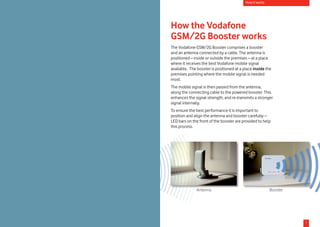
    The Vodafone GSM/2G Booster comprises a booster
    and an antenna connected by a cable. The antenna is
    positioned – inside or outside the premises – at a place
    where it receives the best Vodafone mobile signal
    available. The booster is positioned at a place inside the
    premises pointing where the mobile signal is needed
    most.
    The mobile signal is then passed from the antenna,
    along the connecting cable to the powered booster. This
    enhances the signal strength, and re-transmits a stronger
    signal internally.
    To ensure the best performance it is important to
    position and align the antenna and booster carefully –
    LED bars on the front of the booster are provided to help
    this process.


                  Antenna                                     Booster


3                                                                       1
Safety & contents                                                                                      Setting it up


Safety                                                        Setting it up
       Read the health and safety information section in      When setting up your Vodafone GSM/2G Booster
       the User Guide provided                                there are three main things to remember to get the best
       Avoid contact with liquid – keep dry                   signal boost:

       Do not try to disassemble                              •	 make sure that the antenna is located to receive the
                                                                 best Vodafone signal
       Only use approved accessories
                                                              •	 make sure that the antenna and the booster are as far
       Small parts may cause a choking hazard: keep out          apart as possible (at least 4 metres is optimal)
       of reach of small children
                                                              •	 make sure that the front of the booster is facing away
       Plastic bags present a suffocation hazard to              from the antenna.
       young children. Dispose of all packaging safely.
                                                              Choosing the best location
                                                              Before setting up the Vodafone GSM/2G Booster, you
What’s in the box                                             need to find the best location for the antenna and the
                                                              booster, which are connected together by a 6m long
•	 one antenna with 6 metre cable attached – in some          cable:
   countries a further 6 metre extension cable may be         •	 the antenna must be located where there is a
   provided                                                      Vodafone mobile signal
•	 one booster, with reversible stand/mounting bracket        •	 choose where you want the mobile coverage to be
•	 booster power supply                                          enhanced – ideally the area where you most use your
                                                                 Vodafone mobile phone, USB mobile stick or Mobile
•	 mounting bracket for the antenna                              Connect card. Place the booster facing this area.
•	 optional stand for the antenna                             •	 it’s advisable to keep any children away from the area
•	 4 screws and rawl plugs (note: the rawl plugs provided        when setting up the Vodafone GSM/2G Booster.
   are suitable for solid walls – alternatives will need to
   be found if other wall types are considered)
•	 user guide.


                                                                                                                        continued on the next page u
 2                                                                                                                                               3
Setting it up                                                                                              Setting it up


1. Position the antenna                                        2. Connect it up                              The antenna is waterproof, and
                                                                                                             may be placed outside – the
•	 place the antenna where the best mobile signal is           •	 screw together the other end of
                                                                                                             booster should never be placed
   received. You can use the signal strength indicator on         the antenna’s connection cable
                                                                                                             outside.
   a Vodafone mobile phone or Vodafone mobile connect             with the antenna connection on
   card to help you with this. An ideal site for the antenna      the booster. You only need to           •	 	plug the power supply into the
   will normally be near a window or on an outside wall.          use your fingers to screw the two           bottom of the booster, and switch
   The antenna should face away from the building.                parts together.                             on the mains power. Do not
                                                                                                              connect the device to the power
•	 see page 9 for example installations                        •	 place the booster in a ventilated
                                                                                                              supply or switch it on until the
•	 make sure that the antenna is at least 4 metres away           area that is not exposed to direct
                                                                                                              previous installation instructions
   from the booster – the further the separation, the             sunlight, near a power point.
                                                                                                              have been carried out.
   better the booster will work. Take care to avoid the           Make sure that the front (the side
                                                                  with the Vodafone logo) is facing       •	 try different angles and locations
   risk of tripping over the cable (once the booster is
                                                                  towards the area where you need            for the antenna until you get the
   positioned, the cable should be safely and securely
                                                                  a signal boost.                            strongest reception
   routed – see section 4).
                                                                  Note: if the booster can be the         •	 The left-hand signal bars on the
•	 if the antenna is to be stood on a windowsill, slot the
                                                                  other side of an internal wall             booster                show the
   mounting bracket into the supplied stand
                                                                  from the antenna, it can help              strength of the Vodafone signal
•	 to fix the antenna to a structure (eg. a wall), see            reduce any interference, and can           being received by the antenna.
   section 4 for installation. Do not permanently install         potentially allow the distance             The greater the number of bars
   the antenna until you have followed through the                between the booster and the                the better the signal.
   remaining installation instructions, and are happy with        antenna to be less than 4 metres.
   the location of both the antenna and booster.
                                                                                              Booster connections


                                                                      connection to                                               antenna connection
                                                                      power supply                                                on Booster

                                 Antenna positions
                                                                                           reversible Booster stand/
                                                                                               mounting bracket             continued on the next page u
 4                                                                                                                                                   5
Setting it up                                                                                                                     Setting it up


3. Position the booster                                                                •	 a test call from your Vodafone mobile phone can be
                                                                                          made to check the area of coverage provided by the
Point the front of the booster (the
                                                                                          booster, and to help you decide if you have chosen the
side with the Vodafone logo) towards
                                                                                          best location for the Vodafone GSM/2G Booster.
the area where you want the mobile
coverage to be enhanced.                                                               Refer to the Troubleshooting pages to fix any problems.
                                                                                       When you are happy with the location of the antenna and
•	 make sure that the front of the
                                                                                       booster, they can be permanently installed. Make sure
   booster doesn’t point toward
                                                                                       that they cannot be accidentally knocked out of position.
   the antenna, as this will interfere with the signal, and
   reduce the boost effect. You may see the booster                                    4. Fix the antenna and (if applicable) the
   signal bars flashing to warn you if this happens.                                   booster mounting plate
•	 	the right-hand signal bars on the booster show how                                 Before fixing the antenna and/or booster, it is important to
    much the mobile signal is being boosted. Adjust the                                refer to the separate Health and Safety Information sheet.
    position of the booster to maximise the number of
    bars lit up.                                                                       •	 	switch off the mains power, and disconnect the power
                                                                                           supply and the antenna connection cable from the
Now you have found the best position for the booster,                                      booster
decide how you can secure it there. The mounting
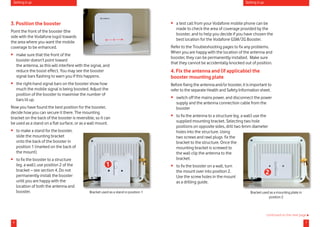
bracket on the back of the booster is reversible, so it can                            •	 to fix the antenna to a structure (eg. a wall) use the
be used as a stand on a flat surface, or as a wall mount.                                 supplied mounting bracket. Selecting two hole
                                                                                          positions on opposite sides, drill two 6mm diameter
•	 	to make a stand for the booster,                                                      holes into the structure. Using
    slide the mounting bracket                                                            two screws and rawl plugs fix the
    onto the back of the booster in                                                       bracket to the structure. Once the
    position 1 (marked on the back of                                                     mounting bracket is screwed to
    the mount).                                                                           the wall clip the antenna to the
•	 	to fix the booster to a structure                                                     bracket.
    (eg. a wall), use position 2 of the                   1                            •	 	to fix the booster on a wall, turn
    bracket – see section 4. Do not
    permanently install the booster
                                                                                           the mount over into position 2.                         2
                                                                                           Use the screw holes in the mount
    until you are happy with the                                                           as a drilling guide.
    location of both the antenna and
    booster.                                   Bracket used as a stand in position 1                                                  Bracket used as a mounting plate in
                                                                                                                                                  position 2


                                                                                                                                                   continued on the next page u
 6                                                                                                                                                                          7
Setting it up                                                                                         Example installations


•	 screw the mount to the wall with two of the screws        Example installations
   and rawl plugs provided and slide the booster down
                                                             Window installation: the antenna is facing out of the window, with the
   onto it
                                                             booster facing into the building, covering the area that’s most useful.
•	 make sure that the routing of the cable between the
   antenna and booster is safe and secure, so that it does
   not become damaged (eg. in a doorway) or pose a
   tripping hazard. Coil any excess cable and secure with
                                                                                                   Booster             Antenna
   cable ties or tape.

5. That’s it
You’re now ready to start using Vodafone mobile services.
The Vodafone GSM/2G Booster should provide good
signal coverage up to 9 metres from the device. Refer to
the User Guide for further information.
Note: When in use, the Vodafone GSM/2G Booster will get
warm to the touch – this is perfectly normal operation.
If it gets abnormally warm or you notice anything that
might suggest it is not working properly, disconnect from
the mains power and call your local Vodafone customer
services.


                                                                                                                    continued on the next page u
 8                                                                                                                                           9
Example installations                                                                                     Help


Outside installation: if the quality of signal inside the
house isn’t good enough, the antenna may need to be                                 Help
fixed to an outside wall (it’s fully waterproof).
Refer to the health                                                                 Troubleshooting
and safety information                                                              Q.	The signal bars aren’t
provided.                                                                           lighting up
                                                                                    A.	 Make sure that the power lead is securely connected
                                                                                    to the booster, and that it’s plugged in. Slowly rotate the
                                                                                    antenna from side to side to find the direction that gives
                                                                                    the maximum number of signal bars on the booster.
             Antenna                                                                Leave the antenna pointing in this direction
              Booster                                                               If that doesn’t help, then reset the booster by turning it
                                                                                    off at the mains power supply and then turning it back on
                                                                                    again.
                                                                                    Use your Vodafone mobile phone, USB mobile stick or
                                                                                    Mobile Connect card to confirm that there is the required
                                                                                    Vodafone mobile coverage at the antenna location.
                         Loft or attic installation: these sometimes prove to be    Q.	After power on, the booster signal bars are
Antenna    Booster       ideal locations for the Vodafone GSM/2G Booster.           flashing red
                         The antenna faces out through the roof, with the booster   A.	 The antenna and booster are too close, or are pointing
                                                       facing down into the         at each other.
                                                       premises, giving the best
                                                       coverage of boosted          Make sure that the antenna and booster have not been
                                                       signal through the central   accidentally knocked out of position. Make sure that they
                                                       area of the premises.        are separated as much as possible, and that the front
                                                       However, Vodafone            of the booster (the side with the Vodafone logo) isn’t
                                                       does not recommend           pointing at the antenna.
                                                       self-installation in lofts   Once the positions have been adjusted you’ll need to
                                                       or attics: a professional    reset the booster by turning it off at the mains power
                                                       installer should be          supply and then turning it back on again.
                                                       engaged for such sites to
                                                                                    Finally adjust the position and direction of the booster to
                                                       avoid any injury.
                                                                                    maximise the output bars.

                                                                                                                       continued on the next page u
10                                                                                                                                              11
Help


       Q.	The signal bars on the booster aren’t fully lit
       A.	 Make sure that the antenna cable is connected
       securely to the booster.
       The booster needs a Vodafone mobile signal to work. The
       left hand signal bars show the strength of this received
       signal. It may be that you need to use a different window
       or move upstairs for a better signal to be received by the
       antenna. The antenna should be located so that the left
       hand input lights are as fully lit as possible.

       Q.	The output bars on the booster aren’t fully lit
       A.	 The booster is designed to protect itself, and the
       Vodafone network, by reducing the signal boost if it is not
       installed correctly.
       To get the best boosted signal, make sure the booster
       does not point at the antenna, and that they are
       separated as much as possible. Carefully adjust the
       position and direction in which the booster is pointing, so
       that the right hand signal bars are as fully lit as possible.

       Help and support
       If you still have problems setting up or using your
       Vodafone GSM/2G Booster, or have any other questions,
       then please contact your local customer services.


12                                                                     13

2 g boosterinstallguide

  • 1.
    Vodafone GSM/2G Booster Installation guide To get the best GSM/2G mobile coverage possible, and to ensure your safety and the safety of others around you, it’s important that you read and follow the instructions carefully. In the event of any difficulty please contact a qualified engineer to perform the installation. Make the most of now © Vodafone Group 2009. Vodafone and the Vodafone logos are trade marks of the Vodafone Group. Any product or company names mentioned herein may be the trade marks of their respective owners. 1 2
  • 2.
    How it works How the Vodafone GSM/2G Booster works The Vodafone GSM/2G Booster comprises a booster and an antenna connected by a cable. The antenna is positioned – inside or outside the premises – at a place where it receives the best Vodafone mobile signal available. The booster is positioned at a place inside the premises pointing where the mobile signal is needed most. The mobile signal is then passed from the antenna, along the connecting cable to the powered booster. This enhances the signal strength, and re-transmits a stronger signal internally. To ensure the best performance it is important to position and align the antenna and booster carefully – LED bars on the front of the booster are provided to help this process. Antenna Booster 3 1
  • 3.
    Safety & contents Setting it up Safety Setting it up Read the health and safety information section in When setting up your Vodafone GSM/2G Booster the User Guide provided there are three main things to remember to get the best Avoid contact with liquid – keep dry signal boost: Do not try to disassemble • make sure that the antenna is located to receive the best Vodafone signal Only use approved accessories • make sure that the antenna and the booster are as far Small parts may cause a choking hazard: keep out apart as possible (at least 4 metres is optimal) of reach of small children • make sure that the front of the booster is facing away Plastic bags present a suffocation hazard to from the antenna. young children. Dispose of all packaging safely. Choosing the best location Before setting up the Vodafone GSM/2G Booster, you What’s in the box need to find the best location for the antenna and the booster, which are connected together by a 6m long • one antenna with 6 metre cable attached – in some cable: countries a further 6 metre extension cable may be • the antenna must be located where there is a provided Vodafone mobile signal • one booster, with reversible stand/mounting bracket • choose where you want the mobile coverage to be • booster power supply enhanced – ideally the area where you most use your Vodafone mobile phone, USB mobile stick or Mobile • mounting bracket for the antenna Connect card. Place the booster facing this area. • optional stand for the antenna • it’s advisable to keep any children away from the area • 4 screws and rawl plugs (note: the rawl plugs provided when setting up the Vodafone GSM/2G Booster. are suitable for solid walls – alternatives will need to be found if other wall types are considered) • user guide. continued on the next page u 2 3
  • 4.
    Setting it up Setting it up 1. Position the antenna 2. Connect it up The antenna is waterproof, and may be placed outside – the • place the antenna where the best mobile signal is • screw together the other end of booster should never be placed received. You can use the signal strength indicator on the antenna’s connection cable outside. a Vodafone mobile phone or Vodafone mobile connect with the antenna connection on card to help you with this. An ideal site for the antenna the booster. You only need to • plug the power supply into the will normally be near a window or on an outside wall. use your fingers to screw the two bottom of the booster, and switch The antenna should face away from the building. parts together. on the mains power. Do not connect the device to the power • see page 9 for example installations • place the booster in a ventilated supply or switch it on until the • make sure that the antenna is at least 4 metres away area that is not exposed to direct previous installation instructions from the booster – the further the separation, the sunlight, near a power point. have been carried out. better the booster will work. Take care to avoid the Make sure that the front (the side with the Vodafone logo) is facing • try different angles and locations risk of tripping over the cable (once the booster is towards the area where you need for the antenna until you get the positioned, the cable should be safely and securely a signal boost. strongest reception routed – see section 4). Note: if the booster can be the • The left-hand signal bars on the • if the antenna is to be stood on a windowsill, slot the other side of an internal wall booster show the mounting bracket into the supplied stand from the antenna, it can help strength of the Vodafone signal • to fix the antenna to a structure (eg. a wall), see reduce any interference, and can being received by the antenna. section 4 for installation. Do not permanently install potentially allow the distance The greater the number of bars the antenna until you have followed through the between the booster and the the better the signal. remaining installation instructions, and are happy with antenna to be less than 4 metres. the location of both the antenna and booster. Booster connections connection to antenna connection power supply on Booster Antenna positions reversible Booster stand/ mounting bracket continued on the next page u 4 5
  • 5.
    Setting it up Setting it up 3. Position the booster • a test call from your Vodafone mobile phone can be made to check the area of coverage provided by the Point the front of the booster (the booster, and to help you decide if you have chosen the side with the Vodafone logo) towards best location for the Vodafone GSM/2G Booster. the area where you want the mobile coverage to be enhanced. Refer to the Troubleshooting pages to fix any problems. When you are happy with the location of the antenna and • make sure that the front of the booster, they can be permanently installed. Make sure booster doesn’t point toward that they cannot be accidentally knocked out of position. the antenna, as this will interfere with the signal, and reduce the boost effect. You may see the booster 4. Fix the antenna and (if applicable) the signal bars flashing to warn you if this happens. booster mounting plate • the right-hand signal bars on the booster show how Before fixing the antenna and/or booster, it is important to much the mobile signal is being boosted. Adjust the refer to the separate Health and Safety Information sheet. position of the booster to maximise the number of bars lit up. • switch off the mains power, and disconnect the power supply and the antenna connection cable from the Now you have found the best position for the booster, booster decide how you can secure it there. The mounting bracket on the back of the booster is reversible, so it can • to fix the antenna to a structure (eg. a wall) use the be used as a stand on a flat surface, or as a wall mount. supplied mounting bracket. Selecting two hole positions on opposite sides, drill two 6mm diameter • to make a stand for the booster, holes into the structure. Using slide the mounting bracket two screws and rawl plugs fix the onto the back of the booster in bracket to the structure. Once the position 1 (marked on the back of mounting bracket is screwed to the mount). the wall clip the antenna to the • to fix the booster to a structure bracket. (eg. a wall), use position 2 of the 1 • to fix the booster on a wall, turn bracket – see section 4. Do not permanently install the booster the mount over into position 2. 2 Use the screw holes in the mount until you are happy with the as a drilling guide. location of both the antenna and booster. Bracket used as a stand in position 1 Bracket used as a mounting plate in position 2 continued on the next page u 6 7
  • 6.
    Setting it up Example installations • screw the mount to the wall with two of the screws Example installations and rawl plugs provided and slide the booster down Window installation: the antenna is facing out of the window, with the onto it booster facing into the building, covering the area that’s most useful. • make sure that the routing of the cable between the antenna and booster is safe and secure, so that it does not become damaged (eg. in a doorway) or pose a tripping hazard. Coil any excess cable and secure with Booster Antenna cable ties or tape. 5. That’s it You’re now ready to start using Vodafone mobile services. The Vodafone GSM/2G Booster should provide good signal coverage up to 9 metres from the device. Refer to the User Guide for further information. Note: When in use, the Vodafone GSM/2G Booster will get warm to the touch – this is perfectly normal operation. If it gets abnormally warm or you notice anything that might suggest it is not working properly, disconnect from the mains power and call your local Vodafone customer services. continued on the next page u 8 9
  • 7.
    Example installations Help Outside installation: if the quality of signal inside the house isn’t good enough, the antenna may need to be Help fixed to an outside wall (it’s fully waterproof). Refer to the health Troubleshooting and safety information Q. The signal bars aren’t provided. lighting up A. Make sure that the power lead is securely connected to the booster, and that it’s plugged in. Slowly rotate the antenna from side to side to find the direction that gives the maximum number of signal bars on the booster. Antenna Leave the antenna pointing in this direction Booster If that doesn’t help, then reset the booster by turning it off at the mains power supply and then turning it back on again. Use your Vodafone mobile phone, USB mobile stick or Mobile Connect card to confirm that there is the required Vodafone mobile coverage at the antenna location. Loft or attic installation: these sometimes prove to be Q. After power on, the booster signal bars are Antenna Booster ideal locations for the Vodafone GSM/2G Booster. flashing red The antenna faces out through the roof, with the booster A. The antenna and booster are too close, or are pointing facing down into the at each other. premises, giving the best coverage of boosted Make sure that the antenna and booster have not been signal through the central accidentally knocked out of position. Make sure that they area of the premises. are separated as much as possible, and that the front However, Vodafone of the booster (the side with the Vodafone logo) isn’t does not recommend pointing at the antenna. self-installation in lofts Once the positions have been adjusted you’ll need to or attics: a professional reset the booster by turning it off at the mains power installer should be supply and then turning it back on again. engaged for such sites to Finally adjust the position and direction of the booster to avoid any injury. maximise the output bars. continued on the next page u 10 11
  • 8.
    Help Q. The signal bars on the booster aren’t fully lit A. Make sure that the antenna cable is connected securely to the booster. The booster needs a Vodafone mobile signal to work. The left hand signal bars show the strength of this received signal. It may be that you need to use a different window or move upstairs for a better signal to be received by the antenna. The antenna should be located so that the left hand input lights are as fully lit as possible. Q. The output bars on the booster aren’t fully lit A. The booster is designed to protect itself, and the Vodafone network, by reducing the signal boost if it is not installed correctly. To get the best boosted signal, make sure the booster does not point at the antenna, and that they are separated as much as possible. Carefully adjust the position and direction in which the booster is pointing, so that the right hand signal bars are as fully lit as possible. Help and support If you still have problems setting up or using your Vodafone GSM/2G Booster, or have any other questions, then please contact your local customer services. 12 13