Functions
1
CHAPTER -
2
Functions in Python
Function is a collection of statements which is
made to perform a specific task.
To Execute function we have to call it in the
program.
Instead of writing a large program we can write
small functions as a specific part of program to
accomplish the task.
Once written a function can also be used in other
programs as library functions.
Functions can be categorized in three types-
Built-in
1.
Modules
2.
User Defined
3.
2
Built-in Functions
These are the functions which are
predefined in python we have to just call them
to use.
Functions make any programming
language efficient and provide a structure to
language.
Python has many built-in functions which
makes programming easy, fast and efficient.
They always reside in standard library and we
need not to import any module to use them.
We will study about some built-in
function in next slide. 3
Built-in Functions. .
.
Type Conversion Functions: These are the functions
which converts the values from one type to another-
1.
int( ) – To convert the string into integer.
1.
str( ) – To covert any value into string.
2.
float( ) – To covert string into float.
3.
Input Functions: This function is used to take input from user
in the form of string.
2.
e.g. name=input(“Enter your name : “)
3. eval function: This function is used to evaluate the value of
a string.
e.g. x=eval(“45+10“)
print(x) # answer will be 55
4
Built-in Functions. .
.
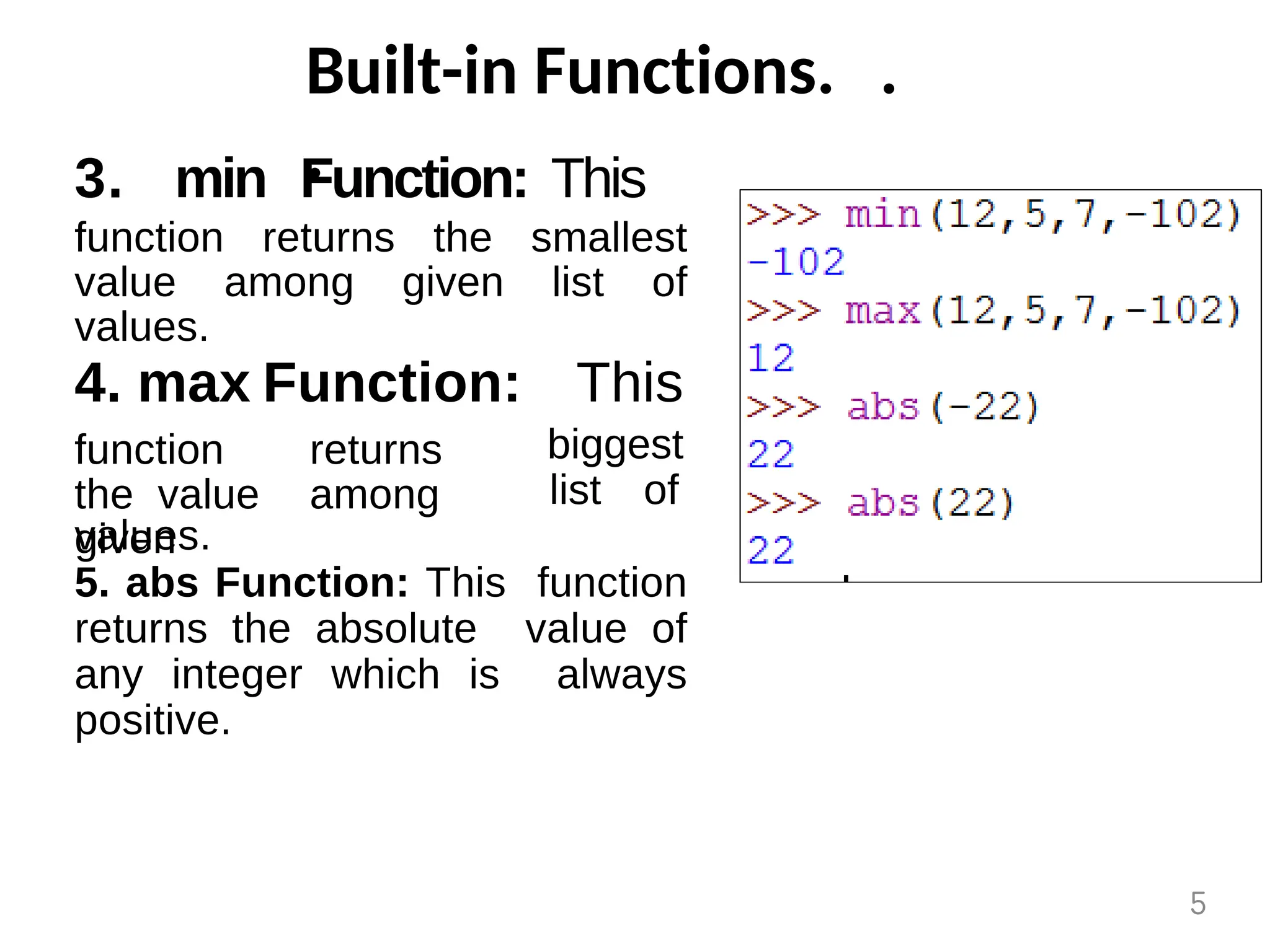
3. min Function: This
function returns the smallest
value among given list of
values.
4. max Function: This
biggest
function returns
the value among
given
list of
values.
5. abs Function: This function
returns the absolute value of
any integer which is always
positive.
5
Built-in Functions. .
.
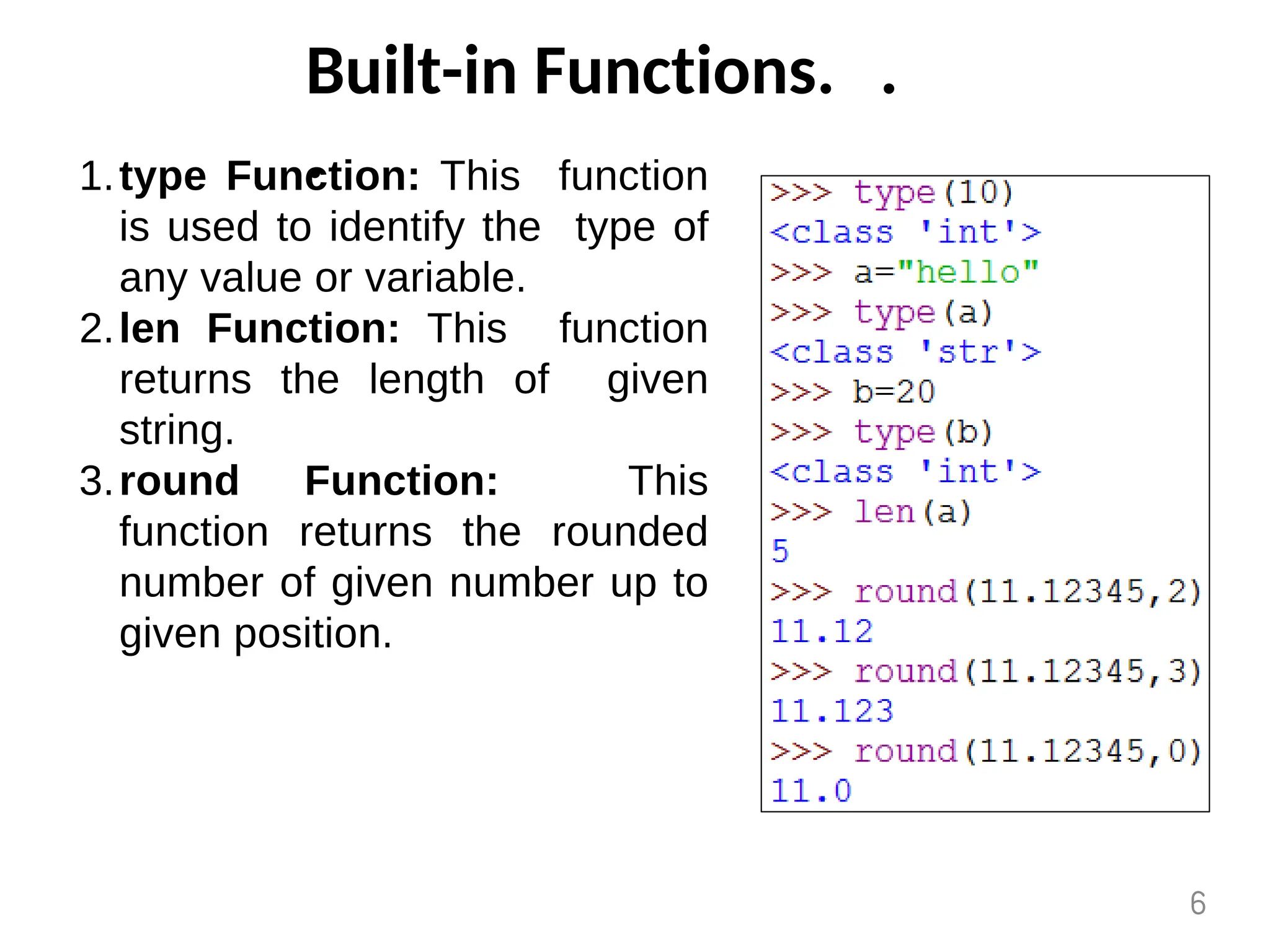
type Function: This function
is used to identify the type of
any value or variable.
1.
len Function: This function
returns the length of given
string.
2.
round Function: This
function returns the rounded
number of given number up to
given position.
3.
6
Built-in Functions. .
.
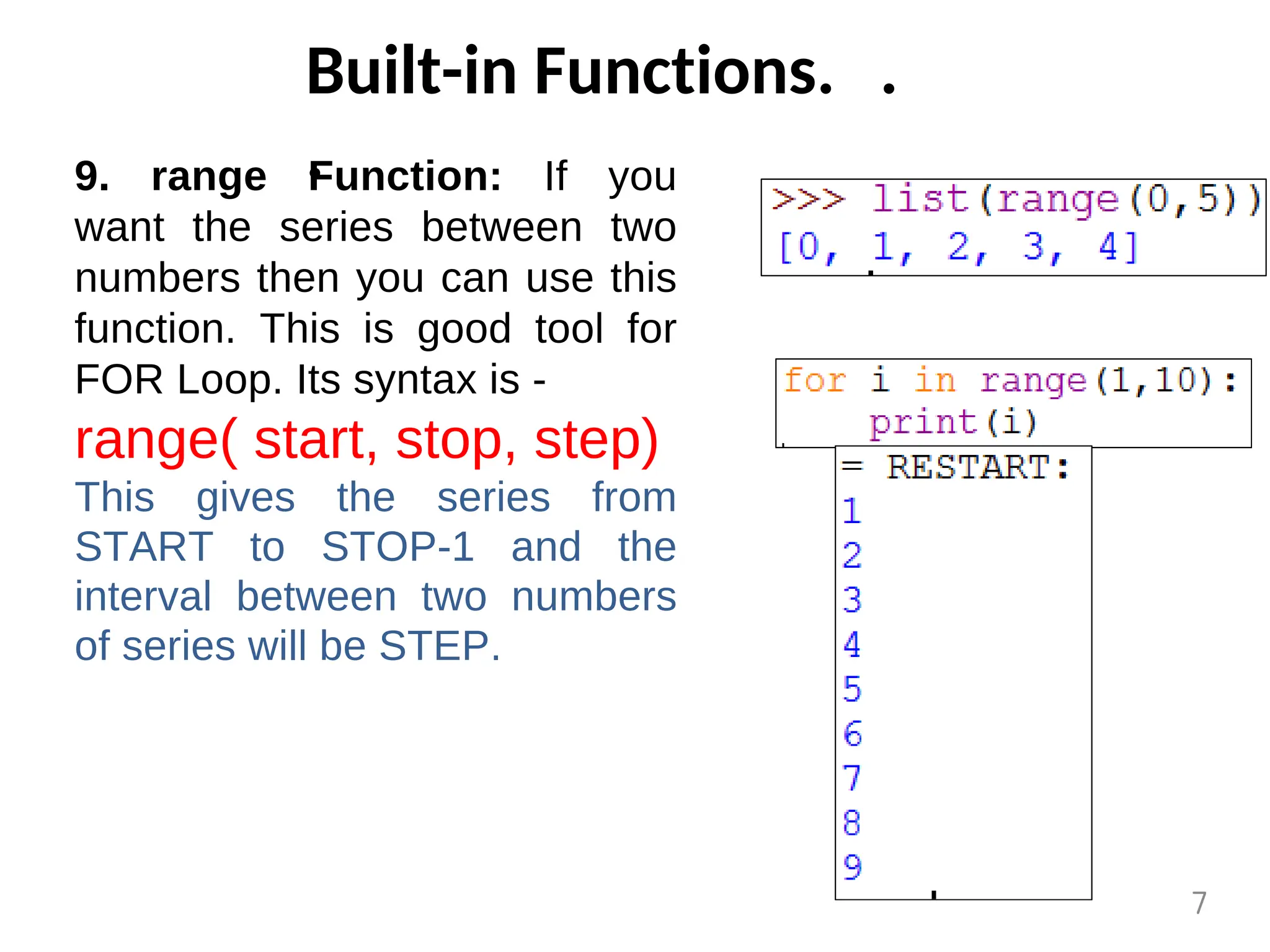
9. range Function: If you
want the series between two
numbers then you can use this
function. This is good tool for
FOR Loop. Its syntax is -
range( start, stop, step)
This gives the series from
START to STOP-1 and the
interval between two numbers
of series will be STEP.
7
Python Modules
Module is a .py file which contains the
definitions of functions and variables.
Module is a simple python file.
When we divide a program into modules then
each module contains functions and variables.
And each functions is made for a special task.
Once written code in modules can be used in
other programs.
When we make such functions which may be
used in other programs also then we write
them in module.
We can import those module in any program
an we can use the functions.
8
Python Modules. . .
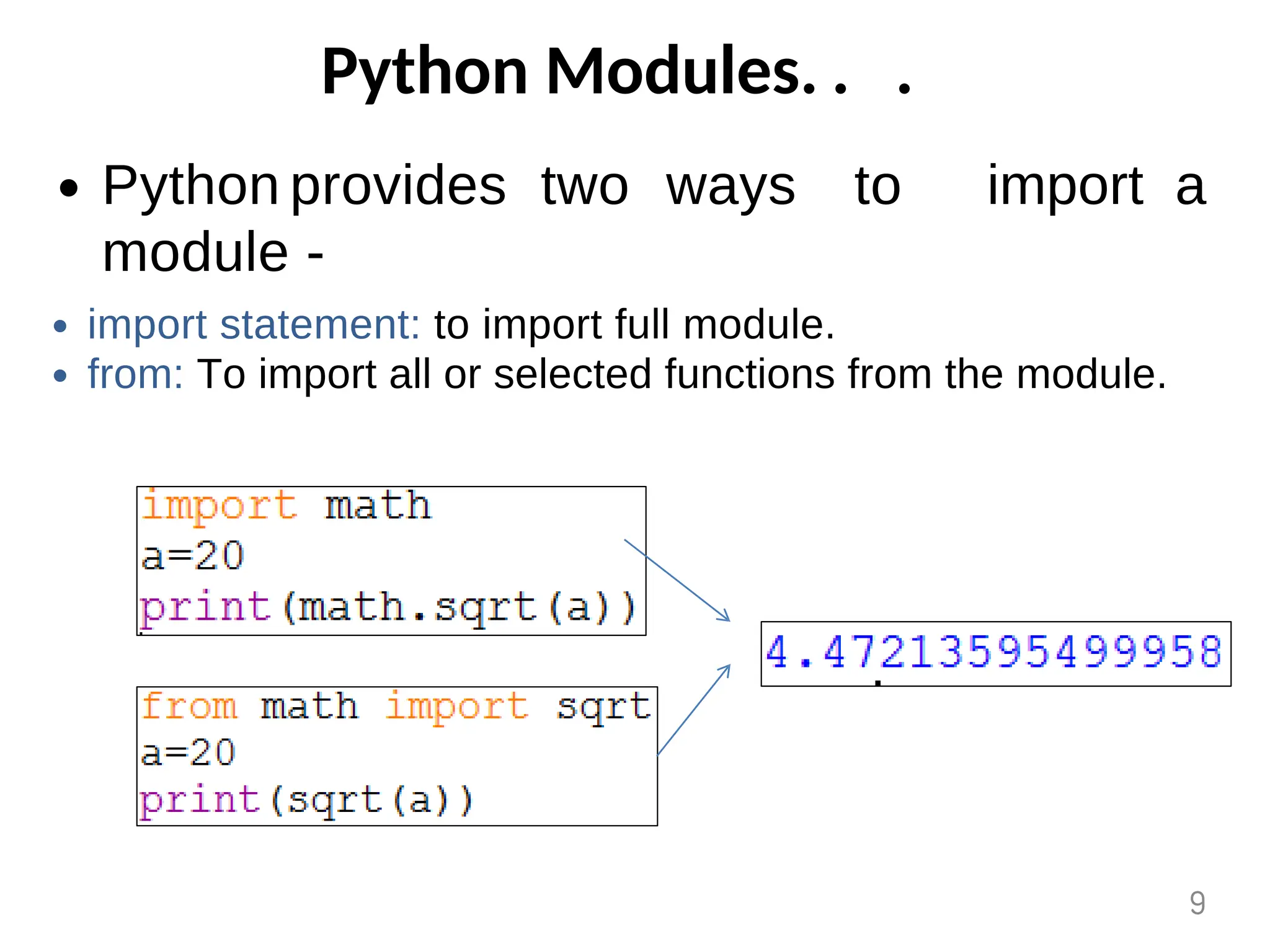
Python provides two ways to
module -
import a
import statement: to import full module.
from: To import all or selected functions from the module.
9
Python Modules. . .
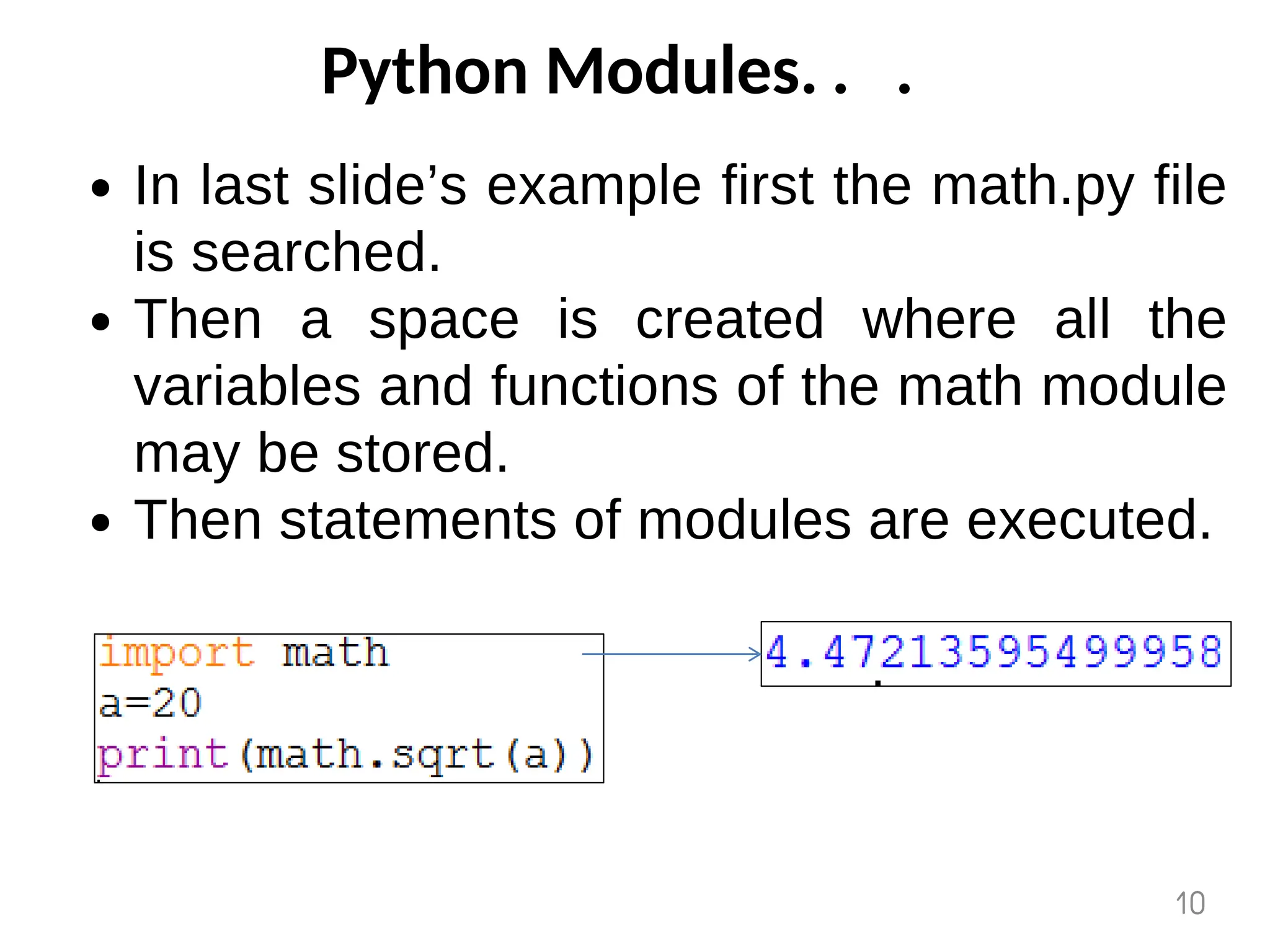
In last slide’s example first the math.py file
is searched.
Then a space is created where all the
variables and functions of the math module
may be stored.
Then statements of modules are executed.
10
Math Module
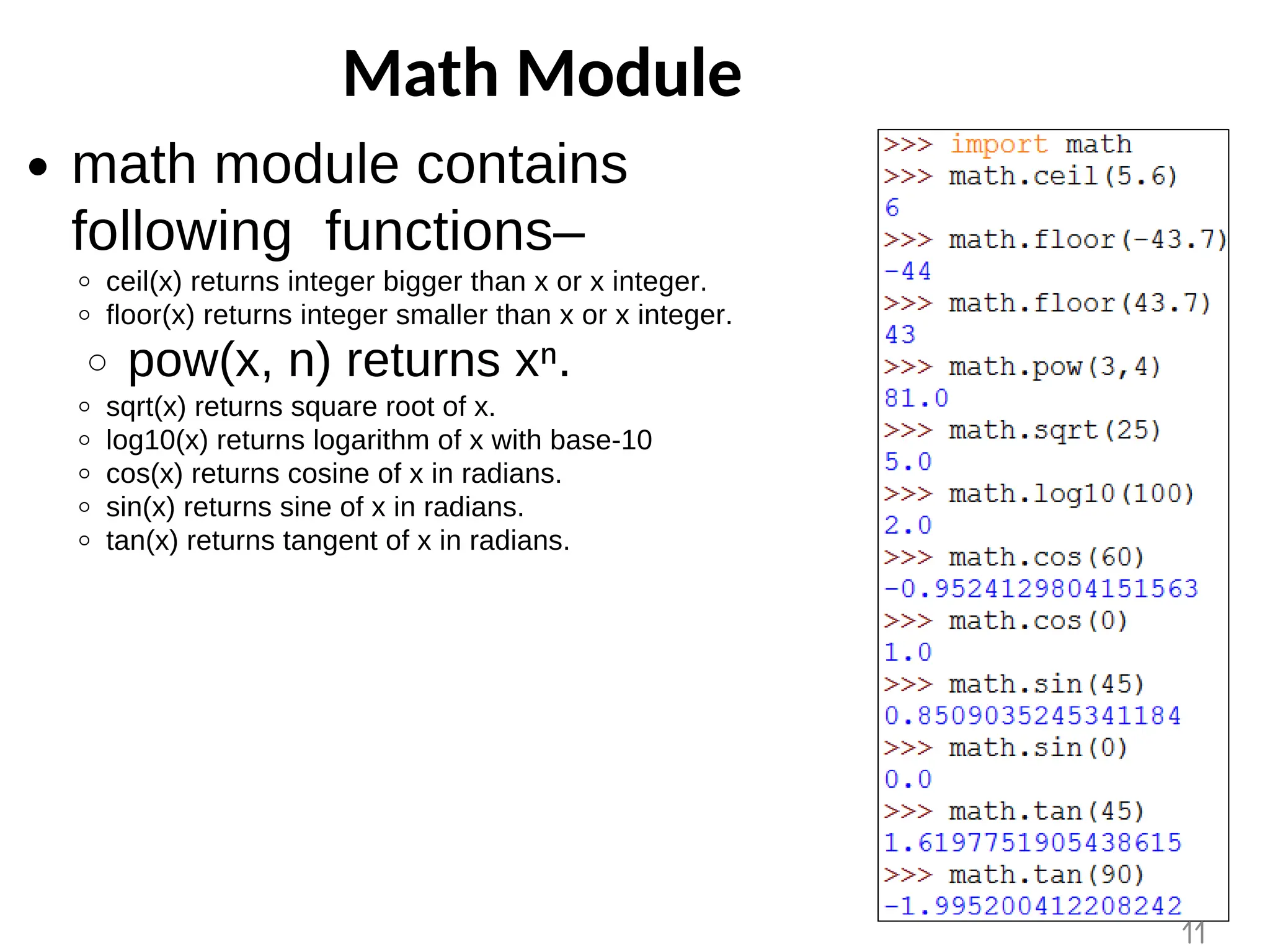
math module contains
following functions–
ceil(x) returns integer bigger than x or x integer.
floor(x) returns integer smaller than x or x integer.
pow(x, n) returns xⁿ.
sqrt(x) returns square root of x.
log10(x) returns logarithm of x with base-10
cos(x) returns cosine of x in radians.
sin(x) returns sine of x in radians.
tan(x) returns tangent of x in radians.
11
Help Function
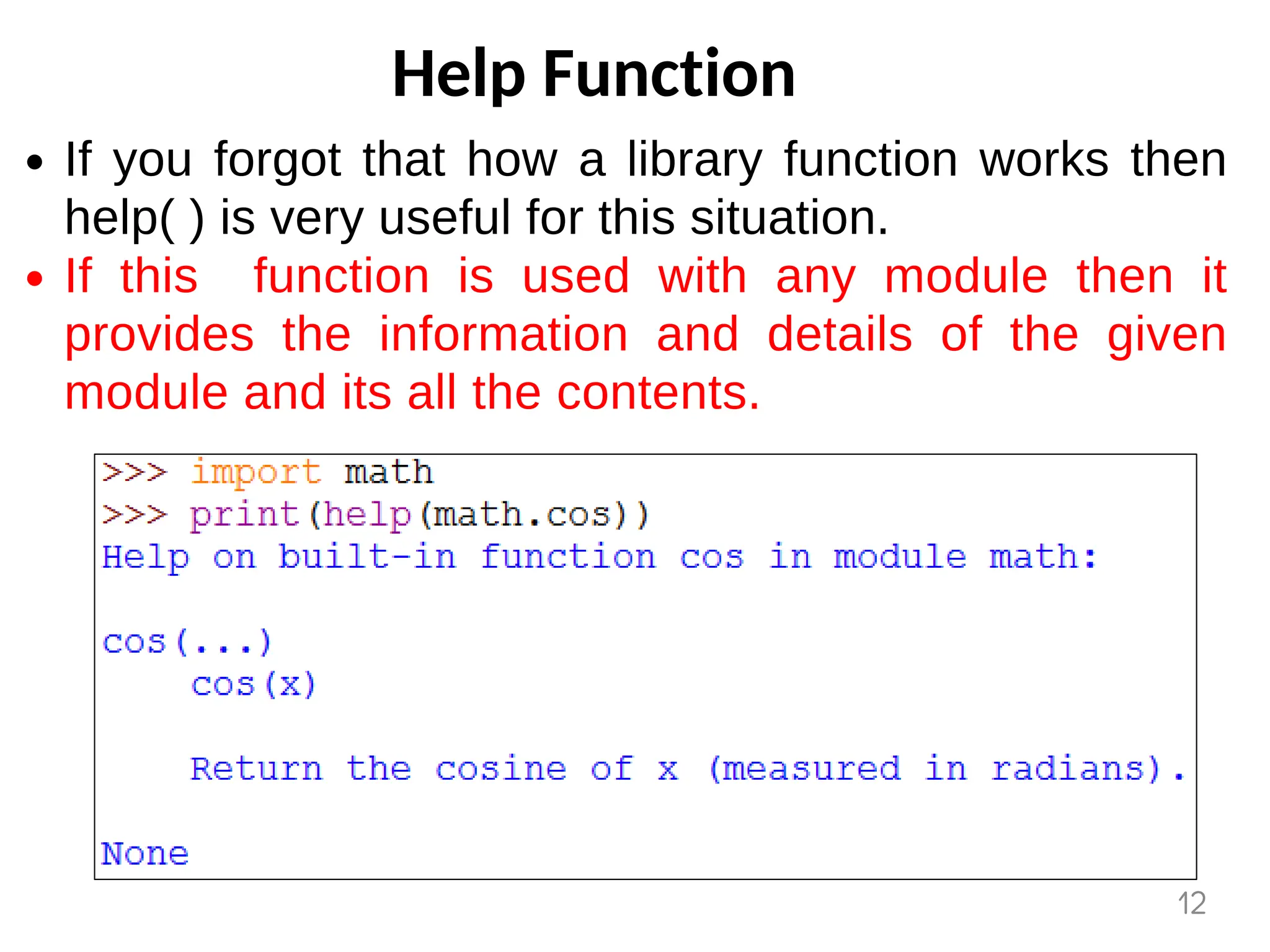
If you forgot that how a library function works then
help( ) is very useful for this situation.
If this function is used with any module then it
provides the information and details of the given
module and its all the contents.
12
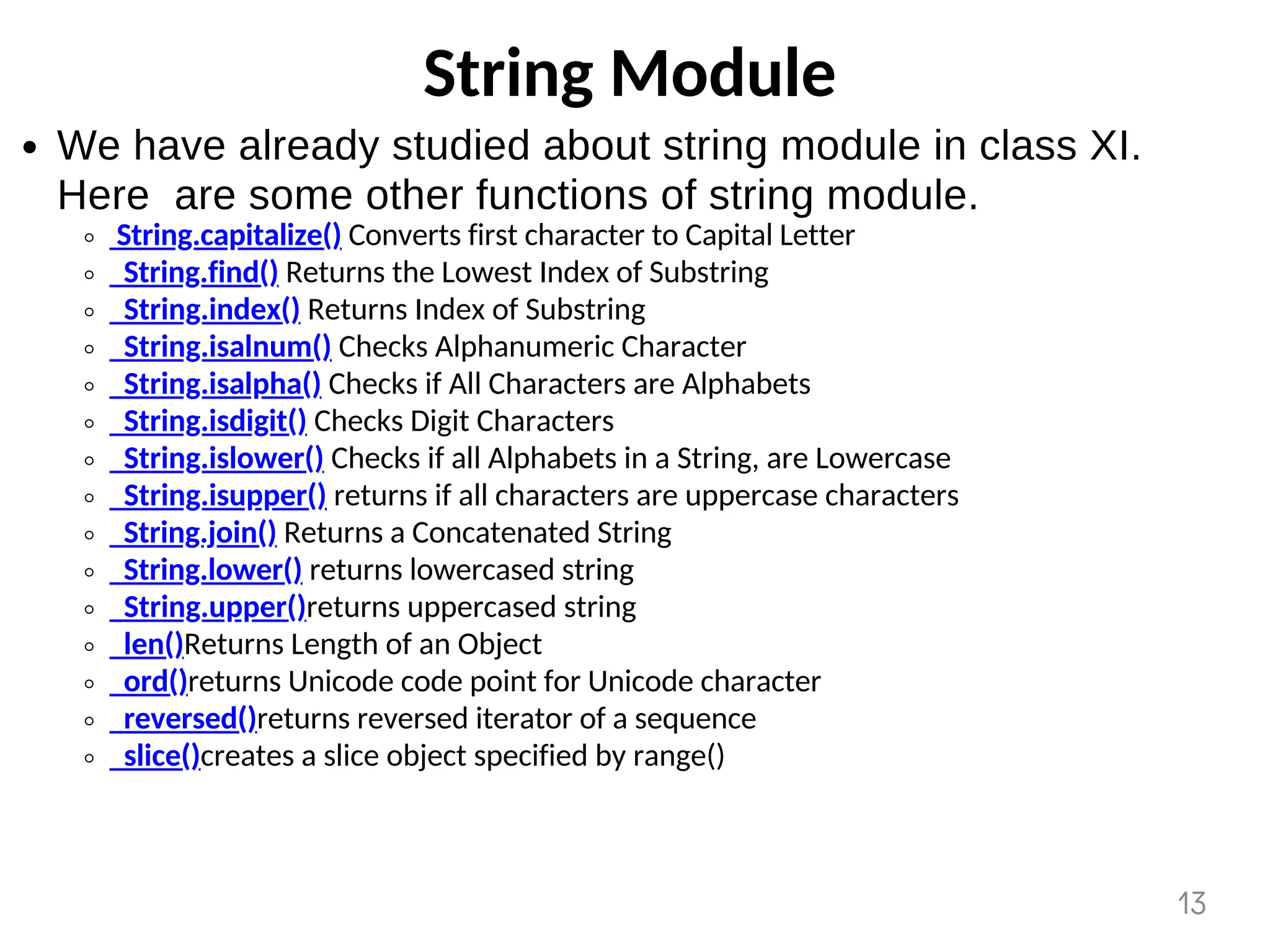
String Module
We have already studied about string module in class XI.
Here are some other functions of string module.
String.capitalize() Converts first character to Capital Letter
String.find() Returns the Lowest Index of Substring
String.index() Returns Index of Substring
String.isalnum() Checks Alphanumeric Character
String.isalpha() Checks if All Characters are Alphabets
String.isdigit() Checks Digit Characters
String.islower() Checks if all Alphabets in a String, are Lowercase
String.isupper() returns if all characters are uppercase characters
String.join() Returns a Concatenated String
String.lower() returns lowercased string
String.upper()returns uppercased string
len()Returns Length of an Object
ord()returns Unicode code point for Unicode character
reversed()returns reversed iterator of a sequence
slice()creates a slice object specified by range()
13
Random Module
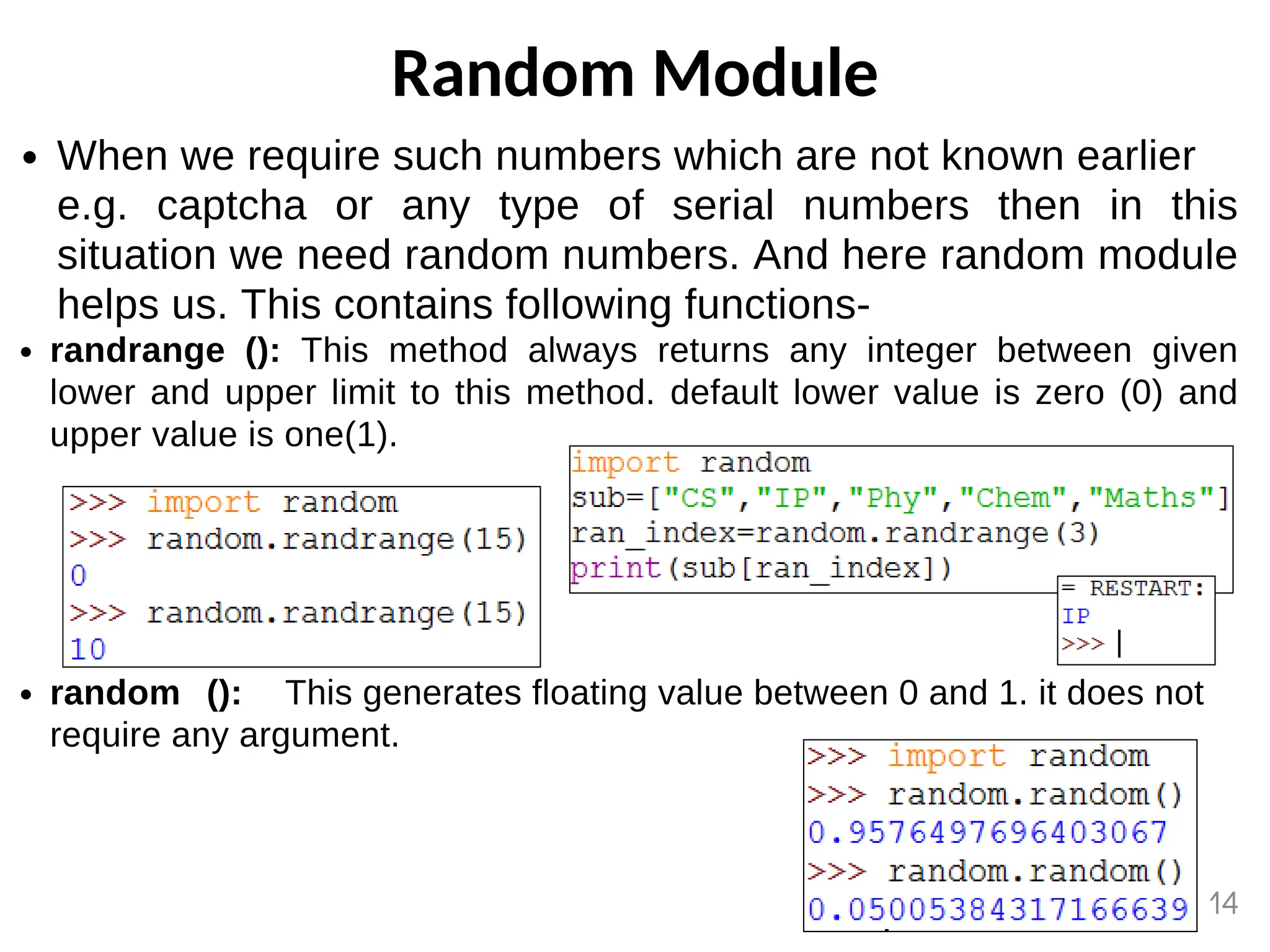
When we require such numbers which are not known earlier
e.g. captcha or any type of serial numbers then in this
situation we need random numbers. And here random module
helps us. This contains following functions-
randrange (): This method always returns any integer between given
lower and upper limit to this method. default lower value is zero (0) and
upper value is one(1).
random (): This generates floating value between 0 and 1. it does not
require any argument.
14
Random Module. . .
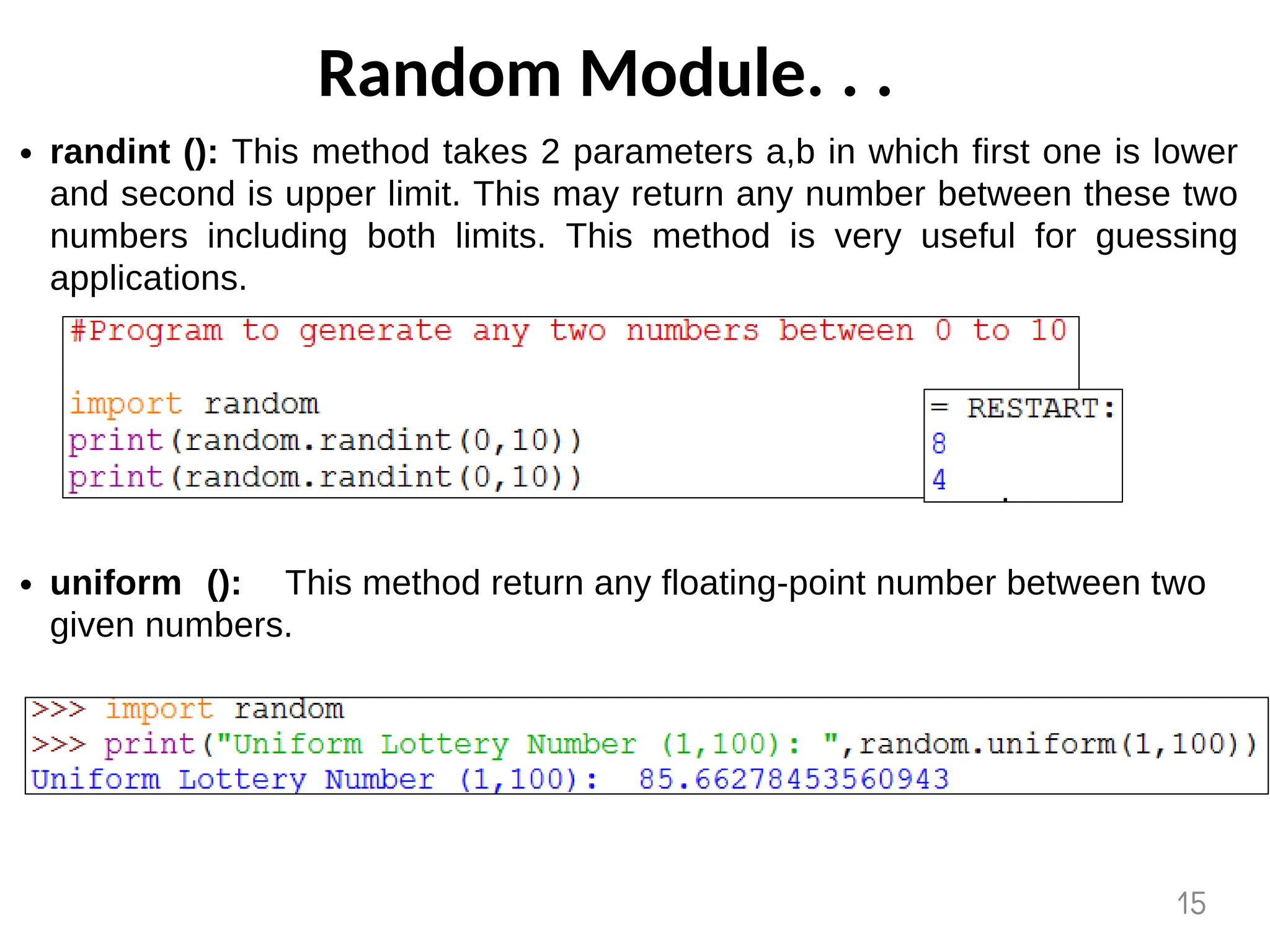
randint (): This method takes 2 parameters a,b in which first one is lower
and second is upper limit. This may return any number between these two
numbers including both limits. This method is very useful for guessing
applications.
uniform (): This method return any floating-point number between two
given numbers.
15
Random Module. . .
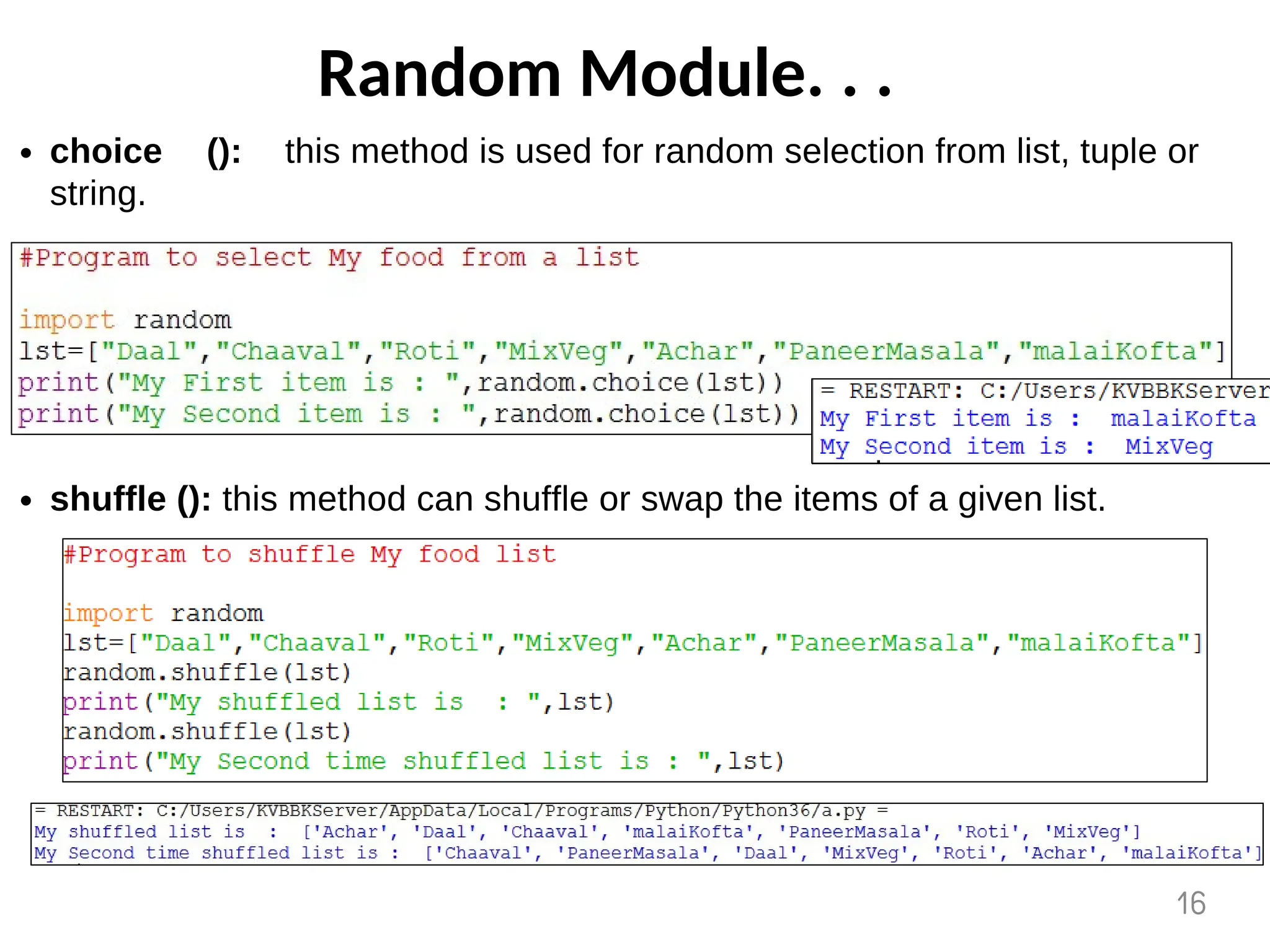
choice (): this method is used for random selection from list, tuple or
string.
shuffle (): this method can shuffle or swap the items of a given list.
16
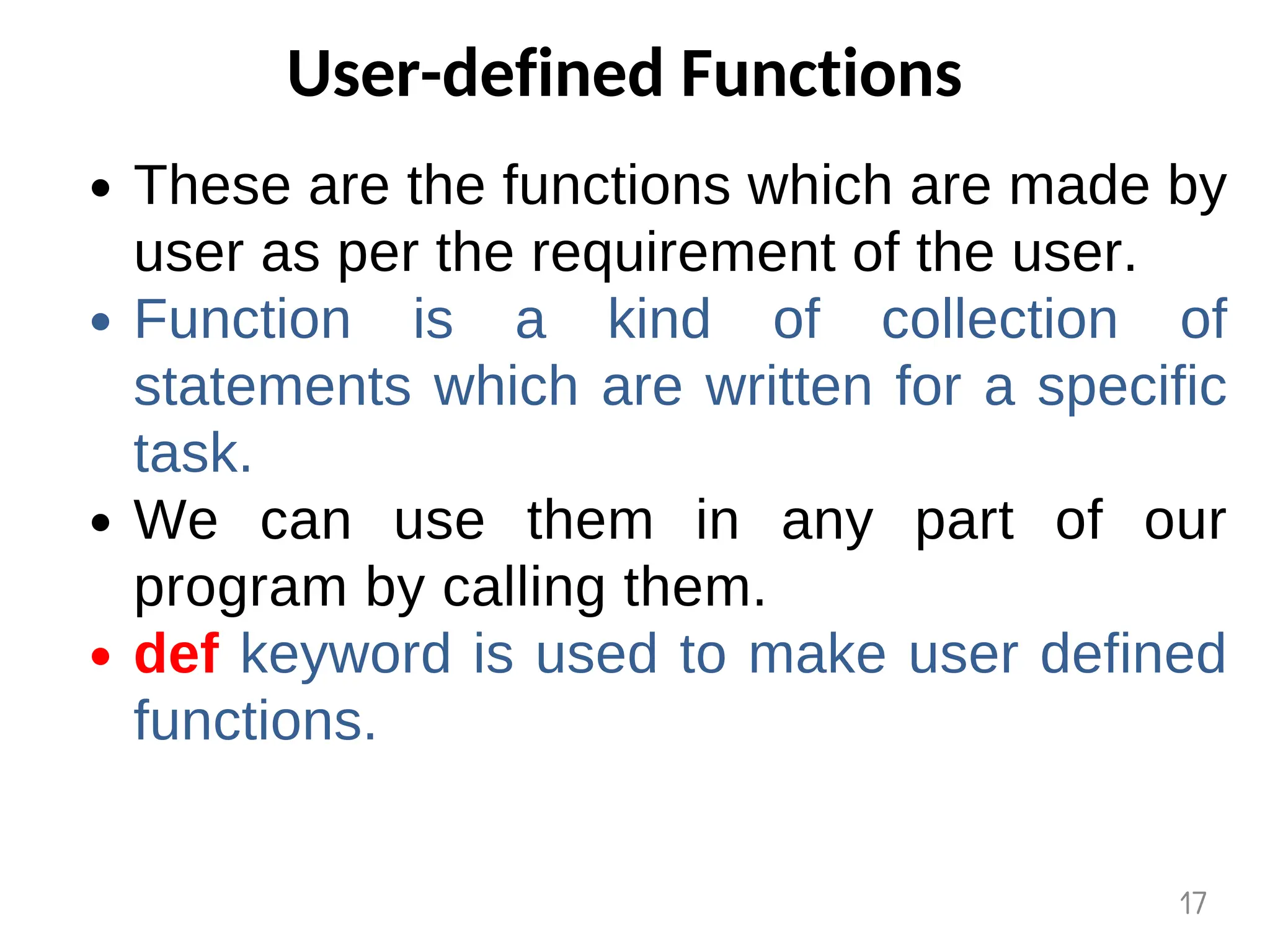
User-defined Functions
These are the functions which are made by
user as per the requirement of the user.
Function is a kind of collection of
statements which are written for a specific
task.
We can use them in any part of our
program by calling them.
def keyword is used to make user defined
functions.
17
User-defined Functions…
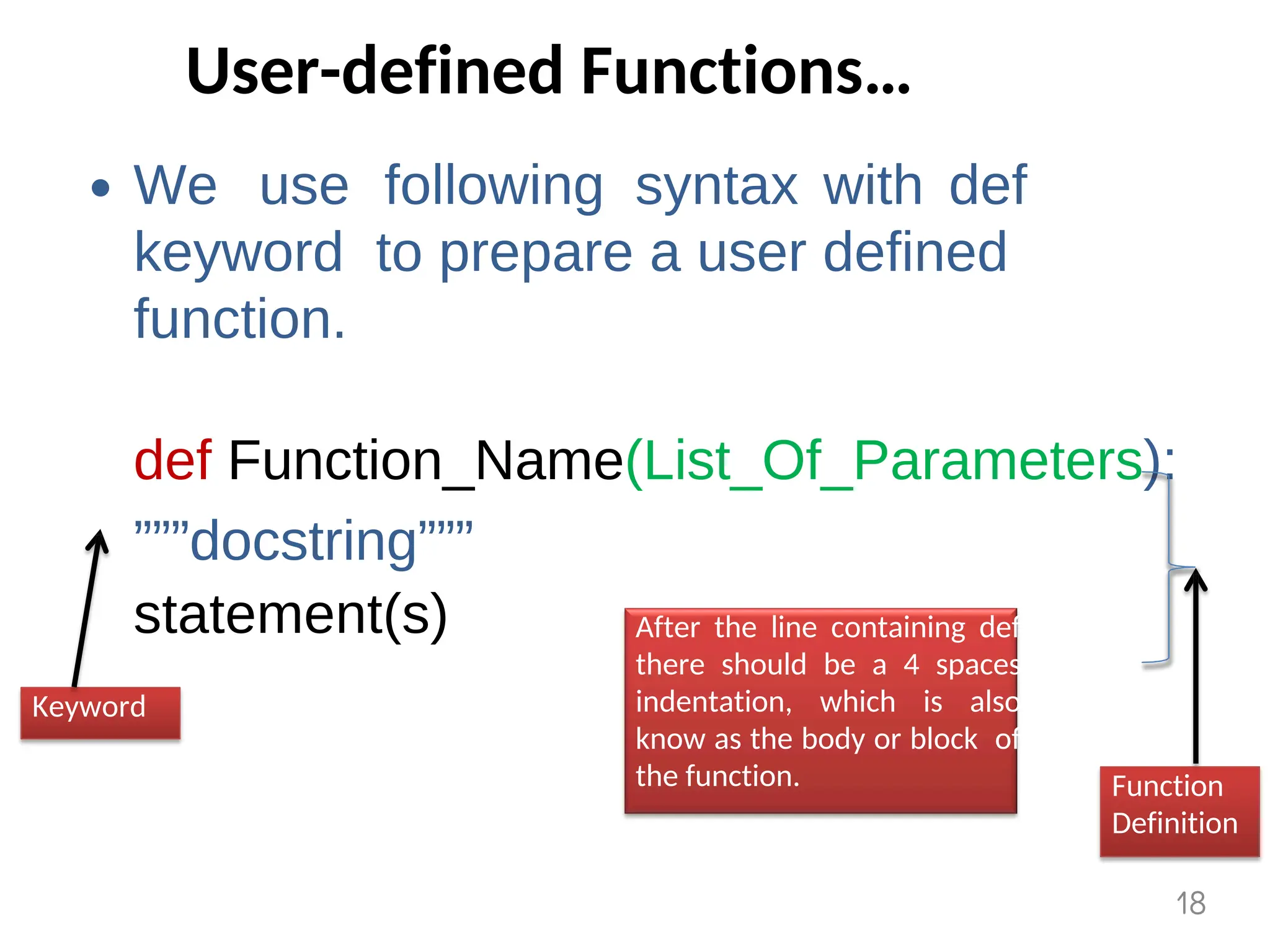
We use following syntax with def
keyword to prepare a user defined
function.
def Function_Name(List_Of_Parameters):
”””docstring”””
statement(s)
Keyword
Function
Definition
After the line containing def
there should be a 4 spaces
indentation, which is also
know as the body or block of
the function.
18
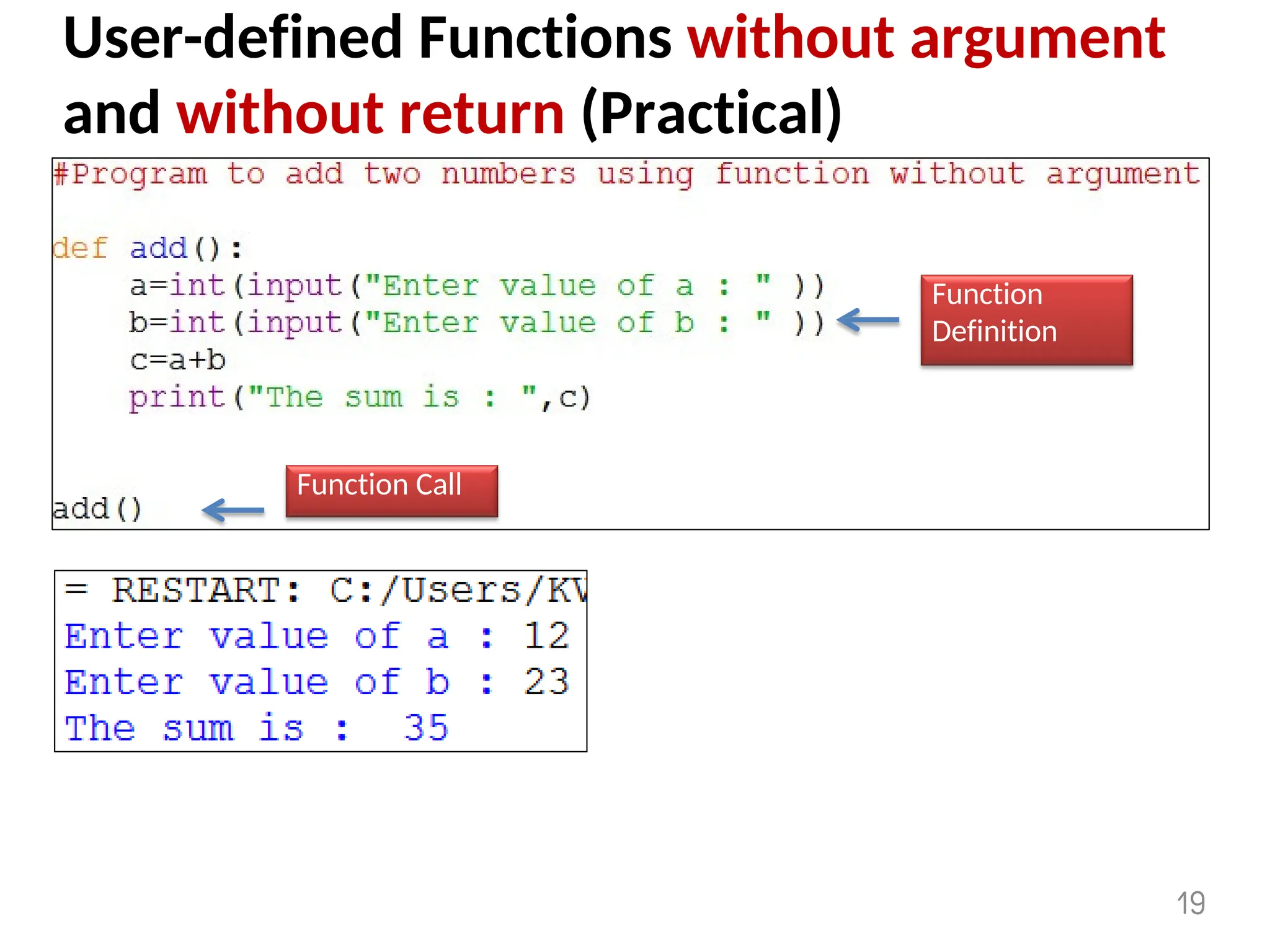
User-defined Functions without argument
and without return (Practical)
Function
Definition
Function Call
19
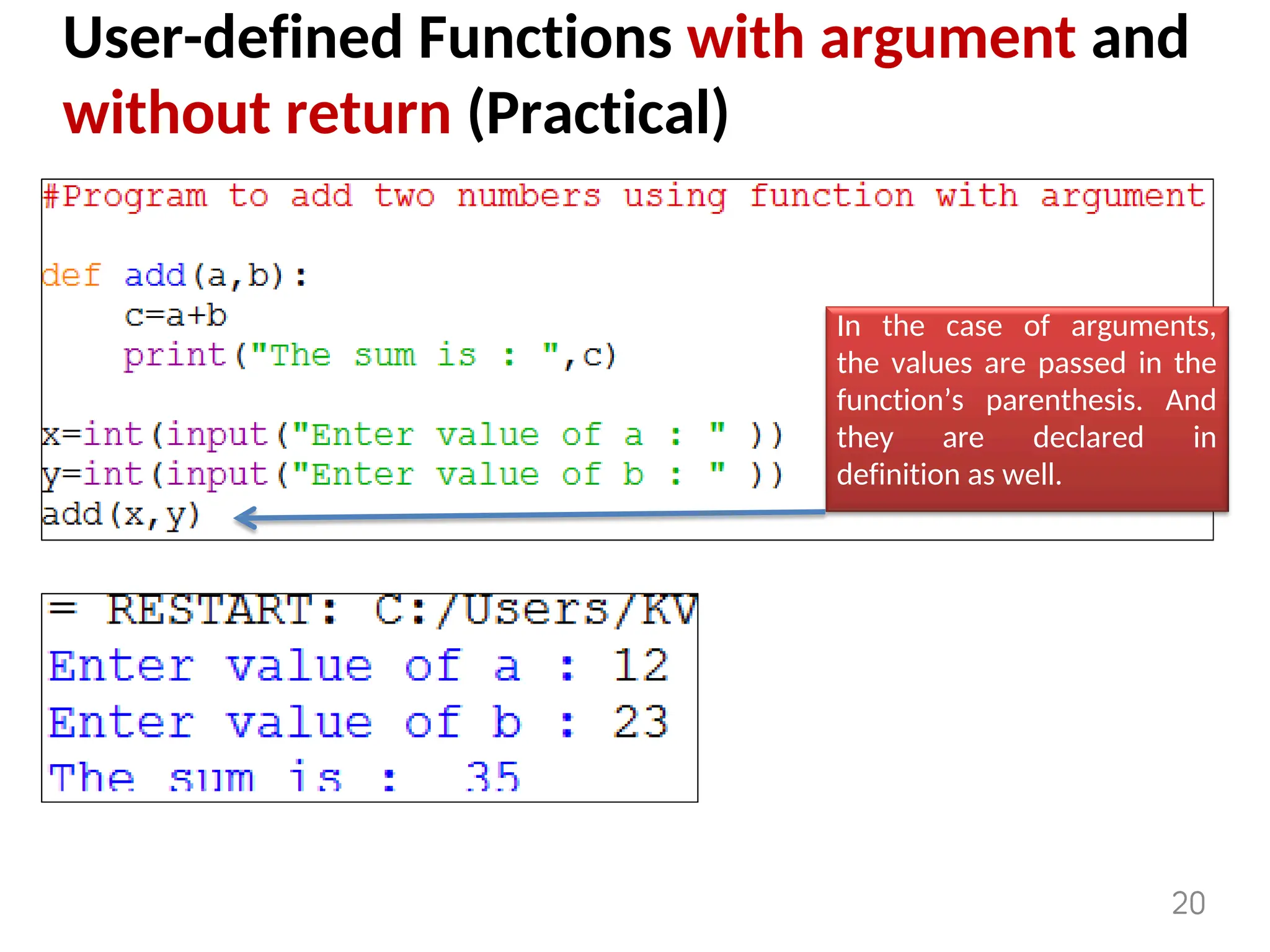
User-defined Functions with argument and
without return (Practical)
In the case of arguments,
the values are passed in the
function’s parenthesis. And
they are declared in
definition as well.
20
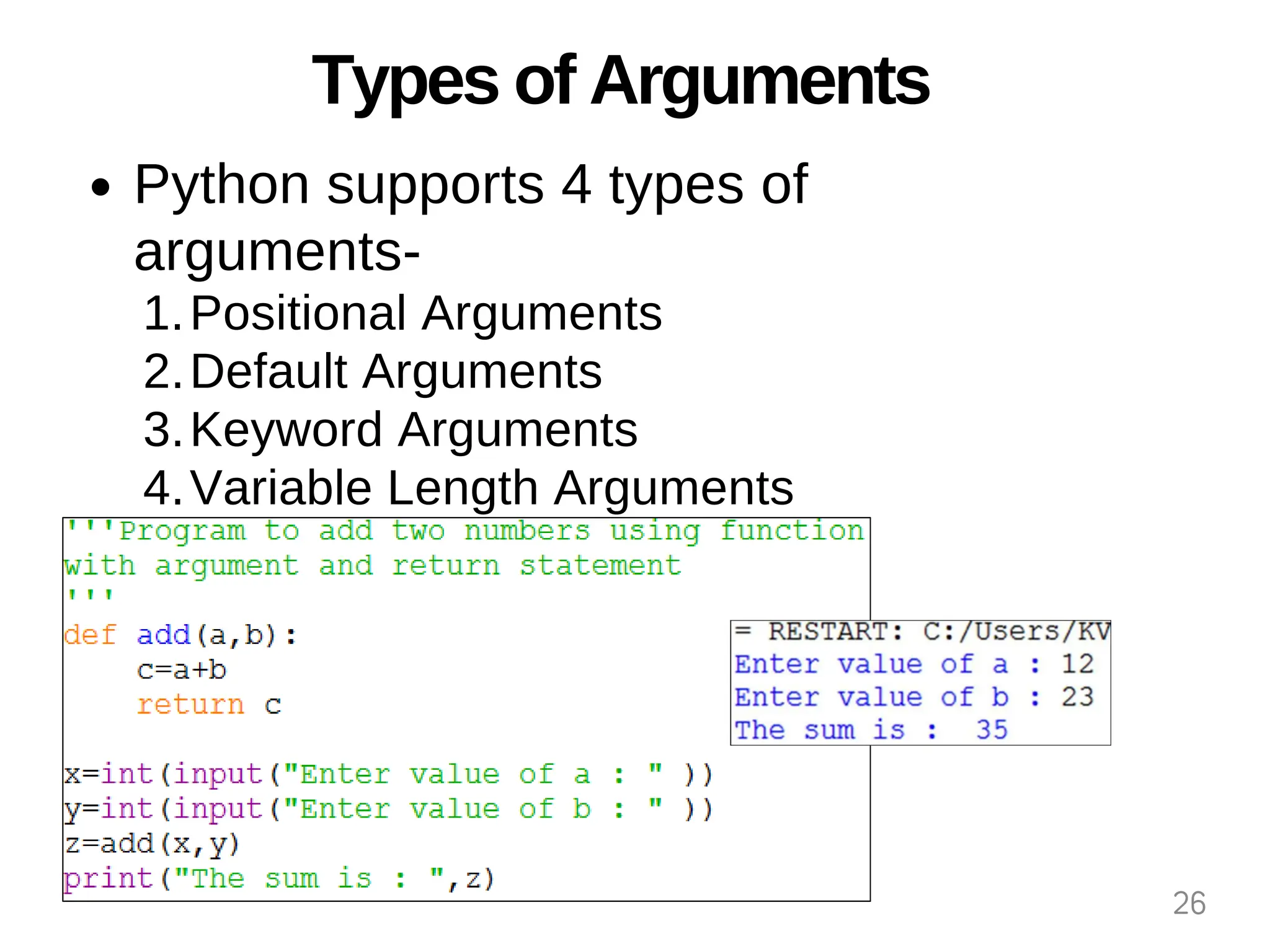
User-defined Functions with argument and
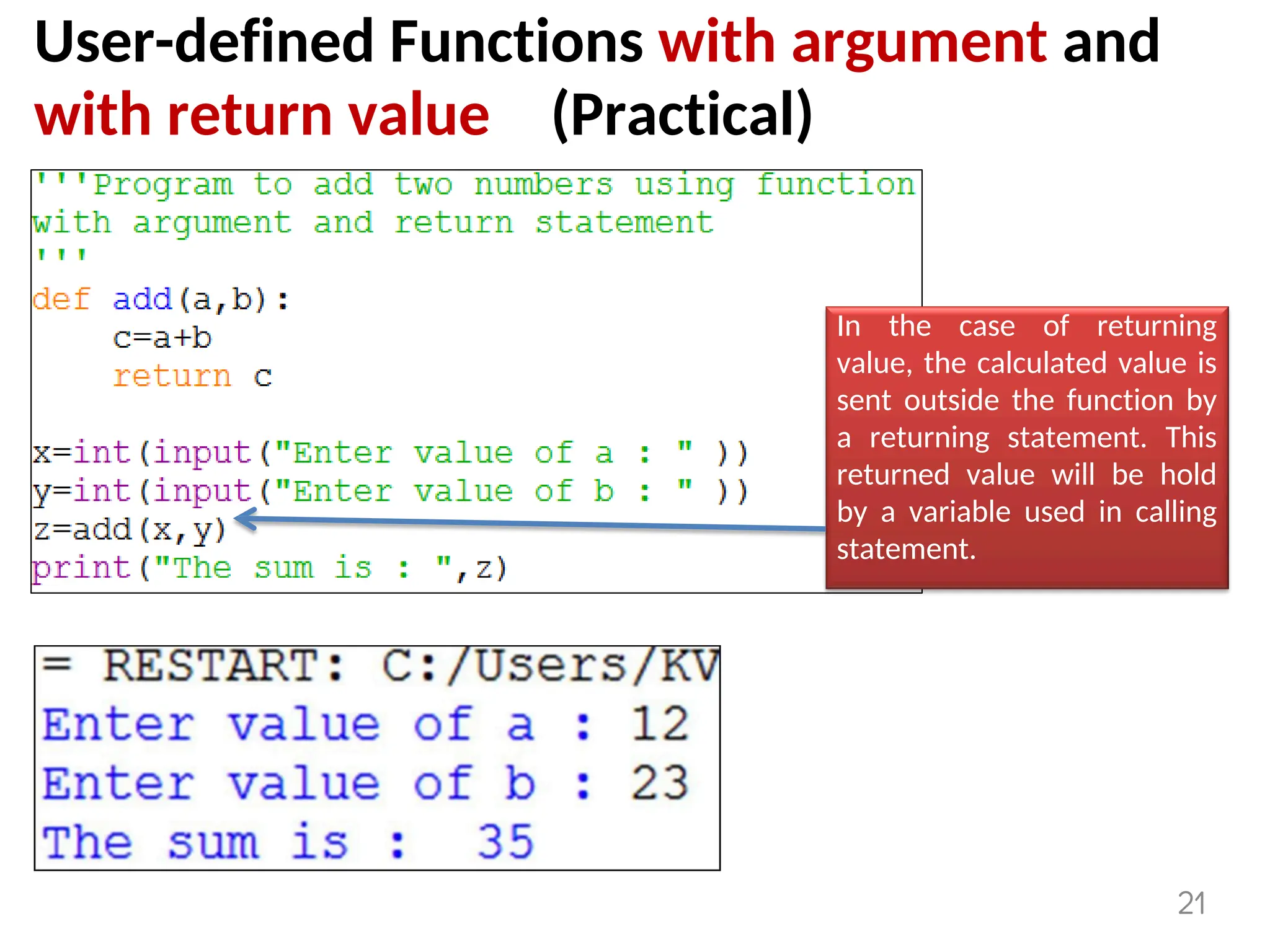
with return value (Practical)
In the case of returning
value, the calculated value is
sent outside the function by
a returning statement. This
returned value will be hold
by a variable used in calling
statement.
21
User-defined Functions with multiple return
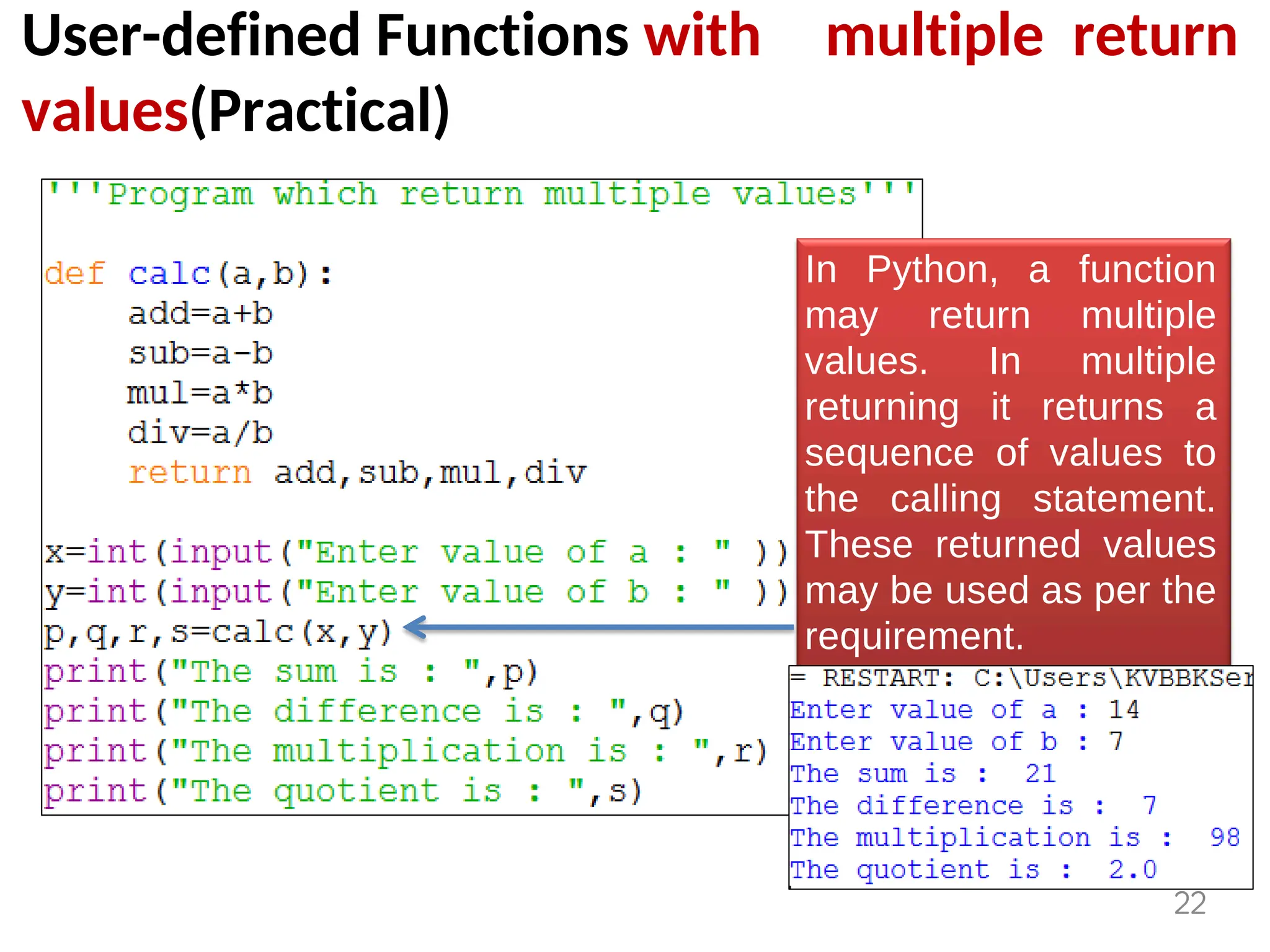
values(Practical)
In Python, a function
may return multiple
values. In multiple
returning it returns a
sequence of values to
the calling statement.
These returned values
may be used as per the
requirement.
22
User-defined Functions with multiple return
values(Practical)
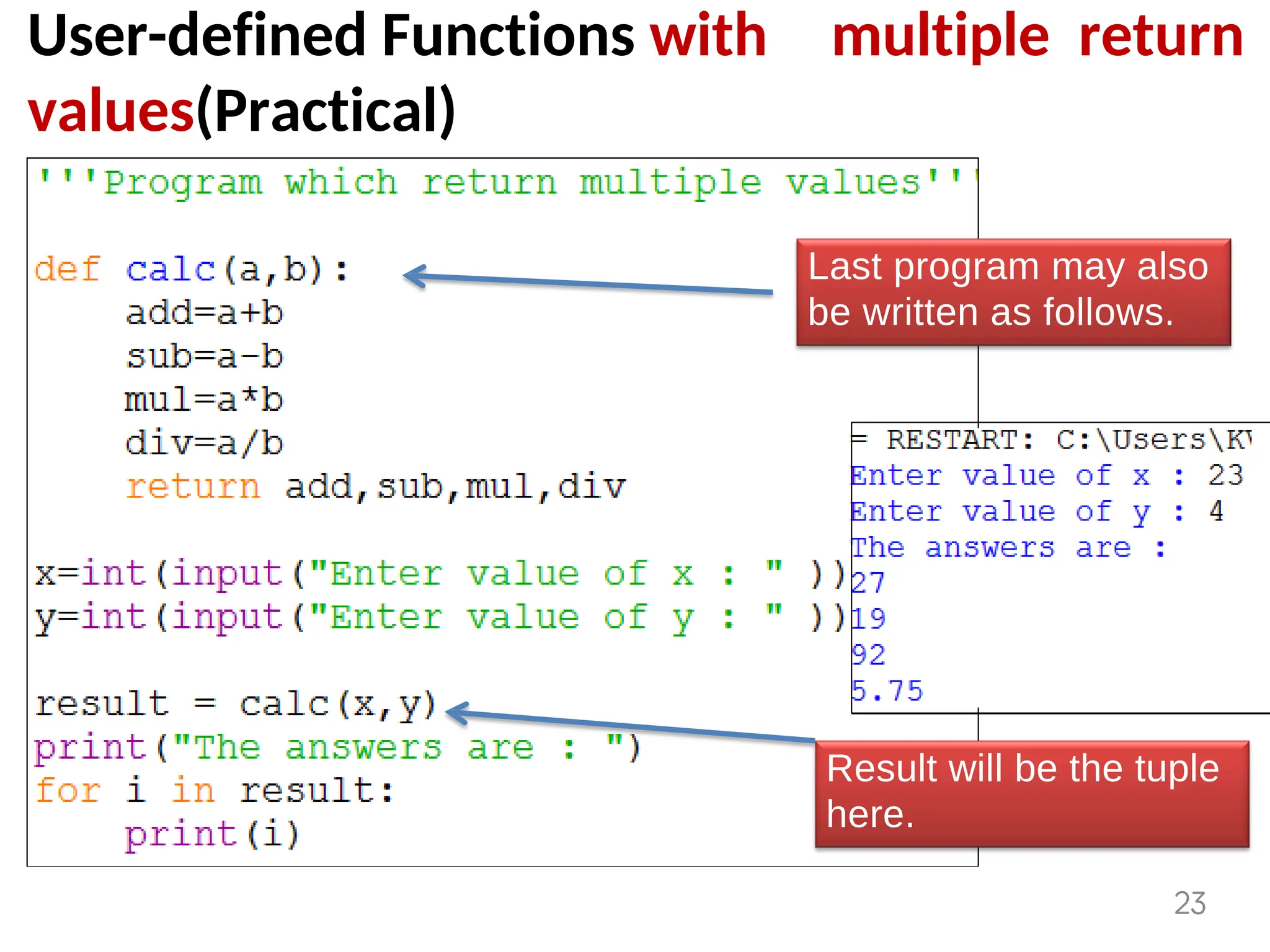
Last program may also
be written as follows.
Result will be the tuple
here.
23
Parameters and Arguments in Functions
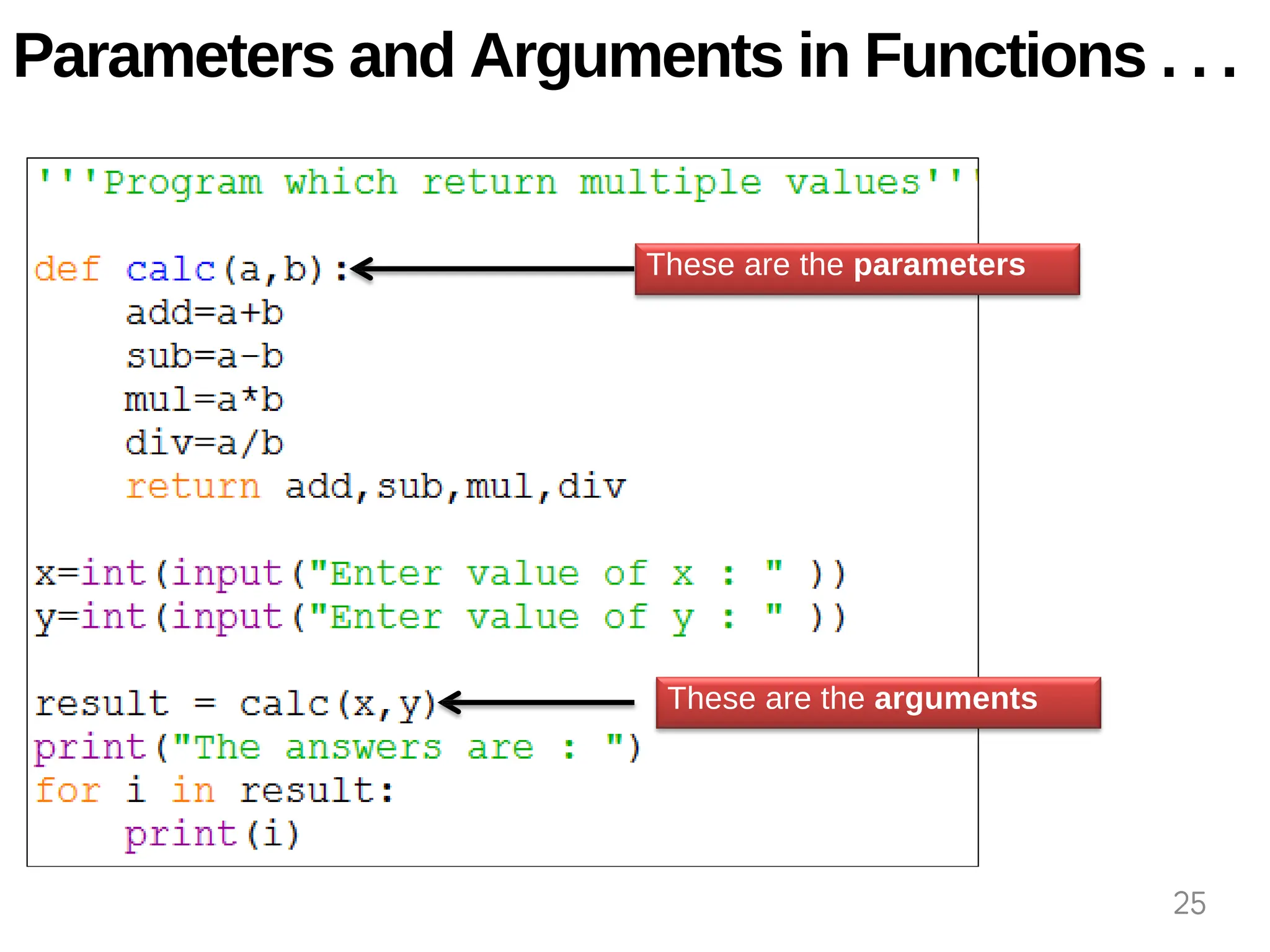
When we write header of any function then
the
one or more values given to its parenthesis ( )
are known as parameter.
These are the values which are used by the
function for any specific task.
While argument is the value passed at the
time of calling a function.
In other words the arguments are used to
invoke a function.
Formal parameters are said to be parameters
and actual parameters are said to be
arguments.
24
These are the parameters
.
These are the arguments
.
Parameters and Arguments in Functions . . .
25
Types of Arguments
Python supports 4 types of
arguments-
Positional Arguments
1.
Default Arguments
2.
Keyword Arguments
3.
Variable Length Arguments
4.
26
1. Positional Arguments
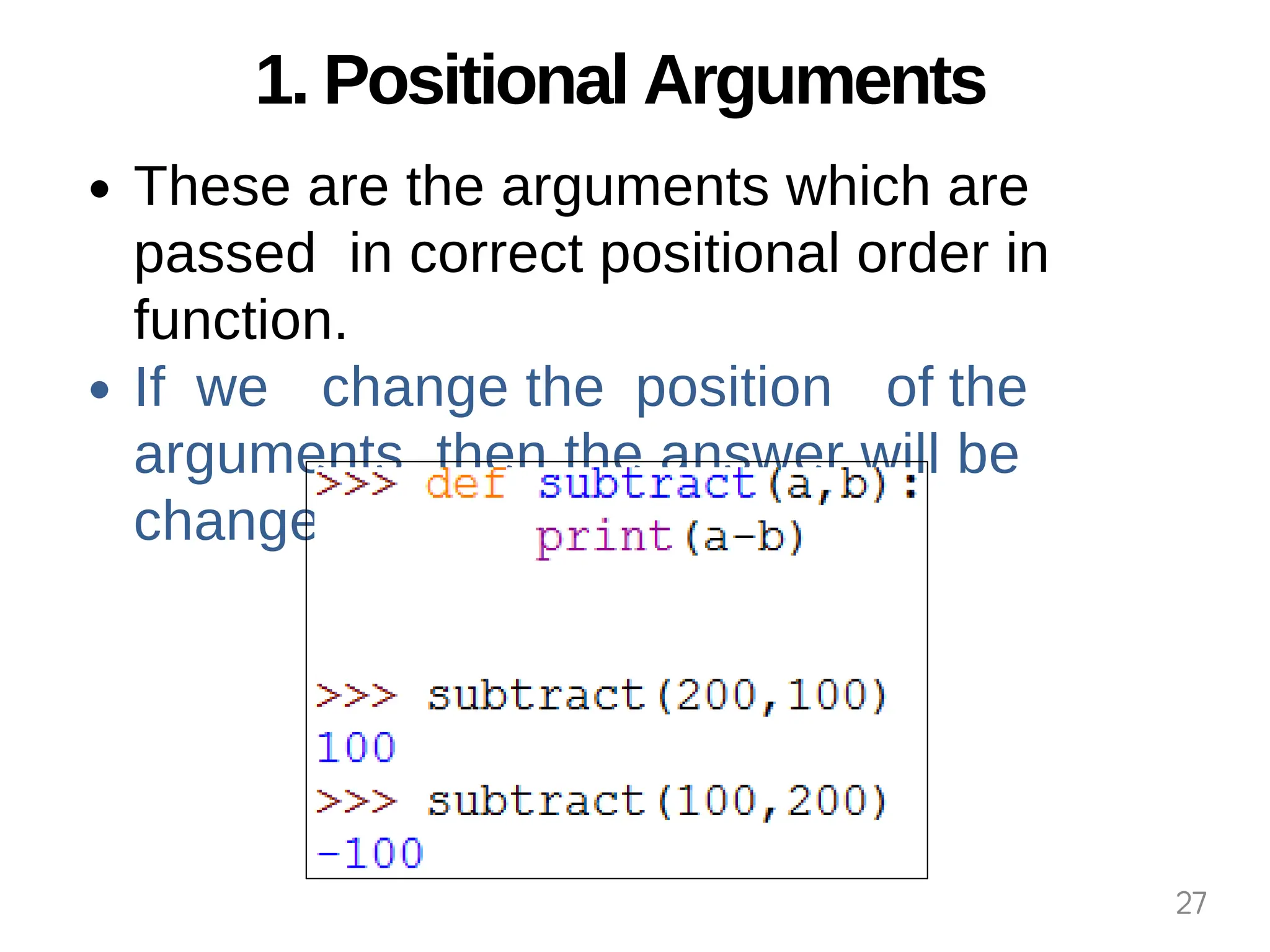
These are the arguments which are
passed in correct positional order in
function.
If we change the position of the
arguments then the answer will be
changed.
27
2. Default Arguments
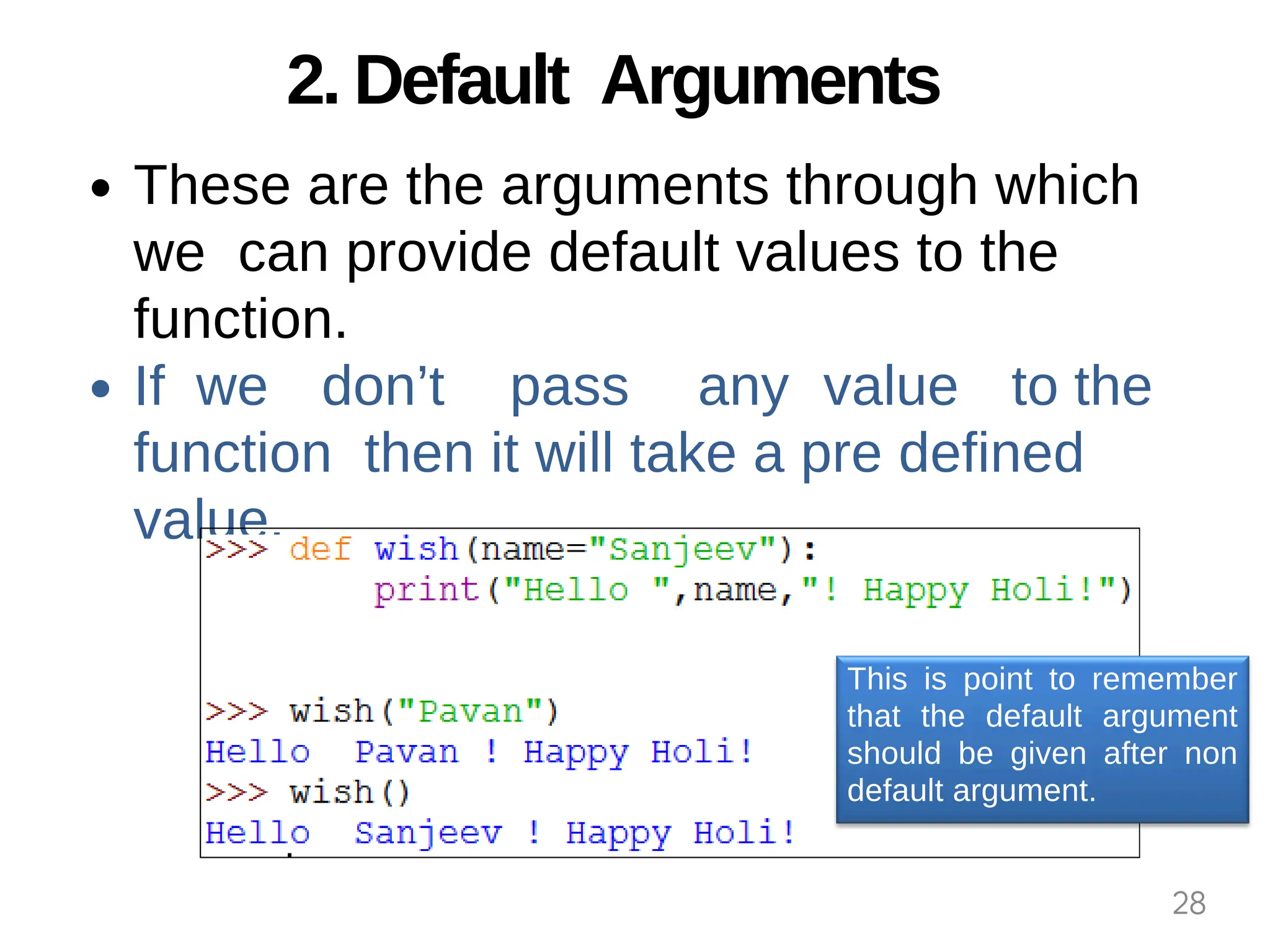
These are the arguments through which
we can provide default values to the
function.
If we don’t pass any value to the
function then it will take a pre defined
value.
This is point to remember
that the default argument
should be given after non
default argument.
28
3. Keyword Arguments
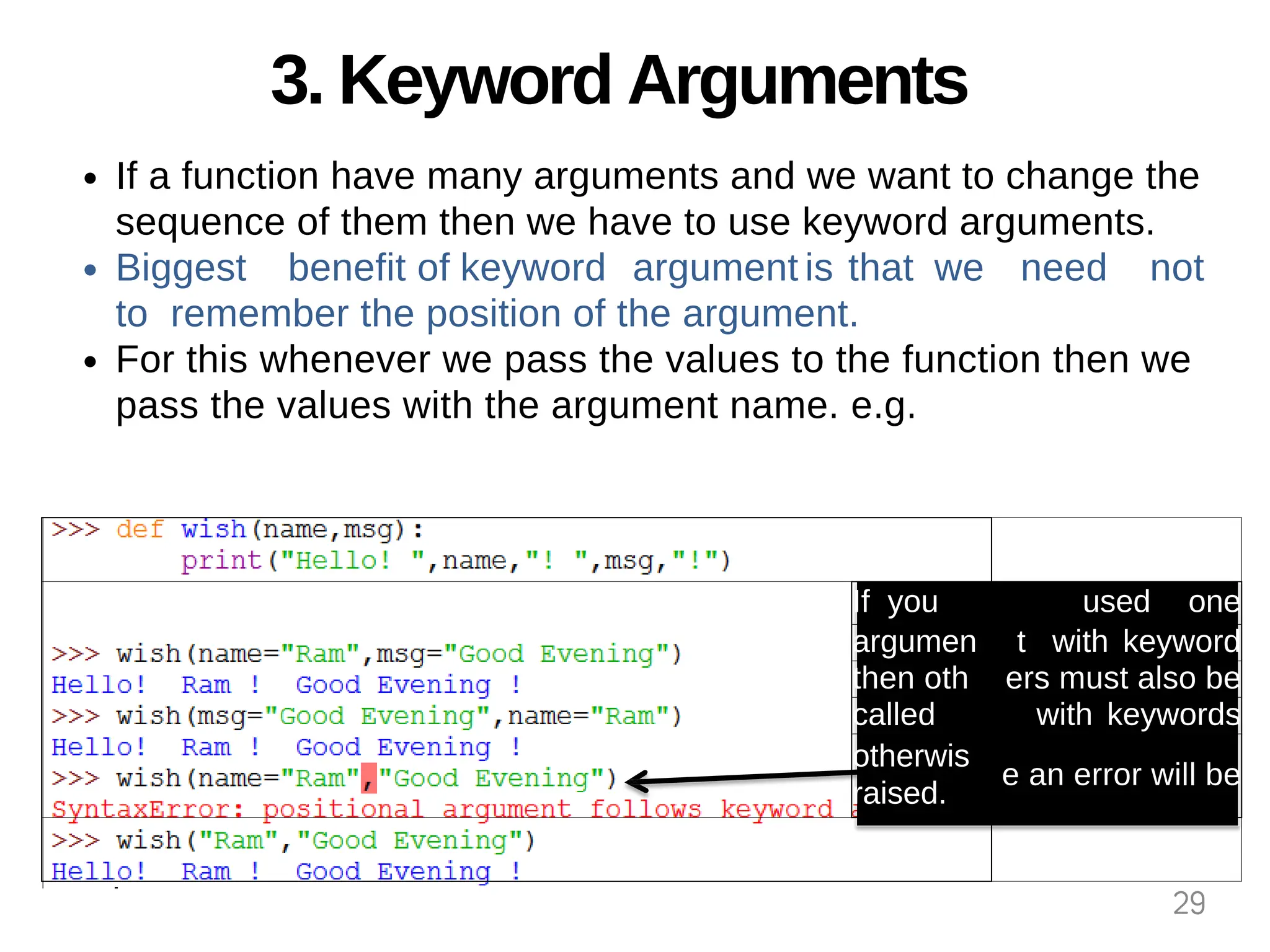
If a function have many arguments and we want to change the
sequence of them then we have to use keyword arguments.
Biggest benefit of keyword argument is that we need not
to remember the position of the argument.
For this whenever we pass the values to the function then we
pass the values with the argument name. e.g.
If you used one
argumen t with keyword
then oth ers must also be
called with keywords
otherwis
raised.
e an error will be
29
4. Variable Length Arguments
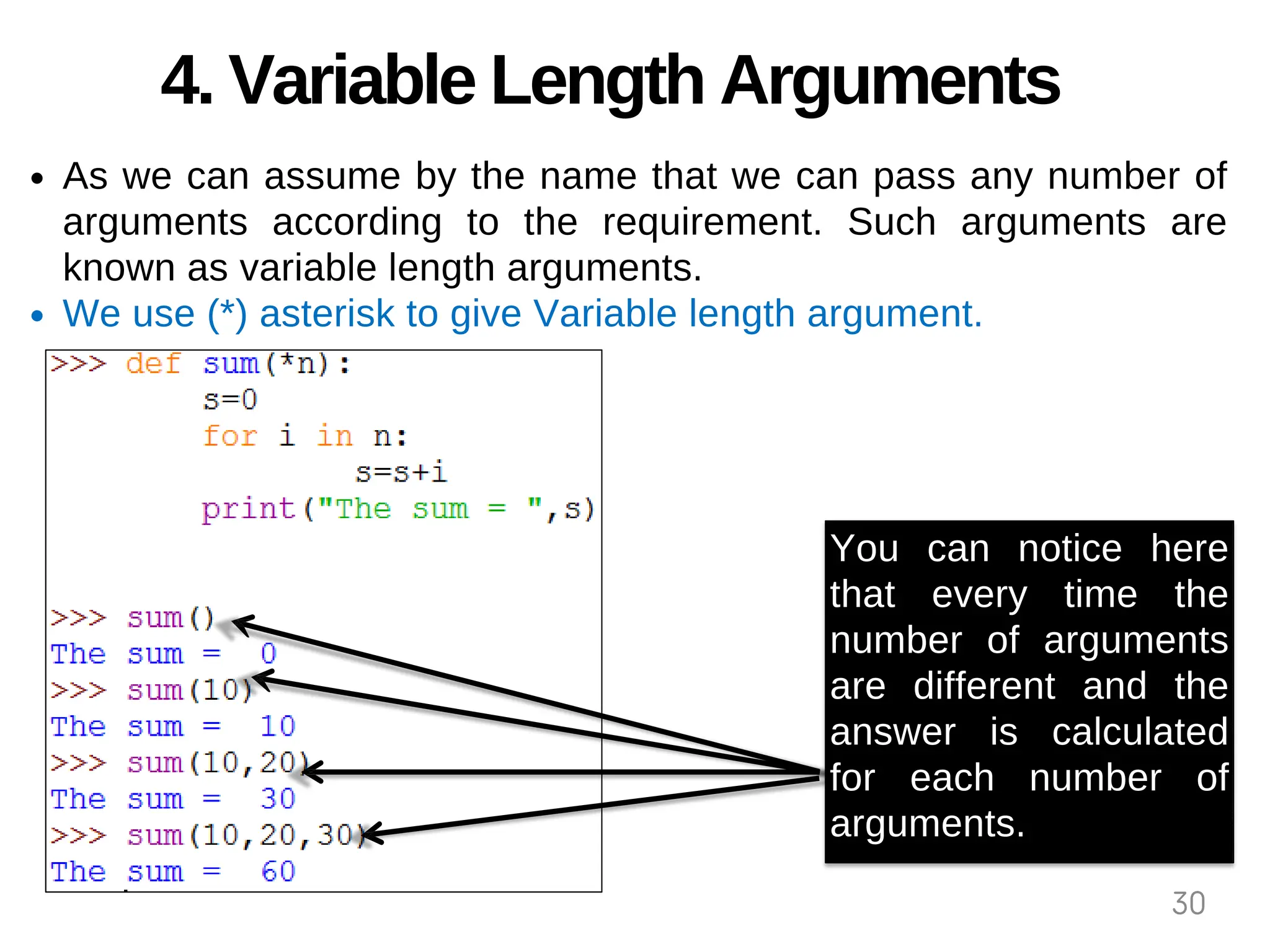
As we can assume by the name that we can pass any number of
arguments according to the requirement. Such arguments are
known as variable length arguments.
We use (*) asterisk to give Variable length argument.
You can notice here
that every time the
number of arguments
are different and the
answer is calculated
for each number of
arguments.
30
Passing ARRAYS /LISTS to Function
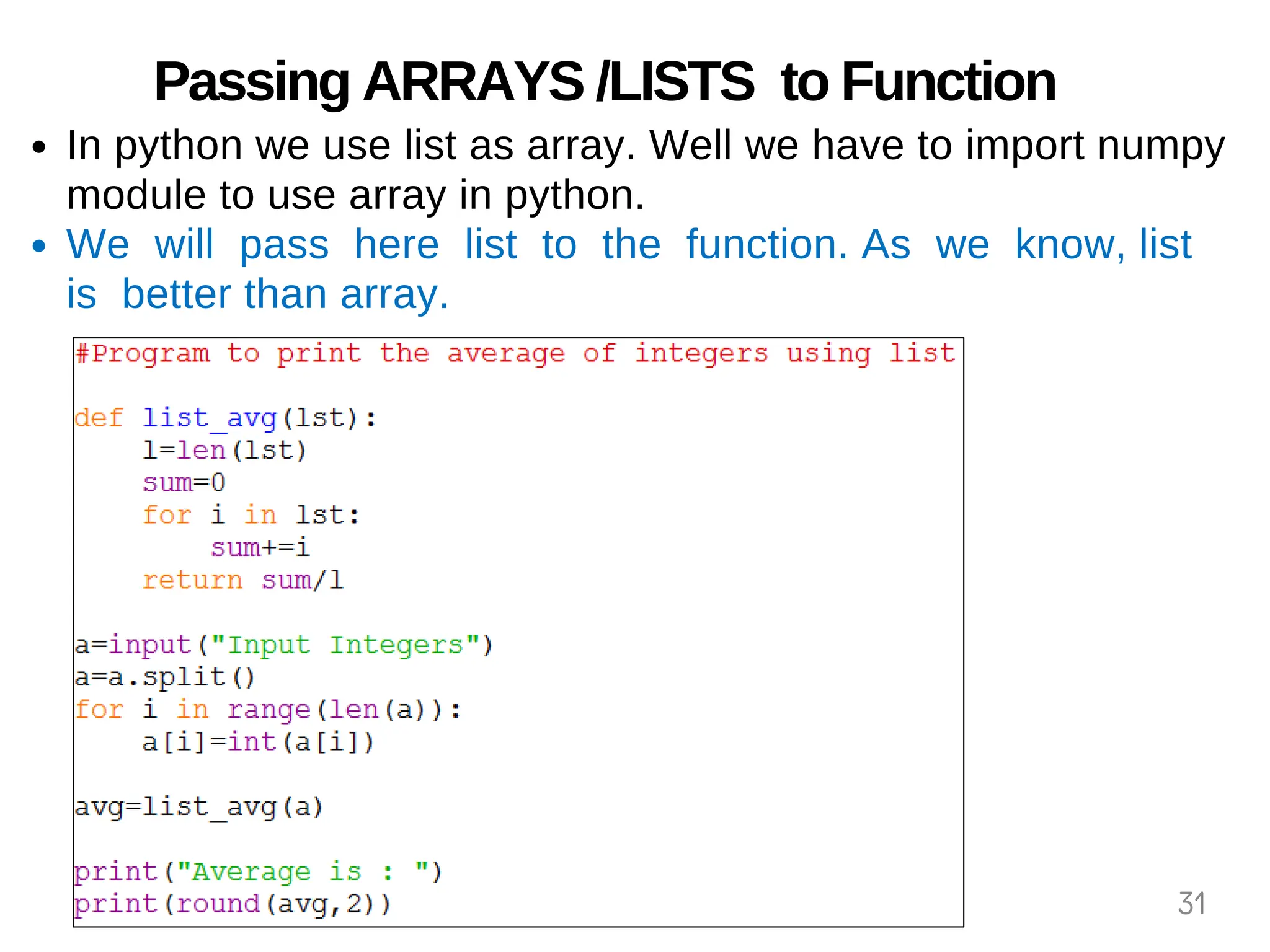
In python we use list as array. Well we have to import numpy
module to use array in python.
We will pass here list to the function. As we know, list
is better than array.
31
Scope of Variable
Scope of variable means the part of program where
the variable will be visible. It means where we can
use this variable.
We can say that scope is the collection of variables
and their values.
Scope can of two types -
Global (module)
All those names which are assigned at top level in module
or directly assigned in interpreter.
Local (function)
Those variables which are assigned within a loop of
function.
32
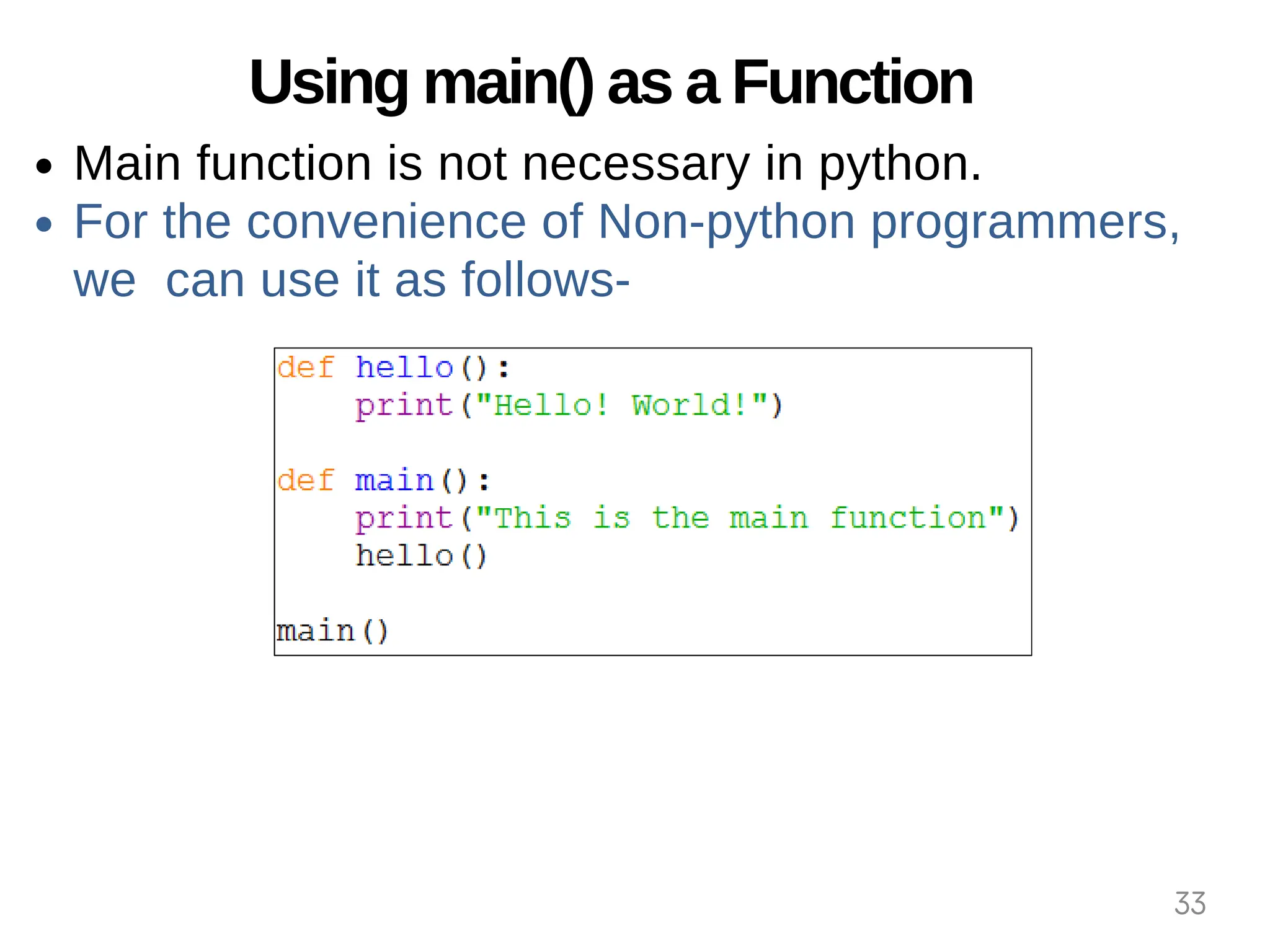
Using main() as a Function
Main function is not necessary in python.
For the convenience of Non-python programmers,
we can use it as follows-
33
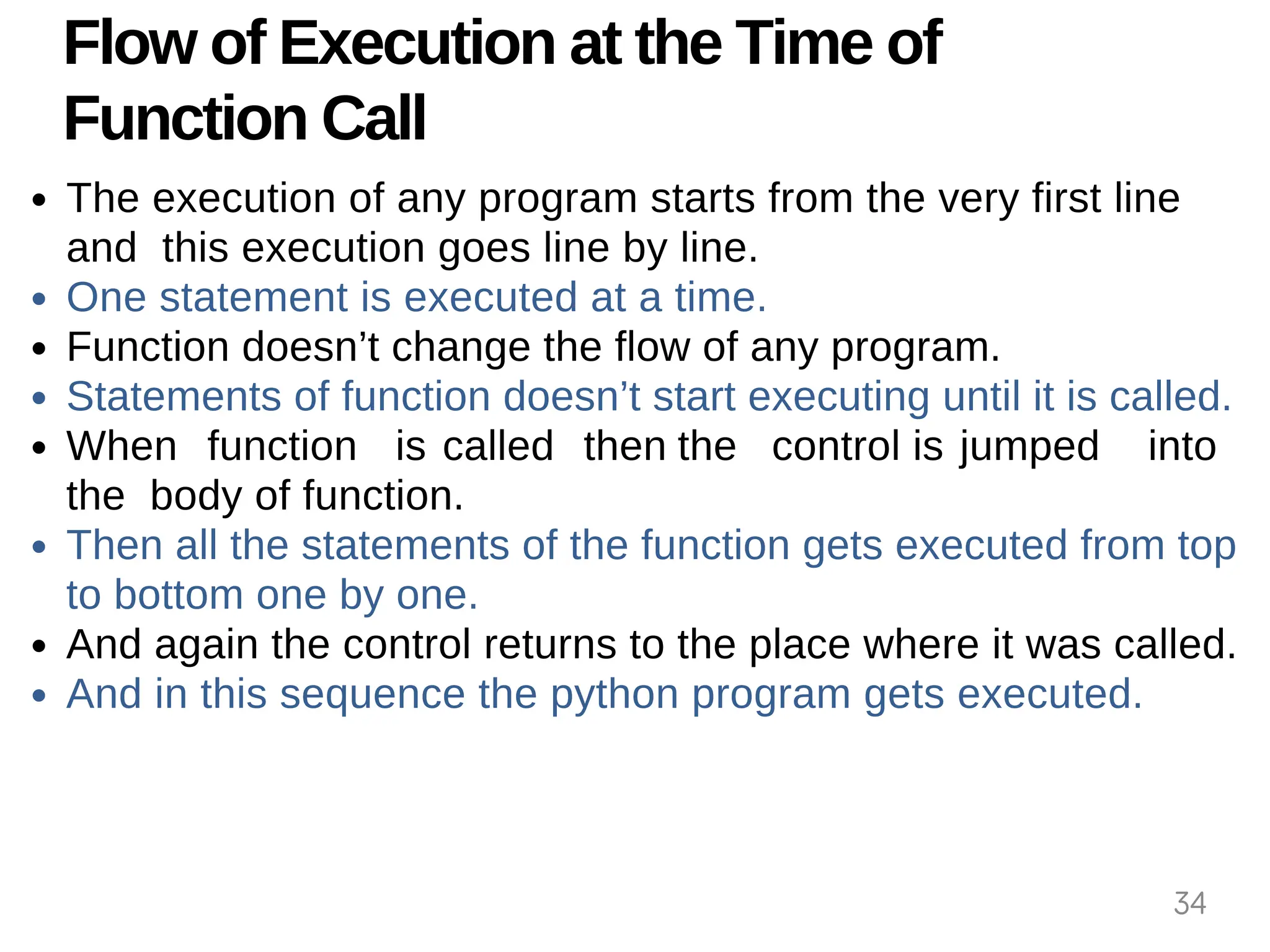
Flow of Execution at the Time of
Function Call
The execution of any program starts from the very first line
and this execution goes line by line.
One statement is executed at a time.
Function doesn’t change the flow of any program.
Statements of function doesn’t start executing until it is called.
When function is called then the control is jumped into
the body of function.
Then all the statements of the function gets executed from top
to bottom one by one.
And again the control returns to the place where it was called.
And in this sequence the python program gets executed.
34
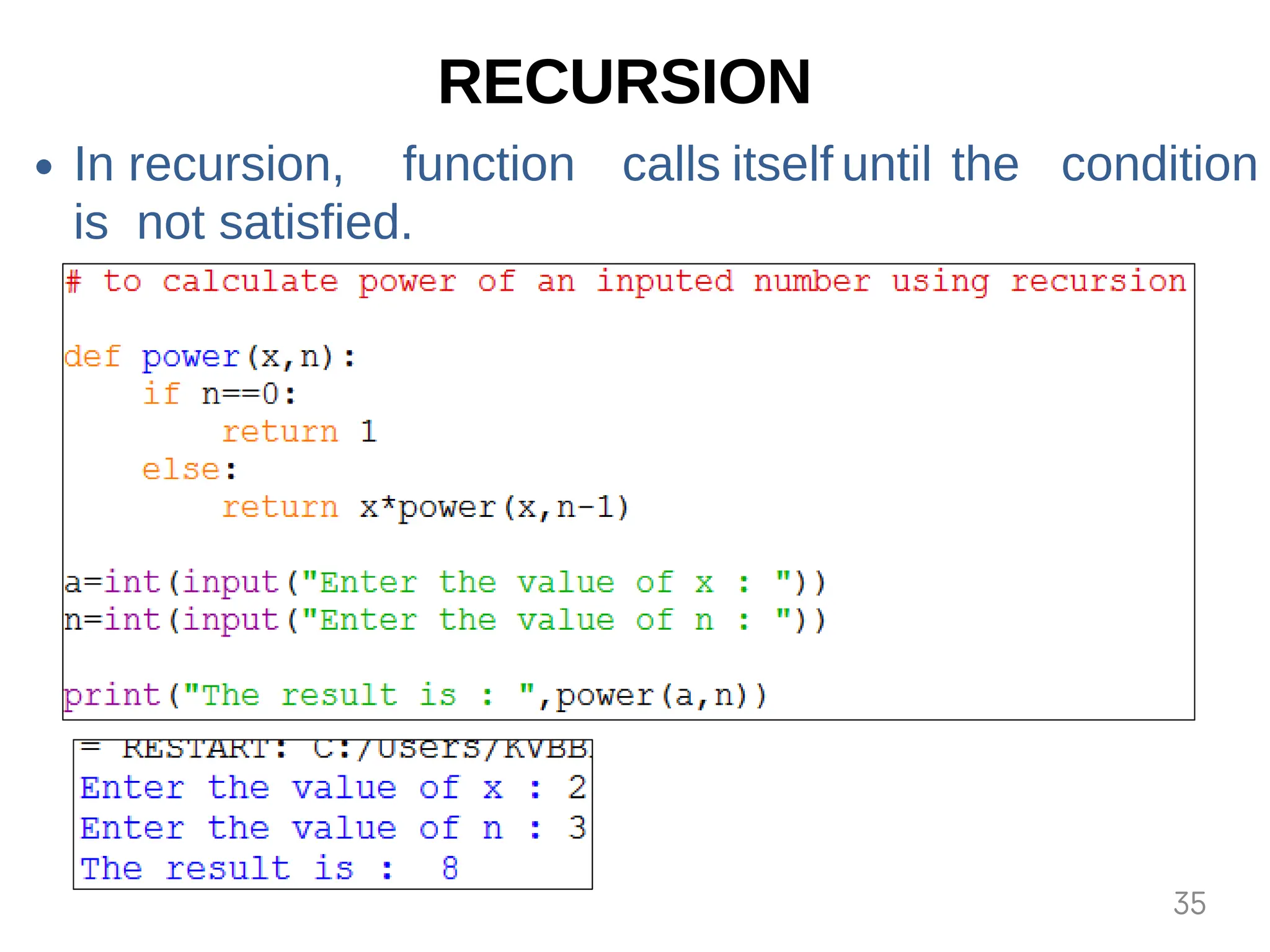
RECURSION
In recursion, function calls itself until the condition
is not satisfied.
35
RECURSION. . .
Recursion is one of the most powerful tools of the
programming language. When a function calls itself
within its body then this is know as recursion.
There are two conditions to use recursion -
There must be a terminating condition.
There must be an if condition in recursive routine.
Every recursive problem has a special feature its reversal
in
the order of execution.
As many times there is recursive call then every time a new
memory is allocated to the local variables of recursive
function.
During recursion each value is pushed in a stack.
36
Drawbacks of RECURSION
It uses more storage as each values is pushed in to stack.
If recursive call is not checked carefully then your
computer may go out of memory.
It is less efficient in terms of time and speed.
37
THANK YOU
38

2-functions.pptx_20240619_085610_0000.pdf

  • 1.
  • 2.
    Functions in Python Functionis a collection of statements which is made to perform a specific task. To Execute function we have to call it in the program. Instead of writing a large program we can write small functions as a specific part of program to accomplish the task. Once written a function can also be used in other programs as library functions. Functions can be categorized in three types- Built-in 1. Modules 2. User Defined 3. 2
  • 3.
    Built-in Functions These arethe functions which are predefined in python we have to just call them to use. Functions make any programming language efficient and provide a structure to language. Python has many built-in functions which makes programming easy, fast and efficient. They always reside in standard library and we need not to import any module to use them. We will study about some built-in function in next slide. 3
  • 4.
    Built-in Functions. . . TypeConversion Functions: These are the functions which converts the values from one type to another- 1. int( ) – To convert the string into integer. 1. str( ) – To covert any value into string. 2. float( ) – To covert string into float. 3. Input Functions: This function is used to take input from user in the form of string. 2. e.g. name=input(“Enter your name : “) 3. eval function: This function is used to evaluate the value of a string. e.g. x=eval(“45+10“) print(x) # answer will be 55 4
  • 5.
    Built-in Functions. . . 3.min Function: This function returns the smallest value among given list of values. 4. max Function: This biggest function returns the value among given list of values. 5. abs Function: This function returns the absolute value of any integer which is always positive. 5
  • 6.
    Built-in Functions. . . typeFunction: This function is used to identify the type of any value or variable. 1. len Function: This function returns the length of given string. 2. round Function: This function returns the rounded number of given number up to given position. 3. 6
  • 7.
    Built-in Functions. . . 9.range Function: If you want the series between two numbers then you can use this function. This is good tool for FOR Loop. Its syntax is - range( start, stop, step) This gives the series from START to STOP-1 and the interval between two numbers of series will be STEP. 7
  • 8.
    Python Modules Module isa .py file which contains the definitions of functions and variables. Module is a simple python file. When we divide a program into modules then each module contains functions and variables. And each functions is made for a special task. Once written code in modules can be used in other programs. When we make such functions which may be used in other programs also then we write them in module. We can import those module in any program an we can use the functions. 8
  • 9.
    Python Modules. .. Python provides two ways to module - import a import statement: to import full module. from: To import all or selected functions from the module. 9
  • 10.
    Python Modules. .. In last slide’s example first the math.py file is searched. Then a space is created where all the variables and functions of the math module may be stored. Then statements of modules are executed. 10
  • 11.
    Math Module math modulecontains following functions– ceil(x) returns integer bigger than x or x integer. floor(x) returns integer smaller than x or x integer. pow(x, n) returns xⁿ. sqrt(x) returns square root of x. log10(x) returns logarithm of x with base-10 cos(x) returns cosine of x in radians. sin(x) returns sine of x in radians. tan(x) returns tangent of x in radians. 11
  • 12.
    Help Function If youforgot that how a library function works then help( ) is very useful for this situation. If this function is used with any module then it provides the information and details of the given module and its all the contents. 12
  • 13.
    String Module We havealready studied about string module in class XI. Here are some other functions of string module. String.capitalize() Converts first character to Capital Letter String.find() Returns the Lowest Index of Substring String.index() Returns Index of Substring String.isalnum() Checks Alphanumeric Character String.isalpha() Checks if All Characters are Alphabets String.isdigit() Checks Digit Characters String.islower() Checks if all Alphabets in a String, are Lowercase String.isupper() returns if all characters are uppercase characters String.join() Returns a Concatenated String String.lower() returns lowercased string String.upper()returns uppercased string len()Returns Length of an Object ord()returns Unicode code point for Unicode character reversed()returns reversed iterator of a sequence slice()creates a slice object specified by range() 13
  • 14.
    Random Module When werequire such numbers which are not known earlier e.g. captcha or any type of serial numbers then in this situation we need random numbers. And here random module helps us. This contains following functions- randrange (): This method always returns any integer between given lower and upper limit to this method. default lower value is zero (0) and upper value is one(1). random (): This generates floating value between 0 and 1. it does not require any argument. 14
  • 15.
    Random Module. .. randint (): This method takes 2 parameters a,b in which first one is lower and second is upper limit. This may return any number between these two numbers including both limits. This method is very useful for guessing applications. uniform (): This method return any floating-point number between two given numbers. 15
  • 16.
    Random Module. .. choice (): this method is used for random selection from list, tuple or string. shuffle (): this method can shuffle or swap the items of a given list. 16
  • 17.
    User-defined Functions These arethe functions which are made by user as per the requirement of the user. Function is a kind of collection of statements which are written for a specific task. We can use them in any part of our program by calling them. def keyword is used to make user defined functions. 17
  • 18.
    User-defined Functions… We usefollowing syntax with def keyword to prepare a user defined function. def Function_Name(List_Of_Parameters): ”””docstring””” statement(s) Keyword Function Definition After the line containing def there should be a 4 spaces indentation, which is also know as the body or block of the function. 18
  • 19.
    User-defined Functions withoutargument and without return (Practical) Function Definition Function Call 19
  • 20.
    User-defined Functions withargument and without return (Practical) In the case of arguments, the values are passed in the function’s parenthesis. And they are declared in definition as well. 20
  • 21.
    User-defined Functions withargument and with return value (Practical) In the case of returning value, the calculated value is sent outside the function by a returning statement. This returned value will be hold by a variable used in calling statement. 21
  • 22.
    User-defined Functions withmultiple return values(Practical) In Python, a function may return multiple values. In multiple returning it returns a sequence of values to the calling statement. These returned values may be used as per the requirement. 22
  • 23.
    User-defined Functions withmultiple return values(Practical) Last program may also be written as follows. Result will be the tuple here. 23
  • 24.
    Parameters and Argumentsin Functions When we write header of any function then the one or more values given to its parenthesis ( ) are known as parameter. These are the values which are used by the function for any specific task. While argument is the value passed at the time of calling a function. In other words the arguments are used to invoke a function. Formal parameters are said to be parameters and actual parameters are said to be arguments. 24
  • 25.
    These are theparameters . These are the arguments . Parameters and Arguments in Functions . . . 25
  • 26.
    Types of Arguments Pythonsupports 4 types of arguments- Positional Arguments 1. Default Arguments 2. Keyword Arguments 3. Variable Length Arguments 4. 26
  • 27.
    1. Positional Arguments Theseare the arguments which are passed in correct positional order in function. If we change the position of the arguments then the answer will be changed. 27
  • 28.
    2. Default Arguments Theseare the arguments through which we can provide default values to the function. If we don’t pass any value to the function then it will take a pre defined value. This is point to remember that the default argument should be given after non default argument. 28
  • 29.
    3. Keyword Arguments Ifa function have many arguments and we want to change the sequence of them then we have to use keyword arguments. Biggest benefit of keyword argument is that we need not to remember the position of the argument. For this whenever we pass the values to the function then we pass the values with the argument name. e.g. If you used one argumen t with keyword then oth ers must also be called with keywords otherwis raised. e an error will be 29
  • 30.
    4. Variable LengthArguments As we can assume by the name that we can pass any number of arguments according to the requirement. Such arguments are known as variable length arguments. We use (*) asterisk to give Variable length argument. You can notice here that every time the number of arguments are different and the answer is calculated for each number of arguments. 30
  • 31.
    Passing ARRAYS /LISTSto Function In python we use list as array. Well we have to import numpy module to use array in python. We will pass here list to the function. As we know, list is better than array. 31
  • 32.
    Scope of Variable Scopeof variable means the part of program where the variable will be visible. It means where we can use this variable. We can say that scope is the collection of variables and their values. Scope can of two types - Global (module) All those names which are assigned at top level in module or directly assigned in interpreter. Local (function) Those variables which are assigned within a loop of function. 32
  • 33.
    Using main() asa Function Main function is not necessary in python. For the convenience of Non-python programmers, we can use it as follows- 33
  • 34.
    Flow of Executionat the Time of Function Call The execution of any program starts from the very first line and this execution goes line by line. One statement is executed at a time. Function doesn’t change the flow of any program. Statements of function doesn’t start executing until it is called. When function is called then the control is jumped into the body of function. Then all the statements of the function gets executed from top to bottom one by one. And again the control returns to the place where it was called. And in this sequence the python program gets executed. 34
  • 35.
    RECURSION In recursion, functioncalls itself until the condition is not satisfied. 35
  • 36.
    RECURSION. . . Recursionis one of the most powerful tools of the programming language. When a function calls itself within its body then this is know as recursion. There are two conditions to use recursion - There must be a terminating condition. There must be an if condition in recursive routine. Every recursive problem has a special feature its reversal in the order of execution. As many times there is recursive call then every time a new memory is allocated to the local variables of recursive function. During recursion each value is pushed in a stack. 36
  • 37.
    Drawbacks of RECURSION Ituses more storage as each values is pushed in to stack. If recursive call is not checked carefully then your computer may go out of memory. It is less efficient in terms of time and speed. 37
  • 38.