React Components
A FRONTEND LIBRARY
Using bootstrap in react app
>npm i bootstrap
>npm install font-awesome
Then you can use
Use below code in either index.js or in any component
import "bootstrap/dist/css/bootstrap.css";
import "font-awesome/css/font-awesome.css";
Usman Akram http://usmanlive.com CUI LAHORE 2
Function and Class Components
function Welcome(props) {
return <h1>Hello, {props.name}</h1>;
}
class Welcome extends React.Component {
render() {
return <h1>Hello, {this.props.name}</h1>;
}
}
Usman Akram http://usmanlive.com CUI LAHORE 3
Using a Component
<Welcome name="Sara" />
Attributes passed to a component are props
Props are read only
Don’t be afraid to split components into smaller
components.
Usman Akram http://usmanlive.com CUI LAHORE 4
HTML ? FancyBorder Tag?
<FancyBorder color="blue">
<Welcome name="Sara" />
</FancyBorder>
Usman Akram http://usmanlive.com CUI LAHORE 5
Composing Components
function App() {
return (
<div>
<Welcome name="Sara" />
<Welcome name="Cahal" />
<Welcome name="Edite" />
</div>
);
}
Usman Akram http://usmanlive.com CUI LAHORE 6
Welcome Component
import React from "react";
const Welcome= (props) => {
return <div>Welcome {props.name}!</div>;
};
export default Welcome;
Usman Akram http://usmanlive.com CUI LAHORE 7
FancyBorder
import React from "react";
const FancyBorder = (props) => {
return (
<div style={{ border: "1px solid", borderColor: props.color }}>
{props.children}
</div>
);
};
export default FancyBorder;
Usman Akram http://usmanlive.com CUI LAHORE 8
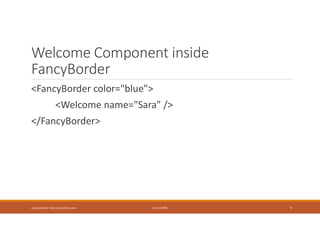
Welcome Component inside
FancyBorder
<FancyBorder color="blue">
<Welcome name="Sara" />
</FancyBorder>
Usman Akram http://usmanlive.com CUI LAHORE 9
Using a Component
import Welcoome `from
"./components/examples/Welcome";
ReactDOM.render(<Welcome name=“Usman”/>,
document.getElementById("root"));
//instead of using App we are using Welcome
Usman Akram http://usmanlive.com CUI LAHORE 10
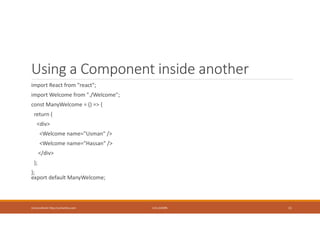
Using a Component inside another
import React from "react";
import Welcome from "./Welcome";
const ManyWelcome = () => {
return (
<div>
<Welcome name="Usman" />
<Welcome name="Hassan" />
</div>
);
};
export default ManyWelcome;
Usman Akram http://usmanlive.com CUI LAHORE 11
Component can return only a Single
Element
import React from "react";
const Welcome= (props) => {
return <div>Welcome {props.name}!</div>;
};
export default Welcome;
Usman Akram http://usmanlive.com CUI LAHORE 12
Embedding Expressions
const count=0;
return (
<div className="App">
{count}
</div>
);
Usman Akram http://usmanlive.com CUI LAHORE 13
If Short Hand
{count === 0 ? "Zero" : count}
{count !== 0 && count} //print count if not zero
Usman Akram http://usmanlive.com CUI LAHORE 14
State
const [count, setCount] = React.useState(5);
//A special variable to control Component
State
React will remember its current value between re-renders,
Provide the most recent one to our function.
Update the current count, we can call setCount.
Usman Akram http://usmanlive.com CUI LAHORE 15
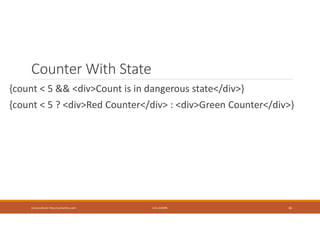
Counter With State
{count < 5 && <div>Count is in dangerous state</div>}
{count < 5 ? <div>Red Counter</div> : <div>Green Counter</div>}
Usman Akram http://usmanlive.com CUI LAHORE 16
Object Destructuring
var o = {p: 42, q: true};
var {p, q} = o;
console.log(p); // 42
console.log(q); // true
Usman Akram http://usmanlive.com CUI LAHORE 17
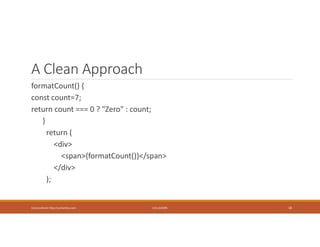
A Clean Approach
formatCount() {
const count=7;
return count === 0 ? "Zero" : count;
}
return (
<div>
<span>{formatCount()}</span>
</div>
);
Usman Akram http://usmanlive.com CUI LAHORE 18
formatCount can also return jsx
expression
formatCount() {
const count=5;
return count === 0 ? "Zero" :
<span> {count}</span>;
}
Usman Akram http://usmanlive.com CUI LAHORE 19
Setting Attributes
return <img src={imageURL} alt="" />;
Usman Akram http://usmanlive.com CUI LAHORE 20
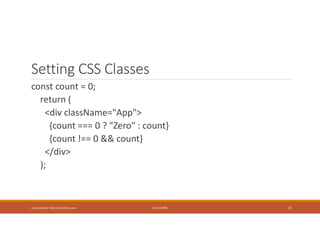
Setting CSS Classes
const count = 0;
return (
<div className="App">
{count === 0 ? "Zero" : count}
{count !== 0 && count}
</div>
);
Usman Akram http://usmanlive.com CUI LAHORE 21
Setting Styles from jsx
styles = {
fontWeight: 'bold'
}
const count = 0;
return (
<div className="App" style={styles}>
Hello
</div>
);
Usman Akram http://usmanlive.com CUI LAHORE 22
Dynamic Classes
getBadgeClasses() {
let classes = "badge m-2 badge-";
classes += count === 0 ? "warning" : "primary";
return classes;
}
//Then in component
//className={getBadgeClasses()}
Usman Akram http://usmanlive.com CUI LAHORE 23
Handling Lists
consttags: ['Funny', 'SciFi', 'Horror'];
return (
<ul>
{tags.map(tag => <li>{tag}</li>)}
</ul>
);
}
//This will generate Warning. Each li should have a
key
Usman Akram http://usmanlive.com CUI LAHORE 24
Specifying Key
const numbers = [1, 2, 3, 4, 5];
const listItems = numbers.map((number) =>
<li key={number.toString()}>
{number}
</li>
);
Usman Akram http://usmanlive.com CUI LAHORE 25
Specifying Key
const todoItems = todos.map((todo, index) =>
// Only do this if items have no stable IDs
<li key={index}>
{todo.text}
</li>
);
Usman Akram http://usmanlive.com CUI LAHORE 26
Conditional Rendering
renderTags() {
if(tags.length===0) return <p>No Tags</p>;
return tags.map(tag => <li>{tag}</li>);
}
//Then in Render
//{tags.length === 0 && "Please Create Tags"}
//{renderTags()}
Usman Akram http://usmanlive.com CUI LAHORE 27
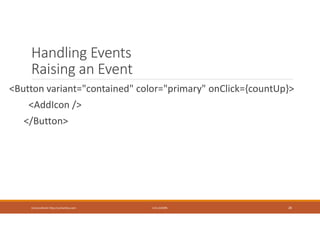
Handling Events
Raising an Event
<Button variant="contained" color="primary" onClick={countUp}>
<AddIcon />
</Button>
Usman Akram http://usmanlive.com CUI LAHORE 28
Handling Events
Capturing an Event
const countUp = () => {
setCount(count + 1);
// count++;
// alert(count);
};
Usman Akram http://usmanlive.com CUI LAHORE 29
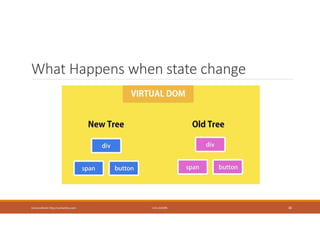
What Happens when state change
Usman Akram http://usmanlive.com CUI LAHORE 30
Passing Parameters to event handler
handleIncrement = (id) => {
//Handle ID
};
Call it like this
onClick={()=>handleIncrement(3)}
Usman Akram http://usmanlive.com CUI LAHORE 31
Vidly Project
https://1drv.ms/f/s!AtGKdbMmNBGd1GXjgiJoFiImccTx
>npm install
>npm start
Usman Akram http://usmanlive.com CUI LAHORE 32
Composing Components
https://1drv.ms/f/s!AtGKdbMmNBGd1zi0xRJmY1kA7tqt
Start to Finish
Usman Akram http://usmanlive.com CUI LAHORE 33
React Debugging
Usman Akram http://usmanlive.com CUI LAHORE 34
Single Source of Truth
Try to make Stateless components as much as possible.
Data should be kept at only one location
E.g. Movies Components has many SingleMovie
Components then movies data should only be placed in
parent .
Usman Akram http://usmanlive.com CUI LAHORE 35
Passing Functions as props
<Like
liked={movie.liked}
onClick={() => handleLike(movie)}
/>
Usman Akram http://usmanlive.com CUI LAHORE 36
Calling Passed Function (Like.jsx)
<i
onClick={props.onClick}
style={{ cursor: "pointer" }}
className={classes}
aria-hidden="true"
/>
Usman Akram http://usmanlive.com CUI LAHORE 37

2- Components.pdf

  • 1.
  • 2.
    Using bootstrap inreact app >npm i bootstrap >npm install font-awesome Then you can use Use below code in either index.js or in any component import "bootstrap/dist/css/bootstrap.css"; import "font-awesome/css/font-awesome.css"; Usman Akram http://usmanlive.com CUI LAHORE 2
  • 3.
    Function and ClassComponents function Welcome(props) { return <h1>Hello, {props.name}</h1>; } class Welcome extends React.Component { render() { return <h1>Hello, {this.props.name}</h1>; } } Usman Akram http://usmanlive.com CUI LAHORE 3
  • 4.
    Using a Component <Welcomename="Sara" /> Attributes passed to a component are props Props are read only Don’t be afraid to split components into smaller components. Usman Akram http://usmanlive.com CUI LAHORE 4
  • 5.
    HTML ? FancyBorderTag? <FancyBorder color="blue"> <Welcome name="Sara" /> </FancyBorder> Usman Akram http://usmanlive.com CUI LAHORE 5
  • 6.
    Composing Components function App(){ return ( <div> <Welcome name="Sara" /> <Welcome name="Cahal" /> <Welcome name="Edite" /> </div> ); } Usman Akram http://usmanlive.com CUI LAHORE 6
  • 7.
    Welcome Component import Reactfrom "react"; const Welcome= (props) => { return <div>Welcome {props.name}!</div>; }; export default Welcome; Usman Akram http://usmanlive.com CUI LAHORE 7
  • 8.
    FancyBorder import React from"react"; const FancyBorder = (props) => { return ( <div style={{ border: "1px solid", borderColor: props.color }}> {props.children} </div> ); }; export default FancyBorder; Usman Akram http://usmanlive.com CUI LAHORE 8
  • 9.
    Welcome Component inside FancyBorder <FancyBordercolor="blue"> <Welcome name="Sara" /> </FancyBorder> Usman Akram http://usmanlive.com CUI LAHORE 9
  • 10.
    Using a Component importWelcoome `from "./components/examples/Welcome"; ReactDOM.render(<Welcome name=“Usman”/>, document.getElementById("root")); //instead of using App we are using Welcome Usman Akram http://usmanlive.com CUI LAHORE 10
  • 11.
    Using a Componentinside another import React from "react"; import Welcome from "./Welcome"; const ManyWelcome = () => { return ( <div> <Welcome name="Usman" /> <Welcome name="Hassan" /> </div> ); }; export default ManyWelcome; Usman Akram http://usmanlive.com CUI LAHORE 11
  • 12.
    Component can returnonly a Single Element import React from "react"; const Welcome= (props) => { return <div>Welcome {props.name}!</div>; }; export default Welcome; Usman Akram http://usmanlive.com CUI LAHORE 12
  • 13.
    Embedding Expressions const count=0; return( <div className="App"> {count} </div> ); Usman Akram http://usmanlive.com CUI LAHORE 13
  • 14.
    If Short Hand {count=== 0 ? "Zero" : count} {count !== 0 && count} //print count if not zero Usman Akram http://usmanlive.com CUI LAHORE 14
  • 15.
    State const [count, setCount]= React.useState(5); //A special variable to control Component State React will remember its current value between re-renders, Provide the most recent one to our function. Update the current count, we can call setCount. Usman Akram http://usmanlive.com CUI LAHORE 15
  • 16.
    Counter With State {count< 5 && <div>Count is in dangerous state</div>} {count < 5 ? <div>Red Counter</div> : <div>Green Counter</div>} Usman Akram http://usmanlive.com CUI LAHORE 16
  • 17.
    Object Destructuring var o= {p: 42, q: true}; var {p, q} = o; console.log(p); // 42 console.log(q); // true Usman Akram http://usmanlive.com CUI LAHORE 17
  • 18.
    A Clean Approach formatCount(){ const count=7; return count === 0 ? "Zero" : count; } return ( <div> <span>{formatCount()}</span> </div> ); Usman Akram http://usmanlive.com CUI LAHORE 18
  • 19.
    formatCount can alsoreturn jsx expression formatCount() { const count=5; return count === 0 ? "Zero" : <span> {count}</span>; } Usman Akram http://usmanlive.com CUI LAHORE 19
  • 20.
    Setting Attributes return <imgsrc={imageURL} alt="" />; Usman Akram http://usmanlive.com CUI LAHORE 20
  • 21.
    Setting CSS Classes constcount = 0; return ( <div className="App"> {count === 0 ? "Zero" : count} {count !== 0 && count} </div> ); Usman Akram http://usmanlive.com CUI LAHORE 21
  • 22.
    Setting Styles fromjsx styles = { fontWeight: 'bold' } const count = 0; return ( <div className="App" style={styles}> Hello </div> ); Usman Akram http://usmanlive.com CUI LAHORE 22
  • 23.
    Dynamic Classes getBadgeClasses() { letclasses = "badge m-2 badge-"; classes += count === 0 ? "warning" : "primary"; return classes; } //Then in component //className={getBadgeClasses()} Usman Akram http://usmanlive.com CUI LAHORE 23
  • 24.
    Handling Lists consttags: ['Funny','SciFi', 'Horror']; return ( <ul> {tags.map(tag => <li>{tag}</li>)} </ul> ); } //This will generate Warning. Each li should have a key Usman Akram http://usmanlive.com CUI LAHORE 24
  • 25.
    Specifying Key const numbers= [1, 2, 3, 4, 5]; const listItems = numbers.map((number) => <li key={number.toString()}> {number} </li> ); Usman Akram http://usmanlive.com CUI LAHORE 25
  • 26.
    Specifying Key const todoItems= todos.map((todo, index) => // Only do this if items have no stable IDs <li key={index}> {todo.text} </li> ); Usman Akram http://usmanlive.com CUI LAHORE 26
  • 27.
    Conditional Rendering renderTags() { if(tags.length===0)return <p>No Tags</p>; return tags.map(tag => <li>{tag}</li>); } //Then in Render //{tags.length === 0 && "Please Create Tags"} //{renderTags()} Usman Akram http://usmanlive.com CUI LAHORE 27
  • 28.
    Handling Events Raising anEvent <Button variant="contained" color="primary" onClick={countUp}> <AddIcon /> </Button> Usman Akram http://usmanlive.com CUI LAHORE 28
  • 29.
    Handling Events Capturing anEvent const countUp = () => { setCount(count + 1); // count++; // alert(count); }; Usman Akram http://usmanlive.com CUI LAHORE 29
  • 30.
    What Happens whenstate change Usman Akram http://usmanlive.com CUI LAHORE 30
  • 31.
    Passing Parameters toevent handler handleIncrement = (id) => { //Handle ID }; Call it like this onClick={()=>handleIncrement(3)} Usman Akram http://usmanlive.com CUI LAHORE 31
  • 32.
  • 33.
    Composing Components https://1drv.ms/f/s!AtGKdbMmNBGd1zi0xRJmY1kA7tqt Start toFinish Usman Akram http://usmanlive.com CUI LAHORE 33
  • 34.
    React Debugging Usman Akramhttp://usmanlive.com CUI LAHORE 34
  • 35.
    Single Source ofTruth Try to make Stateless components as much as possible. Data should be kept at only one location E.g. Movies Components has many SingleMovie Components then movies data should only be placed in parent . Usman Akram http://usmanlive.com CUI LAHORE 35
  • 36.
    Passing Functions asprops <Like liked={movie.liked} onClick={() => handleLike(movie)} /> Usman Akram http://usmanlive.com CUI LAHORE 36
  • 37.
    Calling Passed Function(Like.jsx) <i onClick={props.onClick} style={{ cursor: "pointer" }} className={classes} aria-hidden="true" /> Usman Akram http://usmanlive.com CUI LAHORE 37