1
WWW/HTML Basics
CS 4173
2
What is the WWW?
A distributed document delivery system
Uses a client-server model
Main presentation language is HTML
3
Client-Server Model
Two processes (possibly networked):
 The client
 Sends requests to the server
 Blocks until reply is received
 The server
 Processes requests from clients
 Never blocks
 Can reply to several clients simultaneously
4
HTML
Hypertext Markup Language
Intended to be maximally portable
 Logical markup
 Graceful degradation of presentation
An ideal promoted by early WWW
 Used to be more honoured in the breach
 Is it getting better now?
5
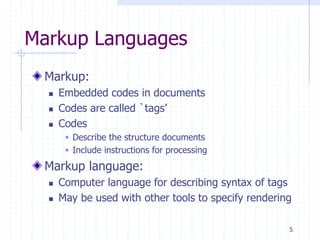
Markup Languages
Markup:
 Embedded codes in documents
 Codes are called `tags’
 Codes
 Describe the structure documents
 Include instructions for processing
Markup language:
 Computer language for describing syntax of tags
 May be used with other tools to specify rendering
6
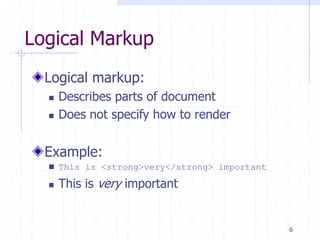
Logical Markup
Logical markup:
 Describes parts of document
 Does not specify how to render
Example:
 This is <strong>very</strong> important
 This is very important
7
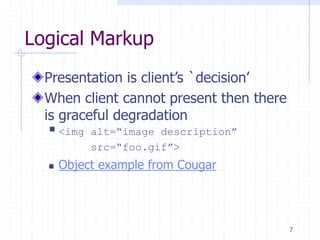
Logical Markup
Presentation is client’s `decision’
When client cannot present then there
is graceful degradation
 <img alt=“image description”
src=“foo.gif”>
 Object example from Cougar
8
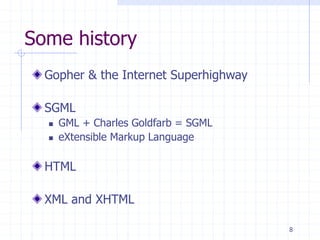
Some history
Gopher & the Internet Superhighway
SGML
 GML + Charles Goldfarb = SGML
 eXtensible Markup Language
HTML
XML and XHTML
9
Why HTML became XHTML
HTML was originally a SGML application
 Tags described the syntax
 A DTD could check the syntax
 Informal mapping from syntax to rendering
Multiple incompatible versions arose
 IETF moves at ’net speed not web $peed
 Tag abuse was rampant in the ’net
 They were a plague unto the users
10
Why HTML became XHTML (2)
If you think IMG is bad …
Big vendors (M$ and N$ mostly) agreed
 To start over
 To use eXtensible Markup Language
 A re-write of SGML emphasizing simplicity
 Carefully planned by CS savvy folks
 Includes hooks for future development
11
XHTML Basics
Very few real changes from HTML
But more strict
All tags are in lowercase
All tags must be closed
 Empty tags
 Paired tags
12
XHTML Basics
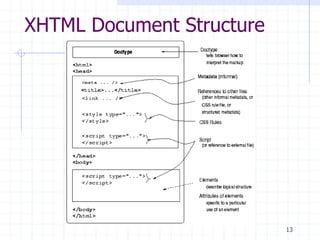
3 Parts to an XHTML or HTML document
 DOCTYPE
 What DTD are you using
 Head
 Meta information
 Only <title> is required
 Body
 Text to render
13
XHTML Document Structure
14
XHTML Basics
Tags
 Elements
 Attributes
Entities
 <,>,&,‘ ’
 Ö,ð,÷,©, etc.
 See example at CS4173 website
Comments
15
XHTML Tags vs. Elements
Tag is markup to represent an element
Logical vs. Presentation Elements
 TT  CODE, KBD, PRE?
 B/IT/U  EM/STRONG
Lists
 UL/OL
 DL
16
XHTML Tags vs. Elements
Block-level and in-line elements
 TABLE, P, BLOCKQUOTE, DIV, etc.
 CODE, Q, H1, SPAN, etc.
Grouping Elements
 DIV
 SPAN
One-part elements
 BR, etc.
17
XHTML Tags vs. Elements
Browser-specific tags
MARQUEE, BLINK, etc.
What happens when a browser doesn't
recognize a tag?
18
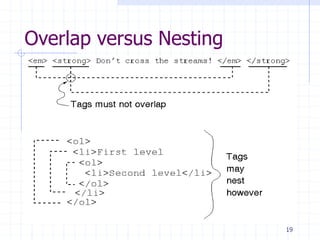
XHTML Basics
Tags may be nested but
Tags may not overlap
19
Overlap versus Nesting
20
Links — Why The WWW Is HT
‘A’ element
 HREF
 NAME
 CLASS
 REL
 TYPE
URIs and URLs
RFCs
 TITLE
 ID
 STYLE
 Anchor Text
 TABINDEX
21
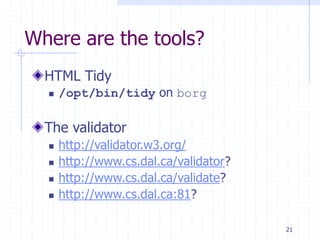
Where are the tools?
HTML Tidy
 /opt/bin/tidy on borg
The validator
 http://validator.w3.org/
 http://www.cs.dal.ca/validator?
 http://www.cs.dal.ca/validate?
 http://www.cs.dal.ca:81?
22
XHTML/HTML Examples
XHTML element sampler
XHTML sample template
Both in the examples section of the website
23
For More About HTML
RFC 1866 (HTML 2.0) (at faqs.org)
Explains some of the philosophy behind HTML
HTML 4.01 (at W3C)
Last version of HTML
XHTML 1.1 (at W3C)
Modularized XHTML
So many choices!…
24
Which Standard to Follow?
Minimal standard for this course is
HTML 4.01 Transitional
Preferred standard is XHTML 1.0 or 1.1
See Picking a Rendering Mode
 By Eric Meyer
 In the Readings part of the Resources
25
Here endeth the lesson

1-Basic HTML.ppt

  • 1.
  • 2.
    2 What is theWWW? A distributed document delivery system Uses a client-server model Main presentation language is HTML
  • 3.
    3 Client-Server Model Two processes(possibly networked):  The client  Sends requests to the server  Blocks until reply is received  The server  Processes requests from clients  Never blocks  Can reply to several clients simultaneously
  • 4.
    4 HTML Hypertext Markup Language Intendedto be maximally portable  Logical markup  Graceful degradation of presentation An ideal promoted by early WWW  Used to be more honoured in the breach  Is it getting better now?
  • 5.
    5 Markup Languages Markup:  Embeddedcodes in documents  Codes are called `tags’  Codes  Describe the structure documents  Include instructions for processing Markup language:  Computer language for describing syntax of tags  May be used with other tools to specify rendering
  • 6.
    6 Logical Markup Logical markup: Describes parts of document  Does not specify how to render Example:  This is <strong>very</strong> important  This is very important
  • 7.
    7 Logical Markup Presentation isclient’s `decision’ When client cannot present then there is graceful degradation  <img alt=“image description” src=“foo.gif”>  Object example from Cougar
  • 8.
    8 Some history Gopher &the Internet Superhighway SGML  GML + Charles Goldfarb = SGML  eXtensible Markup Language HTML XML and XHTML
  • 9.
    9 Why HTML becameXHTML HTML was originally a SGML application  Tags described the syntax  A DTD could check the syntax  Informal mapping from syntax to rendering Multiple incompatible versions arose  IETF moves at ’net speed not web $peed  Tag abuse was rampant in the ’net  They were a plague unto the users
  • 10.
    10 Why HTML becameXHTML (2) If you think IMG is bad … Big vendors (M$ and N$ mostly) agreed  To start over  To use eXtensible Markup Language  A re-write of SGML emphasizing simplicity  Carefully planned by CS savvy folks  Includes hooks for future development
  • 11.
    11 XHTML Basics Very fewreal changes from HTML But more strict All tags are in lowercase All tags must be closed  Empty tags  Paired tags
  • 12.
    12 XHTML Basics 3 Partsto an XHTML or HTML document  DOCTYPE  What DTD are you using  Head  Meta information  Only <title> is required  Body  Text to render
  • 13.
  • 14.
    14 XHTML Basics Tags  Elements Attributes Entities  <,>,&,‘ ’  Ö,ð,÷,©, etc.  See example at CS4173 website Comments
  • 15.
    15 XHTML Tags vs.Elements Tag is markup to represent an element Logical vs. Presentation Elements  TT  CODE, KBD, PRE?  B/IT/U  EM/STRONG Lists  UL/OL  DL
  • 16.
    16 XHTML Tags vs.Elements Block-level and in-line elements  TABLE, P, BLOCKQUOTE, DIV, etc.  CODE, Q, H1, SPAN, etc. Grouping Elements  DIV  SPAN One-part elements  BR, etc.
  • 17.
    17 XHTML Tags vs.Elements Browser-specific tags MARQUEE, BLINK, etc. What happens when a browser doesn't recognize a tag?
  • 18.
    18 XHTML Basics Tags maybe nested but Tags may not overlap
  • 19.
  • 20.
    20 Links — WhyThe WWW Is HT ‘A’ element  HREF  NAME  CLASS  REL  TYPE URIs and URLs RFCs  TITLE  ID  STYLE  Anchor Text  TABINDEX
  • 21.
    21 Where are thetools? HTML Tidy  /opt/bin/tidy on borg The validator  http://validator.w3.org/  http://www.cs.dal.ca/validator?  http://www.cs.dal.ca/validate?  http://www.cs.dal.ca:81?
  • 22.
    22 XHTML/HTML Examples XHTML elementsampler XHTML sample template Both in the examples section of the website
  • 23.
    23 For More AboutHTML RFC 1866 (HTML 2.0) (at faqs.org) Explains some of the philosophy behind HTML HTML 4.01 (at W3C) Last version of HTML XHTML 1.1 (at W3C) Modularized XHTML So many choices!…
  • 24.
    24 Which Standard toFollow? Minimal standard for this course is HTML 4.01 Transitional Preferred standard is XHTML 1.0 or 1.1 See Picking a Rendering Mode  By Eric Meyer  In the Readings part of the Resources
  • 25.