Elements of Modern Network
Mekuanint A. (PhD)
memekuanint@gmail.com
Faculty of Computing
Bahir Dar Institute of Technology
Bahir Dar University
Advanced Computer Networking
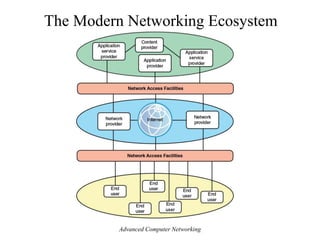
The Modern Networking Ecosystem
Advanced Computer Networking
• The ecosystem exists to provide services to end users
• user platforms: fixed(PC or workstation), portable
(laptop), smartphone (tablet, mobile)
• Users connect to network-based services and content
through network access facilities
• Access networks: DSL, Ethernet, Wi-Fi, WiMAX,
3G/4G,…
• users use network facilities to access applications and
content
Advanced Computer Networking
• Application providers: provide applications that run
on the user’s platform
– App store
• application service provider: acts as a server or
host of application software that is executed on the
provider’s platforms
– Ex: web servers, e-mail servers, and database servers
• content provider: serves the data to be consumed on
the user device
– data may be commercially provided intellectual property
– Ex: music record labels and movie studios
Advanced Computer Networking
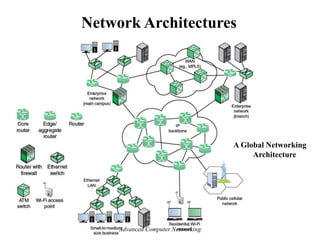
Network Architectures
A Global Networking
Architecture
Advanced Computer Networking
• IP backbone: consists of high-performance routers,
called core routers, interconnected with high-volume
optical links
– wavelength-division multiplexing (WDM)
• Edge/aggregation routers. provide connectivity to
external networks and users
• used within an enterprise network to connect routers
and switches, to external resources, such as an IP
backbone or a high-speed WAN
• Requirements by 2020: 200 Gbps to 400 Gbps per
optical link for aggregation routers, and 400 Gbps to
1 Tbps per optical link for core routers
Advanced Computer Networking
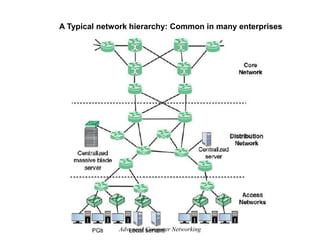
A Typical network hierarchy: Common in many enterprises
Advanced Computer Networking
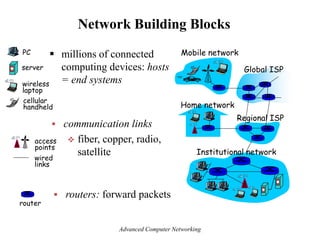
Network Building Blocks
 millions of connected
computing devices: hosts
= end systems
Home network
Institutional network
Mobile network
Global ISP
Regional ISP
router
PC
server
wireless
laptop
cellular
handheld
wired
links
access
points
 communication links
 fiber, copper, radio,
satellite
 routers: forward packets
Advanced Computer Networking
Access Networks
Advanced Computer Networking
telephone
network Internet
home
dial-up
modem
ISP
modem
(e.g., AOL)
home
PC
central
office
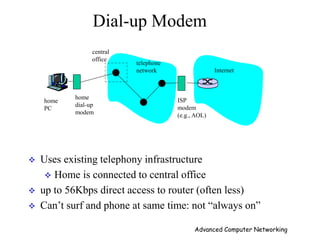
 Uses existing telephony infrastructure
 Home is connected to central office
 up to 56Kbps direct access to router (often less)
 Can’t surf and phone at same time: not ―always on‖
Dial-up Modem
Advanced Computer Networking
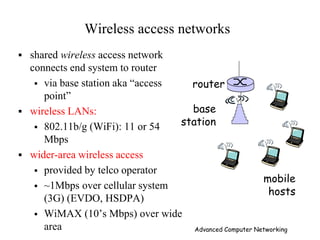
Wireless access networks
 shared wireless access network
connects end system to router
 via base station aka ―access
point‖
 wireless LANs:
 802.11b/g (WiFi): 11 or 54
Mbps
 wider-area wireless access
 provided by telco operator
 ~1Mbps over cellular system
(3G) (EVDO, HSDPA)
 WiMAX (10’s Mbps) over wide
area
base
station
mobile
hosts
router
Advanced Computer Networking
100 Mbps
100 Mbps
100 Mbps
1 Gbps
server
Ethernet
switch
Institutional
router
To Institution’s
ISP
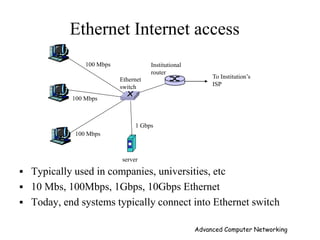
Ethernet Internet access
 Typically used in companies, universities, etc
 10 Mbs, 100Mbps, 1Gbps, 10Gbps Ethernet
 Today, end systems typically connect into Ethernet switch
Advanced Computer Networking
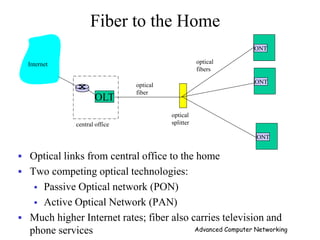
ONT
OLT
central office
optical
splitter
ONT
ONT
optical
fiber
optical
fibers
Internet
Fiber to the Home
 Optical links from central office to the home
 Two competing optical technologies:
 Passive Optical network (PON)
 Active Optical Network (PAN)
 Much higher Internet rates; fiber also carries television and
phone services Advanced Computer Networking
Ethernet
 Developed in the mid-1970s
 Ethernet eventually became the dominant local area
networking technology
 it competes mainly with 802.11 wireless networks
 the Ethernet is a multiple-access network
 a set of nodes sends and receives frames over a shared
link
 Multiple Access with Collision Detect (CSMA/CD)
 Data rates: up to 100 Gbps from few meters to ten
kilometers
Advanced Computer Networking
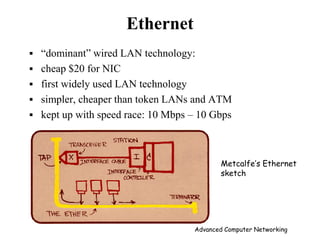
Ethernet
 ―dominant‖ wired LAN technology:
 cheap $20 for NIC
 first widely used LAN technology
 simpler, cheaper than token LANs and ATM
 kept up with speed race: 10 Mbps – 10 Gbps
Metcalfe’s Ethernet
sketch
Advanced Computer Networking
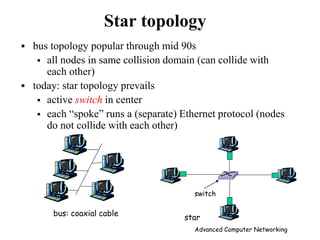
Star topology
 bus topology popular through mid 90s
 all nodes in same collision domain (can collide with
each other)
 today: star topology prevails
 active switch in center
 each ―spoke‖ runs a (separate) Ethernet protocol (nodes
do not collide with each other)
switch
bus: coaxial cable
star
Advanced Computer Networking
Ethernet: Unreliable, connectionless
 connectionless: No handshaking between sending and
receiving NICs
 unreliable: receiving NIC doesn’t send acks or nacks to
sending NIC
 Ethernet’s MAC protocol: CSMA/CD
 a node listens as it transmits and can therefore detect when a
frame it is transmitting has interfered (collided) with a frame
transmitted by another node
Advanced Computer Networking
Ethernet CSMA/CD
1. NIC receives datagram from
network layer, creates frame
2. If NIC senses channel idle,
starts frame transmission If
NIC senses channel busy, waits
until channel idle, then
transmits
3. If NIC transmits entire frame
without detecting another
transmission, NIC is done with
frame !
4. If NIC detects another
transmission while
transmitting, aborts and sends
jam signal
5. After aborting, NIC enters
exponential backoff: after mth
collision, NIC chooses K at
random from
{0,1,2,…,2m-1}. NIC waits K·512
bit times, returns to Step 2
Advanced Computer Networking
Wi-Fi
• Application: work place, home, educational institutions, cafes,
airports. and street corners
• First used to replace Ethernet cabling
• wireless LANs are now one of the most important access
network technologies in the Internet today
• The winner wireless standard: IEEE 802.11 wireless LAN,
also known as Wi-Fi
• IEEE 802.11 committee and Wi-Fi Alliance
Advanced Computer Networking
Wi-Fi Data Rates
• Advancement of antenna technologies, wireless transmission
techniques, wireless protocol design introduce new standards
of Wi-Fi
 802.11 (1997): 2 Mbps
 802.11a (1999): 54 Mbps
 802.11b (1999): 11 Mbps
 802.11n (1999): 600 Mbps
 802.11g (2003): 54 Mbps
 802.11ad (2012): 6.76 Gbps
 802.11ac (2014): 3.2 Gbps
 802.11ac operates in the 5-Ghz band
o Used advanced technologies of antenna design and
signal processing
 802.11ad operates in the 60-Ghz frequency band
o few devices operate in the 60-Ghz band
o offers much wider channel bandwidth
Advanced Computer Networking
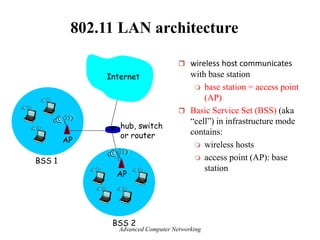
802.11 LAN architecture
 wireless host communicates
with base station
 base station = access point
(AP)
 Basic Service Set (BSS) (aka
―cell‖) in infrastructure mode
contains:
 wireless hosts
 access point (AP): base
station
BSS 1
BSS 2
Internet
hub, switch
or router
AP
AP
Advanced Computer Networking
802.11: Channels, association
• 802.11b: 2.4GHz-2.485GHz spectrum divided into 11 channels
at different frequencies
– AP admin chooses frequency for AP
– interference possible: channel can be same as that chosen
by neighboring AP!
• host: must associate with an AP
– scans channels, listening for beacon frames containing
AP’s name (SSID) and MAC address
– selects AP to associate with
– may perform authentication
Advanced Computer Networking
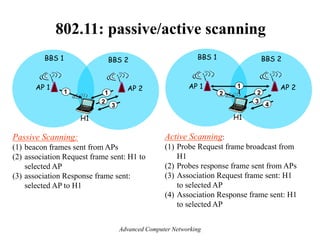
802.11: passive/active scanning
AP 2
AP 1
H1
BBS 2
BBS 1
1
2
2
3
4
Active Scanning:
(1) Probe Request frame broadcast from
H1
(2) Probes response frame sent from APs
(3) Association Request frame sent: H1
to selected AP
(4) Association Response frame sent: H1
to selected AP
AP 2
AP 1
H1
BBS 2
BBS 1
1
2
3
1
Passive Scanning:
(1) beacon frames sent from APs
(2) association Request frame sent: H1 to
selected AP
(3) association Response frame sent:
selected AP to H1
Advanced Computer Networking
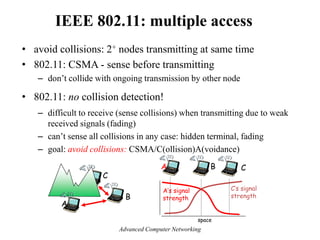
IEEE 802.11: multiple access
• avoid collisions: 2+ nodes transmitting at same time
• 802.11: CSMA - sense before transmitting
– don’t collide with ongoing transmission by other node
• 802.11: no collision detection!
– difficult to receive (sense collisions) when transmitting due to weak
received signals (fading)
– can’t sense all collisions in any case: hidden terminal, fading
– goal: avoid collisions: CSMA/C(ollision)A(voidance)
A
B
C
A B C
A’s signal
strength
space
C’s signal
strength
Advanced Computer Networking
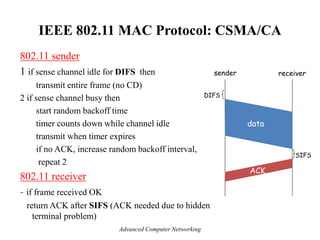
IEEE 802.11 MAC Protocol: CSMA/CA
802.11 sender
1 if sense channel idle for DIFS then
transmit entire frame (no CD)
2 if sense channel busy then
start random backoff time
timer counts down while channel idle
transmit when timer expires
if no ACK, increase random backoff interval,
repeat 2
802.11 receiver
- if frame received OK
return ACK after SIFS (ACK needed due to hidden
terminal problem)
sender receiver
DIFS
data
SIFS
ACK
Advanced Computer Networking
Cellular Networks
Advanced Computer Networking
Cellular Systems
• Cellular systems provide voice and data communication with
regional, national, or international coverage
• Cellular systems were initially designed for mobile terminals
inside vehicles with antennas mounted on the vehicle roof.
• Today these systems have evolved to support lightweight
handheld mobile terminals
• The basic premise behind cellular system design is frequency
reuse
Advanced Computer Networking
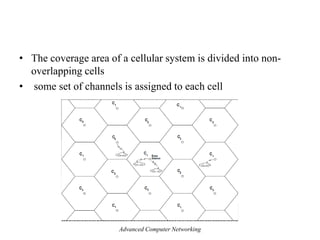
• The coverage area of a cellular system is divided into non-
overlapping cells
• some set of channels is assigned to each cell
Advanced Computer Networking
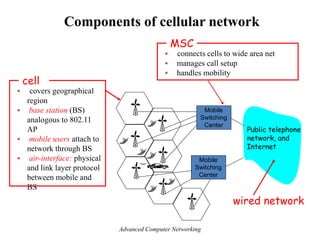
Mobile
Switching
Center
Public telephone
network, and
Internet
Mobile
Switching
Center
Components of cellular network
 connects cells to wide area net
 manages call setup
 handles mobility
MSC
 covers geographical
region
 base station (BS)
analogous to 802.11
AP
 mobile users attach to
network through BS
 air-interface: physical
and link layer protocol
between mobile and
BS
cell
wired network
Advanced Computer Networking
Multiple-Access Techniques
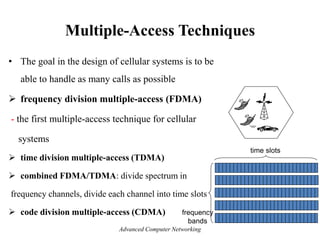
• The goal in the design of cellular systems is to be
able to handle as many calls as possible
 frequency division multiple-access (FDMA)
- the first multiple-access technique for cellular
systems
 time division multiple-access (TDMA)
 combined FDMA/TDMA: divide spectrum in
frequency channels, divide each channel into time slots
 code division multiple-access (CDMA) frequency
bands
time slots
Advanced Computer Networking
1G Cellular Systems
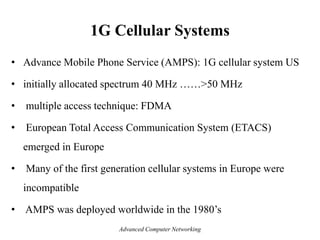
• Advance Mobile Phone Service (AMPS): 1G cellular system US
• initially allocated spectrum 40 MHz ……>50 MHz
• multiple access technique: FDMA
• European Total Access Communication System (ETACS)
emerged in Europe
• Many of the first generation cellular systems in Europe were
incompatible
• AMPS was deployed worldwide in the 1980’s
Advanced Computer Networking
1G Cellular Systems
Advanced Computer Networking
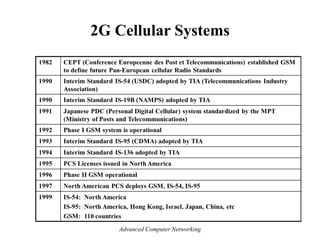
2G Cellular Systems
• Compared to first-generation systems, 2G three primary benefits
– conversations are digitally encrypted
– significantly more efficient on the spectrum allowing for far
greater mobile phone penetration levels
– introduced data services for mobile
• Second generation 2G cellular telecom networks were
commercially launched on the GSM standard
• GSM (global system for mobile communications): combined
FDMA/TDMA
– most widely deployed
Advanced Computer Networking
2G Cellular Systems
2.5 G systems: voice and data channels
• for those who can’t wait for 3G service: 2G extensions
• general packet radio service (GPRS)
– evolved from GSM
– data sent on multiple channels (if available)
• enhanced data rates for global evolution (EDGE)
– also evolved from GSM, using enhanced modulation
– data rates up to 384K
• CDMA-2000 (phase 1)
– data rates up to 144K
– evolved from IS-95
Advanced Computer Networking
Drawbacks of 2G :
• 2G requires strong digital signals to help mobile phones work
• If there is no network coverage in any specific area , digital
signals would weak
• 2G systems are unable to handle complex data such as Videos
Advanced Computer Networking
2G Cellular Systems
Advanced Computer Networking
3G Cellular Systems
 3G systems: voice/data
• the standards for developing the networks were different for
different parts of the world
• Hence, it was decided to have a network which provides services
independent of the technology platform and whose network design
standards are same globally
• Thus 3G was born
• 3G is not one standard; it is a family of standards which can all
work together
Advanced Computer Networking
 IMT-2000 (International Mobile Telecommunications-2000):
- Fulfill one's dream of anywhere, anytime communications a
reality.
 Important Component of IMT-2000 is ability to provide high
data rate capabilities:
- 2 Mbps for indoor
- 384 Kbps for outdoor stationary use and
walking speed
- 144 kbps for vehicular environment.
Advanced Computer Networking
3G Cellular Systems
The following standards are typically branded 3G:
• Universal Mobile Telecommunications Service (UMTS)
– first offered in 2001
– used primarily in Europe, Japan, China
– data service: High Speed Uplink/Downlink packet Access: 3 Mbps
• CDMA-2000: CDMA in TDMA slots
– first offered in 2002
– used especially in North America and South Korea
– data service: up to 14 Mbps
Advanced Computer Networking
• 3G can be applied to wireless voice telephony, mobile Internet
access, fixed wireless Internet access, video calls and mobile TV
technologies
Drawbacks:
• High bandwidth requirement
• It was challenge to build the infrastructure for 3G
• 3G phones are expensive
Advanced Computer Networking
4G Cellular Systems
• In 2007, a new global standard called International
Mobile Telecommunications-Advanced (IMT-Advanced)
broadband cellular network technology developed
Features:
• compatibility of services within IMT and with fixed
networks
• capability of interworking with other radio access systems
• high quality mobile services
• worldwide roaming capability
• enhanced peak data rates to support advanced services
and applications.
Advanced Computer Networking
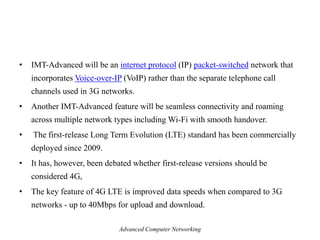
• IMT-Advanced will be an internet protocol (IP) packet-switched network that
incorporates Voice-over-IP (VoIP) rather than the separate telephone call
channels used in 3G networks.
• Another IMT-Advanced feature will be seamless connectivity and roaming
across multiple network types including Wi-Fi with smooth handover.
• The first-release Long Term Evolution (LTE) standard has been commercially
deployed since 2009.
• It has, however, been debated whether first-release versions should be
considered 4G,
• The key feature of 4G LTE is improved data speeds when compared to 3G
networks - up to 40Mbps for upload and download.
Advanced Computer Networking
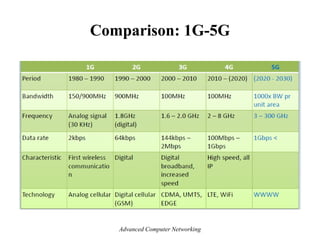
Comparison: 1G-5G
Advanced Computer Networking
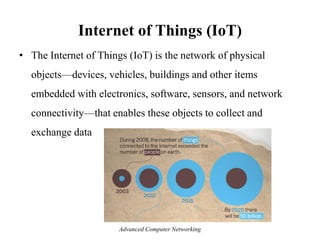
Internet of Things (IoT)
• The Internet of Things (IoT) is the network of physical
objects—devices, vehicles, buildings and other items
embedded with electronics, software, sensors, and network
connectivity—that enables these objects to collect and
exchange data
Advanced Computer Networking
• The Internet of Things (IoT): refers to the expanding
interconnection of smart devices, ranging from appliances to
tiny sensors
• The Internet now supports the interconnection of billions of
industrial and personal objects
• IoT is primarily driven by deeply embedded devices
• These devices are low bandwidth, low-repetition data-capture
and low-bandwidth data-usage appliances
• Internet of Things—the ―things‖ that are connected, and the
Internet that interconnects them
Internet of Things (IoT)
Advanced Computer Networking
IoT system consists of five layers:
 Sensors and actuators: These are the things
– observe their environment and report back quantitative
measurements
– temperature, humidity
– Actuators operate on their environment (operating a valve)
• Connectivity: A device may connect via either a wireless or
wired link into a network to send collected data to the
appropriate data center
Layers of the Internet of Things
Advanced Computer Networking
• Capacity: The network supporting the devices must be able to
handle a potentially huge flow of data
• Storage: There needs to be a large storage facility to store and
maintain backups of all the collected data
• Data analytics. For large collections of devices, ―big data‖ is
generated, requiring a data analytics capability to process the
data flow
Layers of the Internet of Things
Advanced Computer Networking
Components of IoT-Enabled Things
• key ingredients: sensors, actuators, a microcontroller, a means
of communication (transceiver), and a means of identification
(radio-frequency identification)
• A sensor measures some parameter of a physical, chemical, or
biological entity
• A sensor send data to the controller either periodically or when
a defined threshold is crossed (active mode)
• the sensor may operate in the passive mode, providing data
when requested by the controller
Advanced Computer Networking
• An actuator receives an electronic signal from a controller
and responds by interacting with its environment to produce an
effect on some parameter of a physical, chemical, or biological
entity
• An actuator provides a mechanical response according to the
input provided by the sensors and (usually) processed by other
electronics
Advanced Computer Networking
• A transceiver contains the electronics needed to transmit and receive data
• Most IoT devices contain a wireless transceiver, capable of communication
using Wi-Fi, ZigBee or some other wireless scheme
• Radio-frequency identification (RFID) technology, which uses radio
waves to identify items, is increasingly becoming an enabling technology for
IoT
• The main elements of an RFID system are tags and readers
• RFID tags are small programmable devices used for object, animal and
human tracking
• RFID readers acquire and sometimes rewrite information stored on RFID tags
Advanced Computer Networking
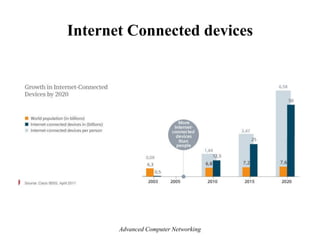
Internet Connected devices
Advanced Computer Networking
Market growth
• ―According to a study conducted by Frost & Sullivan in 2011, the global RFID market of $3 billion
to $4 billion (in 2009) will grow by twelve percent per year through 2016 and reach a volume of
approximately $6.5 billion to almost $9 billion.‖
• 80 percent of all households in the European Union are expected to have intelligent power meters by
2020.
• A building’s energy management can then be monitored and administered remotely via a smartphone
or a PC. Market experts predict that this global market, which represented $5.3 billion in 2010.
• In February 2012 the Chinese government therefore decided to set up a fund of approximately $775
million to support this field in the next five years. It will grow to $11 billion by 2015.
– This sector is expected to grow to $116 billion by 2015, according to a report published by the
Xinhua News Agency in late 2010.
Advanced Computer Networking
Global Data Generation
- Everyday around 20 quintillion (10^18) bytes of data are
produced (Source: http://www-01.ibm.com/software/data/bigdata/).
- This data includes textual content (unstructured, semi-structured,
structured) to multimedia content (images, video and audio), on
a variety of platforms (enterprise, social media, and sensors).
Advanced Computer Networking
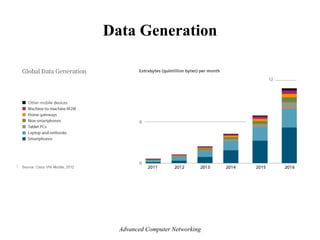
Data Generation
Advanced Computer Networking

1_________Elements of Moderen Network.pdf

  • 1.
    Elements of ModernNetwork Mekuanint A. (PhD) memekuanint@gmail.com Faculty of Computing Bahir Dar Institute of Technology Bahir Dar University Advanced Computer Networking
  • 2.
    The Modern NetworkingEcosystem Advanced Computer Networking
  • 3.
    • The ecosystemexists to provide services to end users • user platforms: fixed(PC or workstation), portable (laptop), smartphone (tablet, mobile) • Users connect to network-based services and content through network access facilities • Access networks: DSL, Ethernet, Wi-Fi, WiMAX, 3G/4G,… • users use network facilities to access applications and content Advanced Computer Networking
  • 4.
    • Application providers:provide applications that run on the user’s platform – App store • application service provider: acts as a server or host of application software that is executed on the provider’s platforms – Ex: web servers, e-mail servers, and database servers • content provider: serves the data to be consumed on the user device – data may be commercially provided intellectual property – Ex: music record labels and movie studios Advanced Computer Networking
  • 5.
    Network Architectures A GlobalNetworking Architecture Advanced Computer Networking
  • 6.
    • IP backbone:consists of high-performance routers, called core routers, interconnected with high-volume optical links – wavelength-division multiplexing (WDM) • Edge/aggregation routers. provide connectivity to external networks and users • used within an enterprise network to connect routers and switches, to external resources, such as an IP backbone or a high-speed WAN • Requirements by 2020: 200 Gbps to 400 Gbps per optical link for aggregation routers, and 400 Gbps to 1 Tbps per optical link for core routers Advanced Computer Networking
  • 7.
    A Typical networkhierarchy: Common in many enterprises Advanced Computer Networking
  • 8.
    Network Building Blocks millions of connected computing devices: hosts = end systems Home network Institutional network Mobile network Global ISP Regional ISP router PC server wireless laptop cellular handheld wired links access points  communication links  fiber, copper, radio, satellite  routers: forward packets Advanced Computer Networking
  • 9.
  • 10.
    telephone network Internet home dial-up modem ISP modem (e.g., AOL) home PC central office Uses existing telephony infrastructure  Home is connected to central office  up to 56Kbps direct access to router (often less)  Can’t surf and phone at same time: not ―always on‖ Dial-up Modem Advanced Computer Networking
  • 11.
    Wireless access networks shared wireless access network connects end system to router  via base station aka ―access point‖  wireless LANs:  802.11b/g (WiFi): 11 or 54 Mbps  wider-area wireless access  provided by telco operator  ~1Mbps over cellular system (3G) (EVDO, HSDPA)  WiMAX (10’s Mbps) over wide area base station mobile hosts router Advanced Computer Networking
  • 12.
    100 Mbps 100 Mbps 100Mbps 1 Gbps server Ethernet switch Institutional router To Institution’s ISP Ethernet Internet access  Typically used in companies, universities, etc  10 Mbs, 100Mbps, 1Gbps, 10Gbps Ethernet  Today, end systems typically connect into Ethernet switch Advanced Computer Networking
  • 13.
    ONT OLT central office optical splitter ONT ONT optical fiber optical fibers Internet Fiber tothe Home  Optical links from central office to the home  Two competing optical technologies:  Passive Optical network (PON)  Active Optical Network (PAN)  Much higher Internet rates; fiber also carries television and phone services Advanced Computer Networking
  • 14.
    Ethernet  Developed inthe mid-1970s  Ethernet eventually became the dominant local area networking technology  it competes mainly with 802.11 wireless networks  the Ethernet is a multiple-access network  a set of nodes sends and receives frames over a shared link  Multiple Access with Collision Detect (CSMA/CD)  Data rates: up to 100 Gbps from few meters to ten kilometers Advanced Computer Networking
  • 15.
    Ethernet  ―dominant‖ wiredLAN technology:  cheap $20 for NIC  first widely used LAN technology  simpler, cheaper than token LANs and ATM  kept up with speed race: 10 Mbps – 10 Gbps Metcalfe’s Ethernet sketch Advanced Computer Networking
  • 16.
    Star topology  bustopology popular through mid 90s  all nodes in same collision domain (can collide with each other)  today: star topology prevails  active switch in center  each ―spoke‖ runs a (separate) Ethernet protocol (nodes do not collide with each other) switch bus: coaxial cable star Advanced Computer Networking
  • 17.
    Ethernet: Unreliable, connectionless connectionless: No handshaking between sending and receiving NICs  unreliable: receiving NIC doesn’t send acks or nacks to sending NIC  Ethernet’s MAC protocol: CSMA/CD  a node listens as it transmits and can therefore detect when a frame it is transmitting has interfered (collided) with a frame transmitted by another node Advanced Computer Networking
  • 18.
    Ethernet CSMA/CD 1. NICreceives datagram from network layer, creates frame 2. If NIC senses channel idle, starts frame transmission If NIC senses channel busy, waits until channel idle, then transmits 3. If NIC transmits entire frame without detecting another transmission, NIC is done with frame ! 4. If NIC detects another transmission while transmitting, aborts and sends jam signal 5. After aborting, NIC enters exponential backoff: after mth collision, NIC chooses K at random from {0,1,2,…,2m-1}. NIC waits K·512 bit times, returns to Step 2 Advanced Computer Networking
  • 19.
    Wi-Fi • Application: workplace, home, educational institutions, cafes, airports. and street corners • First used to replace Ethernet cabling • wireless LANs are now one of the most important access network technologies in the Internet today • The winner wireless standard: IEEE 802.11 wireless LAN, also known as Wi-Fi • IEEE 802.11 committee and Wi-Fi Alliance Advanced Computer Networking
  • 20.
    Wi-Fi Data Rates •Advancement of antenna technologies, wireless transmission techniques, wireless protocol design introduce new standards of Wi-Fi  802.11 (1997): 2 Mbps  802.11a (1999): 54 Mbps  802.11b (1999): 11 Mbps  802.11n (1999): 600 Mbps  802.11g (2003): 54 Mbps  802.11ad (2012): 6.76 Gbps  802.11ac (2014): 3.2 Gbps  802.11ac operates in the 5-Ghz band o Used advanced technologies of antenna design and signal processing  802.11ad operates in the 60-Ghz frequency band o few devices operate in the 60-Ghz band o offers much wider channel bandwidth Advanced Computer Networking
  • 21.
    802.11 LAN architecture wireless host communicates with base station  base station = access point (AP)  Basic Service Set (BSS) (aka ―cell‖) in infrastructure mode contains:  wireless hosts  access point (AP): base station BSS 1 BSS 2 Internet hub, switch or router AP AP Advanced Computer Networking
  • 22.
    802.11: Channels, association •802.11b: 2.4GHz-2.485GHz spectrum divided into 11 channels at different frequencies – AP admin chooses frequency for AP – interference possible: channel can be same as that chosen by neighboring AP! • host: must associate with an AP – scans channels, listening for beacon frames containing AP’s name (SSID) and MAC address – selects AP to associate with – may perform authentication Advanced Computer Networking
  • 23.
    802.11: passive/active scanning AP2 AP 1 H1 BBS 2 BBS 1 1 2 2 3 4 Active Scanning: (1) Probe Request frame broadcast from H1 (2) Probes response frame sent from APs (3) Association Request frame sent: H1 to selected AP (4) Association Response frame sent: H1 to selected AP AP 2 AP 1 H1 BBS 2 BBS 1 1 2 3 1 Passive Scanning: (1) beacon frames sent from APs (2) association Request frame sent: H1 to selected AP (3) association Response frame sent: selected AP to H1 Advanced Computer Networking
  • 24.
    IEEE 802.11: multipleaccess • avoid collisions: 2+ nodes transmitting at same time • 802.11: CSMA - sense before transmitting – don’t collide with ongoing transmission by other node • 802.11: no collision detection! – difficult to receive (sense collisions) when transmitting due to weak received signals (fading) – can’t sense all collisions in any case: hidden terminal, fading – goal: avoid collisions: CSMA/C(ollision)A(voidance) A B C A B C A’s signal strength space C’s signal strength Advanced Computer Networking
  • 25.
    IEEE 802.11 MACProtocol: CSMA/CA 802.11 sender 1 if sense channel idle for DIFS then transmit entire frame (no CD) 2 if sense channel busy then start random backoff time timer counts down while channel idle transmit when timer expires if no ACK, increase random backoff interval, repeat 2 802.11 receiver - if frame received OK return ACK after SIFS (ACK needed due to hidden terminal problem) sender receiver DIFS data SIFS ACK Advanced Computer Networking
  • 26.
  • 27.
    Cellular Systems • Cellularsystems provide voice and data communication with regional, national, or international coverage • Cellular systems were initially designed for mobile terminals inside vehicles with antennas mounted on the vehicle roof. • Today these systems have evolved to support lightweight handheld mobile terminals • The basic premise behind cellular system design is frequency reuse Advanced Computer Networking
  • 28.
    • The coveragearea of a cellular system is divided into non- overlapping cells • some set of channels is assigned to each cell Advanced Computer Networking
  • 29.
    Mobile Switching Center Public telephone network, and Internet Mobile Switching Center Componentsof cellular network  connects cells to wide area net  manages call setup  handles mobility MSC  covers geographical region  base station (BS) analogous to 802.11 AP  mobile users attach to network through BS  air-interface: physical and link layer protocol between mobile and BS cell wired network Advanced Computer Networking
  • 30.
    Multiple-Access Techniques • Thegoal in the design of cellular systems is to be able to handle as many calls as possible  frequency division multiple-access (FDMA) - the first multiple-access technique for cellular systems  time division multiple-access (TDMA)  combined FDMA/TDMA: divide spectrum in frequency channels, divide each channel into time slots  code division multiple-access (CDMA) frequency bands time slots Advanced Computer Networking
  • 31.
    1G Cellular Systems •Advance Mobile Phone Service (AMPS): 1G cellular system US • initially allocated spectrum 40 MHz ……>50 MHz • multiple access technique: FDMA • European Total Access Communication System (ETACS) emerged in Europe • Many of the first generation cellular systems in Europe were incompatible • AMPS was deployed worldwide in the 1980’s Advanced Computer Networking
  • 32.
    1G Cellular Systems AdvancedComputer Networking
  • 33.
    2G Cellular Systems •Compared to first-generation systems, 2G three primary benefits – conversations are digitally encrypted – significantly more efficient on the spectrum allowing for far greater mobile phone penetration levels – introduced data services for mobile • Second generation 2G cellular telecom networks were commercially launched on the GSM standard • GSM (global system for mobile communications): combined FDMA/TDMA – most widely deployed Advanced Computer Networking
  • 34.
    2G Cellular Systems 2.5G systems: voice and data channels • for those who can’t wait for 3G service: 2G extensions • general packet radio service (GPRS) – evolved from GSM – data sent on multiple channels (if available) • enhanced data rates for global evolution (EDGE) – also evolved from GSM, using enhanced modulation – data rates up to 384K • CDMA-2000 (phase 1) – data rates up to 144K – evolved from IS-95 Advanced Computer Networking
  • 35.
    Drawbacks of 2G: • 2G requires strong digital signals to help mobile phones work • If there is no network coverage in any specific area , digital signals would weak • 2G systems are unable to handle complex data such as Videos Advanced Computer Networking
  • 36.
    2G Cellular Systems AdvancedComputer Networking
  • 37.
    3G Cellular Systems 3G systems: voice/data • the standards for developing the networks were different for different parts of the world • Hence, it was decided to have a network which provides services independent of the technology platform and whose network design standards are same globally • Thus 3G was born • 3G is not one standard; it is a family of standards which can all work together Advanced Computer Networking
  • 38.
     IMT-2000 (InternationalMobile Telecommunications-2000): - Fulfill one's dream of anywhere, anytime communications a reality.  Important Component of IMT-2000 is ability to provide high data rate capabilities: - 2 Mbps for indoor - 384 Kbps for outdoor stationary use and walking speed - 144 kbps for vehicular environment. Advanced Computer Networking
  • 39.
    3G Cellular Systems Thefollowing standards are typically branded 3G: • Universal Mobile Telecommunications Service (UMTS) – first offered in 2001 – used primarily in Europe, Japan, China – data service: High Speed Uplink/Downlink packet Access: 3 Mbps • CDMA-2000: CDMA in TDMA slots – first offered in 2002 – used especially in North America and South Korea – data service: up to 14 Mbps Advanced Computer Networking
  • 40.
    • 3G canbe applied to wireless voice telephony, mobile Internet access, fixed wireless Internet access, video calls and mobile TV technologies Drawbacks: • High bandwidth requirement • It was challenge to build the infrastructure for 3G • 3G phones are expensive Advanced Computer Networking
  • 41.
    4G Cellular Systems •In 2007, a new global standard called International Mobile Telecommunications-Advanced (IMT-Advanced) broadband cellular network technology developed Features: • compatibility of services within IMT and with fixed networks • capability of interworking with other radio access systems • high quality mobile services • worldwide roaming capability • enhanced peak data rates to support advanced services and applications. Advanced Computer Networking
  • 42.
    • IMT-Advanced willbe an internet protocol (IP) packet-switched network that incorporates Voice-over-IP (VoIP) rather than the separate telephone call channels used in 3G networks. • Another IMT-Advanced feature will be seamless connectivity and roaming across multiple network types including Wi-Fi with smooth handover. • The first-release Long Term Evolution (LTE) standard has been commercially deployed since 2009. • It has, however, been debated whether first-release versions should be considered 4G, • The key feature of 4G LTE is improved data speeds when compared to 3G networks - up to 40Mbps for upload and download. Advanced Computer Networking
  • 43.
  • 44.
    Internet of Things(IoT) • The Internet of Things (IoT) is the network of physical objects—devices, vehicles, buildings and other items embedded with electronics, software, sensors, and network connectivity—that enables these objects to collect and exchange data Advanced Computer Networking
  • 45.
    • The Internetof Things (IoT): refers to the expanding interconnection of smart devices, ranging from appliances to tiny sensors • The Internet now supports the interconnection of billions of industrial and personal objects • IoT is primarily driven by deeply embedded devices • These devices are low bandwidth, low-repetition data-capture and low-bandwidth data-usage appliances • Internet of Things—the ―things‖ that are connected, and the Internet that interconnects them Internet of Things (IoT) Advanced Computer Networking
  • 46.
    IoT system consistsof five layers:  Sensors and actuators: These are the things – observe their environment and report back quantitative measurements – temperature, humidity – Actuators operate on their environment (operating a valve) • Connectivity: A device may connect via either a wireless or wired link into a network to send collected data to the appropriate data center Layers of the Internet of Things Advanced Computer Networking
  • 47.
    • Capacity: Thenetwork supporting the devices must be able to handle a potentially huge flow of data • Storage: There needs to be a large storage facility to store and maintain backups of all the collected data • Data analytics. For large collections of devices, ―big data‖ is generated, requiring a data analytics capability to process the data flow Layers of the Internet of Things Advanced Computer Networking
  • 48.
    Components of IoT-EnabledThings • key ingredients: sensors, actuators, a microcontroller, a means of communication (transceiver), and a means of identification (radio-frequency identification) • A sensor measures some parameter of a physical, chemical, or biological entity • A sensor send data to the controller either periodically or when a defined threshold is crossed (active mode) • the sensor may operate in the passive mode, providing data when requested by the controller Advanced Computer Networking
  • 49.
    • An actuatorreceives an electronic signal from a controller and responds by interacting with its environment to produce an effect on some parameter of a physical, chemical, or biological entity • An actuator provides a mechanical response according to the input provided by the sensors and (usually) processed by other electronics Advanced Computer Networking
  • 50.
    • A transceivercontains the electronics needed to transmit and receive data • Most IoT devices contain a wireless transceiver, capable of communication using Wi-Fi, ZigBee or some other wireless scheme • Radio-frequency identification (RFID) technology, which uses radio waves to identify items, is increasingly becoming an enabling technology for IoT • The main elements of an RFID system are tags and readers • RFID tags are small programmable devices used for object, animal and human tracking • RFID readers acquire and sometimes rewrite information stored on RFID tags Advanced Computer Networking
  • 51.
  • 52.
  • 53.
    Market growth • ―Accordingto a study conducted by Frost & Sullivan in 2011, the global RFID market of $3 billion to $4 billion (in 2009) will grow by twelve percent per year through 2016 and reach a volume of approximately $6.5 billion to almost $9 billion.‖ • 80 percent of all households in the European Union are expected to have intelligent power meters by 2020. • A building’s energy management can then be monitored and administered remotely via a smartphone or a PC. Market experts predict that this global market, which represented $5.3 billion in 2010. • In February 2012 the Chinese government therefore decided to set up a fund of approximately $775 million to support this field in the next five years. It will grow to $11 billion by 2015. – This sector is expected to grow to $116 billion by 2015, according to a report published by the Xinhua News Agency in late 2010. Advanced Computer Networking
  • 54.
    Global Data Generation -Everyday around 20 quintillion (10^18) bytes of data are produced (Source: http://www-01.ibm.com/software/data/bigdata/). - This data includes textual content (unstructured, semi-structured, structured) to multimedia content (images, video and audio), on a variety of platforms (enterprise, social media, and sensors). Advanced Computer Networking
  • 55.