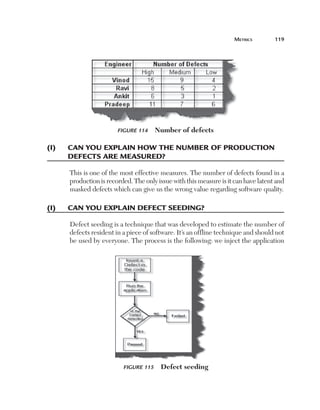
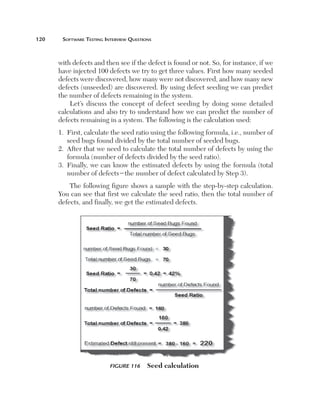
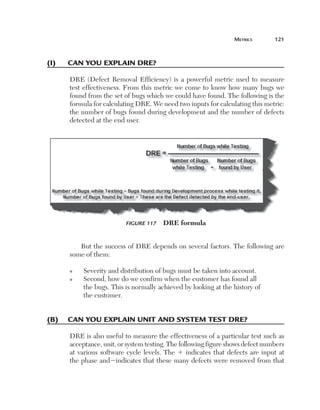
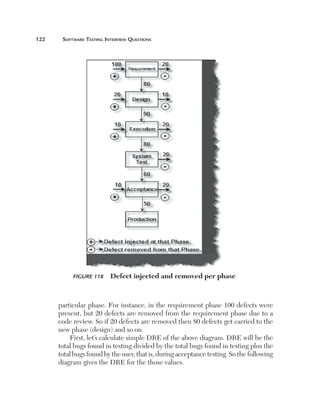
SOFTWARE TESTING
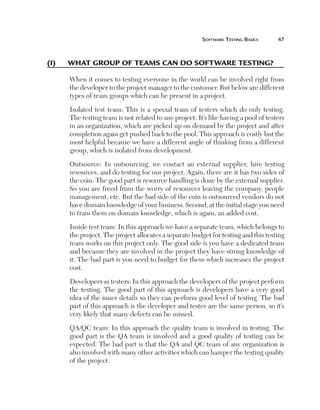
Interview Questions
S. Koirala & S. Sheikh

C O M P U T E R

S C I E N C E

S E R I E S

Include
TestCo s C D with
m
Demo plete ™
FR E E S and a
Estima oftware
tion Bo
ok!
Software Testing
Interview Questions
LICENSE, DISCLAIMER OF LIABILITY, AND LIMITED WARRANTY
The CD-ROM that accompanies this book may only be used on a single PC. This
license does not permit its use on the Internet or on a network (of any kind). By
purchasing or using this book/CD-ROM package(the “Work”), you agree that this
license grants permission to use the products contained herein, but does not give
you the right of ownership to any of the textual content in the book or ownership
to any of the information or products contained on the CD-ROM. Use of third
party software contained herein is limited to and subject to licensing terms for the
respective products, and permission must be obtained from the publisher or the owner
of the software in order to reproduce or network any portion of the textual material or
software (in any media) that is contained in the Work.
Infinity Science Press LLC (“ISP” or “the Publisher”) and anyone involved in the
creation, writing or production of the accompanying algorithms, code, or computer
programs (“the software”) or any of the third party software contained on the CDROM or any of the textual material in the book, cannot and do not warrant the
performance or results that might be obtained by using the software or contents of the
book. The authors, developers, and the publisher have used their best efforts to insure
the accuracy and functionality of the textual material and programs contained in this
package; we, however, make no warranty of any kind, express or implied, regarding
the performance of these contents or programs. The Work is sold “as is” without
warranty (except for defective materials used in manufacturing the disc or due to
faulty workmanship);
The authors, developers, and the publisher of any third party software, and anyone
involved in the composition, production, and manufacturing of this work will not be
liable for damages of any kind arising out of the use of (or the inability to use) the
algorithms, source code, computer programs, or textual material contained in this
publication. This includes, but is not limited to, loss of revenue or profit, or other
incidental, physical, or consequential damages arising out of the use of this Work.
The sole remedy in the event of a claim of any kind is expressly limited to
replacement of the book and/or the CD-ROM, and only at the discretion of the
Publisher.
The use of “implied warranty” and certain “exclusions” vary from state to state, and
might not apply to the purchaser of this product.
Software Testing
Interview Questions

By
S. Koirala
&
S. Sheikh

Infinity Science Press LLC
Hingham, Massachusetts
New Delhi
Revision & Reprint Copyright 2008 by Infinity Science Press LLC. All rights reserved.
Original Copyright 2008 by BPB PUBLICATIONS PVT. LTD. All rights reserved.
This publication, portions of it, or any accompanying software may not be reproduced in any way,
stored in a retrieval system of any type, or transmitted by any means or media, electronic or mechanical,
including, but not limited to, photocopy, recording, Internet postings or scanning, without prior
permission in writing from the publisher.
Infinity Science Press LLC
11 Leavitt Street
Hingham, MA 02043
Tel. 877-266-5796 (toll free)
Fax 781-740-1677
info@infinitysciencepress.com
www.infinitysciencepress.com
This book is printed on acid-free paper.
S. Koirala & S. Sheikh, Software Testing Interview Questions
ISBN: 978-1-934015-24-7
ISBN: 978-0-7637-8297-9 (e)
8480
The publisher recognizes and respects all marks used by companies, manufacturers, and developers as
a means to distinguish their products. All brand names and product names mentioned in this book are
trademarks or service marks of their respective companies. Any omission or misuse (of any kind) of
service marks or trademarks, etc. is not an attempt to infringe on the property of others.
 
Library of Congress Cataloging-in-Publication Data
Koirala, Shivprasad.
   Software testing interview questions / Shivprasad Koirala, Sham Sheikh.
     p. cm.
   ISBN 978-1-934015-24-7 (softcover)
  1.  Electronic data processing–Examinations, questions, etc   2.  Computer software–
Testing.   I.  Sheikh, Sham.   II.  Title.
   QA76.28.K635 2008
   005.1'4–dc22
	
8904321

2008022567

Our titles are available for adoption, license or bulk purchase by institutions, corporations, etc. For
additional information, please contact the Customer Service Dept. at 877-266-5796 (toll free).
Requests for replacement of a defective CD-ROM must be accompanied by the original disc, your
mailing address, telephone number, date of purchase and purchase price. Please state the nature of the
problem, and send the information to Infinity Science Press, 11 Leavitt Street, Hingham,
MA 02043.
The sole obligation of Infinity Science Press to the purchaser is to replace the disc, based on defective
materials or faulty workmanship, but not based on the operation or functionality of the product.
What’s on the CD
The CD contains all that you need for software testing:
n

n

n
n

S
 ample resumes which can help you improve your own
resume.
t
 estcomplete512demo setup is a software automation tool. In
the automation chapter we explain this tool. You can get the
latest update for this automated testing tool from http://www.
automatedqa.com/downloads/testcomplete/index.asp
Estimation TPA sheet.
Free estimation PDF book.
About this book
n

n

n

n

n

n

n

n

n

n

A
 s the name suggests “Software Testing Interview Questions,”
is mainly meant for new testers as well as professionals who
are looking for opportunities in the software testing field.
O
 ther than software testing basics, this book also covers
software processes and interview questions (i.e., Six Sigma and
CMMI) which are important from SQA point of view. SQA is
a position which every tester eventually wants to reach on a
senior level.
T
 his book also goes one step farther and covers software
estimation and includes topics such as function points and
TPA analysis.
A
 utomation testing is one of the most covered sections during
software testing interviews. It is covered in this book using
testing software.
F
 rom a senior level point of view metrics form an important
part of the software testing interviews. A complete chapter is
dedicated to it which covers the most frequently used metrics
such as DRE, spoilage, phage, defect density, and so on.
D
 uring software testing interviews the quality of a tester is
judged by the various testing techniques previously used.
This book has dedicated a complete chapter to complicated
concepts such as Boundary Value Analysis (BVA), equivalence,
exploratory, random/monkey testing, and pair-wise,
orthogonal, and decision tables.
T
 his book also covers non-technical aspects such as resume
creating, salary negotiations, and points to be remembered
(why do want to leave the organization?, where do you see
yourself in 3 years, and so on) during the process.
W
 ith the book we also have an accompanying CD which has
a test complete software testing tool setup, free software
estimation PDF book, interview rating sheet, and more.
W
 ith the CD we have also provided an interview rating sheet
which can be used to judge for yourself to what extent you are
ready for software testing interviews.
O
 n the CD we have also provided a sample resume which can
help prepare your resume.
Organizational Hierarchy
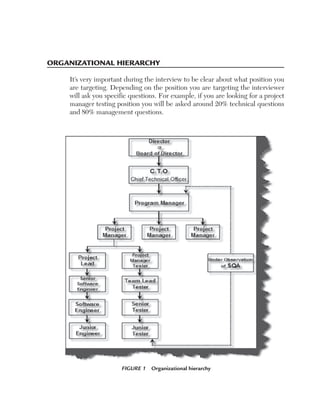
It’s very important during the interview to be clear about what position you
are targeting. Depending on the position you are targeting the interviewer
will ask you specific questions. For example, if you are looking for a project
manager testing position you will be asked around 20% technical questions
and 80% management questions.

Figure 1  Organizational hierarchy
viii	

Organizational Hierarchy

Note:  In small software houses and mid-scale software companies there are times
when they expect a program manager to be very technical. But in big software
houses the situation is very different; interviews are conducted according to
position.
Figure 1 shows the general hierarchy across most IT companies.
Note:  There are many small and medium software companies which do not
follow this hierarchy and have their own adhoc way of defining positions in the
company.
An employer is looking for a suitable candidate and a candidate is looking for
a better career. Normally in interviews the employer is very clear about what
type of candidate he is looking for. But 90% of the time the candidate is not
clear about the position he is looking for. How many times has it happened
to you that you have given a whole interview and when you mentioned the
position you were looking for you get this answer, “we are not hiring for that
position?” So be clear about the position you are looking for right from the
start of the interview.
There are basically two teams in a software organization: project teams
and quality teams. Project teams are those who execute the project and quality
teams are comprised of testers and SQA. The quality team looks after the
quality part of the project. Director and CTO are on the top of the hierarchy
of the company. The main role of the director is to handle finances; he is
responsible of all happenings in the company. The CTO’s (chief technical
officer) main role is to have a bird’s eye view of technical as well as management
operations in the project. He is closely involved with the director in reporting,
budgeting, and people management across the organization. The program
manager comes below the CTO and is mostly involved in interacting with the
project managers to see to higher level day-to-day operations in every project.
The program manager normally does not interact directly with the developers
or testers (serious scenarios are an exception); he only takes daily reports and
metrics from project managers and monitors the health of the project. Now
Organizational Hierarchy	

ix

let’s look at both project and quality team hierarchies. The following are the
number of years of experience according to position for the projects team:
n

n

n

n

n

J
 unior engineers are especially new and work under software
engineers.
S
 oftware engineers have around 1 to 2 years of experience.
Interviewers expect software engineers to be technically at a
medium level.
S
 enior software engineers have around 2 to 4 years of experience.
Interviewers expect them to technically be very strong.
P
 roject leads handle the majority of technical aspects of the
project and should have around 4 to 8 years of experience.
They are also indirect architects of the project. Interviewers
expect them to be technically strong and in terms of
architecture to be decent. Interviewers also expect them to
have people management skills.
P
 roject managers are expected to be around 40% technically
strong and should have experience above 10 years. But they
are more interviewed from the aspect of project management,
client interaction, people management, proposal preparation,
etc. So now judge where you stand, and where you want to go.

The quality hierarchy for various reasons comes under the project manager
of the project. Let’s start from the bottom of the hierarchy:
n

n

n

J
 unior tester: junior testers normally have 1 to 2 years of
experience or are entry level.Their main task is executing test
procedures prepared by seniors.
S
 enior tester: senior testers generally have 2 to 4 years of
experience and are expected to know how to prepare test plans.
They are also aware of various metrics and testing techniques
which help them to communicate project health. But the main
expectation from a senior tester is that he should independently
prepare test plans based on the requirement documents.
T
 eam lead tester: team lead testers mainly help and guide
the senior testers. They are primarily involved in deciding the
Resume Preparation Guidelines

n

n

testing strategy, what kind of automation tool used, etc. They
also act as a bridge between the project manager and the other
team members.
P
 roject test manager: the main job of a project test manager
is to collect accurate metrics and report them to the project
manager. He is also responsible for interacting with SQA
to give updates on the quality of the project. They are also
involved in the requirement phase.
S
 QA: If you are starting your career as a tester then you would
surely aim to become an SQA leader somewhere down the
line. The main job of SQA is to define the quality standard of
the organization and to ensure that every project follows the
quality process.

Resume Preparation Guidelines

N

TH E C

D

O

Note:  The first impression is the last impression.

A sample resume is provided in the “Sample Resume” folder on the CD.
Even before the interviewer meets you he will meet your resume. The
interviewer looking at your resume is 20% of the interview happening without
you even knowing it. With this in mind the following checklist should be
considered:
n

n

U
 se plain text when you are sending resumes through email.
For instance, if you sent your resume using Microsoft Word
and the interviewer is using Linux, he will never be able to
read your resume.
A
 ttaching a cover letter really impresses and makes you look
traditionally formal. Yes, even if you are sending your CV
through email send a cover letter.
Resume Preparation Guidelines	

xi

The following should be included in your resume:
n

Start with an objective or summary, for instance:
W
 orked as a senior tester for more than 4 years.
Implemented testing automation in projects.
®  ollowed the industry’s best practices and adhered and
F
implemented processes, which enhanced the quality of
technical delivery.
®  ledge to deliver the best technical solutions to the industry.
P
S
 pecify your core strengths at the start of your resume so the
interviewer can decide quickly if you are eligible for the position.
®

n

For example:
n
n
n
n

n

Looked after SQA and testing department independently.
Played a major role in software testing automation.
W
 orked extensively in software testing planning and estimation.
W
 ell-versed with the CMMI process and followed it
extensively in projects.
L
 ooking forward to work as an SQA or in a senior manager
position. (This is also a good place to specify your objective
or position, which makes it clear to the interviewer that he
should call you for an interview.)

For instance, if you are looking for a senior position specify it explicitly:
‘looking for a senior position.’ Any kind of certification such as CSTE, etc.,
you should make visible in this section.
n

n

O
 nce you have specified briefly your goals and what you have
done it’s time to specify what type of technology you have
worked with. For instance, BVA, automated QA, processes
(Six Sigma, CMMI), TPA analysis, etc.
A
 fter that you can give a run through of your experience
company-wise, that is, what company you have worked with,
year/month joined and year/month left. This will give an
overview to the interviewer of what type of companies you
have associated yourself with. Now it’s time to mention all the
xii	

Salary Negotiation

projects you have worked on untill now. It is best to start in
descending order, that is, from your current project backward.
For every project include these things:
n

n
n
n
n

n
n

n
n

n

n

P
 roject name/client name (It’s sometimes unethical to mention
a client’s name; I leave it to the readers.)
Number of team members.
Time span of the project.
Tools, languages, and technology used to complete the project.
B
 rief summary of the project. Senior people who have much
experience tend to increase their CV by putting in summaries
for all projects. It is best for them to just put descriptions of
the first three projects in descending order and the rest they
can offer verbally during the interview.
Finally, include your education and personal details.
I
 f working in a foreign country, remember your passport
number.
Your resume should not be more than 4 to 5 pages.
D
 o not mention your salary in your CV. You can talk about it
during the interview.
W
 hen you are writing summaries of projects make them
effective by using verbs such as managed a team of
5 members, architected the project from start to finish, etc.
M
 ake 4 to 5 copies of your resume as you will need them.

Salary Negotiation
Here are some points:
n

n

n

W
 hat is the salary trend? Do some research and have some
kind of baseline in mind. What is the salary trend based on
number of years of experience? Discuss this with your friends.
L
 et the employer first make the salary offer. Try to delay the
salary discussion untill the end.
I
 f you are asked your expectations come with a figure a little
high and say negotiable. Remember never say negotiable on
Interview Rating Sheet	

n

n
n
n

n

n
n

n

n

n

xiii

a number you have aimed for; HR guys will always bring it
down. Negotiate on AIMED SALARY 1 something extra.
T
 he normal trend is to look at your current salary and add a
little to it so that they can pull you in. Do your homework and
be firm about what you want.
Do not be harsh during salary negotiations.
It’s good to aim high, but at the same time, be realistic.
S
 ome companies have hidden costs attached to salaries.
Clarify rather than be surprised.
M
 any companies add extra performance compensation in your
base salary which can be surprising at times. Ask for a detailed
breakdown.
Talk with the employer about the frequency of raises.
G
 et everything in writing and, look it over with a cool head. Is
the offer worth leaving your current employer?
D
 o not forget: once you have the job in hand you can come
back to your current employer for negotiation.
T
 he best negotiation ground is not the new company where
you are going but the old company which you are leaving. So
once you have an offer in hand get back to your old employer
and show them the offer and then make your next move.
R
 emember somethings are worth more than money: JOB
SATISFACTION. So whatever you negotiate, if you think you
can get more, go for it.

Interview Rating Sheet
O
 n the CD we have provided an interview rating Excel spreadsheet. This
sheet will help you by providing insight about how ready you are for software
testing, JAVA, .NET, or SQL server interviews. In the spreadsheet there are
nine sections:
n
n
n
n
n

Guidelines
JAVA
JAVA results
.NET
.NET results
xiv	

Interview Rating Sheet

n
n
n
n

SQL server
SQL server results
Software testing
Software testing results

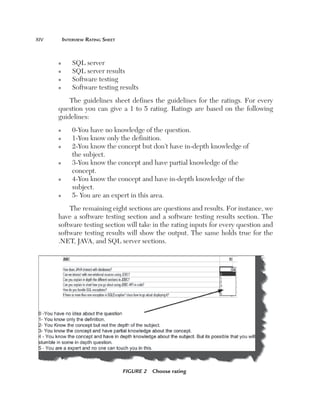
The guidelines sheet defines the guidelines for the ratings. For every
question you can give a 1 to 5 rating. Ratings are based on the following
guidelines:
n
n
n

n

n

n

0-You have no knowledge of the question.
1-You know only the definition.
2
 -You know the concept but don’t have in-depth knowledge of
the subject.
3
 -You know the concept and have partial knowledge of the
concept.
4
 -You know the concept and have in-depth knowledge of the
subject.
5- You are an expert in this area.

The remaining eight sections are questions and results. For instance, we
have a software testing section and a software testing results section. The
software testing section will take in the rating inputs for every question and
software testing results will show the output. The same holds true for the
.NET, JAVA, and SQL server sections.

Figure 2  Choose rating
Interview Rating Sheet	

xv

For every question you need to select ratings. So go through every
question and see how much you know. You do not have anyone to govern
you but you do have to clear the interview so answer honestly and know your
results beforehand.

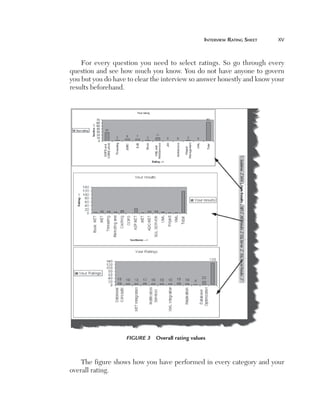
Figure 3  Overall rating values

The figure shows how you have performed in every category and your
overall rating.
xvi	

Common questions asked during interviews

Common questions asked during interviews
n

n
n
n
n

n
n

n
n
n
n
n
n
n
n
n
n
n
n

n
n
n
n
n

n

n

O
 ne of the first questions asked during an interview is “Can
you tell me something about yourself?”
Can you describe yourself and some of your achievements?
Why do you want to leave your current company?
Where do you see yourself in three years?
H
 ow well do you rate yourself in software testing, on a scale of
one to ten?
Are you looking for onsite opportunities?
W
 hy have you changed jobs so many times? (Prepare a decent
answer; do not blame companies and individuals).
Have you worked with software automation?
What do you know about our company?
Can you describe the best project you have worked on?
Do you work on Saturday and Sunday?
What is the biggest team size you have worked with?
Can you describe your most recent project?
How much time will you need to join our organization?
What certifications do you have?
What motivates you?
Which type of job gives you the greatest satisfaction?
What type of environment are you looking for?
D
 o you have experience in software testing project
management?
D
 o you like to work on a team or as an individual?
Describe the best project manager you have worked with.
Why should I hire you?
Have you ever been fired or forced to resign?
C
 an you explain some important points that you have learned
from your past projects?
H
 ave you worked on some unsuccessful projects, if yes can
you explain why the project failed?
Will you be comfortable with location changes?
How to Read This Book
The book provides some legends that will make your reading more effective.
Every question has simple tags which mark the rating of the questions.
These ratings are given by the author and vary according to particular
companies and individuals. The questions all categorized as follows:
(B) Basic Questions: These are fundamental questions and should be
answered. Example: Can you explain unit testing? People stumbling on this
question will rarely pass software testing interviews.
(I) Intermediate Questions: These are mid-level questions and will be expected
to be answered if you are looking for a higher position in the company.
(A) Advanced Questions: These are advanced level questions which are
expected when the interviewer is looking for a specialist in the field.
Note:  While reading you will come across “Note” sections which highlight
special points.
Contents
What’s on the CD
About the Book
Organizational Hierarchy 
Resume Preparation Guidelines 
Salary Negotiation
Interview Rating Sheet 
C
 ommon Questions Asked During
Interviews
How to Read This Book

Chapter 1  Software Testing Basics
(B)  which software life cycle phase does
In
testing occur?
(B) 
Can you explain the PDCA cycle and
where testing fits in? 
(B) 
What is the difference between white
box, black box, and gray box testing?
(B) 
What is the difference between a defect
and a failure?
(B) 
What are the categories of defects?
(B) 
What is the difference between verification
and validation?
(B)  How does testing affect risk?
(B) 
Does an increase in testing always improve
the project?
(I)  How do you define a testing policy?
(B) 
Should testing be done only after the build
and execution phases are complete?
(B)  there more defects in the design phase
Are
or in the coding phase?
(B) 
What kind of input do we need from the
end user to begin proper testing?

v
vi
vii
x
xii
xiii
xvi
xvii

1
1
1
2
3
4
4
4
5
6
7
9
10

xviii
Contents	

(B) 
What is the difference between latent
and masked defects?
(B)  defect which could have been removed
A
during the initial stage is removed in a
later stage. How does this affect cost?
(I)  Can you explain the workbench concept?
(B) 
What’s the difference between alpha
and beta testing?
(I) 
Can you explain the concept of defect
cascading?
(B) 
Can you explain how one defect leads to
other defects?
(B)  Can you explain usability testing?
(B) 
What are the different strategies for
rollout to end users?
(I) 
Can you explain requirement traceability
and its importance?
(B) 
What is the difference between pilot
and beta testing?
(B) 
How do you perform a risk analysis during
software testing?
(B) 
How do you conclude which section is
most risky in your application?
(B) 
What does entry and exit criteria mean
in a project?
(B)  what basis is the acceptance plan
On
prepared?
(B) 
What’s the relationship between
environment reality and test phases?
(B) 
What are different types of
verifications?
(B) 
What’s the difference between inspections
and walkthroughs?
(B) 
Can you explain regression testing and
confirmation testing?
What is coverage and what are the different
(I) 
types of coverage techniques?

xix

11
12
13
16
17
17
18
18
19
20
21
21
25
25
26
27
27
28
29
xx	

Contents

(A)  How does a coverage tool work?
(B)  What is configuration management?
(B) 
Can you explain the baseline concept
in software development?
(B) 
What are the different test plan
documents in a project?
(B) 
How do test documents in a project
span across the software development
lifecycle?
(A)  Can you explain inventories?
(A) 
How do you do analysis and design for
testing projects?
(A)  Can you explain calibration?
(B) 
Which test cases are written first: white
boxes or black boxes?
(I)  Can you explain cohabiting software?
(B) 
What impact ratings have you used in your
projects?
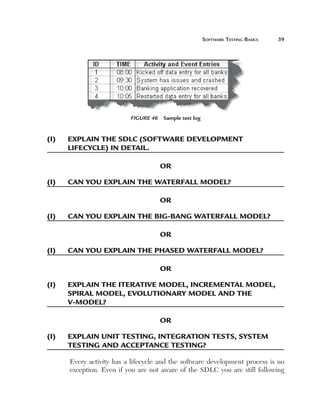
(B)  What is a test log?
(I) 
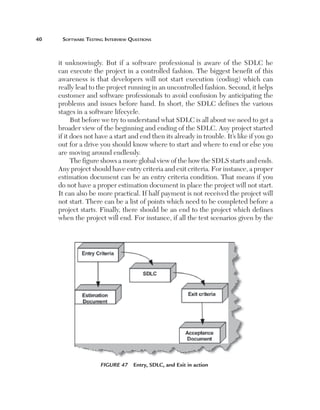
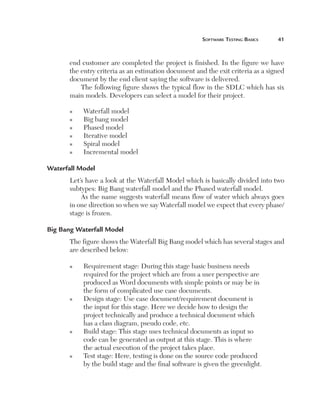
Explain the SDLC (Software Development
LifeCycle) in detail?
(I)  Can you explain the waterfall model?
(I) 
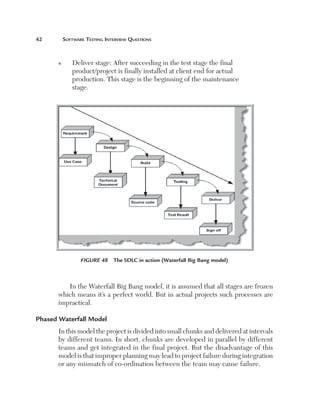
Can you explain the big-bang
waterfall model?
(I) 
Can you explain the phased
waterfall model?
(I) 
Explain the iterative model, incremental
model, spiral model, evolutionary model
and the V-model?
(I) 
Explain unit testing, integration tests,
system testing and acceptance testing?
(I) 
What’s the difference between system
testing and acceptance testing?
(I)  Which is the best model?
(I) 
What group of teams can do software
testing?

29
30
30
32
33
34
34
34
36
37
38
38
39
39
39
39
39
39
46
46
47
Contents	

Chapter 2  Testing Techniques
(B) 
Can you explain boundary value
analysis?
(B) 
What is a boundary value in software
testing?
(B) 
Can you explain equivalence
partitioning?
(B) 
Can you explain how the state
transition diagrams can be helpful
during testing?
(B)  Can you explain random testing?
(B)  Can you explain monkey testing?
(B)  What is negative and positive testing?
(I)  Can you explain exploratory testing?
(A)  What are semi-random test cases?
(I)  What is an orthogonal arrays?
(I) 
Can you explain a pair-wise defect?
(I)  Can you explain decision tables?
(B) 
How did you define severity ratings in
your project?
Chapter 3  The Software Process
(B)  What is a software process?
(I) 
What are the different cost elements
involved in implementing a process in an
organization?
(B)  What is a model?
(B)  What is a maturity level?
(B)  Can you explain process areas in CMMI?
(B)  Can you explain tailoring?
Chapter 4  CMMI
(B) 
What is CMMI and what’s the advantage
of implementing it in an organization?

xxi

49
49
49
49
52
53
53
54
54
55
56
56
58
59
61
61
62
63
64
64
65
67
67
xxii	

Contents

(I) 
What’s the difference between
implementation and institu­tionalization?
(I)  What are different models in CMMI?
(I) 
Can you explain staged and continuous
models in CMMI?
(I) 
Can you explain the different maturity
levels in a staged representation?
(I) 
Can you explain capability levels in a
continuous representation?
(I) 
Which model should we use and under
what scenarios?
(A) 
How many process areas are present in
CMMI and what classification do
they fall in?
(B)  Can you define all the levels in CMMI?
(I) 
What different sources are needed to verify
authenticity for CMMI implementation?
(I)  Can you explain the SCAMPI process?
(I)  How is appraisal done in CMMI?
(I)  Which appraisal method class is best?
(I) 
Can you explain the importance of PII in
SCAMPI?
(A) 
Can you explain implementation of CMMI
in one of the key process areas?
(B) 
What are all the process areas and goals
and practices?
(A)  Can you explain all the process areas? 
Chapter 5  Six Sigma
(B)  What is Six Sigma?
(I) 
Can you explain the different methodology
for the execution and the design process
stages in Six Sigma?
What are executive leaders, champions,
(I) 
master black belts, green belts, and
black belts?

68
69
69
72
73
75
75
77
80
81
81
82
84
85
88
88
105
105
105
107
Contents	

(I) 
What are the different kinds of variations
used in Six Sigma?
(A)  Can you explain standard deviation?
(B) 
Can you explain the fish bone/Ishikawa
diagram?
Chapter 6  Metrics
(B)  What is meant by measures and metrics?
(I) 
Can you explain how the number of
defects are measured?
(I) 
Can you explain how the number of
production defects are measured?
(I)  Can you explain defect seeding?
(I)  Can you explain DRE?
(B) 
Can you explain unit and system
test DRE?
(I)  How do you measure test effectiveness?
(B) 
Can you explain defect age and defect
spoilage?
Chapter 7  Automated Testing
(B) 
What are good candidates for automation
in testing?
(B)  Does automation replace manual testing?
(I) 
Which automation tools have you worked
with and can you explain them briefly?
(I) 
How does load testing work for websites?
(A) 
Can you give an example showing load
testing for Websites?
(I) 
What does the load test summary report
contain?
(I)  Can you explain data-driven testing?
(I)  Can you explain table-driven testing?
(I) 
How can you perform data-driven testing
using Automated QA?

xxiii

109
112
115
117
117
118
119
119
121
121
124
125
127
127
127
128
136
138
144
145
145
145
xxiv	

Contents

Chapter 8  Testing Estimation
(B) 
What are the different ways of doing
black box testing?
(B)  Can you explain TPA analysis?
(A)  Can you explain function points?
(B) 
Can you explain an application boundary?
Can you explain the elementary process?
(B) 
Can you explain the concept of the static
(B) 
and dynamic elementary processes?
(I) 
Can you explain FTR, ILF, EIF, EI,
EO, EQ, and GSC?
(A) 
How can you estimate the number of
acceptance test cases in a project?
(A) 
Can you explain how TPA works
(A) 
How do you create an estimate for black
box testing?
(A)  How do you estimate white box testing?
(A)  there a way to estimate acceptance test
Is
cases in a system?

147
147
147
148
149
150
150
152
175
181
183
190
190
Chapter

S oft ware
T esting
B asics

1

(B)	  n which software life cycle phase does testing
I
occur?
OR
(B)	 Can you explain the PDCA cycle and where	
testing fitS IN?
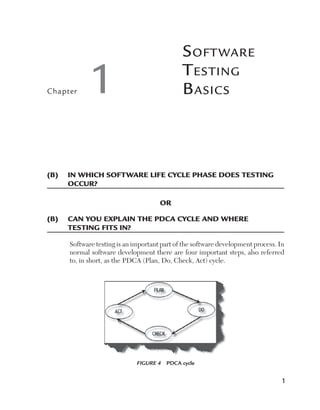
Software testing is an important part of the software development process. In
normal software development there are four important steps, also referred
to, in short, as the PDCA (Plan, Do, Check, Act) cycle.

Figure 4  PDCA cycle

1
Software Testing Interview Questions

Let’s review the four steps in detail.
1)  Plan: Define the goal and the plan for achieving that goal.
2)   o/Execute: Depending on the plan strategy decided during the plan
D
stage we do execution accordingly in this phase.
3)   heck: Check/Test to ensure that we are moving according to plan and
C
are getting the desired results.
A
4)   ct: During the check cycle, if any issues are there, then we take appropriate
action accordingly and revise our plan again.
So now to answer our question, where does testing fit in….you guessed
it, the check part of the cycle. So developers and other stakeholders of the
project do the “planning and building,” while testers do the check part of
the cycle.

(B)	 What is the difference between white box,	
black box, and gray box testing?
Black box testing is a testing strategy based solely on requirements and
specifications. Black box testing requires no knowledge of internal paths,
structures, or implementation of the software being tested.
White box testing is a testing strategy based on internal paths, code
structures, and implementation of the software being tested. White box testing
generally requires detailed programming skills.
There is one more type of testing called gray box testing. In this we look
into the “box” being tested just long enough to understand how it has been
implemented. Then we close up the box and use our knowledge to choose
more effective black box tests.
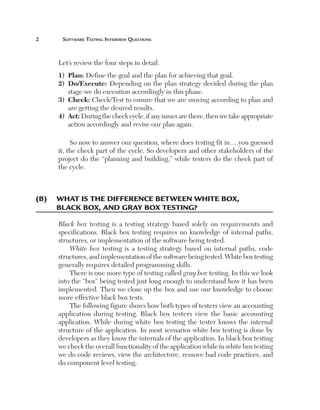
The following figure shows how both types of testers view an accounting
application during testing. Black box testers view the basic accounting
application. While during white box testing the tester knows the internal
structure of the application. In most scenarios white box testing is done by
developers as they know the internals of the application. In black box testing
we check the overall functionality of the application while in white box testing
we do code reviews, view the architecture, remove bad code practices, and
do component level testing.
Software Testing Basics	


Figure 5  White box and black box testing in action

(B)	 What is the difference between a defect and a
failure?
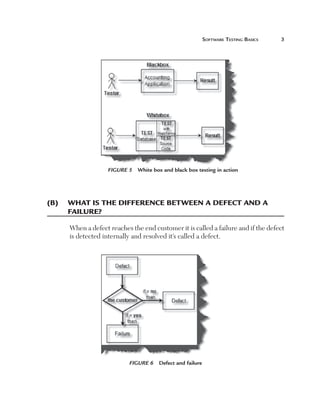
When a defect reaches the end customer it is called a failure and if the defect
is detected internally and resolved it’s called a defect.

Figure 6  Defect and failure
Software Testing Interview Questions

(B)	 What are the categories of defects?
There are three main categories of defects:
Wrong: The requirements have been implemented incorrectly. This defect
is a variance from the given specification.
Missing: There was a requirement given by the customer and it was not done.
This is a variance from the specifications, an indication that a specification was
not implemented, or a requirement of the customer was not noted properly.
Extra: A requirement incorporated into the product that was not given by
the end customer. This is always a variance from the specification, but may
be an attribute desired by the user of the product. However, it is considered
a defect because it’s a variance from the existing requirements.

Figure 7  Broader classification of defects

(B)	 What is the difference between verification and
validation?
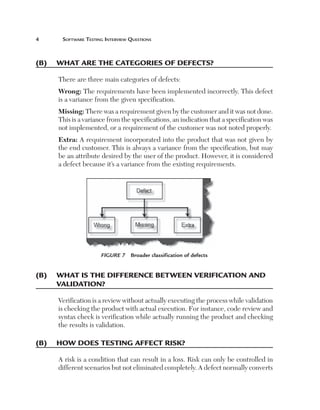
Verification is a review without actually executing the process while validation
is checking the product with actual execution. For instance, code review and
syntax check is verification while actually running the product and checking
the results is validation.

(B)	 How does testing affect risk?
A risk is a condition that can result in a loss. Risk can only be controlled in
different scenarios but not eliminated completely. A defect normally converts
Software Testing Basics	


Figure 8  Verification and validation

to a risk. For instance, let’s say you are developing an accounting application
and you have done the wrong tax calculation. There is a huge possibility that
this will lead to the risk of the company running under loss. But if this defect
is controlled then we can either remove this risk completely or minimize it.
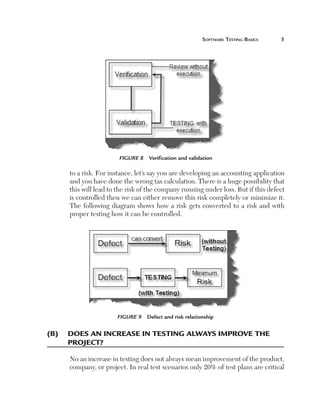
The following diagram shows how a risk gets converted to a risk and with
proper testing how it can be controlled.

Figure 9  Defect and risk relationship

(B)	 Does an increase in testing always improve the
project?
No an increase in testing does not always mean improvement of the product,
company, or project. In real test scenarios only 20% of test plans are critical
Software Testing Interview Questions

from a business angle. Running those critical test plans will assure that the
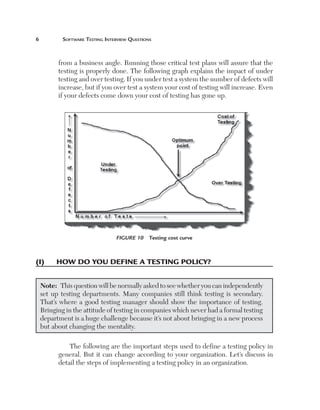
testing is properly done. The following graph explains the impact of under
testing and over testing. If you under test a system the number of defects will
increase, but if you over test a system your cost of testing will increase. Even
if your defects come down your cost of testing has gone up.

Figure 10  Testing cost curve

(I)	

How do you define a testing policy?

Note:  This question will be normally asked to see whether you can independently
set up testing departments. Many companies still think testing is secondary.
That’s where a good testing manager should show the importance of testing.
Bringing in the attitude of testing in companies which never had a formal testing
department is a huge challenge because it’s not about bringing in a new process
but about changing the mentality.
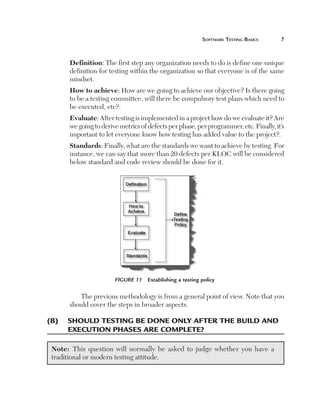
The following are the important steps used to define a testing policy in
general. But it can change according to your organization. Let’s discuss in
detail the steps of implementing a testing policy in an organization.
Software Testing Basics	


Definition: The first step any organization needs to do is define one unique
definition for testing within the organization so that everyone is of the same
mindset.
How to achieve: How are we going to achieve our objective? Is there going
to be a testing committee, will there be compulsory test plans which need to
be executed, etc?.
Evaluate: After testing is implemented in a project how do we evaluate it? Are
we going to derive metrics of defects per phase, per programmer, etc. Finally, it’s
important to let everyone know how testing has added value to the project?.
Standards: Finally, what are the standards we want to achieve by testing. For
instance, we can say that more than 20 defects per KLOC will be considered
below standard and code review should be done for it.

Figure 11  Establishing a testing policy

The previous methodology is from a general point of view. Note that you
should cover the steps in broader aspects.

(B)	 Should testing be done only after the build and
execution phases are complete?
Note:  This question will normally be asked to judge whether you have a
traditional or modern testing attitude.
Software Testing Interview Questions

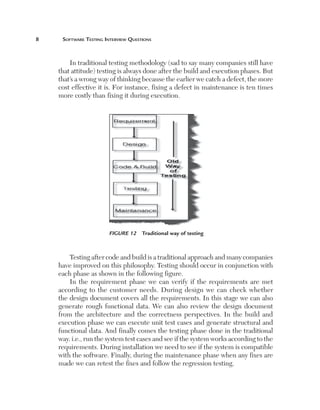
In traditional testing methodology (sad to say many companies still have
that attitude) testing is always done after the build and execution phases. But
that’s a wrong way of thinking because the earlier we catch a defect, the more
cost effective it is. For instance, fixing a defect in maintenance is ten times
more costly than fixing it during execution.

Figure 12  Traditional way of testing

Testing after code and build is a traditional approach and many companies
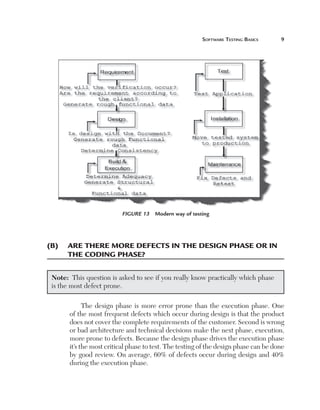
have improved on this philosophy. Testing should occur in conjunction with
each phase as shown in the following figure.
In the requirement phase we can verify if the requirements are met
according to the customer needs. During design we can check whether
the design document covers all the requirements. In this stage we can also
generate rough functional data. We can also review the design document
from the architecture and the correctness perspectives. In the build and
execution phase we can execute unit test cases and generate structural and
functional data. And finally comes the testing phase done in the traditional
way. i.e., run the system test cases and see if the system works according to the
requirements. During installation we need to see if the system is compatible
with the software. Finally, during the maintenance phase when any fixes are
made we can retest the fixes and follow the regression testing.
Software Testing Basics	


Figure 13  Modern way of testing

(B)	 Are there more defects in the design phase or in
the coding phase?
Note:  This question is asked to see if you really know practically which phase
is the most defect prone.
The design phase is more error prone than the execution phase. One
of the most frequent defects which occur during design is that the product
does not cover the complete requirements of the customer. Second is wrong
or bad architecture and technical decisions make the next phase, execution,
more prone to defects. Because the design phase drives the execution phase
it’s the most critical phase to test. The testing of the design phase can be done
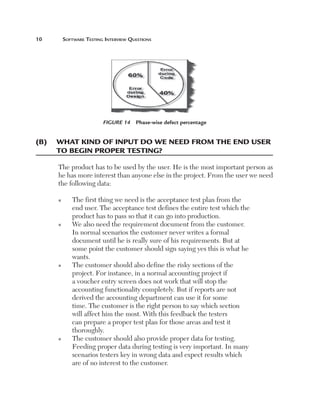
by good review. On average, 60% of defects occur during design and 40%
during the execution phase.
10	

Software Testing Interview Questions

Figure 14  Phase-wise defect percentage

(B)	 What kind of input do we need from the end user
to begin proper testing?
The product has to be used by the user. He is the most important person as
he has more interest than anyone else in the project. From the user we need
the following data:
n

n

n

n

T
 he first thing we need is the acceptance test plan from the
end user. The acceptance test defines the entire test which the
product has to pass so that it can go into production.
W
 e also need the requirement document from the customer.
In normal scenarios the customer never writes a formal
document until he is really sure of his requirements. But at
some point the customer should sign saying yes this is what he
wants.
T
 he customer should also define the risky sections of the
project. For instance, in a normal accounting project if
a voucher entry screen does not work that will stop the
accounting functionality completely. But if reports are not
derived the accounting department can use it for some
time. The customer is the right person to say which section
will affect him the most. With this feedback the testers
can prepare a proper test plan for those areas and test it
thoroughly.
T
 he customer should also provide proper data for testing.
Feeding proper data during testing is very important. In many
scenarios testers key in wrong data and expect results which
are of no interest to the customer.
Software Testing Basics	

11

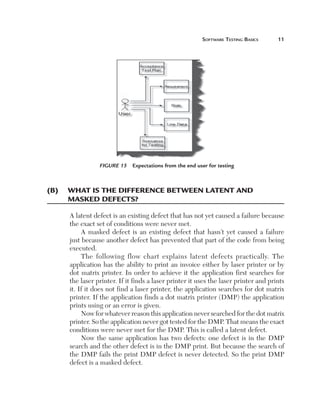
Figure 15  Expectations from the end user for testing

(B)	 What is the difference between latent and
masked defects?
A latent defect is an existing defect that has not yet caused a failure because
the exact set of conditions were never met.
A masked defect is an existing defect that hasn’t yet caused a failure
just because another defect has prevented that part of the code from being
executed.
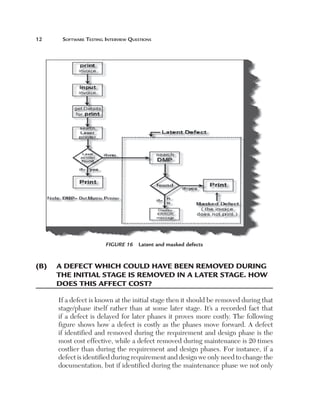
The following flow chart explains latent defects practically. The
application has the ability to print an invoice either by laser printer or by
dot matrix printer. In order to achieve it the application first searches for
the laser printer. If it finds a laser printer it uses the laser printer and prints
it. If it does not find a laser printer, the application searches for dot matrix
printer. If the application finds a dot matrix printer (DMP) the application
prints using or an error is given.
Now for whatever reason this application never searched for the dot matrix
printer. So the application never got tested for the DMP. That means the exact
conditions were never met for the DMP. This is called a latent defect.
Now the same application has two defects: one defect is in the DMP
search and the other defect is in the DMP print. But because the search of
the DMP fails the print DMP defect is never detected. So the print DMP
defect is a masked defect.
12	

Software Testing Interview Questions

Figure 16  Latent and masked defects

(B)	 A defect which could have been removed during
the initial stage is removed in a later stage. How
does this affect cost?
If a defect is known at the initial stage then it should be removed during that
stage/phase itself rather than at some later stage. It’s a recorded fact that
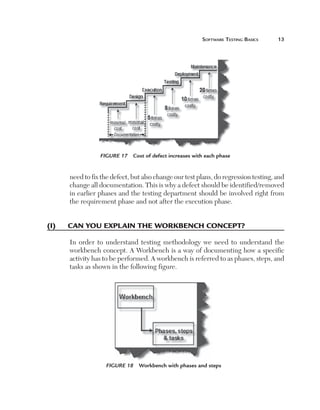
if a defect is delayed for later phases it proves more costly. The following
figure shows how a defect is costly as the phases move forward. A defect
if identified and removed during the requirement and design phase is the
most cost effective, while a defect removed during maintenance is 20 times
costlier than during the requirement and design phases. For instance, if a
defect is identified during requirement and design we only need to change the
documentation, but if identified during the maintenance phase we not only
Software Testing Basics	

13

Figure 17  Cost of defect increases with each phase

need to fix the defect, but also change our test plans, do regression testing, and
change all documentation. This is why a defect should be identified/removed
in earlier phases and the testing department should be involved right from
the requirement phase and not after the execution phase.

(I)	

Can you explain the workbench concept?
In order to understand testing methodology we need to understand the
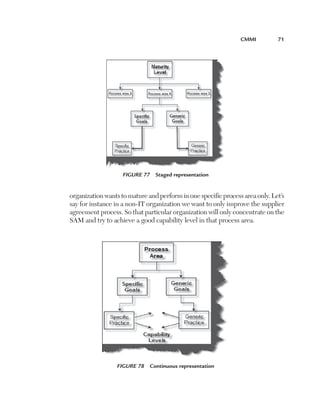
workbench concept. A Workbench is a way of documenting how a specific
activity has to be performed. A workbench is referred to as phases, steps, and
tasks as shown in the following figure.

Figure 18  Workbench with phases and steps
14	

Software Testing Interview Questions

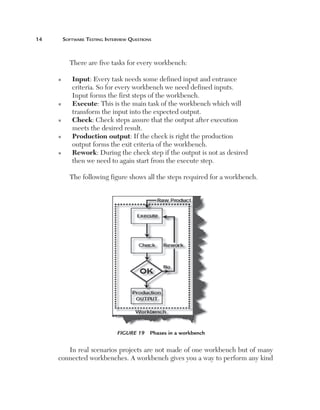
There are five tasks for every workbench:
n

n

n

n

n

I
 nput: Every task needs some defined input and entrance
criteria. So for every workbench we need defined inputs.
Input forms the first steps of the workbench.
E
 xecute: This is the main task of the workbench which will
transform the input into the expected output.
C
 heck: Check steps assure that the output after execution
meets the desired result.
P
 roduction output: If the check is right the production
output forms the exit criteria of the workbench.
Rework: During the check step if the output is not as desired

then we need to again start from the execute step.
The following figure shows all the steps required for a workbench.

Figure 19  Phases in a workbench

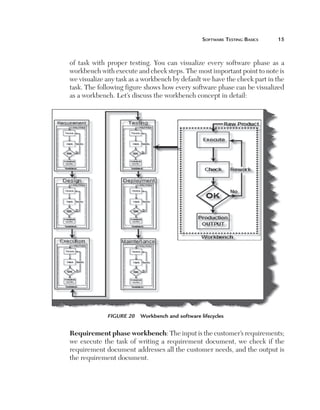
In real scenarios projects are not made of one workbench but of many
connected workbenches. A workbench gives you a way to perform any kind
Software Testing Basics	

15

of task with proper testing. You can visualize every software phase as a
workbench with execute and check steps. The most important point to note is
we visualize any task as a workbench by default we have the check part in the
task. The following figure shows how every software phase can be visualized
as a workbench. Let’s discuss the workbench concept in detail:

Figure 20  Workbench and software lifecycles

Requirement phase workbench: The input is the customer’s requirements;
we execute the task of writing a requirement document, we check if the
requirement document addresses all the customer needs, and the output is
the requirement document.
16	

Software Testing Interview Questions

Design phase workbench: The input is the requirement document, we
execute the task of preparing a technical document; review/check is done
to see if the design document is technically correct and addresses all the
requirements mentioned in the requirement document, and the output is
the technical document.
Execution phase workbench: This is the actual execution of the project. The
input is the technical document; the execution is nothing but implementation/
coding according to the technical document, and the output of this phase is
the implementation/source code.
Testing phase workbench: This is the testing phase of the project. The
input is the source code which needs to be tested; the execution is executing
the test case and the output is the test results.
Deployment phase workbench: This is the deployment phase. There are
two inputs for this phase: one is the source code which needs to be deployed
and that is dependent on the test results. The output of this project is that
the customer gets the product which he can now start using.
Maintenance phase workbench: The input to this phase is the deployment
results, execution is implementing change requests from the end customer,
the check part is nothing but running regression testing after every change
request implementation, and the output is a new release after every change
request execution.

(B)	 What’s the difference between alpha and beta
testing?
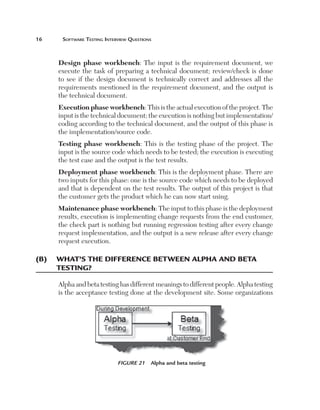
Alpha and beta testing has different meanings to different people. Alpha testing
is the acceptance testing done at the development site. Some organizations

Figure 21  Alpha and beta testing
Software Testing Basics	

17

have a different visualization of alpha testing. They consider alpha testing as
testing which is conducted on early, unstable versions of software. On the
contrary beta testing is acceptance testing conducted at the customer end.
In short, the difference between beta testing and alpha testing is the location
where the tests are done.

(I)	

Can you explain the concept of defect cascading?
OR

(B)	 Can you explain how one defect leads to other
defects?
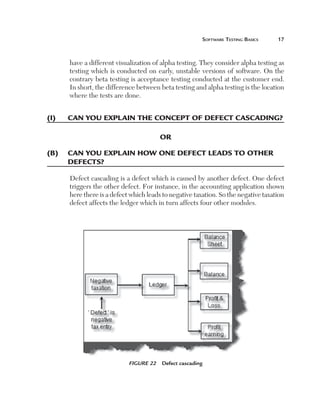
Defect cascading is a defect which is caused by another defect. One defect
triggers the other defect. For instance, in the accounting application shown
here there is a defect which leads to negative taxation. So the negative taxation
defect affects the ledger which in turn affects four other modules.

Figure 22  Defect cascading
18	

Software Testing Interview Questions

(B)	 Can you explain usability testing?
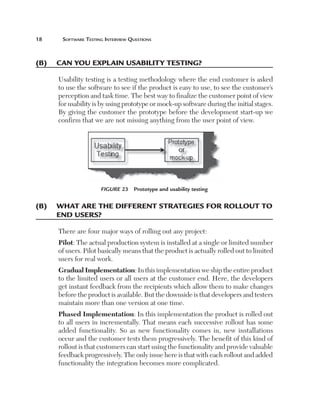
Usability testing is a testing methodology where the end customer is asked
to use the software to see if the product is easy to use, to see the customer’s
perception and task time. The best way to finalize the customer point of view
for usability is by using prototype or mock-up software during the initial stages.
By giving the customer the prototype before the development start-up we
confirm that we are not missing anything from the user point of view.

Figure 23  Prototype and usability testing

(B)	 What are the different strategies for rollout to
end users?
There are four major ways of rolling out any project:
Pilot: The actual production system is installed at a single or limited number
of users. Pilot basically means that the product is actually rolled out to limited
users for real work.
Gradual Implementation: In this implementation we ship the entire product
to the limited users or all users at the customer end. Here, the developers
get instant feedback from the recipients which allow them to make changes
before the product is available. But the downside is that developers and testers
maintain more than one version at one time.
Phased Implementation: In this implementation the product is rolled out
to all users in incrementally. That means each successive rollout has some
added functionality. So as new functionality comes in, new installations
occur and the customer tests them progressively. The benefit of this kind of
rollout is that customers can start using the functionality and provide valuable
feedback progressively. The only issue here is that with each rollout and added
functionality the integration becomes more complicated.
Software Testing Basics	

19

Parallel Implementation: In these types of rollouts the existing application
is run side by side with the new application. If there are any issues with the
new application we again move back to the old application. One of the biggest
problems with parallel implementation is we need extra hardware, software,
and resources.
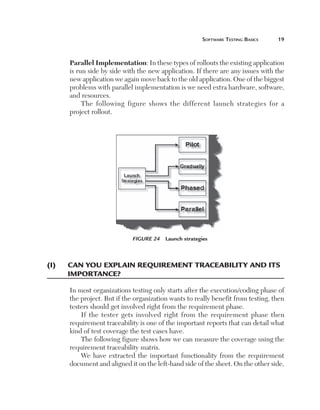
The following figure shows the different launch strategies for a
project rollout.

Figure 24  Launch strategies

(I)	

Can you explain requirement traceability and its
importance?
In most organizations testing only starts after the execution/coding phase of
the project. But if the organization wants to really benefit from testing, then
testers should get involved right from the requirement phase.
If the tester gets involved right from the requirement phase then
requirement traceability is one of the important reports that can detail what
kind of test coverage the test cases have.
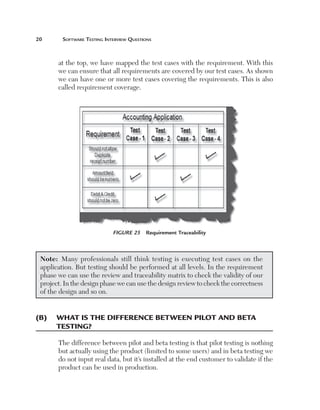
The following figure shows how we can measure the coverage using the
requirement traceability matrix.
We have extracted the important functionality from the requirement
document and aligned it on the left-hand side of the sheet. On the other side,
20	

Software Testing Interview Questions

at the top, we have mapped the test cases with the requirement. With this
we can ensure that all requirements are covered by our test cases. As shown
we can have one or more test cases covering the requirements. This is also
called requirement coverage.

Figure 25  Requirement Traceability

Note:  Many professionals still think testing is executing test cases on the
application. But testing should be performed at all levels. In the requirement
phase we can use the review and traceability matrix to check the validity of our
project. In the design phase we can use the design review to check the correctness
of the design and so on.

(B)	 What is the difference between pilot and beta
testing?
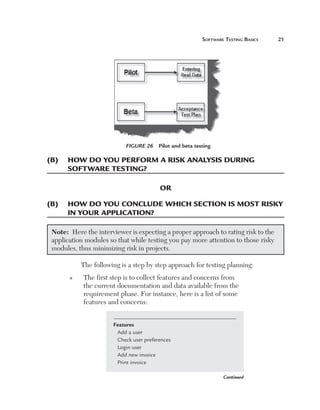
The difference between pilot and beta testing is that pilot testing is nothing
but actually using the product (limited to some users) and in beta testing we
do not input real data, but it’s installed at the end customer to validate if the
product can be used in production.
Software Testing Basics	

21

Figure 26  Pilot and beta testing

(B)	 How do you perform a risk analysis during 	
software testing?
OR
(B)	 How do you conclude which section is most risky
in your application?
Note:  Here the interviewer is expecting a proper approach to rating risk to the
application modules so that while testing you pay more attention to those risky
modules, thus minimizing risk in projects.
The following is a step by step approach for testing planning:
n

T
 he first step is to collect features and concerns from
the current documentation and data available from the
requirement phase. For instance, here is a list of some
features and concerns:
Features
Add a user
Check user preferences
Login user
Add new invoice
Print invoice
Continued
22	

Software Testing Interview Questions

Concerns
Maintainability
Security
Performance

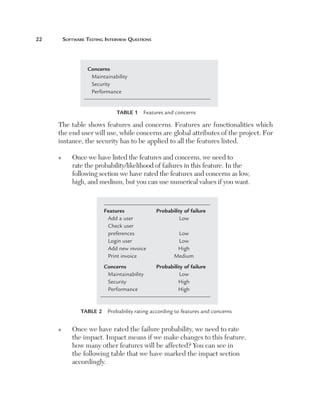
Table 1  Features and concerns

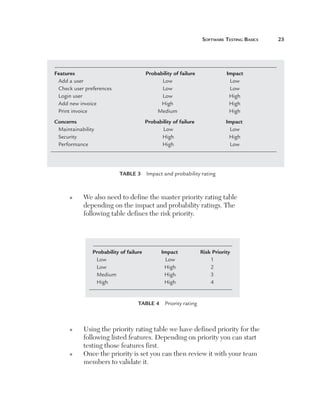
The table shows features and concerns. Features are functionalities which
the end user will use, while concerns are global attributes of the project. For
instance, the security has to be applied to all the features listed.
n

O
 nce we have listed the features and concerns, we need to
rate the probability/likelihood of failures in this feature. In the
following section we have rated the features and concerns as low,
high, and medium, but you can use numerical values if you want.

Features	
Add a user	
Check user
preferences	
Login user	
Add new invoice	
Print invoice	

Probability of failure
Low

Concerns	
Maintainability	
Security	
Performance	

Probability of failure
Low
High
High

Low
Low
High
Medium

Table 2  Probability rating according to features and concerns
n

O
 nce we have rated the failure probability, we need to rate
the impact. Impact means if we make changes to this feature,
how many other features will be affected? You can see in
the following table that we have marked the impact section
accordingly.
Software Testing Basics	

Features	
Add a user	
Check user preferences	
Login user	
Add new invoice	
Print invoice	

Probability of failure	
Low	
Low	
Low	
High	
Medium	

Impact
Low
Low
High
High
High

Concerns	
Maintainability	
Security	
Performance	

Probability of failure	
Low	
High	
High	

Impact
Low
High
Low

Table 3  Impact and probability rating

n

W
 e also need to define the master priority rating table
depending on the impact and probability ratings. The
following table defines the risk priority.

Probability of failure	
Low	
Low	
Medium	
High	

Impact	
Low	
High	
High	
High	

Risk Priority
1
2
3
4

Table 4  Priority rating

n

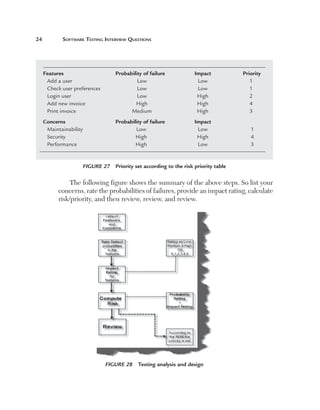
n

U
 sing the priority rating table we have defined priority for the
following listed features. Depending on priority you can start
testing those features first.
O
 nce the priority is set you can then review it with your team
members to validate it.

23
24	

Software Testing Interview Questions

Features	
Add a user	
Check user preferences	
Login user	
Add new invoice	
Print invoice	

Probability of failure	
Low	
Low	
Low	
High	
Medium	

Impact	
Low	
Low	
High	
High	
High	

Priority
1
1
2
4
3

Concerns	
Maintainability	
Security	
Performance	

Probability of failure	
Low	
High	
High	

Impact	
Low	
High	
Low	

1
4
3

Figure 27  Priority set according to the risk priority table

The following figure shows the summary of the above steps. So list your
concerns, rate the probabilities of failures, provide an impact rating, calculate
risk/priority, and then review, review, and review.

Figure 28  Testing analysis and design
Software Testing Basics	

25

(B)	 What does entry and exit criteria mean in a
project?
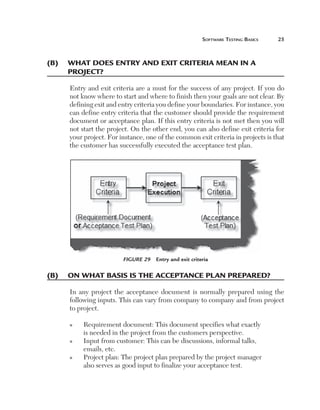
Entry and exit criteria are a must for the success of any project. If you do
not know where to start and where to finish then your goals are not clear. By
defining exit and entry criteria you define your boundaries. For instance, you
can define entry criteria that the customer should provide the requirement
document or acceptance plan. If this entry criteria is not met then you will
not start the project. On the other end, you can also define exit criteria for
your project. For instance, one of the common exit criteria in projects is that
the customer has successfully executed the acceptance test plan.

Figure 29  Entry and exit criteria

(B)	 On what basis is the acceptance plan prepared?
In any project the acceptance document is normally prepared using the
following inputs. This can vary from company to company and from project
to project.
n

n

n

R
 equirement document: This document specifies what exactly
is needed in the project from the customers perspective.
I
 nput from customer: This can be discussions, informal talks,
emails, etc.
P
 roject plan: The project plan prepared by the project manager
also serves as good input to finalize your acceptance test.
26	

Software Testing Interview Questions

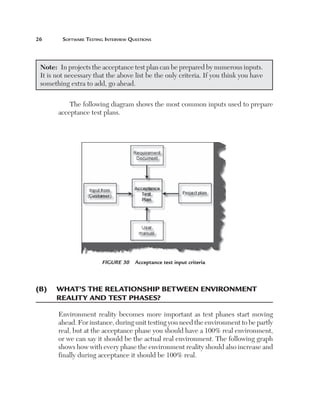
Note:  In projects the acceptance test plan can be prepared by numerous inputs.
It is not necessary that the above list be the only criteria. If you think you have
something extra to add, go ahead.
The following diagram shows the most common inputs used to prepare
acceptance test plans.

Figure 30  Acceptance test input criteria

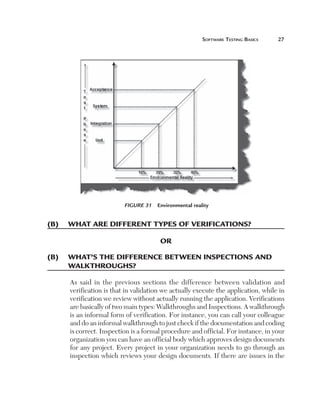
(B)	 What’s the relationship between environment 	
reality and test phases?
Environment reality becomes more important as test phases start moving
ahead. For instance, during unit testing you need the environment to be partly
real, but at the acceptance phase you should have a 100% real environment,
or we can say it should be the actual real environment. The following graph
shows how with every phase the environment reality should also increase and
finally during acceptance it should be 100% real.
Software Testing Basics	

27

Figure 31  Environmental reality

(B)	 What are different types of verifications?
OR
(B)	 What’s the difference between inspections and
walkthroughs?
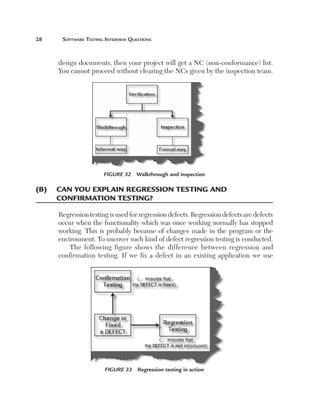
As said in the previous sections the difference between validation and
verification is that in validation we actually execute the application, while in
verification we review without actually running the application. Verifications
are basically of two main types: Walkthroughs and Inspections. A walkthrough
is an informal form of verification. For instance, you can call your colleague
and do an informal walkthrough to just check if the documentation and coding
is correct. Inspection is a formal procedure and official. For instance, in your
organization you can have an official body which approves design documents
for any project. Every project in your organization needs to go through an
inspection which reviews your design documents. If there are issues in the
28	

Software Testing Interview Questions

design documents, then your project will get a NC (non-conformance) list.
You cannot proceed without clearing the NCs given by the inspection team.

Figure 32  Walkthrough and inspection

(B)	 Can you explain regression testing and 	
confirmation testing?
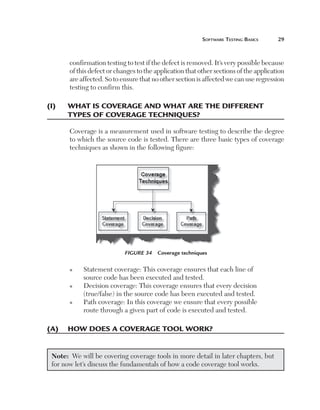
Regression testing is used for regression defects. Regression defects are defects
occur when the functionality which was once working normally has stopped
working. This is probably because of changes made in the program or the
environment. To uncover such kind of defect regression testing is conducted.
The following figure shows the difference between regression and
confirmation testing. If we fix a defect in an existing application we use

Figure 33  Regression testing in action
Software Testing Basics	

29

confirmation testing to test if the defect is removed. It’s very possible because
of this defect or changes to the application that other sections of the application
are affected. So to ensure that no other section is affected we can use regression
testing to confirm this.

(I)	

What is coverage and what are the different
types of coverage techniques?
Coverage is a measurement used in software testing to describe the degree
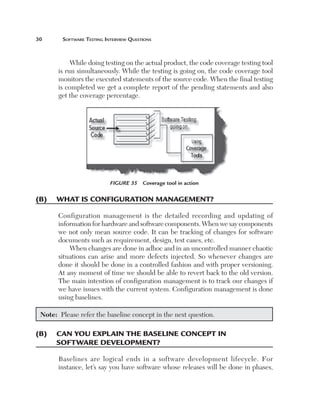
to which the source code is tested. There are three basic types of coverage
techniques as shown in the following figure:

Figure 34  Coverage techniques
n

n

n

S
 tatement coverage: This coverage ensures that each line of
source code has been executed and tested.
D
 ecision coverage: This coverage ensures that every decision
(true/false) in the source code has been executed and tested.
P
 ath coverage: In this coverage we ensure that every possible
route through a given part of code is executed and tested.

(A)	 How does a coverage tool work?
Note:  We will be covering coverage tools in more detail in later chapters, but
for now let’s discuss the fundamentals of how a code coverage tool works.
30	

Software Testing Interview Questions

While doing testing on the actual product, the code coverage testing tool
is run simultaneously. While the testing is going on, the code coverage tool
monitors the executed statements of the source code. When the final testing
is completed we get a complete report of the pending statements and also
get the coverage percentage.

Figure 35  Coverage tool in action

(B)	 What is configuration management?
Configuration management is the detailed recording and updating of
information for hardware and software components. When we say components
we not only mean source code. It can be tracking of changes for software
documents such as requirement, design, test cases, etc.
When changes are done in adhoc and in an uncontrolled manner chaotic
situations can arise and more defects injected. So whenever changes are
done it should be done in a controlled fashion and with proper versioning.
At any moment of time we should be able to revert back to the old version.
The main intention of configuration management is to track our changes if
we have issues with the current system. Configuration management is done
using baselines.
Note:  Please refer the baseline concept in the next question.

(B)	 Can you explain the baseline concept in 	
software development?
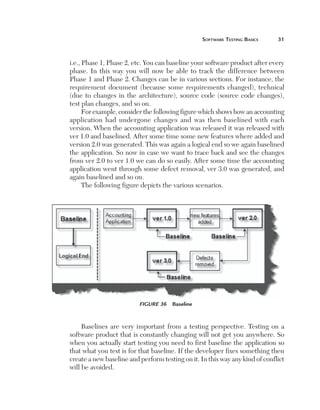
Baselines are logical ends in a software development lifecycle. For
instance, let’s say you have software whose releases will be done in phases,
Software Testing Basics	

31

i.e., Phase 1, Phase 2, etc. You can baseline your software product after every
phase. In this way you will now be able to track the difference between
Phase 1 and Phase 2. Changes can be in various sections. For instance, the
requirement document (because some requirements changed), technical
(due to changes in the architecture), source code (source code changes),
test plan changes, and so on.
For example, consider the following figure which shows how an accounting
application had undergone changes and was then baselined with each
version. When the accounting application was released it was released with
ver 1.0 and baselined. After some time some new features where added and
version 2.0 was generated. This was again a logical end so we again baselined
the application. So now in case we want to trace back and see the changes
from ver 2.0 to ver 1.0 we can do so easily. After some time the accounting
application went through some defect removal, ver 3.0 was generated, and
again baselined and so on.
The following figure depicts the various scenarios.

Figure 36  Baseline

Baselines are very important from a testing perspective. Testing on a
software product that is constantly changing will not get you anywhere. So
when you actually start testing you need to first baseline the application so
that what you test is for that baseline. If the developer fixes something then
create a new baseline and perform testing on it. In this way any kind of conflict
will be avoided.
32	

Software Testing Interview Questions

(B)	 What are the different test plan documents 	
in a project?

Note:  This answer varies from project to project and company to company. You
can tailor this answer according to your experience. This book will try to answer
the question from the authors view point.

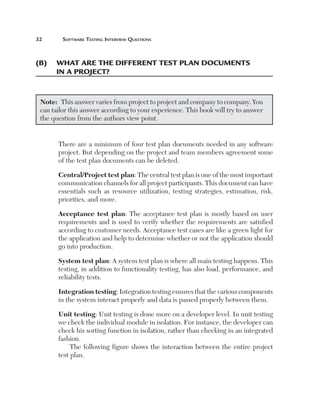
There are a minimum of four test plan documents needed in any software
project. But depending on the project and team members agreement some
of the test plan documents can be deleted.
Central/Project test plan: The central test plan is one of the most important
communication channels for all project participants. This document can have
essentials such as resource utilization, testing strategies, estimation, risk,
priorities, and more.
Acceptance test plan: The acceptance test plan is mostly based on user
requirements and is used to verify whether the requirements are satisfied
according to customer needs. Acceptance test cases are like a green light for
the application and help to determine whether or not the application should
go into production.
System test plan: A system test plan is where all main testing happens. This
testing, in addition to functionality testing, has also load, performance, and
reliability tests.
Integration testing: Integration testing ensures that the various components
in the system interact properly and data is passed properly between them.
Unit testing: Unit testing is done more on a developer level. In unit testing
we check the individual module in isolation. For instance, the developer can
check his sorting function in isolation, rather than checking in an integrated
fashion.
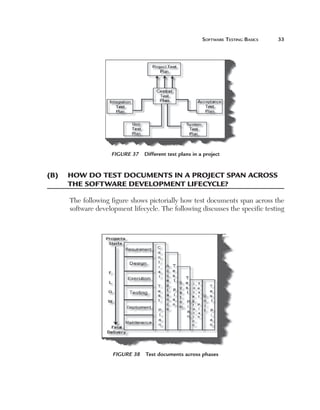
The following figure shows the interaction between the entire project
test plan.
Software Testing Basics	

33

Figure 37  Different test plans in a project

(B)	 How do test documents in a project span across
the software development lifecycle?
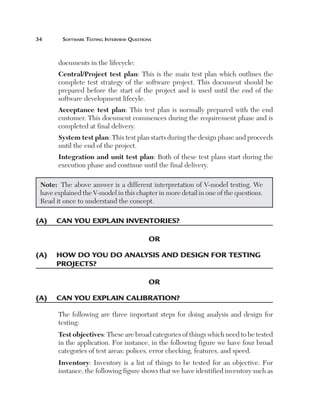
The following figure shows pictorially how test documents span across the
software development lifecycle. The following discusses the specific testing

Figure 38  Test documents across phases
34	

Software Testing Interview Questions

documents in the lifecycle:
Central/Project test plan: This is the main test plan which outlines the
complete test strategy of the software project. This document should be
prepared before the start of the project and is used until the end of the
software development lifecyle.
Acceptance test plan: This test plan is normally prepared with the end
customer. This document commences during the requirement phase and is
completed at final delivery.
System test plan: This test plan starts during the design phase and proceeds
until the end of the project.
Integration and unit test plan: Both of these test plans start during the
execution phase and continue until the final delivery.
Note:  The above answer is a different interpretation of V-model testing. We
have explained the V-model in this chapter in more detail in one of the questions.
Read it once to understand the concept.

(A)	 Can you explain inventories?
OR
(A)	  ow do you do analysis and design for testing
h
projects?
OR
(A)	 Can you explain calibration?
The following are three important steps for doing analysis and design for
testing:
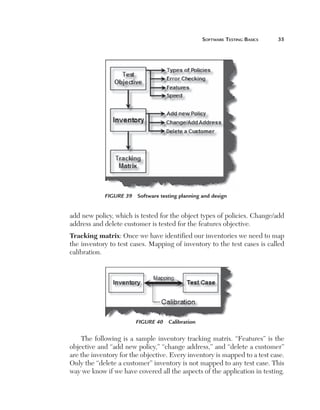
Test objectives: These are broad categories of things which need to be tested
in the application. For instance, in the following figure we have four broad
categories of test areas: polices, error checking, features, and speed.
Inventory: Inventory is a list of things to be tested for an objective. For
instance, the following figure shows that we have identified inventory such as
Software Testing Basics	

35

Figure 39  Software testing planning and design

add new policy, which is tested for the object types of policies. Change/add
address and delete customer is tested for the features objective.
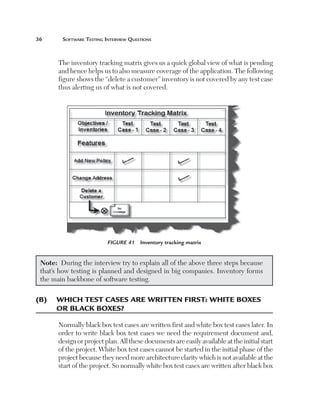
Tracking matrix: Once we have identified our inventories we need to map
the inventory to test cases. Mapping of inventory to the test cases is called
calibration.

Figure 40  Calibration

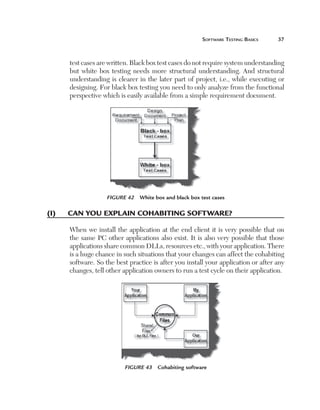
The following is a sample inventory tracking matrix. “Features” is the
objective and “add new policy,” “change address,” and “delete a customer”
are the inventory for the objective. Every inventory is mapped to a test case.
Only the “delete a customer” inventory is not mapped to any test case. This
way we know if we have covered all the aspects of the application in testing.
36	

Software Testing Interview Questions

The inventory tracking matrix gives us a quick global view of what is pending
and hence helps us to also measure coverage of the application. The following
figure shows the “delete a customer” inventory is not covered by any test case
thus alerting us of what is not covered.

Figure 41  Inventory tracking matrix

Note:  During the interview try to explain all of the above three steps because
that’s how testing is planned and designed in big companies. Inventory forms
the main backbone of software testing.

(B)	 Which test cases are written first: white boxes
or black boxes?
Normally black box test cases are written first and white box test cases later. In
order to write black box test cases we need the requirement document and,
design or project plan. All these documents are easily available at the initial start
of the project. White box test cases cannot be started in the initial phase of the
project because they need more architecture clarity which is not available at the
start of the project. So normally white box test cases are written after black box
Software Testing Basics	

37

test cases are written. Black box test cases do not require system understanding
but white box testing needs more structural understanding. And structural
understanding is clearer in the later part of project, i.e., while executing or
designing. For black box testing you need to only analyze from the functional
perspective which is easily available from a simple requirement document.

Figure 42  White box and black box test cases

(I)	

Can you explain cohabiting software?
When we install the application at the end client it is very possible that on
the same PC other applications also exist. It is also very possible that those
applications share common DLLs, resources etc., with your application. There
is a huge chance in such situations that your changes can affect the cohabiting
software. So the best practice is after you install your application or after any
changes, tell other application owners to run a test cycle on their application.

Figure 43  Cohabiting software
38	

Software Testing Interview Questions

(B)	 What impact ratings have you used in your 	
projects?
Normally, the impact ratings for defects are classified into three types:
n

n
n

M
 inor: Very low impact but does not affect operations on a
large scale.
Major: Affects operations on a very large scale.
C
 ritical: Brings the system to a halt and stops the show.

Figure 44  Test Impact rating

(B)	 What is a test log?
The IEEE Std. 829-1998 defines a test log as a chronological record of relevant
details about the execution of test cases. It’s a detailed view of activity and
events given in chronological manner. The following figure shows a test log
and is followed by a sample test log.

Figure 45  Test Log
Software Testing Basics	

39

Figure 46  Sample test log

(I)	

Explain the SDLC (Software Development 	
LifeCycle) in detail.
OR

(I)	

Can you explain the Waterfall Model?
OR

(I)	

Can you explain the Big-Bang Waterfall Model?
OR

(I)	

Can you explain the Phased Waterfall Model?
OR

(I)	

Explain the Iterative model, Incremental model,
Spiral model, Evolutionary Model and the 	
V-Model?
OR

(I)	

Explain Unit Testing, Integration Tests, System
Testing and Acceptance Testing?
Every activity has a lifecycle and the software development process is no
exception. Even if you are not aware of the SDLC you are still following
40	

Software Testing Interview Questions

it unknowingly. But if a software professional is aware of the SDLC he
can execute the project in a controlled fashion. The biggest benefit of this
awareness is that developers will not start execution (coding) which can
really lead to the project running in an uncontrolled fashion. Second, it helps
customer and software professionals to avoid confusion by anticipating the
problems and issues before hand. In short, the SDLC defines the various
stages in a software lifecycle.
But before we try to understand what SDLC is all about we need to get a
broader view of the beginning and ending of the SDLC. Any project started
if it does not have a start and end then its already in trouble. It’s like if you go
out for a drive you should know where to start and where to end or else you
are moving around endlessly.
The figure shows a more global view of the how the SDLS starts and ends.
Any project should have entry criteria and exit criteria. For instance, a proper
estimation document can be an entry criteria condition. That means if you
do not have a proper estimation document in place the project will not start.
It can also be more practical. If half payment is not received the project will
not start. There can be a list of points which need to be completed before a
project starts. Finally, there should be an end to the project which defines
when the project will end. For instance, if all the test scenarios given by the

Figure 47  Entry, SDLC, and Exit in action
Software Testing Basics	

41

end customer are completed the project is finished. In the figure we have
the entry criteria as an estimation document and the exit criteria as a signed
document by the end client saying the software is delivered.
The following figure shows the typical flow in the SDLC which has six
main models. Developers can select a model for their project.
n
n
n
n
n
n

Waterfall model
Big bang model
Phased model
Iterative model
Spiral model
Incremental model

Waterfall Model
Let’s have a look at the Waterfall Model which is basically divided into two
subtypes: Big Bang waterfall model and the Phased waterfall model.
As the name suggests waterfall means flow of water which always goes
in one direction so when we say Waterfall model we expect that every phase/
stage is frozen.
Big Bang Waterfall Model
The figure shows the Waterfall Big Bang model which has several stages and
are described below:
n

n

n

n

R
 equirement stage: During this stage basic business needs
required for the project which are from a user perspective are
produced as Word documents with simple points or may be in
the form of complicated use case documents.
D
 esign stage: Use case document/requirement document is
the input for this stage. Here we decide how to design the
project technically and produce a technical document which
has a class diagram, pseudo code, etc.
B
 uild stage: This stage uses technical documents as input so
code can be generated as output at this stage. This is where
the actual execution of the project takes place.
T
 est stage: Here, testing is done on the source code produced
by the build stage and the final software is given the greenlight.
42	

Software Testing Interview Questions

n

D
 eliver stage: After succeeding in the test stage the final
product/project is finally installed at client end for actual
production. This stage is the beginning of the maintenance
stage.

Figure 48  The SDLC in action (Waterfall Big Bang model)

In the Waterfall Big Bang model, it is assumed that all stages are frozen
which means it’s a perfect world. But in actual projects such processes are
impractical.
Phased Waterfall Model
In this model the project is divided into small chunks and delivered at intervals
by different teams. In short, chunks are developed in parallel by different
teams and get integrated in the final project. But the disadvantage of this
model is that improper planning may lead to project failure during integration
or any mismatch of co-ordination between the team may cause failure.
Software Testing Basics	

43

Iterative Model
The Iterative model was introduced because of problems occuring in the
Waterfall model.
Now let’s take a look at the Iterative model which also has a two
subtypes:
Incremental Model
In this model work is divided into chunks like the Phase Waterfall model but
the difference is that in the Incremental model one team can work on one or
many chunks unlike in the Phase Waterfall model.
Spiral Model
This model uses a series of prototypes which refine our understanding of what
we are actually going to deliver. Plans are changed if required per refining
of the prototype. So everytime refining of the prototype is done the whole
process cycle is repeated.
Evolutionary Model
In the Incremental and Spiral model the main problem is for any changes done
in the between the SDLC we need to iterate a whole new cycle. For instance,
during the final (deliver) stage, if the customer demands a change we have to
iterate the whole cycle again which means we need to update all the previous
(requirement, technical documents, source code  test plan) stages.
In the Evolutionary model, we divide software into small units which
can be delivered earlier to the customer’s end. In later stages we evolve the
software with new customer needs.
Note:  The Vs model is one of the favorite questions asked by interviews.
V-model
This type of model was developed by testers to emphasize the importance
of early testing. In this model testers are involved from the requirement
stage itself. The following diagram (V-model cycle diagram) shows how for
every stage some testing activity is done to ensure that the project is moving
forward as planned.
44	

Software Testing Interview Questions

Figure 49  V-model cycle flow

For instance,
n

n

n

n

I
 n the requirement stage we have acceptance test documents
created by the testers. Acceptance test documents outline that
if these tests pass then the customer will accept the software.
I
 n the specification stage testers create the system test
document. In the following section, system testing is explained
in more detail.
I
 n the design stage we have the integration documents created
by testers. Integration test documents define testing steps
for how the components should work when integrated. For
instance, you develop a customer class and product class. You
have tested the customer class and the product class individually.
But in a practical scenario the customer class will interact
with the product class. So you also need to test to ensure the
customer class is interacting with the product class properly.
I
 n the implement stage we have unit documents created by
the programmers or testers.
Software Testing Basics	

45

Let’s take a look at each testing phase in more detail.
Unit Testing
Starting from the bottom the first test level is “Unit Testing.” It involves
checking that each feature specified in the “Component Design” has been
implemented in the component.
In theory, an independent tester should do this, but in practice the
developer usually does it, as they are the only people who understand how a
component works. The problem with a component is that it performs only a
small part of the functionality of a system, and it relies on cooperating with
other parts of the system, which may not have been built yet. To overcome this,
the developer either builds, or uses, special software to trick the component
into believing it is working in a fully functional system.
Integration Testing
As the components are constructed and tested they are linked together to
make sure they work with each other. It is a fact that two components that
have passed all their tests, when connected to each other, produce one new
component full of faults. These tests can be done by specialists, or by the
developers.
Integration testing is not focused on what the components are doing but on
how they communicate with each other, as specified in the “System Design.”
The “System Design” defines relationships between components.
The tests are organized to check all the interfaces, until all the components
have been built and interfaced to each other producing the whole system.
System Testing
Once the entire system has been built then it has to be tested against the
“System Specification” to see if it delivers the features required. It is still
developer focused, although specialist developers known as systems testers
are normally employed to do it.
In essence, system testing is not about checking the individual parts of
the design, but about checking the system as a whole. In fact, it is one giant
component.
System testing can involve a number of special types of tests used to see if
all the functional and non-functional requirements have been met. In addition
46	

Software Testing Interview Questions

to functional requirements these may include the following types of testing
for the non-functional requirements:
n
n
n
n
n

Performance - Are the performance criteria met?
Volume - Can large volumes of information be handled?
Stress - Can peak volumes of information be handled?
Documentation - Is the documentation usable for the system?
R
 obustness - Does the system remain stable under adverse
circumstances?

There are many others, the need for which is dictated by how the system is
supposed to perform.

(I)	

What’s the difference between System Testing
and Acceptance Testing?
Acceptance testing checks the system against the “Requirements.” It is similar
to System testing in that the whole system is checked but the important
difference is the change in focus:
System testing checks that the system that was specified has been delivered.
Acceptance testing checks that the system will deliver what was requested.
The customer should always do Acceptance testing and not the developer.
The customer knows what is required from the system to achieve value in
the business and is the only person qualified to make that judgment. This
testing is more about ensuring that the software is delivered as defined by the
customer. It’s like getting a greenlight from the customer that the software
meets expectations and is ready to be used.

(I)	

Which is the best model?
In the previous section we looked through all the models. But in actual
projects, hardly one complete model can fulfill the entire project requirement.
In real projects, tailored models are proven to be the best, because they
share features from The Waterfall, Iterative, Evolutionary models, etc., and
can fit into real life time projects. Tailored models are most productive and
beneficial for many organizations. If it’s a pure testing project, then the V
model is the best.
(I)	

Software Testing Basics	

47

What group of teams can do software testing?
When it comes to testing everyone in the world can be involved right from
the developer to the project manager to the customer. But below are different
types of team groups which can be present in a project.
Isolated test team: This is a special team of testers which do only testing.
The testing team is not related to any project. It’s like having a pool of testers
in an organization, which are picked up on demand by the project and after
completion again get pushed back to the pool. This approach is costly but the
most helpful because we have a different angle of thinking from a different
group, which is isolated from development.
Outsource: In outsourcing, we contact an external supplier, hire testing
resources, and do testing for our project. Again, there are it has two sides of
the coin. The good part is resource handling is done by the external supplier.
So you are freed from the worry of resources leaving the company, people
management, etc. But the bad side of the coin is outsourced vendors do not
have domain knowledge of your business. Second, at the initial stage you need
to train them on domain knowledge, which is again, an added cost.
Inside test team: In this approach we have a separate team, which belongs to
the project. The project allocates a separate budget for testing and this testing
team works on this project only. The good side is you have a dedicated team
and because they are involved in the project they have strong knowledge of
it. The bad part is you need to budget for them which increases the project
cost.
Developers as testers: In this approach the developers of the project perform
the testing. The good part of this approach is developers have a very good
idea of the inner details so they can perform good level of testing. The bad
part of this approach is the developer and tester are the same person, so it’s
very likely that many defects can be missed.
QA/QC team: In this approach the quality team is involved in testing. The
good part is the QA team is involved and a good quality of testing can be
expected. The bad part is that the QA and QC team of any organization is
also involved with many other activities which can hamper the testing quality
of the project.
48	

Software Testing Interview Questions

The following diagram shows the different team approaches.

Figure 50  Types of teams
Chapter

2

T esting
T echniques

(B)	 Can you explain boundary value analysis?
OR
(B)	 What is a boundary value in software testing?
In some projects there are scenarios where we need to do boundary value
testing. For instance, let’s say for a bank application you can withdraw a
maximum of 25000 and a minimum of 100. So in boundary value testing we only
test the exact boundaries rather than hitting in the middle. That means we only
test above the max and below the max. This covers all scenarios. The following
figure shows the boundary value testing for the bank application which we just
described. TC1 and TC2 are sufficient to test all conditions for the bank. TC3
and TC4 are just duplicate/redundant test cases which really do not add any
value to the testing. So by applying proper boundary value fundamentals we
can avoid duplicate test cases, which do not add value to the testing.

(B)	 Can you explain equivalence partitioning?
In equivalence partitioning we identify inputs which are treated by the system
in the same way and produce the same results. You can see from the following
figure applications TC1 and TC2 give the same results (i.e., TC3 and TC4 both
give the same result, Result2). In short, we have two redundant test cases. By
applying equivalence partitioning we minimize the redundant test cases.

49
50	

Software Testing Interview Questions

Figure 51  Boundary value analysis

So apply the test below to see if it forms an equivalence class or not:
n
n
n
n

All the test cases should test the same thing.
They should produce the same results.
If one test case catches a bug, then the other should also catch it.
I
 f one of them does not catch the defect, then the other
should not catch it.

Figure 52  Equivalence partitioning
Testing Techniques	

51

The following figure shows how the equivalence partition works.
Below, we have a scenario in which valid values lie between 20 and 2000.

Figure 53  Sample of equivalence partitioning

Any values beyond 2000 and below 20 are invalid. In the following scenario
the tester has made four test cases:
n
n
n
n

Check below 20 (TC1)
Check above 2000 (TC2)
Check equal to 30 (TC3)
Check equal to 1000 (TC4)

Test cases 3 and 4 give the same outputs so they lie in the same partition.
In short, we are doing redundant testing. Both TC3 and TC4 fall in one
equivalence partitioning, so we can prepare one test case by testing one value
in between the boundary, thus eliminating redundancy testing in projects.
52	

Software Testing Interview Questions

(B)	  an you explain how the state transition 	
C
diagrams can be helpful during testing?
Before we understand how state transition diagrams can be useful in testing,
let’s understand what exactly a state and transition. The result of a previous
input is called a state and transitions are actions which cause the state to
change from one state to another.
The following figure shows a typical state transition diagram. The arrows
signify the transition and the oval shapes signify the states. The first transition
in the diagram is the issue of the check that it is ready to be deposited. The
second transition is the check is deposited of which we can have two states:
either the check cleared or it bounced.

Figure 54  Sample state transition diagram

Now that we are clear about state and transition, how does it help us in
testing? By using states and transitions we can identify test cases. So we can
identify test cases either using states or transitions. But if we use only one entity,
i.e., either state or transition, it is very possible that we can miss some scenarios.
In order to get the maximum benefit we should use the combination of state
and transition. The following figure shows that if we only use state or transition
in isolation it’s possible that we will have partial testing. But the combination
of state and transition can give us better test coverage for an application.
Testing Techniques	

53

Figure 55  State, transition, and test cases

(B)	 Can you explain random testing?
OR
(B)	 Can you explain monkey testing?
Random testing is sometimes called monkey testing. In Random testing, data is
generated randomly often using a tool. For instance, the following figure shows
how randomly-generated data is sent to the system. This data is generated either
using a tool or some automated mechanism. With this randomly generated
input the system is then tested and results are observed accordingly.

Figure 56  Random/Monkey testing
54	

Software Testing Interview Questions

Random testing has the following weakness:
n
n
n
n

They are not realistic.
Many of the tests are redundant and unrealistic.
You will spend more time analyzing results.
Y
 ou cannot recreate the test if you do not record what data
was used for testing.

This kind of testing is really of no use and is normally performed by
newcomers. Its best use is to see if the system will hold up under adverse
effects.

(B)	 What is negative and positive testing?
A negative test is when you put in an invalid input and recieve errors.
A positive test is when you put in a valid input and expect some action to
be completed in accordance with the specification.

Figure 57  Negative and Positive testing

(I)	

Can you explain exploratory testing?
Exploratory testing is also called adhoc testing, but in reality it’s not completely
adhoc. Ad hoc testing is an unplanned, unstructured, may be even an impulsive
journey through the system with the intent of finding bugs. Exploratory
testing is simultaneous learning, test design, and test execution. In other
words, exploratory testing is any testing done to the extent that the tester
proactively controls the design of the tests as those tests are performed and
Testing Techniques	

55

uses information gained while testing to design better tests. Exploratory
testers are not merely keying in random data, but rather testing areas that
their experience (or imagination) tells them are important and then going
where those tests take them.

Figure 58  Exploratory testing

(A)	 What are semi-random test cases?
As the name specifies semi-random testing is nothing but controlling random
testing and removing redundant test cases. So what we do is perform random
test cases and equivalence partitioning to those test cases, which in turn
removes redundant test cases, thus giving us semi-random test cases.

Figure 59  Semi-random test cases
56	

(I)	

Software Testing Interview Questions

What is an orthogonal arrays?
OR

(I)	

Can you explain a pair-wise defect?
Orthogonal array is a two-dimensional array in which if we choose any two
columns in the array and all the combinations of numbers will appear in those
columns. The following figure shows a simple L9 (34) orthogonal array. In
this the number 9 indicates that it has 9 rows. The number 4 indicates that
it has 4 columns and 3 indicates that each cell contains a 1, 2, and 3. Choose
any two columns. Let’s choose column 1 and 2. It has (1,1), (1,2), (1,3), (2,1),
(2,2), (2,3), (3,1), (3,2), (3,3) combination values. As you can see these values
cover all the values in the array. Compare the values with the combination
of column 3 and 4 and they will fall in some pair. This is applied in software
testing which helps us eliminate duplicate test cases.

Figure 60  Sample orthogonal array

Now let’s try to apply an orthogonal array in actual testing field. Let’s say
we have a scenario in which we need to test a mobile handset with different
plan types, terms, and sizes. Below are the different situations:
n
n

Handset (Nokia, 3G and Orange).
Plan type (4 x 400, 4 x 300, and 2 x 270).
Testing Techniques	

n
n

57

Term (Long-term, short-term, and mid-term).
Size (3, 4, and 5 inch).
We will also have the following testing combinations:

n

n

n

E
 ach handset should be tested with every plan type, term, and
size.
E
 ach plan type should be tested with every handset, term, and
size.
E
 ach size should be tested with every handset, plan type, and
term.

So now you must be thinking we have 81 combinations. But we can test
all these conditions with only 9 test cases. The following is the orthogonal
array for it.

Figure 61  Orthogonal array in actual testing

Orthogonal arrays are very useful because most defects are pairs-wise defects
and with orthogonal arrays, we can reduce redundancy to a huge extent.
58	

(I)	

Software Testing Interview Questions

Can you explain decision tables?
As the name suggests they are tables that list all possible inputs and all possible
outputs. A general form of decision table is shown in the following figure.
Condition 1 through Condition N indicates various input conditions. Action 1
through Condition N are actions that should be taken depending on various
input combinations. Each rule defines unique combinations of conditions
that result in actions associated with that rule.

Figure 62  General decision tables

The following is a sample decision table for a discount which depends on
age. Discounts are only allowed if you are married or a student. The following is
the decision table accordingly. Using the decision table we have also derived our
test cases. Because this is a sample example we cannot see the importance of the

Figure 63  Discount Decision table
Testing Techniques	

59

decision table. But just imagine that you have a huge amount of possible inputs
and outputs. For such a scenario decision tables gives you a better view.
The following is the decision table for the scenarios described above. In
the top part we have put the condition and below are the actions which occur
as a result of the conditions. Read from the right and move to the left and
then to the action. For instance, Married ‡ Yes ‡ then discount. The same
goes for the student condition. Using the decision table we can ensure, to a
good extent, that we do not skip any validation in a project.

Figure 64  Test cases from the above decision tables

(B)	 How did you define severity ratings in your 	
project?
Note:  Severity ratings vary from organization to organization and project to
project. But most organizations have four kinds of severity rating as shown.
There are four types of severity ratings as shown in the table:

Figure 65  Severity rating in projects
60	

Software Testing Interview Questions

n

n

n

n

S
 everity 1 (showstoppers): These kinds of defects do not
allow the application to move ahead. So they are also called
showstopper defects.
S
 everity 2 (application continues with severe defects):
Application continues working with these types of defects,
but they can have high implications, later, which can be more
difficult to remove.
S
 everity 3 (application continues with unexpected results): In
this scenario the application continues but with unexpected
results.
S
 everity 4 (suggestions): Defects with these severities are
suggestions given by the customer to make the application
better. These kinds of defects have the least priority and
are considered at the end of the project or during the
maintenance stage of the project.
Chapter

3

T he
S oft ware
P rocess

(B)	 What is a software process?
A software process is a series of steps used to solve a problem. The following
figure shows a pictorial view of how an organization has defined a way to
solve risk problems. In the diagram we have shown two branches: one is

Figure 66  Software process

61
62	

Software Testing Interview Questions

the process and the second branch shows a sample risk mitigation process
for an organization. For instance, the risk mitigation process defines what
step any department should follow to mitigate a risk. The process is as
follows:
n

n

n

n

(I)	

I
 dentify the risk of the project by discussion, proper
requirement gathering, and forecasting.
O
 nce you have identified the risk prioritize which risk has the
most impact and should be tackled on a priority basis.
A
 nalyze how the risk can be solved by proper impact analysis
and planning.
Finally, using the above analysis, we mitigate the risk.

W
 hat are the different cost elements involved	
in implementing a process in an organization?
Below are some of the cost elements involved in the implementing process:
n

n

n

n

S
 alary: This forms the major component of implementing
any process, the salary of the employees. Normally while
implementing a process in a company either organization can
recruit full-time people or they can share resources part-time
for implementing the process.
C
 onsultant: If the process is new it can also involve consultants
which is again an added cost.
T
 raining Costs: Employees of the company may also have to
undergo training in order to implement the new process.
T
 ools: In order to implement the process an organization will
also need to buy tools which again need to be budgeted for.

Note:  Implementing a process is not an easy job in any organization. More
than financial commitment, it requires commitment from people to follow
the process.
The Software Process	

63

Figure 67  Cost of implementing a process

(B)	 What is a model?
A model is nothing but best practices followed in an industry to solve issues
and problems. Models are not made in a day but are finalized and realized
by years of experience and continuous improvements.

Figure 68  Model

Many companies reinvent the wheel rather than following time tested
models in the industry.
64	

Software Testing Interview Questions

(B)	 What is a maturity level?
A maturity level specifies the level of performance expected from an
organization.

Figure 69  Maturity level

(B)	 Can you explain process areas in CMMI?
A process area is the area of improvement defined by CMMI. Every maturity
level consists of process areas. A process area is a group of practices or activities
performed collectively to achieve a specific objective. For instance, you can
see from the following figure we have process areas such as project planning,
configuration management, and requirement gathering.

Figure 70  Process areas in action
The Software Process	

65

(B)	 Can you explain tailoring?
As the name suggests, tailoring is nothing but changing an action to achieve
an objective according to conditions. Whenever tailoring is done there
should be adequate reasons for it. Remember when a process is defined in
an organization it should be followed properly. So even if tailoring is applied
the process is not bypassed or omitted.

Figure 71  Tailoring

Let’s try to understand this using a simple example. Let’s say in a
organization there is a process defined that every contract should have
a hard copy signed. But there can be scenarios in the organization when the
person is not present physically, so for those scenarios the contract should
be signed through email. So in short, the process for signing a contract is not
bypassed but the process approach is tailored.

Figure 72  Example of tailoring
Chapter

4

CMMI

(B)	  hat is CMMI and what’s the advantage of 	
W
implementing it in an organization?
CMMI stands for Capability Maturity Model Integration. It is a process
improvement approach that provides companies with the essential elements of
an effective process. CMMI can serve as a good guide for process improvement
across a project, organization, or division.
CMMI was formed by using multiple previous CMM processes. The
following are the areas which CMMI addresses:
Systems engineering: This covers development of total systems. System
engineers concentrate on converting customer needs to product solutions
and supports them throughout the product lifecycle.
Software engineering: Software engineers concentrate on the application
of systematic, disciplined, and quantifiable approaches to the development,
operation, and maintenance of software.
Integrated Product and Process Development (IPPD): Integrated
Product and Process Development (IPPD) is a systematic approach that
achieves a timely collaboration of relevant stakeholders throughout the
life of the product to better satisfy customer needs, expectations, and
requirements. This section mostly concentrates on the integration part of the
project for different processes. For instance, it’s possible that your project
is using services of some other third party component. In such situations
the integration is a big task itself, and if approached in a systematic manner,
can be handled with ease.

67
68	

Software Testing Interview Questions

Software acquisition: Many times an organization has to acquire products
from other organizations. Acquisition is itself a big step for any organization
and if not handled in a proper manner means a disaster is sure to happen.
The following figure shows the areas involved in CMMI.

Figure 73  CMMI

(I)	

W
 hat’s the difference between implementation
and institu­tionalization?
Both of these concepts are important while implementing a process in any
organization. Any new process implemented has to go through these two
phases.
Implementation: It is just performing a task within a process area. A task
is performed according to a process but actions performed to complete the
process are not ingrained in the organization. That means the process involved
is done according to the individual point of view. When an organization starts
to implement any process it first starts at this phase, i.e., implementation, and
then when this process looks good it is raised to the organization level so that
it can be implemented across organizations.
Institutionalization: Institutionalization is the output of implementing
the process again and again. The difference between implementation and
institutionalization is in implementation if the person who implemented the
process leaves the company the process is not followed, but if the process is
institutionalized then even if the person leaves the organization, the process
is still followed.
CMMI	

69

Figure: 74  Implementation and institutionalization

(I)	

What are different models in CMMI?
OR

(I)	

C
 an you explain staged and continuous models 	
in CMMI?
There are two models in CMMI. The first is “staged” in which the maturity
level organizes the process areas. The second is “continuous” in which the
capability level organizes the process area.

Figure 75 

CMMI models
70	

Software Testing Interview Questions

The following figure shows how process areas are grouped in both
models.

Figure 76  Staged and continuous models

Let’s try to understand both the models in more detail. Before we move
ahead let’s discuss the basic structure of the CMMI process, goal, and practices.
A process area, as said previously, is a group of practices or activities performed
to achieve a specific objective. Every process area has specific as well as generic
goals that should be satisfied to achieve that objective. To achieve those goals we
need to follow certain practices. So again to achieve those specific goals we have
specific practices and to achieve generic goals we have generic practices.
In one of our previous questions we talked about implementation and
institutionalization. Implementation can be related to a specific practice while
institutionalization can be related to generics practices. This is the common
basic structure in both models: Process area ‡ Specific/Generic goals ‡
Specific/Generic practice.
Now let’s try to understand model structures with both types of
representations. In a staged representation, we revolve around the maturity
level as shown in the following figure. All processes have to be at one maturity
level, while in a continuous representation we try to achieve capability levels in
those practices. The following diagram shows how continuous representation
revolves around capability. Continuous representation is used when the
CMMI	

71

Figure 77  Staged representation

organization wants to mature and perform in one specific process area only. Let’s
say for instance in a non-IT organization we want to only improve the supplier
agreement process. So that particular organization will only concentrate on the
SAM and try to achieve a good capability level in that process area.

Figure 78  Continuous representation
72	

(I)	

Software Testing Interview Questions

C
 an you explain the different maturity levels in a
staged representation?
There are five maturity levels in a staged representation as shown in the
following figure.
Maturity Level 1 (Initial): In this level everything is adhoc. Development is
completely chaotic with budget and schedules often exceeded. In this scenario
we can never predict quality.
Maturity Level 2 (Managed): In the managed level basic project
management is in place. But the basic project management and practices are
followed only in the project level.
Maturity Level 3 (Defined): To reach this level the organization should have
already achieved level 2. In the previous level the good practices and process
were only done at the project level. But in this level all these good practices
and processes are brought to the organization level. There are set and standard
practices defined at the organization level which every project should follow.
Maturity Level 3 moves ahead with defining a strong, meaningful, organizational
approach to developing products. An important distinction between Maturity
Levels 2 and 3 is that at Level 3, processes are described in more detail and
more rigorously than at Level 2 and are at an organization level.
Maturity Level 4 (Quantitively measured): To start with, this level of
organization should have already achieved Level 2 and Level 3. In this level,
more statistics come into the picture. Organization controls the project
by statistical and other quantitative techniques. Product quality, process
performance, and service quality are understood in statistical terms and are
managed throughout the life of the processes. Maturity Level 4 concentrates
on using metrics to make decisions and to truly measure whether progress is
happening and the product is becoming better. The main difference between
Levels 3 and 4 are that at Level 3, processes are qualitatively predictable. At
Level 4, processes are quantitatively predictable. Level 4 addresses causes of
process variation and takes corrective action.
Maturity Level 5 (Optimized): The organization has achieved goals of
maturity levels 2, 3, and 4. In this level, processes are continually improved
based on an understanding of common causes of variation within the processes.
This is like the final level; everyone on the team is a productive member,
defects are minimized, and products are delivered on time and within the
budget boundary.
CMMI	

73

The following figure shows, in detail, all the maturity levels in a
pictorial fashion.

Figure 79  Maturity level in staged model

(I)	

C
 an you explain capability levels in a continuous
representation?
The continuous model is the same as the staged model only that the arrangement
is a bit different. The continuous representation/model concentrates on the
action or task to be completed within a process area. It focuses on maturing
the organizations ability to perform, control, and improve the performance
in that specific performance area.

Capability Level 0: Incomplete
This level means that any generic or specific practice of capability level 1 is
not performed.
Capability Level 1: Performed
The capability level 1 process is expected to perform all capability level 1
specific and generic practices for that process area. In this level performance
74	

Software Testing Interview Questions

may not be stable and probably does not meet objectives such as quality, cost,
and schedule, but still the task can be done.
Capability Level 2: Managed
Capability level 2 is a managed process planned properly, performed,
monitored, and controlled to achieve a given purpose. Because the process
is managed we achieve other objectives, such as cost, schedule, and quality.
Because you are managing, certain metrics are consistently collected and
applied to your management approach.
Capability Level 3: Defined
The defined process is a managed process that is tailored from an organization
standard. Tailoring is done by justification and documentation guidelines. For
instance your organization may have a standard that we should get an invoice
from every supplier. But if the supplier is not able to supply the invoice then
he should sign an agreement in place of the invoice. So here the invoice
standard is not followed but the deviation is under control.
Capability Level 4: Quantitatively Managed
The quantitatively managed process is a defined process which is controlled
through statistical and quantitative information. So from defect tracking to
project schedules all are statistically tracked and measured for that process.

Figure 80  Capability levels in a continuous model
CMMI	

75

Capability Level 5: Optimizing
The optimizing process is a quantitatively managed process where we
increase process performance through incremental and innovative
improvements.
Continuous representation is the same as staged only that information is
arranged in a different fashion. The biggest difference is one concentrates
on a specific process while the other brings a group of processes to a certain
maturity level.

(I)	

W
 hich model should we use and under what 	
scenarios?
Staging defines an organization process implementation sequence. So
staging is a sequence of targeted process areas that describe a path of process
improvement the organization will take. For instance, you cannot do your
project planning (Level 2) if you have not done requirements management
(Level 2). While in the continuous model you select certain process areas even
if they’re linked with other process areas and mature there.
So when your organization should only concentrate on specific process
areas you will likely go for the continuous model. But if you want your
organization to have a specific plan and to achieve not only the specific process
but also any interlinked process within that process area you should go for
the continuous model.

(A)	 How many process areas are present in CMMI and
what classification do they fall in?
All 25 process areas in CMMI are classified into four major sections.
Process management
This process areas contain all project tasks related to defining, planning,
executing, implementing, monitoring, controlling, measuring, and making
better processes.
76	

Software Testing Interview Questions

Project Management
Project management process areas cover the project management activities
related to planning, monitoring, and controlling the project.
Engineering
Engineering process areas were written using general engineering terminology
so that any technical discipline involved in the product development process
(e.g., software engineering or mechanical engineering) can use them for
process improvement.
Support
Support process areas address processes that are used in the context of
performing other processes. In general, the support process areas address
processes that are targeted toward the project and may address processes
that apply more generally to the organization. For example, process and
product quality assurance can be used with all the process areas to provide
an objective evaluation of the processes and work products described in all
the process areas.
The following diagram shows the classification and representation of the
process areas.

Figure 81  The 25 Process areas
CMMI	

77

The following table defines all the abbreviations of the process areas.

Figure 82  Abbreviations of all the process areas

(B)	 Can you define all the levels in CMMI?
Level 1 and Level 2
These levels are the biggest steps for any organization because the organization
moves from a immature position to a more mature organization. Level 1 is an
adhoc process in which people have created a personal process to accomplish
a certain task. With this approach there is a lot of redundant work and people
do not share their information. This leads to heroes’ in the project, so when
people move out of the organization the knowledge also moves out, and the
organization suffers.
In maturity level 2 individuals share their lessons and best practices, which
leads to devising preliminary processes at the project and in some cases it also
moves to the organization level. In level 2 we focus on project management
78	

Software Testing Interview Questions

issues that affect day to day routines. It has seven process areas as shown in
the figure below.
So in the short difference between level 1 and level 2 is related to immature
and mature organizations.

Figure 83  From level 1 to Level 2

Level 2 to Level 3
Now that in Level 2 good practices are observed at the project level, it is time
to move these good practices to the organization level so that every one can
benefit from the same. So the biggest difference between Level 2 and Level 3
is good practices from the projects that are bubbled up to organization level.
The organization approach of doing business is documented. To perform
Maturity level 3, first Maturity 2 must be achieved with the 14 processes as
shown in the given figure.

Figure 84  Level 2 to Level 3
CMMI	

79

Level 3 to Level 4
Maturity level 4 is all about numbers and statistics. All aspects of the project
are managed by numbers. All decisions are made by numbers. Product quality
and process are measured by numbers. So in Level 3 we say this is of good
quality; in Level 4 we say this is of good quality because the defect ratio is less
than 1 %. So there are two process areas in Level 4 as shown below. In order
to move to Level 4, you should have achieved all the PA’s of Level 3 and also
the two process areas below.

Figure 85  Level 3 to Level 4

Level 4 to Level 5
Level 5 is all about improvement as compared to Level 4. Level 5 concentrates
on improving quality of organization process by identifying variation, by
looking at root causes of the conditions and incorporating improvements for

Figure 86  Level 4 to Level 5
80	

Software Testing Interview Questions

improve process. Below are the two process areas in Level 5 as shown in figure
below. In order to get level 5 all level 4 PA’s should be satisfied. So the basic
difference between level 4 and level 5 is in Level 4 we have already achieved
a good level of quality, and in level 5 we are trying to improve the quality.

(I)	

W
 hat different sources are needed to verify 	
authenticity for CMMI implementation?
There are three different sources from which an appraiser can verify that an
organization followed the process or not.
Instruments: An instrument is a survey or questionnaire provided to the
organization, project, or individuals before starting the assessment so that
beforehand the appraiser knows some basic details of the project.
Interview: An interview is a formal meeting between one or more members
of the organization in which they are asked some questions and the appraiser
makes some judgments based on those interviews. During the interview the
member represents some process area or role which he performs. For instance,
the appraiser may interview a tester or programmer asking him indirectly what
metrics he has submitted to his project manager. By this the appraiser gets a
fair idea of CMMI implementation in that organization.
Documents: A document is a written work or product which serves as evidence
that a process is followed. It can be hard copy, Word document, email, or any
type of written official proof.
The following figure is the pictorial view of the sources used to verify how
compliant the organization is with CMMI.

Figure 87  Different data sources used for verification
(I)	

CMMI	

81

Can you explain the SCAMPI process?
OR

(I)	

How is appraisal done in CMMI?
SCAMPI stands for Standard CMMI Appraisal Method for Process
Improvement. SCAMPI is an assessment process used to get CMMI certified
for an organization. There are three classes of CMMI appraisal methods:
Class A, Class B, and Class C. Class A is the most aggressive, while Class B
is less aggressive, and Class C is the least aggressive.

Figure 88  SCAMPI

Let’s discuss these appraisal methods in more detail.
Class A: This is the only method that can provide a rating and get you a CMMI
certificate. It requires all three sources of data instruments, interviews, and
documents.
Class B: This class requires only two sources of data (interviews and
either documents or instruments). But please note you do not get rated with
Class B appraisals. Class B is just a warm-up to see if an organization is ready
for Class A. With less verification the appraisal takes less time. In this class
data sufficiency and draft presentations are optional.
Class C: This class requires only one source of data (interviews, instruments,
or documents). Team consensus, validation, observation, data sufficiency, and
draft presentation are optional.
82	

Software Testing Interview Questions

The following table shows the characteristic features with proper
comparison.

Figure 89  Comparison between Class A, B, and C

(I)	

Which appraisal method class is best?
Normally, organizations use a mix of the classes to achieve process improvement.
The following are some of the strategies which an organization uses:

First Strategy
Use Class B to initiate a process improvement plan. After that apply Class C
to check readiness for Class B or Class A. The following diagram shows this
strategy.

Figure 90  Strategy one
CMMI	

83

Second Strategy
Class C appraisal is used on a subset of an organization. From this we get an
aggregation of weakness across the organization. From this we can prepare a
process improvement plan. We can then apply a Class B appraisal to see if we
are ready for Class A appraisal. The following diagram shows the strategy.

Figure 91  Second strategy

Third Strategy
Class A is used to initiate an organization level process. The process
improvement plan is based on an identified weakness. Class B appraisal should
be performed after six months to see the readiness for the second Class A
appraisal rating. The following diagram shows this strategy.

Figure 92  Third strategy
84	

(I)	

Software Testing Interview Questions

Can you explain the importance of PII in SCAMPI?
Using PII (Practice Implementation Indicators) we find information
about the organization. PII gives us a compliance matrix showing how
practices are performed in an organization. PII basically consists of three
types of information: direct work products, indirect work products, and
affirmations. Direct work products and indirect work products come from
documents while affirmations come from interviews. The following table
shows sample PII information for the SAM process and for one of the key
process areas.

Figure 93  Sample PIID

Once the PII documents are filed we can rate whether the organization
is compliant or not. Below are the steps to be followed during the
SCAMPI:
n
n
n
n

Gather documentation.
Conduct interviews.
Discover and document strengths and weaknesses.
Communicate/present findings.
CMMI	

85

(A)	  an you explain implementation of CMMI in one of
C
the Key process areas?
Note:  This question will be asked to judge whether you have actually
implemented CMMI in a proper fashion in your oganization. To answer this
question, we will be using SAM as the process area. But you can answer with
whatever process area you have implemented in your organization.
For the following SAM process there are the two SG1 and SG2 practices which
need to be implemented to satisfy the process area. SAM helps us to define
our agreement with the supplier while procuring products in the company.
Let’s see, in the next step, how we have mapped our existing process with the
SAM practices defined in CMMI.

Figure 94  SAM process area
86	

Software Testing Interview Questions

SAM is a process adopted by the company. If anyone wants to demand
any product he has to first raise demand for the item by using the demand
form which is defined by the company. Depending on demand the supervisor
defines which acquisition type the demand is. For instance, is it a production
acquisition type, office material acquisition type, or another type. Once the
acquisition type is decided the organization places an advertisement in the
newspaper to ask suppliers for quotes. Once all quotations are received
depending on cost, quality, and other factors the final supplier is decided. The
supplier is then called to the office and he has to sign an agreement with the
organization for the delivery of the product. Once the agreement is signed
the supplier sends a sample product which is analyzed by the organization
practically. Finally, the product is accepted and the supplier is then asked to

Figure 95  SAM process area mapped
CMMI	

87

send the complete delivery of all products. The product is accepted in the
organization by issuing the supplier a proper invoice. The invoice document
says that the product is accepted by the organization officially. When the
product is installed in the organization then either someone from the supplier
side comes for the demo or a help brochure is shipped with the product.
The above explanation is from the perspective of the how the organization
manages its transactions with the supplier. Now let’s try to map how the above
process fits in the CMMI model. In the above diagram the circled descriptions
are process areas of CMMI.

CMMI process	
Determine acquisition type	
	
	
Select suppliers	
	
Establish supplier agreements	


Review product	
	
	
Execute supplier agreements	
	
Accept acquired product	
	
Transition products	


Organization process
In the above process the demand form
decides what the acquisition type of the
product is.
Looking at the quotation the supplier is
reviewed and the selection is done.
In the above process we have a step when
we sign an agreement with the supplier
which establishes all the terms and
conditions for the supplier agreement.
One of the steps of the process is that the
supplier has to send a sample which is
reviewed by the organization.
The supplier agreement is executed by
accepting the invoice.
The invoice is the proof of acceptance of
the product.
In the above process the transition of the
product either happens through help
brochures or when the demo person
visits.
88	

Software Testing Interview Questions

(B)	 what are all the process areas and goals and
practices?
OR
(A)	 Can you explain all the process areas?
Note:  No one is going to ask such a question, but they would like to know at
least the purpose of each KPA. Second, they would like to know what you did to
attain compatibility in these process areas. For instance, you say that you did an
organizational process. They would like to know how you did it. You can justify
it by saying that you made standard documents for coding standards which was
then followed at the organization level for reference. Normally everyone follows
a process; only they do not realize it. So try to map the KPA to the process that
you followed.
Each process area is defined by a set of goals and practices. There are two
categories of goals and practices: generic and specific. Generic goals and
practices are a part of every process area. Specific goals and practices are
specific to a given process area. A process area is satisfied when company
processes cover all of the generic and specific goals and practices for that
process area.
Generic goals and practices are a part of every process area. They include
the following:
Achieve Specific Goals
GG	 1	
GP	 1.1	 Perform Base Practices
GG	 2	
Institutionalize a Managed Process
GP	 2.1	 Establish an Organizational Policy
GP	 2.2	 Plan the Process
GP	 2.3	 Provide Resources
GP	 2.4	 Assign Responsibility
GP	 2.5	 Train People
GP	 2.6	 Manage Configurations
GP	 2.7	 Identify and Involve Relevant Stakeholders
GP	 2.8	 Monitor and Control the Process
GP	 2.9	 Objectively Evaluate Adherence
CMMI	

GP	 2.10	
GG	 3	
GP	 3.1	
GP	 3.2	
GG	 4	
GP	 4.1	
GP	 4.2	
GG	 5	
GP	 5.1	
GP	 5.2	

89

Review Status with Higher Level Management
Institutionalize a Defined Process
Establish a Defined Process
Collect Improvement Information
Institutionalize a Quantitatively Managed Process
Establish Quantitative Objectives for the Process
Stabilize Sub process Performance
Institutionalize an Optimizing Process
Ensure Continuous Process Improvement
Correct Root Causes of Problems

Process Areas
The CMMI contains 25 key process areas indicating the aspects of product
development that are to be covered by company processes.
Causal Analysis and Resolution (CAR)
A support process area at Maturity Level 5.
Purpose
The purpose of Causal Analysis and Resolution (CAR) is to identify causes of
defects and other problems and take action to prevent them from occurring
in the future.
Specific Practices by Goal
SG	1	
SP	 1.1-1	
SP	 1.2-1	
SG	2	
SP	 2.1-1	
SP	 2.2-1	
SP	 2.3-1	

Determine Causes of Defects
Select Defect Data for Analysis
Analyze Causes
Address Causes of Defects
Implement the Action Proposals
Evaluate the Effect of Changes
Record Data

Configuration Management (CM)
A support process area at Maturity Level 2.
90	

Software Testing Interview Questions

Purpose
The purpose of Configuration Management (CM) is to establish and maintain
the integrity of work products using configuration identification, configuration
control, configuration status accounting, and configuration audits.
Specific Practices by Goal
SG	1	
SP	 1.1-1	
SP	 1.2-1	
SP	 1.3-1	
SG	2	
SP	 2.1-1	
SP	 2.2-1	
SG	3	
SP	 3.1-1	
SP	 3.2-1	

Establish Baselines
Identify Configuration Items
Establish a Configuration Management System
Create or Release Baselines
Track and Control Changes
Track Change Requests
Control Configuration Items
Establish Integrity
Establish Configuration Management Records
Perform Configuration Audits

Decision Analysis and Resolution (DAR)
A support process area at Maturity Level 3.
Purpose
The purpose of Decision Analysis and Resolution (DAR) is to analyze
possible decisions using a formal evaluation process that evaluates identified
alternatives against established criteria.
Specific Practices by Goal
SG	1	
SP	 1.1-1	
SP	 1.2-1	
SP	 1.3-1	
SP	 1.4-1	
SP	 1.5-1	
SP	 1.6-1	

Evaluate Alternatives
Establish Guidelines for Decision Analysis
Establish Evaluation Criteria
Identify Alternative Solutions
Select Evaluation Methods
Evaluate Alternatives
Select Solutions

Integrated Project Management (IPM)
A Project Management process area at Maturity Level 3.
CMMI	

91

Purpose
The purpose of Integrated Project Management (IPM) is to establish and
manage the project and the involvement of the relevant stakeholders according
to an integrated and defined process that is tailored from the organization’s
set of standard processes.
Specific Practices by Goal
SG	1	
Use the Project’s Defined Process
SP	 1.1-1	 Establish the Project’s Defined Process
SP	 1.2-1	
Use Organizational Process Assets for Planning Project
Activities
SP	 1.3-1	 Integrate Plans
SP	 1.4-1	 Manage the Project Using the Integrated Plans
SP	 1.5-1	 Contribute to the Organizational Process Assets
SG	2	
Coordinate and Collaborate with Relevant Stakeholders
SP	 2.1-1	 Manage Stakeholder Involvement
SP	 2.2-1	 Manage Dependencies
SP	 2.3-1	 Resolve Coordination Issues
SG	3	
Use the Project’s Shared Vision for IPPD
SP	 3.1-1	 Define a Project’s Shared Vision for IPPD
SP	 3.2-1	 Establish the Project’s Shared Vision
SG	4	
Organize Integrated Teams for IPPD
SP	 4.1-1	 Determine Integrated Team Structure for the Project
SP	 4.2-1	
Develop a Preliminary Distribution of Requirements to
Integrated Teams
SP	 4.3-1	 Establish Integrated Teams
Integrated Supplier Management (ISM)
A project management process area at Maturity Level 3.
Purpose
The purpose of Integrated Supplier Management (ISM) is to proactively identify
sources of products that may be used to satisfy the project’s requirements and
to manage selected suppliers while maintaining a cooperative project-supplier
relationship.
92	

Software Testing Interview Questions

Specific Practices by Goal
SG	1	
SP	 1.1-1	
SP	 1.2-1	
SG	2	
SP	 2.1-1	
SP	 2.2-1	
SP	 2.3-1	

Analyze and Select Sources of Products
Analyze Potential Sources of Products
Evaluate and Determine Sources of Products
Coordinate Work with Suppliers
Monitor Selected Supplier Processes
Evaluate Selected Supplier Work Products
Revise the Supplier Agreement or Relationship

Integrated Teaming (IT)
A Project Management process area at Maturity Level 3.
Purpose
The purpose of Integrated Teaming (IT) is to form and sustain an integrated
team for the development of work products.
Specific Practices by Goal
SG	1	
SP	 1.1-1	
SP	 1.2-1	
SP	 1.3-1	
SG	2	
SP	 2.1-1	
SP	 2.2-1	
SP	 2.3-1	
SP	 2.4-1	
SP	 2.5-1	

Establish Team Composition
Identify Team Tasks
Identify Needed Knowledge and Skills
Assign Appropriate Team Members
Govern Team Operation
Establish a Shared Vision
Establish a Team Charter
Define Roles and Responsibilities
Establish Operating Procedures
Collaborate among Interfacing Teams

Measurement and Analysis (MA)
A support process area at Maturity Level 2.
Purpose
The purpose of Measurement and Analysis (MA) is to develop and sustain
a measurement capability that is used to support management information
needs.
CMMI	

93

Specific Practices by Goal
SG	1	
SP	 1.1-1	
SP	 1.2-1	
SP	 1.3-1	
SP	 1.4-1	
SG	2	
SP	 2.1-1	
SP	 2.2-1	
SP	 2.3-1	
SP	 2.4-1	

Align Measurement and Analysis Activities
Establish Measurement Objectives
Specify Measures
Specify Data Collection and Storage Procedures
Specify Analysis Procedures
Provide Measurement Results
Collect Measurement Data
Analyze Measurement Data
Store Data and Results
Communicate Results

Organizational Environment for Integration (OEI)
A support process area at Maturity Level 3.
Purpose
The purpose of Organizational Environment for Integration (OEI) is to provide
an Integrated Product and Process Development (IPPD) infrastructure and
manage people for integration.
Specific Practices by Goal
SG	1	
Provide IPPD Infrastructure
SP	 1.1-1	 Establish the Organization’s Shared Vision
SP	 1.2-1	 Establish an Integrated Work Environment
SP	 1.3-1	 Identify IPPD-Unique Skill Requirements
SG	2	
Manage People for Integration
SP	 2.1-1	 Establish Leadership Mechanisms
SP	 2.2-1	 Establish Incentives for Integration
S
 P	 2.3-1	
Establish Mechanisms to Balance Team and Home Organization
Responsibilities
Organizational Innovation and Deployment (OID)
A Process Management process area at Maturity Level 5.
Purpose
The purpose of Organizational Innovation and Deployment (OID) is to
select and deploy incremental and innovative improvements that measurably
improve the organization’s processes and technologies. The improvements
94	

Software Testing Interview Questions

support the organization’s quality and process-performance objectives as
derived from the organization’s business objectives.
Specific Practices by Goal
SG	1	
SP	 1.1-1	
SP	 1.2-1	
SP	 1.3-1	
SP	 1.4-1	
SG	2	
SP	 2.1-1	
SP	 2.2-1	
SP	 2.3-1	

Select Improvements
Collect and Analyze Improvement Proposals
Identify and Analyze Innovations
Pilot Improvements
Select Improvements for Deployment
Deploy Improvements
Plan the Deployment Areas
Manage the Deployment
Measure Improvement Effects

Organizational Process Definition (OPD)
A process management process area at Maturity Level 3.
Purpose
The purpose of the Organizational Process Definition (OPD) is to establish
and maintain a usable set of organizational process assets.
Specific Practices by Goal
SG	1	
SP	 1.1-1	
SP	 1.2-1	
SP	 1.3-1	
SP	 1.4-1	
SP	 1.5-1	

Establish Organizational Process Assets
Establish Standard Processes
Establish Life-Cycle Model Descriptions
Establish Tailoring Criteria and Guidelines
Establish the Organization’s Measurement Repository
Establish the Organization’s Process Asset Library

Organizational Process Focus (OPF)
A process management process area at Maturity Level 3.
Purpose
The purpose of Organizational Process Focus (OPF) is to plan and implement
organizational process improvement based on a thorough understanding of
CMMI	

95

the current strengths and weaknesses of the organization’s processes and
process assets.
Specific Practices by Goal
SG	1	
Determine Process Improvement Opportunities
SP	 1.1-1	 Establish Organizational Process Needs
SP	 1.2-1	 Appraise the Organization’s Processes
SP	 1.3-1	 Identify the Organization’s Process Improvements
SG	2	
Plan and Implement Process Improvement Activities
SP	 2.1-1	 Establish Process Action Plans
SP	 2.2-1	 Implement Process Action Plans
SP	 2.3-1	 Deploy Organizational Process Assets
S
 P	 2.4-1	
Incorporate Process-Related Experiences into the
Organizational Process Assets
Organizational Process Performance (OPP)
A Process Management process area at Maturity Level 4.
Purpose
The purpose of Organizational Process Performance (OPP) is to establish and
maintain a quantitative understanding of the performance of the organization’s
set of standard processes in support of quality and process-performance
objectives, and to provide the process performance data, baselines, and models
to quantitatively manage the organization’s projects.
Specific Practices by Goal
SG	1	
SP	 1.1-1	
SP	 1.2-1	
SP	 1.3-1	
SP	 1.4-1	
SP	 1.5-1	

Establish Performance Baselines and Models
Select Processes
Establish Process Performance Measures
Establish Quality and Process Performance Objectives
Establish Process Performance Baselines
Establish Process Performance Models

Organizational Training (OT)
A process management process area at Maturity Level 3.
96	

Software Testing Interview Questions

Purpose
The purpose of Organizational Training (OT) is to develop the skills and
knowledge of people so that they can perform their roles effectively and
efficiently.
Specific Practices by Goal
SG	1	
Establish an Organizational Training Capability
SP	 1.1-1	 Establish the Strategic Training Needs
SP	 1.2-1	
Determine Which Training Needs Are the Responsibility of the
Organization
SP	 1.3-1	 Establish an Organizational Training Tactical Plan
SP	 1.4-1	 Establish Training Capability
SG	2	
Provide Necessary Training
SP	 2.1-1	 Deliver Training
SP	 2.2-1	 Establish Training Records
SP	 2.3-1	 Assess Training Effectiveness
Product Integration (PI)
An engineering process area at Maturity Level 3.
Purpose
The purpose of Product Integration (PI) is to assemble the product from the
product components, ensure that the product is integrated, functions properly,
and delivers the product.
Specific Practices by Goal
SG	1	
SP	 1.1-1	
SP	 1.2-1	
SP	 1.3-1	
SG	2	
SP	 2.1-1	
SP	 2.2-1	
SG	3	
SP	 3.1-1	

Prepare for Product Integration
Determine Integration Sequence
Establish the Product Integration Environment
Establish Product Integration Procedures and Criteria
Ensure Interface Compatibility
Review Interface Descriptions for Completeness
Manage Interfaces
Assemble Product Components and Deliver the Product
Confirm Readiness of Product Components for Integration
CMMI	

97

SP	 3.2-1	 Assemble Product Components
SP	 3.3-1	 Evaluate Assembled Product Components
SP	 3.4-1	 Package and Deliver the Product or Product Component
Project Monitoring and Control (PMC)
A project management process area at Maturity Level 2.
Purpose
The purpose of Project Monitoring and Control (PMC) is to provide an
understanding of the project’s progress so that appropriate corrective actions can
be taken when the project’s performance deviates significantly from the plan.
Specific Practices by Goals
SG	1	
SP	 1.1-1	
SP	 1.2-1	
SP	 1.3-1	
SP	 1.4-1	
SP	 1.5-1	
SP	 1.6-1	
SP	 1.7-1	
SG	2	
SP	 2.1-1	
SP	 2.2-1	
SP	 2.3-1	

Monitor Project Against the Plan
Monitor Project Planning Parameters
Monitor Commitments
Monitor Project Risks
Monitor Data Management
Monitor Stakeholder Involvement
Conduct Progress Reviews
Conduct Milestone Reviews
Manage Corrective Action to Closure
Analyze Issues
Take Corrective Action
Manage Corrective Action

Project Planning (PP)
A project management process area at Maturity Level 2.
Purpose
The purpose of Project Planning (PP) is to establish and maintain plans that
define project activities.
Specific Practices by Goal
SG	1	
Establish Estimates
SP	 1.1-1	 Estimate the Scope of the Project
98	

Software Testing Interview Questions

SP	 1.2-1	
SP	 1.3-1	
SP	 1.4-1	
SG	2	
SP	 2.1-1	
SP	 2.2-1	
SP	 2.3-1	
SP	 2.4-1	
SP	 2.5-1	
SP	 2.6-1	
SP	 2.7-1	
SG	3	
SP	 3.1-1	
SP	 3.2-1	
SP	 3.3-1	

Establish Estimates of Work Product and Task Attributes
Define Project Life Cycle
Determine Estimates of Effort and Cost
Develop a Project Plan
Establish the Budget and Schedule
Identify Project Risks
Plan for Data Management
Plan for Project Resources
Plan for Needed Knowledge and Skills
Plan Stakeholder Involvement
Establish the Project Plan
Obtain Commitment to the Plan
Review Plans that Affect the Project
Reconcile Work and Resource Levels
Obtain Plan Commitment

Process and Product Quality Assurance (PPQA)
A support process area at Maturity Level 2.
Purpose
The purpose of Process and Product Quality Assurance (PPQA) is to provide
staff and management with objective insight into processes and associated
work products.
Specific Practices by Goal
SG	1	
Objectively Evaluate Processes and Work Products
SP	 1.1-1	 Objectively Evaluate Processes
SP	 1.2-1	 Objectively Evaluate Work Products and Services
SG	2	
Provide Objective Insight
SP	 2.1-1	
Communicate and Ensure Resolution of Noncompliance
Issues
SP	 2.2-1	 Establish Records
Quantitative Project Management (QPM)
A Project Management process area at Maturity Level 4.
CMMI	

99

Purpose
The purpose of the Quantitative Project Management (QPM) process area is
to quantitatively manage the project’s defined process to achieve the project’s
established quality and process-performance objectives.
Specific Practices by Goal
SG	1	
SP	 1.1-1	
SP	 1.2-1	
SP	 1.3-1	
SP	 1.4-1	
SG	2	
SP	 2.1-1	
SP	 2.2-1	
SP	 2.3-1	
SP	 2.4-1	

Quantitatively Manage the Project
Establish the Project’s Objectives
Compose the Defined Processes
Select the Sub processes that Will Be Statistically Managed
Manage Project Performance
Statistically Manage Sub-process Performance
Select Measures and Analytic Techniques
Apply Statistical Methods to Understand Variation
Monitor Performance of the Selected Sub-processes
Record Statistical Management Data

Requirements Development (RD)
An engineering process area at Maturity Level 3.
Purpose
The purpose of Requirements Development (RD) is to produce and analyze
customer, product, and product-component requirements.
Specific Practices by Goal
SG	1	
SP	 1.1-1	
SP	 1.1-2	
SP	 1.2-1	
SG	2	
SP	 2.1-1	
SP	 2.2-1	
SP	 2.3-1	
SG	3	

Develop Customer Requirements
Collect Stakeholder Needs
Elicit Needs
Develop the Customer Requirements
Develop Product Requirements
Establish Product and Product-Component Requirements
Allocate Product-Component Requirements
Identify Interface Requirements
Analyze and Validate Requirements
100	

Software Testing Interview Questions

SP	 3.1-1	
SP	 3.2-1	
SP	 3.3-1	
SP	 3.4-3	
SP	 3.5-1	
SP	 3.5-2	

Establish Operational Concepts and Scenarios
Establish a Definition of Required Functionality
Analyze Requirements
Analyze Requirements to Achieve Balance
Validate Requirements
Validate Requirements with Comprehensive Methods

Requirements Management (REQM)
An engineering process area at Maturity Level 2.
Purpose
The purpose of Requirements Management (REQM) is to manage the
requirements of the project’s products and product components and to
identify inconsistencies between those requirements and the project’s plans
and work products.
Specific Practices by Goal
SG	1	
Manage Requirements
SP	 1.1-1	 Obtain an Understanding of Requirements
SP	 1.2-2	 Obtain Commitment to Requirements
SP	 1.3-1	 Manage Requirements Changes
SP	 1.4-2	 Maintain Bidirectional Traceability of Requirements
SP	 1.5-1	
Identify Inconsistencies between Project Work and
Requirements
Risk Management (RSKM)
A project management process area at Maturity Level 3.
Purpose
The purpose of Risk Management (RSKM) is to identify potential problems
before they occur so that risk-handling activities can be planned and invoked
as needed across the life of the product or project to mitigate adverse impacts
on achieving objectives.
Specific Practices by Goal
SG	1	
Prepare for Risk Management
SP	 1.1-1	 Determine Risk Sources and Categories
CMMI	

SP	 1.2-1	
SP	 1.3-1	
SG	2	
SP	 2.1-1	
SP	 2.2-1	
SG	3	
SP	 3.1-1	
SP	 3.2-1	

101

Define Risk Parameters
Establish a Risk Management Strategy
Identify and Analyze Risks
Identify Risks
Evaluate, Categorize, and Prioritize Risks
Mitigate Risks
Develop Risk Mitigation Plans
Implement Risk Mitigation Plans

Supplier Agreement Management (SAM)
A project management process area at Maturity Level 2.
Purpose
The purpose of the Supplier Agreement Management (SAM) is to manage
the acquisition of products from suppliers for which there exists a formal
agreement.
Specific Practices by Goal
SG	1	
SP	 1.1-1	
SP	 1.2-1	
SP	 1.3-1	
SG	2	
SP	 2.1-1	
SP	 2.2-1	
SP	 2.3-1	
SP	 2.4-1	

Establish Supplier Agreements
Determine Acquisition Type
Select Suppliers
Establish Supplier Agreements
Satisfy Supplier Agreements
Review COTS Products
Execute the Supplier Agreement
Accept the Acquired Product
Transition Products

Technical Solution (TS)
An engineering process area at Maturity Level 3.
Purpose
The purpose of the Technical Solution (TS) is to design, develop, and
implement solutions to requirements. Solutions, designs, and implementations
encompass products, product components, and product-related life-cycle
processes either alone or in appropriate combinations.
102	

Software Testing Interview Questions

Specific Practices by Goal
SG	1	
Select Product-Component Solutions
SP	 1.1-1	 Develop Alternative Solutions and Selection Criteria
SP	 1.1-2	
Develop Detailed Alternative Solutions and Selection
Criteria
SP	 1.2-2	 Evolve Operational Concepts and Scenarios
SP	 1.3-1	 Select Product-Component Solutions
SG	2	
Develop the Design
SP	 2.1-1	 Design the Product or Product Component
SP	 2.2-3	 Establish a Technical Data Package
SP	 2.3-1	 Establish Interface Descriptions
SP	 2.3-3	 Design Interfaces Using Criteria
SP	 2.4-3	 Perform Make, Buy, or Reuse Analyses
SG	3	
Implement the Product Design
SP	 3.1-1	 Implement the Design
SP	 3.2-1	 Develop Product Support
Documentation Validation (VAL)
An engineering process area at Maturity Level 3.
Purpose
The purpose of Validation (VAL) is to demonstrate that a product or
product component fulfills its intended use when placed in its intended
environment.
Specific Practices by Goal
SG	1	
SP	 1.1-1	
SP	 1.2-2	
SP	 1.3-3	
SG	2	
SP	 2.1-1	
SP	 2.2-1	

Prepare for Validation
Select Products for Validation
Establish the Validation Environment
Establish Validation Procedures and Criteria
Validate Product or Product Components
Perform Validation
Analyze Validation Results
CMMI	

103

Verification (VER)
An engineering process area at Maturity Level 3.
Purpose
The purpose of Verification (VER) is to ensure that a selected work product
meets their specified requirements.
Specific Practices by Goal
SG	1	
Prepare for Verification
SP	 1.1-1	 Select Work Products for Verification
SP	 1.2-2	 Establish the Verification Environment
SP	 1.3-3	 Establish Verification Procedures and Criteria
SG	2	
Perform Peer Reviews
SP	 2.1-1	 Prepare for Peer Reviews
SP	 2.2-1	 Conduct Peer Reviews
SP	 2.3-2	 Analyze Peer Review Data
SG	3	
Verify Selected Work Products
SP	 3.1-1	 Perform Verification
SP	 3.2-2	
Analyze Verification Results and Identify Corrective
Action.
Chapter

5

S ix S igma

(B)	 What is Six Sigma?
Six Sigma is a statistical measure of variation in a process. We say a process
has achieved Six Sigma if the quality is 3.4 DPMO (Defect per Million
Opportunities). It’s a problem-solving methodology that can be applied to a
process to eliminate the root cause of defects and costs associated with it.

Figure 96  Six Sigma

(I)	

C
 an you explain the different methodology	
for the execution and the design process stages
in Six Sigma?
The main focus of Six Sigma is to reduce defects and variations in the processes.
DMAIC and DMADV are the models used in most Six Sigma initiatives.

105
106	

Software Testing Interview Questions

Figure 97  Methodology in Six Sigma

DMADV is the model for designing processes while DMAIC is used for
improving the process.
The DMADV model includes the following five steps:
n

n
n

n

n

D
 efine: Determine the project goals and the requirements of
customers (external and internal).
Measure: Assess customer needs and specifications.
A
 nalyze: Examine process options to meet customer
requirements.
D
 esign: Develop the process to meet the customer
requirements.
V
 erify: Check the design to ensure that it’s meeting customer
requirements
The DMAIC model includes the following five steps:

n

n

D
 efine the projects, goals, and deliverables to customers
(internal and external). Describe and quantify both the defects
and the expected improvements.
M
 easure the current performance of the process. Validate data
to make sure it is credible and set the baselines.
Six Sigma	

107

Figure 98  DMAIC and DMADV

n

n

n

(I)	

A
 nalyze and determine the root cause(s) of the defects.
Narrow the causal factors to the vital few.
I
 mprove the process to eliminate defects. Optimize the vital
few and their interrelationships.
Control the performance of the process. Lock down the gains.

W
 hat are executive leaders, champions, master
black belts, green belts, and black belts?
Six Sigma is not only about techniques, tools, and statistics, but also about
people. In Six Sigma there are five key players:
n
n
n
n
n

Executive leaders
Champions
Master black belts
Black belts
Green belts
108	

Software Testing Interview Questions

Let’s try to understand the role of the players step by step.
Executive leaders: They are the main people who actually decide that
we need to do Six Sigma. They promote it throughout the organization and
ensure commitment of the organization. Executive leaders are mainly either
CEOs or from the board of directors. So, in short, they are the people who
fund the Six Sigma initiative. They should believe that Six Sigma will improve
the organization process and that they will succeed. They should ensure that
resources get proper training on Six Sigma, understand how it will benefit
the organization, and track the metrics.
Champions: Champions are normally senior managers of the company. These
people promote Six Sigma mainly between the business users. The champion
understands Six Sigma thoroughly, and serve as a coaches and mentors, select
the project, decide objectives, dedicate resources to black belts, and remove
obstacles which come across black belt players. Historically, champions always
fight for a cause. In Six Sigma they fight to remove black belt hurdles.
Master black belts: This role requires the highest level of technical capability
in Six Sigma. Normally organizations that are just starting up with Six Sigma
will not have master black belts. So normally outsiders are recruited. The
main role of the master black belt is to train, mentor, and guide. He helps the
executive leaders in selecting candidates, finding the right project, teaching
the basics, and training resources. They regularly meet with black belts and
green belts training and mentoring them.
Black belts: Black belts lead a team on a selected project which has to
be showcased for Six Sigma. They are mainly responsible for finding out
variations and seeing how these variations can be minimized. Master black
belts basically select a project and train resources, but black belts are the
people who actually implement them. Black belts normally work in projects
as team leaders or project managers. They are central to Six Sigma as they
are actually implementing Six Sigma in the organization.
Green belts: Green belts assist black belts in their functional areas. They are
mainly in projects and work part-time on Six Sigma implementation. They
apply Six Sigma methodologies to solve problems and improve processes at
the bottom level. They have just enough knowledge of Six Sigma and they
help to define the base of Six Sigma implementation in the organization. They
assist black belts in Six Sigma implementation.
Six Sigma	

109

Figure 99  Six Sigma key players

(I)	

W
 hat are the different kinds of variations used
in Six Sigma?
Variation is the basis of Six Sigma. It defines how many changes are happening
in the output of a process. So if a process is improved then this should reduce

Figure 100  Different variations in Six Sigma
110	

Software Testing Interview Questions

variations. In Six Sigma we identify variations in the process, control them, and
reduce or eliminate defects. Now let’s discuss how we can measure variations.
There are four basic ways of measuring variations: Mean, Median, Mode, and
Range. Let’s discuss each of these variations in more depth for better analysis.
Mean: In the mean measurement the variations are measured and compared
using averaging techniques. For instance, you can see from the following figures
which shows two weekly measures, how many computers are manufactured.
We have tracked two weeks; one we have named Week 1 and the other Week
2. So to calculate variation using mean we calculate the mean of Week 1 and
Week 2. You can see from the calculations in the following figure we have
5.083 for Week 1 and 2.85 for Week 2. So we have a variation of 2.23.

Figure 101  Measuring variations using mean

Median: Median value is a mid-point in our range of data. The mid-point
can be found by finding the difference between the highest and lowest value
and then dividing it by two and, finally, adding the lowest value to it. For
instance, for the following figure in Week 1 we have 4 as the lowest value
and 7 as the highest value. So first we subtract the lowest value from the
highest value, i.e., 7 2 4. Then we divide it by two and add the lowest value.
So for Week 1 the median is 5.5 and for Week 2 the median is 2.9. So the
variation is 5.5-2.9.
Six Sigma	

111

Figure 102  Median for calculating variations

Range: Range is nothing but the spread of values for a particular data
range. In short, it is the difference between the highest and lowest values in
a particular data range. For instance, you can see for the recorded computer
data of Week 2 we have found the range of values by subtracting the highest
value from the lowest.

Figure 103  Range for calculating variations
112	

Software Testing Interview Questions

Mode: Mode is nothing but the most frequently occurring values in a data
range. For instance, in our computer manufacturing data, range 4 is the most
occurring value in Week 1 and 3 is the most occurring value in Week 2. So
the variation is 1 between these data ranges.

Figure 104  Mode for calculating variations

(A)	 Can you explain standard deviation?
The most accurate method of quantifying variation is by using standard
deviation. It indicates the degree of variation in a set of measurements or a
process by measuring the average spread of data around the mean. It’s more
complicated than the deviation process discussed in the previous question,
but it does give accurate information.
Below is the formula for standard deviation. The “s“ symbol stands
for standard deviation. X is the observed values; X (with the top bar) is the
arithmetic mean; and n is the number of observations. The formula must look
complicated but let’s break-up into steps to understand it better.
Six Sigma	

113

Figure 105  Standard deviation formula

The first step is to calculate the mean. This can be calculated by adding up
all the observed values and dividing them by the number of observed values.
The second step is to subtract the average from each observation, square
them, and then sum them. Because we square them we will not get negative

Figure 106  Step 1: Standard deviation
114	

Software Testing Interview Questions

values. The following figure shows this very detailed manner.

Figure 107  Step 2: Standard deviation

In the third step we divide the average by the number of observations as
shown in the figure.

Figure 108  Step 3: Standard deviation

In the final step we take the square root which gives the standard
deviation.
Six Sigma	

115

Figure 109  Step 4: Standard deviation

(B)	 Can you explain the fish bone/Ishikawa diagram?
There are situations where we need to analyze what caused the failure or
problem in a project. The fish bone or Ishikawa diagram is one important
concept which can help you find the root cause of the problem. Fish bone
was conceptualized by Ishikawa, so in honor of its inventor, this concept was
named the Ishikawa diagram. Inputs to conduct a fish bone diagram come
from discussion and brainstorming with people involved in the project. The
following figure shows the structure of the Ishikawa diagram.

Figure 110  Fish bone/Ishikawa diagram
116	

Software Testing Interview Questions

The main bone is the problem which we need to address to know what
caused the failure. For instance, the following fish bone is constructed to find
what caused the project failure. To know this cause we have taken four main
bones as inputs: Finance, Process, People, and Tools. For instance, on the
people front there are many resignations ‡ this was caused because there was
no job satisfaction ‡ this was caused because the project was a maintenance
project. In the same way causes are analyzed on the Tools front also. In Tools
‡ No tools were used in the project ‡ because no resource had enough
knowledge of them ‡ this happened because of a lack of planning. In the
Process front the process was adhoc ‡ this was because of tight deadlines ‡
this was caused because marketing people over promised and did not negotiate
properly with the end customer.
Now once the diagram is drawn the end bones of the fish bone signify
the main cause of project failure. From the following diagram here’s a list of
causes:
n
n

n

No training was provided for the resources regarding tools.
M
 arketing people over promised the customer which lead to
tight deadlines.
Resources resigned because it’s a maintenance project.
Chapter

6

M etrics

(B)	 What is meant by measures and metrics?
Measures are quantitatively unit defined elements, for instance, hours,
km, etc. Measures are basically comprised of more than one measure. For
instance, we can have metrics such as km/hr, m/s etc.

Figure 111 

Measure and metrics

117
118	

(I)	

Software Testing Interview Questions

Can you explain how the number of defects are 	
measured?
The number of defects is one of the measures used to measure test
effectiveness. One of the side effects of the number of defects is that all
bugs are not equal. So it becomes necessary to weight bugs according to
there criticality level. If we are using the number of defects as the metric
measurement the following are the issues:
n

n

T
 he number of bugs that originally existed significantly
impacts the number of bugs discovered, which in turns gives a
wrong measure of the software quality.
A
 ll defects are not equal so defects should be numbered with
a criticality level to get the right software quality measure.

The following are three simple tables which show the number of defects
SDLC phase-wise, module-wise and developer-wise.

Figure 112 

Figure 113 

Number of defects phase-wise

Number of defects module-wise
Metrics	

Figure 114 

(I)	

119

Number of defects

Can you explain how the number of production 	
defects are measured?
This is one of the most effective measures. The number of defects found in a
production is recorded. The only issue with this measure is it can have latent and
masked defects which can give us the wrong value regarding software quality.

(I)	

Can you explain defect seeding?
Defect seeding is a technique that was developed to estimate the number of
defects resident in a piece of software. It’s an offline technique and should not
be used by everyone. The process is the following: we inject the application

Figure 115 

Defect seeding
120	

Software Testing Interview Questions

with defects and then see if the defect is found or not. So, for instance, if we
have injected 100 defects we try to get three values. First how many seeded
defects were discovered, how many were not discovered, and how many new
defects (unseeded) are discovered. By using defect seeding we can predict
the number of defects remaining in the system.
Let’s discuss the concept of defect seeding by doing some detailed
calculations and also try to understand how we can predict the number of
defects remaining in a system. The following is the calculation used:
First, calculate the seed ratio using the following formula, i.e., number of
1. 
seed bugs found divided by the total number of seeded bugs.
2. 
After that we need to calculate the total number of defects by using the
formula (number of defects divided by the seed ratio).
3. 
Finally, we can know the estimated defects by using the formula (total
number of defects2the number of defect calculated by Step 3).
The following figure shows a sample with the step-by-step calculation.
You can see that first we calculate the seed ratio, then the total number of
defects, and finally, we get the estimated defects.

Figure 116 

Seed calculation
(I)	

Metrics	

121

Can you explain DRE?
DRE (Defect Removal Efficiency) is a powerful metric used to measure
test effectiveness. From this metric we come to know how many bugs we
found from the set of bugs which we could have found. The following is the
formula for calculating DRE. We need two inputs for calculating this metric:
the number of bugs found during development and the number of defects
detected at the end user.

Figure 117 

DRE formula

But the success of DRE depends on several factors. The following are
some of them:
n
n

Severity and distribution of bugs must be taken into account.
S
 econd, how do we confirm when the customer has found all
the bugs. This is normally achieved by looking at the history of
the customer.

(B)	 Can you explain unit and system test DRE?
DRE is also useful to measure the effectiveness of a particular test such as
acceptance, unit, or system testing. The following figure shows defect numbers
at various software cycle levels. The 1 indicates that defects are input at
the phase and2indicates that these many defects were removed from that
122	

Software Testing Interview Questions

Figure 118 

Defect injected and removed per phase

particular phase. For instance, in the requirement phase 100 defects were
present, but 20 defects are removed from the requirement phase due to a
code review. So if 20 defects are removed then 80 defects get carried to the
new phase (design) and so on.
First, let’s calculate simple DRE of the above diagram. DRE will be the
total bugs found in testing divided by the total bugs found in testing plus the
total bugs found by the user, that is, during acceptance testing. So the following
diagram gives the DRE for the those values.
Metrics	

Figure 119 

123

DRE calculation

Now let’s calculate system DRE of the above given project. In order
to calculate the system DRE we need to take the number of defects found
during the system divided by the defects found during system testing plus
the defects found during acceptance testing. The following figure shows the
system DRE calculation step by step.

Figure 120 

System testing DRE calculation
124	

Software Testing Interview Questions

Unit testing DRE calculation is similar to system testing DRE. As you
can see from the following figure it’s nothing but the number of defects found
during unit testing divided by the number of defects found during unit testing
plus the number of defects found during system testing.

Figure 121 

Unit test DRE calculation

One of the important factors to be noted while calculating unit testing
DRE is that we need to exclude those defects which cannot be produced
due to the limitations of unit testing. For instance, passing of data between
components to each other. In unit testing, because we test it as a single unit,
we can never reproduce defects which involve interaction. So such kinds of
defects should be removed to get accurate test results.

(I)	

How do you measure test effectiveness?
Test effectiveness is the measure of the bug-finding ability of our tests. In
short, it measures how good the tests were. So effectiveness is the ratio of
the measure of bugs found during testing to the total bugs found. Total bugs
are the sum of new defects found by the user plus the bugs found in the test.
The following figure explains the calculations in a pictorial format.
Metrics	

Figure 122 

125

Measure test effectiveness

(B)	 Can you explain defect age and defect spoilage?
Defect age is also called a phase age or phage. One of the most important things
to remember in testing is that the later we find a defect the more it costs to fix
it. Defect age and defect spoilage metrics work with the same fundamental,
i.e., how late you found the defect. So the first thing we need to define is what
is the scale of the defect age according to phases. For instance, the following
table defines the scale according to phases. So, for instance, requirement
defects, if found in the design phase, have a scale of 1, and the same defect,
if propagated until the production phase, goes up to a scale of 4.

Figure 123 

Scale of defect age
126	

Software Testing Interview Questions

Figure124 

Defect spoilage

Once the scale is decided now we can find the defect spoilage. Defect
spoilage is defects from the previous phase multiplied by the scale. For
instance, in the following figure we have found 8 defects in the design phase
from which 4 defects are propagated from the requirement phase. So we
multiply the 4 defects with the scale defined in the previous table, so we get
the value of 4. In the same fashion we calculate for all the phases. The following
is the spoilage formula. It’s the ratio of the sum of defects passed from the
previous phase multiplied by the discovered phase then finally divided by the
total number of defects. For instance, the first row shows that total defects are
27 and the sum of passed on defects multiplied by their factor is 8 (4 3 1 5
4 1 2 3 2 5 4). In this way we calculate for all phases and finally the total.
The optimal value is 1. A lower value of spoilage indicates a more effective
defect discovery process.

Figure 125 

Spoilage formula
Chapter

7

A utomated
T esting

(B)	  hat are good candidates for automation	
W
in testing?
OR
(B)	 Does automation replace manual testing?
Automation is the integration of testing tools into the test environment in such
a manner that the test execution, logging, and comparison of results are done
with little human intervention. A testing tool is a software application which
helps automate the testing process. But the testing tool is not the complete
answer for automation. One of the huge mistakes done in testing automation is
automating the wrong things during development. Many testers learn the hard
way that everything cannot be automated. The best components to automate are
repetitive tasks. So some companies first start with manual testing and then see
which tests are the most repetitive ones and only those are then automated.
As a rule of thumb do not try to automate:
n

n

n

U
 nstable software: If the software is still under development
and undergoing many changes automation testing will not be
that effective.
O
 nce in a blue moon test scripts: Do not automate test scripts
which will be run once in a while.
C
 ode and document review: Do not try to automate code and
document reviews; they will just cause trouble.

127
128	

Software Testing Interview Questions

The following figure shows what should not be automated.

Figure 126  What should not be automated

All repetitive tasks which are frequently used should be automated. For
instance, regression tests are prime candidates for automation because they’re
typically executed many times. Smoke, load, and performance tests are other
examples of repetitive tasks that are suitable for automation. White box testing
can also be automated using various unit testing tools. Code coverage can also
be a good candidate for automation. The following figure shows, in general,
the type of tests which can be automated.

(I)	

W
 hich automation tools have you worked with
and can you explain them briefly?

Note:  For this book we are using AutomatedQA as the tool for testing automation.
So we will answer this question from the point of view of the AutomatedQA tool.
You can install the AutomationQA tool and practice for yourself to see how it
really works.
Automated Testing	

129

Figure 127  Candidates for automation

In this answer we will be testing a tool called “WindowsFileSearch.” This
tool offers the following functionality:
n

n

T
 his tool basically searches files by name and internal content
of the file.
I
 t also has a wildcard search as well as an extension search
which means we can search the file by extension, for instance,
*.doc, *.exe, etc.

Note:  To answer this answer in detail we have used the FileSearch application.
You can experiment with any other application installed on your system such as
a messenger or office application.
Let’s go step by step to learn to use the AutomatedQA tool to automate our
testing process. First, start the tool by clicking all programs ‡ AutomatedQA
‡ TestComplete 5. Once the tool is started you will get a screen as shown
130	

Software Testing Interview Questions

here. We first need to create a new project by using the New Project menu
as shown in the following figure.

Figure 128  Create a new project

After clicking on the new project we will be prompted for what kind of
testing we are looking at, i.e., load testing, general testing, etc. Currently, we
will select only General-Purpose Test project. At this moment, you can also
specify the project name, location, and the language for scripting (Select
VBscript, currently).

Figure 129  Select the type of project
Automated Testing	

131

Once the project name and path are given you will then be prompted
with a screen as shown here. These are project items which we need
to be included in your project depending on the testing type. Because
currently we are doing a Windows application test we need to select the
project items as shown in the figure. Please note events have to be selected
compulsorily.

Figure 130  Select project items

Once you have clicked finished you will get the Test Complete Project
Explorer as shown here. The Test Complete Project Explorer is divided into
three main parts: Events, Scripts, and TestedApps. Script is where all the
programming logic is present. In TestedApps we add the applications that we
want to test. So let’s first add the application in TestedApps.
132	

Software Testing Interview Questions

Figure 131  Project explorer

In order to add the application EXE in TestedApps we need to right click
on the TestedApps folder and click on New Item.

Figure 132  Add new applications to the project
Automated Testing	

133

You will then be prompted with a screen as shown here. Browse to your
application EXE file and add it to the TestedApps folder.

Figure 133  Add the EXE to your TestedApps folder

Currently, we have added the WindowsFileSearch application. Now that
your application is added we need to start recording our test. In order to start
recording click on the button shown in the figure or push SHIFT 1 F1.

Figure 134  EXE has been added successfully
134	

Software Testing Interview Questions

Once the recording toolbar is seen right click on the application added
and run your test. In this scenario you can see the WindowsFileSearch
application running. In this we have recorded a complete test in which we
gave the folder name and keyword, and then tried to see if we were getting
proper results. Your application being tested can be something different so
your steps may vary.

Figure 135  Recording

Once the test is complete you can stop the recording using the button on
the recording toolbar. Once you stop, the recording tool will generate script of
all your actions done as shown in the figure. You can view the programming
script as shown here.
Automated Testing	

135

Figure 136  Script generated for the recording

Once the script is recorded you can run the script by right clicking and
running it. Once you run it the script tool will playback all the test steps which
you recorded.

Figure 137  Running the recorded test
136	

Software Testing Interview Questions

If everything goes right you can see the test log as shown here which
signifies that your script has run successfully.

Figure 138  Successful execution of the scripts

(I)	

How does load testing work for websites?
In order to understand this we need to first understand the concept of how
websites work. Websites have software called a web server installed on the
server. The user sends a request to the web server and receives a response.
So, for instance, when you type http://www.questpond.com (that’s my official
website) the web server senses it and sends you the home page as a response.
This happens each time you click on a link, do a submit, etc. So if we want
to do load testing you need to just multiply these requests and responses
“N” times. This is what an automation tool does. It first captures the request
and response and then just multiplies it by “N” times and sends it to the web
server, which results in load simulation.
Automated Testing	

137

Figure 139  Concept of load testing

So once the tool captures the request and response, we just need to
multiply the request and response with the virtual user. Virtual users are logical
users which actually simulate the actual physical user by sending in the same
request and response. If you want to do load testing with 10,000 users on an

Figure 140  Load testing simulation by virtual user
138	

Software Testing Interview Questions

application it’s practically impossible. But by using the load testing tool you
only need to create 1000 virtual users.

(A)	 Can you give an example showing load testing
for Websites?

Note:  As said previously we will be using the AutomatedQA tool for automation
in this book. So let’s try to answer this question from the same perspective. You
can get the tool from the CD provided with the book.
The first step is to open a new project using TestComplete.

Figure 141  Create a new project
Automated Testing	

139

After that select HTTP Load Testing from the project types.

Figure 142  Select HTTP load testing

Once you click “OK” you will get different project items which you need
for the project. For load testing only select three, i.e., Events, HTTP Load
Testing, and Script as shown here.

Figure 143  Select the three items in load testing
140	

Software Testing Interview Questions

This project has the following items: Stations, Tasks, Tests, and Scripts.
Stations basically define how many users the load testing will be performed
for. Task has the request and response captured. Tests and Scripts have the
Script which is generated when we record the automated test.

Figure 144  Load testing explorer

Figure 145  Project items
Automated Testing	

141

You need to specify the number of virtual users, tasks, and the browser
type such as Internet Explorer, Opera, etc.

Figure 146  Assign the number of virtual users and the browser

As said previously the basic idea in load testing is the request and response
which need to be recorded. That can be done by using the recording taskbar
and clicking the icon shown.

Figure 147  Record HTTP task

Once you click on the icon you need to enter the task name for it.

Figure 148  Specify task name
142	

Software Testing Interview Questions

In order to record the request and response the tool changes the proxy
setting of the browser. So you can see from the screen here just click yes and
let the next screen change the proxy settings.

Figure 149  Prompt to change proxy setting

Figure 150  Changing proxy settings
Automated Testing	

143

Once the setting is changed you can then start your browser and make
some requests and responses. Once that is done click on the stop button to
stop the recording.

Figure 151  Stop the task once done

The tool actually generates a script for the task recorded. You can see the
script and the code generated in the following figure. To view the code you
can double click on the Test2 script (here we have named it Test2 script).

Figure 152  Test2 created
144	

Software Testing Interview Questions

If you double click the test you can see the code.

Figure 153  Code generated for test

Right click on the task and run it and you will see a summary report as
shown in the figure.

Figure 154  Load test summary report

(I)	

W
 hat does the load test summary report contain?
The figure above explains the answer.
(I)	

Automated Testing	

145

Can you explain data-driven testing?
Normally an application has to be tested with multiple sets of data. For
instance, a simple login screen, depending on the user type, will give different
rights. For example, if the user is an admin he will have full rights, while a
user will have limited rights and support if he only has read-only support
rights. In this scenario the testing steps are the same but with different user
ids and passwords. In data-driven testing, inputs to the system are read from
data files such as Excel, CSV (comma separated values), ODBC, etc. So
the values are read from these sources and then test steps are executed by
automated testing.

Figure 153  Data-driven testing

(I)	

Can you explain table-driven testing?
OR

(I)	

How can you perform data-driven testing using
Automated QA?
[This question is left to the user. Please install the tool and try for yourself.]
Chapter

8

T esting
E stimation

(B)	  hat are the different ways of doing black box
W
testing?

Note:  Below we have listed the most used estimation methodologies in testing.
As this is an interview question book we limit ourselves to TPA which is the most
preferred estimation methodology for black box testing.
There are five methodologies most frequently used:
n
n
n
n
n

Top down according to budget
WBS (Work Breakdown Structure)
Guess and gut feeling
Early project data
TPA (Test Point Analysis)

(B)	 Can you explain TPA analysis?
TPA is a technique used to estimate test efforts for black box testing. Inputs
for TPA are the counts derived from function points (function points will be
discussed in more detail in the next sections).

147
148	

Software Testing Interview Questions

Below are the features of TPA:
n
n

Used to estimate only black box testing.
Require function points as inputs.

Figure 154  Inputs for TPA come from function points

Note:  In the following section we will look into how to estimate function
points.

(A)	 Can you explain function points?
Note:  It’s rare that someone will ask you to give the full definition of function
points. They will rather ask about specific sections such as GSC, ILF, etc. The
main interest of the interviewer will be how you use the function point value in
TPA analysis. Function point analysis is mainly done by the development team
so from a testing perspective you only need to get the function point value and
then use TPA to get the black box testing estimates.
Note:  This document contains material which has been extracted from the
IFPUG Counting Practices Manual. It is reproduced in this document with the
permission of IFPUG.
Testing Estimation	

149

Function Point Analysis was developed first by Allan J. Albrecht in the
mid-1970s. It was an attempt to overcome difficulties associated with lines of
code as a measure of software size, and to assist in developing a mechanism to
predict efforts associated with software development. The method was first
published in 1979, then later in 1983. In 1984 Albrecht refined the method
and since 1986, when the International Function Point User Group (IFPUG)
was set up, several versions of the Function Point Counting Practices Manual
have come out.
Note:  The best way to understand any complicated system is to break the system
down into smaller subsystems and try to understand those smaller sub-systems
first. In a function point you break complicated systems into smaller systems
and estimate those smaller pieces, then total up all the subsystem estimates to
come up with a final estimate.
Basics of Function Points
The Following are some terms used in FPA: [Function Point analysis].

(B)	 Can you explain an Application boundary?
Application Boundary
The first step in FPA is to define the boundary. There are two types of major
boundaries:
n
n

Internal Application Boundary
External Application Boundary

We will give the features of external application boundaries and the
internal application boundaries will be obvious.
The external application boundary can be identified using the following
litmus test:
n

D
 oes it have or will it have any other interface to maintain
its data, which was not developed by you?. Example: Your
150	

Software Testing Interview Questions

n

n

Company is developing an “Accounts Application” and  
at the end of the accounting year, you have to report to  
the tax department. The tax department has its own  
website where companies can connect and report their
tax transactions. Tax department applications have other
maintenance and reporting screens developed by the tax
software department. These maintenance screens are used
internally by the tax department. So the tax online interface
has other interfaces to maintain its data which is not within
your scope, thus we can identify the tax website reporting as
an external application.
Does your program have to go through a third party API or
layer? In order for your application to interact with the tax
department application your code has to interact with the tax
department API.
T
 he best litmus test is to ask yourself if you have full access
to the system. If you have full rights to make changes then it
is an internal application boundary, otherwise it is an external
application boundary.

(B)	 Can you explain the elementary process?
OR
(B)	 Can you explain the concept of the static and 	
dynamic elementary processes?
The Elementary Processes
As said previously FPA is about breaking huge systems into smaller pieces
and analyzing them. Software applications are a combination of elementary
processes.
Note:  An EP is the smallest unit of activity that is meaningful to a user. An EP
must be self-contained and leave the application in a consistent state.
Testing Estimation	

151

When elementary processes come together they form a software
application.

Note:  An elementary process is not necessarily completely independent. So,
we can define elementary process as small units of self-contained functionality
from a user’s perspective.
Dynamic and static elementary processes
There are two types of elementary processes:
n
n

Dynamic elementary Process.
Static elementary Process.

The dynamic elementary process moves data from an internal application
boundary to an external application boundary or vice-versa.
Examples of dynamic elementary processes include:
n

n

n

I
 nput data screen where a user inputs data into the
application. Data moves from the input screen inside the
application.
Transactions exported in export files in XML or any other
standard.
D
 isplay reports which can come from an external application
boundary and an internal application boundary.
Examples of static elementary processes include:

n

S
 tatic elementary process which maintains the data of the
application either inside the application boundary or in the
external application boundary.

For instance, in a customer maintenance screen maintaining customer
data is a static elementary process.
152	

(I)	

Software Testing Interview Questions

Can you explain FTR, ILF, EIF, EI, EO, EQ, and GSC?

Elements of Function Points
The following are the elements of FPA:
Internal Logical Files (ILFs)
The following are points to be noted for ILF:
n
n

n

ILFs are logically related data from a user’s point of view.
T
 hey reside in the internal application boundary and are
maintained through the elementary process of the application.
ILFs can have a maintenance screen but not always.

Note:  Do not make the mistake of mapping a one-to-one relationship between
ILFs and the technical database design. This can make FPA go very wrong.
The main difference between ILFs and a technical database is an ILF is a
logical view and a database is a physical structure (technical design). Example:
A supplier database design will have tables such as Supplier, Supplier Address,
SupplierPhonenumbers, but from the ILF point of view you will only see the
Supplier as logically they are all Supplier details.

Figure 155  ILF example
Testing Estimation	

External Interface Files (EIFs)
n

n
n

n

T
 hese files are logically related data from the user point of
view.
EIFs reside in the external application boundary.
EIFs are used only for reference purposes and are not
maintained by internal applications.
EIFs are maintained by external applications.

Record Element Type (RET)
The following points are to be noted for RETs:
n
n

n

An RET is a sub-group element data of ILF or EIF.
I
 f there is no sub-group of ILF then count the ILF itself as
one RET.
A group of RETs within ILF are logically related. Most
likely with a parent-child relationship. Example: A supplier
has multiple addresses and every address can have multiple
phone numbers (see the following figure which shows a
database diagram). So, Supplier, SupplierAddress, and
SupplierPhoneNumber are a RETs.

Figure 156  RET

153
154	

Software Testing Interview Questions

Please note the whole database is one supplier ILF as all belong to one logical
section. The RET quantifies the relationship complexity of ILF and EIF.
Data Element Types (DETs)
The following are the points to be noted for DETs counting:
n

n

n

Each DET should be user recognizable. For example, in
the previous figure we have kept the auto increment field
(SupplierId) as the primary key. The SupplierId field from a
user point of view never exists at all, it’s only from a software
designing aspect, so does not qualify as a DET.
DETs should be a non-recursive fields in ILF. DETs should
not repeat in the same ILF again, and should be counted only
once.
Count foreign keys as one DET. SupplierId does not qualify
as a DET but its relationship in the SupplierAddress table is
counted as a DET. So Supplierid_fk in the SupplierAddress
table is counted as a DET. The same holds true for
“Supplieraddressid_fk”.

File Type References (FTRs)
The following points are to be noted for FTRs:
n
n

n

An FTR is a file or data referenced by a transaction.
An FTR should be an ILF or EIF. So count each ILF or EIF
read during the process.
If the EP is maintained as an ILF then count that as an FTR.
So by default you will always have one FTR in any EP.

External Input (EI)
The following are points to be noted for EIs:
n

EIs are dynamic elementary processes in which data is
received from the external application boundary. Example:
User interaction screens, when data comes from the User
Interface to the Internal Application.
Testing Estimation	

n

n

n

EIs may maintain the ILF of the application, but it’s not a
compulsory rule.
E
 xample: A calculator application does not maintain any data,
but still the screen of the calculator will be counted as EI.
Most of the time user screens will be EI, but again it’s not a
hard and fast rule. Example: An import batch process running
from the command line does not have a screen, but still
should be counted as EI as it helps pass data from the external
application boundary to the internal application boundary.

External Inquiry (EQ)
The following are points to be noted for EQs:
n

n

n
n
n
n
n

An EQ is a dynamic elementary process in which result data
is retrieved from one or more ILF or EIF. In this EP some
input requests have to enter the application boundary. Output
results exits the application boundary.
EQ does not contain any derived data. Derived data means
any complex calculated data. Derived data is not just mere
retrieval data but are combined with additional formula to
generate results. Derived data is not part of ILF or EIF, they
are generated on the fly.
EQ does not update any ILF or EIF.
EQ activity should be meaningful from a user perspective.
EP is self-contained and leaves the business in a consistent state.
DET and processing logic is different from other EQs.
Simple reports form good a base for EQs.

Note:  There are no hard and fast rules that only simple reports are EQs. Simple
view functionality can also be counted as an EQ.
External Output (EO)
The Following are points to be noted for EOs:
n

EOs are dynamic elementary processes in which derived
data
crosses from the internal application boundary to the external
application boundary.

155
156	

Software Testing Interview Questions

n
n

n

n

n

EO can update an ILF or EIF.
T
 he Process should be the smallest unit of activity that is
meaningful to the end user in business.
E
 P is self-contained and leaves the business in a consistent
state.
D
 ET is different from other EOs. So this ensures that we do
not count EOs twice.
They have derived data or formulae calculated data.

The major difference between EO and EQ is that data passes across the
application boundary.
Example: Exporting accounts transactions to some external file format such  
as XML or some other format, which later the external accounting software
can import. The second important difference is that EQ has non-derived data 
and EO has derived data.
General System Characteristics (GSC) Section
This section is the most important section. All the previously discussed sections
relate only to applications. But there are other things also to be considered
while making software, such as are you going to make it an N-Tier application,
what’s the performance level the user is expecting, etc. These other factors
are called GSCs. These are external factors which affect the software and
the cost of the software. When you submit a function point to a client, he
normally will skip everything and go to the GSC section first. The GSC gives
us something called the VAFs (Value Added Factors).
There are 14 points associated with (VAFs) and the associated 
rating tables:
Data Communications
How many communication facilities are there to aid in the transfer or exchange
of information with the application or system?
Testing Estimation	

157

Rating	
0	
1	

Description
A
 pplication uses pure batch processing or a stand-alone PC.
A
 pplication uses batch processing but has remote data
entry or remote printing.
2	Application uses batch processing but has remote data
entry and remote printing.
3	
A
 pplication includes online data collection or TP
(Teleprocessing) front-end to a batch process or query
system.
4	
A
 pplication is more than a front-end, but supports only one
type of TP communications protocol.
5	Application is more than a front-end, and supports more
than one type of TP communications protocol.

Table 5  Data communication

Distributed Data Processing
How are distributed data and processing functions handled?

Rating	
0	
1	
2	
3	
4	
5	

Description
A
 pplication does not aid the transfer of data or processing functions
between components of the system.
A
 pplication prepares data for end-user processing on another
component of the system such as PC spreadsheets or PC DBMS.
D
 ata is prepared for transfer, then is transferred and processed on
another component of the system (not for end-user processing).
D
 istributed processing and data transfer are online and in one direction
only.
D
 istributed processing and data transfer are online and in both
directions.
P
 rocessing functions are dynamically performed on the most appropriate
component of the system.

Table 6  Distributed data processing
158	

Software Testing Interview Questions

Performance
Did the user require response time or throughput?
Rating	
0	
1	
2	

3	

4	
5	

Description
N
 o special performance requirements were stated by the user.
P
 erformance and design requirements were stated and reviewed but no
special actions were required.
R
 esponse time or throughput is critical during peak hours.No special design
for CPU utilization was required. Processing deadline is for the next business
day.
R
 esponse time or throughput is critical during all business hours. No special
design for CPU utilization was required. Processing deadline requirements
with interfacing systems are constraining.
I
n addition, stated user performance requirements are stringent enough to
require performance analysis tasks in the design phase.
I
n addition, performance analysis tools were used in the design,
development, and/or implementation phases to meet the stated user
performance requirements.

Table 7  Performance

Heavily Used Configuration
How heavily used is the current hardware platform where the application
will be executed?
Rating	
0	
1	
2	
3	
4	
5	

Description
No explicit or implicit operational restrictions are included.
O
 perational restrictions do exist, but are less restrictive than a typical
application. No special effort is needed to meet the restrictions.
S
 ome security or timing considerations are included.
S
 pecific processor requirement for a specific piece of the application is
included.
S
 tated operation restrictions require special constraints on the application
in the central processor or a dedicated processor.
I
n addition, there are special constraints on the application in the
distributed components of the system.

Table 8  Heavily used configuration
Testing Estimation	

159

Transaction Rate
How frequently are transactions executed; daily, weekly, monthly, etc.?

Rating	
0	
1	
2	
3	
4	

5	

Description
No peak transaction period is anticipated.
P
 eak transaction period (e.g., monthly, quarterly, seasonally, annually) is
anticipated.
W
 eekly peak transaction period is anticipated.
D
 aily peak transaction period is anticipated.
H
 igh transaction rate(s) stated by the user in the application requirements
or service-level agreements are high enough to require performance analysis
tasks in the design phase.
H
 igh transaction rate(s) stated by the user in the application requirements
or service-level agreements are high enough to require performance analysis
tasks and, in addition, require the use of performance analysis tools in the
design, development, and/or installation phases.

Table 9  Transaction rate

Online Data Entry
What percentage of the information is entered online?

Rating	
0	
1	
2	
3	
4	
5	

Description
All transactions are processed in batch mode.
1
 % to 7% of transactions are interactive data entry.
8
 % to 15% of transactions are interactive data entry.
1
 6% to 23% of transactions are interactive data entry.
2
 4% to 30% of transactions are interactive data entry.
M
 ore than 30% of transactions are interactive data entry.

Table 10  Online data entry

End-user Efficiency
Was the application designed for end-user efficiency? There are seven enduser efficiency factors which govern how this point is rated.
160	

Software Testing Interview Questions

YES OR NO	
1	
2	
3	
4	
5	
6	
7	
8	
9	
10	
11	
12	
13	
14	
15	
16	

End-user Efficiency Factor.
N
 avigational aids (e.g., function keys, jumps, dynamically
generated menus).
Menus.
Online help and documents.
Automated cursor movement.
Scrolling.
Remote printing (via online transactions).
Preassigned function keys.
Batch jobs submitted from online transactions.
Cursor selection of screen data.
H
 eavy use of reverse video, highlighting, colors underlining, and
other indicators.
Hard copy user documentation of online transactions.
Mouse interface.
Pop-up windows.
A
 s few screens as possible to accomplish a business function.
B
 ilingual support (supports two languages; count as four items).
M
 ultilingual support (supports more than two languages; count
as six items).

Table 11  End-user efficiency factor

Rating	
0	
1	
2	
3	
4	

5	

Description
None of the above.
O
 ne to three of the above.
F
 our to five of the above.
S
 ix or more of the above, but there are no specific user requirements related
to efficiency.
S
 ix or more of the above and stated requirements for end-user efficiency are
strong enough to require design tasks for human factors to be included (for
example, minimize keystrokes, maximize defaults, use of templates).
S
 ix or more of the above and stated requirements for end-user efficiency are
strong enough to require use of special tools and processes to demonstrate
that the objectives have been achieved.

Table 12  End-user efficiency
Testing Estimation	

161

Online Update
How many ILFs are updated by online transactions?

Rating	
0	
1	
2	
3	
4	
5	

Description
None of the above.
O
 nline update of one to three control files is included. Volume of updating
is slow and recovery is easy.
O
 nline update of four or more control files is included. Volume of updating
is low and recovery is easy.
O
 nline update of major internal logical files is included.
I
n addition, protection against data lost is essential and has been specially
designed and programmed in the system.
I
n addition, high volumes bring cost considerations into the recovery
process. Highly automated recovery procedures with minimum operator
intervention are included.

Table 13  Online update

Complex Processing
Does the application have extensive logical or mathematical processing?

YES OR NO	
1	
2	
3	
4	

5	

Complex Processing Factor
S
 ensitive control (for e.g., special audit processing) and/or
application specific security processing.
Extensive logical processing.
Extensive mathematical processing.
M
 uch exception processing results in incomplete transactions
that must be processed again, for example, incomplete ATM
transactions caused by TP interruption, missing data values, or
failed edits.
C
 omplex processing to handle multiple input/output
possibilities, for example, multimedia, or device independence.

Table 14  Complex processing factor
162	

Software Testing Interview Questions

Rating	
0	
1	
2	
3	
4	
5	

Description
None of the above.
Any one of the above.
Any two of the above.
Any three of the above.
Any four of the above.
All five of the above

Table 15  Complex processing

Reusability
Was the application developed to meet one or many users needs?

Rating	
0	
1	
2	
3	

Description
No reusable code.
R
 eusable code is used within the application.
L
 ess than 10% of the application considers more than one user’s needs.
T
 en percent or more of the application considers more than one user’s
needs.
T
 he application was specifically packaged and/or documented to ease	
re-use, and the application is customized by the user at a source-code level.
T
 he application was specifically packaged and/or documented to ease	
re-use, and the application is customized for use by means of user
parameter maintenance.

4	
5	

Table 16  Reusability

Installation Ease
How difficult is conversion and installation?
Testing Estimation	

Rating	
0	
1	
2	

3	

4	
5	

163

Description
N
 o special considerations were stated by the user, and no special setup is
required for installation.
N
 o special considerations were stated by the user but special setup is
required for installation.
C
 onversion and installation requirements were stated by the user and
conversion and installation guides were provided and tested. The impact of
conversion on the project is not considered to be important.
C
 onversion and installation requirements were stated by the user, and
conversion and installation guides were provided and tested. The impact of
conversion on the project is considered to be important.
I
n addition to 2 above, automated conversion and installation tools were
provided and tested.
I
n addition to 3 above, automated conversion and installation tools were
provided and tested.

Table 17  Installation ease

Operational Ease
How effective and/or automated are start-up, back-up, and recovery
procedures?

Rating	
0	
1–4	


Description
N
 o special operational considerations other than the normal back-up
procedures were stated by the user.
O
 ne, some, or all of the following items apply to the application. Select
all that apply. Each item has a point value of one, except where noted
otherwise.
E
 ffective start-up, back-up, and recovery processes were provided, but
operator intervention is required.
E
 ffective start-up, back-up, and recovery processes were provided, and no
operator intervention is required (count as two items).
T
 he application minimizes the need for tape mounts.
T
 he application minimizes the need for paper handling.

Continued
164	

Software Testing Interview Questions

Rating	
5	

Description
T
 he application is designed for unattended operation. Unattended
operation means no operator intervention is required to operate the system
other than to start-up or shut-down the application.	
Automatic error recovery is a feature of the application.

Table 18  Operational ease

Multiple Sites
Was the application specifically designed, developed, and supported to be
installed at multiple sites for multiple organizations?

Description	
0	
1	

2	

3	

4	
5	

Rating
U
 ser requirements do not require consider the needs of more than one user/
installation site.
N
 eeds of multiple sites were considered in the design, and the application
is designed to operate only under identical hardware and software
environments.
N
 eeds of multiple sites were considered in the design, and the application
is designed to operate only under similar hardware and/or software
environments.
N
 eeds of multiple sites were considered in the design, and the application
is designed to operate under different hardware and/or software
environments.
D
 ocumentation and support plans are provided and tested to support the
application at multiple sites and the application is as described by 1 or 2.
D
 ocumentation and support plans are provided and tested to support the
application at multiple sites and the application is as described by 3.

Table 19  Multiple sites

Facilitate Change
Was the application specifically designed, developed, and supported to
facilitate change?
Testing Estimation	

165

The following characteristics can apply to the application:
Facilitates factors.

YES OR NO	
0	
1	

None of above.
F
 lexible query and report facility is provided that can handle
simple requests; for example, and/or logic applied to only one
internal logical file (counts as one item).
F
 lexible query and report facility is provided that can handle
requests of average complexity, for example, and/or logic applied
to more than one internal logical file (counts as two items).
F
 lexible query and report facility is provided that can handle
complex requests, for example, and/or logic combinations on
one or more internal logical files (counts as three items).
B
 usiness control data is kept in tables that are maintained by the
user with online interactive processes, but changes take effect
only on the next business day.
B
 usiness control data is kept in tables that are maintained by the
user with online interactive processes and the changes take effect
immediately (counts as two items)

2	

3	

4	

5	

Table 20  Facilitates change factors

Rating	
0	
1	
2	
3	
4	
5	

Description
None of the above.
Any one of the above.
Any two of the above.
Any three of the above.
Any four of the above.
All five of the above

Table 21  Facilitate change

All of the above GSCs are rated from 0-5.Then VAFs are calculated from
the equation below:
VAF 5 0.65 1 (sum of all GSC factor)/100).
166	

Software Testing Interview Questions

Note:  GSC has not been widely accepted in the software industry. Many software
companies use unadjusted function points rather than adjusted. ISO has also
removed the GSC section from its books and only kept unadjusted function
points as the base for measurement.
The following are the look-up tables which will be referred to during
counting.

EI Rating Table
Data Elements

FTR	
Less than 2	
Equal to 2	
Greater than 2	

1 to 4	

5 to 15	

Greater than 15

3	
3	
4	

3	
4	
4	

4
6
6

Table 22  EI rating table

This table says that in any EI (External Input), if your DET count (Data
Element) and FTR (File Type Reference) exceed these limits, then this should
be the FP (Function Point). For example, if your DET exceeds 15 and the
FTR is greater than 2, then the function point count is 6. The following tables
also show the same things. These tables should be there before us when we
are doing function point counting. The best way is to put these values in Excel

EO Rating Table
Data Elements

FTR	
Less than 2	
2 or 3	
Greater than 2	

1 to 5	

6 to 19	

4	
4	
5	

4	
5	
7	

Table 23  EO rating table

Greater than 19
5
7
7
Testing Estimation	

167

with the formula so that you only have to put the quantity in the appropriate
section and you get the final value.

EQ Rating Table
Data Elements

FTR	
Less than 2	
2 or 3	
Greater than 2	

1 to 5	

6 to 19	

3	
3	
4	

3	
4	
6	

Greater than 19
4
6
6

Table 24  EQ rating table

ILF Rating Table
RET	
1 RET	
2 to 5	
Greater than 6	

1 to 19	
7	
7	
10	

EIF Rating Table
RET	
1 RET	
2 to 5	
Greater than 6	

Data Elements
20 to 50	
7	
10	
15	

1 to 19	
5	
5	
7	

20 to 50	
5	
7	
10	

51 or more
10
15
15

51 or more
7
10
10

Table 25  ILF rating table

Steps used to Count Function Points
This section will discuss the practical way of counting FPs to end up with the
number of men/days on a project.
1.   ount the ILF, EIF, EI, EQ, RET, DET, FTR (this is basically all sections
C
discussed above): This whole FP count will be called the “unadjusted
function point.”
168	

Software Testing Interview Questions

2.   hen put rating values 0 to 5 for all 14 GSCs. Add the total of all 14 GSCs
T
to set the total VAF. The formula for VAF 5 0.65 1 (sum of all GSC
factors/100).
3.   inally, make the calculation of adjusted function points. Formula: Total
F
function point 5 VAF * unadjusted function point.
4.   ake an estimation of how many function points you will cover per day.
M
This is also called the “performance factor.”
5.   n the basis of the performance factor, you can calculate men/days.
O
Let’s try to implement these details in a sample customer project.
Sample Customer Project
We will be evaluating the customer GUI, so we will assume what the customer
GUI is all about.
The following is the scope of the customer screen:
n
n

The customer screen will be as shown here.
A
 fter inputting the customer code and customer name, they
will be verified with a credit card check.

Figure157  Custom screen
Testing Estimation	

n
n
n

n
n
n

n

n

The credit card check is an external system.
Every customer can have multiple addresses.
The customer will have add and update functionality.
There is one ILF in the customer screen:
The customer ILF.
There is one EIF in the form.
Credit card system.
The following are the ILF counting rules:
I
 LF are logically related data from the user’s point of view.
Customers and customer addresses belong logically to the
customer category.
I
 LF reside in the internal application boundary and are
maintained through the elementary process of the application.
Customer resides inside the application boundary as we have
full access over it.
The following table gives the appropriate ILFs:

ILF Customer
Description	

Number of DETs	

There are total 9 DETs, all 	
add and update buttons,  
even the credit check button,  
the address list box, check box  
active, all text boxes. There is  
only one RET, the customer  
addresses.
So according to the ILF 	
ranking table

9	

Total function	

Table 26  ILF for the customer

Number of RETs

1

7

169
170	

Software Testing Interview Questions

EIF lies outside the application boundary.

EI Credit Card Information
	

Number of DETs	

Description
The credit card information referenced	
is an EIF. Note this file is only referenced	
for the credit card check.	
There’s only one textbox credit card	
number and hence one DET is put	
in the side column. And RET is 0.	
Looking at the rating table the	
total FP is 5.
So according to the above ranking table	

1	

Total function	

Number of RETs

1

5

Table 27  EI for the customer

The following EIF rules were defined in the previous sections:
n

n

I
 t is a dynamic elementary process in which data is received
from the external application boundary. Customer details are
received from the external boundary, that is, the customer
input screen.
E
 I may maintain the ILF of the application, but it’s not a
compulsory rule. In this sample project the customer ILF is
maintained. So there are two EI: one for add and one from
update.

While counting EI I have seen many people multiply it by 3.That means
we are going to do all CRUD functionality (ADD, UPDATE, and DELETE).
Here the customer screen has add and update. We can say that 2 * 6; that 5
12 FP for this EI customer. But later when someone refers to your FP sheet
he will be completely lost.
Testing Estimation	

EI Add Customer	

Number of DETs	

Description
There are total 9 DETs, all add and	
update buttons, even the credit check	
button, the address list box, check	
box active, all text boxes.
There are 3 FTRs, one is the address	
and the second is the credit card	
information, and the third is the	
customer itself.	
So according to the above ranking table	

9	
Total function	

171

Number of FTRs

3
6

Table 28  EI for the add customer

EI Update Customer
Description	
There are 9 total DETs, all add and update	
uttons, even the credit check button, the	
address list box, check box active, all text	
boxes.There are 3 FTRs, one is the	
address, the second is the credit card	
information, and the third is the	
customer itself.	
So according to the above ranking table	

Number of DET	

Number of RET

9	
Total function	

3
6

Table 29  EI for the update customer

The following are rules to recognize EO:
n

D
 ata should cross application boundaries and should involve
complex logic.

Credit card check processes can be complex as credit card API complexity is
still not known. Credit card information crosses from the credit card system
to the customer system.
172	

Software Testing Interview Questions

EO Check Credit Card
Description	
One DET credit card number	
and one RET credit card itself.	
Note if there are no RET we use	
a default of one. Look for RET	
counting rules defined in	
previous sections.	
So according to the above ranking table	

Number of DETs	

1	
Total function	

Number of RETs

1
4

Table 30  EO to check the credit card

The following are rules used to recognize EQ:
n

n

n

n

E
 Q is a dynamic elementary process in which result data is
retrieved from one or more ILFs or EIFs. For editing, the
customer we will need to retrieve the customer details.
In EP some input requests have to enter the application
this
boundary. The customer code is inputted from the same screen.
Output results exit the application boundary. The customer
details are displayed while the customer is editing the
customer data.
E
 Q does not contain any derived data. The customer data
which is displayed does not contain any complex calculations.

EQ Display Customer Edit Information
Description	
There are 5 DETs to be retrieved:	
customer code, customer name,	
credit card number, active,	
customer address. Only customer	
details and customer address	
will be referenced.	
So according to the above ranking table	

Number of DETs	

5	
Total function	

Table 31  EQ to display customer edit

Number of FTRs

2
3
Testing Estimation	

173

So now let’s add the total FPs from the previous tables:

Function Point	
Section Name Counted
ILF customer
EO credit card check system	
4
EIF credit card information	
5
EI customer (add and update)	
12
EQ display customer edit information	
3
Total unadjusted function points	
31

Table 32  Total of all function points.

So the unadjusted FPs come to 31. Please note we refer to unadjusted
function points as we have not accounted for other variance factors of the
project (programmers leaving the job, languages, we, architecture, etc.).
In order to make it the adjusted function points, we have to calculate and
tabulate the GSCs and end up with the VAFs.

GSCs	
Data communications 	
Distributed data processing	
Performance	
Heavily used configuration	
Transaction rate	
Online data entry	
End-user efficiency	
Online update	
Complex processing	
Reusability	
Installation ease	
Operational ease	
Multiple sites	
Facilitate change	
Total	

Table 33  GSC

Value (0–5)
1
1
4
0
1
0
4
0
0
3
4
4
0
0
22
174	

Software Testing Interview Questions

VAF 5 0.65 1 ((sum of all GSC factor)/100) 5 0.65 1 (22/100) 5 0.87.
This factor affects the whole FP so be very careful with this factor. So
now, calculating the
adjusted FPs 5 VAFs * total unadjusted. Now we know that the complete
FPs for the customer GUI is 27 FPs. Now calculating the efficiency factor,
we say that we will complete 3 FPs per day, that is, 9 working days. So, the
whole customer GUI is of 9 working days (note: do not consider Saturday
and Sunday as working days).
FPs 5 0.87 * 31 5 26.97 5 rounded to 27 FPs.
Considering the SDLC (System Development Life Cycle)
Before reading this section please refer to the different SDLC cycles in
previous chapters.
Quotations are heavily affected by which software lifecycle you follow
because deliverables change according to the SLDC model the project
manager chooses for the project. Example: For the waterfall model we will
have requirement documents, design documents, source code, and testing
plans. But for prototyping models, in addition to the documents above, we
will also need to deliver the rough prototype. For the build and fix model we
will not deliver any of the documents and the only document delivered will
be the source code. So according to the SDLC model deliverables change
and hence the quotation. We will divide the estimation across requirement,
design, implementation (coding), and testing. How the estimation divides
across all deliverables is all up to the project manager and his plans.

Phase	
Requirements	
Design Phase	
Coding	
Testing	

Percentage distribution effort
10% of total effort
20% of total effort
100% of total effort
10% of total effort

Table 34  Phase-wise distribution of effort
Testing Estimation	

175

The above sample is 100% of the distribution of effort across various phases.
But note that function points or any other estimation methodology only gives
you the total execution estimation. So you can see in the above distribution we
have given coding 100%. But as previously said it is up to the project manager
to change according to scenarios. From the above function point estimation
the estimation is 7 days. Let’s try to divide it across all phases.

Phase	
Percentage distribution effort	
		
Requirements	
10% of total effort	
Design Phase	
20% of total effort	
Coding	
60% of total effort	
Testing	
10% of total effort	
Total	
	

Distribution of men/ 
days acrossphases
0.9 days
1.8 days
7 days
0.9 days
10.6 days

Table 35  Phase-wise effort distribution of man days

The table shows the division of project men/days across the project. Now
let’s put down the final quotation. But first just a small comment about test
cases.
The total number of Test Cases 5 (Function Points) raised to a power of 1.2.

(A)	 How can you estimate the number of acceptance
test cases in a project?
The number of acceptance test cases 5 1.2 * Function Points.
20–25% of the total effort can be allocated to the testing phase. Test cases
are non-deterministic. That means if the test passes it takes “X” amount of
time and if it does not then to amend it takes “Y” amount of time.
Final Quotation
One programmer will work on the project for $1,000 a month. So his 10.6 days
of salary comes to around $318.00. The following quotation format is a simple
176	

Software Testing Interview Questions

format. Every company has its own quotation format. http://www.microsoft.
com/mac/resources/templates.aspx?pid5templates has a good collection of
decent templates.

XYZ SOFTWARE COMPANY
To:
TNC Limited, Western road 17, California.
Quotation number: 90
Date: 1/1/2004
Customer ID: Z- 20090DATAENTRY
Quantity
Description
Discount Taxable
0%
1
Customer Project 0%
Quotation Valid for 100 days
Goods delivery date within 25 days of half payment
Quotation prepared by: XYZ estimation department
Approved by: SPEG department XYZ

Total
$318.00

Table 36  Final bill

CustomerSampleFP.xls is provided on the CD which has all the estimation
details you need.
GSC Acceptance in Software industry
GSC factors have been always a controversial topic. Most software companies
do not use GSC, rather they baseline UAFP or construct their own table
depending on company project history. ISO has also adopted function points
as units of measurement, but they also use UAFP rather than AFP. Let’s do
a small experiment to view the relationships between FP, AFP, GSC, and
VAF. In this experiment we will assume UAFP 5 120 and then lot graph
with GSC in increments of five. So the formula is
VAF 5 0.65 1 (GS/100).
Here’s the table with the values in the formula plotted.
Testing Estimation	

FP	
  78	
  84	
  90	
  96	
102	
108	
114	
120	
126	
132	
138	
144	
150	
156	
162	

GSC
0
5
10
15
20
25
30
35
40
45
50
55
60
65
70

Table 37  GSC acceptance

Figure 158  FP versus VAF

177
178	

Software Testing Interview Questions

The following are the observations from the table and plot:
n

n

n

n

T
 he graph is linear. It also captures that the nature of
complexity is linear.
I
 f the GSC value is zero then the VAF is 0.65. So the graph starts
from UAFP * 0.65.GSC 5 35 AFP 5 UAFP. So the VAF 5 1.
W
 hen GSC , 35 then AFP . UAFP. That means complexity
decreases.
W
 hen GSC . 35 then AFP . UAFP. That means complexity
increases.

Readers must be wondering why 0.65? There are 14 GSC factors from
zero to five. So the maximum value of VAF 5 0.65 1 (70/100) 5 1.35. So that
VAF does not have any affect, i.e., UAFP = FP, the VAF should be one. The
VAF will be one when the GSC is 35, i.e., half of 70. So, in order to complete
value “1”, value “0.65” is taken. Note that the value is 0.35 when the GSC is
35, to complete the one factor, “0.65” is required.
But the following is the main problem related to the GSCs. The GSCs
are applied throughout FPs even when some GSCs do not apply to whole
function points. Here’s the example to demonstrate the GSC problem.
Let’s take the 11th GSC factor “installation ease.” The project is of 100
UAFP and there is no consideration of the installation done previously by the
client so the 11th factor is zero.

GSC with installation easewith ZERO
GSC	
Data communications 	
Distributed data processing	
Performance	
Heavily used configuration	
Transaction rate	
Online data entry	
End-user efficiency	
Online update	
Complex processing 	

Value (0–5)
1
1
4
0
1
0
4
0
0

continued
Testing Estimation	

GSC	
Reusability 	
Installation ease 	
Operational ease	
Multiple sites	
Facilitate change	
Total	

179

Value (0–5)
3
0
4
0
0
18

Table 39  GSC with installation ease zero

VAF 5 0.65 1 (18/100) 5 0.83. So the FPs 5 100 * 0.83 5 83 function
points. But later the client demanded a full-blown installation for the project
with auto updating when the new version is released. So we change the
installation ease to 5.

GSC with installation easewith 5
GSC	
Data communications 	
Distributed data processing	
Performance	
Heavily used configuration	
Transaction rate	
Online data entry	
End-user efficiency	
Online update	
Complex processing 	
Reusability 	
Installation ease 	
Operational ease	
Multiple sites	
Facilitate change	
Total	

Value (0–5)
1
1
4
0
1
0
4
0
0
3
5
4
0
0
23

Table 39  GSC with installation ease 5
180	

Software Testing Interview Questions

So VAFs 5 0.65 1 (23/100) 5 0.88 so the FPs 5 100 * 0.88 5 88. The
difference is only 5 FPs which in no way is a proper effort estimate. You cannot
make an auto update for a software version in 5 function points. Just think
about downloading the new version, deleting the old version, updating any
databases, structure changes, etc. So that’s the reason GSCs are not accepted
in the software industry. It is best to baseline your UAFPs.
Enhancement Function Points
Major software projects fail not because of programmers or project managers,
but due to changing needs of customers. Function point groups have come
out with a methodology called “Enhancement Function Points.”
The formula is as follows:
Formulae of EFP (Enhanced Function Points) 5 (ADD 1 CHGA) * VAFA 1
(DELFP) * VAFB
ADD: This is where new function points added. This value is achieved by
counting all new EPs (elementary processes) given in a change request.
CHGA: Function points which are affected due to CR. This value is achieved
by counting all DET, FTR, ILF, EI, EO, and EQ which are affected. Do not
count elements that are not affected.
VAFA: This is a VAF which occurs because of CR. The example previously
given was the desktop application that was changed to a web application so
the GSC factor is affected.
DELFP: When CR is used for removing some functionality this value is
counted. It’s rare that the customer removes functionalities, but if they ever
do the estimator has to take note of it by counting the deleted elementary
processes.
VAFB: Again removal affects value added factors.
Once we are through with calculating enhanced function points, it is
time to count the total function points of the application. The formula is as
follows:
Testing Estimation	

181

Total Function points 5 [UFPB 1 ADD 1 CHGA]2[CHGB2DELFP]
UFPB: Function points previously counted before enhancement.
ADD: Newly added functionality which leads to new function points after
enhancements.
CHGA: Changed function points counted after enhancements.
CHGB: Changed function points before enhancements.
DELFP: Deleted function points.

(A)	 Can you explain how TPA works?
There are three main elements which determine estimates for black box
testing: size, test strategy, and productivity. Using all three elements we can
determine the estimate for black box testing for a given project. Let’s take a
look at these elements.
Size: The most important aspect of estimating is definitely the size of the
project. The size of a project is mainly defined by the number of function
points. But a function point fails or pays the least attention to the following
factors:
n

C
 omplexity: Complexity defines how many conditions exist
in function points identified during a project. More conditions
means more test cases which means more testing estimates.
For instance, the following is an application which takes the
customer name from the end user. If the customer name is
greater than 20 characters then the application should give
an error. So for this case there will be one test case. But let’s
say the end user also puts one more condition that if the user
inputs any invalid character then the application should give
an error. Because there is one more extra condition in the
project the complexity has increased, which also means that
we need to test two cases. The following illustrates this figure.
182	

Software Testing Interview Questions

Figure 159  Complexity

n

n

I
 nterfacing: How much does one function affect the other
part of the system? If a function is modified then accordingly
the other systems have to be tested as one function always
impacts another.
U
 niformity: How reusable is the application? It is important
to consider how many similar structured functions exist in
the system. It is important to consider the extent to which the
system allows testing with slight modifications.

Test strategy: Every project has certain requirements. The importance of all
these requirements also affects testing estimates. Any requirement importance
is from two perspectives: one is the user importance and the other is the user
usage. Depending on these two characteristics a requirement rating can be
generated and a strategy can be chalked out accordingly, which also means
that estimates vary accordingly.
Productivity: This is one more important aspect to be considered while
estimating black box testing. Productivity depends on many aspects. For
Testing Estimation	

183

instance, if your project has new testers your estimates shoot up because you
will need to train the new testers in terms of project and domain knowledge.
Productivity has two important aspects: environment and productivity
figures. Environmental factors define how much the environment affects a
project estimate. Environmental factors include aspects such as tools, test
environments, availability of testware, etc. While the productivity figures
depend on knowledge, how many senior people are on the team, etc.
The following diagram shows the different elements that constitute TPA
analysis as discussed.

Figure 160  TPA parameters

(A)	 How do you create an estimate for black box
testing?

Note:  On the CD we have provided an Excel file called “FunctionPoints
(Accounting Application)”, which is used in this example to make TPA calculation
easier. We have also provided an explanation of how to use the Excel spread
sheet. The entire image snapshot which you will see in this answer is taken from
the “FunctionPoints file.”
184	

Software Testing Interview Questions

In order to really answer this question let’s do one complete estimation
practically for a sample project. The following is a simple accounting
application developed for http://www.questpond.com to track its sales. The
first screen is a voucher entry screen. It’s a normal simple voucher entry screen
with extra functionality to print the voucher. The second screen is a master
screen for adding accounting codes.

Figure 161  Accounting application

The following are point requirements gathered from the end customer:
(1)   he account code entered in the voucher entry screen should be a valid
T
account code from the defined chart of accounts given by the customer.
(2)   he user should be able to add, delete, and modify the account code
T
from the chart of the account master (this is what the second screen
defines).
(3)   he user will not be able to delete the chart of account codes if he has
T
already entered transactions for in vouchers.
(4)   he chart of account code master will consist of account codes and
T
descriptions of the account code.
(5)   he account code cannot be greater than 10.
T
Testing Estimation	

185

Figure 162  Account code description

(6)   he voucher data entry screen consists of the debit account code, credit
T
account code, date of transaction, and amount.
(7)   nce the user enters voucher data he should be able to print it in the
O
future at any time.
(8)  The debit and credit account are compulsory.
(9)  The amount value should not be negative.
(10)  After pressing the submit button the value should be seen in the grid.
(11)  The amount is compulsory and should be more than zero.
(12)  The debit and credit account should be equal in value.
(13)   nly numeric and non-negative values are allowed in the amount
O
field.
(14)  Two types of entries are allowed: sales and commissions.
(15)  Date, amount, and voucher number are compulsory.
(16)   he voucher number should be in chronological order and the system
T
should auto increment the voucher number with every voucher
added.
(17)  No entries are allowed for previous months.
186	

Software Testing Interview Questions

(18)   sers should be able to access data from separate geographical locations.
U
For instance, if one user is working in India and the other in China,
then both users should be able to access each other’s data through their
respective location.
Now that we have all the requirements let’s try to estimate how we can
use TPA to do get the actual men days needed to complete a project. The
following figure shows our road map and how we will achieve using TPA.
There are in all ten steps needed to achieve our goal.

Figure 163  TPA steps.
Testing Estimation	

187

Step 1: Calculate function points
Note: You will understand this section if you have not read the function points
explanation given previously.
EI Calculation
The following are the EI entries for the accounting application. Currently,
we have two screens: one is the master screen and one is the voucher
transaction screen. In the description we have also described which DETs
we have considered. For the add voucher screen we have 7 DETs (note
the buttons are also counted as DETs) and for the account code master we
have 4 DETs.

Figure 164  EI for the accounting application

EIF
There are no EIFs in the system because we do not communicate with any
external application.

Figure 165  EIF for the accounting application
188	

Software Testing Interview Questions

EO
EOs are nothing but complex reports. In our system we have three complex
reports: trial balance, profit and loss, and balance sheet. By default we have
assumed 20 fields which makes it a complex report (when we do estimations
sometimes assumptions are okay).

Figure 166  EO for the accounting application

EQ
EQs are nothing but simple output sent from the inside of the application to
the external world. For instance, a simple report is a typical type of EQ. In our
current accounting application we have one simple form that is the print voucher.
We have assumed 20 DETs so that we can move ahead with the calculation.

Figure 167  EQ for the accounting application

GSC Calculation
As said in the FPA tutorial previously given the GSC factor defines the other
factors of the projects which the FP counting does not accommodate. For the
accounting application we have kept all the GSC factors as 1 except for data
communications and performance. We have kept communication as 2 because,
one the requirement point is that we need application data to be accessed
from multiple centers which increases the data communication complexity
and also because the requirement of the end customer is that performance
should be mediumly good. The following figure shows the GSC entries.
Testing Estimation	

189

Figure 168  GSC factors for our accounting application

Total Calculation
Now that we have filled in all the details we need to calculate the total man days.
The following figure explains how the calculations are done. The first five rows,
i.e., ILF, EIF, EO, EQ, and EI, are nothing but the total of the individual entries.
A total unadjusted function point is the total of ILF 1 EIF 1 EO 1 EQ 1 EI.
We get the total adjusted function which is nothing but the total un-adjusted
function points multiplied by the GSC factors. Depending on the organizations
baseline we define how many FPs can be completed by a programmer in one
day. For instance, for the following accounting application we have 1.2 FPs per
day. Depending on the FPs per day we get the total man days. Once we have the
total man days we distribute these values across the phases. We have just found
the total execution time. So we have assigned the total man days to the execution
phase. From the execution phase and man days we distribute 20 percent to the
requirement phase, 20 percent to technical design, and 5 percent to testing.
190	

Software Testing Interview Questions

(A)	 How do you estimate white box testing?
The testing estimates derived from function points are actually the estimates
for white box testing. So in the following figure the man days are actually the
estimates for white box testing of the project. It does not take into account
black box testing estimation.

(A)	 Is there a way to estimate acceptance test cases
in a system?
Total acceptance test cases 5 total adjusted function points multiplied by 1.2:
The total estimate for this project is 37.7 man days.

Figure 169  Total estimation of the accounting application

Now that we have completed the function point analysis for this project let’s
move on to the second step needed to calculate black box testing using TPA.
Testing Estimation	

191

Step 2: Calculate Df (Function-dependant factors)
Df is defined for each function point. So all the function point descriptions
as well as values are taken and the Dfs are calculated for, each of them. You
can see from the figure how every function point factor is taken, and how
the Df is calculated.

Figure 170  Df calculated

But we have still not seen how Df will be calculated. Df is calculated using
four inputs: user importance, usage intensity, interfacing, and complexity.
The following figure shows the different inputs in a pictorial manner. All four
factors are rated as low, normal, and high and assigned to each function are
factors derived from the function points. Let’s take a look at these factors.

Figure 171  Factors on which Dfs depend
192	

Software Testing Interview Questions

User importance (Ue):  How important is this function factor to the user
compared to other function factors? The following figure shows how they are
rated. Voucher data, print voucher, and add voucher are rated with high user
importance. Without these the user cannot work at all. Reports have been
rated low because they do not really stop the user from working. The chart
of accounts master is rated low because the master data is something which
is added at one time and can also be added from the back end.

Figure 172  User importance

Usage intensity (Uy):  This factor tells how many users use the application
and how often. The following figure shows how we have assigned the values
to each function factor. Add voucher, Print Voucher, and voucher data are the
most used function factors. So they are rated high. All other function factors
are rated as low.

Figure 173  Usage intensity
Testing Estimation	

193

Interfacing (I):  This factor defines how much impact this function
factor has on other parts of the system. But how do we now find the impact?
In TPA, the concept of LDS is used to determine the interfacing rating.
LDS stands for Logical Data Source. In our project we have two logical data
sources: one is voucher data and the other is account code data (i.e., chart
of accounts data). The following are the important points to be noted which
determine the interfacing:
n

n

W
 e need to consider only functions which modify LDS. If
a function is not modifying LDS then its rating is Low by
default.
T
 o define LDS we need to define how many LDSs are
affected by the function and how many other functions access
the LDS. Other functions only need to access the function;
even if they do not modify it.

The following is the table which defines the complexity level according
to the number of LDSs and functions impacting on LDS.

Figure 174  LDS and the function concept
194	

Software Testing Interview Questions

Figure 175  LDS ratings

So now depending on the two points defined above let’s try to find out the
interfacing value for our accounting project. As said previously we have two
functions which modify LDS in our project: one is the add voucher function
which affects the voucher data and the add account code which affects the
chart of accounts code (i.e., the accounts code master). The add voucher
function primarily affects voucher data LDFs. But other functions such as
reports and print also use the LDS. So in total there are five functions and
one LDS. Now looking at the number of LDSs and the number of functions
the impact complexity factor is Low.

Figure 176  Add voucher data
Testing Estimation	

195

The other function which modifies is the Add account code function. The
LDS affected is the chart of account code and the function which affects it is
the Add account code function. There are other functions that indirectly affect
this function, too. For instance, Report which needs to access account code,
Print voucher which uses the account code to print account description and
also the Add voucher function which uses the chart of accounts code LDS to
verify if the account code is correct. So we can see the look-up table and the
impact complexity factor is Average.

Figure 177  Add account code LDS and functions

The other function factors do not modify any data so we give them a Low
rating. The following is the interfacing complexity factors assigned.
196	

Software Testing Interview Questions

Figure 178  Interfacing

Complexity (C):  This factor defines how complex the algorithm for
the particular function factor is. Add voucher is the most complex function
in the project and it can have more than 11 conditions so we have rated the
complexity factor the highest. Reports are mildly complex and can be rated
as average in complexity. So as discussed we have assigned values accordingly
as shown in the figure.

Figure 179  Complexity
Testing Estimation	

197

Uniformity (U):  This factor defines how reusable a system is. For
instance, if a test case written for one function can be applied again then
it affects the testing estimates accordingly. Currently, for this project, we
have taken a uniformity factor of 1. So, for example, if the customer had a
requirement to also update the accounts code then we could have used two
functions, Add voucher and Update voucher.

Figure 180  Uniformity

One we have all the five factors we apply the following formula to calculate
Df for all the function factors:
Df 5 [(Ue 1 Uy 1 I 1 C)/16] * U
Step 3: Calculate Qd
The third step is to calculate Qd. Qd, i.e, dynamic quality characteristics, have
two parts: explicit characteristics (Qde) and implicit characteristics (Qdi).
Qde has five important characteristics: Functionality, Security, Suitability,
Performance, and Portability. The following diagram shows how we rate those
ratings. Qdi defines the implicit characteristic part of the Qd. These are not
standard and vary from project to project. For instance, we have identified
for this accounting application four characteristics: user friendly, efficiency,
performance, and maintainability. From these four characteristics we assign
198	

Software Testing Interview Questions

each 0.02 value. We can see from the following figure for user friendliness we
have assigned 0.02 value. In the Qde part we have given functionality normal
importance and performance as relatively unimportant but we do need to
account for them. Once we have Qde and Qdi then Qd 5 Qde 1 Qdi. For
this sample you can see that the total value of Qd is 1.17 (which is obtained
from 1.15 1 0.02).
Qd is calculated using the rating multiplied by the value. The following
table shows the rating and the actual value. So the 1.15 has come from the
following formula:
((5 * 0.75) 1 (3 * 0.05) 1 (4 * 0.10) 1 (3 * 0.10) 1 (3 * .10)) / 4

Figure 181  Qd ratings

Figure 182  Calculation of Qd (dynamic characteristics)
Testing Estimation	

199

Step 4: Calculate TPf for each function
In this step we calculate TPf (number of test points assigned to each function).
This is done by using three data values (FPf, Df, and Qd). The following is
the formula:
TPf 5 FPf * Df * Qd
Because we are using the Excel worksheet these calculations are done
automatically. The following figure shows how the TPf calculations are done.

Figure 183  Calculation of TPf

Step 5: Calculate static test points Qs
In this step we take into account the static quality characteristic of the project.
This is done by defining a checklist of properties and then assigning a value of
16 to those properties. For this project we have only considered easy-to-use
as a criteria and hence assigned 16 to it.
200	

Software Testing Interview Questions

Figure 184  Qs calculation

Step 6: Calculate total number of test points
Now that we have TPfs for all function factors, FPs and Qs (static test point
data), it’s time to calculate the Tp (Total number of test points). The formula
is as follows:
Tp 5 sum(TPf) 1 (FP*Qs/500)
For the accounting system total Tp 5 71.21 (use a calculator if needed).
The following figure shows how the total Tp is derived.

Figure 185  Total number of test points

Step 7: Calculate Productivity/Skill factors
Productivity/skill factors show the number of test hours needed per test points.
It’s a measure of experience, knowledge, and expertise and a team’s ability to
perform. Productivity factors vary from project to project and also organization
to organization. For instance, if we have a project team with many seniors
then productivity increases. But if we have a new testing team productivity
decreases. The higher the productivity factor the higher the number of test
hours required.
Testing Estimation	

201

For this project we have good resources with great ability. So we have
entered a value of 1.50 which means we have high productivity.

Figure 186  Productivity factor/Skill factor

Step 8:  Calculate environmental Factor (E)
The number of test hours for each test point is influenced not only by skills
but also by the environment in which those resources work. The following
figure shows the different environmental factors. You can also see the table
ratings for each environmental factor.

Figure 187  Testware

Figure 188  Test tools
202	

Software Testing Interview Questions

Figure 189  Test environment

Figure 190  Test basis

Figure 191  Development testing
Testing Estimation	

203

Figure 192  Development environment

Step 9: Calculate primary test hours (PT)
Primary test hours are the product of test points, skill factors, and environmental
factors. The following formula shows the concept in more detail:
Primary test hours 5 TP * Skill factor * E
For the accounting application the total primary test hours is 101.73 as
shown in the figure.

Figure 193  Primary test hours

Step 10: Calculate total hours
Every process involves planning and management activities. We also need to
take into account these activities. Planning and management is affected by two
important concepts. Team size and management tools. So below are the rating
sheet for team size and management tools. These values are summed and the
percentage of this value is then multiplied with the primary test hours.
204	

Software Testing Interview Questions

Figure 194  Number of test hours

Figure 195  Planning and control tools

Finally, we distribute this number across the phases. So the total black
box testing estimate for this project in man hours is 101.73 man hours, a 
    13-man day approximately.

Figure 196  Distribution over phases
Appendix

■	

■	

A

A bout the
CD-ROM

I
 ncluded on the CD-ROM are files related to topics about
software testing
S
 ee the “README” files for any specific information/system
requirements related to each file folder, but most files will run
on Windows XP or higher

205
Index
A

Acceptance document, 25
Acceptance plan, 25–26
Acceptance test input criteria, 26
Acceptance test plan, 32–34
Acceptance testing, 39, 46
ADD, 180–181
Ad hoc testing, 54
Alpha testing, 16–17
Application boundary, 149–150
Appraisal methods, 81–83
AutomatedQA, 128–145
Automation testing, 127–145
Automation tools, 128–129

B

Baselines, 30–31
Beta testing, 16–17, 20–21
Big-bang waterfall model, 39, 41–42
Requirement stage, 41
Design stage, 41
Build stage, 41
Test stage, 41
Deliver stage, 42
Black belts, 107–109
Black box test cases, 36–37
Black box testing, 2–3, 147, 181–189
Creating an estimate for, 183–189
Boundary value, 49–51
Boundary value analysis, 49–51

C

Calculating variations, 109–112
Calibration, 34–35
Test objectives, 34
Inventory, 34–35
Tracking matrix, 35–36
Capability levels, 73–75
Capability level 0, 73
Capability level 1, 73–74
Capability level 2, 74
Capability level 3, 74
Capability level 4, 74
Capability level 5, 75
Capability maturity model ­integration
(CMMI), 64–68, 70, 75–76,
77–80, 85–87
Casual analysis resolution
(CAR), 89
Categories of defects, 4
Central/project test plan, 32–34
Champions, 107–109
CHGA, 180–181
CMMI, 64–68, 70, 75–80, 85–87
Process areas of, 64
Systems engineering, 67
Software engineering, 67
Integrated product and process
d
­ evelopment (IPPD), 67
Software acquisition, 68
Process management, 75
Project management, 76

207
208	

Index

Engineering, 76
Support, 76
CMMI model, 67–68, 70, 75–76, 77–80
Level 1 and level 2, 77–78
Level 2 and level 3, 78–79
Level 3 and level 4, 79
Level 4 and level 5, 79–80
Coding phase, defects in, 9
Cohabiting software, 37
Common interview questions, xvi
Complex processing, 161–162
Complexity calculation, 196
Configuration management (CM),
30, 89–90
Confirmation testing, 28–29
Consultant costs, 62
Continuous models, 69–71
Continuous representation, 75
Cost elements in implementation
p
­ rocess, 62
Cost of defects, 12–13
Coverage techniques, 29
Coverage tool, 29–30
CTO, VII
Customer input, 25

D

Data communications, 156–157
Data element types (DETs), 154
Data-driven testing, 145
Decision analysis resolution (DAR), 90
Decision coverage, 29
Decision tables, 58–59
Defect age, 125
Defect cascading, 17
Defect removal efficiency (DRE),
121–124

Defect seeding, 119–120
Defect spoilage, 125–126
Defects, 3
DELFP, 180–181
Deployment phase workbench, 16
Design phase workbench, 16
Design phase, defects in, 9
Developers as testers, 47
Development environment, 203
Development testing, 202
Df calculation, 191–192
Director, VII
Distributed data processing, 157–158
DMADV model, 105–107
DMAIC, 105–107
Documentation, 46
Documentation validation (VAL), 102
DPMO, 105
DRE formula, 121–124

E

EF calculation, 201
EI calculation, 187
EI rating table, 166
EIF calculation, 187
Elementary process, 150–151
End-user efficiency, 159–160
Engineering process area, 76
Enhancement function points, 180
Entry criteria, 40, 25
Environment reality, 26–27
EO calculation, 188
EO rating table, 166
EQ calculation, 188
EQ rating table, 167
Equivalence partitioning, 49–51
Evolutionary model, 39, 43
Execution phase workbench, 16
Executive leaders, 107–109
Exit criteria, 25, 40
Exploratory testing, 54–55
External application boundary,
149–150
External input (EI), 154–155
External inquiry (EQ), 155
External logical files (EIFs), 153
External output (EO), 155–156

F

Failure, 3
File type references (FTRs), 154
FileSearch application, 129–136
Fish bone diagram, 115–116
Formulae of EFP, 180–181
Function points, 148–167
Analysis of, 148–151
Elements of, 152–167

G

General system characteristics (GSC),
156, 166, 168, 176–180, 188–189
calculation of, 188–189
Gradual implementation, 18
Gray box testing, 2–3
Green belts, 107–109

I

ILF rating table, 167
Impact and probability rating, 23
Impact ratings, 38
Implementation, 68–69
Incremental model, 39, 43

Index	

209

Inside test team, 47
Inspections, 27–28
Institutionalization, 68–69
Integrated product and process
d
­ evelopment (IPPD), 67
Integrated project management (IPM),
90–91
Integrated supplier management (ISM),
91–92
Integrated teaming (IT), 92
Integration testing, 32–34
Integration tests, 39, 45
Interfacing calculation, 193
Internal application boundary,
149–150
Internal logical files (ILFs), 152
Interview rating sheet, xiii–xv
Inventories, 34
Inventory tracking matrix, 35–36
Ishikawa diagram, 115–116
Isolated test team, 47
Iterative model, 39, 43

J

Junior engineer, ix
Junior tester, ix

K

KPA, 88

L

Latent defects, 11
Launch strategies, 19
Load testing, 136–144
Logical data source (LDS), 193–195
210	

Index

M

Maintenance phase workbench, 16
Manual testing, 127–128
Masked defects, 11
Master black belts, 107–109
Maturity levels, 63, 70–74
Mean measurement, 110
Measurement and analysis (MA), 92
Measuring defects, 118–119
Measuring test effectiveness, 124–125
Median measurement, 110
Metrics, 117
Mode measurement, 112
Modern way of testing, 8–9
Monkey testing, 53–54

N

Negative testing, 54

O

Online data entry, 159
Online updates, 161
Operational ease, 163–164
Optimizing process, 75
Organizational environment for
i
­ntegration (OEI), 93
Organizational hierarchy, vii–viii
Organizational innovation and
d
­ eployment (OID), 93–94
Organizational process focus (OPF),
94–95
Organizational process performance
(OPP), 95
Organizational training (OT), 95–96
Orthogonal arrays, 56–57
Outsource, 47

P

Pair-wise defect, 56
Parallel implementation, 19
Path coverage, 29
PDCA cycle, 1–2
Performance, 46
Phased implementation, 18
Phased waterfall model, 39, 42–43
Phase-wise distribution, 174–175
Pilot testing, 20–21
Planning and control tools, 204
Positive testing, 54
Practice implementation indicators
(PII), 84–85
Priority rating, 23
Priority set, 24
Probability of failure, 22
Process and product quality assurance
(PPQA), 98
Process area abbreviations, 77
Process areas, 73–75, 88–103
Casual analysis resolution (CAR), 89
Decision analysis resolution
(DAR), 90
Integrated project management
(IPM), 90–91
Integrated supplier management
(ISM), 91–92
Integrated teaming (IT), 92
Measurement and analysis (MA), 92
Organizational environment for
i
­ntegration (OEI), 93
Organizational innovation and
d
­ eployment (OID), 93–94
Organizational process focus (OPF),
94–95
Organizational process performance
(OPP), 95
Organizational training (OT), 95–96
Product integration (PI), 96–97
Project monitoring and control
(PMC), 97–98
Process and product quality
a
­ ssurance (PPQA), 98
Quantitative project management
(QPM), 98–99
Requirements development (RD),
99–100
Requirements management
(REQM), 100
Risk management (RSKM), 100–101
Technical solution (TS), 101–102
Supplier agreement management
(SAM), 101
Documentation validation (VAL), 102
Verification (VER), 103
Process areas in CMMI, 64, 70–71, 75
Process management, 75
Product integration (PI), 96–97
Program manager, viii
Project lead, ix
Project management, 76
Project manager, vii, ix, 25
Project monitoring and control (PMC),
97–98
Project plan, 25
Project teams, vii
Project test manager, x
PT calculation, 203

Q

QA/QC, 47
Qd calculation, 197–198
Qs calculation, 199–200

Index	

211

Quality teams, vii
Quantitative project management
(QPM), 98–99
Quotation, 175–176

R

Random testing, 53–54
Range measurement, 111
Record element type (RET), 153
Regression testing, 28–29
Requirement document, 25
Requirement traceability, 19–20
Requirements development (RD),
99–100
Requirements management
(REQM), 100
Resume preparation guidelines, x–xii
Reusability, 162
Risk analysis, 21–23
Risk management (RSKM), 100–101
Risk mitigation process, 62
Risk priority table, 23
Rollout, 18–19

S

Salary, 62
Salary negotiation, xii–xiii
SCAMPI process, 81–82
Class a, 81
Class b, 81
Class c, 81
Semi-random test cases, 55
Senior software engineer, ix
Senior tester, ix
Severity ratings, 59–60
212	

Index

SG2, 85
SGI, 85
Six sigma, 105–112
Key players, 107–109
Variations in, 109–112
Software acquisition, 68
Software development lifecycle,
30–31, 33–34, 39–43
Software engineer, ix
Software engineering, 67
Software process, 61–62
Software testing teams, 47–48
Isolated test team, 47
Outsource, 47
Inside test team, 47
Developers as testers, 47
QA/QC, 47
Spiral model, 39, 43
Spoilage formula, 126
SQA, x
Staged models, 70–73
Staging, 75
Standard CMMI appraisal method for
process improvement, 81–82
Standard deviation formula,
113–115
Standard deviations, 112–113
State transition diagrams, 52–53
Statement coverage, 29
Supplier agreement management
(SAM), 71, 85–86, 101
Support process area, 76
System development lifecycle, 174
System test plan, 32–34
System testing, 39, 45–46, 123
Systems engineering, 67

T

Table-driven testing, 145–146
Tailoring, 65, 74
TC1, 49–51
TC2, 49–51
TC3, 49–51
TC4, 49–51
Team leader tester, ix–x
Technical solution (TS), 101–102
Test basis, 202
Test complete project explorer,
131–136, 138–144
Test documents across phases, 33–34
Test environment, 202
Test log, 38–39
Test objectives, 34
Test phases, 26–27
Test plan documents, 32–33
Central/project test plan, 32–34
Acceptance test plan, 32–34
System test plan, 32–34
Integration testing, 32–34
Unit testing, 32–34
Test strategy, 182
Test tools, 201
Testers, vii
Testing analysis and design, 24, 34
Testing cost curve, 6
Testing phase workbench, 16
Testing policy, 6–7
Testware, 201
Tool costs, 62
TPA, 147–148, 181–186, 193
Analysis, 147–148
Parameters, 183
TPf calculation, 199
TPfs calculation, 200
Traditional way of testing, 8
Training costs, 62
Transaction rate, 159
Types of verifications, 27–28
Inspections, 27–28
Walk-throughs, 27–28

U

Ue calculation, 192
UFPB, 180–181
Uniformity calculation, 197
Unit testing, 32–34, 39, 45, 124
Usability testing, 18
Usage intensity, 192
User importance, 192
User input, 10–11
Uy calculation, 192

V

VAFA, 180–181
VAFB, 180–181
Validation, 4
Verification (VER), 4–5, 103
Verifying authenticity, 80
Instruments, 80
Interview, 80
Documents, 80

Index	

213

V-model, 39, 43–44
Requirement stage, 44
Acceptance stage, 44
Specification stage, 44
Implement stage, 44

W

Walk-throughs, 27–28
Waterfall model, 39, 41–42
Requirement stage, 41
Design stage, 41
Build stage, 41
Test stage, 41
Deliver stage, 42
White box testing, 2–3, 36–37, 190–204
Creating an estimate for, 190–204
Workbench, 13–16
Design phase workbench, 16
Execution phase workbench, 16
Testing phase workbench, 16
Deployment phase workbench, 16
Maintenance phase workbench, 16

1934015245 Software TestingA.pdf

  • 1.
    SOFTWARE TESTING Interview Questions S.Koirala & S. Sheikh C O M P U T E R S C I E N C E S E R I E S Include TestCo s C D with m Demo plete ™ FR E E S and a Estima oftware tion Bo ok!
  • 2.
  • 3.
    LICENSE, DISCLAIMER OFLIABILITY, AND LIMITED WARRANTY The CD-ROM that accompanies this book may only be used on a single PC. This license does not permit its use on the Internet or on a network (of any kind). By purchasing or using this book/CD-ROM package(the “Work”), you agree that this license grants permission to use the products contained herein, but does not give you the right of ownership to any of the textual content in the book or ownership to any of the information or products contained on the CD-ROM. Use of third party software contained herein is limited to and subject to licensing terms for the respective products, and permission must be obtained from the publisher or the owner of the software in order to reproduce or network any portion of the textual material or software (in any media) that is contained in the Work. Infinity Science Press LLC (“ISP” or “the Publisher”) and anyone involved in the creation, writing or production of the accompanying algorithms, code, or computer programs (“the software”) or any of the third party software contained on the CDROM or any of the textual material in the book, cannot and do not warrant the performance or results that might be obtained by using the software or contents of the book. The authors, developers, and the publisher have used their best efforts to insure the accuracy and functionality of the textual material and programs contained in this package; we, however, make no warranty of any kind, express or implied, regarding the performance of these contents or programs. The Work is sold “as is” without warranty (except for defective materials used in manufacturing the disc or due to faulty workmanship); The authors, developers, and the publisher of any third party software, and anyone involved in the composition, production, and manufacturing of this work will not be liable for damages of any kind arising out of the use of (or the inability to use) the algorithms, source code, computer programs, or textual material contained in this publication. This includes, but is not limited to, loss of revenue or profit, or other incidental, physical, or consequential damages arising out of the use of this Work. The sole remedy in the event of a claim of any kind is expressly limited to replacement of the book and/or the CD-ROM, and only at the discretion of the Publisher. The use of “implied warranty” and certain “exclusions” vary from state to state, and might not apply to the purchaser of this product.
  • 4.
    Software Testing Interview Questions By S.Koirala & S. Sheikh Infinity Science Press LLC Hingham, Massachusetts New Delhi
  • 5.
    Revision & ReprintCopyright 2008 by Infinity Science Press LLC. All rights reserved. Original Copyright 2008 by BPB PUBLICATIONS PVT. LTD. All rights reserved. This publication, portions of it, or any accompanying software may not be reproduced in any way, stored in a retrieval system of any type, or transmitted by any means or media, electronic or mechanical, including, but not limited to, photocopy, recording, Internet postings or scanning, without prior permission in writing from the publisher. Infinity Science Press LLC 11 Leavitt Street Hingham, MA 02043 Tel. 877-266-5796 (toll free) Fax 781-740-1677 info@infinitysciencepress.com www.infinitysciencepress.com This book is printed on acid-free paper. S. Koirala & S. Sheikh, Software Testing Interview Questions ISBN: 978-1-934015-24-7 ISBN: 978-0-7637-8297-9 (e) 8480 The publisher recognizes and respects all marks used by companies, manufacturers, and developers as a means to distinguish their products. All brand names and product names mentioned in this book are trademarks or service marks of their respective companies. Any omission or misuse (of any kind) of service marks or trademarks, etc. is not an attempt to infringe on the property of others.   Library of Congress Cataloging-in-Publication Data Koirala, Shivprasad.    Software testing interview questions / Shivprasad Koirala, Sham Sheikh.      p. cm.    ISBN 978-1-934015-24-7 (softcover)   1.  Electronic data processing–Examinations, questions, etc   2.  Computer software– Testing.   I.  Sheikh, Sham.   II.  Title.    QA76.28.K635 2008    005.1'4–dc22 8904321 2008022567 Our titles are available for adoption, license or bulk purchase by institutions, corporations, etc. For additional information, please contact the Customer Service Dept. at 877-266-5796 (toll free). Requests for replacement of a defective CD-ROM must be accompanied by the original disc, your mailing address, telephone number, date of purchase and purchase price. Please state the nature of the problem, and send the information to Infinity Science Press, 11 Leavitt Street, Hingham, MA 02043. The sole obligation of Infinity Science Press to the purchaser is to replace the disc, based on defective materials or faulty workmanship, but not based on the operation or functionality of the product.
  • 6.
    What’s on theCD The CD contains all that you need for software testing: n n n n S ample resumes which can help you improve your own resume. t estcomplete512demo setup is a software automation tool. In the automation chapter we explain this tool. You can get the latest update for this automated testing tool from http://www. automatedqa.com/downloads/testcomplete/index.asp Estimation TPA sheet. Free estimation PDF book.
  • 7.
    About this book n n n n n n n n n n A s the name suggests “Software Testing Interview Questions,” is mainly meant for new testers as well as professionals who are looking for opportunities in the software testing field. O ther than software testing basics, this book also covers software processes and interview questions (i.e., Six Sigma and CMMI) which are important from SQA point of view. SQA is a position which every tester eventually wants to reach on a senior level. T his book also goes one step farther and covers software estimation and includes topics such as function points and TPA analysis. A utomation testing is one of the most covered sections during software testing interviews. It is covered in this book using testing software. F rom a senior level point of view metrics form an important part of the software testing interviews. A complete chapter is dedicated to it which covers the most frequently used metrics such as DRE, spoilage, phage, defect density, and so on. D uring software testing interviews the quality of a tester is judged by the various testing techniques previously used. This book has dedicated a complete chapter to complicated concepts such as Boundary Value Analysis (BVA), equivalence, exploratory, random/monkey testing, and pair-wise, orthogonal, and decision tables. T his book also covers non-technical aspects such as resume creating, salary negotiations, and points to be remembered (why do want to leave the organization?, where do you see yourself in 3 years, and so on) during the process. W ith the book we also have an accompanying CD which has a test complete software testing tool setup, free software estimation PDF book, interview rating sheet, and more. W ith the CD we have also provided an interview rating sheet which can be used to judge for yourself to what extent you are ready for software testing interviews. O n the CD we have also provided a sample resume which can help prepare your resume.
  • 8.
    Organizational Hierarchy It’s veryimportant during the interview to be clear about what position you are targeting. Depending on the position you are targeting the interviewer will ask you specific questions. For example, if you are looking for a project manager testing position you will be asked around 20% technical questions and 80% management questions. Figure 1  Organizational hierarchy
  • 9.
    viii Organizational Hierarchy Note:  Insmall software houses and mid-scale software companies there are times when they expect a program manager to be very technical. But in big software houses the situation is very different; interviews are conducted according to position. Figure 1 shows the general hierarchy across most IT companies. Note:  There are many small and medium software companies which do not follow this hierarchy and have their own adhoc way of defining positions in the company. An employer is looking for a suitable candidate and a candidate is looking for a better career. Normally in interviews the employer is very clear about what type of candidate he is looking for. But 90% of the time the candidate is not clear about the position he is looking for. How many times has it happened to you that you have given a whole interview and when you mentioned the position you were looking for you get this answer, “we are not hiring for that position?” So be clear about the position you are looking for right from the start of the interview. There are basically two teams in a software organization: project teams and quality teams. Project teams are those who execute the project and quality teams are comprised of testers and SQA. The quality team looks after the quality part of the project. Director and CTO are on the top of the hierarchy of the company. The main role of the director is to handle finances; he is responsible of all happenings in the company. The CTO’s (chief technical officer) main role is to have a bird’s eye view of technical as well as management operations in the project. He is closely involved with the director in reporting, budgeting, and people management across the organization. The program manager comes below the CTO and is mostly involved in interacting with the project managers to see to higher level day-to-day operations in every project. The program manager normally does not interact directly with the developers or testers (serious scenarios are an exception); he only takes daily reports and metrics from project managers and monitors the health of the project. Now
  • 10.
    Organizational Hierarchy ix let’s lookat both project and quality team hierarchies. The following are the number of years of experience according to position for the projects team: n n n n n J unior engineers are especially new and work under software engineers. S oftware engineers have around 1 to 2 years of experience. Interviewers expect software engineers to be technically at a medium level. S enior software engineers have around 2 to 4 years of experience. Interviewers expect them to technically be very strong. P roject leads handle the majority of technical aspects of the project and should have around 4 to 8 years of experience. They are also indirect architects of the project. Interviewers expect them to be technically strong and in terms of architecture to be decent. Interviewers also expect them to have people management skills. P roject managers are expected to be around 40% technically strong and should have experience above 10 years. But they are more interviewed from the aspect of project management, client interaction, people management, proposal preparation, etc. So now judge where you stand, and where you want to go. The quality hierarchy for various reasons comes under the project manager of the project. Let’s start from the bottom of the hierarchy: n n n J unior tester: junior testers normally have 1 to 2 years of experience or are entry level.Their main task is executing test procedures prepared by seniors. S enior tester: senior testers generally have 2 to 4 years of experience and are expected to know how to prepare test plans. They are also aware of various metrics and testing techniques which help them to communicate project health. But the main expectation from a senior tester is that he should independently prepare test plans based on the requirement documents. T eam lead tester: team lead testers mainly help and guide the senior testers. They are primarily involved in deciding the
  • 11.
    Resume Preparation Guidelines n n testingstrategy, what kind of automation tool used, etc. They also act as a bridge between the project manager and the other team members. P roject test manager: the main job of a project test manager is to collect accurate metrics and report them to the project manager. He is also responsible for interacting with SQA to give updates on the quality of the project. They are also involved in the requirement phase. S QA: If you are starting your career as a tester then you would surely aim to become an SQA leader somewhere down the line. The main job of SQA is to define the quality standard of the organization and to ensure that every project follows the quality process. Resume Preparation Guidelines N TH E C D O Note:  The first impression is the last impression. A sample resume is provided in the “Sample Resume” folder on the CD. Even before the interviewer meets you he will meet your resume. The interviewer looking at your resume is 20% of the interview happening without you even knowing it. With this in mind the following checklist should be considered: n n U se plain text when you are sending resumes through email. For instance, if you sent your resume using Microsoft Word and the interviewer is using Linux, he will never be able to read your resume. A ttaching a cover letter really impresses and makes you look traditionally formal. Yes, even if you are sending your CV through email send a cover letter.
  • 12.
    Resume Preparation Guidelines xi Thefollowing should be included in your resume: n Start with an objective or summary, for instance: W orked as a senior tester for more than 4 years. Implemented testing automation in projects. ® ollowed the industry’s best practices and adhered and F implemented processes, which enhanced the quality of technical delivery. ® ledge to deliver the best technical solutions to the industry. P S pecify your core strengths at the start of your resume so the interviewer can decide quickly if you are eligible for the position. ® n For example: n n n n n Looked after SQA and testing department independently. Played a major role in software testing automation. W orked extensively in software testing planning and estimation. W ell-versed with the CMMI process and followed it extensively in projects. L ooking forward to work as an SQA or in a senior manager position. (This is also a good place to specify your objective or position, which makes it clear to the interviewer that he should call you for an interview.) For instance, if you are looking for a senior position specify it explicitly: ‘looking for a senior position.’ Any kind of certification such as CSTE, etc., you should make visible in this section. n n O nce you have specified briefly your goals and what you have done it’s time to specify what type of technology you have worked with. For instance, BVA, automated QA, processes (Six Sigma, CMMI), TPA analysis, etc. A fter that you can give a run through of your experience company-wise, that is, what company you have worked with, year/month joined and year/month left. This will give an overview to the interviewer of what type of companies you have associated yourself with. Now it’s time to mention all the
  • 13.
    xii Salary Negotiation projects youhave worked on untill now. It is best to start in descending order, that is, from your current project backward. For every project include these things: n n n n n n n n n n n P roject name/client name (It’s sometimes unethical to mention a client’s name; I leave it to the readers.) Number of team members. Time span of the project. Tools, languages, and technology used to complete the project. B rief summary of the project. Senior people who have much experience tend to increase their CV by putting in summaries for all projects. It is best for them to just put descriptions of the first three projects in descending order and the rest they can offer verbally during the interview. Finally, include your education and personal details. I f working in a foreign country, remember your passport number. Your resume should not be more than 4 to 5 pages. D o not mention your salary in your CV. You can talk about it during the interview. W hen you are writing summaries of projects make them effective by using verbs such as managed a team of 5 members, architected the project from start to finish, etc. M ake 4 to 5 copies of your resume as you will need them. Salary Negotiation Here are some points: n n n W hat is the salary trend? Do some research and have some kind of baseline in mind. What is the salary trend based on number of years of experience? Discuss this with your friends. L et the employer first make the salary offer. Try to delay the salary discussion untill the end. I f you are asked your expectations come with a figure a little high and say negotiable. Remember never say negotiable on
  • 14.
    Interview Rating Sheet n n n n n n n n n n xiii anumber you have aimed for; HR guys will always bring it down. Negotiate on AIMED SALARY 1 something extra. T he normal trend is to look at your current salary and add a little to it so that they can pull you in. Do your homework and be firm about what you want. Do not be harsh during salary negotiations. It’s good to aim high, but at the same time, be realistic. S ome companies have hidden costs attached to salaries. Clarify rather than be surprised. M any companies add extra performance compensation in your base salary which can be surprising at times. Ask for a detailed breakdown. Talk with the employer about the frequency of raises. G et everything in writing and, look it over with a cool head. Is the offer worth leaving your current employer? D o not forget: once you have the job in hand you can come back to your current employer for negotiation. T he best negotiation ground is not the new company where you are going but the old company which you are leaving. So once you have an offer in hand get back to your old employer and show them the offer and then make your next move. R emember somethings are worth more than money: JOB SATISFACTION. So whatever you negotiate, if you think you can get more, go for it. Interview Rating Sheet O n the CD we have provided an interview rating Excel spreadsheet. This sheet will help you by providing insight about how ready you are for software testing, JAVA, .NET, or SQL server interviews. In the spreadsheet there are nine sections: n n n n n Guidelines JAVA JAVA results .NET .NET results
  • 15.
    xiv Interview Rating Sheet n n n n SQLserver SQL server results Software testing Software testing results The guidelines sheet defines the guidelines for the ratings. For every question you can give a 1 to 5 rating. Ratings are based on the following guidelines: n n n n n n 0-You have no knowledge of the question. 1-You know only the definition. 2 -You know the concept but don’t have in-depth knowledge of the subject. 3 -You know the concept and have partial knowledge of the concept. 4 -You know the concept and have in-depth knowledge of the subject. 5- You are an expert in this area. The remaining eight sections are questions and results. For instance, we have a software testing section and a software testing results section. The software testing section will take in the rating inputs for every question and software testing results will show the output. The same holds true for the .NET, JAVA, and SQL server sections. Figure 2  Choose rating
  • 16.
    Interview Rating Sheet xv Forevery question you need to select ratings. So go through every question and see how much you know. You do not have anyone to govern you but you do have to clear the interview so answer honestly and know your results beforehand. Figure 3  Overall rating values The figure shows how you have performed in every category and your overall rating.
  • 17.
    xvi Common questions askedduring interviews Common questions asked during interviews n n n n n n n n n n n n n n n n n n n n n n n n n n O ne of the first questions asked during an interview is “Can you tell me something about yourself?” Can you describe yourself and some of your achievements? Why do you want to leave your current company? Where do you see yourself in three years? H ow well do you rate yourself in software testing, on a scale of one to ten? Are you looking for onsite opportunities? W hy have you changed jobs so many times? (Prepare a decent answer; do not blame companies and individuals). Have you worked with software automation? What do you know about our company? Can you describe the best project you have worked on? Do you work on Saturday and Sunday? What is the biggest team size you have worked with? Can you describe your most recent project? How much time will you need to join our organization? What certifications do you have? What motivates you? Which type of job gives you the greatest satisfaction? What type of environment are you looking for? D o you have experience in software testing project management? D o you like to work on a team or as an individual? Describe the best project manager you have worked with. Why should I hire you? Have you ever been fired or forced to resign? C an you explain some important points that you have learned from your past projects? H ave you worked on some unsuccessful projects, if yes can you explain why the project failed? Will you be comfortable with location changes?
  • 18.
    How to ReadThis Book The book provides some legends that will make your reading more effective. Every question has simple tags which mark the rating of the questions. These ratings are given by the author and vary according to particular companies and individuals. The questions all categorized as follows: (B) Basic Questions: These are fundamental questions and should be answered. Example: Can you explain unit testing? People stumbling on this question will rarely pass software testing interviews. (I) Intermediate Questions: These are mid-level questions and will be expected to be answered if you are looking for a higher position in the company. (A) Advanced Questions: These are advanced level questions which are expected when the interviewer is looking for a specialist in the field. Note:  While reading you will come across “Note” sections which highlight special points.
  • 19.
    Contents What’s on theCD About the Book Organizational Hierarchy Resume Preparation Guidelines Salary Negotiation Interview Rating Sheet C ommon Questions Asked During Interviews How to Read This Book Chapter 1  Software Testing Basics (B)  which software life cycle phase does In testing occur? (B)  Can you explain the PDCA cycle and where testing fits in? (B)  What is the difference between white box, black box, and gray box testing? (B)  What is the difference between a defect and a failure? (B)  What are the categories of defects? (B)  What is the difference between verification and validation? (B)  How does testing affect risk? (B)  Does an increase in testing always improve the project? (I)  How do you define a testing policy? (B)  Should testing be done only after the build and execution phases are complete? (B)  there more defects in the design phase Are or in the coding phase? (B)  What kind of input do we need from the end user to begin proper testing? v vi vii x xii xiii xvi xvii 1 1 1 2 3 4 4 4 5 6 7 9 10 xviii
  • 20.
    Contents (B)  What is thedifference between latent and masked defects? (B)  defect which could have been removed A during the initial stage is removed in a later stage. How does this affect cost? (I)  Can you explain the workbench concept? (B)  What’s the difference between alpha and beta testing? (I)  Can you explain the concept of defect cascading? (B)  Can you explain how one defect leads to other defects? (B)  Can you explain usability testing? (B)  What are the different strategies for rollout to end users? (I)  Can you explain requirement traceability and its importance? (B)  What is the difference between pilot and beta testing? (B)  How do you perform a risk analysis during software testing? (B)  How do you conclude which section is most risky in your application? (B)  What does entry and exit criteria mean in a project? (B)  what basis is the acceptance plan On prepared? (B)  What’s the relationship between environment reality and test phases? (B)  What are different types of verifications? (B)  What’s the difference between inspections and walkthroughs? (B)  Can you explain regression testing and confirmation testing? What is coverage and what are the different (I)  types of coverage techniques? xix 11 12 13 16 17 17 18 18 19 20 21 21 25 25 26 27 27 28 29
  • 21.
    xx Contents (A)  How doesa coverage tool work? (B)  What is configuration management? (B)  Can you explain the baseline concept in software development? (B)  What are the different test plan documents in a project? (B)  How do test documents in a project span across the software development lifecycle? (A)  Can you explain inventories? (A)  How do you do analysis and design for testing projects? (A)  Can you explain calibration? (B)  Which test cases are written first: white boxes or black boxes? (I)  Can you explain cohabiting software? (B)  What impact ratings have you used in your projects? (B)  What is a test log? (I)  Explain the SDLC (Software Development LifeCycle) in detail? (I)  Can you explain the waterfall model? (I)  Can you explain the big-bang waterfall model? (I)  Can you explain the phased waterfall model? (I)  Explain the iterative model, incremental model, spiral model, evolutionary model and the V-model? (I)  Explain unit testing, integration tests, system testing and acceptance testing? (I)  What’s the difference between system testing and acceptance testing? (I)  Which is the best model? (I)  What group of teams can do software testing? 29 30 30 32 33 34 34 34 36 37 38 38 39 39 39 39 39 39 46 46 47
  • 22.
    Contents Chapter 2  TestingTechniques (B)  Can you explain boundary value analysis? (B)  What is a boundary value in software testing? (B)  Can you explain equivalence partitioning? (B)  Can you explain how the state transition diagrams can be helpful during testing? (B)  Can you explain random testing? (B)  Can you explain monkey testing? (B)  What is negative and positive testing? (I)  Can you explain exploratory testing? (A)  What are semi-random test cases? (I)  What is an orthogonal arrays? (I)  Can you explain a pair-wise defect? (I)  Can you explain decision tables? (B)  How did you define severity ratings in your project? Chapter 3  The Software Process (B)  What is a software process? (I)  What are the different cost elements involved in implementing a process in an organization? (B)  What is a model? (B)  What is a maturity level? (B)  Can you explain process areas in CMMI? (B)  Can you explain tailoring? Chapter 4  CMMI (B)  What is CMMI and what’s the advantage of implementing it in an organization? xxi 49 49 49 49 52 53 53 54 54 55 56 56 58 59 61 61 62 63 64 64 65 67 67
  • 23.
    xxii Contents (I)  What’s the differencebetween implementation and institu­tionalization? (I)  What are different models in CMMI? (I)  Can you explain staged and continuous models in CMMI? (I)  Can you explain the different maturity levels in a staged representation? (I)  Can you explain capability levels in a continuous representation? (I)  Which model should we use and under what scenarios? (A)  How many process areas are present in CMMI and what classification do they fall in? (B)  Can you define all the levels in CMMI? (I)  What different sources are needed to verify authenticity for CMMI implementation? (I)  Can you explain the SCAMPI process? (I)  How is appraisal done in CMMI? (I)  Which appraisal method class is best? (I)  Can you explain the importance of PII in SCAMPI? (A)  Can you explain implementation of CMMI in one of the key process areas? (B)  What are all the process areas and goals and practices? (A)  Can you explain all the process areas? Chapter 5  Six Sigma (B)  What is Six Sigma? (I)  Can you explain the different methodology for the execution and the design process stages in Six Sigma? What are executive leaders, champions, (I)  master black belts, green belts, and black belts? 68 69 69 72 73 75 75 77 80 81 81 82 84 85 88 88 105 105 105 107
  • 24.
    Contents (I)  What are thedifferent kinds of variations used in Six Sigma? (A)  Can you explain standard deviation? (B)  Can you explain the fish bone/Ishikawa diagram? Chapter 6  Metrics (B)  What is meant by measures and metrics? (I)  Can you explain how the number of defects are measured? (I)  Can you explain how the number of production defects are measured? (I)  Can you explain defect seeding? (I)  Can you explain DRE? (B)  Can you explain unit and system test DRE? (I)  How do you measure test effectiveness? (B)  Can you explain defect age and defect spoilage? Chapter 7  Automated Testing (B)  What are good candidates for automation in testing? (B)  Does automation replace manual testing? (I)  Which automation tools have you worked with and can you explain them briefly? (I)  How does load testing work for websites? (A)  Can you give an example showing load testing for Websites? (I)  What does the load test summary report contain? (I)  Can you explain data-driven testing? (I)  Can you explain table-driven testing? (I)  How can you perform data-driven testing using Automated QA? xxiii 109 112 115 117 117 118 119 119 121 121 124 125 127 127 127 128 136 138 144 145 145 145
  • 25.
    xxiv Contents Chapter 8  TestingEstimation (B)  What are the different ways of doing black box testing? (B)  Can you explain TPA analysis? (A)  Can you explain function points? (B)  Can you explain an application boundary? Can you explain the elementary process? (B)  Can you explain the concept of the static (B)  and dynamic elementary processes? (I)  Can you explain FTR, ILF, EIF, EI, EO, EQ, and GSC? (A)  How can you estimate the number of acceptance test cases in a project? (A)  Can you explain how TPA works (A)  How do you create an estimate for black box testing? (A)  How do you estimate white box testing? (A)  there a way to estimate acceptance test Is cases in a system? 147 147 147 148 149 150 150 152 175 181 183 190 190
  • 27.
    Chapter S oft ware Testing B asics 1 (B) n which software life cycle phase does testing I occur? OR (B) Can you explain the PDCA cycle and where testing fitS IN? Software testing is an important part of the software development process. In normal software development there are four important steps, also referred to, in short, as the PDCA (Plan, Do, Check, Act) cycle. Figure 4  PDCA cycle 1
  • 28.
    Software Testing InterviewQuestions Let’s review the four steps in detail. 1)  Plan: Define the goal and the plan for achieving that goal. 2)  o/Execute: Depending on the plan strategy decided during the plan D stage we do execution accordingly in this phase. 3)  heck: Check/Test to ensure that we are moving according to plan and C are getting the desired results. A 4)  ct: During the check cycle, if any issues are there, then we take appropriate action accordingly and revise our plan again. So now to answer our question, where does testing fit in….you guessed it, the check part of the cycle. So developers and other stakeholders of the project do the “planning and building,” while testers do the check part of the cycle. (B) What is the difference between white box, black box, and gray box testing? Black box testing is a testing strategy based solely on requirements and specifications. Black box testing requires no knowledge of internal paths, structures, or implementation of the software being tested. White box testing is a testing strategy based on internal paths, code structures, and implementation of the software being tested. White box testing generally requires detailed programming skills. There is one more type of testing called gray box testing. In this we look into the “box” being tested just long enough to understand how it has been implemented. Then we close up the box and use our knowledge to choose more effective black box tests. The following figure shows how both types of testers view an accounting application during testing. Black box testers view the basic accounting application. While during white box testing the tester knows the internal structure of the application. In most scenarios white box testing is done by developers as they know the internals of the application. In black box testing we check the overall functionality of the application while in white box testing we do code reviews, view the architecture, remove bad code practices, and do component level testing.
  • 29.
    Software Testing Basics Figure5  White box and black box testing in action (B) What is the difference between a defect and a failure? When a defect reaches the end customer it is called a failure and if the defect is detected internally and resolved it’s called a defect. Figure 6  Defect and failure
  • 30.
    Software Testing InterviewQuestions (B) What are the categories of defects? There are three main categories of defects: Wrong: The requirements have been implemented incorrectly. This defect is a variance from the given specification. Missing: There was a requirement given by the customer and it was not done. This is a variance from the specifications, an indication that a specification was not implemented, or a requirement of the customer was not noted properly. Extra: A requirement incorporated into the product that was not given by the end customer. This is always a variance from the specification, but may be an attribute desired by the user of the product. However, it is considered a defect because it’s a variance from the existing requirements. Figure 7  Broader classification of defects (B) What is the difference between verification and validation? Verification is a review without actually executing the process while validation is checking the product with actual execution. For instance, code review and syntax check is verification while actually running the product and checking the results is validation. (B) How does testing affect risk? A risk is a condition that can result in a loss. Risk can only be controlled in different scenarios but not eliminated completely. A defect normally converts
  • 31.
    Software Testing Basics Figure8  Verification and validation to a risk. For instance, let’s say you are developing an accounting application and you have done the wrong tax calculation. There is a huge possibility that this will lead to the risk of the company running under loss. But if this defect is controlled then we can either remove this risk completely or minimize it. The following diagram shows how a risk gets converted to a risk and with proper testing how it can be controlled. Figure 9  Defect and risk relationship (B) Does an increase in testing always improve the project? No an increase in testing does not always mean improvement of the product, company, or project. In real test scenarios only 20% of test plans are critical
  • 32.
    Software Testing InterviewQuestions from a business angle. Running those critical test plans will assure that the testing is properly done. The following graph explains the impact of under testing and over testing. If you under test a system the number of defects will increase, but if you over test a system your cost of testing will increase. Even if your defects come down your cost of testing has gone up. Figure 10  Testing cost curve (I) How do you define a testing policy? Note:  This question will be normally asked to see whether you can independently set up testing departments. Many companies still think testing is secondary. That’s where a good testing manager should show the importance of testing. Bringing in the attitude of testing in companies which never had a formal testing department is a huge challenge because it’s not about bringing in a new process but about changing the mentality. The following are the important steps used to define a testing policy in general. But it can change according to your organization. Let’s discuss in detail the steps of implementing a testing policy in an organization.
  • 33.
    Software Testing Basics Definition:The first step any organization needs to do is define one unique definition for testing within the organization so that everyone is of the same mindset. How to achieve: How are we going to achieve our objective? Is there going to be a testing committee, will there be compulsory test plans which need to be executed, etc?. Evaluate: After testing is implemented in a project how do we evaluate it? Are we going to derive metrics of defects per phase, per programmer, etc. Finally, it’s important to let everyone know how testing has added value to the project?. Standards: Finally, what are the standards we want to achieve by testing. For instance, we can say that more than 20 defects per KLOC will be considered below standard and code review should be done for it. Figure 11  Establishing a testing policy The previous methodology is from a general point of view. Note that you should cover the steps in broader aspects. (B) Should testing be done only after the build and execution phases are complete? Note:  This question will normally be asked to judge whether you have a traditional or modern testing attitude.
  • 34.
    Software Testing InterviewQuestions In traditional testing methodology (sad to say many companies still have that attitude) testing is always done after the build and execution phases. But that’s a wrong way of thinking because the earlier we catch a defect, the more cost effective it is. For instance, fixing a defect in maintenance is ten times more costly than fixing it during execution. Figure 12  Traditional way of testing Testing after code and build is a traditional approach and many companies have improved on this philosophy. Testing should occur in conjunction with each phase as shown in the following figure. In the requirement phase we can verify if the requirements are met according to the customer needs. During design we can check whether the design document covers all the requirements. In this stage we can also generate rough functional data. We can also review the design document from the architecture and the correctness perspectives. In the build and execution phase we can execute unit test cases and generate structural and functional data. And finally comes the testing phase done in the traditional way. i.e., run the system test cases and see if the system works according to the requirements. During installation we need to see if the system is compatible with the software. Finally, during the maintenance phase when any fixes are made we can retest the fixes and follow the regression testing.
  • 35.
    Software Testing Basics Figure13  Modern way of testing (B) Are there more defects in the design phase or in the coding phase? Note:  This question is asked to see if you really know practically which phase is the most defect prone. The design phase is more error prone than the execution phase. One of the most frequent defects which occur during design is that the product does not cover the complete requirements of the customer. Second is wrong or bad architecture and technical decisions make the next phase, execution, more prone to defects. Because the design phase drives the execution phase it’s the most critical phase to test. The testing of the design phase can be done by good review. On average, 60% of defects occur during design and 40% during the execution phase.
  • 36.
    10 Software Testing InterviewQuestions Figure 14  Phase-wise defect percentage (B) What kind of input do we need from the end user to begin proper testing? The product has to be used by the user. He is the most important person as he has more interest than anyone else in the project. From the user we need the following data: n n n n T he first thing we need is the acceptance test plan from the end user. The acceptance test defines the entire test which the product has to pass so that it can go into production. W e also need the requirement document from the customer. In normal scenarios the customer never writes a formal document until he is really sure of his requirements. But at some point the customer should sign saying yes this is what he wants. T he customer should also define the risky sections of the project. For instance, in a normal accounting project if a voucher entry screen does not work that will stop the accounting functionality completely. But if reports are not derived the accounting department can use it for some time. The customer is the right person to say which section will affect him the most. With this feedback the testers can prepare a proper test plan for those areas and test it thoroughly. T he customer should also provide proper data for testing. Feeding proper data during testing is very important. In many scenarios testers key in wrong data and expect results which are of no interest to the customer.
  • 37.
    Software Testing Basics 11 Figure15  Expectations from the end user for testing (B) What is the difference between latent and masked defects? A latent defect is an existing defect that has not yet caused a failure because the exact set of conditions were never met. A masked defect is an existing defect that hasn’t yet caused a failure just because another defect has prevented that part of the code from being executed. The following flow chart explains latent defects practically. The application has the ability to print an invoice either by laser printer or by dot matrix printer. In order to achieve it the application first searches for the laser printer. If it finds a laser printer it uses the laser printer and prints it. If it does not find a laser printer, the application searches for dot matrix printer. If the application finds a dot matrix printer (DMP) the application prints using or an error is given. Now for whatever reason this application never searched for the dot matrix printer. So the application never got tested for the DMP. That means the exact conditions were never met for the DMP. This is called a latent defect. Now the same application has two defects: one defect is in the DMP search and the other defect is in the DMP print. But because the search of the DMP fails the print DMP defect is never detected. So the print DMP defect is a masked defect.
  • 38.
    12 Software Testing InterviewQuestions Figure 16  Latent and masked defects (B) A defect which could have been removed during the initial stage is removed in a later stage. How does this affect cost? If a defect is known at the initial stage then it should be removed during that stage/phase itself rather than at some later stage. It’s a recorded fact that if a defect is delayed for later phases it proves more costly. The following figure shows how a defect is costly as the phases move forward. A defect if identified and removed during the requirement and design phase is the most cost effective, while a defect removed during maintenance is 20 times costlier than during the requirement and design phases. For instance, if a defect is identified during requirement and design we only need to change the documentation, but if identified during the maintenance phase we not only
  • 39.
    Software Testing Basics 13 Figure17  Cost of defect increases with each phase need to fix the defect, but also change our test plans, do regression testing, and change all documentation. This is why a defect should be identified/removed in earlier phases and the testing department should be involved right from the requirement phase and not after the execution phase. (I) Can you explain the workbench concept? In order to understand testing methodology we need to understand the workbench concept. A Workbench is a way of documenting how a specific activity has to be performed. A workbench is referred to as phases, steps, and tasks as shown in the following figure. Figure 18  Workbench with phases and steps
  • 40.
    14 Software Testing InterviewQuestions There are five tasks for every workbench: n n n n n I nput: Every task needs some defined input and entrance criteria. So for every workbench we need defined inputs. Input forms the first steps of the workbench. E xecute: This is the main task of the workbench which will transform the input into the expected output. C heck: Check steps assure that the output after execution meets the desired result. P roduction output: If the check is right the production output forms the exit criteria of the workbench. Rework: During the check step if the output is not as desired then we need to again start from the execute step. The following figure shows all the steps required for a workbench. Figure 19  Phases in a workbench In real scenarios projects are not made of one workbench but of many connected workbenches. A workbench gives you a way to perform any kind
  • 41.
    Software Testing Basics 15 oftask with proper testing. You can visualize every software phase as a workbench with execute and check steps. The most important point to note is we visualize any task as a workbench by default we have the check part in the task. The following figure shows how every software phase can be visualized as a workbench. Let’s discuss the workbench concept in detail: Figure 20  Workbench and software lifecycles Requirement phase workbench: The input is the customer’s requirements; we execute the task of writing a requirement document, we check if the requirement document addresses all the customer needs, and the output is the requirement document.
  • 42.
    16 Software Testing InterviewQuestions Design phase workbench: The input is the requirement document, we execute the task of preparing a technical document; review/check is done to see if the design document is technically correct and addresses all the requirements mentioned in the requirement document, and the output is the technical document. Execution phase workbench: This is the actual execution of the project. The input is the technical document; the execution is nothing but implementation/ coding according to the technical document, and the output of this phase is the implementation/source code. Testing phase workbench: This is the testing phase of the project. The input is the source code which needs to be tested; the execution is executing the test case and the output is the test results. Deployment phase workbench: This is the deployment phase. There are two inputs for this phase: one is the source code which needs to be deployed and that is dependent on the test results. The output of this project is that the customer gets the product which he can now start using. Maintenance phase workbench: The input to this phase is the deployment results, execution is implementing change requests from the end customer, the check part is nothing but running regression testing after every change request implementation, and the output is a new release after every change request execution. (B) What’s the difference between alpha and beta testing? Alpha and beta testing has different meanings to different people. Alpha testing is the acceptance testing done at the development site. Some organizations Figure 21  Alpha and beta testing
  • 43.
    Software Testing Basics 17 havea different visualization of alpha testing. They consider alpha testing as testing which is conducted on early, unstable versions of software. On the contrary beta testing is acceptance testing conducted at the customer end. In short, the difference between beta testing and alpha testing is the location where the tests are done. (I) Can you explain the concept of defect cascading? OR (B) Can you explain how one defect leads to other defects? Defect cascading is a defect which is caused by another defect. One defect triggers the other defect. For instance, in the accounting application shown here there is a defect which leads to negative taxation. So the negative taxation defect affects the ledger which in turn affects four other modules. Figure 22  Defect cascading
  • 44.
    18 Software Testing InterviewQuestions (B) Can you explain usability testing? Usability testing is a testing methodology where the end customer is asked to use the software to see if the product is easy to use, to see the customer’s perception and task time. The best way to finalize the customer point of view for usability is by using prototype or mock-up software during the initial stages. By giving the customer the prototype before the development start-up we confirm that we are not missing anything from the user point of view. Figure 23  Prototype and usability testing (B) What are the different strategies for rollout to end users? There are four major ways of rolling out any project: Pilot: The actual production system is installed at a single or limited number of users. Pilot basically means that the product is actually rolled out to limited users for real work. Gradual Implementation: In this implementation we ship the entire product to the limited users or all users at the customer end. Here, the developers get instant feedback from the recipients which allow them to make changes before the product is available. But the downside is that developers and testers maintain more than one version at one time. Phased Implementation: In this implementation the product is rolled out to all users in incrementally. That means each successive rollout has some added functionality. So as new functionality comes in, new installations occur and the customer tests them progressively. The benefit of this kind of rollout is that customers can start using the functionality and provide valuable feedback progressively. The only issue here is that with each rollout and added functionality the integration becomes more complicated.
  • 45.
    Software Testing Basics 19 ParallelImplementation: In these types of rollouts the existing application is run side by side with the new application. If there are any issues with the new application we again move back to the old application. One of the biggest problems with parallel implementation is we need extra hardware, software, and resources. The following figure shows the different launch strategies for a project rollout. Figure 24  Launch strategies (I) Can you explain requirement traceability and its importance? In most organizations testing only starts after the execution/coding phase of the project. But if the organization wants to really benefit from testing, then testers should get involved right from the requirement phase. If the tester gets involved right from the requirement phase then requirement traceability is one of the important reports that can detail what kind of test coverage the test cases have. The following figure shows how we can measure the coverage using the requirement traceability matrix. We have extracted the important functionality from the requirement document and aligned it on the left-hand side of the sheet. On the other side,
  • 46.
    20 Software Testing InterviewQuestions at the top, we have mapped the test cases with the requirement. With this we can ensure that all requirements are covered by our test cases. As shown we can have one or more test cases covering the requirements. This is also called requirement coverage. Figure 25  Requirement Traceability Note:  Many professionals still think testing is executing test cases on the application. But testing should be performed at all levels. In the requirement phase we can use the review and traceability matrix to check the validity of our project. In the design phase we can use the design review to check the correctness of the design and so on. (B) What is the difference between pilot and beta testing? The difference between pilot and beta testing is that pilot testing is nothing but actually using the product (limited to some users) and in beta testing we do not input real data, but it’s installed at the end customer to validate if the product can be used in production.
  • 47.
    Software Testing Basics 21 Figure26  Pilot and beta testing (B) How do you perform a risk analysis during software testing? OR (B) How do you conclude which section is most risky in your application? Note:  Here the interviewer is expecting a proper approach to rating risk to the application modules so that while testing you pay more attention to those risky modules, thus minimizing risk in projects. The following is a step by step approach for testing planning: n T he first step is to collect features and concerns from the current documentation and data available from the requirement phase. For instance, here is a list of some features and concerns: Features Add a user Check user preferences Login user Add new invoice Print invoice Continued
  • 48.
    22 Software Testing InterviewQuestions Concerns Maintainability Security Performance Table 1  Features and concerns The table shows features and concerns. Features are functionalities which the end user will use, while concerns are global attributes of the project. For instance, the security has to be applied to all the features listed. n O nce we have listed the features and concerns, we need to rate the probability/likelihood of failures in this feature. In the following section we have rated the features and concerns as low, high, and medium, but you can use numerical values if you want. Features Add a user Check user preferences Login user Add new invoice Print invoice Probability of failure Low Concerns Maintainability Security Performance Probability of failure Low High High Low Low High Medium Table 2  Probability rating according to features and concerns n O nce we have rated the failure probability, we need to rate the impact. Impact means if we make changes to this feature, how many other features will be affected? You can see in the following table that we have marked the impact section accordingly.
  • 49.
    Software Testing Basics Features Adda user Check user preferences Login user Add new invoice Print invoice Probability of failure Low Low Low High Medium Impact Low Low High High High Concerns Maintainability Security Performance Probability of failure Low High High Impact Low High Low Table 3  Impact and probability rating n W e also need to define the master priority rating table depending on the impact and probability ratings. The following table defines the risk priority. Probability of failure Low Low Medium High Impact Low High High High Risk Priority 1 2 3 4 Table 4  Priority rating n n U sing the priority rating table we have defined priority for the following listed features. Depending on priority you can start testing those features first. O nce the priority is set you can then review it with your team members to validate it. 23
  • 50.
    24 Software Testing InterviewQuestions Features Add a user Check user preferences Login user Add new invoice Print invoice Probability of failure Low Low Low High Medium Impact Low Low High High High Priority 1 1 2 4 3 Concerns Maintainability Security Performance Probability of failure Low High High Impact Low High Low 1 4 3 Figure 27  Priority set according to the risk priority table The following figure shows the summary of the above steps. So list your concerns, rate the probabilities of failures, provide an impact rating, calculate risk/priority, and then review, review, and review. Figure 28  Testing analysis and design
  • 51.
    Software Testing Basics 25 (B) What does entry and exit criteria mean in a project? Entry and exit criteria are a must for the success of any project. If you do not know where to start and where to finish then your goals are not clear. By defining exit and entry criteria you define your boundaries. For instance, you can define entry criteria that the customer should provide the requirement document or acceptance plan. If this entry criteria is not met then you will not start the project. On the other end, you can also define exit criteria for your project. For instance, one of the common exit criteria in projects is that the customer has successfully executed the acceptance test plan. Figure 29  Entry and exit criteria (B) On what basis is the acceptance plan prepared? In any project the acceptance document is normally prepared using the following inputs. This can vary from company to company and from project to project. n n n R equirement document: This document specifies what exactly is needed in the project from the customers perspective. I nput from customer: This can be discussions, informal talks, emails, etc. P roject plan: The project plan prepared by the project manager also serves as good input to finalize your acceptance test.
  • 52.
    26 Software Testing InterviewQuestions Note:  In projects the acceptance test plan can be prepared by numerous inputs. It is not necessary that the above list be the only criteria. If you think you have something extra to add, go ahead. The following diagram shows the most common inputs used to prepare acceptance test plans. Figure 30  Acceptance test input criteria (B) What’s the relationship between environment reality and test phases? Environment reality becomes more important as test phases start moving ahead. For instance, during unit testing you need the environment to be partly real, but at the acceptance phase you should have a 100% real environment, or we can say it should be the actual real environment. The following graph shows how with every phase the environment reality should also increase and finally during acceptance it should be 100% real.
  • 53.
    Software Testing Basics 27 Figure31  Environmental reality (B) What are different types of verifications? OR (B) What’s the difference between inspections and walkthroughs? As said in the previous sections the difference between validation and verification is that in validation we actually execute the application, while in verification we review without actually running the application. Verifications are basically of two main types: Walkthroughs and Inspections. A walkthrough is an informal form of verification. For instance, you can call your colleague and do an informal walkthrough to just check if the documentation and coding is correct. Inspection is a formal procedure and official. For instance, in your organization you can have an official body which approves design documents for any project. Every project in your organization needs to go through an inspection which reviews your design documents. If there are issues in the
  • 54.
    28 Software Testing InterviewQuestions design documents, then your project will get a NC (non-conformance) list. You cannot proceed without clearing the NCs given by the inspection team. Figure 32  Walkthrough and inspection (B) Can you explain regression testing and confirmation testing? Regression testing is used for regression defects. Regression defects are defects occur when the functionality which was once working normally has stopped working. This is probably because of changes made in the program or the environment. To uncover such kind of defect regression testing is conducted. The following figure shows the difference between regression and confirmation testing. If we fix a defect in an existing application we use Figure 33  Regression testing in action
  • 55.
    Software Testing Basics 29 confirmationtesting to test if the defect is removed. It’s very possible because of this defect or changes to the application that other sections of the application are affected. So to ensure that no other section is affected we can use regression testing to confirm this. (I) What is coverage and what are the different types of coverage techniques? Coverage is a measurement used in software testing to describe the degree to which the source code is tested. There are three basic types of coverage techniques as shown in the following figure: Figure 34  Coverage techniques n n n S tatement coverage: This coverage ensures that each line of source code has been executed and tested. D ecision coverage: This coverage ensures that every decision (true/false) in the source code has been executed and tested. P ath coverage: In this coverage we ensure that every possible route through a given part of code is executed and tested. (A) How does a coverage tool work? Note:  We will be covering coverage tools in more detail in later chapters, but for now let’s discuss the fundamentals of how a code coverage tool works.
  • 56.
    30 Software Testing InterviewQuestions While doing testing on the actual product, the code coverage testing tool is run simultaneously. While the testing is going on, the code coverage tool monitors the executed statements of the source code. When the final testing is completed we get a complete report of the pending statements and also get the coverage percentage. Figure 35  Coverage tool in action (B) What is configuration management? Configuration management is the detailed recording and updating of information for hardware and software components. When we say components we not only mean source code. It can be tracking of changes for software documents such as requirement, design, test cases, etc. When changes are done in adhoc and in an uncontrolled manner chaotic situations can arise and more defects injected. So whenever changes are done it should be done in a controlled fashion and with proper versioning. At any moment of time we should be able to revert back to the old version. The main intention of configuration management is to track our changes if we have issues with the current system. Configuration management is done using baselines. Note:  Please refer the baseline concept in the next question. (B) Can you explain the baseline concept in software development? Baselines are logical ends in a software development lifecycle. For instance, let’s say you have software whose releases will be done in phases,
  • 57.
    Software Testing Basics 31 i.e.,Phase 1, Phase 2, etc. You can baseline your software product after every phase. In this way you will now be able to track the difference between Phase 1 and Phase 2. Changes can be in various sections. For instance, the requirement document (because some requirements changed), technical (due to changes in the architecture), source code (source code changes), test plan changes, and so on. For example, consider the following figure which shows how an accounting application had undergone changes and was then baselined with each version. When the accounting application was released it was released with ver 1.0 and baselined. After some time some new features where added and version 2.0 was generated. This was again a logical end so we again baselined the application. So now in case we want to trace back and see the changes from ver 2.0 to ver 1.0 we can do so easily. After some time the accounting application went through some defect removal, ver 3.0 was generated, and again baselined and so on. The following figure depicts the various scenarios. Figure 36  Baseline Baselines are very important from a testing perspective. Testing on a software product that is constantly changing will not get you anywhere. So when you actually start testing you need to first baseline the application so that what you test is for that baseline. If the developer fixes something then create a new baseline and perform testing on it. In this way any kind of conflict will be avoided.
  • 58.
    32 Software Testing InterviewQuestions (B) What are the different test plan documents in a project? Note:  This answer varies from project to project and company to company. You can tailor this answer according to your experience. This book will try to answer the question from the authors view point. There are a minimum of four test plan documents needed in any software project. But depending on the project and team members agreement some of the test plan documents can be deleted. Central/Project test plan: The central test plan is one of the most important communication channels for all project participants. This document can have essentials such as resource utilization, testing strategies, estimation, risk, priorities, and more. Acceptance test plan: The acceptance test plan is mostly based on user requirements and is used to verify whether the requirements are satisfied according to customer needs. Acceptance test cases are like a green light for the application and help to determine whether or not the application should go into production. System test plan: A system test plan is where all main testing happens. This testing, in addition to functionality testing, has also load, performance, and reliability tests. Integration testing: Integration testing ensures that the various components in the system interact properly and data is passed properly between them. Unit testing: Unit testing is done more on a developer level. In unit testing we check the individual module in isolation. For instance, the developer can check his sorting function in isolation, rather than checking in an integrated fashion. The following figure shows the interaction between the entire project test plan.
  • 59.
    Software Testing Basics 33 Figure37  Different test plans in a project (B) How do test documents in a project span across the software development lifecycle? The following figure shows pictorially how test documents span across the software development lifecycle. The following discusses the specific testing Figure 38  Test documents across phases
  • 60.
    34 Software Testing InterviewQuestions documents in the lifecycle: Central/Project test plan: This is the main test plan which outlines the complete test strategy of the software project. This document should be prepared before the start of the project and is used until the end of the software development lifecyle. Acceptance test plan: This test plan is normally prepared with the end customer. This document commences during the requirement phase and is completed at final delivery. System test plan: This test plan starts during the design phase and proceeds until the end of the project. Integration and unit test plan: Both of these test plans start during the execution phase and continue until the final delivery. Note:  The above answer is a different interpretation of V-model testing. We have explained the V-model in this chapter in more detail in one of the questions. Read it once to understand the concept. (A) Can you explain inventories? OR (A) ow do you do analysis and design for testing h projects? OR (A) Can you explain calibration? The following are three important steps for doing analysis and design for testing: Test objectives: These are broad categories of things which need to be tested in the application. For instance, in the following figure we have four broad categories of test areas: polices, error checking, features, and speed. Inventory: Inventory is a list of things to be tested for an objective. For instance, the following figure shows that we have identified inventory such as
  • 61.
    Software Testing Basics 35 Figure39  Software testing planning and design add new policy, which is tested for the object types of policies. Change/add address and delete customer is tested for the features objective. Tracking matrix: Once we have identified our inventories we need to map the inventory to test cases. Mapping of inventory to the test cases is called calibration. Figure 40  Calibration The following is a sample inventory tracking matrix. “Features” is the objective and “add new policy,” “change address,” and “delete a customer” are the inventory for the objective. Every inventory is mapped to a test case. Only the “delete a customer” inventory is not mapped to any test case. This way we know if we have covered all the aspects of the application in testing.
  • 62.
    36 Software Testing InterviewQuestions The inventory tracking matrix gives us a quick global view of what is pending and hence helps us to also measure coverage of the application. The following figure shows the “delete a customer” inventory is not covered by any test case thus alerting us of what is not covered. Figure 41  Inventory tracking matrix Note:  During the interview try to explain all of the above three steps because that’s how testing is planned and designed in big companies. Inventory forms the main backbone of software testing. (B) Which test cases are written first: white boxes or black boxes? Normally black box test cases are written first and white box test cases later. In order to write black box test cases we need the requirement document and, design or project plan. All these documents are easily available at the initial start of the project. White box test cases cannot be started in the initial phase of the project because they need more architecture clarity which is not available at the start of the project. So normally white box test cases are written after black box
  • 63.
    Software Testing Basics 37 testcases are written. Black box test cases do not require system understanding but white box testing needs more structural understanding. And structural understanding is clearer in the later part of project, i.e., while executing or designing. For black box testing you need to only analyze from the functional perspective which is easily available from a simple requirement document. Figure 42  White box and black box test cases (I) Can you explain cohabiting software? When we install the application at the end client it is very possible that on the same PC other applications also exist. It is also very possible that those applications share common DLLs, resources etc., with your application. There is a huge chance in such situations that your changes can affect the cohabiting software. So the best practice is after you install your application or after any changes, tell other application owners to run a test cycle on their application. Figure 43  Cohabiting software
  • 64.
    38 Software Testing InterviewQuestions (B) What impact ratings have you used in your projects? Normally, the impact ratings for defects are classified into three types: n n n M inor: Very low impact but does not affect operations on a large scale. Major: Affects operations on a very large scale. C ritical: Brings the system to a halt and stops the show. Figure 44  Test Impact rating (B) What is a test log? The IEEE Std. 829-1998 defines a test log as a chronological record of relevant details about the execution of test cases. It’s a detailed view of activity and events given in chronological manner. The following figure shows a test log and is followed by a sample test log. Figure 45  Test Log
  • 65.
    Software Testing Basics 39 Figure46  Sample test log (I) Explain the SDLC (Software Development LifeCycle) in detail. OR (I) Can you explain the Waterfall Model? OR (I) Can you explain the Big-Bang Waterfall Model? OR (I) Can you explain the Phased Waterfall Model? OR (I) Explain the Iterative model, Incremental model, Spiral model, Evolutionary Model and the V-Model? OR (I) Explain Unit Testing, Integration Tests, System Testing and Acceptance Testing? Every activity has a lifecycle and the software development process is no exception. Even if you are not aware of the SDLC you are still following
  • 66.
    40 Software Testing InterviewQuestions it unknowingly. But if a software professional is aware of the SDLC he can execute the project in a controlled fashion. The biggest benefit of this awareness is that developers will not start execution (coding) which can really lead to the project running in an uncontrolled fashion. Second, it helps customer and software professionals to avoid confusion by anticipating the problems and issues before hand. In short, the SDLC defines the various stages in a software lifecycle. But before we try to understand what SDLC is all about we need to get a broader view of the beginning and ending of the SDLC. Any project started if it does not have a start and end then its already in trouble. It’s like if you go out for a drive you should know where to start and where to end or else you are moving around endlessly. The figure shows a more global view of the how the SDLS starts and ends. Any project should have entry criteria and exit criteria. For instance, a proper estimation document can be an entry criteria condition. That means if you do not have a proper estimation document in place the project will not start. It can also be more practical. If half payment is not received the project will not start. There can be a list of points which need to be completed before a project starts. Finally, there should be an end to the project which defines when the project will end. For instance, if all the test scenarios given by the Figure 47  Entry, SDLC, and Exit in action
  • 67.
    Software Testing Basics 41 endcustomer are completed the project is finished. In the figure we have the entry criteria as an estimation document and the exit criteria as a signed document by the end client saying the software is delivered. The following figure shows the typical flow in the SDLC which has six main models. Developers can select a model for their project. n n n n n n Waterfall model Big bang model Phased model Iterative model Spiral model Incremental model Waterfall Model Let’s have a look at the Waterfall Model which is basically divided into two subtypes: Big Bang waterfall model and the Phased waterfall model. As the name suggests waterfall means flow of water which always goes in one direction so when we say Waterfall model we expect that every phase/ stage is frozen. Big Bang Waterfall Model The figure shows the Waterfall Big Bang model which has several stages and are described below: n n n n R equirement stage: During this stage basic business needs required for the project which are from a user perspective are produced as Word documents with simple points or may be in the form of complicated use case documents. D esign stage: Use case document/requirement document is the input for this stage. Here we decide how to design the project technically and produce a technical document which has a class diagram, pseudo code, etc. B uild stage: This stage uses technical documents as input so code can be generated as output at this stage. This is where the actual execution of the project takes place. T est stage: Here, testing is done on the source code produced by the build stage and the final software is given the greenlight.
  • 68.
    42 Software Testing InterviewQuestions n D eliver stage: After succeeding in the test stage the final product/project is finally installed at client end for actual production. This stage is the beginning of the maintenance stage. Figure 48  The SDLC in action (Waterfall Big Bang model) In the Waterfall Big Bang model, it is assumed that all stages are frozen which means it’s a perfect world. But in actual projects such processes are impractical. Phased Waterfall Model In this model the project is divided into small chunks and delivered at intervals by different teams. In short, chunks are developed in parallel by different teams and get integrated in the final project. But the disadvantage of this model is that improper planning may lead to project failure during integration or any mismatch of co-ordination between the team may cause failure.
  • 69.
    Software Testing Basics 43 IterativeModel The Iterative model was introduced because of problems occuring in the Waterfall model. Now let’s take a look at the Iterative model which also has a two subtypes: Incremental Model In this model work is divided into chunks like the Phase Waterfall model but the difference is that in the Incremental model one team can work on one or many chunks unlike in the Phase Waterfall model. Spiral Model This model uses a series of prototypes which refine our understanding of what we are actually going to deliver. Plans are changed if required per refining of the prototype. So everytime refining of the prototype is done the whole process cycle is repeated. Evolutionary Model In the Incremental and Spiral model the main problem is for any changes done in the between the SDLC we need to iterate a whole new cycle. For instance, during the final (deliver) stage, if the customer demands a change we have to iterate the whole cycle again which means we need to update all the previous (requirement, technical documents, source code test plan) stages. In the Evolutionary model, we divide software into small units which can be delivered earlier to the customer’s end. In later stages we evolve the software with new customer needs. Note:  The Vs model is one of the favorite questions asked by interviews. V-model This type of model was developed by testers to emphasize the importance of early testing. In this model testers are involved from the requirement stage itself. The following diagram (V-model cycle diagram) shows how for every stage some testing activity is done to ensure that the project is moving forward as planned.
  • 70.
    44 Software Testing InterviewQuestions Figure 49  V-model cycle flow For instance, n n n n I n the requirement stage we have acceptance test documents created by the testers. Acceptance test documents outline that if these tests pass then the customer will accept the software. I n the specification stage testers create the system test document. In the following section, system testing is explained in more detail. I n the design stage we have the integration documents created by testers. Integration test documents define testing steps for how the components should work when integrated. For instance, you develop a customer class and product class. You have tested the customer class and the product class individually. But in a practical scenario the customer class will interact with the product class. So you also need to test to ensure the customer class is interacting with the product class properly. I n the implement stage we have unit documents created by the programmers or testers.
  • 71.
    Software Testing Basics 45 Let’stake a look at each testing phase in more detail. Unit Testing Starting from the bottom the first test level is “Unit Testing.” It involves checking that each feature specified in the “Component Design” has been implemented in the component. In theory, an independent tester should do this, but in practice the developer usually does it, as they are the only people who understand how a component works. The problem with a component is that it performs only a small part of the functionality of a system, and it relies on cooperating with other parts of the system, which may not have been built yet. To overcome this, the developer either builds, or uses, special software to trick the component into believing it is working in a fully functional system. Integration Testing As the components are constructed and tested they are linked together to make sure they work with each other. It is a fact that two components that have passed all their tests, when connected to each other, produce one new component full of faults. These tests can be done by specialists, or by the developers. Integration testing is not focused on what the components are doing but on how they communicate with each other, as specified in the “System Design.” The “System Design” defines relationships between components. The tests are organized to check all the interfaces, until all the components have been built and interfaced to each other producing the whole system. System Testing Once the entire system has been built then it has to be tested against the “System Specification” to see if it delivers the features required. It is still developer focused, although specialist developers known as systems testers are normally employed to do it. In essence, system testing is not about checking the individual parts of the design, but about checking the system as a whole. In fact, it is one giant component. System testing can involve a number of special types of tests used to see if all the functional and non-functional requirements have been met. In addition
  • 72.
    46 Software Testing InterviewQuestions to functional requirements these may include the following types of testing for the non-functional requirements: n n n n n Performance - Are the performance criteria met? Volume - Can large volumes of information be handled? Stress - Can peak volumes of information be handled? Documentation - Is the documentation usable for the system? R obustness - Does the system remain stable under adverse circumstances? There are many others, the need for which is dictated by how the system is supposed to perform. (I) What’s the difference between System Testing and Acceptance Testing? Acceptance testing checks the system against the “Requirements.” It is similar to System testing in that the whole system is checked but the important difference is the change in focus: System testing checks that the system that was specified has been delivered. Acceptance testing checks that the system will deliver what was requested. The customer should always do Acceptance testing and not the developer. The customer knows what is required from the system to achieve value in the business and is the only person qualified to make that judgment. This testing is more about ensuring that the software is delivered as defined by the customer. It’s like getting a greenlight from the customer that the software meets expectations and is ready to be used. (I) Which is the best model? In the previous section we looked through all the models. But in actual projects, hardly one complete model can fulfill the entire project requirement. In real projects, tailored models are proven to be the best, because they share features from The Waterfall, Iterative, Evolutionary models, etc., and can fit into real life time projects. Tailored models are most productive and beneficial for many organizations. If it’s a pure testing project, then the V model is the best.
  • 73.
    (I) Software Testing Basics 47 Whatgroup of teams can do software testing? When it comes to testing everyone in the world can be involved right from the developer to the project manager to the customer. But below are different types of team groups which can be present in a project. Isolated test team: This is a special team of testers which do only testing. The testing team is not related to any project. It’s like having a pool of testers in an organization, which are picked up on demand by the project and after completion again get pushed back to the pool. This approach is costly but the most helpful because we have a different angle of thinking from a different group, which is isolated from development. Outsource: In outsourcing, we contact an external supplier, hire testing resources, and do testing for our project. Again, there are it has two sides of the coin. The good part is resource handling is done by the external supplier. So you are freed from the worry of resources leaving the company, people management, etc. But the bad side of the coin is outsourced vendors do not have domain knowledge of your business. Second, at the initial stage you need to train them on domain knowledge, which is again, an added cost. Inside test team: In this approach we have a separate team, which belongs to the project. The project allocates a separate budget for testing and this testing team works on this project only. The good side is you have a dedicated team and because they are involved in the project they have strong knowledge of it. The bad part is you need to budget for them which increases the project cost. Developers as testers: In this approach the developers of the project perform the testing. The good part of this approach is developers have a very good idea of the inner details so they can perform good level of testing. The bad part of this approach is the developer and tester are the same person, so it’s very likely that many defects can be missed. QA/QC team: In this approach the quality team is involved in testing. The good part is the QA team is involved and a good quality of testing can be expected. The bad part is that the QA and QC team of any organization is also involved with many other activities which can hamper the testing quality of the project.
  • 74.
    48 Software Testing InterviewQuestions The following diagram shows the different team approaches. Figure 50  Types of teams
  • 75.
    Chapter 2 T esting T echniques (B) Can you explain boundary value analysis? OR (B) What is a boundary value in software testing? In some projects there are scenarios where we need to do boundary value testing. For instance, let’s say for a bank application you can withdraw a maximum of 25000 and a minimum of 100. So in boundary value testing we only test the exact boundaries rather than hitting in the middle. That means we only test above the max and below the max. This covers all scenarios. The following figure shows the boundary value testing for the bank application which we just described. TC1 and TC2 are sufficient to test all conditions for the bank. TC3 and TC4 are just duplicate/redundant test cases which really do not add any value to the testing. So by applying proper boundary value fundamentals we can avoid duplicate test cases, which do not add value to the testing. (B) Can you explain equivalence partitioning? In equivalence partitioning we identify inputs which are treated by the system in the same way and produce the same results. You can see from the following figure applications TC1 and TC2 give the same results (i.e., TC3 and TC4 both give the same result, Result2). In short, we have two redundant test cases. By applying equivalence partitioning we minimize the redundant test cases. 49
  • 76.
    50 Software Testing InterviewQuestions Figure 51  Boundary value analysis So apply the test below to see if it forms an equivalence class or not: n n n n All the test cases should test the same thing. They should produce the same results. If one test case catches a bug, then the other should also catch it. I f one of them does not catch the defect, then the other should not catch it. Figure 52  Equivalence partitioning
  • 77.
    Testing Techniques 51 The followingfigure shows how the equivalence partition works. Below, we have a scenario in which valid values lie between 20 and 2000. Figure 53  Sample of equivalence partitioning Any values beyond 2000 and below 20 are invalid. In the following scenario the tester has made four test cases: n n n n Check below 20 (TC1) Check above 2000 (TC2) Check equal to 30 (TC3) Check equal to 1000 (TC4) Test cases 3 and 4 give the same outputs so they lie in the same partition. In short, we are doing redundant testing. Both TC3 and TC4 fall in one equivalence partitioning, so we can prepare one test case by testing one value in between the boundary, thus eliminating redundancy testing in projects.
  • 78.
    52 Software Testing InterviewQuestions (B) an you explain how the state transition C diagrams can be helpful during testing? Before we understand how state transition diagrams can be useful in testing, let’s understand what exactly a state and transition. The result of a previous input is called a state and transitions are actions which cause the state to change from one state to another. The following figure shows a typical state transition diagram. The arrows signify the transition and the oval shapes signify the states. The first transition in the diagram is the issue of the check that it is ready to be deposited. The second transition is the check is deposited of which we can have two states: either the check cleared or it bounced. Figure 54  Sample state transition diagram Now that we are clear about state and transition, how does it help us in testing? By using states and transitions we can identify test cases. So we can identify test cases either using states or transitions. But if we use only one entity, i.e., either state or transition, it is very possible that we can miss some scenarios. In order to get the maximum benefit we should use the combination of state and transition. The following figure shows that if we only use state or transition in isolation it’s possible that we will have partial testing. But the combination of state and transition can give us better test coverage for an application.
  • 79.
    Testing Techniques 53 Figure 55 State, transition, and test cases (B) Can you explain random testing? OR (B) Can you explain monkey testing? Random testing is sometimes called monkey testing. In Random testing, data is generated randomly often using a tool. For instance, the following figure shows how randomly-generated data is sent to the system. This data is generated either using a tool or some automated mechanism. With this randomly generated input the system is then tested and results are observed accordingly. Figure 56  Random/Monkey testing
  • 80.
    54 Software Testing InterviewQuestions Random testing has the following weakness: n n n n They are not realistic. Many of the tests are redundant and unrealistic. You will spend more time analyzing results. Y ou cannot recreate the test if you do not record what data was used for testing. This kind of testing is really of no use and is normally performed by newcomers. Its best use is to see if the system will hold up under adverse effects. (B) What is negative and positive testing? A negative test is when you put in an invalid input and recieve errors. A positive test is when you put in a valid input and expect some action to be completed in accordance with the specification. Figure 57  Negative and Positive testing (I) Can you explain exploratory testing? Exploratory testing is also called adhoc testing, but in reality it’s not completely adhoc. Ad hoc testing is an unplanned, unstructured, may be even an impulsive journey through the system with the intent of finding bugs. Exploratory testing is simultaneous learning, test design, and test execution. In other words, exploratory testing is any testing done to the extent that the tester proactively controls the design of the tests as those tests are performed and
  • 81.
    Testing Techniques 55 uses informationgained while testing to design better tests. Exploratory testers are not merely keying in random data, but rather testing areas that their experience (or imagination) tells them are important and then going where those tests take them. Figure 58  Exploratory testing (A) What are semi-random test cases? As the name specifies semi-random testing is nothing but controlling random testing and removing redundant test cases. So what we do is perform random test cases and equivalence partitioning to those test cases, which in turn removes redundant test cases, thus giving us semi-random test cases. Figure 59  Semi-random test cases
  • 82.
    56 (I) Software Testing InterviewQuestions What is an orthogonal arrays? OR (I) Can you explain a pair-wise defect? Orthogonal array is a two-dimensional array in which if we choose any two columns in the array and all the combinations of numbers will appear in those columns. The following figure shows a simple L9 (34) orthogonal array. In this the number 9 indicates that it has 9 rows. The number 4 indicates that it has 4 columns and 3 indicates that each cell contains a 1, 2, and 3. Choose any two columns. Let’s choose column 1 and 2. It has (1,1), (1,2), (1,3), (2,1), (2,2), (2,3), (3,1), (3,2), (3,3) combination values. As you can see these values cover all the values in the array. Compare the values with the combination of column 3 and 4 and they will fall in some pair. This is applied in software testing which helps us eliminate duplicate test cases. Figure 60  Sample orthogonal array Now let’s try to apply an orthogonal array in actual testing field. Let’s say we have a scenario in which we need to test a mobile handset with different plan types, terms, and sizes. Below are the different situations: n n Handset (Nokia, 3G and Orange). Plan type (4 x 400, 4 x 300, and 2 x 270).
  • 83.
    Testing Techniques n n 57 Term (Long-term,short-term, and mid-term). Size (3, 4, and 5 inch). We will also have the following testing combinations: n n n E ach handset should be tested with every plan type, term, and size. E ach plan type should be tested with every handset, term, and size. E ach size should be tested with every handset, plan type, and term. So now you must be thinking we have 81 combinations. But we can test all these conditions with only 9 test cases. The following is the orthogonal array for it. Figure 61  Orthogonal array in actual testing Orthogonal arrays are very useful because most defects are pairs-wise defects and with orthogonal arrays, we can reduce redundancy to a huge extent.
  • 84.
    58 (I) Software Testing InterviewQuestions Can you explain decision tables? As the name suggests they are tables that list all possible inputs and all possible outputs. A general form of decision table is shown in the following figure. Condition 1 through Condition N indicates various input conditions. Action 1 through Condition N are actions that should be taken depending on various input combinations. Each rule defines unique combinations of conditions that result in actions associated with that rule. Figure 62  General decision tables The following is a sample decision table for a discount which depends on age. Discounts are only allowed if you are married or a student. The following is the decision table accordingly. Using the decision table we have also derived our test cases. Because this is a sample example we cannot see the importance of the Figure 63  Discount Decision table
  • 85.
    Testing Techniques 59 decision table.But just imagine that you have a huge amount of possible inputs and outputs. For such a scenario decision tables gives you a better view. The following is the decision table for the scenarios described above. In the top part we have put the condition and below are the actions which occur as a result of the conditions. Read from the right and move to the left and then to the action. For instance, Married ‡ Yes ‡ then discount. The same goes for the student condition. Using the decision table we can ensure, to a good extent, that we do not skip any validation in a project. Figure 64  Test cases from the above decision tables (B) How did you define severity ratings in your project? Note:  Severity ratings vary from organization to organization and project to project. But most organizations have four kinds of severity rating as shown. There are four types of severity ratings as shown in the table: Figure 65  Severity rating in projects
  • 86.
    60 Software Testing InterviewQuestions n n n n S everity 1 (showstoppers): These kinds of defects do not allow the application to move ahead. So they are also called showstopper defects. S everity 2 (application continues with severe defects): Application continues working with these types of defects, but they can have high implications, later, which can be more difficult to remove. S everity 3 (application continues with unexpected results): In this scenario the application continues but with unexpected results. S everity 4 (suggestions): Defects with these severities are suggestions given by the customer to make the application better. These kinds of defects have the least priority and are considered at the end of the project or during the maintenance stage of the project.
  • 87.
    Chapter 3 T he S oftware P rocess (B) What is a software process? A software process is a series of steps used to solve a problem. The following figure shows a pictorial view of how an organization has defined a way to solve risk problems. In the diagram we have shown two branches: one is Figure 66  Software process 61
  • 88.
    62 Software Testing InterviewQuestions the process and the second branch shows a sample risk mitigation process for an organization. For instance, the risk mitigation process defines what step any department should follow to mitigate a risk. The process is as follows: n n n n (I) I dentify the risk of the project by discussion, proper requirement gathering, and forecasting. O nce you have identified the risk prioritize which risk has the most impact and should be tackled on a priority basis. A nalyze how the risk can be solved by proper impact analysis and planning. Finally, using the above analysis, we mitigate the risk. W hat are the different cost elements involved in implementing a process in an organization? Below are some of the cost elements involved in the implementing process: n n n n S alary: This forms the major component of implementing any process, the salary of the employees. Normally while implementing a process in a company either organization can recruit full-time people or they can share resources part-time for implementing the process. C onsultant: If the process is new it can also involve consultants which is again an added cost. T raining Costs: Employees of the company may also have to undergo training in order to implement the new process. T ools: In order to implement the process an organization will also need to buy tools which again need to be budgeted for. Note:  Implementing a process is not an easy job in any organization. More than financial commitment, it requires commitment from people to follow the process.
  • 89.
    The Software Process 63 Figure67  Cost of implementing a process (B) What is a model? A model is nothing but best practices followed in an industry to solve issues and problems. Models are not made in a day but are finalized and realized by years of experience and continuous improvements. Figure 68  Model Many companies reinvent the wheel rather than following time tested models in the industry.
  • 90.
    64 Software Testing InterviewQuestions (B) What is a maturity level? A maturity level specifies the level of performance expected from an organization. Figure 69  Maturity level (B) Can you explain process areas in CMMI? A process area is the area of improvement defined by CMMI. Every maturity level consists of process areas. A process area is a group of practices or activities performed collectively to achieve a specific objective. For instance, you can see from the following figure we have process areas such as project planning, configuration management, and requirement gathering. Figure 70  Process areas in action
  • 91.
    The Software Process 65 (B) Can you explain tailoring? As the name suggests, tailoring is nothing but changing an action to achieve an objective according to conditions. Whenever tailoring is done there should be adequate reasons for it. Remember when a process is defined in an organization it should be followed properly. So even if tailoring is applied the process is not bypassed or omitted. Figure 71  Tailoring Let’s try to understand this using a simple example. Let’s say in a organization there is a process defined that every contract should have a hard copy signed. But there can be scenarios in the organization when the person is not present physically, so for those scenarios the contract should be signed through email. So in short, the process for signing a contract is not bypassed but the process approach is tailored. Figure 72  Example of tailoring
  • 93.
    Chapter 4 CMMI (B) hatis CMMI and what’s the advantage of W implementing it in an organization? CMMI stands for Capability Maturity Model Integration. It is a process improvement approach that provides companies with the essential elements of an effective process. CMMI can serve as a good guide for process improvement across a project, organization, or division. CMMI was formed by using multiple previous CMM processes. The following are the areas which CMMI addresses: Systems engineering: This covers development of total systems. System engineers concentrate on converting customer needs to product solutions and supports them throughout the product lifecycle. Software engineering: Software engineers concentrate on the application of systematic, disciplined, and quantifiable approaches to the development, operation, and maintenance of software. Integrated Product and Process Development (IPPD): Integrated Product and Process Development (IPPD) is a systematic approach that achieves a timely collaboration of relevant stakeholders throughout the life of the product to better satisfy customer needs, expectations, and requirements. This section mostly concentrates on the integration part of the project for different processes. For instance, it’s possible that your project is using services of some other third party component. In such situations the integration is a big task itself, and if approached in a systematic manner, can be handled with ease. 67
  • 94.
    68 Software Testing InterviewQuestions Software acquisition: Many times an organization has to acquire products from other organizations. Acquisition is itself a big step for any organization and if not handled in a proper manner means a disaster is sure to happen. The following figure shows the areas involved in CMMI. Figure 73  CMMI (I) W hat’s the difference between implementation and institu­tionalization? Both of these concepts are important while implementing a process in any organization. Any new process implemented has to go through these two phases. Implementation: It is just performing a task within a process area. A task is performed according to a process but actions performed to complete the process are not ingrained in the organization. That means the process involved is done according to the individual point of view. When an organization starts to implement any process it first starts at this phase, i.e., implementation, and then when this process looks good it is raised to the organization level so that it can be implemented across organizations. Institutionalization: Institutionalization is the output of implementing the process again and again. The difference between implementation and institutionalization is in implementation if the person who implemented the process leaves the company the process is not followed, but if the process is institutionalized then even if the person leaves the organization, the process is still followed.
  • 95.
    CMMI 69 Figure: 74  Implementationand institutionalization (I) What are different models in CMMI? OR (I) C an you explain staged and continuous models in CMMI? There are two models in CMMI. The first is “staged” in which the maturity level organizes the process areas. The second is “continuous” in which the capability level organizes the process area. Figure 75  CMMI models
  • 96.
    70 Software Testing InterviewQuestions The following figure shows how process areas are grouped in both models. Figure 76  Staged and continuous models Let’s try to understand both the models in more detail. Before we move ahead let’s discuss the basic structure of the CMMI process, goal, and practices. A process area, as said previously, is a group of practices or activities performed to achieve a specific objective. Every process area has specific as well as generic goals that should be satisfied to achieve that objective. To achieve those goals we need to follow certain practices. So again to achieve those specific goals we have specific practices and to achieve generic goals we have generic practices. In one of our previous questions we talked about implementation and institutionalization. Implementation can be related to a specific practice while institutionalization can be related to generics practices. This is the common basic structure in both models: Process area ‡ Specific/Generic goals ‡ Specific/Generic practice. Now let’s try to understand model structures with both types of representations. In a staged representation, we revolve around the maturity level as shown in the following figure. All processes have to be at one maturity level, while in a continuous representation we try to achieve capability levels in those practices. The following diagram shows how continuous representation revolves around capability. Continuous representation is used when the
  • 97.
    CMMI 71 Figure 77  Stagedrepresentation organization wants to mature and perform in one specific process area only. Let’s say for instance in a non-IT organization we want to only improve the supplier agreement process. So that particular organization will only concentrate on the SAM and try to achieve a good capability level in that process area. Figure 78  Continuous representation
  • 98.
    72 (I) Software Testing InterviewQuestions C an you explain the different maturity levels in a staged representation? There are five maturity levels in a staged representation as shown in the following figure. Maturity Level 1 (Initial): In this level everything is adhoc. Development is completely chaotic with budget and schedules often exceeded. In this scenario we can never predict quality. Maturity Level 2 (Managed): In the managed level basic project management is in place. But the basic project management and practices are followed only in the project level. Maturity Level 3 (Defined): To reach this level the organization should have already achieved level 2. In the previous level the good practices and process were only done at the project level. But in this level all these good practices and processes are brought to the organization level. There are set and standard practices defined at the organization level which every project should follow. Maturity Level 3 moves ahead with defining a strong, meaningful, organizational approach to developing products. An important distinction between Maturity Levels 2 and 3 is that at Level 3, processes are described in more detail and more rigorously than at Level 2 and are at an organization level. Maturity Level 4 (Quantitively measured): To start with, this level of organization should have already achieved Level 2 and Level 3. In this level, more statistics come into the picture. Organization controls the project by statistical and other quantitative techniques. Product quality, process performance, and service quality are understood in statistical terms and are managed throughout the life of the processes. Maturity Level 4 concentrates on using metrics to make decisions and to truly measure whether progress is happening and the product is becoming better. The main difference between Levels 3 and 4 are that at Level 3, processes are qualitatively predictable. At Level 4, processes are quantitatively predictable. Level 4 addresses causes of process variation and takes corrective action. Maturity Level 5 (Optimized): The organization has achieved goals of maturity levels 2, 3, and 4. In this level, processes are continually improved based on an understanding of common causes of variation within the processes. This is like the final level; everyone on the team is a productive member, defects are minimized, and products are delivered on time and within the budget boundary.
  • 99.
    CMMI 73 The following figureshows, in detail, all the maturity levels in a pictorial fashion. Figure 79  Maturity level in staged model (I) C an you explain capability levels in a continuous representation? The continuous model is the same as the staged model only that the arrangement is a bit different. The continuous representation/model concentrates on the action or task to be completed within a process area. It focuses on maturing the organizations ability to perform, control, and improve the performance in that specific performance area. Capability Level 0: Incomplete This level means that any generic or specific practice of capability level 1 is not performed. Capability Level 1: Performed The capability level 1 process is expected to perform all capability level 1 specific and generic practices for that process area. In this level performance
  • 100.
    74 Software Testing InterviewQuestions may not be stable and probably does not meet objectives such as quality, cost, and schedule, but still the task can be done. Capability Level 2: Managed Capability level 2 is a managed process planned properly, performed, monitored, and controlled to achieve a given purpose. Because the process is managed we achieve other objectives, such as cost, schedule, and quality. Because you are managing, certain metrics are consistently collected and applied to your management approach. Capability Level 3: Defined The defined process is a managed process that is tailored from an organization standard. Tailoring is done by justification and documentation guidelines. For instance your organization may have a standard that we should get an invoice from every supplier. But if the supplier is not able to supply the invoice then he should sign an agreement in place of the invoice. So here the invoice standard is not followed but the deviation is under control. Capability Level 4: Quantitatively Managed The quantitatively managed process is a defined process which is controlled through statistical and quantitative information. So from defect tracking to project schedules all are statistically tracked and measured for that process. Figure 80  Capability levels in a continuous model
  • 101.
    CMMI 75 Capability Level 5:Optimizing The optimizing process is a quantitatively managed process where we increase process performance through incremental and innovative improvements. Continuous representation is the same as staged only that information is arranged in a different fashion. The biggest difference is one concentrates on a specific process while the other brings a group of processes to a certain maturity level. (I) W hich model should we use and under what scenarios? Staging defines an organization process implementation sequence. So staging is a sequence of targeted process areas that describe a path of process improvement the organization will take. For instance, you cannot do your project planning (Level 2) if you have not done requirements management (Level 2). While in the continuous model you select certain process areas even if they’re linked with other process areas and mature there. So when your organization should only concentrate on specific process areas you will likely go for the continuous model. But if you want your organization to have a specific plan and to achieve not only the specific process but also any interlinked process within that process area you should go for the continuous model. (A) How many process areas are present in CMMI and what classification do they fall in? All 25 process areas in CMMI are classified into four major sections. Process management This process areas contain all project tasks related to defining, planning, executing, implementing, monitoring, controlling, measuring, and making better processes.
  • 102.
    76 Software Testing InterviewQuestions Project Management Project management process areas cover the project management activities related to planning, monitoring, and controlling the project. Engineering Engineering process areas were written using general engineering terminology so that any technical discipline involved in the product development process (e.g., software engineering or mechanical engineering) can use them for process improvement. Support Support process areas address processes that are used in the context of performing other processes. In general, the support process areas address processes that are targeted toward the project and may address processes that apply more generally to the organization. For example, process and product quality assurance can be used with all the process areas to provide an objective evaluation of the processes and work products described in all the process areas. The following diagram shows the classification and representation of the process areas. Figure 81  The 25 Process areas
  • 103.
    CMMI 77 The following tabledefines all the abbreviations of the process areas. Figure 82  Abbreviations of all the process areas (B) Can you define all the levels in CMMI? Level 1 and Level 2 These levels are the biggest steps for any organization because the organization moves from a immature position to a more mature organization. Level 1 is an adhoc process in which people have created a personal process to accomplish a certain task. With this approach there is a lot of redundant work and people do not share their information. This leads to heroes’ in the project, so when people move out of the organization the knowledge also moves out, and the organization suffers. In maturity level 2 individuals share their lessons and best practices, which leads to devising preliminary processes at the project and in some cases it also moves to the organization level. In level 2 we focus on project management
  • 104.
    78 Software Testing InterviewQuestions issues that affect day to day routines. It has seven process areas as shown in the figure below. So in the short difference between level 1 and level 2 is related to immature and mature organizations. Figure 83  From level 1 to Level 2 Level 2 to Level 3 Now that in Level 2 good practices are observed at the project level, it is time to move these good practices to the organization level so that every one can benefit from the same. So the biggest difference between Level 2 and Level 3 is good practices from the projects that are bubbled up to organization level. The organization approach of doing business is documented. To perform Maturity level 3, first Maturity 2 must be achieved with the 14 processes as shown in the given figure. Figure 84  Level 2 to Level 3
  • 105.
    CMMI 79 Level 3 toLevel 4 Maturity level 4 is all about numbers and statistics. All aspects of the project are managed by numbers. All decisions are made by numbers. Product quality and process are measured by numbers. So in Level 3 we say this is of good quality; in Level 4 we say this is of good quality because the defect ratio is less than 1 %. So there are two process areas in Level 4 as shown below. In order to move to Level 4, you should have achieved all the PA’s of Level 3 and also the two process areas below. Figure 85  Level 3 to Level 4 Level 4 to Level 5 Level 5 is all about improvement as compared to Level 4. Level 5 concentrates on improving quality of organization process by identifying variation, by looking at root causes of the conditions and incorporating improvements for Figure 86  Level 4 to Level 5
  • 106.
    80 Software Testing InterviewQuestions improve process. Below are the two process areas in Level 5 as shown in figure below. In order to get level 5 all level 4 PA’s should be satisfied. So the basic difference between level 4 and level 5 is in Level 4 we have already achieved a good level of quality, and in level 5 we are trying to improve the quality. (I) W hat different sources are needed to verify authenticity for CMMI implementation? There are three different sources from which an appraiser can verify that an organization followed the process or not. Instruments: An instrument is a survey or questionnaire provided to the organization, project, or individuals before starting the assessment so that beforehand the appraiser knows some basic details of the project. Interview: An interview is a formal meeting between one or more members of the organization in which they are asked some questions and the appraiser makes some judgments based on those interviews. During the interview the member represents some process area or role which he performs. For instance, the appraiser may interview a tester or programmer asking him indirectly what metrics he has submitted to his project manager. By this the appraiser gets a fair idea of CMMI implementation in that organization. Documents: A document is a written work or product which serves as evidence that a process is followed. It can be hard copy, Word document, email, or any type of written official proof. The following figure is the pictorial view of the sources used to verify how compliant the organization is with CMMI. Figure 87  Different data sources used for verification
  • 107.
    (I) CMMI 81 Can you explainthe SCAMPI process? OR (I) How is appraisal done in CMMI? SCAMPI stands for Standard CMMI Appraisal Method for Process Improvement. SCAMPI is an assessment process used to get CMMI certified for an organization. There are three classes of CMMI appraisal methods: Class A, Class B, and Class C. Class A is the most aggressive, while Class B is less aggressive, and Class C is the least aggressive. Figure 88  SCAMPI Let’s discuss these appraisal methods in more detail. Class A: This is the only method that can provide a rating and get you a CMMI certificate. It requires all three sources of data instruments, interviews, and documents. Class B: This class requires only two sources of data (interviews and either documents or instruments). But please note you do not get rated with Class B appraisals. Class B is just a warm-up to see if an organization is ready for Class A. With less verification the appraisal takes less time. In this class data sufficiency and draft presentations are optional. Class C: This class requires only one source of data (interviews, instruments, or documents). Team consensus, validation, observation, data sufficiency, and draft presentation are optional.
  • 108.
    82 Software Testing InterviewQuestions The following table shows the characteristic features with proper comparison. Figure 89  Comparison between Class A, B, and C (I) Which appraisal method class is best? Normally, organizations use a mix of the classes to achieve process improvement. The following are some of the strategies which an organization uses: First Strategy Use Class B to initiate a process improvement plan. After that apply Class C to check readiness for Class B or Class A. The following diagram shows this strategy. Figure 90  Strategy one
  • 109.
    CMMI 83 Second Strategy Class Cappraisal is used on a subset of an organization. From this we get an aggregation of weakness across the organization. From this we can prepare a process improvement plan. We can then apply a Class B appraisal to see if we are ready for Class A appraisal. The following diagram shows the strategy. Figure 91  Second strategy Third Strategy Class A is used to initiate an organization level process. The process improvement plan is based on an identified weakness. Class B appraisal should be performed after six months to see the readiness for the second Class A appraisal rating. The following diagram shows this strategy. Figure 92  Third strategy
  • 110.
    84 (I) Software Testing InterviewQuestions Can you explain the importance of PII in SCAMPI? Using PII (Practice Implementation Indicators) we find information about the organization. PII gives us a compliance matrix showing how practices are performed in an organization. PII basically consists of three types of information: direct work products, indirect work products, and affirmations. Direct work products and indirect work products come from documents while affirmations come from interviews. The following table shows sample PII information for the SAM process and for one of the key process areas. Figure 93  Sample PIID Once the PII documents are filed we can rate whether the organization is compliant or not. Below are the steps to be followed during the SCAMPI: n n n n Gather documentation. Conduct interviews. Discover and document strengths and weaknesses. Communicate/present findings.
  • 111.
    CMMI 85 (A) anyou explain implementation of CMMI in one of C the Key process areas? Note:  This question will be asked to judge whether you have actually implemented CMMI in a proper fashion in your oganization. To answer this question, we will be using SAM as the process area. But you can answer with whatever process area you have implemented in your organization. For the following SAM process there are the two SG1 and SG2 practices which need to be implemented to satisfy the process area. SAM helps us to define our agreement with the supplier while procuring products in the company. Let’s see, in the next step, how we have mapped our existing process with the SAM practices defined in CMMI. Figure 94  SAM process area
  • 112.
    86 Software Testing InterviewQuestions SAM is a process adopted by the company. If anyone wants to demand any product he has to first raise demand for the item by using the demand form which is defined by the company. Depending on demand the supervisor defines which acquisition type the demand is. For instance, is it a production acquisition type, office material acquisition type, or another type. Once the acquisition type is decided the organization places an advertisement in the newspaper to ask suppliers for quotes. Once all quotations are received depending on cost, quality, and other factors the final supplier is decided. The supplier is then called to the office and he has to sign an agreement with the organization for the delivery of the product. Once the agreement is signed the supplier sends a sample product which is analyzed by the organization practically. Finally, the product is accepted and the supplier is then asked to Figure 95  SAM process area mapped
  • 113.
    CMMI 87 send the completedelivery of all products. The product is accepted in the organization by issuing the supplier a proper invoice. The invoice document says that the product is accepted by the organization officially. When the product is installed in the organization then either someone from the supplier side comes for the demo or a help brochure is shipped with the product. The above explanation is from the perspective of the how the organization manages its transactions with the supplier. Now let’s try to map how the above process fits in the CMMI model. In the above diagram the circled descriptions are process areas of CMMI. CMMI process Determine acquisition type Select suppliers Establish supplier agreements Review product Execute supplier agreements Accept acquired product Transition products Organization process In the above process the demand form decides what the acquisition type of the product is. Looking at the quotation the supplier is reviewed and the selection is done. In the above process we have a step when we sign an agreement with the supplier which establishes all the terms and conditions for the supplier agreement. One of the steps of the process is that the supplier has to send a sample which is reviewed by the organization. The supplier agreement is executed by accepting the invoice. The invoice is the proof of acceptance of the product. In the above process the transition of the product either happens through help brochures or when the demo person visits.
  • 114.
    88 Software Testing InterviewQuestions (B) what are all the process areas and goals and practices? OR (A) Can you explain all the process areas? Note:  No one is going to ask such a question, but they would like to know at least the purpose of each KPA. Second, they would like to know what you did to attain compatibility in these process areas. For instance, you say that you did an organizational process. They would like to know how you did it. You can justify it by saying that you made standard documents for coding standards which was then followed at the organization level for reference. Normally everyone follows a process; only they do not realize it. So try to map the KPA to the process that you followed. Each process area is defined by a set of goals and practices. There are two categories of goals and practices: generic and specific. Generic goals and practices are a part of every process area. Specific goals and practices are specific to a given process area. A process area is satisfied when company processes cover all of the generic and specific goals and practices for that process area. Generic goals and practices are a part of every process area. They include the following: Achieve Specific Goals GG 1 GP 1.1 Perform Base Practices GG 2 Institutionalize a Managed Process GP 2.1 Establish an Organizational Policy GP 2.2 Plan the Process GP 2.3 Provide Resources GP 2.4 Assign Responsibility GP 2.5 Train People GP 2.6 Manage Configurations GP 2.7 Identify and Involve Relevant Stakeholders GP 2.8 Monitor and Control the Process GP 2.9 Objectively Evaluate Adherence
  • 115.
    CMMI GP 2.10 GG 3 GP 3.1 GP 3.2 GG 4 GP 4.1 GP 4.2 GG 5 GP 5.1 GP 5.2 89 Review Status with Higher Level Management Institutionalize a Defined Process Establish a Defined Process Collect Improvement Information Institutionalize a Quantitatively Managed Process Establish Quantitative Objectives for the Process Stabilize Sub process Performance Institutionalize an Optimizing Process Ensure Continuous Process Improvement Correct Root Causes of Problems Process Areas The CMMI contains 25 key process areas indicating the aspects of product development that are to be covered by company processes. Causal Analysis and Resolution (CAR) A support process area at Maturity Level 5. Purpose The purpose of Causal Analysis and Resolution (CAR) is to identify causes of defects and other problems and take action to prevent them from occurring in the future. Specific Practices by Goal SG 1 SP 1.1-1 SP 1.2-1 SG 2 SP 2.1-1 SP 2.2-1 SP 2.3-1 Determine Causes of Defects Select Defect Data for Analysis Analyze Causes Address Causes of Defects Implement the Action Proposals Evaluate the Effect of Changes Record Data Configuration Management (CM) A support process area at Maturity Level 2.
  • 116.
    90 Software Testing InterviewQuestions Purpose The purpose of Configuration Management (CM) is to establish and maintain the integrity of work products using configuration identification, configuration control, configuration status accounting, and configuration audits. Specific Practices by Goal SG 1 SP 1.1-1 SP 1.2-1 SP 1.3-1 SG 2 SP 2.1-1 SP 2.2-1 SG 3 SP 3.1-1 SP 3.2-1 Establish Baselines Identify Configuration Items Establish a Configuration Management System Create or Release Baselines Track and Control Changes Track Change Requests Control Configuration Items Establish Integrity Establish Configuration Management Records Perform Configuration Audits Decision Analysis and Resolution (DAR) A support process area at Maturity Level 3. Purpose The purpose of Decision Analysis and Resolution (DAR) is to analyze possible decisions using a formal evaluation process that evaluates identified alternatives against established criteria. Specific Practices by Goal SG 1 SP 1.1-1 SP 1.2-1 SP 1.3-1 SP 1.4-1 SP 1.5-1 SP 1.6-1 Evaluate Alternatives Establish Guidelines for Decision Analysis Establish Evaluation Criteria Identify Alternative Solutions Select Evaluation Methods Evaluate Alternatives Select Solutions Integrated Project Management (IPM) A Project Management process area at Maturity Level 3.
  • 117.
    CMMI 91 Purpose The purpose ofIntegrated Project Management (IPM) is to establish and manage the project and the involvement of the relevant stakeholders according to an integrated and defined process that is tailored from the organization’s set of standard processes. Specific Practices by Goal SG 1 Use the Project’s Defined Process SP 1.1-1 Establish the Project’s Defined Process SP 1.2-1 Use Organizational Process Assets for Planning Project Activities SP 1.3-1 Integrate Plans SP 1.4-1 Manage the Project Using the Integrated Plans SP 1.5-1 Contribute to the Organizational Process Assets SG 2 Coordinate and Collaborate with Relevant Stakeholders SP 2.1-1 Manage Stakeholder Involvement SP 2.2-1 Manage Dependencies SP 2.3-1 Resolve Coordination Issues SG 3 Use the Project’s Shared Vision for IPPD SP 3.1-1 Define a Project’s Shared Vision for IPPD SP 3.2-1 Establish the Project’s Shared Vision SG 4 Organize Integrated Teams for IPPD SP 4.1-1 Determine Integrated Team Structure for the Project SP 4.2-1 Develop a Preliminary Distribution of Requirements to Integrated Teams SP 4.3-1 Establish Integrated Teams Integrated Supplier Management (ISM) A project management process area at Maturity Level 3. Purpose The purpose of Integrated Supplier Management (ISM) is to proactively identify sources of products that may be used to satisfy the project’s requirements and to manage selected suppliers while maintaining a cooperative project-supplier relationship.
  • 118.
    92 Software Testing InterviewQuestions Specific Practices by Goal SG 1 SP 1.1-1 SP 1.2-1 SG 2 SP 2.1-1 SP 2.2-1 SP 2.3-1 Analyze and Select Sources of Products Analyze Potential Sources of Products Evaluate and Determine Sources of Products Coordinate Work with Suppliers Monitor Selected Supplier Processes Evaluate Selected Supplier Work Products Revise the Supplier Agreement or Relationship Integrated Teaming (IT) A Project Management process area at Maturity Level 3. Purpose The purpose of Integrated Teaming (IT) is to form and sustain an integrated team for the development of work products. Specific Practices by Goal SG 1 SP 1.1-1 SP 1.2-1 SP 1.3-1 SG 2 SP 2.1-1 SP 2.2-1 SP 2.3-1 SP 2.4-1 SP 2.5-1 Establish Team Composition Identify Team Tasks Identify Needed Knowledge and Skills Assign Appropriate Team Members Govern Team Operation Establish a Shared Vision Establish a Team Charter Define Roles and Responsibilities Establish Operating Procedures Collaborate among Interfacing Teams Measurement and Analysis (MA) A support process area at Maturity Level 2. Purpose The purpose of Measurement and Analysis (MA) is to develop and sustain a measurement capability that is used to support management information needs.
  • 119.
    CMMI 93 Specific Practices byGoal SG 1 SP 1.1-1 SP 1.2-1 SP 1.3-1 SP 1.4-1 SG 2 SP 2.1-1 SP 2.2-1 SP 2.3-1 SP 2.4-1 Align Measurement and Analysis Activities Establish Measurement Objectives Specify Measures Specify Data Collection and Storage Procedures Specify Analysis Procedures Provide Measurement Results Collect Measurement Data Analyze Measurement Data Store Data and Results Communicate Results Organizational Environment for Integration (OEI) A support process area at Maturity Level 3. Purpose The purpose of Organizational Environment for Integration (OEI) is to provide an Integrated Product and Process Development (IPPD) infrastructure and manage people for integration. Specific Practices by Goal SG 1 Provide IPPD Infrastructure SP 1.1-1 Establish the Organization’s Shared Vision SP 1.2-1 Establish an Integrated Work Environment SP 1.3-1 Identify IPPD-Unique Skill Requirements SG 2 Manage People for Integration SP 2.1-1 Establish Leadership Mechanisms SP 2.2-1 Establish Incentives for Integration S P 2.3-1 Establish Mechanisms to Balance Team and Home Organization Responsibilities Organizational Innovation and Deployment (OID) A Process Management process area at Maturity Level 5. Purpose The purpose of Organizational Innovation and Deployment (OID) is to select and deploy incremental and innovative improvements that measurably improve the organization’s processes and technologies. The improvements
  • 120.
    94 Software Testing InterviewQuestions support the organization’s quality and process-performance objectives as derived from the organization’s business objectives. Specific Practices by Goal SG 1 SP 1.1-1 SP 1.2-1 SP 1.3-1 SP 1.4-1 SG 2 SP 2.1-1 SP 2.2-1 SP 2.3-1 Select Improvements Collect and Analyze Improvement Proposals Identify and Analyze Innovations Pilot Improvements Select Improvements for Deployment Deploy Improvements Plan the Deployment Areas Manage the Deployment Measure Improvement Effects Organizational Process Definition (OPD) A process management process area at Maturity Level 3. Purpose The purpose of the Organizational Process Definition (OPD) is to establish and maintain a usable set of organizational process assets. Specific Practices by Goal SG 1 SP 1.1-1 SP 1.2-1 SP 1.3-1 SP 1.4-1 SP 1.5-1 Establish Organizational Process Assets Establish Standard Processes Establish Life-Cycle Model Descriptions Establish Tailoring Criteria and Guidelines Establish the Organization’s Measurement Repository Establish the Organization’s Process Asset Library Organizational Process Focus (OPF) A process management process area at Maturity Level 3. Purpose The purpose of Organizational Process Focus (OPF) is to plan and implement organizational process improvement based on a thorough understanding of
  • 121.
    CMMI 95 the current strengthsand weaknesses of the organization’s processes and process assets. Specific Practices by Goal SG 1 Determine Process Improvement Opportunities SP 1.1-1 Establish Organizational Process Needs SP 1.2-1 Appraise the Organization’s Processes SP 1.3-1 Identify the Organization’s Process Improvements SG 2 Plan and Implement Process Improvement Activities SP 2.1-1 Establish Process Action Plans SP 2.2-1 Implement Process Action Plans SP 2.3-1 Deploy Organizational Process Assets S P 2.4-1 Incorporate Process-Related Experiences into the Organizational Process Assets Organizational Process Performance (OPP) A Process Management process area at Maturity Level 4. Purpose The purpose of Organizational Process Performance (OPP) is to establish and maintain a quantitative understanding of the performance of the organization’s set of standard processes in support of quality and process-performance objectives, and to provide the process performance data, baselines, and models to quantitatively manage the organization’s projects. Specific Practices by Goal SG 1 SP 1.1-1 SP 1.2-1 SP 1.3-1 SP 1.4-1 SP 1.5-1 Establish Performance Baselines and Models Select Processes Establish Process Performance Measures Establish Quality and Process Performance Objectives Establish Process Performance Baselines Establish Process Performance Models Organizational Training (OT) A process management process area at Maturity Level 3.
  • 122.
    96 Software Testing InterviewQuestions Purpose The purpose of Organizational Training (OT) is to develop the skills and knowledge of people so that they can perform their roles effectively and efficiently. Specific Practices by Goal SG 1 Establish an Organizational Training Capability SP 1.1-1 Establish the Strategic Training Needs SP 1.2-1 Determine Which Training Needs Are the Responsibility of the Organization SP 1.3-1 Establish an Organizational Training Tactical Plan SP 1.4-1 Establish Training Capability SG 2 Provide Necessary Training SP 2.1-1 Deliver Training SP 2.2-1 Establish Training Records SP 2.3-1 Assess Training Effectiveness Product Integration (PI) An engineering process area at Maturity Level 3. Purpose The purpose of Product Integration (PI) is to assemble the product from the product components, ensure that the product is integrated, functions properly, and delivers the product. Specific Practices by Goal SG 1 SP 1.1-1 SP 1.2-1 SP 1.3-1 SG 2 SP 2.1-1 SP 2.2-1 SG 3 SP 3.1-1 Prepare for Product Integration Determine Integration Sequence Establish the Product Integration Environment Establish Product Integration Procedures and Criteria Ensure Interface Compatibility Review Interface Descriptions for Completeness Manage Interfaces Assemble Product Components and Deliver the Product Confirm Readiness of Product Components for Integration
  • 123.
    CMMI 97 SP 3.2-1 AssembleProduct Components SP 3.3-1 Evaluate Assembled Product Components SP 3.4-1 Package and Deliver the Product or Product Component Project Monitoring and Control (PMC) A project management process area at Maturity Level 2. Purpose The purpose of Project Monitoring and Control (PMC) is to provide an understanding of the project’s progress so that appropriate corrective actions can be taken when the project’s performance deviates significantly from the plan. Specific Practices by Goals SG 1 SP 1.1-1 SP 1.2-1 SP 1.3-1 SP 1.4-1 SP 1.5-1 SP 1.6-1 SP 1.7-1 SG 2 SP 2.1-1 SP 2.2-1 SP 2.3-1 Monitor Project Against the Plan Monitor Project Planning Parameters Monitor Commitments Monitor Project Risks Monitor Data Management Monitor Stakeholder Involvement Conduct Progress Reviews Conduct Milestone Reviews Manage Corrective Action to Closure Analyze Issues Take Corrective Action Manage Corrective Action Project Planning (PP) A project management process area at Maturity Level 2. Purpose The purpose of Project Planning (PP) is to establish and maintain plans that define project activities. Specific Practices by Goal SG 1 Establish Estimates SP 1.1-1 Estimate the Scope of the Project
  • 124.
    98 Software Testing InterviewQuestions SP 1.2-1 SP 1.3-1 SP 1.4-1 SG 2 SP 2.1-1 SP 2.2-1 SP 2.3-1 SP 2.4-1 SP 2.5-1 SP 2.6-1 SP 2.7-1 SG 3 SP 3.1-1 SP 3.2-1 SP 3.3-1 Establish Estimates of Work Product and Task Attributes Define Project Life Cycle Determine Estimates of Effort and Cost Develop a Project Plan Establish the Budget and Schedule Identify Project Risks Plan for Data Management Plan for Project Resources Plan for Needed Knowledge and Skills Plan Stakeholder Involvement Establish the Project Plan Obtain Commitment to the Plan Review Plans that Affect the Project Reconcile Work and Resource Levels Obtain Plan Commitment Process and Product Quality Assurance (PPQA) A support process area at Maturity Level 2. Purpose The purpose of Process and Product Quality Assurance (PPQA) is to provide staff and management with objective insight into processes and associated work products. Specific Practices by Goal SG 1 Objectively Evaluate Processes and Work Products SP 1.1-1 Objectively Evaluate Processes SP 1.2-1 Objectively Evaluate Work Products and Services SG 2 Provide Objective Insight SP 2.1-1 Communicate and Ensure Resolution of Noncompliance Issues SP 2.2-1 Establish Records Quantitative Project Management (QPM) A Project Management process area at Maturity Level 4.
  • 125.
    CMMI 99 Purpose The purpose ofthe Quantitative Project Management (QPM) process area is to quantitatively manage the project’s defined process to achieve the project’s established quality and process-performance objectives. Specific Practices by Goal SG 1 SP 1.1-1 SP 1.2-1 SP 1.3-1 SP 1.4-1 SG 2 SP 2.1-1 SP 2.2-1 SP 2.3-1 SP 2.4-1 Quantitatively Manage the Project Establish the Project’s Objectives Compose the Defined Processes Select the Sub processes that Will Be Statistically Managed Manage Project Performance Statistically Manage Sub-process Performance Select Measures and Analytic Techniques Apply Statistical Methods to Understand Variation Monitor Performance of the Selected Sub-processes Record Statistical Management Data Requirements Development (RD) An engineering process area at Maturity Level 3. Purpose The purpose of Requirements Development (RD) is to produce and analyze customer, product, and product-component requirements. Specific Practices by Goal SG 1 SP 1.1-1 SP 1.1-2 SP 1.2-1 SG 2 SP 2.1-1 SP 2.2-1 SP 2.3-1 SG 3 Develop Customer Requirements Collect Stakeholder Needs Elicit Needs Develop the Customer Requirements Develop Product Requirements Establish Product and Product-Component Requirements Allocate Product-Component Requirements Identify Interface Requirements Analyze and Validate Requirements
  • 126.
    100 Software Testing InterviewQuestions SP 3.1-1 SP 3.2-1 SP 3.3-1 SP 3.4-3 SP 3.5-1 SP 3.5-2 Establish Operational Concepts and Scenarios Establish a Definition of Required Functionality Analyze Requirements Analyze Requirements to Achieve Balance Validate Requirements Validate Requirements with Comprehensive Methods Requirements Management (REQM) An engineering process area at Maturity Level 2. Purpose The purpose of Requirements Management (REQM) is to manage the requirements of the project’s products and product components and to identify inconsistencies between those requirements and the project’s plans and work products. Specific Practices by Goal SG 1 Manage Requirements SP 1.1-1 Obtain an Understanding of Requirements SP 1.2-2 Obtain Commitment to Requirements SP 1.3-1 Manage Requirements Changes SP 1.4-2 Maintain Bidirectional Traceability of Requirements SP 1.5-1 Identify Inconsistencies between Project Work and Requirements Risk Management (RSKM) A project management process area at Maturity Level 3. Purpose The purpose of Risk Management (RSKM) is to identify potential problems before they occur so that risk-handling activities can be planned and invoked as needed across the life of the product or project to mitigate adverse impacts on achieving objectives. Specific Practices by Goal SG 1 Prepare for Risk Management SP 1.1-1 Determine Risk Sources and Categories
  • 127.
    CMMI SP 1.2-1 SP 1.3-1 SG 2 SP 2.1-1 SP 2.2-1 SG 3 SP 3.1-1 SP 3.2-1 101 Define Risk Parameters Establish a Risk Management Strategy Identify and Analyze Risks Identify Risks Evaluate, Categorize, and Prioritize Risks Mitigate Risks Develop Risk Mitigation Plans Implement Risk Mitigation Plans Supplier Agreement Management (SAM) A project management process area at Maturity Level 2. Purpose The purpose of the Supplier Agreement Management (SAM) is to manage the acquisition of products from suppliers for which there exists a formal agreement. Specific Practices by Goal SG 1 SP 1.1-1 SP 1.2-1 SP 1.3-1 SG 2 SP 2.1-1 SP 2.2-1 SP 2.3-1 SP 2.4-1 Establish Supplier Agreements Determine Acquisition Type Select Suppliers Establish Supplier Agreements Satisfy Supplier Agreements Review COTS Products Execute the Supplier Agreement Accept the Acquired Product Transition Products Technical Solution (TS) An engineering process area at Maturity Level 3. Purpose The purpose of the Technical Solution (TS) is to design, develop, and implement solutions to requirements. Solutions, designs, and implementations encompass products, product components, and product-related life-cycle processes either alone or in appropriate combinations.
  • 128.
    102 Software Testing InterviewQuestions Specific Practices by Goal SG 1 Select Product-Component Solutions SP 1.1-1 Develop Alternative Solutions and Selection Criteria SP 1.1-2 Develop Detailed Alternative Solutions and Selection Criteria SP 1.2-2 Evolve Operational Concepts and Scenarios SP 1.3-1 Select Product-Component Solutions SG 2 Develop the Design SP 2.1-1 Design the Product or Product Component SP 2.2-3 Establish a Technical Data Package SP 2.3-1 Establish Interface Descriptions SP 2.3-3 Design Interfaces Using Criteria SP 2.4-3 Perform Make, Buy, or Reuse Analyses SG 3 Implement the Product Design SP 3.1-1 Implement the Design SP 3.2-1 Develop Product Support Documentation Validation (VAL) An engineering process area at Maturity Level 3. Purpose The purpose of Validation (VAL) is to demonstrate that a product or product component fulfills its intended use when placed in its intended environment. Specific Practices by Goal SG 1 SP 1.1-1 SP 1.2-2 SP 1.3-3 SG 2 SP 2.1-1 SP 2.2-1 Prepare for Validation Select Products for Validation Establish the Validation Environment Establish Validation Procedures and Criteria Validate Product or Product Components Perform Validation Analyze Validation Results
  • 129.
    CMMI 103 Verification (VER) An engineeringprocess area at Maturity Level 3. Purpose The purpose of Verification (VER) is to ensure that a selected work product meets their specified requirements. Specific Practices by Goal SG 1 Prepare for Verification SP 1.1-1 Select Work Products for Verification SP 1.2-2 Establish the Verification Environment SP 1.3-3 Establish Verification Procedures and Criteria SG 2 Perform Peer Reviews SP 2.1-1 Prepare for Peer Reviews SP 2.2-1 Conduct Peer Reviews SP 2.3-2 Analyze Peer Review Data SG 3 Verify Selected Work Products SP 3.1-1 Perform Verification SP 3.2-2 Analyze Verification Results and Identify Corrective Action.
  • 131.
    Chapter 5 S ix Sigma (B) What is Six Sigma? Six Sigma is a statistical measure of variation in a process. We say a process has achieved Six Sigma if the quality is 3.4 DPMO (Defect per Million Opportunities). It’s a problem-solving methodology that can be applied to a process to eliminate the root cause of defects and costs associated with it. Figure 96  Six Sigma (I) C an you explain the different methodology for the execution and the design process stages in Six Sigma? The main focus of Six Sigma is to reduce defects and variations in the processes. DMAIC and DMADV are the models used in most Six Sigma initiatives. 105
  • 132.
    106 Software Testing InterviewQuestions Figure 97  Methodology in Six Sigma DMADV is the model for designing processes while DMAIC is used for improving the process. The DMADV model includes the following five steps: n n n n n D efine: Determine the project goals and the requirements of customers (external and internal). Measure: Assess customer needs and specifications. A nalyze: Examine process options to meet customer requirements. D esign: Develop the process to meet the customer requirements. V erify: Check the design to ensure that it’s meeting customer requirements The DMAIC model includes the following five steps: n n D efine the projects, goals, and deliverables to customers (internal and external). Describe and quantify both the defects and the expected improvements. M easure the current performance of the process. Validate data to make sure it is credible and set the baselines.
  • 133.
    Six Sigma 107 Figure 98 DMAIC and DMADV n n n (I) A nalyze and determine the root cause(s) of the defects. Narrow the causal factors to the vital few. I mprove the process to eliminate defects. Optimize the vital few and their interrelationships. Control the performance of the process. Lock down the gains. W hat are executive leaders, champions, master black belts, green belts, and black belts? Six Sigma is not only about techniques, tools, and statistics, but also about people. In Six Sigma there are five key players: n n n n n Executive leaders Champions Master black belts Black belts Green belts
  • 134.
    108 Software Testing InterviewQuestions Let’s try to understand the role of the players step by step. Executive leaders: They are the main people who actually decide that we need to do Six Sigma. They promote it throughout the organization and ensure commitment of the organization. Executive leaders are mainly either CEOs or from the board of directors. So, in short, they are the people who fund the Six Sigma initiative. They should believe that Six Sigma will improve the organization process and that they will succeed. They should ensure that resources get proper training on Six Sigma, understand how it will benefit the organization, and track the metrics. Champions: Champions are normally senior managers of the company. These people promote Six Sigma mainly between the business users. The champion understands Six Sigma thoroughly, and serve as a coaches and mentors, select the project, decide objectives, dedicate resources to black belts, and remove obstacles which come across black belt players. Historically, champions always fight for a cause. In Six Sigma they fight to remove black belt hurdles. Master black belts: This role requires the highest level of technical capability in Six Sigma. Normally organizations that are just starting up with Six Sigma will not have master black belts. So normally outsiders are recruited. The main role of the master black belt is to train, mentor, and guide. He helps the executive leaders in selecting candidates, finding the right project, teaching the basics, and training resources. They regularly meet with black belts and green belts training and mentoring them. Black belts: Black belts lead a team on a selected project which has to be showcased for Six Sigma. They are mainly responsible for finding out variations and seeing how these variations can be minimized. Master black belts basically select a project and train resources, but black belts are the people who actually implement them. Black belts normally work in projects as team leaders or project managers. They are central to Six Sigma as they are actually implementing Six Sigma in the organization. Green belts: Green belts assist black belts in their functional areas. They are mainly in projects and work part-time on Six Sigma implementation. They apply Six Sigma methodologies to solve problems and improve processes at the bottom level. They have just enough knowledge of Six Sigma and they help to define the base of Six Sigma implementation in the organization. They assist black belts in Six Sigma implementation.
  • 135.
    Six Sigma 109 Figure 99 Six Sigma key players (I) W hat are the different kinds of variations used in Six Sigma? Variation is the basis of Six Sigma. It defines how many changes are happening in the output of a process. So if a process is improved then this should reduce Figure 100  Different variations in Six Sigma
  • 136.
    110 Software Testing InterviewQuestions variations. In Six Sigma we identify variations in the process, control them, and reduce or eliminate defects. Now let’s discuss how we can measure variations. There are four basic ways of measuring variations: Mean, Median, Mode, and Range. Let’s discuss each of these variations in more depth for better analysis. Mean: In the mean measurement the variations are measured and compared using averaging techniques. For instance, you can see from the following figures which shows two weekly measures, how many computers are manufactured. We have tracked two weeks; one we have named Week 1 and the other Week 2. So to calculate variation using mean we calculate the mean of Week 1 and Week 2. You can see from the calculations in the following figure we have 5.083 for Week 1 and 2.85 for Week 2. So we have a variation of 2.23. Figure 101  Measuring variations using mean Median: Median value is a mid-point in our range of data. The mid-point can be found by finding the difference between the highest and lowest value and then dividing it by two and, finally, adding the lowest value to it. For instance, for the following figure in Week 1 we have 4 as the lowest value and 7 as the highest value. So first we subtract the lowest value from the highest value, i.e., 7 2 4. Then we divide it by two and add the lowest value. So for Week 1 the median is 5.5 and for Week 2 the median is 2.9. So the variation is 5.5-2.9.
  • 137.
    Six Sigma 111 Figure 102 Median for calculating variations Range: Range is nothing but the spread of values for a particular data range. In short, it is the difference between the highest and lowest values in a particular data range. For instance, you can see for the recorded computer data of Week 2 we have found the range of values by subtracting the highest value from the lowest. Figure 103  Range for calculating variations
  • 138.
    112 Software Testing InterviewQuestions Mode: Mode is nothing but the most frequently occurring values in a data range. For instance, in our computer manufacturing data, range 4 is the most occurring value in Week 1 and 3 is the most occurring value in Week 2. So the variation is 1 between these data ranges. Figure 104  Mode for calculating variations (A) Can you explain standard deviation? The most accurate method of quantifying variation is by using standard deviation. It indicates the degree of variation in a set of measurements or a process by measuring the average spread of data around the mean. It’s more complicated than the deviation process discussed in the previous question, but it does give accurate information. Below is the formula for standard deviation. The “s“ symbol stands for standard deviation. X is the observed values; X (with the top bar) is the arithmetic mean; and n is the number of observations. The formula must look complicated but let’s break-up into steps to understand it better.
  • 139.
    Six Sigma 113 Figure 105 Standard deviation formula The first step is to calculate the mean. This can be calculated by adding up all the observed values and dividing them by the number of observed values. The second step is to subtract the average from each observation, square them, and then sum them. Because we square them we will not get negative Figure 106  Step 1: Standard deviation
  • 140.
    114 Software Testing InterviewQuestions values. The following figure shows this very detailed manner. Figure 107  Step 2: Standard deviation In the third step we divide the average by the number of observations as shown in the figure. Figure 108  Step 3: Standard deviation In the final step we take the square root which gives the standard deviation.
  • 141.
    Six Sigma 115 Figure 109 Step 4: Standard deviation (B) Can you explain the fish bone/Ishikawa diagram? There are situations where we need to analyze what caused the failure or problem in a project. The fish bone or Ishikawa diagram is one important concept which can help you find the root cause of the problem. Fish bone was conceptualized by Ishikawa, so in honor of its inventor, this concept was named the Ishikawa diagram. Inputs to conduct a fish bone diagram come from discussion and brainstorming with people involved in the project. The following figure shows the structure of the Ishikawa diagram. Figure 110  Fish bone/Ishikawa diagram
  • 142.
    116 Software Testing InterviewQuestions The main bone is the problem which we need to address to know what caused the failure. For instance, the following fish bone is constructed to find what caused the project failure. To know this cause we have taken four main bones as inputs: Finance, Process, People, and Tools. For instance, on the people front there are many resignations ‡ this was caused because there was no job satisfaction ‡ this was caused because the project was a maintenance project. In the same way causes are analyzed on the Tools front also. In Tools ‡ No tools were used in the project ‡ because no resource had enough knowledge of them ‡ this happened because of a lack of planning. In the Process front the process was adhoc ‡ this was because of tight deadlines ‡ this was caused because marketing people over promised and did not negotiate properly with the end customer. Now once the diagram is drawn the end bones of the fish bone signify the main cause of project failure. From the following diagram here’s a list of causes: n n n No training was provided for the resources regarding tools. M arketing people over promised the customer which lead to tight deadlines. Resources resigned because it’s a maintenance project.
  • 143.
    Chapter 6 M etrics (B) Whatis meant by measures and metrics? Measures are quantitatively unit defined elements, for instance, hours, km, etc. Measures are basically comprised of more than one measure. For instance, we can have metrics such as km/hr, m/s etc. Figure 111  Measure and metrics 117
  • 144.
    118 (I) Software Testing InterviewQuestions Can you explain how the number of defects are measured? The number of defects is one of the measures used to measure test effectiveness. One of the side effects of the number of defects is that all bugs are not equal. So it becomes necessary to weight bugs according to there criticality level. If we are using the number of defects as the metric measurement the following are the issues: n n T he number of bugs that originally existed significantly impacts the number of bugs discovered, which in turns gives a wrong measure of the software quality. A ll defects are not equal so defects should be numbered with a criticality level to get the right software quality measure. The following are three simple tables which show the number of defects SDLC phase-wise, module-wise and developer-wise. Figure 112  Figure 113  Number of defects phase-wise Number of defects module-wise
  • 145.
    Metrics Figure 114  (I) 119 Number ofdefects Can you explain how the number of production defects are measured? This is one of the most effective measures. The number of defects found in a production is recorded. The only issue with this measure is it can have latent and masked defects which can give us the wrong value regarding software quality. (I) Can you explain defect seeding? Defect seeding is a technique that was developed to estimate the number of defects resident in a piece of software. It’s an offline technique and should not be used by everyone. The process is the following: we inject the application Figure 115  Defect seeding
  • 146.
    120 Software Testing InterviewQuestions with defects and then see if the defect is found or not. So, for instance, if we have injected 100 defects we try to get three values. First how many seeded defects were discovered, how many were not discovered, and how many new defects (unseeded) are discovered. By using defect seeding we can predict the number of defects remaining in the system. Let’s discuss the concept of defect seeding by doing some detailed calculations and also try to understand how we can predict the number of defects remaining in a system. The following is the calculation used: First, calculate the seed ratio using the following formula, i.e., number of 1.  seed bugs found divided by the total number of seeded bugs. 2.  After that we need to calculate the total number of defects by using the formula (number of defects divided by the seed ratio). 3.  Finally, we can know the estimated defects by using the formula (total number of defects2the number of defect calculated by Step 3). The following figure shows a sample with the step-by-step calculation. You can see that first we calculate the seed ratio, then the total number of defects, and finally, we get the estimated defects. Figure 116  Seed calculation
  • 147.
    (I) Metrics 121 Can you explainDRE? DRE (Defect Removal Efficiency) is a powerful metric used to measure test effectiveness. From this metric we come to know how many bugs we found from the set of bugs which we could have found. The following is the formula for calculating DRE. We need two inputs for calculating this metric: the number of bugs found during development and the number of defects detected at the end user. Figure 117  DRE formula But the success of DRE depends on several factors. The following are some of them: n n Severity and distribution of bugs must be taken into account. S econd, how do we confirm when the customer has found all the bugs. This is normally achieved by looking at the history of the customer. (B) Can you explain unit and system test DRE? DRE is also useful to measure the effectiveness of a particular test such as acceptance, unit, or system testing. The following figure shows defect numbers at various software cycle levels. The 1 indicates that defects are input at the phase and2indicates that these many defects were removed from that
  • 148.
    122 Software Testing InterviewQuestions Figure 118  Defect injected and removed per phase particular phase. For instance, in the requirement phase 100 defects were present, but 20 defects are removed from the requirement phase due to a code review. So if 20 defects are removed then 80 defects get carried to the new phase (design) and so on. First, let’s calculate simple DRE of the above diagram. DRE will be the total bugs found in testing divided by the total bugs found in testing plus the total bugs found by the user, that is, during acceptance testing. So the following diagram gives the DRE for the those values.
  • 149.
    Metrics Figure 119  123 DRE calculation Nowlet’s calculate system DRE of the above given project. In order to calculate the system DRE we need to take the number of defects found during the system divided by the defects found during system testing plus the defects found during acceptance testing. The following figure shows the system DRE calculation step by step. Figure 120  System testing DRE calculation
  • 150.
    124 Software Testing InterviewQuestions Unit testing DRE calculation is similar to system testing DRE. As you can see from the following figure it’s nothing but the number of defects found during unit testing divided by the number of defects found during unit testing plus the number of defects found during system testing. Figure 121  Unit test DRE calculation One of the important factors to be noted while calculating unit testing DRE is that we need to exclude those defects which cannot be produced due to the limitations of unit testing. For instance, passing of data between components to each other. In unit testing, because we test it as a single unit, we can never reproduce defects which involve interaction. So such kinds of defects should be removed to get accurate test results. (I) How do you measure test effectiveness? Test effectiveness is the measure of the bug-finding ability of our tests. In short, it measures how good the tests were. So effectiveness is the ratio of the measure of bugs found during testing to the total bugs found. Total bugs are the sum of new defects found by the user plus the bugs found in the test. The following figure explains the calculations in a pictorial format.
  • 151.
    Metrics Figure 122  125 Measure testeffectiveness (B) Can you explain defect age and defect spoilage? Defect age is also called a phase age or phage. One of the most important things to remember in testing is that the later we find a defect the more it costs to fix it. Defect age and defect spoilage metrics work with the same fundamental, i.e., how late you found the defect. So the first thing we need to define is what is the scale of the defect age according to phases. For instance, the following table defines the scale according to phases. So, for instance, requirement defects, if found in the design phase, have a scale of 1, and the same defect, if propagated until the production phase, goes up to a scale of 4. Figure 123  Scale of defect age
  • 152.
    126 Software Testing InterviewQuestions Figure124  Defect spoilage Once the scale is decided now we can find the defect spoilage. Defect spoilage is defects from the previous phase multiplied by the scale. For instance, in the following figure we have found 8 defects in the design phase from which 4 defects are propagated from the requirement phase. So we multiply the 4 defects with the scale defined in the previous table, so we get the value of 4. In the same fashion we calculate for all the phases. The following is the spoilage formula. It’s the ratio of the sum of defects passed from the previous phase multiplied by the discovered phase then finally divided by the total number of defects. For instance, the first row shows that total defects are 27 and the sum of passed on defects multiplied by their factor is 8 (4 3 1 5 4 1 2 3 2 5 4). In this way we calculate for all phases and finally the total. The optimal value is 1. A lower value of spoilage indicates a more effective defect discovery process. Figure 125  Spoilage formula
  • 153.
    Chapter 7 A utomated T esting (B) hat are good candidates for automation W in testing? OR (B) Does automation replace manual testing? Automation is the integration of testing tools into the test environment in such a manner that the test execution, logging, and comparison of results are done with little human intervention. A testing tool is a software application which helps automate the testing process. But the testing tool is not the complete answer for automation. One of the huge mistakes done in testing automation is automating the wrong things during development. Many testers learn the hard way that everything cannot be automated. The best components to automate are repetitive tasks. So some companies first start with manual testing and then see which tests are the most repetitive ones and only those are then automated. As a rule of thumb do not try to automate: n n n U nstable software: If the software is still under development and undergoing many changes automation testing will not be that effective. O nce in a blue moon test scripts: Do not automate test scripts which will be run once in a while. C ode and document review: Do not try to automate code and document reviews; they will just cause trouble. 127
  • 154.
    128 Software Testing InterviewQuestions The following figure shows what should not be automated. Figure 126  What should not be automated All repetitive tasks which are frequently used should be automated. For instance, regression tests are prime candidates for automation because they’re typically executed many times. Smoke, load, and performance tests are other examples of repetitive tasks that are suitable for automation. White box testing can also be automated using various unit testing tools. Code coverage can also be a good candidate for automation. The following figure shows, in general, the type of tests which can be automated. (I) W hich automation tools have you worked with and can you explain them briefly? Note:  For this book we are using AutomatedQA as the tool for testing automation. So we will answer this question from the point of view of the AutomatedQA tool. You can install the AutomationQA tool and practice for yourself to see how it really works.
  • 155.
    Automated Testing 129 Figure 127 Candidates for automation In this answer we will be testing a tool called “WindowsFileSearch.” This tool offers the following functionality: n n T his tool basically searches files by name and internal content of the file. I t also has a wildcard search as well as an extension search which means we can search the file by extension, for instance, *.doc, *.exe, etc. Note:  To answer this answer in detail we have used the FileSearch application. You can experiment with any other application installed on your system such as a messenger or office application. Let’s go step by step to learn to use the AutomatedQA tool to automate our testing process. First, start the tool by clicking all programs ‡ AutomatedQA ‡ TestComplete 5. Once the tool is started you will get a screen as shown
  • 156.
    130 Software Testing InterviewQuestions here. We first need to create a new project by using the New Project menu as shown in the following figure. Figure 128  Create a new project After clicking on the new project we will be prompted for what kind of testing we are looking at, i.e., load testing, general testing, etc. Currently, we will select only General-Purpose Test project. At this moment, you can also specify the project name, location, and the language for scripting (Select VBscript, currently). Figure 129  Select the type of project
  • 157.
    Automated Testing 131 Once theproject name and path are given you will then be prompted with a screen as shown here. These are project items which we need to be included in your project depending on the testing type. Because currently we are doing a Windows application test we need to select the project items as shown in the figure. Please note events have to be selected compulsorily. Figure 130  Select project items Once you have clicked finished you will get the Test Complete Project Explorer as shown here. The Test Complete Project Explorer is divided into three main parts: Events, Scripts, and TestedApps. Script is where all the programming logic is present. In TestedApps we add the applications that we want to test. So let’s first add the application in TestedApps.
  • 158.
    132 Software Testing InterviewQuestions Figure 131  Project explorer In order to add the application EXE in TestedApps we need to right click on the TestedApps folder and click on New Item. Figure 132  Add new applications to the project
  • 159.
    Automated Testing 133 You willthen be prompted with a screen as shown here. Browse to your application EXE file and add it to the TestedApps folder. Figure 133  Add the EXE to your TestedApps folder Currently, we have added the WindowsFileSearch application. Now that your application is added we need to start recording our test. In order to start recording click on the button shown in the figure or push SHIFT 1 F1. Figure 134  EXE has been added successfully
  • 160.
    134 Software Testing InterviewQuestions Once the recording toolbar is seen right click on the application added and run your test. In this scenario you can see the WindowsFileSearch application running. In this we have recorded a complete test in which we gave the folder name and keyword, and then tried to see if we were getting proper results. Your application being tested can be something different so your steps may vary. Figure 135  Recording Once the test is complete you can stop the recording using the button on the recording toolbar. Once you stop, the recording tool will generate script of all your actions done as shown in the figure. You can view the programming script as shown here.
  • 161.
    Automated Testing 135 Figure 136 Script generated for the recording Once the script is recorded you can run the script by right clicking and running it. Once you run it the script tool will playback all the test steps which you recorded. Figure 137  Running the recorded test
  • 162.
    136 Software Testing InterviewQuestions If everything goes right you can see the test log as shown here which signifies that your script has run successfully. Figure 138  Successful execution of the scripts (I) How does load testing work for websites? In order to understand this we need to first understand the concept of how websites work. Websites have software called a web server installed on the server. The user sends a request to the web server and receives a response. So, for instance, when you type http://www.questpond.com (that’s my official website) the web server senses it and sends you the home page as a response. This happens each time you click on a link, do a submit, etc. So if we want to do load testing you need to just multiply these requests and responses “N” times. This is what an automation tool does. It first captures the request and response and then just multiplies it by “N” times and sends it to the web server, which results in load simulation.
  • 163.
    Automated Testing 137 Figure 139 Concept of load testing So once the tool captures the request and response, we just need to multiply the request and response with the virtual user. Virtual users are logical users which actually simulate the actual physical user by sending in the same request and response. If you want to do load testing with 10,000 users on an Figure 140  Load testing simulation by virtual user
  • 164.
    138 Software Testing InterviewQuestions application it’s practically impossible. But by using the load testing tool you only need to create 1000 virtual users. (A) Can you give an example showing load testing for Websites? Note:  As said previously we will be using the AutomatedQA tool for automation in this book. So let’s try to answer this question from the same perspective. You can get the tool from the CD provided with the book. The first step is to open a new project using TestComplete. Figure 141  Create a new project
  • 165.
    Automated Testing 139 After thatselect HTTP Load Testing from the project types. Figure 142  Select HTTP load testing Once you click “OK” you will get different project items which you need for the project. For load testing only select three, i.e., Events, HTTP Load Testing, and Script as shown here. Figure 143  Select the three items in load testing
  • 166.
    140 Software Testing InterviewQuestions This project has the following items: Stations, Tasks, Tests, and Scripts. Stations basically define how many users the load testing will be performed for. Task has the request and response captured. Tests and Scripts have the Script which is generated when we record the automated test. Figure 144  Load testing explorer Figure 145  Project items
  • 167.
    Automated Testing 141 You needto specify the number of virtual users, tasks, and the browser type such as Internet Explorer, Opera, etc. Figure 146  Assign the number of virtual users and the browser As said previously the basic idea in load testing is the request and response which need to be recorded. That can be done by using the recording taskbar and clicking the icon shown. Figure 147  Record HTTP task Once you click on the icon you need to enter the task name for it. Figure 148  Specify task name
  • 168.
    142 Software Testing InterviewQuestions In order to record the request and response the tool changes the proxy setting of the browser. So you can see from the screen here just click yes and let the next screen change the proxy settings. Figure 149  Prompt to change proxy setting Figure 150  Changing proxy settings
  • 169.
    Automated Testing 143 Once thesetting is changed you can then start your browser and make some requests and responses. Once that is done click on the stop button to stop the recording. Figure 151  Stop the task once done The tool actually generates a script for the task recorded. You can see the script and the code generated in the following figure. To view the code you can double click on the Test2 script (here we have named it Test2 script). Figure 152  Test2 created
  • 170.
    144 Software Testing InterviewQuestions If you double click the test you can see the code. Figure 153  Code generated for test Right click on the task and run it and you will see a summary report as shown in the figure. Figure 154  Load test summary report (I) W hat does the load test summary report contain? The figure above explains the answer.
  • 171.
    (I) Automated Testing 145 Can youexplain data-driven testing? Normally an application has to be tested with multiple sets of data. For instance, a simple login screen, depending on the user type, will give different rights. For example, if the user is an admin he will have full rights, while a user will have limited rights and support if he only has read-only support rights. In this scenario the testing steps are the same but with different user ids and passwords. In data-driven testing, inputs to the system are read from data files such as Excel, CSV (comma separated values), ODBC, etc. So the values are read from these sources and then test steps are executed by automated testing. Figure 153  Data-driven testing (I) Can you explain table-driven testing? OR (I) How can you perform data-driven testing using Automated QA? [This question is left to the user. Please install the tool and try for yourself.]
  • 173.
    Chapter 8 T esting E stimation (B) hat are the different ways of doing black box W testing? Note:  Below we have listed the most used estimation methodologies in testing. As this is an interview question book we limit ourselves to TPA which is the most preferred estimation methodology for black box testing. There are five methodologies most frequently used: n n n n n Top down according to budget WBS (Work Breakdown Structure) Guess and gut feeling Early project data TPA (Test Point Analysis) (B) Can you explain TPA analysis? TPA is a technique used to estimate test efforts for black box testing. Inputs for TPA are the counts derived from function points (function points will be discussed in more detail in the next sections). 147
  • 174.
    148 Software Testing InterviewQuestions Below are the features of TPA: n n Used to estimate only black box testing. Require function points as inputs. Figure 154  Inputs for TPA come from function points Note:  In the following section we will look into how to estimate function points. (A) Can you explain function points? Note:  It’s rare that someone will ask you to give the full definition of function points. They will rather ask about specific sections such as GSC, ILF, etc. The main interest of the interviewer will be how you use the function point value in TPA analysis. Function point analysis is mainly done by the development team so from a testing perspective you only need to get the function point value and then use TPA to get the black box testing estimates. Note:  This document contains material which has been extracted from the IFPUG Counting Practices Manual. It is reproduced in this document with the permission of IFPUG.
  • 175.
    Testing Estimation 149 Function PointAnalysis was developed first by Allan J. Albrecht in the mid-1970s. It was an attempt to overcome difficulties associated with lines of code as a measure of software size, and to assist in developing a mechanism to predict efforts associated with software development. The method was first published in 1979, then later in 1983. In 1984 Albrecht refined the method and since 1986, when the International Function Point User Group (IFPUG) was set up, several versions of the Function Point Counting Practices Manual have come out. Note:  The best way to understand any complicated system is to break the system down into smaller subsystems and try to understand those smaller sub-systems first. In a function point you break complicated systems into smaller systems and estimate those smaller pieces, then total up all the subsystem estimates to come up with a final estimate. Basics of Function Points The Following are some terms used in FPA: [Function Point analysis]. (B) Can you explain an Application boundary? Application Boundary The first step in FPA is to define the boundary. There are two types of major boundaries: n n Internal Application Boundary External Application Boundary We will give the features of external application boundaries and the internal application boundaries will be obvious. The external application boundary can be identified using the following litmus test: n D oes it have or will it have any other interface to maintain its data, which was not developed by you?. Example: Your
  • 176.
    150 Software Testing InterviewQuestions n n Company is developing an “Accounts Application” and   at the end of the accounting year, you have to report to   the tax department. The tax department has its own   website where companies can connect and report their tax transactions. Tax department applications have other maintenance and reporting screens developed by the tax software department. These maintenance screens are used internally by the tax department. So the tax online interface has other interfaces to maintain its data which is not within your scope, thus we can identify the tax website reporting as an external application. Does your program have to go through a third party API or layer? In order for your application to interact with the tax department application your code has to interact with the tax department API. T he best litmus test is to ask yourself if you have full access to the system. If you have full rights to make changes then it is an internal application boundary, otherwise it is an external application boundary. (B) Can you explain the elementary process? OR (B) Can you explain the concept of the static and dynamic elementary processes? The Elementary Processes As said previously FPA is about breaking huge systems into smaller pieces and analyzing them. Software applications are a combination of elementary processes. Note:  An EP is the smallest unit of activity that is meaningful to a user. An EP must be self-contained and leave the application in a consistent state.
  • 177.
    Testing Estimation 151 When elementaryprocesses come together they form a software application. Note:  An elementary process is not necessarily completely independent. So, we can define elementary process as small units of self-contained functionality from a user’s perspective. Dynamic and static elementary processes There are two types of elementary processes: n n Dynamic elementary Process. Static elementary Process. The dynamic elementary process moves data from an internal application boundary to an external application boundary or vice-versa. Examples of dynamic elementary processes include: n n n I nput data screen where a user inputs data into the application. Data moves from the input screen inside the application. Transactions exported in export files in XML or any other standard. D isplay reports which can come from an external application boundary and an internal application boundary. Examples of static elementary processes include: n S tatic elementary process which maintains the data of the application either inside the application boundary or in the external application boundary. For instance, in a customer maintenance screen maintaining customer data is a static elementary process.
  • 178.
    152 (I) Software Testing InterviewQuestions Can you explain FTR, ILF, EIF, EI, EO, EQ, and GSC? Elements of Function Points The following are the elements of FPA: Internal Logical Files (ILFs) The following are points to be noted for ILF: n n n ILFs are logically related data from a user’s point of view. T hey reside in the internal application boundary and are maintained through the elementary process of the application. ILFs can have a maintenance screen but not always. Note:  Do not make the mistake of mapping a one-to-one relationship between ILFs and the technical database design. This can make FPA go very wrong. The main difference between ILFs and a technical database is an ILF is a logical view and a database is a physical structure (technical design). Example: A supplier database design will have tables such as Supplier, Supplier Address, SupplierPhonenumbers, but from the ILF point of view you will only see the Supplier as logically they are all Supplier details. Figure 155  ILF example
  • 179.
    Testing Estimation External InterfaceFiles (EIFs) n n n n T hese files are logically related data from the user point of view. EIFs reside in the external application boundary. EIFs are used only for reference purposes and are not maintained by internal applications. EIFs are maintained by external applications. Record Element Type (RET) The following points are to be noted for RETs: n n n An RET is a sub-group element data of ILF or EIF. I f there is no sub-group of ILF then count the ILF itself as one RET. A group of RETs within ILF are logically related. Most likely with a parent-child relationship. Example: A supplier has multiple addresses and every address can have multiple phone numbers (see the following figure which shows a database diagram). So, Supplier, SupplierAddress, and SupplierPhoneNumber are a RETs. Figure 156  RET 153
  • 180.
    154 Software Testing InterviewQuestions Please note the whole database is one supplier ILF as all belong to one logical section. The RET quantifies the relationship complexity of ILF and EIF. Data Element Types (DETs) The following are the points to be noted for DETs counting: n n n Each DET should be user recognizable. For example, in the previous figure we have kept the auto increment field (SupplierId) as the primary key. The SupplierId field from a user point of view never exists at all, it’s only from a software designing aspect, so does not qualify as a DET. DETs should be a non-recursive fields in ILF. DETs should not repeat in the same ILF again, and should be counted only once. Count foreign keys as one DET. SupplierId does not qualify as a DET but its relationship in the SupplierAddress table is counted as a DET. So Supplierid_fk in the SupplierAddress table is counted as a DET. The same holds true for “Supplieraddressid_fk”. File Type References (FTRs) The following points are to be noted for FTRs: n n n An FTR is a file or data referenced by a transaction. An FTR should be an ILF or EIF. So count each ILF or EIF read during the process. If the EP is maintained as an ILF then count that as an FTR. So by default you will always have one FTR in any EP. External Input (EI) The following are points to be noted for EIs: n EIs are dynamic elementary processes in which data is received from the external application boundary. Example: User interaction screens, when data comes from the User Interface to the Internal Application.
  • 181.
    Testing Estimation n n n EIs maymaintain the ILF of the application, but it’s not a compulsory rule. E xample: A calculator application does not maintain any data, but still the screen of the calculator will be counted as EI. Most of the time user screens will be EI, but again it’s not a hard and fast rule. Example: An import batch process running from the command line does not have a screen, but still should be counted as EI as it helps pass data from the external application boundary to the internal application boundary. External Inquiry (EQ) The following are points to be noted for EQs: n n n n n n n An EQ is a dynamic elementary process in which result data is retrieved from one or more ILF or EIF. In this EP some input requests have to enter the application boundary. Output results exits the application boundary. EQ does not contain any derived data. Derived data means any complex calculated data. Derived data is not just mere retrieval data but are combined with additional formula to generate results. Derived data is not part of ILF or EIF, they are generated on the fly. EQ does not update any ILF or EIF. EQ activity should be meaningful from a user perspective. EP is self-contained and leaves the business in a consistent state. DET and processing logic is different from other EQs. Simple reports form good a base for EQs. Note:  There are no hard and fast rules that only simple reports are EQs. Simple view functionality can also be counted as an EQ. External Output (EO) The Following are points to be noted for EOs: n EOs are dynamic elementary processes in which derived data crosses from the internal application boundary to the external application boundary. 155
  • 182.
    156 Software Testing InterviewQuestions n n n n n EO can update an ILF or EIF. T he Process should be the smallest unit of activity that is meaningful to the end user in business. E P is self-contained and leaves the business in a consistent state. D ET is different from other EOs. So this ensures that we do not count EOs twice. They have derived data or formulae calculated data. The major difference between EO and EQ is that data passes across the application boundary. Example: Exporting accounts transactions to some external file format such as XML or some other format, which later the external accounting software can import. The second important difference is that EQ has non-derived data  and EO has derived data. General System Characteristics (GSC) Section This section is the most important section. All the previously discussed sections relate only to applications. But there are other things also to be considered while making software, such as are you going to make it an N-Tier application, what’s the performance level the user is expecting, etc. These other factors are called GSCs. These are external factors which affect the software and the cost of the software. When you submit a function point to a client, he normally will skip everything and go to the GSC section first. The GSC gives us something called the VAFs (Value Added Factors). There are 14 points associated with (VAFs) and the associated  rating tables: Data Communications How many communication facilities are there to aid in the transfer or exchange of information with the application or system?
  • 183.
    Testing Estimation 157 Rating 0 1 Description A pplicationuses pure batch processing or a stand-alone PC. A pplication uses batch processing but has remote data entry or remote printing. 2 Application uses batch processing but has remote data entry and remote printing. 3 A pplication includes online data collection or TP (Teleprocessing) front-end to a batch process or query system. 4 A pplication is more than a front-end, but supports only one type of TP communications protocol. 5 Application is more than a front-end, and supports more than one type of TP communications protocol. Table 5  Data communication Distributed Data Processing How are distributed data and processing functions handled? Rating 0 1 2 3 4 5 Description A pplication does not aid the transfer of data or processing functions between components of the system. A pplication prepares data for end-user processing on another component of the system such as PC spreadsheets or PC DBMS. D ata is prepared for transfer, then is transferred and processed on another component of the system (not for end-user processing). D istributed processing and data transfer are online and in one direction only. D istributed processing and data transfer are online and in both directions. P rocessing functions are dynamically performed on the most appropriate component of the system. Table 6  Distributed data processing
  • 184.
    158 Software Testing InterviewQuestions Performance Did the user require response time or throughput? Rating 0 1 2 3 4 5 Description N o special performance requirements were stated by the user. P erformance and design requirements were stated and reviewed but no special actions were required. R esponse time or throughput is critical during peak hours.No special design for CPU utilization was required. Processing deadline is for the next business day. R esponse time or throughput is critical during all business hours. No special design for CPU utilization was required. Processing deadline requirements with interfacing systems are constraining. I n addition, stated user performance requirements are stringent enough to require performance analysis tasks in the design phase. I n addition, performance analysis tools were used in the design, development, and/or implementation phases to meet the stated user performance requirements. Table 7  Performance Heavily Used Configuration How heavily used is the current hardware platform where the application will be executed? Rating 0 1 2 3 4 5 Description No explicit or implicit operational restrictions are included. O perational restrictions do exist, but are less restrictive than a typical application. No special effort is needed to meet the restrictions. S ome security or timing considerations are included. S pecific processor requirement for a specific piece of the application is included. S tated operation restrictions require special constraints on the application in the central processor or a dedicated processor. I n addition, there are special constraints on the application in the distributed components of the system. Table 8  Heavily used configuration
  • 185.
    Testing Estimation 159 Transaction Rate Howfrequently are transactions executed; daily, weekly, monthly, etc.? Rating 0 1 2 3 4 5 Description No peak transaction period is anticipated. P eak transaction period (e.g., monthly, quarterly, seasonally, annually) is anticipated. W eekly peak transaction period is anticipated. D aily peak transaction period is anticipated. H igh transaction rate(s) stated by the user in the application requirements or service-level agreements are high enough to require performance analysis tasks in the design phase. H igh transaction rate(s) stated by the user in the application requirements or service-level agreements are high enough to require performance analysis tasks and, in addition, require the use of performance analysis tools in the design, development, and/or installation phases. Table 9  Transaction rate Online Data Entry What percentage of the information is entered online? Rating 0 1 2 3 4 5 Description All transactions are processed in batch mode. 1 % to 7% of transactions are interactive data entry. 8 % to 15% of transactions are interactive data entry. 1 6% to 23% of transactions are interactive data entry. 2 4% to 30% of transactions are interactive data entry. M ore than 30% of transactions are interactive data entry. Table 10  Online data entry End-user Efficiency Was the application designed for end-user efficiency? There are seven enduser efficiency factors which govern how this point is rated.
  • 186.
    160 Software Testing InterviewQuestions YES OR NO 1 2 3 4 5 6 7 8 9 10 11 12 13 14 15 16 End-user Efficiency Factor. N avigational aids (e.g., function keys, jumps, dynamically generated menus). Menus. Online help and documents. Automated cursor movement. Scrolling. Remote printing (via online transactions). Preassigned function keys. Batch jobs submitted from online transactions. Cursor selection of screen data. H eavy use of reverse video, highlighting, colors underlining, and other indicators. Hard copy user documentation of online transactions. Mouse interface. Pop-up windows. A s few screens as possible to accomplish a business function. B ilingual support (supports two languages; count as four items). M ultilingual support (supports more than two languages; count as six items). Table 11  End-user efficiency factor Rating 0 1 2 3 4 5 Description None of the above. O ne to three of the above. F our to five of the above. S ix or more of the above, but there are no specific user requirements related to efficiency. S ix or more of the above and stated requirements for end-user efficiency are strong enough to require design tasks for human factors to be included (for example, minimize keystrokes, maximize defaults, use of templates). S ix or more of the above and stated requirements for end-user efficiency are strong enough to require use of special tools and processes to demonstrate that the objectives have been achieved. Table 12  End-user efficiency
  • 187.
    Testing Estimation 161 Online Update Howmany ILFs are updated by online transactions? Rating 0 1 2 3 4 5 Description None of the above. O nline update of one to three control files is included. Volume of updating is slow and recovery is easy. O nline update of four or more control files is included. Volume of updating is low and recovery is easy. O nline update of major internal logical files is included. I n addition, protection against data lost is essential and has been specially designed and programmed in the system. I n addition, high volumes bring cost considerations into the recovery process. Highly automated recovery procedures with minimum operator intervention are included. Table 13  Online update Complex Processing Does the application have extensive logical or mathematical processing? YES OR NO 1 2 3 4 5 Complex Processing Factor S ensitive control (for e.g., special audit processing) and/or application specific security processing. Extensive logical processing. Extensive mathematical processing. M uch exception processing results in incomplete transactions that must be processed again, for example, incomplete ATM transactions caused by TP interruption, missing data values, or failed edits. C omplex processing to handle multiple input/output possibilities, for example, multimedia, or device independence. Table 14  Complex processing factor
  • 188.
    162 Software Testing InterviewQuestions Rating 0 1 2 3 4 5 Description None of the above. Any one of the above. Any two of the above. Any three of the above. Any four of the above. All five of the above Table 15  Complex processing Reusability Was the application developed to meet one or many users needs? Rating 0 1 2 3 Description No reusable code. R eusable code is used within the application. L ess than 10% of the application considers more than one user’s needs. T en percent or more of the application considers more than one user’s needs. T he application was specifically packaged and/or documented to ease re-use, and the application is customized by the user at a source-code level. T he application was specifically packaged and/or documented to ease re-use, and the application is customized for use by means of user parameter maintenance. 4 5 Table 16  Reusability Installation Ease How difficult is conversion and installation?
  • 189.
    Testing Estimation Rating 0 1 2 3 4 5 163 Description N ospecial considerations were stated by the user, and no special setup is required for installation. N o special considerations were stated by the user but special setup is required for installation. C onversion and installation requirements were stated by the user and conversion and installation guides were provided and tested. The impact of conversion on the project is not considered to be important. C onversion and installation requirements were stated by the user, and conversion and installation guides were provided and tested. The impact of conversion on the project is considered to be important. I n addition to 2 above, automated conversion and installation tools were provided and tested. I n addition to 3 above, automated conversion and installation tools were provided and tested. Table 17  Installation ease Operational Ease How effective and/or automated are start-up, back-up, and recovery procedures? Rating 0 1–4 Description N o special operational considerations other than the normal back-up procedures were stated by the user. O ne, some, or all of the following items apply to the application. Select all that apply. Each item has a point value of one, except where noted otherwise. E ffective start-up, back-up, and recovery processes were provided, but operator intervention is required. E ffective start-up, back-up, and recovery processes were provided, and no operator intervention is required (count as two items). T he application minimizes the need for tape mounts. T he application minimizes the need for paper handling. Continued
  • 190.
    164 Software Testing InterviewQuestions Rating 5 Description T he application is designed for unattended operation. Unattended operation means no operator intervention is required to operate the system other than to start-up or shut-down the application. Automatic error recovery is a feature of the application. Table 18  Operational ease Multiple Sites Was the application specifically designed, developed, and supported to be installed at multiple sites for multiple organizations? Description 0 1 2 3 4 5 Rating U ser requirements do not require consider the needs of more than one user/ installation site. N eeds of multiple sites were considered in the design, and the application is designed to operate only under identical hardware and software environments. N eeds of multiple sites were considered in the design, and the application is designed to operate only under similar hardware and/or software environments. N eeds of multiple sites were considered in the design, and the application is designed to operate under different hardware and/or software environments. D ocumentation and support plans are provided and tested to support the application at multiple sites and the application is as described by 1 or 2. D ocumentation and support plans are provided and tested to support the application at multiple sites and the application is as described by 3. Table 19  Multiple sites Facilitate Change Was the application specifically designed, developed, and supported to facilitate change?
  • 191.
    Testing Estimation 165 The followingcharacteristics can apply to the application: Facilitates factors. YES OR NO 0 1 None of above. F lexible query and report facility is provided that can handle simple requests; for example, and/or logic applied to only one internal logical file (counts as one item). F lexible query and report facility is provided that can handle requests of average complexity, for example, and/or logic applied to more than one internal logical file (counts as two items). F lexible query and report facility is provided that can handle complex requests, for example, and/or logic combinations on one or more internal logical files (counts as three items). B usiness control data is kept in tables that are maintained by the user with online interactive processes, but changes take effect only on the next business day. B usiness control data is kept in tables that are maintained by the user with online interactive processes and the changes take effect immediately (counts as two items) 2 3 4 5 Table 20  Facilitates change factors Rating 0 1 2 3 4 5 Description None of the above. Any one of the above. Any two of the above. Any three of the above. Any four of the above. All five of the above Table 21  Facilitate change All of the above GSCs are rated from 0-5.Then VAFs are calculated from the equation below: VAF 5 0.65 1 (sum of all GSC factor)/100).
  • 192.
    166 Software Testing InterviewQuestions Note:  GSC has not been widely accepted in the software industry. Many software companies use unadjusted function points rather than adjusted. ISO has also removed the GSC section from its books and only kept unadjusted function points as the base for measurement. The following are the look-up tables which will be referred to during counting. EI Rating Table Data Elements FTR Less than 2 Equal to 2 Greater than 2 1 to 4 5 to 15 Greater than 15 3 3 4 3 4 4 4 6 6 Table 22  EI rating table This table says that in any EI (External Input), if your DET count (Data Element) and FTR (File Type Reference) exceed these limits, then this should be the FP (Function Point). For example, if your DET exceeds 15 and the FTR is greater than 2, then the function point count is 6. The following tables also show the same things. These tables should be there before us when we are doing function point counting. The best way is to put these values in Excel EO Rating Table Data Elements FTR Less than 2 2 or 3 Greater than 2 1 to 5 6 to 19 4 4 5 4 5 7 Table 23  EO rating table Greater than 19 5 7 7
  • 193.
    Testing Estimation 167 with theformula so that you only have to put the quantity in the appropriate section and you get the final value. EQ Rating Table Data Elements FTR Less than 2 2 or 3 Greater than 2 1 to 5 6 to 19 3 3 4 3 4 6 Greater than 19 4 6 6 Table 24  EQ rating table ILF Rating Table RET 1 RET 2 to 5 Greater than 6 1 to 19 7 7 10 EIF Rating Table RET 1 RET 2 to 5 Greater than 6 Data Elements 20 to 50 7 10 15 1 to 19 5 5 7 20 to 50 5 7 10 51 or more 10 15 15 51 or more 7 10 10 Table 25  ILF rating table Steps used to Count Function Points This section will discuss the practical way of counting FPs to end up with the number of men/days on a project. 1.  ount the ILF, EIF, EI, EQ, RET, DET, FTR (this is basically all sections C discussed above): This whole FP count will be called the “unadjusted function point.”
  • 194.
    168 Software Testing InterviewQuestions 2.  hen put rating values 0 to 5 for all 14 GSCs. Add the total of all 14 GSCs T to set the total VAF. The formula for VAF 5 0.65 1 (sum of all GSC factors/100). 3.  inally, make the calculation of adjusted function points. Formula: Total F function point 5 VAF * unadjusted function point. 4.  ake an estimation of how many function points you will cover per day. M This is also called the “performance factor.” 5.  n the basis of the performance factor, you can calculate men/days. O Let’s try to implement these details in a sample customer project. Sample Customer Project We will be evaluating the customer GUI, so we will assume what the customer GUI is all about. The following is the scope of the customer screen: n n The customer screen will be as shown here. A fter inputting the customer code and customer name, they will be verified with a credit card check. Figure157  Custom screen
  • 195.
    Testing Estimation n n n n n n n n The creditcard check is an external system. Every customer can have multiple addresses. The customer will have add and update functionality. There is one ILF in the customer screen: The customer ILF. There is one EIF in the form. Credit card system. The following are the ILF counting rules: I LF are logically related data from the user’s point of view. Customers and customer addresses belong logically to the customer category. I LF reside in the internal application boundary and are maintained through the elementary process of the application. Customer resides inside the application boundary as we have full access over it. The following table gives the appropriate ILFs: ILF Customer Description Number of DETs There are total 9 DETs, all add and update buttons,   even the credit check button,   the address list box, check box   active, all text boxes. There is   only one RET, the customer   addresses. So according to the ILF ranking table 9 Total function Table 26  ILF for the customer Number of RETs 1 7 169
  • 196.
    170 Software Testing InterviewQuestions EIF lies outside the application boundary. EI Credit Card Information Number of DETs Description The credit card information referenced is an EIF. Note this file is only referenced for the credit card check. There’s only one textbox credit card number and hence one DET is put in the side column. And RET is 0. Looking at the rating table the total FP is 5. So according to the above ranking table 1 Total function Number of RETs 1 5 Table 27  EI for the customer The following EIF rules were defined in the previous sections: n n I t is a dynamic elementary process in which data is received from the external application boundary. Customer details are received from the external boundary, that is, the customer input screen. E I may maintain the ILF of the application, but it’s not a compulsory rule. In this sample project the customer ILF is maintained. So there are two EI: one for add and one from update. While counting EI I have seen many people multiply it by 3.That means we are going to do all CRUD functionality (ADD, UPDATE, and DELETE). Here the customer screen has add and update. We can say that 2 * 6; that 5 12 FP for this EI customer. But later when someone refers to your FP sheet he will be completely lost.
  • 197.
    Testing Estimation EI AddCustomer Number of DETs Description There are total 9 DETs, all add and update buttons, even the credit check button, the address list box, check box active, all text boxes. There are 3 FTRs, one is the address and the second is the credit card information, and the third is the customer itself. So according to the above ranking table 9 Total function 171 Number of FTRs 3 6 Table 28  EI for the add customer EI Update Customer Description There are 9 total DETs, all add and update uttons, even the credit check button, the address list box, check box active, all text boxes.There are 3 FTRs, one is the address, the second is the credit card information, and the third is the customer itself. So according to the above ranking table Number of DET Number of RET 9 Total function 3 6 Table 29  EI for the update customer The following are rules to recognize EO: n D ata should cross application boundaries and should involve complex logic. Credit card check processes can be complex as credit card API complexity is still not known. Credit card information crosses from the credit card system to the customer system.
  • 198.
    172 Software Testing InterviewQuestions EO Check Credit Card Description One DET credit card number and one RET credit card itself. Note if there are no RET we use a default of one. Look for RET counting rules defined in previous sections. So according to the above ranking table Number of DETs 1 Total function Number of RETs 1 4 Table 30  EO to check the credit card The following are rules used to recognize EQ: n n n n E Q is a dynamic elementary process in which result data is retrieved from one or more ILFs or EIFs. For editing, the customer we will need to retrieve the customer details. In EP some input requests have to enter the application this boundary. The customer code is inputted from the same screen. Output results exit the application boundary. The customer details are displayed while the customer is editing the customer data. E Q does not contain any derived data. The customer data which is displayed does not contain any complex calculations. EQ Display Customer Edit Information Description There are 5 DETs to be retrieved: customer code, customer name, credit card number, active, customer address. Only customer details and customer address will be referenced. So according to the above ranking table Number of DETs 5 Total function Table 31  EQ to display customer edit Number of FTRs 2 3
  • 199.
    Testing Estimation 173 So nowlet’s add the total FPs from the previous tables: Function Point Section Name Counted ILF customer EO credit card check system 4 EIF credit card information 5 EI customer (add and update) 12 EQ display customer edit information 3 Total unadjusted function points 31 Table 32  Total of all function points. So the unadjusted FPs come to 31. Please note we refer to unadjusted function points as we have not accounted for other variance factors of the project (programmers leaving the job, languages, we, architecture, etc.). In order to make it the adjusted function points, we have to calculate and tabulate the GSCs and end up with the VAFs. GSCs Data communications Distributed data processing Performance Heavily used configuration Transaction rate Online data entry End-user efficiency Online update Complex processing Reusability Installation ease Operational ease Multiple sites Facilitate change Total Table 33  GSC Value (0–5) 1 1 4 0 1 0 4 0 0 3 4 4 0 0 22
  • 200.
    174 Software Testing InterviewQuestions VAF 5 0.65 1 ((sum of all GSC factor)/100) 5 0.65 1 (22/100) 5 0.87. This factor affects the whole FP so be very careful with this factor. So now, calculating the adjusted FPs 5 VAFs * total unadjusted. Now we know that the complete FPs for the customer GUI is 27 FPs. Now calculating the efficiency factor, we say that we will complete 3 FPs per day, that is, 9 working days. So, the whole customer GUI is of 9 working days (note: do not consider Saturday and Sunday as working days). FPs 5 0.87 * 31 5 26.97 5 rounded to 27 FPs. Considering the SDLC (System Development Life Cycle) Before reading this section please refer to the different SDLC cycles in previous chapters. Quotations are heavily affected by which software lifecycle you follow because deliverables change according to the SLDC model the project manager chooses for the project. Example: For the waterfall model we will have requirement documents, design documents, source code, and testing plans. But for prototyping models, in addition to the documents above, we will also need to deliver the rough prototype. For the build and fix model we will not deliver any of the documents and the only document delivered will be the source code. So according to the SDLC model deliverables change and hence the quotation. We will divide the estimation across requirement, design, implementation (coding), and testing. How the estimation divides across all deliverables is all up to the project manager and his plans. Phase Requirements Design Phase Coding Testing Percentage distribution effort 10% of total effort 20% of total effort 100% of total effort 10% of total effort Table 34  Phase-wise distribution of effort
  • 201.
    Testing Estimation 175 The abovesample is 100% of the distribution of effort across various phases. But note that function points or any other estimation methodology only gives you the total execution estimation. So you can see in the above distribution we have given coding 100%. But as previously said it is up to the project manager to change according to scenarios. From the above function point estimation the estimation is 7 days. Let’s try to divide it across all phases. Phase Percentage distribution effort Requirements 10% of total effort Design Phase 20% of total effort Coding 60% of total effort Testing 10% of total effort Total Distribution of men/  days acrossphases 0.9 days 1.8 days 7 days 0.9 days 10.6 days Table 35  Phase-wise effort distribution of man days The table shows the division of project men/days across the project. Now let’s put down the final quotation. But first just a small comment about test cases. The total number of Test Cases 5 (Function Points) raised to a power of 1.2. (A) How can you estimate the number of acceptance test cases in a project? The number of acceptance test cases 5 1.2 * Function Points. 20–25% of the total effort can be allocated to the testing phase. Test cases are non-deterministic. That means if the test passes it takes “X” amount of time and if it does not then to amend it takes “Y” amount of time. Final Quotation One programmer will work on the project for $1,000 a month. So his 10.6 days of salary comes to around $318.00. The following quotation format is a simple
  • 202.
    176 Software Testing InterviewQuestions format. Every company has its own quotation format. http://www.microsoft. com/mac/resources/templates.aspx?pid5templates has a good collection of decent templates. XYZ SOFTWARE COMPANY To: TNC Limited, Western road 17, California. Quotation number: 90 Date: 1/1/2004 Customer ID: Z- 20090DATAENTRY Quantity Description Discount Taxable 0% 1 Customer Project 0% Quotation Valid for 100 days Goods delivery date within 25 days of half payment Quotation prepared by: XYZ estimation department Approved by: SPEG department XYZ Total $318.00 Table 36  Final bill CustomerSampleFP.xls is provided on the CD which has all the estimation details you need. GSC Acceptance in Software industry GSC factors have been always a controversial topic. Most software companies do not use GSC, rather they baseline UAFP or construct their own table depending on company project history. ISO has also adopted function points as units of measurement, but they also use UAFP rather than AFP. Let’s do a small experiment to view the relationships between FP, AFP, GSC, and VAF. In this experiment we will assume UAFP 5 120 and then lot graph with GSC in increments of five. So the formula is VAF 5 0.65 1 (GS/100). Here’s the table with the values in the formula plotted.
  • 203.
    Testing Estimation FP   78  84   90   96 102 108 114 120 126 132 138 144 150 156 162 GSC 0 5 10 15 20 25 30 35 40 45 50 55 60 65 70 Table 37  GSC acceptance Figure 158  FP versus VAF 177
  • 204.
    178 Software Testing InterviewQuestions The following are the observations from the table and plot: n n n n T he graph is linear. It also captures that the nature of complexity is linear. I f the GSC value is zero then the VAF is 0.65. So the graph starts from UAFP * 0.65.GSC 5 35 AFP 5 UAFP. So the VAF 5 1. W hen GSC , 35 then AFP . UAFP. That means complexity decreases. W hen GSC . 35 then AFP . UAFP. That means complexity increases. Readers must be wondering why 0.65? There are 14 GSC factors from zero to five. So the maximum value of VAF 5 0.65 1 (70/100) 5 1.35. So that VAF does not have any affect, i.e., UAFP = FP, the VAF should be one. The VAF will be one when the GSC is 35, i.e., half of 70. So, in order to complete value “1”, value “0.65” is taken. Note that the value is 0.35 when the GSC is 35, to complete the one factor, “0.65” is required. But the following is the main problem related to the GSCs. The GSCs are applied throughout FPs even when some GSCs do not apply to whole function points. Here’s the example to demonstrate the GSC problem. Let’s take the 11th GSC factor “installation ease.” The project is of 100 UAFP and there is no consideration of the installation done previously by the client so the 11th factor is zero. GSC with installation easewith ZERO GSC Data communications Distributed data processing Performance Heavily used configuration Transaction rate Online data entry End-user efficiency Online update Complex processing Value (0–5) 1 1 4 0 1 0 4 0 0 continued
  • 205.
    Testing Estimation GSC Reusability Installationease Operational ease Multiple sites Facilitate change Total 179 Value (0–5) 3 0 4 0 0 18 Table 39  GSC with installation ease zero VAF 5 0.65 1 (18/100) 5 0.83. So the FPs 5 100 * 0.83 5 83 function points. But later the client demanded a full-blown installation for the project with auto updating when the new version is released. So we change the installation ease to 5. GSC with installation easewith 5 GSC Data communications Distributed data processing Performance Heavily used configuration Transaction rate Online data entry End-user efficiency Online update Complex processing Reusability Installation ease Operational ease Multiple sites Facilitate change Total Value (0–5) 1 1 4 0 1 0 4 0 0 3 5 4 0 0 23 Table 39  GSC with installation ease 5
  • 206.
    180 Software Testing InterviewQuestions So VAFs 5 0.65 1 (23/100) 5 0.88 so the FPs 5 100 * 0.88 5 88. The difference is only 5 FPs which in no way is a proper effort estimate. You cannot make an auto update for a software version in 5 function points. Just think about downloading the new version, deleting the old version, updating any databases, structure changes, etc. So that’s the reason GSCs are not accepted in the software industry. It is best to baseline your UAFPs. Enhancement Function Points Major software projects fail not because of programmers or project managers, but due to changing needs of customers. Function point groups have come out with a methodology called “Enhancement Function Points.” The formula is as follows: Formulae of EFP (Enhanced Function Points) 5 (ADD 1 CHGA) * VAFA 1 (DELFP) * VAFB ADD: This is where new function points added. This value is achieved by counting all new EPs (elementary processes) given in a change request. CHGA: Function points which are affected due to CR. This value is achieved by counting all DET, FTR, ILF, EI, EO, and EQ which are affected. Do not count elements that are not affected. VAFA: This is a VAF which occurs because of CR. The example previously given was the desktop application that was changed to a web application so the GSC factor is affected. DELFP: When CR is used for removing some functionality this value is counted. It’s rare that the customer removes functionalities, but if they ever do the estimator has to take note of it by counting the deleted elementary processes. VAFB: Again removal affects value added factors. Once we are through with calculating enhanced function points, it is time to count the total function points of the application. The formula is as follows:
  • 207.
    Testing Estimation 181 Total Functionpoints 5 [UFPB 1 ADD 1 CHGA]2[CHGB2DELFP] UFPB: Function points previously counted before enhancement. ADD: Newly added functionality which leads to new function points after enhancements. CHGA: Changed function points counted after enhancements. CHGB: Changed function points before enhancements. DELFP: Deleted function points. (A) Can you explain how TPA works? There are three main elements which determine estimates for black box testing: size, test strategy, and productivity. Using all three elements we can determine the estimate for black box testing for a given project. Let’s take a look at these elements. Size: The most important aspect of estimating is definitely the size of the project. The size of a project is mainly defined by the number of function points. But a function point fails or pays the least attention to the following factors: n C omplexity: Complexity defines how many conditions exist in function points identified during a project. More conditions means more test cases which means more testing estimates. For instance, the following is an application which takes the customer name from the end user. If the customer name is greater than 20 characters then the application should give an error. So for this case there will be one test case. But let’s say the end user also puts one more condition that if the user inputs any invalid character then the application should give an error. Because there is one more extra condition in the project the complexity has increased, which also means that we need to test two cases. The following illustrates this figure.
  • 208.
    182 Software Testing InterviewQuestions Figure 159  Complexity n n I nterfacing: How much does one function affect the other part of the system? If a function is modified then accordingly the other systems have to be tested as one function always impacts another. U niformity: How reusable is the application? It is important to consider how many similar structured functions exist in the system. It is important to consider the extent to which the system allows testing with slight modifications. Test strategy: Every project has certain requirements. The importance of all these requirements also affects testing estimates. Any requirement importance is from two perspectives: one is the user importance and the other is the user usage. Depending on these two characteristics a requirement rating can be generated and a strategy can be chalked out accordingly, which also means that estimates vary accordingly. Productivity: This is one more important aspect to be considered while estimating black box testing. Productivity depends on many aspects. For
  • 209.
    Testing Estimation 183 instance, ifyour project has new testers your estimates shoot up because you will need to train the new testers in terms of project and domain knowledge. Productivity has two important aspects: environment and productivity figures. Environmental factors define how much the environment affects a project estimate. Environmental factors include aspects such as tools, test environments, availability of testware, etc. While the productivity figures depend on knowledge, how many senior people are on the team, etc. The following diagram shows the different elements that constitute TPA analysis as discussed. Figure 160  TPA parameters (A) How do you create an estimate for black box testing? Note:  On the CD we have provided an Excel file called “FunctionPoints (Accounting Application)”, which is used in this example to make TPA calculation easier. We have also provided an explanation of how to use the Excel spread sheet. The entire image snapshot which you will see in this answer is taken from the “FunctionPoints file.”
  • 210.
    184 Software Testing InterviewQuestions In order to really answer this question let’s do one complete estimation practically for a sample project. The following is a simple accounting application developed for http://www.questpond.com to track its sales. The first screen is a voucher entry screen. It’s a normal simple voucher entry screen with extra functionality to print the voucher. The second screen is a master screen for adding accounting codes. Figure 161  Accounting application The following are point requirements gathered from the end customer: (1)  he account code entered in the voucher entry screen should be a valid T account code from the defined chart of accounts given by the customer. (2)  he user should be able to add, delete, and modify the account code T from the chart of the account master (this is what the second screen defines). (3)  he user will not be able to delete the chart of account codes if he has T already entered transactions for in vouchers. (4)  he chart of account code master will consist of account codes and T descriptions of the account code. (5)  he account code cannot be greater than 10. T
  • 211.
    Testing Estimation 185 Figure 162 Account code description (6)  he voucher data entry screen consists of the debit account code, credit T account code, date of transaction, and amount. (7)  nce the user enters voucher data he should be able to print it in the O future at any time. (8)  The debit and credit account are compulsory. (9)  The amount value should not be negative. (10)  After pressing the submit button the value should be seen in the grid. (11)  The amount is compulsory and should be more than zero. (12)  The debit and credit account should be equal in value. (13)  nly numeric and non-negative values are allowed in the amount O field. (14)  Two types of entries are allowed: sales and commissions. (15)  Date, amount, and voucher number are compulsory. (16)  he voucher number should be in chronological order and the system T should auto increment the voucher number with every voucher added. (17)  No entries are allowed for previous months.
  • 212.
    186 Software Testing InterviewQuestions (18)  sers should be able to access data from separate geographical locations. U For instance, if one user is working in India and the other in China, then both users should be able to access each other’s data through their respective location. Now that we have all the requirements let’s try to estimate how we can use TPA to do get the actual men days needed to complete a project. The following figure shows our road map and how we will achieve using TPA. There are in all ten steps needed to achieve our goal. Figure 163  TPA steps.
  • 213.
    Testing Estimation 187 Step 1:Calculate function points Note: You will understand this section if you have not read the function points explanation given previously. EI Calculation The following are the EI entries for the accounting application. Currently, we have two screens: one is the master screen and one is the voucher transaction screen. In the description we have also described which DETs we have considered. For the add voucher screen we have 7 DETs (note the buttons are also counted as DETs) and for the account code master we have 4 DETs. Figure 164  EI for the accounting application EIF There are no EIFs in the system because we do not communicate with any external application. Figure 165  EIF for the accounting application
  • 214.
    188 Software Testing InterviewQuestions EO EOs are nothing but complex reports. In our system we have three complex reports: trial balance, profit and loss, and balance sheet. By default we have assumed 20 fields which makes it a complex report (when we do estimations sometimes assumptions are okay). Figure 166  EO for the accounting application EQ EQs are nothing but simple output sent from the inside of the application to the external world. For instance, a simple report is a typical type of EQ. In our current accounting application we have one simple form that is the print voucher. We have assumed 20 DETs so that we can move ahead with the calculation. Figure 167  EQ for the accounting application GSC Calculation As said in the FPA tutorial previously given the GSC factor defines the other factors of the projects which the FP counting does not accommodate. For the accounting application we have kept all the GSC factors as 1 except for data communications and performance. We have kept communication as 2 because, one the requirement point is that we need application data to be accessed from multiple centers which increases the data communication complexity and also because the requirement of the end customer is that performance should be mediumly good. The following figure shows the GSC entries.
  • 215.
    Testing Estimation 189 Figure 168 GSC factors for our accounting application Total Calculation Now that we have filled in all the details we need to calculate the total man days. The following figure explains how the calculations are done. The first five rows, i.e., ILF, EIF, EO, EQ, and EI, are nothing but the total of the individual entries. A total unadjusted function point is the total of ILF 1 EIF 1 EO 1 EQ 1 EI. We get the total adjusted function which is nothing but the total un-adjusted function points multiplied by the GSC factors. Depending on the organizations baseline we define how many FPs can be completed by a programmer in one day. For instance, for the following accounting application we have 1.2 FPs per day. Depending on the FPs per day we get the total man days. Once we have the total man days we distribute these values across the phases. We have just found the total execution time. So we have assigned the total man days to the execution phase. From the execution phase and man days we distribute 20 percent to the requirement phase, 20 percent to technical design, and 5 percent to testing.
  • 216.
    190 Software Testing InterviewQuestions (A) How do you estimate white box testing? The testing estimates derived from function points are actually the estimates for white box testing. So in the following figure the man days are actually the estimates for white box testing of the project. It does not take into account black box testing estimation. (A) Is there a way to estimate acceptance test cases in a system? Total acceptance test cases 5 total adjusted function points multiplied by 1.2: The total estimate for this project is 37.7 man days. Figure 169  Total estimation of the accounting application Now that we have completed the function point analysis for this project let’s move on to the second step needed to calculate black box testing using TPA.
  • 217.
    Testing Estimation 191 Step 2:Calculate Df (Function-dependant factors) Df is defined for each function point. So all the function point descriptions as well as values are taken and the Dfs are calculated for, each of them. You can see from the figure how every function point factor is taken, and how the Df is calculated. Figure 170  Df calculated But we have still not seen how Df will be calculated. Df is calculated using four inputs: user importance, usage intensity, interfacing, and complexity. The following figure shows the different inputs in a pictorial manner. All four factors are rated as low, normal, and high and assigned to each function are factors derived from the function points. Let’s take a look at these factors. Figure 171  Factors on which Dfs depend
  • 218.
    192 Software Testing InterviewQuestions User importance (Ue):  How important is this function factor to the user compared to other function factors? The following figure shows how they are rated. Voucher data, print voucher, and add voucher are rated with high user importance. Without these the user cannot work at all. Reports have been rated low because they do not really stop the user from working. The chart of accounts master is rated low because the master data is something which is added at one time and can also be added from the back end. Figure 172  User importance Usage intensity (Uy):  This factor tells how many users use the application and how often. The following figure shows how we have assigned the values to each function factor. Add voucher, Print Voucher, and voucher data are the most used function factors. So they are rated high. All other function factors are rated as low. Figure 173  Usage intensity
  • 219.
    Testing Estimation 193 Interfacing (I): This factor defines how much impact this function factor has on other parts of the system. But how do we now find the impact? In TPA, the concept of LDS is used to determine the interfacing rating. LDS stands for Logical Data Source. In our project we have two logical data sources: one is voucher data and the other is account code data (i.e., chart of accounts data). The following are the important points to be noted which determine the interfacing: n n W e need to consider only functions which modify LDS. If a function is not modifying LDS then its rating is Low by default. T o define LDS we need to define how many LDSs are affected by the function and how many other functions access the LDS. Other functions only need to access the function; even if they do not modify it. The following is the table which defines the complexity level according to the number of LDSs and functions impacting on LDS. Figure 174  LDS and the function concept
  • 220.
    194 Software Testing InterviewQuestions Figure 175  LDS ratings So now depending on the two points defined above let’s try to find out the interfacing value for our accounting project. As said previously we have two functions which modify LDS in our project: one is the add voucher function which affects the voucher data and the add account code which affects the chart of accounts code (i.e., the accounts code master). The add voucher function primarily affects voucher data LDFs. But other functions such as reports and print also use the LDS. So in total there are five functions and one LDS. Now looking at the number of LDSs and the number of functions the impact complexity factor is Low. Figure 176  Add voucher data
  • 221.
    Testing Estimation 195 The otherfunction which modifies is the Add account code function. The LDS affected is the chart of account code and the function which affects it is the Add account code function. There are other functions that indirectly affect this function, too. For instance, Report which needs to access account code, Print voucher which uses the account code to print account description and also the Add voucher function which uses the chart of accounts code LDS to verify if the account code is correct. So we can see the look-up table and the impact complexity factor is Average. Figure 177  Add account code LDS and functions The other function factors do not modify any data so we give them a Low rating. The following is the interfacing complexity factors assigned.
  • 222.
    196 Software Testing InterviewQuestions Figure 178  Interfacing Complexity (C):  This factor defines how complex the algorithm for the particular function factor is. Add voucher is the most complex function in the project and it can have more than 11 conditions so we have rated the complexity factor the highest. Reports are mildly complex and can be rated as average in complexity. So as discussed we have assigned values accordingly as shown in the figure. Figure 179  Complexity
  • 223.
    Testing Estimation 197 Uniformity (U): This factor defines how reusable a system is. For instance, if a test case written for one function can be applied again then it affects the testing estimates accordingly. Currently, for this project, we have taken a uniformity factor of 1. So, for example, if the customer had a requirement to also update the accounts code then we could have used two functions, Add voucher and Update voucher. Figure 180  Uniformity One we have all the five factors we apply the following formula to calculate Df for all the function factors: Df 5 [(Ue 1 Uy 1 I 1 C)/16] * U Step 3: Calculate Qd The third step is to calculate Qd. Qd, i.e, dynamic quality characteristics, have two parts: explicit characteristics (Qde) and implicit characteristics (Qdi). Qde has five important characteristics: Functionality, Security, Suitability, Performance, and Portability. The following diagram shows how we rate those ratings. Qdi defines the implicit characteristic part of the Qd. These are not standard and vary from project to project. For instance, we have identified for this accounting application four characteristics: user friendly, efficiency, performance, and maintainability. From these four characteristics we assign
  • 224.
    198 Software Testing InterviewQuestions each 0.02 value. We can see from the following figure for user friendliness we have assigned 0.02 value. In the Qde part we have given functionality normal importance and performance as relatively unimportant but we do need to account for them. Once we have Qde and Qdi then Qd 5 Qde 1 Qdi. For this sample you can see that the total value of Qd is 1.17 (which is obtained from 1.15 1 0.02). Qd is calculated using the rating multiplied by the value. The following table shows the rating and the actual value. So the 1.15 has come from the following formula: ((5 * 0.75) 1 (3 * 0.05) 1 (4 * 0.10) 1 (3 * 0.10) 1 (3 * .10)) / 4 Figure 181  Qd ratings Figure 182  Calculation of Qd (dynamic characteristics)
  • 225.
    Testing Estimation 199 Step 4:Calculate TPf for each function In this step we calculate TPf (number of test points assigned to each function). This is done by using three data values (FPf, Df, and Qd). The following is the formula: TPf 5 FPf * Df * Qd Because we are using the Excel worksheet these calculations are done automatically. The following figure shows how the TPf calculations are done. Figure 183  Calculation of TPf Step 5: Calculate static test points Qs In this step we take into account the static quality characteristic of the project. This is done by defining a checklist of properties and then assigning a value of 16 to those properties. For this project we have only considered easy-to-use as a criteria and hence assigned 16 to it.
  • 226.
    200 Software Testing InterviewQuestions Figure 184  Qs calculation Step 6: Calculate total number of test points Now that we have TPfs for all function factors, FPs and Qs (static test point data), it’s time to calculate the Tp (Total number of test points). The formula is as follows: Tp 5 sum(TPf) 1 (FP*Qs/500) For the accounting system total Tp 5 71.21 (use a calculator if needed). The following figure shows how the total Tp is derived. Figure 185  Total number of test points Step 7: Calculate Productivity/Skill factors Productivity/skill factors show the number of test hours needed per test points. It’s a measure of experience, knowledge, and expertise and a team’s ability to perform. Productivity factors vary from project to project and also organization to organization. For instance, if we have a project team with many seniors then productivity increases. But if we have a new testing team productivity decreases. The higher the productivity factor the higher the number of test hours required.
  • 227.
    Testing Estimation 201 For thisproject we have good resources with great ability. So we have entered a value of 1.50 which means we have high productivity. Figure 186  Productivity factor/Skill factor Step 8:  Calculate environmental Factor (E) The number of test hours for each test point is influenced not only by skills but also by the environment in which those resources work. The following figure shows the different environmental factors. You can also see the table ratings for each environmental factor. Figure 187  Testware Figure 188  Test tools
  • 228.
    202 Software Testing InterviewQuestions Figure 189  Test environment Figure 190  Test basis Figure 191  Development testing
  • 229.
    Testing Estimation 203 Figure 192 Development environment Step 9: Calculate primary test hours (PT) Primary test hours are the product of test points, skill factors, and environmental factors. The following formula shows the concept in more detail: Primary test hours 5 TP * Skill factor * E For the accounting application the total primary test hours is 101.73 as shown in the figure. Figure 193  Primary test hours Step 10: Calculate total hours Every process involves planning and management activities. We also need to take into account these activities. Planning and management is affected by two important concepts. Team size and management tools. So below are the rating sheet for team size and management tools. These values are summed and the percentage of this value is then multiplied with the primary test hours.
  • 230.
    204 Software Testing InterviewQuestions Figure 194  Number of test hours Figure 195  Planning and control tools Finally, we distribute this number across the phases. So the total black box testing estimate for this project in man hours is 101.73 man hours, a  13-man day approximately. Figure 196  Distribution over phases
  • 231.
    Appendix ■ ■ A A bout the CD-ROM I ncluded on the CD-ROM are files related to topics about software testing S ee the “README” files for any specific information/system requirements related to each file folder, but most files will run on Windows XP or higher 205
  • 233.
    Index A Acceptance document, 25 Acceptanceplan, 25–26 Acceptance test input criteria, 26 Acceptance test plan, 32–34 Acceptance testing, 39, 46 ADD, 180–181 Ad hoc testing, 54 Alpha testing, 16–17 Application boundary, 149–150 Appraisal methods, 81–83 AutomatedQA, 128–145 Automation testing, 127–145 Automation tools, 128–129 B Baselines, 30–31 Beta testing, 16–17, 20–21 Big-bang waterfall model, 39, 41–42 Requirement stage, 41 Design stage, 41 Build stage, 41 Test stage, 41 Deliver stage, 42 Black belts, 107–109 Black box test cases, 36–37 Black box testing, 2–3, 147, 181–189 Creating an estimate for, 183–189 Boundary value, 49–51 Boundary value analysis, 49–51 C Calculating variations, 109–112 Calibration, 34–35 Test objectives, 34 Inventory, 34–35 Tracking matrix, 35–36 Capability levels, 73–75 Capability level 0, 73 Capability level 1, 73–74 Capability level 2, 74 Capability level 3, 74 Capability level 4, 74 Capability level 5, 75 Capability maturity model ­integration (CMMI), 64–68, 70, 75–76, 77–80, 85–87 Casual analysis resolution (CAR), 89 Categories of defects, 4 Central/project test plan, 32–34 Champions, 107–109 CHGA, 180–181 CMMI, 64–68, 70, 75–80, 85–87 Process areas of, 64 Systems engineering, 67 Software engineering, 67 Integrated product and process d ­ evelopment (IPPD), 67 Software acquisition, 68 Process management, 75 Project management, 76 207
  • 234.
    208 Index Engineering, 76 Support, 76 CMMImodel, 67–68, 70, 75–76, 77–80 Level 1 and level 2, 77–78 Level 2 and level 3, 78–79 Level 3 and level 4, 79 Level 4 and level 5, 79–80 Coding phase, defects in, 9 Cohabiting software, 37 Common interview questions, xvi Complex processing, 161–162 Complexity calculation, 196 Configuration management (CM), 30, 89–90 Confirmation testing, 28–29 Consultant costs, 62 Continuous models, 69–71 Continuous representation, 75 Cost elements in implementation p ­ rocess, 62 Cost of defects, 12–13 Coverage techniques, 29 Coverage tool, 29–30 CTO, VII Customer input, 25 D Data communications, 156–157 Data element types (DETs), 154 Data-driven testing, 145 Decision analysis resolution (DAR), 90 Decision coverage, 29 Decision tables, 58–59 Defect age, 125 Defect cascading, 17 Defect removal efficiency (DRE), 121–124 Defect seeding, 119–120 Defect spoilage, 125–126 Defects, 3 DELFP, 180–181 Deployment phase workbench, 16 Design phase workbench, 16 Design phase, defects in, 9 Developers as testers, 47 Development environment, 203 Development testing, 202 Df calculation, 191–192 Director, VII Distributed data processing, 157–158 DMADV model, 105–107 DMAIC, 105–107 Documentation, 46 Documentation validation (VAL), 102 DPMO, 105 DRE formula, 121–124 E EF calculation, 201 EI calculation, 187 EI rating table, 166 EIF calculation, 187 Elementary process, 150–151 End-user efficiency, 159–160 Engineering process area, 76 Enhancement function points, 180 Entry criteria, 40, 25 Environment reality, 26–27 EO calculation, 188 EO rating table, 166 EQ calculation, 188 EQ rating table, 167 Equivalence partitioning, 49–51 Evolutionary model, 39, 43
  • 235.
    Execution phase workbench,16 Executive leaders, 107–109 Exit criteria, 25, 40 Exploratory testing, 54–55 External application boundary, 149–150 External input (EI), 154–155 External inquiry (EQ), 155 External logical files (EIFs), 153 External output (EO), 155–156 F Failure, 3 File type references (FTRs), 154 FileSearch application, 129–136 Fish bone diagram, 115–116 Formulae of EFP, 180–181 Function points, 148–167 Analysis of, 148–151 Elements of, 152–167 G General system characteristics (GSC), 156, 166, 168, 176–180, 188–189 calculation of, 188–189 Gradual implementation, 18 Gray box testing, 2–3 Green belts, 107–109 I ILF rating table, 167 Impact and probability rating, 23 Impact ratings, 38 Implementation, 68–69 Incremental model, 39, 43 Index 209 Inside test team, 47 Inspections, 27–28 Institutionalization, 68–69 Integrated product and process d ­ evelopment (IPPD), 67 Integrated project management (IPM), 90–91 Integrated supplier management (ISM), 91–92 Integrated teaming (IT), 92 Integration testing, 32–34 Integration tests, 39, 45 Interfacing calculation, 193 Internal application boundary, 149–150 Internal logical files (ILFs), 152 Interview rating sheet, xiii–xv Inventories, 34 Inventory tracking matrix, 35–36 Ishikawa diagram, 115–116 Isolated test team, 47 Iterative model, 39, 43 J Junior engineer, ix Junior tester, ix K KPA, 88 L Latent defects, 11 Launch strategies, 19 Load testing, 136–144 Logical data source (LDS), 193–195
  • 236.
    210 Index M Maintenance phase workbench,16 Manual testing, 127–128 Masked defects, 11 Master black belts, 107–109 Maturity levels, 63, 70–74 Mean measurement, 110 Measurement and analysis (MA), 92 Measuring defects, 118–119 Measuring test effectiveness, 124–125 Median measurement, 110 Metrics, 117 Mode measurement, 112 Modern way of testing, 8–9 Monkey testing, 53–54 N Negative testing, 54 O Online data entry, 159 Online updates, 161 Operational ease, 163–164 Optimizing process, 75 Organizational environment for i ­ntegration (OEI), 93 Organizational hierarchy, vii–viii Organizational innovation and d ­ eployment (OID), 93–94 Organizational process focus (OPF), 94–95 Organizational process performance (OPP), 95 Organizational training (OT), 95–96 Orthogonal arrays, 56–57 Outsource, 47 P Pair-wise defect, 56 Parallel implementation, 19 Path coverage, 29 PDCA cycle, 1–2 Performance, 46 Phased implementation, 18 Phased waterfall model, 39, 42–43 Phase-wise distribution, 174–175 Pilot testing, 20–21 Planning and control tools, 204 Positive testing, 54 Practice implementation indicators (PII), 84–85 Priority rating, 23 Priority set, 24 Probability of failure, 22 Process and product quality assurance (PPQA), 98 Process area abbreviations, 77 Process areas, 73–75, 88–103 Casual analysis resolution (CAR), 89 Decision analysis resolution (DAR), 90 Integrated project management (IPM), 90–91 Integrated supplier management (ISM), 91–92 Integrated teaming (IT), 92 Measurement and analysis (MA), 92 Organizational environment for i ­ntegration (OEI), 93 Organizational innovation and d ­ eployment (OID), 93–94 Organizational process focus (OPF), 94–95 Organizational process performance (OPP), 95
  • 237.
    Organizational training (OT),95–96 Product integration (PI), 96–97 Project monitoring and control (PMC), 97–98 Process and product quality a ­ ssurance (PPQA), 98 Quantitative project management (QPM), 98–99 Requirements development (RD), 99–100 Requirements management (REQM), 100 Risk management (RSKM), 100–101 Technical solution (TS), 101–102 Supplier agreement management (SAM), 101 Documentation validation (VAL), 102 Verification (VER), 103 Process areas in CMMI, 64, 70–71, 75 Process management, 75 Product integration (PI), 96–97 Program manager, viii Project lead, ix Project management, 76 Project manager, vii, ix, 25 Project monitoring and control (PMC), 97–98 Project plan, 25 Project teams, vii Project test manager, x PT calculation, 203 Q QA/QC, 47 Qd calculation, 197–198 Qs calculation, 199–200 Index 211 Quality teams, vii Quantitative project management (QPM), 98–99 Quotation, 175–176 R Random testing, 53–54 Range measurement, 111 Record element type (RET), 153 Regression testing, 28–29 Requirement document, 25 Requirement traceability, 19–20 Requirements development (RD), 99–100 Requirements management (REQM), 100 Resume preparation guidelines, x–xii Reusability, 162 Risk analysis, 21–23 Risk management (RSKM), 100–101 Risk mitigation process, 62 Risk priority table, 23 Rollout, 18–19 S Salary, 62 Salary negotiation, xii–xiii SCAMPI process, 81–82 Class a, 81 Class b, 81 Class c, 81 Semi-random test cases, 55 Senior software engineer, ix Senior tester, ix Severity ratings, 59–60
  • 238.
    212 Index SG2, 85 SGI, 85 Sixsigma, 105–112 Key players, 107–109 Variations in, 109–112 Software acquisition, 68 Software development lifecycle, 30–31, 33–34, 39–43 Software engineer, ix Software engineering, 67 Software process, 61–62 Software testing teams, 47–48 Isolated test team, 47 Outsource, 47 Inside test team, 47 Developers as testers, 47 QA/QC, 47 Spiral model, 39, 43 Spoilage formula, 126 SQA, x Staged models, 70–73 Staging, 75 Standard CMMI appraisal method for process improvement, 81–82 Standard deviation formula, 113–115 Standard deviations, 112–113 State transition diagrams, 52–53 Statement coverage, 29 Supplier agreement management (SAM), 71, 85–86, 101 Support process area, 76 System development lifecycle, 174 System test plan, 32–34 System testing, 39, 45–46, 123 Systems engineering, 67 T Table-driven testing, 145–146 Tailoring, 65, 74 TC1, 49–51 TC2, 49–51 TC3, 49–51 TC4, 49–51 Team leader tester, ix–x Technical solution (TS), 101–102 Test basis, 202 Test complete project explorer, 131–136, 138–144 Test documents across phases, 33–34 Test environment, 202 Test log, 38–39 Test objectives, 34 Test phases, 26–27 Test plan documents, 32–33 Central/project test plan, 32–34 Acceptance test plan, 32–34 System test plan, 32–34 Integration testing, 32–34 Unit testing, 32–34 Test strategy, 182 Test tools, 201 Testers, vii Testing analysis and design, 24, 34 Testing cost curve, 6 Testing phase workbench, 16 Testing policy, 6–7 Testware, 201 Tool costs, 62 TPA, 147–148, 181–186, 193 Analysis, 147–148 Parameters, 183 TPf calculation, 199
  • 239.
    TPfs calculation, 200 Traditionalway of testing, 8 Training costs, 62 Transaction rate, 159 Types of verifications, 27–28 Inspections, 27–28 Walk-throughs, 27–28 U Ue calculation, 192 UFPB, 180–181 Uniformity calculation, 197 Unit testing, 32–34, 39, 45, 124 Usability testing, 18 Usage intensity, 192 User importance, 192 User input, 10–11 Uy calculation, 192 V VAFA, 180–181 VAFB, 180–181 Validation, 4 Verification (VER), 4–5, 103 Verifying authenticity, 80 Instruments, 80 Interview, 80 Documents, 80 Index 213 V-model, 39, 43–44 Requirement stage, 44 Acceptance stage, 44 Specification stage, 44 Implement stage, 44 W Walk-throughs, 27–28 Waterfall model, 39, 41–42 Requirement stage, 41 Design stage, 41 Build stage, 41 Test stage, 41 Deliver stage, 42 White box testing, 2–3, 36–37, 190–204 Creating an estimate for, 190–204 Workbench, 13–16 Design phase workbench, 16 Execution phase workbench, 16 Testing phase workbench, 16 Deployment phase workbench, 16 Maintenance phase workbench, 16