10 STEPS FOR
MANAGING CROSS-
SYSTEM DATA
MAPPING
BY PIER GIUSEPPE DE MEO
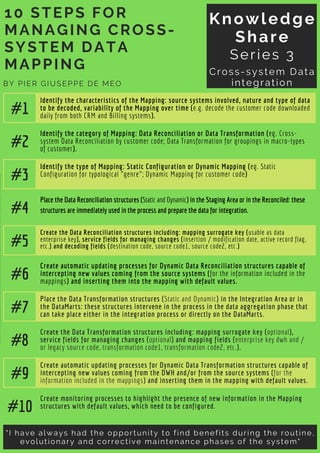
#1
Identify the characteristics of the Mapping: source systems involved, nature and type of data
to be decoded, variability of the Mapping over time (e.g. decode the customer code downloaded
daily from both CRM and Billing systems).
Knowledge
Share
Series 3
Cross-system Data
integration
"I have always had the opportunity to find benefits during the routine,
evolutionary and corrective maintenance phases of the system"
#2
Identify the category of Mapping: Data Reconciliation or Data Transformation (eg. Cross-
system Data Reconciliation by customer code; Data Transformation for groupings in macro-types
of customer).
#3
Identify the type of Mapping: Static Configuration or Dynamic Mapping (eg. Static
Configuration for typological "genre"; Dynamic Mapping for customer code)
#4
Place the Data Reconciliation structures (Static and Dynamic) in the Staging Area or in the Reconciled: these
structures are immediately used in the process and prepare the data for integration.
#5
Create the Data Reconciliation structures including: mapping surrogate key (usable as data
enterprise key), service fields for managing changes (insertion / modification date, active record flag,
etc.) and decoding fields (destination code, source code1, source code2, etc.)
#6
Create automatic updating processes for Dynamic Data Reconciliation structures capable of
intercepting new values coming from the source systems (for the information included in the
mappings) and inserting them into the mapping with default values.
#7
Place the Data Transformation structures (Static and Dynamic) in the Integration Area or in
the DataMarts: these structures intervene in the process in the data aggregation phase that
can take place either in the integration process or directly on the DataMarts.
#8
Create the Data Transformation structures including: mapping surrogate key (optional),
service fields for managing changes (optional) and mapping fields (enterprise key dwh and /
or legacy source code, transformation code1, transformation code2, etc.).
#9
Create automatic updating processes for Dynamic Data Transformation structures capable of
intercepting new values coming from the DWH and/or from the source systems (for the
information included in the mappings) and inserting them in the mapping with default values.
#10
Create monitoring processes to highlight the presence of new information in the Mapping
structures with default values, which need to be configured.

10 Steps for Managing Cross-System Data Mapping.pdf

  • 1.
    10 STEPS FOR MANAGINGCROSS- SYSTEM DATA MAPPING BY PIER GIUSEPPE DE MEO #1 Identify the characteristics of the Mapping: source systems involved, nature and type of data to be decoded, variability of the Mapping over time (e.g. decode the customer code downloaded daily from both CRM and Billing systems). Knowledge Share Series 3 Cross-system Data integration "I have always had the opportunity to find benefits during the routine, evolutionary and corrective maintenance phases of the system" #2 Identify the category of Mapping: Data Reconciliation or Data Transformation (eg. Cross- system Data Reconciliation by customer code; Data Transformation for groupings in macro-types of customer). #3 Identify the type of Mapping: Static Configuration or Dynamic Mapping (eg. Static Configuration for typological "genre"; Dynamic Mapping for customer code) #4 Place the Data Reconciliation structures (Static and Dynamic) in the Staging Area or in the Reconciled: these structures are immediately used in the process and prepare the data for integration. #5 Create the Data Reconciliation structures including: mapping surrogate key (usable as data enterprise key), service fields for managing changes (insertion / modification date, active record flag, etc.) and decoding fields (destination code, source code1, source code2, etc.) #6 Create automatic updating processes for Dynamic Data Reconciliation structures capable of intercepting new values coming from the source systems (for the information included in the mappings) and inserting them into the mapping with default values. #7 Place the Data Transformation structures (Static and Dynamic) in the Integration Area or in the DataMarts: these structures intervene in the process in the data aggregation phase that can take place either in the integration process or directly on the DataMarts. #8 Create the Data Transformation structures including: mapping surrogate key (optional), service fields for managing changes (optional) and mapping fields (enterprise key dwh and / or legacy source code, transformation code1, transformation code2, etc.). #9 Create automatic updating processes for Dynamic Data Transformation structures capable of intercepting new values coming from the DWH and/or from the source systems (for the information included in the mappings) and inserting them in the mapping with default values. #10 Create monitoring processes to highlight the presence of new information in the Mapping structures with default values, which need to be configured.