1 Weird Layout Trick UI
Devs Use to Avoid Floats!
Flexbox Will Shock You!
Devsigners Hate Him!
Scott Vandehey — @spaceninja — Devsigner 2015
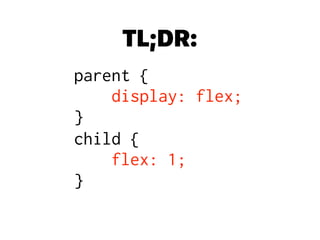
TL;DR:
parent {

display: flex;

}
child {

flex: 1;

}
F– see me after class
At First I Was in Shock,
Then I Was Outraged.
Now, I'm Just Plain
Flummoxed.
What IS Flexbox?
A New Layout Mode
CSS 2.1 defined four layout modes:
block layout for laying out documents
inline layout for laying out text
table layout for laying out 2D tabular data
positioned layout for explicit positioning
What About Floats?
Floats were never intended for layout! They were a CSS
recreation of the old “align” attribute in HTML.
CSS3 introduced new layout methods to offer an
alternative to abusing floats and tables:
• Grid layout — divides space into columns & rows

Like table layouts, but better!
• Flexbox layout — distributes space along 1 column/row

Like float layouts, but better!
–Tab Atkins (@tabatkins), author of the Flexbox and Grid specs
“My goal in doing Flexbox and later Grid was to
replace all the crazy float/table/inline-block/etc
hacks that I’d had to master as a webdev. All that
crap was (a) stupid, (b) hard to remember, and 

(c) limited in a million annoying ways, so I wanted
to make a few well-done layout modules that
solved the same problems in simple, easy-to-use,
and complete ways.”
“Optimized for UI Design”
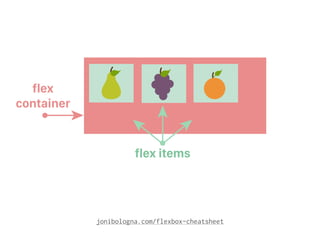
Flexbox items can be laid out horizontally or vertically
They can “flex” their sizes, growing to fill unused space
or shrinking to avoid overflow.
Nested flex containers (horizontal inside vertical, or vice
versa) can build more complex layouts.
from the CSS Flexible Box Layout Module Spec
There are
3 Flexbox Specs
3 Specs; Only 1 Matters
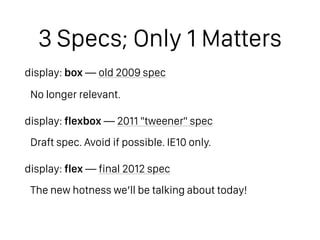
display: box — old 2009 spec
No longer relevant.
display: flexbox — 2011 "tweener" spec
Draft spec. Avoid if possible. IE10 only.
display: flex — final 2012 spec
The new hotness we’ll be talking about today!
Flexbox Layouts
Go in One Direction
Flexbox = One Direction?
#DadJoke
jonibologna.com/flexbox-cheatsheet
The 13 Flexbox
Properties That Will
Change Your Code…
FOREVER
Flex Container
Properties
display: flex
This defines a flex container; inline or block depending
on the given value. It enables a flex context for all its
direct children.
New values: flex and inline-flex.
css-tricks.com/snippets/css/a-guide-to-flexbox
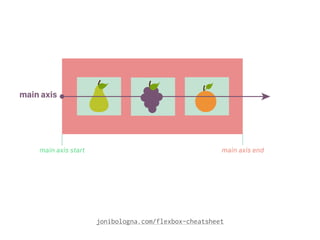
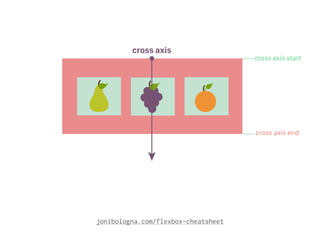
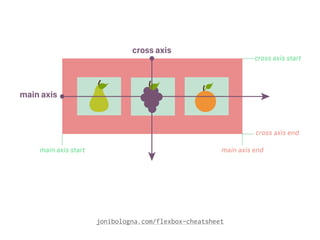
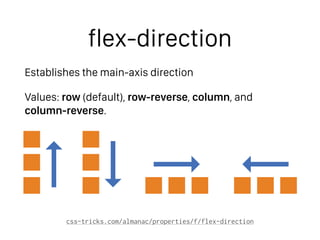
flex-direction
Establishes the main-axis direction
Values: row (default), row-reverse, column, and
column-reverse.
css-tricks.com/almanac/properties/f/flex-direction
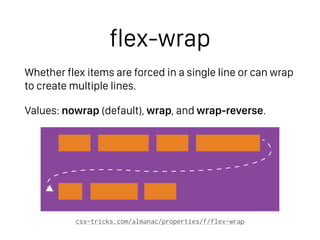
flex-wrap
Whether flex items are forced in a single line or can wrap
to create multiple lines.
Values: nowrap (default), wrap, and wrap-reverse.
css-tricks.com/almanac/properties/f/flex-wrap
flex-flow (shorthand)
Shorthand for flex-direction and flex-wrap.
css-tricks.com/almanac/properties/f/flex-flow
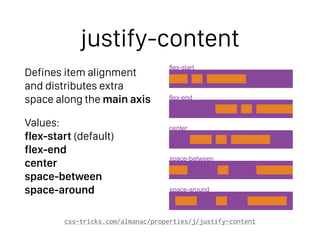
flex-start
flex-end
center
space-between
space-around
justify-content
Defines item alignment
and distributes extra
space along the main axis
Values:

flex-start (default)

flex-end

center

space-between

space-around
css-tricks.com/almanac/properties/j/justify-content
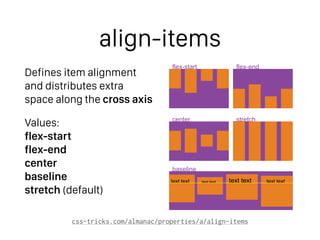
flex-start
center
baseline
stretch
flex-end
text text text texttext text text text
align-items
Defines item alignment
and distributes extra
space along the cross axis
Values:

flex-start

flex-end

center

baseline

stretch (default)
css-tricks.com/almanac/properties/a/align-items
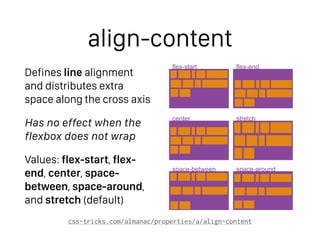
flex-start
center
space-between
stretch
space-around
flex-end
align-content
Defines line alignment 

and distributes extra
space along the cross axis
Has no effect when the
flexbox does not wrap
Values: flex-start, flex-
end, center, space-
between, space-around,
and stretch (default)
css-tricks.com/almanac/properties/a/align-content
Flex Item Properties
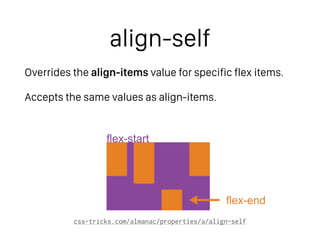
align-self
Overrides the align-items value for specific flex items.
Accepts the same values as align-items.
css-tricks.com/almanac/properties/a/align-self
flex-end
flex-start
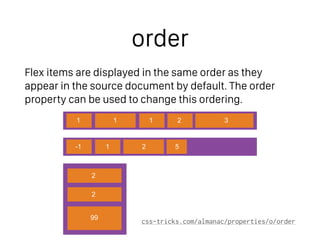
order
Flex items are displayed in the same order as they
appear in the source document by default. The order
property can be used to change this ordering.
css-tricks.com/almanac/properties/o/order
1
-1 1 2 5
1 1 2 3
2
2
99
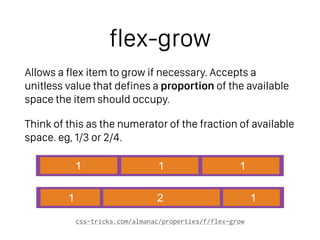
flex-grow
Allows a flex item to grow if necessary. Accepts a
unitless value that defines a proportion of the available
space the item should occupy.
Think of this as the numerator of the fraction of available
space. eg, 1/3 or 2/4.
css-tricks.com/almanac/properties/f/flex-grow
1 1 1
1 2 1
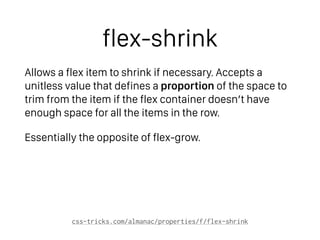
flex-shrink
Allows a flex item to shrink if necessary. Accepts a
unitless value that defines a proportion of the space to
trim from the item if the flex container doesn’t have
enough space for all the items in the row.
Essentially the opposite of flex-grow.
css-tricks.com/almanac/properties/f/flex-shrink
flex-basis
Specifies the initial size of the flex item, before any
available space is distributed according to the flex
factors.
When set to auto, sizes the item according to its width/
height property (which can itself be set to auto, which
sizes the item based on its content).
When set to 0, sizes the item based on flex-grow and
flex-shrink allocating available space.
css-tricks.com/almanac/properties/f/flex-basis
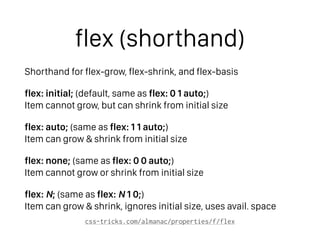
flex (shorthand)
Shorthand for flex-grow, flex-shrink, and flex-basis
flex: initial; (default, same as flex: 0 1 auto;)

Item cannot grow, but can shrink from initial size
flex: auto; (same as flex: 1 1 auto;)

Item can grow & shrink from initial size
flex: none; (same as flex: 0 0 auto;)

Item cannot grow or shrink from initial size
flex: N; (same as flex: N 1 0;)

Item can grow & shrink, ignores initial size, uses avail. space
css-tricks.com/almanac/properties/f/flex
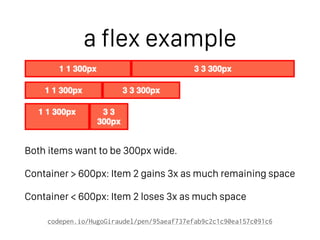
a flex example
Both items want to be 300px wide.
Container > 600px: Item 2 gains 3x as much remaining space
Container < 600px: Item 2 loses 3x as much space
codepen.io/HugoGiraudel/pen/95aeaf737efab9c2c1c90ea157c091c6
Speaker Calls CSS
Layout “Difficult,”
Gets DESTROYED Before
a Live Audience by
these Flexbox Examples
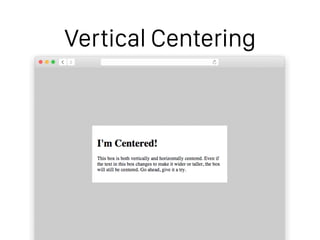
Vertical Centering
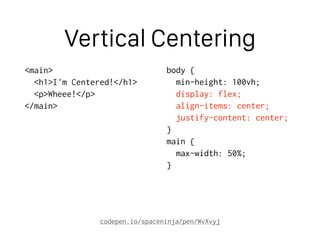
Vertical Centering
<main>
<h1>I'm Centered!</h1>
<p>Wheee!</p>
</main>
body {
min-height: 100vh;
display: flex;
align-items: center;
justify-content: center;
}
main {
max-width: 50%;
}
codepen.io/spaceninja/pen/WvXvyj
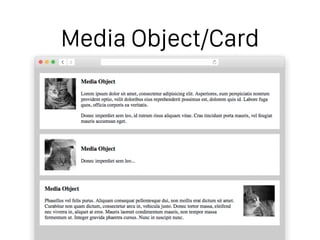
Media Object/Card
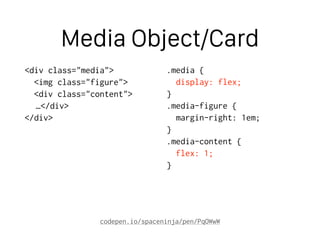
Media Object/Card
<div class="media">
<img class="figure">
<div class="content">
…</div>
</div>
.media {
display: flex;
}
.media-figure {
margin-right: 1em;
}
.media-content {
flex: 1;
}
codepen.io/spaceninja/pen/PqOWwW
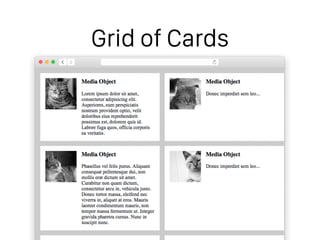
Grid of Cards
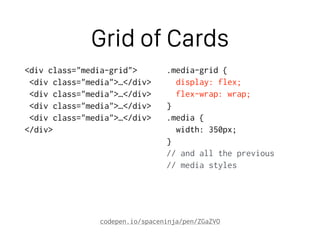
Grid of Cards
<div class="media-grid">
<div class="media">…</div>
</div>
.media-grid {
display: flex;
flex-wrap: wrap;
}
.media {
width: 350px;
}
// and all the previous
// media styles
codepen.io/spaceninja/pen/ZGaZVO
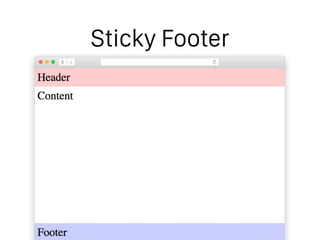
Sticky Footer
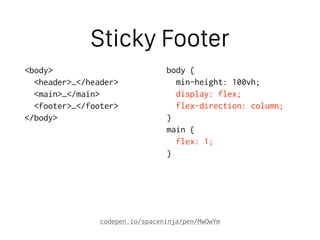
Sticky Footer
<body>
<header>…</header>
<main>…</main>
<footer>…</footer>
</body>
body {
min-height: 100vh;
display: flex;
flex-direction: column;
}
main {
flex: 1;
}
codepen.io/spaceninja/pen/MwOwYm
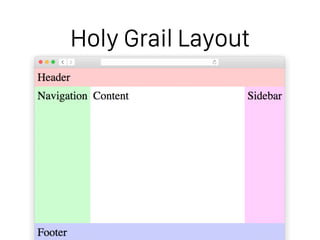
Holy Grail Layout
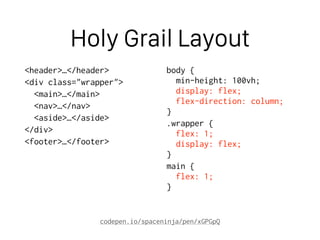
Holy Grail Layout
<header>…</header>
<div class="wrapper">
<main>…</main>
<nav>…</nav>
<aside>…</aside>
</div>
<footer>…</footer>
body {

min-height: 100vh;

display: flex;

flex-direction: column;

}
.wrapper {

flex: 1;

display: flex;

}
main {

flex: 1;

}
codepen.io/spaceninja/pen/xGPGpQ
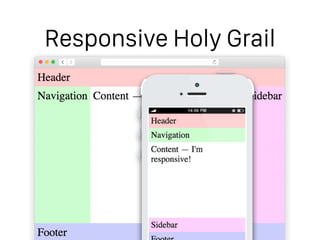
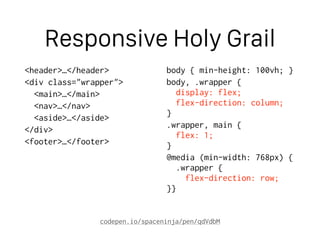
Responsive Holy Grail
<header>…</header>
<div class="wrapper">
<main>…</main>
<nav>…</nav>
<aside>…</aside>
</div>
<footer>…</footer>
body { min-height: 100vh; }
body, .wrapper {

display: flex;

flex-direction: column;

}
.wrapper, main {

flex: 1;

}
@media (min-width: 768px) {

.wrapper {

flex-direction: row;

}}
codepen.io/spaceninja/pen/qdVdbM
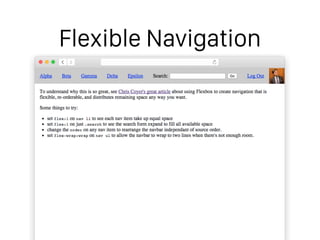
Flexible Navigation
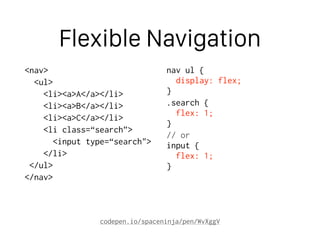
Flexible Navigation
<nav>
<ul>
<li><a>A</a></li>
<li><a>B</a></li>
<li><a>C</a></li>
<li class=“search”>
<input type=“search">
</li>
</ul>
</nav>
nav ul {

display: flex;

}
.search {

flex: 1;

}
// or

input {

flex: 1;

}
codepen.io/spaceninja/pen/WvXggV
Will Lack of Browser
Support Kill Flexbox?
You Won’t BELIEVE
What Happens Next.
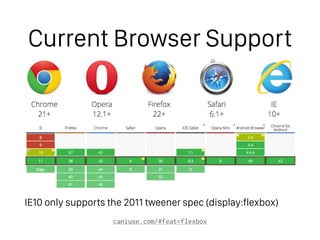
Current Browser Support
IE10 only supports the 2011 tweener spec (display:flexbox)
caniuse.com/#feat=flexbox
But What Can

We Do About IE?
Options
Best-case scenario: Degrade gracefully to a vertically-
stacked mobile-style layout for non-flexbox browsers.
If you must support non-flexbox, you can easily provide
a fallback float-based layout using Modernizr.
Note: Browser prefixes are only needed for Safari & IE10.

Chrome, Firefox, Opera, and IE11 don’t need any!
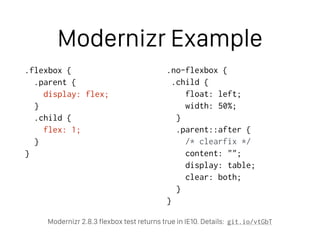
Modernizr Example
.flexbox {
.parent {
display: flex;
}
.child {
flex: 1;
}
}
.no-flexbox {
.child {
float: left;
width: 50%;
}
.parent::after {
/* clearfix */
content: "";
display: table;
clear: both;
}
}
Modernizr 2.8.3 flexbox test returns true in IE10. Details: git.io/vtGbT
I Thought Flexbox

Would be Hard to Learn,
But These Resources
Restored My Faith in
HUMANITY
• CSS Tricks: Guide to Flexbox
• Solved by Flexbox
• Flexbox Cheatsheet
• Visual Guide to Flexbox Properties
• Sass Flexbox Mixins
• Articles: Using Flexbox Today, Dive into Flexbox, MDN
Flexbox Guide
• Presentations: Putting Flexbox into Practice, Deep Dive:
Flexbox, Leveling Up with Flexbox, SassBites: Flexbox
git.io/vtlRa
What Isn’t This
Speaker Telling You?
Discover the
SHOCKING Secrets of
Grid Layout!
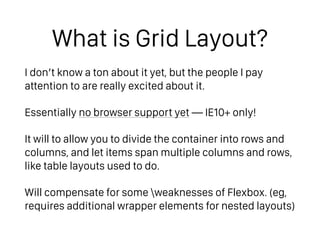
What is Grid Layout?
I don’t know a ton about it yet, but the people I pay
attention to are really excited about it.
Essentially no browser support yet — IE10+ only!
It will to allow you to divide the container into rows and
columns, and let items span multiple columns and rows,
like table layouts used to do.
Will compensate for some weaknesses of Flexbox. (eg,
requires additional wrapper elements for nested layouts)
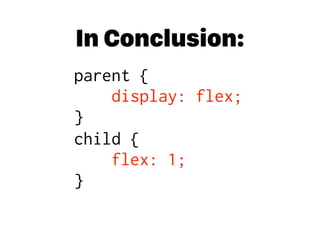
In Conclusion:
parent {

display: flex;

}
child {

flex: 1;

}

Flexbox Will Shock You!

  • 1.
    1 Weird LayoutTrick UI Devs Use to Avoid Floats! Flexbox Will Shock You! Devsigners Hate Him! Scott Vandehey — @spaceninja — Devsigner 2015
  • 2.
  • 4.
    F– see meafter class
  • 5.
    At First IWas in Shock, Then I Was Outraged. Now, I'm Just Plain Flummoxed. What IS Flexbox?
  • 6.
    A New LayoutMode CSS 2.1 defined four layout modes: block layout for laying out documents inline layout for laying out text table layout for laying out 2D tabular data positioned layout for explicit positioning
  • 7.
    What About Floats? Floatswere never intended for layout! They were a CSS recreation of the old “align” attribute in HTML. CSS3 introduced new layout methods to offer an alternative to abusing floats and tables: • Grid layout — divides space into columns & rows
 Like table layouts, but better! • Flexbox layout — distributes space along 1 column/row
 Like float layouts, but better!
  • 8.
    –Tab Atkins (@tabatkins),author of the Flexbox and Grid specs “My goal in doing Flexbox and later Grid was to replace all the crazy float/table/inline-block/etc hacks that I’d had to master as a webdev. All that crap was (a) stupid, (b) hard to remember, and 
 (c) limited in a million annoying ways, so I wanted to make a few well-done layout modules that solved the same problems in simple, easy-to-use, and complete ways.”
  • 9.
    “Optimized for UIDesign” Flexbox items can be laid out horizontally or vertically They can “flex” their sizes, growing to fill unused space or shrinking to avoid overflow. Nested flex containers (horizontal inside vertical, or vice versa) can build more complex layouts. from the CSS Flexible Box Layout Module Spec
  • 10.
  • 12.
    3 Specs; Only1 Matters display: box — old 2009 spec No longer relevant. display: flexbox — 2011 "tweener" spec Draft spec. Avoid if possible. IE10 only. display: flex — final 2012 spec The new hotness we’ll be talking about today!
  • 13.
    Flexbox Layouts Go inOne Direction
  • 14.
    Flexbox = OneDirection?
  • 15.
    Flexbox = OneDirection? #DadJoke
  • 16.
  • 17.
  • 18.
  • 19.
  • 20.
    The 13 Flexbox PropertiesThat Will Change Your Code… FOREVER
  • 21.
  • 22.
    display: flex This definesa flex container; inline or block depending on the given value. It enables a flex context for all its direct children. New values: flex and inline-flex. css-tricks.com/snippets/css/a-guide-to-flexbox
  • 23.
    flex-direction Establishes the main-axisdirection Values: row (default), row-reverse, column, and column-reverse. css-tricks.com/almanac/properties/f/flex-direction
  • 24.
    flex-wrap Whether flex itemsare forced in a single line or can wrap to create multiple lines. Values: nowrap (default), wrap, and wrap-reverse. css-tricks.com/almanac/properties/f/flex-wrap
  • 25.
    flex-flow (shorthand) Shorthand forflex-direction and flex-wrap. css-tricks.com/almanac/properties/f/flex-flow
  • 26.
    flex-start flex-end center space-between space-around justify-content Defines item alignment anddistributes extra space along the main axis Values:
 flex-start (default)
 flex-end
 center
 space-between
 space-around css-tricks.com/almanac/properties/j/justify-content
  • 27.
    flex-start center baseline stretch flex-end text text texttexttext text text text align-items Defines item alignment and distributes extra space along the cross axis Values:
 flex-start
 flex-end
 center
 baseline
 stretch (default) css-tricks.com/almanac/properties/a/align-items
  • 28.
    flex-start center space-between stretch space-around flex-end align-content Defines line alignment
 and distributes extra space along the cross axis Has no effect when the flexbox does not wrap Values: flex-start, flex- end, center, space- between, space-around, and stretch (default) css-tricks.com/almanac/properties/a/align-content
  • 29.
  • 30.
    align-self Overrides the align-itemsvalue for specific flex items. Accepts the same values as align-items. css-tricks.com/almanac/properties/a/align-self flex-end flex-start
  • 31.
    order Flex items aredisplayed in the same order as they appear in the source document by default. The order property can be used to change this ordering. css-tricks.com/almanac/properties/o/order 1 -1 1 2 5 1 1 2 3 2 2 99
  • 32.
    flex-grow Allows a flexitem to grow if necessary. Accepts a unitless value that defines a proportion of the available space the item should occupy. Think of this as the numerator of the fraction of available space. eg, 1/3 or 2/4. css-tricks.com/almanac/properties/f/flex-grow 1 1 1 1 2 1
  • 33.
    flex-shrink Allows a flexitem to shrink if necessary. Accepts a unitless value that defines a proportion of the space to trim from the item if the flex container doesn’t have enough space for all the items in the row. Essentially the opposite of flex-grow. css-tricks.com/almanac/properties/f/flex-shrink
  • 34.
    flex-basis Specifies the initialsize of the flex item, before any available space is distributed according to the flex factors. When set to auto, sizes the item according to its width/ height property (which can itself be set to auto, which sizes the item based on its content). When set to 0, sizes the item based on flex-grow and flex-shrink allocating available space. css-tricks.com/almanac/properties/f/flex-basis
  • 35.
    flex (shorthand) Shorthand forflex-grow, flex-shrink, and flex-basis flex: initial; (default, same as flex: 0 1 auto;)
 Item cannot grow, but can shrink from initial size flex: auto; (same as flex: 1 1 auto;)
 Item can grow & shrink from initial size flex: none; (same as flex: 0 0 auto;)
 Item cannot grow or shrink from initial size flex: N; (same as flex: N 1 0;)
 Item can grow & shrink, ignores initial size, uses avail. space css-tricks.com/almanac/properties/f/flex
  • 36.
    a flex example Bothitems want to be 300px wide. Container > 600px: Item 2 gains 3x as much remaining space Container < 600px: Item 2 loses 3x as much space codepen.io/HugoGiraudel/pen/95aeaf737efab9c2c1c90ea157c091c6
  • 37.
    Speaker Calls CSS Layout“Difficult,” Gets DESTROYED Before a Live Audience by these Flexbox Examples
  • 38.
  • 39.
    Vertical Centering <main> <h1>I'm Centered!</h1> <p>Wheee!</p> </main> body{ min-height: 100vh; display: flex; align-items: center; justify-content: center; } main { max-width: 50%; } codepen.io/spaceninja/pen/WvXvyj
  • 40.
  • 41.
    Media Object/Card <div class="media"> <imgclass="figure"> <div class="content"> …</div> </div> .media { display: flex; } .media-figure { margin-right: 1em; } .media-content { flex: 1; } codepen.io/spaceninja/pen/PqOWwW
  • 42.
  • 43.
    Grid of Cards <divclass="media-grid"> <div class="media">…</div> <div class="media">…</div> <div class="media">…</div> <div class="media">…</div> </div> .media-grid { display: flex; flex-wrap: wrap; } .media { width: 350px; } // and all the previous // media styles codepen.io/spaceninja/pen/ZGaZVO
  • 44.
  • 45.
    Sticky Footer <body> <header>…</header> <main>…</main> <footer>…</footer> </body> body { min-height:100vh; display: flex; flex-direction: column; } main { flex: 1; } codepen.io/spaceninja/pen/MwOwYm
  • 46.
  • 47.
    Holy Grail Layout <header>…</header> <divclass="wrapper"> <main>…</main> <nav>…</nav> <aside>…</aside> </div> <footer>…</footer> body {
 min-height: 100vh;
 display: flex;
 flex-direction: column;
 } .wrapper {
 flex: 1;
 display: flex;
 } main {
 flex: 1;
 } codepen.io/spaceninja/pen/xGPGpQ
  • 48.
  • 49.
    Responsive Holy Grail <header>…</header> <divclass="wrapper"> <main>…</main> <nav>…</nav> <aside>…</aside> </div> <footer>…</footer> body { min-height: 100vh; } body, .wrapper {
 display: flex;
 flex-direction: column;
 } .wrapper, main {
 flex: 1;
 } @media (min-width: 768px) {
 .wrapper {
 flex-direction: row;
 }} codepen.io/spaceninja/pen/qdVdbM
  • 50.
  • 51.
    Flexible Navigation <nav> <ul> <li><a>A</a></li> <li><a>B</a></li> <li><a>C</a></li> <li class=“search”> <inputtype=“search"> </li> </ul> </nav> nav ul {
 display: flex;
 } .search {
 flex: 1;
 } // or
 input {
 flex: 1;
 } codepen.io/spaceninja/pen/WvXggV
  • 52.
    Will Lack ofBrowser Support Kill Flexbox? You Won’t BELIEVE What Happens Next.
  • 53.
    Current Browser Support IE10only supports the 2011 tweener spec (display:flexbox) caniuse.com/#feat=flexbox
  • 54.
    But What Can
 WeDo About IE?
  • 56.
    Options Best-case scenario: Degradegracefully to a vertically- stacked mobile-style layout for non-flexbox browsers. If you must support non-flexbox, you can easily provide a fallback float-based layout using Modernizr. Note: Browser prefixes are only needed for Safari & IE10.
 Chrome, Firefox, Opera, and IE11 don’t need any!
  • 57.
    Modernizr Example .flexbox { .parent{ display: flex; } .child { flex: 1; } } .no-flexbox { .child { float: left; width: 50%; } .parent::after { /* clearfix */ content: ""; display: table; clear: both; } } Modernizr 2.8.3 flexbox test returns true in IE10. Details: git.io/vtGbT
  • 58.
    I Thought Flexbox
 Wouldbe Hard to Learn, But These Resources Restored My Faith in HUMANITY
  • 59.
    • CSS Tricks:Guide to Flexbox • Solved by Flexbox • Flexbox Cheatsheet • Visual Guide to Flexbox Properties • Sass Flexbox Mixins • Articles: Using Flexbox Today, Dive into Flexbox, MDN Flexbox Guide • Presentations: Putting Flexbox into Practice, Deep Dive: Flexbox, Leveling Up with Flexbox, SassBites: Flexbox git.io/vtlRa
  • 60.
    What Isn’t This SpeakerTelling You? Discover the SHOCKING Secrets of Grid Layout!
  • 62.
    What is GridLayout? I don’t know a ton about it yet, but the people I pay attention to are really excited about it. Essentially no browser support yet — IE10+ only! It will to allow you to divide the container into rows and columns, and let items span multiple columns and rows, like table layouts used to do. Will compensate for some weaknesses of Flexbox. (eg, requires additional wrapper elements for nested layouts)
  • 63.
    In Conclusion: parent {
 display:flex;
 } child {
 flex: 1;
 }