1 minute intro
For the very beginning

Note:
Everything you share in Loomideck team is available for each
teammate
Teammates are those who accept your invitation to join team which
you send by email
It is easier to add pin using “Save to Loomideck” button
You can share files by dropping it on screen
Get the latest news from your team
“News” gives you overview of everything what happened in your teams. If you
want to check what happened in exact team, just choose team from dropdown
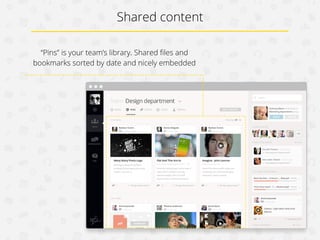
Shared content
“Pins” is your team’s library. Shared files and
bookmarks sorted by date and nicely embedded
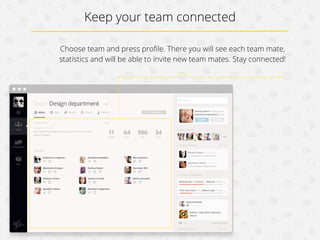
Keep your team connected
Choose team and press profile. In it you will see each teammate,
statistics and will be able to invite new teammates. Stay connected!
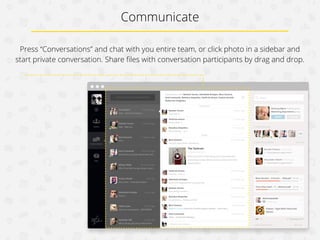
Communicate
Press “Conversations” and chat with you entire team, or click photo in a sidebar and
start private conversation. Share files with conversation participants by drag and drop.
Notify and be notified while being offline
If you are connected with
Facebook, you can notify
and be notified by your
teammates while you are
offline. Message from
conversations will come
as Facebook message
directly to your Facebook
messenger.
Enjoy!

www.loomideck.com!

1 minute intro

  • 1.
  • 2.
    For the verybeginning Note: Everything you share in Loomideck team is available for each teammate Teammates are those who accept your invitation to join team which you send by email It is easier to add pin using “Save to Loomideck” button You can share files by dropping it on screen
  • 3.
    Get the latestnews from your team “News” gives you overview of everything what happened in your teams. If you want to check what happened in exact team, just choose team from dropdown
  • 4.
    Shared content “Pins” isyour team’s library. Shared files and bookmarks sorted by date and nicely embedded
  • 5.
    Keep your teamconnected Choose team and press profile. In it you will see each teammate, statistics and will be able to invite new teammates. Stay connected!
  • 6.
    Communicate Press “Conversations” andchat with you entire team, or click photo in a sidebar and start private conversation. Share files with conversation participants by drag and drop.
  • 7.
    Notify and benotified while being offline If you are connected with Facebook, you can notify and be notified by your teammates while you are offline. Message from conversations will come as Facebook message directly to your Facebook messenger.
  • 8.