GCSE J277 Unit 1.3| Computer networks, connections and protocols Craig’n’Dave
Specification & learning objectives
By the end of this topic you will have studied:
• Types of network: LAN, WAN
• Factors that affect the performance of networks
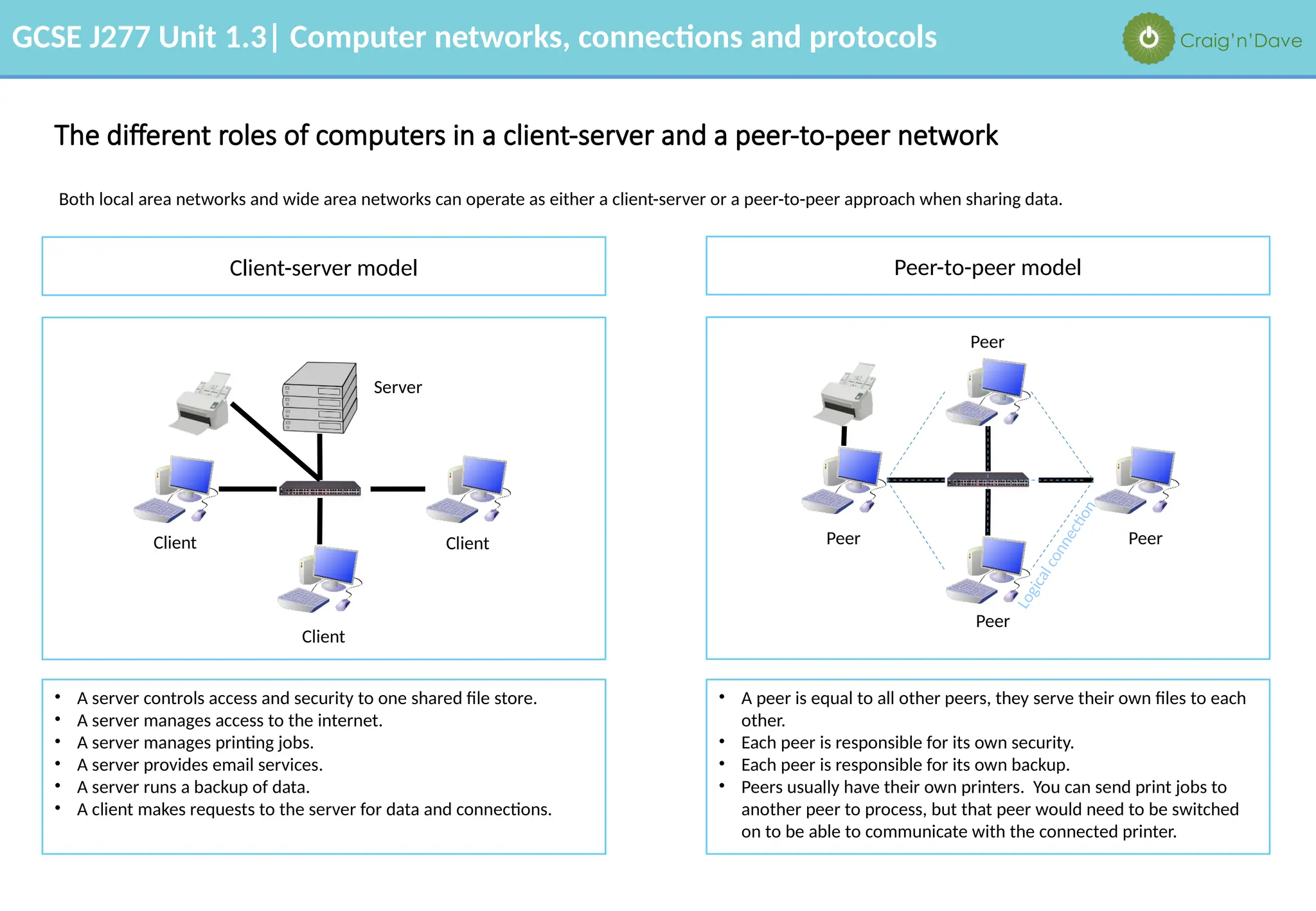
• The different roles of computers in a client-server and peer-to-peer network
• The hardware needed to connect stand-alone computers to a LAN: Wireless access points, Routers, Switches, NIC, Transmission media
• The Internet as a worldwide collection of computer networks: DNS, Hosting, The Cloud, Web servers and clients
• Star and Mesh network topologies
• Modes of connection: Wired (Ehternet), Wireless (Wi-Fi, Bluetooth)
• Encryption
• IP addressing and MAC addressing
• Standards
• Common protocols including: TCP/IP, HTTP, HTTPS, FTP, POP, IMAP, SMTP
• The concept of layers
Resources
We recommend the OCR endorsed text book from PG Online for use during your GCSE studies.
Craig'n'Dave videos for SLR 1.3
GCSE J277 Unit 1.3| Computer networks, connections and protocols Craig’n’Dave
Types of networks
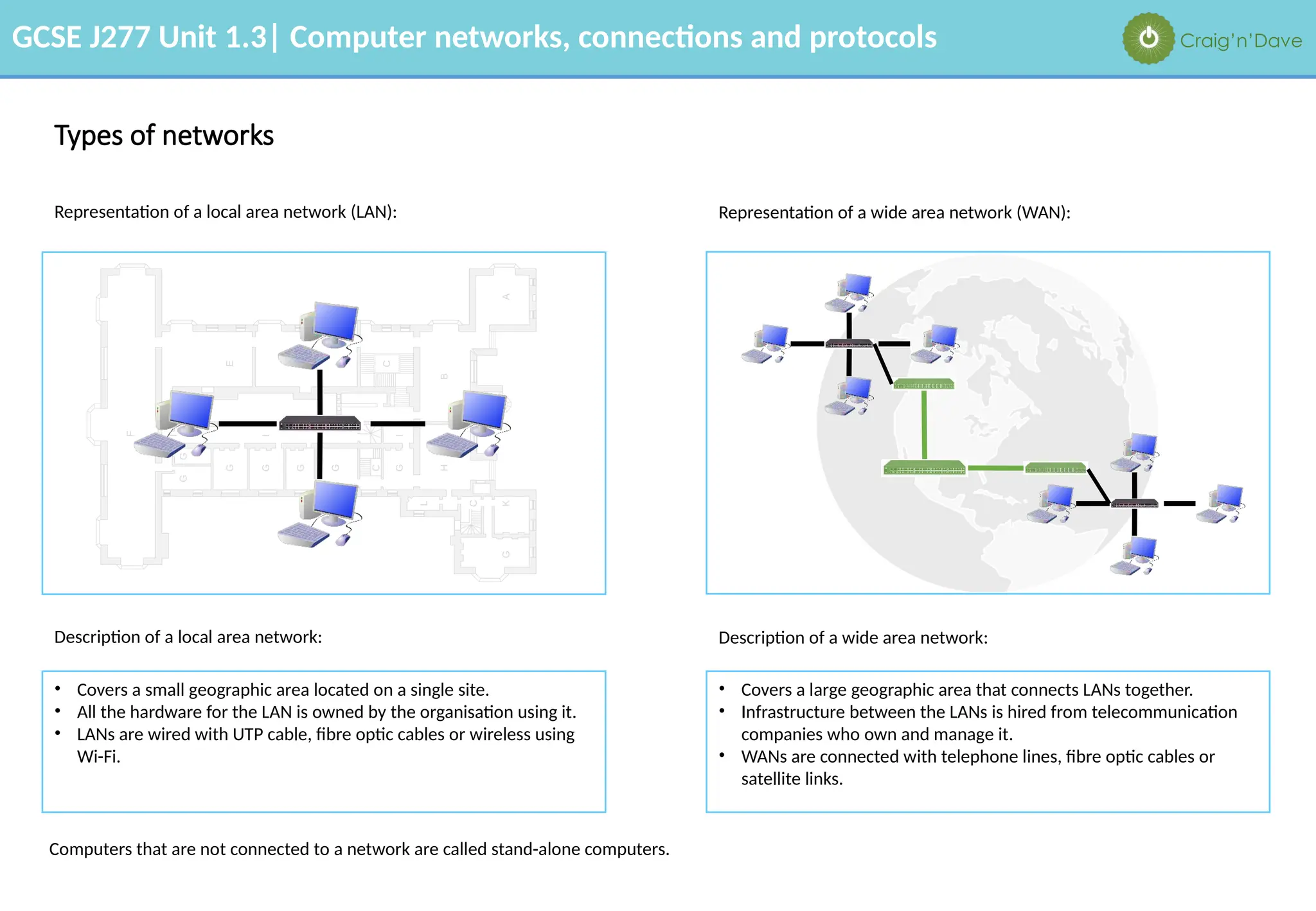
Representation of a local area network (LAN):
• Covers a small geographic area located on a single site.
• All the hardware for the LAN is owned by the organisation using it.
• LANs are wired with UTP cable, fibre optic cables or wireless using
Wi-Fi.
Representation of a wide area network (WAN):
Description of a local area network: Description of a wide area network:
• Covers a large geographic area that connects LANs together.
• Infrastructure between the LANs is hired from telecommunication
companies who own and manage it.
• WANs are connected with telephone lines, fibre optic cables or
satellite links.
Computers that are not connected to a network are called stand-alone computers.
GCSE J277 Unit 1.3| Computer networks, connections and protocols Craig’n’Dave
The advantages and disadvantages of networks
The advantages of networks include: • Users can share files.
• Users can share peripherals such as printers, and connections to other networks, e.g. the internet.
• Users can access their files from any computer on the network.
• Servers can control security, software updates and backup of data.
• Communication with other people, e.g. email and social networking.
The disadvantages of networks include: • Increased security risk to data.
• Malware and viruses spread very easily between computers.
• If a server fails, all the computers may not work.
• The computer may run more slowly if there is a lot of data travelling on the network.
GCSE J277 Unit 1.3| Computer networks, connections and protocols Craig’n’Dave
Factors that affect the performance of networks
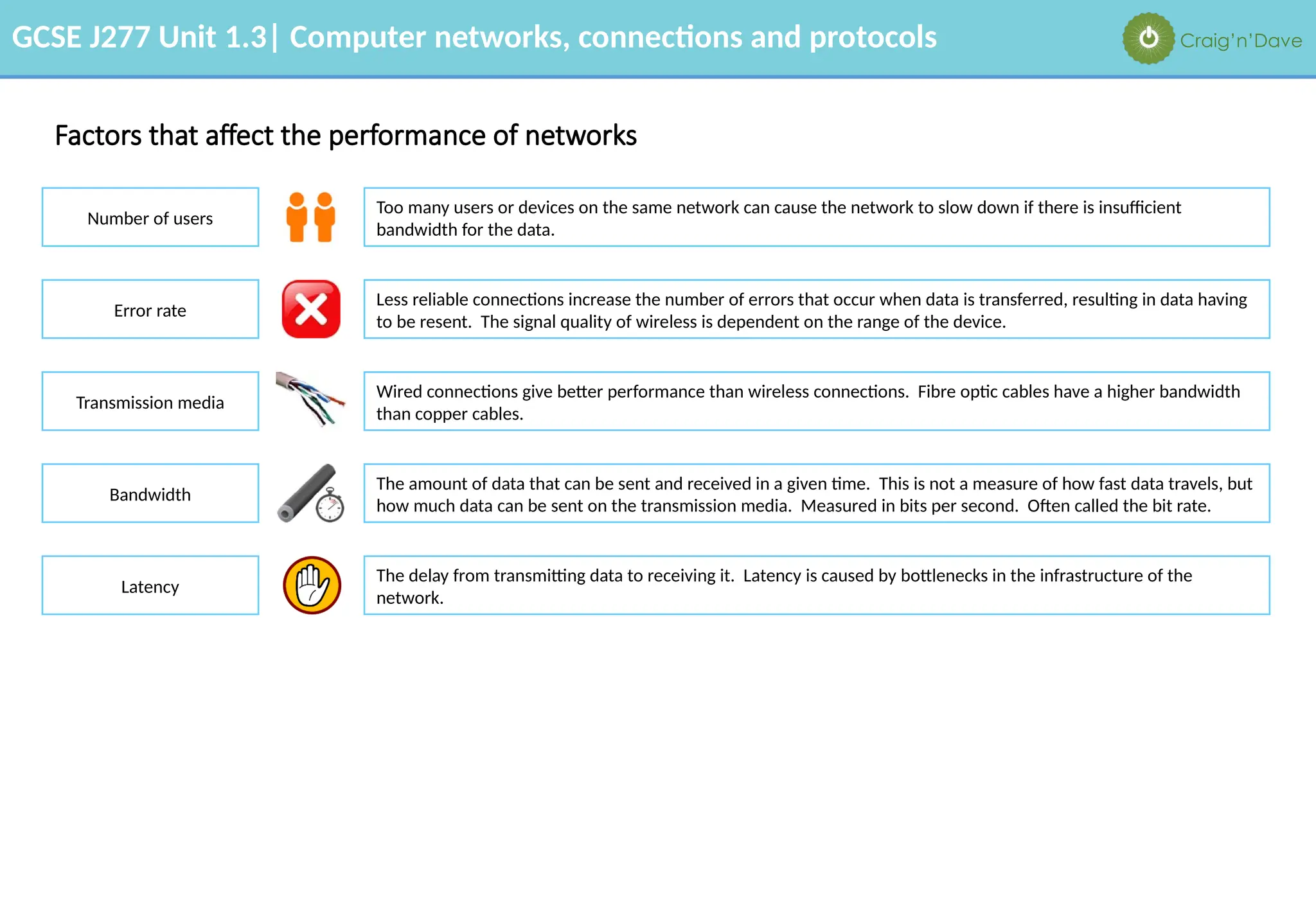
Number of users
Too many users or devices on the same network can cause the network to slow down if there is insufficient
bandwidth for the data.
Error rate
Transmission media
Bandwidth
Less reliable connections increase the number of errors that occur when data is transferred, resulting in data having
to be resent. The signal quality of wireless is dependent on the range of the device.
Wired connections give better performance than wireless connections. Fibre optic cables have a higher bandwidth
than copper cables.
The amount of data that can be sent and received in a given time. This is not a measure of how fast data travels, but
how much data can be sent on the transmission media. Measured in bits per second. Often called the bit rate.
Latency
The delay from transmitting data to receiving it. Latency is caused by bottlenecks in the infrastructure of the
network.
GCSE J277 Unit 1.3| Computer networks, connections and protocols Craig’n’Dave
The different roles of computers in a client-server and a peer-to-peer network
Both local area networks and wide area networks can operate as either a client-server or a peer-to-peer approach when sharing data.
Client-server model Peer-to-peer model
Peer
• A server controls access and security to one shared file store.
• A server manages access to the internet.
• A server manages printing jobs.
• A server provides email services.
• A server runs a backup of data.
• A client makes requests to the server for data and connections.
• A peer is equal to all other peers, they serve their own files to each
other.
• Each peer is responsible for its own security.
• Each peer is responsible for its own backup.
• Peers usually have their own printers. You can send print jobs to
another peer to process, but that peer would need to be switched
on to be able to communicate with the connected printer.
Server
Client
Client
Client
L
o
g
i
c
a
l
c
o
n
n
e
c
ti
o
n
Peer
Peer
Peer
GCSE J277 Unit 1.3| Computer networks, connections and protocols Craig’n’Dave
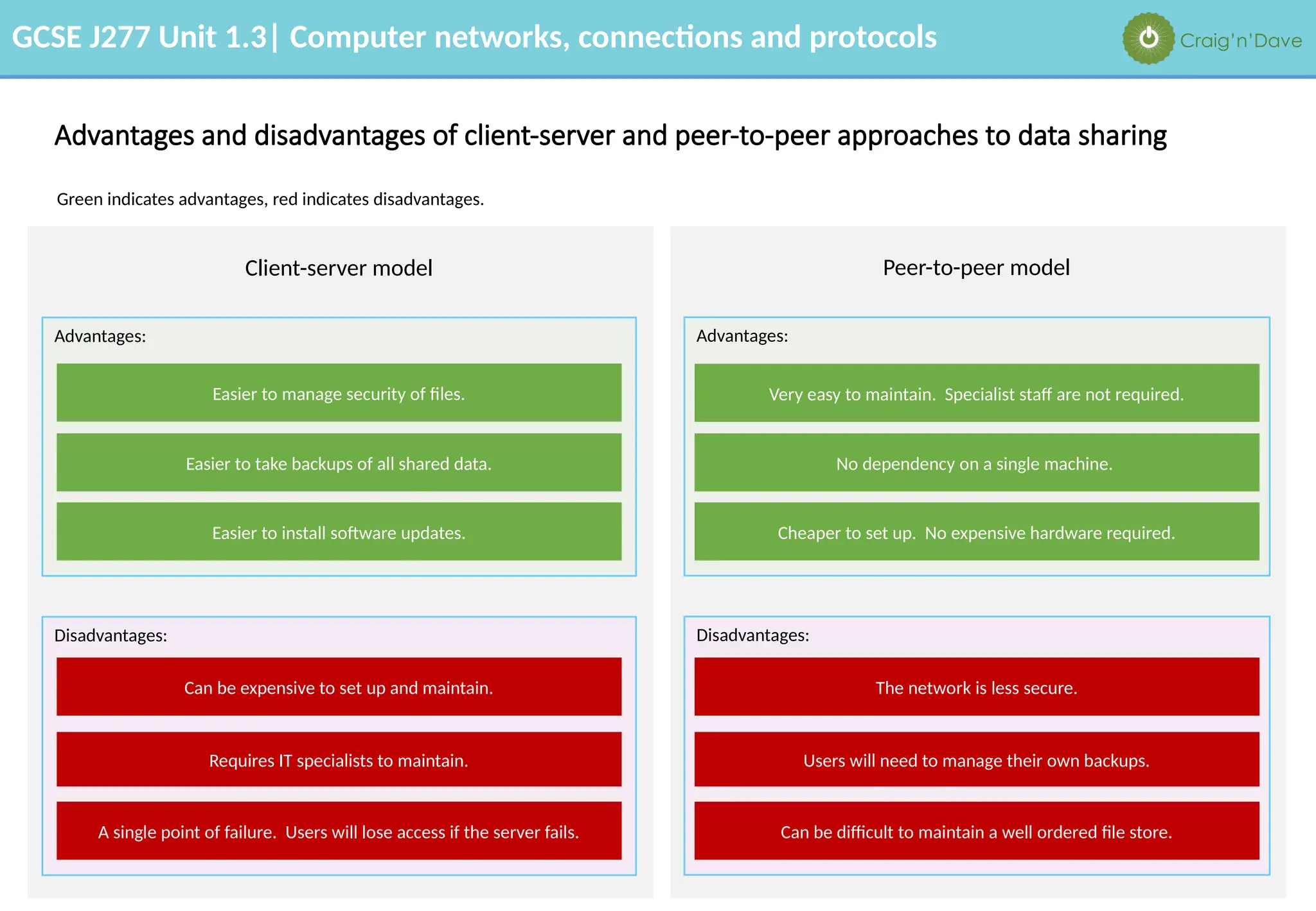
Advantages and disadvantages of client-server and peer-to-peer approaches to data sharing
Green indicates advantages, red indicates disadvantages.
Client-server model Peer-to-peer model
Advantages: Advantages:
Disadvantages: Disadvantages:
Easier to manage security of files.
Easier to take backups of all shared data.
Easier to install software updates.
Can be expensive to set up and maintain.
Requires IT specialists to maintain.
A single point of failure. Users will lose access if the server fails.
Very easy to maintain. Specialist staff are not required.
No dependency on a single machine.
Cheaper to set up. No expensive hardware required.
The network is less secure.
Users will need to manage their own backups.
Can be difficult to maintain a well ordered file store.
GCSE J277 Unit 1.3| Computer networks, connections and protocols Craig’n’Dave
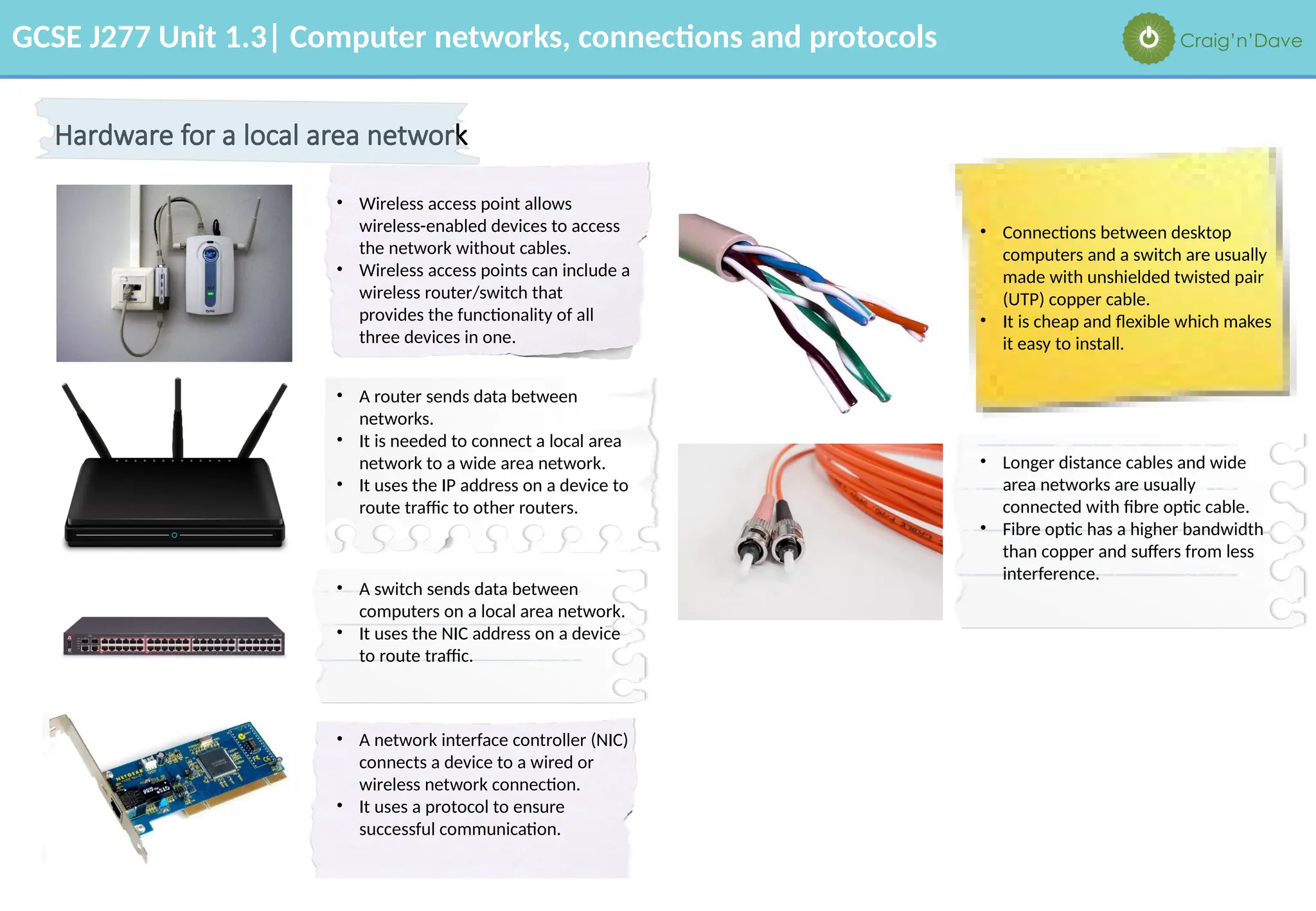
Hardware for a local area network
• Wireless access point allows
wireless-enabled devices to access
the network without cables.
• Wireless access points can include a
wireless router/switch that
provides the functionality of all
three devices in one.
• A router sends data between
networks.
• It is needed to connect a local area
network to a wide area network.
• It uses the IP address on a device to
route traffic to other routers.
• A switch sends data between
computers on a local area network.
• It uses the NIC address on a device
to route traffic.
• A network interface controller (NIC)
connects a device to a wired or
wireless network connection.
• It uses a protocol to ensure
successful communication.
• Connections between desktop
computers and a switch are usually
made with unshielded twisted pair
(UTP) copper cable.
• It is cheap and flexible which makes
it easy to install.
• Longer distance cables and wide
area networks are usually
connected with fibre optic cable.
• Fibre optic has a higher bandwidth
than copper and suffers from less
interference.
GCSE J277 Unit 1.3| Computer networks, connections and protocols Craig’n’Dave
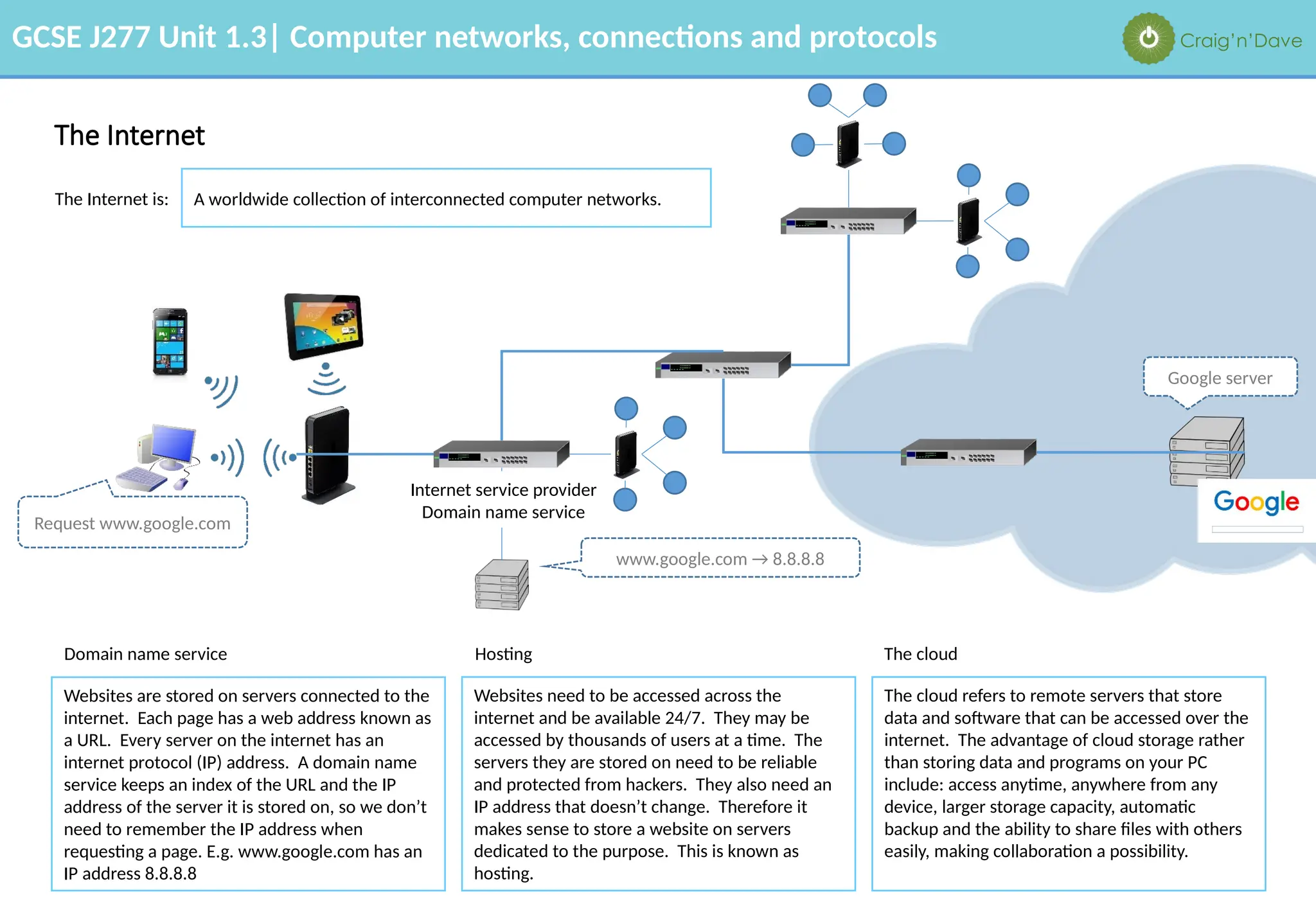
The Internet
The Internet is: A worldwide collection of interconnected computer networks.
Domain name service
Websites are stored on servers connected to the
internet. Each page has a web address known as
a URL. Every server on the internet has an
internet protocol (IP) address. A domain name
service keeps an index of the URL and the IP
address of the server it is stored on, so we don’t
need to remember the IP address when
requesting a page. E.g. www.google.com has an
IP address 8.8.8.8
Hosting
Websites need to be accessed across the
internet and be available 24/7. They may be
accessed by thousands of users at a time. The
servers they are stored on need to be reliable
and protected from hackers. They also need an
IP address that doesn’t change. Therefore it
makes sense to store a website on servers
dedicated to the purpose. This is known as
hosting.
The cloud refers to remote servers that store
data and software that can be accessed over the
internet. The advantage of cloud storage rather
than storing data and programs on your PC
include: access anytime, anywhere from any
device, larger storage capacity, automatic
backup and the ability to share files with others
easily, making collaboration a possibility.
The cloud
Internet service provider
Domain name service
www.google.com → 8.8.8.8
Request www.google.com
Google server
GCSE J277 Unit 1.3| Computer networks, connections and protocols Craig’n’Dave
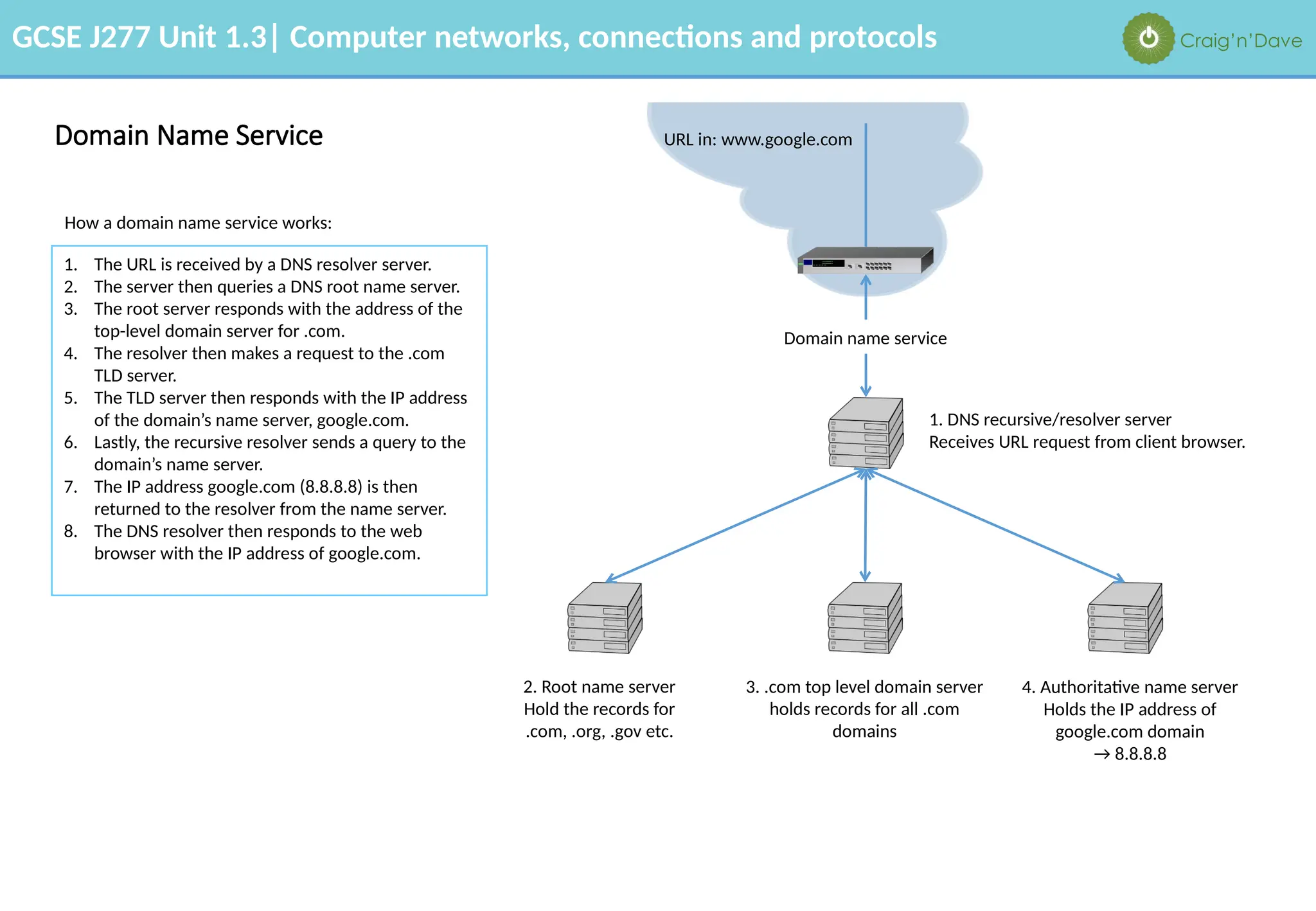
Domain Name Service
1. DNS recursive/resolver server
Receives URL request from client browser.
2. Root name server
Hold the records for
.com, .org, .gov etc.
3. .com top level domain server
holds records for all .com
domains
4. Authoritative name server
Holds the IP address of
google.com domain
→ 8.8.8.8
Domain name service
URL in: www.google.com
How a domain name service works:
1. The URL is received by a DNS resolver server.
2. The server then queries a DNS root name server.
3. The root server responds with the address of the
top-level domain server for .com.
4. The resolver then makes a request to the .com
TLD server.
5. The TLD server then responds with the IP address
of the domain’s name server, google.com.
6. Lastly, the recursive resolver sends a query to the
domain’s name server.
7. The IP address google.com (8.8.8.8) is then
returned to the resolver from the name server.
8. The DNS resolver then responds to the web
browser with the IP address of google.com.
GCSE J277 Unit 1.3| Computer networks, connections and protocols Craig’n’Dave
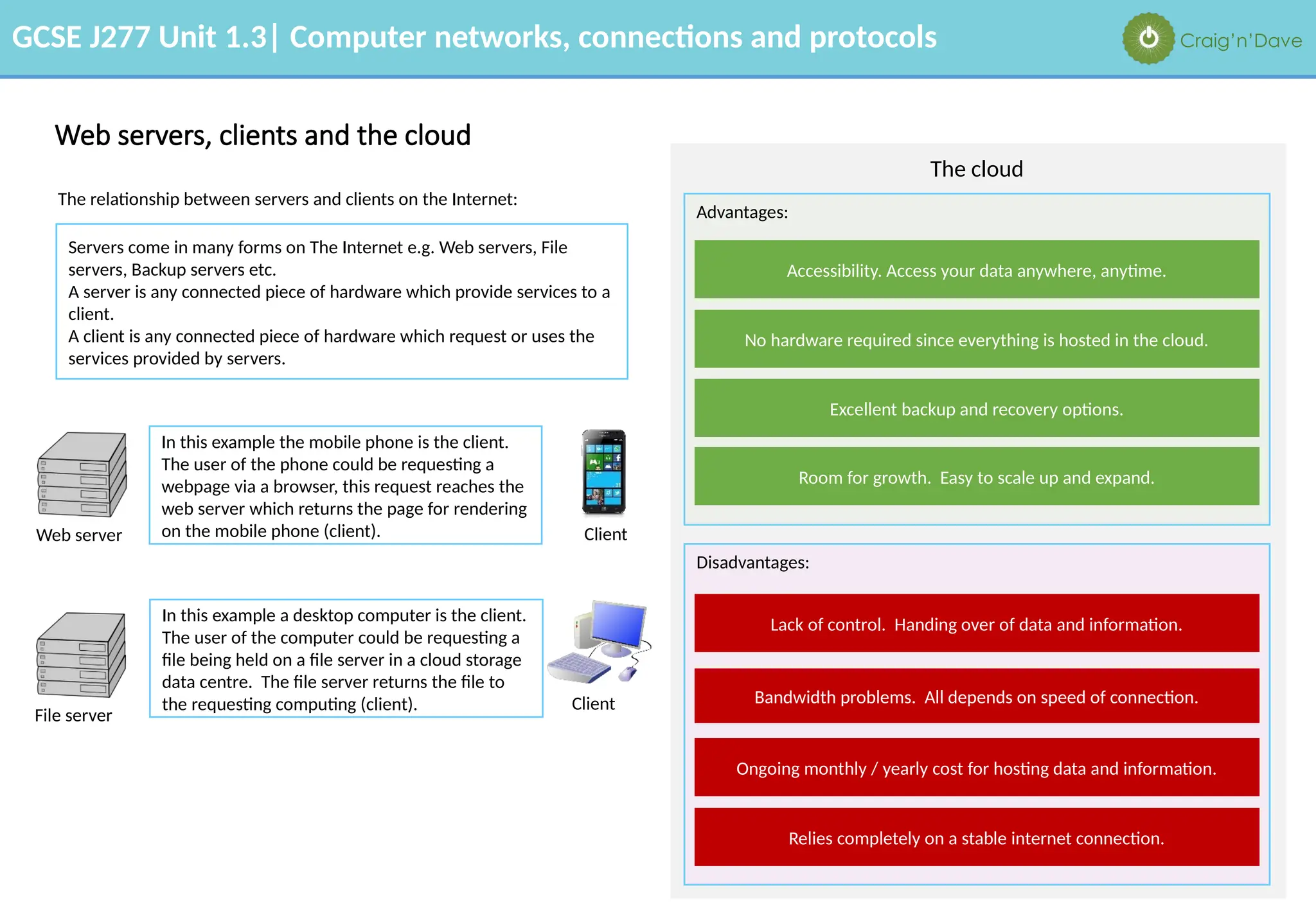
Web servers, clients and the cloud
The cloud
Advantages:
Disadvantages:
Accessibility. Access your data anywhere, anytime.
No hardware required since everything is hosted in the cloud.
Excellent backup and recovery options.
Lack of control. Handing over of data and information.
Bandwidth problems. All depends on speed of connection.
Ongoing monthly / yearly cost for hosting data and information.
Room for growth. Easy to scale up and expand.
Relies completely on a stable internet connection.
Web server
Client
File server
Client
In this example the mobile phone is the client.
The user of the phone could be requesting a
webpage via a browser, this request reaches the
web server which returns the page for rendering
on the mobile phone (client).
In this example a desktop computer is the client.
The user of the computer could be requesting a
file being held on a file server in a cloud storage
data centre. The file server returns the file to
the requesting computing (client).
The relationship between servers and clients on the Internet:
Servers come in many forms on The Internet e.g. Web servers, File
servers, Backup servers etc.
A server is any connected piece of hardware which provide services to a
client.
A client is any connected piece of hardware which request or uses the
services provided by servers.
GCSE J277 Unit 1.3| Computer networks, connections and protocols Craig’n’Dave
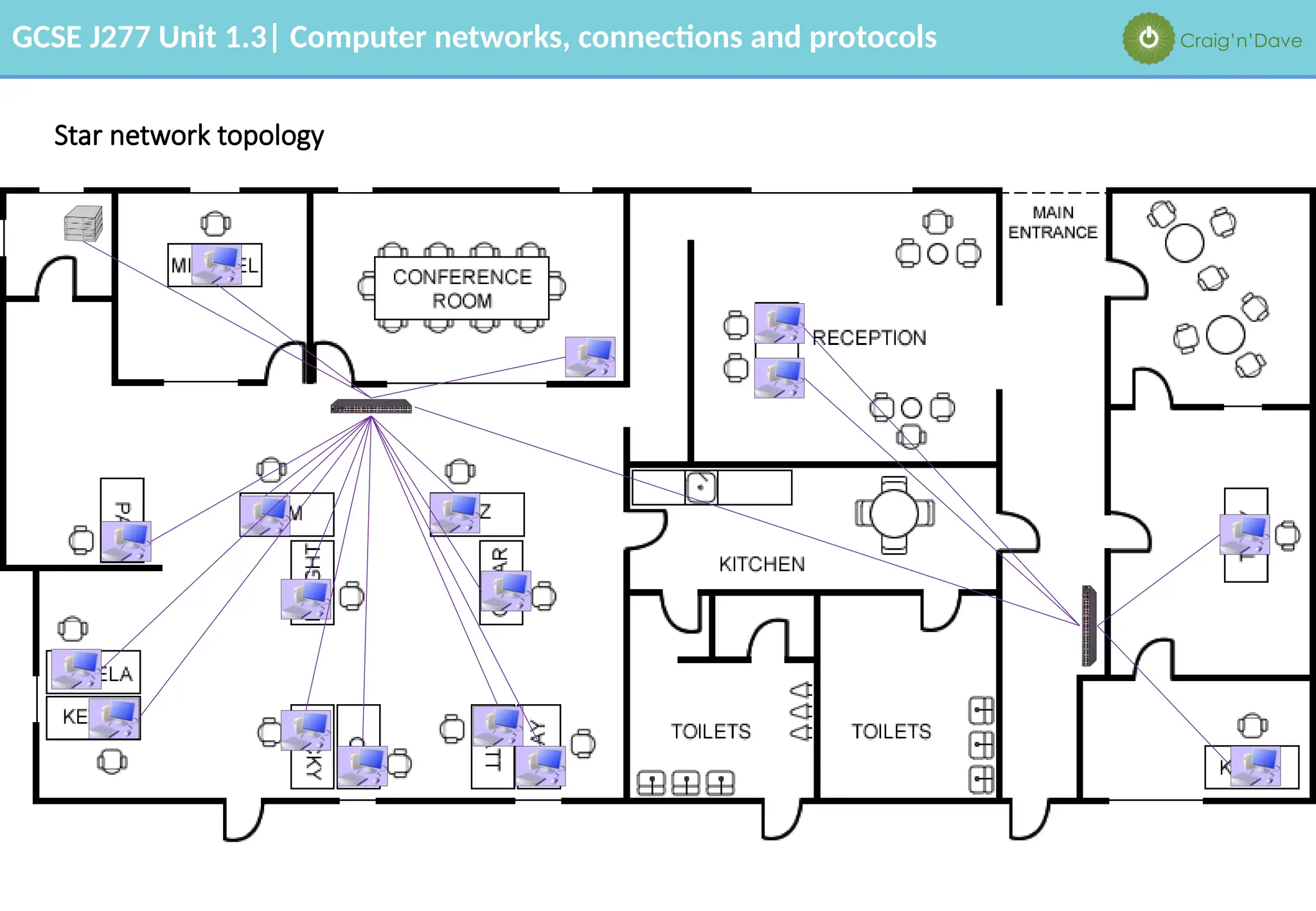
Star network topology
GCSE J277 Unit 1.3| Computer networks, connections and protocols Craig’n’Dave
Star network topology
The weakness of the star network topology as illustrated in the diagram on the previous slide is: if the switch fails, everyone connected to it loses access to
the network.
Full mesh network topology
The advantage of connecting computers together in a full
mesh topology is:
if the switch fails, the network will still function because
there is another route between the source and destination.
The disadvantages of connecting computers together in a
full mesh topology are that:
there is a lot more cabling and switches needed, which can
be expensive and impractical for large networks.
GCSE J277 Unit 1.3| Computer networks, connections and protocols Craig’n’Dave
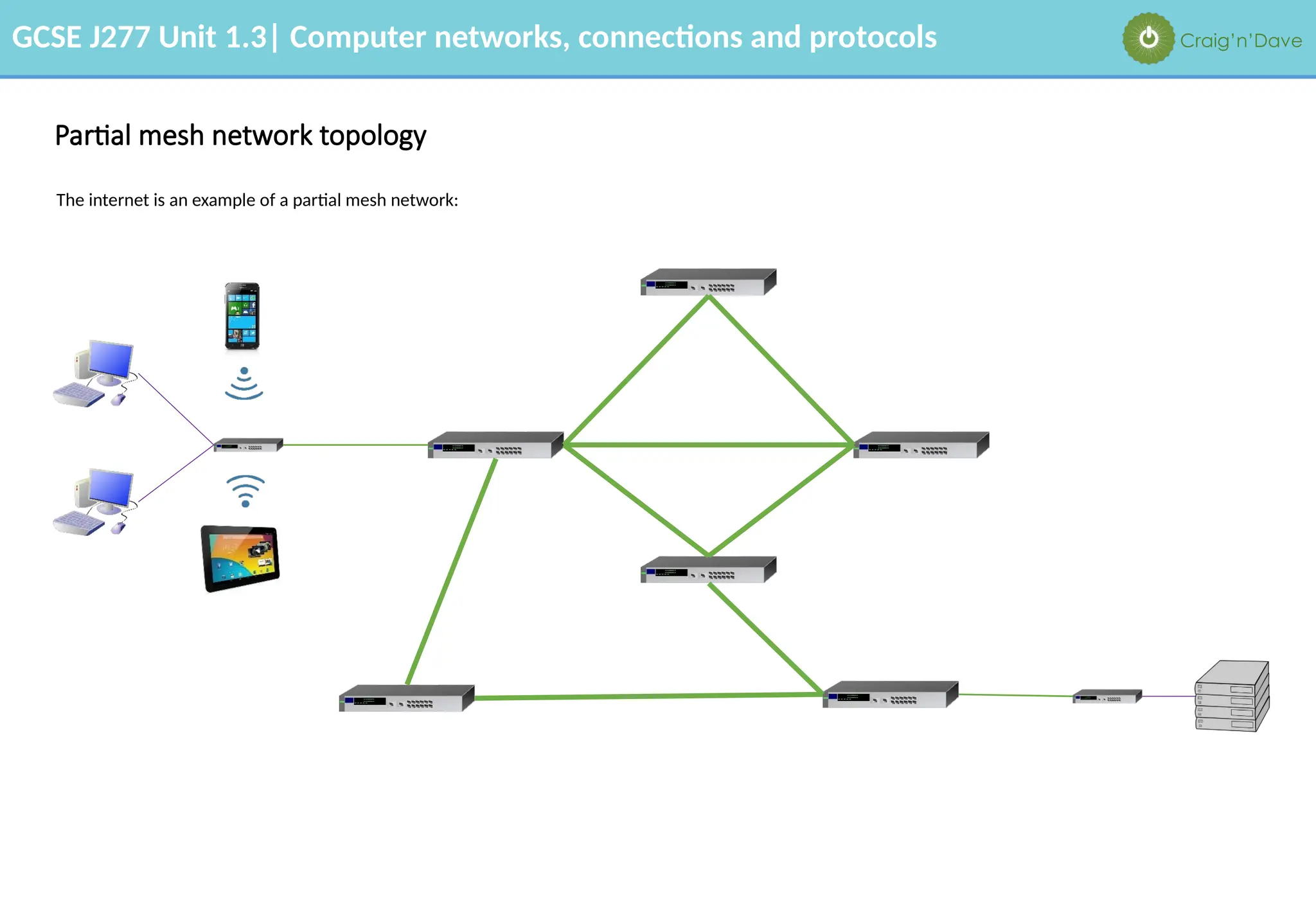
Partial mesh network topology
The internet is an example of a partial mesh network:
GCSE J277 Unit 1.3| Computer networks, connections and protocols Craig’n’Dave
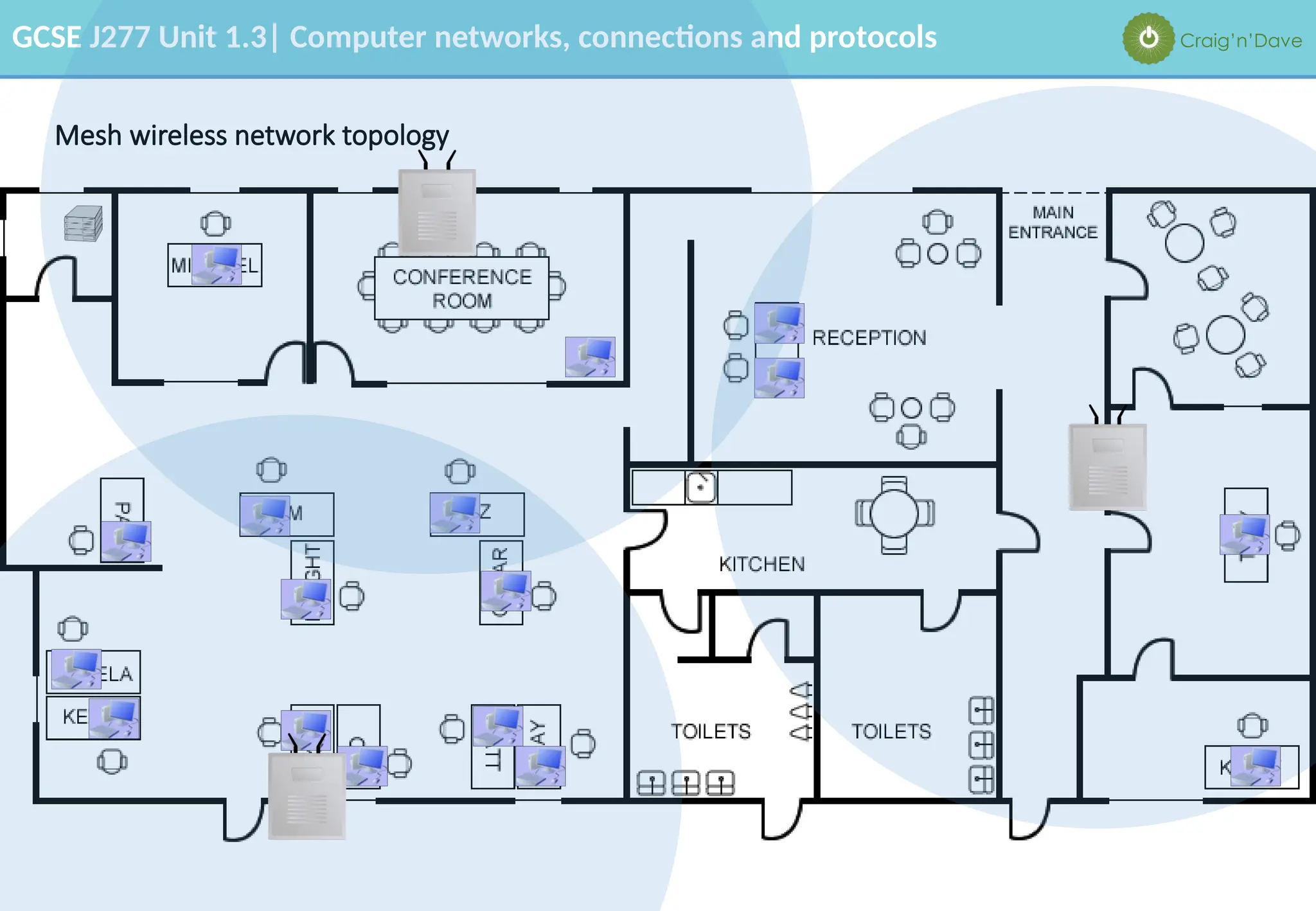
Mesh wireless network topology
GCSE J277 Unit 1.3| Computer networks, connections and protocols Craig’n’Dave
Mesh wireless network topology
The advantages of a wireless mesh network topology are: • Using fewer wires means it costs less to set up a network.
• They are convenient, e.g. in outdoor concert venues, warehouses or transportation settings.
• They are useful for non-line-of-sight network configurations where wireless signals are
intermittently blocked. For example, in an amusement park a Ferris wheel occasionally blocks
the signal from a wireless access point. If there are dozens or hundreds of other nodes around,
the mesh network will adjust to find a clear signal.
• Wireless mesh nodes are easy to install and uninstall, making the network extremely adaptable
and expandable as more or less coverage is needed.
The disadvantages of a wireless network topology are: • Lower bandwidth means it is slower than wired networks.
• Access points need to be in range of each other and the signal can be variable.
• They can suffer from interference.
• They are less secure due to broadcasting data packets.
GCSE J277 Unit 1.3| Computer networks, connections and protocols Craig’n’Dave
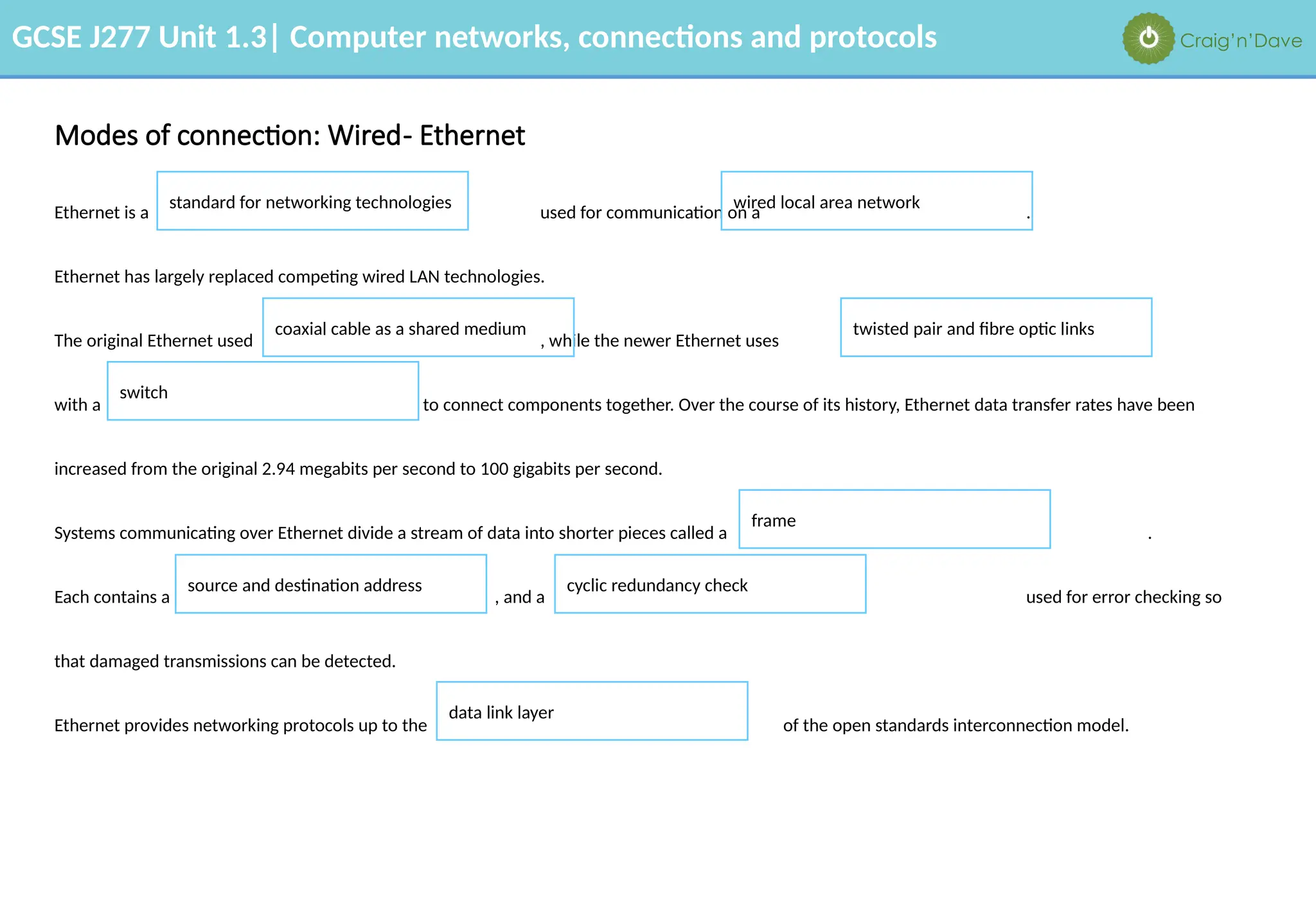
Ethernet is a used for communication on a .
Ethernet has largely replaced competing wired LAN technologies.
The original Ethernet used , while the newer Ethernet uses
with a to connect components together. Over the course of its history, Ethernet data transfer rates have been
increased from the original 2.94 megabits per second to 100 gigabits per second.
Systems communicating over Ethernet divide a stream of data into shorter pieces called a .
Each contains a , and a used for error checking so
that damaged transmissions can be detected.
Ethernet provides networking protocols up to the of the open standards interconnection model.
Modes of connection: Wired- Ethernet
standard for networking technologies wired local area network
coaxial cable as a shared medium twisted pair and fibre optic links
switch
frame
source and destination address cyclic redundancy check
data link layer
GCSE J277 Unit 1.3| Computer networks, connections and protocols Craig’n’Dave
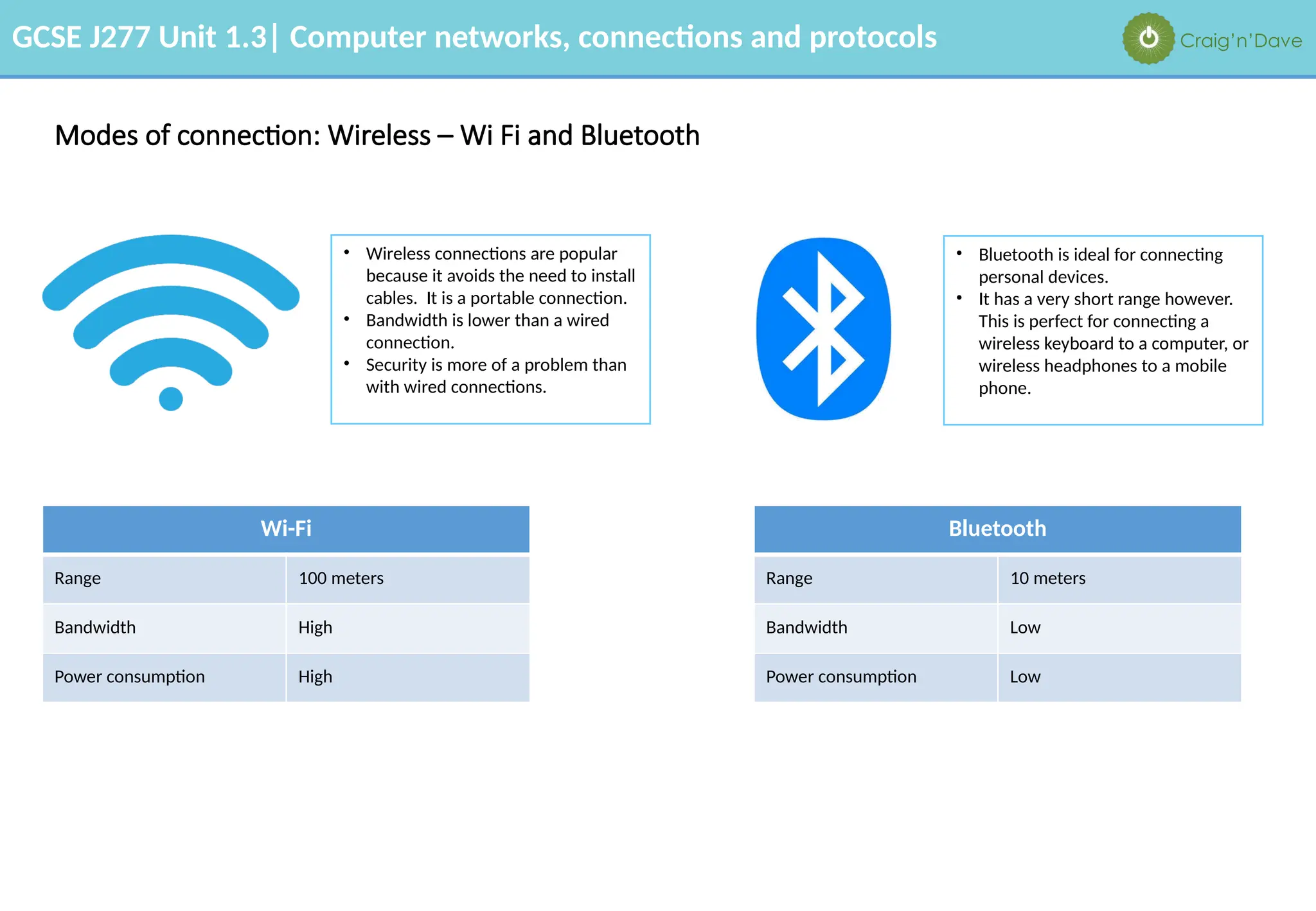
Modes of connection: Wireless – Wi Fi and Bluetooth
• Wireless connections are popular
because it avoids the need to install
cables. It is a portable connection.
• Bandwidth is lower than a wired
connection.
• Security is more of a problem than
with wired connections.
• Bluetooth is ideal for connecting
personal devices.
• It has a very short range however.
This is perfect for connecting a
wireless keyboard to a computer, or
wireless headphones to a mobile
phone.
Wi-Fi
Range 100 meters
Bandwidth High
Power consumption High
Bluetooth
Range 10 meters
Bandwidth Low
Power consumption Low
GCSE J277 Unit 1.3| Computer networks, connections and protocols Craig’n’Dave
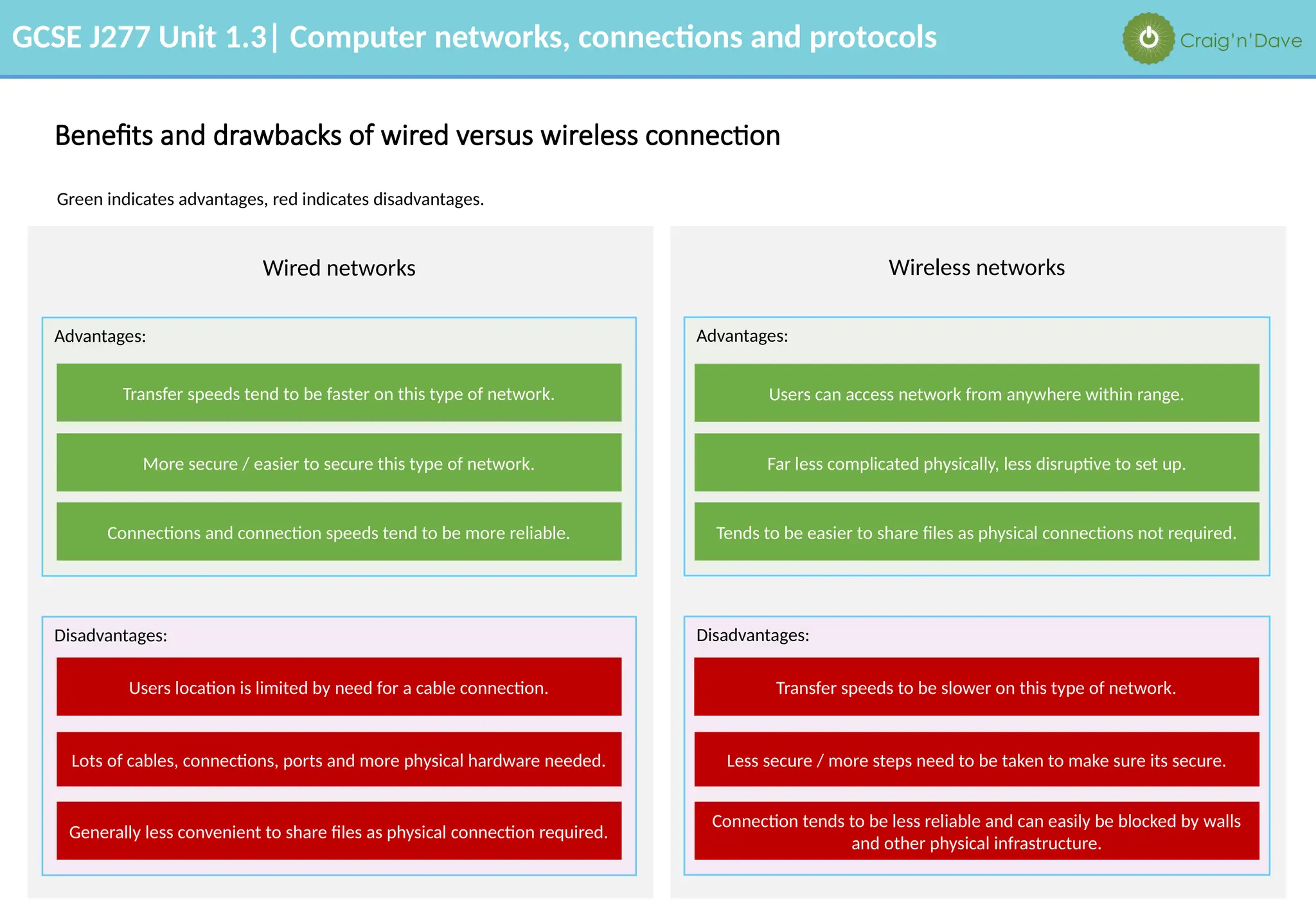
Benefits and drawbacks of wired versus wireless connection
Green indicates advantages, red indicates disadvantages.
Wired networks Wireless networks
Advantages: Advantages:
Disadvantages: Disadvantages:
Transfer speeds tend to be faster on this type of network.
More secure / easier to secure this type of network.
Connections and connection speeds tend to be more reliable.
Users location is limited by need for a cable connection.
Lots of cables, connections, ports and more physical hardware needed.
Generally less convenient to share files as physical connection required.
Users can access network from anywhere within range.
Far less complicated physically, less disruptive to set up.
Tends to be easier to share files as physical connections not required.
Transfer speeds to be slower on this type of network.
Less secure / more steps need to be taken to make sure its secure.
Connection tends to be less reliable and can easily be blocked by walls
and other physical infrastructure.
GCSE J277 Unit 1.3| Computer networks, connections and protocols Craig’n’Dave
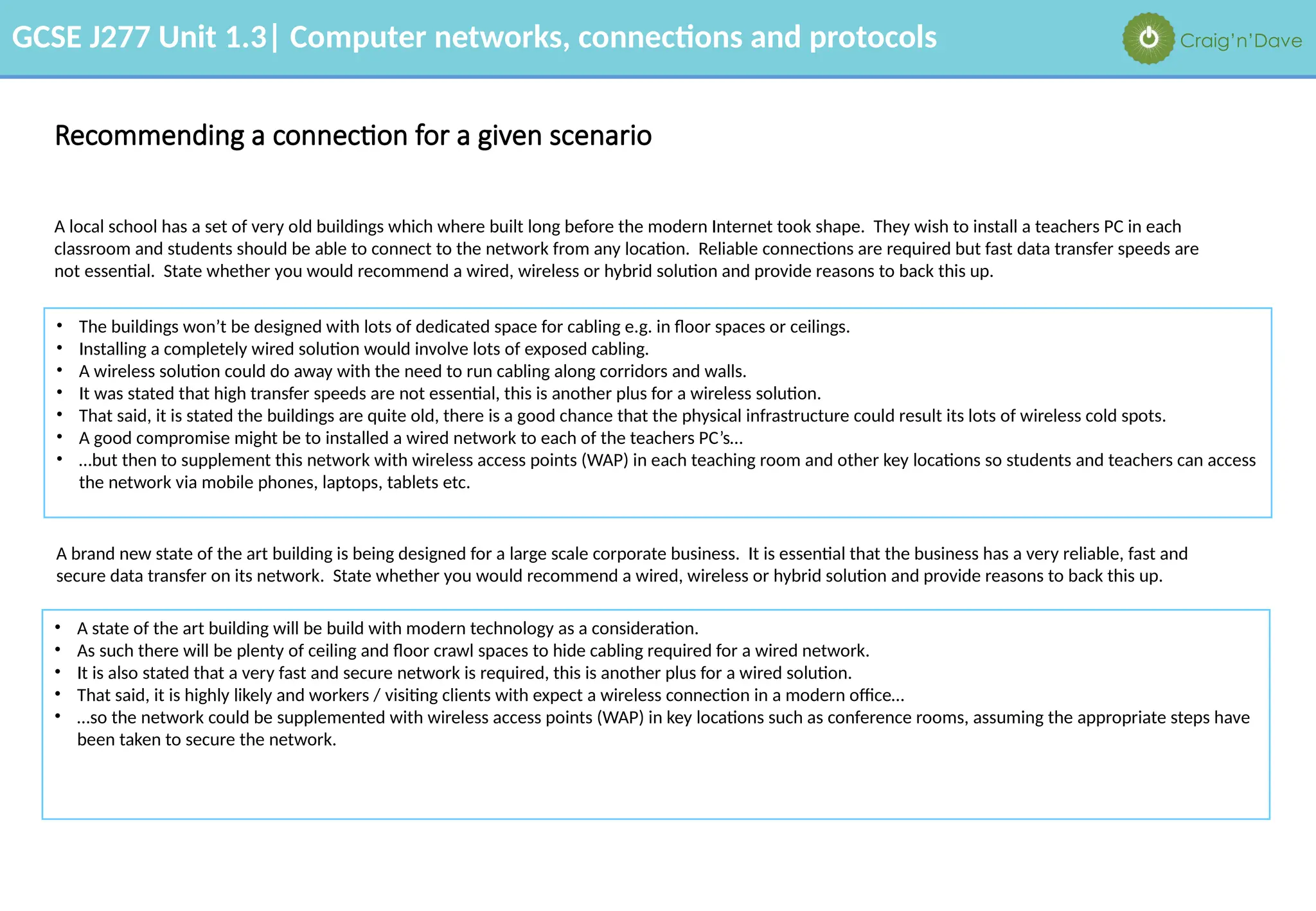
Recommending a connection for a given scenario
A local school has a set of very old buildings which where built long before the modern Internet took shape. They wish to install a teachers PC in each
classroom and students should be able to connect to the network from any location. Reliable connections are required but fast data transfer speeds are
not essential. State whether you would recommend a wired, wireless or hybrid solution and provide reasons to back this up.
A brand new state of the art building is being designed for a large scale corporate business. It is essential that the business has a very reliable, fast and
secure data transfer on its network. State whether you would recommend a wired, wireless or hybrid solution and provide reasons to back this up.
• The buildings won’t be designed with lots of dedicated space for cabling e.g. in floor spaces or ceilings.
• Installing a completely wired solution would involve lots of exposed cabling.
• A wireless solution could do away with the need to run cabling along corridors and walls.
• It was stated that high transfer speeds are not essential, this is another plus for a wireless solution.
• That said, it is stated the buildings are quite old, there is a good chance that the physical infrastructure could result its lots of wireless cold spots.
• A good compromise might be to installed a wired network to each of the teachers PC’s…
• …but then to supplement this network with wireless access points (WAP) in each teaching room and other key locations so students and teachers can access
the network via mobile phones, laptops, tablets etc.
• A state of the art building will be build with modern technology as a consideration.
• As such there will be plenty of ceiling and floor crawl spaces to hide cabling required for a wired network.
• It is also stated that a very fast and secure network is required, this is another plus for a wired solution.
• That said, it is highly likely and workers / visiting clients with expect a wireless connection in a modern office…
• …so the network could be supplemented with wireless access points (WAP) in key locations such as conference rooms, assuming the appropriate steps have
been taken to secure the network.
GCSE J277 Unit 1.3| Computer networks, connections and protocols Craig’n’Dave
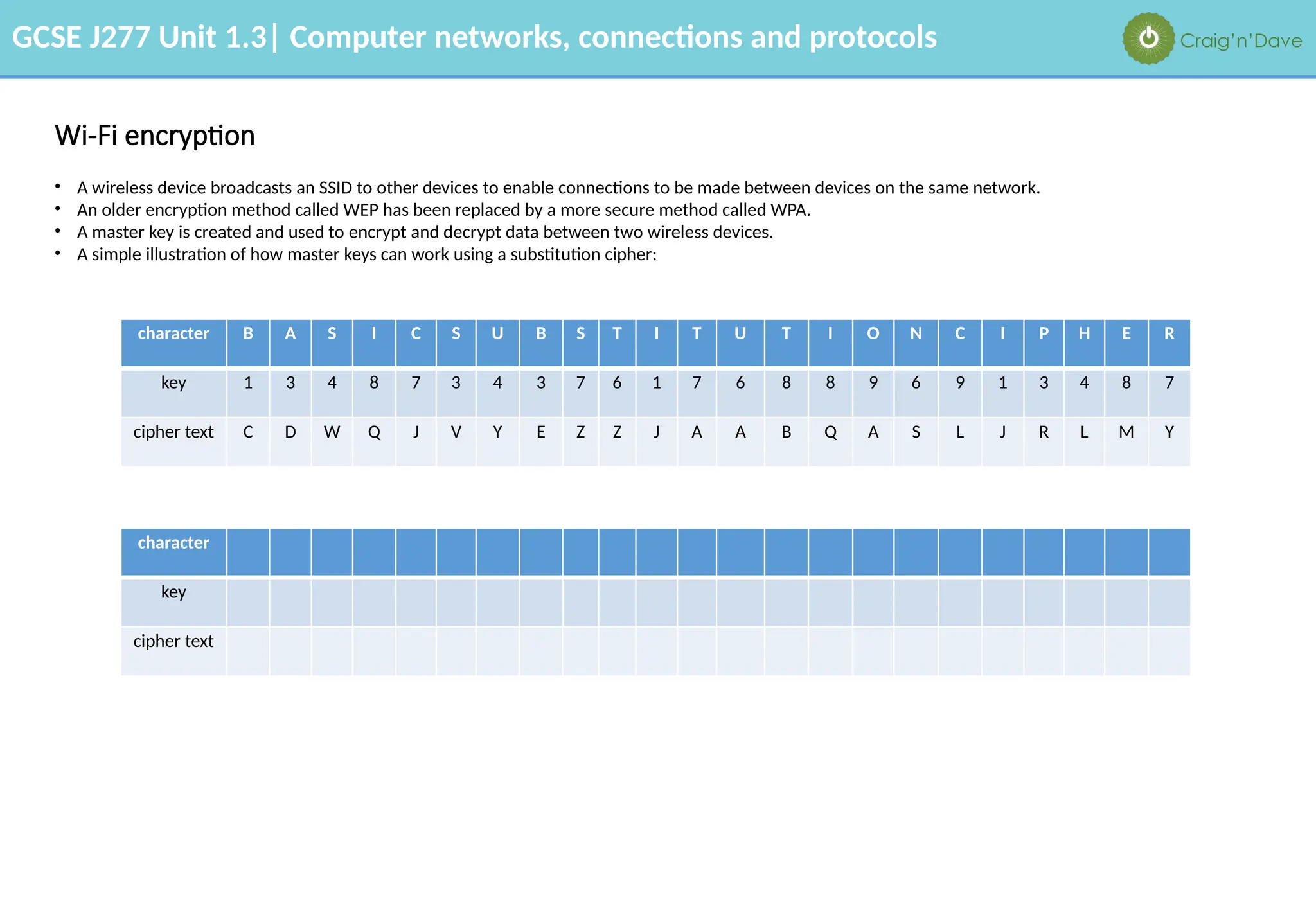
• A wireless device broadcasts an SSID to other devices to enable connections to be made between devices on the same network.
• An older encryption method called WEP has been replaced by a more secure method called WPA.
• A master key is created and used to encrypt and decrypt data between two wireless devices.
• A simple illustration of how master keys can work using a substitution cipher:
Wi-Fi encryption
character B A S I C S U B S T I T U T I O N C I P H E R
key 1 3 4 8 7 3 4 3 7 6 1 7 6 8 8 9 6 9 1 3 4 8 7
cipher text C D W Q J V Y E Z Z J A A B Q A S L J R L M Y
character
key
cipher text
GCSE J277 Unit 1.3| Computer networks, connections and protocols Craig’n’Dave
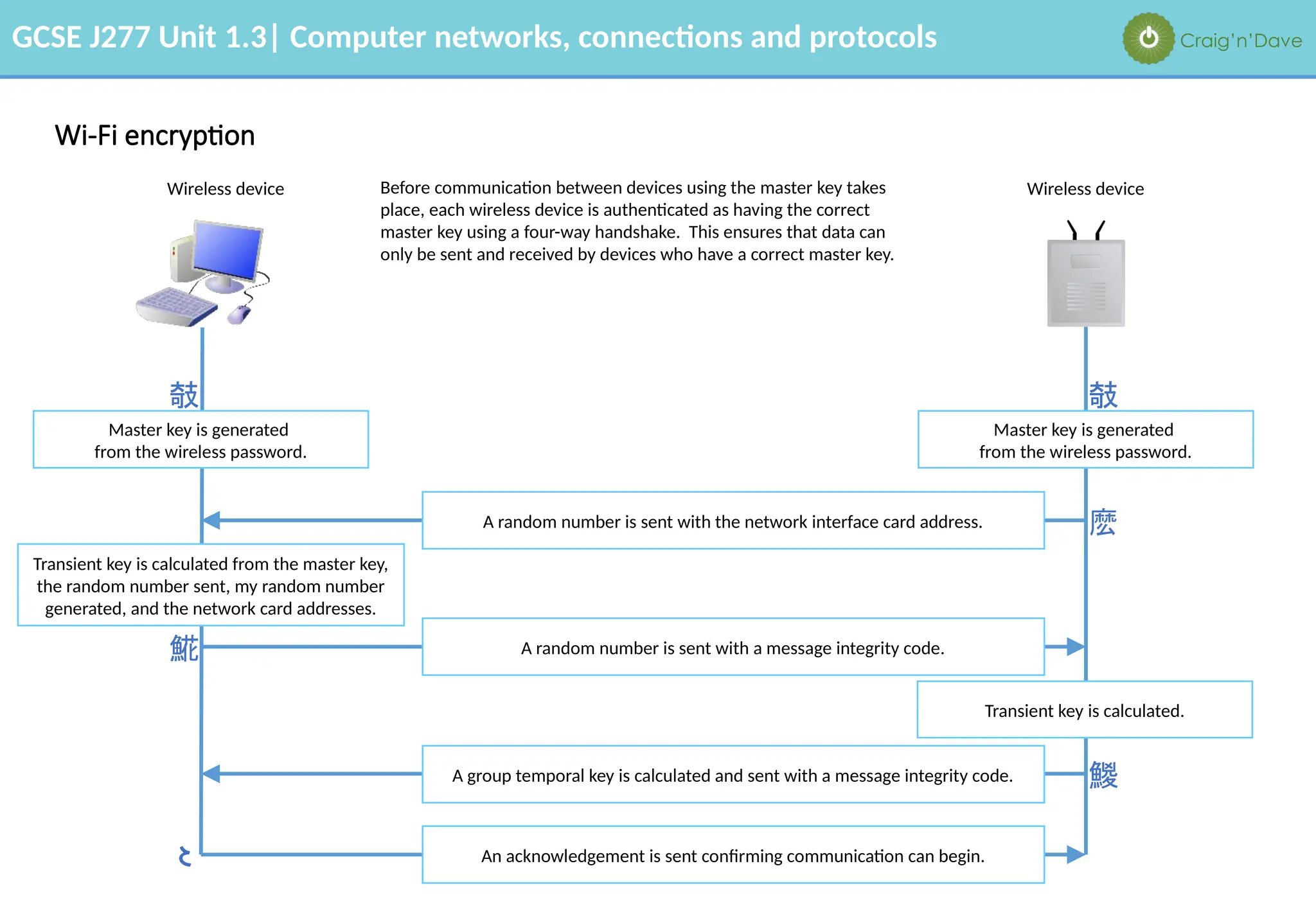
Before communication between devices using the master key takes
place, each wireless device is authenticated as having the correct
master key using a four-way handshake. This ensures that data can
only be sent and received by devices who have a correct master key.
Wi-Fi encryption
Wireless device Wireless device
Transient key is calculated from the master key,
the random number sent, my random number
generated, and the network card addresses.
A random number is sent with the network interface card address.
A random number is sent with a message integrity code.
Transient key is calculated.
A group temporal key is calculated and sent with a message integrity code.
An acknowledgement is sent confirming communication can begin.
Master key is generated
from the wireless password.
Master key is generated
from the wireless password.






GCSE J277 Unit 1.3| Computer networks, connections and protocols Craig’n’Dave
The uses of IP addressing (IPv4 & IPv6) and MAC addressing
Found on network interface cards. Routes frames on a local area network between
network interface cards.
MAC address
Routes packets on a wide area network between routers.
IP address
Media Access Control address
Internet Protocol address
There are two types of addressing used for local and wide area networks:
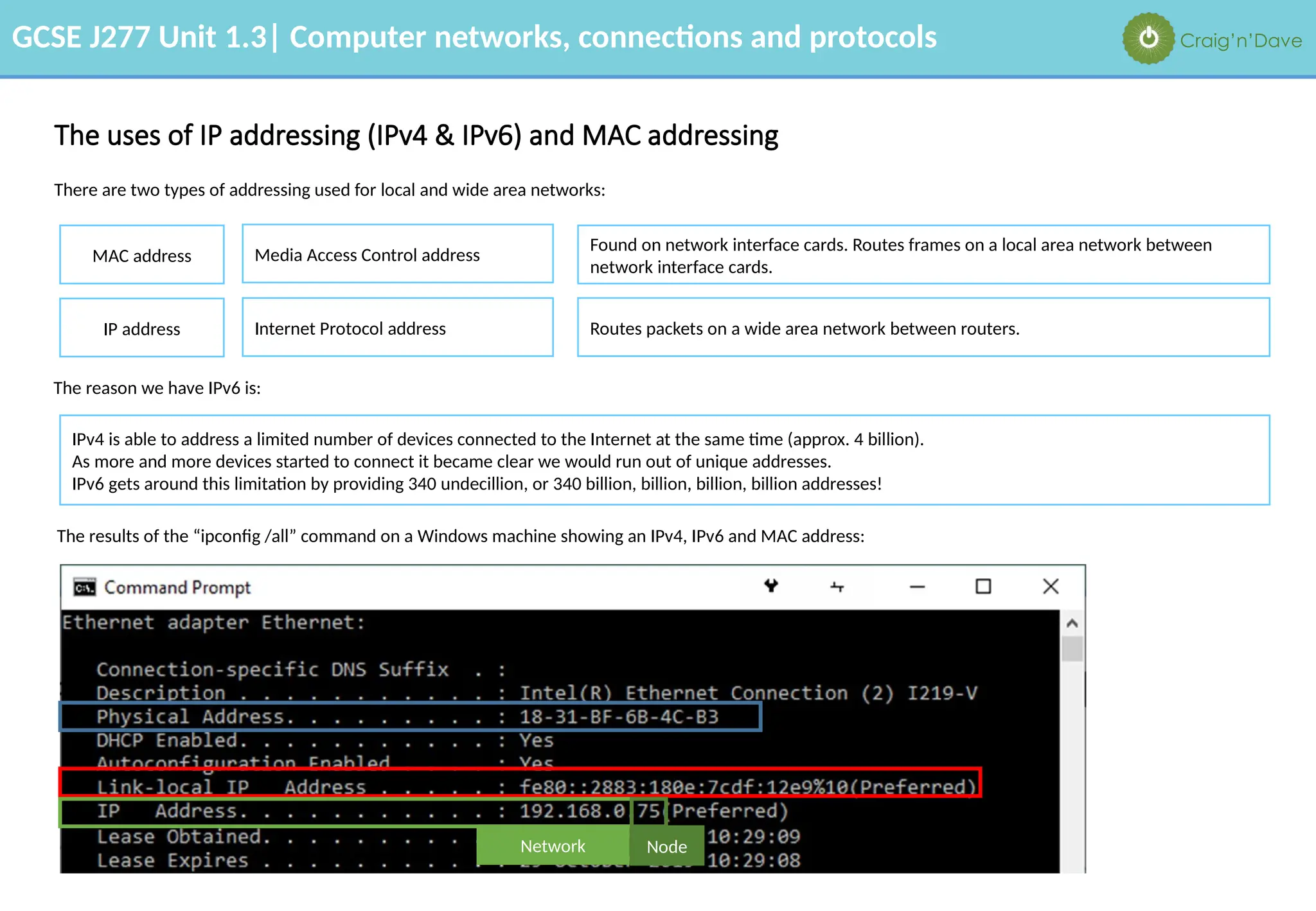
The results of the “ipconfig /all” command on a Windows machine showing an IPv4, IPv6 and MAC address:
The reason we have IPv6 is:
IPv4 is able to address a limited number of devices connected to the Internet at the same time (approx. 4 billion).
As more and more devices started to connect it became clear we would run out of unique addresses.
IPv6 gets around this limitation by providing 340 undecillion, or 340 billion, billion, billion, billion addresses!
Network Node
GCSE J277 Unit 1.3| Computer networks, connections and protocols Craig’n’Dave
Standards and protocols
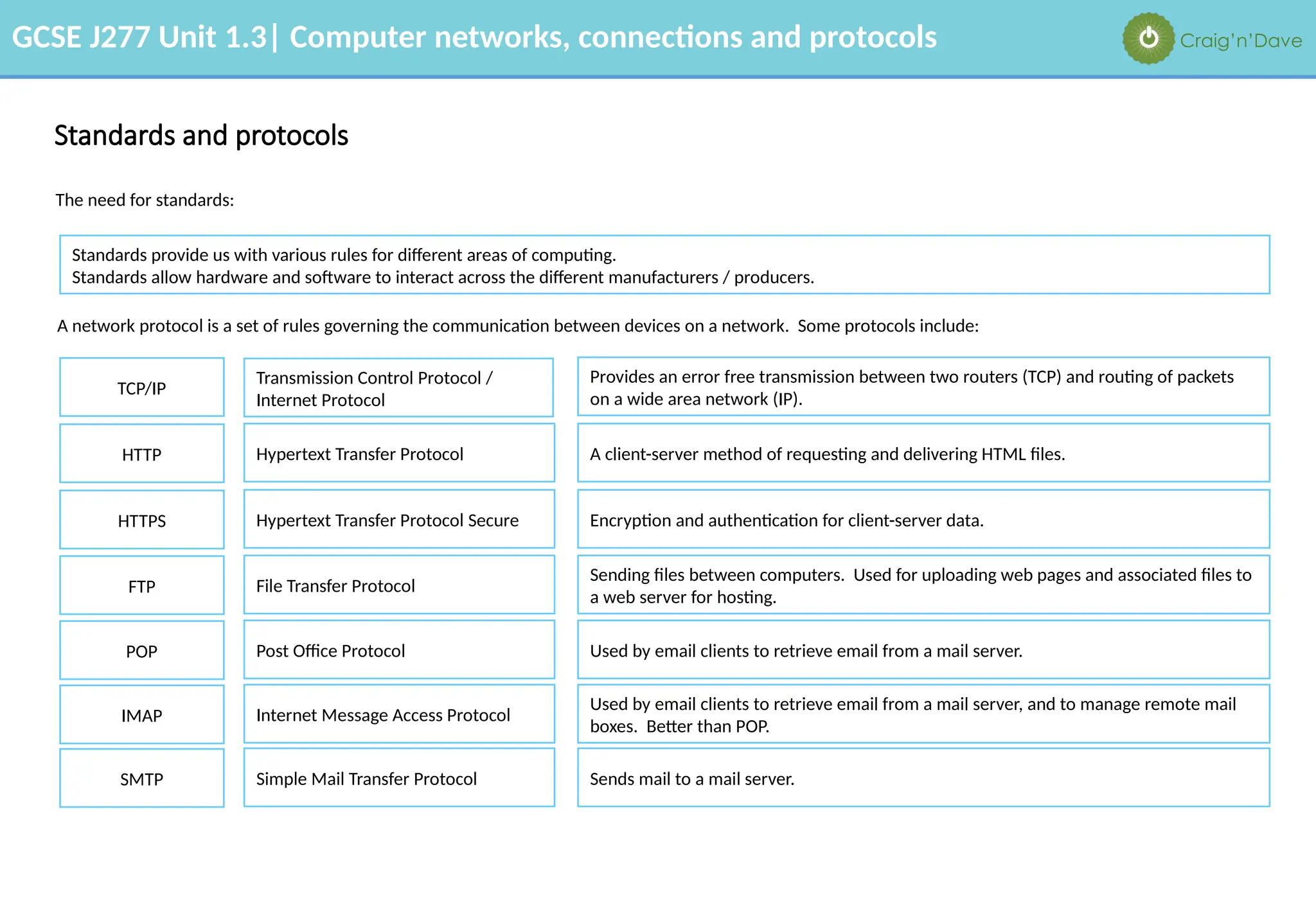
Standards provide us with various rules for different areas of computing.
Standards allow hardware and software to interact across the different manufacturers / producers.
Provides an error free transmission between two routers (TCP) and routing of packets
on a wide area network (IP).
TCP/IP
Hypertext Transfer Protocol
HTTP
Transmission Control Protocol /
Internet Protocol
A client-server method of requesting and delivering HTML files.
Hypertext Transfer Protocol Secure
HTTPS Encryption and authentication for client-server data.
File Transfer Protocol
FTP
Sending files between computers. Used for uploading web pages and associated files to
a web server for hosting.
Post Office Protocol
POP Used by email clients to retrieve email from a mail server.
Internet Message Access Protocol
IMAP
Used by email clients to retrieve email from a mail server, and to manage remote mail
boxes. Better than POP.
Simple Mail Transfer Protocol
SMTP Sends mail to a mail server.
A network protocol is a set of rules governing the communication between devices on a network. Some protocols include:
The need for standards:
GCSE J277 Unit 1.3| Computer networks, connections and protocols Craig’n’Dave
The concept of layers
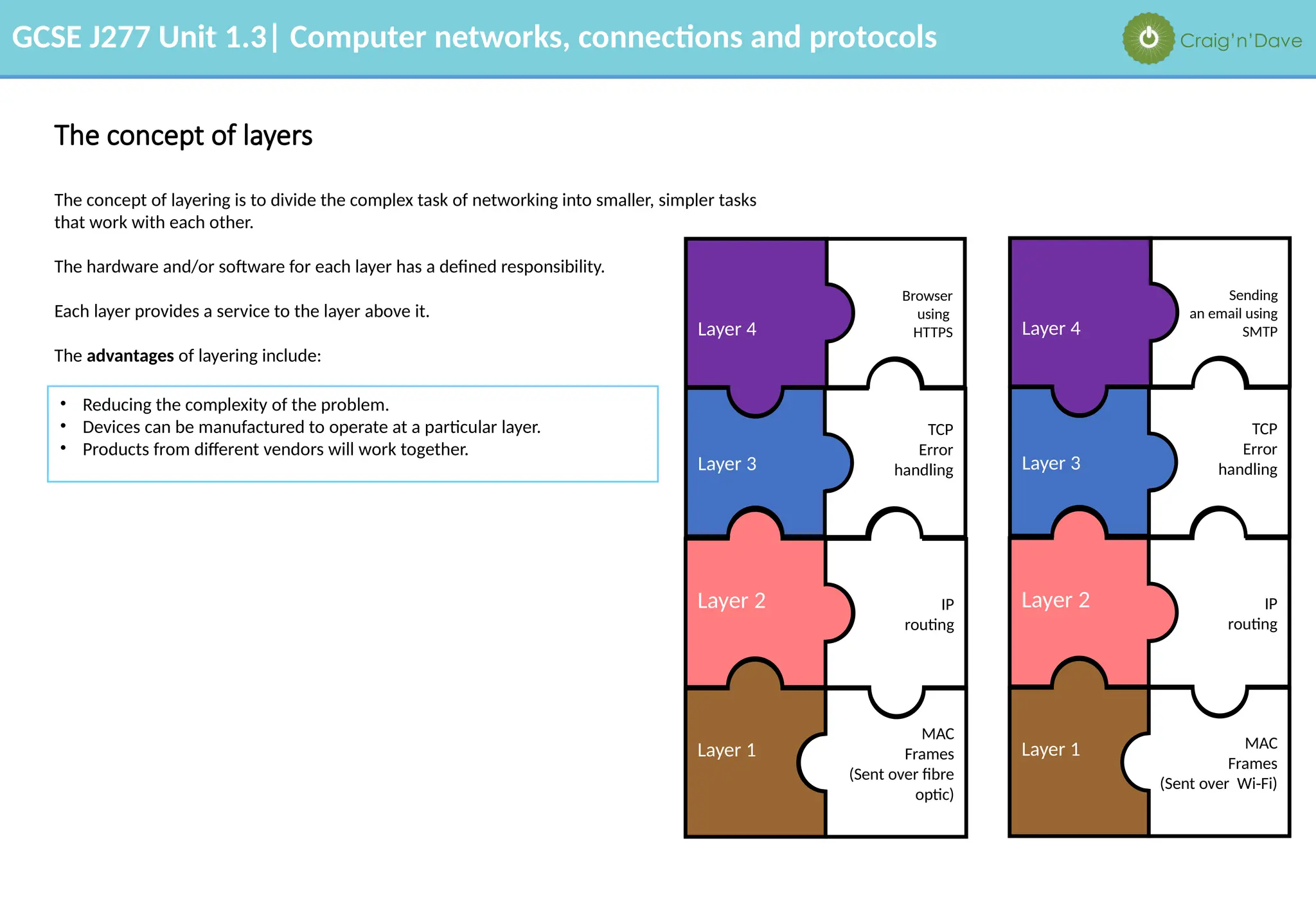
The concept of layering is to divide the complex task of networking into smaller, simpler tasks
that work with each other.
The hardware and/or software for each layer has a defined responsibility.
Each layer provides a service to the layer above it.
The advantages of layering include:
• Reducing the complexity of the problem.
• Devices can be manufactured to operate at a particular layer.
• Products from different vendors will work together.
Layer 2
Layer 3
Layer 1
MAC
Frames
(Sent over fibre
optic)
IP
routing
TCP
Error
handling
Browser
using
HTTPS
Layer 4
Layer 2
Layer 3
Layer 1 MAC
Frames
(Sent over Wi-Fi)
IP
routing
TCP
Error
handling
Sending
an email using
SMTP
Layer 4

1.3 Workbook Answers.pptx.....................

  • 1.
    GCSE J277 Unit1.3| Computer networks, connections and protocols Craig’n’Dave Specification & learning objectives By the end of this topic you will have studied: • Types of network: LAN, WAN • Factors that affect the performance of networks • The different roles of computers in a client-server and peer-to-peer network • The hardware needed to connect stand-alone computers to a LAN: Wireless access points, Routers, Switches, NIC, Transmission media • The Internet as a worldwide collection of computer networks: DNS, Hosting, The Cloud, Web servers and clients • Star and Mesh network topologies • Modes of connection: Wired (Ehternet), Wireless (Wi-Fi, Bluetooth) • Encryption • IP addressing and MAC addressing • Standards • Common protocols including: TCP/IP, HTTP, HTTPS, FTP, POP, IMAP, SMTP • The concept of layers Resources We recommend the OCR endorsed text book from PG Online for use during your GCSE studies. Craig'n'Dave videos for SLR 1.3
  • 2.
    GCSE J277 Unit1.3| Computer networks, connections and protocols Craig’n’Dave Types of networks Representation of a local area network (LAN): • Covers a small geographic area located on a single site. • All the hardware for the LAN is owned by the organisation using it. • LANs are wired with UTP cable, fibre optic cables or wireless using Wi-Fi. Representation of a wide area network (WAN): Description of a local area network: Description of a wide area network: • Covers a large geographic area that connects LANs together. • Infrastructure between the LANs is hired from telecommunication companies who own and manage it. • WANs are connected with telephone lines, fibre optic cables or satellite links. Computers that are not connected to a network are called stand-alone computers.
  • 3.
    GCSE J277 Unit1.3| Computer networks, connections and protocols Craig’n’Dave The advantages and disadvantages of networks The advantages of networks include: • Users can share files. • Users can share peripherals such as printers, and connections to other networks, e.g. the internet. • Users can access their files from any computer on the network. • Servers can control security, software updates and backup of data. • Communication with other people, e.g. email and social networking. The disadvantages of networks include: • Increased security risk to data. • Malware and viruses spread very easily between computers. • If a server fails, all the computers may not work. • The computer may run more slowly if there is a lot of data travelling on the network.
  • 4.
    GCSE J277 Unit1.3| Computer networks, connections and protocols Craig’n’Dave Factors that affect the performance of networks Number of users Too many users or devices on the same network can cause the network to slow down if there is insufficient bandwidth for the data. Error rate Transmission media Bandwidth Less reliable connections increase the number of errors that occur when data is transferred, resulting in data having to be resent. The signal quality of wireless is dependent on the range of the device. Wired connections give better performance than wireless connections. Fibre optic cables have a higher bandwidth than copper cables. The amount of data that can be sent and received in a given time. This is not a measure of how fast data travels, but how much data can be sent on the transmission media. Measured in bits per second. Often called the bit rate. Latency The delay from transmitting data to receiving it. Latency is caused by bottlenecks in the infrastructure of the network.
  • 5.
    GCSE J277 Unit1.3| Computer networks, connections and protocols Craig’n’Dave The different roles of computers in a client-server and a peer-to-peer network Both local area networks and wide area networks can operate as either a client-server or a peer-to-peer approach when sharing data. Client-server model Peer-to-peer model Peer • A server controls access and security to one shared file store. • A server manages access to the internet. • A server manages printing jobs. • A server provides email services. • A server runs a backup of data. • A client makes requests to the server for data and connections. • A peer is equal to all other peers, they serve their own files to each other. • Each peer is responsible for its own security. • Each peer is responsible for its own backup. • Peers usually have their own printers. You can send print jobs to another peer to process, but that peer would need to be switched on to be able to communicate with the connected printer. Server Client Client Client L o g i c a l c o n n e c ti o n Peer Peer Peer
  • 6.
    GCSE J277 Unit1.3| Computer networks, connections and protocols Craig’n’Dave Advantages and disadvantages of client-server and peer-to-peer approaches to data sharing Green indicates advantages, red indicates disadvantages. Client-server model Peer-to-peer model Advantages: Advantages: Disadvantages: Disadvantages: Easier to manage security of files. Easier to take backups of all shared data. Easier to install software updates. Can be expensive to set up and maintain. Requires IT specialists to maintain. A single point of failure. Users will lose access if the server fails. Very easy to maintain. Specialist staff are not required. No dependency on a single machine. Cheaper to set up. No expensive hardware required. The network is less secure. Users will need to manage their own backups. Can be difficult to maintain a well ordered file store.
  • 7.
    GCSE J277 Unit1.3| Computer networks, connections and protocols Craig’n’Dave Hardware for a local area network • Wireless access point allows wireless-enabled devices to access the network without cables. • Wireless access points can include a wireless router/switch that provides the functionality of all three devices in one. • A router sends data between networks. • It is needed to connect a local area network to a wide area network. • It uses the IP address on a device to route traffic to other routers. • A switch sends data between computers on a local area network. • It uses the NIC address on a device to route traffic. • A network interface controller (NIC) connects a device to a wired or wireless network connection. • It uses a protocol to ensure successful communication. • Connections between desktop computers and a switch are usually made with unshielded twisted pair (UTP) copper cable. • It is cheap and flexible which makes it easy to install. • Longer distance cables and wide area networks are usually connected with fibre optic cable. • Fibre optic has a higher bandwidth than copper and suffers from less interference.
  • 8.
    GCSE J277 Unit1.3| Computer networks, connections and protocols Craig’n’Dave The Internet The Internet is: A worldwide collection of interconnected computer networks. Domain name service Websites are stored on servers connected to the internet. Each page has a web address known as a URL. Every server on the internet has an internet protocol (IP) address. A domain name service keeps an index of the URL and the IP address of the server it is stored on, so we don’t need to remember the IP address when requesting a page. E.g. www.google.com has an IP address 8.8.8.8 Hosting Websites need to be accessed across the internet and be available 24/7. They may be accessed by thousands of users at a time. The servers they are stored on need to be reliable and protected from hackers. They also need an IP address that doesn’t change. Therefore it makes sense to store a website on servers dedicated to the purpose. This is known as hosting. The cloud refers to remote servers that store data and software that can be accessed over the internet. The advantage of cloud storage rather than storing data and programs on your PC include: access anytime, anywhere from any device, larger storage capacity, automatic backup and the ability to share files with others easily, making collaboration a possibility. The cloud Internet service provider Domain name service www.google.com → 8.8.8.8 Request www.google.com Google server
  • 9.
    GCSE J277 Unit1.3| Computer networks, connections and protocols Craig’n’Dave Domain Name Service 1. DNS recursive/resolver server Receives URL request from client browser. 2. Root name server Hold the records for .com, .org, .gov etc. 3. .com top level domain server holds records for all .com domains 4. Authoritative name server Holds the IP address of google.com domain → 8.8.8.8 Domain name service URL in: www.google.com How a domain name service works: 1. The URL is received by a DNS resolver server. 2. The server then queries a DNS root name server. 3. The root server responds with the address of the top-level domain server for .com. 4. The resolver then makes a request to the .com TLD server. 5. The TLD server then responds with the IP address of the domain’s name server, google.com. 6. Lastly, the recursive resolver sends a query to the domain’s name server. 7. The IP address google.com (8.8.8.8) is then returned to the resolver from the name server. 8. The DNS resolver then responds to the web browser with the IP address of google.com.
  • 10.
    GCSE J277 Unit1.3| Computer networks, connections and protocols Craig’n’Dave Web servers, clients and the cloud The cloud Advantages: Disadvantages: Accessibility. Access your data anywhere, anytime. No hardware required since everything is hosted in the cloud. Excellent backup and recovery options. Lack of control. Handing over of data and information. Bandwidth problems. All depends on speed of connection. Ongoing monthly / yearly cost for hosting data and information. Room for growth. Easy to scale up and expand. Relies completely on a stable internet connection. Web server Client File server Client In this example the mobile phone is the client. The user of the phone could be requesting a webpage via a browser, this request reaches the web server which returns the page for rendering on the mobile phone (client). In this example a desktop computer is the client. The user of the computer could be requesting a file being held on a file server in a cloud storage data centre. The file server returns the file to the requesting computing (client). The relationship between servers and clients on the Internet: Servers come in many forms on The Internet e.g. Web servers, File servers, Backup servers etc. A server is any connected piece of hardware which provide services to a client. A client is any connected piece of hardware which request or uses the services provided by servers.
  • 11.
    GCSE J277 Unit1.3| Computer networks, connections and protocols Craig’n’Dave Star network topology
  • 12.
    GCSE J277 Unit1.3| Computer networks, connections and protocols Craig’n’Dave Star network topology The weakness of the star network topology as illustrated in the diagram on the previous slide is: if the switch fails, everyone connected to it loses access to the network. Full mesh network topology The advantage of connecting computers together in a full mesh topology is: if the switch fails, the network will still function because there is another route between the source and destination. The disadvantages of connecting computers together in a full mesh topology are that: there is a lot more cabling and switches needed, which can be expensive and impractical for large networks.
  • 13.
    GCSE J277 Unit1.3| Computer networks, connections and protocols Craig’n’Dave Partial mesh network topology The internet is an example of a partial mesh network:
  • 14.
    GCSE J277 Unit1.3| Computer networks, connections and protocols Craig’n’Dave Mesh wireless network topology
  • 15.
    GCSE J277 Unit1.3| Computer networks, connections and protocols Craig’n’Dave Mesh wireless network topology The advantages of a wireless mesh network topology are: • Using fewer wires means it costs less to set up a network. • They are convenient, e.g. in outdoor concert venues, warehouses or transportation settings. • They are useful for non-line-of-sight network configurations where wireless signals are intermittently blocked. For example, in an amusement park a Ferris wheel occasionally blocks the signal from a wireless access point. If there are dozens or hundreds of other nodes around, the mesh network will adjust to find a clear signal. • Wireless mesh nodes are easy to install and uninstall, making the network extremely adaptable and expandable as more or less coverage is needed. The disadvantages of a wireless network topology are: • Lower bandwidth means it is slower than wired networks. • Access points need to be in range of each other and the signal can be variable. • They can suffer from interference. • They are less secure due to broadcasting data packets.
  • 16.
    GCSE J277 Unit1.3| Computer networks, connections and protocols Craig’n’Dave Ethernet is a used for communication on a . Ethernet has largely replaced competing wired LAN technologies. The original Ethernet used , while the newer Ethernet uses with a to connect components together. Over the course of its history, Ethernet data transfer rates have been increased from the original 2.94 megabits per second to 100 gigabits per second. Systems communicating over Ethernet divide a stream of data into shorter pieces called a . Each contains a , and a used for error checking so that damaged transmissions can be detected. Ethernet provides networking protocols up to the of the open standards interconnection model. Modes of connection: Wired- Ethernet standard for networking technologies wired local area network coaxial cable as a shared medium twisted pair and fibre optic links switch frame source and destination address cyclic redundancy check data link layer
  • 17.
    GCSE J277 Unit1.3| Computer networks, connections and protocols Craig’n’Dave Modes of connection: Wireless – Wi Fi and Bluetooth • Wireless connections are popular because it avoids the need to install cables. It is a portable connection. • Bandwidth is lower than a wired connection. • Security is more of a problem than with wired connections. • Bluetooth is ideal for connecting personal devices. • It has a very short range however. This is perfect for connecting a wireless keyboard to a computer, or wireless headphones to a mobile phone. Wi-Fi Range 100 meters Bandwidth High Power consumption High Bluetooth Range 10 meters Bandwidth Low Power consumption Low
  • 18.
    GCSE J277 Unit1.3| Computer networks, connections and protocols Craig’n’Dave Benefits and drawbacks of wired versus wireless connection Green indicates advantages, red indicates disadvantages. Wired networks Wireless networks Advantages: Advantages: Disadvantages: Disadvantages: Transfer speeds tend to be faster on this type of network. More secure / easier to secure this type of network. Connections and connection speeds tend to be more reliable. Users location is limited by need for a cable connection. Lots of cables, connections, ports and more physical hardware needed. Generally less convenient to share files as physical connection required. Users can access network from anywhere within range. Far less complicated physically, less disruptive to set up. Tends to be easier to share files as physical connections not required. Transfer speeds to be slower on this type of network. Less secure / more steps need to be taken to make sure its secure. Connection tends to be less reliable and can easily be blocked by walls and other physical infrastructure.
  • 19.
    GCSE J277 Unit1.3| Computer networks, connections and protocols Craig’n’Dave Recommending a connection for a given scenario A local school has a set of very old buildings which where built long before the modern Internet took shape. They wish to install a teachers PC in each classroom and students should be able to connect to the network from any location. Reliable connections are required but fast data transfer speeds are not essential. State whether you would recommend a wired, wireless or hybrid solution and provide reasons to back this up. A brand new state of the art building is being designed for a large scale corporate business. It is essential that the business has a very reliable, fast and secure data transfer on its network. State whether you would recommend a wired, wireless or hybrid solution and provide reasons to back this up. • The buildings won’t be designed with lots of dedicated space for cabling e.g. in floor spaces or ceilings. • Installing a completely wired solution would involve lots of exposed cabling. • A wireless solution could do away with the need to run cabling along corridors and walls. • It was stated that high transfer speeds are not essential, this is another plus for a wireless solution. • That said, it is stated the buildings are quite old, there is a good chance that the physical infrastructure could result its lots of wireless cold spots. • A good compromise might be to installed a wired network to each of the teachers PC’s… • …but then to supplement this network with wireless access points (WAP) in each teaching room and other key locations so students and teachers can access the network via mobile phones, laptops, tablets etc. • A state of the art building will be build with modern technology as a consideration. • As such there will be plenty of ceiling and floor crawl spaces to hide cabling required for a wired network. • It is also stated that a very fast and secure network is required, this is another plus for a wired solution. • That said, it is highly likely and workers / visiting clients with expect a wireless connection in a modern office… • …so the network could be supplemented with wireless access points (WAP) in key locations such as conference rooms, assuming the appropriate steps have been taken to secure the network.
  • 20.
    GCSE J277 Unit1.3| Computer networks, connections and protocols Craig’n’Dave • A wireless device broadcasts an SSID to other devices to enable connections to be made between devices on the same network. • An older encryption method called WEP has been replaced by a more secure method called WPA. • A master key is created and used to encrypt and decrypt data between two wireless devices. • A simple illustration of how master keys can work using a substitution cipher: Wi-Fi encryption character B A S I C S U B S T I T U T I O N C I P H E R key 1 3 4 8 7 3 4 3 7 6 1 7 6 8 8 9 6 9 1 3 4 8 7 cipher text C D W Q J V Y E Z Z J A A B Q A S L J R L M Y character key cipher text
  • 21.
    GCSE J277 Unit1.3| Computer networks, connections and protocols Craig’n’Dave Before communication between devices using the master key takes place, each wireless device is authenticated as having the correct master key using a four-way handshake. This ensures that data can only be sent and received by devices who have a correct master key. Wi-Fi encryption Wireless device Wireless device Transient key is calculated from the master key, the random number sent, my random number generated, and the network card addresses. A random number is sent with the network interface card address. A random number is sent with a message integrity code. Transient key is calculated. A group temporal key is calculated and sent with a message integrity code. An acknowledgement is sent confirming communication can begin. Master key is generated from the wireless password. Master key is generated from the wireless password.      
  • 22.
    GCSE J277 Unit1.3| Computer networks, connections and protocols Craig’n’Dave The uses of IP addressing (IPv4 & IPv6) and MAC addressing Found on network interface cards. Routes frames on a local area network between network interface cards. MAC address Routes packets on a wide area network between routers. IP address Media Access Control address Internet Protocol address There are two types of addressing used for local and wide area networks: The results of the “ipconfig /all” command on a Windows machine showing an IPv4, IPv6 and MAC address: The reason we have IPv6 is: IPv4 is able to address a limited number of devices connected to the Internet at the same time (approx. 4 billion). As more and more devices started to connect it became clear we would run out of unique addresses. IPv6 gets around this limitation by providing 340 undecillion, or 340 billion, billion, billion, billion addresses! Network Node
  • 23.
    GCSE J277 Unit1.3| Computer networks, connections and protocols Craig’n’Dave Standards and protocols Standards provide us with various rules for different areas of computing. Standards allow hardware and software to interact across the different manufacturers / producers. Provides an error free transmission between two routers (TCP) and routing of packets on a wide area network (IP). TCP/IP Hypertext Transfer Protocol HTTP Transmission Control Protocol / Internet Protocol A client-server method of requesting and delivering HTML files. Hypertext Transfer Protocol Secure HTTPS Encryption and authentication for client-server data. File Transfer Protocol FTP Sending files between computers. Used for uploading web pages and associated files to a web server for hosting. Post Office Protocol POP Used by email clients to retrieve email from a mail server. Internet Message Access Protocol IMAP Used by email clients to retrieve email from a mail server, and to manage remote mail boxes. Better than POP. Simple Mail Transfer Protocol SMTP Sends mail to a mail server. A network protocol is a set of rules governing the communication between devices on a network. Some protocols include: The need for standards:
  • 24.
    GCSE J277 Unit1.3| Computer networks, connections and protocols Craig’n’Dave The concept of layers The concept of layering is to divide the complex task of networking into smaller, simpler tasks that work with each other. The hardware and/or software for each layer has a defined responsibility. Each layer provides a service to the layer above it. The advantages of layering include: • Reducing the complexity of the problem. • Devices can be manufactured to operate at a particular layer. • Products from different vendors will work together. Layer 2 Layer 3 Layer 1 MAC Frames (Sent over fibre optic) IP routing TCP Error handling Browser using HTTPS Layer 4 Layer 2 Layer 3 Layer 1 MAC Frames (Sent over Wi-Fi) IP routing TCP Error handling Sending an email using SMTP Layer 4

Editor's Notes

  • #1 Activity…
  • #2 Using copies of the images on the slide and lines representing cables, create an illustration of what a LAN and a WAN looks like conceptually. Write 3 bullet points to describe a LAN. Write 3 contrasting bullet points to describe a WAN.
  • #3 List the advantages of networks. List the disadvantages of networks.
  • #4 Explain how each of the five factors listed impacts on the speed of a network.
  • #5 Correctly label each illustration either ‘client-server’ or ‘peer-to-peer’. Add additional labels to each illustration to indicate which devices are servers, clients or peers. In the appropriate box underneath each illustration, explain what a server does, what a client does, and what peers do.
  • #6 Group the statements on this slide into the correct box. Colour the background of each statement to green for advantage and red for disadvantage.
  • #7 Using the graphical assets on the slide to add interest, create a scrapbook page illustrating and explaining the purpose of: Wireless access points Routers Switches Network interface cards Transmission media: UTP (CAT5e/6) and fibre optic
  • #8 Complete the definition of The Internet. Using the illustration as stimulus material, explain what is meant by a domain name service, hosting and the cloud. Include advantages of DNS, hosting and the cloud to the users.
  • #9 Using the illustration, explain briefly how a domain name service works to resolve www.google.com to IP address 8.8.8.8 Note, you do not need to remember the names of the servers for exams, just the concept that a domain name service (DNS) is not one server but is made up of multiple domain name servers.
  • #10 Complete the box to explain the relationship between servers and clients. Complete the box to describe the client/server relationship between a web server and a mobile phone. Complete the box to describe the relationship between a file server and a desktop PC. Group the statements about “The cloud” into the correct box. Colour the background of each statement to green for advantage and red for disadvantage.
  • #11 Assume every member of staff has a computer on their desk. Assume reception has two computers. Assume the conference room has a computer. Using the computer, switch icons, and straight lines representing twisted pair cable, show how reception, Kelly and Toby’s computers can be connected together to a switch outside Toby’s office in a star network topology. Colour the twisted pair lines purple so they stand out on the illustration. Show how Michael, Liz, and her office colleagues can be connected to a second switch outside the conference room in a star network topology. Show how the two switches are connected together. Show how the server in the room next to Michael can be connected to the network.
  • #12 Explain the biggest weakness of a star network. Illustrate how a full mesh network overcomes this problem using computer, switch, and lines representing twisted pair connections. A computer only has one network card with one connection. Switches have multiple connections. Explain one advantage and two disadvantages of a full mesh network.
  • #13 Illustrate how the internet is an example of a partial mesh network using the icons provided, and lines representing connections between routers. Show the local area network connections in purple, and the wide area connections in green.
  • #14 Using the ruler, draw a circle with a radius of 8. (Click view… ruler…) Colour the circle so it is a transparent blue, and the office can be seen through the circle. (Drawing tools… format… shape fill… more fill colours…) Put a wireless access point in the middle of the circle, and group the objects. The circle represents the range of the access point. The colour represents the frequency. Show how the office could be connected in a wireless mesh topology: - each wireless access point must be in range of at least one other access point; - every computer and server must be connected; - a wireless access point must be screwed to a wall;
  • #15 Complete the boxes to explain 4 advantages and 4 disadvantages of mesh wireless networks compared to wired networks.
  • #16 Find out about the Ethernet standard, and complete the blanks using the words: source and destination address switch data link layer standard for networking technologies coaxial cable as a shared medium frame wired local area network twisted pair and fibre optic links cyclic redundancy check
  • #17 Complete the two boxes to provide an explanation of Wi-Fi and Bluetooth. Complete the two tables, the options for each row are as follows: - Range: 10 meters or 100 meters - Bandwidth: Low or High - Power consumption: Low or High
  • #18 Group the statements on this slide into the correct box. Colour the background of each statement to green for advantage and red for disadvantage.
  • #19 Complete the boxes.
  • #20 Create your own key, and show how a message can be encrypted using a substitution cipher. Create a message for someone else in the class to decode. Note how it would be very difficult for them to work out what the message is without the key. Sharing the key makes it vulnerable to interception though, so master keys should be known, but not communicated.
  • #21 Research the IEEE 802.11i-2004 WPA2 protocol. Show how wireless encryption works by putting the correct text in the boxes: Master key is generated from the wireless password. An acknowledgement is sent confirming communication can begin. A random number is sent with a message integrity code. Transient key is calculated from the master key, the random number sent, my random number generated, and the network card addresses. Transient key is calculated. A random number is sent with the network interface card address. A group temporal key is calculated and sent with a message integrity code.
  • #22 In the top two rows provide details of the two types of addressing used for local and wide area networks: In the second box provide the full name of the acronym stated in the first box. In the third box provide a description of the address. State the reason for IPv6. On the picture highlight an example of: 1) An IPv4 address, 2) An IPv6 address, 3) A MAC address. For the IPv4 address, highlight which part of the address identifies the network and which part identifies the client computer (called a node).
  • #23 Complete the top box. Sort the cards into 3 columns: acronym, protocol name and description.
  • #24 State 3 advantages of layering a complex task like networking. Complete the jigsaw puzzle to show how all the component parts of networking that you have learned operate together in different layers. Show a second puzzle for the scenario of sending a HTML presented email with no encryption over a Wi-Fi link to a mail server.