The document discusses arrays in Java. It begins by defining an array as a data structure that holds a collection of the same type of data. It then covers topics such as declaring and creating arrays, accessing array elements using indexes, default values, passing arrays to methods, returning arrays from methods, and two-dimensional arrays. Examples are provided throughout to illustrate key concepts related to working with arrays in Java programs.

![Declaring Array Variables
• datatype[] arrayRefVar;
Example:
double[] myList;
• datatype arrayRefVar[]; // This style is allowed, but not preferred
Example:
double myList[];
3](https://image.slidesharecdn.com/0708slide-221020204220-87fc01a4/85/07-08slide-pptx-3-320.jpg)
![Creating Arrays
arrayRefVar = new datatype[arraySize];
Example:
myList = new double[10];
myList[0] references the first element in the array.
myList[9] references the last element in the array.
4](https://image.slidesharecdn.com/0708slide-221020204220-87fc01a4/85/07-08slide-pptx-4-320.jpg)
![Declaring and Creating
in One Step
• datatype[] arrayRefVar = new datatype[arraySize];
double[] Array = new double[10];
• datatype arrayRefVar[] = new datatype[arraySize];
double Array[] = new double[10];
5](https://image.slidesharecdn.com/0708slide-221020204220-87fc01a4/85/07-08slide-pptx-5-320.jpg)

![Default Values
When an array is created, its elements are assigned the default
value of
0 for the numeric primitive data types,
'u0000' for char types, and
false for boolean types.
double [][] list=new double[10][10]; //this initialize array with 0.0
But
double [][] list={}; //give empty array
Note :double [10][10] list ;//wrong :not accepted
7](https://image.slidesharecdn.com/0708slide-221020204220-87fc01a4/85/07-08slide-pptx-7-320.jpg)
![Indexed Variables
The array elements are accessed through the index.
The array indices are 0-based, i.e., it starts from 0 to
arrayRefVar.length-1. In the example in Figure 6.1,
myList holds ten double values and the indices are
from 0 to 9.
Each element in the array is represented using the
following syntax, known as an indexed variable:
arrayRefVar[index];
8](https://image.slidesharecdn.com/0708slide-221020204220-87fc01a4/85/07-08slide-pptx-8-320.jpg)
![Using Indexed Variables
After an array is created, an indexed variable can
be used in the same way as a regular variable.
For example, the following code adds the value
in myList[0] and myList[1] to myList[2].
myList[2] = myList[0] + myList[1];
9](https://image.slidesharecdn.com/0708slide-221020204220-87fc01a4/85/07-08slide-pptx-9-320.jpg)
![Declaring, creating, initializing Using the
Shorthand Notation
double[] myList = {1.9, 2.9, 3.4, 3.5};
This shorthand notation is equivalent to the following
statements:
double[] myList = new double[4];
myList[0] = 1.9;
myList[1] = 2.9;
myList[2] = 3.4;
myList[3] = 3.5;
10](https://image.slidesharecdn.com/0708slide-221020204220-87fc01a4/85/07-08slide-pptx-10-320.jpg)
![CAUTION
Using the shorthand notation, you
have to declare, create, and initialize
the array all in one statement.
Splitting it would cause a syntax
error. For example, the following is
wrong:
double[] myList;
myList = {1.9, 2.9, 3.4, 3.5};
11](https://image.slidesharecdn.com/0708slide-221020204220-87fc01a4/85/07-08slide-pptx-11-320.jpg)
![Trace Program with Arrays
public class Test {
public static void main(String[] args) {
int[] values = new int[5];
for (int i = 1; i < 5; i++) {
values[i] = i + values[i-1];
}
values[0] = values[1] + values[4];
}
}
12
Declare array variable values, create an
array, and assign its reference to values
After the array is created
0
1
2
3
4
0
0
0
0
0](https://image.slidesharecdn.com/0708slide-221020204220-87fc01a4/85/07-08slide-pptx-12-320.jpg)
![Initializing arrays with input values
Scanner input = new java.util.Scanner(System.in);
System.out.print("Enter " + myList.length + " values: ");
for (int i = 0; i < myList.length; i++)
myList[i] = input.nextDouble();
13
for (int i = 0; i < myList.length; i++) {
myList[i] = Math.random() * 100;
}
Initializing arrays with random values](https://image.slidesharecdn.com/0708slide-221020204220-87fc01a4/85/07-08slide-pptx-13-320.jpg)
![Printing arrays
for (int i = 0; i < myList.length; i++) {
System.out.print(myList[i] + " ");
}
Summing all elements
double total = 0;
for (int i = 0; i < myList.length; i++) {
total += myList[i];
}](https://image.slidesharecdn.com/0708slide-221020204220-87fc01a4/85/07-08slide-pptx-14-320.jpg)
![Finding the largest element
double max = myList[0];
for (int i = 1; i < myList.length; i++) {
if (myList[i] > max)
max = myList[i];
}
15](https://image.slidesharecdn.com/0708slide-221020204220-87fc01a4/85/07-08slide-pptx-15-320.jpg)
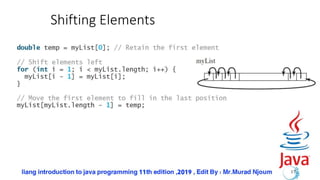
![Random shuffling
16
for (int i = 0; i < myList.length - 1; i++) {
// Generate an index j randomly
int j = (int)(Math.random()
* myList.length);
// Swap myList[i] with myList[j]
double temp = myList[i];
myList[i] = myList[j];
myList[j] = temp;
}
myList
[0]
[1]
.
.
.
A random index
i
swap
.
.
.
[i]
[j]](https://image.slidesharecdn.com/0708slide-221020204220-87fc01a4/85/07-08slide-pptx-16-320.jpg)

![Copying Arrays
Using a loop:
int[] sourceArray = {2, 3, 1, 5, 10};
int[] targetArray = new
int[sourceArray.length];
for (int i = 0; i < sourceArrays.length; i++)
targetArray[i] = sourceArray[i];
20](https://image.slidesharecdn.com/0708slide-221020204220-87fc01a4/85/07-08slide-pptx-20-320.jpg)

![Passing Arrays to Methods
public static void printArray(int[] array) {
for (int i = 0; i < array.length; i++) {
System.out.print(array[i] + " ");
}
}
22
Invoke the method
int[] list = {3, 1, 2, 6, 4, 2};
printArray(list);
Invoke the method
printArray(new int[]{3, 1, 2, 6, 4, 2});
Anonymous array](https://image.slidesharecdn.com/0708slide-221020204220-87fc01a4/85/07-08slide-pptx-22-320.jpg)
![Anonymous Array
The statement
printArray(new int[]{3, 1, 2, 6, 4, 2});
creates an array using the following syntax:
new dataType[]{literal0, literal1, ..., literalk};
There is no explicit reference variable for the array.
Such array is called an anonymous array.
23](https://image.slidesharecdn.com/0708slide-221020204220-87fc01a4/85/07-08slide-pptx-23-320.jpg)
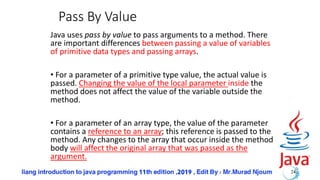
![Simple Example
public class Test {
public static void main(String[] args) {
int x = 1; // x represents an int value
int[] y = new int[10]; // y represents an array of int values
m(x, y); // Invoke m with arguments x and y
System.out.println("x is " + x);
System.out.println("y[0] is " + y[0]);
}
public static void m(int number, int[] numbers) {
number = 1001; // Assign a new value to number
numbers[0] = 5555; // Assign a new value to numbers[0]
}
}
25
x is 1
y[0] is 5555](https://image.slidesharecdn.com/0708slide-221020204220-87fc01a4/85/07-08slide-pptx-25-320.jpg)
![Returning an Array from a Method
int[] list1 = {1, 2, 3, 4, 5, 6};
int[] list2 = reverse(list1);
26
public static int[] reverse(int[] list) {
int[] result = new int[list.length];
for (int i = 0, j = result.length - 1;
i < list.length; i++, j--) {
result[j] = list[i];
}
return result;
}
list
result](https://image.slidesharecdn.com/0708slide-221020204220-87fc01a4/85/07-08slide-pptx-26-320.jpg)
![Trace the reverse Method
int[] list1 = {1, 2, 3, 4, 5, 6};
int[] list2 = reverse(list1);
27
public static int[] reverse(int[] list) {
int[] result = new int[list.length];
for (int i = 0, j = result.length - 1;
i < list.length; i++, j--) {
result[j] = list[i];
}
return result;
}
list
result
1 2 3 4 5 6
0 0 0 0 0 0
Declare result and create array](https://image.slidesharecdn.com/0708slide-221020204220-87fc01a4/85/07-08slide-pptx-27-320.jpg)
![Trace the reverse Method, cont.
int[] list1 = {1, 2, 3, 4, 5, 6};
int[] list2 = reverse(list1);
28
public static int[] reverse(int[] list) {
int[] result = new int[list.length];
for (int i = 0, j = result.length - 1;
i < list.length; i++, j--) {
result[j] = list[i];
}
return result;
}
list
result
1 2 3 4 5 6
6 5 4 3 2 1
After this, i becomes 6 and
j becomes -1](https://image.slidesharecdn.com/0708slide-221020204220-87fc01a4/85/07-08slide-pptx-28-320.jpg)
![Searching Arrays
Searching is the process of looking for a specific element in
an array; for example, discovering whether a certain score is
included in a list of scores. Searching is a common task in
computer programming. There are many algorithms and
data structures devoted to searching. In this section, two
commonly used approaches are discussed, linear search
and binary search.
29
public class LinearSearch {
/** The method for finding a key in the list */
public static int linearSearch(int[] list, int key) {
for (int i = 0; i < list.length; i++)
if (key == list[i])
return i;
return -1;
}
}
list
key Compare key with list[i] for i = 0, 1, …
[0] [1] [2] …](https://image.slidesharecdn.com/0708slide-221020204220-87fc01a4/85/07-08slide-pptx-29-320.jpg)


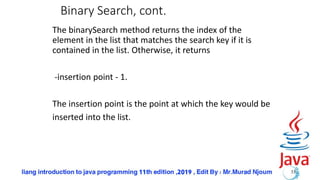
![Binary Search, cont.
32
[0] [1] [2] [3] [4] [5] [6] [7] [8] [9] [10] [11] [12]
2 4 7 10 11 45 50 59 60 66 69 70 79
key is 54
key > 50
list
mid
[0] [1] [2] [3] [4] [5] [6] [7] [8] [9] [10] [11] [12]
key < 66
key < 59
high
low
mid high
low
list
[7] [8]
mid high
low
list
59 60 66 69 70 79
59 60
[6] [7] [8]
high
low
59 60](https://image.slidesharecdn.com/0708slide-221020204220-87fc01a4/85/07-08slide-pptx-32-320.jpg)
![From Idea to Soluton
/** Use binary search to find the key in the list */
public static int binarySearch(int[] list, int key) {
int low = 0;
int high = list.length - 1;
while (high >= low) {
int mid = (low + high) / 2;
if (key < list[mid])
high = mid - 1;
else if (key == list[mid])
return mid;
else
low = mid + 1;
}
return -1 ;
}
34](https://image.slidesharecdn.com/0708slide-221020204220-87fc01a4/85/07-08slide-pptx-34-320.jpg)
![The Arrays.binarySearch Method
Since binary search is frequently used in programming, Java provides several
overloaded binarySearch methods for searching a key in an array of int, double,
char, short, long, and float in the java.util.Arrays class. For example, the following
code searches the keys in an array of numbers and an array of characters.
int[] list = {2, 4, 7, 10, 11, 45, 50, 59, 60, 66, 69, 70, 79};
System.out.println("Index is " +
java.util.Arrays.binarySearch(list, 11));
char[] chars = {'a', 'c', 'g', 'x', 'y', 'z'};
System.out.println("Index is " +
java.util.Arrays.binarySearch(chars, 't'));
For the binarySearch method to work, the array must be pre-sorted in increasing
order.
35
Return is 4
Return is –4 (insertion point is
3, so return is -3-1)](https://image.slidesharecdn.com/0708slide-221020204220-87fc01a4/85/07-08slide-pptx-35-320.jpg)

![Command-Line Parameters
class TestMain {
public static void main(String[] args) {
...
}
}
java TestMain arg0 arg1 arg2 ... argn
37](https://image.slidesharecdn.com/0708slide-221020204220-87fc01a4/85/07-08slide-pptx-37-320.jpg)
![38
Main Method Is Just a Regular Method
public class A {
public static void main(String[] args) {
String[] strings = {"New York",
"Boston", "Atlanta"};
B.main(strings);
}
}
class B {
public static void main(String[] args) {
for (int i = 0; i < args.length; i++)
System.out.println(args[i]);
}
}
You can call a regular method by passing actual
parameters. Can you pass arguments to main? Of course,
yes. For example, the main method in class B is invoked
by a method in A, as shown below:](https://image.slidesharecdn.com/0708slide-221020204220-87fc01a4/85/07-08slide-pptx-38-320.jpg)
![Processing
Command-Line Parameters
In the main method, get the arguments from
args[0], args[1], ..., args[n], which
corresponds to arg0, arg1, ..., argn in
the command line.
39](https://image.slidesharecdn.com/0708slide-221020204220-87fc01a4/85/07-08slide-pptx-39-320.jpg)


![42
Declare/Create Two-dimensional Arrays
// Declare array ref var
dataType[][] refVar;
// Create array and assign its reference to variable
refVar = new dataType[10][10];
// Combine declaration and creation in one statement
dataType[][] refVar = new dataType[10][10];
// Alternative syntax
dataType refVar[][] = new dataType[10][10];](https://image.slidesharecdn.com/0708slide-221020204220-87fc01a4/85/07-08slide-pptx-42-320.jpg)
![43
Declaring Variables of Two-
dimensional Arrays and Creating Two-
dimensional Arrays
int[][] matrix = new int[10][10];
or
int matrix[][] = new int[10][10];
matrix[0][0] = 3;
for (int i = 0; i < matrix.length; i++)
for (int j = 0; j < matrix[i].length; j++)
matrix[i][j] = (int)(Math.random() * 1000);
double[][] x;](https://image.slidesharecdn.com/0708slide-221020204220-87fc01a4/85/07-08slide-pptx-43-320.jpg)
![44
int[][] multD = new int[5][10];
int[][] multD = new int[5][];
for (int i = 0; i < 5; i++)
{
multD[i] = new int[10];
}
The above declartaion of 2D array is Similar to:](https://image.slidesharecdn.com/0708slide-221020204220-87fc01a4/85/07-08slide-pptx-44-320.jpg)
![45
Lengths of Two-dimensional Arrays
int[][] x = new int[3][4];](https://image.slidesharecdn.com/0708slide-221020204220-87fc01a4/85/07-08slide-pptx-45-320.jpg)
![46
Lengths of Two-dimensional Arrays,
cont.
int[][] array = {
{1, 2, 3},
{4, 5, 6},
{7, 8, 9},
{10, 11, 12}
};
array.length
array[0].length
array[1].length
array[2].length
array[3].length
array[4].length ArrayIndexOutOfBoundsException](https://image.slidesharecdn.com/0708slide-221020204220-87fc01a4/85/07-08slide-pptx-46-320.jpg)
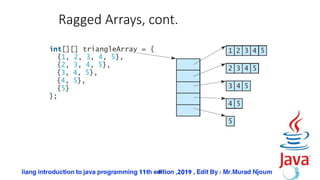
![47
Ragged Arrays
Each row in a two-dimensional array is itself an array. So,
the rows can have different lengths. Such an array is
known as a ragged array. For example,
int[][] matrix = {
{1, 2, 3, 4, 5},
{2, 3, 4, 5},
{3, 4, 5},
{4, 5},
{5}
};
matrix.length is 5
matrix[0].length is 5
matrix[1].length is 4
matrix[2].length is 3
matrix[3].length is 2
matrix[4].length is 1](https://image.slidesharecdn.com/0708slide-221020204220-87fc01a4/85/07-08slide-pptx-47-320.jpg)
![49
Initializing arrays with input values
Scanner input = new Scanner(System.in);
System.out.println("Enter " + matrix.length + " rows and " +
matrix[0].length + " columns: ");
for (int row = 0; row < matrix.length; row++) {
for (int column = 0; column < matrix[row].length; column++) {
matrix[row][column] = input.nextInt();
}
}](https://image.slidesharecdn.com/0708slide-221020204220-87fc01a4/85/07-08slide-pptx-49-320.jpg)
![50
Printing arrays
for (int row = 0; row < matrix.length; row++) {
for (int column = 0; column < matrix[row].length; column++) {
System.out.print(matrix[row][column] + " ");
}
System.out.println();
}](https://image.slidesharecdn.com/0708slide-221020204220-87fc01a4/85/07-08slide-pptx-50-320.jpg)
![51
Summing all elements
int total = 0;
for (int row = 0; row < matrix.length; row++) {
for (int column = 0; column < matrix[row].length; column++) {
total += matrix[row][column];
}
}](https://image.slidesharecdn.com/0708slide-221020204220-87fc01a4/85/07-08slide-pptx-51-320.jpg)
![52
Summing elements by column
for (int column = 0; column < matrix[0].length; column++) {
int total = 0;
for (int row = 0; row < matrix.length; row++)
total += matrix[row][column];
System.out.println("Sum for column " + column + " is "
+ total);
}](https://image.slidesharecdn.com/0708slide-221020204220-87fc01a4/85/07-08slide-pptx-52-320.jpg)

![54
public class GradeExam {
/** Main method */
public static void main(String[] args) {
// Students' answers to the questions
char[][] answers = {
{'A', 'B', 'A', 'C', 'C', 'D', 'E', 'E', 'A', 'D'},
{'D', 'B', 'A', 'B', 'C', 'A', 'E', 'E', 'A', 'D'},
{'E', 'D', 'D', 'A', 'C', 'B', 'E', 'E', 'A', 'D'},
{'C', 'B', 'A', 'E', 'D', 'C', 'E', 'E', 'A', 'D'},
{'A', 'B', 'D', 'C', 'C', 'D', 'E', 'E', 'A', 'D'},
{'B', 'B', 'E', 'C', 'C', 'D', 'E', 'E', 'A', 'D'},
{'B', 'B', 'A', 'C', 'C', 'D', 'E', 'E', 'A', 'D'},
{'E', 'B', 'E', 'C', 'C', 'D', 'E', 'E', 'A', 'D'}};
// Key to the questions
char[] keys = {'D', 'B', 'D', 'C', 'C', 'D', 'A', 'E', 'A', 'D'};
// Grade all answers
for (int i = 0; i < answers.length; i++) {
// Grade one student
int correctCount = 0;
for (int j = 0; j < answers[i].length; j++) {
if (answers[i][j] == keys[j])
correctCount++;
}
System.out.println("Student " + i + "'s correct count is " +
correctCount);
}
}
}](https://image.slidesharecdn.com/0708slide-221020204220-87fc01a4/85/07-08slide-pptx-54-320.jpg)
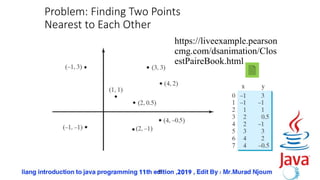
![56
import java.util.Scanner;
public class FindNearestPoints {
public static void main(String[] args) {
Scanner input = new Scanner(System.in);
System.out.print("Enter the number of points: ");
int numberOfPoints = input.nextInt();
// Create an array to store points
double[][] points = new double[numberOfPoints][2];
System.out.print("Enter " + numberOfPoints + " points: ");
for (int i = 0; i < points.length; i++) {
points[i][0] = input.nextDouble();
points[i][1] = input.nextDouble();
}
// p1 and p2 are the indices in the points array
int p1 = 0, p2 = 1; // Initial two points
double shortestDistance = distance(points[p1][0], points[p1][1],
points[p2][0], points[p2][1]); // Initialize shortestDistance
// Compute distance for every two points
for (int i = 0; i < points.length; i++) {
for (int j = i + 1; j < points.length; j++) {
double distance = distance(points[i][0], points[i][1],
points[j][0], points[j][1]); // Find distance](https://image.slidesharecdn.com/0708slide-221020204220-87fc01a4/85/07-08slide-pptx-56-320.jpg)
![57
if (shortestDistance > distance) {
p1 = i; // Update p1
p2 = j; // Update p2
shortestDistance = distance; // Update
shortestDistance
}
}
}
// Display result
System.out.println("The closest two points are " +
"(" + points[p1][0] + ", " + points[p1][1] + ") and
(" +
points[p2][0] + ", " + points[p2][1] + ")");
}
/** Compute the distance between two points (x1, y1) and
(x2, y2)*/
public static double distance(
double x1, double y1, double x2, double y2) {
return Math.sqrt((x2 - x1) * (x2 - x1) + (y2 - y1) *
(y2 - y1));
}
}](https://image.slidesharecdn.com/0708slide-221020204220-87fc01a4/85/07-08slide-pptx-57-320.jpg)
![58
Multidimensional Arrays
double[][][] scores = {
{{7.5, 20.5}, {9.0, 22.5}, {15, 33.5}, {13, 21.5}, {15, 2.5}},
{{4.5, 21.5}, {9.0, 22.5}, {15, 34.5}, {12, 20.5}, {14, 9.5}},
{{6.5, 30.5}, {9.4, 10.5}, {11, 33.5}, {11, 23.5}, {10, 2.5}},
{{6.5, 23.5}, {9.4, 32.5}, {13, 34.5}, {11, 20.5}, {16, 7.5}},
{{8.5, 26.5}, {9.4, 52.5}, {13, 36.5}, {13, 24.5}, {16, 2.5}},
{{9.5, 20.5}, {9.4, 42.5}, {13, 31.5}, {12, 20.5}, {16, 6.5}}
};
scores[ i ] [ j ] [ k ]
Which student Which exam Multiple-choice or essay](https://image.slidesharecdn.com/0708slide-221020204220-87fc01a4/85/07-08slide-pptx-58-320.jpg)


