Database System Concepts, 5th Ed.
©Silberschatz, Korth and Sudarshan
See www.db-book.com for conditions on re-use
Chapter 3: Relational Model
©Silberschatz, Korth and Sudarshan
2.2
Database System Concepts - 5th Edition, Oct 5, 2006
Example of a Relation
©Silberschatz, Korth and Sudarshan
2.3
Database System Concepts - 5th Edition, Oct 5, 2006
Basic Structure
 Formally, given sets D1, D2, …. Dn a relation r is a subset of
D1 x D2 x … x Dn
Thus, a relation is a set of n-tuples (a1, a2, …, an) where each ai  Di
 Example: If
 customer_name = {Jones, Smith, Curry, Lindsay, …}
/* Set of all customer names */
 customer_street = {Main, North, Park, …} /* set of all street names*/
 customer_city = {Harrison, Rye, Pittsfield, …} /* set of all city names */
Then r = { (Jones, Main, Harrison),
(Smith, North, Rye),
(Curry, North, Rye),
(Lindsay, Park, Pittsfield) }
is a relation over
customer_name x customer_street x customer_city
©Silberschatz, Korth and Sudarshan
2.4
Database System Concepts - 5th Edition, Oct 5, 2006
Attribute Types
 Each attribute of a relation has a name
 The set of allowed values for each attribute is called the domain of the
attribute
 Attribute values are (normally) required to be atomic; that is, indivisible
 E.g. the value of an attribute can be an account number,
but cannot be a set of account numbers
 Domain is said to be atomic if all its members are atomic
 The special value null is a member of every domain
 The null value causes complications in the definition of many operations
 We shall ignore the effect of null values in our main presentation
and consider their effect later
©Silberschatz, Korth and Sudarshan
2.5
Database System Concepts - 5th Edition, Oct 5, 2006
Relation Schema
 A1, A2, …, An are attributes
 R = (A1, A2, …, An ) is a relation schema
Example:
Customer_schema = (customer_name, customer_street, customer_city)
 r(R) denotes a relation r on the relation schema R
Example:
customer (Customer_schema)
©Silberschatz, Korth and Sudarshan
2.6
Database System Concepts - 5th Edition, Oct 5, 2006
Relation Instance
 The current values (relation instance) of a relation are specified by
a table
 An element t of r is a tuple, represented by a row in a table
Jones
Smith
Curry
Lindsay
customer_name
Main
North
North
Park
customer_street
Harrison
Rye
Rye
Pittsfield
customer_city
customer
attributes
(or columns)
tuples
(or rows)
©Silberschatz, Korth and Sudarshan
2.7
Database System Concepts - 5th Edition, Oct 5, 2006
Relations are Unordered
 Order of tuples is irrelevant (tuples may be stored in an arbitrary order)
 Example: account relation with unordered tuples
©Silberschatz, Korth and Sudarshan
2.8
Database System Concepts - 5th Edition, Oct 5, 2006
Database
 A database consists of multiple relations
 Information about an enterprise is broken up into parts, with each relation
storing one part of the information
account : stores information about accounts
depositor : stores information about which customer
owns which account
customer : stores information about customers
 Storing all information as a single relation such as
bank(account_number, balance, customer_name, ..)
results in
 repetition of information
 e.g.,if two customers own an account (What gets repeated?)
 the need for null values
 e.g., to represent a customer without an account
 Normalization theory (Chapter 7) deals with how to design relational schemas
©Silberschatz, Korth and Sudarshan
2.9
Database System Concepts - 5th Edition, Oct 5, 2006
The customer Relation
©Silberschatz, Korth and Sudarshan
2.10
Database System Concepts - 5th Edition, Oct 5, 2006
The depositor Relation
©Silberschatz, Korth and Sudarshan
2.11
Database System Concepts - 5th Edition, Oct 5, 2006
Keys
 Let K  R
 K is a superkey of R if values for K are sufficient to identify a unique tuple of
each possible relation r(R)
 by “possible r ” we mean a relation r that could exist in the enterprise we
are modeling.
 Example: {customer_name, customer_street} and
{customer_name}
are both superkeys of Customer, if no two customers can possibly have
the same name
 In real life, an attribute such as customer_id would be used instead of
customer_name to uniquely identify customers, but we omit it to keep
our examples small, and instead assume customer names are unique.
©Silberschatz, Korth and Sudarshan
2.12
Database System Concepts - 5th Edition, Oct 5, 2006
Keys (Cont.)
 K is a candidate key if K is minimal
Example: {customer_name} is a candidate key for Customer, since it
is a superkey and no subset of it is a superkey.
 Primary key: a candidate key chosen as the principal means of
identifying tuples within a relation
 Should choose an attribute whose value never, or very rarely,
changes.
 E.g. email address is unique, but may change
©Silberschatz, Korth and Sudarshan
2.13
Database System Concepts - 5th Edition, Oct 5, 2006
Foreign Keys
 A relation schema may have an attribute that corresponds to the primary
key of another relation. The attribute is called a foreign key.
 E.g. customer_name and account_number attributes of depositor are
foreign keys to customer and account respectively.
 Only values occurring in the primary key attribute of the referenced
relation may occur in the foreign key attribute of the referencing
relation.
 Schema diagram
©Silberschatz, Korth and Sudarshan
2.14
Database System Concepts - 5th Edition, Oct 5, 2006
Query Languages
 Language in which user requests information from the database.
 Categories of languages
 Procedural
 Non-procedural, or declarative
 “Pure” languages:
 Relational algebra
 Tuple relational calculus
 Domain relational calculus
 Pure languages form underlying basis of query languages that people
use.
©Silberschatz, Korth and Sudarshan
2.15
Database System Concepts - 5th Edition, Oct 5, 2006
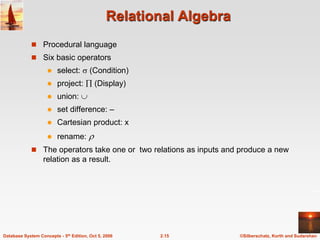
Relational Algebra
 Procedural language
 Six basic operators
 select:  (Condition)
 project:  (Display)
 union: 
 set difference: –
 Cartesian product: x
 rename: 
 The operators take one or two relations as inputs and produce a new
relation as a result.
©Silberschatz, Korth and Sudarshan
2.16
Database System Concepts - 5th Edition, Oct 5, 2006
Select Operation – Example
 Relation r
A B C D








1
5
12
23
7
7
3
10
 A=B ^ D > 5 (r)
A B C D




1
23
7
10
©Silberschatz, Korth and Sudarshan
2.17
Database System Concepts - 5th Edition, Oct 5, 2006
Select Operation
 Notation:  p(r)
 p is called the selection predicate
 Defined as:
p(r) = {t | t  r and p(t)}
Where p is a formula in propositional calculus consisting of terms
connected by :  (and),  (or),  (not)
Each term is one of:
<attribute> op <attribute> or <constant>
where op is one of: =, , >, . <. 
 Example of selection:
 branch_name=“Perryridge”(account)
©Silberschatz, Korth and Sudarshan
2.18
Database System Concepts - 5th Edition, Oct 5, 2006
Project Operation – Example
 Relation r: A B C




10
20
30
40
1
1
1
2
A C




1
1
1
2
=
A C



1
1
2
A,C (r)
©Silberschatz, Korth and Sudarshan
2.19
Database System Concepts - 5th Edition, Oct 5, 2006
Project Operation
 Notation:
where A1, A2 are attribute names and r is a relation name.
 The result is defined as the relation of k columns obtained by erasing
the columns that are not listed
 Duplicate rows removed from result, since relations are sets
 Example: To eliminate the branch_name attribute of account
account_number, balance (account)
)
(
,
,
, 2
1
r
k
A
A
A 

©Silberschatz, Korth and Sudarshan
2.20
Database System Concepts - 5th Edition, Oct 5, 2006
Union Operation – Example
 Relations r, s:
 r  s:
A B



1
2
1
A B


2
3
r
s
A B




1
2
1
3
©Silberschatz, Korth and Sudarshan
2.21
Database System Concepts - 5th Edition, Oct 5, 2006
Union Operation
 Notation: r  s
 Defined as:
r  s = {t | t  r or t  s}
 For r  s to be valid.
1. r, s must have the same arity (same number of attributes)
2. The attribute domains must be compatible (example: 2nd column
of r deals with the same type of values as does the 2nd
column of s)
 Example: to find all customers with either an account or a loan
customer_name (depositor)  customer_name (borrower)
©Silberschatz, Korth and Sudarshan
2.22
Database System Concepts - 5th Edition, Oct 5, 2006
Set Difference Operation – Example
 Relations r, s:
 r – s:
A B



1
2
1
A B


2
3
r
s
A B


1
1
©Silberschatz, Korth and Sudarshan
2.23
Database System Concepts - 5th Edition, Oct 5, 2006
Set Difference Operation
 Notation r – s
 Defined as:
r – s = {t | t  r and t  s}
 Set differences must be taken between compatible
relations.
 r and s must have the same arity
 attribute domains of r and s must be compatible
©Silberschatz, Korth and Sudarshan
2.24
Database System Concepts - 5th Edition, Oct 5, 2006
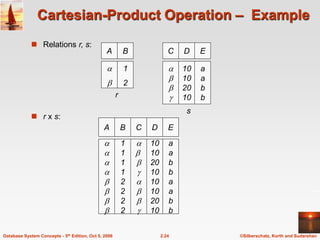
Cartesian-Product Operation – Example
 Relations r, s:
 r x s:
A B


1
2
A B








1
1
1
1
2
2
2
2
C D








10
10
20
10
10
10
20
10
E
a
a
b
b
a
a
b
b
C D




10
10
20
10
E
a
a
b
b
r
s
©Silberschatz, Korth and Sudarshan
2.25
Database System Concepts - 5th Edition, Oct 5, 2006
Cartesian-Product Operation
 Notation r x s
 Defined as:
r x s = {t q | t  r and q  s}
 Assume that attributes of r(R) and s(S) are disjoint. (That is, R  S = ).
 If attributes of r(R) and s(S) are not disjoint, then renaming must be
used.
©Silberschatz, Korth and Sudarshan
2.26
Database System Concepts - 5th Edition, Oct 5, 2006
Composition of Operations
 Can build expressions using multiple operations
 Example: A=C(r x s)
 r x s
 A=C(r x s)
A B








1
1
1
1
2
2
2
2
C D








10
10
20
10
10
10
20
10
E
a
a
b
b
a
a
b
b
A B C D E



1
2
2



10
10
20
a
a
b
©Silberschatz, Korth and Sudarshan
2.27
Database System Concepts - 5th Edition, Oct 5, 2006
Rename Operation
 Allows us to name, and therefore to refer to, the results of relational-
algebra expressions.
 Allows us to refer to a relation by more than one name.
 Example:
 x (E)
returns the expression E under the name X
 If a relational-algebra expression E has arity n, then
returns the result of expression E under the name X, and with the
attributes renamed to A1 , A2 , …., An .
)
(
)
,...,
,
( 2
1
E
n
A
A
A
x

©Silberschatz, Korth and Sudarshan
2.28
Database System Concepts - 5th Edition, Oct 5, 2006
Banking Example
branch (branch_name, branch_city, assets)
customer (customer_name, customer_street, customer_city)
account (account_number, branch_name, balance)
loan (loan_number, branch_name, amount)
depositor (customer_name, account_number)
borrower (customer_name, loan_number)
©Silberschatz, Korth and Sudarshan
2.29
Database System Concepts - 5th Edition, Oct 5, 2006
Example Queries
 Find all loans of over $1200
 Find the loan number for each loan of an amount greater than
$1200
amount > 1200 (loan)
loan_number (amount > 1200 (loan))
 Find the names of all customers who have a loan, an account, or both,
from the bank
customer_name (borrower)  customer_name (depositor)
©Silberschatz, Korth and Sudarshan
2.30
Database System Concepts - 5th Edition, Oct 5, 2006
Example Queries
 Find the names of all customers who have a loan at the Perryridge
branch.
 Find the names of all customers who have a loan at the
Perryridge branch but do not have an account at any branch of
the bank.
customer_name (branch_name = “Perryridge”
(borrower.loan_number = loan.loan_number(borrower x loan))) –
customer_name(depositor)
customer_name (branch_name=“Perryridge”
(borrower.loan_number = loan.loan_number(borrower x loan)))
©Silberschatz, Korth and Sudarshan
2.31
Database System Concepts - 5th Edition, Oct 5, 2006
Example Queries
 Find the names of all customers who have a loan at the Perryridge branch.
 Query 2
customer_name(loan.loan_number = borrower.loan_number (
(branch_name = “Perryridge” (loan)) x borrower))
 Query 1
customer_name (branch_name = “Perryridge” (
borrower.loan_number = loan.loan_number (borrower x loan)))
©Silberschatz, Korth and Sudarshan
2.32
Database System Concepts - 5th Edition, Oct 5, 2006
Example Queries
 Find the largest account balance
 Strategy:
 Find those balances that are not the largest
– Rename account relation as d so that we can compare each
account balance with all others
 Use set difference to find those account balances that were not found
in the earlier step.
 The query is:
balance(account) - account.balance
(account.balance < d.balance (account x d (account)))
©Silberschatz, Korth and Sudarshan
2.33
Database System Concepts - 5th Edition, Oct 5, 2006
Formal Definition
 A basic expression in the relational algebra consists of either one of the
following:
 A relation in the database
 A constant relation
 Let E1 and E2 be relational-algebra expressions; the following are all
relational-algebra expressions:
 E1  E2
 E1 – E2
 E1 x E2
 p (E1), P is a predicate on attributes in E1
 s(E1), S is a list consisting of some of the attributes in E1
  x (E1), x is the new name for the result of E1
©Silberschatz, Korth and Sudarshan
2.34
Database System Concepts - 5th Edition, Oct 5, 2006
Additional Operations
We define additional operations that do not add any power to the
relational algebra, but that simplify common queries.
 Set intersection
 Natural join
 Division
 Assignment
©Silberschatz, Korth and Sudarshan
2.35
Database System Concepts - 5th Edition, Oct 5, 2006
Set-Intersection Operation
 Notation: r  s
 Defined as:
 r  s = { t | t  r and t  s }
 Assume:
 r, s have the same arity
 attributes of r and s are compatible
 Note: r  s = r – (r – s)
©Silberschatz, Korth and Sudarshan
2.36
Database System Concepts - 5th Edition, Oct 5, 2006
Set-Intersection Operation – Example
 Relation r, s:
 r  s
A B



1
2
1
A B


2
3
r s
A B
 2
©Silberschatz, Korth and Sudarshan
2.37
Database System Concepts - 5th Edition, Oct 5, 2006
 Notation: r s
Natural-Join Operation
 Let r and s be relations on schemas R and S respectively.
Then, r s is a relation on schema R  S obtained as follows:
 Consider each pair of tuples tr from r and ts from s.
 If tr and ts have the same value on each of the attributes in R  S, add
a tuple t to the result, where
 t has the same value as tr on r
 t has the same value as ts on s
 Example:
R = (A, B, C, D)
S = (E, B, D)
 Result schema = (A, B, C, D, E)
 r s is defined as:
r.A, r.B, r.C, r.D, s.E (r.B = s.B  r.D = s.D (r x s))
©Silberschatz, Korth and Sudarshan
2.38
Database System Concepts - 5th Edition, Oct 5, 2006
Natural Join Operation – Example
 Relations r, s:
A B





1
2
4
1
2
C D





a
a
b
a
b
B
1
3
1
2
3
D
a
a
a
b
b
E





r
A B





1
1
1
1
2
C D





a
a
a
a
b
E





s
 r s
©Silberschatz, Korth and Sudarshan
2.39
Database System Concepts - 5th Edition, Oct 5, 2006
Division Operation
 Notation:
 Suited to queries that include the phrase “for all”.
 Let r and s be relations on schemas R and S respectively
where
 R = (A1, …, Am , B1, …, Bn )
 S = (B1, …, Bn)
The result of r  s is a relation on schema
R – S = (A1, …, Am)
r  s = { t | t   R-S (r)   u  s ( tu  r ) }
Where tu means the concatenation of tuples t and u to
produce a single tuple
r  s
©Silberschatz, Korth and Sudarshan
2.40
Database System Concepts - 5th Edition, Oct 5, 2006
Division Operation – Example
 Relations r, s:
 r  s: A
B


1
2
A B











1
2
3
1
1
1
3
4
6
1
2
r
s
©Silberschatz, Korth and Sudarshan
2.41
Database System Concepts - 5th Edition, Oct 5, 2006
Another Division Example
A B








a
a
a
a
a
a
a
a
C D








a
a
b
a
b
a
b
b
E
1
1
1
1
3
1
1
1
 Relations r, s:
 r  s:
D
a
b
E
1
1
A B


a
a
C


r
s
©Silberschatz, Korth and Sudarshan
2.42
Database System Concepts - 5th Edition, Oct 5, 2006
Division Operation (Cont.)
 Property
 Let q = r  s
 Then q is the largest relation satisfying q x s  r
 Definition in terms of the basic algebra operation
Let r(R) and s(S) be relations, and let S  R
r  s = R-S (r ) – R-S ( ( R-S (r ) x s ) – R-S,S(r ))
To see why
 R-S,S (r) simply reorders attributes of r
 R-S (R-S (r ) x s ) – R-S,S(r) ) gives those tuples t in
R-S (r ) such that for some tuple u  s, tu  r.
©Silberschatz, Korth and Sudarshan
2.43
Database System Concepts - 5th Edition, Oct 5, 2006
Assignment Operation
 The assignment operation () provides a convenient way to express
complex queries.
 Write query as a sequential program consisting of
 a series of assignments
 followed by an expression whose value is displayed as a result of
the query.
 Assignment must always be made to a temporary relation variable.
 Example: Write r  s as
temp1  R-S (r )
temp2  R-S ((temp1 x s ) – R-S,S (r ))
result = temp1 – temp2
 The result to the right of the  is assigned to the relation variable on
the left of the .
 May use variable in subsequent expressions.
©Silberschatz, Korth and Sudarshan
2.44
Database System Concepts - 5th Edition, Oct 5, 2006
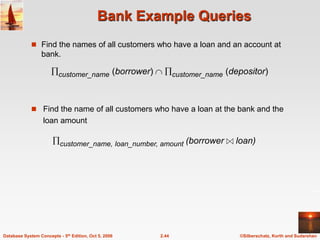
Bank Example Queries
 Find the names of all customers who have a loan and an account at
bank.
customer_name (borrower)  customer_name (depositor)
 Find the name of all customers who have a loan at the bank and the
loan amount
customer_name, loan_number, amount (borrower loan)
©Silberschatz, Korth and Sudarshan
2.45
Database System Concepts - 5th Edition, Oct 5, 2006
 Query 1
customer_name (branch_name = “Downtown” (depositor account )) 
customer_name (branch_name = “Uptown” (depositor account))
 Query 2
customer_name, branch_name (depositor account)
 temp(branch_name) ({(“Downtown” ), (“Uptown” )})
Note that Query 2 uses a constant relation.
Bank Example Queries
 Find all customers who have an account from at least the “Downtown”
and the Uptown” branches.
©Silberschatz, Korth and Sudarshan
2.46
Database System Concepts - 5th Edition, Oct 5, 2006
 Find all customers who have an account at all branches located in
Brooklyn city.
Bank Example Queries
customer_name, branch_name (depositor account)
 branch_name (branch_city = “Brooklyn” (branch))
©Silberschatz, Korth and Sudarshan
2.47
Database System Concepts - 5th Edition, Oct 5, 2006
Extended Relational-Algebra-Operations
 Generalized Projection
 Aggregate Functions
 Outer Join
©Silberschatz, Korth and Sudarshan
2.48
Database System Concepts - 5th Edition, Oct 5, 2006
Generalized Projection
 Extends the projection operation by allowing arithmetic functions to be
used in the projection list.
 E is any relational-algebra expression
 Each of F1, F2, …, Fn are are arithmetic expressions involving constants
and attributes in the schema of E.
 Given relation credit_info(customer_name, limit, credit_balance), find
how much more each person can spend:
customer_name, limit – credit_balance (credit_info)
)
(
,...,
, 2
1
E
n
F
F
F

©Silberschatz, Korth and Sudarshan
2.49
Database System Concepts - 5th Edition, Oct 5, 2006
Aggregate Functions and Operations
 Aggregation function takes a collection of values and returns a single
value as a result.
avg: average value
min: minimum value
max: maximum value
sum: sum of values
count: number of values
 Aggregate operation in relational algebra
E is any relational-algebra expression
 G1, G2 …, Gn is a list of attributes on which to group (can be empty)
 Each Fi is an aggregate function
 Each Ai is an attribute name
)
(
)
(
,
,
(
),
(
,
,
, 2
2
1
1
2
1
E
n
n
n A
F
A
F
A
F
G
G
G 


©Silberschatz, Korth and Sudarshan
2.50
Database System Concepts - 5th Edition, Oct 5, 2006
Aggregate Operation – Example
 Relation r:
A B








C
7
7
3
10
 g sum(c) (r) sum(c )
27
©Silberschatz, Korth and Sudarshan
2.51
Database System Concepts - 5th Edition, Oct 5, 2006
Aggregate Operation – Example
 Relation account grouped by branch-name:
branch_name g sum(balance) (account)
branch_name account_number balance
Perryridge
Perryridge
Brighton
Brighton
Redwood
A-102
A-201
A-217
A-215
A-222
400
900
750
750
700
branch_name sum(balance)
Perryridge
Brighton
Redwood
1300
1500
700
©Silberschatz, Korth and Sudarshan
2.52
Database System Concepts - 5th Edition, Oct 5, 2006
Aggregate Functions (Cont.)
 Result of aggregation does not have a name
 Can use rename operation to give it a name
 For convenience, we permit renaming as part of aggregate
operation
branch_name g sum(balance) as sum_balance (account)
©Silberschatz, Korth and Sudarshan
2.53
Database System Concepts - 5th Edition, Oct 5, 2006
Outer Join
 An extension of the join operation that avoids loss of information.
 Computes the join and then adds tuples form one relation that does not
match tuples in the other relation to the result of the join.
 Uses null values:
 null signifies that the value is unknown or does not exist
 All comparisons involving null are (roughly speaking) false by
definition.
 We shall study precise meaning of comparisons with nulls later
©Silberschatz, Korth and Sudarshan
2.54
Database System Concepts - 5th Edition, Oct 5, 2006
Outer Join – Example
 Relation loan
 Relation borrower
customer_name loan_number
Jones
Smith
Hayes
L-170
L-230
L-155
3000
4000
1700
loan_number amount
L-170
L-230
L-260
branch_name
Downtown
Redwood
Perryridge
©Silberschatz, Korth and Sudarshan
2.55
Database System Concepts - 5th Edition, Oct 5, 2006
Outer Join – Example
 Join
loan borrower
loan_number amount
L-170
L-230
3000
4000
customer_name
Jones
Smith
branch_name
Downtown
Redwood
Jones
Smith
null
loan_number amount
L-170
L-230
L-260
3000
4000
1700
customer_name
branch_name
Downtown
Redwood
Perryridge
 Left Outer Join
loan borrower
©Silberschatz, Korth and Sudarshan
2.56
Database System Concepts - 5th Edition, Oct 5, 2006
Outer Join – Example
loan_number amount
L-170
L-230
L-155
3000
4000
null
customer_name
Jones
Smith
Hayes
branch_name
Downtown
Redwood
null
loan_number amount
L-170
L-230
L-260
L-155
3000
4000
1700
null
customer_name
Jones
Smith
null
Hayes
branch_name
Downtown
Redwood
Perryridge
null
 Full Outer Join
loan borrower
 Right Outer Join
loan borrower
©Silberschatz, Korth and Sudarshan
2.57
Database System Concepts - 5th Edition, Oct 5, 2006
Null Values
 It is possible for tuples to have a null value, denoted by null, for some
of their attributes
 null signifies an unknown value or that a value does not exist.
 The result of any arithmetic expression involving null is null.
 Aggregate functions simply ignore null values (as in SQL)
 For duplicate elimination and grouping, null is treated like any other
value, and two nulls are assumed to be the same (as in SQL)
©Silberschatz, Korth and Sudarshan
2.58
Database System Concepts - 5th Edition, Oct 5, 2006
Null Values
 Comparisons with null values return the special truth value: unknown
 If false was used instead of unknown, then not (A < 5)
would not be equivalent to A >= 5
 Three-valued logic using the truth value unknown:
 OR: (unknown or true) = true,
(unknown or false) = unknown
(unknown or unknown) = unknown
 AND: (true and unknown) = unknown,
(false and unknown) = false,
(unknown and unknown) = unknown
 NOT: (not unknown) = unknown
 In SQL “P is unknown” evaluates to true if predicate P evaluates to
unknown
 Result of select predicate is treated as false if it evaluates to unknown
©Silberschatz, Korth and Sudarshan
2.59
Database System Concepts - 5th Edition, Oct 5, 2006
Modification of the Database
 The content of the database may be modified using the following
operations:
 Deletion
 Insertion
 Updating
 All these operations are expressed using the assignment
operator.
©Silberschatz, Korth and Sudarshan
2.60
Database System Concepts - 5th Edition, Oct 5, 2006
Deletion
 A delete request is expressed similarly to a query, except
instead of displaying tuples to the user, the selected tuples are
removed from the database.
 Can delete only whole tuples; cannot delete values on only
particular attributes
 A deletion is expressed in relational algebra by:
r  r – E
where r is a relation and E is a relational algebra query.
©Silberschatz, Korth and Sudarshan
2.61
Database System Concepts - 5th Edition, Oct 5, 2006
Deletion Examples
 Delete all account records in the Perryridge branch.
 Delete all accounts at branches located in Needham.
r1  branch_city = “Needham” (account branch )
r2   account_number, branch_name, balance (r1)
r3   customer_name, account_number (r2 depositor)
account  account – r2
depositor  depositor – r3
 Delete all loan records with amount in the range of 0 to 50
loan  loan –  amount 0 and amount  50 (loan)
account  account – branch_name = “Perryridge” (account )
©Silberschatz, Korth and Sudarshan
2.62
Database System Concepts - 5th Edition, Oct 5, 2006
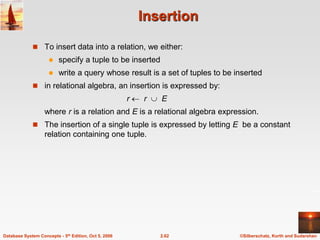
Insertion
 To insert data into a relation, we either:
 specify a tuple to be inserted
 write a query whose result is a set of tuples to be inserted
 in relational algebra, an insertion is expressed by:
r  r  E
where r is a relation and E is a relational algebra expression.
 The insertion of a single tuple is expressed by letting E be a constant
relation containing one tuple.
©Silberschatz, Korth and Sudarshan
2.63
Database System Concepts - 5th Edition, Oct 5, 2006
Insertion Examples
 Insert information in the database specifying that Smith has $1200 in
account A-973 at the Perryridge branch.
 Provide as a gift for all loan customers in the Perryridge
branch, a $200 savings account. Let the loan number serve
as the account number for the new savings account.
account  account  {(“A-973”, “Perryridge”, 1200)}
depositor  depositor  {(“Smith”, “A-973”)}
r1  (branch_name = “Perryridge” (borrower loan))
account  account  loan_number, branch_name, 200 (r1)
depositor  depositor  customer_name, loan_number (r1)
©Silberschatz, Korth and Sudarshan
2.64
Database System Concepts - 5th Edition, Oct 5, 2006
Updating
 A mechanism to change a value in a tuple without charging all values in
the tuple
 Use the generalized projection operator to do this task
 Each Fi is either
 the I th attribute of r, if the I th attribute is not updated, or,
 if the attribute is to be updated Fi is an expression, involving only
constants and the attributes of r, which gives the new value for the
attribute
)
(
,
,
,
, 2
1
r
r l
F
F
F 


©Silberschatz, Korth and Sudarshan
2.65
Database System Concepts - 5th Edition, Oct 5, 2006
Update Examples
 Make interest payments by increasing all balances by 5 percent.
 Pay all accounts with balances over $10,000 6 percent interest
and pay all others 5 percent
account   account_number, branch_name, balance * 1.06 ( BAL  10000 (account ))
  account_number, branch_name, balance * 1.05 (BAL  10000
(account))
account   account_number, branch_name, balance * 1.05 (account)
Database System Concepts, 5th Ed.
©Silberschatz, Korth and Sudarshan
See www.db-book.com for conditions on re-use
Chapter 3: SQL
©Silberschatz, Korth and Sudarshan
2.67
Database System Concepts - 5th Edition, Oct 5, 2006
Chapter 3: SQL
 Data Definition
 Basic Query Structure
 Set Operations
 Aggregate Functions
 Null Values
 Nested Subqueries
 Complex Queries
 Views
 Modification of the Database
 Joined Relations**
©Silberschatz, Korth and Sudarshan
2.68
Database System Concepts - 5th Edition, Oct 5, 2006
History
 IBM Sequel language developed as part of System R project at the
IBM San Jose Research Laboratory
 Renamed Structured Query Language (SQL)
 ANSI and ISO standard SQL:
 SQL-86
 SQL-89
 SQL-92
 SQL:1999 (language name became Y2K compliant!)
 SQL:2003
 Commercial systems offer most, if not all, SQL-92 features, plus
varying feature sets from later standards and special proprietary
features.
 Not all examples here may work on your particular system.
©Silberschatz, Korth and Sudarshan
2.69
Database System Concepts - 5th Edition, Oct 5, 2006
Data Definition Language
 The schema for each relation.
 The domain of values associated with each attribute.
 Integrity constraints
 The set of indices to be maintained for each relations.
 Security and authorization information for each relation.
 The physical storage structure of each relation on disk.
Allows the specification of not only a set of relations but also
information about each relation, including:
©Silberschatz, Korth and Sudarshan
2.70
Database System Concepts - 5th Edition, Oct 5, 2006
Domain Types in SQL
 char(n). Fixed length character string, with user-specified length n.
 varchar(n). Variable length character strings, with user-specified maximum
length n.
 int. Integer (a finite subset of the integers that is machine-dependent).
 smallint. Small integer (a machine-dependent subset of the integer
domain type).
 numeric(p,d). Fixed point number, with user-specified precision of p digits,
with n digits to the right of decimal point.
 real, double precision. Floating point and double-precision floating point
numbers, with machine-dependent precision.
 float(n). Floating point number, with user-specified precision of at least n
digits.
 More are covered in Chapter 4.
©Silberschatz, Korth and Sudarshan
2.71
Database System Concepts - 5th Edition, Oct 5, 2006
Create Table Construct
 An SQL relation is defined using the create table command:
create table r (A1 D1, A2 D2, ..., An Dn,
(integrity-constraint1),
...,
(integrity-constraintk))
 r is the name of the relation
 each Ai is an attribute name in the schema of relation r
 Di is the data type of values in the domain of attribute Ai
 Example:
create table branch
(branch_name char(15) not null,
branch_city char(30),
assets integer)
©Silberschatz, Korth and Sudarshan
2.72
Database System Concepts - 5th Edition, Oct 5, 2006
Integrity Constraints in Create Table
 not null
 primary key (A1, ..., An )
Example: Declare branch_name as the primary key for branch
.
create table branch
(branch_name char(15),
branch_city char(30),
assets integer,
primary key (branch_name))
primary key declaration on an attribute automatically ensures
not null in SQL-92 onwards, needs to be explicitly stated in
SQL-89
©Silberschatz, Korth and Sudarshan
2.73
Database System Concepts - 5th Edition, Oct 5, 2006
Drop and Alter Table Constructs
 The drop table command deletes all information about the dropped
relation from the database.
 The alter table command is used to add attributes to an existing
relation:
alter table r add A D
where A is the name of the attribute to be added to relation r and D
is the domain of A.
 All tuples in the relation are assigned null as the value for the
new attribute.
 The alter table command can also be used to drop attributes of a
relation:
alter table r drop A
where A is the name of an attribute of relation r
 Dropping of attributes not supported by many databases
©Silberschatz, Korth and Sudarshan
2.74
Database System Concepts - 5th Edition, Oct 5, 2006
Basic Query Structure
 SQL is based on set and relational operations with certain
modifications and enhancements
 A typical SQL query has the form:
select A1, A2, ..., An
from r1, r2, ..., rm
where P
 Ai represents an attribute
 Ri represents a relation
 P is a predicate.
 This query is equivalent to the relational algebra expression.
 The result of an SQL query is a relation.
))
(
( 2
1
,
,
, 2
1 m
P
A
A
A
r
r
r
n



 


©Silberschatz, Korth and Sudarshan
2.75
Database System Concepts - 5th Edition, Oct 5, 2006
The select Clause
 The select clause list the attributes desired in the result of a query
 corresponds to the projection operation of the relational algebra
 Example: find the names of all branches in the loan relation:
select branch_name
from loan
 In the relational algebra, the query would be:
branch_name (loan)
 NOTE: SQL names are case insensitive (i.e., you may use upper- or
lower-case letters.)
 E.g. Branch_Name ≡ BRANCH_NAME ≡ branch_name
 Some people use upper case wherever we use bold font.
©Silberschatz, Korth and Sudarshan
2.76
Database System Concepts - 5th Edition, Oct 5, 2006
The select Clause (Cont.)
 SQL allows duplicates in relations as well as in query results.
 To force the elimination of duplicates, insert the keyword distinct after
select.
 Find the names of all branches in the loan relations, and remove
duplicates
select distinct branch_name
from loan
 The keyword all specifies that duplicates not be removed.
select all branch_name
from loan
©Silberschatz, Korth and Sudarshan
2.77
Database System Concepts - 5th Edition, Oct 5, 2006
The select Clause (Cont.)
 An asterisk in the select clause denotes “all attributes”
select *
from loan
 The select clause can contain arithmetic expressions involving the
operation, +, –, , and /, and operating on constants or attributes of
tuples.
 The query:
select loan_number, branch_name, amount  100
from loan
would return a relation that is the same as the loan relation, except that
the value of the attribute amount is multiplied by 100.
©Silberschatz, Korth and Sudarshan
2.78
Database System Concepts - 5th Edition, Oct 5, 2006
The where Clause
 The where clause specifies conditions that the result must satisfy
 Corresponds to the selection predicate of the relational algebra.
 To find all loan number for loans made at the Perryridge branch with
loan amounts greater than $1200.
select loan_number
from loan
where branch_name = 'Perryridge' and amount > 1200
 Comparison results can be combined using the logical connectives and,
or, and not.
 Comparisons can be applied to results of arithmetic expressions.
©Silberschatz, Korth and Sudarshan
2.79
Database System Concepts - 5th Edition, Oct 5, 2006
The where Clause (Cont.)
 SQL includes a between comparison operator
 Example: Find the loan number of those loans with loan amounts between
$90,000 and $100,000 (that is,  $90,000 and  $100,000)
select loan_number
from loan
where amount between 90000 and 100000
©Silberschatz, Korth and Sudarshan
2.80
Database System Concepts - 5th Edition, Oct 5, 2006
The from Clause
 The from clause lists the relations involved in the query
 Corresponds to the Cartesian product operation of the relational algebra.
 Find the Cartesian product borrower X loan
select 
from borrower, loan
 Find the name, loan number and loan amount of all customers
having a loan at the Perryridge branch.
select customer_name, borrower.loan_number, amount
from borrower, loan
where borrower.loan_number = loan.loan_number and
branch_name = 'Perryridge'
©Silberschatz, Korth and Sudarshan
2.81
Database System Concepts - 5th Edition, Oct 5, 2006
The Rename Operation
 The SQL allows renaming relations and attributes using the as clause:
old-name as new-name
 Find the name, loan number and loan amount of all customers; rename the
column name loan_number as loan_id.
select customer_name, borrower.loan_number as loan_id, amount
from borrower, loan
where borrower.loan_number = loan.loan_number
©Silberschatz, Korth and Sudarshan
2.82
Database System Concepts - 5th Edition, Oct 5, 2006
Tuple Variables
 Tuple variables are defined in the from clause via the use of the as
clause.
 Find the customer names and their loan numbers for all customers
having a loan at some branch.
 Find the names of all branches that have greater assets than
some branch located in Brooklyn.
select distinct T.branch_name
from branch as T, branch as S
where T.assets > S.assets and S.branch_city = 'Brooklyn'
Keyword as is optional and may be omitted
borrower as T ≡ borrower T
select customer_name, T.loan_number, S.amount
from borrower as T, loan as S
where T.loan_number = S.loan_number
©Silberschatz, Korth and Sudarshan
2.83
Database System Concepts - 5th Edition, Oct 5, 2006
String Operations
 SQL includes a string-matching operator for comparisons on character
strings. The operator “like” uses patterns that are described using two
special characters:
 percent (%). The % character matches any substring.
 underscore (_). The _ character matches any character.
 Find the names of all customers whose street includes the substring
“Main”.
select customer_name
from customer
where customer_street like '% Main%'
 Match the name “Main%”
like 'Main%' escape ''
 SQL supports a variety of string operations such as
 concatenation (using “||”)
 converting from upper to lower case (and vice versa)
 finding string length, extracting substrings, etc.
©Silberschatz, Korth and Sudarshan
2.84
Database System Concepts - 5th Edition, Oct 5, 2006
Ordering the Display of Tuples
 List in alphabetic order the names of all customers having a loan in
Perryridge branch
select distinct customer_name
from borrower, loan
where borrower loan_number = loan.loan_number and
branch_name = 'Perryridge'
order by customer_name
 We may specify desc for descending order or asc for ascending
order, for each attribute; ascending order is the default.
 Example: order by customer_name desc
©Silberschatz, Korth and Sudarshan
2.85
Database System Concepts - 5th Edition, Oct 5, 2006
Duplicates
 In relations with duplicates, SQL can define how many copies of
tuples appear in the result.
 Multiset versions of some of the relational algebra operators – given
multiset relations r1 and r2:
1.  (r1): If there are c1 copies of tuple t1 in r1, and t1 satisfies
selections ,, then there are c1 copies of t1 in  (r1).
2. A (r ): For each copy of tuple t1 in r1, there is a copy of tuple
A (t1) in A (r1) where A (t1) denotes the projection of the single
tuple t1.
3. r1 x r2 : If there are c1 copies of tuple t1 in r1 and c2 copies of tuple
t2 in r2, there are c1 x c2 copies of the tuple t1. t2 in r1 x r2
©Silberschatz, Korth and Sudarshan
2.86
Database System Concepts - 5th Edition, Oct 5, 2006
Duplicates (Cont.)
 Example: Suppose multiset relations r1 (A, B) and r2 (C) are as
follows:
r1 = {(1, a) (2,a)} r2 = {(2), (3), (3)}
 Then B(r1) would be {(a), (a)}, while B(r1) x r2 would be
{(a,2), (a,2), (a,3), (a,3), (a,3), (a,3)}
 SQL duplicate semantics:
select A1,, A2, ..., An
from r1, r2, ..., rm
where P
is equivalent to the multiset version of the expression:
))
(
( 2
1
,
,
, 2
1 m
P
A
A
A
r
r
r
n



 


©Silberschatz, Korth and Sudarshan
2.87
Database System Concepts - 5th Edition, Oct 5, 2006
Set Operations
 The set operations union, intersect, and except operate on relations
and correspond to the relational algebra operations 
 Each of the above operations automatically eliminates duplicates; to
retain all duplicates use the corresponding multiset versions union all,
intersect all and except all.
Suppose a tuple occurs m times in r and n times in s, then, it occurs:
 m + n times in r union all s
 min(m,n) times in r intersect all s
 max(0, m – n) times in r except all s
©Silberschatz, Korth and Sudarshan
2.88
Database System Concepts - 5th Edition, Oct 5, 2006
Set Operations
 Find all customers who have a loan, an account, or both:
(select customer_name from depositor)
except
(select customer_name from borrower)
(select customer_name from depositor)
intersect
(select customer_name from borrower)
 Find all customers who have an account but no loan.
(select customer_name from depositor)
union
(select customer_name from borrower)
 Find all customers who have both a loan and an account.
©Silberschatz, Korth and Sudarshan
2.89
Database System Concepts - 5th Edition, Oct 5, 2006
Aggregate Functions
 These functions operate on the multiset of values of a column of
a relation, and return a value
avg: average value
min: minimum value
max: maximum value
sum: sum of values
count: number of values
©Silberschatz, Korth and Sudarshan
2.90
Database System Concepts - 5th Edition, Oct 5, 2006
Aggregate Functions (Cont.)
 Find the average account balance at the Perryridge branch.
 Find the number of depositors in the bank.
 Find the number of tuples in the customer relation.
select avg (balance)
from account
where branch_name = 'Perryridge'
select count (*)
from customer
select count (distinct customer_name)
from depositor
©Silberschatz, Korth and Sudarshan
2.91
Database System Concepts - 5th Edition, Oct 5, 2006
Aggregate Functions – Group By
 Find the number of depositors for each branch.
Note: Attributes in select clause outside of aggregate functions must
appear in group by list
select branch_name, count (distinct customer_name)
from depositor, account
where depositor.account_number = account.account_number
group by branch_name
©Silberschatz, Korth and Sudarshan
2.92
Database System Concepts - 5th Edition, Oct 5, 2006
Aggregate Functions – Having Clause
 Find the names of all branches where the average account balance is
more than $1,200.
Note: predicates in the having clause are applied after the
formation of groups whereas predicates in the where
clause are applied before forming groups
select branch_name, avg (balance)
from account
group by branch_name
having avg (balance) > 1200
©Silberschatz, Korth and Sudarshan
2.93
Database System Concepts - 5th Edition, Oct 5, 2006
Null Values
 It is possible for tuples to have a null value, denoted by null, for some
of their attributes
 null signifies an unknown value or that a value does not exist.
 The predicate is null can be used to check for null values.
 Example: Find all loan number which appear in the loan relation
with null values for amount.
select loan_number
from loan
where amount is null
 The result of any arithmetic expression involving null is null
 Example: 5 + null returns null
 However, aggregate functions simply ignore nulls
 More on next slide
©Silberschatz, Korth and Sudarshan
2.94
Database System Concepts - 5th Edition, Oct 5, 2006
Null Values and Three Valued Logic
 Any comparison with null returns unknown
 Example: 5 < null or null <> null or null = null
 Three-valued logic using the truth value unknown:
 OR: (unknown or true) = true,
(unknown or false) = unknown
(unknown or unknown) = unknown
 AND: (true and unknown) = unknown,
(false and unknown) = false,
(unknown and unknown) = unknown
 NOT: (not unknown) = unknown
 “P is unknown” evaluates to true if predicate P evaluates to
unknown
 Result of where clause predicate is treated as false if it evaluates to
unknown
©Silberschatz, Korth and Sudarshan
2.95
Database System Concepts - 5th Edition, Oct 5, 2006
Null Values and Aggregates
 Total all loan amounts
select sum (amount )
from loan
 Above statement ignores null amounts
 Result is null if there is no non-null amount
 All aggregate operations except count(*) ignore tuples with null
values on the aggregated attributes.
©Silberschatz, Korth and Sudarshan
2.96
Database System Concepts - 5th Edition, Oct 5, 2006
Nested Subqueries
 SQL provides a mechanism for the nesting of subqueries.
 A subquery is a select-from-where expression that is nested within
another query.
 A common use of subqueries is to perform tests for set membership, set
comparisons, and set cardinality.
©Silberschatz, Korth and Sudarshan
2.97
Database System Concepts - 5th Edition, Oct 5, 2006
Example Query
 Find all customers who have both an account and a loan at the bank.
 Find all customers who have a loan at the bank but do not have
an account at the bank
select distinct customer_name
from borrower
where customer_name not in (select customer_name
from depositor )
select distinct customer_name
from borrower
where customer_name in (select customer_name
from depositor )
©Silberschatz, Korth and Sudarshan
2.98
Database System Concepts - 5th Edition, Oct 5, 2006
Example Query
 Find all customers who have both an account and a loan at the
Perryridge branch
 Note: Above query can be written in a much simpler manner. The
formulation above is simply to illustrate SQL features.
select distinct customer_name
from borrower, loan
where borrower.loan_number = loan.loan_number and
branch_name = 'Perryridge' and
(branch_name, customer_name ) in
(select branch_name, customer_name
from depositor, account
where depositor.account_number =
account.account_number )
©Silberschatz, Korth and Sudarshan
2.99
Database System Concepts - 5th Edition, Oct 5, 2006
Set Comparison
 Find all branches that have greater assets than some branch located
in Brooklyn.
 Same query using > some clause
select branch_name
from branch
where assets > some
(select assets
from branch
where branch_city = 'Brooklyn')
select distinct T.branch_name
from branch as T, branch as S
where T.assets > S.assets and
S.branch_city = 'Brooklyn'
©Silberschatz, Korth and Sudarshan
2.100
Database System Concepts - 5th Edition, Oct 5, 2006
Definition of Some Clause
 F <comp> some r t  r such that (F <comp> t )
Where <comp> can be:     
0
5
6
(5 < some ) = true
0
5
0
) = false
5
0
5
(5  some ) = true (since 0  5)
(read: 5 < some tuple in the relation)
(5 < some
) = true
(5 = some
(= some)  in
However, ( some)  not in
©Silberschatz, Korth and Sudarshan
2.101
Database System Concepts - 5th Edition, Oct 5, 2006
Example Query
 Find the names of all branches that have greater assets than all
branches located in Brooklyn.
select branch_name
from branch
where assets > all
(select assets
from branch
where branch_city = 'Brooklyn')
©Silberschatz, Korth and Sudarshan
2.102
Database System Concepts - 5th Edition, Oct 5, 2006
Definition of all Clause
 F <comp> all r t  r (F <comp> t)
0
5
6
(5 < all ) = false
6
10
4
) = true
5
4
6
(5  all ) = true (since 5  4 and 5  6)
(5 < all
) = false
(5 = all
( all)  not in
However, (= all)  in
©Silberschatz, Korth and Sudarshan
2.103
Database System Concepts - 5th Edition, Oct 5, 2006
Test for Empty Relations
 The exists construct returns the value true if the argument subquery is
nonempty.
 exists r  r  Ø
 not exists r  r = Ø
©Silberschatz, Korth and Sudarshan
2.104
Database System Concepts - 5th Edition, Oct 5, 2006
Example Query
 Find all customers who have an account at all branches located in
Brooklyn.
select distinct S.customer_name
from depositor as S
where not exists (
(select branch_name
from branch
where branch_city = 'Brooklyn')
except
(select R.branch_name
from depositor as T, account as R
where T.account_number = R.account_number and
S.customer_name = T.customer_name ))
 Note that X – Y = Ø  X Y
 Note: Cannot write this query using = all and its variants
©Silberschatz, Korth and Sudarshan
2.105
Database System Concepts - 5th Edition, Oct 5, 2006
Test for Absence of Duplicate Tuples
 The unique construct tests whether a subquery has any duplicate
tuples in its result.
 Find all customers who have at most one account at the Perryridge
branch.
select T.customer_name
from depositor as T
where unique (
select R.customer_name
from account, depositor as R
where T.customer_name = R.customer_name and
R.account_number = account.account_number and
account.branch_name = 'Perryridge')
©Silberschatz, Korth and Sudarshan
2.106
Database System Concepts - 5th Edition, Oct 5, 2006
Example Query
 Find all customers who have at least two accounts at the Perryridge
branch.
select distinct T.customer_name
from depositor as T
where not unique (
select R.customer_name
from account, depositor as R
where T.customer_name = R.customer_name and
R.account_number = account.account_number and
account.branch_name = 'Perryridge')
 Variable from outer level is known as a correlation variable
©Silberschatz, Korth and Sudarshan
2.107
Database System Concepts - 5th Edition, Oct 5, 2006
Derived Relations
 SQL allows a subquery expression to be used in the from clause
 Find the average account balance of those branches where the average
account balance is greater than $1200.
select branch_name, avg_balance
from (select branch_name, avg (balance)
from account
group by branch_name )
as branch_avg ( branch_name, avg_balance )
where avg_balance > 1200
Note that we do not need to use the having clause, since we compute
the temporary (view) relation branch_avg in the from clause, and the
attributes of branch_avg can be used directly in the where clause.
©Silberschatz, Korth and Sudarshan
2.108
Database System Concepts - 5th Edition, Oct 5, 2006
With Clause
 The with clause provides a way of defining a temporary view whose
definition is available only to the query in which the with clause
occurs.
 Find all accounts with the maximum balance
with max_balance (value) as
select max (balance)
from account
select account_number
from account, max_balance
where account.balance = max_balance.value
©Silberschatz, Korth and Sudarshan
2.109
Database System Concepts - 5th Edition, Oct 5, 2006
Complex Queries using With Clause
 Find all branches where the total account deposit is greater than the
average of the total account deposits at all branches.
with branch_total (branch_name, value) as
select branch_name, sum (balance)
from account
group by branch_name
with branch_total_avg (value) as
select avg (value)
from branch_total
select branch_name
from branch_total, branch_total_avg
where branch_total.value >= branch_total_avg.value
©Silberschatz, Korth and Sudarshan
2.110
Database System Concepts - 5th Edition, Oct 5, 2006
Views
 In some cases, it is not desirable for all users to see the entire logical
model (that is, all the actual relations stored in the database.)
 Consider a person who needs to know a customer’s name, loan number
and branch name, but has no need to see the loan amount. This person
should see a relation described, in SQL, by
(select customer_name, borrower.loan_number, branch_name
from borrower, loan
where borrower.loan_number = loan.loan_number )
 A view provides a mechanism to hide certain data from the view of
certain users.
 Any relation that is not of the conceptual model but is made visible to a
user as a “virtual relation” is called a view.
©Silberschatz, Korth and Sudarshan
2.111
Database System Concepts - 5th Edition, Oct 5, 2006
View Definition
 A view is defined using the create view statement which has the
form
create view v as < query expression >
where <query expression> is any legal SQL expression. The view
name is represented by v.
 Once a view is defined, the view name can be used to refer to the
virtual relation that the view generates.
 When a view is created, the query expression is stored in the
database; the expression is substituted into queries using the view.
©Silberschatz, Korth and Sudarshan
2.112
Database System Concepts - 5th Edition, Oct 5, 2006
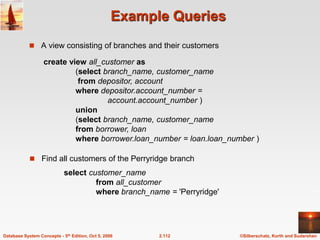
Example Queries
 A view consisting of branches and their customers
 Find all customers of the Perryridge branch
create view all_customer as
(select branch_name, customer_name
from depositor, account
where depositor.account_number =
account.account_number )
union
(select branch_name, customer_name
from borrower, loan
where borrower.loan_number = loan.loan_number )
select customer_name
from all_customer
where branch_name = 'Perryridge'
©Silberschatz, Korth and Sudarshan
2.113
Database System Concepts - 5th Edition, Oct 5, 2006
Views Defined Using Other Views
 One view may be used in the expression defining another view
 A view relation v1 is said to depend directly on a view relation v2 if v2
is used in the expression defining v1
 A view relation v1 is said to depend on view relation v2 if either v1
depends directly to v2 or there is a path of dependencies from v1 to
v2
 A view relation v is said to be recursive if it depends on itself.
©Silberschatz, Korth and Sudarshan
2.114
Database System Concepts - 5th Edition, Oct 5, 2006
View Expansion
 A way to define the meaning of views defined in terms of other views.
 Let view v1 be defined by an expression e1 that may itself contain uses
of view relations.
 View expansion of an expression repeats the following replacement
step:
repeat
Find any view relation vi in e1
Replace the view relation vi by the expression defining vi
until no more view relations are present in e1
 As long as the view definitions are not recursive, this loop will
terminate
©Silberschatz, Korth and Sudarshan
2.115
Database System Concepts - 5th Edition, Oct 5, 2006
Modification of the Database – Deletion
 Delete all account tuples at the Perryridge branch
delete from account
where branch_name = 'Perryridge'
 Delete all accounts at every branch located in the city ‘Needham’.
delete from account
where branch_name in (select branch_name
from branch
where branch_city = 'Needham')
©Silberschatz, Korth and Sudarshan
2.116
Database System Concepts - 5th Edition, Oct 5, 2006
Example Query
 Delete the record of all accounts with balances below the average at
the bank.
delete from account
where balance < (select avg (balance )
from account )
 Problem: as we delete tuples from deposit, the average balance
changes
 Solution used in SQL:
1. First, compute avg balance and find all tuples to delete
2. Next, delete all tuples found above (without recomputing avg or
retesting the tuples)
©Silberschatz, Korth and Sudarshan
2.117
Database System Concepts - 5th Edition, Oct 5, 2006
Modification of the Database – Insertion
 Add a new tuple to account
insert into account
values ('A-9732', 'Perryridge', 1200)
or equivalently
insert into account (branch_name, balance, account_number)
values ('Perryridge', 1200, 'A-9732')
 Add a new tuple to account with balance set to null
insert into account
values ('A-777','Perryridge', null )
©Silberschatz, Korth and Sudarshan
2.118
Database System Concepts - 5th Edition, Oct 5, 2006
Modification of the Database – Insertion
 Provide as a gift for all loan customers of the Perryridge branch, a $200
savings account. Let the loan number serve as the account number for the
new savings account
insert into account
select loan_number, branch_name, 200
from loan
where branch_name = 'Perryridge'
insert into depositor
select customer_name, loan_number
from loan, borrower
where branch_name = 'Perryridge'
and loan.account_number = borrower.account_number
 The select from where statement is evaluated fully before any of its
results are inserted into the relation (otherwise queries like
insert into table1 select * from table1
would cause problems)
©Silberschatz, Korth and Sudarshan
2.119
Database System Concepts - 5th Edition, Oct 5, 2006
Modification of the Database – Updates
 Increase all accounts with balances over $10,000 by 6%, all other
accounts receive 5%.
 Write two update statements:
update account
set balance = balance  1.06
where balance > 10000
update account
set balance = balance  1.05
where balance  10000
 The order is important
 Can be done better using the case statement (next slide)
©Silberschatz, Korth and Sudarshan
2.120
Database System Concepts - 5th Edition, Oct 5, 2006
Case Statement for Conditional Updates
 Same query as before: Increase all accounts with balances over
$10,000 by 6%, all other accounts receive 5%.
update account
set balance = case
when balance <= 10000 then balance *1.05
else balance * 1.06
end
©Silberschatz, Korth and Sudarshan
2.121
Database System Concepts - 5th Edition, Oct 5, 2006
Update of a View
 Create a view of all loan data in the loan relation, hiding the amount
attribute
create view loan_branch as
select loan_number, branch_name
from loan
 Add a new tuple to branch_loan
insert into branch_loan
values ('L-37‘, 'Perryridge‘)
This insertion must be represented by the insertion of the tuple
('L-37', 'Perryridge', null )
into the loan relation
©Silberschatz, Korth and Sudarshan
2.122
Database System Concepts - 5th Edition, Oct 5, 2006
Updates Through Views (Cont.)
 Some updates through views are impossible to translate into
updates on the database relations
 create view v as
select loan_number, branch_name, amount
from loan
where branch_name = ‘Perryridge’
insert into v values ( 'L-99','Downtown', '23')
 Others cannot be translated uniquely
 insert into all_customer values ('Perryridge', 'John')
 Have to choose loan or account, and
create a new loan/account number!
 Most SQL implementations allow updates only on simple views
(without aggregates) defined on a single relation
©Silberschatz, Korth and Sudarshan
2.123
Database System Concepts - 5th Edition, Oct 5, 2006
Joined Relations**
 Join operations take two relations and return as a result another
relation.
 These additional operations are typically used as subquery
expressions in the from clause
 Join condition – defines which tuples in the two relations match, and
what attributes are present in the result of the join.
 Join type – defines how tuples in each relation that do not match any
tuple in the other relation (based on the join condition) are treated.
©Silberschatz, Korth and Sudarshan
2.124
Database System Concepts - 5th Edition, Oct 5, 2006
Joined Relations – Datasets for Examples
 Relation loan
 Relation borrower
 Note: borrower information missing for L-260 and loan
information missing for L-155
©Silberschatz, Korth and Sudarshan
2.125
Database System Concepts - 5th Edition, Oct 5, 2006
Joined Relations – Examples
 loan inner join borrower on
loan.loan_number = borrower.loan_number
 loan left outer join borrower on
loan.loan_number = borrower.loan_number
©Silberschatz, Korth and Sudarshan
2.126
Database System Concepts - 5th Edition, Oct 5, 2006
Joined Relations – Examples
 loan natural inner join borrower
 loan natural right outer join borrower
©Silberschatz, Korth and Sudarshan
2.127
Database System Concepts - 5th Edition, Oct 5, 2006
Joined Relations – Examples
 loan full outer join borrower using (loan_number)
 Find all customers who have either an account or a loan (but not both)
at the bank.
select customer_name
from (depositor natural full outer join borrower )
where account_number is null or loan_number is null
Database System Concepts, 5th Ed.
©Silberschatz, Korth and Sudarshan
See www.db-book.com for conditions on re-use
Chapter 3: Advanced SQL
©Silberschatz, Korth and Sudarshan
2.129
Database System Concepts - 5th Edition, Oct 5, 2006
Built-in Data Types in SQL
 date: Dates, containing a (4 digit) year, month and date
 Example: date ‘2005-7-27’
 time: Time of day, in hours, minutes and seconds.
 Example: time ‘09:00:30’ time ‘09:00:30.75’
 timestamp: date plus time of day
 Example: timestamp ‘2005-7-27 09:00:30.75’
 interval: period of time
 Example: interval ‘1’ day
 Subtracting a date/time/timestamp value from another gives an
interval value
 Interval values can be added to date/time/timestamp values
©Silberschatz, Korth and Sudarshan
2.130
Database System Concepts - 5th Edition, Oct 5, 2006
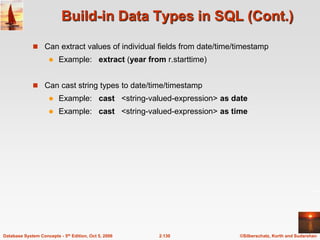
Build-in Data Types in SQL (Cont.)
 Can extract values of individual fields from date/time/timestamp
 Example: extract (year from r.starttime)
 Can cast string types to date/time/timestamp
 Example: cast <string-valued-expression> as date
 Example: cast <string-valued-expression> as time
©Silberschatz, Korth and Sudarshan
2.131
Database System Concepts - 5th Edition, Oct 5, 2006
User-Defined Types
 create type construct in SQL creates user-defined type
create type Dollars as numeric (12,2) final
 create domain construct in SQL-92 creates user-defined domain
types
create domain person_name char(20) not null
 Types and domains are similar. Domains can have constraints, such
as not null, specified on them.
©Silberschatz, Korth and Sudarshan
2.132
Database System Concepts - 5th Edition, Oct 5, 2006
Domain Constraints
 Domain constraints are the most elementary form of integrity
constraint. They test values inserted in the database, and test queries
to ensure that the comparisons make sense.
 New domains can be created from existing data types
 Example: create domain Dollars numeric(12, 2)
create domain Pounds numeric(12,2)
 We cannot assign or compare a value of type Dollars to a value of
type Pounds.
 However, we can convert type as below
(cast r.A as Pounds)
(Should also multiply by the dollar-to-pound conversion-rate)
©Silberschatz, Korth and Sudarshan
2.133
Database System Concepts - 5th Edition, Oct 5, 2006
Large-Object Types
 Large objects (photos, videos, CAD files, etc.) are stored as a large
object:
 blob: binary large object -- object is a large collection of
uninterpreted binary data (whose interpretation is left to an
application outside of the database system)
 clob: character large object -- object is a large collection of
character data
 When a query returns a large object, a pointer is returned rather
than the large object itself.
©Silberschatz, Korth and Sudarshan
2.134
Database System Concepts - 5th Edition, Oct 5, 2006
Integrity Constraints
 Integrity constraints guard against accidental damage to the
database, by ensuring that authorized changes to the
database do not result in a loss of data consistency.
 A checking account must have a balance greater than
$10,000.00
 A salary of a bank employee must be at least $4.00 an
hour
 A customer must have a (non-null) phone number
©Silberschatz, Korth and Sudarshan
2.135
Database System Concepts - 5th Edition, Oct 5, 2006
Constraints on a Single Relation
 not null
 primary key
 unique
 check (P ), where P is a predicate
©Silberschatz, Korth and Sudarshan
2.136
Database System Concepts - 5th Edition, Oct 5, 2006
Not Null Constraint
 Declare branch_name for branch is not null
branch_name char(15) not null
 Declare the domain Dollars to be not null
create domain Dollars numeric(12,2) not null
©Silberschatz, Korth and Sudarshan
2.137
Database System Concepts - 5th Edition, Oct 5, 2006
The Unique Constraint
 unique ( A1, A2, …, Am)
 The unique specification states that the attributes
A1, A2, … Am
form a candidate key.
 Candidate keys are permitted to be null (in contrast to primary keys).
©Silberschatz, Korth and Sudarshan
2.138
Database System Concepts - 5th Edition, Oct 5, 2006
The check clause
 check (P ), where P is a predicate
Example: Declare branch_name as the primary key for
branch and ensure that the values of assets are non-
negative.
create table branch
(branch_name char(15),
branch_city char(30),
assets integer,
primary key (branch_name),
check (assets >= 0))
©Silberschatz, Korth and Sudarshan
2.139
Database System Concepts - 5th Edition, Oct 5, 2006
The check clause (Cont.)
 The check clause in SQL-92 permits domains to be restricted:
 Use check clause to ensure that an hourly_wage domain allows
only values greater than a specified value.
create domain hourly_wage numeric(5,2)
constraint value_test check(value > = 4.00)
 The domain has a constraint that ensures that the hourly_wage is
greater than 4.00
 The clause constraint value_test is optional; useful to indicate
which constraint an update violated.
©Silberschatz, Korth and Sudarshan
2.140
Database System Concepts - 5th Edition, Oct 5, 2006
Referential Integrity
 Ensures that a value that appears in one relation for a given set of
attributes also appears for a certain set of attributes in another relation.
 Example: If “Perryridge” is a branch name appearing in one of the
tuples in the account relation, then there exists a tuple in the branch
relation for branch “Perryridge”.
 Primary and candidate keys and foreign keys can be specified as part of
the SQL create table statement:
 The primary key clause lists attributes that comprise the primary key.
 The unique key clause lists attributes that comprise a candidate key.
 The foreign key clause lists the attributes that comprise the foreign
key and the name of the relation referenced by the foreign key. By
default, a foreign key references the primary key attributes of the
referenced table.
©Silberschatz, Korth and Sudarshan
2.141
Database System Concepts - 5th Edition, Oct 5, 2006
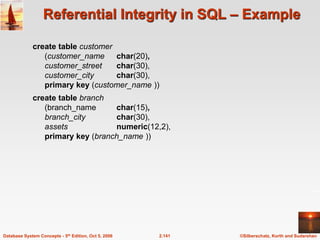
Referential Integrity in SQL – Example
create table customer
(customer_name char(20),
customer_street char(30),
customer_city char(30),
primary key (customer_name ))
create table branch
(branch_name char(15),
branch_city char(30),
assets numeric(12,2),
primary key (branch_name ))
©Silberschatz, Korth and Sudarshan
2.142
Database System Concepts - 5th Edition, Oct 5, 2006
Referential Integrity in SQL – Example (Cont.)
create table account
(account_number char(10),
branch_name char(15),
balance integer,
primary key (account_number),
foreign key (branch_name) references branch )
create table depositor
(customer_name char(20),
account_number char(10),
primary key (customer_name, account_number),
foreign key (account_number ) references account,
foreign key (customer_name ) references customer )
©Silberschatz, Korth and Sudarshan
2.143
Database System Concepts - 5th Edition, Oct 5, 2006
Authorization
Forms of authorization on parts of the database:
 Read - allows reading, but not modification of data.
 Insert - allows insertion of new data, but not modification of existing data.
 Update - allows modification, but not deletion of data.
 Delete - allows deletion of data.
Forms of authorization to modify the database schema (covered in Chapter 8):
 Index - allows creation and deletion of indices.
 Resources - allows creation of new relations.
 Alteration - allows addition or deletion of attributes in a relation.
 Drop - allows deletion of relations.
©Silberschatz, Korth and Sudarshan
2.144
Database System Concepts - 5th Edition, Oct 5, 2006
Authorization Specification in SQL
 The grant statement is used to confer authorization
grant <privilege list>
on <relation name or view name> to <user list>
 <user list> is:
 a user-id
 public, which allows all valid users the privilege granted
 A role (more on this in Chapter 8)
 Granting a privilege on a view does not imply granting any privileges
on the underlying relations.
 The grantor of the privilege must already hold the privilege on the
specified item (or be the database administrator).
©Silberschatz, Korth and Sudarshan
2.145
Database System Concepts - 5th Edition, Oct 5, 2006
Privileges in SQL
 select: allows read access to relation,or the ability to query using
the view
 Example: grant users U1, U2, and U3 select authorization on
the branch relation:
grant select on branch to U1, U2, U3
 insert: the ability to insert tuples
 update: the ability to update using the SQL update statement
 delete: the ability to delete tuples.
 all privileges: used as a short form for all the allowable privileges
 more in Chapter 8
©Silberschatz, Korth and Sudarshan
2.146
Database System Concepts - 5th Edition, Oct 5, 2006
Revoking Authorization in SQL
 The revoke statement is used to revoke authorization.
revoke <privilege list>
on <relation name or view name> from <user list>
 Example:
revoke select on branch from U1, U2, U3
 <privilege-list> may be all to revoke all privileges the revokee may
hold.
 If <revokee-list> includes public, all users lose the privilege except
those granted it explicitly.
 If the same privilege was granted twice to the same user by different
grantees, the user may retain the privilege after the revocation.
 All privileges that depend on the privilege being revoked are also
revoked.
©Silberschatz, Korth and Sudarshan
2.147
Database System Concepts - 5th Edition, Oct 5, 2006
Embedded SQL
 The SQL standard defines embeddings of SQL in a variety of
programming languages such as C, Java, and Cobol.
 A language to which SQL queries are embedded is referred to as a host
language, and the SQL structures permitted in the host language
comprise embedded SQL.
 The basic form of these languages follows that of the System R
embedding of SQL into PL/I.
 EXEC SQL statement is used to identify embedded SQL request to the
preprocessor
EXEC SQL <embedded SQL statement > END_EXEC
Note: this varies by language (for example, the Java embedding uses
# SQL { …. }; )
©Silberschatz, Korth and Sudarshan
2.148
Database System Concepts - 5th Edition, Oct 5, 2006
Example Query
 Specify the query in SQL and declare a cursor for it
EXEC SQL
declare c cursor for
select depositor.customer_name, customer_city
from depositor, customer, account
where depositor.customer_name = customer.customer_name
and depositor account_number = account.account_number
and account.balance > :amount
END_EXEC
 From within a host language, find the names and cities of
customers with more than the variable amount dollars in some
account.
©Silberschatz, Korth and Sudarshan
2.149
Database System Concepts - 5th Edition, Oct 5, 2006
Embedded SQL (Cont.)
 The open statement causes the query to be evaluated
EXEC SQL open c END_EXEC
 The fetch statement causes the values of one tuple in the query result
to be placed on host language variables.
EXEC SQL fetch c into :cn, :cc END_EXEC
Repeated calls to fetch get successive tuples in the query result
 A variable called SQLSTATE in the SQL communication area
(SQLCA) gets set to ‘02000’ to indicate no more data is available
 The close statement causes the database system to delete the
temporary relation that holds the result of the query.
EXEC SQL close c END_EXEC
Note: above details vary with language. For example, the Java
embedding defines Java iterators to step through result tuples.
©Silberschatz, Korth and Sudarshan
2.150
Database System Concepts - 5th Edition, Oct 5, 2006
Dynamic SQL
 Allows programs to construct and submit SQL queries at run time.
 Example of the use of dynamic SQL from within a C program.
char * sqlprog = “update account
set balance = balance * 1.05
where account_number = ?”
EXEC SQL prepare dynprog from :sqlprog;
char account [10] = “A-101”;
EXEC SQL execute dynprog using :account;
 The dynamic SQL program contains a ?, which is a place holder for a
value that is provided when the SQL program is executed.
©Silberschatz, Korth and Sudarshan
2.151
Database System Concepts - 5th Edition, Oct 5, 2006
Procedural Extensions and Stored Procedures
 SQL provides a module language
 Permits definition of procedures in SQL, with if-then-else statements,
for and while loops, etc.
 more in Chapter 9
 Stored Procedures
 Can store procedures in the database
 then execute them using the call statement
 permit external applications to operate on the database without
knowing about internal details
 These features are covered in Chapter 9 (Object Relational Databases)
©Silberschatz, Korth and Sudarshan
2.152
Database System Concepts - 5th Edition, Oct 5, 2006
Functions and Procedures
 SQL:1999 supports functions and procedures
 Functions/procedures can be written in SQL itself, or in an external
programming language
 Functions are particularly useful with specialized data types such as
images and geometric objects
 Example: functions to check if polygons overlap, or to compare
images for similarity
 Some database systems support table-valued functions, which
can return a relation as a result
 SQL:1999 also supports a rich set of imperative constructs, including
 Loops, if-then-else, assignment
 Many databases have proprietary procedural extensions to SQL that
differ from SQL:1999
©Silberschatz, Korth and Sudarshan
2.153
Database System Concepts - 5th Edition, Oct 5, 2006
SQL Functions
 Define a function that, given the name of a customer, returns the
count of the number of accounts owned by the customer.
create function account_count (customer_name varchar(20))
returns integer
begin
declare a_count integer;
select count (* ) into a_count
from depositor
where depositor.customer_name = customer_name
return a_count;
end
 Find the name and address of each customer that has more than one
account.
select customer_name, customer_street, customer_city
from customer
where account_count (customer_name ) > 1
©Silberschatz, Korth and Sudarshan
2.154
Database System Concepts - 5th Edition, Oct 5, 2006
Table Functions
 SQL:2003 added functions that return a relation as a result
 Example: Return all accounts owned by a given customer
create function accounts_of (customer_name char(20)
returns table ( account_number char(10),
branch_name char(15)
balance numeric(12,2))
return table
(select account_number, branch_name, balance
from account A
where exists (
select *
from depositor D
where D.customer_name = accounts_of.customer_name
and D.account_number = A.account_number ))
©Silberschatz, Korth and Sudarshan
2.155
Database System Concepts - 5th Edition, Oct 5, 2006
Table Functions (cont’d)
 Usage
select *
from table (accounts_of (‘Smith’))
©Silberschatz, Korth and Sudarshan
2.156
Database System Concepts - 5th Edition, Oct 5, 2006
SQL Procedures
 The author_count function could instead be written as procedure:
create procedure account_count_proc (in title varchar(20),
out a_count integer)
begin
select count(author) into a_count
from depositor
where depositor.customer_name = account_count_proc.customer_name
end
 Procedures can be invoked either from an SQL procedure or from
embedded SQL, using the call statement.
declare a_count integer;
call account_count_proc( ‘Smith’, a_count);
Procedures and functions can be invoked also from dynamic SQL
 SQL:1999 allows more than one function/procedure of the same name
(called name overloading), as long as the number of
arguments differ, or at least the types of the arguments differ
©Silberschatz, Korth and Sudarshan
2.157
Database System Concepts - 5th Edition, Oct 5, 2006
Procedural Constructs
 Compound statement: begin … end,
 May contain multiple SQL statements between begin and end.
 Local variables can be declared within a compound statements
 While and repeat statements:
declare n integer default 0;
while n < 10 do
set n = n + 1
end while
repeat
set n = n – 1
until n = 0
end repeat
©Silberschatz, Korth and Sudarshan
2.158
Database System Concepts - 5th Edition, Oct 5, 2006
Procedural Constructs (Cont.)
 For loop
 Permits iteration over all results of a query
 Example: find total of all balances at the Perryridge branch
declare n integer default 0;
for r as
select balance from account
where branch_name = ‘Perryridge’
do
set n = n + r.balance
end for
©Silberschatz, Korth and Sudarshan
2.159
Database System Concepts - 5th Edition, Oct 5, 2006
Procedural Constructs (cont.)
 Conditional statements (if-then-else)
E.g. To find sum of balances for each of three categories of accounts
(with balance <1000, >=1000 and <5000, >= 5000)
if r.balance < 1000
then set l = l + r.balance
elseif r.balance < 5000
then set m = m + r.balance
else set h = h + r.balance
end if
 SQL:1999 also supports a case statement similar to C case statement
 Signaling of exception conditions, and declaring handlers for exceptions
declare out_of_stock condition
declare exit handler for out_of_stock
begin
…
.. signal out-of-stock
end
 The handler here is exit -- causes enclosing begin..end to be exited
 Other actions possible on exception

03 Relational Databases.ppt

  • 1.
    Database System Concepts,5th Ed. ©Silberschatz, Korth and Sudarshan See www.db-book.com for conditions on re-use Chapter 3: Relational Model
  • 2.
    ©Silberschatz, Korth andSudarshan 2.2 Database System Concepts - 5th Edition, Oct 5, 2006 Example of a Relation
  • 3.
    ©Silberschatz, Korth andSudarshan 2.3 Database System Concepts - 5th Edition, Oct 5, 2006 Basic Structure  Formally, given sets D1, D2, …. Dn a relation r is a subset of D1 x D2 x … x Dn Thus, a relation is a set of n-tuples (a1, a2, …, an) where each ai  Di  Example: If  customer_name = {Jones, Smith, Curry, Lindsay, …} /* Set of all customer names */  customer_street = {Main, North, Park, …} /* set of all street names*/  customer_city = {Harrison, Rye, Pittsfield, …} /* set of all city names */ Then r = { (Jones, Main, Harrison), (Smith, North, Rye), (Curry, North, Rye), (Lindsay, Park, Pittsfield) } is a relation over customer_name x customer_street x customer_city
  • 4.
    ©Silberschatz, Korth andSudarshan 2.4 Database System Concepts - 5th Edition, Oct 5, 2006 Attribute Types  Each attribute of a relation has a name  The set of allowed values for each attribute is called the domain of the attribute  Attribute values are (normally) required to be atomic; that is, indivisible  E.g. the value of an attribute can be an account number, but cannot be a set of account numbers  Domain is said to be atomic if all its members are atomic  The special value null is a member of every domain  The null value causes complications in the definition of many operations  We shall ignore the effect of null values in our main presentation and consider their effect later
  • 5.
    ©Silberschatz, Korth andSudarshan 2.5 Database System Concepts - 5th Edition, Oct 5, 2006 Relation Schema  A1, A2, …, An are attributes  R = (A1, A2, …, An ) is a relation schema Example: Customer_schema = (customer_name, customer_street, customer_city)  r(R) denotes a relation r on the relation schema R Example: customer (Customer_schema)
  • 6.
    ©Silberschatz, Korth andSudarshan 2.6 Database System Concepts - 5th Edition, Oct 5, 2006 Relation Instance  The current values (relation instance) of a relation are specified by a table  An element t of r is a tuple, represented by a row in a table Jones Smith Curry Lindsay customer_name Main North North Park customer_street Harrison Rye Rye Pittsfield customer_city customer attributes (or columns) tuples (or rows)
  • 7.
    ©Silberschatz, Korth andSudarshan 2.7 Database System Concepts - 5th Edition, Oct 5, 2006 Relations are Unordered  Order of tuples is irrelevant (tuples may be stored in an arbitrary order)  Example: account relation with unordered tuples
  • 8.
    ©Silberschatz, Korth andSudarshan 2.8 Database System Concepts - 5th Edition, Oct 5, 2006 Database  A database consists of multiple relations  Information about an enterprise is broken up into parts, with each relation storing one part of the information account : stores information about accounts depositor : stores information about which customer owns which account customer : stores information about customers  Storing all information as a single relation such as bank(account_number, balance, customer_name, ..) results in  repetition of information  e.g.,if two customers own an account (What gets repeated?)  the need for null values  e.g., to represent a customer without an account  Normalization theory (Chapter 7) deals with how to design relational schemas
  • 9.
    ©Silberschatz, Korth andSudarshan 2.9 Database System Concepts - 5th Edition, Oct 5, 2006 The customer Relation
  • 10.
    ©Silberschatz, Korth andSudarshan 2.10 Database System Concepts - 5th Edition, Oct 5, 2006 The depositor Relation
  • 11.
    ©Silberschatz, Korth andSudarshan 2.11 Database System Concepts - 5th Edition, Oct 5, 2006 Keys  Let K  R  K is a superkey of R if values for K are sufficient to identify a unique tuple of each possible relation r(R)  by “possible r ” we mean a relation r that could exist in the enterprise we are modeling.  Example: {customer_name, customer_street} and {customer_name} are both superkeys of Customer, if no two customers can possibly have the same name  In real life, an attribute such as customer_id would be used instead of customer_name to uniquely identify customers, but we omit it to keep our examples small, and instead assume customer names are unique.
  • 12.
    ©Silberschatz, Korth andSudarshan 2.12 Database System Concepts - 5th Edition, Oct 5, 2006 Keys (Cont.)  K is a candidate key if K is minimal Example: {customer_name} is a candidate key for Customer, since it is a superkey and no subset of it is a superkey.  Primary key: a candidate key chosen as the principal means of identifying tuples within a relation  Should choose an attribute whose value never, or very rarely, changes.  E.g. email address is unique, but may change
  • 13.
    ©Silberschatz, Korth andSudarshan 2.13 Database System Concepts - 5th Edition, Oct 5, 2006 Foreign Keys  A relation schema may have an attribute that corresponds to the primary key of another relation. The attribute is called a foreign key.  E.g. customer_name and account_number attributes of depositor are foreign keys to customer and account respectively.  Only values occurring in the primary key attribute of the referenced relation may occur in the foreign key attribute of the referencing relation.  Schema diagram
  • 14.
    ©Silberschatz, Korth andSudarshan 2.14 Database System Concepts - 5th Edition, Oct 5, 2006 Query Languages  Language in which user requests information from the database.  Categories of languages  Procedural  Non-procedural, or declarative  “Pure” languages:  Relational algebra  Tuple relational calculus  Domain relational calculus  Pure languages form underlying basis of query languages that people use.
  • 15.
    ©Silberschatz, Korth andSudarshan 2.15 Database System Concepts - 5th Edition, Oct 5, 2006 Relational Algebra  Procedural language  Six basic operators  select:  (Condition)  project:  (Display)  union:   set difference: –  Cartesian product: x  rename:   The operators take one or two relations as inputs and produce a new relation as a result.
  • 16.
    ©Silberschatz, Korth andSudarshan 2.16 Database System Concepts - 5th Edition, Oct 5, 2006 Select Operation – Example  Relation r A B C D         1 5 12 23 7 7 3 10  A=B ^ D > 5 (r) A B C D     1 23 7 10
  • 17.
    ©Silberschatz, Korth andSudarshan 2.17 Database System Concepts - 5th Edition, Oct 5, 2006 Select Operation  Notation:  p(r)  p is called the selection predicate  Defined as: p(r) = {t | t  r and p(t)} Where p is a formula in propositional calculus consisting of terms connected by :  (and),  (or),  (not) Each term is one of: <attribute> op <attribute> or <constant> where op is one of: =, , >, . <.   Example of selection:  branch_name=“Perryridge”(account)
  • 18.
    ©Silberschatz, Korth andSudarshan 2.18 Database System Concepts - 5th Edition, Oct 5, 2006 Project Operation – Example  Relation r: A B C     10 20 30 40 1 1 1 2 A C     1 1 1 2 = A C    1 1 2 A,C (r)
  • 19.
    ©Silberschatz, Korth andSudarshan 2.19 Database System Concepts - 5th Edition, Oct 5, 2006 Project Operation  Notation: where A1, A2 are attribute names and r is a relation name.  The result is defined as the relation of k columns obtained by erasing the columns that are not listed  Duplicate rows removed from result, since relations are sets  Example: To eliminate the branch_name attribute of account account_number, balance (account) ) ( , , , 2 1 r k A A A  
  • 20.
    ©Silberschatz, Korth andSudarshan 2.20 Database System Concepts - 5th Edition, Oct 5, 2006 Union Operation – Example  Relations r, s:  r  s: A B    1 2 1 A B   2 3 r s A B     1 2 1 3
  • 21.
    ©Silberschatz, Korth andSudarshan 2.21 Database System Concepts - 5th Edition, Oct 5, 2006 Union Operation  Notation: r  s  Defined as: r  s = {t | t  r or t  s}  For r  s to be valid. 1. r, s must have the same arity (same number of attributes) 2. The attribute domains must be compatible (example: 2nd column of r deals with the same type of values as does the 2nd column of s)  Example: to find all customers with either an account or a loan customer_name (depositor)  customer_name (borrower)
  • 22.
    ©Silberschatz, Korth andSudarshan 2.22 Database System Concepts - 5th Edition, Oct 5, 2006 Set Difference Operation – Example  Relations r, s:  r – s: A B    1 2 1 A B   2 3 r s A B   1 1
  • 23.
    ©Silberschatz, Korth andSudarshan 2.23 Database System Concepts - 5th Edition, Oct 5, 2006 Set Difference Operation  Notation r – s  Defined as: r – s = {t | t  r and t  s}  Set differences must be taken between compatible relations.  r and s must have the same arity  attribute domains of r and s must be compatible
  • 24.
    ©Silberschatz, Korth andSudarshan 2.24 Database System Concepts - 5th Edition, Oct 5, 2006 Cartesian-Product Operation – Example  Relations r, s:  r x s: A B   1 2 A B         1 1 1 1 2 2 2 2 C D         10 10 20 10 10 10 20 10 E a a b b a a b b C D     10 10 20 10 E a a b b r s
  • 25.
    ©Silberschatz, Korth andSudarshan 2.25 Database System Concepts - 5th Edition, Oct 5, 2006 Cartesian-Product Operation  Notation r x s  Defined as: r x s = {t q | t  r and q  s}  Assume that attributes of r(R) and s(S) are disjoint. (That is, R  S = ).  If attributes of r(R) and s(S) are not disjoint, then renaming must be used.
  • 26.
    ©Silberschatz, Korth andSudarshan 2.26 Database System Concepts - 5th Edition, Oct 5, 2006 Composition of Operations  Can build expressions using multiple operations  Example: A=C(r x s)  r x s  A=C(r x s) A B         1 1 1 1 2 2 2 2 C D         10 10 20 10 10 10 20 10 E a a b b a a b b A B C D E    1 2 2    10 10 20 a a b
  • 27.
    ©Silberschatz, Korth andSudarshan 2.27 Database System Concepts - 5th Edition, Oct 5, 2006 Rename Operation  Allows us to name, and therefore to refer to, the results of relational- algebra expressions.  Allows us to refer to a relation by more than one name.  Example:  x (E) returns the expression E under the name X  If a relational-algebra expression E has arity n, then returns the result of expression E under the name X, and with the attributes renamed to A1 , A2 , …., An . ) ( ) ,..., , ( 2 1 E n A A A x 
  • 28.
    ©Silberschatz, Korth andSudarshan 2.28 Database System Concepts - 5th Edition, Oct 5, 2006 Banking Example branch (branch_name, branch_city, assets) customer (customer_name, customer_street, customer_city) account (account_number, branch_name, balance) loan (loan_number, branch_name, amount) depositor (customer_name, account_number) borrower (customer_name, loan_number)
  • 29.
    ©Silberschatz, Korth andSudarshan 2.29 Database System Concepts - 5th Edition, Oct 5, 2006 Example Queries  Find all loans of over $1200  Find the loan number for each loan of an amount greater than $1200 amount > 1200 (loan) loan_number (amount > 1200 (loan))  Find the names of all customers who have a loan, an account, or both, from the bank customer_name (borrower)  customer_name (depositor)
  • 30.
    ©Silberschatz, Korth andSudarshan 2.30 Database System Concepts - 5th Edition, Oct 5, 2006 Example Queries  Find the names of all customers who have a loan at the Perryridge branch.  Find the names of all customers who have a loan at the Perryridge branch but do not have an account at any branch of the bank. customer_name (branch_name = “Perryridge” (borrower.loan_number = loan.loan_number(borrower x loan))) – customer_name(depositor) customer_name (branch_name=“Perryridge” (borrower.loan_number = loan.loan_number(borrower x loan)))
  • 31.
    ©Silberschatz, Korth andSudarshan 2.31 Database System Concepts - 5th Edition, Oct 5, 2006 Example Queries  Find the names of all customers who have a loan at the Perryridge branch.  Query 2 customer_name(loan.loan_number = borrower.loan_number ( (branch_name = “Perryridge” (loan)) x borrower))  Query 1 customer_name (branch_name = “Perryridge” ( borrower.loan_number = loan.loan_number (borrower x loan)))
  • 32.
    ©Silberschatz, Korth andSudarshan 2.32 Database System Concepts - 5th Edition, Oct 5, 2006 Example Queries  Find the largest account balance  Strategy:  Find those balances that are not the largest – Rename account relation as d so that we can compare each account balance with all others  Use set difference to find those account balances that were not found in the earlier step.  The query is: balance(account) - account.balance (account.balance < d.balance (account x d (account)))
  • 33.
    ©Silberschatz, Korth andSudarshan 2.33 Database System Concepts - 5th Edition, Oct 5, 2006 Formal Definition  A basic expression in the relational algebra consists of either one of the following:  A relation in the database  A constant relation  Let E1 and E2 be relational-algebra expressions; the following are all relational-algebra expressions:  E1  E2  E1 – E2  E1 x E2  p (E1), P is a predicate on attributes in E1  s(E1), S is a list consisting of some of the attributes in E1   x (E1), x is the new name for the result of E1
  • 34.
    ©Silberschatz, Korth andSudarshan 2.34 Database System Concepts - 5th Edition, Oct 5, 2006 Additional Operations We define additional operations that do not add any power to the relational algebra, but that simplify common queries.  Set intersection  Natural join  Division  Assignment
  • 35.
    ©Silberschatz, Korth andSudarshan 2.35 Database System Concepts - 5th Edition, Oct 5, 2006 Set-Intersection Operation  Notation: r  s  Defined as:  r  s = { t | t  r and t  s }  Assume:  r, s have the same arity  attributes of r and s are compatible  Note: r  s = r – (r – s)
  • 36.
    ©Silberschatz, Korth andSudarshan 2.36 Database System Concepts - 5th Edition, Oct 5, 2006 Set-Intersection Operation – Example  Relation r, s:  r  s A B    1 2 1 A B   2 3 r s A B  2
  • 37.
    ©Silberschatz, Korth andSudarshan 2.37 Database System Concepts - 5th Edition, Oct 5, 2006  Notation: r s Natural-Join Operation  Let r and s be relations on schemas R and S respectively. Then, r s is a relation on schema R  S obtained as follows:  Consider each pair of tuples tr from r and ts from s.  If tr and ts have the same value on each of the attributes in R  S, add a tuple t to the result, where  t has the same value as tr on r  t has the same value as ts on s  Example: R = (A, B, C, D) S = (E, B, D)  Result schema = (A, B, C, D, E)  r s is defined as: r.A, r.B, r.C, r.D, s.E (r.B = s.B  r.D = s.D (r x s))
  • 38.
    ©Silberschatz, Korth andSudarshan 2.38 Database System Concepts - 5th Edition, Oct 5, 2006 Natural Join Operation – Example  Relations r, s: A B      1 2 4 1 2 C D      a a b a b B 1 3 1 2 3 D a a a b b E      r A B      1 1 1 1 2 C D      a a a a b E      s  r s
  • 39.
    ©Silberschatz, Korth andSudarshan 2.39 Database System Concepts - 5th Edition, Oct 5, 2006 Division Operation  Notation:  Suited to queries that include the phrase “for all”.  Let r and s be relations on schemas R and S respectively where  R = (A1, …, Am , B1, …, Bn )  S = (B1, …, Bn) The result of r  s is a relation on schema R – S = (A1, …, Am) r  s = { t | t   R-S (r)   u  s ( tu  r ) } Where tu means the concatenation of tuples t and u to produce a single tuple r  s
  • 40.
    ©Silberschatz, Korth andSudarshan 2.40 Database System Concepts - 5th Edition, Oct 5, 2006 Division Operation – Example  Relations r, s:  r  s: A B   1 2 A B            1 2 3 1 1 1 3 4 6 1 2 r s
  • 41.
    ©Silberschatz, Korth andSudarshan 2.41 Database System Concepts - 5th Edition, Oct 5, 2006 Another Division Example A B         a a a a a a a a C D         a a b a b a b b E 1 1 1 1 3 1 1 1  Relations r, s:  r  s: D a b E 1 1 A B   a a C   r s
  • 42.
    ©Silberschatz, Korth andSudarshan 2.42 Database System Concepts - 5th Edition, Oct 5, 2006 Division Operation (Cont.)  Property  Let q = r  s  Then q is the largest relation satisfying q x s  r  Definition in terms of the basic algebra operation Let r(R) and s(S) be relations, and let S  R r  s = R-S (r ) – R-S ( ( R-S (r ) x s ) – R-S,S(r )) To see why  R-S,S (r) simply reorders attributes of r  R-S (R-S (r ) x s ) – R-S,S(r) ) gives those tuples t in R-S (r ) such that for some tuple u  s, tu  r.
  • 43.
    ©Silberschatz, Korth andSudarshan 2.43 Database System Concepts - 5th Edition, Oct 5, 2006 Assignment Operation  The assignment operation () provides a convenient way to express complex queries.  Write query as a sequential program consisting of  a series of assignments  followed by an expression whose value is displayed as a result of the query.  Assignment must always be made to a temporary relation variable.  Example: Write r  s as temp1  R-S (r ) temp2  R-S ((temp1 x s ) – R-S,S (r )) result = temp1 – temp2  The result to the right of the  is assigned to the relation variable on the left of the .  May use variable in subsequent expressions.
  • 44.
    ©Silberschatz, Korth andSudarshan 2.44 Database System Concepts - 5th Edition, Oct 5, 2006 Bank Example Queries  Find the names of all customers who have a loan and an account at bank. customer_name (borrower)  customer_name (depositor)  Find the name of all customers who have a loan at the bank and the loan amount customer_name, loan_number, amount (borrower loan)
  • 45.
    ©Silberschatz, Korth andSudarshan 2.45 Database System Concepts - 5th Edition, Oct 5, 2006  Query 1 customer_name (branch_name = “Downtown” (depositor account ))  customer_name (branch_name = “Uptown” (depositor account))  Query 2 customer_name, branch_name (depositor account)  temp(branch_name) ({(“Downtown” ), (“Uptown” )}) Note that Query 2 uses a constant relation. Bank Example Queries  Find all customers who have an account from at least the “Downtown” and the Uptown” branches.
  • 46.
    ©Silberschatz, Korth andSudarshan 2.46 Database System Concepts - 5th Edition, Oct 5, 2006  Find all customers who have an account at all branches located in Brooklyn city. Bank Example Queries customer_name, branch_name (depositor account)  branch_name (branch_city = “Brooklyn” (branch))
  • 47.
    ©Silberschatz, Korth andSudarshan 2.47 Database System Concepts - 5th Edition, Oct 5, 2006 Extended Relational-Algebra-Operations  Generalized Projection  Aggregate Functions  Outer Join
  • 48.
    ©Silberschatz, Korth andSudarshan 2.48 Database System Concepts - 5th Edition, Oct 5, 2006 Generalized Projection  Extends the projection operation by allowing arithmetic functions to be used in the projection list.  E is any relational-algebra expression  Each of F1, F2, …, Fn are are arithmetic expressions involving constants and attributes in the schema of E.  Given relation credit_info(customer_name, limit, credit_balance), find how much more each person can spend: customer_name, limit – credit_balance (credit_info) ) ( ,..., , 2 1 E n F F F 
  • 49.
    ©Silberschatz, Korth andSudarshan 2.49 Database System Concepts - 5th Edition, Oct 5, 2006 Aggregate Functions and Operations  Aggregation function takes a collection of values and returns a single value as a result. avg: average value min: minimum value max: maximum value sum: sum of values count: number of values  Aggregate operation in relational algebra E is any relational-algebra expression  G1, G2 …, Gn is a list of attributes on which to group (can be empty)  Each Fi is an aggregate function  Each Ai is an attribute name ) ( ) ( , , ( ), ( , , , 2 2 1 1 2 1 E n n n A F A F A F G G G   
  • 50.
    ©Silberschatz, Korth andSudarshan 2.50 Database System Concepts - 5th Edition, Oct 5, 2006 Aggregate Operation – Example  Relation r: A B         C 7 7 3 10  g sum(c) (r) sum(c ) 27
  • 51.
    ©Silberschatz, Korth andSudarshan 2.51 Database System Concepts - 5th Edition, Oct 5, 2006 Aggregate Operation – Example  Relation account grouped by branch-name: branch_name g sum(balance) (account) branch_name account_number balance Perryridge Perryridge Brighton Brighton Redwood A-102 A-201 A-217 A-215 A-222 400 900 750 750 700 branch_name sum(balance) Perryridge Brighton Redwood 1300 1500 700
  • 52.
    ©Silberschatz, Korth andSudarshan 2.52 Database System Concepts - 5th Edition, Oct 5, 2006 Aggregate Functions (Cont.)  Result of aggregation does not have a name  Can use rename operation to give it a name  For convenience, we permit renaming as part of aggregate operation branch_name g sum(balance) as sum_balance (account)
  • 53.
    ©Silberschatz, Korth andSudarshan 2.53 Database System Concepts - 5th Edition, Oct 5, 2006 Outer Join  An extension of the join operation that avoids loss of information.  Computes the join and then adds tuples form one relation that does not match tuples in the other relation to the result of the join.  Uses null values:  null signifies that the value is unknown or does not exist  All comparisons involving null are (roughly speaking) false by definition.  We shall study precise meaning of comparisons with nulls later
  • 54.
    ©Silberschatz, Korth andSudarshan 2.54 Database System Concepts - 5th Edition, Oct 5, 2006 Outer Join – Example  Relation loan  Relation borrower customer_name loan_number Jones Smith Hayes L-170 L-230 L-155 3000 4000 1700 loan_number amount L-170 L-230 L-260 branch_name Downtown Redwood Perryridge
  • 55.
    ©Silberschatz, Korth andSudarshan 2.55 Database System Concepts - 5th Edition, Oct 5, 2006 Outer Join – Example  Join loan borrower loan_number amount L-170 L-230 3000 4000 customer_name Jones Smith branch_name Downtown Redwood Jones Smith null loan_number amount L-170 L-230 L-260 3000 4000 1700 customer_name branch_name Downtown Redwood Perryridge  Left Outer Join loan borrower
  • 56.
    ©Silberschatz, Korth andSudarshan 2.56 Database System Concepts - 5th Edition, Oct 5, 2006 Outer Join – Example loan_number amount L-170 L-230 L-155 3000 4000 null customer_name Jones Smith Hayes branch_name Downtown Redwood null loan_number amount L-170 L-230 L-260 L-155 3000 4000 1700 null customer_name Jones Smith null Hayes branch_name Downtown Redwood Perryridge null  Full Outer Join loan borrower  Right Outer Join loan borrower
  • 57.
    ©Silberschatz, Korth andSudarshan 2.57 Database System Concepts - 5th Edition, Oct 5, 2006 Null Values  It is possible for tuples to have a null value, denoted by null, for some of their attributes  null signifies an unknown value or that a value does not exist.  The result of any arithmetic expression involving null is null.  Aggregate functions simply ignore null values (as in SQL)  For duplicate elimination and grouping, null is treated like any other value, and two nulls are assumed to be the same (as in SQL)
  • 58.
    ©Silberschatz, Korth andSudarshan 2.58 Database System Concepts - 5th Edition, Oct 5, 2006 Null Values  Comparisons with null values return the special truth value: unknown  If false was used instead of unknown, then not (A < 5) would not be equivalent to A >= 5  Three-valued logic using the truth value unknown:  OR: (unknown or true) = true, (unknown or false) = unknown (unknown or unknown) = unknown  AND: (true and unknown) = unknown, (false and unknown) = false, (unknown and unknown) = unknown  NOT: (not unknown) = unknown  In SQL “P is unknown” evaluates to true if predicate P evaluates to unknown  Result of select predicate is treated as false if it evaluates to unknown
  • 59.
    ©Silberschatz, Korth andSudarshan 2.59 Database System Concepts - 5th Edition, Oct 5, 2006 Modification of the Database  The content of the database may be modified using the following operations:  Deletion  Insertion  Updating  All these operations are expressed using the assignment operator.
  • 60.
    ©Silberschatz, Korth andSudarshan 2.60 Database System Concepts - 5th Edition, Oct 5, 2006 Deletion  A delete request is expressed similarly to a query, except instead of displaying tuples to the user, the selected tuples are removed from the database.  Can delete only whole tuples; cannot delete values on only particular attributes  A deletion is expressed in relational algebra by: r  r – E where r is a relation and E is a relational algebra query.
  • 61.
    ©Silberschatz, Korth andSudarshan 2.61 Database System Concepts - 5th Edition, Oct 5, 2006 Deletion Examples  Delete all account records in the Perryridge branch.  Delete all accounts at branches located in Needham. r1  branch_city = “Needham” (account branch ) r2   account_number, branch_name, balance (r1) r3   customer_name, account_number (r2 depositor) account  account – r2 depositor  depositor – r3  Delete all loan records with amount in the range of 0 to 50 loan  loan –  amount 0 and amount  50 (loan) account  account – branch_name = “Perryridge” (account )
  • 62.
    ©Silberschatz, Korth andSudarshan 2.62 Database System Concepts - 5th Edition, Oct 5, 2006 Insertion  To insert data into a relation, we either:  specify a tuple to be inserted  write a query whose result is a set of tuples to be inserted  in relational algebra, an insertion is expressed by: r  r  E where r is a relation and E is a relational algebra expression.  The insertion of a single tuple is expressed by letting E be a constant relation containing one tuple.
  • 63.
    ©Silberschatz, Korth andSudarshan 2.63 Database System Concepts - 5th Edition, Oct 5, 2006 Insertion Examples  Insert information in the database specifying that Smith has $1200 in account A-973 at the Perryridge branch.  Provide as a gift for all loan customers in the Perryridge branch, a $200 savings account. Let the loan number serve as the account number for the new savings account. account  account  {(“A-973”, “Perryridge”, 1200)} depositor  depositor  {(“Smith”, “A-973”)} r1  (branch_name = “Perryridge” (borrower loan)) account  account  loan_number, branch_name, 200 (r1) depositor  depositor  customer_name, loan_number (r1)
  • 64.
    ©Silberschatz, Korth andSudarshan 2.64 Database System Concepts - 5th Edition, Oct 5, 2006 Updating  A mechanism to change a value in a tuple without charging all values in the tuple  Use the generalized projection operator to do this task  Each Fi is either  the I th attribute of r, if the I th attribute is not updated, or,  if the attribute is to be updated Fi is an expression, involving only constants and the attributes of r, which gives the new value for the attribute ) ( , , , , 2 1 r r l F F F   
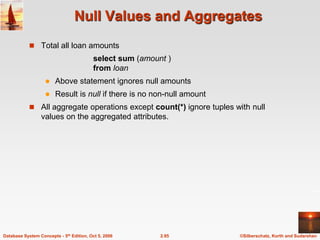
  • 65.
    ©Silberschatz, Korth andSudarshan 2.65 Database System Concepts - 5th Edition, Oct 5, 2006 Update Examples  Make interest payments by increasing all balances by 5 percent.  Pay all accounts with balances over $10,000 6 percent interest and pay all others 5 percent account   account_number, branch_name, balance * 1.06 ( BAL  10000 (account ))   account_number, branch_name, balance * 1.05 (BAL  10000 (account)) account   account_number, branch_name, balance * 1.05 (account)
  • 66.
    Database System Concepts,5th Ed. ©Silberschatz, Korth and Sudarshan See www.db-book.com for conditions on re-use Chapter 3: SQL
  • 67.
    ©Silberschatz, Korth andSudarshan 2.67 Database System Concepts - 5th Edition, Oct 5, 2006 Chapter 3: SQL  Data Definition  Basic Query Structure  Set Operations  Aggregate Functions  Null Values  Nested Subqueries  Complex Queries  Views  Modification of the Database  Joined Relations**
  • 68.
    ©Silberschatz, Korth andSudarshan 2.68 Database System Concepts - 5th Edition, Oct 5, 2006 History  IBM Sequel language developed as part of System R project at the IBM San Jose Research Laboratory  Renamed Structured Query Language (SQL)  ANSI and ISO standard SQL:  SQL-86  SQL-89  SQL-92  SQL:1999 (language name became Y2K compliant!)  SQL:2003  Commercial systems offer most, if not all, SQL-92 features, plus varying feature sets from later standards and special proprietary features.  Not all examples here may work on your particular system.
  • 69.
    ©Silberschatz, Korth andSudarshan 2.69 Database System Concepts - 5th Edition, Oct 5, 2006 Data Definition Language  The schema for each relation.  The domain of values associated with each attribute.  Integrity constraints  The set of indices to be maintained for each relations.  Security and authorization information for each relation.  The physical storage structure of each relation on disk. Allows the specification of not only a set of relations but also information about each relation, including:
  • 70.
    ©Silberschatz, Korth andSudarshan 2.70 Database System Concepts - 5th Edition, Oct 5, 2006 Domain Types in SQL  char(n). Fixed length character string, with user-specified length n.  varchar(n). Variable length character strings, with user-specified maximum length n.  int. Integer (a finite subset of the integers that is machine-dependent).  smallint. Small integer (a machine-dependent subset of the integer domain type).  numeric(p,d). Fixed point number, with user-specified precision of p digits, with n digits to the right of decimal point.  real, double precision. Floating point and double-precision floating point numbers, with machine-dependent precision.  float(n). Floating point number, with user-specified precision of at least n digits.  More are covered in Chapter 4.
  • 71.
    ©Silberschatz, Korth andSudarshan 2.71 Database System Concepts - 5th Edition, Oct 5, 2006 Create Table Construct  An SQL relation is defined using the create table command: create table r (A1 D1, A2 D2, ..., An Dn, (integrity-constraint1), ..., (integrity-constraintk))  r is the name of the relation  each Ai is an attribute name in the schema of relation r  Di is the data type of values in the domain of attribute Ai  Example: create table branch (branch_name char(15) not null, branch_city char(30), assets integer)
  • 72.
    ©Silberschatz, Korth andSudarshan 2.72 Database System Concepts - 5th Edition, Oct 5, 2006 Integrity Constraints in Create Table  not null  primary key (A1, ..., An ) Example: Declare branch_name as the primary key for branch . create table branch (branch_name char(15), branch_city char(30), assets integer, primary key (branch_name)) primary key declaration on an attribute automatically ensures not null in SQL-92 onwards, needs to be explicitly stated in SQL-89
  • 73.
    ©Silberschatz, Korth andSudarshan 2.73 Database System Concepts - 5th Edition, Oct 5, 2006 Drop and Alter Table Constructs  The drop table command deletes all information about the dropped relation from the database.  The alter table command is used to add attributes to an existing relation: alter table r add A D where A is the name of the attribute to be added to relation r and D is the domain of A.  All tuples in the relation are assigned null as the value for the new attribute.  The alter table command can also be used to drop attributes of a relation: alter table r drop A where A is the name of an attribute of relation r  Dropping of attributes not supported by many databases
  • 74.
    ©Silberschatz, Korth andSudarshan 2.74 Database System Concepts - 5th Edition, Oct 5, 2006 Basic Query Structure  SQL is based on set and relational operations with certain modifications and enhancements  A typical SQL query has the form: select A1, A2, ..., An from r1, r2, ..., rm where P  Ai represents an attribute  Ri represents a relation  P is a predicate.  This query is equivalent to the relational algebra expression.  The result of an SQL query is a relation. )) ( ( 2 1 , , , 2 1 m P A A A r r r n       
  • 75.
    ©Silberschatz, Korth andSudarshan 2.75 Database System Concepts - 5th Edition, Oct 5, 2006 The select Clause  The select clause list the attributes desired in the result of a query  corresponds to the projection operation of the relational algebra  Example: find the names of all branches in the loan relation: select branch_name from loan  In the relational algebra, the query would be: branch_name (loan)  NOTE: SQL names are case insensitive (i.e., you may use upper- or lower-case letters.)  E.g. Branch_Name ≡ BRANCH_NAME ≡ branch_name  Some people use upper case wherever we use bold font.
  • 76.
    ©Silberschatz, Korth andSudarshan 2.76 Database System Concepts - 5th Edition, Oct 5, 2006 The select Clause (Cont.)  SQL allows duplicates in relations as well as in query results.  To force the elimination of duplicates, insert the keyword distinct after select.  Find the names of all branches in the loan relations, and remove duplicates select distinct branch_name from loan  The keyword all specifies that duplicates not be removed. select all branch_name from loan
  • 77.
    ©Silberschatz, Korth andSudarshan 2.77 Database System Concepts - 5th Edition, Oct 5, 2006 The select Clause (Cont.)  An asterisk in the select clause denotes “all attributes” select * from loan  The select clause can contain arithmetic expressions involving the operation, +, –, , and /, and operating on constants or attributes of tuples.  The query: select loan_number, branch_name, amount  100 from loan would return a relation that is the same as the loan relation, except that the value of the attribute amount is multiplied by 100.
  • 78.
    ©Silberschatz, Korth andSudarshan 2.78 Database System Concepts - 5th Edition, Oct 5, 2006 The where Clause  The where clause specifies conditions that the result must satisfy  Corresponds to the selection predicate of the relational algebra.  To find all loan number for loans made at the Perryridge branch with loan amounts greater than $1200. select loan_number from loan where branch_name = 'Perryridge' and amount > 1200  Comparison results can be combined using the logical connectives and, or, and not.  Comparisons can be applied to results of arithmetic expressions.
  • 79.
    ©Silberschatz, Korth andSudarshan 2.79 Database System Concepts - 5th Edition, Oct 5, 2006 The where Clause (Cont.)  SQL includes a between comparison operator  Example: Find the loan number of those loans with loan amounts between $90,000 and $100,000 (that is,  $90,000 and  $100,000) select loan_number from loan where amount between 90000 and 100000
  • 80.
    ©Silberschatz, Korth andSudarshan 2.80 Database System Concepts - 5th Edition, Oct 5, 2006 The from Clause  The from clause lists the relations involved in the query  Corresponds to the Cartesian product operation of the relational algebra.  Find the Cartesian product borrower X loan select  from borrower, loan  Find the name, loan number and loan amount of all customers having a loan at the Perryridge branch. select customer_name, borrower.loan_number, amount from borrower, loan where borrower.loan_number = loan.loan_number and branch_name = 'Perryridge'
  • 81.
    ©Silberschatz, Korth andSudarshan 2.81 Database System Concepts - 5th Edition, Oct 5, 2006 The Rename Operation  The SQL allows renaming relations and attributes using the as clause: old-name as new-name  Find the name, loan number and loan amount of all customers; rename the column name loan_number as loan_id. select customer_name, borrower.loan_number as loan_id, amount from borrower, loan where borrower.loan_number = loan.loan_number
  • 82.
    ©Silberschatz, Korth andSudarshan 2.82 Database System Concepts - 5th Edition, Oct 5, 2006 Tuple Variables  Tuple variables are defined in the from clause via the use of the as clause.  Find the customer names and their loan numbers for all customers having a loan at some branch.  Find the names of all branches that have greater assets than some branch located in Brooklyn. select distinct T.branch_name from branch as T, branch as S where T.assets > S.assets and S.branch_city = 'Brooklyn' Keyword as is optional and may be omitted borrower as T ≡ borrower T select customer_name, T.loan_number, S.amount from borrower as T, loan as S where T.loan_number = S.loan_number
  • 83.
    ©Silberschatz, Korth andSudarshan 2.83 Database System Concepts - 5th Edition, Oct 5, 2006 String Operations  SQL includes a string-matching operator for comparisons on character strings. The operator “like” uses patterns that are described using two special characters:  percent (%). The % character matches any substring.  underscore (_). The _ character matches any character.  Find the names of all customers whose street includes the substring “Main”. select customer_name from customer where customer_street like '% Main%'  Match the name “Main%” like 'Main%' escape ''  SQL supports a variety of string operations such as  concatenation (using “||”)  converting from upper to lower case (and vice versa)  finding string length, extracting substrings, etc.
  • 84.
    ©Silberschatz, Korth andSudarshan 2.84 Database System Concepts - 5th Edition, Oct 5, 2006 Ordering the Display of Tuples  List in alphabetic order the names of all customers having a loan in Perryridge branch select distinct customer_name from borrower, loan where borrower loan_number = loan.loan_number and branch_name = 'Perryridge' order by customer_name  We may specify desc for descending order or asc for ascending order, for each attribute; ascending order is the default.  Example: order by customer_name desc
  • 85.
    ©Silberschatz, Korth andSudarshan 2.85 Database System Concepts - 5th Edition, Oct 5, 2006 Duplicates  In relations with duplicates, SQL can define how many copies of tuples appear in the result.  Multiset versions of some of the relational algebra operators – given multiset relations r1 and r2: 1.  (r1): If there are c1 copies of tuple t1 in r1, and t1 satisfies selections ,, then there are c1 copies of t1 in  (r1). 2. A (r ): For each copy of tuple t1 in r1, there is a copy of tuple A (t1) in A (r1) where A (t1) denotes the projection of the single tuple t1. 3. r1 x r2 : If there are c1 copies of tuple t1 in r1 and c2 copies of tuple t2 in r2, there are c1 x c2 copies of the tuple t1. t2 in r1 x r2
  • 86.
    ©Silberschatz, Korth andSudarshan 2.86 Database System Concepts - 5th Edition, Oct 5, 2006 Duplicates (Cont.)  Example: Suppose multiset relations r1 (A, B) and r2 (C) are as follows: r1 = {(1, a) (2,a)} r2 = {(2), (3), (3)}  Then B(r1) would be {(a), (a)}, while B(r1) x r2 would be {(a,2), (a,2), (a,3), (a,3), (a,3), (a,3)}  SQL duplicate semantics: select A1,, A2, ..., An from r1, r2, ..., rm where P is equivalent to the multiset version of the expression: )) ( ( 2 1 , , , 2 1 m P A A A r r r n       
  • 87.
    ©Silberschatz, Korth andSudarshan 2.87 Database System Concepts - 5th Edition, Oct 5, 2006 Set Operations  The set operations union, intersect, and except operate on relations and correspond to the relational algebra operations   Each of the above operations automatically eliminates duplicates; to retain all duplicates use the corresponding multiset versions union all, intersect all and except all. Suppose a tuple occurs m times in r and n times in s, then, it occurs:  m + n times in r union all s  min(m,n) times in r intersect all s  max(0, m – n) times in r except all s
  • 88.
    ©Silberschatz, Korth andSudarshan 2.88 Database System Concepts - 5th Edition, Oct 5, 2006 Set Operations  Find all customers who have a loan, an account, or both: (select customer_name from depositor) except (select customer_name from borrower) (select customer_name from depositor) intersect (select customer_name from borrower)  Find all customers who have an account but no loan. (select customer_name from depositor) union (select customer_name from borrower)  Find all customers who have both a loan and an account.
  • 89.
    ©Silberschatz, Korth andSudarshan 2.89 Database System Concepts - 5th Edition, Oct 5, 2006 Aggregate Functions  These functions operate on the multiset of values of a column of a relation, and return a value avg: average value min: minimum value max: maximum value sum: sum of values count: number of values
  • 90.
    ©Silberschatz, Korth andSudarshan 2.90 Database System Concepts - 5th Edition, Oct 5, 2006 Aggregate Functions (Cont.)  Find the average account balance at the Perryridge branch.  Find the number of depositors in the bank.  Find the number of tuples in the customer relation. select avg (balance) from account where branch_name = 'Perryridge' select count (*) from customer select count (distinct customer_name) from depositor
  • 91.
    ©Silberschatz, Korth andSudarshan 2.91 Database System Concepts - 5th Edition, Oct 5, 2006 Aggregate Functions – Group By  Find the number of depositors for each branch. Note: Attributes in select clause outside of aggregate functions must appear in group by list select branch_name, count (distinct customer_name) from depositor, account where depositor.account_number = account.account_number group by branch_name
  • 92.
    ©Silberschatz, Korth andSudarshan 2.92 Database System Concepts - 5th Edition, Oct 5, 2006 Aggregate Functions – Having Clause  Find the names of all branches where the average account balance is more than $1,200. Note: predicates in the having clause are applied after the formation of groups whereas predicates in the where clause are applied before forming groups select branch_name, avg (balance) from account group by branch_name having avg (balance) > 1200
  • 93.
    ©Silberschatz, Korth andSudarshan 2.93 Database System Concepts - 5th Edition, Oct 5, 2006 Null Values  It is possible for tuples to have a null value, denoted by null, for some of their attributes  null signifies an unknown value or that a value does not exist.  The predicate is null can be used to check for null values.  Example: Find all loan number which appear in the loan relation with null values for amount. select loan_number from loan where amount is null  The result of any arithmetic expression involving null is null  Example: 5 + null returns null  However, aggregate functions simply ignore nulls  More on next slide
  • 94.
    ©Silberschatz, Korth andSudarshan 2.94 Database System Concepts - 5th Edition, Oct 5, 2006 Null Values and Three Valued Logic  Any comparison with null returns unknown  Example: 5 < null or null <> null or null = null  Three-valued logic using the truth value unknown:  OR: (unknown or true) = true, (unknown or false) = unknown (unknown or unknown) = unknown  AND: (true and unknown) = unknown, (false and unknown) = false, (unknown and unknown) = unknown  NOT: (not unknown) = unknown  “P is unknown” evaluates to true if predicate P evaluates to unknown  Result of where clause predicate is treated as false if it evaluates to unknown
  • 95.
    ©Silberschatz, Korth andSudarshan 2.95 Database System Concepts - 5th Edition, Oct 5, 2006 Null Values and Aggregates  Total all loan amounts select sum (amount ) from loan  Above statement ignores null amounts  Result is null if there is no non-null amount  All aggregate operations except count(*) ignore tuples with null values on the aggregated attributes.
  • 96.
    ©Silberschatz, Korth andSudarshan 2.96 Database System Concepts - 5th Edition, Oct 5, 2006 Nested Subqueries  SQL provides a mechanism for the nesting of subqueries.  A subquery is a select-from-where expression that is nested within another query.  A common use of subqueries is to perform tests for set membership, set comparisons, and set cardinality.
  • 97.
    ©Silberschatz, Korth andSudarshan 2.97 Database System Concepts - 5th Edition, Oct 5, 2006 Example Query  Find all customers who have both an account and a loan at the bank.  Find all customers who have a loan at the bank but do not have an account at the bank select distinct customer_name from borrower where customer_name not in (select customer_name from depositor ) select distinct customer_name from borrower where customer_name in (select customer_name from depositor )
  • 98.
    ©Silberschatz, Korth andSudarshan 2.98 Database System Concepts - 5th Edition, Oct 5, 2006 Example Query  Find all customers who have both an account and a loan at the Perryridge branch  Note: Above query can be written in a much simpler manner. The formulation above is simply to illustrate SQL features. select distinct customer_name from borrower, loan where borrower.loan_number = loan.loan_number and branch_name = 'Perryridge' and (branch_name, customer_name ) in (select branch_name, customer_name from depositor, account where depositor.account_number = account.account_number )
  • 99.
    ©Silberschatz, Korth andSudarshan 2.99 Database System Concepts - 5th Edition, Oct 5, 2006 Set Comparison  Find all branches that have greater assets than some branch located in Brooklyn.  Same query using > some clause select branch_name from branch where assets > some (select assets from branch where branch_city = 'Brooklyn') select distinct T.branch_name from branch as T, branch as S where T.assets > S.assets and S.branch_city = 'Brooklyn'
  • 100.
    ©Silberschatz, Korth andSudarshan 2.100 Database System Concepts - 5th Edition, Oct 5, 2006 Definition of Some Clause  F <comp> some r t  r such that (F <comp> t ) Where <comp> can be:      0 5 6 (5 < some ) = true 0 5 0 ) = false 5 0 5 (5  some ) = true (since 0  5) (read: 5 < some tuple in the relation) (5 < some ) = true (5 = some (= some)  in However, ( some)  not in
  • 101.
    ©Silberschatz, Korth andSudarshan 2.101 Database System Concepts - 5th Edition, Oct 5, 2006 Example Query  Find the names of all branches that have greater assets than all branches located in Brooklyn. select branch_name from branch where assets > all (select assets from branch where branch_city = 'Brooklyn')
  • 102.
    ©Silberschatz, Korth andSudarshan 2.102 Database System Concepts - 5th Edition, Oct 5, 2006 Definition of all Clause  F <comp> all r t  r (F <comp> t) 0 5 6 (5 < all ) = false 6 10 4 ) = true 5 4 6 (5  all ) = true (since 5  4 and 5  6) (5 < all ) = false (5 = all ( all)  not in However, (= all)  in
  • 103.
    ©Silberschatz, Korth andSudarshan 2.103 Database System Concepts - 5th Edition, Oct 5, 2006 Test for Empty Relations  The exists construct returns the value true if the argument subquery is nonempty.  exists r  r  Ø  not exists r  r = Ø
  • 104.
    ©Silberschatz, Korth andSudarshan 2.104 Database System Concepts - 5th Edition, Oct 5, 2006 Example Query  Find all customers who have an account at all branches located in Brooklyn. select distinct S.customer_name from depositor as S where not exists ( (select branch_name from branch where branch_city = 'Brooklyn') except (select R.branch_name from depositor as T, account as R where T.account_number = R.account_number and S.customer_name = T.customer_name ))  Note that X – Y = Ø  X Y  Note: Cannot write this query using = all and its variants
  • 105.
    ©Silberschatz, Korth andSudarshan 2.105 Database System Concepts - 5th Edition, Oct 5, 2006 Test for Absence of Duplicate Tuples  The unique construct tests whether a subquery has any duplicate tuples in its result.  Find all customers who have at most one account at the Perryridge branch. select T.customer_name from depositor as T where unique ( select R.customer_name from account, depositor as R where T.customer_name = R.customer_name and R.account_number = account.account_number and account.branch_name = 'Perryridge')
  • 106.
    ©Silberschatz, Korth andSudarshan 2.106 Database System Concepts - 5th Edition, Oct 5, 2006 Example Query  Find all customers who have at least two accounts at the Perryridge branch. select distinct T.customer_name from depositor as T where not unique ( select R.customer_name from account, depositor as R where T.customer_name = R.customer_name and R.account_number = account.account_number and account.branch_name = 'Perryridge')  Variable from outer level is known as a correlation variable
  • 107.
    ©Silberschatz, Korth andSudarshan 2.107 Database System Concepts - 5th Edition, Oct 5, 2006 Derived Relations  SQL allows a subquery expression to be used in the from clause  Find the average account balance of those branches where the average account balance is greater than $1200. select branch_name, avg_balance from (select branch_name, avg (balance) from account group by branch_name ) as branch_avg ( branch_name, avg_balance ) where avg_balance > 1200 Note that we do not need to use the having clause, since we compute the temporary (view) relation branch_avg in the from clause, and the attributes of branch_avg can be used directly in the where clause.
  • 108.
    ©Silberschatz, Korth andSudarshan 2.108 Database System Concepts - 5th Edition, Oct 5, 2006 With Clause  The with clause provides a way of defining a temporary view whose definition is available only to the query in which the with clause occurs.  Find all accounts with the maximum balance with max_balance (value) as select max (balance) from account select account_number from account, max_balance where account.balance = max_balance.value
  • 109.
    ©Silberschatz, Korth andSudarshan 2.109 Database System Concepts - 5th Edition, Oct 5, 2006 Complex Queries using With Clause  Find all branches where the total account deposit is greater than the average of the total account deposits at all branches. with branch_total (branch_name, value) as select branch_name, sum (balance) from account group by branch_name with branch_total_avg (value) as select avg (value) from branch_total select branch_name from branch_total, branch_total_avg where branch_total.value >= branch_total_avg.value
  • 110.
    ©Silberschatz, Korth andSudarshan 2.110 Database System Concepts - 5th Edition, Oct 5, 2006 Views  In some cases, it is not desirable for all users to see the entire logical model (that is, all the actual relations stored in the database.)  Consider a person who needs to know a customer’s name, loan number and branch name, but has no need to see the loan amount. This person should see a relation described, in SQL, by (select customer_name, borrower.loan_number, branch_name from borrower, loan where borrower.loan_number = loan.loan_number )  A view provides a mechanism to hide certain data from the view of certain users.  Any relation that is not of the conceptual model but is made visible to a user as a “virtual relation” is called a view.
  • 111.
    ©Silberschatz, Korth andSudarshan 2.111 Database System Concepts - 5th Edition, Oct 5, 2006 View Definition  A view is defined using the create view statement which has the form create view v as < query expression > where <query expression> is any legal SQL expression. The view name is represented by v.  Once a view is defined, the view name can be used to refer to the virtual relation that the view generates.  When a view is created, the query expression is stored in the database; the expression is substituted into queries using the view.
  • 112.
    ©Silberschatz, Korth andSudarshan 2.112 Database System Concepts - 5th Edition, Oct 5, 2006 Example Queries  A view consisting of branches and their customers  Find all customers of the Perryridge branch create view all_customer as (select branch_name, customer_name from depositor, account where depositor.account_number = account.account_number ) union (select branch_name, customer_name from borrower, loan where borrower.loan_number = loan.loan_number ) select customer_name from all_customer where branch_name = 'Perryridge'
  • 113.
    ©Silberschatz, Korth andSudarshan 2.113 Database System Concepts - 5th Edition, Oct 5, 2006 Views Defined Using Other Views  One view may be used in the expression defining another view  A view relation v1 is said to depend directly on a view relation v2 if v2 is used in the expression defining v1  A view relation v1 is said to depend on view relation v2 if either v1 depends directly to v2 or there is a path of dependencies from v1 to v2  A view relation v is said to be recursive if it depends on itself.
  • 114.
    ©Silberschatz, Korth andSudarshan 2.114 Database System Concepts - 5th Edition, Oct 5, 2006 View Expansion  A way to define the meaning of views defined in terms of other views.  Let view v1 be defined by an expression e1 that may itself contain uses of view relations.  View expansion of an expression repeats the following replacement step: repeat Find any view relation vi in e1 Replace the view relation vi by the expression defining vi until no more view relations are present in e1  As long as the view definitions are not recursive, this loop will terminate
  • 115.
    ©Silberschatz, Korth andSudarshan 2.115 Database System Concepts - 5th Edition, Oct 5, 2006 Modification of the Database – Deletion  Delete all account tuples at the Perryridge branch delete from account where branch_name = 'Perryridge'  Delete all accounts at every branch located in the city ‘Needham’. delete from account where branch_name in (select branch_name from branch where branch_city = 'Needham')
  • 116.
    ©Silberschatz, Korth andSudarshan 2.116 Database System Concepts - 5th Edition, Oct 5, 2006 Example Query  Delete the record of all accounts with balances below the average at the bank. delete from account where balance < (select avg (balance ) from account )  Problem: as we delete tuples from deposit, the average balance changes  Solution used in SQL: 1. First, compute avg balance and find all tuples to delete 2. Next, delete all tuples found above (without recomputing avg or retesting the tuples)
  • 117.
    ©Silberschatz, Korth andSudarshan 2.117 Database System Concepts - 5th Edition, Oct 5, 2006 Modification of the Database – Insertion  Add a new tuple to account insert into account values ('A-9732', 'Perryridge', 1200) or equivalently insert into account (branch_name, balance, account_number) values ('Perryridge', 1200, 'A-9732')  Add a new tuple to account with balance set to null insert into account values ('A-777','Perryridge', null )
  • 118.
    ©Silberschatz, Korth andSudarshan 2.118 Database System Concepts - 5th Edition, Oct 5, 2006 Modification of the Database – Insertion  Provide as a gift for all loan customers of the Perryridge branch, a $200 savings account. Let the loan number serve as the account number for the new savings account insert into account select loan_number, branch_name, 200 from loan where branch_name = 'Perryridge' insert into depositor select customer_name, loan_number from loan, borrower where branch_name = 'Perryridge' and loan.account_number = borrower.account_number  The select from where statement is evaluated fully before any of its results are inserted into the relation (otherwise queries like insert into table1 select * from table1 would cause problems)
  • 119.
    ©Silberschatz, Korth andSudarshan 2.119 Database System Concepts - 5th Edition, Oct 5, 2006 Modification of the Database – Updates  Increase all accounts with balances over $10,000 by 6%, all other accounts receive 5%.  Write two update statements: update account set balance = balance  1.06 where balance > 10000 update account set balance = balance  1.05 where balance  10000  The order is important  Can be done better using the case statement (next slide)
  • 120.
    ©Silberschatz, Korth andSudarshan 2.120 Database System Concepts - 5th Edition, Oct 5, 2006 Case Statement for Conditional Updates  Same query as before: Increase all accounts with balances over $10,000 by 6%, all other accounts receive 5%. update account set balance = case when balance <= 10000 then balance *1.05 else balance * 1.06 end
  • 121.
    ©Silberschatz, Korth andSudarshan 2.121 Database System Concepts - 5th Edition, Oct 5, 2006 Update of a View  Create a view of all loan data in the loan relation, hiding the amount attribute create view loan_branch as select loan_number, branch_name from loan  Add a new tuple to branch_loan insert into branch_loan values ('L-37‘, 'Perryridge‘) This insertion must be represented by the insertion of the tuple ('L-37', 'Perryridge', null ) into the loan relation
  • 122.
    ©Silberschatz, Korth andSudarshan 2.122 Database System Concepts - 5th Edition, Oct 5, 2006 Updates Through Views (Cont.)  Some updates through views are impossible to translate into updates on the database relations  create view v as select loan_number, branch_name, amount from loan where branch_name = ‘Perryridge’ insert into v values ( 'L-99','Downtown', '23')  Others cannot be translated uniquely  insert into all_customer values ('Perryridge', 'John')  Have to choose loan or account, and create a new loan/account number!  Most SQL implementations allow updates only on simple views (without aggregates) defined on a single relation
  • 123.
    ©Silberschatz, Korth andSudarshan 2.123 Database System Concepts - 5th Edition, Oct 5, 2006 Joined Relations**  Join operations take two relations and return as a result another relation.  These additional operations are typically used as subquery expressions in the from clause  Join condition – defines which tuples in the two relations match, and what attributes are present in the result of the join.  Join type – defines how tuples in each relation that do not match any tuple in the other relation (based on the join condition) are treated.
  • 124.
    ©Silberschatz, Korth andSudarshan 2.124 Database System Concepts - 5th Edition, Oct 5, 2006 Joined Relations – Datasets for Examples  Relation loan  Relation borrower  Note: borrower information missing for L-260 and loan information missing for L-155
  • 125.
    ©Silberschatz, Korth andSudarshan 2.125 Database System Concepts - 5th Edition, Oct 5, 2006 Joined Relations – Examples  loan inner join borrower on loan.loan_number = borrower.loan_number  loan left outer join borrower on loan.loan_number = borrower.loan_number
  • 126.
    ©Silberschatz, Korth andSudarshan 2.126 Database System Concepts - 5th Edition, Oct 5, 2006 Joined Relations – Examples  loan natural inner join borrower  loan natural right outer join borrower
  • 127.
    ©Silberschatz, Korth andSudarshan 2.127 Database System Concepts - 5th Edition, Oct 5, 2006 Joined Relations – Examples  loan full outer join borrower using (loan_number)  Find all customers who have either an account or a loan (but not both) at the bank. select customer_name from (depositor natural full outer join borrower ) where account_number is null or loan_number is null
  • 128.
    Database System Concepts,5th Ed. ©Silberschatz, Korth and Sudarshan See www.db-book.com for conditions on re-use Chapter 3: Advanced SQL
  • 129.
    ©Silberschatz, Korth andSudarshan 2.129 Database System Concepts - 5th Edition, Oct 5, 2006 Built-in Data Types in SQL  date: Dates, containing a (4 digit) year, month and date  Example: date ‘2005-7-27’  time: Time of day, in hours, minutes and seconds.  Example: time ‘09:00:30’ time ‘09:00:30.75’  timestamp: date plus time of day  Example: timestamp ‘2005-7-27 09:00:30.75’  interval: period of time  Example: interval ‘1’ day  Subtracting a date/time/timestamp value from another gives an interval value  Interval values can be added to date/time/timestamp values
  • 130.
    ©Silberschatz, Korth andSudarshan 2.130 Database System Concepts - 5th Edition, Oct 5, 2006 Build-in Data Types in SQL (Cont.)  Can extract values of individual fields from date/time/timestamp  Example: extract (year from r.starttime)  Can cast string types to date/time/timestamp  Example: cast <string-valued-expression> as date  Example: cast <string-valued-expression> as time
  • 131.
    ©Silberschatz, Korth andSudarshan 2.131 Database System Concepts - 5th Edition, Oct 5, 2006 User-Defined Types  create type construct in SQL creates user-defined type create type Dollars as numeric (12,2) final  create domain construct in SQL-92 creates user-defined domain types create domain person_name char(20) not null  Types and domains are similar. Domains can have constraints, such as not null, specified on them.
  • 132.
    ©Silberschatz, Korth andSudarshan 2.132 Database System Concepts - 5th Edition, Oct 5, 2006 Domain Constraints  Domain constraints are the most elementary form of integrity constraint. They test values inserted in the database, and test queries to ensure that the comparisons make sense.  New domains can be created from existing data types  Example: create domain Dollars numeric(12, 2) create domain Pounds numeric(12,2)  We cannot assign or compare a value of type Dollars to a value of type Pounds.  However, we can convert type as below (cast r.A as Pounds) (Should also multiply by the dollar-to-pound conversion-rate)
  • 133.
    ©Silberschatz, Korth andSudarshan 2.133 Database System Concepts - 5th Edition, Oct 5, 2006 Large-Object Types  Large objects (photos, videos, CAD files, etc.) are stored as a large object:  blob: binary large object -- object is a large collection of uninterpreted binary data (whose interpretation is left to an application outside of the database system)  clob: character large object -- object is a large collection of character data  When a query returns a large object, a pointer is returned rather than the large object itself.
  • 134.
    ©Silberschatz, Korth andSudarshan 2.134 Database System Concepts - 5th Edition, Oct 5, 2006 Integrity Constraints  Integrity constraints guard against accidental damage to the database, by ensuring that authorized changes to the database do not result in a loss of data consistency.  A checking account must have a balance greater than $10,000.00  A salary of a bank employee must be at least $4.00 an hour  A customer must have a (non-null) phone number
  • 135.
    ©Silberschatz, Korth andSudarshan 2.135 Database System Concepts - 5th Edition, Oct 5, 2006 Constraints on a Single Relation  not null  primary key  unique  check (P ), where P is a predicate
  • 136.
    ©Silberschatz, Korth andSudarshan 2.136 Database System Concepts - 5th Edition, Oct 5, 2006 Not Null Constraint  Declare branch_name for branch is not null branch_name char(15) not null  Declare the domain Dollars to be not null create domain Dollars numeric(12,2) not null
  • 137.
    ©Silberschatz, Korth andSudarshan 2.137 Database System Concepts - 5th Edition, Oct 5, 2006 The Unique Constraint  unique ( A1, A2, …, Am)  The unique specification states that the attributes A1, A2, … Am form a candidate key.  Candidate keys are permitted to be null (in contrast to primary keys).
  • 138.
    ©Silberschatz, Korth andSudarshan 2.138 Database System Concepts - 5th Edition, Oct 5, 2006 The check clause  check (P ), where P is a predicate Example: Declare branch_name as the primary key for branch and ensure that the values of assets are non- negative. create table branch (branch_name char(15), branch_city char(30), assets integer, primary key (branch_name), check (assets >= 0))
  • 139.
    ©Silberschatz, Korth andSudarshan 2.139 Database System Concepts - 5th Edition, Oct 5, 2006 The check clause (Cont.)  The check clause in SQL-92 permits domains to be restricted:  Use check clause to ensure that an hourly_wage domain allows only values greater than a specified value. create domain hourly_wage numeric(5,2) constraint value_test check(value > = 4.00)  The domain has a constraint that ensures that the hourly_wage is greater than 4.00  The clause constraint value_test is optional; useful to indicate which constraint an update violated.
  • 140.
    ©Silberschatz, Korth andSudarshan 2.140 Database System Concepts - 5th Edition, Oct 5, 2006 Referential Integrity  Ensures that a value that appears in one relation for a given set of attributes also appears for a certain set of attributes in another relation.  Example: If “Perryridge” is a branch name appearing in one of the tuples in the account relation, then there exists a tuple in the branch relation for branch “Perryridge”.  Primary and candidate keys and foreign keys can be specified as part of the SQL create table statement:  The primary key clause lists attributes that comprise the primary key.  The unique key clause lists attributes that comprise a candidate key.  The foreign key clause lists the attributes that comprise the foreign key and the name of the relation referenced by the foreign key. By default, a foreign key references the primary key attributes of the referenced table.
  • 141.
    ©Silberschatz, Korth andSudarshan 2.141 Database System Concepts - 5th Edition, Oct 5, 2006 Referential Integrity in SQL – Example create table customer (customer_name char(20), customer_street char(30), customer_city char(30), primary key (customer_name )) create table branch (branch_name char(15), branch_city char(30), assets numeric(12,2), primary key (branch_name ))
  • 142.
    ©Silberschatz, Korth andSudarshan 2.142 Database System Concepts - 5th Edition, Oct 5, 2006 Referential Integrity in SQL – Example (Cont.) create table account (account_number char(10), branch_name char(15), balance integer, primary key (account_number), foreign key (branch_name) references branch ) create table depositor (customer_name char(20), account_number char(10), primary key (customer_name, account_number), foreign key (account_number ) references account, foreign key (customer_name ) references customer )
  • 143.
    ©Silberschatz, Korth andSudarshan 2.143 Database System Concepts - 5th Edition, Oct 5, 2006 Authorization Forms of authorization on parts of the database:  Read - allows reading, but not modification of data.  Insert - allows insertion of new data, but not modification of existing data.  Update - allows modification, but not deletion of data.  Delete - allows deletion of data. Forms of authorization to modify the database schema (covered in Chapter 8):  Index - allows creation and deletion of indices.  Resources - allows creation of new relations.  Alteration - allows addition or deletion of attributes in a relation.  Drop - allows deletion of relations.
  • 144.
    ©Silberschatz, Korth andSudarshan 2.144 Database System Concepts - 5th Edition, Oct 5, 2006 Authorization Specification in SQL  The grant statement is used to confer authorization grant <privilege list> on <relation name or view name> to <user list>  <user list> is:  a user-id  public, which allows all valid users the privilege granted  A role (more on this in Chapter 8)  Granting a privilege on a view does not imply granting any privileges on the underlying relations.  The grantor of the privilege must already hold the privilege on the specified item (or be the database administrator).
  • 145.
    ©Silberschatz, Korth andSudarshan 2.145 Database System Concepts - 5th Edition, Oct 5, 2006 Privileges in SQL  select: allows read access to relation,or the ability to query using the view  Example: grant users U1, U2, and U3 select authorization on the branch relation: grant select on branch to U1, U2, U3  insert: the ability to insert tuples  update: the ability to update using the SQL update statement  delete: the ability to delete tuples.  all privileges: used as a short form for all the allowable privileges  more in Chapter 8
  • 146.
    ©Silberschatz, Korth andSudarshan 2.146 Database System Concepts - 5th Edition, Oct 5, 2006 Revoking Authorization in SQL  The revoke statement is used to revoke authorization. revoke <privilege list> on <relation name or view name> from <user list>  Example: revoke select on branch from U1, U2, U3  <privilege-list> may be all to revoke all privileges the revokee may hold.  If <revokee-list> includes public, all users lose the privilege except those granted it explicitly.  If the same privilege was granted twice to the same user by different grantees, the user may retain the privilege after the revocation.  All privileges that depend on the privilege being revoked are also revoked.
  • 147.
    ©Silberschatz, Korth andSudarshan 2.147 Database System Concepts - 5th Edition, Oct 5, 2006 Embedded SQL  The SQL standard defines embeddings of SQL in a variety of programming languages such as C, Java, and Cobol.  A language to which SQL queries are embedded is referred to as a host language, and the SQL structures permitted in the host language comprise embedded SQL.  The basic form of these languages follows that of the System R embedding of SQL into PL/I.  EXEC SQL statement is used to identify embedded SQL request to the preprocessor EXEC SQL <embedded SQL statement > END_EXEC Note: this varies by language (for example, the Java embedding uses # SQL { …. }; )
  • 148.
    ©Silberschatz, Korth andSudarshan 2.148 Database System Concepts - 5th Edition, Oct 5, 2006 Example Query  Specify the query in SQL and declare a cursor for it EXEC SQL declare c cursor for select depositor.customer_name, customer_city from depositor, customer, account where depositor.customer_name = customer.customer_name and depositor account_number = account.account_number and account.balance > :amount END_EXEC  From within a host language, find the names and cities of customers with more than the variable amount dollars in some account.
  • 149.
    ©Silberschatz, Korth andSudarshan 2.149 Database System Concepts - 5th Edition, Oct 5, 2006 Embedded SQL (Cont.)  The open statement causes the query to be evaluated EXEC SQL open c END_EXEC  The fetch statement causes the values of one tuple in the query result to be placed on host language variables. EXEC SQL fetch c into :cn, :cc END_EXEC Repeated calls to fetch get successive tuples in the query result  A variable called SQLSTATE in the SQL communication area (SQLCA) gets set to ‘02000’ to indicate no more data is available  The close statement causes the database system to delete the temporary relation that holds the result of the query. EXEC SQL close c END_EXEC Note: above details vary with language. For example, the Java embedding defines Java iterators to step through result tuples.
  • 150.
    ©Silberschatz, Korth andSudarshan 2.150 Database System Concepts - 5th Edition, Oct 5, 2006 Dynamic SQL  Allows programs to construct and submit SQL queries at run time.  Example of the use of dynamic SQL from within a C program. char * sqlprog = “update account set balance = balance * 1.05 where account_number = ?” EXEC SQL prepare dynprog from :sqlprog; char account [10] = “A-101”; EXEC SQL execute dynprog using :account;  The dynamic SQL program contains a ?, which is a place holder for a value that is provided when the SQL program is executed.
  • 151.
    ©Silberschatz, Korth andSudarshan 2.151 Database System Concepts - 5th Edition, Oct 5, 2006 Procedural Extensions and Stored Procedures  SQL provides a module language  Permits definition of procedures in SQL, with if-then-else statements, for and while loops, etc.  more in Chapter 9  Stored Procedures  Can store procedures in the database  then execute them using the call statement  permit external applications to operate on the database without knowing about internal details  These features are covered in Chapter 9 (Object Relational Databases)
  • 152.
    ©Silberschatz, Korth andSudarshan 2.152 Database System Concepts - 5th Edition, Oct 5, 2006 Functions and Procedures  SQL:1999 supports functions and procedures  Functions/procedures can be written in SQL itself, or in an external programming language  Functions are particularly useful with specialized data types such as images and geometric objects  Example: functions to check if polygons overlap, or to compare images for similarity  Some database systems support table-valued functions, which can return a relation as a result  SQL:1999 also supports a rich set of imperative constructs, including  Loops, if-then-else, assignment  Many databases have proprietary procedural extensions to SQL that differ from SQL:1999
  • 153.
    ©Silberschatz, Korth andSudarshan 2.153 Database System Concepts - 5th Edition, Oct 5, 2006 SQL Functions  Define a function that, given the name of a customer, returns the count of the number of accounts owned by the customer. create function account_count (customer_name varchar(20)) returns integer begin declare a_count integer; select count (* ) into a_count from depositor where depositor.customer_name = customer_name return a_count; end  Find the name and address of each customer that has more than one account. select customer_name, customer_street, customer_city from customer where account_count (customer_name ) > 1
  • 154.
    ©Silberschatz, Korth andSudarshan 2.154 Database System Concepts - 5th Edition, Oct 5, 2006 Table Functions  SQL:2003 added functions that return a relation as a result  Example: Return all accounts owned by a given customer create function accounts_of (customer_name char(20) returns table ( account_number char(10), branch_name char(15) balance numeric(12,2)) return table (select account_number, branch_name, balance from account A where exists ( select * from depositor D where D.customer_name = accounts_of.customer_name and D.account_number = A.account_number ))
  • 155.
    ©Silberschatz, Korth andSudarshan 2.155 Database System Concepts - 5th Edition, Oct 5, 2006 Table Functions (cont’d)  Usage select * from table (accounts_of (‘Smith’))
  • 156.
    ©Silberschatz, Korth andSudarshan 2.156 Database System Concepts - 5th Edition, Oct 5, 2006 SQL Procedures  The author_count function could instead be written as procedure: create procedure account_count_proc (in title varchar(20), out a_count integer) begin select count(author) into a_count from depositor where depositor.customer_name = account_count_proc.customer_name end  Procedures can be invoked either from an SQL procedure or from embedded SQL, using the call statement. declare a_count integer; call account_count_proc( ‘Smith’, a_count); Procedures and functions can be invoked also from dynamic SQL  SQL:1999 allows more than one function/procedure of the same name (called name overloading), as long as the number of arguments differ, or at least the types of the arguments differ
  • 157.
    ©Silberschatz, Korth andSudarshan 2.157 Database System Concepts - 5th Edition, Oct 5, 2006 Procedural Constructs  Compound statement: begin … end,  May contain multiple SQL statements between begin and end.  Local variables can be declared within a compound statements  While and repeat statements: declare n integer default 0; while n < 10 do set n = n + 1 end while repeat set n = n – 1 until n = 0 end repeat
  • 158.
    ©Silberschatz, Korth andSudarshan 2.158 Database System Concepts - 5th Edition, Oct 5, 2006 Procedural Constructs (Cont.)  For loop  Permits iteration over all results of a query  Example: find total of all balances at the Perryridge branch declare n integer default 0; for r as select balance from account where branch_name = ‘Perryridge’ do set n = n + r.balance end for
  • 159.
    ©Silberschatz, Korth andSudarshan 2.159 Database System Concepts - 5th Edition, Oct 5, 2006 Procedural Constructs (cont.)  Conditional statements (if-then-else) E.g. To find sum of balances for each of three categories of accounts (with balance <1000, >=1000 and <5000, >= 5000) if r.balance < 1000 then set l = l + r.balance elseif r.balance < 5000 then set m = m + r.balance else set h = h + r.balance end if  SQL:1999 also supports a case statement similar to C case statement  Signaling of exception conditions, and declaring handlers for exceptions declare out_of_stock condition declare exit handler for out_of_stock begin … .. signal out-of-stock end  The handler here is exit -- causes enclosing begin..end to be exited  Other actions possible on exception