F F F F F
51282792042 F F
1
F F Menu
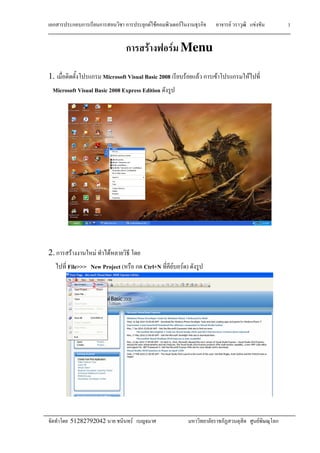
1. Microsoft Visual Basic 2008 F F F F
Microsoft Visual Basic 2008 Express Edition
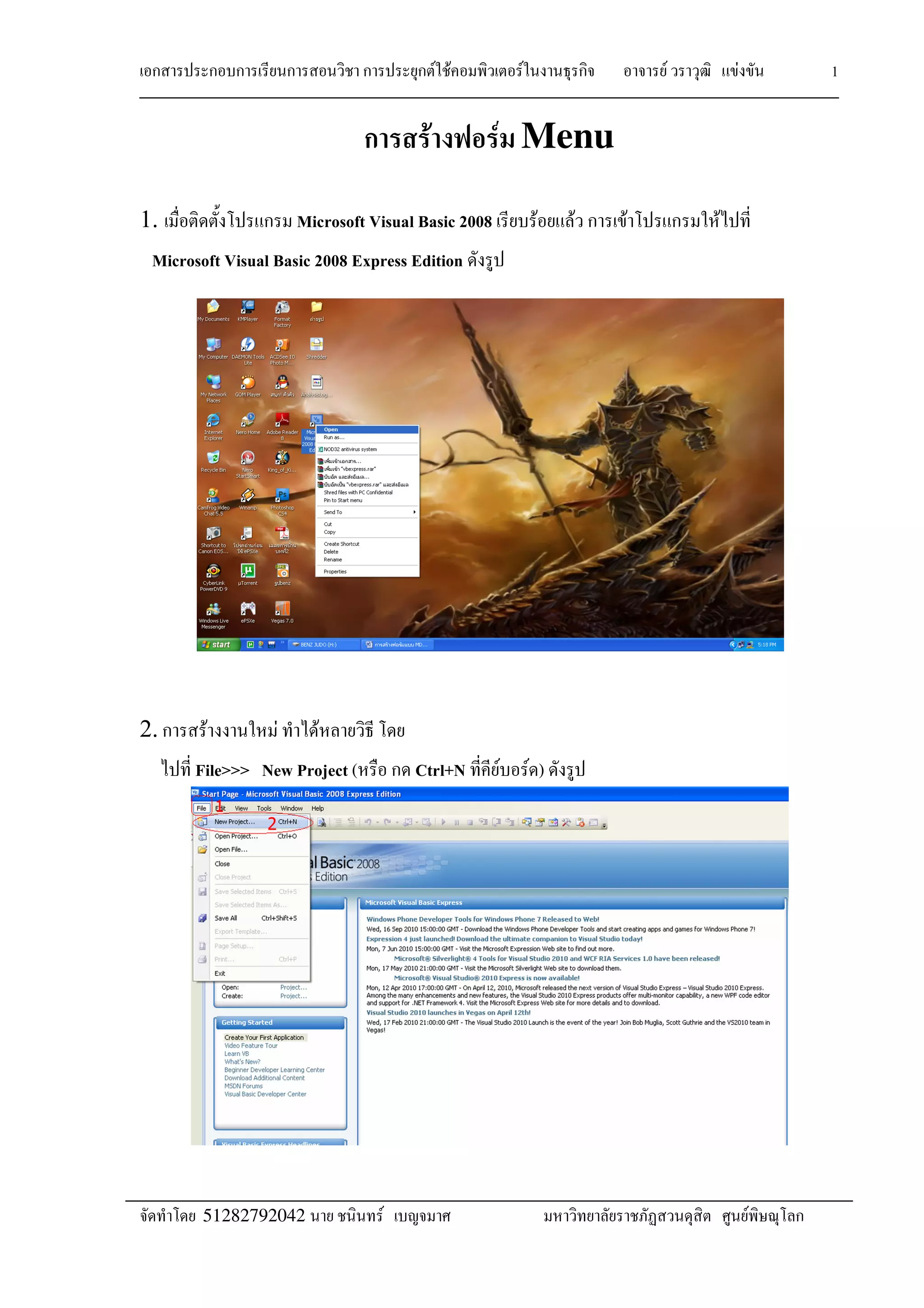
2. F F F
File>>> New Project ( Ctrl+N F F )
F F F F F
51282792042 F F
2
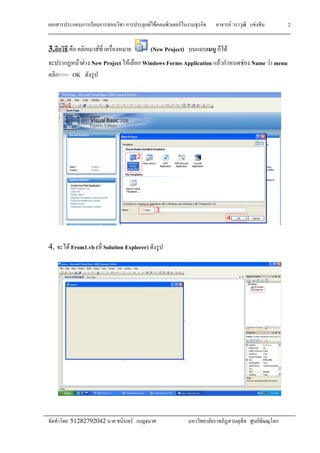
3. F (New Project) F
F F New Project F Windows Forms Application F F Name F menu
>>> OK
4. F From1.vb ( Solution Explorer)
F F F F F
51282792042 F F
3
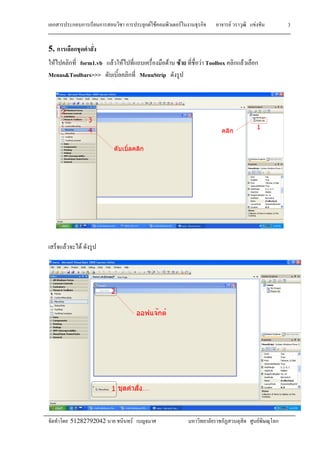
5.
F form1.vb F F F F F Toolbox F
Menus&Toolbars>>> MenuStrip
F F
F F F F F
51282792042 F F
4
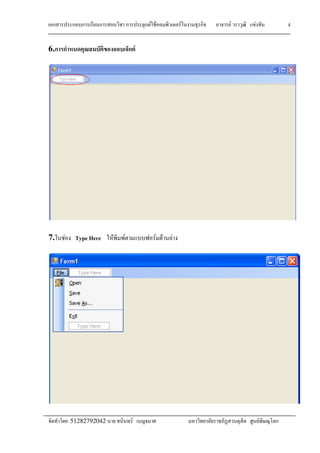
6. F
7. F Type Here F F F F F
F F F F F
51282792042 F F
F F F
File F
Open F
Save F
Save As… F
Exit F
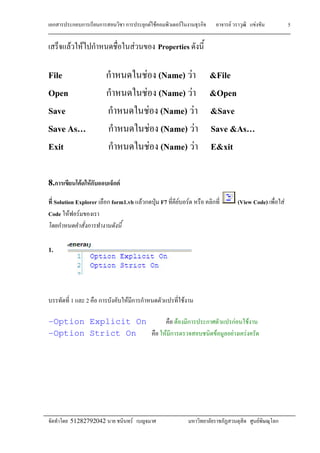
8. F F F
Solution Explorer form1.vb
Code F F
1.
1 2 F F
-Option Explicit
-Option Strict
F F F F F
F F
F F F Properties
F (Name) F &File
F (Name) F &Ope
F (Name) F &Save
F (Name) F Save &As
F (Name) F E&xit
F F F
form1.vb F ˁ F7 F F
F F
Explicit On F F F
ct On F F F F
F F F F F
F F
5
&Open
&Save
Save &As
E&xit
(View Code) F
F F F
F F F F
F F F F F
51282792042 F F
6
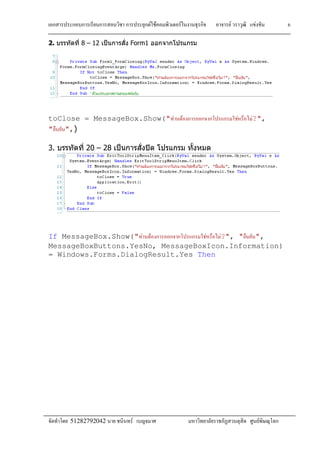
2. 8 – 12  Form1
toClose = MessageBox.Show(" F F F F?",
" ",)
3. 20 – 28  
If MessageBox.Show(" F F F F?", " ",
MessageBoxButtons.YesNo, MessageBoxIcon.Information)
= Windows.Forms.DialogResult.Yes Then
F F F F F
51282792042 F F
7
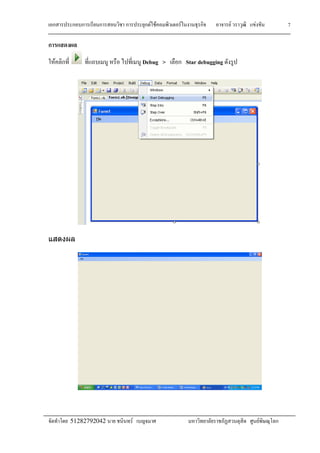
F Debug > Star debugging
F F F F F
51282792042 F F
8
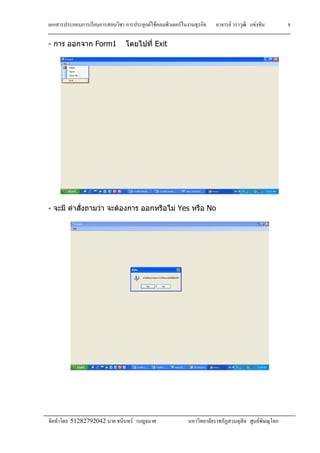
- Form1 Exit
-    Yes No
F F F F F
51282792042 F F
9
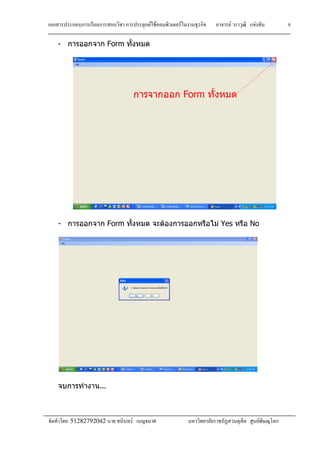
- Form
- Form   Yes No
...

02 Create Menu

  • 1.
    F F FF F 51282792042 F F 1 F F Menu 1. Microsoft Visual Basic 2008 F F F F Microsoft Visual Basic 2008 Express Edition 2. F F F File>>> New Project ( Ctrl+N F F )
  • 2.
    F F FF F 51282792042 F F 2 3. F (New Project) F F F New Project F Windows Forms Application F F Name F menu >>> OK 4. F From1.vb ( Solution Explorer)
  • 3.
    F F FF F 51282792042 F F 3 5. F form1.vb F F F F F Toolbox F Menus&Toolbars>>> MenuStrip F F
  • 4.
    F F FF F 51282792042 F F 4 6. F 7. F Type Here F F F F F
  • 5.
    F F FF F 51282792042 F F F F F File F Open F Save F Save As… F Exit F 8. F F F Solution Explorer form1.vb Code F F 1. 1 2 F F -Option Explicit -Option Strict F F F F F F F F F F Properties F (Name) F &File F (Name) F &Ope F (Name) F &Save F (Name) F Save &As F (Name) F E&xit F F F form1.vb F ˁ F7 F F F F Explicit On F F F ct On F F F F F F F F F F F 5 &Open &Save Save &As E&xit (View Code) F F F F F F F F
  • 6.
    F F FF F 51282792042 F F 6 2. 8 – 12  Form1 toClose = MessageBox.Show(" F F F F?", " ",) 3. 20 – 28   If MessageBox.Show(" F F F F?", " ", MessageBoxButtons.YesNo, MessageBoxIcon.Information) = Windows.Forms.DialogResult.Yes Then
  • 7.
    F F FF F 51282792042 F F 7 F Debug > Star debugging
  • 8.
    F F FF F 51282792042 F F 8 - Form1 Exit -    Yes No
  • 9.
    F F FF F 51282792042 F F 9 - Form - Form   Yes No ...