Instructor: Ebad ullah Qureshi
Email: ebadullah.qureshi@rutgers.edu
N2E Coding Club
Python Workshop
Welcome to
Python 101!
Python workshop by Ebad ullah Qureshi
About this Workshop
Meetings
• Thursdays on 8:00 PM to 9:00 PM @ CORE 538
Workshop Goals
• Learn fundamentals of Programming in Python
• Apply those fundamentals to Solve Problems
Source Code will be shared on my Github https://github.com/Ebad8931
IEEE N2E Coding Club Facebook Group https://www.facebook.com/groups/RutgersIEEE.N2E/
2
Python workshop by Ebad ullah Qureshi
Preliminaries
3
Things You need
• Laptop/PC
• Python – Download latest version https://www.python.org/downloads/
• Pycharm IDE – Download free edition at https://www.jetbrains.com/pycharm/
Recommended Resources
• Python Official Documentation – https://www.python.org/doc/
• Sololearn App – Python modules
• Hackerrank or Leetcode – Coding Exercises
• [Book] 101 Python Challenges with Solutions/Code Listings by Philippe Kerampran
Python workshop by Ebad ullah Qureshi
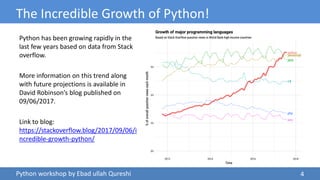
The Incredible Growth of Python!
Python has been growing rapidly in the
last few years based on data from Stack
overflow.
More information on this trend along
with future projections is available in
David Robinson’s blog published on
09/06/2017.
Link to blog:
https://stackoverflow.blog/2017/09/06/i
ncredible-growth-python/
4
Python workshop by Ebad ullah Qureshi
Pros and Cons of Python
• Easy to Use and Fast to Develop
• Open Source
• Abundant libraries – from web
development through game development
to machine learning
• Great for Prototypes – Ability to achieve
more with less lines of code
• Speed limitations
• Problems with threading
• Not native to mobile development
Python is not a perfect fit for all projects but it can be a very good choice in many use cases.
This language is an obvious choice for machine learning, data analysis and visualization.
Read full article: https://www.netguru.com/blog/python-pros-and-cons-what-are-the-benefits-and-downsides-of-the-
programming-language
5
Python workshop by Ebad ullah Qureshi
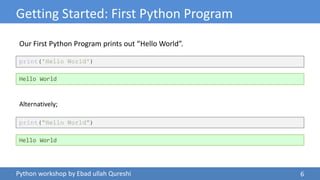
Getting Started: First Python Program
print('Hello World')
Hello World
Alternatively;
Our First Python Program prints out “Hello World”.
print(“Hello World”)
Hello World
6
Python workshop by Ebad ullah Qureshi
Exercise: Display
7
Display the following:
• He asked, “how are you?”
• The Professor didn’t curve the final exam.
• Your first and Last Name on separate lines
• H:My DriveSpring 2019n2e_python_workshop
print('He asked,"how are you?"')
print('The Professor didn‟t curve the final exam.')
print("[FirstName]n[LastName]")
print(r"H:My DriveSpring 2019n2e_python_workshop")
Python workshop by Ebad ullah Qureshi
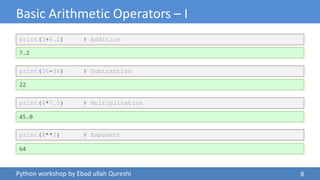
Basic Arithmetic Operators – I
print(3+4.2) # Addition
7.2
print(56-34) # Subtraction
22
print(6*7.5) # Multiplication
45.0
print(8**2) # Exponent
64
8
Python workshop by Ebad ullah Qureshi
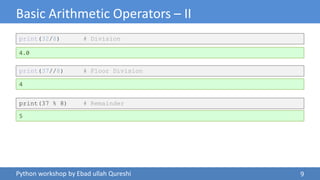
Basic Arithmetic Operators – II
print(32/8) # Division
4.0
print(37//8) # Floor Division
4
print(37 % 8) # Remainder
5
9
Python workshop by Ebad ullah Qureshi
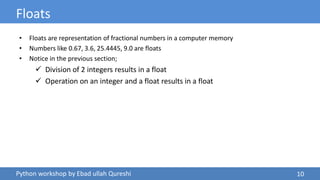
Floats
• Floats are representation of fractional numbers in a computer memory
• Numbers like 0.67, 3.6, 25.4445, 9.0 are floats
• Notice in the previous section;
 Division of 2 integers results in a float
 Operation on an integer and a float results in a float
10
Python workshop by Ebad ullah Qureshi
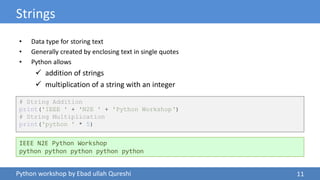
Strings
# String Addition
print('IEEE ' + 'N2E ' + 'Python Workshop„)
# String Multiplication
print('python ' * 5)
• Data type for storing text
• Generally created by enclosing text in single quotes
• Python allows
 addition of strings
 multiplication of a string with an integer
IEEE N2E Python Workshop
python python python python python
11
Python workshop by Ebad ullah Qureshi
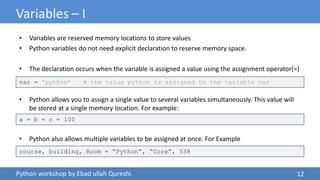
Variables – I
• Variables are reserved memory locations to store values
• Python variables do not need explicit declaration to reserve memory space.
• The declaration occurs when the variable is assigned a value using the assignment operator(=)
• Python allows you to assign a single value to several variables simultaneously. This value will
be stored at a single memory location. For example:
• Python also allows multiple variables to be assigned at once. For Example
var = 'python‟ # the value python is assigned to the variable var
a = b = c = 100
course, building, Room = “Python”, “Core”, 538
12
Python workshop by Ebad ullah Qureshi
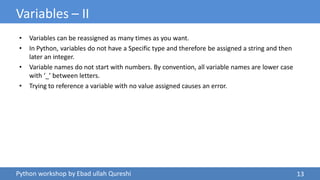
Variables – II
• Variables can be reassigned as many times as you want.
• In Python, variables do not have a Specific type and therefore be assigned a string and then
later an integer.
• Variable names do not start with numbers. By convention, all variable names are lower case
with ‘_’ between letters.
• Trying to reference a variable with no value assigned causes an error.
13
Python workshop by Ebad ullah Qureshi
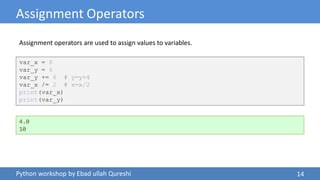
Assignment Operators
var_x = 8
var_y = 6
var_y += 4 # y=y+4
var_x /= 2 # x=x/2
print(var_x)
print(var_y)
4.0
10
Assignment operators are used to assign values to variables.
14
Python workshop by Ebad ullah Qureshi
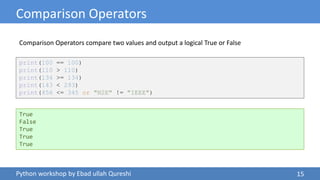
Comparison Operators
print(100 == 100)
print(110 > 110)
print(134 >= 134)
print(143 < 293)
print(456 <= 345 or "N2E" != "IEEE")
True
False
True
True
True
Comparison Operators compare two values and output a logical True or False
15
Python workshop by Ebad ullah Qureshi
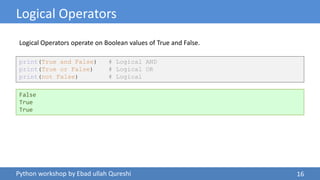
Logical Operators
print(True and False) # Logical AND
print(True or False) # Logical OR
print(not False) # Logical
False
True
True
Logical Operators operate on Boolean values of True and False.
16
Instructor: Ebad ullah Qureshi
Email: ebadullah.qureshi@rutgers.edu
N2E Coding Club
Python Workshop
Python Introduction
Complete

01 Introduction to Python

  • 1.
    Instructor: Ebad ullahQureshi Email: ebadullah.qureshi@rutgers.edu N2E Coding Club Python Workshop Welcome to Python 101!
  • 2.
    Python workshop byEbad ullah Qureshi About this Workshop Meetings • Thursdays on 8:00 PM to 9:00 PM @ CORE 538 Workshop Goals • Learn fundamentals of Programming in Python • Apply those fundamentals to Solve Problems Source Code will be shared on my Github https://github.com/Ebad8931 IEEE N2E Coding Club Facebook Group https://www.facebook.com/groups/RutgersIEEE.N2E/ 2
  • 3.
    Python workshop byEbad ullah Qureshi Preliminaries 3 Things You need • Laptop/PC • Python – Download latest version https://www.python.org/downloads/ • Pycharm IDE – Download free edition at https://www.jetbrains.com/pycharm/ Recommended Resources • Python Official Documentation – https://www.python.org/doc/ • Sololearn App – Python modules • Hackerrank or Leetcode – Coding Exercises • [Book] 101 Python Challenges with Solutions/Code Listings by Philippe Kerampran
  • 4.
    Python workshop byEbad ullah Qureshi The Incredible Growth of Python! Python has been growing rapidly in the last few years based on data from Stack overflow. More information on this trend along with future projections is available in David Robinson’s blog published on 09/06/2017. Link to blog: https://stackoverflow.blog/2017/09/06/i ncredible-growth-python/ 4
  • 5.
    Python workshop byEbad ullah Qureshi Pros and Cons of Python • Easy to Use and Fast to Develop • Open Source • Abundant libraries – from web development through game development to machine learning • Great for Prototypes – Ability to achieve more with less lines of code • Speed limitations • Problems with threading • Not native to mobile development Python is not a perfect fit for all projects but it can be a very good choice in many use cases. This language is an obvious choice for machine learning, data analysis and visualization. Read full article: https://www.netguru.com/blog/python-pros-and-cons-what-are-the-benefits-and-downsides-of-the- programming-language 5
  • 6.
    Python workshop byEbad ullah Qureshi Getting Started: First Python Program print('Hello World') Hello World Alternatively; Our First Python Program prints out “Hello World”. print(“Hello World”) Hello World 6
  • 7.
    Python workshop byEbad ullah Qureshi Exercise: Display 7 Display the following: • He asked, “how are you?” • The Professor didn’t curve the final exam. • Your first and Last Name on separate lines • H:My DriveSpring 2019n2e_python_workshop print('He asked,"how are you?"') print('The Professor didn‟t curve the final exam.') print("[FirstName]n[LastName]") print(r"H:My DriveSpring 2019n2e_python_workshop")
  • 8.
    Python workshop byEbad ullah Qureshi Basic Arithmetic Operators – I print(3+4.2) # Addition 7.2 print(56-34) # Subtraction 22 print(6*7.5) # Multiplication 45.0 print(8**2) # Exponent 64 8
  • 9.
    Python workshop byEbad ullah Qureshi Basic Arithmetic Operators – II print(32/8) # Division 4.0 print(37//8) # Floor Division 4 print(37 % 8) # Remainder 5 9
  • 10.
    Python workshop byEbad ullah Qureshi Floats • Floats are representation of fractional numbers in a computer memory • Numbers like 0.67, 3.6, 25.4445, 9.0 are floats • Notice in the previous section;  Division of 2 integers results in a float  Operation on an integer and a float results in a float 10
  • 11.
    Python workshop byEbad ullah Qureshi Strings # String Addition print('IEEE ' + 'N2E ' + 'Python Workshop„) # String Multiplication print('python ' * 5) • Data type for storing text • Generally created by enclosing text in single quotes • Python allows  addition of strings  multiplication of a string with an integer IEEE N2E Python Workshop python python python python python 11
  • 12.
    Python workshop byEbad ullah Qureshi Variables – I • Variables are reserved memory locations to store values • Python variables do not need explicit declaration to reserve memory space. • The declaration occurs when the variable is assigned a value using the assignment operator(=) • Python allows you to assign a single value to several variables simultaneously. This value will be stored at a single memory location. For example: • Python also allows multiple variables to be assigned at once. For Example var = 'python‟ # the value python is assigned to the variable var a = b = c = 100 course, building, Room = “Python”, “Core”, 538 12
  • 13.
    Python workshop byEbad ullah Qureshi Variables – II • Variables can be reassigned as many times as you want. • In Python, variables do not have a Specific type and therefore be assigned a string and then later an integer. • Variable names do not start with numbers. By convention, all variable names are lower case with ‘_’ between letters. • Trying to reference a variable with no value assigned causes an error. 13
  • 14.
    Python workshop byEbad ullah Qureshi Assignment Operators var_x = 8 var_y = 6 var_y += 4 # y=y+4 var_x /= 2 # x=x/2 print(var_x) print(var_y) 4.0 10 Assignment operators are used to assign values to variables. 14
  • 15.
    Python workshop byEbad ullah Qureshi Comparison Operators print(100 == 100) print(110 > 110) print(134 >= 134) print(143 < 293) print(456 <= 345 or "N2E" != "IEEE") True False True True True Comparison Operators compare two values and output a logical True or False 15
  • 16.
    Python workshop byEbad ullah Qureshi Logical Operators print(True and False) # Logical AND print(True or False) # Logical OR print(not False) # Logical False True True Logical Operators operate on Boolean values of True and False. 16
  • 17.
    Instructor: Ebad ullahQureshi Email: ebadullah.qureshi@rutgers.edu N2E Coding Club Python Workshop Python Introduction Complete