
ADF DATABINDINGS & DATACONTROLS
Rohan Walia
Oracle ADF/Fusion Middleware Consultant
ABOUT MYSELF
 Oracle ADF and Fusion Middleware Consultant.
 Oracle Certified ADF & Webcenter Implementation
specialist.
 Consultant, Blogger, Speaker and open networker.
 Part of A Team of North India Chapter AIOUG.
 Passionate about Oracle Technologies.
 Have been working in Oracle/Java products from 8.5
years.
 Blog – http://rohanwalia.blogspot.in/
 Twitter - @rohanwalia17
 Linked in : sg.linkedin/in/rohanwalia
AGENDA
 Revisit ADF Architecture.
 How ADF Model Fits into the Architecture.
 ADF Model.
 More about ADF DataControls.
 Get deep into ADF Data Bindings.
 Understand Page Definition files.
 DataBindings.cpx.
 Different Type of Bindings.
 Examples and Demo.
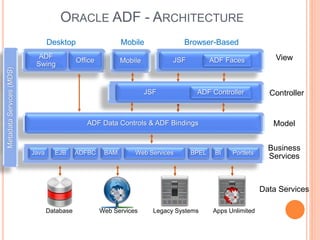
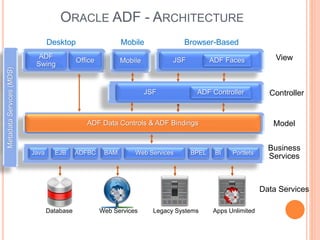
ORACLE ADF - ARCHITECTURE
Business
Services
Data Services
Model
Controller
JSF View
Desktop Browser-Based
Office
ADF
Swing
EJB BAMADFBC PortletsBIBPELWeb ServicesJava
ADF Faces
MetadataServices(MDS)
Mobile
Database Web Services Legacy Systems Apps Unlimited
JSF ADF Controller
ADF Data Controls & ADF Bindings
Mobile
ORACLE ADF - ARCHITECTURE
Business
Services
Data Services
Model
Controller
JSF View
Desktop Browser-Based
Office
ADF
Swing
EJB BAMADFBC PortletsBIBPELWeb ServicesJava
ADF Faces
MetadataServices(MDS)
Mobile
Database Web Services Legacy Systems Apps Unlimited
JSF ADF Controller
ADF Data Controls & ADF Bindings
Mobile
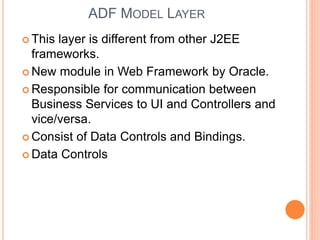
ADF MODEL LAYER
 This layer is different from other J2EE
frameworks.
 New module in Web Framework by Oracle.
 Responsible for communication between
Business Services to UI and Controllers and
vice/versa.
 Consist of Data Controls and Bindings.
 Data Controls
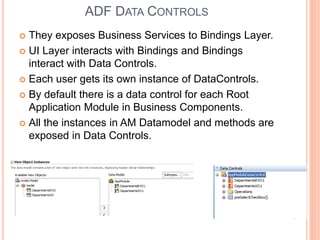
ADF DATA CONTROLS
 They exposes Business Services to Bindings Layer.
 UI Layer interacts with Bindings and Bindings
interact with Data Controls.
 Each user gets its own instance of DataControls.
 By default there is a data control for each Root
Application Module in Business Components.
 All the instances in AM Datamodel and methods are
exposed in Data Controls.
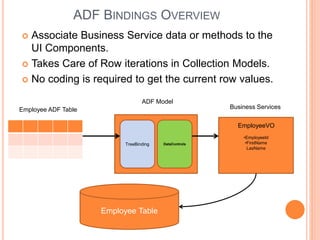
ADF BINDINGS OVERVIEW
 Associate Business Service data or methods to the
UI Components.
 Takes Care of Row iterations in Collection Models.
 No coding is required to get the current row values.
TreeBinding DataControls
•EmployeeId
•FirstName
LasName
Employee Table
Employee ADF Table
EmployeeVO
ADF Model
Business Services
BINDINGS - FILES
 Page Definition Files.
 Each Jspx Page/ Fragment has its own file.
 <PageName>PageDef.xml file.
 Also known as Binding Container.
 Databindings.cpx file.
 Has mapping between All pages and pageDefination
files in the ViewController project.
 Known as Binding Context.
 Has name/id of all the Data Controls used by the
ViewController layer.
 Default Exception Handler which can be modified using
ErrorHandlerClass attribute.
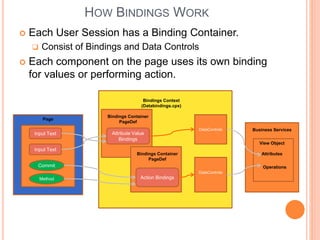
HOW BINDINGS WORK
 Each User Session has a Binding Container.
 Consist of Bindings and Data Controls
 Each component on the page uses its own binding
for values or performing action.
s
Page
Method
Commit
Input Text
Input Text
Bindings Context
(Databindings.cpx)
Bindings Container
PageDef
Bindings Container
PageDef
Business ServicesDataControls
DataControls
Attribute Value
Bindings
Action Bindings
View Object
Attributes
Operations
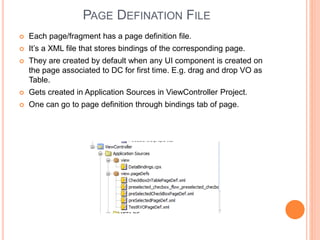
PAGE DEFINATION FILE
 Each page/fragment has a page definition file.
 It’s a XML file that stores bindings of the corresponding page.
 They are created by default when any UI component is created on
the page associated to DC for first time. E.g. drag and drop VO as
Table.
 Gets created in Application Sources in ViewController Project.
 One can go to page definition through bindings tab of page.
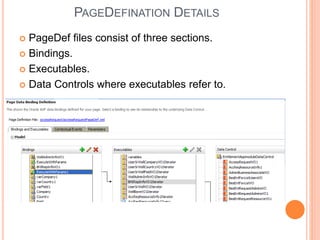
PAGEDEFINATION DETAILS
 PageDef files consist of three sections.
 Bindings.
 Executables.
 Data Controls where executables refer to.
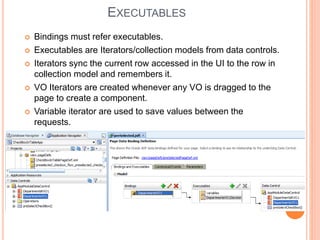
EXECUTABLES
 Bindings must refer executables.
 Executables are Iterators/collection models from data controls.
 Iterators sync the current row accessed in the UI to the row in
collection model and remembers it.
 VO Iterators are created whenever any VO is dragged to the
page to create a component.
 Variable iterator are used to save values between the
requests.
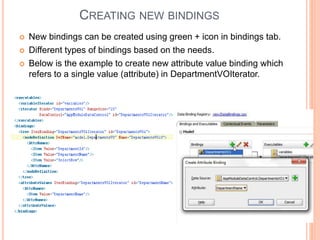
CREATING NEW BINDINGS
 New bindings can be created using green + icon in bindings tab.
 Different types of bindings based on the needs.
 Below is the example to create new attribute value binding which
refers to a single value (attribute) in DepartmentVOIterator.
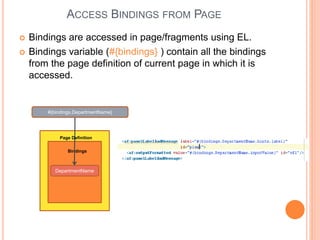
ACCESS BINDINGS FROM PAGE
 Bindings are accessed in page/fragments using EL.
 Bindings variable (#{bindings} ) contain all the bindings
from the page definition of current page in which it is
accessed.
DepartmentName
Page Definition
Bindings
#{bindings.DepartmentName}
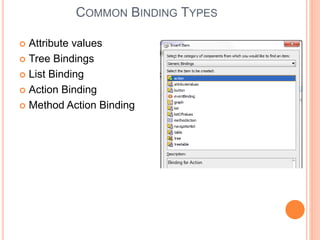
COMMON BINDING TYPES
 Attribute values
 Tree Bindings
 List Binding
 Action Binding
 Method Action Binding
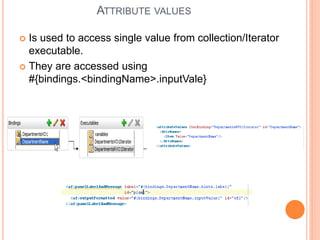
ATTRIBUTE VALUES
 Is used to access single value from collection/Iterator
executable.
 They are accessed using
#{bindings.<bindingName>.inputVale}
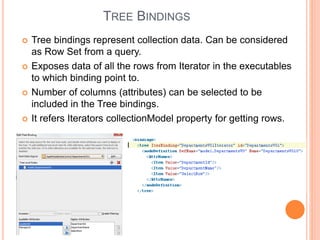
TREE BINDINGS
 Tree bindings represent collection data. Can be considered
as Row Set from a query.
 Exposes data of all the rows from Iterator in the executables
to which binding point to.
 Number of columns (attributes) can be selected to be
included in the Tree bindings.
 It refers Iterators collectionModel property for getting rows.
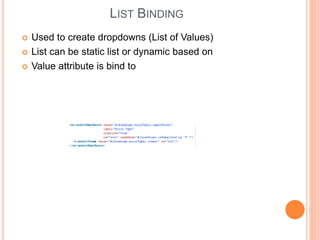
LIST BINDING
 Used to create dropdowns (List of Values)
 List can be static list or dynamic based on
 Value attribute is bind to
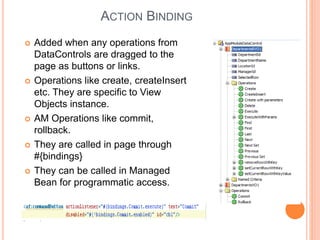
ACTION BINDING
 Added when any operations from
DataControls are dragged to the
page as buttons or links.
 Operations like create, createInsert
etc. They are specific to View
Objects instance.
 AM Operations like commit,
rollback.
 They are called in page through
#{bindings}
 They can be called in Managed
Bean for programmatic access.
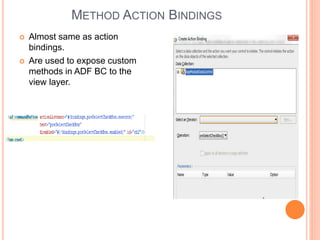
METHOD ACTION BINDINGS
 Almost same as action
bindings.
 Are used to expose custom
methods in ADF BC to the
view layer.
DEMO
THANKS

ADF Bindings & Data Controls

  • 1.
    ADF DATABINDINGS &DATACONTROLS Rohan Walia Oracle ADF/Fusion Middleware Consultant
  • 2.
    ABOUT MYSELF  OracleADF and Fusion Middleware Consultant.  Oracle Certified ADF & Webcenter Implementation specialist.  Consultant, Blogger, Speaker and open networker.  Part of A Team of North India Chapter AIOUG.  Passionate about Oracle Technologies.  Have been working in Oracle/Java products from 8.5 years.  Blog – http://rohanwalia.blogspot.in/  Twitter - @rohanwalia17  Linked in : sg.linkedin/in/rohanwalia
  • 3.
    AGENDA  Revisit ADFArchitecture.  How ADF Model Fits into the Architecture.  ADF Model.  More about ADF DataControls.  Get deep into ADF Data Bindings.  Understand Page Definition files.  DataBindings.cpx.  Different Type of Bindings.  Examples and Demo.
  • 4.
    ORACLE ADF -ARCHITECTURE Business Services Data Services Model Controller JSF View Desktop Browser-Based Office ADF Swing EJB BAMADFBC PortletsBIBPELWeb ServicesJava ADF Faces MetadataServices(MDS) Mobile Database Web Services Legacy Systems Apps Unlimited JSF ADF Controller ADF Data Controls & ADF Bindings Mobile
  • 5.
    ORACLE ADF -ARCHITECTURE Business Services Data Services Model Controller JSF View Desktop Browser-Based Office ADF Swing EJB BAMADFBC PortletsBIBPELWeb ServicesJava ADF Faces MetadataServices(MDS) Mobile Database Web Services Legacy Systems Apps Unlimited JSF ADF Controller ADF Data Controls & ADF Bindings Mobile
  • 6.
    ADF MODEL LAYER This layer is different from other J2EE frameworks.  New module in Web Framework by Oracle.  Responsible for communication between Business Services to UI and Controllers and vice/versa.  Consist of Data Controls and Bindings.  Data Controls
  • 7.
    ADF DATA CONTROLS They exposes Business Services to Bindings Layer.  UI Layer interacts with Bindings and Bindings interact with Data Controls.  Each user gets its own instance of DataControls.  By default there is a data control for each Root Application Module in Business Components.  All the instances in AM Datamodel and methods are exposed in Data Controls.
  • 8.
    ADF BINDINGS OVERVIEW Associate Business Service data or methods to the UI Components.  Takes Care of Row iterations in Collection Models.  No coding is required to get the current row values. TreeBinding DataControls •EmployeeId •FirstName LasName Employee Table Employee ADF Table EmployeeVO ADF Model Business Services
  • 9.
    BINDINGS - FILES Page Definition Files.  Each Jspx Page/ Fragment has its own file.  <PageName>PageDef.xml file.  Also known as Binding Container.  Databindings.cpx file.  Has mapping between All pages and pageDefination files in the ViewController project.  Known as Binding Context.  Has name/id of all the Data Controls used by the ViewController layer.  Default Exception Handler which can be modified using ErrorHandlerClass attribute.
  • 10.
    HOW BINDINGS WORK Each User Session has a Binding Container.  Consist of Bindings and Data Controls  Each component on the page uses its own binding for values or performing action. s Page Method Commit Input Text Input Text Bindings Context (Databindings.cpx) Bindings Container PageDef Bindings Container PageDef Business ServicesDataControls DataControls Attribute Value Bindings Action Bindings View Object Attributes Operations
  • 11.
    PAGE DEFINATION FILE Each page/fragment has a page definition file.  It’s a XML file that stores bindings of the corresponding page.  They are created by default when any UI component is created on the page associated to DC for first time. E.g. drag and drop VO as Table.  Gets created in Application Sources in ViewController Project.  One can go to page definition through bindings tab of page.
  • 12.
    PAGEDEFINATION DETAILS  PageDeffiles consist of three sections.  Bindings.  Executables.  Data Controls where executables refer to.
  • 13.
    EXECUTABLES  Bindings mustrefer executables.  Executables are Iterators/collection models from data controls.  Iterators sync the current row accessed in the UI to the row in collection model and remembers it.  VO Iterators are created whenever any VO is dragged to the page to create a component.  Variable iterator are used to save values between the requests.
  • 14.
    CREATING NEW BINDINGS New bindings can be created using green + icon in bindings tab.  Different types of bindings based on the needs.  Below is the example to create new attribute value binding which refers to a single value (attribute) in DepartmentVOIterator.
  • 15.
    ACCESS BINDINGS FROMPAGE  Bindings are accessed in page/fragments using EL.  Bindings variable (#{bindings} ) contain all the bindings from the page definition of current page in which it is accessed. DepartmentName Page Definition Bindings #{bindings.DepartmentName}
  • 16.
    COMMON BINDING TYPES Attribute values  Tree Bindings  List Binding  Action Binding  Method Action Binding
  • 17.
    ATTRIBUTE VALUES  Isused to access single value from collection/Iterator executable.  They are accessed using #{bindings.<bindingName>.inputVale}
  • 18.
    TREE BINDINGS  Treebindings represent collection data. Can be considered as Row Set from a query.  Exposes data of all the rows from Iterator in the executables to which binding point to.  Number of columns (attributes) can be selected to be included in the Tree bindings.  It refers Iterators collectionModel property for getting rows.
  • 19.
    LIST BINDING  Usedto create dropdowns (List of Values)  List can be static list or dynamic based on  Value attribute is bind to
  • 20.
    ACTION BINDING  Addedwhen any operations from DataControls are dragged to the page as buttons or links.  Operations like create, createInsert etc. They are specific to View Objects instance.  AM Operations like commit, rollback.  They are called in page through #{bindings}  They can be called in Managed Bean for programmatic access.
  • 21.
    METHOD ACTION BINDINGS Almost same as action bindings.  Are used to expose custom methods in ADF BC to the view layer.
  • 22.
  • 23.