Un-Framework
Delivering Dynamic Experiences with HTML over the Wire
Andreas Nedbal / T3DD23
About Me
Andreas Nedbal
Senior Frontend Developer @ in2code
TYPO3 Core Merger: Backend UX
TYPO3camp Munich Organizer
<template>
<ul id="entries">
<li v-for="item in items">
{{ item }}
</li>
</ul>
<button @click="fetchNextPage">Next Page</button>
</template>
<script>
const items = ref([])
function fetchNextPage() {
fetch('/endpoint').then((res) => {
items.value = items.value.concat(res.body)
})
}
</script>
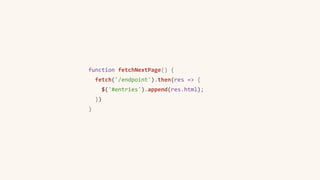
function fetchNextPage() {
fetch('/endpoint').then(res => {
$('#entries').append(res.html);
})
}
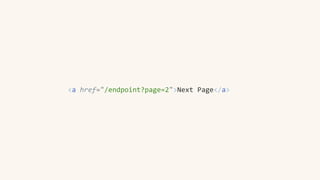
<a href="/endpoint?page=2">Next Page</a>
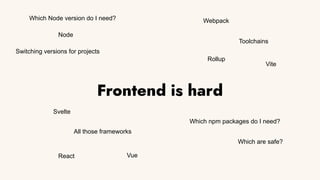
Frontend is hard
Node
Toolchains
Which npm packages do I need?
All those frameworks
Vite
Webpack
Rollup
React Vue
Svelte
Which are safe?
Which Node version do I need?
Switching versions for projects
Turbo Drive
Previously known as “Turbolinks” in the Rails world.
Turns a page into an “SPA” by replacing all regular page loads with AJAX.
Previous pages are cached, so perceived performance is way faster.
Turbo Frames
Turbo Frames allow pages to be decomposed into smaller components that
capture form actions and navigation.
Navigating inside a <turbo-frame id=”idName”> will check the target
response for a matching <turbo-frame> tag and only replace it’s contents with
the current tag present.
Turbo Streams
Actually meant for streaming over websockets, you can also use this as
responses from any web request.
Turbo will listen to responses using the text/vnd.turbo-stream.html
content-type and execute actions based on <turbo-stream> tags present.
Demonstration
Problems with the Turbo approach
Porting an existing site using a lot of JS already is not recommended.
Pages using Turbo don’t fire the load event anymore (or well, only once) since
page navigation is happening over AJAX.
This requires massive refactoring/rethinking of an application.
Controllers
Classes that contain functionality for sites using actions, targets and values in
HTML.
Controllers don’t require event listeners to be initialized, this happens
automatically as soon as a matching data-controller attribute is found on the
page or even asynchronously loaded.
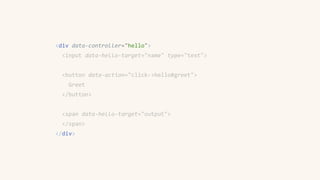
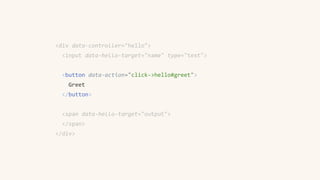
<div data-controller="hello">
<input data-hello-target="name" type="text">
<button data-action="click->hello#greet">
Greet
</button>
<span data-hello-target="output">
</span>
</div>
import { Controller } from "stimulus"
export default class extends Controller {
static targets = [ "name", "output" ]
greet() {
this.outputTarget.textContent =
`Hello, ${this.nameTarget.value}!`
}
}
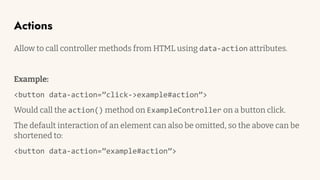
Actions
Allow to call controller methods from HTML using data-action attributes.
Example:
<button data-action=”click->example#action”>
Would call the action() method on ExampleController on a button click.
The default interaction of an element can also be omitted, so the above can be
shortened to:
<button data-action=”example#action”>
<div data-controller="hello">
<input data-hello-target="name" type="text">
<button data-action="click->hello#greet">
Greet
</button>
<span data-hello-target="output">
</span>
</div>
import { Controller } from "stimulus"
export default class extends Controller {
static targets = [ "name", "output" ]
greet() {
this.outputTarget.textContent =
`Hello, ${this.nameTarget.value}!`
}
}
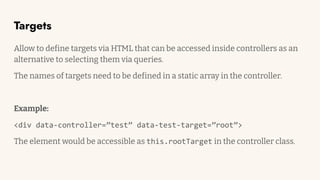
Targets
Allow to define targets via HTML that can be accessed inside controllers as an
alternative to selecting them via queries.
The names of targets need to be defined in a static array in the controller.
Example:
<div data-controller=”test” data-test-target=”root”>
The element would be accessible as this.rootTarget in the controller class.
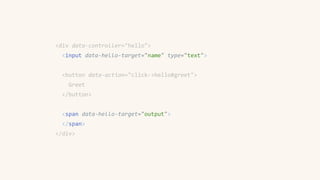
<div data-controller="hello">
<input data-hello-target="name" type="text">
<button data-action="click->hello#greet">
Greet
</button>
<span data-hello-target="output">
</span>
</div>
import { Controller } from "stimulus"
export default class extends Controller {
static targets = [ "name", "output" ]
greet() {
this.outputTarget.textContent =
`Hello, ${this.nameTarget.value}!`
}
}
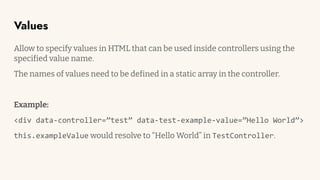
Values
Allow to specify values in HTML that can be used inside controllers using the
specified value name.
The names of values need to be defined in a static array in the controller.
Example:
<div data-controller=”test” data-test-example-value=”Hello World”>
this.exampleValue would resolve to “Hello World” in TestController.
Demonstration
Who is using Hotwire?
Integrations
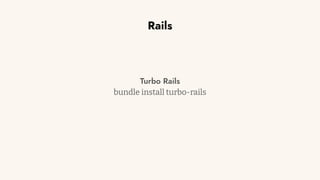
Rails
Turbo Rails
bundle install turbo-rails
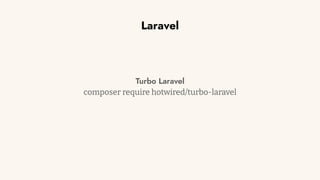
Laravel
Turbo Laravel
composer require hotwired/turbo-laravel
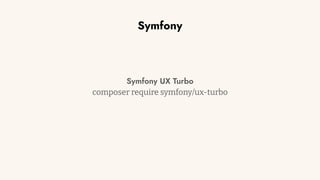
Symfony
Symfony UX Turbo
composer require symfony/ux-turbo
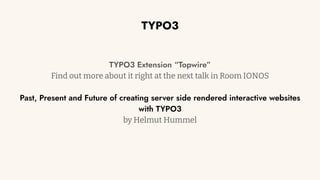
TYPO3
TYPO3 Extension “Topwire”
Find out more about it right at the next talk in Room IONOS
Past, Present and Future of creating server side rendered interactive websites
with TYPO3
by Helmut Hummel
Questions?
Thanks for listening!
Hope you enjoyed this talk :)
Feedback? Want to chat?
Fediverse (Mastodon/…):
@pixel@desu.social
Twitter:
@pixeldesu
TYPO3 Slack:
@pixeldesu

Un-Framework - Delivering Dynamic Experiences with HTML over the Wire

  • 1.
    Un-Framework Delivering Dynamic Experienceswith HTML over the Wire Andreas Nedbal / T3DD23
  • 2.
    About Me Andreas Nedbal SeniorFrontend Developer @ in2code TYPO3 Core Merger: Backend UX TYPO3camp Munich Organizer
  • 3.
    <template> <ul id="entries"> <li v-for="itemin items"> {{ item }} </li> </ul> <button @click="fetchNextPage">Next Page</button> </template> <script> const items = ref([]) function fetchNextPage() { fetch('/endpoint').then((res) => { items.value = items.value.concat(res.body) }) } </script>
  • 4.
    function fetchNextPage() { fetch('/endpoint').then(res=> { $('#entries').append(res.html); }) }
  • 5.
  • 6.
    Frontend is hard Node Toolchains Whichnpm packages do I need? All those frameworks Vite Webpack Rollup React Vue Svelte Which are safe? Which Node version do I need? Switching versions for projects
  • 10.
    Turbo Drive Previously knownas “Turbolinks” in the Rails world. Turns a page into an “SPA” by replacing all regular page loads with AJAX. Previous pages are cached, so perceived performance is way faster.
  • 11.
    Turbo Frames Turbo Framesallow pages to be decomposed into smaller components that capture form actions and navigation. Navigating inside a <turbo-frame id=”idName”> will check the target response for a matching <turbo-frame> tag and only replace it’s contents with the current tag present.
  • 12.
    Turbo Streams Actually meantfor streaming over websockets, you can also use this as responses from any web request. Turbo will listen to responses using the text/vnd.turbo-stream.html content-type and execute actions based on <turbo-stream> tags present.
  • 13.
  • 14.
    Problems with theTurbo approach Porting an existing site using a lot of JS already is not recommended. Pages using Turbo don’t fire the load event anymore (or well, only once) since page navigation is happening over AJAX. This requires massive refactoring/rethinking of an application.
  • 16.
    Controllers Classes that containfunctionality for sites using actions, targets and values in HTML. Controllers don’t require event listeners to be initialized, this happens automatically as soon as a matching data-controller attribute is found on the page or even asynchronously loaded.
  • 17.
    <div data-controller="hello"> <input data-hello-target="name"type="text"> <button data-action="click->hello#greet"> Greet </button> <span data-hello-target="output"> </span> </div>
  • 18.
    import { Controller} from "stimulus" export default class extends Controller { static targets = [ "name", "output" ] greet() { this.outputTarget.textContent = `Hello, ${this.nameTarget.value}!` } }
  • 19.
    Actions Allow to callcontroller methods from HTML using data-action attributes. Example: <button data-action=”click->example#action”> Would call the action() method on ExampleController on a button click. The default interaction of an element can also be omitted, so the above can be shortened to: <button data-action=”example#action”>
  • 20.
    <div data-controller="hello"> <input data-hello-target="name"type="text"> <button data-action="click->hello#greet"> Greet </button> <span data-hello-target="output"> </span> </div>
  • 21.
    import { Controller} from "stimulus" export default class extends Controller { static targets = [ "name", "output" ] greet() { this.outputTarget.textContent = `Hello, ${this.nameTarget.value}!` } }
  • 22.
    Targets Allow to definetargets via HTML that can be accessed inside controllers as an alternative to selecting them via queries. The names of targets need to be defined in a static array in the controller. Example: <div data-controller=”test” data-test-target=”root”> The element would be accessible as this.rootTarget in the controller class.
  • 23.
    <div data-controller="hello"> <input data-hello-target="name"type="text"> <button data-action="click->hello#greet"> Greet </button> <span data-hello-target="output"> </span> </div>
  • 24.
    import { Controller} from "stimulus" export default class extends Controller { static targets = [ "name", "output" ] greet() { this.outputTarget.textContent = `Hello, ${this.nameTarget.value}!` } }
  • 25.
    Values Allow to specifyvalues in HTML that can be used inside controllers using the specified value name. The names of values need to be defined in a static array in the controller. Example: <div data-controller=”test” data-test-example-value=”Hello World”> this.exampleValue would resolve to “Hello World” in TestController.
  • 26.
  • 27.
    Who is usingHotwire?
  • 28.
  • 29.
  • 30.
  • 31.
    Symfony Symfony UX Turbo composerrequire symfony/ux-turbo
  • 32.
    TYPO3 TYPO3 Extension “Topwire” Findout more about it right at the next talk in Room IONOS Past, Present and Future of creating server side rendered interactive websites with TYPO3 by Helmut Hummel
  • 33.
  • 34.
    Thanks for listening! Hopeyou enjoyed this talk :) Feedback? Want to chat? Fediverse (Mastodon/…): @pixel@desu.social Twitter: @pixeldesu TYPO3 Slack: @pixeldesu