© 2022 NTT DATA Corporation 1
第35回 PostgreSQLアンカンファレンス@オンライン
Postgres Playground で pgbench を走らせよう!
2022年9月9日
株式会社NTTデータ 藤井 雅雄
© 2022 NTT DATA Corporation 2
自己紹介
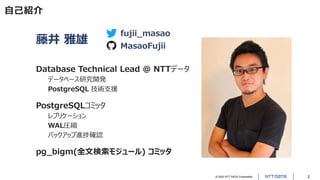
藤井 雅雄
Database Technical Lead @ NTTデータ
データベース研究開発
PostgreSQL 技術支援
PostgreSQLコミッタ
レプリケーション
WAL圧縮
バックアップ進捗確認
pg_bigm(全文検索モジュール) コミッタ
fujii_masao
MasaoFujii
© 2022 NTT DATA Corporation 3
本講演について
講演資料は、後日、NTTデータのSlideShareアカウント上で公開予定です。
https://www.slideshare.net/nttdata-tech
© 2022 NTT DATA Corporation 4
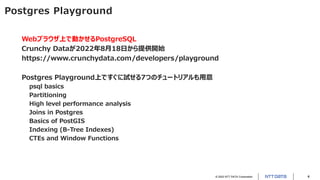
Postgres Playground
Webブラウザ上で動かせるPostgreSQL
Crunchy Dataが2022年8月18日から提供開始
https://www.crunchydata.com/developers/playground
Postgres Playground上ですぐに試せる7つのチュートリアルも用意
psql basics
Partitioning
High level performance analysis
Joins in Postgres
Basics of PostGIS
Indexing (B-Tree Indexes)
CTEs and Window Functions
© 2022 NTT DATA Corporation 5
Postgres Playground上で
pgbenchを走らせる3つの方法
© 2022 NTT DATA Corporation 6
(方法1) COPY ... PROGRAM で pgbench を実行
Postgres Playgroundでは、スーパーユーザpostgresでSQL操作できるため、
COPY ... PROGRAMコマンドを使って任意のOSコマンドを実行できる。
=# SELECT current_user;
current_user
--------------
postgres
(1 row)
=# du postgres
List of roles
-[ RECORD 1 ]----------------------------------------------------------
Role name | postgres
Attributes | Superuser, Create role, Create DB, Replication, Bypass RLS
Member of | {}
© 2022 NTT DATA Corporation 7
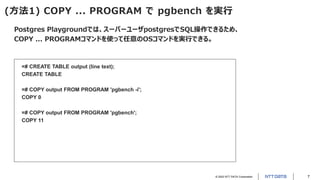
(方法1) COPY ... PROGRAM で pgbench を実行
Postgres Playgroundでは、スーパーユーザpostgresでSQL操作できるため、
COPY ... PROGRAMコマンドを使って任意のOSコマンドを実行できる。
=# CREATE TABLE output (line text);
CREATE TABLE
=# COPY output FROM PROGRAM 'pgbench -i';
COPY 0
=# COPY output FROM PROGRAM 'pgbench';
COPY 11
© 2022 NTT DATA Corporation 8
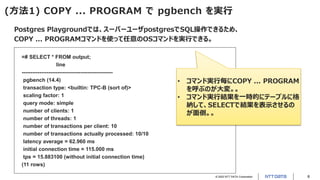
(方法1) COPY ... PROGRAM で pgbench を実行
Postgres Playgroundでは、スーパーユーザpostgresでSQL操作できるため、
COPY ... PROGRAMコマンドを使って任意のOSコマンドを実行できる。
=# SELECT * FROM output;
line
---------------------------------------------------
pgbench (14.4)
transaction type: <builtin: TPC-B (sort of)>
scaling factor: 1
query mode: simple
number of clients: 1
number of threads: 1
number of transactions per client: 10
number of transactions actually processed: 10/10
latency average = 62.960 ms
initial connection time = 115.000 ms
tps = 15.883100 (without initial connection time)
(11 rows)
• コマンド実行毎にCOPY ... PROGRAM
を呼ぶのが大変。。
• コマンド実行結果を一時的にテーブルに格
納して、SELECTで結果を表示させるの
が面倒。。
© 2022 NTT DATA Corporation 9
(方法2) ! で pgbench を実行
!は、psqlが動作する環境上で、任意のOSコマンドを実行できるpsqlメタコマンド
Postgres Playgroundでは、PostgreSQLとpsqlが同一環境上で動作している
=# ! pgbench -i
dropping old tables...
NOTICE: table "pgbench_accounts" does not exist, skipping
NOTICE: table "pgbench_branches" does not exist, skipping
NOTICE: table "pgbench_history" does not exist, skipping
NOTICE: table "pgbench_tellers" does not exist, skipping
creating tables...
generating data (client-side)...
100000 of 100000 tuples (100%) done (elapsed 12.07 s, remaining 0.00 s)
vacuuming...
creating primary keys...
done in 30.67 s (drop tables 0.36 s, create tables 1.00 s, client-side generate 15.57 s, vacuum 5.74 s, primary
keys 8.01 s).
pgbenchの途中経過ログも
確認できる!
© 2022 NTT DATA Corporation 10
(方法2) ! で pgbench を実行
!は、psqlが動作する環境上で、任意のOSコマンドを実行できるpsqlメタコマンド
Postgres Playgroundでは、PostgreSQLとpsqlが同一環境上で動作している
=# ! pgbench
pgbench (14.4)
starting vacuum...end.
transaction type: <builtin: TPC-B (sort of)>
scaling factor: 1
query mode: simple
number of clients: 1
number of threads: 1
number of transactions per client: 10
number of transactions actually processed: 10/10
latency average = 76.800 ms
initial connection time = 180.400 ms
tps = 13.020833 (without initial connection time)
• コマンド実行毎に ! を呼ぶのが大変。。
• コマンドのタブ補完も効かない。。
© 2022 NTT DATA Corporation 11
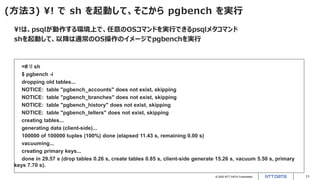
(方法3) ! で sh を起動して、そこから pgbench を実行
!は、psqlが動作する環境上で、任意のOSコマンドを実行できるpsqlメタコマンド
shを起動して、以降は通常のOS操作のイメージでpgbenchを実行
=# ! sh
$ pgbench -i
dropping old tables...
NOTICE: table "pgbench_accounts" does not exist, skipping
NOTICE: table "pgbench_branches" does not exist, skipping
NOTICE: table "pgbench_history" does not exist, skipping
NOTICE: table "pgbench_tellers" does not exist, skipping
creating tables...
generating data (client-side)...
100000 of 100000 tuples (100%) done (elapsed 11.43 s, remaining 0.00 s)
vacuuming...
creating primary keys...
done in 29.57 s (drop tables 0.26 s, create tables 0.85 s, client-side generate 15.26 s, vacuum 5.50 s, primary
keys 7.70 s).
© 2022 NTT DATA Corporation 12
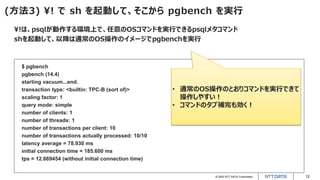
(方法3) ! で sh を起動して、そこから pgbench を実行
!は、psqlが動作する環境上で、任意のOSコマンドを実行できるpsqlメタコマンド
shを起動して、以降は通常のOS操作のイメージでpgbenchを実行
$ pgbench
pgbench (14.4)
starting vacuum...end.
transaction type: <builtin: TPC-B (sort of)>
scaling factor: 1
query mode: simple
number of clients: 1
number of threads: 1
number of transactions per client: 10
number of transactions actually processed: 10/10
latency average = 78.930 ms
initial connection time = 185.600 ms
tps = 12.669454 (without initial connection time)
• 通常のOS操作のとおりコマンドを実行できて
操作しやすい!
• コマンドのタブ補完も効く!
© 2022 NTT DATA Corporation 13
(方法3) ! で sh を起動して、そこから pgbench を実行
!は、psqlが動作する環境上で、任意のOSコマンドを実行できるpsqlメタコマンド
shを起動して、以降は通常のOS操作のイメージでpgbenchを実行
$ cat /etc/os-release
NAME=Buildroot
VERSION=2022.02.4
ID=buildroot
VERSION_ID=2022.02.4
PRETTY_NAME="Buildroot 2022.02.4"
$ head -1 /proc/meminfo
MemTotal: 511252 kB
$ ps | grep postgres:
98 postgres postgres: checkpointer
99 postgres postgres: background writer
100 postgres postgres: walwriter
101 postgres postgres: autovacuum launcher
102 postgres postgres: stats collector
103 postgres postgres: logical replication launcher
120 postgres postgres: postgres postgres [local] idle
132 postgres grep postgres:
• Postgres Playgroundの環境を手軽に確認できる
© 2022 NTT DATA Corporation 14
pgbench実行から見える
Postgres Playground
利用時の注意点
© 2022 NTT DATA Corporation 15
(注意点) COMMITコマンドでPostgresがクラッシュすることがある
例えば、複数多重で一定時間pgbenchを走らせるとクラッシュを再現しやすい
$ pgbench -T 60
pgbench (14.4)
starting vacuum...end.
pgbench: error: client 0 aborted in command 10 (SQL) of script 0; perhaps the backend died while processing
transaction type: <builtin: TPC-B (sort of)>
scaling factor: 1
query mode: simple
number of clients: 1
number of threads: 1
duration: 60 s
number of transactions actually processed: 414
latency average = 53.726 ms
initial connection time = 132.800 ms
tps = 18.613099 (without initial connection time)
pgbench: fatal: Run was aborted; the above results are incomplete.
© 2022 NTT DATA Corporation 16
(注意点) COMMITコマンドでPostgresがクラッシュすることがある
サーバログを確認すると、COMMITコマンドでセグメンテーションフォルトが発生して、PostgreSQLがクラッ
シュし、自動的に再起動されたことが分かる
$ cat logfile
2022-08-22 20:27:00.887 UTC [96] LOG: starting PostgreSQL 14.4 on i686-buildroot-linux-musl, compiled by i686-buildroot-linux-
musl-gcc.br_real (Buildroot 2022.02.4) 11.3.0, 32-bit
2022-08-22 20:27:00.892 UTC [96] LOG: listening on IPv4 address "127.0.0.1", port 5432
2022-08-22 20:27:00.896 UTC [96] LOG: listening on Unix socket "/tmp/.s.PGSQL.5432"
2022-08-22 20:27:00.985 UTC [97] LOG: database system was shut down at 2022-08-22 18:42:17 UTC
2022-08-22 20:27:01.121 UTC [96] LOG: database system is ready to accept connections
2022-09-01 15:20:28.594 UTC [96] LOG: server process (PID 133) was terminated by signal 11: Segmentation fault
2022-09-01 15:20:28.594 UTC [96] DETAIL: Failed process was running: END;
2022-09-01 15:20:28.595 UTC [96] LOG: terminating any other active server processes
2022-09-01 15:20:33.698 UTC [96] LOG: issuing SIGKILL to recalcitrant children
2022-09-01 15:20:33.709 UTC [96] LOG: all server processes terminated; reinitializing
2022-09-01 15:20:34.009 UTC [134] LOG: database system was interrupted; last known up at 2022-09-01 15:20:26 UTC
2022-09-01 15:20:37.623 UTC [134] LOG: database system was not properly shut down; automatic recovery in progress
2022-09-01 15:20:37.694 UTC [134] LOG: redo starts at 0/1E9FE10
2022-09-01 15:20:39.587 UTC [134] LOG: redo done at 0/24CCB8C system usage: CPU: user: 1.87 s, system: 0.00 s, elapsed:
1.89 s
2022-09-01 15:20:42.306 UTC [96] LOG: database system is ready to accept connections
© 2022 NTT DATA Corporation 17
(注意点) COMMITコマンドでPostgresがクラッシュすることがある
以降、PostgreSQL上でCOMMITを実行すると、再度セグメンテーションフォルトでクラッシュし続ける。。
状況を回復するには、Webブラウザをリロードして、Postgres Playgroundのリセットが必要
$ psql
psql (14.4)
Type "help" for help.
=# begin;
BEGIN
=*# update pgbench_accounts set bid = bid + 1 where aid = 3;
UPDATE 1
=*# commit;
server closed the connection unexpectedly
This probably means the server terminated abnormally
before or while processing the request.
The connection to the server was lost. Attempting reset: 2022-09-01 15:24:15.205 UTC [145] LOG: server
process (PID 166) was terminated by signal 11: Segmentation fault
2022-09-01 15:24:15.205 UTC [145] DETAIL: Failed process was running: commit;
© 2022 NTT DATA Corporation 18
(注意点) COMMITコマンドでPostgresがクラッシュすることがある
-cオプションをつけてpg_ctlでPostgreSQLを起動しなおすことで、
クラッシュ時のcoreファイルを取得するところまではできるが、解析の術がないように見える。。
$ pg_ctl -D . stop
waiting for server to shut down.... done
server stopped
$ pg_ctl -D . -c start
waiting for server to start......
$ psql
<トランザクション実行でセグメンテーションフォルトを発生させる>
$ ls -l core
-rw------- 1 postgres postgres 42741760 Sep 1 15:24 core
© 2022 NTT DATA Corporation
その他、記載されている会社名、商品名、又はサービス名は、
各社の登録商標又は商標です。

Postgres Playground で pgbench を走らせよう!(第35回PostgreSQLアンカンファレンス@オンライン 発表資料)

  • 1.
    © 2022 NTTDATA Corporation 1 第35回 PostgreSQLアンカンファレンス@オンライン Postgres Playground で pgbench を走らせよう! 2022年9月9日 株式会社NTTデータ 藤井 雅雄
  • 2.
    © 2022 NTTDATA Corporation 2 自己紹介 藤井 雅雄 Database Technical Lead @ NTTデータ データベース研究開発 PostgreSQL 技術支援 PostgreSQLコミッタ レプリケーション WAL圧縮 バックアップ進捗確認 pg_bigm(全文検索モジュール) コミッタ fujii_masao MasaoFujii
  • 3.
    © 2022 NTTDATA Corporation 3 本講演について 講演資料は、後日、NTTデータのSlideShareアカウント上で公開予定です。 https://www.slideshare.net/nttdata-tech
  • 4.
    © 2022 NTTDATA Corporation 4 Postgres Playground Webブラウザ上で動かせるPostgreSQL Crunchy Dataが2022年8月18日から提供開始 https://www.crunchydata.com/developers/playground Postgres Playground上ですぐに試せる7つのチュートリアルも用意 psql basics Partitioning High level performance analysis Joins in Postgres Basics of PostGIS Indexing (B-Tree Indexes) CTEs and Window Functions
  • 5.
    © 2022 NTTDATA Corporation 5 Postgres Playground上で pgbenchを走らせる3つの方法
  • 6.
    © 2022 NTTDATA Corporation 6 (方法1) COPY ... PROGRAM で pgbench を実行 Postgres Playgroundでは、スーパーユーザpostgresでSQL操作できるため、 COPY ... PROGRAMコマンドを使って任意のOSコマンドを実行できる。 =# SELECT current_user; current_user -------------- postgres (1 row) =# du postgres List of roles -[ RECORD 1 ]---------------------------------------------------------- Role name | postgres Attributes | Superuser, Create role, Create DB, Replication, Bypass RLS Member of | {}
  • 7.
    © 2022 NTTDATA Corporation 7 (方法1) COPY ... PROGRAM で pgbench を実行 Postgres Playgroundでは、スーパーユーザpostgresでSQL操作できるため、 COPY ... PROGRAMコマンドを使って任意のOSコマンドを実行できる。 =# CREATE TABLE output (line text); CREATE TABLE =# COPY output FROM PROGRAM 'pgbench -i'; COPY 0 =# COPY output FROM PROGRAM 'pgbench'; COPY 11
  • 8.
    © 2022 NTTDATA Corporation 8 (方法1) COPY ... PROGRAM で pgbench を実行 Postgres Playgroundでは、スーパーユーザpostgresでSQL操作できるため、 COPY ... PROGRAMコマンドを使って任意のOSコマンドを実行できる。 =# SELECT * FROM output; line --------------------------------------------------- pgbench (14.4) transaction type: <builtin: TPC-B (sort of)> scaling factor: 1 query mode: simple number of clients: 1 number of threads: 1 number of transactions per client: 10 number of transactions actually processed: 10/10 latency average = 62.960 ms initial connection time = 115.000 ms tps = 15.883100 (without initial connection time) (11 rows) • コマンド実行毎にCOPY ... PROGRAM を呼ぶのが大変。。 • コマンド実行結果を一時的にテーブルに格 納して、SELECTで結果を表示させるの が面倒。。
  • 9.
    © 2022 NTTDATA Corporation 9 (方法2) ! で pgbench を実行 !は、psqlが動作する環境上で、任意のOSコマンドを実行できるpsqlメタコマンド Postgres Playgroundでは、PostgreSQLとpsqlが同一環境上で動作している =# ! pgbench -i dropping old tables... NOTICE: table "pgbench_accounts" does not exist, skipping NOTICE: table "pgbench_branches" does not exist, skipping NOTICE: table "pgbench_history" does not exist, skipping NOTICE: table "pgbench_tellers" does not exist, skipping creating tables... generating data (client-side)... 100000 of 100000 tuples (100%) done (elapsed 12.07 s, remaining 0.00 s) vacuuming... creating primary keys... done in 30.67 s (drop tables 0.36 s, create tables 1.00 s, client-side generate 15.57 s, vacuum 5.74 s, primary keys 8.01 s). pgbenchの途中経過ログも 確認できる!
  • 10.
    © 2022 NTTDATA Corporation 10 (方法2) ! で pgbench を実行 !は、psqlが動作する環境上で、任意のOSコマンドを実行できるpsqlメタコマンド Postgres Playgroundでは、PostgreSQLとpsqlが同一環境上で動作している =# ! pgbench pgbench (14.4) starting vacuum...end. transaction type: <builtin: TPC-B (sort of)> scaling factor: 1 query mode: simple number of clients: 1 number of threads: 1 number of transactions per client: 10 number of transactions actually processed: 10/10 latency average = 76.800 ms initial connection time = 180.400 ms tps = 13.020833 (without initial connection time) • コマンド実行毎に ! を呼ぶのが大変。。 • コマンドのタブ補完も効かない。。
  • 11.
    © 2022 NTTDATA Corporation 11 (方法3) ! で sh を起動して、そこから pgbench を実行 !は、psqlが動作する環境上で、任意のOSコマンドを実行できるpsqlメタコマンド shを起動して、以降は通常のOS操作のイメージでpgbenchを実行 =# ! sh $ pgbench -i dropping old tables... NOTICE: table "pgbench_accounts" does not exist, skipping NOTICE: table "pgbench_branches" does not exist, skipping NOTICE: table "pgbench_history" does not exist, skipping NOTICE: table "pgbench_tellers" does not exist, skipping creating tables... generating data (client-side)... 100000 of 100000 tuples (100%) done (elapsed 11.43 s, remaining 0.00 s) vacuuming... creating primary keys... done in 29.57 s (drop tables 0.26 s, create tables 0.85 s, client-side generate 15.26 s, vacuum 5.50 s, primary keys 7.70 s).
  • 12.
    © 2022 NTTDATA Corporation 12 (方法3) ! で sh を起動して、そこから pgbench を実行 !は、psqlが動作する環境上で、任意のOSコマンドを実行できるpsqlメタコマンド shを起動して、以降は通常のOS操作のイメージでpgbenchを実行 $ pgbench pgbench (14.4) starting vacuum...end. transaction type: <builtin: TPC-B (sort of)> scaling factor: 1 query mode: simple number of clients: 1 number of threads: 1 number of transactions per client: 10 number of transactions actually processed: 10/10 latency average = 78.930 ms initial connection time = 185.600 ms tps = 12.669454 (without initial connection time) • 通常のOS操作のとおりコマンドを実行できて 操作しやすい! • コマンドのタブ補完も効く!
  • 13.
    © 2022 NTTDATA Corporation 13 (方法3) ! で sh を起動して、そこから pgbench を実行 !は、psqlが動作する環境上で、任意のOSコマンドを実行できるpsqlメタコマンド shを起動して、以降は通常のOS操作のイメージでpgbenchを実行 $ cat /etc/os-release NAME=Buildroot VERSION=2022.02.4 ID=buildroot VERSION_ID=2022.02.4 PRETTY_NAME="Buildroot 2022.02.4" $ head -1 /proc/meminfo MemTotal: 511252 kB $ ps | grep postgres: 98 postgres postgres: checkpointer 99 postgres postgres: background writer 100 postgres postgres: walwriter 101 postgres postgres: autovacuum launcher 102 postgres postgres: stats collector 103 postgres postgres: logical replication launcher 120 postgres postgres: postgres postgres [local] idle 132 postgres grep postgres: • Postgres Playgroundの環境を手軽に確認できる
  • 14.
    © 2022 NTTDATA Corporation 14 pgbench実行から見える Postgres Playground 利用時の注意点
  • 15.
    © 2022 NTTDATA Corporation 15 (注意点) COMMITコマンドでPostgresがクラッシュすることがある 例えば、複数多重で一定時間pgbenchを走らせるとクラッシュを再現しやすい $ pgbench -T 60 pgbench (14.4) starting vacuum...end. pgbench: error: client 0 aborted in command 10 (SQL) of script 0; perhaps the backend died while processing transaction type: <builtin: TPC-B (sort of)> scaling factor: 1 query mode: simple number of clients: 1 number of threads: 1 duration: 60 s number of transactions actually processed: 414 latency average = 53.726 ms initial connection time = 132.800 ms tps = 18.613099 (without initial connection time) pgbench: fatal: Run was aborted; the above results are incomplete.
  • 16.
    © 2022 NTTDATA Corporation 16 (注意点) COMMITコマンドでPostgresがクラッシュすることがある サーバログを確認すると、COMMITコマンドでセグメンテーションフォルトが発生して、PostgreSQLがクラッ シュし、自動的に再起動されたことが分かる $ cat logfile 2022-08-22 20:27:00.887 UTC [96] LOG: starting PostgreSQL 14.4 on i686-buildroot-linux-musl, compiled by i686-buildroot-linux- musl-gcc.br_real (Buildroot 2022.02.4) 11.3.0, 32-bit 2022-08-22 20:27:00.892 UTC [96] LOG: listening on IPv4 address "127.0.0.1", port 5432 2022-08-22 20:27:00.896 UTC [96] LOG: listening on Unix socket "/tmp/.s.PGSQL.5432" 2022-08-22 20:27:00.985 UTC [97] LOG: database system was shut down at 2022-08-22 18:42:17 UTC 2022-08-22 20:27:01.121 UTC [96] LOG: database system is ready to accept connections 2022-09-01 15:20:28.594 UTC [96] LOG: server process (PID 133) was terminated by signal 11: Segmentation fault 2022-09-01 15:20:28.594 UTC [96] DETAIL: Failed process was running: END; 2022-09-01 15:20:28.595 UTC [96] LOG: terminating any other active server processes 2022-09-01 15:20:33.698 UTC [96] LOG: issuing SIGKILL to recalcitrant children 2022-09-01 15:20:33.709 UTC [96] LOG: all server processes terminated; reinitializing 2022-09-01 15:20:34.009 UTC [134] LOG: database system was interrupted; last known up at 2022-09-01 15:20:26 UTC 2022-09-01 15:20:37.623 UTC [134] LOG: database system was not properly shut down; automatic recovery in progress 2022-09-01 15:20:37.694 UTC [134] LOG: redo starts at 0/1E9FE10 2022-09-01 15:20:39.587 UTC [134] LOG: redo done at 0/24CCB8C system usage: CPU: user: 1.87 s, system: 0.00 s, elapsed: 1.89 s 2022-09-01 15:20:42.306 UTC [96] LOG: database system is ready to accept connections
  • 17.
    © 2022 NTTDATA Corporation 17 (注意点) COMMITコマンドでPostgresがクラッシュすることがある 以降、PostgreSQL上でCOMMITを実行すると、再度セグメンテーションフォルトでクラッシュし続ける。。 状況を回復するには、Webブラウザをリロードして、Postgres Playgroundのリセットが必要 $ psql psql (14.4) Type "help" for help. =# begin; BEGIN =*# update pgbench_accounts set bid = bid + 1 where aid = 3; UPDATE 1 =*# commit; server closed the connection unexpectedly This probably means the server terminated abnormally before or while processing the request. The connection to the server was lost. Attempting reset: 2022-09-01 15:24:15.205 UTC [145] LOG: server process (PID 166) was terminated by signal 11: Segmentation fault 2022-09-01 15:24:15.205 UTC [145] DETAIL: Failed process was running: commit;
  • 18.
    © 2022 NTTDATA Corporation 18 (注意点) COMMITコマンドでPostgresがクラッシュすることがある -cオプションをつけてpg_ctlでPostgreSQLを起動しなおすことで、 クラッシュ時のcoreファイルを取得するところまではできるが、解析の術がないように見える。。 $ pg_ctl -D . stop waiting for server to shut down.... done server stopped $ pg_ctl -D . -c start waiting for server to start...... $ psql <トランザクション実行でセグメンテーションフォルトを発生させる> $ ls -l core -rw------- 1 postgres postgres 42741760 Sep 1 15:24 core
  • 19.
    © 2022 NTTDATA Corporation その他、記載されている会社名、商品名、又はサービス名は、 各社の登録商標又は商標です。