MongoDB 성능최적화 전략
대구개발자그룹
Jinwook Jeong
Indexing Strategy and query optimization
MongoDB
목차
• MongoDB 기본
• 데이터모델링
– References
– Embedding
• Index
– 인덱스 배경
– 인덱스 생성
– 인덱스 전략
• Aggregation Pipieline
• 고급기능활용
MongoDB
MongoDB 기본
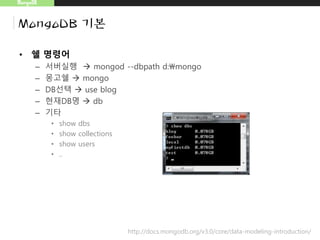
• 쉘 명령어
– 서버실행  mongod --dbpath d:mongo
– 몽고쉘  mongo
– DB선택  use blog
– 현재DB명  db
– 기타
• show dbs
• show collections
• show users
• ..
http://docs.mongodb.org/v3.0/core/data-modeling-introduction/
MongoDB
MongoDB 기본
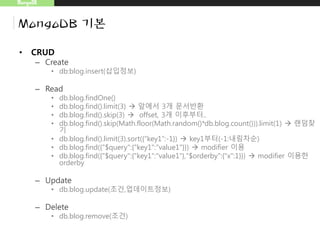
• CRUD
– Create
• db:blog.insert(삽입정보)
– Read
• db.blog.findOne()
• db.blog.find().limit(3)  앞에서 3개 문서반환
• db.blog.find().skip(3)  offset, 3개 이후부터..
• db.blog.find().skip(Math.floor(Math.random()*db.blog.count())).limit(1)  랜덤찾
기
• db.blog.find().limit(3).sort({“key1”:-1})  key1부터(-1:내림차순)
• db.blog.find({"$query":{"key1":"value1"}})  modifier 이용
• db.blog.find({"$query":{"key1":"value1"},"$orderby":{"x":1}})  modifier 이용한
orderby
– Update
• db.blog.update(조건,업데이트정보)
– Delete
• db.blog.remove(조건)
MongoDB
데이터 모델링
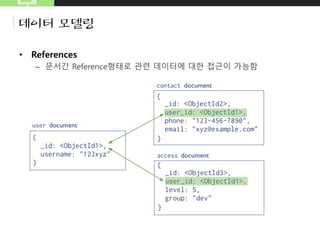
• References
– 문서간 Reference형태로 관련 데이터에 대한 접근이 가능함
MongoDB
데이터 모델링
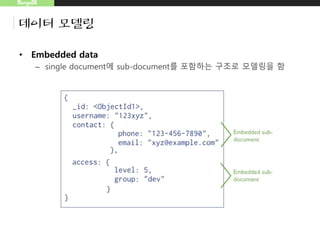
• Embedded data
– single document에 sub-document를 포함하는 구조로 모델링을 함
– 문서(BSON)는 16MB를 넘을수 없다는 점을 유의할 필요가 있음
• http://docs.mongodb.org/master/reference/limits/
MongoDB
Index 배경
• Index를 사용하는 이유
• 거대한 컬렉션에 대해 Read Operation이 느릴때
– Read operation시 Table scan(정보전체에 대한 읽기)이 일어남
– 거대한 컬렉션에서 Table scan이 일어난다면서버는 Table scan이
일어나지 않도록 해야함
MongoDB
Index 배경
• Index의 효과
– 인덱스는 DB 테이블에 대한 동작속도를 높여주는 자료구조로, 저장된
자료에대한 빠른조회를 위해 생성 (Index ↔ Full Table Scan)
– 인덱스는 키-필드 형태를 가지며, Scan을 거치지 않고, 원하는 문서 위
치주소로 바로 이동함
MongoDB
Index 배경
• 몽고DB Index에 대한 특징
– MongoDB automatically creates a unique index on the _idfield.
• Index 생성시 알아둘점
– 각 Index는 8KB의 데이터 공간을 필요로함
– Index생성시 write 및 update operation 성능을 떨어뜨림
– Index는 system.indexes 컬렉션에 저장됨
• db.system.indexes.find() 로 색인된키 확인가능
MongoDB
Index 생성
• 오름차순/내림차순에 대한 색인
– 키가 하나 일때는 키 방향이 무의미, 키가 하나 이상일 경우 고려함
• 단일키에서 특정M키는 방향과 관계없이 명확함
– 최적화시 정렬방향을 고려함
• {“username”:1,”age”:-1} 내림차순 최적화
• {“username”:1,“age”:1} 오름차순 최적화
• {“comments.date”:1} 내장문서 comments에 있는 date키에 대한 색인
– 예
• 수백만 사용자에 대한 상태메시지
– {date:-1, user:1}
MongoDB
Index 생성
• 인덱스 생성
– db.people.find({“username”:”david”})에 대한 인덱스 생성은
db.people.ensureIndex({“username”:1})
db.people.ensuerIndex({“date”:1,“username:”:1})  1은 오름차순 방향
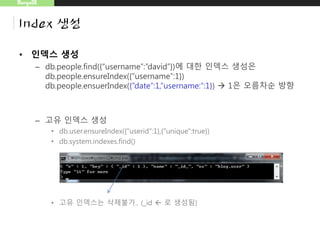
– 고유 인덱스 생성
• db.user.ensureIndex({"userid":1},{"unique":true})
• db.system.indexes.find()
• 고유 인덱스는 삭제불가.. (_id  로 생성됨)
MongoDB
Index 생성
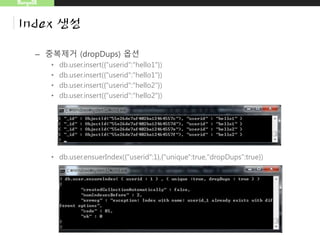
– 중복제거 (dropDups) 옵션
• db.user.insert({"userid":"hello1"})
• db.user.insert({"userid":"hello2"})
• db.user.ensuerIndex({"userid":1},{"unique":true,"dropDups":true})
unique 하지 않아서 발생되는 에러
MongoDB
Index 생성
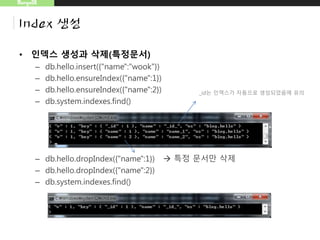
• 인덱스 생성과 삭제(특정문서)
– db.hello.insert({"name":"wook"})
– db.hello.ensureIndex({"name":1})
– db.hello.ensureIndex({"name":2})
– db.system.indexes.find()
– db.hello.dropIndex({"name":1})  특정 문서만 삭제
– db.hello.dropIndex({"name":2})
– db.system.indexes.find()
_id는 인덱스가 자동으로 생성되었음에 유의
MongoDB
Index 생성
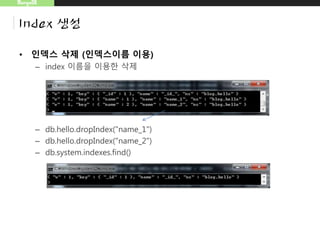
• 인덱스 삭제 (인덱스이름 이용)
– index 이름을 이용한 삭제
– db.hello.dropIndex("name_1")
– db.hello.dropIndex("name_2")
– db.system.indexes.find()
MongoDB
Index 생성
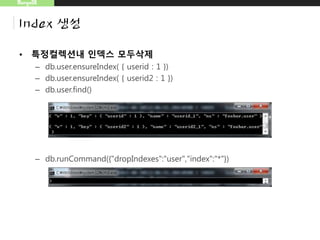
• 특정컬렉션내 인덱스 모두삭제
– db.user.ensureIndex( { userid : 1 })
– db.user.ensureIndex( { userid2 : 1 })
– db.user.find()
– db.runCommand({"dropIndexes":"user","index":"*"})
MongoDB
Index 생성
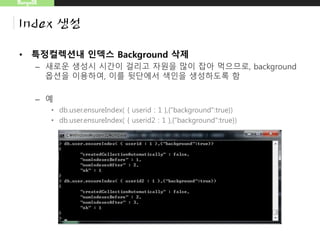
• 특정컬렉션내 인덱스 Background 삭제
– 새로운 생성시 시간이 걸리고 자원을 많이 잡아 먹으므로, background
옵션을 이용하여, 이를 뒷단에서 색인을 생성하도록 함
– 예
• db.user.ensureIndex( { userid : 1 },{"background":true})
• db.user.ensureIndex( { userid2 : 1 },{"background":true})
MongoDB
Index 생성
• _id는 삭제할 수 있는가?
– _id 기본 index는 삭제할수 없음
• capped collections을 제외하고, id_field는 자동으로 생성되며, 삭제불가
• _id index는 키의 유일함을 강제함 (샤딩은 제외)
– db.hello.drop()  컬렉션 삭제시 인덱스도 삭제됨
http://api.mongodb.org/wiki/current/Indexes.html#Indexes-The%5CidIndex
MongoDB
Index 생성
• 공간정보색인
– 위도,경도에 가까운 영화관을 찾을때 공간색인을 이용함
– 공간정보 색인
• 1 or -1대신, 2d를 넣음
• db.map.ensureIndex({"gps":"2d"})
– 유효키 예
• {"gps":[0,100]}
• {"gps":{"x":-30,"y":30}}
• {"gps":{"lat":-180,"long":180}}
MongoDB
Index 생성
– 2d지정 예
• db.map.ensureIndex({"gps":"2d"})
• db.map.insert({"gps":[0,100]})
• db.map.insert({"gps":{"x":-30,"y":30}})
• db.map.insert({"gps":{"lat":-180,"long":180}})
MongoDB
Index 생성
– 범위지정 예
• db.map.ensureIndex({"gps2":"2d"},{"min":-1000,"max":1000})
• db.map.insert({"gps2":[-1001,0]})
범위 벗어났을때 오류
MongoDB
Index 생성
– 복합공간 정보색인 질의
• db.map.ensureIndex({"gps3":"2d"},{"min":-1000,"max":1000},{"desc":1})
• db.map.insert({"gps3":[50,70],"desc":"coffe"})
• db.map.insert({"gps3":[60,70],"desc":"coffe"})
• db.map.find({"gps3":{"$near":[56,70]},"desc":"coffe"})
MongoDB
Index 전략
• 주의사항
– 모든 Key에 대해 색인하지 않는다.
• 공간이 늘어날 수 있으며, 모든 Key에 인덱싱을 걸었다고 하여도, 쿼리속도
가 크게 빨라지지 않는다.
• 색인생성시 입력, 갱신, 삭제에 대한 Cost가 발생함
– DB연산 수행뿐 아니라, 컬렉션 내 모든 색인에도 반영이 필요하므로
– 컬렉션의 절반이상을 반환하는 경우는 사용하지 않음
• 모든 문서에 대해 키를 찾아 살피는것보다, 그냥 테이블 스캔을 하는 것이
훨씬 효율적
MongoDB
Index 전략
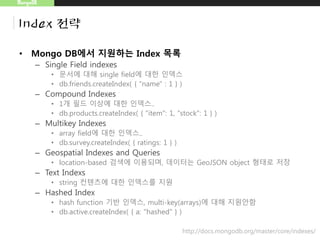
• Mongo DB에서 지원하는 Index 목록
– Single Field indexes
• 문서에 대해 single field에 대한 인덱스
• db.friends.createIndex( { "name" : 1 } )
– Compound Indexes
• 1개 필드 이상에 대한 인덱스..
• db.products.createIndex( { "item": 1, "stock": 1 } )
– Multikey Indexes
• array field에 대한 인덱스..
• db.survey.createIndex( { ratings: 1 } )
– Geospatial Indexes and Queries
• location-based 검색에 이용되며, 데이터는 GeoJSON object 형태로 저장
– Text Indexs
• string 컨텐츠에 대한 인덱스를 지원
– Hashed Index
• hash function 기반 인덱스, multi-key(arrays)에 대해 지원안함
• db.active.createIndex( { a: "hashed" } )
http://docs.mongodb.org/master/core/indexes/
MongoDB
Index 전략
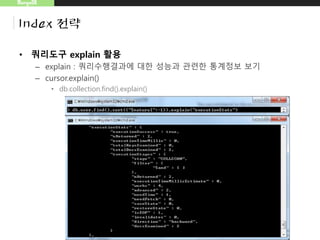
• 쿼리도구 explain 활용
– explain : 쿼리수행결과 통계정보를 통한 성능개선점 찾기
– cursor.explain()
• db.collection.find().explain()
MongoDB
Aggregation Pipeline
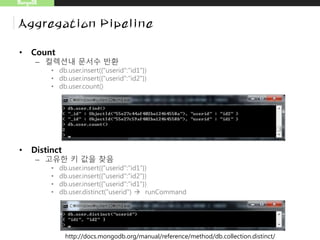
• Count
– 컬렉션내 문서수 반환
• db.user.insert({"userid":"id1"})
• db.user.insert({"userid":"id2"})
• db.user.count()
• Distinct
– 고유한 키 값을 찾음
• db.user.insert({"userid":"id1"})
• db.user.insert({"userid":"id2"})
• db.user.insert({"userid":"id1"})
• db.user.distinct("userid")  runCommand
http://docs.mongodb.org/manual/reference/method/db.collection.distinct/
MongoDB
Aggregation Pipeline
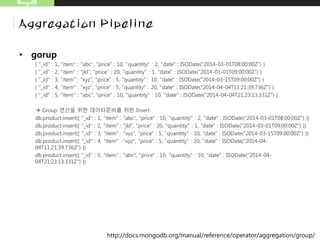
• gorup
{ "_id" : 1, "item" : "abc", "price" : 10, "quantity" : 2, "date" : ISODate("2014-03-01T08:00:00Z") }
{ "_id" : 2, "item" : "jkl", "price" : 20, "quantity" : 1, "date" : ISODate("2014-03-01T09:00:00Z") }
{ "_id" : 3, "item" : "xyz", "price" : 5, "quantity" : 10, "date" : ISODate("2014-03-15T09:00:00Z") }
{ "_id" : 4, "item" : "xyz", "price" : 5, "quantity" : 20, "date" : ISODate("2014-04-04T11:21:39.736Z") }
{ "_id" : 5, "item" : "abc", "price" : 10, "quantity" : 10, "date" : ISODate("2014-04-04T21:23:13.331Z") }
 Group 연산을 위한 데이터준비를 위한 Insert
db.product.insert({ "_id" : 1, "item" : "abc", "price" : 10, "quantity" : 2, "date" : ISODate("2014-03-01T08:00:00Z") })
db.product.insert({ "_id" : 2, "item" : "jkl", "price" : 20, "quantity" : 1, "date" : ISODate("2014-03-01T09:00:00Z") })
db.product.insert({ "_id" : 3, "item" : "xyz", "price" : 5, "quantity" : 10, "date" : ISODate("2014-03-15T09:00:00Z") })
db.product.insert({ "_id" : 4, "item" : "xyz", "price" : 5, "quantity" : 20, "date" : ISODate("2014-04-
04T11:21:39.736Z") })
db.product.insert({ "_id" : 5, "item" : "abc", "price" : 10, "quantity" : 10, "date" : ISODate("2014-04-
04T21:23:13.331Z") })
http://docs.mongodb.org/manual/reference/operator/aggregation/group/
• Group으로 집계
MongoDB
Aggregation Pipeline
db.sales.aggregate(
[
{
$group : {
_id : { month: { $month: "$date" }, day: { $dayOfMonth: "$date" }, year: { $year:
"$date" } },
totalPrice: { $sum: { $multiply: [ "$price", "$quantity" ] } },
averageQuantity: { $avg: "$quantity" },
count: { $sum: 1 }
}
}
]
)
_id(생략시 fail)를 date필드를
이용하여 구성함
MongoDB
고급기능활용
• 명령어 수행
– MongGoDB는 75개 이상의 명령어를 제공하며, 명령어 최신 목록은
http://docs.mongodb.org/manual/reference/command/ 에서 확인가
능
– 명령어 실행
• db.runCommand({“명령어이름”:”...”})
• db.runCommand({"buildInfo":"1"})  관리자 전용 명령어
• db.runCommand({"collStats":"foo"})  컬렉션 정보
– 예 : 전체 인덱스 사이즈, 인덱스 개수, capped 상태, 스토리지 사이즈, 문서개수
등..
• ...
MongoDB
고급기능활용
• Collection (=table)
– 삽입시 컬렉션 자동생성
• use blog;
• db.board_articles.insert({“title”:”hello”})
– 컬렉셩생성
• use blog;
db.createCollection(“board_articles");
• show collections; (show tables와 동일)
– 컬렉션삭제
• db.컬렉션이름.drop()
• db.runCommand({"drop":"user"})
MongoDB
고급기능활용
• Capped Collection (제한컬렉션)
– 고정사이즈 컬렉션으로, insert와 retrieve시 high-throughput를 가짐
– insertion 순서 보장하며
– 정렬을 위해 인덱스가 필요로 하지 않으며, 오버헤드 없이 higher
insertion throughput 가능
• 최소사이즈 (byte)
– db.createCollection( "log", { capped: true, size: 100000 } )
• 문서개수 제한
– db.createCollection("log", { capped : true, size : 5242880, max : 5000 } )
http://docs.mongodb.org/manual/core/capped-collections/#CappedCollections-UsageandRestrictions
MongoDB
고급기능활용
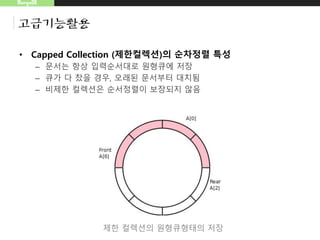
• Capped Collection (제한컬렉션)의 순차정렬 특성
– 문서는 항상 입력순서대로 원형큐에 저장
– 큐가 다 찼을 경우, 오래된 문서부터 대치됨
– 비제한 컬렉션은 순서정렬이 보장되지 않음
제한 컬렉션의 원형큐형태의 저장
MongoDB
고급기능활용
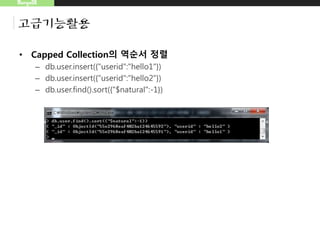
• Capped Collection의 역순서 정렬
– db.user.insert({"userid":"hello1"})
– db.user.insert({"userid":"hello2"})
– db.user.find().sort({"$natural":-1})
MongoDB
고급기능활용
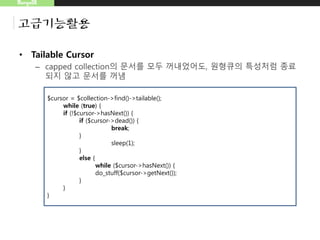
• Tailable Cursor
– capped collection의 문서를 모두 꺼내었어도, 원형큐의 특성처럼 종료
되지 않고 문서를 꺼냄
$cursor = $collection->find()->tailable();
while (true) {
if (!$cursor->hasNext()) {
if ($cursor->dead()) {
break;
}
sleep(1);
}
else {
while ($cursor->hasNext()) {
do_stuff($cursor->getNext());
}
}
}


Mongo DB 성능최적화 전략

  • 1.
    MongoDB 성능최적화 전략 대구개발자그룹 JinwookJeong Indexing Strategy and query optimization
  • 2.
    MongoDB 목차 • MongoDB 기본 •데이터모델링 – References – Embedding • Index – 인덱스 배경 – 인덱스 생성 – 인덱스 전략 • Aggregation Pipieline • 고급기능활용
  • 3.
    MongoDB MongoDB 기본 • 쉘명령어 – 서버실행  mongod --dbpath d:mongo – 몽고쉘  mongo – DB선택  use blog – 현재DB명  db – 기타 • show dbs • show collections • show users • .. http://docs.mongodb.org/v3.0/core/data-modeling-introduction/
  • 4.
    MongoDB MongoDB 기본 • CRUD –Create • db:blog.insert(삽입정보) – Read • db.blog.findOne() • db.blog.find().limit(3)  앞에서 3개 문서반환 • db.blog.find().skip(3)  offset, 3개 이후부터.. • db.blog.find().skip(Math.floor(Math.random()*db.blog.count())).limit(1)  랜덤찾 기 • db.blog.find().limit(3).sort({“key1”:-1})  key1부터(-1:내림차순) • db.blog.find({"$query":{"key1":"value1"}})  modifier 이용 • db.blog.find({"$query":{"key1":"value1"},"$orderby":{"x":1}})  modifier 이용한 orderby – Update • db.blog.update(조건,업데이트정보) – Delete • db.blog.remove(조건)
  • 5.
    MongoDB 데이터 모델링 • References –문서간 Reference형태로 관련 데이터에 대한 접근이 가능함
  • 6.
    MongoDB 데이터 모델링 • Embeddeddata – single document에 sub-document를 포함하는 구조로 모델링을 함 – 문서(BSON)는 16MB를 넘을수 없다는 점을 유의할 필요가 있음 • http://docs.mongodb.org/master/reference/limits/
  • 7.
    MongoDB Index 배경 • Index를사용하는 이유 • 거대한 컬렉션에 대해 Read Operation이 느릴때 – Read operation시 Table scan(정보전체에 대한 읽기)이 일어남 – 거대한 컬렉션에서 Table scan이 일어난다면서버는 Table scan이 일어나지 않도록 해야함
  • 8.
    MongoDB Index 배경 • Index의효과 – 인덱스는 DB 테이블에 대한 동작속도를 높여주는 자료구조로, 저장된 자료에대한 빠른조회를 위해 생성 (Index ↔ Full Table Scan) – 인덱스는 키-필드 형태를 가지며, Scan을 거치지 않고, 원하는 문서 위 치주소로 바로 이동함
  • 9.
    MongoDB Index 배경 • 몽고DBIndex에 대한 특징 – MongoDB automatically creates a unique index on the _idfield. • Index 생성시 알아둘점 – 각 Index는 8KB의 데이터 공간을 필요로함 – Index생성시 write 및 update operation 성능을 떨어뜨림 – Index는 system.indexes 컬렉션에 저장됨 • db.system.indexes.find() 로 색인된키 확인가능
  • 10.
    MongoDB Index 생성 • 오름차순/내림차순에대한 색인 – 키가 하나 일때는 키 방향이 무의미, 키가 하나 이상일 경우 고려함 • 단일키에서 특정M키는 방향과 관계없이 명확함 – 최적화시 정렬방향을 고려함 • {“username”:1,”age”:-1} 내림차순 최적화 • {“username”:1,“age”:1} 오름차순 최적화 • {“comments.date”:1} 내장문서 comments에 있는 date키에 대한 색인 – 예 • 수백만 사용자에 대한 상태메시지 – {date:-1, user:1}
  • 11.
    MongoDB Index 생성 • 인덱스생성 – db.people.find({“username”:”david”})에 대한 인덱스 생성은 db.people.ensureIndex({“username”:1}) db.people.ensuerIndex({“date”:1,“username:”:1})  1은 오름차순 방향 – 고유 인덱스 생성 • db.user.ensureIndex({"userid":1},{"unique":true}) • db.system.indexes.find() • 고유 인덱스는 삭제불가.. (_id  로 생성됨)
  • 12.
    MongoDB Index 생성 – 중복제거(dropDups) 옵션 • db.user.insert({"userid":"hello1"}) • db.user.insert({"userid":"hello1"}) • db.user.insert({"userid":"hello2"}) • db.user.insert({"userid":"hello2"}) • db.user.ensuerIndex({"userid":1},{"unique":true,"dropDups":true}) unique 하지 않아서 발생되는 에러
  • 13.
    MongoDB Index 생성 • 인덱스생성과 삭제(특정문서) – db.hello.insert({"name":"wook"}) – db.hello.ensureIndex({"name":1}) – db.hello.ensureIndex({"name":2}) – db.system.indexes.find() – db.hello.dropIndex({"name":1})  특정 문서만 삭제 – db.hello.dropIndex({"name":2}) – db.system.indexes.find() _id는 인덱스가 자동으로 생성되었음에 유의
  • 14.
    MongoDB Index 생성 • 인덱스삭제 (인덱스이름 이용) – index 이름을 이용한 삭제 – db.hello.dropIndex("name_1") – db.hello.dropIndex("name_2") – db.system.indexes.find()
  • 15.
    MongoDB Index 생성 • 특정컬렉션내인덱스 모두삭제 – db.user.ensureIndex( { userid : 1 }) – db.user.ensureIndex( { userid2 : 1 }) – db.user.find() – db.runCommand({"dropIndexes":"user","index":"*"})
  • 16.
    MongoDB Index 생성 • 특정컬렉션내인덱스 Background 삭제 – 새로운 생성시 시간이 걸리고 자원을 많이 잡아 먹으므로, background 옵션을 이용하여, 이를 뒷단에서 색인을 생성하도록 함 – 예 • db.user.ensureIndex( { userid : 1 },{"background":true}) • db.user.ensureIndex( { userid2 : 1 },{"background":true})
  • 17.
    MongoDB Index 생성 • _id는삭제할 수 있는가? – _id 기본 index는 삭제할수 없음 • capped collections을 제외하고, id_field는 자동으로 생성되며, 삭제불가 • _id index는 키의 유일함을 강제함 (샤딩은 제외) – db.hello.drop()  컬렉션 삭제시 인덱스도 삭제됨 http://api.mongodb.org/wiki/current/Indexes.html#Indexes-The%5CidIndex
  • 18.
    MongoDB Index 생성 • 공간정보색인 –위도,경도에 가까운 영화관을 찾을때 공간색인을 이용함 – 공간정보 색인 • 1 or -1대신, 2d를 넣음 • db.map.ensureIndex({"gps":"2d"}) – 유효키 예 • {"gps":[0,100]} • {"gps":{"x":-30,"y":30}} • {"gps":{"lat":-180,"long":180}}
  • 19.
    MongoDB Index 생성 – 2d지정예 • db.map.ensureIndex({"gps":"2d"}) • db.map.insert({"gps":[0,100]}) • db.map.insert({"gps":{"x":-30,"y":30}}) • db.map.insert({"gps":{"lat":-180,"long":180}})
  • 20.
    MongoDB Index 생성 – 범위지정예 • db.map.ensureIndex({"gps2":"2d"},{"min":-1000,"max":1000}) • db.map.insert({"gps2":[-1001,0]}) 범위 벗어났을때 오류
  • 21.
    MongoDB Index 생성 – 복합공간정보색인 질의 • db.map.ensureIndex({"gps3":"2d"},{"min":-1000,"max":1000},{"desc":1}) • db.map.insert({"gps3":[50,70],"desc":"coffe"}) • db.map.insert({"gps3":[60,70],"desc":"coffe"}) • db.map.find({"gps3":{"$near":[56,70]},"desc":"coffe"})
  • 22.
    MongoDB Index 전략 • 주의사항 –모든 Key에 대해 색인하지 않는다. • 공간이 늘어날 수 있으며, 모든 Key에 인덱싱을 걸었다고 하여도, 쿼리속도 가 크게 빨라지지 않는다. • 색인생성시 입력, 갱신, 삭제에 대한 Cost가 발생함 – DB연산 수행뿐 아니라, 컬렉션 내 모든 색인에도 반영이 필요하므로 – 컬렉션의 절반이상을 반환하는 경우는 사용하지 않음 • 모든 문서에 대해 키를 찾아 살피는것보다, 그냥 테이블 스캔을 하는 것이 훨씬 효율적
  • 23.
    MongoDB Index 전략 • MongoDB에서 지원하는 Index 목록 – Single Field indexes • 문서에 대해 single field에 대한 인덱스 • db.friends.createIndex( { "name" : 1 } ) – Compound Indexes • 1개 필드 이상에 대한 인덱스.. • db.products.createIndex( { "item": 1, "stock": 1 } ) – Multikey Indexes • array field에 대한 인덱스.. • db.survey.createIndex( { ratings: 1 } ) – Geospatial Indexes and Queries • location-based 검색에 이용되며, 데이터는 GeoJSON object 형태로 저장 – Text Indexs • string 컨텐츠에 대한 인덱스를 지원 – Hashed Index • hash function 기반 인덱스, multi-key(arrays)에 대해 지원안함 • db.active.createIndex( { a: "hashed" } ) http://docs.mongodb.org/master/core/indexes/
  • 24.
    MongoDB Index 전략 • 쿼리도구explain 활용 – explain : 쿼리수행결과 통계정보를 통한 성능개선점 찾기 – cursor.explain() • db.collection.find().explain()
  • 25.
    MongoDB Aggregation Pipeline • Count –컬렉션내 문서수 반환 • db.user.insert({"userid":"id1"}) • db.user.insert({"userid":"id2"}) • db.user.count() • Distinct – 고유한 키 값을 찾음 • db.user.insert({"userid":"id1"}) • db.user.insert({"userid":"id2"}) • db.user.insert({"userid":"id1"}) • db.user.distinct("userid")  runCommand http://docs.mongodb.org/manual/reference/method/db.collection.distinct/
  • 26.
    MongoDB Aggregation Pipeline • gorup {"_id" : 1, "item" : "abc", "price" : 10, "quantity" : 2, "date" : ISODate("2014-03-01T08:00:00Z") } { "_id" : 2, "item" : "jkl", "price" : 20, "quantity" : 1, "date" : ISODate("2014-03-01T09:00:00Z") } { "_id" : 3, "item" : "xyz", "price" : 5, "quantity" : 10, "date" : ISODate("2014-03-15T09:00:00Z") } { "_id" : 4, "item" : "xyz", "price" : 5, "quantity" : 20, "date" : ISODate("2014-04-04T11:21:39.736Z") } { "_id" : 5, "item" : "abc", "price" : 10, "quantity" : 10, "date" : ISODate("2014-04-04T21:23:13.331Z") }  Group 연산을 위한 데이터준비를 위한 Insert db.product.insert({ "_id" : 1, "item" : "abc", "price" : 10, "quantity" : 2, "date" : ISODate("2014-03-01T08:00:00Z") }) db.product.insert({ "_id" : 2, "item" : "jkl", "price" : 20, "quantity" : 1, "date" : ISODate("2014-03-01T09:00:00Z") }) db.product.insert({ "_id" : 3, "item" : "xyz", "price" : 5, "quantity" : 10, "date" : ISODate("2014-03-15T09:00:00Z") }) db.product.insert({ "_id" : 4, "item" : "xyz", "price" : 5, "quantity" : 20, "date" : ISODate("2014-04- 04T11:21:39.736Z") }) db.product.insert({ "_id" : 5, "item" : "abc", "price" : 10, "quantity" : 10, "date" : ISODate("2014-04- 04T21:23:13.331Z") }) http://docs.mongodb.org/manual/reference/operator/aggregation/group/
  • 27.
    • Group으로 집계 MongoDB AggregationPipeline db.sales.aggregate( [ { $group : { _id : { month: { $month: "$date" }, day: { $dayOfMonth: "$date" }, year: { $year: "$date" } }, totalPrice: { $sum: { $multiply: [ "$price", "$quantity" ] } }, averageQuantity: { $avg: "$quantity" }, count: { $sum: 1 } } } ] ) _id(생략시 fail)를 date필드를 이용하여 구성함
  • 28.
    MongoDB 고급기능활용 • 명령어 수행 –MongGoDB는 75개 이상의 명령어를 제공하며, 명령어 최신 목록은 http://docs.mongodb.org/manual/reference/command/ 에서 확인가 능 – 명령어 실행 • db.runCommand({“명령어이름”:”...”}) • db.runCommand({"buildInfo":"1"})  관리자 전용 명령어 • db.runCommand({"collStats":"foo"})  컬렉션 정보 – 예 : 전체 인덱스 사이즈, 인덱스 개수, capped 상태, 스토리지 사이즈, 문서개수 등.. • ...
  • 29.
    MongoDB 고급기능활용 • Collection (=table) –삽입시 컬렉션 자동생성 • use blog; • db.board_articles.insert({“title”:”hello”}) – 컬렉셩생성 • use blog; db.createCollection(“board_articles"); • show collections; (show tables와 동일) – 컬렉션삭제 • db.컬렉션이름.drop() • db.runCommand({"drop":"user"})
  • 30.
    MongoDB 고급기능활용 • Capped Collection(제한컬렉션) – 고정사이즈 컬렉션으로, insert와 retrieve시 high-throughput를 가짐 – insertion 순서 보장하며 – 정렬을 위해 인덱스가 필요로 하지 않으며, 오버헤드 없이 higher insertion throughput 가능 • 최소사이즈 (byte) – db.createCollection( "log", { capped: true, size: 100000 } ) • 문서개수 제한 – db.createCollection("log", { capped : true, size : 5242880, max : 5000 } ) http://docs.mongodb.org/manual/core/capped-collections/#CappedCollections-UsageandRestrictions
  • 31.
    MongoDB 고급기능활용 • Capped Collection(제한컬렉션)의 순차정렬 특성 – 문서는 항상 입력순서대로 원형큐에 저장 – 큐가 다 찼을 경우, 오래된 문서부터 대치됨 – 비제한 컬렉션은 순서정렬이 보장되지 않음 제한 컬렉션의 원형큐형태의 저장
  • 32.
    MongoDB 고급기능활용 • Capped Collection의역순서 정렬 – db.user.insert({"userid":"hello1"}) – db.user.insert({"userid":"hello2"}) – db.user.find().sort({"$natural":-1})
  • 33.
    MongoDB 고급기능활용 • Tailable Cursor –capped collection의 문서를 모두 꺼내었어도, 원형큐의 특성처럼 종료 되지 않고 문서를 꺼냄 $cursor = $collection->find()->tailable(); while (true) { if (!$cursor->hasNext()) { if ($cursor->dead()) { break; } sleep(1); } else { while ($cursor->hasNext()) { do_stuff($cursor->getNext()); } } }
Editor's Notes

  • #5 Read는 삽입순서가 첫번째인 문서부터 선택
  • #9 검색이 빈번하며, 자주 변하지 않는 필드를, Index로 고려
  • #10 http://docs.mongodb.org/v3.0/core/data-model-operations/
  • #11 http://docs.mongodb.org/v3.0/core/data-model-operations/
  • #12 http://docs.mongodb.org/v3.0/core/data-model-operations/
  • #13 중복키값이 있어 적용이 안됨.
  • #14 db.hello.insert({"name":"wook"}) db.hello.ensureIndex({"name":1}) db.hello.ensureIndex({"name":2}) db.system.indexes.find() db.hello.dropIndex({"name":1}) db.hello.dropIndex({"name":2}) db.system.indexes.find()
  • #20 db.map.ensureIndex({"gps":"2d"}) db.map.insert({"gps":[0,100]}) db.map.insert({"gps":{"x":-30,"y":30}}) db.map.insert({"gps":{"lat":-180,"long":180}})
  • #21 db.map.ensureIndex({"gps2":"2d"},{"min":-1000,"max":1000}) db.map.insert({"gps2":[-1001,0]})