





Engineering
Introduction to LIFF
(LINE Front-End Framework)
Warit Wanwithu
Technical Consultant
Engineering
• What is LIFF?
• LIFF Benefits
• LIFF Use cases
• Demo
Agenda
WHAT IS LIFF
LINE Frontend-End Framework
LIFF
WebView that allows seamless integration between
CHAT and WEB
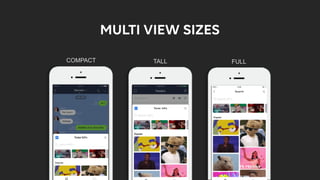
COMPACT TALL FULL
MULTI VIEW SIZES
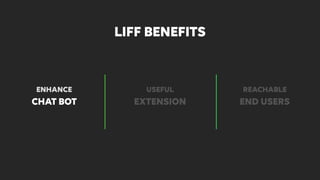
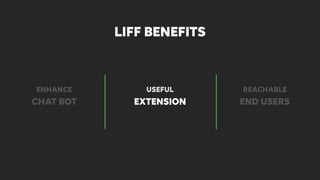
LIFF BENEFITS
CHAT BOT EXTENSION END USERS
LIFF BENEFITS
ENHANCE USEFUL REACHABLE
ENHANCE CHATBOT
CHAT BOT EXTENSION END USERS
LIFF BENEFITS
ENHANCE USEFUL REACHABLE
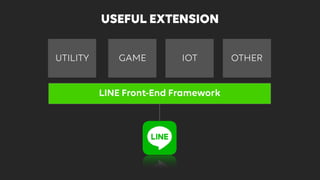
WEB
GAME
GAME IOT
LINE Front-End Framework
UTILITY OTHER
USEFUL EXTENSION
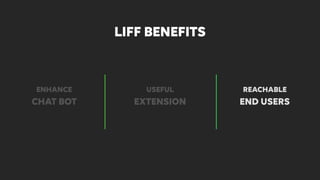
CHAT BOT EXTENSION END USERS
LIFF BENEFITS
ENHANCE USEFUL REACHABLE
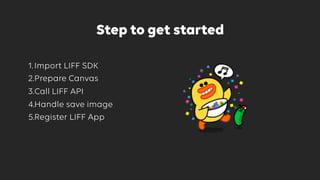
Step to get started
1.Import LIFF SDK
2.Prepare Canvas
3.Call LIFF API
4.Handle save image
5.Register LIFF App
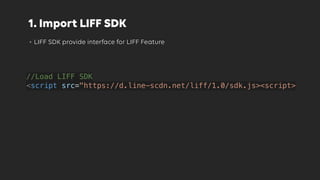
1. Import LIFF SDK
• LIFF SDK provide interface for LIFF Feature
//Load LIFF SDK
<script src="https://d.line-scdn.net/liff/1.0/sdk.js><script>
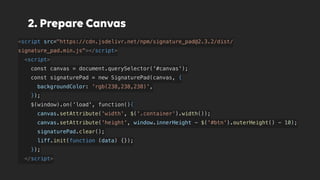
2. Prepare Canvas
<script src="https://cdn.jsdelivr.net/npm/signature_pad@2.3.2/dist/
signature_pad.min.js"></script>
<script>
const canvas = document.querySelector('#canvas');
const signaturePad = new SignaturePad(canvas, {
backgroundColor: 'rgb(238,238,238)',
});
$(window).on('load', function(){
canvas.setAttribute('width', $('.container').width());
canvas.setAttribute('height', window.innerHeight - $('#btn').outerHeight() - 10);
signaturePad.clear();
liff.init(function (data) {});
});
</script>
3. Call LIFF API
liff.getProfile().then(function (profile) {
liff.sendMessages([
{
type: 'image',
originalContentUrl: 'https://' + document.domain + '/imgs/' + res + '.jpg',
previewImageUrl: 'https://' + document.domain + '/imgs/' + res + '_240.jpg'
},
{
type: 'text',
text: 'From:' + profile.displayName
}
]).then(function () {
liff.closeWindow();
}})
4. Handle Save Image
if not os.path.exists(dir_name):
os.makedirs(dir_name)
with open(os.path.join(dir_name, '{}.jpg'.format(img_name)), 'wb') as img:
img.write(base64.b64decode(event['image'].split(",")[1]))
original = Image.open(os.path.join(dir_name, '{}.jpg'.format(img_name)))
original.thumbnail((240, 240), Image.ANTIALIAS)
original.save(os.path.join(dir_name, '{}_240.jpg'.format(img_name)), 'JPEG')
return make_response(img_name, 200)
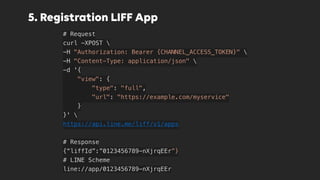
5. Registration LIFF App
# Request
curl -XPOST 
-H "Authorization: Bearer {CHANNEL_ACCESS_TOKEN}" 
-H "Content-Type: application/json" 
-d '{
    "view": {
        "type": "full",
        "url": "https://example.com/myservice"
    }
}' 
https://api.line.me/liff/v1/apps
# Response
{“liffId”:”0123456789-nXjrqEEr”}
# LINE Scheme
line://app/0123456789-nXjrqEEr
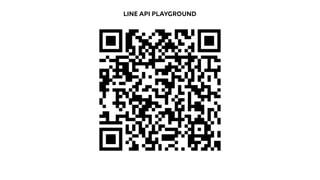
LINE API PLAYGROUND
Engineering
THANK YOU :)

Introduction to LIFF (LINE Front-End Framework)

  • 1.
    Engineering Introduction to LIFF (LINEFront-End Framework) Warit Wanwithu Technical Consultant
  • 2.
    Engineering • What isLIFF? • LIFF Benefits • LIFF Use cases • Demo Agenda
  • 3.
  • 4.
    LINE Frontend-End Framework LIFF WebViewthat allows seamless integration between CHAT and WEB
  • 5.
  • 6.
  • 7.
    CHAT BOT EXTENSIONEND USERS LIFF BENEFITS ENHANCE USEFUL REACHABLE
  • 8.
  • 9.
    CHAT BOT EXTENSIONEND USERS LIFF BENEFITS ENHANCE USEFUL REACHABLE
  • 10.
    WEB GAME GAME IOT LINE Front-EndFramework UTILITY OTHER USEFUL EXTENSION
  • 11.
    CHAT BOT EXTENSIONEND USERS LIFF BENEFITS ENHANCE USEFUL REACHABLE
  • 12.
    Step to getstarted 1.Import LIFF SDK 2.Prepare Canvas 3.Call LIFF API 4.Handle save image 5.Register LIFF App
  • 13.
    1. Import LIFFSDK • LIFF SDK provide interface for LIFF Feature //Load LIFF SDK <script src="https://d.line-scdn.net/liff/1.0/sdk.js><script>
  • 14.
    2. Prepare Canvas <scriptsrc="https://cdn.jsdelivr.net/npm/signature_pad@2.3.2/dist/ signature_pad.min.js"></script> <script> const canvas = document.querySelector('#canvas'); const signaturePad = new SignaturePad(canvas, { backgroundColor: 'rgb(238,238,238)', }); $(window).on('load', function(){ canvas.setAttribute('width', $('.container').width()); canvas.setAttribute('height', window.innerHeight - $('#btn').outerHeight() - 10); signaturePad.clear(); liff.init(function (data) {}); }); </script>
  • 15.
    3. Call LIFFAPI liff.getProfile().then(function (profile) { liff.sendMessages([ { type: 'image', originalContentUrl: 'https://' + document.domain + '/imgs/' + res + '.jpg', previewImageUrl: 'https://' + document.domain + '/imgs/' + res + '_240.jpg' }, { type: 'text', text: 'From:' + profile.displayName } ]).then(function () { liff.closeWindow(); }})
  • 16.
    4. Handle SaveImage if not os.path.exists(dir_name): os.makedirs(dir_name) with open(os.path.join(dir_name, '{}.jpg'.format(img_name)), 'wb') as img: img.write(base64.b64decode(event['image'].split(",")[1])) original = Image.open(os.path.join(dir_name, '{}.jpg'.format(img_name))) original.thumbnail((240, 240), Image.ANTIALIAS) original.save(os.path.join(dir_name, '{}_240.jpg'.format(img_name)), 'JPEG') return make_response(img_name, 200)
  • 17.
    5. Registration LIFFApp # Request curl -XPOST -H "Authorization: Bearer {CHANNEL_ACCESS_TOKEN}"  -H "Content-Type: application/json"  -d '{     "view": {         "type": "full",         "url": "https://example.com/myservice"     } }' https://api.line.me/liff/v1/apps # Response {“liffId”:”0123456789-nXjrqEEr”} # LINE Scheme line://app/0123456789-nXjrqEEr
  • 18.
  • 19.