Azure Functions Best Practices
Juan Pablo Garcia
Principal SDE Lead, Microsoft Corp
@liarjo
Best
Practices
General
Performance
DEV/OPS
Cost
Serverless platform components
Azure Functions
Process events with Serverless code.
Make composing Cloud Apps insanely easy
Develop Functions in C#, Node.js, F#, and more
Easily schedule event-driven tasks across services
Expose Functions as HTTP API endpoints
Scale Functions based on customer demand
Easily integrate with other services
Best
Practices
General
Performance
DEV/OPS
Cost
General Best Practices
• Write defensive functions
• Write functions to be stateless
• Avoid long running functions
• Cross function communication
• Durable Functions and Azure Logic Apps are built to manage state transitions
and communication between multiple functions.
• Pass message using queue
• Use Azure Functions bindings for simple interactions (with CosmosDB,
Service Bus, etc)
• Best to use the SDKs directly for anything more complex or for better error
handling
Best
Practices
General
Performance
DEV/OPS
Cost
DEV/OPS
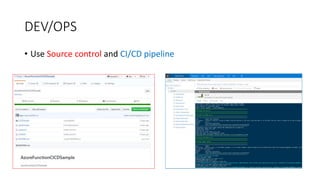
• Use Source control and CI/CD pipeline
DEV/OPS
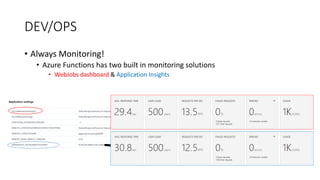
• Always Monitoring!
• Azure Functions has two built in monitoring solutions
• WebJobs dashboard & Application Insights
DEV/OPS / Application Insights
• Live Stream: see a near-live view of what’s coming from your Function App
• Metrics Explorer: insights on your metrics coming from your Function App
• Failures: insights on which things are failing
• Performance: information on the count, latency, and more of Function
executions
• Servers: esource utilization and throughput per server (Putting the servers
back in Serverless)
• Antilytic Portal: Write custom queries against your data
• Alerts*
Best
Practices
General
Performance
DEV/OPS
Cost
Scalability Best Practices
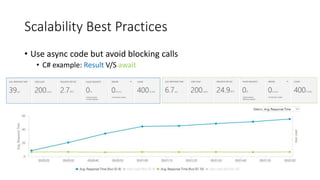
• Use async code but avoid blocking calls
• C# example: Result V/S await
Scalability Best Practices
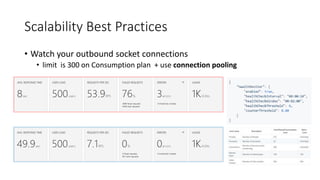
• Watch your outbound socket connections
• limit is 300 on Consumption plan + use connection pooling
Scalability Best Practices
• Configure host behaviors to better handle concurrency
“scale paradox?“
Scalability Best Practices
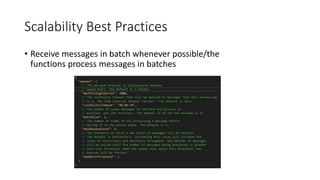
• Receive messages in batch whenever possible/the
functions process messages in batches
Best
Practices
General
Performance
DEV/OPS
Cost
Cost
• Consumption plan
• Executions
• total number of requested executions each month for all functions
• The first million executions are included free each month.
• Resource consumption
• “Observed resource consumption” measured in gigabyte seconds (GB-s).
• Observed resource consumption is calculated by multiplying average memory size in gigabytes by
the time in milliseconds it takes to execute the function.
• Memory used by a function is measured by rounding up to the nearest 128 MB, up to the
maximum memory size of 1,536 MB
• Execution time calculated by rounding up to the nearest 1 ms.
• The minimum execution time and memory for a single function execution is 100 ms and 128 mb
respectively.
• Functions pricing includes a monthly free grant of 400,000 GB-s.
• App Service plan
• Same as usual for Web apps
Best
Practices
General
Performance
DEV/OPS
Cost
References
• Optimize the performance and reliability of Azure Functions
• https://docs.microsoft.com/en-us/azure/azure-functions/functions-best-practices
• Processing 100,000 Events Per Second on Azure Functions
• https://blogs.msdn.microsoft.com/appserviceteam/2017/09/19/processing-100000-events-per-second-on-azure-functions/
• Azure Functions – Significant Improvements in HTTP Trigger Scaling
• https://www.azurefromthetrenches.com/azure-functions-significant-improvements-in-http-trigger-scaling/
• Azure Function Apps: Performance Considerations
• https://blogs.msdn.microsoft.com/amitagarwal/2018/04/03/azure-function-apps-performance-considerations/
• How we checked and fixed the 503 error and Performance issue in our Azure Function
• https://blogs.msdn.microsoft.com/visualstudioalmrangers/2018/04/03/how-we-checked-and-fixed-the-503-error-and-
performance-issue-in-our-azure-function/
• Host Health Monitor
• https://github.com/Azure/azure-functions-host/wiki/Host-Health-Monitor
• Functions pricing
• https://azure.microsoft.com/en-us/pricing/details/functions/
References
• Azure Functions – Prepare for continuous delivery
• https://blogs.msdn.microsoft.com/visualstudioalmrangers/2017/09/06/azure-functions-prepare-for-continuous-delivery/
• Azure Function – Integration tests automation
• https://blogs.msdn.microsoft.com/visualstudioalmrangers/2017/09/24/azure-function-integration-tests-automation/
• Azure Web App sandbox
• https://github.com/projectkudu/kudu/wiki/Azure-Web-App-sandbox
• High throughput Azure Functions on HTTP
• https://codez.deedx.cz/projects/high-throughput-azure-functions-on-http/

Serverless Computing with Azure Functions Best Practices

  • 1.
    Azure Functions BestPractices Juan Pablo Garcia Principal SDE Lead, Microsoft Corp @liarjo
  • 3.
  • 4.
  • 5.
    Azure Functions Process eventswith Serverless code. Make composing Cloud Apps insanely easy Develop Functions in C#, Node.js, F#, and more Easily schedule event-driven tasks across services Expose Functions as HTTP API endpoints Scale Functions based on customer demand Easily integrate with other services
  • 6.
  • 7.
    General Best Practices •Write defensive functions • Write functions to be stateless • Avoid long running functions • Cross function communication • Durable Functions and Azure Logic Apps are built to manage state transitions and communication between multiple functions. • Pass message using queue • Use Azure Functions bindings for simple interactions (with CosmosDB, Service Bus, etc) • Best to use the SDKs directly for anything more complex or for better error handling
  • 8.
  • 9.
    DEV/OPS • Use Sourcecontrol and CI/CD pipeline
  • 10.
    DEV/OPS • Always Monitoring! •Azure Functions has two built in monitoring solutions • WebJobs dashboard & Application Insights
  • 11.
    DEV/OPS / ApplicationInsights • Live Stream: see a near-live view of what’s coming from your Function App • Metrics Explorer: insights on your metrics coming from your Function App • Failures: insights on which things are failing • Performance: information on the count, latency, and more of Function executions • Servers: esource utilization and throughput per server (Putting the servers back in Serverless) • Antilytic Portal: Write custom queries against your data • Alerts*
  • 12.
  • 13.
    Scalability Best Practices •Use async code but avoid blocking calls • C# example: Result V/S await
  • 14.
    Scalability Best Practices •Watch your outbound socket connections • limit is 300 on Consumption plan + use connection pooling
  • 15.
    Scalability Best Practices •Configure host behaviors to better handle concurrency “scale paradox?“
  • 16.
    Scalability Best Practices •Receive messages in batch whenever possible/the functions process messages in batches
  • 17.
  • 18.
    Cost • Consumption plan •Executions • total number of requested executions each month for all functions • The first million executions are included free each month. • Resource consumption • “Observed resource consumption” measured in gigabyte seconds (GB-s). • Observed resource consumption is calculated by multiplying average memory size in gigabytes by the time in milliseconds it takes to execute the function. • Memory used by a function is measured by rounding up to the nearest 128 MB, up to the maximum memory size of 1,536 MB • Execution time calculated by rounding up to the nearest 1 ms. • The minimum execution time and memory for a single function execution is 100 ms and 128 mb respectively. • Functions pricing includes a monthly free grant of 400,000 GB-s. • App Service plan • Same as usual for Web apps
  • 19.
  • 20.
    References • Optimize theperformance and reliability of Azure Functions • https://docs.microsoft.com/en-us/azure/azure-functions/functions-best-practices • Processing 100,000 Events Per Second on Azure Functions • https://blogs.msdn.microsoft.com/appserviceteam/2017/09/19/processing-100000-events-per-second-on-azure-functions/ • Azure Functions – Significant Improvements in HTTP Trigger Scaling • https://www.azurefromthetrenches.com/azure-functions-significant-improvements-in-http-trigger-scaling/ • Azure Function Apps: Performance Considerations • https://blogs.msdn.microsoft.com/amitagarwal/2018/04/03/azure-function-apps-performance-considerations/ • How we checked and fixed the 503 error and Performance issue in our Azure Function • https://blogs.msdn.microsoft.com/visualstudioalmrangers/2018/04/03/how-we-checked-and-fixed-the-503-error-and- performance-issue-in-our-azure-function/ • Host Health Monitor • https://github.com/Azure/azure-functions-host/wiki/Host-Health-Monitor • Functions pricing • https://azure.microsoft.com/en-us/pricing/details/functions/
  • 21.
    References • Azure Functions– Prepare for continuous delivery • https://blogs.msdn.microsoft.com/visualstudioalmrangers/2017/09/06/azure-functions-prepare-for-continuous-delivery/ • Azure Function – Integration tests automation • https://blogs.msdn.microsoft.com/visualstudioalmrangers/2017/09/24/azure-function-integration-tests-automation/ • Azure Web App sandbox • https://github.com/projectkudu/kudu/wiki/Azure-Web-App-sandbox • High throughput Azure Functions on HTTP • https://codez.deedx.cz/projects/high-throughput-azure-functions-on-http/

Editor's Notes

  • #8 https://docs.microsoft.com/en-us/azure/azure-functions/functions-best-practices#scalability-best-practices DEMOS: 1. Talk with me V2
  • #10 Demos Source Control and C https://github.com/liarjo/AzureFunctionCICDSample 2. https://jpgarciams.visualstudio.com/MyFirstProject
  • #11 Azure Functions has two built in monitoring solutions – the WebJobs dashboard and Application Insights (integration between Azure Functions and App Insights is currently in preview). The dashboard was designed with longer running jobs in mind and isn’t optimized for scenarios where there are 10,000+ function executions happening per second. Fortunately, App Insights is Turning on App insights is really easy – just add your instrumentation key to your function app and Azure Functions will start sending data to App Insights automatically. For more info see here. The Azure dashboard is highly customizable and App Insights has great support for pinning its visual components. It only took an hour or two to put together a pretty useful monitoring dashboard for this scenario demos LOG Stream using BackendAPI
  • #12 Demos Product Evaluation with APP Insight Live Stream Single and loadtest https://jpgarciams.visualstudio.com/MyFirstProject/_apps/hub/ms.vss-cloudloadtest-web.hub-loadtest-test?_a=summary&name=ProductEvaluation&definitionId=2d352142-0ff0-4a3b-90a2-c77029371b3d&runId=da58b32c-9726-4529-9f75-8c7a7f739406&definitionType=visualStudioLoadTest Analytics traces | where message has "New Evaluation product {\"Id\":\"123\",\"Evaluation\":29}" Metrics Preview Alerts
  • #14 1. BackedApi: GetProduct v/s GetProducResutl
  • #15 https://github.com/Azure/azure-functions-host/wiki/Host-Health-Monitor Description of settings: enabled: Whether the feature is enabled. Default is true. healthCheckInterval: The time interval between the periodic background health checks. Default is 10 seconds. healthCheckWindow: A sliding time window used in conjunction with the healthCheckThreshold setting (see below). healthCheckThreshold: Maximum number of times the health check can fail before a host recycle is initiated. counterThreshold: The threshold at which a performance counter will be considered unhealthy. Default is 0.80. HttpClientInstanceSamplesController Show run test to show error detials
  • #16 PropertyDefaultDescription routePrefixapi The route prefix that applies to all routes. Use an empty string to remove the default prefix. maxOutstandingRequests The maximum number of outstanding requests that are held at any given time. This limit includes requests that are queued but have not started executing, as well as any in progress executions. Any incoming requests over this limit are rejected with a 429 "Too Busy" response. That allows callers to employ time-based retry strategies, and also helps you to control maximum request latencies. This only controls queuing that occurs within the script host execution path. Other queues such as the ASP.NET request queue will still be in effect and unaffected by this setting. The default is unbounded. maxConcurrentRequests The maximum number of http functions that will be executed in parallel. This allows you to control concurrency, which can help manage resource utilization. For example, you might have an http function that uses a lot of system resources (memory/cpu/sockets) such that it causes issues when concurrency is too high. Or you might have a function that makes outbound requests to a third party service, and those calls need to be rate limited. In these cases, applying a throttle here can help. The default is unbounded. dynamicThrottlesEnabledfalse When enabled, this setting causes the request processing pipeline to periodically check system performance counters like connections/threads/processes/memory/cpu/etc. and if any of those counters are over a built-in high threshold (80%), requests will be rejected with a 429 "Too Busy" response until the counter(s) return to normal levels.
  • #17  1. Batch Sample
  • #19 https://azure.microsoft.com/en-us/pricing/calculator/?service=functions