

SQL Strikes Back
©2016 Couchbase Inc. 2
©2016 Couchbase Inc. 3
Agenda
Thinking in N1QL
Anatomy of Query
©2016 Couchbase Inc. 4
©2016 Couchbase Inc. 5
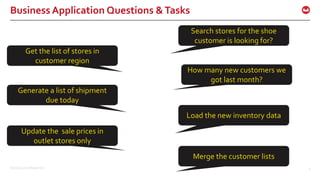
Business Application Questions &Tasks
How many new customers we
got last month?
Get the list of stores in
customer region
Search stores for the shoe
customer is looking for?
Generate a list of shipment
due today
Load the new inventory data
Update the sale prices in
outlet stores only
Merge the customer lists
©2016 Couchbase Inc. 6
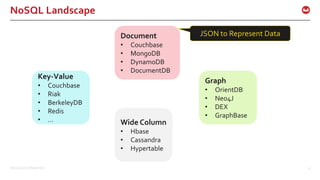
NoSQL Landscape
Document
• Couchbase
• MongoDB
• DynamoDB
• DocumentDB
Graph
• OrientDB
• Neo4J
• DEX
• GraphBase
Key-Value
• Couchbase
• Riak
• BerkeleyDB
• Redis
• … Wide Column
• Hbase
• Cassandra
• Hypertable
JSON to Represent Data
©2015 Couchbase Inc. 7
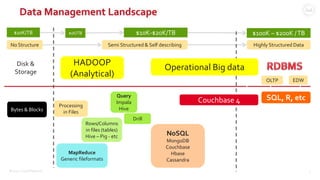
Data Management Landscape
Processing
in Files
MapReduce
Generic fileformats
Rows/Columns
in files (tables)
Hive – Pig - etc
Query
Impala
Hive
NoSQL
MongoDB
Couchbase
Hbase
Cassandra
HADOOP
(Analytical)
Disk &
Storage
Highly Structured Data
SQL, R, etc
Bytes & Blocks
$100K – $200K /TB$1K/TB$10K/TB
Semi Structured & Self describingNo Structure
OLTP EDW
$10K-$20K/TB
Drill
Operational Big data
Couchbase 4
©2016 Couchbase Inc. 8
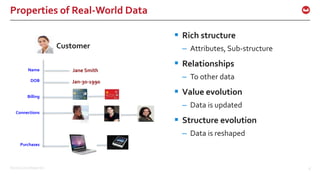
Properties of Real-World Data
 Rich structure
– Attributes, Sub-structure
 Relationships
– To other data
 Value evolution
– Data is updated
 Structure evolution
– Data is reshaped
Customer
Name
DOB
Billing
Connections
Purchases
©2016 Couchbase Inc. 9
Transform: Relational to JSON
{
"Name" : "Jane Smith",
"DOB" : "1990-01-30",
"Billing" : [
{
"type" : "visa",
"cardnum" : "5827-2842-2847-3909",
"expiry" : "2019-03"
},
{
"type" : "master",
"cardnum" : "6274-2842-2847-3909",
"expiry" : "2019-03"
}
],
"Connections" : [
{
"CustId" : "XYZ987",
"Name" : "Joe Smith"
},
{
"CustId" : "PQR823",
"Name" : "Dylan Smith"
}
{
"CustId" : "PQR823",
"Name" : "Dylan Smith"
}
],
"Purchases" : [
{ "id":12, item: "mac", "amt": 2823.52 }
{ "id":19, item: "ipad2", "amt": 623.52 }
]
}
DocumentKey: CBL2015
CustomerID Name DOB
CBL2015 Jane Smith 1990-01-30
Customer
ID
Type Cardnum Expiry
CBL2015 visa 5827… 2019-03
CBL2015 maste
r
6274… 2018-12
CustomerID ConnId Name
CBL2015 XYZ987 Joe Smith
CBL2015 SKR007 Sam Smith
CustomerID item amt
CBL2015 mac 2823.52
CBL2015 ipad2 623.52
CustomerID ConnId Name
CBL2015 XYZ987 Joe Smith
CBL2015 SKR007 Sam
Smith
Contacts
Customer
Billing
ConnectionsPurchases
©2016 Couchbase Inc. 10
JSON
{
"Name" : "Jane Smith",
"DOB" : "1990-01-30",
"Billing" : [
{
"type" : "visa",
"cardnum" : "5827-2842-2847-3909",
"expiry" : "2019-03"
},
{
"type" : "master",
"cardnum" : "6274-2842-2847-3909",
"expiry" : "2019-03"
}
],
"Connections" : [
{
"CustId" : "XYZ987",
"Name" : "Joe Smith"
},
{
"CustId" : "PQR823",
"Name" : "Dylan Smith"
}
{
"CustId" : "PQR823",
"Name" : "Dylan Smith"
}
],
"Purchases" : [
{ "id":12, item: "mac", "amt": 2823.52 }
{ "id":19, item: "ipad2", "amt": 623.52 }
]
}
 JSON is a means to the end and not the end itself
– JSON is the representation of the enterprise data model for applications
– JSON flexibility translates to application flexibility
• Simple flattened data can be represented
• Entities with complex data, always accessed analyzed together should belong
together
– Applications are designed to handle the flexible data model.
©2016 Couchbase Inc. 11
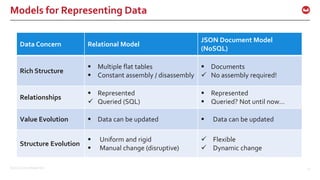
Models for Representing Data
Data Concern Relational Model
JSON Document Model
(NoSQL)
Rich Structure
 Multiple flat tables
 Constant assembly / disassembly
 Documents
 No assembly required!
Relationships
 Represented
 Queried (SQL)
 Represented
 Queried? Not until now…
Value Evolution  Data can be updated  Data can be updated
Structure Evolution
 Uniform and rigid
 Manual change (disruptive)
 Flexible
 Dynamic change
©2016 Couchbase Inc. 12
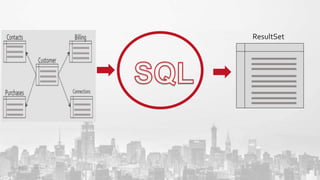
ResultSet
©2016 Couchbase Inc. 13
{
"Name" : "Jane Smith",
"DOB" : "1990-01-30",
"Billing" : [
{
"type" : "visa",
"cardnum" : "5827-2842-2847-3909",
"expiry" : "2019-03"
},
{
"type" : "master",
"cardnum" : "6274-2842-2847-3909",
"expiry" : "2019-03"
}
],
"Connections" : [
{
"CustId" : "XYZ987",
"Name" : "Joe Smith"
},
{
"CustId" : "PQR823",
"Name" : "Dylan Smith"
}
{
"CustId" : "PQR823",
"Name" : "Dylan Smith"
}
],
"Purchases" : [
{ "id":12, item: "mac", "amt": 2823.52 }
{ "id":19, item: "ipad2", "amt": 623.52 }
]
}
LoyaltyInfo ResultDocuments
Orders
CUSTOMER
Built Manually; Expensive
©2016 Couchbase Inc. 14
{
"Name" : "Jane Smith",
"DOB" : "1990-01-30",
"Billing" : [
{
"type" : "visa",
"cardnum" : "5827-2842-2847-3909",
"expiry" : "2019-03"
},
{
"type" : "master",
"cardnum" : "6274-2842-2847-3909",
"expiry" : "2019-03"
}
],
"Connections" : [
{
"CustId" : "XYZ987",
"Name" : "Joe Smith"
},
{
"CustId" : "PQR823",
"Name" : "Dylan Smith"
}
{
"CustId" : "PQR823",
"Name" : "Dylan Smith"
}
],
"Purchases" : [
{ "id":12, item: "mac", "amt": 2823.52 }
{ "id":19, item: "ipad2", "amt": 623.52 }
]
}
LoyaltyInfo ResultDocuments
Orders
CUSTOMER
©2016 Couchbase Inc. 15
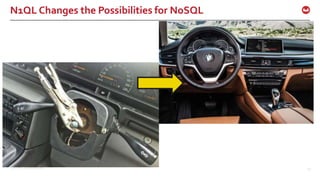
N1QL Changes the Possibilities for NoSQL
©2016 Couchbase Inc. 16
Goal of N1QL: SQL for JSON
Give developers and enterprises an
expressive, powerful, and complete
language for querying, transforming,
and manipulating JSON data.
©2016 Couchbase Inc. 17
N1QL: Developers & Enterprises
Application Developers in all languages
–Couchbase SDK Support for N1QL
–Open REST API
Exchanges data with other databases using Standard
Tools
Simba provides ODBC, JDBC drivers
Tableau, INFA interoperability
©2016 Couchbase Inc. 18
N1QL: expressive
 Access to every part of JSON document
 Scalar & Aggreate functions
 Issue subquery in any expressions
 Subqueries
 Subqueries in the FROM clause
©2016 Couchbase Inc. 19
N1QL: powerful
 Access to every part of JSON document
 JOINS, Aggregations, standard scalar functions
 Aggregation on arrays
 NEST & UNNEST operations
 Covering Index
©2016 Couchbase Inc. 20
N1QL: querying
 INSERT
 UPDATE
 DELETE
 MERGE
 SELECT
 EXPLAIN
©2016 Couchbase Inc. 21
N1QL: transforming & manipulating
 FullTransformation of the data via Query.
 INSERT
– INSERT single & multiple documents
– INSERT result a SELECT statement
 DELETE documents based on complex filter
 UPDATE any part of JSON document & use complex filter.
 MERGE two sets of documents using traditional MERGE
statement
©2016 Couchbase Inc. 22
©2016 Couchbase Inc. 23
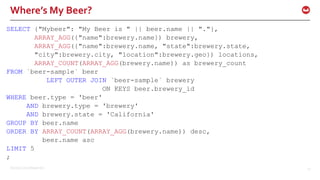
Where’s My Beer?
SELECT {"Mybeer": "My Beer is " || beer.name || "."},
ARRAY_AGG({"name":brewery.name}) brewery,
ARRAY_AGG({"name":brewery.name, "state":brewery.state,
"city":brewery.city, "location":brewery.geo}) locations,
ARRAY_COUNT(ARRAY_AGG(brewery.name)) as brewery_count
FROM `beer-sample` beer
LEFT OUTER JOIN `beer-sample` brewery
ON KEYS beer.brewery_id
WHERE beer.type = 'beer'
AND brewery.type = 'brewery'
AND brewery.state = 'California'
GROUP BY beer.name
ORDER BY ARRAY_COUNT(ARRAY_AGG(brewery.name)) desc,
beer.name asc
LIMIT 5
;
©2016 Couchbase Inc. 24
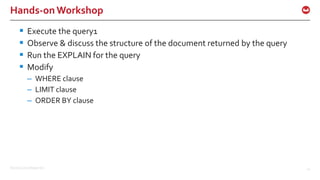
Hands-onWorkshop
 Execute the query1
 Observe & discuss the structure of the document returned by the query
 Run the EXPLAIN for the query
 Modify
– WHERE clause
– LIMIT clause
– ORDER BY clause
©2016 Couchbase Inc. 25
QUERY EXECUTION
©2016 Couchbase Inc. 26
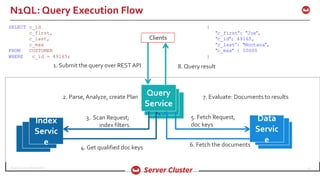
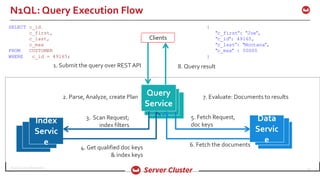
N1QL: Query Execution Flow
Clients
1. Submit the query over RESTAPI 8. Query result
2. Parse, Analyze, create Plan 7. Evaluate: Documents to results
3. Scan Request;
index filters
6. Fetch the documents
Index
Servic
e
Query
Service
Data
Servic
e
4. Get qualified doc keys
5. Fetch Request,
doc keys
SELECT c_id,
c_first,
c_last,
c_max
FROM CUSTOMER
WHERE c_id = 49165;
{
"c_first": "Joe",
"c_id": 49165,
"c_last": "Montana",
"c_max" : 50000
}
©2016 Couchbase Inc. 27
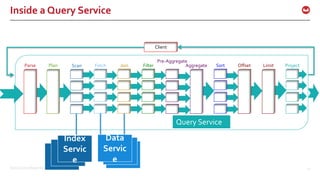
Inside a Query Service
Client
FetchParse Plan Join Filter
Pre-Aggregate
Offset Limit ProjectSortAggregateScan
Query Service
Index
Servic
e
Data
Servic
e
©2016 Couchbase Inc. 28
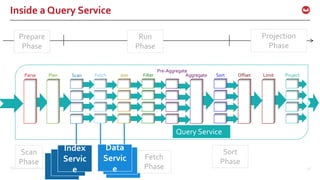
Inside a Query Service
FetchParse Plan Join Filter
Pre-Aggregate
Offset Limit ProjectSortAggregateScan
Query Service
Index
Servic
e
Data
Servic
e
Prepare
Phase
Projection
Phase
Run
Phase
Scan
Phase
Fetch
Phase
Sort
Phase
©2016 Couchbase Inc. 29
QUERY PREPARE
©2016 Couchbase Inc. 30
Prepare Phase: Parse & Semantic Check
 Analyzes the Query for syntax & grammar
 Only verifies for existence of referenced buckets
 Flexible schema means, you can refer to arbitrary attribute
names. N1QL key names are CaSe SENSitive.
 A key is NULL if it’s a known null. {“location”:null}
 A key is MISSING if not present in the document
 Use IS NULL and IS MISSING to check for each condition
 Full reference to JSON structure
– Nested reference: CUSTOMER.contact.address.state
– Array Reference: CUSTOMER.c_contact.phone_number[0]
 SQL is enhanced to access & manipulateArrays
Fetch
Parse
Plan
Join
Filter
Offset
Limit
Project
Sort
Aggre
gate
Scan
©2016 Couchbase Inc. 31
Prepare: PLAN
Fetch
Parse
Plan
Join
Filter
Offset
Limit
Project
Sort
Aggre
gate
Scan
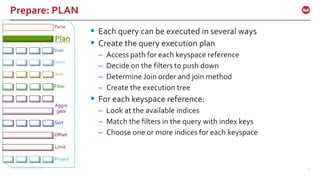
 Each query can be executed in several ways
 Create the query execution plan
– Access path for each keyspace reference
– Decide on the filters to push down
– Determine Join order and join method
– Create the execution tree
 For each keyspace reference:
– Look at the available indices
– Match the filters in the query with index keys
– Choose one or more indices for each keyspace
©2016 Couchbase Inc. 32
PREPARE
Fetch
Parse
Plan
Join
Filter
Offset
Limit
Project
Sort
Aggre
gate
Scan
 Ever statement executed in the engine is PREPARED
 When you have same statement executed millions of
times, you can save prepare time
 Prepare statement can use simple adhoc statement
PREPARE p1 FROM SELECT * from `beer-sample` LIMIT 1;
EXECUTE p1;
 Compare the execution time
 Prepare Statement can exploit parameters to bind
PREPARE p2 FROM SELECT * from `beer-sample` WHERE abv = $1;
$ curl http://localhost:8093/query/service -H "Content-
Type: application/json" -d '{"prepared":"p2",
"args":[5.0]}’
$ curl http://localhost:8093/query/service -d 'prepared
="mp"&args=[5.0]’
©2016 Couchbase Inc. 33
PREPARE
Fetch
Parse
Plan
Join
Filter
Offset
Limit
Project
Sort
Aggre
gate
Scan
 Ever statement executed in the engine is PREPARED
 When you have same statement executed millions of
times, you can save prepare time
 Prepare statement can use simple adhoc statement
PREPARE p1 FROM SELECT * from `beer-sample` LIMIT 1;
EXECUTE p1;
 Compare the execution time
 Prepare Statement can exploit parameters to bind
PREPARE p2 FROM SELECT * from `beer-sample` WHERE abv = $1;
$ curl http://localhost:8093/query/service -H "Content-
Type: application/json" -d '{"prepared":"p2",
"args":[5.0]}’
$ curl http://localhost:8093/query/service -d 'prepared
="mp"&args=[5.0]’
©2016 Couchbase Inc. 34
PREPARE
Fetch
Parse
Plan
Join
Filter
Offset
Limit
Project
Sort
Aggre
gate
Scan
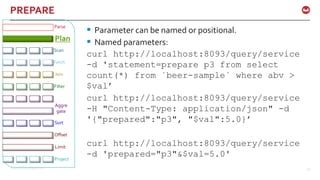
 Parameter can be named or positional.
 Named parameters:
curl http://localhost:8093/query/service
-d 'statement=prepare p3 from select
count(*) from `beer-sample` where abv >
$val’
curl http://localhost:8093/query/service
-H "Content-Type: application/json" -d
'{"prepared":"p3", "$val":5.0}’
curl http://localhost:8093/query/service
-d 'prepared="p3"&$val=5.0'
©2016 Couchbase Inc. 35
PREPARE: Cluster Environment
Fetch
Parse
Plan
Join
Filter
Offset
Limit
Project
Sort
Aggre
gate
Scan
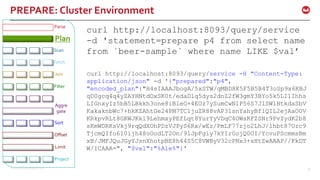
curl http://localhost:8093/query/service
-d 'statement=prepare p4 from select name
from `beer-sample` where name LIKE $val’
curl http://localhost:8093/query/service -H "Content-Type:
application/json" -d '{"prepared":"p4",
"encoded_plan":"H4sIAAAJbogA/5xSTW/qMBD8K5F5B5B4T3oSp9x6KBJ
qD0gcq4q4yZAYHNtdOxSK0t/edaDlq5dys2dnZ2fW3gmY3BYo5k5LI1Ihhs
LIGnxyIz5bB5LBkkh3one8iBleG+4EUz7ySumCwN1P56S7JlSW1HtkdaSbV
KakaknbWc7+hkKZAhtGe24PM7TC1juZR88vAP31snYahyBflQIL2ejAaOOV
KRkpvRLt8GKWJKk19LehmxyPEfLqt8YurYyVDqC4OWsKFZSNr9PvZydK2b8
sKmWDRKsVkj9rqQdXOhPDzVJPyS6Rx/wEz/PmLF77zjo2LhJ/lhbt87Uzc9
TjcmQIfo610ijh48oOodLT2On/9lJpFgiy7kYIr0ojQ0OI/YcvuPScmmsBm
xB/JMFJQuJGyYJsnXhotpBE8h44S5C8VWByV32cPNx3+xHtZwAAAP//FkDT
W/ICAAA=", "$val":"%Ale%"}'
©2016 Couchbase Inc. 36
PREPARE: Summary
Fetch
Parse
Plan
Join
Filter
Offset
Limit
Project
Sort
Aggre
gate
Scan
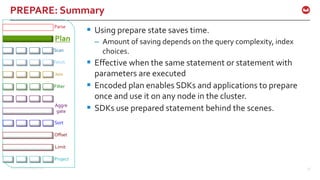
 Using prepare state saves time.
– Amount of saving depends on the query complexity, index
choices.
 Effective when the same statement or statement with
parameters are executed
 Encoded plan enables SDKs and applications to prepare
once and use it on any node in the cluster.
 SDKs use prepared statement behind the scenes.
©2016 Couchbase Inc. 37
Hands-onWorkshop
 Prepare the queries P1 through P4.
 Execute them in cbq and via curl
 Compare the execution timings.
©2016 Couchbase Inc. 38
QUERY PLANNING & INDEX SELECTION
©2016 Couchbase Inc. 39
PLAN:We’re not done yet!
Fetch
Parse
Plan
Join
Filter
Offset
Limit
Project
Sort
Aggre
gate
Scan
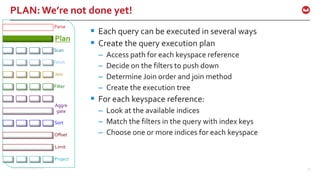
 Each query can be executed in several ways
 Create the query execution plan
– Access path for each keyspace reference
– Decide on the filters to push down
– Determine Join order and join method
– Create the execution tree
 For each keyspace reference:
– Look at the available indices
– Match the filters in the query with index keys
– Choose one or more indices for each keyspace
©2016 Couchbase Inc. 40
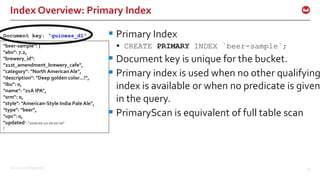
Index Overview: Primary Index
 Primary Index
 CREATE PRIMARY INDEX `beer-sample`;
 Document key is unique for the bucket.
 Primary index is used when no other qualifying
index is available or when no predicate is given
in the query.
 PrimaryScan is equivalent of full table scan
"beer-sample": {
"abv": 7.2,
"brewery_id":
"21st_amendment_brewery_cafe",
"category": "North American Ale",
"description": "Deep golden color...!",
"ibu": 0,
"name": "21A IPA",
"srm": 0,
"style": "American-Style India Pale Ale",
"type": "beer",
"upc": 0,
"updated": "2010-07-22 20:00:20"
}
Document key: “guiness_d1”
©2016 Couchbase Inc. 41
"beer-sample": {
"abv": 7.2,
"brewery_id":
"21st_amendment_brewery_cafe",
"category": "North American Ale",
"description": "Deep golden color...!",
"ibu": 0,
"name": "21A IPA",
"srm": 0,
"style": "American-Style India Pale Ale",
"type": "beer",
"upc": 0,
"updated": "2010-07-22 20:00:20"
}
Document key: “Pale Ale.A1”
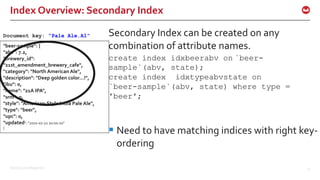
Index Overview: Secondary Index
Secondary Index can be created on any
combination of attribute names.
create index idxbeerabv on `beer-
sample`(abv, state);
create index idxtypeabvstate on
`beer-sample`(abv, state) where type =
'beer';
 Need to have matching indices with right key-
ordering
©2016 Couchbase Inc. 42
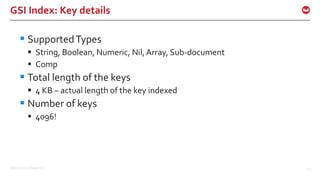
GSI Index: Key details
 SupportedTypes
 String, Boolean, Numeric, Nil,Array, Sub-document
 Comp
 Total length of the keys
 4 KB – actual length of the key indexed
 Number of keys
 4096!
©2016 Couchbase Inc. 43
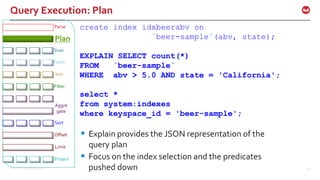
Query Execution: Plan
Fetch
Parse
Plan
Join
Filter
Offset
Limit
Project
Sort
Aggre
gate
Scan
create index idxbeerabv on
`beer-sample`(abv, state);
EXPLAIN SELECT count(*)
FROM `beer-sample`
WHERE abv > 5.0 AND state = 'California';
select *
from system:indexes
where keyspace_id = 'beer-sample';
 Explain provides the JSON representation of the
query plan
 Focus on the index selection and the predicates
pushed down
©2016 Couchbase Inc. 44
Query Execution: Plan
Fetch
Parse
Plan
Join
Filter
Offset
Limit
Project
Sort
Aggre
gate
Scan
create index idxtypeabvstate on `beer-
sample`(abv, state) where type = ‘beer’;
select * from system:indexes where name =
'idxtypeabvstate';
"indexes": {
"condition": "(`type` = "beer")",
"datastore_id": "http://127.0.0.1:8091",
"id": "611ffca1720b7868",
"index_key": [
"`abv`",
"`state`"
],
"keyspace_id": "beer-sample",
"name": "idxtypeabvstate",
"namespace_id": "default",
"state": "online",
"using": "gsi"
}
©2016 Couchbase Inc. 45
Plan: Index selection – Partial Index
Fetch
Parse
Plan
Join
Filter
Offset
Limit
Project
Sort
Aggre
gate
Scan
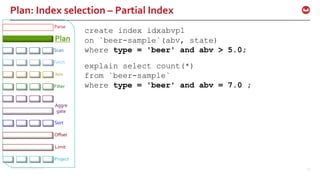
create index idxabvp1
on `beer-sample`(abv, state)
where type = 'beer' and abv > 5.0;
explain select count(*)
from `beer-sample`
where type = 'beer' and abv = 7.0 ;
©2015 Couchbase Inc. 46
Power Features: IntersectScan (Multi-Index Scan)
create index idxbeerabv on `beer-sample`(abv);
create index idxbeercat on `beer-sample`(category);
select *
from `beer-sample`
where abv > 15 and category like '%North%';
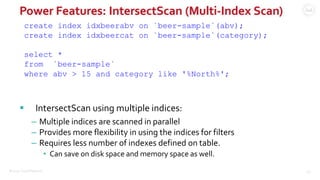
 IntersectScan using multiple indices:
– Multiple indices are scanned in parallel
– Provides more flexibility in using the indices for filters
– Requires less number of indexes defined on table.
• Can save on disk space and memory space as well.
©2016 Couchbase Inc. 47
IntersectScan method using multiple indices
create index idxbeerabv on `beer-sample`(abv);
create index idxbeercat on `beer-sample`(category);
select *
from `beer-sample`
where abv > 15 and category like '%North%';
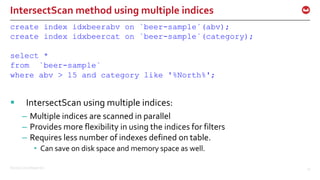
 IntersectScan using multiple indices:
– Multiple indices are scanned in parallel
– Provides more flexibility in using the indices for filters
– Requires less number of indexes defined on table.
• Can save on disk space and memory space as well.
©2016 Couchbase Inc. 48
Plan Directives: USE INDEX
create index idxbeerabv on `beer-sample`(abv);
create index idxbeercat on `beer-sample`(category);
select *
from `beer-sample` USE INDEX (idxbeerabv)
where abv > 15 and category like '%North%';
select *
from `beer-sample` USE INDEX (idxbeerabv, idxbeercat)
where abv > 15 and category like '%North%’;
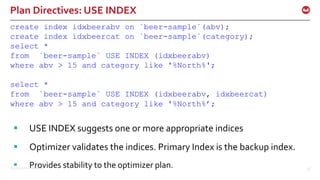
 USE INDEX suggests one or more appropriate indices
 Optimizer validates the indices. Primary Index is the backup index.
 Provides stability to the optimizer plan.
©2016 Couchbase Inc. 49
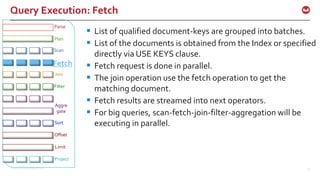
Query Execution: Fetch
 List of qualified document-keys are grouped into batches.
 List of the documents is obtained from the Index or specified
directly via USE KEYS clause.
 Fetch request is done in parallel.
 The join operation use the fetch operation to get the
matching document.
 Fetch results are streamed into next operators.
 For big queries, scan-fetch-join-filter-aggregation will be
executing in parallel.
Fetch
Parse
Plan
Join
Filter
Offset
Limit
Project
Sort
Aggre
gate
Scan
©2016 Couchbase Inc. 50
JOINS
©2016 Couchbase Inc. 51
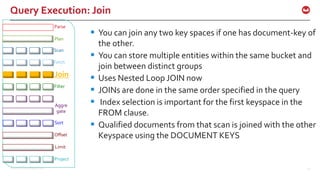
Query Execution: Join
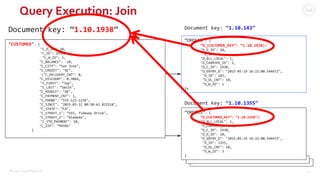
 You can join any two key spaces if one has document-key of
the other.
 You can store multiple entities within the same bucket and
join between distinct groups
 Uses Nested Loop JOIN now
 JOINs are done in the same order specified in the query
 Index selection is important for the first keyspace in the
FROM clause.
 Qualified documents from that scan is joined with the other
Keyspace using the DOCUMENT KEYS
Fetch
Parse
Plan
Join
Filter
Offset
Limit
Project
Sort
Aggre
gate
Scan
©2015 Couchbase Inc. 52
Query Execution: Join
"CUSTOMER": {
"C_D_ID": 10,
"C_ID": 1938,
"C_W_ID": 1,
"C_BALANCE": -10,
"C_CITY": ”San Jose",
"C_CREDIT": "GC”,
"C_DELIVERY_CNT": 0,
"C_DISCOUNT": 0.3866,
"C_FIRST": ”Jay",
"C_LAST": ”Smith",
"C_MIDDLE": "OE",
"C_PAYMENT_CNT": 1,
"C_PHONE": ”555-123-1234",
"C_SINCE": "2015-03-22 00:50:42.822518",
"C_STATE": ”CA",
"C_STREET_1": ”555, Tideway Drive",
"C_STREET_2": ”Alameda",
"C_YTD_PAYMENT": 10,
"C_ZIP": ”94501"
}
Document key: “1.10.1938” Document key: “1.10.143”
“ORDERS”: {
“O_CUSTOMER_KEY”: “1.10.1938):
"O_D_ID": 10,
"O_ID": 1,
"O_ALL_LOCAL": 1,
"O_CARRIER_ID": 2,
"O_C_ID": 1938,
"O_ENTRY_D": "2015-05-19 16:22:08.544472",
"O_ID": 143,
"O_OL_CNT": 10,
"O_W_ID": 1
}x
“ORDERS”: {
“O_CUSTOMER_KEY”: “1.10.1938”):
"O_ALL_LOCAL": 1,
"O_CARRIER_ID": 2,
"O_C_ID": 1938,
"O_D_ID": 10,
"O_ENTRY_D": "2015-05-19 16:22:08.544472",
"O_ID": 1355,
"O_OL_CNT": 10,
"O_W_ID": 3
}
Document key: “1.10.1355”
©2015 Couchbase Inc. 53
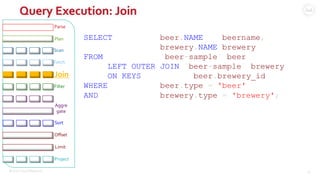
Query Execution: Join
SELECT beer.NAME beername,
brewery.NAME brewery
FROM `beer-sample` beer
LEFT OUTER JOIN `beer-sample` brewery
ON KEYS beer.brewery_id
WHERE beer.type = 'beer'
AND brewery.type = 'brewery';
Fetch
Parse
Plan
Join
Filter
Offset
Limit
Project
Sort
Aggre
gate
Scan
©2015 Couchbase Inc. 54
N1QL: Join
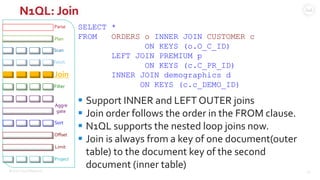
SELECT *
FROM ORDERS o INNER JOIN CUSTOMER c
ON KEYS (o.O_C_ID)
LEFT JOIN PREMIUM p
ON KEYS (c.C_PR_ID)
INNER JOIN demographics d
ON KEYS (c.c_DEMO_ID)
Fetch
Parse
Plan
Join
Filter
Offset
Limit
Project
Sort
Aggre
gate
Scan
 Support INNER and LEFT OUTER joins
 Join order follows the order in the FROM clause.
 N1QL supports the nested loop joins now.
 Join is always from a key of one document(outer
table) to the document key of the second
document (inner table)
©2016 Couchbase Inc. 56
Covering Index
©2016 Couchbase Inc. 57
N1QL: Query Execution Flow
Clients
1. Submit the query over RESTAPI 8. Query result
2. Parse, Analyze, create Plan 7. Evaluate: Documents to results
3. Scan Request;
index filters
6. Fetch the documents
Index
Servic
e
Query
Service
Data
Servic
e
4. Get qualified doc keys
& index keys
5. Fetch Request,
doc keys
SELECT c_id,
c_first,
c_last,
c_max
FROM CUSTOMER
WHERE c_id = 49165;
{
"c_first": "Joe",
"c_id": 49165,
"c_last": "Montana",
"c_max" : 50000
}
©2016 Couchbase Inc. 58
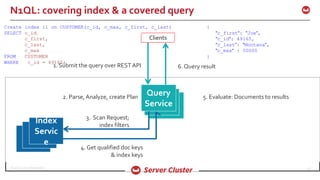
N1QL: covering index & a covered query
Clients
1. Submit the query over RESTAPI 6. Query result
2. Parse, Analyze, create Plan 5. Evaluate: Documents to results
3. Scan Request;
index filters
Index
Servic
e
Query
Service
4. Get qualified doc keys
& index keys
Create index i1 on CUSTOMER(c_id, c_max, c_first, c_last)
SELECT c_id,
c_first,
c_last,
c_max
FROM CUSTOMER
WHERE c_id = 49165;
{
"c_first": "Joe",
"c_id": 49165,
"c_last": "Montana",
"c_max" : 50000
}
©2016 Couchbase Inc. 59
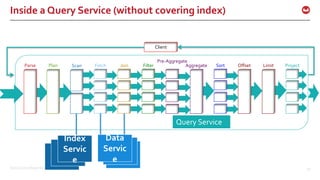
Inside a Query Service (without covering index)
Client
FetchParse Plan Join Filter
Pre-Aggregate
Offset Limit ProjectSortAggregateScan
Query Service
Index
Servic
e
Data
Servic
e
©2016 Couchbase Inc. 60
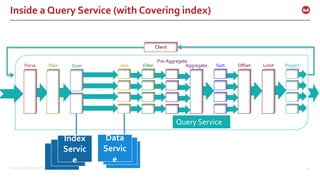
Inside a Query Service (with Covering index)
Client
Parse Plan Join Filter
Pre-Aggregate
Offset Limit ProjectSortAggregateScan
Query Service
Index
Servic
e
Data
Servic
e
©2016 Couchbase Inc. 61
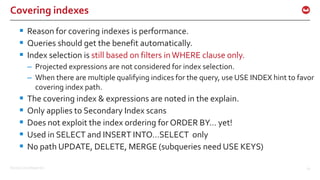
Covering indexes
 Reason for covering indexes is performance.
 Queries should get the benefit automatically.
 Index selection is still based on filters inWHERE clause only.
– Projected expressions are not considered for index selection.
– When there are multiple qualifying indices for the query, use USE INDEX hint to favor
covering index path.
 The covering index & expressions are noted in the explain.
 Only applies to Secondary Index scans
 Does not exploit the index ordering for ORDER BY… yet!
 Used in SELECT and INSERT INTO…SELECT only
 No path UPDATE, DELETE, MERGE (subqueries need USE KEYS)
©2016 Couchbase Inc. 62
create index idxstatecity on `beer-
sample`(state,city) using gsi;
EXPLAIN
SELECT city
FROM`beer-sample`
WHERE state = 'California';
N1QL: Example
{
"requestID": "eef73760-d09e-48e0-a43a-c8da1e0be998
"signature": "json",
"results": [
{
"#operator": "Sequence",
"~children": [
{
"#operator": "IndexScan",
"covers": [
"cover((meta(`beer-sample`).`id`))",
"cover((`beer-sample`.`state`))",
"cover((`beer-sample`.`city`))"
],
"index": "idxstatecity",
"keyspace": "beer-sample",
"namespace": "default",
"spans": [
{
]
©2016 Couchbase Inc. 63
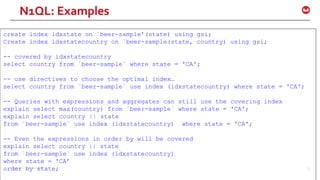
create index idxstate on `beer-sample’(state) using gsi;
Create index idxstatecountry on `beer-sample(state, country) using gsi;
-- covered by idxstatecountry
select country from `beer-sample` where state = 'CA';
-- use directives to choose the optimal index…
select country from `beer-sample` use index (idxstatecountry) where state = 'CA';
-- Queries with expressions and aggregates can still use the covering index
explain select max(country) from `beer-sample` where state = 'CA';
explain select country || state
from `beer-sample` use index (idxstatecountry) where state = 'CA';
-- Even the expressions in order by will be covered
explain select country || state
from `beer-sample` use index (idxstatecountry)
where state = 'CA’
order by state;
N1QL: Examples
©2016 Couchbase Inc. 64
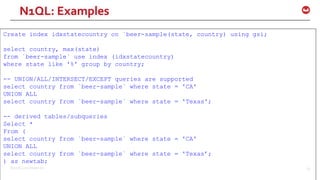
Create index idxstatecountry on `beer-sample(state, country) using gsi;
select country, max(state)
from `beer-sample` use index (idxstatecountry)
where state like '%' group by country;
-- UNION/ALL/INTERSECT/EXCEPT queries are supported
select country from `beer-sample` where state = 'CA'
UNION ALL
select country from `beer-sample` where state = 'Texas';
-- derived tables/subqueries
Select *
From (
select country from `beer-sample` where state = 'CA'
UNION ALL
select country from `beer-sample` where state = 'Texas’;
) as newtab;
N1QL: Examples
©2016 Couchbase Inc. 65
Create index idxstatecountry on `beer-sample(state, country) using gsi;
-- select in insert statement
insert into `travel-sample`(KEY k, value state)
Select country as k, state from `beer-sample b where stat = ‘ca’;
-- Supports Arrays
Create index idxarray on `beer-sample`(a, b);
Select b from `beer-sample` where a = [1, 2, 3, 4];
N1QL: Examples
©2016 Couchbase Inc. 66
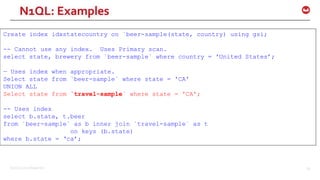
Create index idxstatecountry on `beer-sample(state, country) using gsi;
-- Cannot use any index. Uses Primary scan.
select state, brewery from `beer-sample` where country = 'United States’;
— Uses index when appropriate.
Select state from `beer-sample` where state = 'CA'
UNION ALL
Select state from `travel-sample` where state = 'CA';
-- Uses index
select b.state, t.beer
from `beer-sample` as b inner join `travel-sample` as t
on keys (b.state)
where b.state = ‘ca’;
N1QL: Examples
©2016 Couchbase Inc. 67
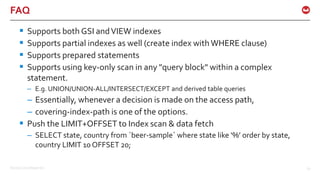
FAQ
 Supports both GSI andVIEW indexes
 Supports partial indexes as well (create index withWHERE clause)
 Supports prepared statements
 Supports using key-only scan in any "query block" within a complex
statement.
– E.g. UNION/UNION-ALL/INTERSECT/EXCEPT and derived table queries
– Essentially, whenever a decision is made on the access path,
– covering-index-path is one of the options.
 Push the LIMIT+OFFSET to Index scan & data fetch
– SELECT state, country from `beer-sample` where state like ‘%’ order by state,
country LIMIT 10 OFFSET 20;
©2016 Couchbase Inc. 68
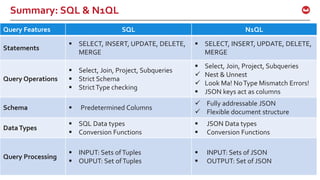
Summary: SQL & N1QL
Query Features SQL N1QL
Statements
 SELECT, INSERT, UPDATE, DELETE,
MERGE
 SELECT, INSERT, UPDATE, DELETE,
MERGE
Query Operations
 Select, Join, Project, Subqueries
 Strict Schema
 StrictType checking
 Select, Join, Project, Subqueries
 Nest & Unnest
 Look Ma! NoType Mismatch Errors!
 JSON keys act as columns
Schema  Predetermined Columns
 Fully addressable JSON
 Flexible document structure
DataTypes
 SQL Data types
 Conversion Functions
 JSON Data types
 Conversion Functions
Query Processing
 INPUT: Sets ofTuples
 OUPUT: Set ofTuples
 INPUT: Sets of JSON
 OUTPUT: Set of JSON
©2016 Couchbase Inc. 69
Summary
Summary
©2016 Couchbase Inc. 71
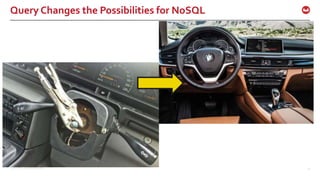
Query Changes the Possibilities for NoSQL
©2016 Couchbase Inc. 72

Query in Couchbase. N1QL: SQL for JSON

  • 1.
  • 2.
  • 3.
    ©2016 Couchbase Inc.3 Agenda Thinking in N1QL Anatomy of Query
  • 4.
  • 5.
    ©2016 Couchbase Inc.5 Business Application Questions &Tasks How many new customers we got last month? Get the list of stores in customer region Search stores for the shoe customer is looking for? Generate a list of shipment due today Load the new inventory data Update the sale prices in outlet stores only Merge the customer lists
  • 6.
    ©2016 Couchbase Inc.6 NoSQL Landscape Document • Couchbase • MongoDB • DynamoDB • DocumentDB Graph • OrientDB • Neo4J • DEX • GraphBase Key-Value • Couchbase • Riak • BerkeleyDB • Redis • … Wide Column • Hbase • Cassandra • Hypertable JSON to Represent Data
  • 7.
    ©2015 Couchbase Inc.7 Data Management Landscape Processing in Files MapReduce Generic fileformats Rows/Columns in files (tables) Hive – Pig - etc Query Impala Hive NoSQL MongoDB Couchbase Hbase Cassandra HADOOP (Analytical) Disk & Storage Highly Structured Data SQL, R, etc Bytes & Blocks $100K – $200K /TB$1K/TB$10K/TB Semi Structured & Self describingNo Structure OLTP EDW $10K-$20K/TB Drill Operational Big data Couchbase 4
  • 8.
    ©2016 Couchbase Inc.8 Properties of Real-World Data  Rich structure – Attributes, Sub-structure  Relationships – To other data  Value evolution – Data is updated  Structure evolution – Data is reshaped Customer Name DOB Billing Connections Purchases
  • 9.
    ©2016 Couchbase Inc.9 Transform: Relational to JSON { "Name" : "Jane Smith", "DOB" : "1990-01-30", "Billing" : [ { "type" : "visa", "cardnum" : "5827-2842-2847-3909", "expiry" : "2019-03" }, { "type" : "master", "cardnum" : "6274-2842-2847-3909", "expiry" : "2019-03" } ], "Connections" : [ { "CustId" : "XYZ987", "Name" : "Joe Smith" }, { "CustId" : "PQR823", "Name" : "Dylan Smith" } { "CustId" : "PQR823", "Name" : "Dylan Smith" } ], "Purchases" : [ { "id":12, item: "mac", "amt": 2823.52 } { "id":19, item: "ipad2", "amt": 623.52 } ] } DocumentKey: CBL2015 CustomerID Name DOB CBL2015 Jane Smith 1990-01-30 Customer ID Type Cardnum Expiry CBL2015 visa 5827… 2019-03 CBL2015 maste r 6274… 2018-12 CustomerID ConnId Name CBL2015 XYZ987 Joe Smith CBL2015 SKR007 Sam Smith CustomerID item amt CBL2015 mac 2823.52 CBL2015 ipad2 623.52 CustomerID ConnId Name CBL2015 XYZ987 Joe Smith CBL2015 SKR007 Sam Smith Contacts Customer Billing ConnectionsPurchases
  • 10.
    ©2016 Couchbase Inc.10 JSON { "Name" : "Jane Smith", "DOB" : "1990-01-30", "Billing" : [ { "type" : "visa", "cardnum" : "5827-2842-2847-3909", "expiry" : "2019-03" }, { "type" : "master", "cardnum" : "6274-2842-2847-3909", "expiry" : "2019-03" } ], "Connections" : [ { "CustId" : "XYZ987", "Name" : "Joe Smith" }, { "CustId" : "PQR823", "Name" : "Dylan Smith" } { "CustId" : "PQR823", "Name" : "Dylan Smith" } ], "Purchases" : [ { "id":12, item: "mac", "amt": 2823.52 } { "id":19, item: "ipad2", "amt": 623.52 } ] }  JSON is a means to the end and not the end itself – JSON is the representation of the enterprise data model for applications – JSON flexibility translates to application flexibility • Simple flattened data can be represented • Entities with complex data, always accessed analyzed together should belong together – Applications are designed to handle the flexible data model.
  • 11.
    ©2016 Couchbase Inc.11 Models for Representing Data Data Concern Relational Model JSON Document Model (NoSQL) Rich Structure  Multiple flat tables  Constant assembly / disassembly  Documents  No assembly required! Relationships  Represented  Queried (SQL)  Represented  Queried? Not until now… Value Evolution  Data can be updated  Data can be updated Structure Evolution  Uniform and rigid  Manual change (disruptive)  Flexible  Dynamic change
  • 12.
  • 13.
    ©2016 Couchbase Inc.13 { "Name" : "Jane Smith", "DOB" : "1990-01-30", "Billing" : [ { "type" : "visa", "cardnum" : "5827-2842-2847-3909", "expiry" : "2019-03" }, { "type" : "master", "cardnum" : "6274-2842-2847-3909", "expiry" : "2019-03" } ], "Connections" : [ { "CustId" : "XYZ987", "Name" : "Joe Smith" }, { "CustId" : "PQR823", "Name" : "Dylan Smith" } { "CustId" : "PQR823", "Name" : "Dylan Smith" } ], "Purchases" : [ { "id":12, item: "mac", "amt": 2823.52 } { "id":19, item: "ipad2", "amt": 623.52 } ] } LoyaltyInfo ResultDocuments Orders CUSTOMER Built Manually; Expensive
  • 14.
    ©2016 Couchbase Inc.14 { "Name" : "Jane Smith", "DOB" : "1990-01-30", "Billing" : [ { "type" : "visa", "cardnum" : "5827-2842-2847-3909", "expiry" : "2019-03" }, { "type" : "master", "cardnum" : "6274-2842-2847-3909", "expiry" : "2019-03" } ], "Connections" : [ { "CustId" : "XYZ987", "Name" : "Joe Smith" }, { "CustId" : "PQR823", "Name" : "Dylan Smith" } { "CustId" : "PQR823", "Name" : "Dylan Smith" } ], "Purchases" : [ { "id":12, item: "mac", "amt": 2823.52 } { "id":19, item: "ipad2", "amt": 623.52 } ] } LoyaltyInfo ResultDocuments Orders CUSTOMER
  • 15.
    ©2016 Couchbase Inc.15 N1QL Changes the Possibilities for NoSQL
  • 16.
    ©2016 Couchbase Inc.16 Goal of N1QL: SQL for JSON Give developers and enterprises an expressive, powerful, and complete language for querying, transforming, and manipulating JSON data.
  • 17.
    ©2016 Couchbase Inc.17 N1QL: Developers & Enterprises Application Developers in all languages –Couchbase SDK Support for N1QL –Open REST API Exchanges data with other databases using Standard Tools Simba provides ODBC, JDBC drivers Tableau, INFA interoperability
  • 18.
    ©2016 Couchbase Inc.18 N1QL: expressive  Access to every part of JSON document  Scalar & Aggreate functions  Issue subquery in any expressions  Subqueries  Subqueries in the FROM clause
  • 19.
    ©2016 Couchbase Inc.19 N1QL: powerful  Access to every part of JSON document  JOINS, Aggregations, standard scalar functions  Aggregation on arrays  NEST & UNNEST operations  Covering Index
  • 20.
    ©2016 Couchbase Inc.20 N1QL: querying  INSERT  UPDATE  DELETE  MERGE  SELECT  EXPLAIN
  • 21.
    ©2016 Couchbase Inc.21 N1QL: transforming & manipulating  FullTransformation of the data via Query.  INSERT – INSERT single & multiple documents – INSERT result a SELECT statement  DELETE documents based on complex filter  UPDATE any part of JSON document & use complex filter.  MERGE two sets of documents using traditional MERGE statement
  • 22.
  • 23.
    ©2016 Couchbase Inc.23 Where’s My Beer? SELECT {"Mybeer": "My Beer is " || beer.name || "."}, ARRAY_AGG({"name":brewery.name}) brewery, ARRAY_AGG({"name":brewery.name, "state":brewery.state, "city":brewery.city, "location":brewery.geo}) locations, ARRAY_COUNT(ARRAY_AGG(brewery.name)) as brewery_count FROM `beer-sample` beer LEFT OUTER JOIN `beer-sample` brewery ON KEYS beer.brewery_id WHERE beer.type = 'beer' AND brewery.type = 'brewery' AND brewery.state = 'California' GROUP BY beer.name ORDER BY ARRAY_COUNT(ARRAY_AGG(brewery.name)) desc, beer.name asc LIMIT 5 ;
  • 24.
    ©2016 Couchbase Inc.24 Hands-onWorkshop  Execute the query1  Observe & discuss the structure of the document returned by the query  Run the EXPLAIN for the query  Modify – WHERE clause – LIMIT clause – ORDER BY clause
  • 25.
    ©2016 Couchbase Inc.25 QUERY EXECUTION
  • 26.
    ©2016 Couchbase Inc.26 N1QL: Query Execution Flow Clients 1. Submit the query over RESTAPI 8. Query result 2. Parse, Analyze, create Plan 7. Evaluate: Documents to results 3. Scan Request; index filters 6. Fetch the documents Index Servic e Query Service Data Servic e 4. Get qualified doc keys 5. Fetch Request, doc keys SELECT c_id, c_first, c_last, c_max FROM CUSTOMER WHERE c_id = 49165; { "c_first": "Joe", "c_id": 49165, "c_last": "Montana", "c_max" : 50000 }
  • 27.
    ©2016 Couchbase Inc.27 Inside a Query Service Client FetchParse Plan Join Filter Pre-Aggregate Offset Limit ProjectSortAggregateScan Query Service Index Servic e Data Servic e
  • 28.
    ©2016 Couchbase Inc.28 Inside a Query Service FetchParse Plan Join Filter Pre-Aggregate Offset Limit ProjectSortAggregateScan Query Service Index Servic e Data Servic e Prepare Phase Projection Phase Run Phase Scan Phase Fetch Phase Sort Phase
  • 29.
    ©2016 Couchbase Inc.29 QUERY PREPARE
  • 30.
    ©2016 Couchbase Inc.30 Prepare Phase: Parse & Semantic Check  Analyzes the Query for syntax & grammar  Only verifies for existence of referenced buckets  Flexible schema means, you can refer to arbitrary attribute names. N1QL key names are CaSe SENSitive.  A key is NULL if it’s a known null. {“location”:null}  A key is MISSING if not present in the document  Use IS NULL and IS MISSING to check for each condition  Full reference to JSON structure – Nested reference: CUSTOMER.contact.address.state – Array Reference: CUSTOMER.c_contact.phone_number[0]  SQL is enhanced to access & manipulateArrays Fetch Parse Plan Join Filter Offset Limit Project Sort Aggre gate Scan
  • 31.
    ©2016 Couchbase Inc.31 Prepare: PLAN Fetch Parse Plan Join Filter Offset Limit Project Sort Aggre gate Scan  Each query can be executed in several ways  Create the query execution plan – Access path for each keyspace reference – Decide on the filters to push down – Determine Join order and join method – Create the execution tree  For each keyspace reference: – Look at the available indices – Match the filters in the query with index keys – Choose one or more indices for each keyspace
  • 32.
    ©2016 Couchbase Inc.32 PREPARE Fetch Parse Plan Join Filter Offset Limit Project Sort Aggre gate Scan  Ever statement executed in the engine is PREPARED  When you have same statement executed millions of times, you can save prepare time  Prepare statement can use simple adhoc statement PREPARE p1 FROM SELECT * from `beer-sample` LIMIT 1; EXECUTE p1;  Compare the execution time  Prepare Statement can exploit parameters to bind PREPARE p2 FROM SELECT * from `beer-sample` WHERE abv = $1; $ curl http://localhost:8093/query/service -H "Content- Type: application/json" -d '{"prepared":"p2", "args":[5.0]}’ $ curl http://localhost:8093/query/service -d 'prepared ="mp"&args=[5.0]’
  • 33.
    ©2016 Couchbase Inc.33 PREPARE Fetch Parse Plan Join Filter Offset Limit Project Sort Aggre gate Scan  Ever statement executed in the engine is PREPARED  When you have same statement executed millions of times, you can save prepare time  Prepare statement can use simple adhoc statement PREPARE p1 FROM SELECT * from `beer-sample` LIMIT 1; EXECUTE p1;  Compare the execution time  Prepare Statement can exploit parameters to bind PREPARE p2 FROM SELECT * from `beer-sample` WHERE abv = $1; $ curl http://localhost:8093/query/service -H "Content- Type: application/json" -d '{"prepared":"p2", "args":[5.0]}’ $ curl http://localhost:8093/query/service -d 'prepared ="mp"&args=[5.0]’
  • 34.
    ©2016 Couchbase Inc.34 PREPARE Fetch Parse Plan Join Filter Offset Limit Project Sort Aggre gate Scan  Parameter can be named or positional.  Named parameters: curl http://localhost:8093/query/service -d 'statement=prepare p3 from select count(*) from `beer-sample` where abv > $val’ curl http://localhost:8093/query/service -H "Content-Type: application/json" -d '{"prepared":"p3", "$val":5.0}’ curl http://localhost:8093/query/service -d 'prepared="p3"&$val=5.0'
  • 35.
    ©2016 Couchbase Inc.35 PREPARE: Cluster Environment Fetch Parse Plan Join Filter Offset Limit Project Sort Aggre gate Scan curl http://localhost:8093/query/service -d 'statement=prepare p4 from select name from `beer-sample` where name LIKE $val’ curl http://localhost:8093/query/service -H "Content-Type: application/json" -d '{"prepared":"p4", "encoded_plan":"H4sIAAAJbogA/5xSTW/qMBD8K5F5B5B4T3oSp9x6KBJ qD0gcq4q4yZAYHNtdOxSK0t/edaDlq5dys2dnZ2fW3gmY3BYo5k5LI1Ihhs LIGnxyIz5bB5LBkkh3one8iBleG+4EUz7ySumCwN1P56S7JlSW1HtkdaSbV KakaknbWc7+hkKZAhtGe24PM7TC1juZR88vAP31snYahyBflQIL2ejAaOOV KRkpvRLt8GKWJKk19LehmxyPEfLqt8YurYyVDqC4OWsKFZSNr9PvZydK2b8 sKmWDRKsVkj9rqQdXOhPDzVJPyS6Rx/wEz/PmLF77zjo2LhJ/lhbt87Uzc9 TjcmQIfo610ijh48oOodLT2On/9lJpFgiy7kYIr0ojQ0OI/YcvuPScmmsBm xB/JMFJQuJGyYJsnXhotpBE8h44S5C8VWByV32cPNx3+xHtZwAAAP//FkDT W/ICAAA=", "$val":"%Ale%"}'
  • 36.
    ©2016 Couchbase Inc.36 PREPARE: Summary Fetch Parse Plan Join Filter Offset Limit Project Sort Aggre gate Scan  Using prepare state saves time. – Amount of saving depends on the query complexity, index choices.  Effective when the same statement or statement with parameters are executed  Encoded plan enables SDKs and applications to prepare once and use it on any node in the cluster.  SDKs use prepared statement behind the scenes.
  • 37.
    ©2016 Couchbase Inc.37 Hands-onWorkshop  Prepare the queries P1 through P4.  Execute them in cbq and via curl  Compare the execution timings.
  • 38.
    ©2016 Couchbase Inc.38 QUERY PLANNING & INDEX SELECTION
  • 39.
    ©2016 Couchbase Inc.39 PLAN:We’re not done yet! Fetch Parse Plan Join Filter Offset Limit Project Sort Aggre gate Scan  Each query can be executed in several ways  Create the query execution plan – Access path for each keyspace reference – Decide on the filters to push down – Determine Join order and join method – Create the execution tree  For each keyspace reference: – Look at the available indices – Match the filters in the query with index keys – Choose one or more indices for each keyspace
  • 40.
    ©2016 Couchbase Inc.40 Index Overview: Primary Index  Primary Index  CREATE PRIMARY INDEX `beer-sample`;  Document key is unique for the bucket.  Primary index is used when no other qualifying index is available or when no predicate is given in the query.  PrimaryScan is equivalent of full table scan "beer-sample": { "abv": 7.2, "brewery_id": "21st_amendment_brewery_cafe", "category": "North American Ale", "description": "Deep golden color...!", "ibu": 0, "name": "21A IPA", "srm": 0, "style": "American-Style India Pale Ale", "type": "beer", "upc": 0, "updated": "2010-07-22 20:00:20" } Document key: “guiness_d1”
  • 41.
    ©2016 Couchbase Inc.41 "beer-sample": { "abv": 7.2, "brewery_id": "21st_amendment_brewery_cafe", "category": "North American Ale", "description": "Deep golden color...!", "ibu": 0, "name": "21A IPA", "srm": 0, "style": "American-Style India Pale Ale", "type": "beer", "upc": 0, "updated": "2010-07-22 20:00:20" } Document key: “Pale Ale.A1” Index Overview: Secondary Index Secondary Index can be created on any combination of attribute names. create index idxbeerabv on `beer- sample`(abv, state); create index idxtypeabvstate on `beer-sample`(abv, state) where type = 'beer';  Need to have matching indices with right key- ordering
  • 42.
    ©2016 Couchbase Inc.42 GSI Index: Key details  SupportedTypes  String, Boolean, Numeric, Nil,Array, Sub-document  Comp  Total length of the keys  4 KB – actual length of the key indexed  Number of keys  4096!
  • 43.
    ©2016 Couchbase Inc.43 Query Execution: Plan Fetch Parse Plan Join Filter Offset Limit Project Sort Aggre gate Scan create index idxbeerabv on `beer-sample`(abv, state); EXPLAIN SELECT count(*) FROM `beer-sample` WHERE abv > 5.0 AND state = 'California'; select * from system:indexes where keyspace_id = 'beer-sample';  Explain provides the JSON representation of the query plan  Focus on the index selection and the predicates pushed down
  • 44.
    ©2016 Couchbase Inc.44 Query Execution: Plan Fetch Parse Plan Join Filter Offset Limit Project Sort Aggre gate Scan create index idxtypeabvstate on `beer- sample`(abv, state) where type = ‘beer’; select * from system:indexes where name = 'idxtypeabvstate'; "indexes": { "condition": "(`type` = "beer")", "datastore_id": "http://127.0.0.1:8091", "id": "611ffca1720b7868", "index_key": [ "`abv`", "`state`" ], "keyspace_id": "beer-sample", "name": "idxtypeabvstate", "namespace_id": "default", "state": "online", "using": "gsi" }
  • 45.
    ©2016 Couchbase Inc.45 Plan: Index selection – Partial Index Fetch Parse Plan Join Filter Offset Limit Project Sort Aggre gate Scan create index idxabvp1 on `beer-sample`(abv, state) where type = 'beer' and abv > 5.0; explain select count(*) from `beer-sample` where type = 'beer' and abv = 7.0 ;
  • 46.
    ©2015 Couchbase Inc.46 Power Features: IntersectScan (Multi-Index Scan) create index idxbeerabv on `beer-sample`(abv); create index idxbeercat on `beer-sample`(category); select * from `beer-sample` where abv > 15 and category like '%North%';  IntersectScan using multiple indices: – Multiple indices are scanned in parallel – Provides more flexibility in using the indices for filters – Requires less number of indexes defined on table. • Can save on disk space and memory space as well.
  • 47.
    ©2016 Couchbase Inc.47 IntersectScan method using multiple indices create index idxbeerabv on `beer-sample`(abv); create index idxbeercat on `beer-sample`(category); select * from `beer-sample` where abv > 15 and category like '%North%';  IntersectScan using multiple indices: – Multiple indices are scanned in parallel – Provides more flexibility in using the indices for filters – Requires less number of indexes defined on table. • Can save on disk space and memory space as well.
  • 48.
    ©2016 Couchbase Inc.48 Plan Directives: USE INDEX create index idxbeerabv on `beer-sample`(abv); create index idxbeercat on `beer-sample`(category); select * from `beer-sample` USE INDEX (idxbeerabv) where abv > 15 and category like '%North%'; select * from `beer-sample` USE INDEX (idxbeerabv, idxbeercat) where abv > 15 and category like '%North%’;  USE INDEX suggests one or more appropriate indices  Optimizer validates the indices. Primary Index is the backup index.  Provides stability to the optimizer plan.
  • 49.
    ©2016 Couchbase Inc.49 Query Execution: Fetch  List of qualified document-keys are grouped into batches.  List of the documents is obtained from the Index or specified directly via USE KEYS clause.  Fetch request is done in parallel.  The join operation use the fetch operation to get the matching document.  Fetch results are streamed into next operators.  For big queries, scan-fetch-join-filter-aggregation will be executing in parallel. Fetch Parse Plan Join Filter Offset Limit Project Sort Aggre gate Scan
  • 50.
  • 51.
    ©2016 Couchbase Inc.51 Query Execution: Join  You can join any two key spaces if one has document-key of the other.  You can store multiple entities within the same bucket and join between distinct groups  Uses Nested Loop JOIN now  JOINs are done in the same order specified in the query  Index selection is important for the first keyspace in the FROM clause.  Qualified documents from that scan is joined with the other Keyspace using the DOCUMENT KEYS Fetch Parse Plan Join Filter Offset Limit Project Sort Aggre gate Scan
  • 52.
    ©2015 Couchbase Inc.52 Query Execution: Join "CUSTOMER": { "C_D_ID": 10, "C_ID": 1938, "C_W_ID": 1, "C_BALANCE": -10, "C_CITY": ”San Jose", "C_CREDIT": "GC”, "C_DELIVERY_CNT": 0, "C_DISCOUNT": 0.3866, "C_FIRST": ”Jay", "C_LAST": ”Smith", "C_MIDDLE": "OE", "C_PAYMENT_CNT": 1, "C_PHONE": ”555-123-1234", "C_SINCE": "2015-03-22 00:50:42.822518", "C_STATE": ”CA", "C_STREET_1": ”555, Tideway Drive", "C_STREET_2": ”Alameda", "C_YTD_PAYMENT": 10, "C_ZIP": ”94501" } Document key: “1.10.1938” Document key: “1.10.143” “ORDERS”: { “O_CUSTOMER_KEY”: “1.10.1938): "O_D_ID": 10, "O_ID": 1, "O_ALL_LOCAL": 1, "O_CARRIER_ID": 2, "O_C_ID": 1938, "O_ENTRY_D": "2015-05-19 16:22:08.544472", "O_ID": 143, "O_OL_CNT": 10, "O_W_ID": 1 }x “ORDERS”: { “O_CUSTOMER_KEY”: “1.10.1938”): "O_ALL_LOCAL": 1, "O_CARRIER_ID": 2, "O_C_ID": 1938, "O_D_ID": 10, "O_ENTRY_D": "2015-05-19 16:22:08.544472", "O_ID": 1355, "O_OL_CNT": 10, "O_W_ID": 3 } Document key: “1.10.1355”
  • 53.
    ©2015 Couchbase Inc.53 Query Execution: Join SELECT beer.NAME beername, brewery.NAME brewery FROM `beer-sample` beer LEFT OUTER JOIN `beer-sample` brewery ON KEYS beer.brewery_id WHERE beer.type = 'beer' AND brewery.type = 'brewery'; Fetch Parse Plan Join Filter Offset Limit Project Sort Aggre gate Scan
  • 54.
    ©2015 Couchbase Inc.54 N1QL: Join SELECT * FROM ORDERS o INNER JOIN CUSTOMER c ON KEYS (o.O_C_ID) LEFT JOIN PREMIUM p ON KEYS (c.C_PR_ID) INNER JOIN demographics d ON KEYS (c.c_DEMO_ID) Fetch Parse Plan Join Filter Offset Limit Project Sort Aggre gate Scan  Support INNER and LEFT OUTER joins  Join order follows the order in the FROM clause.  N1QL supports the nested loop joins now.  Join is always from a key of one document(outer table) to the document key of the second document (inner table)
  • 55.
    ©2016 Couchbase Inc.56 Covering Index
  • 56.
    ©2016 Couchbase Inc.57 N1QL: Query Execution Flow Clients 1. Submit the query over RESTAPI 8. Query result 2. Parse, Analyze, create Plan 7. Evaluate: Documents to results 3. Scan Request; index filters 6. Fetch the documents Index Servic e Query Service Data Servic e 4. Get qualified doc keys & index keys 5. Fetch Request, doc keys SELECT c_id, c_first, c_last, c_max FROM CUSTOMER WHERE c_id = 49165; { "c_first": "Joe", "c_id": 49165, "c_last": "Montana", "c_max" : 50000 }
  • 57.
    ©2016 Couchbase Inc.58 N1QL: covering index & a covered query Clients 1. Submit the query over RESTAPI 6. Query result 2. Parse, Analyze, create Plan 5. Evaluate: Documents to results 3. Scan Request; index filters Index Servic e Query Service 4. Get qualified doc keys & index keys Create index i1 on CUSTOMER(c_id, c_max, c_first, c_last) SELECT c_id, c_first, c_last, c_max FROM CUSTOMER WHERE c_id = 49165; { "c_first": "Joe", "c_id": 49165, "c_last": "Montana", "c_max" : 50000 }
  • 58.
    ©2016 Couchbase Inc.59 Inside a Query Service (without covering index) Client FetchParse Plan Join Filter Pre-Aggregate Offset Limit ProjectSortAggregateScan Query Service Index Servic e Data Servic e
  • 59.
    ©2016 Couchbase Inc.60 Inside a Query Service (with Covering index) Client Parse Plan Join Filter Pre-Aggregate Offset Limit ProjectSortAggregateScan Query Service Index Servic e Data Servic e
  • 60.
    ©2016 Couchbase Inc.61 Covering indexes  Reason for covering indexes is performance.  Queries should get the benefit automatically.  Index selection is still based on filters inWHERE clause only. – Projected expressions are not considered for index selection. – When there are multiple qualifying indices for the query, use USE INDEX hint to favor covering index path.  The covering index & expressions are noted in the explain.  Only applies to Secondary Index scans  Does not exploit the index ordering for ORDER BY… yet!  Used in SELECT and INSERT INTO…SELECT only  No path UPDATE, DELETE, MERGE (subqueries need USE KEYS)
  • 61.
    ©2016 Couchbase Inc.62 create index idxstatecity on `beer- sample`(state,city) using gsi; EXPLAIN SELECT city FROM`beer-sample` WHERE state = 'California'; N1QL: Example { "requestID": "eef73760-d09e-48e0-a43a-c8da1e0be998 "signature": "json", "results": [ { "#operator": "Sequence", "~children": [ { "#operator": "IndexScan", "covers": [ "cover((meta(`beer-sample`).`id`))", "cover((`beer-sample`.`state`))", "cover((`beer-sample`.`city`))" ], "index": "idxstatecity", "keyspace": "beer-sample", "namespace": "default", "spans": [ { ]
  • 62.
    ©2016 Couchbase Inc.63 create index idxstate on `beer-sample’(state) using gsi; Create index idxstatecountry on `beer-sample(state, country) using gsi; -- covered by idxstatecountry select country from `beer-sample` where state = 'CA'; -- use directives to choose the optimal index… select country from `beer-sample` use index (idxstatecountry) where state = 'CA'; -- Queries with expressions and aggregates can still use the covering index explain select max(country) from `beer-sample` where state = 'CA'; explain select country || state from `beer-sample` use index (idxstatecountry) where state = 'CA'; -- Even the expressions in order by will be covered explain select country || state from `beer-sample` use index (idxstatecountry) where state = 'CA’ order by state; N1QL: Examples
  • 63.
    ©2016 Couchbase Inc.64 Create index idxstatecountry on `beer-sample(state, country) using gsi; select country, max(state) from `beer-sample` use index (idxstatecountry) where state like '%' group by country; -- UNION/ALL/INTERSECT/EXCEPT queries are supported select country from `beer-sample` where state = 'CA' UNION ALL select country from `beer-sample` where state = 'Texas'; -- derived tables/subqueries Select * From ( select country from `beer-sample` where state = 'CA' UNION ALL select country from `beer-sample` where state = 'Texas’; ) as newtab; N1QL: Examples
  • 64.
    ©2016 Couchbase Inc.65 Create index idxstatecountry on `beer-sample(state, country) using gsi; -- select in insert statement insert into `travel-sample`(KEY k, value state) Select country as k, state from `beer-sample b where stat = ‘ca’; -- Supports Arrays Create index idxarray on `beer-sample`(a, b); Select b from `beer-sample` where a = [1, 2, 3, 4]; N1QL: Examples
  • 65.
    ©2016 Couchbase Inc.66 Create index idxstatecountry on `beer-sample(state, country) using gsi; -- Cannot use any index. Uses Primary scan. select state, brewery from `beer-sample` where country = 'United States’; — Uses index when appropriate. Select state from `beer-sample` where state = 'CA' UNION ALL Select state from `travel-sample` where state = 'CA'; -- Uses index select b.state, t.beer from `beer-sample` as b inner join `travel-sample` as t on keys (b.state) where b.state = ‘ca’; N1QL: Examples
  • 66.
    ©2016 Couchbase Inc.67 FAQ  Supports both GSI andVIEW indexes  Supports partial indexes as well (create index withWHERE clause)  Supports prepared statements  Supports using key-only scan in any "query block" within a complex statement. – E.g. UNION/UNION-ALL/INTERSECT/EXCEPT and derived table queries – Essentially, whenever a decision is made on the access path, – covering-index-path is one of the options.  Push the LIMIT+OFFSET to Index scan & data fetch – SELECT state, country from `beer-sample` where state like ‘%’ order by state, country LIMIT 10 OFFSET 20;
  • 67.
    ©2016 Couchbase Inc.68 Summary: SQL & N1QL Query Features SQL N1QL Statements  SELECT, INSERT, UPDATE, DELETE, MERGE  SELECT, INSERT, UPDATE, DELETE, MERGE Query Operations  Select, Join, Project, Subqueries  Strict Schema  StrictType checking  Select, Join, Project, Subqueries  Nest & Unnest  Look Ma! NoType Mismatch Errors!  JSON keys act as columns Schema  Predetermined Columns  Fully addressable JSON  Flexible document structure DataTypes  SQL Data types  Conversion Functions  JSON Data types  Conversion Functions Query Processing  INPUT: Sets ofTuples  OUPUT: Set ofTuples  INPUT: Sets of JSON  OUTPUT: Set of JSON
  • 68.
  • 69.
  • 70.
    ©2016 Couchbase Inc.71 Query Changes the Possibilities for NoSQL
  • 71.

Editor's Notes

  • #7 NoSQL, although generally accepted as Not Only SQL, generally refers to databases which lack SQL. Implementing generally accepted subset of SQL for flexible data model on a distributed system IS HARD. Once the SQL language, transaction became optional, flurry of databases were created using distinct approaches for common use-cases. KEY-Value simply provided quick access to data for a given KEY. Lot of the databases in this group provide additional functionality compared to memcached. Wide Column databases Graph databases can store large number of arbitrary columns in each row Document databases aggregate data into a hierarchical structure. With JSON is a means to the end. Document databases provide flexible schema,built-in data types, rich structure, implicit relationships using JSON. With lot of these databases simple things like GET and PUT were done via very simple API. Anything compilicated requires long, client side programs. Let’s seen an example.
  • #9 Let’s look at modeling Customer data.
  • #13 SQL language operates on set of relations (table) and then projects another relation (table)
  • #14 N1QL is a SQL based language designed for JSON. Input is set of related sets of JSON documents. It operates on these documents and produces another set of JSON documents. All of the SQL operattions, select, join, project operations are supported. All of the common statements are supported: SELECT, INSERT, UPDATE, DELETE and MERGE. Additionally, N1QL extends the language to support: -- Fully address, access and modify any part of the JSON document. -- Handle the full flexible schema where schema is self-described by each document. -- key-value pairs could be missing, data types could change and structure could change!
  • #15 N1QL is a SQL based language designed for JSON. Input is set of related sets of JSON documents. It operates on these documents and produces another set of JSON documents. All of the SQL operattions, select, join, project operations are supported. All of the common statements are supported: SELECT, INSERT, UPDATE, DELETE and MERGE. Additionally, N1QL extends the language to support: -- Fully address, access and modify any part of the JSON document. -- Handle the full flexible schema where schema is self-described by each document. -- key-value pairs could be missing, data types could change and structure could change!
  • #18 Give developers and enterprises an expressive, powerful, and complete language for querying, transforming, and manipulating JSON data.
  • #19 Give developers and enterprises an expressive, powerful, and complete language for querying, transforming, and manipulating JSON data.
  • #20 Give developers and enterprises an expressive, powerful, and complete language for querying, transforming, and manipulating JSON data.
  • #21 Give developers and enterprises an expressive, powerful, and complete language for querying, transforming, and manipulating JSON data.
  • #22 Give developers and enterprises an expressive, powerful, and complete language for querying, transforming, and manipulating JSON data.
  • #23 Give developers and enterprises an expressive, powerful, and complete language for querying, transforming, and manipulating JSON data.
  • #28 Data-parallel — Query latency scales up with cores Memory-bound
  • #29 Data-parallel — Query latency scales up with cores Memory-bound
  • #43 Global Secondary Indexes Tackles indexer for fast query execution with efficient index maintenance for N1QL Queries High Performance Indexing Projector and Router : Coordinate and communicate efficient index change notifications between data service and index service. Supervisor – Indexer and scanner Indexer : Maintain large number of indexes as change notifications arrive Scanner: Respond to Query Service index-scan requests with rich set of consistency dials Index Storage &Caching ForestDB: Brand new storage engine for high performance index caching and storage
  • #54 N1QL currently supports left-to-right JOINs, where the left-hand term produces the key of the right-hand term: SELECT * FROM beer JOIN brewery ON KEYS beer.brewery_id; Customers, including Apple and DirecTV, have requested additional JOINs where the right-hand term contains the key of the left-hand term: SELECT * FROM brewery JOIN beer ON KEY beer.brewery_id FOR brewery WHERE brewery.name = "21st Amendment Brewery Cafe";
  • #59 If a
  • #68 Parameters
  • #69 JOIN Covering index FOR clause
  • #70 Watson Roadmap: Array indexes New Shell Monitoring.