‘How To’ for Middle Years Book Trailersby Jenny Butler
Step 1MOST OF THE HARD WORK IS IN THIS STEP SO TAKE YOUR TIME TO WORK OUT WHAT IS IMPORTANTCreate a folder on your desktop called ‘Book Trailer’.List 5 points about the plot, setting or ‘feel’ of the book that you think are the most important things to show/tell the viewer. Save this document into your Book Trailer folder.Think HOW you could get these ideas across – what image/sound effect/music would capture that point in the best way? Add these thoughts to your Plot points doc.
Step 2COLLECT YOUR IMAGESusing the weblinks on this page, look around to find images to fit what you have in your head.  It is preferable to use these images as the creators have alreay given you permission to use them. Save them all into your Book Trailer folder.each time you find an image, note down the author/composer/publisher and the URL where you found it. (see 8.  Credits document)
Step 3COLLECT YOUR BACKGROUND MUSICusing the weblinks on this page, listen to lots of music to find the right background sound that complements the mood of your book and your chosen images. It is preferable to use music from these sites as the composers have already given you the permission to use their music.Save into your Book Trailer folder.
Step 4COLLECT YOUR SOUND EFFECTSusing the weblinks on this page, listen to lots of sound effects to find and save the sounds you are looking for in to your Book Trailer folder. It is preferable to use these sound effects websites as the creators have already given you permission to use their sound effects.
Step 5PUT IT ALL TOGETHERNow you have all your links and thoughts together in one place, it’s time to make some decisions.(1) What software will you use to make your trailer? Photostory, Moviemaker or Powerpoint? Do you want to use still images or moving images? Do you like one particular program more than another?(2) Look at the main points you want to get across and keep this in mind as you choose which images, music and sound go together the best.(3) Remember – the main purpose of a book trailer is to get the viewer to borrow/read the book – will your combination of images and sound do that?(4) Put it all together. (5) As you do, keep checking against the rubric so you can see how your trailer is measuring up.(6) End your book trailer with a shot of your book cover and the credits screen.
How to make your book trailer videosVIDEOShow to make book trailers in Movie Maker   http://www.youtube.com/watch?v=HVesRUBrTPs how to make a book trailer using Powerpoint    http://www.youtube.com/watch?v=Z0kkmwAyOvE how to create book trailers using     Photostory 3    http://www.youtube.com/watch?v=m6Oxf_6lmVs
ImagesOpenphoto  http://openphoto.net/Wikimedia Commons http://commons.wikimedia.org/wiki/Main_PageFlickr Creative Commons – each photo you choose displays bibliographic information next to it http://flickrcc.bluemountains.net/Veezle – free stock photos http://www.veezzle.com/Burning Well http://www.burningwell.org/Public Domain Imageshttp://www.public-domain-image.com/Copyright Friendly Image search – links to more free image websites   http://weblist.me/Copyright-friendly-image-search
Moving ImageMoving Image Archive - http://www.archive.org/details/moviesWikimedia Commons: Video http://commons.wikimedia.org/wiki/Category:Videos
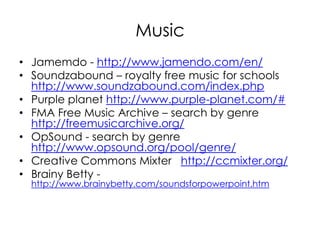
MusicJamemdo - http://www.jamendo.com/en/Soundzabound – royalty free music for schools http://www.soundzabound.com/index.phpPurple planet http://www.purple-planet.com/#FMA Free Music Archive – search by genre http://freemusicarchive.org/OpSound - search by genre http://www.opsound.org/pool/genre/Creative Commons Mixter   http://ccmixter.org/Brainy Betty - http://www.brainybetty.com/soundsforpowerpoint.htm
Sound EffectsFind Sounds  http://findsounds.com/Partners in Rhyme  http://www.partnersinrhyme.com/pir/PIRsfx.shtmlSound Jay  http://www.soundjay.com/Soungle  http://soungle.com/
Hints to Make a Good Book TrailerHave a hook for the audience: (1)  to get people interested/excited about the book and (2) grab their attention with the first frame.Don't have too much text. Set the moods and convey the ‘feeling’ of the book using image, movement and sound.Length is important. Not too long or too short but enough to give a quick ‘taste’ of the book. Make sure you keep the balance between telling enough of the plot to hook but also having some unanswered questions/mystery to hook as well. Look at the concept behind the story and don't focus on the details of the book. Music and/or sound can really help to get across the plot, setting or ‘feel’ of the book.
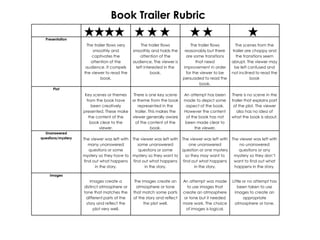
Book Trailer Rubric
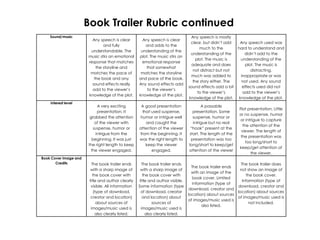
Book Trailer Rubric continued
CreditsThis information needs to be listed on your credits screen at the end of the Book Trailer.
Most of all, Have FUN!

How to make book trailers

  • 1.
    ‘How To’ forMiddle Years Book Trailersby Jenny Butler
  • 2.
    Step 1MOST OFTHE HARD WORK IS IN THIS STEP SO TAKE YOUR TIME TO WORK OUT WHAT IS IMPORTANTCreate a folder on your desktop called ‘Book Trailer’.List 5 points about the plot, setting or ‘feel’ of the book that you think are the most important things to show/tell the viewer. Save this document into your Book Trailer folder.Think HOW you could get these ideas across – what image/sound effect/music would capture that point in the best way? Add these thoughts to your Plot points doc.
  • 3.
    Step 2COLLECT YOURIMAGESusing the weblinks on this page, look around to find images to fit what you have in your head.  It is preferable to use these images as the creators have alreay given you permission to use them. Save them all into your Book Trailer folder.each time you find an image, note down the author/composer/publisher and the URL where you found it. (see 8.  Credits document)
  • 4.
    Step 3COLLECT YOURBACKGROUND MUSICusing the weblinks on this page, listen to lots of music to find the right background sound that complements the mood of your book and your chosen images. It is preferable to use music from these sites as the composers have already given you the permission to use their music.Save into your Book Trailer folder.
  • 5.
    Step 4COLLECT YOURSOUND EFFECTSusing the weblinks on this page, listen to lots of sound effects to find and save the sounds you are looking for in to your Book Trailer folder. It is preferable to use these sound effects websites as the creators have already given you permission to use their sound effects.
  • 6.
    Step 5PUT ITALL TOGETHERNow you have all your links and thoughts together in one place, it’s time to make some decisions.(1) What software will you use to make your trailer? Photostory, Moviemaker or Powerpoint? Do you want to use still images or moving images? Do you like one particular program more than another?(2) Look at the main points you want to get across and keep this in mind as you choose which images, music and sound go together the best.(3) Remember – the main purpose of a book trailer is to get the viewer to borrow/read the book – will your combination of images and sound do that?(4) Put it all together. (5) As you do, keep checking against the rubric so you can see how your trailer is measuring up.(6) End your book trailer with a shot of your book cover and the credits screen.
  • 7.
    How to makeyour book trailer videosVIDEOShow to make book trailers in Movie Maker   http://www.youtube.com/watch?v=HVesRUBrTPs how to make a book trailer using Powerpoint    http://www.youtube.com/watch?v=Z0kkmwAyOvE how to create book trailers using Photostory 3    http://www.youtube.com/watch?v=m6Oxf_6lmVs
  • 8.
    ImagesOpenphoto  http://openphoto.net/Wikimedia Commonshttp://commons.wikimedia.org/wiki/Main_PageFlickr Creative Commons – each photo you choose displays bibliographic information next to it http://flickrcc.bluemountains.net/Veezle – free stock photos http://www.veezzle.com/Burning Well http://www.burningwell.org/Public Domain Imageshttp://www.public-domain-image.com/Copyright Friendly Image search – links to more free image websites   http://weblist.me/Copyright-friendly-image-search
  • 9.
    Moving ImageMoving ImageArchive - http://www.archive.org/details/moviesWikimedia Commons: Video http://commons.wikimedia.org/wiki/Category:Videos
  • 10.
    MusicJamemdo - http://www.jamendo.com/en/Soundzabound– royalty free music for schools http://www.soundzabound.com/index.phpPurple planet http://www.purple-planet.com/#FMA Free Music Archive – search by genre http://freemusicarchive.org/OpSound - search by genre http://www.opsound.org/pool/genre/Creative Commons Mixter   http://ccmixter.org/Brainy Betty - http://www.brainybetty.com/soundsforpowerpoint.htm
  • 11.
    Sound EffectsFind Sounds http://findsounds.com/Partners in Rhyme  http://www.partnersinrhyme.com/pir/PIRsfx.shtmlSound Jay  http://www.soundjay.com/Soungle  http://soungle.com/
  • 12.
    Hints to Makea Good Book TrailerHave a hook for the audience: (1)  to get people interested/excited about the book and (2) grab their attention with the first frame.Don't have too much text. Set the moods and convey the ‘feeling’ of the book using image, movement and sound.Length is important. Not too long or too short but enough to give a quick ‘taste’ of the book. Make sure you keep the balance between telling enough of the plot to hook but also having some unanswered questions/mystery to hook as well. Look at the concept behind the story and don't focus on the details of the book. Music and/or sound can really help to get across the plot, setting or ‘feel’ of the book.
  • 13.
  • 14.
  • 15.
    CreditsThis information needsto be listed on your credits screen at the end of the Book Trailer.
  • 16.
    Most of all,Have FUN!