Best Practices
Bootstrap GWT Projects
for Beginners
B. Lofi Dewanto, 2017
GWTCon 2017 - Best Practices for Beginners | 2017Seite 2
Blasius Lofi Dewanto
Team Leader Application Development @ Interseroh
Zero Waste Solutions
https://www.interseroh.de
Agenda
GWTCon 2017 - Best Practices for Beginners | 2017Seite 3
• Challenges and Objectives
• Best Practices
• Summary
• Discussion
GWT User Perspective
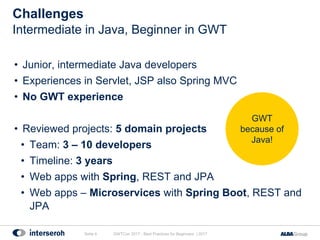
• Junior, intermediate Java developers
• Experiences in Servlet, JSP also Spring MVC
• No GWT experience
• Reviewed projects: 5 domain projects
• Team: 3 – 10 developers
• Timeline: 3 years
• Web apps with Spring, REST and JPA
• Web apps – Microservices with Spring Boot, REST and
JPA
Challenges
GWTCon 2017 - Best Practices for Beginners | 2017Seite 4
Intermediate in Java, Beginner in GWT
GWT
because of
Java!
Technology Stack - Example
GWTCon 2017 - Best Practices for Beginners | 2017Seite 5
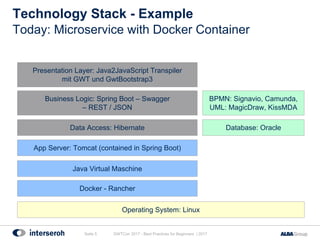
Today: Microservice with Docker Container
Java Virtual Maschine
App Server: Tomcat (contained in Spring Boot)
Docker - Rancher
Presentation Layer: Java2JavaScript Transpiler
mit GWT und GwtBootstrap3
Data Access: Hibernate Database: Oracle
BPMN: Signavio, Camunda,
UML: MagicDraw, KissMDA
Operating System: Linux
Business Logic: Spring Boot – Swagger
– REST / JSON
• How to make GWT easily accessible for beginners?
• How to bootstrap your GWT project successfully?
• Fast
• Easy
• Secure
• Fun!
Objectives
GWTCon 2017 - Best Practices for Beginners | 2017Seite 6
Successful GWT Project
GWTCon 2017 - Best Practices for Beginners | 2017Seite 7
Best Practices
Best Practices
• Environment and Architecture (EA)
• Microservice-oriented and Integration with available web
apps (MSAI)
• Programming Model (PROGM)
• Module, Structure and Components (MSC)
• Security (SEC)
GWTCon 2017 - Best Practices for Beginners | 2017Seite 8
Categories
Choose your UI Framework
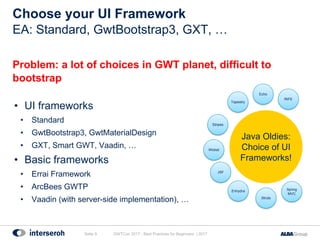
Problem: a lot of choices in GWT planet, difficult to
bootstrap
• UI frameworks
• Standard
• GwtBootstrap3, GwtMaterialDesign
• GXT, Smart GWT, Vaadin, …
• Basic frameworks
• Errai Framework
• ArcBees GWTP
• Vaadin (with server-side implementation), …
GWTCon 2017 - Best Practices for Beginners | 2017Seite 9
EA: Standard, GwtBootstrap3, GXT, …
Struts
Spring
MVC
Enhydra
Stripes
Wicket
JSF
Tapestry
Echo
RIFE
Java Oldies:
Choice of UI
Frameworks!
Choose your UI Framework
Solution: choose it directly in the beginning, start simple!
• Start simple, create a reference implementation for your
team, extend and migrate as you go
• Interseroh simple reference example:
https://github.com/interseroh/demo-gwt-springboot
• Good start GWT Project Generator:
https://gwt-project-generator.cfapps.io
GWTCon 2017 - Best Practices for Beginners | 2017Seite 10
EA: Standard, GwtBootstrap3, GXT, …
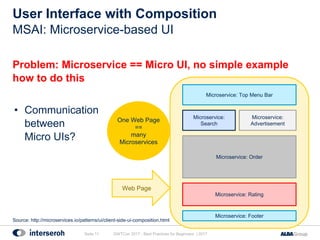
User Interface with Composition
Problem: Microservice == Micro UI, no simple example
how to do this
• Communication
between
Micro UIs?
GWTCon 2017 - Best Practices for Beginners | 2017Seite 11
MSAI: Microservice-based UI
Microservice: Top Menu Bar
Microservice:
Search
Microservice: Footer
Microservice: Order
Microservice: Rating
Microservice:
Advertisement
One Web Page
==
many
Microservices
Web Page
Source: http://microservices.io/patterns/ui/client-side-ui-composition.html
User Interface with Composition
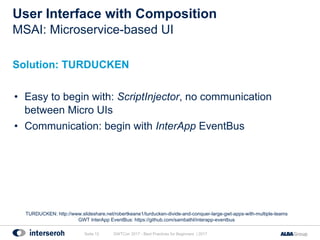
Solution: TURDUCKEN
• Easy to begin with: ScriptInjector, no communication
between Micro UIs
• Communication: begin with InterApp EventBus
GWTCon 2017 - Best Practices for Beginners | 2017Seite 12
MSAI: Microservice-based UI
TURDUCKEN: http://www.slideshare.net/robertkeane1/turducken-divide-and-conquer-large-gwt-apps-with-multiple-teams
GWT InterApp EventBus: https://github.com/sambathl/interapp-eventbus
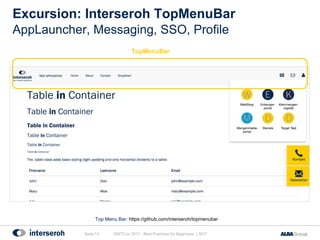
Excursion: Interseroh TopMenuBar
GWTCon 2017 - Best Practices for Beginners | 2017Seite 13
AppLauncher, Messaging, SSO, Profile
Top Menu Bar: https://github.com/interseroh/topmenubar
TopMenuBar
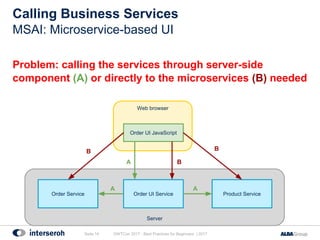
Problem: calling the services through server-side
component (A) or directly to the microservices (B) needed
Server
Calling Business Services
GWTCon 2017 - Best Practices for Beginners | 2017Seite 14
MSAI: Microservice-based UI
Web browser
Order Service Order UI Service
Order UI JavaScript
Product Service
A
A A
B
B
B
Calling Business Services
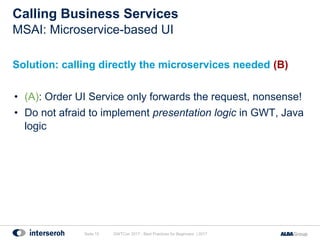
Solution: calling directly the microservices needed (B)
• (A): Order UI Service only forwards the request, nonsense!
• Do not afraid to implement presentation logic in GWT, Java
logic
GWTCon 2017 - Best Practices for Beginners | 2017Seite 15
MSAI: Microservice-based UI
Run One UI in One Time independently
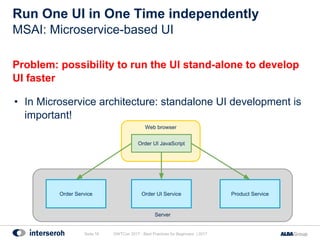
Problem: possibility to run the UI stand-alone to develop
UI faster
• In Microservice architecture: standalone UI development is
important!
GWTCon 2017 - Best Practices for Beginners | 2017Seite 16
MSAI: Microservice-based UI
Server
Web browser
Order Service Order UI Service
Order UI JavaScript
Product Service
Run One UI in One Time independently
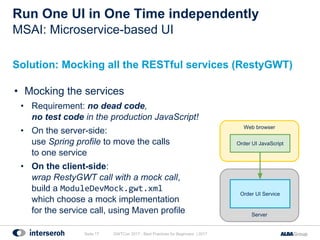
Solution: Mocking all the RESTful services (RestyGWT)
• Mocking the services
• Requirement: no dead code,
no test code in the production JavaScript!
• On the server-side:
use Spring profile to move the calls
to one service
• On the client-side:
wrap RestyGWT call with a mock call,
build a ModuleDevMock.gwt.xml
which choose a mock implementation
for the service call, using Maven profile
GWTCon 2017 - Best Practices for Beginners | 2017Seite 17
MSAI: Microservice-based UI
Server
Web browser
Order UI Service
Order UI JavaScript
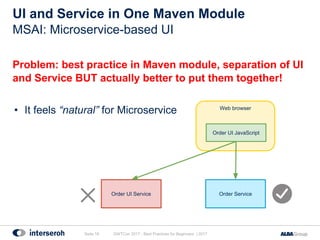
Problem: best practice in Maven module, separation of UI
and Service BUT actually better to put them together!
• It feels “natural” for Microservice
UI and Service in One Maven Module
GWTCon 2017 - Best Practices for Beginners | 2017Seite 18
MSAI: Microservice-based UI
Web browser
Order ServiceOrder UI Service
Order UI JavaScript
UI and Service in One Maven Module
Solution: none sofar
• UI and Service together in Maven: problem with
dependencies?
• You can “copy” the JavaScript result to the service…
• It makes your dependencies complex and not a Maven
standard
• No A depends on B, but A must be built before B!
• Sofar it works fine with Spring Boot
GWTCon 2017 - Best Practices for Beginners | 2017Seite 19
MSAI: Microservice-based UI
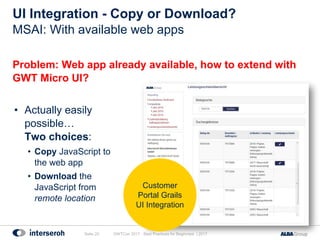
UI Integration - Copy or Download?
Problem: Web app already available, how to extend with
GWT Micro UI?
• Actually easily
possible…
Two choices:
• Copy JavaScript to
the web app
• Download the
JavaScript from
remote location
GWTCon 2017 - Best Practices for Beginners | 2017Seite 20
MSAI: With available web apps
Customer
Portal Grails
UI Integration
UI Integration - Copy or Download?
Solution: download from remote location
• Integration JavaScript (GWT-based) in available web app
useful!
• Both ways have advantages and disadvantages
• Download from remote location:
• Microservice-oriented
• Easier to update
GWTCon 2017 - Best Practices for Beginners | 2017Seite 21
MSAI: With available web apps
Table and Grid Component Darn Difficult!
Problem: table and grid component difficult for beginners
• UI components like grid, table, treeview are always difficult
to use, no matter which technologies you are using!
• Borland Delphi, Visual Basic, Struts, HTML, ...
GWTCon 2017 - Best Practices for Beginners | 2017Seite 22
PROGM: Cell-based UI
Table and Grid Component Darn Difficult!
Solution: make a better documentation for those
components; learn, learn and learn
• Luckily good StackOverflow answers
• Vaadin has a good a good Grid component but the GWT
(client-side) part does not have a good documentation
GWTCon 2017 - Best Practices for Beginners | 2017Seite 23
PROGM: Cell-based UI
Vaadin Grid Client-side: https://vaadin.com/docs/framework/v8/clientsidewidgets/clientsidewidgets-grid.html
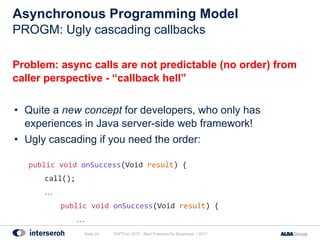
Asynchronous Programming Model
Problem: async calls are not predictable (no order) from
caller perspective - “callback hell”
• Quite a new concept for developers, who only has
experiences in Java server-side web framework!
• Ugly cascading if you need the order:
public void onSuccess(Void result) {
call();
…
public void onSuccess(Void result) {
…
GWTCon 2017 - Best Practices for Beginners | 2017Seite 24
PROGM: Ugly cascading callbacks
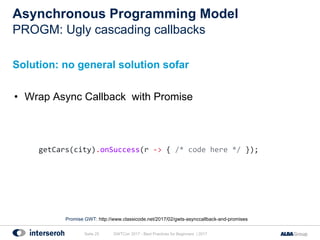
Asynchronous Programming Model
Solution: no general solution sofar
• Wrap Async Callback with Promise
GWTCon 2017 - Best Practices for Beginners | 2017Seite 25
PROGM: Ugly cascading callbacks
Promise GWT: http://www.classicode.net/2017/02/gwts-asynccallback-and-promises
getCars(city).onSuccess(r -> { /* code here */ });
UI Security
Problem: how to secure GWT web app?
• Same as any Single Page Applications
• … it’s own topic ...
GWTCon 2017 - Best Practices for Beginners | 2017Seite 26
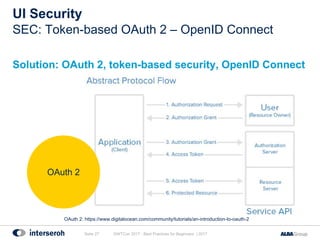
SEC: Token-based OAuth 2 – OpenID Connect
UI Security
Solution: OAuth 2, token-based security, OpenID Connect
GWTCon 2017 - Best Practices for Beginners | 2017Seite 27
SEC: Token-based OAuth 2 – OpenID Connect
OAuth 2
OAuth 2: https://www.digitalocean.com/community/tutorials/an-introduction-to-oauth-2
GWTCon 2017 - Best Practices for Beginners | 2017Seite 28
Summary
Summary (1)
• GWT Swing-based programming model: is here to stay!
• Very easy for beginners!
• GWT uses Java semantic as near as possible
• Very good show cases and examples
• Table, Grid and Treeview difficult
• But this is everywhere…
• No designer (GWT Designer is still somewhere…)
Seite 29 GWTCon 2017 - Best Practices for Beginners | 2017
GWT Designer: https://stackoverflow.com/questions/27175381/why-does-gwt-2-7-discontinue-the-gwt-designer
Summary (2)
● Documentation needs rework and cleaning
• General features
• Versions overview
• Documentation (API and reference) per version
• Quick start
• … the rest
• See Spring Framework documentation!
Seite 30 GWTCon 2017 - Best Practices for Beginners | 2017
Summary (3)
GWT still the BEST for
Java-based Single Page Application!
Seite 31 GWTCon 2017 - Best Practices for Beginners | 2017
Discussion
Dr. Blasius Lofi Dewanto
ITbyServices / Manager Application Development
Phone: +49 (02203) 9147 - 1705
Fax: +49 (02203) 9157 - 9773
Mobile: +49 (0151) 6135 - 7172
E-Mail: blasius.dewanto@interseroh.com
Web: www.interseroh.com

Best Practices - By Lofi Dewanto

  • 1.
    Best Practices Bootstrap GWTProjects for Beginners B. Lofi Dewanto, 2017
  • 2.
    GWTCon 2017 -Best Practices for Beginners | 2017Seite 2 Blasius Lofi Dewanto Team Leader Application Development @ Interseroh Zero Waste Solutions https://www.interseroh.de
  • 3.
    Agenda GWTCon 2017 -Best Practices for Beginners | 2017Seite 3 • Challenges and Objectives • Best Practices • Summary • Discussion GWT User Perspective
  • 4.
    • Junior, intermediateJava developers • Experiences in Servlet, JSP also Spring MVC • No GWT experience • Reviewed projects: 5 domain projects • Team: 3 – 10 developers • Timeline: 3 years • Web apps with Spring, REST and JPA • Web apps – Microservices with Spring Boot, REST and JPA Challenges GWTCon 2017 - Best Practices for Beginners | 2017Seite 4 Intermediate in Java, Beginner in GWT GWT because of Java!
  • 5.
    Technology Stack -Example GWTCon 2017 - Best Practices for Beginners | 2017Seite 5 Today: Microservice with Docker Container Java Virtual Maschine App Server: Tomcat (contained in Spring Boot) Docker - Rancher Presentation Layer: Java2JavaScript Transpiler mit GWT und GwtBootstrap3 Data Access: Hibernate Database: Oracle BPMN: Signavio, Camunda, UML: MagicDraw, KissMDA Operating System: Linux Business Logic: Spring Boot – Swagger – REST / JSON
  • 6.
    • How tomake GWT easily accessible for beginners? • How to bootstrap your GWT project successfully? • Fast • Easy • Secure • Fun! Objectives GWTCon 2017 - Best Practices for Beginners | 2017Seite 6 Successful GWT Project
  • 7.
    GWTCon 2017 -Best Practices for Beginners | 2017Seite 7 Best Practices
  • 8.
    Best Practices • Environmentand Architecture (EA) • Microservice-oriented and Integration with available web apps (MSAI) • Programming Model (PROGM) • Module, Structure and Components (MSC) • Security (SEC) GWTCon 2017 - Best Practices for Beginners | 2017Seite 8 Categories
  • 9.
    Choose your UIFramework Problem: a lot of choices in GWT planet, difficult to bootstrap • UI frameworks • Standard • GwtBootstrap3, GwtMaterialDesign • GXT, Smart GWT, Vaadin, … • Basic frameworks • Errai Framework • ArcBees GWTP • Vaadin (with server-side implementation), … GWTCon 2017 - Best Practices for Beginners | 2017Seite 9 EA: Standard, GwtBootstrap3, GXT, … Struts Spring MVC Enhydra Stripes Wicket JSF Tapestry Echo RIFE Java Oldies: Choice of UI Frameworks!
  • 10.
    Choose your UIFramework Solution: choose it directly in the beginning, start simple! • Start simple, create a reference implementation for your team, extend and migrate as you go • Interseroh simple reference example: https://github.com/interseroh/demo-gwt-springboot • Good start GWT Project Generator: https://gwt-project-generator.cfapps.io GWTCon 2017 - Best Practices for Beginners | 2017Seite 10 EA: Standard, GwtBootstrap3, GXT, …
  • 11.
    User Interface withComposition Problem: Microservice == Micro UI, no simple example how to do this • Communication between Micro UIs? GWTCon 2017 - Best Practices for Beginners | 2017Seite 11 MSAI: Microservice-based UI Microservice: Top Menu Bar Microservice: Search Microservice: Footer Microservice: Order Microservice: Rating Microservice: Advertisement One Web Page == many Microservices Web Page Source: http://microservices.io/patterns/ui/client-side-ui-composition.html
  • 12.
    User Interface withComposition Solution: TURDUCKEN • Easy to begin with: ScriptInjector, no communication between Micro UIs • Communication: begin with InterApp EventBus GWTCon 2017 - Best Practices for Beginners | 2017Seite 12 MSAI: Microservice-based UI TURDUCKEN: http://www.slideshare.net/robertkeane1/turducken-divide-and-conquer-large-gwt-apps-with-multiple-teams GWT InterApp EventBus: https://github.com/sambathl/interapp-eventbus
  • 13.
    Excursion: Interseroh TopMenuBar GWTCon2017 - Best Practices for Beginners | 2017Seite 13 AppLauncher, Messaging, SSO, Profile Top Menu Bar: https://github.com/interseroh/topmenubar TopMenuBar
  • 14.
    Problem: calling theservices through server-side component (A) or directly to the microservices (B) needed Server Calling Business Services GWTCon 2017 - Best Practices for Beginners | 2017Seite 14 MSAI: Microservice-based UI Web browser Order Service Order UI Service Order UI JavaScript Product Service A A A B B B
  • 15.
    Calling Business Services Solution:calling directly the microservices needed (B) • (A): Order UI Service only forwards the request, nonsense! • Do not afraid to implement presentation logic in GWT, Java logic GWTCon 2017 - Best Practices for Beginners | 2017Seite 15 MSAI: Microservice-based UI
  • 16.
    Run One UIin One Time independently Problem: possibility to run the UI stand-alone to develop UI faster • In Microservice architecture: standalone UI development is important! GWTCon 2017 - Best Practices for Beginners | 2017Seite 16 MSAI: Microservice-based UI Server Web browser Order Service Order UI Service Order UI JavaScript Product Service
  • 17.
    Run One UIin One Time independently Solution: Mocking all the RESTful services (RestyGWT) • Mocking the services • Requirement: no dead code, no test code in the production JavaScript! • On the server-side: use Spring profile to move the calls to one service • On the client-side: wrap RestyGWT call with a mock call, build a ModuleDevMock.gwt.xml which choose a mock implementation for the service call, using Maven profile GWTCon 2017 - Best Practices for Beginners | 2017Seite 17 MSAI: Microservice-based UI Server Web browser Order UI Service Order UI JavaScript
  • 18.
    Problem: best practicein Maven module, separation of UI and Service BUT actually better to put them together! • It feels “natural” for Microservice UI and Service in One Maven Module GWTCon 2017 - Best Practices for Beginners | 2017Seite 18 MSAI: Microservice-based UI Web browser Order ServiceOrder UI Service Order UI JavaScript
  • 19.
    UI and Servicein One Maven Module Solution: none sofar • UI and Service together in Maven: problem with dependencies? • You can “copy” the JavaScript result to the service… • It makes your dependencies complex and not a Maven standard • No A depends on B, but A must be built before B! • Sofar it works fine with Spring Boot GWTCon 2017 - Best Practices for Beginners | 2017Seite 19 MSAI: Microservice-based UI
  • 20.
    UI Integration -Copy or Download? Problem: Web app already available, how to extend with GWT Micro UI? • Actually easily possible… Two choices: • Copy JavaScript to the web app • Download the JavaScript from remote location GWTCon 2017 - Best Practices for Beginners | 2017Seite 20 MSAI: With available web apps Customer Portal Grails UI Integration
  • 21.
    UI Integration -Copy or Download? Solution: download from remote location • Integration JavaScript (GWT-based) in available web app useful! • Both ways have advantages and disadvantages • Download from remote location: • Microservice-oriented • Easier to update GWTCon 2017 - Best Practices for Beginners | 2017Seite 21 MSAI: With available web apps
  • 22.
    Table and GridComponent Darn Difficult! Problem: table and grid component difficult for beginners • UI components like grid, table, treeview are always difficult to use, no matter which technologies you are using! • Borland Delphi, Visual Basic, Struts, HTML, ... GWTCon 2017 - Best Practices for Beginners | 2017Seite 22 PROGM: Cell-based UI
  • 23.
    Table and GridComponent Darn Difficult! Solution: make a better documentation for those components; learn, learn and learn • Luckily good StackOverflow answers • Vaadin has a good a good Grid component but the GWT (client-side) part does not have a good documentation GWTCon 2017 - Best Practices for Beginners | 2017Seite 23 PROGM: Cell-based UI Vaadin Grid Client-side: https://vaadin.com/docs/framework/v8/clientsidewidgets/clientsidewidgets-grid.html
  • 24.
    Asynchronous Programming Model Problem:async calls are not predictable (no order) from caller perspective - “callback hell” • Quite a new concept for developers, who only has experiences in Java server-side web framework! • Ugly cascading if you need the order: public void onSuccess(Void result) { call(); … public void onSuccess(Void result) { … GWTCon 2017 - Best Practices for Beginners | 2017Seite 24 PROGM: Ugly cascading callbacks
  • 25.
    Asynchronous Programming Model Solution:no general solution sofar • Wrap Async Callback with Promise GWTCon 2017 - Best Practices for Beginners | 2017Seite 25 PROGM: Ugly cascading callbacks Promise GWT: http://www.classicode.net/2017/02/gwts-asynccallback-and-promises getCars(city).onSuccess(r -> { /* code here */ });
  • 26.
    UI Security Problem: howto secure GWT web app? • Same as any Single Page Applications • … it’s own topic ... GWTCon 2017 - Best Practices for Beginners | 2017Seite 26 SEC: Token-based OAuth 2 – OpenID Connect
  • 27.
    UI Security Solution: OAuth2, token-based security, OpenID Connect GWTCon 2017 - Best Practices for Beginners | 2017Seite 27 SEC: Token-based OAuth 2 – OpenID Connect OAuth 2 OAuth 2: https://www.digitalocean.com/community/tutorials/an-introduction-to-oauth-2
  • 28.
    GWTCon 2017 -Best Practices for Beginners | 2017Seite 28 Summary
  • 29.
    Summary (1) • GWTSwing-based programming model: is here to stay! • Very easy for beginners! • GWT uses Java semantic as near as possible • Very good show cases and examples • Table, Grid and Treeview difficult • But this is everywhere… • No designer (GWT Designer is still somewhere…) Seite 29 GWTCon 2017 - Best Practices for Beginners | 2017 GWT Designer: https://stackoverflow.com/questions/27175381/why-does-gwt-2-7-discontinue-the-gwt-designer
  • 30.
    Summary (2) ● Documentationneeds rework and cleaning • General features • Versions overview • Documentation (API and reference) per version • Quick start • … the rest • See Spring Framework documentation! Seite 30 GWTCon 2017 - Best Practices for Beginners | 2017
  • 31.
    Summary (3) GWT stillthe BEST for Java-based Single Page Application! Seite 31 GWTCon 2017 - Best Practices for Beginners | 2017
  • 32.
    Discussion Dr. Blasius LofiDewanto ITbyServices / Manager Application Development Phone: +49 (02203) 9147 - 1705 Fax: +49 (02203) 9157 - 9773 Mobile: +49 (0151) 6135 - 7172 E-Mail: blasius.dewanto@interseroh.com Web: www.interseroh.com